# Amazon Affiliate WordPress Plugin
> Best WordPress Plugin for Amazon Affiliates
Make more money by boosting your Amazon Associates commissions with AAWP’s product boxes, bestseller lists, comparison tables and more! No programming skills required.
---
# Amazon Creators API
Source: https://getaawp.com/docs/article/amazon-creators-api/
https://www.youtube.com/watch?v=fB3o18ga8PE
## What is the Amazon Creators API?
The **Amazon Creators API** is an official Amazon API that provides access to product data from the Amazon catalog.
It is the **successor to the former Amazon Product Advertising API (PAAPI)** and represents the current and recommended way to retrieve Amazon product information.
AAWP uses the Amazon Creators API to fetch and display Amazon product data such as product titles, images, prices, and availability directly inside WordPress.
To use the Creators API, you must be a **fully accepted Amazon Associate**. Access is only available to accounts that have successfully completed the Amazon Associates review process and meet the current eligibility requirements.
## Eligibility requirements for the Amazon Creators API
**To access the Amazon Creators API, your Amazon Associates account must have generated at least 10 qualified sales within the last 30 days.**
If your account does not generate qualified referring sales for a consecutive 30-day period, access to the Creators API will be temporarily revoked by Amazon.
During this time, AAWP can be used with the [AAWP API](https://getaawp.com/features/aawp-api/?utm_source=docs&utm_medium=inline_notice&utm_campaign=aawp_api&utm_content=amazon-creators-api) until access to the Creators API becomes available again.
Access to the Creators API will be automatically restored within two days after your referred sales have been shipped again.
## How-To create Amazon Creators API credentials

Follow the steps below to create the Amazon Creators API credentials required for AAWP.
### 1. Sign in to Amazon Associates
Sign in to your [Amazon Associates account](https://affiliate-program.amazon.com/) and open **Associates Central**.
Only the primary account owner of the Amazon Associates account can create Creators API applications and credentials.
### 2. Open the Creators API section
In Associates Central, open the **Tools** menu and select **Creators API**.
Alternatively, you can open [https://affiliate-program.amazon.com/creatorsapi](https://affiliate-program.amazon.com/creatorsapi) directly.
### 3. Create a new application
Click **Create Application** and enter an application name.
The application name is for internal reference only. For example, you can use “aawp”.
### 4. Generate API credentials
After creating the application, click **Add New Credential**.
Amazon will generate the following credentials:
- Credential ID
- Credential Secret
- Version
Copy the credentials or download them as a CSV file.
Make sure to store the credential secret securely, as it is only shown once.
### 5. Enter the credentials in AAWP
Log in to your WordPress admin area and go to **AAWP → Settings → Amazon API**.
Enter the following values:
- Credential ID
- Credential Secret
Select the Amazon store you want to promote and save the settings. AAWP will now be able to retrieve product data from Amazon using the Creators API.
---
# Click Tracking
Source: https://getaawp.com/docs/article/click-tracking/
Tracking is essential to monitor and optimize the performance of your placed products.
AAWP provides you with important data that lets you recognize which products are clicked on the most and also which element of a product box is clicked on the most.
As you can see, it is worth using this function.
## How to enable Click Tracking
By default, click tracking is deactivated in AAWP. We show you how to activate it.
- Log in to your WordPress site.
- Navigate to AAWP.
- And click on **“Clicks”** in the sidebar navigation.

- Switch to the **"Settings" **tab

- Activate the checkbox **"Enable tracking of clicks on Amazon partner links."**

- After activation, the data is collected and displayed in the dashboard.
## Graphical representation of clicks over different periods
For a clear evaluation and assessment of the clicks over a certain period of time, the presentation in graphs or line charts is very useful.
There are different parameters for this.

- Select the chart in which the clicks are to be displayed. You can choose between a line chart and a bar chart.
- Group the display according to the following filter options:
Date
- Source
- Tracking ID
- If you only want to analyze the results of a specific tracking ID, you can select the desired ID in this dropdown.
- Select the time period that only shows the clicks that were made in the selected time window.
## How to analyze the data
Okay, let's get down to business!
In the following section (below the chart) you will find what at first glance appears to be a very complicated table. But don't worry; this table is quickly explained.

What do we have here?
Explained in order:
- **ID:** The product is stored in your database under this unique ID.
- **ASIN:** This is the** "Amazon Standard Identification Number”**. This is a unique ID that every product on Amazon has. You can use this ID to uniquely assign products and place them on your website.
- **Preview:** A preview image of the product is displayed here so that you can recognize which product it is at first glance.
- **Title:** The title of the product is shown here.
- **Type:** Here you can see which element was clicked on within the product display. This can be the title, the buy button, the product image and other elements. This insight is super important to optimize your displays!
- **Target:** The URL of the Amazon product on the Amazon store website.
- **Source:** Shows you the page of your website on which the product is embedded (you can click on it to go directly to the respective page).
- **Referrer URL:** Shows from which web address the user has reached you.
- **Created At:** The date and time at which the click was made.
- **Browser:** The browser used by the user.
- **OS:** The operating system used by the user.
- **Device:** The device used by the user.
- **Country:** The country from which the user comes.
Of course, you can hide irrelevant columns and show important columns:

## Exclude User Roles from Tracking
In many cases, it makes sense to exclude certain user roles from tracking. For example, if several people (i.e. admins, editors and authors) work on the website and click on products for various reasons (e.g. internal tests). Because these clicks distort the statistics!
- Click on **“Settings”** tab.
- and activate the checkboxes of the user roles you want to exclude from tracking.

## Enable Location (Country) Tracking
Tracking of location / country data is deactivated by default. You can activate it as follows:
- Click on **“Settings”** tab.
- and activate the checkbox **"Check to enable tracking the location of the visitor"**.

## Reset / clear all data
Would you like to completely delete / reset the collected data? No problem! You can do it with just one click!
- Click on **“Settings”** tab.
- and click the **“Empty Clicks”** button.

## Export Clicks Statistics
Here, you can select the data you would like to include in the CSV Export. You can also define tracking ID and date filters to further personalize the list of data you want to retrieve.
- Click on **"Export"** tab.
- Choose the Tracking ID and data you want to include in the export.

- And click on the Button **"Download Export File"**.

## Common Issues and Solutions
### Click tracking not working
If click tracking is not working as expected and no data is being recorded, there are two common causes: JavaScript errors on the WordPress site or a blocked WP JSON API.
In such cases, the following error will appear in the browser console:
`POST .../wp-json/aawp/v1/click/1 401 (Unauthorized)`
This means that AAWP is attempting to record a click, but the request to the WP JSON API is being rejected with a "401 Unauthorized" error.
**Cause: WP JSON API is blocked by a plugin**
Many security or performance plugins (e.g. Wordfence, iThemes Security or Falcon) offer an option to block unauthorized access to the WP JSON API. If this setting is active, AAWP is unable to send click data to the API – meaning Click Tracking will not work.
**Solution:** Check the settings of your security and performance plugins and disable the option that blocks the WP JSON API. After doing so, click tracking should work correctly again.
---
# Freemius License Migration
Source: https://getaawp.com/docs/article/freemius-license-migration/
At the beginning of 2024, we switched our payment and license system to the provider [Freemius](https://freemius.com).
As part of this, it is necessary for all customer websites to be reactivated via the new license system.
## Automatic migration via plugin update
The migration is usually done automatically with our plugin update version 4. You can easily check whether your website(s) has already been converted to the new license system by checking whether you can find the following view in your WordPress admin area.

If you find the "Account" view shown above in the AAWP admin menu and your data is displayed, then everything has already been migrated, and you don't need to do anything else.
## Execute manual migration
You can't find the "Account" page shown above yet? Don't worry!
In this case, please download the latest AAWP plugin version (v4.0.0 or newer) via your [Freemius account](https://users.freemius.com/store/6470/) and upload the *aawp.zip* file via *Plugins > Install*, to overwrite the installed version.
Once you click on the *AAWP* menu item, will then see the following activation window, in which you should enter your personal license key.

After entering your license key, your website will be activated via the new license system, and you're all set.
Please don't forget to check all your AAWP powered websites.
## Conclusion
By reactivating your websites, you ensure that license and plugin updates can be delivered reliably.
To receive security updates and new features, please [ensure you have an active license](https://getaawp.com/docs/article/license-renewals/).
If you have any questions or need assistance, please [contact us](https://getaawp.com/contact/).
---
# AAWP API
Source: https://getaawp.com/docs/article/aawp-api/
https://www.youtube.com/watch?v=nNHlJqWfoRU
## What is the AAWP API?
The [**AAWP API**](https://getaawp.com/features/aawp-api/) is a standalone service that enables Amazon product data to be retrieved.
It is based on infrastructure operated by us and can be used both **with the AAWP plugin** and **independently of it**.
The provision of the AAWP API incurs **ongoing costs per user**, including infrastructure, data connection, and support. Therefore, access to the AAWP API is **subject to a fee** and must be **booked separately**. It is not automatically included in the plugin license.
After purchase, you will receive a **personal AAWP API key**, which is stored in the plugin settings. No additional access data or technical configurations are required.
AAWP API access is **not tied to an active plugin license**. Even if your plugin license expires, you can continue to use the AAWP API as long as you have an active API plan.
## What are the functions of the AAWP API?
### Retrieving Amazon product information
Our API can retrieve product information about all Amazon products from all stores worldwide.
This allows customers to use our plugin even if they don't have [access to the official Amazon Product Advertising API](https://getaawp.com/docs/article/amazon-product-advertising-api-credentials/) yet.
If you don't need an already placed product anymore, we recommend removing it from the plugin's database so it won't get counted next month.
Current technical restrictions: Bestsellers and new releases lists cannot be used.

## How many products can I retrieve with the AAWP API?
The retrieval of Amazon products via the AAWP API is **quota-based**.
Depending on the plan you have booked, you have a fixed product limit per month.
The pricing structure is **flexible** and allows you to adjust your AAWP API access to your **actual needs** at any time. Both upgrades and downgrades are possible at any time.
The following **AAWP API plans** are currently available:
| **Products / Month** | **Price / Month** |
| -------------------- | ----------------- |
| 150 Products | $5 |
| 250 Products | $9 |
| 500 Products | $19 |
| 750 Products | $29 |
| 1.000 Products | $39 |
**Get 1 month free** by selecting annual billing during checkout.
**Looking for higher quotas or agency pricing?** [Contact us](https://getaawp.com/contact/) for a custom plan or more options.
The product limit you have booked applies **per month** and is **automatically reset at the beginning of each month**.
👉 [**Click here to purchase AAWP API access**](https://getaawp.com/link/aawp-api-checkout/)
After completing a purchase or plan change, the updated access is automatically set up in the background. This usually happens immediately, but no later than within 24 hours.
## Can I have access to the AAWP API with my expired plugin license?
Yes. The **AAWP API can also be used with an expired AAWP plugin license**, provided that the plugin version installed on your website is **compatible with the AAWP API** ([version 4.4.0](https://getaawp.com/changelog/) or higher).
Access to the AAWP API is **independent of the status of the plugin license**.
Even without an active plugin license, you can purchase a **standalone AAWP API plan** and continue to retrieve product data.
If your plugin license has expired **and** the installed plugin version **is too old** to work with the AAWP API, you should **at least once **[**renew**](https://getaawp.com/docs/article/license-renewals/) your plugin license to update to the current version of AAWP. After that, the AAWP API can be used again as usual.
Please note that **no plugin updates** will be provided if your plugin license has expired. We therefore recommend keeping your plugin license active to receive security and feature updates.
👉 [**Click here to purchase AAWP API access**](https://getaawp.com/link/aawp-api-checkout/)
The following **AAWP API plans** are currently available:
| **Products / Month** | **Price / Month** |
| -------------------- | ----------------- |
| 150 Products | $7 |
| 250 Products | $12 |
| 500 Products | $24 |
| 750 Products | $36 |
| 1.000 Products | $48 |
**Get 2 months free** by selecting annual billing during checkout.
**Looking for higher quotas or agency pricing?** [Contact us](https://getaawp.com/contact/) for a custom plan or more options.
The product limit you have booked applies **per month** and is **automatically reset at the beginning of each month**.
👉 [**Click here to purchase AAWP API access**](https://getaawp.com/link/aawp-api-checkout-v2/)
After completing a purchase or plan change, the updated access is automatically set up in the background. This usually happens immediately, but no later than within 24 hours.
## Can I have access to the AAWP API with my expired plugin license?
Yes. The **AAWP API can also be used with an expired AAWP plugin license**, provided that the plugin version installed on your website is **compatible with the AAWP API** ([version 4.4.0](https://getaawp.com/changelog/) or higher).
Access to the AAWP API is **independent of the status of the plugin license**.
Even without an active plugin license, you can purchase a **standalone AAWP API plan** and continue to retrieve product data.
If your plugin license has expired **and** the installed plugin version **is too old** to work with the AAWP API, you should **at least once **[**renew**](https://getaawp.com/docs/article/license-renewals/) your plugin license to update to the current version of AAWP. After that, the AAWP API can be used again as usual.
Please note that **no plugin updates** will be provided if your plugin license has expired. We therefore recommend keeping your plugin license active to receive security and feature updates.
👉 [**Click here to purchase AAWP API access**](https://getaawp.com/link/aawp-api-checkout-v2/)
## Managing your AAWP API plan
If your usage grows over time — for example, because you want to use the AAWP API on more websites or retrieve and place more products — you can adjust your AAWP API plan at any time.
### Upgrade or downgrade your plan

Managing your AAWP API plan is done via your **[Freemius account](https://users.freemius.com/store/6470/)**.
To upgrade your plan:
- Log in to your **Freemius Account**
- Open the **Licenses** section
- Select your **AAWP API**
- Click **Upgrade to** on the right-hand side
- Choose the plan that matches your current needs
Once the upgrade is completed, the new plan becomes effective immediately. You can continue using the AAWP API with the increased quota without making any changes to your plugin configuration.
If your requirements change later, you can downgrade your plan in the same place using the same steps.
---
# Telemetry Data
Source: https://getaawp.com/docs/article/telemetry-data/
Thanks for your interest in making AAWP even better. We do appreciate your help!
### Why do we collect information?
In our ongoing effort to create a top-notch product, users have the option to share usage data with us when installing our plugin. By gathering this information, we can make well-informed decisions regarding which features to develop and gain a better understanding of how our customers utilize our plugin.
This information also helps us to design our test environments, to test our plugin for compatibility and adjust it if necessary.
**Important**: In any case, we only collect non-sensitive data that is purely aimed at the technical use of our plugin. We have no interest in any other information, apart from our plugin.
### What information is collected?
The collected information comes directly from the plugin installed on your site and includes the following information:
- Number of created comparison tables
- Number of active products in db
- Number of invalid products in db
- Number of stored bestseller lists in db
- Number of stored new releases lists in db
- Is click tracking activated?
- Is click tracking country detection activated?
- Is geotargeting activated?
- Amazon API: Which country is selected?
- Is multi store functionality activated?
- Which cache duration was chosen?
- Which affiliate link type was chosen? Standard or shortened?
- Is image proxy activated?
- Is the star rating functionality activated?
- Is "Load Assets Globally" option enabled?
This data is collected regularly to ensure we stay up to date with our users’ needs.
Our tracking process is designed to be transparent and non-intrusive, ensuring your peace of mind while allowing us to continually enhance our offerings to best suit your needs.
### Do I have to give my consent?
The information listed above will only be shared with your active consent.
You can revoke (or give) your consent at any time directly via the plugin settings.
Regardless of this, we still receive technically relevant information (such as your site's domain, PHP and WordPress version). This information is not sensitive and is collected to facilitate the operation of our plugin update system.
---
# Gutenberg Block
Source: https://getaawp.com/docs/article/gutenberg-block/
With the help of our Gutenberg Block you now have the possibility to use our features directly from the editor. Copying and pasting shortcodes is now optional.
You can find a short summary about the use of the block in this video:
## AAWP Gutenberg Block

To use the AAWP Gutenberg block, you have two options within the Gutenberg editor.
On the one hand you can call the Gutenberg block directly via the "+" symbol in the menu bar or you can simply use the block within the editor to call AAWP.
Click on the "+" symbol or "Add block" and enter "AAWP" in the search bar, if our icon is not already displayed.
You can also enter the following into the TExt editor:
"/AAWP"
then the AAWP block will appear directly in the block search

After that you will see our Gutenberg Block, where you can apply all our features with just one click.
## Product boxes

Clicking on **"Product Boxes"** opens the block on the right side, where you can make numerous settings for our product boxes.

So you can store one or more ASINs in the general settings or you click on the button "Search for product(s) without ASIN" to be able to search and insert a product directly.

In our example, we have inserted two ASINs under the item ASIN, which are directly output on the left in the Gutenberg editor.
In addition to the general settings, there are numerous other setting options available to you.
For example, the adjustment of the title / description, the length of the title, change the template / style, the deposit of an extra button, the addition of another tracking ID and much more.

**Important to know:** The possible options may differ depending on the feature selection - i.e. product boxes, bestseller lists, comparison tables, etc.
## Bestsellers lists

With a click on **"Bestseller Lists"** you can use our [bestseller lists](https://getaawp.com/docs/article/bestseller-lists/). To do this, you have the option on the right in the block view under "General settings" to specify a keyword.
In our example, we have entered the keyword "printer cartridges". The current bestsellers on Amazon are then displayed on the left in the editor.

In the advanced settings, you can specify, for example, how many products may be displayed in the list or whether the label "Bestseller" should be displayed.
## New releases

With a click on **"New Releases"** you can use our new [release lists](https://getaawp.com/docs/article/new-releases-lists/). For this purpose, you have the possibility to enter a keyword in the block view on the right - just like with the bestseller lists - under "General settings".
In our example we have entered the keyword "Totoro". The current bestsellers on Amazon are then displayed on the left in the editor.

In the advanced settings you will find exactly the same options as in the bestseller lists. Of course, you can also specify the number of products to be output or determine the corresponding label to be output.
## Data fields

With a click on **"Data Fields"** you now have the possibility to use our so-called "[Data Fields](https://getaawp.com/features/data-fields/)" directly within the Gutenberg editor.
In the block view on the right column you can use different data fields in the general settings or output individual product information.

Among other things, the title, the description, the thumbnail, star rating, the price or a button. To do this, however, you must first enter a suitable ASIN. Of course, you can also use the product search here as an alternative.
Especially for the data fields, you can also store a different tracking ID in the advanced settings, for example.
## Text links

With a click on **"Text Links"** you can insert text links directly from the AAWP Gutenberg block.
Also for this purpose, fields for inserting a product are available in the right column, within the block view. You can either enter an ASIN directly or use the product search.

In the advanced settings for the text links, among other things, adjustments for the link type (Basic, Reviews, Cart) or also between different icons can be selected.
## Comparison tables

With a click on **"Comparison Tables"** you can insert comparison tables via the block view.
To do this, you can simply select your already created comparison tables from the drop-down menu on the right within the block view.

**Important:** You must have created your comparison tables within AAWP before, so that they are available for selection and can be output here.
---
# Shortened Links
Source: https://getaawp.com/docs/article/shortened-links/
With our plugin, you have the possibility to use so-called "Shortened Links" which look like: [https://amzn.to/3yD9FEm](https://amzn.to/3yD9FEm).
For this, AAWP uses the API from Bitly.
The shortened links replace the long product links that come from the Amazon API. The use of this feature depends on the user's preference.
## How to set up shortened links

- Create a Bitly account [from here](https://bitly.com/pages/pricing)
- Log in with your account and [follow these instructions](https://support.bitly.com/hc/en-us/articles/230647907-How-do-I-generate-an-OAuth-access-token-for-the-Bitly-API-) to generate the API token
- Activate the "shortened links" function via "general" AAWP settings
- Enter your previously generated Bitly API token
After successful configuration, all links will be converted automatically.
If you use a caching plugin, you should empty the cached cache so that the new links are displayed immediately.
## Are there any limitations?
In Bitly's free plan, 10 new links can be created per month. Therefore, you may not be able to convert all links immediately.
In this case, you can either wait for the following month or get a paid month for a short time until all links have been converted.
## What about data privacy of my site visitors?
Since a third-party service is used here and the link clicks end up going through the Bitly server, you may need to include a notice in your website's privacy policy.
Since we are not allowed to give legal advice, you have to inform yourself about this before you use the function.
We also do not have any text templates.
---
# Agency Licenses
Source: https://getaawp.com/docs/article/agency-licenses/
Beyond the licenses offered on the pricing page, we also have our so-called agency licenses.
These are designed for customers who maintain a larger number of websites.
As a new customer, you can [buy an agency license here](https://checkout.freemius.com/mode/dialog/plugin/14610/plan/24526/?currency=auto&language=auto&licenses=50).
If you are already an existing customer, you can upgrade an existing license to an agency license directly via the [customer account](https://getaawp.com/dashboard/).
If you have further questions about our licenses, you can find more information in our [documentation](https://getaawp.com/docs/article-category/account-licenses/). Otherwise, feel free to [contact our support team](https://getaawp.com/contact/).
---
# Browser Extension
Source: https://getaawp.com/docs/article/browser-extension/
How to use our browser extension (shortcode generator) successfully on your website, we show you below in numerous examples.
## Use AAWP browser extension successfully
Install the browser extension now:
**Chrome:** [https://aawp.de/link/chrome-erweiterung](https://getaawp.com/link/chrome-extension)
**Firefox:** [https://aawp.de/link/firefox-erweiterung](https://getaawp.com/link/firefox-extension)
After [installing the AAWP browser add-on](https://getaawp.com/features/browser-extension), you should see it in the top right corner (AAWP icon) of your browser toolbar. Depending on your browser, the view here may differ slightly, of course.

The icon changes its color from red to blue, or blue to red. The colors have the following meaning:
**Red:** The red icon indicates that you are not currently on an Amazon product detail page. This can be the case, for example, if you are in the Amazon search or not even in the Amazon store.
**Blue:** You are now on an Amazon product detail page. The add-on has recognized this and now provides you with various options to generate shortcodes for the product you have selected.
---
## Go to Amazon product detail page
Visit the Amazon store and select the product for which you want to generate a shortcode via our browser extension. Because only here our add-on becomes active and changes to the color "blue".

**Amazon-Icon "Blue":**

---
## The browser extension in use
With a click on the blue icon the heart of our browser extension opens, namely the so-called AAWP shortcode generator. With this generator you can create all known shortcodes very easy!
The shortcode generator is divided into three different tabs. As you can see in the picture, these are the "Quick Actions", "Customizations" and the "ASIN Collection".

### Quick Actions
Under the "Quick Actions" tab you can use our usual shortcodes. Once the appropriate shortcode is created, you can paste it anywhere on your website by clicking the "Copy Shortcode to Clipboard" button.

### Standard product box
With a click on the button "Standard product box" the shortcode for a classic product box is generated. The ASIN will be added fully automatically, so in the end you only have to copy the shortcode via the button and paste it on your website.

**Result:**

### Create products in the grid
With a click on the button "Create products in grid" the grid attribute is automatically added within the shortcode to output two or more products as a "grid".

**Result:**

### Display products in table
Click on the button "Display products in table". This will add the "Table attribute" to the shortcode and your products will be output in a table view on your website.

**Result:**

### Amazon Buy button
With a click on the button "Buy from Amazon" the shortcode generator creates the corresponding shortcode for our buy button. This of course automatically includes the ASIN as always, as well as all the necessary field attributes for the output of the button.

**Result:**

### Product preview image
Clicking on the "Product Preview" button will also generate a corresponding shortcode with our so-called "Fields" for the output of very specific product information. In this case, it is a preview image of the selected product.

**Result:**

---
## Customizations
Click on the "Customizations" tab to customize the shortcode according to your wishes.
This means: with our add-on you can make individual customizations to your product box.
These are:
- **the title,**
- **the description,**
- **the template**
Important: Depending on the template selection or product box, not all of these options are always available to you.
**Example of a standard product box:**

As you can see here, the shortcode will be modified automatically as you enter your customizations. So that you only have to click on the button "Copy shortcode to Clipboard" to output the product with your individual adjustments.
---
## ASIN Collection
Last but not least you will find the tab "ASIN Collection" in our AAWP shortcode generator. This is used if you want to combine multiple products in one shortcode.
This is especially helpful if, for example, several product boxes are to be displayed one below the other or if you want to display several products as a grid or in a table.
For this reason, only the first three "quick actions" can be used for the "ASIN collection".

### Example for a standard product box
Below we show you the procedure for a standard product box. For the other two functions "Display products in grid" and "Display products in table" the procedure is identical.
**Step 1: Product detail page**
In the first step, open the Amazon product detail page of your "first" product and then open the AAWP shortcode generator. Click here in the tab "ASIN Collection".

**Step 2: Add product to ASIN collection**
Now click on the button "Add ASIN to collection" to add the ASIN to the collection.

The ASIN will then appear in the collection. You have the possibility to delete the ASIN from the collection at any time by clicking the button "Remove".
You can repeat the first two steps with other products and add them to the collection as well.

**Step 3: Select quick action**
In the third and last step you only have to select a suitable "Quick Action". In our example this would be the "Standard Product Box". The AAWP shortcode generator will then automatically generate a shortcode with all products from your "ASIN collection".

**Result:**

---
# Create a temporary login for our support team
Source: https://getaawp.com/docs/article/create-a-temporary-login-for-our-support-team/
Our support team is always motivated to help you as much as possible. Remote diagnosis via e-mail is not always sufficient. In such cases, it may be helpful to grant our support access to your website's dashboard. Of course, this access should be temporary and of course you can rely on the confidentiality and seriousness of our staff.
## Option 1: Use a plugin to easily enable temporary access
The most secure way to give access to our support staff is temporary access with limited rights. Good news: there is a good plugin that makes this easy.
[You can download this plugin here for free.](https://wordpress.org/plugins/temporary-login-without-password/)
### How do you use the plugin?

- Open the dashboard of your WordPress website
- Navigate to **"Plugins"**
- Search in the search for "**Temporary Login Without Password"**
- Install and activate the plugin
- After activation: Go to **"Users"** -> **"Temporary Logins"**.
- Click on "Create New" and add the email address of the support staff.
- Activate the following settings:
Role: Administrator
Expiry: One week
- After you have done that, send the temporary login to our support staff.
## Option 2: Create an admin user account via the WordPress user management
- Log in to your WordPress Dashboard
- Go to "**Users" > Add New**. Use the username *"aawp" *and email address of the support staff.
- Set a password
- Send the login credential over to our support staff
- **Don't forget: **Once the issue is resolved and the support staff no longer needs access to your website, you should delete the account!
---
# Database Garbage Collection
Source: https://getaawp.com/docs/article/database-garbage-collection/
The plugin automatically takes care of the old and thus no longer needed products and lists are regularly removed from the database. This function helps to reduce the load on your database and also ensures that the Amazon API's request limits are not exceeded.
*The function described here was added with the plugin update to version 3.13. on August 17, 2020 (see [Changelog](https://getaawp.com/changelog/))*
### The Problem: Products and lists that are no longer needed are still saved in the database
Products and lists that are no longer needed, accumulate through the following scenarios:
- You placed products or lists only for testing purposes
- You removed products after some time again from your contributions or pages
- Lists (bestsellers or new releases) contain products that will no longer be included when the data is renewed again
- There are products on your website that are no longer listed on Amazon
If there are too many products or lists in your database that are no longer needed, this will cause the following problems:
- The database size of your website grows unnecessarily
- The plugin wastes important resources by updating products and lists that may no longer be shown
- The higher the number of data renewals, the faster you reach the Amazon API request limit
### The Solution: Database Garbage Collection
The products and lists accumulated by the previously mentioned scenarios must be continuously checked and removed from the database.
For this purpose, we have implemented a routine that runs regularly and deletes a certain number of products and lists from the database. This works in the following way:
| Interval | Task | Condition |
| -------- | ---- | --------- |
| Hourly | 50 products will be removed from the database | which are older than 30 days |
| Hourly | 50 lists will be removed from the database | which are older than 30 days |
The age of the products and lists is the time when they were first placed and stored in the database. Not, the date of the last update. The latter is of course performed continuously.
### What happens to deleted products/lists which are still being placed?
That's not a problem! In this case, the products will be fetched from the Amazon API completely new the next time the page is visited and stored in the database again.
### Can I deactivate this function?
If you do not want to use the built-in database garbage collection, you can disable it easily via the plugin settings (tab "General").
[](https://getaawp.com/wp-content/uploads/aawp-settings-database-garbage-collection.png)
---
# Output Amazon Product Information Individually – How It Works
Source: https://getaawp.com/docs/article/output-amazon-product-information-individually/
In some cases, it's a good idea to only display individual information on products. For example, just the price or the title.
Even when creating your own comparison tables, you may only want to show "individual" details or information for comparison. Our data field function allows you to do this easily.
## What are data fields and how can they be used?
With data fields, individual product data such as, for example, the title, the description or the "Buy" button are easy to place within body text, an HTML table (e.g. comparison table) or directly into a PHP template using shortcode. The great thing about this is that this product information is automatically updated after you’ve inserted it. For example, price changes on Amazon. This is also reflected in the data fields.
Therefore, to display product information on your own website, it isn’t mandatory to include a product box or even several of these. Data fields have a decisive advantage: in addition to displaying individual product information, you can also place them anywhere on your website.
Today in this tutorial, we’d like to give you more details about how this can look.
## Data fields within an HTML table
Would you like to simply display data fields using an efficient and effective HTML table, created using the WordPress editor? No problem - it's really easy.
### Creating an HTML table in WordPress
To do this, open a new page or a new post in WordPress and create a new table block in the Gutenberg editor by clicking on the plus symbol.

A selection menu then opens showing the most commonly used blocks. If you don't see the table block, you can simply search for it using the search field.

Click on "**Table**" and you’ll then see a menu where you can specify your table formatting.

This is where you can easily set the desired number of columns and rows. To create the table, simply click on the “**Create table**” button.
By clicking on "Create table", you’ll see the finished table in the WordPress editor.

You can now insert data fields to display individual product information in the table fields.
### Inserting data fields into an HTML table
Here is an example of how you can use data fields within an HTML table. If you’re currently using this tutorial to create a table at the same time, it’s best to bring up the [data fields documentation](/docs/article/fields-single-product-data/) for examples of the shortcode we’ll be using here.
In our example, we'll create a simple table with 3 products. For this purpose, we’ll produce a product title using the data fields, the product image, the sales price, the "Buy" button and the date of the last update.
In addition to the shortcodes that you can find in the documentation we just mentioned, we now need the ASIN for the products that you want to display in the table. You can find the product’s ASIN on the corresponding product page in the Amazon Shop under the product information.
You can then insert the shortcodes, including the ASIN, into your HTML table in the WordPress editor. In our example, the end result looks like this:

As you can see, we have listed a product in each column with the shortcode to display the product image, product title, product price, the buy button and the date of the last update.
Of course, you can use the data fields to get a lot more product information such as the product description, the number of reviews, the current savings, the Prime logo and much more. To do this, you simply have to adjust the corresponding “value” settings (see documentation).
If we now click on "**Preview**", we’ll see the HTML table we previously created in the Gutenberg editor, including the three products to display by means of the data field shortcodes.

If you’re still using the Classic Editor, you can, of course, easily create an HTML table here too. You just need the corresponding HTML tags to insert into the Classic Editor.
For example:
| Column 1 | Column 2 | Column 3 |
| -------- | -------- | -------- |
| Content 1 | Content 2 | Content 3 |
| Content 4 | Content 5 | Content 6 |
You can insert this HTML code into the Classic Editor using the text or HTML view and you’ve already created an HTML table here.

### Including data fields within a body text
Inserting data fields into a body text is just as easy as within an HTML table that you’ve created. This means that if you want to display product information such as, for example, the price or title, you only have to insert the shortcode where you want the information to be displayed in the text.
#### Example 1: Price
Product XY is available free of shipping, costs
```
[amazon fields = "B00WLI5E3M" value = "price"]
```
and will be delivered tomorrow.
**Display:**

#### Example 2: Title
The product
```
[amazon fields = "B00WLI5E3M" value = "title"]
```
is available free of shipping costs, costs $ 12,99 and will be delivered tomorrow.
**Display:**

Of course, you can do this with any available parameter. It doesn't matter where the body text appears on your page, whether in a post, the sidebar, the header, the footer or on the page.
## Conclusion
Using data fields, our plugin offers a flexible option to place individual product information exactly where you want it. As shown in our little guide, you can include data fields within a body text or in your own HTML tables.
This also works for integration into your own PHP templates. To create your own templates, use the following [data fields documentation](/docs/article/templating/).
---
# Step-by-step troubleshooting guide for solving the “Products not found” issue
Source: https://getaawp.com/docs/article/products-not-found-troubleshooting-guide/
Our plugin connects to Amazon using their API to show the product information based on the ASIN you have entered. If you ever see a “Products not found” message instead of the product details, you can use this guide and the following steps to find why the product is not being displayed.
## Step 1: Check via Amazon's Site Stripe

Not all products listed on Amazon’s websites are available for affiliates and sometimes the product can be removed from Amazon. This means 2 things. First, they would not be available for you to earn affiliate commissions and secondly, they would not be available via Amazon’s API.
To check if the product is available for affiliates you can use Amazon’s Site Stripe feature. Login to your Amazon account and then check if you can generate an affiliate link for the product. If you cannot, then it means this product is not available for Affiliates to earn any commissions and would also not be available through their API.
If you can generate an affiliate link, then proceed to the next step.
## Step 2: Check the plugin's log

Our plugin logs every call to Amazon’s API. You can find all the log entries on the “Amazon Affiliates > Support” menu in your WordPress admin.
You would find log entries at the bottom of the “Support” page. Check if there is a recently added entry with the ASIN you tried to place.
If the entry has a “code”, then please check the following link to understand what that code means: [https://getaawp.com/docs/article/amazon-api-not-connected-frequent-causes/](https://getaawp.com/docs/article/amazon-api-not-connected-frequent-causes/)
## Step 3: Check your Amazon API Connection

If you do not see any error code in the above step, then go to the “Amazon Affiliate > Settings” menu in your WordPress admin and click on the “Reconnect” button.
Doing so will cause our plugin to make an API connection. This will help you know if the plugin can connect with Amazon’s API using the keys you provided.
If the API status says connected and if the product is still not displayed, then proceed to the next step.
## Step 4: Check via Amazon Scratchpad

If all the above steps do not give any error, then the last step is to check on Amazon’s website. Amazon’s official tool “Scratchpad” can be used to make a quick call/check.
Visit [https://webservices.amazon.com/paapi5/scratchpad/index.html](https://webservices.amazon.com/paapi5/scratchpad/index.html) and then after adding your API Access/Secret key & your tracking ID, add a product ASIN and click on the “Run Request” to see what data is returned.
---
## Other Causes
### Products fetched but not displayed
If products are fetched (according to the logs) but not displayed on your website, then please check if your database character set is "utf8mb4". In older versions such as "utf8mb3", if there are any special characters in the Amazon product data, then they will not be saved in the local database.
---
## You haven't found the cause of the problem?
If all the above steps do not show any error, then there might be something else that prevents the product from being processed properly via our plugin.
After you have gone through all the 4 steps, please contact us and also provide us with the following information.
- Provide the ASIN and the store (e.g. "Amazon.com") you want to place the product from
To contact us, please [click here](https://getaawp.com/contact/).
---
# License Server – Problems and Fixes
Source: https://getaawp.com/docs/article/license-server-problems-fixes/
As the owner of an active license (see "[License Renewals](https://getaawp.com/docs/article/license-renewals/)"), you will receive regular plugin updates. In this context, we fix known bugs and introduce new features.
In order for the plugin installed on your website to receive an update, the website or domain must be activated with a license key.
Your personal license key was sent to you by email after you purchased our plugin. Alternatively you can also find on your [account page](https://getaawp.com/dashboard/).
The activation itself is done via our license server. In rare cases, there may be problems with the activation of a website, which will be discussed in this article.
[](https://getaawp.com/wp-content/uploads/aawp-settings-licensing.png)
---
## Problems, Error Messages and their Causes
### ❌ cURL error 28: Operation timed out
The cURL error 28 literally means that the website tried to send a request to our license server, but the timeout period specified by the server was reached before a successful result of the request was received.
**Problem**: It is often the case that hosting providers incorrectly identify the API request as spam and thus block the request at the server level.
### ❌cURL error 35: Unknown SSL protocol error in connection
This error occurs if your server cannot establish a HTTPS connection with our license server due to the failed *SSL handshake*.
**Problem**: This typically happens when a server runs outdated software and cannot properly connect to our license server (which runs the latest SSL software *OpenSSL*) via HTTPS.
---
## Possible Solutions
### ✅ Check your WordPress Security / Firewall Plugin(s)
If you have installed a WordPress Security or Firewall plugin (e.g. Wordfence), check its settings to see if it could block outgoing connections.
If you can't do this yourself, contact the support of the respective plugin provider and ask them to assist you.
### ✅ Update PHP cURL on your server
Make sure your server has the latest version (see [https://curl.haxx.se/docs//releases.html](https://curl.haxx.se/docs//releases.html)) of the *PHP cURL extension* installed.
If you can't do this yourself, contact your web hosting provider's support and ask them to assist you.
### ✅ Update PHP OpenSSL on your server
Make sure your server has the latest version (see [https://github.com/openssl/openssl/releases](https://github.com/openssl/openssl/releases)) of the *PHP OpenSSL extension* installed.
If you can't do this yourself, contact your web hosting provider's support and ask them to assist you.
### ✅ Whitelist our license servers
Add our license servers to the so-called "whitelist" so that outgoing requests are not blocked. The following information is required:
**Domains**:
`https://getaawp.com`
`https://aawp.de`
If you can't do this yourself, contact your web hosting provider's support and ask them to assist you.
---
## What happens if you can't activate your website/domain?
In this case, our license server cannot distribute automatic plugin updates to your website.
However, you can also update our plugin manually at any time (as described [here](https://getaawp.com/docs/article/updating-the-plugin/)) and *activate* your domain directly via your [account page](https://getaawp.com/dashboard/).
---
# Amazon Product Advertising API v5 Migration
Source: https://getaawp.com/docs/article/amazon-product-advertising-api-v5/
## What is the Amazon Product Advertising API?
API stands for Application Programming Interface and is the method we use in our plugin to connect with Amazon to retrieve product information. Without a working API key that you generate from your Amazon account, our plugin cannot connect to Amazon’s servers.
## What will change?
Amazon announced that it will terminate the old Product Advertising API v4 as of March 9, 2020. The official statement can be found below:
> We would like to inform you that all of your applications making calls to Amazon’s Product Advertising API version 4.0 (PA API 4.0) will need to upgrade to Amazon’s Product Advertising API version 5.0 (PA API 5.0) by March 9, 2020.
>
>
>
> PA API 5.0 is a more simple, granular, and consistent API that enables you to quickly and easily link your content to Amazon.
>
>
>
> You may continue to use both PA API 4.0 and PA API 5.0 without disruption through March 9, 2020. After that date, we will shut down PA API 4.0, and any application calling it will no longer be able to retrieve Amazon product information.
You can learn more about this version at [https://webservices.amazon.com/paapi5/documentation/faq.html](https://webservices.amazon.com/paapi5/documentation/faq.html).
## How will this affect your website?
After March 9, 2020, version 3.8.14 (or older) of our plugin will no longer be able to connect to Amazon’s API which means you would not be able to add new products or update details of existing products.
## You still have old AWS credentials?
To use the new API, you must migrate your old AWS credentials. You can see how to do this in the following official guide: [https://webservices.amazon.com/paapi5/documentation/migrating-your-product-advertising-api-account-from-your-aws-account.html](https://webservices.amazon.com/paapi5/documentation/migrating-your-product-advertising-api-account-from-your-aws-account.html).
## Do you have an active AAWP license?
You must have an active license, to get future updates. You can check the plugin settings or your account to know when your license expires. If your license has expired, please [click here to learn about how to renew your license](https://getaawp.com/docs/article/license-renewals/).
## AAWP + Amazon API v5
Starting with version 3.9 of our plugin ([Changelog](https://getaawp.com/changelog/)), the new Amazon API is supported.
Please update the plugin immediately on all your pages. Afterward, please visit the plugin settings (tab "Amazon API") and click on "reconnect" to check if the connection with Amazon's new API can be established.
You can check your plugin version via "Plugins > Installed Plugins".
## Amazon emailed you regarding the use of the old API v4?
Amazon sometimes sends an email with the following wording to its affiliates:
> We have noticed that within the last 30 days at least one of your applications has accessed the PA API 4.0.
Basically, Amazon wants to tell you that there is a website somewhere that sends requests to the old API with your API keys.
However, if you receive this email from Amazon, this may have the following reasons:
- There is still an old version of AAWP installed on one of your websites
- On one of your websites, a third-party Amazon plugin (not AAWP) is active, which still accesses the old Amazon API
- Someone else is using your API keys
- Amazon sends out the emails to all affiliates by default, without any real reason :-)
---
## Report on the current development status
*Last update: 28th February, 2020*
### Bestseller (Lists)
The new API does not yet offer the possibility to retrieve bestseller lists. According to the Amazon development team, this function will be available again in the future.
Therefore, a "normal" product search will now be performed. In the results, products highlighted by Amazon will be displayed at the top.
In order to display bestseller lists, you have to pass a search term. Passing a Browse Node ID is currently not possible with the new API.
### New Releases (Lists)
The new API does not yet offer the possibility to retrieve new releases lists. We don't know if Amazon will implement this feature again in the future.
Therefore, a "normal" product search will now be performed and the results sorted (via the API) according to the release date.
In order to display new releases lists, you have to pass a search term. Passing a Browse Node ID is currently not possible with the new API.
### Filtering & ordering products
With version 3.10 of our plugin, we bring back the filtering and ordering of products. Please be aware that the API returns a maximum of 10 products. That's why the attributes **filter_items** and **order_items** are limited to 10 as well.
---
# Amazon API: “RequestThrottled” and how to fix it?
Source: https://getaawp.com/docs/article/amazon-api-requestthrottled-how-to-fix/
API stands for Application Programming Interface and is the method we use in our plugin to connect with Amazon to retrieve product information. Without a working API key that you generate from your Amazon account, our plugin cannot connect to Amazon’s servers.
## Error "RequestThrottled" - What does it mean?
Until the beginning of this year, after your account was verified, you could [generate an API key](https://getaawp.com/docs/article/amazon-product-advertising-api-credentials/) and use it without any restrictions to get product details using a plugin such as ours. However, Amazon made some changes regarding their affiliate program.
### Some of these new rules set by Amazon are:
- New Affiliate accounts can only have access to API keys after their shop is verified and have **generated at least 3 sales**.
- New API keys start working only after **48 hours**.
- If your account hasn’t **generated at least 3 referring sales** using Product Advertising API in the last 30 days, your account will lose access to Product Advertising API.
- If you lose access to Product Advertising API 5.0, you can continue to use other product linking tools, such as Site Stripe and generate revenue. You will regain access to Product Advertising API 5.0 within two days after your referred sales are shipped.
- Also, according to the Amazon Product Advertising API document, the allowed initial **usage limit per day is 8640 requests** and the limit for each account will be based on the revenue performance of your Product API during the last 30 days.
If your Amazon Affiliate account does not adhere to these new rules, you would get an error in the API settings page of our plugin called “RequestThrottled - Something went wrong. Please check your API keys”
## How to check if your API keys work?
There are 2 ways to test your API keys:
- Quick Check via [**Amazon API Key Checker**](https://getaawp.com/amazon-api-key-checker/) (Unoffical)
*This was developed by us to do a quick API check. If you do not believe in the results, then we would recommend using the official tool provided by Amazon listed below.*
- [**Amazon’s AWS Scratchpad**](https://webservices.amazon.com/paapi5/scratchpad/index.html) (Official)
*The official Scratchpad provides a more detailed error message the result of this can also be used to send to Amazon for API related issues.*
[](https://getaawp.com/wp-content/uploads/amazon-product-advertising-api-scratchpad-test.png)
**How to test your API keys with the scratchpad tool:**
[Amazon’s AWS Scratchpad](https://webservices.amazon.com/paapi5/scratchpad/index.html) can be used to get a more detailed error report related to your API keys. You can follow these steps to test.
- Go to [Amazon’s AWS Scratchpad](https://webservices.amazon.com/paapi5/scratchpad/index.html)
- Click on “ItemSearch” option in the left column. This will open a form where you would need to enter your Amazon API key ID & secret access key along with your tracking ID.
- After entering the details, click on the “Run Request” button.
- The result of this would be displayed under the “Response” section on the same page.
**NOTE:** In case it's not working you can be sure your API key has been blocked by Amazon for not adhering to one of the rules listed above.
## How to resolve the “RequestThrottled” error?
While these points do not guarantee that it would make the API keys to work, they can help you
- For newly created API keys, wait for at least 48 hours for the keys to become active.
- Make sure you generate at least 3 referring sales every 30 day period.
- Do not use the same API keys on multiple websites unless you are generating enough sales to allow more API requests.
For API errors, there is nothing we can do from our side and for any further queries you would need get in touch with Amazon Associates team directly via [https://affiliate-program.amazon.com/home/contact](https://affiliate-program.amazon.com/home/contact)
If you are new to the Amazon Affiliate program and looking to generate your first 3 sales in order to get API access, then I recommend our other plugin called "[Easy Amazon Links](https://wordpress.org/plugins/easy-amazon-links/)". It does not require an active API key and helps you to place affiliate links easily.
---
# Image Proxy
Source: https://getaawp.com/docs/article/image-proxy/
As mentioned in our [GDPR article](https://getaawp.com/docs/article/gdpr/), you may come to the point where you want to use a proxy for loading product images from Amazon's server.
### Why would I need a proxy for product images?
Product images provided by Amazon’s API are delivered directly from the Amazon servers. Regarding the upcoming [General Data Protection Regulation](https://getaawp.com/docs/article/gdpr/), this is a problem because Amazon has access to the IP addresses of your site visitors.
To prevent this, we introduced a so-called privacy proxy, which delivers the product images through a small PHP file. By doing so, Amazon only receives the IP of your web server instead of your site visitors.
### How-to use the image proxy
[](https://getaawp.com/wp-content/uploads/aawp-settings-image-proxy.png)
This function must be activated via plugin settings ("Output" tab, "Product images" section). In case you are using a caching plugin on your site, its cache should be emptied afterward too.
---
### Troubleshooting: Images don't show up properly
#### PHP "allow_url_fopen" is not enabled
In order to make use of the image proxy, PHP "allow_url_fopen" must be enabled on your server. Otherwise, the plugin is not able to read the image inside our little PHP file.
In case you're not sure if it's enabled or not, let's find out:
- Inside the plugin's admin area, click on the menu item "**Support**"
- At the bottom of the page you can find the section "**Environment**"
- Here you can find an info wether PHP "allow_url_fopen" is enabled or not
[](https://getaawp.com/wp-content/uploads/aawp-admin-support-environment.png)
#### Permission denied
Right-click on the image URL and open it directly in a new tab of your browser. In case it shows "Permission Denied", there's a problem with the .htaccess of your site.
Please make sure that the file is accessible under the following URL: `https://your-domain.com/wp-content/plugins/aawp/public/image.php`
#### Security/Firewall Plugins
##### All In One WP Security & Firewall
When using this plugin, please deactivate the **Deny Bad Query Strings** setting.
[](https://getaawp.com/wp-content/uploads/wp-security-bad-query-strings.png)
##### iThemes Security
When using this plugin, please deactivate the **Suspicious Query Strings** setting.
[](https://getaawp.com/wp-content/uploads/ithemes-security-suspicious-query-strings.png)
#### Incompatible WebHosting
At the following WebHosting providers, we noticed that the image proxy file was blocked on the server side:
- Cloudways
---
# General Data Protection Regulation (GDPR)
Source: https://getaawp.com/docs/article/gdpr/
GDPR is a regulation that aims to protect the privacy of EU (European Union) citizens. Among other things, it provides users with more control over the personal data that they share with websites.
In case you want to learn more about GDPR, here you can find some further details:
- [Data protection - Interactive Infographic](http://ec.europa.eu/justice/smedataprotect/index_en.htm)
- [The official General Data Protection Regulation](https://gdpr-info.eu/)
---
## Is the AAWP plugin GDPR compliant?
Yes, our plugin is compliant with GDPR.
### Collection of Personal Data
After installing and activating our plugin on your website, it doesn’t collect, store or send any personal data from either you or your site’s visitors.
The only time data is collected, is during a license activation, deactivation or update request. This data is as expected and includes the license key, AAWP version, WordPress version, website name, website URL, website language, and timezone. This data will only be sent to our very own license server. Without, it wouldn't be possible to activate respectively deactivate a license, as well as updating the plugin to the latest version.
### Cookies
In general, our plugin does not work with cookies, with one exception: Our [geo-targeting](https://getaawp.com/docs/article/geo-targeting/) feature temporarily stores the site visitors origin country inside a session cookie.
### Geo-Targeting
Actually, geo-targeting is not compliant: In order to determine the country of origin, the current IP address of your site visitor will be analyzed via a free online service.
Right now we don't see an alternative way to receive your site visitors origin, so **we highly recommend not to use geo-targeting**, if you want to stay GDPR compliant.
### Product Images
As you know, the plugin embeds product images delivered directly from Amazon's servers, which theoretically grants Amazon access to the IP addresses of your site visitors. In a reverse conclusion, this is GDPR relevant as well.
Unfortunately, Amazon doesn't allow downloading product images due to their terms. Additionally, they didn't come up with a solution for this so far.
That's why we decided to implement a so-called [image proxy](https://getaawp.com/docs/article/image-proxy/), in order to temporarily solve this situation plugin-side.
---
## Conclusion: What you should do now
Summing up, here are our recommendations from the current point of view:
- Disable [geo-targeting](https://getaawp.com/docs/article/geo-targeting/)
- Enable the [image proxy](https://getaawp.com/docs/article/image-proxy/) setting
In case you have any further questions, feel free to get in touch with us.
*We're going to update this article as soon as there is new information available.*
---
## Legal Disclaimer / Disclosure
We are not lawyers. Nothing on this website should be considered legal advice. Due to the dynamic nature of websites, no single plugin or platform can offer 100% legal compliance. When in doubt, it’s best to consult a specialist internet law attorney to determine if you are in compliance with all applicable laws for your jurisdictions and your use cases.
---
# Google Accelerated Mobile Pages (AMP)
Source: https://getaawp.com/docs/article/google-accelerated-mobile-pages-amp/
Google's Accelerated Mobile Pages (short *AMP*) is an open-source initiative aiming to make the websites faster across all devices and distribution platforms ([read more](https://www.ampproject.org/)).
## Does AAWP support Google Accelerated Mobile Pages?
AAWP supports the **official AMP plugin**, which can be downloaded and installed for free.
### How to set up the AMP plugin properly
Actually, it is only important that you choose either the **standard** or the **transitional** mode. The rest is done automatically by the AMP plugin.
[](https://getaawp.com/wp-content/uploads/aawp-docs-amp-plugin-template-mode-settings.png)
---
---
# How-to display the currentness of product data
Source: https://getaawp.com/docs/article/display-currentness-of-product-data/
The plugin allows you to easily display the currentness of product data. Additionally you can choose between multiple formats.
### What's the meaning of "last update"?
This stands for the date/time the plugin fetched/renewed a product (via Amazon's API) at last.
### How can I display the last update info?
In general there are multiple ways to display the last update info.
#### Inline info
[](https://getaawp.com/wp-content/uploads/aawp-docs-last-update-inline-info-demo.png)**Note**: This is an exemplary screenshot. No real-time data. [Live demonstration can be found here](https://getaawp.com/demo/).
This is a little area inside a template which can be used to display custom text.
[](https://getaawp.com/wp-content/uploads/aawp-docs-last-update-inline-info-settings.png)
The content can be controlled via plugin settings (tab "general"). Simply use the placeholder `%last_update%` inside the textarea and the date/time will be displayed.
---
#### Disclaimer
[](https://getaawp.com/wp-content/uploads/aawp-docs-last-update-disclaimer-demo.png)**Note**: This is an exemplary screenshot. No real-time data. [Live demonstration can be found here](https://getaawp.com/demo/).
By using the disclaimer you can display custom text below each box/list or once at the bottom of a post/page.
[](https://getaawp.com/wp-content/uploads/aawp-docs-last-update-disclaimer-settings.png)
The content can be controlled via plugin settings (tab "general"). Simply use the placeholder `%last_update%` inside the textarea and the date/time will be displayed.
**Tip**: By using the following shortcode, you can place the disclaimer wherever you want:
```
[amazon_disclaimer /]
```
---
#### Shortcodes
Additionally you can display the last update date/time by using one of the following shortcodes:
**Global**
This stands for date/time the plugin fetched/renewed products the last time.
```
[amazon_last_update /]
```
**Product specific**
By using the following shortcode you can display the exact date/time of the last update for a single product:
```
[amazon fields="ASIN" value="last_update" /]
```
---
### How-to adjust the format of the last update info
On the plugin settings page (tab "general") you can choose whether you want to show the date + time, or only the date.
The format itself comes from your WordPress' date/time settings which can be found under: `Settings > General`.
If you want to use a custom format, this can be done by using the following filter:
`
add_filter( 'aawp_func_last_update_format', function( $format_overwrite ) {
return 'j. F Y - G:i';
});
`
In case you don't know what to do with the code above, take a look at the following article: [How-to use custom PHP code snippets](https://getaawp.com/docs/article/custom-php-code-snippets/).
---
# Is there a WooCommerce integration?
Source: https://getaawp.com/docs/article/woocommerce/
Right now there is no WooCommerce integration yet, but it's already on our todo list.
Feel free to [sign up for our newsletter](https://getaawp.com/newsletter/) if you don't want to miss any news.
---
# Nofollow links
Source: https://getaawp.com/docs/article/nofollow-links/
All affiliate links coming from the plugin are *nofollow* by default.
In case you experience anything different, please [let us know](https://getaawp.com/contact/).
---
# eBook prices don’t show up
Source: https://getaawp.com/docs/article/ebook-prices-missing/
Right now it's not possible to show pricing data for eBooks. This is caused by the fact that Amazon's API doesn't provide pricing data for this product type.
As soon as things change, we will update the plugin too.
---
# WP Cron and how-to setup your own cron jobs
Source: https://getaawp.com/docs/article/wp-cron-setup-cron-jobs/
In case you run into an issue with *WP Cron* on your site, it might be necessary to setup your own cron jobs. Otherwise the plugin might not be able to renew its data properly.
## WP Cron
### What are cron events for?
The plugin makes use of WordPress' built in cron system (called WP Cron) in order to execute multiple tasks in the background: For instance calling Amazon's API, fetching the latest product data and updating your database. By doing so, there's no manual action needed.
### How is WP Cron working exactly?
Unlike regular cron jobs, which run at specific time based on the server settings, the WP-Cron function runs every time someone visits the WordPress powered website. This makes a WordPress site run properly on different kinds of server setups because it eliminates a lot of server-specific requirements. On every page load, WordPress checks if there is a need for WP-Cron to run.
### Why is WP Cron not working for me?
There are several reasons why WP Cron might not be working properly on your site.
It could be simply the fact, that you don't have enough visitors on your site. This often happens when you're still building your site or it was launched recently.
Alternatively there might be a problem with the server setup, such as improper settings or firewall configuration.
---
## How-to setup your own cron jobs
As you see, it might be the case that you can't rely on WP cron. The best solution is to setup your own cron jobs. There are a few ways to do it. In case you aren't a server administrator, we prepared some instructions for you.
### Which cron jobs need to be set up?
On the plugin's menu page "Support" you will find the links, which must be executed by your own cron jobs.
[](https://getaawp.com/wp-content/uploads/aawp-docs-support-cron-events.png)
If you're setting up your own cron jobs, please don't forget to activate the checkbox above too.
Right now there are two events which must be executed frequently in order to hold your product data up2date:
| Description | Frequency |
| ----------- | --------- |
| Renewing product data | Every 10 minutes |
| Renewing product ratings | Every 24 hours |
### Setting up cron jobs via your hosting company
Some hosting companies offer cron jobs as well. In this case you will find all instructions on their site.
### Setting up cron jobs via online service
[](https://getaawp.com/link/cron-job-org)
There are many online services which offer setting up cron jobs. We recommend using [cron-job.org](https://getaawp.com/link/cron-job-org) which is available for free.
After creating an account on their site, you can start adding your own cron jobs. Therefore just enter a describing title, insert the url and set the schedule.
[](https://getaawp.com/wp-content/uploads/aawp-docs-cron-job-org-create.png)
Repeat the step for each cron job needed (take care of the correct urls and schedules) and afterwards you should see your cron jobs on the overview page:
[](https://getaawp.com/wp-content/uploads/aawp-docs-cron-job-org-overview.png)
Now you're done and [cron-job.org](https://getaawp.com/link/cron-job-org) will take care that the plugin's routines will be executed frequently.
---
# Using the WordPress debug log
Source: https://getaawp.com/docs/article/using-wordpress-debug-log/
In case you run into an issue, it might be necessary to get more details about the cause of the problem. Therefore we make use of WordPress' debug logging.
### Step 1: Enable the debug logging
In order to enable debugging, prevent errors and warnings from being displayed and log errors, you need add the following lines to your `wp-config.php` file:
`
define( 'WP_DEBUG', true );
define( 'WP_DEBUG_DISPLAY', false );
define( 'WP_DEBUG_LOG', true );
`
Most WordPress installations already have an entry for `WP_DEBUG` set to `false`, so you’ll need to change this value to `true`.
In order to edit the config file, please connect to your web server via FTP and navigate to the root of your WordPress installation.
### Step 2: Reproduce the error
Now you have to reproduce the issue in order to get the log entry created.
Therefore simply do what you did before, when the problem occurred: For instance visit your WordPress dashboard/frontend and simply repeat the operation or refresh the page that isn’t working properly.
### Step 3: View the debug log file
The actual debug log is saved in a file called `debug.log` in your site’s `wp-content` directory.
One way to view and clear your log is to access that file directly via FTP. Alternatively you can use a plugin like [Log Viewer](https://wordpress.org/plugins/log-viewer/) and access the log directly via your admin dashboard.
### Step 4: Send the log to our customer support
You might be asked to send the log file to our customer support team. Therefore simply download and attached it to your next email reply.
Alternatively create a new [Pastebin](https://pastebin.com/) and send us the link to it.
---
# Styles/scripts are not loaded properly
Source: https://getaawp.com/docs/article/styles-scripts-not-loaded-properly/
You may run into the issue that your product boxes/tables are being displayed completely un-styled. This often happens after installing the plugin on a new site or updating it to a newer version.
### What's the problem?
You're using a plugin which minifies CSS/Javascript assets and the newly added/updated styles/scripts of this plugin are not added to the minify cache yet. This might come from a caching plugin (e.g. [WP Rocket](https://getaawp.com/link/wp-rocket)) or a standalone plugin like [Autoptimize](https://wordpress.org/plugins/autoptimize/).
### How-to solve it?
Simply empty/trash the minify cache. The proceeding itself depends on the plugin you're using. In general you will find an "Empty Minify Cache" link/button on the plugin settings page or the top admin menu.
---
Afterwards the styles/scripts should be loaded properly. In case you're still experiencing any issue, feel free to [get in touch with us](https://getaawp.com/contact/).
---
# Star ratings and reviews don’t show up
Source: https://getaawp.com/docs/article/star-ratings-reviews-missing/
The plugin has a built-in functionality which allows you to show a product's star rating respectively the amount of submitted reviews.
### Where is this data coming from?
Unfortunately Amazon doesn't provide the data via their API. That's why the plugin has to scrape the rating and reviews out of the relevant product pages on Amazon.
In the past Amazon *beared* scraping the data but lately they implemented a captcha in order to prevent scraping the ratings/reviews from their sites.
### Star rating and reviews don't show up on my site
In case the star ratings and reviews are missing on your site, the plugin wasn't able to scrape the data from Amazon. This varies from product to product.
For some customer it works without exception, some get only a few of it and others none. Due to the previously mentioned protective mechanisms, it cannot be guaranteed.
### Anyway how do I get the ratings and reviews?
If you compulsory want to make use of the ratings and reviews, give the plugin some time to scrape and collect the data. This might take a few days or even longer.
Be happy if the stars and reviews show up, but don’t expect that.
### Can I set the rating manually?
Yes you can. On a shortcode basis you can easily pass the rating as follows:
```
[amazon box="ASIN" rating="5"]
```
*The shortcode attribute `rating` expects a numeric value from 1 to 5. Decimal numbers work fine as well: e.g. `rating="3.5"`*
---
# Replacing the tracking id
Source: https://getaawp.com/docs/article/replacing-tracking-id/
By default you setup one tracking id which will be used for generating your affiliate links.
[](https://getaawp.com/wp-content/uploads/aawp-docs-tracking-id-settings.png)
But there might be a situation where you want to replace the tracking id. This allows you to measure and compare different product placements, templates etc.
### How can I set a custom tracking id?
This can be done easily by adding the attribute `tracking_id` to any standard shortcode and passing your custom tracking id as follows:
**e.g. single/multiple boxes**
```
[amazon box="ASIN" tracking_id="my-custom-id-20"][
```
**e.g. bestseller lists**
```
[amazon bestseller="smartphone" tracking_id="my-custom-id-20"]
```
**e.g. comparison tables**
```
[amazon table="ID" tracking_id="my-custom-id-20"]
```
---
# How-to filter products
Source: https://getaawp.com/docs/article/filtering-products/
There might be a situation where you want to filter a list of products by title, price etc. This can be done by using the shortcode attributes "filter" and "filterby".
## Filtering examples and options
### Filtering products by title
In this example we assume you want to filter a list of products by title:
**Only show products with a certain keyword in their title**
[amazon bestseller="smartphone" filterby="title" filter="iphone"]
```
[amazon bestseller="smartphone" filterby="title" filter="iphone"]
```
**Only show products without a certain keyword in their title**
[amazon bestseller="smartphone" filterby="title" filter="iphone" filter_type="exclude"]
```
[amazon bestseller="smartphone" filterby="title" filter="iphone" filter_type="exclude"]
```
### Filtering products by price
In this example we assume you want to filter a list of products by price:
**Only show products with a price lower than 100 EUR/USD etc.**
[amazon bestseller="smartphone" filterby="price" filter="100" filter_compare="less"]
```
[amazon bestseller="smartphone" filterby="price" filter="100" filter_compare="less"]
```
**Only show products with a price higher than 100 EUR/USD etc.**
[amazon bestseller="smartphone" filterby="price" filter="100" filter_compare="more"]
```
[amazon bestseller="smartphone" filterby="price" filter="100" filter_compare="more"]
```
**Only show products with a price between 100 and 200 EUR/USD etc.**
[amazon bestseller="smartphone" filterby="price" filter="100,200" filter_compare="range"]
```
[amazon bestseller="smartphone" filterby="price" filter="100,200" filter_compare="range"]
```
**Only show products with an exact price of 100 EUR/USD etc.**
[amazon bestseller="smartphone" filterby="price" filter="100" filter_compare="equal"]
```
[amazon bestseller="smartphone" filterby="price" filter="100" filter_compare="equal"]
```
**Only show products which are currently on sale**
[amazon bestseller="smartphone" filterby="price" filter="offer"]
```
[amazon bestseller="smartphone" filterby="price" filter="offer"]
```
**Only show products which are available**
[amazon bestseller="smartphone" filterby="price" filter="available"]
```
[amazon bestseller="smartphone" filterby="price" filter="available"]
```
---
### What shortcodes can be used for filtering?
Filtering can be applied when displaying [multiple boxes](https://getaawp.com/docs/article/product-boxes/), [bestseller lists](https://getaawp.com/docs/article/bestseller-lists/) and [new releases lists](https://getaawp.com/docs/article/new-releases-lists/).
---
### Overview of all available filtering options
#### "filterby" options
| Value | Description |
| ----- | ----------- |
| `asin` | ASIN of the product |
| `title` | Title of the product |
| `price` | Advertised price of the product |
#### "filter" options
| Value | Description |
| ----- | ----------- |
| *Any text string* | Can be used in combination with `filterby="title"`. |
| *Any numeric number* | Can be used in combination with `filterby="price"`. Only integers allowed, no decimal numbers. |
| `offer` | Can be used in combination with `filterby="price"` in order to display/hide products which are on sale. |
| `available` | Can be used in combination with `filterby="price"` in order to display/hide products which are available. |
#### "filter_type" options
| Value | Description |
| ----- | ----------- |
| `include` | Only show products which meet the given conditions (standard behaviour). |
| `exclude` | Only show products which do not meet the given conditions. |
#### "filter_compare" options
| Value | Description |
| ----- | ----------- |
| `less` | Can be used in combination with `filterby="price"` in order to set a limit on top. |
| `more` | Can be used in combination with `filterby="price"` in order to set a limit on bottom. |
| `range` | Can be used in combination with `filterby="price"` in order to set price range. |
| `equal` | Can be used in combination with `filterby="price"` in order to set an exact price. |
---
## Advanced information
### Increasing the range of products for filtering
It's possible to filter an even larger number of products, but only display a lower amount of products. The benefit is, that the filter can be applied to more products which might give you better results.
Therefore add the shortcode attributes `items` and `filter_items` as follows:
[amazon bestseller="smartphone" filterby="title" filter="iphone" filter_items="10" items="5"]
```
[amazon bestseller="smartphone" filterby="title" filter="iphone" filter_items="10" items="5"]
```
This way, the plugin fetches 10 products (instead of only 5) from the API and filters them by their title. Anyway, your list only shows a total amount of 5 products, but includes products that might not be included without making use of `filter_items`.
---
# How-to sort products
Source: https://getaawp.com/docs/article/sorting-products/
There might be a situation where you want to re-order a list of products by title, price etc. This can be done by using the shortcode attributes "order" and "orderby".
## Sorting examples and options
### Sorting products by title
In this example we assume you want to sort a list of products by title (from A to Z):
```
[amazon bestseller="smartphone" orderby="title" order="asc"]
```
*In case you want to sort the products in reverse order, change the order attribute to `desc`.*
### Sorting products by price
In this example we assume you want to sort a list of products by price (from highest to lowest):
```
[amazon bestseller="smartphone" orderby="price" order="desc"]
```
*In case you want to sort the products in reverse order, change the order attribute to `asc`.*
### Sorting products by price reduction
In this example we assume you want to sort a list of products by their price reduction (from highest to lowest):
```
[amazon bestseller="smartphone" orderby="percentage_saved" order="desc"]
```
*In case you want to sort the products in reverse order, change the order attribute to `asc`.*
---
### What shortcodes can be used for sorting?
Sorting can be applied when displaying [multiple boxes](https://getaawp.com/docs/article/product-boxes/), [bestseller lists](https://getaawp.com/docs/article/bestseller-lists/) and [new releases lists](https://getaawp.com/docs/article/new-releases-lists/).
---
### Overview of all available sorting options
#### "orderby" options
| Value | Description |
| ----- | ----------- |
| `title` | Title of the product |
| `price` | Advertised price of the product |
| `percentage_saved` | Price reduction (in percentage) of the product |
| `amount_saved` | Price reduction (total amount) of the product |
| `rating` | Rating (numeric) of the product
*Right now ratings cannot be guaranteed ([see this article](https://getaawp.com/blog/note-missing-star-ratings/)). That's why it's not recommended to order by rating.* |
#### "order" options
| Value | Description |
| ----- | ----------- |
| `asc` | Ascending order (e.g. low to high or A to Z) |
| `desc` | Descending order (e.g. high to low or Z to A) |
---
## Advanced information
### Increasing the range of products for sorting
It's possible to sort an even larger number of products, but only display a lower amount of products. The benefit is, that the sorting can be applied to more products which might give you better results.
Therefore add the shortcode attributes `items` and `order_items` as follows:
```
[amazon bestseller="smartphone" orderby="price" order="desc" order_items="10" items="5"]
```
This way, the plugin fetches 10 products (instead of only 5) from the API and orders them by their price. Anyway, your list only shows a total amount of 5 products, but includes products that might not be included without making use of `order_items`.
---
# How long is a license valid for?
Source: https://getaawp.com/docs/article/how-long-is-a-license-valid-for/
Your license key is valid for one year from the purchase date. You need an active license key for continued access to automatic updates and support.
---
# Using AAWP with WordPress Multisite
Source: https://getaawp.com/docs/article/multisite/
In general the plugin works fine on a multisite. Due to the fact that there is no network-wide functionality, please make sure that enable it on each sub site you want to use it on.
All your sites will have its own settings. That's why you have to enter your license key on the plugin settings page of every single blog inside your multisite.
### Which license do I need?
In order to use AAWP on a WordPress multisite, you must own at least a "Plus" license (see [pricing](https://getaawp.com/pricing/)).
Each site on a WordPress multisite installation counts as a separate site.
In case you're license is does not match your multisite intention, you can easily [upgrade your license](https://getaawp.com/docs/article/license-upgrades/).
### Plugin updates in a multisite
For technical reasons, new plugin updates only appear if the plugin is active in the first blog (ID 1) of your multisite.
---
# How-to increase the WordPress memory limit
Source: https://getaawp.com/docs/article/increase-wordpress-memory-limit/
There might be a situation where you need to increase the memory limit of your WordPress site.
This can be done in several ways and you have to figure out, which one works for your current hosting.
**Note:** *Be aware that the following adjustments require advanced knowledge.*
### Editing wp-config.php file
In order to edit this file, you need access to your server via FTP. The file can be found directly in the root of your WordPress site.
Open the file in your favorite editor. At the very bottom, right before the line that says, “Happy Blogging”, add the following line:
`define('WP_MEMORY_LIMIT', '256M');`
Further information can be found [here](http://codex.wordpress.org/Editing_wp-config.php#Increasing_memory_allocated_to_PHP).
### Editing your PHP.ini file
If you have access to the *PHP.ini* on your server, please look for the following setting and update it as follows:
`memory_limit = 256M;`
### Editing your .htaccess file
In order to edit this file, you need access to your server via FTP. The file can be found directly in the root of your WordPress site.
Open the file in your favorite editor and add the following line at the top of it:
`php_value memory_limit 256M`
---
### Didn't work or don't want to do it on your own?
If you don't feel comfortable in trying the above methods, or the above did not work for you, you need to get in touch with your hosting company and ask them to increase your memory limit.
---
# How-to use custom PHP code snippets
Source: https://getaawp.com/docs/article/custom-php-code-snippets/
There might be a situation where you need to use some custom PHP code snippets on your site.
This could be done by adding the code into the *functions.php* of your child-/theme. Unfortunately after changing your theme, your snippets will be gone too.
Alternatively you could create your own plugin and collect those snippets inside. Of course this requires deeper technical programming knowledge.
### The easy way of handling PHP code snippets
We recommend making use of a plugin called **[Code Snippets](https://wordpress.org/plugins/code-snippets/)** which is available for free.
After you installed and activated the plugin, you can find a new menu entry called "Snippets" on your left. Here you can add multiple snippets, control where the snippet should be executed, assign a title and description.
[](https://getaawp.com/wp-content/uploads/aawp-docs-custom-php-code-snippets-editor.png)
Additionally you can easily deactivate snippets in order to pause their execution, without deleting them completely.
[](https://getaawp.com/wp-content/uploads/aawp-docs-custom-php-code-snippets-overview.png)
---
# Using placeholders for displaying products dynamically
Source: https://getaawp.com/docs/article/placeholders-displaying-products-dynamically/
The plugin comes a long with a few placeholders which can be used in order to dynamically display products based on certain parts of your context.
For instance if you want create a list of bestselling products, based on the title of your post, the shortcode looks as follows:
### Overview of all available placeholders
| Placeholder | Description |
| ----------- | ----------- |
| %post_title% | Title of the current post |
| %page_title% | Title of the current page |
| %post_category% | Name of the main category of the current post |
| %yoast_focus_keyword% | Only available when using [Yoast SEO](https://wordpress.org/plugins/wordpress-seo/). |
---
# How-to change the domain of your license
Source: https://getaawp.com/docs/article/license-domain-change/
In general, there are two ways for changing the domain of your license:
### Via plugin settings

The recommended way would look as follows:
- Deactivate your current site via plugin's "account" menu setting
- Remove your license key and uninstall the plugin
- Install the plugin on your new site and activate it by entering your license key again
### Via account page
In case you don't have access to your old site anymore, don't worry.
Log into your [account page](https://getaawp.com/account/), login and click on "Websites" on the left side of the screen.

Here you can remove your old domain. Afterward, add the new domain to the license via the plugin itself.
---
# Quick translate or replace single words
Source: https://getaawp.com/docs/article/quick-translate-replace-single-words/
In general our plugin is [ready to be translated in your language](https://getaawp.com/docs/article/translate-aawp-into-your-language/). Additionally you can edit certain text strings (e.g. sale ribbon or button text) easily via [plugin settings](https://getaawp.com/docs/article-category/settings/).
Anyway there might be some situation where you don't want to make use of our prepared translations or only want to replace single words.
Therefore we prepared a filter which can be used to quickly replace single terms.

In this example we're going to update the text "Reviews" to "Amazon Reviews".
### Making use of our filter
The filter looks as follows:
`
add_filter( 'aawp_replace_translations', function( $translations ) {
$translations['%s Reviews'] = '%s Amazon Reviews';
return $translations;
});`
After adding our little PHP snippet the output looks as follows:

### Frequently asked text replacements
Here you can find more examples of frequently asked text replacements which can be done by using the filter above:
| Description | String to be replaced |
| ----------- | --------------------- |
| "Reviews" label | `%s Reviews` |
*We will to update this collection continuously.*
---
# How-to translate AAWP into your language
Source: https://getaawp.com/docs/article/translate-aawp-into-your-language/
Our plugin can be easily translated into any language and even includes several non-English translations. If your language is not included in the list below, or your language has an incomplete translation, follow the instructions below to create and/or update a translation.
At this time, AAWP includes translations for the following languages:
- English (default)
- German
- Spanish
- French
- Italian
- Vietnamese
**Please note:** Some translations may not 100% completed yet.
### Centralized translation platform
We think that handling translations should be as easy as possible for you. That's why we decided to setup our very own [translation platform](https://translate.flowdee.de/projects/aawp/).
In case you don't have an account yet, [register here](https://translate.flowdee.de/wp-login.php?action=register).
### Adding new translations
[](https://translate.flowdee.de/projects/aawp/)
First you must select the locale you want to edit (e.g Spanish).
In case you're searching for a certain string, click on the link "Filter", enter the desired string into the "term" field (e.g. "pages") and hit the "filter" button on the right
Double-Click a term or click on the "Details" link on the right. Now you can add your translation and save by hitting "Add translation".
[](https://getaawp.com/wp-content/uploads/aawp-docs-glotpress-edit.png)
### Editing existing translations
In case AAWP already has a translation for your language but it is incomplete or needs improvements, you may update it at anytime using the same steps as above.
### I can't find my language in your locales list
No problem! Just [get in touch with us](https://getaawp.com/contact/) and we will set it up for you.
### Submitting your translations for inclusion
If you have translated AAWP into another language, or made improvements to an existing translation, we would love to include it directly into the plugin. Simply [send us an email](https://getaawp.com/contact/) and let us know that you added/updated translations.
---
# License renewals
Source: https://getaawp.com/docs/article/license-renewals/
Purchasing a license of AAWP comes with a license key that is valid for one year from your date of purchase.
### What happens if my license expires?
Once your license expired, the plugin will keep on working as it is at that time. But, you will no longer receive new plugin updates or be eligible for priority support over email.
You can renew your license at any point in time after your license expires.
### Should I renew my license?
Absolutely! Staying up to date with the latest versions of plugins is critical to ensure that you have the latest features and are running the most secure and stable version of the plugin.
Updates are released frequently to resolve issues that are discovered and to introduce new features.
### Will my license be renewed automatically?
Yes. Your license will automatically renew after one year, so you don't lose access to support and updates. You can easily disable the auto-renewal on your [account page](https://getaawp.com/account/).
### How much will the renewal cost?
License renewals are at the plugin's price at the time of your initial purchase (applied discounts excluded).
In case you [upgraded your license](https://getaawp.com/docs/article/license-upgrades/), the price and date of the new license level will be taken.
### How can I renew my license keys?
You will receive periodic emails alerting you that your license key is about to expire. In that email will be a URL with instructions on how to renew.
If you do not receive the email, or you have lost it, you can log into your [account page](https://getaawp.com/account/) and renew your license there. Simply click on "Renew" as shown below:

The checkout process for license renewal will then open directly in your customer account.

### I renewed my license. What's next?
When you renew your license, you don't need to take any further action. On your account page, you can see the new license expiration date immediately. The expiration date on the plugin settings page will be refreshed within a few hours.
### What if I don't want to renew?
You don't have to! Just leave it as it is.
### Do you offer lifetime licenses?
Yes, we do! Check out our [AAWP lifetime deal](https://getaawp.com/aawp-lifetime-deal/).
---
# Do you have a demo or trial?
Source: https://getaawp.com/docs/article/demo-trial-version/
We don't provide a demo or trial, but we do have several live demonstrations, screenshots of the plugin settings, a list of features and our support team is available to answer any questions you may have.
We also have a [30-day Money Back Guarantee](https://getaawp.com/terms/), which allows you to dig into the plugin, try it out on your site and see how it works for you. Our documentation is well prepared in order to help you to install, configure and use our plugin.
The [Getting Started](https://getaawp.com/docs/article-category/getting-started/) section is a great place to start, but of course we are always here if you need any assistance. If you're not 100% happy with AAWP, we'll provide you a refund within 30 days of the original purchase date.
Here are some quick links so you can get started
- [Live demonstration](https://getaawp.com/demo/)
- [Overview of all prepared templates](https://getaawp.com/templates/)
- [Overview of all features](https://getaawp.com/features/)
- [Collection of screenshots](https://getaawp.com/screenshots/)
In case you have any further question, feel free to [get in touch with us](https://getaawp.com/contact/).
---
# Can your plugin be used with any theme?
Source: https://getaawp.com/docs/article/theme-compatibility/
Due to the fact that our plugin comes along with its own templates and styles, it works pretty well with all free and premium themes.
If you encountered an unexpected issue or some of the plugin styles got overwritten by your theme, don't worry. Most of the time this can be fixed by using a little CSS snippet.
Feel free to [get in touch with us](https://getaawp.com/contact/) and we would be happy to assist you.
---
# License upgrades
Source: https://getaawp.com/docs/article/license-upgrades/
You can easily upgrade your existing license whenever you like to use the plugin on more sites. When upgrading a license, the amount you will be charged to upgrade is based on the price difference between the two options, and the time left until the license expires.
### Initiate license upgrade
Go to your [account page](https://getaawp.com/account/) and click on "View Upgrades" as shown below:

The checkout process for license upgrade will then open directly in your customer account.

### I upgraded my license. What's next?
When you upgrade your license, you don't need to take any further action such as reinstalling the plugin or entering a new license key.
The plugin files, as well as your license key, stay the same between all license levels. The only difference is the number of sites you are able to install and use AAWP on.
---
# Starting with AAWP: Main functions and how to use them
Source: https://getaawp.com/docs/article/guide/
In this guide, we’re going to introduce you to the AAWP’s main functions and show you how to use them on your site.
## Basics
To get an overview of AAWP, you can also watch our walkthrough video:
https://www.youtube.com/watch?v=0pvnsAwLl0k&t=14s
### Using shortcodes
By way of example, we'll show you how to use a shortcode and insert it into your posts (or pages).
#### Step 1: Get your shortcode
Navigate to our [shortcodes overview page](https://getaawp.com/docs/article/shortcodes/).
Right under the heading "Basic Shortcodes" you are going to find an overview of the plugin’s main functions. Copy the shortcode you want to use, by clicking on the blue button on the right side.

#### Step 2: Select a post/page
Inside your WordPress’ admin area, navigate to the post/page where you want to place the shortcode. To do so, click onto the entry “Posts” (or “Pages”) of the main navigation. On the overview page, please select the entry you want to edit.

#### Step 3: Insert shortcode
Now place your cursor at the place where you want to insert the shortcode, simply make a click on the right and select “paste”. Alternatively you can use the keyboard command *STRG + V*.

#### Step 4: Find your article number (ASIN)
Next you have to enter/replace the ASIN inside the shortcode. For doing so, you’ll need the ASIN of the Amazon product you want to link. You will find the ASIN on in the product information section of the product itself.
In order to copy the ASIN, mark it with the cursor and make a click on the right and select “copy”. Alternatively you can use the keyboard command *STRG + C*.

In case there is no ASIN written down, you can also find it in the URL of the product (see “[Find out article numbers](https://getaawp.com/docs/article/find-article-numbers/)” )
#### Step 5: Insert your ASIN
Next you have to go back to your WordPress admin area and insert the new ASIN into the shortcode. Simply replace the existing ASIN inside the quotation marks.

Now hit the “preview” button on the top right of the page and take a look at the output on the frontend.
**Note:** All shortcodes can be placed inside the WordPress editor as well as in text widgets.
---
## Usage of the main functions
### 1. Textlinks
#### What is an Textlink?
A Textlinks is nothing else than a simple HTML-hyperlink, which leads to an Amazon product and includes your affiliate id.
By default for the link name the product title will be taken. You can also modify the title on a shortcode basis.
All links coming from AAWP will be opened in a new tab or window and marked as “nofollow”.
#### How does the shortcode look?
The basic shortcode for a textlink looks like this:
```
[amazon link="B01DFKBG54" /]
```
If you want to use your own title, you can do so by adjusting it like this:
```
[amazon link="B01DFKBG54" title="Mein Produkttitel" /]
```
#### How does the output look on the website?
Standard shortcode:

With user-defined title:

More details about the textlink shortcode and its adjustments can be found [here](https://getaawp.com/docs/article/links/).
---
### 2. Product Boxes
#### What is a product box?
A product box displays all product information within an elegant and conversion optimized box. Basically a box includes the name of the product as well as the price and a short description. Furthermore a buy now button is shown on the bottom right side.
Additionally you can show the Amazon Prime icon (optional) in order to generate more commissions. This icon shows up if the product is marked as “available for Prime”. In order to activate this functionality, go to the plugin settings page, tab “output” and scroll down to the “pricing” section. Besides the title “Prime” you can find a dropdown field.

#### How does the shortcode look?
The basic shortcode for a product box looks like this:
```
[amazon box="B01DFKBG54" /]
```
#### How does it look on the website?

More details about the box shortcode and its adjustments can be found [here](https://getaawp.com/docs/article/product-boxes/).
### 3. Bestseller List
#### What is a bestseller list?
This is a list of the most sold products inside a specific category. By default the plugin generates a list including 10 products. You can adjust the number of products in order to create a top 5 list for example.
Bestseller lists are based on given keywords, not ASINs.
#### How does the shortcode look like?
The basic shortcode for a bestseller list looks like this:
```
[amazon bestseller="wordpress bücher" items="3"]
```
#### How does it look on the website?

More details about the bestseller shortcode and its adjustments can be found [here](https://getaawp.com/docs/article/bestseller-lists/).
---
### 4. Comparison tables
#### What is a comparison table
Comparison tables are a very handy way to compare multiple products and support your website visitors with their buying decision.
You can choose the number of products that are shown in the table. In general we recommend comparing 3 to 5 products. Showing too many products may confuse your visitors due to the large amount of information inside a single table. This leads into leaving visitors without making a purchase.
The aim of a comparison table should always be, to make the buying decision for the visitor more clear. If this is the case, you are offering your customers an easement and they are going to be thankful and buy over your affiliate-link.
#### How to create a comparison table?
Here you can find a video tutorial which shows you how to setup a comparison table.
https://www.youtube.com/watch?v=8AJznMQN9Tg&t=40s
#### How does the shortcode look?
You can find the shortcode of your previously created table right above the “save” button. Copy the shortcode into your clipboard and simply insert it into the post (or page) you like.
```
[amazon table="2628"]
```
The number in the shortcode represents the table, you created.
#### How does it look on the website?

More details about the comparison tables and its adjustments can be found [here](https://getaawp.com/docs/article/comparison-tables/).
### 5. Data fields
#### What is a data field?
A data field can be used to display single information about a product. This can be the title, price or image of the product. Our fields work very well when using them in order to enhance your existing content with single product information.
#### How does the shortcode look like?
Here is an example which shows the product image in its full size including the alt attribute (for SEO purpose):
```
[amazon fields="B01DFKBG54" value="thumb" image_size="large" image_alt="Amazon Echo Dot"]
```
Here is an example to display the buy button:
```
[amazon fields="B01DFKBG54" value="button"]
```
#### How does it look on the website?

---
### 6. Widgets
#### What is an AAWP-Widget?
You already know widgets from WordPress itself. They allow you to place content inside
the sidebar or footer of your website. Widgets can also be used in combination with Page Builders (e.g. SiteOrigin or Thrive). Right now the following widgets are available:
• Product box
• Bestseller list
• New Releases list
Each widget can be used multiple times and configured (title, design and template) individually.
#### Where can I find AAWP-Widgets?
You can find our widgets in the widget area of WordPress. To get there click on **Design > Widgets** on the left navigation bar:

#### How do I include a widget in my site?
There are two ways of including a widget into your sidebar:
**Option 1**
Drag the widget on the left side, move it on to the sidebar and drop it onto the desired place.
**Option 2**
Click onto the widget. A menu will show up and choose the entry “Sidebar” (or similar). Afterwards simply click on the blue button “Add Widget”.

**Note:** In order to generate a list of newly released products you to pass a browse node id. More information can be found [here](https://getaawp.com/docs/article/browse-nodes/).
#### How does it look on the website?

---
# PHP SOAP Extension
Source: https://getaawp.com/docs/article/php-soap-extension/
In order to communicate with Amazon's Product Advertising API, the PHP SOAP extension must be enabled on your server.
In case you're not sure if it's enabled or not, let's find out:
- Inside the plugin's admin area, click on the menu item "**Support**"
- At the bottom of the page you can find the section "**Environment**".
Here you can find an info wether PHP SOAP is enabled or not
[](https://getaawp.com/wp-content/uploads/aawp-admin-support-environment.png)
Right now the usage of this extension is required. The plugin cannot be used without.
*All other requirements are listed [here](https://getaawp.com/docs/article/technical-requirements/).*
---
# Creating Credentials for Amazon Product Advertising API
Source: https://getaawp.com/docs/article/amazon-product-advertising-api-credentials/
Product images and data (e.g. pricing) will be fetched via the official Product Advertising API. In order to use the API, you need to create some credentials.
## Create Credentials

Your credentials can be created [directly in your Amazon Associates account](https://affiliate-program.amazon.com/assoc_credentials/home).
*In case you're using another local Associates program, your url might be different.*

In case you don't have credentials yet, please click on the button "Add Credentials".
### Download Credentials

After your credentials were generated, you can view and download them.
## Manage Credentials

All previously credentials will be shown in your Amazon Associates account.
Existing credentials may be deleted, but your secrets cannot be seen again.
In case you don't know your credentials anymore, please create new one (note that there's a maximum limit of 2 active pairs of credentials).
[Manage Credentials](https://affiliate-program.amazon.com/assoc_credentials/home)
*In case you're using another local Associates program, your url might be different.*
### Walkthrough Video
In this video we explain step by step how to create your Credentials for Amazon Product Advertising API and how to use them in our AAWP plugin:
https://youtu.be/3hczt__kfXI?si=TwOyQeP2ZQmLqpEl
---
# Template Variables
Source: https://getaawp.com/docs/article/template-variables/
With template variables you can pass variables directly via shortcode and access them inside the template files.
### Passing variables
Template variables must be prefixed with *tpl_*. The name behind it can be chosen freely.
```
[amazon box="ASIN" tpl_var1="test" tpl_var2="text1,text2,text3" /]
```
Comma-separated values are converted directly into an *Array*.
### Accessing variables inside the templates
Within the template files, the following functions are available:
**Accessing all variables**
```
$variables = $this->get_template_variables();
```
... returns an Array with all passed values.
**Accessing single variable**
```
$variable = $this->get_template_variable( 'var1', 0 );
```
... returns a certain passed value.
By passing a second parameter to the function, you can define a default value.
---
# Comparison Tables
Source: https://getaawp.com/docs/article/comparison-tables/
To create a comparison table, you need at least 2 products, which can be compared with each other. The creation of the table is really simple and can be performed directly via the WordPress admin area.
### Creating comparison tables in 3 steps
- Add products (via ASIN or product search)
- Create table rows and define content types
- Insert table via shortcode in your post or page
### Add products
There are two ways in order to add products to a comparison table:

**Direct input via ASIN**
Products can be added easily by using the article number (ASIN). [Here](https://getaawp.com/docs/article/find-article-numbers/) you can find our article which shows you how to find the ASIN of a product.
Only one ASIN respectively product can be added at once.
**Product search**
By entering a search term, the plugin finds relevant products which can be selected and added to the comparison table.

### Row configuration

**(1) Move rows**
The order of rows can be changed and the new order will be applied to all products automatically.
**(2) Deactivate rows**
By hitting the green button, a row can be deactivated and hidden for site visitors.
**(3) Label rows**
The label of a row shows up on the left side of the table. Entering a text is optional.
**(4) Select a content type**
Each row will be assigned to a content type which is responsible for the output on the frontend. The following content type groups are available:
- Product information (z.B. Product image, title, price, rating, buy now button)
- Predefined elements (z.B. Yes/No)
- Custom output (e.g. shortcode, button, text, HTML)
Depending on the content type, more options show up.
We’re going to continuously add more content types.
**(5) Highlight rows**
Rows can be highlighted by adding a background color. The color can be selected on the plugin settings page (tab "functions", section "comparison tables").
**(6) Link rows**
If you wish, you can easily add a link (referencing to the product detail page at Amazon) to the output of the selected row.
**(7) Delete rows**
In case you don't need a row any more, feel free to delete it by using the corresponding icon.
### Product configuration
In general you don't need to make any deeper product configurations for a basic comparison table. Nonetheless there are more options which can be used to adjust the product.

**(1) Deactivate products**
By hitting the green button, a product can be deactivated and hidden for site visitors.
**(2) ASIN change**
You can easily change the product by entering a new ASIN.
**(3) Search new products**
By using the product search, you can easily search a new product and replace the current one.
**(4) Overwriting content types**
Each row will be assigned to a content type by default. Additionally you can overwrite the pre-assigned content type for each row respectively product.
**(5) More options**
Here you can blend in more options (e.g. highlighting a product) to customize the output of a product.
**(6) Highlight products**
Products can be highlighted by adding a background color. By using the color picker, the choice of the color is yours.
Entering a text (e.g. "best choice" or "best price") is optional.
Highlighting a product can be activated/deactivated by using the icon on the left.
**(7) Delete products**
In case you don't need a product any more, feel free to delete it by using the corresponding icon.
### Embedding a table via shortcode
Created tables show up by placing a shortcode in your posts/pages. The shortcode itself can be found on the top right of the "table edit page" and looks like follows:
```
[amazon table="ID"/]
```
### Copy/Duplicate a table
Right now, comparison tables cannot be copied/duplicated yet. This functionality is already on our todo list and will be implemented soon.
Anyway we recommend using the plugin "[Duplicate Page](https://de.wordpress.org/plugins/duplicate-page/)" which allows duplicating existing tables.
---
###
---
# Updating the plugin
Source: https://getaawp.com/docs/article/updating-the-plugin/
### Automatic plugin updates
By entering your license key into the plugin settings ("licensing" tab) your site will be activated for receiving future updates.
From now on available updates will show up with the WordPress update functionality. An extra download won't be necessary anymore.
### Updating manually
In case automatic updates are not available (or you simply don't want to use them), you can update the plugin manually as well. The latest version can be downloaded via your [account page](https://getaawp.com/account/).
**Update via FTP**
- Extract the *aawp.zip* file locally
- Connect to your server and navigate the folder */wp-content/plugins/*
- Upload the local folder *aawp* into the *plugins* directory on your server
- Login to your website and go to the admin dashboard.
- Select *Plugins* from the side menu.
- You should now see the new version number of the plugin
---
**Please be aware:** *Only as an owner of an active license you have access to our update service. Purchasing a license includes 1 year of updates and supports for free. After this period your license must be renewed in order to continue receiving updates.*
---
# Star Ratings: Replace icons
Source: https://getaawp.com/docs/article/star-ratings-replace-icons/
### Basics
The basic structure of star ratings looks as follows:
- 1 icon for the gray (inactive) background
- 1 icon for the yellow (active) foreground
For a 4-star product rating, 4 active and 1 inactive star will be shown.
### Icon sources
On the one hand you can create your own icons with almost every picture editing tool. On the other hand you can make use of a public resource like [Iconfinder](https://www.iconfinder.com/). Anyway the file format should be SVG, alternatively PNG or GIF. After getting your icons, please upload them on your server (e.g. via WordPress media).
### Default sizes
On the plugin settings page (or via shortcode) you can choose between the following star rating sizes:
- Small = 16px * 16px
- Medium = 20px * 20px
- Large = 30px * 30px
Please be aware that the new icons should be at least 30px * 30px in order to fit all sizes.
## Replacing icons via CSS
On the plugin settings page (tab "output") please select "Custom style" under the star ratings section. Afterwards you can replace the graphics easily as follows:
#### Variant 1: Replacing both icons
`
.aawp .aawp-star-rating--custom,
.aawp-star-rating--custom,
a.aawp-star-rating--custom {
background-image: url('https://domain.de/path-to-images/star.png');
}`
.aawp .aawp-star-rating--custom > span,
.aawp-star-rating--custom > span,
a.aawp-star-rating--custom > span {
background-image: url('https://domain.de/path-to-images/star-active.png');
}
---
#### Variant 2: Replacing both icons and defining a custom size
This example sets a custom size of 32px * 16px for a horizontal icon.
`
.aawp .aawp-star-rating--custom,
.aawp-star-rating--custom,
a.aawp-star-rating--custom {
height: 16px;
width: 32px;`
background-size: 32px 16px;
background-image: url('https://domain.de/path-to-images/star.png');
}
.aawp .aawp-star-rating--custom > span,
.aawp-star-rating--custom > span,
a.aawp-star-rating--custom > span {
height: 16px;
width: 32px;
background-size: 32px 16px;
background-image: url('https://domain.de/path-to-images/star-active.png');
}
---
#### Variant 3: Eliminating the background icon
This example eliminates the inactive background icon.
`
.aawp .aawp-star-rating--custom,
.aawp-star-rating--custom,
a.aawp-star-rating--custom {
background-image: none;
}`
.aawp .aawp-star-rating--custom > span,
.aawp-star-rating--custom > span,
a.aawp-star-rating--custom > span {
background-image: url('https://domain.de/path-to-images/star-active.png');
}
---
All previously showed styles should be placed into the settings field "Custom CSS" (tab "output"). Alternatively you can place them into your child-/theme's styles. Therefore please put *.aawp-custom* in front of every declaration: e.g. `.aawp-custom .aawp .aawp-star-rating--custom { ... }`
---
# Templates
Source: https://getaawp.com/docs/article/templates/
### Basics
You can find all provided PHP template files inside the plugin folder *templates*. These temples will be used by AAWP in order to display lists, tables and single product boxes.
In case you want to edit existing or create new templates, you will find all information in our [templating documentation](https://getaawp.com/docs/article/templating/).
**Note:** Please don't edit original files inside the plugin folder due to the fact that they will be overwritten with the next update!
## Template functionality
Right now the Amazon Affiliate WordPress plugin provides the following template types: layouts, products and parts. Layouts holding the basic (HTML-) skeleton and including a product template in order to display single products.
Thereby it's possible to use different layouts with the same product template without writing redundant code: e.g. showing products one below the other and side by side as *grid*. Template "parts" are little HTML fragments (e.g. button) which were outsourced in order to allow updating them easily.
### Layout templates
| Template | Description |
| -------- | ----------- |
| loop.php
*(default)* | Loop in order to display multiple products one below the other |
| grid.php | Loop in order to display multiple products side by side (grid) |
| table.php | Displays multiple products as a standard table |
| widget.php | Loop in order to display multiple products in widgets |
Layout templates are located in the root directory: */templates/*.
---
### Product templates
| Template | Description |
| -------- | ----------- |
| horizontal.php
*(default)* | Product box, making use of the full width of the page |
| list.php | Representing one row of a product list |
| vertical.php | Product box, compact and vertical (squared) |
| widget-small.php | Compact product presentation for widgets, including thumbnail, title, rating and price |
| widget-vertical.php
*(default)* | Product box for widgets, compact and vertical (squared) |
Product templates are located in the corresponding sub-directory: */templates/products/*.
## Impact on templating
Loading a template simplified looks like:
Layout (loaded 1 time) >>> product (loaded for each single product)
Depending on your intention when using [templating](https://getaawp.com/docs/article/templating/), it's recommendable to replace a single product template only, otherwise you can move the product template content into a layout template as well.
---
# Templating
Source: https://getaawp.com/docs/article/templating/
### Basics
In order to edit PHP templates (depends on your intention) you need knowledge in HTML, CSS and PHP. Additionally it's recommendable to make use of a special editor like [Notepad++](https://notepad-plus-plus.org/) (Windows) or [Sublime Text](https://www.sublimetext.com/) (MacOS).
**Note:** Please don't edit original files inside the plugin folder due to the fact that they will be overwritten with the next update!
## Editing existing templates
In order to edit existing templates, please go on as follows:
- Create a new directory called "aawp" inside your theme/child-theme folder
- Copy the template file you want to edit out of the plugin folder (sub-directory "templates)
- Insert the file you copied previously (point 2) into the recently created folder (point 1)
- Please be aware that you mirror the original folder structure:
"*/templates/table.php*" will become "*/aawp/table.php*" inside your theme
- "*/templates/products/vertical.php*" will become "*/aawp/products/vertical.php*" inside your theme
- etc...
- Now you're ready to edit the file inside your theme how you like to. For example...
editing the HTML structure
- editing or adding CSS classes
- remove unneeded elements (e.g. description) or simply move them to another place
- etc...
- From now on the plugin will use your edited template instead of the original one
---
## Creating new templates
Not only you are able to edit existing templates but also you can create new ones. This makes sense especially when creating new product presentations which will be used in addition to the basic ones.
In order to edit existing templates, please go on as follows:
- Create a new directory called "aawp" inside your theme/child-theme folder
- Copy the template file - you want to use as a guideline - out of the plugin folder (sub-directory "templates)
- Insert the file you copied previously (point 2) into the recently created folder (point 1)
- AAWP is looking for templates by following the this logic:
first of all the plugin will look for the template of a single product, which will be found in the sub-directory */products/*
- if nothing found, it will look for a layout template (e.g. "table") in the root folder
- depending on your intention, it's recommendable to replace a single product template only, otherwise you can move the product template content into a layout template as well
- Please be aware that you mirror the following folder structure:
when creating a new product box, save the new template as following: "*/aawp/products/my-box.php*"
- If you also update the layout around the product box, save the template as “*/aawp/my-box.php*” (in which case you may also need to copy and paste part of the layout template).
- more information can be found in the [templates documentation](https://getaawp.com/docs/article/templates/)
- Now you're ready to edit the file inside your theme how you like to. For example...
editing the HTML structure
- editing or adding CSS classes
- remove unneeded elements (e.g. description) or simply move them to another place
- etc...
- Afterwards you can set the recently created template as new default template (via plugin settings, tab "functions") or simply on a shortcode basis. (see [Functions – Plugin settings](https://getaawp.com/docs/article/functions-plugin-settings/))
---
Templates located inside your theme/child-theme sub-directory *"aawp"* won't be overwritten with the next update of AAWP.
***Note:** It's recommendable to go through the plugin changelog after every update and take a look if one of the default templates were updated or extended with new features. In this case you might have to compare and update your own templates as well.*
---
# Geo-targeting
Source: https://getaawp.com/docs/article/geo-targeting/
Geo-targeting allows you to redirect your website visitors - when clicking on Amazon affiliate links - to the nearest Amazon shop.
### Practical example
You're running a German website and presenting products from Amazon.de shop. A visitor from France clicks on an Amazon affiliate link and will be redirected to the same product on Amazon.fr instead of the German shop.
This way you don't lose a conversion which might be the case when forwarding him to the German shop.
## Geo-targeting for Amazon links

In order to use geo-targeting for Amazon links you have to enable the feature via plugin settings (tab "features"). Additionally it's mandatory to signup for all Amazon affiliate programs individually. After this you have to enter your **local tracking ids** into the corresponding fields at the settings page (tab "Amazon API").

A geo-targeting redirect will only work if the corresponding local tracking id is available.
### Privacy information
To determine the country of origin, the current IP address of your page visitor will be analyzed. This happens via the interfaces of some free online services.
On the plugin settings page, you can choose between the following services:
- [geoip-db.com](https://geoip-db.com/) (Standard)
- [ipdata.co](https://ipdata.co/)
- [ipinfo.io](https://ipinfo.io/)
*(As of today: Plugin version 3.8.4 or newer)*
The location itself will be temporarily stored via cookies.
This article is also mentioned in our [GDPR article](https://getaawp.com/docs/article/gdpr/).
## How to test your GeoTargeting configuration in AAWP
First of all make sure the GeoTargeting feature is enabled under AAWP > Settings > Functions.

You may also need to configure a localized tracking ID for each country you want to redirect to, under AAWP > Settings > Amazon API after checking the box for using multiple tracking IDs there.

## How it works
When someone first visits your website, AAWP will detect the country and then save the detected country in a cookie. That means that changing your IP to another country after you’ve already visited the website won’t change the GeoTargeting to another country as it only detects this on the first visit for optimized site speed. It also won’t work if you are logged in to your Wordpress Admin!
## A quick test
The best way of testing is to first connect to your VPN to change your IP address to another country. Only after the VPN is connected you open a Private Browsing / Incognito window in your browser. By using a private browsing window you prevent any cookies from previous sessions from interfering with the test and it also makes sure you’re not logged in to your Wordpress admin. Links should now redirect to the country your IP address belongs to. Note that you can set up AAWP to redirect to the same product ASIN or to Search. In many cases a product may not be available under the same ASIN in another country so we usually recommend to set it to redirect to Search instead. You will find that setting under AAWP > Settings > Function.
## Further testing
If it’s not working correctly yet, you may want to check if the country detection is working at all and if the cookie with the country code is set.
In your private browsing session, right click anywhere on the page and choose “inspect”. This will open the developer panel in the browser. Go to the Application tab and there open the Cookies section on the left and finally click on your domain name to see the cookies that are set by your website. There should be a cookie with the name “aawp-geotargeting” and a two letter country code.

If the aawp-geotargeting cookie isn’t there you can try switching to another Localization Service under AAWP > Settings > Functions and see if that solves the issue.
If the cookie is set, but for the wrong country you can delete the cookie and reload the page. If it still resets to a different country than what you expected it’s probably an issue with your VPN/IP address.
---
# Shortcodes and adjustment
Source: https://getaawp.com/docs/article/shortcodes/
Here you can find an overview of all available shortocdes and its attributes.
## Basis shortcodes
#### Text links
```
[amazon link="ASIN"]
```
[Click here](https://getaawp.com/docs/article/links/)
#### Product boxes
```
[amazon box="ASIN"]
```
[Click here](https://getaawp.com/docs/article/product-boxes/)
#### Bestseller (lists)
```
[amazon bestseller="keywords"]
```
[Click here](https://getaawp.com/docs/article/bestseller-lists/)
#### New Releases (lists)
```
[amazon new="browse_node_ID"]
```
[Click here](https://getaawp.com/docs/article/new-releases-lists/)
#### Fields (Single product data)
```
[amazon fields="ASIN" value="price"]
```
[Click here](https://getaawp.com/docs/article/fields-single-product-data/)
## Available adjustments
| Icon | Funktion |
| ---- | -------- |
| | Product Boxes ([documentation](https://getaawp.com/docs/article/product-boxes/)) |
| | Bestseller Lists ([documentation](https://getaawp.com/docs/article/bestseller-lists/)) |
| | New Releases Lists ([documentation](https://getaawp.com/docs/article/new-releases-lists/)) |
| | Data Fields ([documentation](https://getaawp.com/docs/article/fields-single-product-data/)) |
| | Text Links ([documentation](https://getaawp.com/docs/article/text-links/)) |
*This overview will be updated continuously.*
---
# Product boxes
Source: https://getaawp.com/docs/article/product-boxes/
By using the shortcode attribute *box* you can display single boxes for one or multiple products.
### What do I need?
- ASIN or ISBN (books), see [How-To: Find out article numbers](https://getaawp.com/docs/article/find-article-numbers/)
## How-to place product boxes
https://www.youtube.com/watch?v=2VB_Tdq2rKI&
### Single product box
**Shortcode**
```
[amazon box="ASIN"]
```
**Output**
[](https://getaawp.com/wp-content/uploads/aawp-docs-product-box-example.png)**Note**: This is an exemplary screenshot. No real-time data. [Live demonstration can be found here](https://getaawp.com/demo/).
### Multiple product boxes
**Shortcode**
```
[amazon box="ASIN1,ASIN2"]
```
**Output**
[](https://getaawp.com/wp-content/uploads/aawp-docs-product-boxes-example.png)**Note**: This is an exemplary screenshot. No real-time data. [Live demonstration can be found here](https://getaawp.com/demo/).
---
## How-to customize the output
### Using a custom title
```
[amazon box="ASIN" title="My product name"]
```
### Using a custom description
```
[amazon box="ASIN" description="My description text"]
```
```
[amazon box="ASIN"]My custom description including HTML or not.[/amazon]
```
### Using a custom button text
```
[amazon box="ASIN" button_text="My text"]
```
### Using a custom product link title
```
[amazon box="ASIN" link_title="My SEO link title" /]
```
### Adding another (detail) button
You can display an extra button inside a product box. This can be very useful e.g. when referencing to an internal/external link which contains a test report of the product:
```
[amazon box="ASIN" button_detail="http://domain.com/test-XYZ/"]
```
**Overview of all available detail button attributes**
| Attribute | Description |
| --------- | ----------- |
| `button_detail` | Target (URL or Post ID) |
| `button_detail_text` | Button text (overwrites plugin settings) |
| `button_detail_target` | HTML link target, e.g. "_blank"
*Standard = same window/tab* |
---
---
# Bestseller (Lists)
Source: https://getaawp.com/docs/article/bestseller-lists/
By using the shortcode attribute *bestseller* you can display an automated list of the best selling products of a specific product category.
### What do I need?
- Search terms (keywords)
- alternatively a browse node (see [Use Browse Nodes](https://getaawp.com/docs/article/browse-nodes/))
Here you can find [all product groups available for Bestsellers](https://www.amazon.com/Best-Sellers/zgbs/ref=as_li_ss_tl?&linkCode=ll2&tag=getaawp-20&linkId=c56af36234573c5a66145f1cd5662073).
## Displaying a bestseller list
### Using keywords
**Shortcode**
```
[amazon bestseller="4k monitor" items="2"]
```
**Output**
[](https://getaawp.com/wp-content/uploads/aawp-docs-bestseller-example.png)**Note**: This is an exemplary screenshot. No real-time data. [Live demonstration can be found here](https://getaawp.com/demo/).
### Using browse nodes
```
[amazon bestseller="BROWSE_NODE_ID" items="2"]
```
---
---
# New Releases (Lists)
Source: https://getaawp.com/docs/article/new-releases-lists/
By using the shortcode attribute *new*, you can display an automated list of the newest products for a specific product category.
### What do I need?
- Search terms (keywords)
- alternatively a browse node (see [Use Browse Nodes](https://getaawp.com/docs/article/browse-nodes/))
Here you can find [all product groups available for New Releases](http://www.amazon.com/gp/new-releases/ref=zg_bs_tab?tag=getaawp-20).
## Displaying a new releases list
### Using keywords
**Shortcode**
```
[amazon bestseller="playstation games" items="2"]
```
**Shortcode**
[cc][/cc]
**Output**
[](https://getaawp.com/wp-content/uploads/aawp-docs-new-releases-example.png)**Note**: This is an exemplary screenshot. No real-time data. [Live demonstration can be found here](https://getaawp.com/demo/).
---
---
# Text links
Source: https://getaawp.com/docs/article/text-links/
By using the shortcode attribute "***link**"*, you can easily place automated Amazon product text links.
### What do I need?
ASIN or ISBN (books), see [How-To: Find out article numbers](https://getaawp.com/docs/article/find-article-numbers/)
## How-to place text links
### Standard text link
**Shortcode**
```
[amazon link="ASIN" /]
```
**Output**
e.g.
**Note**: Please close the shortcode by placing "/" at the end. Otherwise it might lead into some issues.
### Custom link name
**Shortcode**
```
[amazon link="ASIN" title="My product name" /]
```
**Output**
e.g.
### Custom link title
Here you can set the HTML link title attribute:
**Shortcode**
```
[amazon link="ASIN" link_title="My SEO link title" /]
```
**Output**
e.g. *(hover me)*
**Tip**: Of course you can combine multiple shortcode adjustments such as "title" and "link_title".
### Selecting a link icon
By default you define the icon appearing besides a link on the plugin settings page.
Additionally you can choose an icon on a shortcode basis as follows:
**Shortcode**
```
[amazon link="ASIN" link_icon="amazon" /]
```
**Output**
e.g.
Available values are: `none`, `amazon`, `amazon-logo`, `cart`.
---
---
# Fields (Single product data)
Source: https://getaawp.com/docs/article/fields-single-product-data/
The so called Fields allow you to display single product data e.g. title, description or price via shortcode or inside your PHP templates.
### What do I need?
ASIN or ISBN (books), see [How-To: Find out article numbers](https://getaawp.com/docs/article/find-article-numbers/)
### Shortcode examples
**Displaying the product title**
```
[amazon fields="ASIN" value="title"]
```
**Displaying the product thumbnail**
```
[amazon fields="ASIN" value="thumb"]
```
**Displaying the product price**
```
[amazon fields="ASIN" value="price"]
```
**Displaying the "buy now" button**
```
[amazon fields="ASIN" value="button"]
```
---
### Using PHP functions inside templates
**Display value**
`echo aawp_get_field_value('ASIN', 'price');`
**Store value in a variable**
`$value = aawp_get_field_value('ASIN', 'price');`
**Passing more attributes**
`$value = aawp_get_field_value('ASIN', 'price', array( 'button_detail' => '/test/product-name/' ) );`
---
### Overview of all available values
---
# Licensing – Plugin settings
Source: https://getaawp.com/docs/article/licensing-plugin-settings/

### License key
After buying the plugin you received an confirmation email including your personal license key. This key is required in order to receive automatic updates including bug fixes, new functionality and more.
Additionally the license key authorizes you to use the plugin and determines how many WordPress installations are allowed to be used with (depending on which license you bought).
### Activate license
After every first plugin installation you must activate your license for this single website.
### Deactivate license
In case you want to use the plugin on another site (assuming that you don't own a developer license) you first have to deactivate the current site and after that activating the new site again.
---
You want to use the plugin on more than one website? That's amazing! Go to your [account page](https://getaawp.com/account/) and upgrade your existing license.
For any problems about licensing please don't hesitate to [contact us](https://getaawp.com/contact/).
---
# Amazon API – Plugin settings
Source: https://getaawp.com/docs/article/amazon-api-plugin-settings/
###
### Status
Here you will be informed about the current status of your connection with the Amazon API.
In case you are not connected, you can find some [possible causes for Amazon API connection issues](https://getaawp.com/docs/article/amazon-api-not-connected-frequent-causes/) in the documentation.
### API Key
Please enter your "Access Key ID" into this field.
### API Secret
Please enter your "Secret Access Key" into this field.
### Country
Please select the Amazon page you want to advertise for. On the basis of this selection, the product information like title, description and prices will be returned.
### Tracking ID
After signing up for Amazon Associates you must enter your unique tracking id. This id will be used when generating affiliate links and connecting commissions to your account.
---
In case you don't have API key or secret, here you will find more information about [creating Amazon API user credentials (access keys)](https://getaawp.com/docs/article/amazon-product-advertising-api-credentials/).
---
# General – Plugin settings
Source: https://getaawp.com/docs/article/general-plugin-settings/
###
### Shortcode
Here you can switch the shortcode in case another WordPress plugin uses the same "amazon" shortcode.
### Cache duration
Due to the fact that communication with the Amazon Product Advertising API takes a few seconds, the plugin has a built-in cache functionality. The results (product title, -descriptions, -prices etc.) are stored for a certain time in the database.
We recommend using a 24 hours interval but of course you can change it if you like. The shorter the interval is, the more often the product informations will be queried.
### SSL Support
If you secured your site by using a SSL certificate, enable this option in order to avoid *mixed content*. In this case external resources (e.g. images) will be served through a connection server as well.
### Last update format
Inside the inline info or disclaimer boxes you can display the date (and time) of the last update for each product respectively list. The following formatting options are available:
- **Date**, e.g. 06.12.2015
- **Datum & time**, z.B. 06.12.2015 at 12:05
The date and time can be displayed by using the placeholder *%last_update%*. The plugin settings tell you which input fields are supported. Additionally you can display the date and time by using the fields feature as well.
### Inline info
With product boxes you can display a short extra text at the left bottom corner. e.g. "Price incl. tax, excl. shipping costs"
The placeholder %last_update% can be used too.
### Disclaimer
Amazon advised to include a disclaimer adjacent to the pricing or availability information.
One option ( [source](https://affiliate-program.amazon.com/gp/advertising/api/detail/agreement.html) ) is to reference to an extra page which containing a disclaimer text - paragraph 4(o) - taken from the official agreement.
Another option is to display the date (and time) of the last update besides every Amazon API generated content.
The disclaimer option of the plugin allows you to display important data/text besides the presented products: e.g.
```
Last update on %last_update% / * Affiliate links / Image source: Amazon Product Advertising API
```
The disclaimer can be displayed...
- after each single product box or list
- once at the end of the page
The placeholder %last_update% generally works here, but not at the end of the page. This will be implemented soon.
*The suggestions above are taken from the official agreements. We cannot assume liability for you, to comply with their terms.*
### Clear cache
At the end of almost every settings page you are able to delete the plugin cache. After this on the next visit the product informations will be fetched from scratch.
---
# Output – Plugin settings
Source: https://getaawp.com/docs/article/output-plugin-settings/
###
### Title
**Limit length**
Here you can set a maximum amount of total characters.
**Adding**
Here you can add extra text at the end of every product title, e.g. an asterisk *
### Description
**Number of list points**
The plugin automatically returns a list of description items for every product. Either it was entered by the seller or generated by the internal logic of the plugin. By default the list contains of 5 items. You can adjust the amount of list items on via this option.
Additionally you can overwrite this value individually via shortcodes:
```
[amazon box="123456789" description_items="3"]
```
Attention: There might be only a lower amount of description items available.
**Limit length for each list point**
Here you can set a maximum amount of total characters of each list item.
**HTML formatting**
In some cases the description includes HTML formatting in order to highlight certain words for example. Here you can remove the HTML intentional.
### Rating
**Star rating**
Select between three different sizes "small, medium and large" for displaying the star ratings.
**Reviews**
The numeric amount of total reviews can be enabled/disabled.
### Pricing
**Price reduction**
You have the choice between:
- hiding
- displaying the total sum
- displaying the percentage
**Price reduction position**
By default the price reduction will be displayed besides the advertised price. Alternatively it can be displayed inside the badge - instead of the text - on the right top of each box.
### Button
Here you can adjust the design, icon and text of the standard "Buy on Amazon" button.
### Details-Button
Here you can adjust the design, icon and text of the details button.
*More information about the details button can be found on the documentation pages.*
### Custom CSS
The output of all product boxes and lists can be adjusted by adding custom CSS which will be used when adding into this box.
There's no need to enter the `style` tag. Simply insert you style definitions e.g. `.aawp .aawp-product { backkround-color: #000; }`
---
---
# Functions – Plugin settings
Source: https://getaawp.com/docs/article/functions-plugin-settings/
###
### Icon
When using text link shortcodes you can optionally output an icon as well.
*More information about the text link shortcodes can be found on the documentation pages.*
### Template
The output of product boxes and lists are based on different template files.
For example: Bestseller lists right now come along with the following templates:
- Standard
- Table (= **table**)
- List (= **list**)
```
[amazon bestseller="330405011" template="table"]
```
In case you have a basic HTML/PHP knowledge, you can adjust respectively customize the template files for your project.
*More information about **templating** can be found [here](https://getaawp.com/docs/article/templating/).*
### Design
When displaying boxes (or lists) you have the choice between different designs, with regard to colors, positioning and element sizes.
Right now the following designs are available:
- Standard (= **standard**)
- Light (= **light**)
- Dark (= **dark**)
Additionally you can overwrite the style by extending the shortcodes:
```
[amazon box="B00THKEKEQ" style="light"]
```
Of course you can add your custom CSS styles on top.
---
---
# Quickstart
Source: https://getaawp.com/docs/article/quickstart/
Here you can find a short tutorial for starting with the Amazon Affiliate WordPress plugin. Please be aware that this is not a complete documentation. You will find more information about the settings and all functions on the [documentation pages](https://getaawp.com/docs/).
### 1. Step: Install plugin
After finishing your purchase you received an email including the download link and your personal license key.
Please download the plugin, login to your WordPress dashboard and install the plugin via the "upload plugin" functionality. Afterwards activate the Amazon Affiliate WordPress Plugin.
Tip: In case you need [more detailed information about the installation](https://getaawp.com/docs/articles/installation/), please take a look into the documentation.
### 2. Step: Amazon Product Advertising API
- [Signup](https://getaawp.com/docs/article/signup-amazon-api/) for using the Amazon Product Advertising API
- [Create your API credentials](https://getaawp.com/docs/article/amazon-product-advertising-api-credentials/)
- Back inside your WordPress dashboard, go to the plugin settings (left menu, located at the bottom, named "Amazon Affiliate")
- Enter your previously created access keys, select the country and add your tracking id
- After saving your input, the plugin connects with the Amazon API and returns "connected" (or any other status if not)
Tip: The documentation contains [more detailed information about the Amazon API](https://getaawp.com/docs/articles/amazon-product-advertising-api/).
### 3. Step: Using shortcodes for displaying products
Single (or multiple) products and lists will be placed by using shortcodes inside the WordPress editor.
Therefore the article number (ASIN) or ISBN (for books) right from the Amazon page. The numbers can be found on the product details or inside the URL.

Create a new, or edit an existing post/page and use one of the following shortcodes:
#### Text links
*Displaying a text link, using the original product title from Amazon.*
```
[amazon link="B00THKEKEQ" /]
```
*Displaying a text link, using your own product title.*
```
[amazon link="B00THKEKEQ" title="Nikon Coolpix L340" /]
```
#### Product boxes
*Displaying a **single** product box.*
```
[amazon box="B00THKEKEQ" ]
```
*Displaying **multiple** previously defined product boxes among each other.*
```
[amazon box="B00THKEKEQ,B0039BPG1A" ]
```
#### Bestseller lists
*Displaying an automatic generated top 3 bestseller list, based on a given search term.*
```
[amazon bestseller="mainboard" items="3" ]
```
---
[Here you can find our guide for new AAWP users](https://getaawp.com/docs/article/guide/)
---
# Browse Nodes
Source: https://getaawp.com/docs/article/browse-nodes/
When displaying single products, you can use article numbers (ASIN, or ISBN for books).
However, lists (e.g. Bestseller, New Releases) be an exception due to the fact that we need to use the id of the specific product group. Only when submitting the so-called "Browse Nodes", the Amazon Product Advertising API will return exact results.
**Note**: When using a browse node, Amazon's API returns a maximum amount of 10 products.
## How to get the Browse Nodes
[](https://getaawp.com/wp-content/uploads/aawp-amazon-affiliate-wordpress-plugin-docs-find-browse-nodes.jpg)
Here you can find an overview of the most important main groups (for Amazon.com):
- [Bestseller](https://www.amazon.com/gp/bestsellers/?tag=getaawp-20)
- [New Releases](https://www.amazon.com/gp/new-releases/?tag=getaawp-20)
---
# Find out article numbers
Source: https://getaawp.com/docs/article/find-article-numbers/
In order to display any data on your website it's necessary to get the article number (ASIN) or ISBN (for books) right from the Amazon page. The numbers can be found on the product details or inside the URL.
### Example: Amazon ASIN
[](https://getaawp.com/wp-content/uploads/aawp-amazon-affiliate-wordpress-plugin-docs-find-asin.jpg)
### Example: Books ISBN
[](https://getaawp.com/wp-content/uploads/aawp-amazon-affiliate-wordpress-plugin-docs-find-isbn.jpg)
---
# Amazon API “not connected” – Frequent causes
Source: https://getaawp.com/docs/article/amazon-api-not-connected-frequent-causes/
In case the plugin was not able to establish a connection to the Amazon API, here you find a collection of all API connection error codes, messages, and their solutions.
### AccessDenied
This error occurs when the access key provided is not registered with Product Advertising API or the credentials being used are AWS credentials.
**✅ Solution**: Please [visit your Amazon associates central](https://getaawp.com/docs/article/signup-amazon-api/) and create API keys [according to our tutorial](https://getaawp.com/docs/article/amazon-product-advertising-api-credentials/).
---
### AccessDeniedAwsUsers
This error occurs when the access key provided is not registered with Product Advertising API or the credentials being used are AWS credentials.
**✅ Solution**: Please [visit your Amazon associates central](https://getaawp.com/docs/article/signup-amazon-api/) and create API keys [according to our tutorial](https://getaawp.com/docs/article/amazon-product-advertising-api-credentials/).
---
### AssociateNotEligible
This error occurs when the account associated with the access key fails to meet the eligibility requirements for accessing the Product Advertising API. The current eligibility criteria to access the Product Advertising API is that **the account must have made 10 qualified sales in the trailing 30 days**.
**✅ Solution**: To generate the required sales you can **[switch to AAWP API](https://getaawp.com/docs/article/aawp-api/) which can be used without Amazon API access**.
---
### InvalidAssociate
This error occurs when the access key is not mapped to the approved associate store.
**✅ Solution**: Please [visit your Amazon associates central](https://getaawp.com/docs/article/signup-amazon-api/) and make sure the API keys come from your account.
---
### IncompleteSignature
The request signature did not include all of the required components.
❌ **Problem**: It seems like there are problems on your server sending a correct API request.
---
### InvalidPartnerTag
The partner tag is not mapped to a valid associate store with your access key. Please visit associates central.
**✅ Solution**: Please [visit your Amazon associates central](https://getaawp.com/docs/article/signup-amazon-api/) and make sure the tracking id comes from your account.
---
### InvalidSignature
The request has not been correctly signed.
**❌ Problem**: It seems like there are problems on your server sending a correct API request.
---
### RequestThrottled
You send more API requests than your Amazon Associates account allows.
**❌ Problem**: Amazon made some changes regarding their affiliate program which brings several requirements to fully use their API. Please go through our article [Amazon API: “RequestThrottled” and how to fix it?](https://getaawp.com/docs/article/amazon-api-requestthrottled-how-to-fix/) in order to solve this problem long-term.
If you lose access to Product Advertising API 5.0, you can continue to use other product linking tools, such as Site Stripe and generate revenue. You will regain access to Product Advertising API 5.0 within two days after your referred sales are shipped.
### TooManyRequests
The request was denied due to request throttling. Please verify the number of requests made per second to the Amazon Product Advertising API.
**✅ Solution**: This problem may occur temporarily only because the plugin needs to fetch many products from the API at the same time. Please wait for some hours and see if the problem remains.
**❌ Problem**: In case the problem still occurs, this may be related to the following situation: [Amazon API: “RequestThrottled” and how to fix it?](https://getaawp.com/docs/article/amazon-api-requestthrottled-how-to-fix/).
---
### RequestExpired
The request is past expiry date or the request date (either with 15-minute padding), or the request date occurs more than 15 minutes in the future.
**❌ Problem**: This problem usually occurs when the server's date/time setting is incorrect. To resolve the problem, please contact your web hosting provider's support.
---
### InvalidParameterValue
Some of the input parameter relating to request are invalid or missing.
---
### MissingParameter
Some of the input parameter relating to request are invalid or missing.
---
### UnknownOperation
The operation requested is invalid. Please verify that the operation name is typed correctly.
---
### Undefined error
Undefined error.
**❌ Problem**: Please [get in touch with us directly](https://getaawp.com/contact/) and provide temporary WP + FTP credentials, so we can investigate this issue.
---
# Signup for Amazon API
Source: https://getaawp.com/docs/article/signup-amazon-api/
If you don't have signed up for the Amazon Product Advertising API until now, let's do it together.
| Locale | Product Advertising API URL |
| ------ | --------------------------- |
| Brazil | [http://associados.amazon.com.br/gp/associates/apply/main.html](http://associados.amazon.com.br/gp/associates/apply/main.html) |
| Canada | [https://associates.amazon.ca/gp/flex/advertising/api/sign-in.html](https://associates.amazon.ca/gp/flex/advertising/api/sign-in.html/) |
| China | [https://associates.amazon.cn/gp/advertising/api/detail/main.html](https://associates.amazon.cn/gp/advertising/api/detail/main.html) |
| France | [https://partenaires.amazon.fr/gp/flex/advertising/api/sign-in.html](https://partenaires.amazon.fr/gp/flex/advertising/api/sign-in.html) |
| Germany | [https://partnernet.amazon.de/gp/flex/advertising/api/sign-in.html](https://partnernet.amazon.de/gp/flex/advertising/api/sign-in.html) |
| India | [http://affiliate-program.amazon.in/gp/associates/apply/main.html](http://affiliate-program.amazon.in/gp/associates/apply/main.html) |
| Italy | [https://programma-affiliazione.amazon.it/gp/advertising/api/detail/main.html](https://programma-affiliazione.amazon.it/gp/advertising/api/detail/main.html) |
| Japan | [https://affiliate-program.amazon.com/gp/flex/advertising/api/sign-in-jp.html](https://affiliate-program.amazon.com/gp/flex/advertising/api/sign-in-jp.html) |
| Mexico | [https://afiliados.amazon.com.mx/gp/advertising/api/detail/main.html](https://afiliados.amazon.com.mx/gp/advertising/api/detail/main.html) |
| Spain | [https://afiliados.amazon.es/gp/flex/advertising/api/sign-in.html](https://afiliados.amazon.es/gp/flex/advertising/api/sign-in.html) |
| United Kingdom | [https://affiliate-program.amazon.co.uk/gp/flex/advertising/api/sign-in.html](https://affiliate-program.amazon.co.uk/gp/flex/advertising/api/sign-in.html) |
| United States | [https://affiliate-program.amazon.com/gp/flex/advertising/api/sign-in.html](https://affiliate-program.amazon.com/gp/flex/advertising/api/sign-in.html) |

On this page click on "Sign up" on the right and fill in registration. It's possible to use your existing Amazon account if you don't mind.
---
# Install via uploader or FTP
Source: https://getaawp.com/docs/article/install-via-uploader-ftp/
**Install via uploader**
- Login to your website and go to the admin dashboard.
- Select Plugins -> Add New from the side menu.
- Click the Upload link.
- Upload the *aawp.zip* file included in the downloaded package.
- Click the Activate Plugin link.
**Install via FTP**
- Extract the *aawp.zip* file locally
- Connect to your server and navigate the folder */wp-content/plugins/*
- Upload the local folder *aawp* into the *plugins* directory on your server
- Login to your website and go to the admin dashboard.
- Select *Plugins* from the side menu.
- Click the *Activate Plugin* link.
You have now successfully installed the plugin.
---
# Technical requirements
Source: https://getaawp.com/docs/article/technical-requirements/
Please ensure that your web hosting meets the following requirements:
- PHP 7.1 or newer
- MySQL 5.0.3 or newer
- WordPress 4.7.5 or newer
- PHP "*[SOAP](https://getaawp.com/docs/article/php-soap-extension/)",* "*cURL"* and "*mbstring*" extensions installed and enabled
- PHP *"**curl_exec**"* and "*allow_url_fopen*" enabled
- PHP *"**XML**"* enabled
### WebHosting recommendation
In general the above-mentioned requirements are easily met by all web hosting providers.
## Server Check Tool
We are happy to provide you a very easy tool in order to check if your your web hosting meets all requirements. [Click here to download](https://getaawp.com/link/aawp-server-check-download) our Server Check Tool.

- The downloaded file "**aawp-server-check.php**" must be uploaded via FTP (e.g. in the root directory of your site)
- Go to your browser and open the previously uploaded file on your site; e.g. *http://your-domain.com/aawp-server-check.php*
- After checking your web hosting, please remove the file from your server
---
# AAWP API
Source: https://getaawp.com/features/aawp-api/
*Note: A valid license for our WordPress plugin is required to use the AAWP API.*
---
# WordPress Services
Source: https://getaawp.com/wordpress-services/
---
# Creatives
Source: https://getaawp.com/affiliates/creatives/

[Download](https://getaawp.com/link/affiliates-creatives-download/)
*By clicking on the button, the file "aawp-affiliates-creatives.zip" will be downloaded.*
---
# Manual Order
Source: https://getaawp.com/manual-order/

You've arrived here after talking to our support team because you couldn't make a purchase via our payment provider Freemius for payment-related reasons.
However, this is not a problem, we can also process your payment directly. Please pick a license below and complete the payment.
## Pick Your AAWP License 🚀
| AAWP **1 Site** License - $49 | 👉 [Buy Now](https://checkout.freemius.com/mode/dialog/product/16268/plan/27117/?licenses=1) |
| ----------------------------- | ---------------------------------------------------------------------------------------------- |
| AAWP **3 Sites** License - $129 | 👉 [Buy Now](https://checkout.freemius.com/mode/dialog/product/16268/plan/27117/?licenses=3) |
| AAWP **10 Sites** License - $249 | 👉 [Buy Now](https://checkout.freemius.com/mode/dialog/product/16268/plan/27117/?licenses=10) |
| AAWP **25 Sites** License - $399 | 👉 [Buy Now](https://checkout.freemius.com/mode/dialog/product/16268/plan/27117/?licenses=25) |
**Note**: Please use the checkout links above as well for license renewals.
*If you experience any problems, please [get in touch with us](https://getaawp.com/contact/)*.
---
# Free 1-Year License of AAWP
Source: https://getaawp.com/free-1-year-license/
## Validate your invitation and grab AAWP
If you have any problems or questions about redeeming your free license, please [contact us](https://getaawp.com/contact/).
---
# DEV: Purchase Confirmation
Source: https://getaawp.com/dev-purchase-confirmation/
---
# AAWP Lifetime Deal
Source: https://getaawp.com/aawp-lifetime-deal/
## Benefits of AAWP Lifetime Licenses
You don't like subscriptions and prefer a one-time purchase? Or are you building a website for a customer and don't want to burden them with annual license renewals?
Then the AAWP Lifetime Deal is the perfect solution for your needs.
With a one-time purchase, you can get a license for the Amazon WordPress plugin and take your affiliate marketing business, or that of your customer, to the next level.
Our lifetime pricing includes lifetime updates and three years of premium support.
---
# About Us
Source: https://getaawp.com/about/

## Our Passion for Affiliate Marketing Solutions
AAWP was founded in 2015 by [Florian](https://flowdee.dev). In the early years, he developed the plugin entirely on his own and provided customer support. It soon became clear that more manpower was needed to cope with the growing popularity. The team was therefore expanded step by step and in all areas of the company.
Today, AAWP is a **team of passionate and enthusiastic members** whose goal is to provide Amazon Affiliates with a helpful tool to take their own business to the next level.
Behind AAWP is our own company, [fdmedia](https://fdmedia.io), which is **specialized in the development of WordPress plugins and themes**. In addition to our Amazon plugin, we have other premium plugins for online and affiliate marketing, such as [ClickWhale, the WordPress Link Manager](https://clickwhale.pro). In addition, our [MH Magazine WordPress theme](https://mhthemes.com/themes/mh-magazine/) is popular with many operators of news and magazine portals.
Our digital business allows us to work remotely, and our colleagues are spread all over the world. We are proud to have **developed the best Amazon WordPress plugin** and to provide our customers with excellent customer service daily.
---
# Reviews
Source: https://getaawp.com/reviews/
---
# E-Book: 10 Proven Strategies for Boosting Your Amazon Commissions💰
Source: https://getaawp.com/ebook-increase-your-amazon-revenue/
## Is This E-book Right for You?
Dive into our e-book and unlock the secrets to boosting your Amazon affiliate game. We've packed it with 10 super smart strategies to help you shine at promoting Amazon products and see your sales soar.
**Grab this guide if you're:**
👉 Just stepping into the affiliate marketing world!
👉 New to Amazon Associates and curious about the ropes!
👉 Still waiting for that exciting first sale!
👉 Ready to turn those disappointing sales numbers around & celebrate success!
---
# AzonPress Alternative
Source: https://getaawp.com/lasso-alternative-3/
## Listen to what Satisfied Customers have to say about AAWP as AzonPress Alternative
---
# Affiliatable Alternative
Source: https://getaawp.com/lasso-alternative-2/
## Listen to what Satisfied Customers have to say about AAWP as Affiliatable Alternative
---
# AAWP Alternative
Source: https://getaawp.com/aawp-alternative/
## Looking for an AAWP Alternative? Listen to what satisfied customers have to say!
---
# Amalinks Pro® Alternative
Source: https://getaawp.com/amalinkspro-alternative/
## Listen to what Satisfied Customers have to say about AAWP as Amalinks Pro® Alternative
---
# Lasso Alternative
Source: https://getaawp.com/lasso-alternative/
## Listen to what Satisfied Customers have to say about AAWP as Lasso Alternative
---
# EasyAzon Alternative
Source: https://getaawp.com/easyazon-alternative/
## Listen to what Satisfied Customers have to say about AAWP as EasyAzon Alternative
---
# Black Friday 2026
Source: https://getaawp.com/black-friday/
---
# Welcome Deal
Source: https://getaawp.com/welcome-deal/
---
# Purchase Receipt
Source: https://getaawp.com/checkout/purchase-receipt/
---
# Click Tracking
Source: https://getaawp.com/features/click-tracking/
## What is click tracking with AAWP?
AAWP provides you with a fully integrated click tracking function. All products that have ever been clicked on are collected in a clear list. Within this list there are various parameters that tell you:
- Which product was clicked
- Where exactly within the product box was clicked. E.g. if the product image, the title or the buy button was clicked.
- Information about the user who clicked. Means: the date of the click, the operating system, the device and the browser used.
You are also able to display the clicks in a configurable chart and filter them over a certain period of time.
Activate - or deactivate click tracking in the settings. Furthermore, you can exclude certain user roles for tracking. And that makes sense: If you or one of your colleagues working on the website clicks on a product, this click should not be counted.

## Your benefits of Click-Tracking
Here is a brief overview of the benefits:
- Analyze your content very granularly!
- Optimize how and where you display the products based on this analysis.
- Find out when, with which device, and in which display variant (Comparsion table, Product box and so on) they are clicked the most!
## How do you use click tracking?
This is super easy!
- Log in to your WordPress website
- Navigate to "AAWP"
- Click on "Clicks"
- Select the "Settings" tab at the top
- and activate the click tracking by checking the box: "Check to enable tracking Amazon affiliate links clicks."
- From now on, the clicks will be counted and will be displayed in the overview.
---
# Link Shortener
Source: https://getaawp.com/features/link-shortener/
With our plugin, you have the possibility to use so-called "Shortened Links" which look like: [https://amzn.to/3yD9FEm](https://amzn.to/3yD9FEm).
For this, AAWP uses the API from Bitly.
The shortened links replace the long product links that come from the Amazon API. The use of this feature depends on the user's preference.
Shortened URLs are more readable and can be used better for advertising purposes.

## How does the feature work?
detailed instructions on how to use the feautre can be found in our documentation.
[Read more here.](https://getaawp.com/docs/article/shortened-links/)
---
# Gutenberg Block
Source: https://getaawp.com/features/gutenberg-block/
Why? Well, because you no longer have to deal with shortcodes. All representations can be selected and customized via an interactive interface.
The view of the AAWP Gutenberg block in the WordPress editor
You can find the AAWP Gutenberg block in the block library. The easiest way to reach it is to type "AAWP" into the block search.
The rest is pretty self-explanatory. The following video gives you a comprehensive overview:
https://youtu.be/fFIJcNn1r8s
---
# Browser Extension
Source: https://getaawp.com/features/browser-extension/
All the usual functions for generating a suitable shortcode are available to you here. From the classic product box, to the buy button, to the table.
## What is the AAWP browser extension?
The AAWP browser extension is a so-called "add-on", which is available for the browsers [Firefox](https://getaawp.com/link/firefox-extension) and [Chrome](https://getaawp.com/link/chrome-extension) and can be installed.
After the installation you will find the browser extension in the browser toolbar, where you can see the AAWP icon. If you are on an Amazon product detail page and click on the icon, our shortcode generator will open, which you can use to generate a suitable shortcode for the corresponding product.
In addition, you can customize product information such as the title, the description and the template to your needs or even merge multiple products into one shortcode using the ASIN collection. Then, with just one click, copy your individual shortcode and paste it within your website!
## The AAWP Shortcode Generator
This is what the shortcode generator inside our browser extension looks like in action:

## The advantages of the AAWP browser extension
These are the advantages of our browser extension:
- Shortcodes can be created directly from the browser extension (add-on).
- Up to 5 quick actions are possible.
- Product information is customizable via the add-on.
- Multiple products can be combined in one shortcode.
- Different templates are selectable.
## In 4 steps via the browser extension to the shortcode
How to create a shortcode in just 4 steps with the help of our add-on:
- Step 1: Call product detail page.
- Step 2: Select the appropriate action (product box, grid, table, button, preview image).
- Step 3: Shortcode will be created automatically.
- Step 4: Copy shortcode and paste it on your website.
If you want to learn more about the possibilities of the AAWP browser extension, you can [access our documentation](https://getaawp.com/docs/article/browser-extension/) with numerous examples right here.
---
# AAWP Nulled
Source: https://getaawp.com/aawp-nulled/
In this article, we’ll show you why you must avoid AAWP nulled, especially if you’re serious about your website and online business.
### What Are Nulled WordPress Plugins?
*Nulled plugins* are illegal pirated of premium WordPress software that are shared over the internet. Using these unofficial duplicated copies of software often comes at a cost and you mas risk the reputation and stability of your website.
Nulled plugins are often **the reason why your website gets hacked**.
## Why You Should Avoid Using AAWP Nulled
Here are some reasons why you must avoid using AAWP nulled on your website:
### 1. Security
AAWP nulled versions are [extremely dangerous and can have a negative impact on your WordPress security](https://patchstack.com/articles/nulled-wordpress-themes-nulled-wordpress-plugins/). As already mentioned, in most cases, nulled plugins include so-called *malware*, which spreads through different files.
If Google detects this malware distribution on your site, it could get de-indexed from search results, and you will risk all your site's traffic.
### 2. Privacy
AAWP nulled software could also include malicious code that steals sensitive information from your site and forwards it to hackers and cyber criminals.
This could be either your username, email address, and passwords. As well as personal information of your customers. A customer data breach can severely damage a brand’s identity and can lead you to financial ruin.
### 3. Bad for SEO
Using an AAWP nulled version on your site, could entirely ruin your search engine rankings. Nulled plugins can add spam links to your site, hijack your visitors and redirect them to dangerous websites.
Search engines like Google will not tolerate this behavior under any circumstances and will punish you by dropping your rankings.
---
## How to Get AAWP for Free
We’re a team of real people who spend their time and effort into building the most advanced and user-friendly Amazon WordPress plugin out there. That's why, unfortunately, we cannot offer our plugin for free.
But we know sometimes software costs can add up.
That's why we offer you to **make use of our official [AAWP Discount Code](https://getaawp.com/aawp-discount-code/) and save some bucks**.
By doing so, you will enjoy the following benefits:
- You will have access to the latest plugin updates incl. fixes and improvements
- You will receive the newest features
- You will get help from our customer support team
Plus, your purchase is protected by a 100% No-Risk Money-Back Guarantee. This means, if you don’t like AAWP, we will refund within the first 30 days after your purchase.
---
We hope that we could show you the reasons why you must avoid using AAWP nulled on your site.
---
# AAWP Discount Code
Source: https://getaawp.com/aawp-discount-code/
## This is the only official AAWP discount code!
This discount is valid for all new licenses and cannot be combined with other discounts.
### Buy your AAWP license with a Discount now: SAVE10
---
Please be aware of other websites making misleading offers such as:
- AAWP Discount
- AAWP Discount Code
- AAWP Discounts
- AAWP Coupon
- AAWP Coupon Code
- AAWP Coupons
- AAWP Promo
- AAWP Promo Codes
These offers are not authorized by us and serve only to earn money from you.
---
# Subscribed successfully
Source: https://getaawp.com/newsletter/subscribed/
You have been successfully subscribed to our mailing list.
---
# Unsubscribed successfully
Source: https://getaawp.com/newsletter/unsubscribed/
You have been successfully unsubscribed from this mailing list.
---
# Amazon Partner Networks
Source: https://getaawp.com/features/amazon-partner-networks/
## What is the Amazon Partner Network?
The Amazon Partner Network is Amazon's own In-house affiliate program and goes by the name of PartnerNet.
This program is popular with affiliates, bloggers and niche website owners. You can earn a reimbursement of up to 12% of your advertising costs through a product or new customer. The exact commission depends on the product category.
The following link provides a detailed list of the advertising reimbursement that is awarded: [https://affiliate-program.amazon.com/](https://affiliate-program.amazon.com/).
### What are the Amazon PartnerNet networks?
Across the world, there are currently 21 Amazon partner networks and you can register as an affiliate on these.
Below is a list of all the partner networks that our plugin supports:
| **Amazon Australia
**https://affiliate-program.amazon.com.au/ | **Amazon Belgium
**https://affiliate-program.amazon.com.be/ |
| ------------------------------------------------------------- | ----------------------------------------------------------- |
| **Amazon Brazil
**https://associados.amazon.com.br/ | **Amazon Canada
**https://associates.amazon.ca/ |
| **Amazon China
**https://associates.amazon.cn/ | **Amazon France
**https://partenaires.amazon.fr/ |
| **Amazon Germany
**https://partnernet.amazon.de/ | **Amazon India
**https://affiliate-program.amazon.in/ |
| **Amazon Italy
**https://programma-affiliazione.amazon.it/ | **Amazon Japan
**https://affiliate.amazon.co.jp/ |
| **Amazon Mexico
**https://afiliados.amazon.com.mx | **Amazon Netherlands
**https://partnernet.amazon.nl/ |
| **Amazon Poland
**https://affiliate-program.amazon.pl/ | **Amazon Saudi Arabia
**https://affiliate-program.amazon.sa/ |
| **Amazon Spain
**https://afiliados.amazon.es/ | **Amazon Sweden
**https://affiliate-program.amazon.se/ |
| **Amazon Singapore
**https://affiliate-program.amazon.sg/ | **Amazon Turkey
**https://gelirortakligi.amazon.com.tr/ |
| **United Arab Emirates
**https://affiliate-program.amazon.ae/ | **Amazon UK
**https://affiliate-program.amazon.co.uk/ |
| **Amazon USA
**https://affiliate-program.amazon.com/ | |
If you get foreign visitors to your website, you should also consider registering with one or the other foreign Amazon networks to earn commission.
### Promoting products through a partner network
At this point, we would like to point out that you can only ever promote products through one partner network. This means that you cannot use multiple partner networks at the same time.
For example, if you want to promote products on your blog from the German Amazon store, you need to set Amazon.de as the country under the "Amazon API" tab. However, if you would like to promote products from a Spanish Amazon store, Amazon.es must be set as the country and then saved.
Anyone who runs multiple sites can, of course, easily specify different countries or partner networks for each country.
---
# Sorting and Filtering
Source: https://getaawp.com/features/sorting-and-filtering/
## What does sorting and filtering mean?
Sorting and filtering means that you can change the standard way of displaying the price or title, according to specific criteria. This feature is very useful, for example, if you want to display reduced-price products. You might also want to sort products according to ratings.
### What options are available for filtering and sorting?
Titles or price reductions are just some of the ways you can sort and filter in lists.
You can read further information about the options for filtering and sorting products in our documentation:
1. [Filtering products](https://getaawp.com/docs/article/filtering-products/)
2. [Sorting products](https://getaawp.com/docs/article/sorting-products/)
### What are your benefits?
Customising the prices or titles means you can show the visitor specific offers, which improves his/her shopping experience. It can also contribute to a higher conversion rate, which increases affiliate revenue.
### How can I sort and apply filters?
Depending on whether you want to apply a filter, sort products, or both, you can enhance the standard code using an attribute.
The following blog posts give you several examples of how to use the sort and filter function in practice:
1. [How to display current Amazon offers with these shortcodes](https://getaawp.com/blog/display-the-latest-amazon-offers/)
2. [Sorting product boxes and lists: The advantages at a glance](https://getaawp.com/blog/sorting-product-boxes-and-lists-the-advantages-at-a-glance/)
3. [How-to filter products and why you should give it a try](https://getaawp.com/blog/how-to-filter-products-and-why-you-should-give-it-a-try/)
---
# Different Styles / Designs
Source: https://getaawp.com/features/different-styles-designs/
## What are styles and designs?
The plugin provides several ready-made styles and designs and you can apply these to the various functions such as product boxes, lists and grids. Each function will default to the standard design.
If you want to change this, you can do so through the plugin settings or specify your chosen style attribute in the relevant shortcode. When using a widget, you can specify the design by means of a selection box.
If you want to change the look of a particular function, you can specify your own style via CSS. You can make your own CSS customisations in the backend settings under Output> Specify Custom CSS.
### Examples of styles
Here are a few examples of the different styles that the plugin has to offer:
**Example 1 (Light):**

**Example 2 (Dark):**

**Example 3 (Extra: WAYL):**

### Your benefits of Different Styles / Designs
Here is a brief overview of the benefits:
- You can choose an individual look by selecting different styles.
- You can also adapt elements according to the theme used via CSS.
### How do you specify styles and designs?
We have listed the different styles in the shortcode extensions: [https://getaawp.com/docs/article/shortcodes/](https://getaawp.com/docs/article/shortcodes/). Under "Available adjustments", you can see which functions can be enhanced and which attributes to use.
For the shortcode extensions, you can use attributes like "template", "grid", "numbering", "style" and "class".
Here is an example of how to apply your own CSS:
[https://getaawp.com/docs/article/output-plugin-settings/](https://getaawp.com/docs/article/output-plugin-settings/)
---
# Widgets
Source: https://getaawp.com/features/widgets/
## What is a widget?
A widget is a block of fixed or prepared content (such as a product box, best seller list or new release list) and you can place this in the sidebar of a WordPress theme.
Depending on the theme, you can also add widgets to the header or footer of a web page. In addition, you can include widgets in page builder layouts.
---
### Widgets are configurable
A widget’s appearance can be configured. This means you can customise the title and change the look of the widget. There are several designs and templates available for this.
In addition, widgets can be displayed according to a category and using additional plug-ins. This means that the widget will only be displayed if it fits in with the relevant category.
---
### Your benefits of a widget
Here is a brief overview of the benefits:
- A widget can be used in a sidebar, header and footer (depending on the theme).
- The title can be configured.
- Choose from various designs & templates.
- Display the widget according to a category.
---
Different templates and styles are available for the front-end appearance and you specify these in the backend.
**Styles:** Light, Dark, Special: WAYL
**Templates**: Standard, Small
Of course, if you wish, you can also use your own templates.
---
### A preview of the AAWP widgets from the WordPress backend:
Currently, there are 3 different widgets available for display (bestseller, new releases, product boxes).

---
### A preview of the AAWP widgets from the WordPress frontend:
**Product box (single):**

**Bestseller (small):**

**New releases (small):**

---
# Custom Templates
Source: https://getaawp.com/features/custom-templates/
Prepared templates enable the adaptation of standard templates or the creation of custom templates. This provides an even better visual display, matching your own website and increasing its user-friendliness.
## What is a template?
A template is a PHP template file which is called up and then displayed by the plugin. It can be customised to suit your preferences. Also, you can create your own templates. Each template contains standard code, as well as the layout of the function that determines its appearance.
To edit a template, you need to have some programing knowledge in HTML / PHP / CSS, as well as an editor such as Notepad ++, for example.
Here is an actual example of all templates offered by the plugin: [https://getaawp.com/docs/article/templates/](https://getaawp.com/docs/article/templates/).
You will find product boxes (standard), grids, tables, lists and widgets.
---
### Your benefits of having your own templates
Here is a brief overview of the benefits:
- Customise the appearance to suit your own theme layout
- Edit supplied standard templates
- Create your own templates
- Increase user-friendliness
---
### How do I create my own template?
It is not particularly hard to create your own template, but this does require the programing skills we mentioned above. We have published a short tutorial here: [https://getaawp.com/docs/article/templating/](https://getaawp.com/docs/article/templating/).
This provides you with a step-by-step, detailed guide on how to adapt existing templates and how to create new templates with ease.
If you have any questions when adapting and creating templates, you can contact our team using the contact form and we will be pleased to help you with tips and advice. However, please note that we cannot make sweeping changes.
---
# Google Accelerated Mobile Pages
Source: https://getaawp.com/features/google-accelerated-mobile-pages/
## What are Accelerated Mobile Pages?
Accelerated Mobile Pages (abbreviated to "AMP") are part of a technology developed by Google to ensure that the loading speed on mobile devices is significantly improved. As a rule, it reduces layout elements, CSS and JavaScript.
---
### Your benefits of Accelerated Mobile Pages
Here is a brief overview of the benefits:
- Lightning-fast loading on mobile devices.
- The visitor bounce rate is significantly reduced.
- A better user experience on mobile devices.
- Template formatting is preserved.
- Positive impact on mobile rankings.
---
### How can I use Accelerated Mobile Pages?
To use Accelerated Mobile Pages, you need to install an AMP plugin that is supported by our plugin. A list of supported plugins and further information can be found in the documentation at: [https://getaawp.com/docs/article/google-accelerated-mobile-pages-amp/](https://getaawp.com/docs/article/google-accelerated-mobile-pages-amp/).
If you are using an AMP plug-in and that is not listed in the above documentation or even if you have developed your own plugin, we would be very happy to receive brief details on this. We may then be able to add it to our list.
---
# Geotargeting
Source: https://getaawp.com/features/geotargeting/
## What is geo-targeting?
The built-in geo-targeting function determines the geographical location of an Internet user. This gives you an opportunity to monetise foreign visitors.
If, for example, a user comes from Spain and clicks on the affiliate link, he will not be directed to the German Amazon product page, but to the Spanish page. Not only does this improve your conversion rate, but it also improves the user’s experience.
At the same time, geo-targeting increases the chance that when a user is redirected to the shop in his country, he/she will actually buy something. So, geo-targeting is a useful feature for the user and also helps to ensure higher conversions within the Amazon Associates Program.
### Which countries are supported?
The Amazon Associates Program currently supports the following countries:
| **Amazon Australia** | **Amazon Brazil** | **Amazon Canada** |
| -------------------- | ----------------- | ----------------- |
| **Amazon China** | **Amazon France** | **Amazon Germany** |
| **Amazon India** | **Amazon Italy** | **Amazon Japan** |
| **Amazon Mexico** | **Amazon Netherlands**/ | **Amazon Spain** |
| **Amazon Turkey** | **Amazon UK** | **United Arab Emirates** |
| **Amazon USA** | |
### Your benefits of geo-targeting
Here is a brief overview of the benefits:
- Monetising foreign visitors.
- Redirecting visitors to the right Amazon website.
- More revenue through more conversions.
- A better user experience.
### You can see how geo-targeting works from within your admin area
In addition, as shown in the overview below, the tracking IDs for each country can be entered. So, you need to log in to any other Amazon Affiliate Programs.

More information about geo-targeting can be found here:
[https://getaawp.com/docs/article/geo-targeting/](https://getaawp.com/docs/article/geo-targeting/)
Also, here is some important information about the General Data Protection Regulation:
[https://getaawp.com/docs/article/gdpr/](https://getaawp.com/docs/article/gdpr/)
---
# Bestseller (Lists)
Source: https://getaawp.com/features/bestseller-lists/
## What is an Amazon bestseller list?
A bestseller list is an automated list that is generated from a specific Amazon product category. This means that the list only ever shows the most popular and the most frequently purchased products on Amazon.
By default, 10 products are displayed in the list, but you can also limit the number of products. For example, you can simply display the top 3 or top 5 products from a category.
If you limit the products in the list, e.g. to the top 3, these are the benefits:
- A concise overview (shorter list).
- A higher click rate.
- Helping visitors to make a buying decision.
In addition, you can expand a bestseller list with various attributes. For example, turn a filter on to only show the products currently on offer or discounted.
An Amazon bestseller list is not restricted to posts or pages. If you use the Amazon bestseller list widget, you can incorporate the bestseller list into the sidebar of a blog.
### An example of an Amazon bestseller list
Here is an example of the top 3 smartphones on Amazon:
[amazon bestseller="smartphones" items="3"]
```
[amazon bestseller="smartphones" items="3"]
```
### The benefits of an Amazon bestseller list
Here is a brief overview of the benefits:
- Very effective for conversions.
- The number of products can be limited (e.g. to the top 3 or top 5).
- The list can be generated by using any search term (keyword).
- Products can be filtered (e.g. according to offers).
- You can create your own templates.
- Widgets are available.
### Create an Amazon bestseller list in just 3 steps
How to create a bestseller list in 3 steps:
- Step 1: Select the search term, e.g. "laptops".
- Step 2: Insert the search term into the shortcode.
- Step 3: If necessary, specify the number of products.
---
# Data Fields
Source: https://getaawp.com/features/data-fields/
For example, if certain product information is required within a body text, a spreadsheet, or anywhere else, this can be displayed using data fields.
## What is an Amazon data field?
An Amazon data field (simply known as a "field") displays specific Amazon product data. For example, this could be the price, the product title, the star rating, or the buy button. You can place this information anywhere in a post, on a page, or in a sidebar.
Data fields can also be used in a template or as part of a comparison table. In addition, an Amazon data field can generate buttons, such as the ‘buy’ or the ‘details’ buttons. You can add additional values using attributes.
You can find out more about the attributes and values to use for data fields in our documentation on Shortcodes and Extensions.
### An example of an Amazon data field
Here is an example of a data field. This one displays the ‘buy’ button with its own text:
[amazon fields="B0FSB615TX" button_text="To the shop" value="button"]
```
[amazon fields="B0FSB615TX" button_text="To the shop" value="button"]
```
### The benefits of an Amazon data field
Here is a brief overview of the benefits:
- Can be used anywhere in posts, pages, tables, or templates.
- Can be enhanced with attributes, e.g. your own product title or button text.
- The shortcode can be embedded in HTML tags, for example, if you want the product title to be in bold or italics.
### Create an Amazon data field in 3 steps
How to create a data field in 3 steps:
- Step 1: Select the shortcode.
- Step 2: Select the ASIN.
- Step 3: Insert the shortcode into the post, page, template or table and expand this if necessary.
---
# New Releases (Lists)
Source: https://getaawp.com/features/new-releases-lists/
Therefore, it is ideal for showcasing newly released products that have only recently become available in your shop.
## What is an Amazon new release list?
The new release list is similar to a best seller list, except that it only displays the latest products from a particular product group. By default, the maximum number of products is 10, although you can scale this down, e.g.to just 3 products.
Furthermore, you can expand the shortcode using attributes. For example, the list can be displayed according to price or product title. In addition, you can use a widget, for example, in the blog’s sidebar.
### An example of an Amazon new release list
Here is an example of the 3 newest smartphones available to buy on Amazon:
[amazon new="smartphones" items="3"]
```
[amazon new="smartphones" items="3"]
```
### Your benefits of an Amazon new release list
Here is a brief overview of the benefits:
- You can make visitors aware of new products.
- Product numbers can be limited (e.g. to just 3).
- Products can be filtered (e.g. by price or title).
- Widgets are available.
- You can create your own templates.
### Create an Amazon new release list in just 3 steps
How to create a new release list in 3 steps:
- Step 1: Insert the keyword into the shortcode.
- Step 2: If necessary, filter the list according to the prices.
---
# Product Boxes
Source: https://getaawp.com/features/product-boxes/
Various information on products can be displayed within the product box and this can also be modified as to suit your requirements.
## What is an Amazon product box?
An Amazon product box allows you to advertise a single product. The product is set within an elegant frame, and is specifically optimised to boost conversions. In addition, the Amazon title, description, price, and star rating are displayed.
If the product is a Prime product, the Prime symbol will also be displayed inside the box. When a user clicks on this symbol and chooses a trial Prime membership, you will receive an additional commission from Amazon.
A product box also offers various customisation options and its appearance can be changed according to the style of the template. You can make further adjustments using attributes. To do all of this, we recommend referring to our documentation on shortcodes and extensions.
There are various shortcode adjustments you can make to the product box, offering further interesting options. For example, you can place multiple products next to each other or below one another.
https://www.youtube.com/watch?v=2VB_Tdq2rKI
### An Amazon product box example
Here is an example of a product box:
[amazon box="B0FSB615TX"]
```
[amazon box="B0FSB615TX"]
```
### The benefits of Amazon product boxes
Here is a brief overview of the benefits:
- A product box can specifically advertise a single product.
- The number of products can be increased using ASINs (e.g.to 3 or 5).
- The title and description can be customised with your own text.
### Create an Amazon product box in just 3 steps
How to create a product box in 3 steps:
- Step 1: Select the shortcode.
- Step 2: Select the ASIN.
- Step 3: Insert the shortcode and, if necessary, enhance this with attributes.
---
# Text Links
Source: https://getaawp.com/features/text-links/
This method enables the text link to be modified in various ways. For example, you can change the link text and the link can also bear an Amazon symbol.
## What is an Amazon text link?
An Amazon text link is an HTML link within a body text that links to a product. You can use a single term or an entire phrase as part of the link to draw attention to a product.
By default, the plugin uses the Amazon product title for the link. However, if this is too long or if the link requires a specific term, you can change this using an attribute.
In order for a text link to display a product, you need what is known as the ASIN number. On Amazon, the default location for this number is below the product description. To link to the product, you simply need to insert the ASIN number into the shortcode.
You can read a detailed explanation of how to modify a text link and the attributes that are available by referring to our text link documentation.
To enhance the link visually, a symbol (icon) can be displayed at the end of the link. For example, the Amazon symbol. This creates trust and increases the likelihood that users will click.
### An Amazon text link example
Here is an example of a text link:
[amazon link="B0FSB615TX" link_icon="amazon" /]
```
[amazon link="B0FSB615TX" link_icon="amazon" /]
```
### Your benefits of an Amazon text link
Here is a brief overview of the benefits:
- Link anywhere in the body text.
- The link can include a symbol.
- Use your own product title and link title.
### Create an Amazon text link in just 3 steps
How to create a text link in 3 steps:
- Step 1: Select the shortcode.
- Step 2: Select the ASIN.
- Step 3: Insert the shortcode into the body text and amend if necessary.
---
# Register
Source: https://getaawp.com/dashboard/register/
You are already logged in.
[Go to your Dashboard](https://getaawp.com/dashboard/)
---
# Purchase Confirmation
Source: https://getaawp.com/checkout/purchase-confirmation/
---
# Thank you!
Source: https://getaawp.com/newsletter/thank-you/
Please confirm your email address by clicking the link in the email, we sent to you.
If you like, you can also follow us on the following platforms:
---
# Comparison Tables
Source: https://getaawp.com/features/comparison-tables/
Comparison tables are the perfect way to convert customers who are already actively looking to make a purchase.
Select the products and display them clearly, showing the advantages and disadvantages in a clear, visually engaging panel. No coding needed - very easy to set up, and one of the most effective ways to boost sales and commisions.
---
### Creating comparison tables in 3 steps
To create a comparison table, you need at least 2 products, which can be compared with each other. The creation of the table is really simple and can be performed directly via the WordPress admin area.
- Add products (via ASIN or product search)
- Create table rows and define content types
- Insert table via shortcode in your post or page
### Content types
When creating a new table, each row will be assigned to a content type (e.g. Amazon product image). The content type will automatically be applied to all products.
The AAWP comparison table builder is implemented so flexibly that the content can be edited, or removed on a line-by-line basis. This is particularly useful when individual customizations are needed, such as changing a specific product image.
Right now the following content types are available:
#### Product information
- Title
- Product image
- Price
- Prime status (logo)
- Star-Rating
- Amount of reviews
- Buy Button
#### Custom output
- Shortcode
- Button
- Text
- HTML
We're going to continuously add more content types.
**Please note**: Product Specifications - e.g. processor, memory - are not provided by Amazon through their API. These data must be entered manually. For this purpose, the content type "text" is the perfect choice.
### Comparison table builder in action
https://www.youtube.com/watch?v=8AJznMQN9Tg
---
# Newsletter
Source: https://getaawp.com/newsletter/
**The newsletter includes the following topics:**
✅ Plugin updates
✅ License Actions / Upgrades
✅ Discount promotions
✅ Product and service recommendations
---
### Subscribe now to the AAWP Newsletter
---
## Detailed information about our newsletter
**Content**
We will inform you in our newsletter about topics that directly affect our plugin (updates, license upgrades, discount promotions, etc.) as well general topics that are directly related to our Amazon plugin. This includes tips & tricks about other themes/plugins, hosting, SEO and the presentation of interesting tools.
**Statistics**
To provide our subscribers with the best possible service in our newsletter, we use our email provider to track who opens our newsletter and what links are clicked in the email. This information helps us evaluate and measure the delivery of the newsletter.
**Data protection**
Your personal data, which you deposit for your subscriber in our newsletter, will only be used for this purpose. Your data will not be passed on to third parties. We have compiled detailed information on data protection and the protection of your personal data in our [data protection](https://getaawp.com/privacy-statement/) declaration.
**Data protection**
Your personal data, which you deposit for your subscriber in our newsletter, will only be used for this purpose. Your data will not be passed on to third parties. We have compiled detailed information on data protection and the protection of your personal data in our [data protection](https://getaawp.com/privacy-statement/) declaration.
---
If you have questions to our newsletter or to our offer, then contact us gladly over the [contact form](https://getaawp.com/contact/).
---
# Privacy Statement
Source: https://getaawp.com/privacy-statement/
## 1. An overview of data protection
### General information
The following information will provide you with an easy to navigate overview of what will happen with your personal data when you visit this website. The term “personal data” comprises all data that can be used to personally identify you. For detailed information about the subject matter of data protection, please consult our Data Protection Declaration, which we have included beneath this copy.
### Data recording on this website
#### Who is the responsible party for the recording of data on this website (i.e., the “controller”)?
The data on this website is processed by the operator of the website, whose contact information is available under section “Information about the responsible party (referred to as the “controller” in the GDPR)” in this Privacy Policy.
#### How do we record your data?
We collect your data as a result of your sharing of your data with us. This may, for instance be information you enter into our contact form.
Other data shall be recorded by our IT systems automatically or after you consent to its recording during your website visit. This data comprises primarily technical information (e.g., web browser, operating system, or time the site was accessed). This information is recorded automatically when you access this website.
#### What are the purposes we use your data for?
A portion of the information is generated to guarantee the error free provision of the website. Other data may be used to analyze your user patterns.
#### What rights do you have as far as your information is concerned?
You have the right to receive information about the source, recipients, and purposes of your archived personal data at any time without having to pay a fee for such disclosures. You also have the right to demand that your data are rectified or eradicated. If you have consented to data processing, you have the option to revoke this consent at any time, which shall affect all future data processing. Moreover, you have the right to demand that the processing of your data be restricted under certain circumstances. Furthermore, you have the right to log a complaint with the competent supervising agency.
Please do not hesitate to contact us at any time if you have questions about this or any other data protection related issues.
### Analysis tools and tools provided by third parties
There is a possibility that your browsing patterns will be statistically analyzed when your visit this website. Such analyses are performed primarily with what we refer to as analysis programs.
For detailed information about these analysis programs please consult our Data Protection Declaration below.
## 2. Hosting and Content Delivery Networks (CDN)
We are hosting the content of our website at the following provider:
### External Hosting
This website is hosted externally. Personal data collected on this website are stored on the servers of the host. These may include, but are not limited to, IP addresses, contact requests, metadata and communications, contract information, contact information, names, web page access, and other data generated through a web site.
The external hosting serves the purpose of fulfilling the contract with our potential and existing customers (Art. 6(1)(b) GDPR) and in the interest of secure, fast, and efficient provision of our online services by a professional provider (Art. 6(1)(f) GDPR). If appropriate consent has been obtained, the processing is carried out exclusively on the basis of Art. 6 (1)(a) GDPR and § 25 (1) TTDSG, insofar the consent includes the storage of cookies or the access to information in the user's end device (e.g., device fingerprinting) within the meaning of the TTDSG. This consent can be revoked at any time.
Our host(s) will only process your data to the extent necessary to fulfil its performance obligations and to follow our instructions with respect to such data.
We are using the following host(s):
onRocket.com, LLC
17885 SE Federal Hwy
Jupiter, FL 33469
USA
#### Data processing
We have concluded a data processing agreement (DPA) for the use of the above-mentioned service. This is a contract mandated by data privacy laws that guarantees that they process personal data of our website visitors only based on our instructions and in compliance with the GDPR.
### Cloudflare
We use the “Cloudflare” service provided by Cloudflare Inc., 101 Townsend St., San Francisco, CA 94107, USA. (hereinafter referred to as “Cloudflare”).
Cloudflare offers a content delivery network with DNS that is available worldwide. As a result, the information transfer that occurs between your browser and our website is technically routed via Cloudflare’s network. This enables Cloudflare to analyze data transactions between your browser and our website and to work as a filter between our servers and potentially malicious data traffic from the Internet. In this context, Cloudflare may also use cookies or other technologies deployed to recognize Internet users, which shall, however, only be used for the herein described purpose.
The use of Cloudflare is based on our legitimate interest in a provision of our website offerings that is as error free and secure as possible (Art. 6(1)(f) GDPR).
Data transmission to the US is based on the Standard Contractual Clauses (SCC) of the European Commission. Details can be found here: [https://www.cloudflare.com/privacypolicy/](https://www.cloudflare.com/privacypolicy/).
For more information on Cloudflare’s security precautions and data privacy policies, please follow this link: [https://www.cloudflare.com/privacypolicy/](https://www.cloudflare.com/privacypolicy/).
The company is certified in accordance with the “EU-US Data Privacy Framework” (DPF). The DPF is an agreement between the European Union and the US, which is intended to ensure compliance with European data protection standards for data processing in the US. Every company certified under the DPF is obliged to comply with these data protection standards. For more information, please contact the provider under the following link: [https://www.dataprivacyframework.gov/s/participant-search/participant-detail?contact=true&id=a2zt0000000GnZKAA0&status=Active](https://www.dataprivacyframework.gov/s/participant-search/participant-detail?contact=true&id=a2zt0000000GnZKAA0&status=Active)
#### Data processing
We have concluded a data processing agreement (DPA) for the use of the above-mentioned service. This is a contract mandated by data privacy laws that guarantees that they process personal data of our website visitors only based on our instructions and in compliance with the GDPR.
## 3. General information and mandatory information
### Data protection
The operators of this website and its pages take the protection of your personal data very seriously. Hence, we handle your personal data as confidential information and in compliance with the statutory data protection regulations and this Data Protection Declaration.
Whenever you use this website, a variety of personal information will be collected. Personal data comprises data that can be used to personally identify you. This Data Protection Declaration explains which data we collect as well as the purposes we use this data for. It also explains how, and for which purpose the information is collected.
We herewith advise you that the transmission of data via the Internet (i.e., through e-mail communications) may be prone to security gaps. It is not possible to completely protect data against third-party access.
### Information about the responsible party (referred to as the “controller” in the GDPR)
The data processing controller on this website is:
fdmedia GmbH
Altrottstraße 31
69190 Walldorf
Phone: +49 6227 8991526 (No Support)
E-mail: mail@getaawp.com
The controller is the natural person or legal entity that single-handedly or jointly with others makes decisions as to the purposes of and resources for the processing of personal data (e.g., names, e-mail addresses, etc.).
### Storage duration
Unless a more specific storage period has been specified in this privacy policy, your personal data will remain with us until the purpose for which it was collected no longer applies. If you assert a justified request for deletion or revoke your consent to data processing, your data will be deleted, unless we have other legally permissible reasons for storing your personal data (e.g., tax or commercial law retention periods); in the latter case, the deletion will take place after these reasons cease to apply.
### General information on the legal basis for the data processing on this website
If you have consented to data processing, we process your personal data on the basis of Art. 6(1)(a) GDPR or Art. 9 (2)(a) GDPR, if special categories of data are processed according to Art. 9 (1) DSGVO. In the case of explicit consent to the transfer of personal data to third countries, the data processing is also based on Art. 49 (1)(a) GDPR. If you have consented to the storage of cookies or to the access to information in your end device (e.g., via device fingerprinting), the data processing is additionally based on § 25 (1) TTDSG. The consent can be revoked at any time. If your data is required for the fulfillment of a contract or for the implementation of pre-contractual measures, we process your data on the basis of Art. 6(1)(b) GDPR. Furthermore, if your data is required for the fulfillment of a legal obligation, we process it on the basis of Art. 6(1)(c) GDPR. Furthermore, the data processing may be carried out on the basis of our legitimate interest according to Art. 6(1)(f) GDPR. Information on the relevant legal basis in each individual case is provided in the following paragraphs of this privacy policy.
### Information on the data transfer to third-party countries that are not secure under data protection law and the transfer to US companies that are not DPF-certified
We use, among other technologies, tools from companies located in third-party countries that are not safe under data protection law, as well as US tools whose providers are not certified under the EU-US Data Privacy Framework (DPF). If these tools are enabled, your personal data may be transferred to and processed in these countries. We would like you to note that no level of data protection comparable to that in the EU can be guaranteed in third countries that are insecure in terms of data protection law.
We would like to point out that the US, as a secure third-party country, generally has a level of data protection comparable to that of the EU. Data transfer to the US is therefore permitted if the recipient is certified under the “EU-US Data Privacy Framework” (DPF) or has appropriate additional assurances. Information on transfers to third-party countries, including the data recipients, can be found in this Privacy Policy.
### Recipients of personal data
In the scope of our business activities, we cooperate with various external parties. In some cases, this also requires the transfer of personal data to these external parties. We only disclose personal data to external parties if this is required as part of the fulfillment of a contract, if we are legally obligated to do so (e.g., disclosure of data to tax authorities), if we have a legitimate interest in the disclosure pursuant to Art. 6 (1)(f) GDPR, or if another legal basis permits the disclosure of this data. When using processors, we only disclose personal data of our customers on the basis of a valid contract on data processing. In the case of joint processing, a joint processing agreement is concluded.
### Revocation of your consent to the processing of data
A wide range of data processing transactions are possible only subject to your express consent. You can also revoke at any time any consent you have already given us. This shall be without prejudice to the lawfulness of any data collection that occurred prior to your revocation.
### Right to object to the collection of data in special cases; right to object to direct advertising (Art. 21 GDPR)
IN THE EVENT THAT DATA ARE PROCESSED ON THE BASIS OF ART. 6(1)(E) OR (F) GDPR, YOU HAVE THE RIGHT TO AT ANY TIME OBJECT TO THE PROCESSING OF YOUR PERSONAL DATA BASED ON GROUNDS ARISING FROM YOUR UNIQUE SITUATION. THIS ALSO APPLIES TO ANY PROFILING BASED ON THESE PROVISIONS. TO DETERMINE THE LEGAL BASIS, ON WHICH ANY PROCESSING OF DATA IS BASED, PLEASE CONSULT THIS DATA PROTECTION DECLARATION. IF YOU LOG AN OBJECTION, WE WILL NO LONGER PROCESS YOUR AFFECTED PERSONAL DATA, UNLESS WE ARE IN A POSITION TO PRESENT COMPELLING PROTECTION WORTHY GROUNDS FOR THE PROCESSING OF YOUR DATA, THAT OUTWEIGH YOUR INTERESTS, RIGHTS AND FREEDOMS OR IF THE PURPOSE OF THE PROCESSING IS THE CLAIMING, EXERCISING OR DEFENCE OF LEGAL ENTITLEMENTS (OBJECTION PURSUANT TO ART. 21(1) GDPR).
IF YOUR PERSONAL DATA IS BEING PROCESSED IN ORDER TO ENGAGE IN DIRECT ADVERTISING, YOU HAVE THE RIGHT TO OBJECT TO THE PROCESSING OF YOUR AFFECTED PERSONAL DATA FOR THE PURPOSES OF SUCH ADVERTISING AT ANY TIME. THIS ALSO APPLIES TO PROFILING TO THE EXTENT THAT IT IS AFFILIATED WITH SUCH DIRECT ADVERTISING. IF YOU OBJECT, YOUR PERSONAL DATA WILL SUBSEQUENTLY NO LONGER BE USED FOR DIRECT ADVERTISING PURPOSES (OBJECTION PURSUANT TO ART. 21(2) GDPR).
### Right to log a complaint with the competent supervisory agency
In the event of violations of the GDPR, data subjects are entitled to log a complaint with a supervisory agency, in particular in the member state where they usually maintain their domicile, place of work or at the place where the alleged violation occurred. The right to log a complaint is in effect regardless of any other administrative or court proceedings available as legal recourses.
### Right to data portability
You have the right to have data that we process automatically on the basis of your consent or in fulfillment of a contract handed over to you or to a third party in a common, machine-readable format. If you should demand the direct transfer of the data to another controller, this will be done only if it is technically feasible.
### Information about, rectification and eradication of data
Within the scope of the applicable statutory provisions, you have the right to demand information about your archived personal data, their source and recipients as well as the purpose of the processing of your data at any time. You may also have a right to have your data rectified or eradicated. If you have questions about this subject matter or any other questions about personal data, please do not hesitate to contact us at any time.
### Right to demand processing restrictions
You have the right to demand the imposition of restrictions as far as the processing of your personal data is concerned. To do so, you may contact us at any time. The right to demand restriction of processing applies in the following cases:
- In the event that you should dispute the correctness of your data archived by us, we will usually need some time to verify this claim. During the time that this investigation is ongoing, you have the right to demand that we restrict the processing of your personal data. - If the processing of your personal data was/is conducted in an unlawful manner, you have the option to demand the restriction of the processing of your data instead of demanding the eradication of this data. - If we do not need your personal data any longer and you need it to exercise, defend or claim legal entitlements, you have the right to demand the restriction of the processing of your personal data instead of its eradication. - If you have raised an objection pursuant to Art. 21(1) GDPR, your rights and our rights will have to be weighed against each other. As long as it has not been determined whose interests prevail, you have the right to demand a restriction of the processing of your personal data. If you have restricted the processing of your personal data, these data – with the exception of their archiving – may be processed only subject to your consent or to claim, exercise or defend legal entitlements or to protect the rights of other natural persons or legal entities or for important public interest reasons cited by the European Union or a member state of the EU.
### SSL and/or TLS encryption
For security reasons and to protect the transmission of confidential content, such as purchase orders or inquiries you submit to us as the website operator, this website uses either an SSL or a TLS encryption program. You can recognize an encrypted connection by checking whether the address line of the browser switches from “http://” to “https://” and also by the appearance of the lock icon in the browser line.
If the SSL or TLS encryption is activated, data you transmit to us cannot be read by third parties.
### Encrypted payment transactions on this website
If you are under an obligation to share your payment information (e.g. account number if you give us the authority to debit your bank account) with us after you have entered into a fee-based contract with us, this information is required to process payments.
Payment transactions using common modes of paying (Visa/MasterCard, debit to your bank account) are processed exclusively via encrypted SSL or TLS connections. You can recognize an encrypted connection by checking whether the address line of the browser switches from “http://” to “https://” and also by the appearance of the lock icon in the browser line.
If the communication with us is encrypted, third parties will not be able to read the payment information you share with us.
### Rejection of unsolicited e-mails
We herewith object to the use of contact information published in conjunction with the mandatory information to be provided in our Site Notice to send us promotional and information material that we have not expressly requested. The operators of this website and its pages reserve the express right to take legal action in the event of the unsolicited sending of promotional information, for instance via SPAM messages.
## 4. Recording of data on this website
### Cookies
Our websites and pages use what the industry refers to as “cookies.” Cookies are small data packages that do not cause any damage to your device. They are either stored temporarily for the duration of a session (session cookies) or they are permanently archived on your device (permanent cookies). Session cookies are automatically deleted once you terminate your visit. Permanent cookies remain archived on your device until you actively delete them, or they are automatically eradicated by your web browser.
Cookies can be issued by us (first-party cookies) or by third-party companies (so-called third-party cookies). Third-party cookies enable the integration of certain services of third-party companies into websites (e.g., cookies for handling payment services).
Cookies have a variety of functions. Many cookies are technically essential since certain website functions would not work in the absence of these cookies (e.g., the shopping cart function or the display of videos). Other cookies may be used to analyze user behavior or for promotional purposes.
Cookies, which are required for the performance of electronic communication transactions, for the provision of certain functions you want to use (e.g., for the shopping cart function) or those that are necessary for the optimization (required cookies) of the website (e.g., cookies that provide measurable insights into the web audience), shall be stored on the basis of Art. 6(1)(f) GDPR, unless a different legal basis is cited. The operator of the website has a legitimate interest in the storage of required cookies to ensure the technically error-free and optimized provision of the operator’s services. If your consent to the storage of the cookies and similar recognition technologies has been requested, the processing occurs exclusively on the basis of the consent obtained (Art. 6(1)(a) GDPR and § 25 (1) TTDSG); this consent may be revoked at any time.
You have the option to set up your browser in such a manner that you will be notified any time cookies are placed and to permit the acceptance of cookies only in specific cases. You may also exclude the acceptance of cookies in certain cases or in general or activate the delete-function for the automatic eradication of cookies when the browser closes. If cookies are deactivated, the functions of this website may be limited.
Which cookies and services are used on this website can be found in this privacy policy.
### Real Cookie Banner
Our website uses Real Cookie Banner’s consent technology to obtain your consent for the storage of certain cookies on your device or for the use of specific technologies and to document the former in a data protection compliant manner. The provider of this technology is devowl.io GmbH, Tannet 12, 94539 Grafling, Germany (hereinafter referred to as “Real Cookie Banner”).
Real Cookie Banner is installed locally on our servers, which ensures that a connection with Real Cookie Banner provider’s servers is not established. Real Cookie Banner stores a cookie in your browser to be able to allocate the consent you have granted or revoked. The data recorded in this manner will be stored until you ask us to delete them, revoke your consent to the archiving of your data or until the purpose of archiving the data no longer exists (e.g., upon completion of the processing of your inquiry). This does not affect mandatory statutory provisions – in particular those governing retention periods.
We use Real Cookie Banner to obtain the consent required by law for the use of cookies from site visitors. The legal basis for this is Art. 6(1)(c) GDPR.
### Server log files
The provider of this website and its pages automatically collects and stores information in so-called server log files, which your browser communicates to us automatically. The information comprises:
- The type and version of browser used - The used operating system - Referrer URL - The hostname of the accessing computer - The time of the server inquiry - The IP address This data is not merged with other data sources.
This data is recorded on the basis of Art. 6(1)(f) GDPR. The operator of the website has a legitimate interest in the technically error free depiction and the optimization of the operator’s website. In order to achieve this, server log files must be recorded.
### Contact form
If you submit inquiries to us via our contact form, the information provided in the contact form as well as any contact information provided therein will be stored by us in order to handle your inquiry and in the event that we have further questions. We will not share this information without your consent.
The processing of these data is based on Art. 6(1)(b) GDPR, if your request is related to the execution of a contract or if it is necessary to carry out pre-contractual measures. In all other cases the processing is based on our legitimate interest in the effective processing of the requests addressed to us (Art. 6(1)(f) GDPR) or on your agreement (Art. 6(1)(a) GDPR) if this has been requested; the consent can be revoked at any time.
The information you have entered into the contact form shall remain with us until you ask us to eradicate the data, revoke your consent to the archiving of data or if the purpose for which the information is being archived no longer exists (e.g., after we have concluded our response to your inquiry). This shall be without prejudice to any mandatory legal provisions, in particular retention periods.
### Request by e-mail, telephone, or fax
If you contact us by e-mail, telephone or fax, your request, including all resulting personal data (name, request) will be stored and processed by us for the purpose of processing your request. We do not pass these data on without your consent.
These data are processed on the basis of Art. 6(1)(b) GDPR if your inquiry is related to the fulfillment of a contract or is required for the performance of pre-contractual measures. In all other cases, the data are processed on the basis of our legitimate interest in the effective handling of inquiries submitted to us (Art. 6(1)(f) GDPR) or on the basis of your consent (Art. 6(1)(a) GDPR) if it has been obtained; the consent can be revoked at any time.
The data sent by you to us via contact requests remain with us until you request us to delete, revoke your consent to the storage or the purpose for the data storage lapses (e.g. after completion of your request). Mandatory statutory provisions - in particular statutory retention periods - remain unaffected.
### Registration on this website
You have the option to register on this website to be able to use additional website functions. We shall use the data you enter only for the purpose of using the respective offer or service you have registered for. The required information we request at the time of registration must be entered in full. Otherwise, we shall reject the registration.
To notify you of any important changes to the scope of our portfolio or in the event of technical modifications, we shall use the e-mail address provided during the registration process.
We shall process the data entered during the registration process on the basis of your consent (Art. 6(1)(a) GDPR).
The data recorded during the registration process shall be stored by us as long as you are registered on this website. Subsequently, such data shall be deleted. This shall be without prejudice to mandatory statutory retention obligations.
### The comment function on this website
When you use the comment function on this website, information on the time the comment was generated and your e-mail-address and, if you are not posting anonymously, the username you have selected will be archived in addition to your comments.
#### Storage period for comments
Comments and any affiliated information shall be stored by us and remain on this website until the content the comment pertained to has been deleted in its entirety or if the comments had to be deleted for legal reasons (e.g., insulting comments).
#### Legal basis
Comments are stored on the basis of your consent (Art. 6(1)(a) GDPR). You have the right to revoke at any time any consent you have already given us. To do so, all you are required to do is sent us an informal notification via e-mail. This shall be without prejudice to the lawfulness of any data collection that occurred prior to your revocation.
## 5. Analysis tools and advertising
### VG Wort Zählpixel
We have implemented texts on our website, in which a so-called tracking pixel (METIS tracking pixel) is embedded. The provider is the Verwertungsgesellschaft WORT - VG WORT (association with legal capacity by virtue of conferral), Untere Weidenstraße 5, 81543 Munich (hereinafter “VG Wort”).
The pixel counts the views of texts, forwards them anonymously to the VG Wort, in order to determine the distributions for the authors. The use of the VG Wort pixel is based on our legitimate interest in receiving remuneration for the texts published on our website for our authors or for ourselves (Art. 6(1)(f) GDPR). Conflicting interests of website visitors are not apparent, as the data is transmitted to VG Wort in anonymized form.
## 6. Newsletter
### Newsletter data
If you would like to subscribe to the newsletter offered on this website, we will need from you an e-mail address as well as information that allow us to verify that you are the owner of the e-mail address provided and consent to the receipt of the newsletter. No further data shall be collected or shall be collected only on a voluntary basis. We shall use such data only for the sending of the requested information and shall not share such data with any third parties.
The processing of the information entered into the newsletter subscription form shall occur exclusively on the basis of your consent (Art. 6(1)(a) GDPR). You may revoke the consent you have given to the archiving of data, the e-mail address, and the use of this information for the sending of the newsletter at any time, for instance by clicking on the “Unsubscribe” link in the newsletter. This shall be without prejudice to the lawfulness of any data processing transactions that have taken place to date.
The data deposited with us for the purpose of subscribing to the newsletter will be stored by us until you unsubscribe from the newsletter or the newsletter service provider and deleted from the newsletter distribution list after you unsubscribe from the newsletter or after the purpose has ceased to apply. We reserve the right to delete or block e-mail addresses from our newsletter distribution list at our own discretion within the scope of our legitimate interest in accordance with Art. 6(1)(f) GDPR.
Data stored for other purposes with us remain unaffected.
After you unsubscribe from the newsletter distribution list, your e-mail address may be stored by us or the newsletter service provider in a blacklist, if such action is necessary to prevent future mailings. The data from the blacklist is used only for this purpose and not merged with other data. This serves both your interest and our interest in complying with the legal requirements when sending newsletters (legitimate interest within the meaning of Art. 6(1)(f) GDPR). The storage in the blacklist is indefinite. **You may object to the storage if your interests outweigh our legitimate interest.**
## 7. Plug-ins and Tools
### YouTube with expanded data protection integration
This website integrates videos from the YouTube website. The operator of the website is Google Ireland Limited (“Google”), Gordon House, Barrow Street, Dublin 4, Ireland.
When you visit one of these websites on which YouTube is integrated, a connection to the YouTube servers is established. This tells the YouTube server which of our pages you have visited. If you are logged into your YouTube account, you enable YouTube to assign your surfing behavior directly to your personal profile. You can prevent this by logging out of your YouTube account.
We use YouTube in extended data protection mode. According to YouTube, videos that are played in extended data protection mode are not used to personalize browsing on YouTube. Ads that are played in extended data protection mode are also not personalized. No cookies are set in extended data protection mode. Instead, so-called local storage elements are stored in the user's browser, which contain personal data similar to cookies and can be used for recognition. Details on the extended data protection mode can be found here: [https://support.google.com/youtube/answer/171780](https://support.google.com/youtube/answer/171780).
After activating a YouTube video, further data processing operations may be triggered over which we have no influence.
The use of YouTube is based on our interest in presenting our online content in an appealing manner. Pursuant to Art. 6(1)(f) GDPR, this is a legitimate interest. If appropriate consent has been obtained, the processing is carried out exclusively on the basis of Art. 6(1)(a) GDPR and § 25 (1) TTDSG, insofar the consent includes the storage of cookies or the access to information in the user’s end device (e.g., device fingerprinting) within the meaning of the TTDSG. This consent can be revoked at any time.
For more information on how YouTube handles user data, please consult the YouTube Data Privacy Policy under: [https://policies.google.com/privacy?hl=en](https://policies.google.com/privacy?hl=en).
The company is certified in accordance with the “EU-US Data Privacy Framework” (DPF). The DPF is an agreement between the European Union and the US, which is intended to ensure compliance with European data protection standards for data processing in the US. Every company certified under the DPF is obliged to comply with these data protection standards. For more information, please contact the provider under the following link: [https://www.dataprivacyframework.gov/s/participant-search/participant-detail?contact=true&id=a2zt000000001L5AAI&status=Active](https://www.dataprivacyframework.gov/s/participant-search/participant-detail?contact=true&id=a2zt000000001L5AAI&status=Active)
### Google Fonts (local embedding)
This website uses so-called Google Fonts provided by Google to ensure the uniform use of fonts on this site. These Google fonts are locally installed so that a connection to Google’s servers will not be established in conjunction with this application.
For more information on Google Fonts, please follow this link: [https://developers.google.com/fonts/faq](https://developers.google.com/fonts/faq) and consult Google’s Data Privacy Declaration under: [https://policies.google.com/privacy?hl=en](https://policies.google.com/privacy?hl=en).
### Font Awesome (local embedding)
This website uses Font Awesome to ensure the uniform use of fonts on this site. Font Awesome is locally installed so that a connection to Fonticons, Inc.’s servers will not be established in conjunction with this application.
For more information on Font Awesome, please and consult the Data Privacy Declaration for Font Awesome under: [https://fontawesome.com/privacy](https://fontawesome.com/privacy).
### Cloudflare Turnstile
We use “Cloudflare Turnstile” on this website. The provider is Cloudflare Inc., 101 Townsend St., San Francisco, CA 94107, USA (hereinafter “Turnstile”).
Turnstile is used to check whether the data input on this website (e.g., in a contact form) is done by a human or by an automated program. For this purpose, Turnstile analyzes the behavior of the website visitor based on a number of characteristics.
This analysis starts automatically as soon as the website visitor enters a website that uses Turnstile. For the analysis, Turnstile evaluates various information (e.g., IP address, time spent on the website or mouse movements made by the user). The data collected during the analysis is forwarded to Cloudflare.
The storage and analysis of the data is based on Art. 6 (1)(f) GDPR. The website operator has a legitimate interest in protecting his web offerings from abusive automated spying and from Spam. If such consent has been obtained, the data will be processed exclusively on the basis of Art. 6 (1)(a) GDPR and § 25 (1) TTDSG, if the consent comprises the storage of cookies or access to information on the user’s device (e.g., device fingerprinting) as defined in the TTDSG (German Telecommunications Act). Such consent may be revoked at any time.
The processing of data is based on Standard Contract Clauses, which you can find here: [https://www.cloudflare.com/cloudflare-customer-scc/](https://www.cloudflare.com/cloudflare-customer-scc/).
For more information on Cloudflare Turnstile, please visit the privacy policy at: [https://www.cloudflare.com/cloudflare-customer-dpa/](https://www.cloudflare.com/cloudflare-customer-dpa/).
The company is certified in accordance with the “EU-US Data Privacy Framework” (DPF). The DPF is an agreement between the European Union and the US, which is intended to ensure compliance with European data protection standards for data processing in the US. Every company certified under the DPF is obliged to comply with these data protection standards. For more information, please contact the provider under the following link: [https://www.dataprivacyframework.gov/s/participant-search/participant-detail?contact=true&id=a2zt0000000GnZKAA0&status=Active](https://www.dataprivacyframework.gov/s/participant-search/participant-detail?contact=true&id=a2zt0000000GnZKAA0&status=Active)
### Sentry
We have integrated Sentry on this website. The provider is Functional Software Inc., 45 Fremont Street, 8th Floor, San Francisco, California 94105, USA.
Sentry is an open-source bug tracking service that allows us to monitor and fix bugs and crashes anywhere in a web-based software in real time.
Sentry is used on the basis of Art. 6 (1)(f) GDPR. The website operator has a legitimate interest in the error-free functioning of its own website.
If appropriate consent has been obtained, the processing is carried out exclusively on the basis of Art. 6(1)(a) GDPR and § 25 (1) TTDSG, insofar the consent includes the storage of cookies or the access to information in the user’s end device (e.g., device fingerprinting) within the meaning of the TTDSG. This consent can be revoked at any time.
For more details, please refer to the provider's privacy policy: [https://sentry.io/privacy/](https://sentry.io/privacy/).
Data transfer to the US is based on the standard contractual clauses of the EU Commission. Details can be found here:
[https://sentry.io/legal/dpa/5.0.0/#cross-border-transfer-mechanisms](https://sentry.io/legal/dpa/5.0.0/#cross-border-transfer-mechanisms) und [https://sentry.io/legal/dpa/5.0.0/#third-party](https://sentry.io/legal/dpa/5.0.0/#third-party).
The company is certified in accordance with the “EU-US Data Privacy Framework” (DPF). The DPF is an agreement between the European Union and the US, which is intended to ensure compliance with European data protection standards for data processing in the US. Every company certified under the DPF is obliged to comply with these data protection standards. For more information, please contact the provider under the following link: [https://www.dataprivacyframework.gov/s/participant-search/participant-detail?contact=true&id=a2zt0000000YdenAAC&status=Active](https://www.dataprivacyframework.gov/s/participant-search/participant-detail?contact=true&id=a2zt0000000YdenAAC&status=Active)
#### Data processing
We have concluded a data processing agreement (DPA) for the use of the above-mentioned service. This is a contract mandated by data privacy laws that guarantees that they process personal data of our website visitors only based on our instructions and in compliance with the GDPR.
### Zapier
We have integrated Zapier on this website. The provider is Zapier Inc, Market St. #62411, San Francisco, CA 94104-5401, USA (hereinafter “Zapier”).
Zapier allows us to link and synchronize various functionalities, databases, and tools with our website. In this way, it is possible, for example, to automatically play out content that we publish on our website on our social media channels or to export content from marketing and analysis tools. Depending on the functionality, Zapier may also collect various personal data in the process.
The use of Zapier is based on Art. 6(1)(f) GDPR. The website operator has a legitimate interest on the most effective integration of the tools used. If appropriate consent has been obtained, the processing is carried out exclusively on the basis of Art. 6(1)(a) GDPR and § 25 (1) TTDSG, insofar the consent includes the storage of cookies or the access to information in the user’s end device (e.g., device fingerprinting) within the meaning of the TTDSG. This consent can be revoked at any time.
Data transfer to the USA is based on the standard contractual clauses of the EU Commission. You can find details here: [https://zapier.com/tos](https://zapier.com/tos).
#### Data processing
We have concluded a data processing agreement (DPA) for the use of the above-mentioned service. This is a contract mandated by data privacy laws that guarantees that they process personal data of our website visitors only based on our instructions and in compliance with the GDPR.
## 8. Online marketing and partner programs
### Affiliate Programs on this website
We participate in affiliate partner programs. In conjunction with affiliate partner programs, ads of businesses (advertisers) are placed on websites of other enterprises within the affiliate partner network (publisher). If you click on one of these affiliate ads, you will be transferred to the promoted offer. If you should subsequently engage in a certain transaction (conversion), the publisher will receive a respective commission in exchange for the service. To be able to compute the commission amount, the affiliate network operator must be in a position to track the ad that has resulted in you seeing the offer and in you completing the predefined transaction. To make this possible, cookies or comparable recognition technologies are deployed (e.g., device fingerprinting).
Data is stored and analyzed on the basis of Art. 6(1)(f) GDPR. The website operator has a legitimate interest in the correct computation of its affiliate compensation. If appropriate consent has been obtained, the processing is carried out exclusively on the basis of Art. 6(1)(a) GDPR and § 25 (1) TTDSG, insofar the consent includes the storage of cookies or the access to information in the user’s end device (e.g., device fingerprinting) within the meaning of the TTDSG. This consent can be revoked at any time.
## 9. eCommerce and payment service providers
### Processing of Customer and Contract Data
We collect, process, and use personal customer and contract data for the establishment, content arrangement and modification of our contractual relationships. Data with personal references to the use of this website (usage data) will be collected, processed, and used only if this is necessary to enable the user to use our services or required for billing purposes. The legal basis for these processes is Art. 6(1)(b) GDPR.
The collected customer data shall be deleted upon completion of the order or termination of the business relationship and upon expiration of any existing statutory archiving periods. This shall be without prejudice to any statutory archiving periods.
### Data transfer upon closing of contracts for online stores, retailers, and the shipment of merchandise
Whenever you order merchandise from us, we will share your personal data with the transportation company entrusted with the delivery as well as the payment service commissioned to handle the payment transactions. Only the data these respective service providers require to meet their obligations will be shared. The legal basis for this sharing is Art. 6 (1)(b) GDPR, which permits the processing of data for the fulfillment of contractual or pre-contractual obligations. If you give us your respective consent pursuant to Art. 6 (1)(a) GDPR, we will share your email address with the transportation company entrusted with the delivery so that this company can notify you on the shipping status for your order via email. You have the option to revoke your consent at any time.
### Data transfer upon closing of contracts for services and digital content
We share personal data with third parties only if this is necessary in conjunction with the handling of the contract; for instance, with the financial institution tasked with the processing of payments.
Any further transfer of data shall not occur or shall only occur if you have expressly consented to the transfer. Any sharing of your data with third parties in the absence of your express consent, for instance for advertising purposes, shall not occur.
The basis for the processing of data is Art. 6(1)(b) GDPR, which permits the processing of data for the fulfilment of a contract or for pre-contractual actions.
### Payment services
We integrate payment services of third-party companies on our website. When you make a purchase from us, your payment data (e.g. name, payment amount, bank account details, credit card number) are processed by the payment service provider for the purpose of payment processing. For these transactions, the respective contractual and data protection provisions of the respective providers apply. The use of the payment service providers is based on Art. 6(1)(b) GDPR (contract processing) and in the interest of a smooth, convenient, and secure payment transaction (Art. 6(1)(f) GDPR). Insofar as your consent is requested for certain actions, Art. 6(1)(a) GDPR is the legal basis for data processing; consent may be revoked at any time for the future.
We use the following payment services / payment service providers within the scope of this website:
#### PayPal
The provider of this payment service is PayPal (Europe) S.à.r.l. et Cie, S.C.A., 22-24 Boulevard Royal, L-2449 Luxembourg (hereinafter “PayPal”).
Data transmission to the US is based on the Standard Contractual Clauses (SCC) of the European Commission. Details can be found here: [https://www.paypal.com/de/webapps/mpp/ua/pocpsa-full](https://www.paypal.com/de/webapps/mpp/ua/pocpsa-full).
Details can be found in PayPal’s privacy policy: [https://www.paypal.com/de/webapps/mpp/ua/privacy-full](https://www.paypal.com/de/webapps/mpp/ua/privacy-full).
#### Stripe
The provider for customers within the EU is Stripe Payments Europe, Ltd,1 Grand Canal Street Lower, Grand Canal Dock, Dublin, Ireland (hereinafter “Stripe”).
Data transmission to the US is based on the Standard Contractual Clauses (SCC) of the European Commission. Details can be found here: [https://stripe.com/de/privacy](https://stripe.com/de/privacy) and [https://stripe.com/de/guides/general-data-protection-regulation](https://stripe.com/de/guides/general-data-protection-regulation).
Details can be found in Stripe’s Privacy Policy at the following link: [https://stripe.com/de/privacy](https://stripe.com/de/privacy).
---
## Additional services
In addition, the following services are used to serve our website and store:
### Improvely
We use Improvely on our website. This is a web analytics service provided by Awio Web Services LLC ("Awio"), 219 Chatham Pl., Lansdale, PA 19446.
Awio Web Services LLC guarantees that it will follow the EU's data protection regulations when processing data.
The Improvely service is used to analyze how our website is used. The legal basis is Art. 6 Para. 1 lit. f) GDPR. Our legitimate interest lies in the analysis, optimization, and economic operation of our site.
Usage and user-related information, such as IP address, place, time, or frequency of your visits to our website will be transmitted to an Improvely server in part outside of the EU and stored there.
The data collected in this way is in turn used by Improvely to provide us with an evaluation of visits to our website and what visitors do once there. This data can also be used to provide other services related to the use of our website and of the internet in general.
Awio Web Services LLC offers detailed information at [https://www.improvely.com/gdpr](https://www.improvely.com/gdpr) & [https://www.awio.com/privacy/](https://www.awio.com/privacy/).
**Objecting to the collection of data**
You can prevent the collection of your data by Improvely by clicking on the following link. An opt-out cookie may be set to prevent your data from being collected on future visits to this site: [https://demo.iljmp.com/optout](https://demo.iljmp.com/optout)
**Completion of a data processing agreement**
We have entered into a data processing agreement with Awio Web Services LLC, in which we require Awio Web Services LLC to protect the data of our customers and not to disclose said data to third parties. This agreement may be viewed at the following link: https://www.improvely.com/dpa.
### Quaderno
For the localization of the customer's country of origin (required for tax purposes) as well as the invoicing of processed orders, we use Quaderno, a service of Recrea Systems, SLU ('Recrea'), Fernando Guanarteme 111 - 35010 Las Palmas, Spain. In this case, customer data can be transmitted with the exception of the payment data. More information about the privacy details of Quaderno can be found here: [https://quaderno.io/privacy/](https://quaderno.io/privacy/)
Completion of a data processing agreement
We have entered into a data processing agreement with Quaderno, in which we require Quaderno to protect the data of our customers and not to disclose said data to third parties.
### Postmark
In order to ensure that e-mails relating to the ordering process and customer care arrive reliably at the recipient, we use Postmark, a service of Wildbit, LLC, 225 Chestnut St., Philadelphia, PA, 19106, USA. In this case, customer data can be transmitted with the exception of the payment data. More information about the privacy details of Postmark can be found here: [https://wildbit.com/privacy-policy](https://wildbit.com/privacy-policy).
Completion of a data processing agreement
We have entered into a data processing agreement with Postmark, in which we require Postmark to protect the data of our customers and not to disclose said data to third parties.
---
# Legal Disclosure
Source: https://getaawp.com/legal-disclosure/
## Information pursuant to Sect. 5 German Telemedia Act (TMG)
fdmedia GmbH
Altrottstraße 31
69190 Walldorf
Commercial Register: HRB 747759
Registration court: Amtsgerichts Mannheim
**Represented by:**
Florian Vizethum
## Contact
Phone: +49 6227 8991526 (No Support)
E-mail: mail@getaawp.com
## VAT ID
Sales tax identification number according to Sect. 27 a of the Sales Tax Law:
DE362121047
## Information regarding professional liability insurance
**Name and registered office of the insurer:**
exali GmbH
Franz-Kobinger-Strasse 9
86157 Augsburg
## Person responsible for editorial
Florian Vizethum
c/o fdmedia GmbH
Altrottstraße 31
69190 Walldorf
## EU dispute resolution
The European Commission provides a platform for online dispute resolution (ODR): [https://ec.europa.eu/consumers/odr/](https://ec.europa.eu/consumers/odr/).
Our e-mail address can be found above in the site notice.
## Dispute resolution proceedings in front of a consumer arbitration board
We are not willing or obliged to participate in dispute resolution proceedings in front of a consumer arbitration board.
---
## Images
[Image by ladaz3d](https://de.freepik.com/freie-psd/geschaeftsproblemloesungskonzept-online-kommunikationsproblem-und-frageloesung-3d-vektor-personen-charakterillustration_26314281.htm#query=3d%20person&position=8&from_view=search&track=ais&uuid=78bbc331-d05f-447e-9cf8-fce39539be04) on Freepik
[Image by ladaz3d](https://de.freepik.com/freie-psd/3d-darstellung-eines-suessen-laechelnden-mannes-der-wie-ein-flugzeug-in-der-luft-fliegt-cartoon-fallender-gluecklicher-geschaeftsmann-froehlicher-freiberufler-der-erfolg-feiert-charakter-mit-euphorischem-gefuehl_26088700.htm#page=3&query=3d%20person&position=46&from_view=search&track=ais&uuid=78bbc331-d05f-447e-9cf8-fce39539be04) on Freepik
[Image by ladaz3d](https://de.freepik.com/freie-psd/3d-darstellung-eines-suessen-laechelnden-mannes-der-wie-ein-flugzeug-in-der-luft-fliegt-cartoon-fallender-gluecklicher-geschaeftsmann-froehlicher-freiberufler-der-erfolg-feiert-charakter-mit-euphorischem-gefuehl_26088700.htm#page=3&query=3d%20person&position=46&from_view=search&track=ais&uuid=78bbc331-d05f-447e-9cf8-fce39539be04) on Freepik
---
# Terms & Conditions
Source: https://getaawp.com/terms/
By purchasing our product(s) you indicate that you have read and agree the Terms & Conditions detailed on this page.
### Licensing
Licenses are valid for one year from the date of purchase. A valid and active license key is required to get access to downloads, the latest updates and support for purchased plugins and themes. After one year, license keys may be renewed for the full price of a new license.
AAWP (flowdee Media, Florian Daugalies) grants each customer a non-transferable license to use the software for internal use, and as defined by the terms set in the customer’s chosen license package.
The customer/license-holder may not on-sell the originally-purchased license key provided by AAWP (flowdee Media, Florian Daugalies), to other users of the license (such as clients) for commercial benefit. Additionally, the customer may not sublicense, to any person or entity, any rights to distribute the software or license key. We will only provide support services to the original customer/license-holder with a legitimate license key, and consider any other uses of this license key for support queries as fraudulent.
### Ownership
All plugins are property of AAWP (flowdee Media, Florian Daugalies). Claiming any type of intellectual or exclusive ownership rights of our products is strictly prohibited.
Our plugins are provided “as is” without warranty of any kind, expressed or implied. We shall not be liable for any damages, including but not limited to, direct, indirect, special, incidental or consequential damages or losses that occur due to the use or inability to use our plugins.
### Website & Plugin Content
All content found on this site and throughout the plugin including images, documentation, support queries and any other information is property of AAWP (flowdee Media, Florian Daugalies) and may not be redistributed without permission or consent.
### Price Changes
We reserve the right, at any time, to modify or discontinue, temporarily or permanently, a license with or without notice. Prices of all products are subject to change. Notice of price changes will be made on the site.
### Software Updates
Updates are included for free for one year. If you have a valid and active license key, and your plugin or theme supports it, updates will be delivered automatically from the WordPress dashboard. If your plugin or theme does not support automatic upgrades, then updates can be downloaded from your account page, as long as you have an active license.
### Support Services
Support for purchased plugins and themes is given up to one year after the purchase date. If you wish to get support after one year, you must purchase another license for the plugin or theme wish to get support for.
Support will not be given to questions relating to general PHP or WordPress functionality or those that feature aggressive tones. Please note that WordPress has a big history of conflicts between plugins.
In order to get support you must provide your received license.
### Warranty
Our plugin and themes are guaranteed to function on a clean installation of WordPress on a properly configured web server. We do not guarantee it will function with all 3rd party plugins, with all web browsers or with all web hosts. We are not responsible for any plugin compatibility conflicts that may occur. It is our policy to support our plugins as best we can and we will provide support for 3rd party plugin conflicts at our discretion or as time allows. We are not responsible for any data loss that may occur as a result of installing our plugins or themes.
### Refunds
If you have problems getting plugins or themes to work, we will be happy to provide a full refund within 30 days of the original purchase. After 30 days, no refunds will be given. Before a refund will be granted, you must allow us to try and help solve any problem you have by [opening a support ticket](https://getaawp.com/contact/).
Refunds will not be granted if you simply decide not to use the purchased products. We stand behind our products and will assist you in solving any problem you have, but we also expect you to adequately understand what you are purchasing and why.
License upgrades and renewals cannot be refunded. However, we can make an exception but then have to deduct €10/$10/£10 (depends on the purchase currency) from the refund amount to compensate for the transaction fees paid by us to the payment provider.
---
*We reserve the right to change or modify the current Terms and Conditions with no prior notice.*
---
# Refer customers and earn cash
Source: https://getaawp.com/affiliates/join/
---
# Templates
Source: https://getaawp.com/templates/
Here you can find an overview of all available templates. A live demonstration of the most used features can be found [here](https://getaawp.com/demo/).
### Product boxes (default)
[amazon box="B0FSB615TX" template="horizontal"]
```
[amazon box="B0FSB615TX" template="horizontal"]
```
To place product boxes into page builder widgets, the "**vertical**" template should be your choice:
[amazon box="B0FSB615TX" template="vertical"]
```
[amazon box="B0FSB615TX" template="vertical"]
```
---
### Grids
[amazon box="B0FSB615TX,B0DP3GQ4QY,B0DKG7MGQZ" grid="3"]
```
[amazon box="B0FSB615TX,B0DP3GQ4QY,B0DKG7MGQZ" grid="3"]
```
Grids automatically make use of the "**vertical**" template as well.
---
### Tables
[amazon box="B0FSB615TX,B0DP3GQ4QY,B0DKG7MGQZ" items="3" template="table"]
```
[amazon box="B0FSB615TX,B0DP3GQ4QY,B0DKG7MGQZ" items="3" template="table"]
```
---
### Lists
[amazon box="B0FSB615TX,B0DP3GQ4QY,B0DKG7MGQZ" template="list"]
```
[amazon box="B0FSB615TX,B0DP3GQ4QY,B0DKG7MGQZ" template="list"]
```
---
Please take a look into the documentation to get additional information about the general use of [templates](https://getaawp.com/docs/article/templates/) and [creating custom templates](https://getaawp.com/docs/article/templating/).
---
# Amazon API Key Checker
Source: https://getaawp.com/amazon-api-key-checker/
In order to use the Amazon Product Advertising API you need to [create your personal API keys](https://getaawp.com/docs/article/amazon-product-advertising-api-credentials/).
If you have any issues using your previously created keys, you can use our "Amazon API Key Checker" in order to validate your keys. Your input will only be used for sending a request to the Amazon Product Advertising API and will be destroyed afterwards.
**Our suggestion**: Create a new pair of keys only for this validation and deactivate them afterwards.
[aawp_api_validator]
---
In case the connection could not been established, here you can find [more information about setting up the Amazon API keys](https://getaawp.com/docs/article/amazon-api-not-connected-frequent-causes/).
---
# Testimonials
Source: https://getaawp.com/testimonials/
This page will be updated soon.
---
# Purchase Pending
Source: https://getaawp.com/checkout/purchase-pending/
Thanks for your order.
You will receive an email including the bank transfer details. After receiving the payment, we're going to complete your order.
---
# Changelog
Source: https://getaawp.com/changelog/
---
# Pricing
Source: https://getaawp.com/pricing/
---
# Thank you!
Source: https://getaawp.com/ebook-increase-your-amazon-revenue/thank-you/

**Almost done! Please check your inbox and confirm your email address to receive the free e-book.**
---
# Your Download
Source: https://getaawp.com/ebook-increase-your-amazon-revenue/your-download/

**No doubt, you can hardly wait to read the e-book. Don't wait any longer.**
[Download](https://getaawp.com/link/ebook-download/)
---
# Thanks for Your AAWP API Purchase
Source: https://getaawp.com/api-purchase-confirmation/

## What's next? 🙌
**The extension of your AAWP API access will be set up in the background.**
You will also receive your personal AAWP API key via email – this is required to activate the API in the plugin settings ([see how](https://getaawp.com/docs/article/aawp-api/)).
If your purchased extension is not completed within 24 hours, please [contact us](https://getaawp.com/contact/).
### Stay in touch with us! 📲
We recommend that you follow our social media channels if you don't want to miss any news about AAWP:
- [Twitter / X](https://twitter.com/AmazonPlugin)
- [Instagram](https://www.instagram.com/amazonplugin/)
- [YouTube](https://www.youtube.com/channel/UC52nMOplesUbOeAXeQAPcGQ)
- [Facebook](https://www.facebook.com/amazon.affiliate.wordpress)
*If you have any questions or need technical support, feel free to [contact us](https://getaawp.com/contact/) anytime.*
---
# Satisfaction Survey 2025
Source: https://getaawp.com/satisfaction-survey/
*If you experience any problems submitting the form, please feel free to email us directly at [support@getaawp.com](mailto:support@getaawp.com).*
---
# Thanks for Your Purchase
Source: https://getaawp.com/manual-order/purchase-confirmation/

## What's next? 🙌
**Our team will review your purchase and complete your new order (or license renewal) within the next 24 hours.**
Please check your spam folder** **if you don’t see it come in the next couple of minutes.
### Stay in touch with us! 📲
We recommend that you follow our social media channels if you don't want to miss any news about AAWP:
- [Twitter / X](https://twitter.com/AmazonPlugin)
- [Instagram](https://www.instagram.com/amazonplugin/)
- [YouTube](https://www.youtube.com/channel/UC52nMOplesUbOeAXeQAPcGQ)
- [Facebook](https://www.facebook.com/amazon.affiliate.wordpress)
*If you have any questions or need technical support, feel free to [contact us](https://getaawp.com/contact/) anytime.*
---
# Thank you!
Source: https://getaawp.com/free-1-year-license/thank-you/

## What's next? 🙌
Your free 1-year license of AAWP will be created in the background.
**We will email you, including your personal license key and download link.** Please check your spam folder** **if you don’t see it come in the next couple of minutes.
Once you activated your license by entering your license key into the plugin settings, you can manage your active sites and account details on [Freemius](https://users.freemius.com/store/6470/).
### Stay in touch with us! 📲
We recommend that you follow our social media channels if you don't want to miss any news about AAWP:
- [Twitter / X](https://twitter.com/AmazonPlugin)
- [Instagram](https://www.instagram.com/amazonplugin/)
- [YouTube](https://www.youtube.com/channel/UC52nMOplesUbOeAXeQAPcGQ)
- [Facebook](https://www.facebook.com/amazon.affiliate.wordpress)
*If you have any questions or need technical support, feel free to [contact us](https://getaawp.com/contact/) anytime.*
---
# Account
Source: https://getaawp.com/account/
## Welcome back! 👋
**With your purchase, we've emailed you a username and password for managing your purchase via Freemius.**
The following options are available to you:
- Download the latest version of our plugin
- Access your personal license key
- Renew your expired licenses
- Manage your subscription for automatic license renewal
- Create invoices for your previous purchases
- Activate or deactivate your sites
- Edit your customer details
Please use the form below to receive a secure login link via email.
*If you have any account-related questions, feel free to [contact us](https://getaawp.com/contact/) anytime.*
---
# Email Confirmed
Source: https://getaawp.com/email-confirmation/

---
# Thanks for Your Purchase
Source: https://getaawp.com/purchase-confirmation/

## What's next? 🙌
**We’ve emailed you with a username and password, as well as your personal license key and download link.** Please check your spam folder** **if you don’t see it come in the next couple of minutes.
You can download AAWP from [your account](https://users.freemius.com/login). You can also manage your active sites and subscriptions there, update your account information, and generate an invoice for your purchase.
### Stay in touch with us! 📲
We recommend that you follow our social media channels if you don't want to miss any news about AAWP:
- [Twitter / X](https://twitter.com/AmazonPlugin)
- [Instagram](https://www.instagram.com/amazonplugin/)
- [YouTube](https://www.youtube.com/channel/UC52nMOplesUbOeAXeQAPcGQ)
- [Facebook](https://www.facebook.com/amazon.affiliate.wordpress)
*If you have any questions or need technical support, feel free to [contact us](https://getaawp.com/contact/) anytime.*
---
# Contact
Source: https://getaawp.com/contact/
> **Please note: **Our support team will also be taking some time off over Christmas and New Year. 🎄
>
>
>
>
>
> Nevertheless, we will do our best to respond to incoming emails as quickly as possible. We therefore ask for your understanding if our response takes a little longer than usual. 🙏
>
>
>
>
>
> Our support team will be available as usual again from Monday, January 5, 2026.
**[Get help from our plugin documentation](/docs/)**, or send us a detailed message:
*If you experience any problems submitting the form, please feel free to email us directly to [support@getaawp.com](mailto:support@getaawp.com).*
---
# Features
Source: https://getaawp.com/features/
---
# Documentation
Source: https://getaawp.com/docs/
---
# Demo
Source: https://getaawp.com/demo/
Here you can find some live previews of the most used features.
### Comparison Tables
### Single (Or Multiple) Product Boxes
### Bestseller (Lists)
### New Releases (Lists)
*For this example the style was changed and the results limited to two products.*
### Data Fields
You can use Data Fields to display specific information about any Amazon product. This allows you to insert any data about a product anywhere within your page, or even build your own comparison tables.
*In this example the product images, ratings, prices, buttons and last update date are generated by the Amazon Affiliate WordPress Plugin. The remaining specifications were chosen arbitrarily. The HTML structure of the tables is self-made.*
---
# Transaction Failed
Source: https://getaawp.com/checkout/transaction-failed/
### Here are some known issues:
- Your PayPal account does not support recurring payments.
### There are two solutions:
- Use the **Credit Card payment method** at checkout
- Or **purchase **AAWP through one of the links below without recurring payment:
| License | Installs | Price | Link |
| ------- | -------- | ----- | ---- |
| Personal | 1 site | 49 EUR | [Purchase Now](https://getaawp.com/checkout/?nocache=true&edd_action=add_to_cart&download_id=1367&edd_options[price_id]=20) |
| Plus | 3 sites | 129 EUR | [Purchase Now](https://getaawp.com/checkout/?nocache=true&edd_action=add_to_cart&download_id=1367&edd_options[price_id]=21) |
| Pro | 10 sites | 249 EUR | [Purchase Now](https://getaawp.com/checkout/?nocache=true&edd_action=add_to_cart&download_id=1367&edd_options[price_id]=22) |
| Ultimate | 25 sites | 399 EUR | [Purchase Now](https://getaawp.com/checkout/?nocache=true&edd_action=add_to_cart&download_id=1367&edd_options[price_id]=23) |
*All price options include 1 year of updates and support for free. After this period, you will receive an email which asks you to renew your license (optional) to continue receiving updates and support.*
As a new customer, you can buy a license directly via the links above.
If you are already an existing customer, you can upgrade an existing license via the [customer account](https://getaawp.com/dashboard/).
If you still experience any issues regarding your transaction, please [get in touch with our support team](https://getaawp.com/contact/).
---
# Purchase History
Source: https://getaawp.com/checkout/purchase-history/
---
# Checkout
Source: https://getaawp.com/checkout/
# Checkout
---
# Blog
Source: https://getaawp.com/blog/
---
# Best WordPress Plugin for Amazon Affiliates
Source: https://getaawp.com/
---
# Affiliate Program
Source: https://getaawp.com/affiliates/
View our [affiliate terms](https://freemius.com/theme/14610/aawp/legal/eula/) for more information
[Join Our Affiliate Program Now](https://getaawp.com/affiliates/join/)
Already an affiliate? [Log in now](https://users.freemius.com/affiliation/)
---
# How to Build a Successful Affiliate Marketing Site That Drives Insane Profits
Source: https://getaawp.com/blog/how-to-build-a-successful-affiliate-marketing-site-that-drives-insane-profits/
Most people get into affiliate marketing chasing passive income, but quickly realize that without the right strategy and tools, an affiliate marketing website rarely earns more than pocket change. In 2026, competition is sharper, audiences are more informed, and the expectations placed on every affiliate marketing website are significantly higher.
If you want to build an affiliate marketing website that generates consistent affiliate income, you need more than a few affiliate links scattered across blog posts. You need a structured affiliate marketing strategy, a clear niche, high-quality content, and tools that actively improve your conversion rate.
This guide will show you exactly how to build a successful affiliate marketing site from the ground up, while highlighting how [AAWP helps affiliate marketers earn more by turning traffic into revenue](https://getaawp.com/).
## Affiliate Marketing for Beginners: How Affiliate Marketing Works Today
Affiliate marketing is a performance-based model where an affiliate marketer promotes a product or service through a unique affiliate link and earns a commission when a user completes a purchase. While the concept is simple, the execution requires a deep understanding of audience intent and online marketing dynamics.
The scale of this industry highlights its effectiveness. According to the Interactive Advertising Bureau, affiliate marketing spend has surpassed $10 billion globally. Statista also reports that affiliate marketing drives around 16 percent of all e-commerce sales. These numbers reinforce that affiliate marketing is not a trend but a core component of digital marketing.
For any beginner, this means there is a real opportunity to make money online, but success depends on how well you build your affiliate systems. A successful affiliate focuses on delivering value first, then monetizing that value through strategically placed affiliate links.

## How to Build a Successful Affiliate Marketing Site: Step-By-Step
If you want to move beyond trial and error and actually build an affiliate marketing website that earns consistent commissions, you need a clear, repeatable process. The step-by-step guide below breaks down exactly how successful affiliate marketers go from choosing a niche to driving traffic, optimizing conversion, and scaling their affiliate income with confidence.
## Becoming an Affiliate Marketer: Choosing a Niche That Earns
Choosing a niche is one of the most important steps when you start affiliate marketing. Your niche defines your audience, your content direction, and your earning potential. Many beginners make the mistake of choosing a niche based purely on interest without considering whether it can actually generate affiliate commission.
A strong niche combines demand, monetization potential, and content sustainability. This is where keyword research becomes essential. Understanding what people are searching for allows you to align your content with real user intent.
For example, informational searches may bring traffic, but buyer-intent searches are what drive affiliate sale opportunities. Over time, focusing on these high-intent keywords helps affiliate marketers make more predictable affiliate marketing income.
When choosing a niche, consider:
- Whether there are multiple affiliate programs available
- If users are actively comparing products or services
- Whether you can consistently create valuable affiliate content
A well-defined niche allows you to build trust faster, which is essential if you want to succeed with affiliate marketing.
## Creating an Affiliate Marketing Website That Converts
Creating an affiliate website involves more than just setting up a domain and installing a theme. You are building a digital asset that must function as both a content hub and a conversion engine.
WordPress is widely considered the best website builder for affiliate marketers because it offers flexibility and access to powerful marketing tools. Combined with a reliable hosting affiliate provider, it enables you to create a professional-looking website that supports long-term growth.
Design and performance play a crucial role in conversion. A cluttered layout or slow load time can significantly reduce your ability to earn commissions. Google research shows that even a one-second delay in page load time can reduce conversion rates by up to 20 percent.
To build a website that converts, focus on:
- Clean website design that prioritizes readability
- Fast loading speeds to improve user experience
- Clear navigation that helps users find what they need quickly
These fundamentals create a strong foundation, but true optimization comes from how you present your affiliate content.

## Why AAWP Is a Must-Have for Affiliate Marketers
AAWP is one of the most effective marketing tools available for affiliate marketers working with Amazon Associates. It transforms basic affiliate links into dynamic, high-converting elements that improve both user experience and revenue potential.
Instead of relying on plain text links, AAWP allows you to display:
- Product boxes with images, pricing, and key details
- Comparison tables that simplify decision-making
- Bestseller lists that leverage social proof
These features are designed to increase click-through rates and drive more successful sales.
[What sets AAWP apart is its powerful API](https://getaawp.com/features/aawp-api/). This integration automatically updates product data, ensuring that pricing and availability remain accurate at all times. Plus, with the AAWP API, you can pull data from Amazon even if you haven’t reached the required sales volume. For an affiliate marketer, this is critical because outdated information can harm trust and reduce conversion.
AAWP also supports geo-targeting, allowing your unique affiliate link to adapt based on the visitor’s location. This means you can earn commissions from global traffic without additional setup, maximizing your affiliate income across different regions.
In practical terms, AAWP helps affiliates build more efficient and scalable monetization systems.
## Building an Affiliate Marketing Strategy That Drives Traffic and Conversion
A successful affiliate marketing strategy is built on three pillars: content, traffic, and conversion. Each plays a distinct role in determining how much an affiliate marketer earns.
**Content **is where everything begins. You need to create content that addresses real user problems and aligns with search intent. High-performing affiliate sites typically focus on product reviews, comparison posts, and in-depth buying guides. This type of affiliate content not only ranks well in search engines but also builds credibility with readers.
**Traffic **is what fuels your affiliate website. Search engine optimization remains the most reliable way to generate consistent traffic to your website. According to BrightEdge, organic search accounts for over 53 percent of all web traffic. This makes optimizing your site for search engines one of the most important investments you can make.
Your SEO approach should include keyword targeting, internal linking, and backlink acquisition. These elements work together to improve your visibility and attract qualified visitors.
**Conversion **is where revenue is generated. Many affiliate marketers focus heavily on traffic but overlook conversion optimization. This is where tools like AAWP provide a measurable advantage. By structuring your affiliate links within visually engaging elements, you guide users toward making a purchase decision more effectively.

## Types of Affiliate Programs and Finding the Best Affiliate Opportunities
Understanding the types of affiliate opportunities available is essential when building your affiliate business. Not all affiliate programs operate the same way, and each offers different benefits.
[Amazon Associates](https://affiliate-program.amazon.com/) is one of the most popular programs like Amazon and is often the starting point for beginners. It provides access to a massive product catalog and a straightforward affiliate marketing program structure.
As your affiliate site grows, you may explore other options, including independent affiliate partnerships and affiliate networks. These can offer higher payout rates or recurring commissions, which can significantly increase your affiliate marketing income.
Affiliate networks act as an affiliate marketplace, connecting brands with affiliates and simplifying affiliate management. Choosing the best affiliate programs depends on how well they align with your niche and audience.
## Affiliate Marketing Without a Website: Is It Worth It
It is possible to start affiliate marketing without a website, using platforms like social media or video channels. However, this approach comes with limitations because you do not control the platform or the audience.
When you build an affiliate website, you create a long-term asset that you own. This allows you to capture an email list, build authority in your niche, and generate consistent traffic through search engines.
For anyone serious about building sustainable affiliate income, creating an affiliate website is the more strategic path.
## Building Trust: The Foundation of Every Successful Affiliate
Trust is what ultimately determines whether your audience clicks your affiliate link and completes a purchase. Without trust, even high traffic volumes will not translate into revenue.
**Building trust requires transparency and consistency**. Clearly disclosing that your site contains affiliate links helps establish credibility. Providing honest reviews, including both pros and cons, shows that you prioritize value over quick commissions.
A trusted affiliate marketer earns more over time because their audience returns for guidance. This repeat engagement leads to higher conversion rates and stronger affiliate income.
## Data-Driven Growth: How Affiliate Marketers Make More
The difference between an average affiliate and a high-performing one often comes down to how effectively they use data. Tracking performance metrics allows you to identify what is working and optimize accordingly.
According to McKinsey, companies that adopt data-driven marketing strategies are significantly more likely to acquire customers and improve profitability. In affiliate marketing, this translates into analyzing click-through rates, conversion rates, and revenue per visitor.
AAWP supports this process by allowing you to test different layouts and product displays. By experimenting with how your affiliate content is presented, you can identify the formats that generate the most successful sales and scale them across your site.
## Scaling Your Affiliate Marketing Website
Once your affiliate website begins to gain traction, scaling becomes the next priority. This involves expanding your content strategy, targeting additional keyword opportunities, and st[rengthening your SEO foundation](https://getaawp.com/blog/).
Scaling also requires efficiency. As your site grows, manual updates and link management can become time-consuming. The AAWP API helps solve this problem by automating product updates and ensuring your affiliate links remain accurate.
This allows you to focus on higher-level strategy, such as content expansion and affiliate partnerships, rather than repetitive tasks.
## Common Mistakes That Hold Affiliate Marketers Back
Many affiliate marketers struggle because of avoidable mistakes. Choosing the wrong niche, neglecting SEO, or overloading content with affiliate links can all limit your growth.
Another common issue is focusing too much on short-term gains. A sustainable affiliate marketing strategy prioritizes long-term value, user experience, and consistent content creation. These elements are what enable affiliate marketers to make a steady and scalable income.

## FAQs About Building a Successful Affiliate Marketing Site
### Is affiliate marketing still profitable in 2026?
Yes, affiliate marketing continues to grow alongside e-commerce. With the right strategy and tools, it remains one of the most effective ways to earn commissions online.
### How much can an affiliate marketer earn?
Affiliate marketing income varies widely depending on niche, traffic, and conversion rate. Some beginners earn modest amounts, while an established affiliate marketer earns substantial monthly revenue.
### Do I need technical skills to get started with affiliate marketing?
No. Modern website builder platforms and tools like AAWP make it easy to create and manage an affiliate marketing website, even for beginners.
### How long does it take to see results?
Most affiliate sites begin to see traction within three to six months, especially when focusing on SEO and consistent content creation.
### What makes AAWP different from other marketing tools?
AAWP is specifically designed for affiliate marketers using Amazon Associates. Its ability to automate product updates and enhance content presentation gives it a unique advantage in improving conversion.
## Start Building Your Affiliate Marketing Website Today
If you want to build an affiliate marketing website that generates consistent affiliate income, you need the right combination of strategy, execution, and tools. From choosing a niche and creating an affiliate website to optimizing your site for search engines and improving conversion, every step plays a role in your success.
AAWP gives you a competitive edge by helping you create high-converting affiliate content with ease. Its product boxes, comparison tables, and powerful AAWP API allow you to present products in a way that drives clicks and increases affiliate commission.
Whether you are just getting started with affiliate marketing or looking to scale an established affiliate site, AAWP provides the tools you need to earn more and grow faster.
[Start your free trial today](https://getaawp.com/pricing/) and discover how AAWP can help you turn your affiliate marketing website into a reliable, scalable source of passive income.
---
# WordPress Amazon Affiliate Site SEO Tips to Grow Traffic and Revenue
Source: https://getaawp.com/blog/wordpress-amazon-affiliate-site-seo-tips-to-grow-traffic-and-revenue-2/
Building a profitable Amazon affiliate site is no longer about publishing a few product reviews and hoping for clicks. The landscape has evolved. Search engine algorithms are more sophisticated, competition is stronger, and user expectations are higher. To succeed today, affiliate marketers need a strategic approach to SEO, content, and monetization tools.
If you want to dominate your niche, drive consistent organic traffic, and maximize earnings from the Amazon Associates program, you need a refined system. This guide delivers actionable WordPress Amazon affiliate site SEO tips designed to help you scale effectively while[ leveraging tools like AAWP](https://getaawp.com/features/) to increase clicks and conversions.

## Understanding the Amazon Affiliate SEO Landscape
The foundation of a successful Amazon affiliate strategy starts with understanding how search engines evaluate affiliate sites. Google prioritizes helpful, authoritative, and experience-driven content. Thin content and overly commercial pages rarely perform well.
According to Google Search Central, content quality and relevance remain primary ranking factors, particularly under the Helpful Content System. Additionally, a 2024 report by Statista found that over 68 percent of all online experiences begin with a search engine, reinforcing the importance of SEO for affiliate sites.
Affiliate marketers who succeed today combine strong keyword research, high-quality content creation, and effective use of WordPress plugins to improve usability and engagement.
## Keyword Research for Amazon Affiliate Marketing Success
Keyword research is the backbone of any Amazon affiliate website. Without targeting the right keyword opportunities, even the best content will struggle to rank.
Focus on buyer-intent keywords such as:
- best product + category
- product comparison queries
- “review” and “vs” terms
- long-tail niche queries
Tools like Ahrefs and SEMrush reveal that long-tail keywords account for the majority of search traffic, often delivering higher conversion rates due to their specificity.
When performing keyword research:
- Identify low-competition niche keywords
- Analyze search intent carefully
- Map keywords to specific content types
- Include semantic variations for better seo optimization
A well-structured keyword strategy helps your WordPress site rank for multiple queries while capturing users at different stages of the buying journey.

## On-Page SEO Best Practices for Affiliate Sites
On-page SEO ensures your affiliate content is properly structured for both users and search engines.
Key best practice elements include:
- Optimized title tags and meta descriptions
- Proper use of H1, H2, and H3 headers
- Internal linking between related affiliate content
- Strategic placement of each affiliate link
- Clear affiliate disclosure compliance
Using a plugin like Yoast SEO can help streamline on-page optimization, ensuring your WordPress website meets technical SEO standards.
It is also essential to naturally embed Amazon affiliate links within content rather than overloading pages. Balanced placement improves readability and increases clicks and conversions.
## Content That Converts: Affiliate Content Strategy
Content is the primary driver of traffic and revenue in Amazon affiliate marketing. However, not all content performs equally.
High-performing affiliate sites typically publish:
- In-depth product reviews
- Comparison tables for decision-making
- Best-of lists targeting buyer intent
- Informational guides supporting product discovery
According to HubSpot, companies that blog consistently generate 55 percent more website visitors than those that do not. For affiliate marketers, this translates into more opportunities to promote Amazon products.
To optimize your content creation:
- Focus on solving user problems
- Include real insights and product analysis
- Use structured layouts for readability
- Incorporate product boxes and comparison tables
This is where tools like AAWP significantly enhance content presentation.
## Technical SEO for Your WordPress Site
Technical SEO ensures your WordPress site is crawlable, fast, and user-friendly.
Important elements include:
- Page speed optimization
- Mobile responsiveness
- Clean URL structures
- XML sitemaps
- Schema markup
Google reports that a one-second delay in mobile load time can reduce conversions by up to 20 percent. This makes performance optimization critical for affiliate websites.
Using lightweight WordPress plugins and a fast WordPress theme helps maintain strong performance metrics. Avoid bloated plugins that slow down your site.
## Optimizing Affiliate Links for Higher Click Rates
An affiliate link is more than just a URL. It is a conversion opportunity.
Effective affiliate link optimization includes:
- Using contextual links within content
- Adding clear call-to-action phrases
- Highlighting product benefits
- Incorporating product boxes and comparison tables
AAWP excels in this area by allowing you to embed dynamic product links that update automatically. This improves user experience while ensuring compliance with Amazon’s affiliate program requirements.
Additionally, tracking link performance with Google Analytics helps identify which affiliate links on your website generate the most clicks.

## The Role of AAWP in SEO and Conversion Optimization
AAWP is[ widely considered one of the best Amazon affiliate WordPress plugins](https://getaawp.com/blog/aawp-the-best-amazon-affiliate-plugin-for-wordpress/) because it enhances both SEO and conversion rates.
Key features include:
- Product boxes that increase visibility and clicks
- Bestseller lists that leverage social proof
- Comparison tables for decision-stage users
- Automatic link localization
These features help affiliate marketers present products on Amazon in a more engaging and structured format.
By improving user engagement signals such as time on page and click-through rates, AAWP indirectly supports SEO performance.
## Leveraging the AAWP API for Scalable Growth
One of the most powerful aspects of AAWP is its integration with the Amazon API.[ The AAWP API allows you to dynamically pull product data directly from the Amazon Associates program](https://getaawp.com/features/aawp-api/).
This functionality provides several advantages:
- Automatic price and availability updates
- Accurate product information
- Reduced manual maintenance
- Improved trust and compliance
When using Amazon affiliate links, keeping data up to date is critical. Outdated pricing or unavailable products can harm user trust and reduce conversions.
The amazon api integration ensures that your affiliate content remains current without constant manual updates. For large affiliate sites, this scalability is essential.
Additionally, the ability to embed real-time product data enhances the credibility of your affiliate website and improves user experience.
## Building Authority in Your Niche
Authority is a major ranking factor for affiliate sites. Google evaluates expertise, experience, authoritativeness, and trustworthiness.
To build authority:
- Focus on a specific niche
- Publish consistent, high-quality content
- Earn backlinks from reputable sources
- Demonstrate real product knowledge
According to a study by[ Backlinko](https://backlinko.com/), the number one result on Google has an average of 3.8 times more backlinks than positions two through ten.
This highlights the importance of link-building in affiliate marketing.

## Essential Plugins for Amazon Affiliate Sites
Choosing the right WordPress plugins can significantly impact your success.
Essential plugins include:
- AAWP for affiliate link management and product displays
- Yoast SEO for on-page optimization
- Caching plugins for performance
- Security plugins for site protection
Using plugins like AAWP ensures your affiliate links to your WordPress content are visually appealing and optimized for conversions.
Avoid overloading your WordPress website with unnecessary plugins, as this can negatively impact performance and seo.
## Tracking Performance and Continuous Optimization
SEO is not a one-time effort. Continuous optimization is required to maintain and improve rankings.
Use tools like Google Analytics to monitor:
- Traffic sources
- User behavior
- Click-through rates
- Conversion performance
Regularly update content to reflect new products, trends, and keyword opportunities. This signals freshness to search engines and keeps your affiliate content relevant.
## Real Questions Affiliate Marketers Ask Before Getting Started
### How long does it take to see SEO results for an Amazon affiliate site?
SEO is a long-term strategy. Most affiliate sites begin to see meaningful traffic within three to six months, depending on competition, niche selection, and content quality.
### Do I need technical skills to build a WordPress Amazon affiliate website?
Not necessarily. With the right WordPress plugin and tools like AAWP, even beginners can create a professional affiliate website. However, basic knowledge of SEO and content strategy is highly beneficial.
### Is it safe to rely entirely on the Amazon affiliate program?
While the Amazon affiliate program is one of the most popular monetization methods, diversifying income streams is recommended. This reduces risk from commission changes or policy updates.
### How many affiliate links should I include per page?
There is no fixed number. Focus on user experience. Include affiliate links where they provide value, rather than forcing them into content.
### Why is AAWP better than other Amazon affiliate plugins for WordPress?
AAWP stands out due to its advanced features, including product boxes, comparison tables, and API integration. These tools enhance both SEO performance and conversion rates, making it a powerful affiliate plugin.
## Turn Your WordPress Site Into a Profitable Amazon Affiliate Machine
Building a profitable Amazon affiliate site requires more than just adding affiliate links to your WordPress website. It demands a strategic combination of SEO, content creation, technical optimization, and conversion-focused design.
By implementing these WordPress Amazon affiliate site SEO tips, you position your affiliate website to rank higher in search engine results, attract targeted traffic, and increase affiliate commissions.
If you are serious about scaling your Amazon affiliate marketing efforts, now is the time to leverage a powerful WordPress plugin like AAWP. From dynamic product boxes to advanced comparison tables and seamless amazon api integration, AAWP equips affiliate marketers with the tools needed to create a profitable Amazon affiliate business.
[Start using AAWP today to optimize your WordPress site,](https://getaawp.com/pricing/) enhance your affiliate marketing strategy, and unlock the full potential of the Amazon Affiliate Program.
---
# Proven SEO Tips That Explode WordPress Amazon Affiliate Traffic
Source: https://getaawp.com/blog/proven-seo-tips-that-explode-wordpress-amazon-affiliate-traffic/
If you’re building an Amazon affiliate business, you already know that traffic is everything. You can have the best affiliate products, compelling reviews, and a polished WordPress site, but without strong SEO, your affiliate revenue will plateau fast.
[AAWP is a specialized WordPress plugin built for Amazon affiliate marketers](https://getaawp.com/) who want to grow efficiently, offering high-converting product displays, comparison tables, and streamlined affiliate link management. It helps optimize how your affiliate content looks and performs, turning more clicks into consistent affiliate revenue.
### Key Takeaways for WordPress Amazon Affiliate SEO Success:
- **Focus on buyer-intent keyword targeting to attract users ready to click on your affiliate link and convert**
- **Build a clean site structure that helps both search engine crawlers and users navigate your affiliate site efficiently**
- **Prioritize high-quality affiliate content that solves real problems and builds trust with your audience**
- **Optimize on-page SEO elements like titles, headers, and internal links across every WordPress page**
- **Improve site speed and technical SEO to reduce bounce rates and increase conversions**
- **Use tools like AAWP to enhance how your Amazon affiliate products are displayed and clicked**
- **Leverage off-page SEO strategies like backlinks and influencer collaborations to boost rankings**
- **Continuously update and refine your SEO strategy to stay competitive in your niche**
The difference between struggling website owners and a profitable Amazon affiliate often comes down to how well they execute a clear SEO strategy.
This guide breaks down proven WordPress Amazon affiliate site SEO tips that actually move the needle. Whether you’re creating an Amazon affiliate website from scratch or optimizing an existing affiliate blog, these strategies are designed to help you drive traffic to your website, increase clicks on your affiliate link, and ultimately grow your affiliate commissions.
## Why SEO Matters for Amazon Affiliate Marketing
Search engine visibility is the backbone of sustainable affiliate marketing. Paid traffic can work, but long-term success in the Amazon Associates program relies heavily on organic traffic.
According to Google, over 90% of online experiences begin with a search engine. Meanwhile, BrightEdge reports that organic search drives 53% of all website traffic, making it the largest digital channel. That means your ability to rank for the right keyword directly impacts how many potential buyers discover your Amazon affiliate site.
When done right, SEO compounds over time. A well-optimized product review or comparison page can generate consistent clicks on your affiliate link for months or even years.
Let’s get into the [most effective SEO tips and tricks for building an Amazon affiliate WordPress site that converts](https://getaawp.com/blog/wordpress-amazon-affiliate-site-seo-tips-to-grow-traffic-and-revenue/).

## Top 8 Proven WordPress Amazon Affiliate Site SEO Tips
### 1. Target Buyer-Intent Keywords, Not Just Traffic
One of the most common mistakes in affiliate marketing is chasing high-volume keyword terms without considering intent. Traffic alone doesn’t generate affiliate revenue. Buyer intent does.
Instead of targeting broad terms like “best laptops,” focus on long-tail keyword phrases such as “best laptops under $1000 for students” or “best noise-canceling headphones for travel.” These queries signal that the user is closer to making a purchase.
Use tools like Ahrefs or SEMrush to identify keyword variations with commercial intent. Look for modifiers like best, review, comparison, cheap, or vs. These align perfectly with Amazon affiliate marketing content.
This works best when each piece of affiliate content focuses on one primary keyword and several related secondary keyword variations. This helps search engine algorithms understand your page's relevance.
### 2. Build a Clean and Scalable Site Structure
Your site structure is critical for both SEO and user experience. A well-organized WordPress website helps search engines crawl your pages efficiently while guiding users toward your affiliate links within content.
**Organize your site around your niche**. For example:
- Homepage
- Category pages (e.g., “Home Office Gear”)
- Subcategories (e.g., “Office Chairs,” “Standing Desks”)
- Individual product review or comparison pages
This hierarchy ensures your affiliate site remains scalable as you add more affiliate products.
Internal linking also plays a key role. Link related posts together to distribute authority and keep users engaged longer, increasing the likelihood that a customer clicks on your affiliate.
### 3. Optimize On-Page SEO for Every Post
On-page SEO is where most affiliate marketers can gain quick wins. Each page on your WordPress site should follow best practices for optimization.
**Key elements include**:
- Title tags that include your primary keyword
- Meta descriptions that drive clicks
- Proper use of H1, H2, and H3 headers
- Keyword placement in the first 100 words
- Optimized image alt text
Use an SEO plugin like Yoast SEO to streamline this process. It helps ensure your content meets technical SEO standards while remaining readable.
Also, make sure your affiliate links are naturally embedded within content. Avoid overstuffing. Instead, focus on contextual placement where it makes sense for the reader.
### 4. Create High-Quality, Conversion-Focused Affiliate Content
Content is still king in affiliate marketing, but not all content performs equally. Google prioritizes helpful, authoritative content, especially after recent algorithm updates.
**Your affiliate content should**:
- Answer a specific user question
- Provide genuine value and insights
- Include detailed product comparisons
- Highlight pros and cons
- Use real-world scenarios
According to [HubSpot](https://www.hubspot.com/home), companies that blog consistently receive 55% more website visitors than those that don’t. For an affiliate blog, this translates directly into more opportunities for clicks on your affiliate link.
Remember to focus on creating content that positions you as a trusted affiliate marketer rather than just someone pushing Amazon links.

### 5. Improve Site Speed and Technical SEO
A slow website can kill both rankings and conversions. Google reports that as page load time increases from 1 to 3 seconds, the probability of bounce increases by 32%. Site speed is especially critical for a WordPress website loaded with images, plugins, and scripts.
**Key improvements include**:
- Using a lightweight WordPress theme
- Compressing images
- Minimizing unnecessary plugins
- Using a caching plugin
- Implementing a content delivery network (CDN)
Technical SEO also includes ensuring your site is mobile-friendly, has a secure HTTPS connection, and uses structured data where appropriate. Remember, a fast, optimized site not only ranks better but also improves user experience, leading to more clicks on your affiliate link.
### 6. Use AAWP to Enhance Affiliate Link Performance
If you’re serious about building an Amazon affiliate business, using the right tools is non-negotiable. AAWP is a powerful affiliate plugin for WordPress that transforms how you display Amazon affiliate products.
Beyond visual enhancements, AAWP also leverages the Amazon Product Advertising API to dynamically pull in accurate product data, including pricing, availability, and images. This is critical because Amazon requires affiliates to display up-to-date information, and manual updates simply don’t scale.
With the [AAWP API integration](https://getaawp.com/features/aawp-api/), your affiliate content stays compliant and automatically refreshed, reducing maintenance while improving trust and click-through rates. In practical terms, this means your product boxes, tables, and bestseller lists are always aligned with real-time data from Amazon; something that directly impacts both SEO performance and affiliate revenue potential.
This aligns with Amazon’s own requirement that pricing and product data be served via API to ensure accuracy and compliance, reinforcing why automated solutions are essential for serious affiliate marketers. It also integrates with the Amazon API, ensuring your product data stays up to date.
### 7. Build High-Quality Backlinks (Off-Page SEO)
Off-page SEO is still one of the strongest ranking factors. Backlinks signal to search engines that your content is authoritative and trustworthy.
**Effective strategies include**:
- Guest posting on relevant niche blogs
- Collaborating with influencers
- Creating link-worthy resources
- Reaching out for product mentions
According to Backlinko, the number of referring domains is one of the strongest correlating factors with higher rankings on Google. For an Amazon affiliate site, even a handful of high-quality backlinks can significantly improve your visibility.
### 8. Optimize for Featured Snippets and SERP Features
Featured snippets can dramatically increase your visibility and click-through rate by placing your content above traditional search results. These boxed answers are designed to give users quick, direct responses, which makes them especially valuable for an Amazon affiliate site competing for high-intent traffic.
To improve your chances of capturing featured snippets, structure your content to mirror how users search. Use clear, keyword-rich headings that align with common queries, and follow them with concise, well-structured answers that typically fall within the 40–60 word range.
Organizing your information logically, such as breaking down product comparisons into digestible sections or summarizing key points clearly, helps search engines better understand and extract your content. This approach works particularly well for product review and comparison pages, to improve user experience and increase clicks on your affiliate link.

## Additional SEO Tips and Tricks for Affiliate Marketers
Beyond the core strategies, long-term success in Amazon affiliate marketing often comes from consistently applying smaller optimizations that compound over time. These refinements can significantly improve your search engine visibility, user engagement, and affiliate revenue.
One key area is **implementing schema markup**, especially for product review content. Structured data helps search engines better understand your pages and can increase your chances of earning rich results, which often leads to higher click-through rates for your affiliate content.
**Keeping your content fresh is equally important**. Product-focused niches evolve quickly, so regularly updating posts with new information, improved keyword targeting, or updated comparisons signals relevance to search engines and maintains your authority within your niche.
Building an email list is another valuable strategy. While SEO brings in new visitors, **email allows you to re-engage your audience**, promote affiliate products, and generate repeat clicks on your affiliate link without relying entirely on search rankings.
**Tracking performance is essential** for refining your SEO strategy. Tools like Google Analytics and [ClickWhale ](https://clickwhale.pro/tracking-codes/)provide insights into keyword performance, user behavior, and opportunities for optimization. This data helps you make smarter decisions around content updates and affiliate link placement.
Even small changes in how you position affiliate links can impact conversions. **Testing different placements and formats** helps you better align with user behavior and increase clicks. Ultimately, successful Amazon affiliates treat SEO as an ongoing process, continuously refining their strategy to stay competitive and grow sustainably.
## Commonly Asked Questions About WordPress Amazon Affiliate SEO, Answered!
### What is the best SEO strategy for an Amazon affiliate website?
The best approach combines keyword research, high-quality affiliate content, strong on-page SEO, and consistent backlink building. Focus on buyer-intent keywords and optimize every page for both users and search engine algorithms.
### How many affiliate links should I include per page?
There is no fixed number, but balance is key. Include enough affiliate links to drive conversions without overwhelming the reader. Contextual placement within helpful content performs best.
### Do I need a plugin for affiliate marketing on WordPress?
While not mandatory, using a WordPress plugin like AAWP significantly improves how you display Amazon affiliate products. It enhances user experience and increases clicks on your affiliate link.
### How long does SEO take to work for an affiliate site?
SEO is a long-term strategy. Most WordPress sites start seeing meaningful results within 3 to 6 months, depending on competition and consistency.
### Can I rely only on Amazon Associates for income?
While the Amazon Associates program is a great starting point, many affiliate marketers diversify their affiliate program sources over time to maximize revenue and reduce dependency.
## Turn Your WordPress Site Into a Profitable Amazon Affiliate Machine
Building a successful Amazon affiliate website is not about shortcuts. It’s about executing a smart, consistent SEO strategy that aligns with user intent and search engine expectations. From targeting the right keyword to optimizing your site structure, improving technical SEO, and creating high-quality affiliate content, every step contributes to your long-term success.
This isn´t just another blog with basic WordPress Amazon affiliate site SEO tips, and AAWP is not just another WordPress plugin; it’s a purpose-built solution for affiliate marketers who want to scale. From high-converting product boxes and comparison tables to dynamic bestseller lists and seamless Amazon affiliate link management, it’s designed to optimize every touchpoint of your Amazon affiliate website.
More importantly, features like its API integration ensure your Amazon affiliate products stay accurate, compliant, and conversion-ready at all times. That means less manual work, fewer errors, and more time focused on what actually grows your affiliate marketing business: content, SEO, and strategy.
If you’re serious about scaling your affiliate marketing efforts, it’s time to upgrade how you present your Amazon affiliate products. AAWP is the Amazon affiliate WordPress plugin designed to help you increase clicks on your affiliate link, enhance your content, and boost your affiliate commissions.
[Start using AAWP today](https://getaawp.com/pricing/) and transform your WordPress site into a high-performing affiliate marketing engine.
---
# WordPress Amazon Affiliate Site SEO Tips to Grow Traffic and Revenue
Source: https://getaawp.com/blog/wordpress-amazon-affiliate-site-seo-tips-to-grow-traffic-and-revenue/
Building a profitable Amazon affiliate site is no longer about publishing a few product reviews and hoping for clicks. The landscape has evolved. Search engine algorithms are more sophisticated, competition is stronger, and user expectations are higher. To succeed today, affiliate marketers need a strategic approach to SEO, content, and monetization tools.
If you want to dominate your niche, drive consistent organic traffic, and maximize earnings from the Amazon Associates program, you need a refined system. This guide delivers actionable WordPress Amazon affiliate site SEO tips designed to help you scale effectively while[ leveraging tools like AAWP](https://getaawp.com/features/) to increase clicks and conversions.

## Understanding the Amazon Affiliate SEO Landscape
The foundation of a successful Amazon affiliate strategy starts with understanding how search engines evaluate affiliate sites. Google prioritizes helpful, authoritative, and experience-driven content. Thin content and overly commercial pages rarely perform well.
According to Google Search Central, content quality and relevance remain primary ranking factors, particularly under the Helpful Content System. Additionally, a 2024 report by Statista found that over 68 percent of all online experiences begin with a search engine, reinforcing the importance of SEO for affiliate sites.
Affiliate marketers who succeed today combine strong keyword research, high-quality content creation, and effective use of WordPress plugins to improve usability and engagement.
## Keyword Research for Amazon Affiliate Marketing Success
Keyword research is the backbone of any Amazon affiliate website. Without targeting the right keyword opportunities, even the best content will struggle to rank.
Focus on buyer-intent keywords such as:
- best product + category
- product comparison queries
- “review” and “vs” terms
- long-tail niche queries
Tools like Ahrefs and SEMrush reveal that long-tail keywords account for the majority of search traffic, often delivering higher conversion rates due to their specificity.
When performing keyword research:
- Identify low-competition niche keywords
- Analyze search intent carefully
- Map keywords to specific content types
- Include semantic variations for better seo optimization
A well-structured keyword strategy helps your WordPress site rank for multiple queries while capturing users at different stages of the buying journey.

## On-Page SEO Best Practices for Affiliate Sites
On-page SEO ensures your affiliate content is properly structured for both users and search engines.
Key best practice elements include:
- Optimized title tags and meta descriptions
- Proper use of H1, H2, and H3 headers
- Internal linking between related affiliate content
- Strategic placement of each affiliate link
- Clear affiliate disclosure compliance
Using a plugin like Yoast SEO can help streamline on-page optimization, ensuring your WordPress website meets technical SEO standards.
It is also essential to naturally embed Amazon affiliate links within content rather than overloading pages. Balanced placement improves readability and increases clicks and conversions.
## Content That Converts: Affiliate Content Strategy
Content is the primary driver of traffic and revenue in Amazon affiliate marketing. However, not all content performs equally.
High-performing affiliate sites typically publish:
- In-depth product reviews
- Comparison tables for decision-making
- Best-of lists targeting buyer intent
- Informational guides supporting product discovery
According to HubSpot, companies that blog consistently generate 55 percent more website visitors than those that do not. For affiliate marketers, this translates into more opportunities to promote Amazon products.
To optimize your content creation:
- Focus on solving user problems
- Include real insights and product analysis
- Use structured layouts for readability
- Incorporate product boxes and comparison tables
This is where tools like AAWP significantly enhance content presentation.
## Technical SEO for Your WordPress Site
Technical SEO ensures your WordPress site is crawlable, fast, and user-friendly.
Important elements include:
- Page speed optimization
- Mobile responsiveness
- Clean URL structures
- XML sitemaps
- Schema markup
Google reports that a one-second delay in mobile load time can reduce conversions by up to 20 percent. This makes performance optimization critical for affiliate websites.
Using lightweight WordPress plugins and a fast WordPress theme helps maintain strong performance metrics. Avoid bloated plugins that slow down your site.
## Optimizing Affiliate Links for Higher Click Rates
An affiliate link is more than just a URL. It is a conversion opportunity.
Effective affiliate link optimization includes:
- Using contextual links within content
- Adding clear call-to-action phrases
- Highlighting product benefits
- Incorporating product boxes and comparison tables
AAWP excels in this area by allowing you to embed dynamic product links that update automatically. This improves user experience while ensuring compliance with Amazon’s affiliate program requirements.
Additionally, tracking link performance with Google Analytics helps identify which affiliate links on your website generate the most clicks.

## The Role of AAWP in SEO and Conversion Optimization
AAWP is[ widely considered one of the best Amazon affiliate WordPress plugins](https://getaawp.com/blog/aawp-the-best-amazon-affiliate-plugin-for-wordpress/) because it enhances both SEO and conversion rates.
Key features include:
- Product boxes that increase visibility and clicks
- Bestseller lists that leverage social proof
- Comparison tables for decision-stage users
- Automatic link localization
These features help affiliate marketers present products on Amazon in a more engaging and structured format.
By improving user engagement signals such as time on page and click-through rates, AAWP indirectly supports SEO performance.
## Leveraging the AAWP API for Scalable Growth
One of the most powerful aspects of AAWP is its integration with the Amazon API.[ The AAWP API allows you to dynamically pull product data directly from the Amazon Associates program](https://getaawp.com/features/aawp-api/).
This functionality provides several advantages:
- Automatic price and availability updates
- Accurate product information
- Reduced manual maintenance
- Improved trust and compliance
When using Amazon affiliate links, keeping data up to date is critical. Outdated pricing or unavailable products can harm user trust and reduce conversions.
The amazon api integration ensures that your affiliate content remains current without constant manual updates. For large affiliate sites, this scalability is essential.
Additionally, the ability to embed real-time product data enhances the credibility of your affiliate website and improves user experience.
## Building Authority in Your Niche
Authority is a major ranking factor for affiliate sites. Google evaluates expertise, experience, authoritativeness, and trustworthiness.
To build authority:
- Focus on a specific niche
- Publish consistent, high-quality content
- Earn backlinks from reputable sources
- Demonstrate real product knowledge
According to a study by[ Backlinko](https://backlinko.com/), the number one result on Google has an average of 3.8 times more backlinks than positions two through ten.
This highlights the importance of link-building in affiliate marketing.

## Essential Plugins for Amazon Affiliate Sites
Choosing the right WordPress plugins can significantly impact your success.
Essential plugins include:
- AAWP for affiliate link management and product displays
- Yoast SEO for on-page optimization
- Caching plugins for performance
- Security plugins for site protection
Using plugins like AAWP ensures your affiliate links to your WordPress content are visually appealing and optimized for conversions.
Avoid overloading your WordPress website with unnecessary plugins, as this can negatively impact performance and seo.
## Tracking Performance and Continuous Optimization
SEO is not a one-time effort. Continuous optimization is required to maintain and improve rankings.
Use tools like Google Analytics to monitor:
- Traffic sources
- User behavior
- Click-through rates
- Conversion performance
Regularly update content to reflect new products, trends, and keyword opportunities. This signals freshness to search engines and keeps your affiliate content relevant.
## Real Questions Affiliate Marketers Ask Before Getting Started
### How long does it take to see SEO results for an Amazon affiliate site?
SEO is a long-term strategy. Most affiliate sites begin to see meaningful traffic within three to six months, depending on competition, niche selection, and content quality.
### Do I need technical skills to build a WordPress Amazon affiliate website?
Not necessarily. With the right WordPress plugin and tools like AAWP, even beginners can create a professional affiliate website. However, basic knowledge of SEO and content strategy is highly beneficial.
### Is it safe to rely entirely on the Amazon affiliate program?
While the Amazon affiliate program is one of the most popular monetization methods, diversifying income streams is recommended. This reduces risk from commission changes or policy updates.
### How many affiliate links should I include per page?
There is no fixed number. Focus on user experience. Include affiliate links where they provide value, rather than forcing them into content.
### Why is AAWP better than other Amazon affiliate plugins for WordPress?
AAWP stands out due to its advanced features, including product boxes, comparison tables, and API integration. These tools enhance both SEO performance and conversion rates, making it a powerful affiliate plugin.

## Turn Your WordPress Site Into a Profitable Amazon Affiliate Machine
Building a profitable Amazon affiliate site requires more than just adding affiliate links to your WordPress website. It demands a strategic combination of SEO, content creation, technical optimization, and conversion-focused design.
By implementing these WordPress Amazon affiliate site SEO tips, you position your affiliate website to rank higher in search engine results, attract targeted traffic, and increase affiliate commissions.
If you are serious about scaling your Amazon affiliate marketing efforts, now is the time to leverage a powerful WordPress plugin like AAWP. From dynamic product boxes to advanced comparison tables and seamless amazon api integration, AAWP equips affiliate marketers with the tools needed to create a profitable Amazon affiliate business.
[Start using AAWP today to optimize your WordPress site,](https://getaawp.com/pricing/) enhance your affiliate marketing strategy, and unlock the full potential of the Amazon Affiliate Program.
---
# How to Build Automated Amazon Affiliate Links That Convert
Source: https://getaawp.com/blog/how-to-build-automated-amazon-affiliate-links-that-convert/
Affiliate marketing has evolved far beyond manually inserting links into blog posts. Today, successful affiliate marketers rely on automation, data, and intelligent tools to streamline workflows, improve conversion rates, and scale revenue efficiently. If you’re still handling each affiliate link manually, you are leaving both time and commissions on the table.
Keep reading to learn how to automate Amazon affiliate links, why automation matters for scaling, and[ how tools like AAWP enable a more profitable, fully automated affiliate marketing strategy](https://getaawp.com/).

## What Is Automated Amazon Affiliate Marketing?
Automated affiliate marketing refers to the use of tools, plugins, and AI-driven systems to manage and optimize affiliate links without constant manual input. In the context of Amazon affiliate marketing, this includes:
- Automatically generating affiliate links for any Amazon product
- Updating product information, such as pricing and availability, in real-time
- Displaying product links in engaging formats like comparison tables and bestseller lists
- Tracking performance and optimizing conversion rates
With the right platform, you can automate every stage of your affiliate workflow, from link creation to monetization.
## Why Automate Amazon Affiliate Links in Affiliate Marketing
At its core, affiliate marketing is about connecting audiences with the right product at the right time. However, the process of generating and managing each affiliate link manually can quickly become overwhelming, especially as your content library grows.
Automation helps eliminate repetitive tasks such as creating links, updating product information, and ensuring compliance with[ Amazon Associates guidelines](https://affiliate-program.amazon.com/help/operating/policies). Instead of spending hours managing URLs, you can focus on strategy, content creation, and optimization.
According to the International Data Corporation (IDC), organizations that implement automation see productivity improvements of up to 30%. Meanwhile, McKinsey & Company reports that marketing automation can reduce time spent on repetitive tasks by up to 20%. These gains are critical for affiliate marketers aiming to scale efficiently.

## Key Benefits of Automating Amazon Affiliate Links
### 1. Save Time and Eliminate Manual Tasks
Manual link building is one of the most time-consuming aspects of affiliate marketing. Automation tools remove the need to constantly generate and update affiliate link URLs.
This is particularly valuable for bloggers, marketers, and social media managers who manage large volumes of content across multiple channels.
### 2. Improve Conversion Rates with Dynamic Content
Static links are easy to ignore. Automated systems transform simple product links into engaging content elements such as product boxes, comparison tables, and curated lists.
According to HubSpot, personalized and dynamic content can improve conversion rates by up to 202%, highlighting the importance of optimizing how affiliate products are presented.
### 3. Real-Time Product Information
One of the biggest challenges in Amazon affiliate marketing is outdated product data. Prices change frequently, and products can go out of stock.
Automation ensures real-time updates using the Amazon API, helping you avoid broken links and maintain trust with your audience.
### 4. Enable Scalable Growth
As your affiliate account grows, managing hundreds or thousands of links becomes impractical without automation. A scalable system allows you to centralize link management and expand your content strategy without increasing workload.
## How AAWP Helps Automate Your Affiliate Workflow
AAWP is[ a specialized WordPress plugin](https://getaawp.com/features/) designed to automate Amazon affiliate links while enhancing how they appear within your content. It integrates directly with the Amazon Product Advertising API to provide accurate, real-time product data.
Here’s how AAWP supports automated affiliate marketing:
### Automated Product Boxes
AAWP allows you to generate visually appealing product boxes with minimal input. Simply insert a keyword or product identifier, and the plugin automatically pulls product information such as:
- Title
- Pricing
- Images
- Call-to-action buttons
This transforms basic affiliate link placements into high-converting elements that drive clicks.
### Bestseller Lists and Top 10 Products
Creating curated lists of affiliate products is a proven strategy for increasing engagement. AAWP enables you to automatically display bestseller lists or even a 10-product roundup based on your niche.
These lists update dynamically, ensuring relevance without manual intervention.
### Comparison Tables for Better Decision-Making
Comparison tables help users evaluate multiple products quickly. AAWP automates the creation of these tables, allowing you to customize fields and layout based on your specific needs.
This is particularly effective for improving conversion, as users are more likely to click when they can easily compare features and benefits.
### Link Localization and URL Management
AAWP includes link shortening and localization features, ensuring your affiliate links are optimized for global audiences. This is essential for maximizing commission opportunities across different regions.
### Templates and Customization Options
The plugin provides flexible template options so you can customize how product links into engaging formats appear on your site. This allows you to maintain brand consistency while optimizing performance.

## Step-by-Step Tutorial to Automate Amazon Affiliate Links
Implementing automation with AAWP is straightforward. Below is a simplified tutorial to help you configure your system.
### Step 1: Install and Configure AAWP
After installing the plugin on your WordPress site, connect it to your Amazon Associates account using your API credentials.
### Step 2: Integrate the Amazon API
AAWP relies on the Amazon API to fetch product data. Once connected, the plugin will automatically retrieve real-time product information.
### Step 3: Create Automated Affiliate Links
Use AAWP shortcodes or blocks to insert affiliate products into your content. You can target a specific product or use a keyword-based query to display relevant results.
### Step 4: Customize Display Templates
Select a template that aligns with your brand and optimize the layout for conversion. You can customize buttons, colors, and content fields.
### Step 5: Optimize and Monitor Performance
Use your dashboard to track clicks and conversion rates. Adjust your strategy based on performance data to maximize revenue.
## The Role of AI in Affiliate Marketing Automation
AI is increasingly shaping the future of affiliate marketing. From AI-generated content suggestions to predictive analytics, AI tools help marketers optimize campaigns and improve decision-making.
According to[ Deloitte](https://www.deloitte.com/), 61% of high-performing marketing teams are already leveraging AI to enhance productivity and personalization. When combined with automation tools like AAWP, AI enables a more intelligent workflow that reduces manual input while improving results.
## AAWP API: Powering Advanced Automation
The AAWP API extends the plugin’s capabilities by allowing developers and advanced users to integrate affiliate functionality into custom workflows.
This API enables you to:
- Build automated systems that fetch and display product data dynamically
- Integrate affiliate link generation into external platforms
- Customize how product information is retrieved and displayed
- Streamline complex workflows using tools like an n8n workflow template
By leveraging the Amazon Product Advertising API alongside[ the AAWP API](https://getaawp.com/features/aawp-api/), you can create a fully automated affiliate marketing ecosystem tailored to your platform. For example, you could configure a system that automatically updates product listings across multiple pages based on performance metrics or keyword targeting.
This level of integration is particularly valuable for large-scale publishers and advanced affiliate marketers looking to optimize every aspect of their workflow.

## Common Errors to Avoid When Automating Affiliate Links
While[ automation can significantly streamline your affiliate marketing workflow](https://getaawp.com/blog/how-to-automate-amazon-affiliate-links-for-scalable-earnings/), it is not a “set it and forget it” system. Even the most advanced automated affiliate setups require thoughtful configuration and ongoing optimization. Below are the most common pitfalls affiliate marketers face, along with actionable best practices to help you avoid them and maintain a profitable, scalable strategy.
### 1. Misconfigured API Credentials and Broken Links
One of the most frequent and damaging issues in automated Amazon affiliate links is improper API setup. If your Amazon API or AAWP API credentials are incorrect or expire, your entire system can fail—leading to broken links, missing product information, or empty product boxes.
Best practices to avoid this:
- Double-check your Amazon Product Advertising API keys during initial setup and after any updates
- Regularly test a sample affiliate link across your site to ensure it resolves correctly
- Use your AAWP dashboard to monitor API connection status and error notifications in real-time
- Set a recurring reminder (monthly or quarterly) to validate your credentials and refresh them if needed
A properly configured API ensures accurate product information and protects your commission potential.
### 2. Overloading Pages with Too Many Affiliate Products
It can be tempting to add as many affiliate products as possible to increase monetization opportunities. However, overcrowding your pages with too many product links can overwhelm users, dilute your message, and negatively impact conversion rates.
Best practices to optimize placement:
- Focus on a curated selection of affiliate products rather than listing every possible option
- Limit comparison tables or lists to high-intent items (for example, a top 10 products list rather than 30+)
- Align each affiliate link with clear user intent and relevant content
- Use whitespace and structured layouts to improve readability and engagement
Remember, effective affiliate marketing is about guiding decisions, not creating friction.
### 3. Ignoring Mobile Optimization
A significant portion of affiliate traffic comes from mobile users. If your automated affiliate elements are not optimized for smaller screens, you risk losing clicks and reducing conversions.
Best practices for mobile performance:
- Test all AAWP templates on multiple devices to ensure responsive design
- Avoid overly wide comparison tables that require horizontal scrolling
- Use concise product descriptions and clear call-to-action buttons
- Prioritize fast-loading elements to reduce bounce rates
Optimizing for mobile ensures your automated systems deliver consistent results across all devices.
### 4. Neglecting Performance Monitoring and Optimization
Automation does not eliminate the need for analysis. Without monitoring performance metrics, you cannot identify which affiliate links are driving clicks, conversions, or revenue. Using[ a link management tool like ClickWhale](https://clickwhale.pro/blog/become-a-successful-amazon-affiliate-marketer/) allows you to centralize tracking, organize URLs efficiently, and gain actionable insights that improve overall conversion rates.
Best practices for ongoing optimization:
- Use your dashboard to track clicks, conversion rates, and top-performing content
- Run periodic audits to identify underperforming affiliate link placements
- A/B test different templates, layouts, and calls-to-action
- Refine your keyword targeting to align with high-intent search queries
Consistent monitoring allows you to optimize your automated affiliate marketing strategy and maximize earnings over time.
### 5. Relying Too Heavily on Automation Without Strategy
While automation reduces manual tasks, it should support—not replace—your overall strategy. A fully automated system without thoughtful content or positioning can lead to generic, low-performing pages.
Best practices for balance:
- Combine automation with high-quality, human-driven content creation
- Use AI tools to assist with research and optimization, but maintain editorial oversight
- Focus on solving specific user problems rather than simply inserting affiliate links
- Continuously refine your workflow to align with audience needs and search intent
The most successful affiliate marketers use automation to enhance productivity while keeping strategy at the forefront.
Avoiding these common errors ensures your automated affiliate marketing system remains efficient, user-friendly, and profitable. By combining smart configuration, regular monitoring, and strategic execution, you can turn automation into a long-term competitive advantage rather than a hidden risk.
## Let’s Clear Up a Few Common Automation Questions
### How do I automate Amazon affiliate links without coding?
You can use plugins like AAWP that provide a user-friendly interface for generating and managing affiliate link placements. These tools eliminate the need for coding while still offering advanced automation features.
### Will automation affect my commission earnings?
On the contrary, automation typically increases commission by improving efficiency, ensuring accurate product information, and enhancing conversion rates through better presentation.
### Is the Amazon API required for automation?
Yes, the Amazon API is essential for accessing real-time product data. It enables automated systems to display accurate pricing and availability.
### Can I customize automated affiliate content?
Absolutely. AAWP allows you to customize templates, layouts, and display settings to match your brand and optimize performance.
### What are the risks of automated affiliate marketing?
The main risks include misconfiguration, over-automation, and lack of monitoring. Regular optimization and proper setup help mitigate these issues.
## Start Automating and Scaling Today
Affiliate marketing can no longer be about manually inserting links and hoping for clicks. It needs to be about building a scalable, data-driven system that maximizes efficiency and revenue.
With tools like AAWP, you can automate your affiliate strategy, transform product links into engaging experiences, and unlock the full potential of Amazon affiliate marketing automation. Whether you are a content creator, publisher, or digital marketer, the ability to automate every aspect of your affiliate workflow is a competitive advantage.
Now is the time to move beyond manual processes and embrace a smarter approach.[ Try AAWP today](https://getaawp.com/pricing/) to automate your affiliate links, streamline your workflow, and earn commissions more efficiently with a fully optimized, automated affiliate marketing system.
---
# How to Automate Amazon Affiliate Links for Scalable Earnings
Source: https://getaawp.com/blog/how-to-automate-amazon-affiliate-links-for-scalable-earnings/
Affiliate marketers and social media managers are under constant pressure to produce high-quality content while scaling revenue. The traditional, manual approach to managing affiliate links is no longer sustainable when you are handling dozens or even hundreds of products across multiple channels. If your goal is to grow your Amazon affiliate income efficiently, automation is not optional. It is foundational.
In this guide, you will learn how to automate Amazon affiliate links, streamline your workflow, and transform static product links into engaging, revenue-driving content. You will also see how[ tools like AAWP](https://getaawp.com/) support a fully automated affiliate strategy that saves time and improves conversion rates.
## Why Amazon Affiliate Marketing Automation Matters
Amazon affiliate marketing continues to be one of the most accessible monetization models for bloggers, creators, and digital publishers. However, scaling it requires more than inserting a link into a blog post.
According to Statista, global affiliate marketing spending is projected to exceed $15 billion, indicating strong competition and growth potential. Meanwhile, research from Forrester Research shows affiliate programs can drive up to 16 percent of total e-commerce sales.
The opportunity is clear. But the challenge lies in execution. Manual link creation, product updates, and posting workflows introduce inefficiencies and increase the likelihood of error. Automation addresses these pain points directly by enabling marketers to:
- Save hours daily on repetitive tasks
- Maintain accuracy in product data and pricing
- Automatically update affiliate links across multiple pages
- Focus on strategy rather than execution
When implemented correctly, Amazon affiliate marketing automation allows you to operate like a high-output publisher without expanding your workload.
## What Does It Mean to Automate Amazon Affiliate Links
Automating Amazon affiliate links means using tools, APIs, and workflows to generate, manage, and update your affiliate URLs without manual intervention.
Instead of copying each product link individually, an automated setup can:
- Generate affiliate links using the Amazon API
- Pull real-time product information, such as price and availability
- Insert links into content dynamically
- Update links automatically when products change
- Distribute links across blogs and social media platforms
This process transforms affiliate marketing from a manual task into a scalable system.
## Key Components of a Fully Automated Amazon Affiliate Workflow
A fully automated Amazon affiliate system relies on several integrated components working together.
### 1. Amazon Product Advertising API
The Amazon Product Advertising API is the foundation of any automated affiliate system. It allows you to extract product data, including images, pricing, and descriptions.
With API access, you can:
- Generate affiliate links programmatically
- Retrieve product information in real time
- Ensure compliance with Amazon policies
This reduces manual errors and ensures your content remains accurate and trustworthy.
### 2. Content Automation and AI
AI plays a growing role in affiliate marketing automation. Tools powered by GPT can generate product descriptions, summaries, and even entire blog sections.
According to[ McKinsey & Company](https://www.mckinsey.com/), AI-driven automation can improve marketing productivity by up to 40 percent. For affiliate marketers, this means faster content creation and more efficient campaigns.
You can use AI to:
- Generate product-focused content
- Create comparison tables
- Transform product links into engaging Facebook posts
- Customize messaging for different audiences
### 3. Workflow Automation Tools
Platforms such as n8n allow you to create automated workflows that connect different systems. A typical n8n workflow might include:
- Pulling product data using the Amazon API
- Processing data using AI
- Publishing content to your website
- Scheduling posting on social media
Using an n8n workflow template, you can automate the entire process from product selection to promotion.
### 4. Affiliate Link Management Plugins
This is where AAWP becomes critical. AAWP simplifies the integration of affiliate links into WordPress by offering:
- Product boxes that display real-time product data
- Bestseller lists to highlight trending products
- Comparison tables to improve user decision-making
- Automatic updates for pricing and availability
These features help you optimize your affiliate store without manual updates.
## Step-by-Step Tutorial to Automate Amazon Affiliate Marketing
This tutorial outlines a practical setup for automating your affiliate workflow.
### Step 1: Set Up Your Amazon Affiliate Account
Before you begin, ensure your Amazon affiliate account is active. Obtain your affiliate tag, which is essential for tracking commissions.
### Step 2: Access the Amazon API
Request access to the Product Advertising API. Once approved, you will receive your API key.
This key allows you to:
- Generate affiliate links automatically
- Retrieve product data
- Verify product accuracy
### Step 3: Install AAWP on WordPress
[Install and configure AAWP on your WordPress site](https://getaawp.com/blog/amazon-affiliate-wordpress-plugin-aawp-complete-review-setup-guide/). This plugin acts as the bridge between your content and Amazon product data.
You can customize product displays using templates and shortcodes, making it easy to insert affiliate products into posts.
### Step 4: Build an n8n Workflow
Create an n8n workflow template that automates the following task sequence:
- Fetch product data using the API
- Process the data using AI
- Generate content blocks
- Insert affiliate links
- Publish or schedule posting
This setup eliminates manual intervention and ensures consistency across your content.
### Step 5: Customize and Optimize
Customization is key to maximizing performance. Adjust your template to match your specific needs, including:
- Product categories
- Keyword targeting
- Content format
- Posting schedule
This ensures your automation aligns with your overall marketing strategy.
## Turning Product Links Into Engaging Content
Automation is not just about efficiency. It is also about improving engagement.
Research from HubSpot shows that personalized content can increase conversion rates by up to 202 percent. This highlights the importance of transforming basic links into meaningful experiences.
With AAWP, you can:
- Display product information in visually appealing formats
- Create comparison tables for multiple products
- Highlight key features and benefits
- Provide genuine recommendations
This approach transforms simple affiliate links into high-performing content assets.
## Common Errors in Amazon Affiliate Automation
Even with automation, errors can occur. Understanding these pitfalls helps maintain system accuracy.
### API Errors
Incorrect API configuration can prevent data retrieval. Always verify your API key and permissions.
### Broken Links
Automated systems must regularly update links to avoid broken URLs. AAWP helps mitigate this by syncing product data automatically.
### Inaccurate Product Data
Outdated product information can reduce trust. Ensure your system pulls real-time data using the API.
### Over-Automation
While automation improves efficiency, it should not replace genuine content. Maintain a balance between automated and original content to preserve authenticity.
## Benefits of a Fully Automated Amazon Affiliate Strategy
Implementing a fully automated system offers several advantages:
- **Efficiency**: Reduce manual workload and repetitive tasks
- **Scalability**: Manage multiple products across multiple platforms
- **Accuracy**: Maintain up-to-date product information
- **Revenue Growth**: Increase affiliate income through optimized content
According to Accenture, businesses that adopt automation see up to a 30 percent increase in operational efficiency. For affiliate marketers, this translates directly into higher output and earnings.
## How AAWP Enhances Amazon Affiliate Marketing Automation
AAWP is designed specifically for WordPress users who want to optimize their Amazon affiliate marketing efforts.
Key features include:
- Automated product boxes with real-time data
- Customizable templates for different content formats
- Easy integration with the Amazon API
- Tools to optimize conversion rates
By integrating this plugin into your workflow, you can automate affiliate links while maintaining high-quality presentation and user experience.
## How the AAWP API Powers Smarter Automation
For affiliate marketers looking to go beyond basic automation,[ the AAWP API adds a powerful layer of flexibility and control](https://getaawp.com/features/aawp-api/). While AAWP already simplifies how you display Amazon product data, its API allows you to integrate that functionality directly into your broader automation workflows.
With the AAWP API, you can programmatically fetch and display product information, generate affiliate links, and dynamically update content without relying solely on manual setup inside WordPress. This is particularly valuable when you are working with custom systems, scaling across multiple sites, or building a fully automated Amazon affiliate pipeline.
For example, you can connect your n8n workflow to the AAWP API to:
- Pull real-time product data into custom templates
- Automatically populate affiliate product tables and boxes
- Sync updated pricing and availability across pages
- Streamline how affiliate links are generated and displayed
This level of integration ensures your automation is not only efficient but also accurate and compliant. Instead of juggling multiple tools, you create a centralized process where product data, affiliate links, and content presentation work together seamlessly.
In short, the AAWP API transforms your setup from simple automation into a scalable, fully automated system built for long-term growth.
## Clearing Up Common Concerns About Affiliate Automation
### How do I automate Amazon affiliate links without coding?
You can use plugins like AAWP combined with workflow tools such as n8n. These tools eliminate the need for manual coding by providing pre-built templates and integrations.
### Is automation compliant with Amazon affiliate policies?
Yes, as long as you use the official Amazon API and follow their guidelines. Always verify that your system adheres to Amazon’s terms of service.
### Can I use AI for Amazon affiliate marketing?
Yes, AI can assist with content creation, product descriptions, and optimization. However, you should always review AI-generated content to ensure accuracy and quality.
### What is the biggest challenge in automation?
The most common challenge is maintaining accuracy in product data. This can be resolved by using reliable API integrations and regularly verifying your system.
### How long does it take to set up a fully automated system?
Initial setup can take a few hours to a few days, depending on complexity. Once configured, the system runs automatically with minimal maintenance.
## Build a Smarter, More Profitable Affiliate System
Automation is no longer a competitive advantage. It is a necessity for anyone serious about scaling affiliate marketing with Amazon. By combining AI, API integration, and tools like AAWP, you can build a system that generates consistent affiliate income while freeing up time to focus on strategy.
If you are ready to automate Amazon affiliate marketing and transform your workflow, now is the time to act. With AAWP, you can create a fully automated system that converts product links into engaging, high-performing content across blogs and social media.
[Start using AAWP today](https://getaawp.com/pricing/) to automate your affiliate links, optimize your content, and unlock your full earning potential.
---
# AAWP Affiliate Plugin Review: Why WordPress Users Love It
Source: https://getaawp.com/blog/aawp-affiliate-plugin-review-why-wordpress-users-love-it/
If you’re serious about earning from the Amazon affiliate program, you already know one thing: simply dropping an affiliate link into a blog post isn’t enough anymore.
Affiliate marketing is no longer about pasting raw URLs and hoping for clicks. Today’s high-performing Amazon affiliate websites use dynamic product boxes, comparison tables, and optimized layouts that build trust and drive conversions. That’s where AAWP comes in.
When marketers search for the best affiliate plugin for WordPress, they’re usually looking for a reliable, conversion-focused solution designed specifically for Amazon. In this in-depth guide, we’ll break down why[ AAWP stands out as the best Amazon affiliate plugin WordPress](https://getaawp.com/) users rely on to increase affiliate earnings, streamline affiliate link management, and scale their affiliate revenue.
You’ll also see how it compares to other top WordPress affiliate plugins, backed by industry data and real-world performance insights.

## Why Amazon Affiliate Marketing Demands a Smarter Plugin for WordPress
The[ Amazon affiliate marketing program](https://affiliate-program.amazon.com/) remains one of the most popular ways to monetize a WordPress blog. According to Amazon’s own corporate reporting, Amazon works with over 900,000 independent authors and sellers worldwide, reflecting the enormous scale of its ecosystem. That scale translates into an unmatched catalog for every affiliate website niche.
But scale also means competition.
According to the Interactive Advertising Bureau, affiliate marketing spending in the U.S. surpassed 9.1 billion dollars in 2021 and continues to grow steadily year over year. In short, affiliate marketers are competing in a mature, data-driven environment. To succeed, you need more than an Amazon affiliate link.
You need a management plugin for WordPress that automates data updates, ensures compliance with Amazon’s affiliate rules, and helps you display Amazon products in high-converting formats.
## What Is AAWP and Why WordPress Users Choose It
AAWP is a premium WordPress plugin designed specifically for Amazon affiliates. Known formally as AAWP – Amazon WordPress Plugin, it connects directly to the official Amazon API and pulls live Amazon product data into your site.
This is not a generic link management plugin for WordPress. It is built specifically for Amazon affiliate products and tightly integrated with the Amazon Product Advertising API.
Here’s what makes AAWP the best Amazon affiliate WordPress plugin for serious marketers:
- Automatic product data updates directly from Amazon
- Native integration with the Amazon Associates API
- Conversion-focused product boxes
- Customizable comparison tables
- Built-in Amazon bestseller lists
- Centralized affiliate link management
Instead of manually updating prices and availability, AAWP gives you access to the official Amazon API, ensuring accuracy and compliance with Amazon’s affiliate program policies.
## AAWP Product Boxes That Convert
One of the core reasons affiliate marketers seeking higher commissions choose AAWP is[ its product box functionality](https://getaawp.com/features/product-boxes/).
AAWP allows you to display Amazon products directly from Amazon in visually rich boxes that include:
• Live pricing
• Star ratings
• Product images
• Call-to-action buttons
• Customizable layouts
This plugin, designed specifically for Amazon affiliates, transforms a plain affiliate link into a dynamic sales element.
Instead of simply dropping an affiliate link into a blog paragraph, you create a structured, high-trust product showcase that significantly improves click-through rates.
According to a study by Forrester Research, improving user experience can increase conversion rates by up to 400 percent in some industries. Well-designed product boxes are part of that experience.

## Comparison Tables That Boost Affiliate Revenue
When users are researching multiple products,[ comparison tables often drive the final click](https://getaawp.com/features/comparison-tables/).
AAWP enables you to create sortable, responsive comparison tables using the AAWP API. These tables pull Amazon product data automatically and let you:
• Highlight top picks
• Feature ratings and specs
• Display Amazon affiliate links cleanly
• Update data dynamically
Comparison tables are particularly powerful for building a profitable affiliate website in competitive niches like tech, fitness equipment, and home appliances.
This functionality alone often places AAWP above free WordPress alternatives.
## Built-In Amazon Bestseller Lists
Social proof drives sales. AAWP includes integrated Amazon bestseller lists that update automatically.
You can display Amazon bestseller lists by category, allowing every affiliate to:
- Showcase trending products
- Increase urgency
- Improve trust signals
- Boost affiliate marketing efforts
Because this data is pulled directly from Amazon via the Amazon API, it remains current and compliant. Many Amazon affiliate plugins require manual configuration for this feature. AAWP automates it.

## Seamless Amazon API Integration
While integration with the official Amazon API is essential for long-term scaling, AAWP offers something many other Amazon affiliate plugins do not: its own built-in AAWP API.
This feature is particularly important for affiliate marketers who worry about losing the ability to display Amazon products directly from Amazon. This means you can continue to display Amazon products even if you do not yet meet Amazon’s API eligibility thresholds.
With a simple API key entered into your plugin settings, you can:
• Display live product titles
• Pull current pricing information
• Show updated product images
• Retrieve accurate descriptions
• Keep product boxes active without manual edits
[The AAWP API](https://getaawp.com/features/aawp-api/) can also help maintain product box functionality if Amazon’s API experiences temporary disruptions. Instead of broken displays or missing Amazon affiliate links, your affiliate website continues functioning smoothly.
For affiliate marketers focused on long-term affiliate revenue, this type of redundancy is not a minor feature. It is a safeguard that protects your content, preserves trust with your audience, and ensures your affiliate marketing efforts remain uninterrupted.
## Affiliate Link Management That Saves Time
Managing dozens or hundreds of Amazon affiliate links manually is inefficient and risky.
AAWP includes[ centralized affiliate link management](https://getaawp.com/features/click-tracking/) so you can:
• Generate affiliate links quickly
• Add Amazon affiliate links via shortcode
• Update affiliate IDs globally
• Manage affiliate links across your WordPress site
For affiliate marketers running multiple Amazon affiliate websites, this affiliate link management plugin reduces operational overhead significantly.
## How AAWP Compares to Other Affiliate Plugins
Many marketers search for the best [Amazon affiliate WordPress solutions](https://getaawp.com/blog/powerful-amazon-affiliate-plugin-alternatives-for-higher-earnings/) before committing.
Common competitors include:
• Generic affiliate plugins for WordPress
• Free WordPress tools with limited Amazon integration
• Link cloaking plugins are not designed specifically for Amazon
Here’s how AAWP differs:
- **Built specifically for Amazon****
**Most affiliate plugins are not designed specifically for Amazon affiliates. AAWP is an Amazon affiliate solution from the ground up.
- **Deep Amazon API integration****
**Competitors often scrape data or require manual input. AAWP uses the official Amazon API for accurate product data.
- **Conversion-first design****
**AAWP focuses on high-converting layouts. Many WordPress plugins for Amazon simply insert text links.
- **Compliance protection****
**Because AAWP pulls data directly from Amazon, it supports compliance with Amazon’s affiliate policies.
- **Scalability****
**AAWP is ideal for affiliate marketers seeking to maximize their affiliate performance across large content libraries.
This is why many professionals rank it among the best Amazon affiliate WordPress plugins and best affiliate plugins for WordPress overall.

## Why Affiliate Marketing Professionals Choose AAWP
Affiliate marketing is performance-driven.
According to Rakuten Advertising’s industry research, 81 percent of brands leverage affiliate marketing as part of their customer acquisition strategy. That level of adoption means every affiliate needs tools that outperform competitors.
[AAWP is a premium WordPress plugin created for serious Amazon affiliate marketers](https://getaawp.com/blog/aawp-the-best-amazon-affiliate-plugin-for-wordpress/). It is not a free WordPress experiment. It is a purpose-built Amazon affiliate WordPress plugin engineered for conversion optimization and operational efficiency.
From seamless Amazon integration to advanced Amazon links display, it supports affiliate marketers at every stage. Whether you’re running a niche affiliate site, scaling a top WordPress review blog, or managing multiple Amazon affiliate websites, AAWP delivers measurable performance improvements.
## Your Top Questions About AAWP Answered
### Is AAWP suitable for beginners in the Amazon affiliate program?
Yes. While AAWP offers advanced features, its shortcode system makes it accessible to beginners. Even if you’re new to Amazon affiliate marketing, you can quickly display Amazon products without technical coding.
### Does AAWP require access to the Amazon Associates API?
Yes. To pull live Amazon product data, you need credentials from the Amazon Associates API. This ensures compliance and accuracy.
### Can I use AAWP on multiple WordPress sites?
Yes, depending on your license tier. Many affiliate marketers manage multiple Amazon affiliate websites using AAWP as their central Amazon affiliate plugin for WordPress.
### Is AAWP better than free WordPress affiliate plugins?
Free tools often lack Amazon Product Advertising API integration, automatic updates, and conversion-optimized layouts. AAWP is built specifically for Amazon and engineered to maximize affiliate revenue.
### Will AAWP help increase affiliate earnings?
While no plugin guarantees income, improved design, dynamic product data, and optimized affiliate link placement typically increase click-through rates, which can significantly improve affiliate earnings over time.
## AAWP Is the Best Amazon Affiliate Plugin WordPress Users Can Choose
If you are serious about becoming the best Amazon affiliate, your tools matter.
AAWP is a premium WordPress plugin built specifically for Amazon. It transforms basic Amazon affiliate links into high-converting product boxes, comparison tables, and Amazon bestseller lists powered directly by the official Amazon API.
It simplifies affiliate link management, supports compliance with Amazon’s affiliate policies, and enables you to display Amazon products directly from your WordPress dashboard. For WordPress users who want the best Amazon affiliate plugin, AAWP consistently ranks among the best WordPress affiliate plugins available today.
Stop relying on basic affiliate plugins and generic solutions. If you want to maximize your affiliate revenue, strengthen your affiliate marketing strategy, and turn your WordPress affiliate project into a scalable business, now is the time.
[Try AAWP today and start building a profitable affiliate website that converts visitors into commissions](https://getaawp.com/pricing/).
---
# Amazon Affiliate WordPress Plugin AAWP: Complete Review & Setup Guide
Source: https://getaawp.com/blog/amazon-affiliate-wordpress-plugin-aawp-complete-review-setup-guide/
If you run an Amazon affiliate site, you already know how competitive affiliate marketing has become. Simply dropping an affiliate link into your content rarely delivers the results it once did. Today’s successful affiliate marketers rely on optimized product displays, automated product data, and dynamic comparison tables to convert readers into buyers.
That’s where AAWP comes in.
AAWP is widely considered[ one of the best WordPress plugins for Amazon affiliates](https://getaawp.com/blog/best-amazon-affiliate-plugin-alternatives-for-wordpress-honest-comparison/) who want to present Amazon product data professionally while remaining compliant with Amazon’s policies. This Amazon affiliate WordPress plugin helps you create engaging product boxes, bestseller lists, and comparison tables directly inside the WordPress editor.
More importantly, the AAWP plugin integrates with the Amazon Product Advertising API, ensuring your product information, price updates, and availability stay accurate automatically.
In this plugin review, we’ll explore how AAWP works, what makes it one of the best Amazon affiliate plugins available, and how affiliates who want to maximize their affiliate income with Amazon can use it effectively.

## What Is AAWP?
AAWP is a premium WordPress plugin for Amazon affiliates designed to simplify the process of displaying Amazon products on your WordPress site.
Instead of manually copying product details, formatting links, and updating price information, the plugin uses the Amazon API to pull real-time product data directly from Amazon.
This means you can showcase Amazon products with professional layouts that include:
- Product images
- Product information
- Automatic price updates
- Affiliate link integration
- Comparison tables
- Bestseller lists
- Product listings
The plugin is built specifically for the Amazon Associates program, making it an ideal Amazon affiliate solution for bloggers, niche site owners, and content creators running an affiliate site.
According to Statista, Amazon captured roughly 37.6 percent of the U.S. ecommerce market in 2023, far ahead of any competitor. For Amazon affiliate marketers, that dominance represents a massive opportunity to generate income with Amazon if your affiliate products are presented effectively.
## Why Affiliate Marketers Choose AAWP
AAWP stands out among affiliate plugins for WordPress because it focuses on conversion optimization.
Instead of just generating an affiliate link, the plugin helps transform simple text links into high-converting product displays. Here are a few reasons affiliates who want to grow their affiliate earnings often choose AAWP.
### Professional product displays
AAWP makes it easy to create attractive product boxes that highlight key product information such as pricing, ratings, and product images. These elements help visitors quickly evaluate an Amazon product and move toward a purchase decision.
Many affiliates report that using structured product displays instead of simple links significantly improves conversion rates.
### Automated product data updates
Because the plugin uses the Amazon API integration, your product data remains accurate without manual updates. The plugin pulls information directly from Amazon, including price updates, availability, and product images.
This feature saves time and ensures your content stays compliant with Amazon’s guidelines.
### Built for affiliate conversion
AAWP includes built-in features specifically designed to boost affiliate commissions. For example, comparison tables allow readers to evaluate multiple affiliate products side-by-side.
According to [HubSpot](https://www.hubspot.com/), comparison-focused content can significantly increase purchase intent because users can quickly assess competing products before making a decision.

## Key Features of the AAWP Plugin
Let’s[ take a closer look at the features that make AAWP one of the best Amazon affiliate plugins for WordPress](https://getaawp.com/features/).
### Product boxes that convert readers into buyers
The AAWP product box is one of its most popular features. This product block allows you to highlight a specific Amazon product with a clean, visually appealing design.
Each product box can display:
- product images
- price and discount information
- star ratings
- a call-to-action button with your affiliate link
- product descriptions
Because this information comes directly from Amazon product data, it remains accurate and compliant with Amazon’s requirements.
### Comparison tables for high-intent buyers
Comparison tables are one of the most effective tools for Amazon affiliate marketing.
AAWP allows you to create customizable comparison tables where readers can compare multiple affiliate products in one place. These tables often appear in product reviews and “best of” articles where readers are evaluating options.
This feature is especially useful for affiliates who want to maximize their affiliate commissions by targeting high-intent buyers. According to research from Forrester Research, nearly 81 percent of online shoppers conduct product research before making a purchase decision. Comparison tables help provide that research in a structured format.
### Bestseller lists
Another standout feature is the ability to generate bestseller lists based on Amazon data.
These lists can automatically pull popular products within a category, helping you create dynamic product listings without manually researching each item. Bestseller lists are particularly useful for affiliate marketers creating list-style articles like:
- Best headphones for travel
- Top gaming keyboards
- Best home office chairs
The plugin uses Amazon product data to keep these lists updated automatically.
### Automatic price updates and compliance
AAWP provides automatic price updates pulled directly from Amazon using the Amazon Product Advertising API.
This is important because Amazon requires affiliates to display accurate pricing when showing product information. Manual price listings can quickly become outdated and violate Amazon’s rules. With AAWP, the plugin uses the Amazon API to refresh price and availability data regularly, helping your affiliate site stay compliant with Amazon’s terms.

## The AAWP API and Amazon API Integration
One of the most powerful aspects of the AAWP plugin is its integration with the Amazon Product Advertising API. Using the Amazon API allows the plugin to retrieve product information directly from Amazon’s database.
This includes:
- Amazon product data
- Product images
- Pricing information
- Availability status
- customer ratings
To connect the plugin, you’ll need Amazon API keys and an API key generated from your Amazon Associates account.
If you are unable to use the Amazon API, for example, because you haven't reached the minimum number of sales, you can use the [AAWP API](https://getaawp.com/features/aawp-api/), which allows you to display Amazon products even without the Amazon Product Advertising API.
According to Amazon documentation, the Amazon Product Advertising API allows developers and affiliate partners to access real-time product data directly from Amazon’s catalog. This integration is what makes tools like AAWP so effective for affiliate marketing.
## How to Install and Configure AAWP
Getting started with AAWP is straightforward, even if you’re new to WordPress plugins.
### Step 1: Install the plugin
After purchasing the plugin, download the installation file and upload it to your WordPress site through the plugin dashboard.
Once you install the plugin, activate it like any other WP plugin.
### Step 2: Connect your Amazon API keys
Next, navigate to the settings page and add your Amazon API keys along with your Amazon Associates tracking ID.
This step enables the plugin to access Amazon product data using the Amazon API.
### Step 3: Configure display settings
You can then configure the default settings for product boxes, comparison tables, and product displays.
These settings allow you to customize button colors, layouts, and affiliate link integration.
### Step 4: Create product displays
Inside the WordPress editor, you can now create product boxes or comparison tables using simple shortcodes.
AAWP makes it easy to add Amazon product displays anywhere in your content.
## How AAWP Helps Maximize Affiliate Income
For many affiliates, the difference between earning small commissions and building sustainable affiliate income comes down to presentation and user experience. AAWP makes this process easier by giving you the tools to showcase Amazon products in a way that encourages clicks and conversions.
Here’s how the plugin helps maximize your affiliate revenue.
### Improved visual engagement
Structured product displays capture reader attention far more effectively than plain text links.
Clear pricing, ratings, and product images help readers quickly understand the value of a product.
### Higher click-through rates
Well-designed comparison tables and product boxes make it easier for readers to click on your Amazon affiliate links. In many cases, affiliates who transition from manual links to dynamic displays report higher click-through rates.
### Automated link management
AAWP simplifies link management by handling affiliate link integration automatically. This reduces the chance of broken links or incorrect tracking codes.
### Time savings through automation
Because the plugin pulls data directly from Amazon, affiliates don’t need to manually update product listings or pricing. That means more time focusing on content and affiliate marketing strategy.

## Who Should Use AAWP?
AAWP is designed for Amazon affiliates who want a professional way to display affiliate products.
The plugin works particularly well for:
- Product review bloggers
- Niche affiliate site owners
- Technology and gear reviewers
- Content creators running product roundups
- Affiliates who rely on comparison content
If your business model depends on the Amazon affiliates program, using a dedicated Amazon affiliate plugin can significantly improve your site’s performance.
## Common Questions Affiliate Marketers Ask About AAWP
### Do I need the Amazon API to use AAWP?
Yes. To unlock the full functionality of the plugin, you need access to the Amazon Product Advertising API. This requires an approved Amazon Associates account and valid API credentials.
### Is there a free version of AAWP?
AAWP is a premium plugin, so there is no free version. However, the advanced features, automated product data, and conversion-focused product displays make it one of the best WordPress plugins for Amazon affiliates.
### Is AAWP compliant with Amazon’s affiliate rules?
Yes. AAWP is designed to be compliant with Amazon’s policies by pulling accurate product information directly from Amazon using the API. This helps prevent outdated prices or incorrect product details.
### Will AAWP slow down my WordPress site?
No. The plugin is optimized for performance and includes caching features that help maintain site speed while displaying Amazon product data.
### Can beginners use AAWP?
Yes. Even beginners can use this plugin easily. Once you install the plugin and connect your API key, you can create product boxes and comparison tables using simple shortcodes inside the WordPress editor.

## Is AAWP the Best Amazon Affiliate WordPress Plugin?
If you’re serious about growing your income with Amazon, using the right tools can make a significant difference.
AAWP provides a complete Amazon affiliate solution for WordPress users who want to present affiliate products professionally and improve conversion rates. Further, the plugin’s Amazon API integration ensures that product information, pricing, and images always stay accurate while saving affiliates hours of manual updates.
Install this powerful WordPress plugin for Amazon affiliates, connect your Amazon API keys, and start showcasing Amazon products with high-converting product boxes, dynamic comparison tables, and automated product listings directly from Amazon.
For anyone running an Amazon affiliate site or participating in the Amazon Associates program, AAWP stands out as one of the best Amazon affiliate plugins available today.If you’re ready to start boosting your affiliate commissions and maximizing your affiliate earnings,[ now is the time to get AAWP](https://getaawp.com/pricing/).
---
# Best Amazon Affiliate Plugin Alternatives For WordPress (Honest Comparison)
Source: https://getaawp.com/blog/best-amazon-affiliate-plugin-alternatives-for-wordpress-honest-comparison/
If you run an affiliate website built around the Amazon Associates program, choosing the right WordPress plugin can make a measurable difference in your revenue. The right Amazon affiliate plugins simplify how you insert affiliate links, display Amazon product data, and optimize conversions across your pages.
But what’s the best Amazon affiliate plugin for your site?
Many affiliate marketers start by comparing features, pricing, and flexibility. They quickly find that while several options exist, not all tools are designed to maximize revenue from an Amazon affiliate website.
In this guide, we’ll explore six of the best Amazon affiliate plugins for WordPress today. We’ll compare their capabilities, usability, and monetization features, all while highlighting how[ AAWP helps affiliate marketers outperform competing tools](https://getaawp.com/blog/how-aawp-became-the-best-affiliate-plugin-for-wordpress-sites/).
Whether you're launching your first Amazon affiliate site or optimizing an established affiliate marketing operation, understanding the strengths and limitations of each plugin will help you make a smarter choice.
## Why Amazon Affiliate Plugins Matter for Affiliate Marketing
Affiliate marketing continues to grow rapidly, and Amazon’s affiliate ecosystem remains one of the largest in the world. According to the affiliate network platform, Awin, affiliate marketing spending is projected to exceed $15.7 billion globally, demonstrating the growing importance of high-performing affiliate tools.
For an affiliate marketer, the biggest challenge isn’t joining the[ Amazon Associates program](https://affiliate-program.amazon.com/). It’s building a system that effectively turns content into clicks and purchases.
Amazon affiliate plugins simplify the process by allowing you to:
- Import Amazon products directly into your WordPress site
- Generate and manage affiliate links from Amazon
- Display conversion-focused product boxes and comparison tables
- Automatically update product prices using the Amazon Product Advertising API
- Add Amazon listings without manual formatting
Without a dedicated Amazon affiliate WordPress plugin, managing hundreds of affiliate links becomes tedious and inefficient.
Even more importantly, poor product presentation can significantly reduce conversions. Research from Baymard Institute shows that optimized product information and comparison tools dramatically improve purchase decisions for online shoppers.
That’s exactly where a powerful plugin like AAWP stands out.

## What to Look for in the Best Amazon Affiliate Plugins
Before exploring the list of the best Amazon affiliate plugins, it’s important to understand what features matter most.
When evaluating affiliate plugins for WordPress, consider these criteria:
- **Conversion-focused product displays****
**The ability to show Amazon product boxes, comparison tables, and bestseller lists helps improve user engagement and click-through rates.
- **Amazon API integration****
**Using the Amazon Product Advertising API ensures product prices, ratings, and availability remain accurate.
- **Automated affiliate link management****
**Efficient tools allow you to easily insert affiliate links or auto-generate Amazon links inside your content.
- **Performance and compatibility****
**Your plugin must maintain compatibility with your WordPress theme and load quickly.
- **Scalability for larger affiliate websites****
**Advanced affiliate marketers need tools that scale across large sites with hundreds or thousands of affiliate products.
AAWP was designed specifically around these priorities.

## 6 Best Amazon Affiliate Plugins for WordPress
Below is a curated list of the best Amazon affiliate WordPress plugins used by marketers today.
### 1. AAWP
AAWP remains one of the most powerful Amazon affiliate plugins for WordPress.
Built specifically for Amazon affiliate marketing, this plugin allows you to easily import Amazon products, create dynamic product displays, and optimize conversions across your affiliate site.
Key features include:
- Conversion-optimized product boxes
- Automated bestseller lists
- Advanced comparison tables
- Geotargeting for international Amazon traffic
- Automatic price updates via the Amazon API
- Smart affiliate link integration
- Lightweight performance optimized for WordPress
AAWP allows you to create visually appealing Amazon listings that dramatically improve engagement.
Instead of manually formatting affiliate products, you can use shortcodes within your WordPress dashboard to instantly generate product displays that encourage clicks. For affiliate marketers promoting Amazon products at scale, these features significantly reduce manual work while improving conversion rates.
AAWP also integrates seamlessly with the Amazon Associates link builder and ensures compliance with Amazon’s affiliate requirements. Because the plugin was designed solely for Amazon affiliates, it offers more targeted functionality than many competing tools.
### 2. Amazon Auto Links
Amazon Auto Links is a free Amazon affiliate plugin designed to automatically generate affiliate links based on keywords or categories. It scans your content and inserts Amazon affiliate links within relevant sections of your site.
Key features:
- Automatic affiliate link insertion
- Category-based Amazon product displays
- Integration with the Amazon Product Advertising API
- Shortcodes for product listings
The biggest advantage of this plugin is automation. However, the tradeoff is limited customization and fewer conversion-focused display options compared with more advanced plugins.
For beginner affiliate marketers who want a free Amazon affiliate plugin, it can be a useful starting point.
### 3. Amalinks Pro
Amalinks Pro focuses heavily on creating custom affiliate link displays within WordPress. It provides visual product boxes, text links, and CTA buttons that help affiliate marketers promote Amazon affiliate products more effectively.
Key features include:
- Custom call-to-action buttons
- Product showcase boxes
- Amazon link management
- Integration with Amazon Associates
While Amalinks Pro offers strong design flexibility, it lacks some of the automated product features available in AAWP, such as dynamic bestseller lists.
### 4. EasyAzon
EasyAzon is another popular affiliate plugin for WordPress designed to simplify adding Amazon affiliate links. It enables affiliate marketers to insert Amazon links directly from the WordPress editor without leaving the page.
Key features:
- One-click affiliate link creation
- Link localization for global traffic
- Product popups and CTA buttons
- Basic affiliate link tracking
This plugin makes adding Amazon affiliate links quick and easy.
However, it lacks the robust product display tools that help increase conversions on larger affiliate sites.
### 5. WooCommerce Amazon Affiliates
WooCommerce Amazon Affiliates focuses on importing Amazon products into a WooCommerce store. This plugin is particularly useful for website owners who want to combine affiliate marketing with a WooCommerce storefront.
Key features include:
- Bulk import Amazon products
- Product synchronization
- Integration with WooCommerce store layouts
- Automated affiliate link generation
While powerful for ecommerce setups, it may be unnecessarily complex for bloggers and content-focused affiliate marketers.
### 6. WP Table Builder with Amazon Integration
Some affiliate program marketers use table builder plugins to create product comparison tables for Amazon listings. These tools allow you to manually add affiliate links within customizable comparison layouts.
Key features include:
- Drag-and-drop comparison tables
- Custom product displays
- Integration with Amazon links
However, these plugins typically lack automatic API integration and require manual product updates.

## Why AAWP Is the Best Amazon Affiliate Plugin for Revenue Growth
AAWP consistently stands out for one reason: conversion optimization. Many plugins help you add Amazon affiliate links. AAWP focuses on maximizing clicks and commissions.
### Conversion-Optimized Product Boxes
AAWP’s product boxes highlight essential purchase details like:
- Product images
- Ratings
- Pricing
- Buy buttons
These elements reduce friction and encourage readers to click through to Amazon.
According to research from[ Nielsen Norman Group](https://www.nngroup.com/), users are far more likely to engage with visually structured product information compared to plain text links.
### Bestseller Lists That Drive Affiliate Clicks
AAWP allows you to automatically display Amazon bestseller lists within your niche.
These lists update dynamically using the Amazon API and highlight trending Amazon products. Because visitors often trust bestseller rankings as social proof, these lists significantly improve affiliate link engagement.
### Comparison Tables That Improve Decision-Making
Comparison tables are one of the most effective tools for affiliate marketing.
AAWP enables affiliate marketers to build comparison tables directly inside WordPress using simple shortcodes. This helps users quickly compare Amazon products without leaving the page.
### Automatic Price Updates via Amazon API
For affiliate marketers who don’t yet have access to the Amazon Product Advertising API,[ AAWP also offers its own AAWP API](https://getaawp.com/features/aawp-api/), allowing you to retrieve essential Amazon product data like titles, images, and prices directly within your WordPress dashboard.
### Global Amazon Link Localization
If your affiliate website receives international traffic, AAWP can automatically redirect visitors to their local Amazon store.
This increases the likelihood of conversions because users land on a regional Amazon marketplace where they can complete their purchase.
### Scalable for Large Affiliate Websites
AAWP was built for professional affiliate marketers managing large WordPress sites.
With shortcode automation and dynamic product displays, you can manage hundreds of affiliate products without manually updating every page. That scalability is essential as your affiliate marketing efforts grow.
## Choosing the Right Amazon Affiliate Plugin for Your WordPress Site
When evaluating plugins for Amazon affiliates, the best option ultimately depends on your goals.
If you run a simple blog with occasional affiliate links, a basic plugin might be sufficient. However, if your business depends on Amazon affiliate commissions, you need tools specifically designed to maximize conversions.
AAWP offers a powerful balance of automation, customization, and conversion-focused features, making it[ one of the best Amazon affiliate WordPress plugins available today](https://getaawp.com/blog/powerful-amazon-affiliate-plugin-alternatives-for-higher-earnings/).
By simplifying how you import Amazon products, display product information, and manage affiliate links within your WordPress dashboard, the plugin helps affiliate marketers scale their revenue more efficiently.
## Your Amazon Affiliate Plugin Questions, Answered!
### What is the best Amazon affiliate plugin for WordPress?
That depends on your goals, but AAWP is widely considered one of the most powerful options for serious affiliate marketers. It offers conversion-focused product boxes, bestseller lists, comparison tables, and automated price updates through the Amazon API.
### Do Amazon affiliate plugins require the Amazon Product Advertising API?
Most advanced plugins use the Amazon Product Advertising API to retrieve product data such as prices, ratings, and availability. This ensures your affiliate website displays accurate information and remains compliant with Amazon Associates guidelines.
### Are there free Amazon affiliate plugins available?
Yes, several free plugins exist. However, many free plugins offer limited customization and fewer conversion-focused features compared with premium tools like AAWP.
### Can I use Amazon affiliate plugins on any WordPress site?
Yes. Most affiliate plugins for WordPress are compatible with the majority of WordPress themes and can be installed directly through your WordPress dashboard.
### Do affiliate plugins improve affiliate marketing performance?
Yes. They simplify how you add affiliate links, import Amazon products, and display product information. These features help improve click-through rates and overall affiliate marketing performance.

## Ready to Grow Your Amazon Affiliate Revenue?
If you're serious about building a successful Amazon affiliate website, choosing the right WordPress plugin is one of the most important decisions you’ll make. While many platforms add affiliate links, AAWP goes further by helping affiliates maximize conversions and revenue.
Whether you're just starting with the Amazon Associates program or scaling an established affiliate site, AAWP makes it easier to import Amazon products, manage your affiliate links, and promote Amazon affiliate products more effectively. With powerful product boxes, automated bestseller lists, advanced comparison tables, and seamless Amazon API integration, AAWP gives you the tools needed to build a high-performing affiliate website.
Start optimizing your affiliate marketing strategy today and see why so many affiliate marketers consider AAWP one of the best Amazon affiliate plugin alternatives for WordPress. [Try AAWP today and transform your WordPress site into a high-converting Amazon affiliate engine](https://getaawp.com/pricing/).
---
# 9 Powerful Amazon Affiliate Plugin Alternatives For Higher Earnings
Source: https://getaawp.com/blog/powerful-amazon-affiliate-plugin-alternatives-for-higher-earnings/
Affiliate marketing continues to be one of the most reliable ways to monetize a WordPress website, and the Amazon Associates program remains the entry point for countless affiliate marketers worldwide. With millions of products, strong brand trust, and consistent conversion rates, Amazon’s affiliate program is often the backbone of a successful affiliate website.
That said, your success does not depend on Amazon alone. It depends on how effectively you present Amazon products, manage affiliate links, and optimize user experience across your WordPress site. This is where the right Amazon affiliate plugin becomes critical.
AAWP is widely recognized as the best Amazon affiliate plugin for WordPress thanks to its performance-focused design, native Amazon Associates API integration, and conversion-optimized layouts. Still, many affiliate marketers want to explore the broader ecosystem before committing, which is why this guide focuses on the best Amazon affiliate plugin alternatives worth considering.
Keep reading to discover a carefully curated list of the best Amazon affiliate plugin alternatives, how they compare, and why AAWP remains the gold standard for serious affiliate marketing efforts.

## Why Amazon Affiliate Plugins Matter for WordPress Sites
Running an Amazon affiliate website manually is inefficient and error-prone. Updating prices, adding affiliate links, managing disclosures, and maintaining compliance with Amazon’s affiliate program quickly becomes overwhelming.
Amazon affiliate plugins simplify this entire workflow by allowing you to:
- Insert affiliate links automatically
- Display Amazon products directly inside your WordPress website
- Create product boxes, comparison tables, and bestseller lists
- Track affiliate links and optimize conversions
- Maintain compliance with Amazon Associates terms
According to Amazon’s own disclosures, affiliates using dynamic product displays see higher engagement than text-only links. Meanwhile, Statista reports that Amazon accounted for nearly 37.8 percent of US ecommerce sales in 2023, reinforcing why Amazon affiliate marketing remains so attractive for content creators and publishers.
Choosing the right WordPress affiliate plugin is not just a technical decision. It directly impacts how much revenue your affiliate website can generate.

## What to Look for in an Amazon Affiliate Plugin Alternative
Before diving into the list of the best Amazon affiliate plugin alternatives, it’s important to understand what actually matters.
A strong Amazon affiliate plugin should offer:
- Clean, conversion-focused design
- Access to the Amazon API or Amazon Associates API
- Automatic price and availability updates
- Easy affiliate link management
- Compliance with Amazon’s affiliate program rules
- Scalability for long-term affiliate marketers
Many plugins for Amazon exist, but very few are designed specifically to help you build a successful Amazon affiliate site at scale.
## 1. AAWP (The Benchmark for Amazon Affiliate Plugins)
Before reviewing alternatives, it’s important to set a benchmark. AAWP is not just another affiliate plugin. It is widely regarded as the best Amazon affiliate plugin for WordPress for a reason.
AAWP allows affiliate marketers to showcase Amazon products using product boxes, comparison tables, bestseller lists, and widgets that are proven to boost conversions. Everything is built natively for WordPress and optimized for speed, usability, and SEO.
One of AAWP’s most powerful advantages is its direct access to the Amazon API. Through the [AAWP API](https://getaawp.com/features/aawp-api/), users can programmatically retrieve Amazon product data, synchronize pricing and availability, and build highly customized Amazon listings directly from within your WordPress site. This access to the Amazon Associates API ensures your affiliate links remain compliant, accurate, and up to date without manual intervention.
For affiliate marketers focused on long-term growth, AAWP is the plugin is the best plugin option because it balances automation, design flexibility, and performance.
## 2. ThirstyAffiliates
ThirstyAffiliates is a popular affiliate plugin focused primarily on affiliate link management rather than Amazon-specific displays. It allows you to cloak your affiliate links, manage your affiliate links from a central dashboard, and track clicks across different affiliate programs.
While ThirstyAffiliates works with Amazon affiliate links, it lacks native Amazon product displays and does not integrate with the Amazon Associates API. This makes it less suitable for sites that rely heavily on Amazon product comparisons or dynamic Amazon listings.
Best for affiliate marketers who promote multiple affiliate products beyond Amazon and want basic affiliate link cloaking.
## 3. ClickWhale
ClickWhale is a modern WordPress affiliate plugin focused on affiliate link tracking, performance insights, and optimization rather than Amazon-specific product displays. It is designed for affiliate marketers who want deeper visibility into how their affiliate links are performing across pages, posts, and campaigns.
With ClickWhale, users can track clicks, identify top-performing affiliate links, and spot underperforming content directly inside the WordPress dashboard. This data-driven approach appeals to affiliate marketers who prioritize optimization and want to improve affiliate marketing efforts based on real usage patterns.
While ClickWhale supports Amazon affiliate links, it does not pull Amazon product data or integrate with the Amazon Associates API. It also lacks conversion-focused elements such as product boxes, comparison tables, and dynamic Amazon listings. For that reason, it works best as a complementary plugin rather than a full Amazon affiliate plugin.
Best suited for affiliate websites that want stronger insight into affiliate link performance alongside a dedicated Amazon affiliate solution like AAWP.
## 4. Amazon Auto Links
Amazon Auto Links is a WordPress plugin designed to generate auto Amazon links based on keywords, categories, or browsing context. It helps affiliate marketers promote Amazon products automatically without manual insertion.
While convenient, auto Amazon links often lack strategic placement and conversion optimization. The plugin also offers limited customization compared to AAWP, especially for affiliate websites that rely on comparison tables and curated product selections.
Best suited for content-heavy sites that want passive Amazon affiliate links rather than structured product reviews.
## 5.EasyAzon
EasyAzon is one of the older Amazon affiliate plugins for WordPress. It allows users to add affiliate links, image links, and call-to-action buttons inside the WordPress editor.
However, EasyAzon relies heavily on manual workflows and lacks modern design options. It also does not offer advanced features like comparison tables or dynamic Amazon listings powered by the Amazon Associates API.
EasyAzon may appeal to beginners, but it struggles to support a successful Amazon affiliate site at scale.
## 6.WooCommerce Amazon Affiliates
WooCommerce Amazon Affiliates allows users to import Amazon products directly into WooCommerce as external affiliate products. This setup works well for hybrid ecommerce and affiliate websites.
However, it adds complexity and overhead that most affiliate marketers do not need. For content-driven Amazon affiliate marketing, WooCommerce Amazon Affiliates often feels like overkill compared to lightweight affiliate plugins designed specifically for WordPress.
## 7.AffiliateWP
AffiliateWP is primarily designed for running your own affiliate program rather than promoting Amazon’s affiliate program. While it can technically handle affiliate links, it is not an Amazon affiliate plugin and does not integrate with the Amazon API.
This plugin is best used alongside Amazon affiliate plugins, not as a replacement.
## 8.Auto Affiliate Links
Auto Affiliate Links focuses on automation by creating Amazon affiliate links dynamically. Similar to Amazon Auto Links, it prioritizes quantity over conversion strategy.
While automation saves time, it rarely replaces thoughtful affiliate marketing efforts where product selection, layout, and user intent matter.
## 9. Manual Amazon Links (No Plugin)
Some affiliate marketers attempt to run an Amazon affiliate website without a plugin by manually inserting affiliate links. While this approach costs nothing, it does not scale.
Manual links require constant monitoring, manual price updates, and increased risk of non-compliance with Amazon’s affiliate program. This approach is rarely sustainable for serious affiliate marketers.
## Why AAWP Remains the Best Amazon Affiliate Plugin for Long-Term Success
When comparing the best Amazon affiliate plugin alternatives, a pattern emerges. Most plugins either focus on link management or automation, but fail to deliver a complete solution tailored to Amazon Associates.
AAWP stands apart because it was built specifically for Amazon affiliate marketing.
With AAWP, you can:
- Easily import Amazon products directly from within your WordPress
- Access the Amazon Associates API and Amazon API data reliably
- Create high-converting product boxes and comparison tables
- Optimize your affiliate marketing without sacrificing performance
- Build a scalable Amazon affiliate website designed for growth
According to Statista, affiliate marketing spending in the US is projected to surpass 13 billion dollars by 2026. So, competitively speaking, using a plugin designed to optimize your affiliate marketing is no longer optional.
## What Most WordPress Affiliate Marketers Ask Before Getting Started (FAQs)
### What’s the best Amazon affiliate plugin for WordPress?
For most affiliate marketers, AAWP is the best Amazon affiliate plugin because it combines native Amazon API access, conversion-optimized layouts, and seamless WordPress integration.
### Are free Amazon affiliate plugins worth using?
The best free Amazon affiliate plugin may work for small projects, but free tools often lack access to the Amazon Associates API, advanced layouts, and reliable updates.
### Can I use multiple affiliate plugins on one WordPress site?
Yes, many affiliate websites combine tools. For example, AAWP for Amazon product displays and a separate plugin for affiliate link management across different affiliate programs.
### Do Amazon affiliate plugins help with compliance?
Yes, quality Amazon affiliate plugins simplify compliance by displaying required pricing disclaimers and keeping product data updated via the Amazon API.
### Is AAWP suitable for beginners?
AAWP is designed to be beginner-friendly while still powerful enough for experienced affiliate marketers building a successful Amazon affiliate site.
## Turn Your WordPress Site Into a Profitable Amazon Affiliate Engine
In the world of affiliate marketing, tools don’t make money on their own. But the right Amazon affiliate plugin can dramatically increase how effectively you promote Amazon products, manage affiliate links, and convert readers into buyers. Choosing from the list above of the best Amazon affiliate plugin alternatives ultimately comes down to your goals.
If you want basic affiliate link cloaking or automation, several plugins may suffice. But if your goal is to build a high-performing Amazon affiliate website that converts consistently and scales over time, AAWP stands in a league of its own. AAWP is more than a WordPress plugin. It is a complete Amazon affiliate solution designed to help affiliate marketers showcase Amazon products, optimize affiliate links, and grow revenue with confidence.If you’re serious about affiliate marketing, ready to move beyond basic plugins, and want the best Amazon affiliate plugin built for long-term success, now is the time to try AAWP. [Start using AAWP today](https://getaawp.com/pricing/) and turn your WordPress website into a powerful Amazon affiliate engine.
---
# Is AAWP The Best Amazon Affiliate Plugin For WordPress? Honest Breakdown
Source: https://getaawp.com/blog/aawp-the-best-amazon-affiliate-plugin-for-wordpress/
Affiliate marketing has evolved from a side hustle into a sophisticated performance channel powering billions in global commerce. Whether you run a niche blog, product review site, or authority media property, the tools you choose directly affect your revenue. Among affiliate plugins for WordPress, one name consistently dominates serious publisher conversations: AAWP.
This guide provides a comprehensive and practical evaluation of why many marketers consider[ AAWP the best Amazon affiliate plugin for WordPress users](https://getaawp.com/blog/how-aawp-became-the-best-affiliate-plugin-for-wordpress-sites/), explaining how its features work and whether its pricing and functionality justify adoption.
## The Affiliate Marketing Landscape and Why Tools Matter
Affiliate marketing is no longer experimental. It is a mature revenue channel utilized by both global brands and independent creators.
Recent industry data confirms its scale and momentum:
- The affiliate marketing industry was valued at about 15.7 billion dollars in 2024 and is projected to surpass 30 billion by 2030.
- Over 77 percent of businesses used affiliate marketing in 2024.
- Amazon Associates is used by more than 58 percent of affiliates, making it the most popular network globally.
- The program has more than 1.2 million active affiliates and accounts for roughly 60 percent of US affiliate revenue.
- When marketers partner with affiliates, they generate 46 percent more sales on average.
These figures highlight a key truth. Affiliate success is no longer about simply dropping an affiliate link into a blog post. It is about optimization, automation, compliance, and conversion engineering. That is where a dedicated Amazon affiliate WordPress plugin becomes essential.

## What is AAWP & Why Affiliates Rely On It
AAWP is a premium WordPress plugin purpose-built for Amazon Associates publishers. It helps affiliate marketers display Amazon product data dynamically using conversion-optimized elements such as:
- product boxes
- bestseller lists
- comparison tables
- widgets
- geo-targeted links
- auto Amazon links
Unlike many free WordPress solutions,[ AAWP focuses on performance engineering rather than basic link insertion](https://getaawp.com/features/). It transforms static affiliate links into interactive, structured, high-converting product modules that align with how users actually shop.
In short, it is not just an Amazon affiliate plugin. It is a management plugin for WordPress designed to improve click-through rates, increase conversions, and simplify link management.
## Why AAWP Stands Out Among Affiliate Plugins for WordPress
There are so many affiliate plugins, but only a few consistently earn recognition as the best Amazon affiliate WordPress plugins. AAWP distinguishes itself through a combination of data accuracy, automation, customization, and compliance features.
**Dynamic product data integration****
**AAWP pulls live product data such as price, availability, ratings, and images directly from Amazon. This prevents outdated listings that can hurt credibility and conversions.
**Conversion-optimized templates****
**Product boxes and comparison tables are designed using proven ecommerce UX principles. These layouts mirror retail product pages, increasing buyer trust and click intent.
**Centralized link management****
**Instead of manually editing links across your WordPress site, AAWP allows you to manage affiliate links from a single interface. For large affiliate websites, this is a major time saver.
**Geotargeting****
**If your audience is global, AAWP automatically redirects users to their local Amazon storefront. This ensures every visitor sees the correct Amazon links and that you never miss commissions from international traffic.
**Shortcodes and blocks****
**You can insert elements anywhere within your WordPress blog using simple shortcodes or Gutenberg blocks, making it accessible for beginners and scalable for developers.
## The AAWP API & Why It´s a Revenue Multiplier
One of the most powerful features of AAWP is its integration with the Amazon Product Advertising API, often referred to as the Amazon Associates API. The[ AAWP API connection is critical because it allows your affiliate website to retrieve real-time product data directly from Amazon’s database.](https://getaawp.com/features/aawp-api/) This has several direct revenue advantages.
- **Real-time pricing accuracy****
**Price discrepancies are one of the fastest ways to lose trust. By pulling live data, AAWP ensures your listings match Amazon’s current pricing.
- **Automatic updates****
**If a product goes out of stock or changes price, AAWP updates it automatically. You do not need to manually check thousands of affiliate links.
- **Compliance with Amazon’s affiliate policies****
**Amazon requires affiliates to use pricing data to fetch it via the official Amazon API. AAWP handles this requirement automatically, helping ensure compliance with Amazon’s affiliate terms.
- **Scalability****
**If your affiliate strategy involves scaling content production or managing hundreds of posts, API automation becomes essential. Without it, manual updates quickly become unsustainable.
- **Data-driven optimization****
**Because the API feeds structured product information, you can build comparison tables and bestseller lists that update dynamically. These elements consistently outperform static product links in click-through testing.
In practical terms, the API transforms AAWP from a simple WordPress plugin for Amazon affiliates into a performance infrastructure tool.
## Features Breakdown for Affiliate Marketers
Let us analyze the core feature stack from an operational perspective.
**Product boxes****
**These display product image, title, price, rating, and call-to-action button. They function like mini landing pages embedded within content.
**Comparison tables****
**Comparison modules are among the highest converting affiliate components because they reduce decision friction. Readers can evaluate multiple Amazon products side by side without leaving your site.
**Bestseller lists****
**These lists automatically pull top selling items from Amazon categories. They are particularly effective for review blogs and buyer guides.
**Automatic link localization****
**AAWP automatically converts links to the correct regional Amazon storefront. This means visitors in Spain, Germany, or the US see localized listings.
**Auto Amazon links****
**The plugin can scan your content and automatically insert relevant affiliate links based on keywords. This saves time and increases monetization density.
**Widgets****
**Sidebar widgets can display top products, deals, or curated lists. These convert well because they remain visible throughout a session.
**Tracking IDs****
**Advanced users can assign multiple tracking IDs to test which pages, categories, or link placements perform best.
## Pricing Structure & Value Analysis
Pricing is one of the most common decision factors when evaluating the best WordPress affiliate plugins. AAWP uses a tiered pricing model based on the number of sites you want to connect.
Typical tiers include licenses for:
- single-site publishers
- multi-site affiliates
- agencies and networks
Because pricing evolves periodically, the key evaluation question is not cost but return on investment.
Consider this logic.
If a plugin increases your click-through rate by even 10 percent and your conversion rate by 5 percent, the compound effect on affiliate earnings can be substantial. For sites generating even modest monthly commissions, AAWP often pays for itself quickly.
When comparing pricing against free versions or cheaper tools, you should calculate:
- time saved on manual updates
- revenue gained from optimized layouts
- compliance risk reduction
- automation value
Professional affiliate marketers evaluate tools based on net revenue impact, not subscription price.
## AAWP vs Free WordPress Affiliate Plugins
Many beginners search for the best free WordPress plugin before investing in premium tools. While free options can work initially, they often lack critical functionality required for growth.
Limitations of free plugins
- no API integration
- limited design customization
- no automatic updates
- weak localization
- manual link management
Advantages of AAWP over free alternatives
- real-time data sync
- conversion-optimized templates
- advanced automation
- professional design
- scalable architecture
For hobby bloggers, a free version may suffice. For anyone serious about affiliate marketing efforts, premium infrastructure is typically necessary.

## Where AAWP Delivers the Biggest Wins for Affiliate Marketers
AAWP is not just for one type of publisher. It supports multiple affiliate models.
**Review sites****
**Product comparison tables dramatically increase conversions for review content.
**Niche blogs****
**Auto Amazon links help monetize informational articles without heavy manual linking.
**Deal sites****
**Live price updates ensure accuracy for discount listings.
**Authority content sites****
**Dynamic bestseller lists create recurring engagement opportunities.
**Content creators scaling SEO****
**Because 78 percent of affiliates rely on SEO as a primary traffic source, scalable automation tools like AAWP are essential for growth.
## How AAWP Improves Affiliate Strategy
Using AAWP is not just a tactical decision. It is a strategic one.
A strong affiliate strategy includes:
- optimized link placement
- high converting layouts
- trust signals
- mobile responsiveness
- compliance safeguards
AAWP directly supports each of these pillars.
For example, comparison tables increase time on page, which improves engagement metrics. Dynamic pricing builds credibility. Localization ensures monetization of global traffic. Together, these improvements strengthen the entire conversion funnel.
### Performance Impact & Conversion Psychology
Affiliate conversions depend heavily on visual cues and decision architecture. Research in ecommerce UX shows that structured product information reduces cognitive load and speeds purchasing decisions.
AAWP’s design elements mimic ecommerce storefront layouts, which users already trust. This familiarity lowers friction and increases click intent.
Additionally, comparison modules leverage a principle known as decision simplification. When readers can easily compare options, they are more likely to complete a purchase rather than abandon the search.
### Compliance & Risk Reduction
Compliance is an often-overlooked aspect of Amazon affiliate marketing.
Amazon’s affiliate program requires:
- accurate pricing display
- proper disclosures
- API-sourced data for price information
Failing to meet these requirements can result in account suspension.
AAWP helps maintain compliance with Amazon’s affiliate rules by pulling official data through[ the Amazon Product Advertising API](https://webservices.amazon.com/paapi5/documentation/) and formatting it correctly. This reduces manual error risk and protects your affiliate revenue stream.
## Potential Drawbacks to consider
No plugin is perfect, and an honest breakdown should include limitations.
- **Learning curve****
**New users may need time to understand shortcodes and configuration settings.
- **No free version****
**AAWP is a premium tool, so beginners must commit financially.
- **Amazon-focused****
**It is designed specifically for Amazon Associates rather than multi-network affiliate programs.
However, for publishers focused on Amazon affiliate WordPress monetization, these tradeoffs are usually minor compared to the benefits.
## Who Should Use AAWP
AAWP is best suited for:
- serious affiliate marketers
- SEO publishers
- niche review bloggers
- authority content sites
- ecommerce content creators
It may not be ideal for casual bloggers who only add affiliate links occasionally.

## Questions Smart Affiliate Marketers Ask Before Choosing AAWP
### Is AAWP worth the pricing for small sites?
If your site earns commissions or plans to scale, yes. Even small improvements in click and conversion rates can offset pricing quickly.
### Does AAWP slow down a WordPress site?
When configured correctly with caching, it is optimized for performance. Because product data is pulled efficiently through the API, load impact is minimal.
### Do I need technical skills to use the plugin?
Basic WordPress knowledge is sufficient. Most features work with shortcodes or blocks.
### Can I use AAWP without the Amazon API?
Some features work without it, but full functionality, including automatic updates, requires API access. Using the API is strongly recommended.
### Is AAWP the best Amazon affiliate plugin WordPress offers
For publishers focused on Amazon Associates, it is widely regarded as one of the most advanced and conversion-focused solutions available.
## Final Verdict on AAWP as The Best Amazon Affiliate WordPress Plugin
The affiliate marketing ecosystem has matured into a performance-driven industry where automation, accuracy, and optimization determine profitability. With Amazon dominating the affiliate network landscape and powering the majority of affiliate revenue, having a specialized Amazon affiliate plugin for WordPress is no longer optional for serious publishers.
AAWP stands out because it combines technical infrastructure, conversion optimization, and compliance safeguards into one unified system. Its API integration alone provides a decisive advantage by automating updates, ensuring data accuracy, and enabling scalable content monetization.
For affiliate marketers who want to maximize earnings rather than manually manage links, AAWP represents a professional-grade solution rather than a basic tool.
## Start Earning More From Your Amazon Affiliate Links Today
If you are ready to upgrade your affiliate marketing results, streamline your affiliate link management, and deploy what many consider the best Amazon affiliate plugin WordPress publishers rely on,[ now is the time to try AAWP](https://getaawp.com/pricing/). Whether you run a growing WordPress affiliate site or a large content platform, this powerful WordPress plugin gives you the automation, data accuracy, and conversion tools needed to scale revenue and dominate your niche.
---
# How AAWP Became The Best Affiliate Plugin For WordPress Sites
Source: https://getaawp.com/blog/how-aawp-became-the-best-affiliate-plugin-for-wordpress-sites/
Nowadays, affiliate marketing has matured from a side hustle into a serious revenue channel, and nowhere is that more evident than in the Amazon affiliate ecosystem. With millions of products, global buyer trust, and a low barrier to entry, the Amazon Associates program continues to attract every affiliate marketer looking to build a scalable income.
But success today depends on more than simply dropping an affiliate link into a blog post. To compete, affiliate websites need automation, compliance, conversion-focused design, and reliable data pulled directly from Amazon. That is exactly why AAWP has earned its reputation as the best Amazon affiliate plugin WordPress users can rely on.
In this guide, we’ll explore[ why AAWP stands out as the best affiliate plugin for WordPress](https://getaawp.com/), how it compares to other popular affiliate plugins, and how affiliate marketers can use it to maximize Amazon affiliate commissions while staying compliant with Amazon’s policies.

## Why Choosing the Right Amazon Affiliate Plugin Matters
Affiliate marketing is no longer about volume alone. According to[ Statista](https://www.statista.com/), affiliate marketing spending in the U.S. surpassed $9.5 billion in 2023 and continues to grow year over year, driven largely by content-led affiliate websites and product-focused blogs. As competition increases, every affiliate needs tools that improve efficiency and conversion rates.
For WordPress users, that means choosing an Amazon affiliate WordPress plugin that can:
- Automatically generate affiliate links
- Display Amazon products in high-converting formats
- Stay compliant with Amazon Associates API requirements
- Reduce manual link management
- Improve click-through rates and affiliate commissions
Many affiliate plugins promise these benefits. Few deliver them as consistently as AAWP.
## What Is AAWP and Who Is It For?
AAWP is a premium WordPress plugin built specifically for Amazon affiliates. Unlike generic affiliate plugins for WordPress that attempt to support dozens of networks, AAWP is purpose-built for the Amazon affiliate program.
[AAWP is a WordPress plugin for Amazon affiliates who want to display Amazon products directly on their WordPress site](https://getaawp.com/blog/reasons-aawp-is-the-best-plugin-for-amazon-product-boxes-in-wordpress/) using dynamic, API-driven elements such as product boxes, comparison tables, bestseller lists, and text links. This focus allows the plugin to go deeper than most affiliate plugins, offering tools designed around how Amazon affiliate marketing actually works.
AAWP is ideal for:
- Affiliate marketers building niche websites
- Content creators monetizing blog traffic
- SEO-driven Amazon affiliate websites
- Publishers managing large volumes of Amazon links
- Every affiliate seeking higher conversion rates
## AAWP Is the Best Amazon Affiliate Plugin for WordPress: Here’s Why
AAWP’s reputation as the best Amazon affiliate WordPress plugin isn’t accidental. It’s the result of feature depth, reliability, and long-term compatibility with Amazon’s evolving policies.
### Deep Amazon API Integration
AAWP connects directly to the Amazon Product Advertising API, also known as the Amazon Associates API. This allows the plugin to pull real-time product data directly from Amazon, including:
- Current prices
- Availability
- Product titles and images
- Star ratings and reviews
This matters because Amazon requires affiliate marketers to display accurate pricing and availability data. Besides, with the AAWP API, you can display product data on your website even if you don’t have access to the official Amazon API. Manual updates are not scalable, and non-compliance can result in account suspension. AAWP will automatically update product data, ensuring your affiliate links and product displays stay compliant without manual intervention.
### High-Converting Amazon Product Displays
AAWP offers some of the most conversion-optimized display options available among Amazon affiliate plugins for WordPress.
You can easily display Amazon products using:
- Amazon product boxes
- Comparison tables
- Amazon bestseller lists
- Top-selling products in any Amazon category
- Text-based affiliate links
These layouts are designed to match user intent at different stages of the buying journey. Comparison tables work well for “best of” content, while product boxes convert readers who are already close to purchasing. According to WP Engine research, pages with structured comparison tables and clear CTAs can increase conversion rates by over 30% compared to plain text links. AAWP makes these layouts native to WordPress, without relying on third-party builders.
### Affiliate Link Management Made Simple
Managing affiliate links manually becomes unmanageable as an affiliate site grows. AAWP functions as a lightweight affiliate link management plugin for WordPress, allowing you to:
- Generate affiliate links instantly
- Insert affiliate links via shortcodes or blocks
- Update Amazon links globally
- Ensure consistent tagging across your WordPress website
This streamlined approach to managing affiliate links reduces errors and saves time, especially for affiliate marketers working with hundreds of Amazon affiliate products.

## Why AAWP Outperforms Other Amazon Affiliate Plugins
There is no shortage of Amazon affiliate plugins available. Tools like AzonPress, ThirstyAffiliates, and AmaLinks Pro all serve the affiliate marketing space. However,[ AAWP consistently ranks among the best Amazon affiliate WordPress plugins because of its specialization.](https://getaawp.com/blog/aawp-azonpress-full-side-by-side-comparison/)
### AAWP vs Generic Affiliate Plugins
Most affiliate plugins are network-agnostic. While that sounds flexible, it often results in shallow Amazon support. Generic plugins may cloak links or manage redirects well, but they lack:
- Native Amazon product displays
- Direct Amazon API integration
- Dynamic pricing and availability updates
- Amazon-compliant layouts
AAWP is specifically designed for Amazon affiliate marketing. This specialization allows it to offer features that generic affiliate plugins simply cannot replicate.
### AAWP vs Other Amazon-Focused Plugins
Some Amazon affiliate plugins attempt to compete directly with AAWP. The difference often comes down to reliability and compliance.
AAWP is widely trusted because it:
- Uses the official Amazon Product Advertising API
- Maintains long-term compatibility with Amazon updates
- Offers multilingual and multi-region Amazon support
- Provides structured data-friendly layouts
According to Amazon’s own documentation, compliance with API usage policies is mandatory for all Amazon affiliate websites. Plugins that cut corners risk putting affiliate commissions at stake. AAWP prioritizes compliance, making it a safer long-term investment.

## How AAWP Helps Maximize Affiliate Revenue
Affiliate revenue optimization isn’t about chasing hacks. It’s about improving the fundamentals: visibility, trust, and conversion.
AAWP addresses all three.
### Improved Click-Through Rates
By allowing affiliate marketers to display Amazon products in visually appealing layouts, AAWP improves engagement and click-through rates. According to data from Nielsen Norman Group, users are significantly more likely to interact with structured product information than with inline text links alone.
### Increased Buyer Trust
Amazon is one of the most trusted ecommerce brands globally. Edelman’s Trust Barometer consistently ranks Amazon among the most trusted digital platforms. AAWP leverages that trust by keeping users within familiar Amazon-branded product experiences, increasing the likelihood that visitors will click through and complete a purchase.
### Higher Average Order Values
Comparison tables and bestseller lists encourage users to explore multiple affiliate products. Because Amazon commissions apply to entire carts, not just the linked product, this often results in higher affiliate commissions per click.
## AAWP for WordPress: Built for Scale
AAWP is not just for beginners. It’s a management plugin for WordPress built to support long-term affiliate growth.
As your WordPress site expands, AAWP helps you:
- Maintain consistent affiliate link placement
- Update products across your site efficiently
- Add affiliate links without editing every post
- Manage affiliate products across multiple Amazon regions
For affiliate marketers seeking a sustainable Amazon affiliate solution, this scalability is critical.
## Compelling Stats That Reinforce the Importance of the Right Plugin
Affiliate marketing continues to grow, and WordPress remains the dominant platform. WordPress powers over 43% of all websites worldwide, according to W3Techs, making it the most popular CMS for affiliate websites. Websites that use structured product displays see higher engagement, with Google research showing that rich results and structured layouts improve user satisfaction and click behavior.
AAWP sits at the intersection of these trends, making it[ one of the best WordPress plugins for Amazon affiliate marketers](https://getaawp.com/blog/aawp-is-the-best-amazon-affiliate-wordpress-plugin/) whose efforts account for approximately 16% of all U.S. ecommerce sales, as reported by Forrester Research. And with Amazon controlling nearly 38% of U.S. ecommerce sales, according to Insider Intelligence, it makes the most lucrative affiliate program for product-based content.
## Common FAQs About AAWP and Amazon Affiliate Plugins, Answered!
### Is AAWP beginner-friendly for new affiliate marketers?
Yes. While AAWP is powerful enough for advanced users, its setup process is straightforward. Once connected to the Amazon Associates API, you can generate affiliate links and product boxes with minimal technical knowledge.
### Do I need the Amazon Associates API to use AAWP?
Yes. AAWP relies on the Amazon Product Advertising API to pull accurate product data. This ensures compliance with Amazon affiliate program requirements and keeps pricing and availability up to date.
### Can AAWP be used on multiple WordPress sites?
AAWP licenses are offered in multiple tiers, allowing affiliate marketers to use the plugin across several WordPress websites depending on their plan.
### Is AAWP better than free Amazon affiliate plugins?
Free WordPress plugins often lack API integration, automation, and compliance safeguards. AAWP is a premium plugin because it provides long-term reliability, advanced features, and dedicated support for Amazon affiliates.
### Does AAWP support international Amazon affiliate programs?
Yes. AAWP supports multiple Amazon marketplaces, making it ideal for Amazon affiliate websites targeting international audiences.

## Why AAWP Is the Best Amazon Affiliate Plugin for WordPress
When evaluating the best Amazon affiliate WordPress plugin, the decision comes down to focus, reliability, and results. AAWP is a WordPress plugin designed specifically for Amazon affiliates seeking to grow revenue without compromising compliance or user experience.
If you’re serious about building a profitable affiliate website, using the right plugin is not optional. It’s foundational.
Discover why AAWP is consistently recognized as one of the best Amazon affiliate WordPress plugins available to automate your Amazon affiliate links, display Amazon products directly from Amazon, and turn your WordPress site into a revenue-generating affiliate asset. [Try AAWP today](https://getaawp.com/pricing/) and see why affiliate marketers across the world trust it as the best Amazon affiliate plugin for WordPress.
---
# 7 Best Amazon Affiliate Plugin Alternatives That Actually Convert
Source: https://getaawp.com/blog/best-amazon-affiliate-plugin-alternatives-that-actually-convert/
If you run a WordPress affiliate website, especially one monetizing Amazon affiliate links, picking the right affiliate plugin can make the difference between modest earnings and significant revenue growth. While [AAWP is among the most powerful Amazon affiliate WordPress plugins](https://getaawp.com/), savvy affiliate marketers often explore the best Amazon affiliate plugin alternatives to find the perfect fit for their unique needs.
Affiliate marketing continues to grow at an impressive pace, global growth projections estimate the affiliate marketing industry will reach $37.3 billion by 2025, fueled by widespread brand and publisher adoption and strong ROI potential.¹ 81 % of brands now leverage affiliate marketing as a key revenue driver, and average affiliate traffic conversion rates across industries sit between 3 %–5 % for content-driven sites.¹
In this detailed guide, we’ll compare AAWP with a selection of compelling alternatives, dive into each tool’s strengths and weaknesses, and help you choose the best fit for your WordPress affiliate strategy, from beginner bloggers to seasoned niche publishers.

## Why Your WordPress Site Needs a Great Amazon Affiliate Plugin
Before we dive into alternatives, let’s quickly recap why choosing the right Amazon affiliate plugin is essential:
- **Higher Conversion Rates:** Reliable affiliate plugins streamline affiliate link insertion and product presentation, which enhances user trust and boosts click-through and conversion rates.
- **SEO & Content Control:** Plugins that integrate with your WordPress dashboard make it easier to insert dynamic product displays without cumbersome shortcodes or manual HTML edits.
- **Accurate Tracking:** Especially with Amazon’s 24-hour cookie window, accurate link tracking and API integration are key to maximizing earnings.
- **Time Savings:** Automated product updates, link templating, and data feeds free you up to focus on content and audience growth.
## AAWP at a Glance: Why It’s a Top Pick
AAWP (Amazon Affiliate for WordPress) is[ widely considered one of the leading Amazon affiliate WordPress plugins](https://getaawp.com/blog/easily-integrate-aawp-to-maximize-your-amazon-affiliate-earnings/), and for good reason. It was built specifically with Amazon associates in mind, offering robust features that help affiliate marketers maximize revenue.
Here’s what AAWP brings to the table:
### Advanced Product Display
AAWP offers a variety of dynamic layouts,[ including product boxes](https://getaawp.com/blog/ultimate-guide-aawp-amazon-product-boxes-bestsellers/), bestseller lists, comparison tables, and more. These are not static images; they are live pulls from the Amazon Product Advertising API that automatically update prices and stock levels, giving your users up-to-date information without manual edits.
### Bestseller Lists & Custom Sorting
Creating custom bestseller lists by category, relevance, or pricing helps affiliate sites highlight trending products and capitalize on seasonal trends, a huge advantage in niches where topicality matters.
### Comparison Tables
Comparison tables are a proven best practice for affiliate marketing because they help visitors compare features at a glance, especially on product review or roundup posts. AAWP makes building responsive tables easy with full control over columns and content.
### Geo-Targeting & Localization
AAWP integrates geo-targeting so that your U.S., UK, DE, and other localized audiences are seamlessly sent to the correct Amazon store, reducing leaks and[ increasing conversions for global traffic](https://getaawp.com/blog/boost-clicks-and-conversions-with-aawps-amazon-bestseller-lists/).
### Automatic Caching & Performance Optimization
These dynamic displays are performance-optimized, ensuring your WordPress site stays fast, a critical ranking and user-experience factor that impacts affiliate conversions.
### Built-in Link Management & Shortcodes
AAWP’s rich shortcode library makes it simple to insert affiliate elements anywhere on your WordPress dashboard without bloating your content with long URLs or manually created images.

## 5 of the Best Amazon Affiliate Plugin Alternatives (& How They Compare)
While AAWP is an excellent solution, it’s not the only** **affiliate plugin for WordPress. Here are some worthy alternatives to consider, depending on your needs, budget, and skill level.
### 1. AzonPress
**Best for:** Beginners and bloggers who want simple link monetization without heavy API integrations.
**What It Does:****
**AzonPress offers quick link creation inside the WordPress editor so you can insert text links, call-to-action buttons, and products effortlessly.
**Pros:**
- Simple setup compared to API-based plugins
- Fast link insertion from the editor
- Automatic link localization
- Click tracking and geo-redirects
**Cons:**
- Limited dynamic product displays compared to AAWP
- Fewer layout options for comparison and bestseller tables
**Why It’s Worth Considering:****
**If you’re just starting with your Amazon affiliate WordPress plugin journey, AzonPress lets you get up and running quickly without the steeper learning curve of API-centric tools like AAWP.
### 2. ClickWhale Pro
**Best for:** Advanced affiliate marketers running multiple affiliate programs across different vendors.
**What It Does:****
**Click Whale Pro is an affiliate link management plugin that lets you cloak, categorize, and track all affiliate links (Amazon and non-Amazon) from a central dashboard.
**Pros:**
- Clean link cloaking and management
- Bulk link importing and redirection control
- Click tracking with detailed performance stats
- Works with any affiliate network
**Cons:**
- Not designed specifically for Amazon affiliate links
- Doesn’t offer dynamic product display blocks like bestseller lists or comparison tables
**Why It’s Worth Considering:****
**If you are running affiliate campaigns across Amazon, ClickBank, CJ Affiliate, and other networks, ClickWhale Pro is a powerful plugin to consolidate and optimize your links.
### 3. AmaLinks Pro
**Best for:** Marketers who want a blend of dynamic product displays and advanced customization, without relying solely on shortcodes.
**What It Does:****
**AmaLinks Pro focuses on creating both simple links and interactive product showcases, all optimized for speed and conversions.
**Pros:**
- Drag-and-drop product display builder
- Highly customizable Amazon product cards
- Quick price and buy button insertion
- Fast-loading elements designed for conversions
**Cons:**
- Somewhat limited compared to AAWP’s feature depth
- Pricier than simpler link managers
**The Value Proposition:****
**AmaLinks Pro strikes a balance between raw link tools and full product display builders; ideal for marketers who want beauty and functionality without extensive technical setup.
### 4. WooCommerce Amazon Affiliates (WZone)
**Best for:** Affiliate marketers who want to build a full affiliate ecommerce experience on WordPress.
**What It Does:****
**This plugin integrates Amazon products directly into WooCommerce, turning your site into a hybrid store that lists and sells Amazon products through your affiliate links.
**Pros:**
- Full WooCommerce integration
- Automated product imports
- Affiliate-style “store” experience for users
**Cons:**
- More complex setup
- Requires managing a WooCommerce store infrastructure
**Why It’s Good:****
**WZone is a strong choice if your strategy involves scaling into catalog-style affiliate selling — it’s more than a basic Amazon affiliate plugin.
### 5. AffiliateWP
**Best for:** Businesses running their own affiliate program, not just promoting external products like Amazon.
**What It Does:****
**AffiliateWP is designed to help WordPress site owners manage affiliates, complete with referral tracking, an affiliate dashboard, and payout integration. It’s perfect for WooCommerce or Easy Digital Downloads stores.
**Pros:**
- Designed for running your own affiliate programs
- Deep integration with WordPress ecommerce systems
- Powerful tracking and reporting
**Cons:**
- Not focused on Amazon affiliate links
- Not an Amazon affiliate product display tool

## How These Alternatives Stack Up Against AAWP
Choosing the right tool depends on your goals:
- **Best for Amazon-only sites:** AAWP remains a top choice because of its Amazon-specific product elements and API integration.
- **Best for link management:** ClickWhale Pro excels when you work across multiple affiliate programs.
- **Best for ecommerce-style presentations:** WZone turns Amazon affiliate feeds into a WooCommerce storefront.
- **Best for beginner link insertion:** EasyAzon/AzonPress makes simple affiliate links painless.
- **Best for custom affiliate programs:** AffiliateWP is perfect when you want to run your own program.
No matter the tool, every effective plugin should help you improve your site’s monetization, link management, or conversion insight; both of which are crucial given affiliate marketing’s growth.
Remember: Affiliate marketing drives 15% to 30% of e-commerce sales for many brands today, and with 81% of advertisers and publishers using affiliate marketing, optimizing your tools is more important than ever.¹
## Choosing the Right Amazon Affiliate Plugin for Your WordPress Site
Here are some criteria to help you choose:
### 1. Goal Alignment
- **Are you focused strictly on Amazon products?****
**Choose AAWP or AmaLinks Pro.
- **Do you want to manage multiple affiliate networks?****
**Go with ClickWhale Pro.
### 2. Design and Display Needs
If visually rich product boxes, comparison tables, and bestseller lists matter, AAWP’s templates outperform simpler link managers.
### 3. Reporting and Analytics
Look for built-in tracking if data-driven optimization appeals to you. AAWP, ClickWhale Pro, and AffiliateWP offer robust analytics, though with different focuses.
### 4. Budget and Scale
Plugins like AAWP and WZone come with premium pricing but are investments in conversion. Simpler plugins may save money early on, but might cost you long-term earnings.
Keep in mind that affiliate marketing can deliver up to $15 in revenue for every $1 spent in marketing, underscoring the value of picking the right Amazon link tools for the job.
## Questions Affiliate Marketers Ask Before Choosing an Amazon Affiliate Plugin
### What’s the main advantage of using AAWP over other Amazon affiliate WordPress plugins?
AAWP integrates directly with Amazon’s Product Advertising API to display dynamic product boxes, bestseller lists, and comparison tables that update automatically; a major boost for credibility and conversions.
### Do I need an Amazon affiliate plugin if I already have link management tools?
Yes.[ Link management tools like ClickWhale](https://clickwhale.pro/link-manager/) help organize links, but don’t always offer the dynamic product visuals and pricing updates that dedicated Amazon affiliate WordPress plugins like AAWP provide.
### Can I use these plugins with other affiliate programs besides Amazon?
Yes! Amazon affiliate plugins like these are designed for multi-network setups. Some also support flexible product displays that can be adapted to other programs.
### Will a plugin really impact my affiliate revenue?
Absolutely! Better product displays and structured content often convert at higher rates. Considering that affiliate-driven channels contribute significantly to ecommerce revenue, optimized presentation matters.
### Is it worth switching plugins if I’m already using a basic link tool?
If you’re aiming for higher conversions, more professional pages, and easier management, upgrading to a more advanced Amazon affiliate plugin typically pays off, especially as your traffic grows.
## Turn More Clicks Into Commissions With the Best WordPress Amazon Affiliate Plugin
Choosing the best Amazon affiliate WordPress plugin is one of the most impactful decisions you’ll make for your affiliate marketing success. Whether you go with AAWP’s feature-rich ecosystem or explore other affiliate plugin alternatives, your goal should always be to deliver compelling content, intuitive product discovery, and seamless user experiences that turn visitors into buyers.
Ready to take your Amazon affiliate earnings to the next level? Try AAWP today; the go-to WordPress plugin built specifically for affiliate marketers who want beautiful product displays, accurate Amazon affiliate links, powerful comparison features, and conversion-boosting tools that help you earn more from your affiliate program.
[Sign up and start optimizing your WordPress affiliate strategy with AAWP now](https://getaawp.com/pricing/)!
---
# Which Is Better: AAWP Or AzonPress? Full Side-by-Side Comparison
Source: https://getaawp.com/blog/aawp-azonpress-full-side-by-side-comparison/
## AAWP vs AzonPress: Which Amazon Affiliate WordPress Plugin Is Best for [year]?
If you are building an Amazon affiliate website, choosing[ the right plugin can be the difference between earning consistent commissions and losing clicks and conversions](https://getaawp.com/blog/easily-integrate-aawp-to-maximize-your-amazon-affiliate-earnings/). Two of the most frequently compared options today are AAWP vs AzonPress. Both are used by affiliate marketers to create product boxes, product comparison tables, and Amazon link embeds within a WordPress affiliate website, but they operate at very different levels of performance.
AAWP is known for being the best Amazon affiliate plugin for WordPress users who want higher conversions, better design, and more automation. Meanwhile, AzonPress is a simpler affiliate plugin that works for beginners but often struggles to scale with the needs of a growing affiliate website. That matters when your income depends on clean layouts, accurate product information, and consistent click-throughs from your affiliate links.
If you are researching Amazon affiliate plugins or trying to compare AAWP vs AzonPress before choosing a plugin for WordPress, this breakdown will help you make a confident decision.
## Why This Comparison Matters for Affiliate Marketing
Affiliate marketing accounts for a significant share of ecommerce sales worldwide. According to[ WPBeginner](https://www.wpbeginner.com/es/research/affiliate-marketing-statistics/), affiliate channels are no longer a minor part of online commerce—affiliate marketing drives approximately 16 percent of all ecommerce sales in the United States and Canada, demonstrating the scale and influence of this monetization model.
This means that a plugin for Amazon is not just a display tool; it directly affects your conversion rate, user trust, and how professionally your product recommendations appear. The plugin you use influences SEO, click behavior, design quality, and how easily visitors can compare products. Because of this, the AAWP vs AzonPress decision becomes more than a preference. It affects revenue.
Both AAWP and AzonPress allow you to display products from the Amazon API, but AAWP offers more customization, more automation, and more design flexibility. For affiliates focused on building the best Amazon affiliate WordPress website possible, AAWP is structured to grow with your business instead of limiting it.
## What AAWP Is Designed to Do
AAWP, also known as the Amazon Affiliate WordPress Plugin, is built specifically for Amazon affiliate marketing and affiliate link placement. It offers:
- Product boxes with a clean design
- Product comparison tables for higher conversions
- Automatic pricing pulls through the Amazon API
- Geotargeting for visitors from local Amazon stores
- Customizable buttons and call-to-action links
- A shortcode system for fast placement across posts and pages
AAWP is created for affiliate marketers who want a WordPress plugin that looks professional, loads quickly, and maintains compliance with Amazon’s terms through accurate product information.
## What AzonPress Is Designed to Do
AzonPress is also an affiliate plugin for WordPress that connects to the Amazon API. Its primary purpose is to offer an entry-level tool for embedding Amazon links and displaying product boxes. It includes comparison table tools and basic pricing pulls, but with far[ fewer customization settings than AAWP](https://getaawp.com/features/).
AzonPress can work well for smaller affiliate sites or beginners placing their first Amazon affiliate links. However, once a site grows and the need for flexibility, branding, and data accuracy becomes more important, many users outgrow it and transition to AAWP.
## AAWP vs AzonPress Comparison Table
| **Category** | **AAWP** | **AzonPress** |
| ------------ | -------- | ------------- |
| Product Box Quality | Advanced styling, cleaner layouts, conversion-focused | Basic designs, fewer customization options |
| Product Comparison Tables | Highly customizable layouts and shortcode flexibility | Limited layout control and fewer display variations |
| Pricing and Availability Updates | Real-time syncing with the Amazon API for accuracy | Updates may lag and can display outdated information |
| Local Amazon Store Support | Multi-region support for visitors around the world | Partial support and less reliable geolocation |
| Affiliate Link Management | Strong routing options, link tools for scaling, better CTR | Basic link placement with limited tracking functionality |
| Ideal User | Professional affiliate marketers and growth-focused sites | Beginners, hobby sites, or early-stage testers |
| Long-Term Scalability | Designed to scale and support traffic growth | More restrictive when upgrading or expanding content |
| Compliance & Data Accuracy | Built to reduce risk with Amazon Associate requirements | Can create mistakes if product info doesn’t update |
| Conversion Rate Support | CTA placement, design hierarchy, and shortcode flexibility | Standard presentation, less optimized for conversions |
| Overall Value | Investment in long-term revenue and site authority | Budget-friendly entry option without advanced depth |
This is where the difference becomes clear: AzonPress is a starter tool, while AAWP is a long-term, scalable solution.
## Why AAWP Is the Better Amazon Affiliate Plugin for WordPress
AAWP consistently ranks as the best Amazon affiliate WordPress plugin because it focuses on conversion-optimized presentation. Affiliate marketers depend on visual structure, trust elements, and accurate information to earn commissions. When a plugin displays the wrong price or an unavailable product, revenue is lost.
AAWP prioritizes accuracy and engagement using:
• Click-optimized button placement
• Clean formatting for comparison table layouts
• Easy shortcode structures
• Link management tools that help scale affiliate marketing
• Local Amazon redirects for maximizing global commissions
AzonPress offers a functioning version of several of these tools, but not at the level needed for serious affiliate marketing growth.
## Real-Time Amazon API Syncing Protects Your Affiliate Account
Every Amazon affiliate knows that Amazon is strict about data accuracy. If pricing or product information is outdated, it violates the affiliate program rules and creates risk for your Amazon Associate account.
AAWP stands out with superior Amazon API syncing that keeps product data accurate and compliant across:
- Pricing
- Availability
- Title and product information
- Amazon link formatting
AzonPress enters the market with basic API use, but it can lag on updates, which introduces accuracy problems. When affiliate income and compliance are at stake, AAWP’s automation offers a safety net that protects earnings.
## Design Quality and Visual Performance of AAWP
When visitors view Amazon affiliate products on your WordPress website, they rely on visual clarity. AAWP offers higher-quality templates for product showcase layouts, product tables, and calls to action. This improves the perceived authority of the site and increases click-through rate.
AzonPress layouts function correctly, but feel more generic. They lack the polish that makes a product look like a strong recommendation. Once traffic increases, the difference becomes visible in analytics and conversions.
### Local Amazon Store Support and International Earnings
AAWP includes automatic localization so visitors are redirected to their local Amazon store. This leads to more successful checkouts and more commissions. AzonPress has limited localization features, and for international affiliates or global traffic sites, that becomes a revenue bottleneck.
For affiliate sites with international readers, this feature alone can justify the AAWP pricing difference.
### Pricing Breakdown
AzonPress appears to have an affordable price at first glance, but AAWP offers more tools that directly affect commission growth. Professional affiliate marketers view it not as an expense but as a revenue investment.
The pricing difference reflects the performance difference.
**AzonPress **= entry-level, more restrictive, starter option
**AAWP** = scalable, conversion-focused, long-term solution
Over time, the return on investment makes AAWP the stronger choice. It´s worth noting that both plugins offer free versions, another reason why they´re respected as the best WordPress plugins for this sector.
## Final Verdict: AAWP vs AzonPress
For hobby bloggers or small sites, AzonPress may be enough to start experimenting with Amazon affiliate links. But for anyone serious about affiliate marketing, growth, and scaling real affiliate success,[ AAWP is the best Amazon affiliate plugin for WordPress.](https://getaawp.com/)
AAWP wins because it offers:
- More design control
- Better product comparison tables
- Real-time Amazon API data
- Stronger link management
- International compatibility
- Better long-term results
AzonPress has a place in the market, but AAWP is the better long-term choice.
## Your Final Questions Answered So You Can Choose the Right Plugin
### Is AAWP better than AzonPress?
Yes. AAWP offers more customization, better visual layouts, real-time Amazon API syncing, and features that support higher conversion rates.
### Does AAWP follow Amazon Associate rules?
Yes. Because it updates pricing and product information automatically, it supports compliance better than AzonPress.
### Is AzonPress good for beginners?
Yes. Beginners can start with it, but most affiliate websites eventually upgrade to AAWP for design control and automation.
### Does AAWP work globally for multiple Amazon stores?
Yes. It supports international visitors through localized links to regional storefronts, improving conversions.
### Is AAWP hard to use?
No. It uses shortcodes, so adding affiliate links to your WordPress posts is simple and fast.
## Try AAWP Today and Build a Better Amazon Affiliate Website
If you want the best Amazon affiliate WordPress plugin for serious results, AAWP is the clear choice. It offers better product comparison tables, more accurate Amazon product data, stronger affiliate link management, and a higher standard of design than AzonPress. It is built for affiliate marketers who want to grow their income, optimize conversions, and build trust with readers.
[Start using AAWP today](https://getaawp.com/pricing/) and experience the difference a professional Amazon affiliate plugin can make. When it comes to your website, using the best Amazon affiliate WordPress plugin for long-term growth is the most sensible thing to do. AAWP is the ideal upgrade for WordPress users who want to build a profitable Amazon store and improve their affiliate marketing efforts.
---
# 5 Reasons why AAWP Is The Best Plugin For Amazon Product Boxes In WordPress
Source: https://getaawp.com/blog/reasons-aawp-is-the-best-plugin-for-amazon-product-boxes-in-wordpress/
## Why AAWP is the Best Plugin for Amazon Product Boxes in WordPress
When it comes to affiliate marketing, particularly for Amazon affiliates, using the right tools can make all the difference in driving revenue. As a WordPress user, you’ve probably already discovered the endless array of plugins designed to help you optimize your site. However, if you’re looking for a powerful solution that enhances your Amazon affiliate business,[ look no further than AAWP](https://getaawp.com/). AAWP (Amazon Affiliate WordPress Plugin) is widely regarded as the best plugin for Amazon product boxes, and in this blog, we’ll explain exactly why.
## What is AAWP?
AAWP is a versatile WordPress plugin[ designed specifically for Amazon affiliates](https://getaawp.com/blog/ultimate-guide-aawp-amazon-product-boxes-bestsellers/). This plugin allows you to display Amazon products directly on your website in attractive Amazon product boxes, comparison tables, and more. By integrating with the Amazon Associates API, this plugin ensures that your affiliate links are always up-to-date, helping you avoid outdated product prices and descriptions. This dynamic functionality is essential for maximizing affiliate revenue and enhancing user experience.
## Why AAWP is the Best Plugin for Amazon Product Boxes
Allow us to break down[ why AAWP stands out as the best plugin for Amazon product boxe](https://getaawp.com/features/)s and an indispensable tool for affiliate marketers.
#### 1. Customizable Product Boxes and Tables
The most significant feature of AAWP is its ability to generate stunning, customizable Amazon product boxes that attract visitors and encourage conversions. Whether you’re showcasing a single Amazon product or a list of related items, our plugin allows you to display product details like pricing, ratings, and images in a clean and visually appealing format. These customizable product boxes help enhance the aesthetics of your website, making it more professional and user-friendly.
For affiliate marketers, customization is crucial. This plugin provides flexibility in how product data is presented, allowing you to match the Amazon product boxes with your site’s theme, ensuring a seamless experience for your visitors.
#### 2. Built for Affiliate Marketers
As an Amazon affiliate, your goal is to drive more sales through affiliate links. AAWP makes this task easier by integrating seamlessly with your Amazon Associates account. The plugin pulls real-time product data directly from Amazon, so the prices, availability, and product information always remain accurate.
With features like automatic product updates and the ability to manage Amazon affiliate links effortlessly, it ensures you won’t miss out on commissions due to outdated product information. It saves you time by automating key aspects of your affiliate marketing business, allowing you to focus on content creation and traffic generation.
#### 3. Improved Conversion Rates
One of the most critical aspects of affiliate marketing is conversion. AAWP optimizes Amazon product boxes and comparison tables to be visually appealing and highly functional, encouraging your visitors to click and make purchases. The clean and attractive designs foster trust with your audience, helping to increase the likelihood of conversions.
Furthermore, the plugin allows you to display affiliate links to products with high conversion potential, boosting your earnings. By showing Amazon’s best-rated and most popular products in well-organized formats, you can drive more affiliate sales.
#### 4. Comprehensive Comparison Tables
For Amazon affiliates, comparison tables are an effective way to help users make purchasing decisions. With AAWP, you can easily create and display comparison tables that highlight different features of competing products. This type of content is especially valuable in niches where consumers want to compare various options before committing to a purchase.
The plugin’s comparison table builder lets you feature key details like product specifications, pricing, ratings, and reviews in a way that makes it easy for your audience to compare products side by side. This feature enhances the value of your website while increasing the chances of earning affiliate commissions.
#### 5. Seamless Integration with Amazon Associates
AAWP works flawlessly with the[ Amazon Associates program](https://affiliate-program.amazon.com/), the go-to affiliate marketing program for Amazon products. The plugin integrates directly with Amazon’s API, ensuring that your Amazon product boxes and tables always display the most current information. Whether you’re promoting electronics, books, or any other category, it helps you maintain accuracy and consistency on your site, which is essential for building credibility and driving conversions.
## Key Features of AAWP That Help Maximize Affiliate Income
These are some[ key features that set this plugin apart](https://getaawp.com/features/product-boxes/) from other Amazon affiliate plugins on WordPress:
- **Real-Time Product Data**: It automatically pulls real-time product data from Amazon, ensuring that product prices, availability, and information are always up-to-date.
- **Automatic Link Cloaking**: It helps you automatically cloak affiliate links, improving your click-through rates and making links look cleaner and more user-friendly.
- **SEO-Friendly**: It ensures that the Amazon product boxes and comparison tables are optimized for search engines. With its built-in schema markup, AAWP helps search engines understand the content on your site, which can boost your rankings and drive more organic traffic.
- **Customizable Call-to-Action (CTA)**: You can add customized CTAs to your Amazon product boxes to increase user engagement and drive more affiliate sales.
- **Multiple Display Options**: Whether you prefer displaying single products, product lists, or comparison tables, it offers multiple display options, making it easy to create the exact layout that suits your website’s needs.
## How AAWP Helps Affiliate Marketers Maximize Their Income
As an affiliate marketer, your goal is to generate revenue by promoting Amazon products. However, to succeed, you need more than just a basic Amazon affiliate plugin. You need a tool that enhances your website’s functionality, improves user experience, and increases conversion rates. AAWP assists with this in the following ways:
### 1. Better Link Management
Managing your affiliate links manually can be time-consuming and prone to error. This plugin streamlines this process by automatically updating product links and prices, ensuring that your website always displays accurate information. Additionally, the plugin offers link management features that help you organize and track your affiliate links with ease.
### 2. Optimized for Amazon’s Affiliate Program
AAWP is specifically designed with Amazon’s affiliate program in mind. It offers Amazon affiliate marketers a powerful, optimized toolset to showcase Amazon products in the most effective way possible. Whether you're promoting a single product or a range of items, it’s features are tailored to drive conversions, helping you maximize affiliate commissions.
### 3. Time-Saving Automation
For busy affiliate marketers, time is of the essence. AAWP automates several key tasks, such as pulling in the latest product data and updating links, which saves you hours of manual work. This means you can focus on other areas of your business, like content creation and driving traffic, instead of constantly managing product details.
## Everything You Need to Know About AAWP: FAQs Answered
### What makes AAWP different from other Amazon affiliate plugins?
AAWP stands out because of its powerful customization options for Amazon product boxes, its seamless integration with Amazon’s API, and its ability to automate many aspects of affiliate marketing. Unlike other plugins, it's specifically designed to optimize your Amazon affiliate marketing efforts, increasing conversion rates and saving you time.
### Can AAWP help me create comparison tables?
Yes, AAWP includes a built-in comparison table feature that allows you to display competing products side by side. This helps your visitors make informed purchase decisions and increases the likelihood of earning affiliate commissions.
### Does AAWP integrate with the Amazon Associates API?
Absolutely. AAWP integrates directly with the Amazon Associates API, ensuring that the data displayed in your Amazon product boxes and comparison tables is always up-to-date. This integration helps you maintain accuracy and avoid potential issues with outdated product information.
### Is AAWP easy to use for beginners?
Yes, it's designed with user-friendliness in mind. The plugin is easy to set up, and its interface is intuitive, even for beginners. You don’t need to be a coding expert to create stunning Amazon product boxes and comparison tables with AAWP.
### Can I try AAWP before purchasing?
Yes, it offers a free version of the plugin with limited features, allowing you to test it out and see how it works. For full functionality, you can upgrade to the premium version, which unlocks advanced features like customizable comparison tables and Amazon product boxes.
## Take Your Affiliate Marketing to the Next Level with AAWP
If you’re an Amazon affiliate marketer looking to maximize your affiliate revenue, AAWP is the tool you need. From customizable Amazon product boxes to comparison tables, this powerful WordPress plugin offers everything you need to enhance your site and improve conversion rates. Whether you're just starting or looking to optimize your existing affiliate site, our plugin can help you succeed in the competitive world of Amazon affiliate marketing.
Don’t wait! [Get AAWP today](https://getaawp.com/pricing/) and see how this premium Amazon affiliate plugin can transform your affiliate marketing strategy. With features like automatic product updates, easy link management, and eye-catching product displays, AAWP is the best plugin for Amazon Product boxes and affiliates interested in boosting their commissions and growing their business.
---
# Why AAWP Is The Best Amazon Affiliate WordPress Plugin
Source: https://getaawp.com/blog/aawp-is-the-best-amazon-affiliate-wordpress-plugin/
Affiliate marketing continues to be one of the most accessible ways to monetize a WordPress website, and the Amazon affiliate program remains the most popular entry point for beginners and professionals alike. With millions of products, strong brand trust, and global reach, Amazon Associates offers enormous earning potential. The challenge is turning clicks into commissions.
That is where a powerful Amazon Affiliate WordPress plugin like AAWP becomes essential.
[AAWP is widely considered one of the best Amazon affiliate WordPress plugins available today](https://getaawp.com/). It allows affiliate marketers to create visually compelling product boxes, comparison tables, bestseller lists, and affiliate links that convert better than plain text links. More importantly, it automates link management and keeps product data compliant with Amazon’s strict policies.
In this in-depth AAWP review, we will explore how this premium Amazon affiliate plugin works, what makes it stand out from competitors, and why so many high-earning affiliate sites rely on it to grow affiliate commissions.

## What Is AAWP and Why Affiliate Marketers Use It
AAWP is a WordPress plugin built specifically for Amazon affiliate marketing. It connects your WordPress site directly to the Amazon Product Advertising API, plus allows you to display Amazon products directly on your site in a visually optimized and conversion-focused way.
Unlike free plugins that only generate basic Amazon links, AAWP is a premium Amazon affiliate plugin designed for serious affiliate marketers who want to scale revenue.
AAWP is a WordPress plugin that helps you:
• Generate affiliate links automatically
• Display Amazon product information dynamically
• Create product comparison tables and bestseller lists
• Insert affiliate links anywhere inside posts or pages
• Manage affiliate links from the WordPress admin
According to Amazon, affiliates who use enhanced product displays earn significantly higher click-through rates than those using plain text links. That aligns with broader ecommerce research as well. Adobe Digital Economy Index data shows that product comparison and visual merchandising elements improve conversion rates by up to 30 percent for ecommerce traffic.
For Amazon affiliates,[ better displays mean more affiliate commissions](https://getaawp.com/reviews/) without increasing traffic.
## Why AAWP Is the Best Amazon Affiliate WordPress Plugin
There are dozens of Amazon affiliate WordPress plugins on the market, but very few are built with long-term affiliate growth in mind. Many free plugins break Amazon’s terms, rely on scraping, or stop working after API changes.
AAWP is different.
It is actively maintained, fully compliant with Amazon Associates API requirements, and trusted by thousands of affiliate marketers worldwide. That alone makes it one of the best WordPress plugins for Amazon affiliate marketing.
What truly sets AAWP apart is how deeply it integrates with WordPress while remaining easy to use for beginners and powerful enough for advanced affiliate strategy execution.

## Key Features That Make AAWP the Best Amazon Affiliate Plugin
### Automatic Affiliate Link Creation and Management
Managing affiliate links manually across a growing affiliate website is a nightmare. Broken links, outdated prices, and unavailable products all reduce trust and earnings. AAWP allows you to generate affiliate links automatically using the Amazon API. You simply insert a shortcode or block, and AAWP pulls real-time product data directly from Amazon.
This includes product titles, images, star ratings, prices, and availability. When Amazon updates product details, your affiliate links update automatically. This level of affiliate link management is critical for scaling an Amazon affiliate site.
### Product Boxes That Increase Click-Through Rates
AAWP’s product boxes are one of its most powerful features. Instead of sending users to Amazon with basic text links, you can display clean, professional[ Amazon product boxes directly on your WordPress website](https://getaawp.com/blog/easily-integrate-aawp-to-maximize-your-amazon-affiliate-earnings/).
These boxes include:
• Product image
• Product title
• Current price
• Star ratings
• Prime badge
• Call-to-action buttons
According to Nielsen Norman Group usability studies, visual product information significantly improves user trust and purchasing confidence. In affiliate marketing, trust directly impacts affiliate earnings.
### Comparison Tables Built for Affiliate Conversions
Comparison tables are one of the highest-converting affiliate formats available. Statista reports that over 80 percent of online shoppers compare products before making a purchase.
[AAWP makes it easy to build comparison tables without coding](https://getaawp.com/demo/). You can compare multiple Amazon affiliate products side by side, highlighting key features and price differences.
This is especially effective for high-intent keywords such as best Amazon affiliate products, product reviews, and buyer guides.
### Amazon Bestseller Lists and Category Displays
AAWP includes built-in support for Amazon bestseller lists. This allows you to automatically display the top-selling products in any Amazon category.
Bestseller lists work because they leverage social proof. When users see that a product is an Amazon bestseller, they are more likely to click and buy.
Displaying Amazon bestseller lists is an easy way to monetize informational content and create evergreen affiliate pages.
### Full Amazon Associates API Compliance
One of the biggest risks in Amazon affiliate marketing is account suspension. Amazon is extremely strict about API compliance, pricing accuracy, and link formatting.
AAWP connects directly to the Amazon Associates API and ensures that all displayed data remains compliant. This protects your affiliate account and reduces the risk of violations that can destroy an affiliate business overnight.
This alone makes AAWP one of the best Amazon affiliate WordPress plugins for long-term sustainability.

## How AAWP Compares to Other Amazon Affiliate WordPress Plugins
### AAWP vs Free Amazon Affiliate Plugins
Many free plugins promise to help you advertise Amazon products, but most come with serious limitations.
Free plugins often:
• Do not use the Amazon API
• Break when Amazon updates policies
• Offer limited customization
• Lack proper affiliate link management
Free WordPress plugins can be useful for testing, but they are not built for professional affiliate marketers.
AAWP is a premium Amazon affiliate plugin that offers reliability, scalability, and consistent performance.
### AAWP vs Plugins Like AAWP Alternatives
Other popular affiliate plugins, such as Amalinks Pro, Lasso, or ThirstyAffiliates, serve different purposes.
Lasso and ThirstyAffiliates are excellent general affiliate link management tools, but they are not specialized Amazon affiliate WordPress plugins. They require manual product updates and do not pull real-time Amazon data.
AAWP is purpose-built for Amazon affiliate marketing. It automates product updates, pricing, and displays while staying compliant with Amazon’s requirements.
For Amazon-focused affiliate sites, AAWP is the best WordPress Amazon affiliate plugin available.
### Ease of Use and WordPress Integration
AAWP integrates seamlessly with WordPress and works with both classic editor and Gutenberg blocks. You can insert affiliate links, product boxes, and tables directly into any WordPress page or WordPress blog post.
The plugin also works with the most popular themes and page builders.
You do not need technical skills to use the plugin. Setup is straightforward, and the documentation is clear even for beginners.
This makes AAWP an ideal plugin for affiliates who want powerful features without complexity.
### Performance, SEO, and Page Speed Considerations
Page speed matters for affiliate marketing. Google research shows that a one-second delay in page load time can reduce conversions by up to 20 percent.
AAWP is optimized for performance and does not significantly slow down your WordPress site. Product data is cached efficiently, and images are optimized for fast loading.
From an SEO perspective, AAWP allows you to create rich affiliate pages that keep users engaged longer, reducing bounce rates and improving dwell time.
Both factors contribute positively to search engine rankings and long-term traffic growth.
### Pricing and Value for Affiliate Marketers
AAWP is a paid plugin, but it is priced competitively compared to other premium affiliate tools.
Considering the time saved on link management, product updates, and compliance issues, most affiliate marketers recover the cost quickly.
For serious Amazon affiliate marketers, AAWP is an investment rather than an expense.
## Who Should Use AAWP
AAWP is ideal for:
• Amazon affiliate marketers building niche sites
• Bloggers monetizing content with Amazon affiliate links
• Affiliate websites focused on product reviews and comparisons
• Marketers scaling multiple Amazon affiliate sites
If your affiliate strategy relies heavily on Amazon products, AAWP is the best Amazon affiliate WordPress plugin to support that growth.
## Your Top Questions About Using AAWP to Earn More With Amazon
### Is AAWP worth it for beginners in affiliate marketing?
Yes. AAWP is beginner-friendly and helps new affiliate marketers avoid common mistakes such as broken affiliate links, outdated pricing, and Amazon policy violations.
### Does AAWP work with all Amazon marketplaces?
AAWP supports multiple Amazon stores, including the US, UK, Canada, and most international Amazon marketplaces.
### Can AAWP improve affiliate commissions?
By using optimized product boxes, comparison tables, and bestseller lists, AAWP helps increase click-through rates, which leads to higher affiliate commissions.
### Does AAWP slow down a WordPress website?
No. AAWP is optimized for performance and uses caching to minimize load time impact.
### Is AAWP compliant with Amazon Associates terms?
Yes. AAWP uses the Amazon Product Advertising API and ensures pricing and product data remain compliant.

## Why You Should Try AAWP Today?
If you are serious about Amazon affiliate marketing, choosing the right plugin is not optional. It is foundational.
AAWP is the best Amazon Affiliate WordPress plugin for affiliate marketers seeking to build trust, boost conversions, and safeguard their Amazon Associates account. From automated affiliate links to high-converting product displays, this plugin does what free tools and generic plugins cannot.
Whether you are launching a new affiliate site or optimizing an existing WordPress website, AAWP gives you the tools to generate affiliate links, advertise Amazon products directly, and scale affiliate earnings with confidence.
If you want a premium Amazon affiliate solution that actually delivers results, now is the time to use AAWP and turn your WordPress site into a high-performing affiliate asset. [Download the plugin](https://getaawp.com/pricing/), connect your Amazon Associates account, and start maximizing your affiliate commissions today.
---
# Why AAWP Is The Best WordPress Plugin For Amazon Affiliates
Source: https://getaawp.com/blog/why-aawp-is-the-best-wordpress-plugin-for-amazon-affiliates/
As an Amazon affiliate, your goal is simple: increase your earnings by promoting the best Amazon products and earning commissions through your affiliate links. But achieving this in a highly competitive space can be tough without the right tools. Enter AAWP, a powerful Amazon affiliate plugin for WordPress that simplifies product displays, enhances user experience, and ultimately boosts affiliate revenue.
Join us as we explore why [AAWP is the best plugin for Amazon affiliates](https://getaawp.com/), the standout features it offers, and how it can help you turn your WordPress site into a profitable affiliate marketing platform.
## Why AAWP Is the Best Amazon Affiliate Plugin
If you’re looking for a WordPress plugin that integrates seamlessly with Amazon, enhances product displays, and helps drive more clicks and conversions, AAWP is the solution.[ Designed specifically for Amazon affiliates](https://getaawp.com/reviews/), this Amazon affiliate plugin provides advanced customization options, stunning product boxes, and automatic link management to ensure you maximize your affiliate commissions.
With AAWP, you don’t need to manually add each product's details or worry about updating prices—this plugin does it all for you. It allows you to display Amazon products, lists, and tables in a way that’s both visually appealing and optimized for affiliate sales.
## Key AAWP Features for Amazon Affiliates
AAWP stands out among other Amazon affiliate WordPress plugins because of its robust features designed to help affiliate marketers get the most out of their Amazon partnerships. Below are[ the top features of AAWP](https://getaawp.com/features/) that make it the go-to plugin for Amazon affiliates.
### 1. Seamless Integration with Amazon's Product API
A standout feature is the seamless integration with Amazon’s Product Advertising API. By leveraging the AAWP API, the plugin pulls in up-to-date product details—such as pricing, descriptions, and availability—directly from Amazon, so you don’t have to manually update or enter this data.
What’s even more powerful is that with the AAWP API, users can advertise Amazon products even without needing direct access to Amazon's API or meeting the usual sales thresholds. This opens up new opportunities for affiliates who are just starting or who haven't yet met the required sales volume for API access. The integration ensures that your content remains fresh, accurate, and compliant with Amazon’s affiliate program rules, all while improving the trustworthiness of your site.
Additionally, [the AAWP API](https://getaawp.com/features/aawp-api/) gives you added flexibility, allowing you to pull data in bulk, create custom queries, and tailor the display of product information to suit your needs—helping you create a highly optimized and engaging affiliate experience.
### 2. Customizable Product Displays
The ability to create attractive, easy-to-read product boxes and lists is one of the biggest advantages of using AAWP. With a variety of pre-designed templates, you can customize how Amazon products appear on your site, whether it's in a simple text-based list, a product table, or a highly visual product box.
By presenting Amazon products in a clean, organized manner, you increase the likelihood of affiliate link clicks, which translates to higher commissions.
### 3. Advanced Amazon Affiliate Link Management
Managing Amazon affiliate links across multiple pages and posts can be overwhelming, especially if you're working with a large volume of products. AAWP helps streamline this process by offering link management features. This includes automatic linking of keywords, easy import of Amazon products, and the option to hide or display your affiliate ID.
These features save you time and reduce the risk of errors, allowing you to focus on content creation and driving traffic to your site.
### 4. Affiliate Link Cloaking & Redirects
To prevent your affiliate links from being hijacked and to improve their click-through rate,** **AAWP includes built-in link cloaking and redirection. By masking your affiliate links with clean, user-friendly URLs, you can enhance the user experience and ensure your commissions are properly tracked.
### 5. Automatic Product Updates
Gone are the days when you had to manually update product prices and availability on your website. With AAWP, product data is automatically updated in real-time. This ensures that you’re always displaying accurate product information, which not only helps with conversion rates but also keeps you compliant with Amazon's affiliate terms.
### 6. WooCommerce Amazon Affiliates Integration
For those running an online store through WooCommerce, AAWP integrates effortlessly with the WooCommerce Amazon Affiliates plugin. This integration allows you to showcase Amazon products directly in your store while keeping track of your affiliate commissions.
### 7. Multi-Country Amazon Integration
If you're targeting an international audience, AAWP supports multiple Amazon marketplaces. With this feature, you can display Amazon products from various regions, including the US, UK, Canada, and many more. The plugin automatically detects the user’s location and shows the appropriate product listings based on their Amazon regional marketplace.
## Benefits of Using AAWP for Affiliate Marketing
As an Amazon affiliate, using the right affiliate plugin can significantly enhance your revenue potential. Below are some key benefits of using AAWP to manage your affiliate marketing efforts:
### Boost Your Affiliate Earnings
With the ability to[ display Amazon products in a variety of formats](https://getaawp.com/blog/ultimate-guide-aawp-amazon-product-boxes-bestsellers/)—boxes, tables, and lists—you can optimize product visibility and drive more clicks on your affiliate links. The more clicks you get, the higher the chance of making a sale and earning a commission.
### Save Time with Automation
The automated features of AAWP, like the automatic linking of keywords and real-time product updates, save you significant time. Instead of manually updating every product on your website, AAWP keeps everything up-to-date without you lifting a finger.
### Enhance User Experience
The clean, professional-looking product improves the user experience, making it easier for visitors to browse Amazon products and make informed purchase decisions. By offering visitors a seamless shopping experience, you're more likely to convert clicks into sales.
### Stay Compliant with Amazon's Affiliate Terms
AAWP helps you stay compliant with Amazon’s ever-evolving affiliate program rules. Whether it’s automatically updating prices or properly managing affiliate links, it ensures you meet Amazon’s standards and avoid penalties.
## How AAWP Compares to Other Amazon Affiliate Plugins
There are plenty of Amazon affiliate WordPress plugins available, but AAWP stands out for several reasons. Compared to other plugins, AAWP offers more robust features like automatic product updates, easy link management, customizable product displays, and seamless API integration. These features make it the best Amazon affiliate plugin for maximizing your earnings.
Unlike some plugins that offer basic product displays or are difficult to configure, ours is user-friendly and highly customizable. Plus, its integration with WooCommerce and support for multiple Amazon marketplaces give it an edge over other Amazon affiliate plugins for WordPress.
## FAQs: Answering Your Concerns About AAWP
### What is AAWP, and how does it help Amazon affiliates?
[AAWP](https://getaawp.com/demo/) (Amazon Affiliate for WordPress) is a plugin for WordPress that allows Amazon affiliates to easily display Amazon products in attractive formats like product boxes, lists, and tables. It helps increase affiliate earnings by making Amazon products more appealing and user-friendly, while automating many of the tasks involved in maintaining an affiliate site.
### Does AAWP work with all Amazon marketplaces?
Yes, AAWP supports multiple Amazon marketplaces, including the US, UK, Canada, Germany, France, Italy, Spain, and others. It automatically detects the user's location and shows the appropriate marketplace for their region.
### Do I need to manually update product information on my site?
No! One of the key features of AAWP is that it automatically pulls the latest product data directly from Amazon’s API. This includes price updates, availability, and product details, so you don’t have to worry about manual updates.
### Can I integrate AAWP with WooCommerce?
Yes, AAWP integrates seamlessly with the WooCommerce Amazon Affiliates plugin. This allows you to display Amazon products directly in your WooCommerce store and track affiliate sales through your website.
### How does AAWP help with affiliate link management?
[AAWP offers advanced affiliate link management features](https://getaawp.com/features/), including automatic keyword linking and easy insertion of affiliate links into your content. It also supports link cloaking, making your links more user-friendly and improving click-through rates.
## Ready to Maximize Your Amazon Affiliate Revenue?
If you’re serious about taking your Amazon affiliate marketing efforts to the next level, AAWP is the best WordPress plugin for the job. With its powerful features, seamless integration with Amazon’s API, and customizable product displays, AAWP can help you create an optimized, revenue-generating affiliate site.
Don’t miss out on the opportunity to boost your earnings with the best Amazon affiliate plugin available today.[ Try AAWP now](https://getaawp.com/pricing/) and see how easy it is to turn your WordPress website into a profitable affiliate platform!
---
# How to Easily Integrate AAWP to Maximize Your Amazon Affiliate Earnings
Source: https://getaawp.com/blog/easily-integrate-aawp-to-maximize-your-amazon-affiliate-earnings/
If you're an affiliate marketer or an Amazon affiliate looking to boost your revenue, you know that the key to success lies in presenting products in a way that attracts clicks, builds trust, and ultimately drives conversions. But how do you make Amazon products stand out on your WordPress site? The answer is simple: Integrate AAWP (Amazon Affiliate WordPress Plugin) into your website.
In this guide, we’ll explore[ how to integrate AAWP with your WordPress site,](https://getaawp.com/) how it can help you optimize your affiliate marketing efforts, and the top features AAWP offers to boost your click-through rates (CTR) and commissions. Let’s dive in and discover how AAWP can transform your affiliate website into a high-converting Amazon affiliate machine!
## Why Integrate AAWP on Your WordPress Site? 👇
According to Statista, the affiliate marketing industry is projected to reach $12 billion in 2022, with a 10% annual growth rate. As an Amazon affiliate, one of the biggest challenges to achieving high-earning success like that is promoting in a way that grabs attention, encourages clicks, and ultimately leads to conversions. With AAWP, you can display Amazon products directly on your WordPress website in a visually appealing, easy-to-use format. From attractive product boxes to comparison tables and product lists, AAWP helps you integrate Amazon products seamlessly into your content.
Whether you’re running a blog, an e-commerce store, or a full-fledged affiliate site, AAWP’s integration features allow you to create stunning Amazon affiliate pages in minutes. And with its[ built-in API functionality](https://getaawp.com/features/aawp-api/), AAWP ensures that your product information is always up-to-date.
Here’s why you should consider integrating AAWP:
- **Enhanced User Experience**: AAWP allows you to display products in sleek, visually appealing formats like product boxes, tables, and lists. This makes your Amazon affiliate pages more attractive and more engaging for visitors.
- **Boosted Conversions**: By presenting products in a clear, professional layout, you increase the likelihood that your audience will click and convert. AAWP’s layout templates are designed for higher conversions.
- **Seamless Integration**: Whether you're a beginner affiliate or an experienced marketer, integrating AAWP into your WordPress site is incredibly easy. You don’t need programming skills, just shortcodes and a simple setup.
## Top Features of AAWP to Optimize Your Amazon Affiliate Marketing ⭐️
The AAWP plugin comes with a range of features designed to help Amazon affiliate marketers succeed. Did you know that over 50% of affiliate marketers say Amazon's Affiliate Program generates the most revenue for their business? This is according to[ Rakuten Marketing](https://get.impact.com/comp-sform/?), one of the largest global affiliate networks, known for providing valuable insights and research through its regular industry reports and surveys. Here are the top features that you should be aware of when you integrate AAWP into your site:
### 1. Attractive Amazon Product Boxes
One of the standout features of AAWP is its ability to [display Amazon products in attractive product boxes](https://getaawp.com/blog/ultimate-guide-aawp-amazon-product-boxes-bestsellers/). These boxes can be customized to fit the layout and design of your website, making your Amazon affiliate products look professional and engaging.
The **product box** displays the essential information your visitors need, including:
- **Product title**
- **Price**
- **Star rating**
- **Product image**
- **Call to action (CTA)** like "Buy Now"
By using AAWP to display Amazon products in visually appealing product boxes, you encourage visitors to click and increase your chances of earning a commission. This simple but effective display of product data creates a seamless shopping experience for users.
### 2. Comparison Tables for Multiple Products
If you want to take your affiliate marketing to the next level, comparison tables are a great way to promote multiple Amazon products in one place. AAWP allows you to create comparison tables that showcase several products side-by-side. You can compare features, prices, ratings, and other product specifications, all with just a few clicks.
Comparison tables are highly effective because they give your audience a clear side-by-side view of the affiliate products you’re promoting, making it easier for them to make a purchase decision. This feature is especially useful for affiliate marketers who run niche blogs or review sites.
### 3. Dynamic Product Lists
With AAWP’s integration, you can also display dynamic product lists on your WordPress site. These lists are automatically populated with the best-selling or most popular products from Amazon, ensuring that you’re always promoting in-demand items.
You can easily filter the products displayed in these lists, allowing you to cater to specific niches or product categories. The beauty of dynamic product lists is that they are always up-to-date, ensuring that your content is always relevant to your audience.
### 4. Automated Amazon Product Updates via AAWP API
One of the best features of AAWP is its integration with the Amazon API. This allows AAWP to automatically update product information, such as pricing and availability, on your website. No more manual updates or checking to see if the products you’ve linked to are still in stock.
The AAWP API provides real-time access to Amazon's product data, ensuring that your affiliate website is always displaying the most accurate and up-to-date information. This feature helps prevent broken links and out-of-stock products from damaging your affiliate marketing efforts.
### 5. Customizable Templates and Shortcodes
AAWP comes with a wide variety of customizable templates that allow you to create Amazon affiliate pages in minutes. Whether you're looking to display a simple product box or a full product comparison table, AAWP’s templates provide a clean, professional layout for all your Amazon affiliate products.
Using shortcodes, you can embed these templates anywhere on your site. Whether in blog posts, sidebars, or dedicated product review pages, AAWP shortcodes make it easy to display Amazon products directly within your content.
## How to Integrate AAWP with Your WordPress Site 👇
Integrating AAWP into your WordPress site is a straightforward process. Here’s a step-by-step guide to get you started:
### Step 1: Install the AAWP Plugin
First, you’ll need to install the AAWP plugin on your WordPress site. You can do this by going to your WordPress dashboard, navigating to “Plugins,” and clicking “Add New.” Search for “AAWP” and click “Install Now.” Once installed, activate the plugin.
### Step 2: Configure Plugin Settings
After activating AAWP, you’ll need to configure the plugin settings. This involves entering your Amazon Associate API keys to enable the plugin to pull product data from Amazon. You can find your API keys in the Amazon Associates dashboard.
### Step 3: Add Amazon Affiliate Products
Once your API keys are set up, you can start adding Amazon products to your WordPress site. You can do this via shortcodes or by using the AAWP Gutenberg Block. Whether you’re adding product boxes, lists, or comparison tables, AAWP’s integration options make it easy to display your affiliate products.
### Step 4: Optimize Your Content
After adding Amazon products to your site, you can start optimizing your affiliate content. AAWP offers features like dynamic product updates, customizable templates, and comparison tables that allow you to refine your approach and increase conversions. Don’t forget to include compelling calls-to-action (CTAs) and high-quality content to maximize your affiliate commissions.
#### Step 5: Monitor Performance
AAWP also provides tracking tools that allow you to monitor the performance of your affiliate products. You can track clicks, commissions, and conversions, making it easy to optimize your strategy and boost your earnings.
## Curious About AAWP? Here Are Your Top Questions Answered! 💬
### Do I need programming skills to integrate AAWP?
No, you don’t need any programming skills to integrate AAWP into your WordPress site. The plugin is designed to be user-friendly, with a simple setup process using shortcodes and customizable templates.
### Will AAWP automatically update product data?
Yes! One of the major benefits of using AAWP is its Amazon API integration, which ensures that product information like pricing and availability is always up-to-date, without the need for manual updates.
### Can I use AAWP for multiple Amazon affiliate programs?
Yes, AAWP works with any Amazon Associates account, regardless of your region. You can promote products from any Amazon marketplace globally by simply adding the appropriate API keys.
### Will AAWP work with my existing WordPress theme?
Absolutely! AAWP is compatible with most WordPress themes and doesn’t require any special customizations. The plugin is designed to work seamlessly with your site’s layout, making integration quick and easy.
### Is AAWP suitable for beginners?
Yes, AAWP is ideal for both beginners and experienced affiliate marketers. The plugin is easy to use, with detailed documentation to help you get started. It also offers powerful features like customizable templates and shortcodes for more advanced users.
## Start Earning with AAWP Today
If you’re serious about earning from Amazon affiliate marketing, integrating AAWP into your WordPress site is the smartest move you can make. AAWP offers everything you need to create stunning Amazon affiliate pages, attractively display Amazon products, and boost your conversion rates.
Don’t wait—[integrate AAWP today and start creating high-converting Amazon affiliate websites](https://getaawp.com/pricing/) that drive clicks and commissions effortlessly!
---
# How To Boost Clicks And Conversions With AAWP’s Amazon Bestseller Lists
Source: https://getaawp.com/blog/boost-clicks-and-conversions-with-aawps-amazon-bestseller-lists/
## Unlock More Earnings: Boost Clicks and Conversions with AAWP
Affiliate marketing is all about conversion rate optimization (CRO)—increasing your click-through rate (CTR) and ensuring that your website visitors are taking the action you want. But turning traffic into a steady stream of income requires more than just good content. If you’re in the Amazon affiliate game, you know that landing page optimization and a compelling call to action are crucial for success. It’s not just about attracting visitors to your site; it's about presenting Amazon products in a way that encourages them to click and make purchases.
That’s where our WordPress plugin, AAWP, comes in. Designed with affiliate marketers looking to boost clicks and conversions,[ AAWP](https://getaawp.com/) (Amazon Affiliate WordPress Plugin) enhances your website with dynamic, customizable Amazon product displays that are optimized for higher engagement and conversion rates. Whether you’re running a marketing campaign to promote bestsellers or showcasing a curated list of products based on user behavior, AAWP helps increase conversion by creating visually appealing, high-performing product boxes and lists.
## Why You Need AAWP to Boost Clicks and Conversions
Unavoidable[ marketing mistakes](https://getaawp.com/blog/affiliate-marketing-mistakes/) aside, affiliate marketers understand that the ultimate goal is to get visitors to click on their active Amazon affiliate links and make purchases. But how can you stand out in the competitive world of Amazon affiliate marketing? The answer lies in how you present your affiliate products.
Our plugin gives you the tools you need to create stunning product displays that grab attention and encourage action. With AAWP, you can:
- **Create beautiful, customizable product boxes and lists** that are visually appealing and designed to convert.
- **Embed Amazon bestseller lists** on your site, automatically updating to feature the most popular and relevant products.
- **Provide rich product details** such as prices, ratings, and product images, all of which make your site more trustworthy and engaging.
- **Optimize product pages** for mobile and desktop devices, ensuring your displays look great on any screen size.
By leveraging these features, you enhance your overall user experience, which directly translates to more clicks and conversions. When visitors trust your content and find products that are relevant and appealing, they are more likely to click and make a purchase.
### Optimize Your Amazon Affiliate Campaigns
With Google Analytics integration and insights into your visitors’ click-through behavior, you can track your conversion success and optimize your efforts even further. Whether you’re looking to improve your headline for higher engagement or refine your value proposition to boost retargeting ads, AAWP helps you create product displays that are fine-tuned for better conversion across the board.
In this post, we’ll explore the best ways to leverage AAWP for your Amazon affiliate campaigns, dive into the features that will help increase conversions, and show you how to maximize earnings using digital marketing tactics. If you're serious about growing your affiliate income, AAWP is the tool that works best for you.
## Top Features of AAWP That Help You Boost Clicks and Conversions
Now that we know the why behind this amazing utility, let’s take a closer look at some of[ the top features that make it a must-have plugin for Amazon affiliate marketers](https://getaawp.com/features/).
### 1. Automated Amazon Bestseller Lists
One of the most powerful features of AAWP is its ability to automatically generate and display Amazon bestseller lists. These lists are a goldmine for affiliate marketers because they showcase the most popular products in any given category. By featuring these products on your site, you’re tapping into Amazon’s proven sales data, which helps drive clicks and conversions.
These lists update automatically, and you can also customize the layout and appearance of the list to suit your website’s design. Whether you choose a grid, list, or carousel layout, AAWP ensures that your bestseller lists are displayed in a clean, professional way that enhances the user experience.

### 2. Stunning Product Boxes and Comparison Tables
AAWP makes it easy to create eye-catching product boxes and comparison tables that showcase Amazon products in a way that’s both informative and visually appealing. These product boxes can be fully customized to include the product title, price, rating, and affiliate link.
The product comparison tables allow you to display multiple products side by side, making it easy for users to compare features, prices, and ratings before clicking through to Amazon. This is a great way to increase engagement and encourage visitors to click on the affiliate links.

### 3. Seamless Amazon API Integration with AAWP API
The AAWP API offers seamless integration with Amazon’s Product Advertising API, enabling you to pull in up-to-the-minute product information (such as pricing, descriptions, and stock availability) directly from Amazon. This ensures your content is always accurate and current, increasing the likelihood that visitors will click through to Amazon.
Even more exciting, [the AAWP API](https://getaawp.com/features/aawp-api/) allows users to advertise Amazon products without needing direct API access or meeting Amazon’s sales requirements, making it a game-changer for new affiliates or those looking to expand their reach. By keeping your product listings fresh and up-to-date, this integration helps build trust with your audience, which in turn boosts your chances of higher conversions.

### 4. Real-Time Price and Availability Updates
Nothing is more frustrating for a customer than clicking on an Amazon product link only to find out that the item is out of stock or the price has changed. AAWP ensures that your product listings are always up-to-date by automatically displaying real-time price and availability data. This gives your visitors the most accurate and reliable information, which helps build trust and encourages them to follow through on their purchase.
Additionally, you can display price drop alerts or discounts, which can further entice customers to click on your links and make a purchase. This is particularly effective when you’re promoting deals and special offers from Amazon.
**Note**: This is an exemplary screenshot. No real-time data. [Live demonstration can be found here](https://getaawp.com/demo/).
### 5. Easy Integration with WordPress
AAWP is designed to integrate seamlessly with WordPress, making it simple to add Amazon product displays to your posts and pages. Whether you’re creating individual product reviews or embedding Amazon bestseller lists, AAWP makes the process as easy as pasting a shortcode into your content.
The plugin also supports custom templates, so you can tailor the appearance of your product boxes and lists to fit the look and feel of your website. With AAWP, you don’t need to be a developer to create professional-looking product displays that enhance your site’s functionality and user experience.
### 6. Flexible Customization and Styling Options
AAWP gives you full control over how your product displays on your site. You can adjust the size, color, font, and layout of your product boxes, lists, and comparison tables to match your website’s design. Additionally, you can easily change the CTA (Call-to-Action) button text to make it more aligned with your brand or the specific product you’re promoting.
This level of flexibility allows you to optimize your affiliate site for higher conversion rates, making it easy to capture your visitors' attention and guide them towards making a purchase.
### 7. International Support for Amazon Affiliates
If you’re an international affiliate marketer, AAWP has you covered. It supports Amazon affiliate programs from multiple countries, including the US, UK, Germany, France, Canada, and more. This allows you to display localized Amazon product listings and prices for each region, ensuring that your content is relevant to your global audience.
By supporting multiple Amazon marketplaces, you can expand your affiliate reach, boost clicks, and drive conversions from a broader pool of potential customers.
## How AAWP Helps You Boost Conversions
Beyond boosting clicks, AAWP is also optimized to help you maximize conversions. Here’s how:
- **Improved User Experience:** The beautiful, mobile-friendly product displays ensure that your visitors have a seamless experience, whether they’re browsing on desktop or mobile. This improves the chances that they will stay on your site longer and engage with your content.
- **Increased Trust:** By displaying real-time product data, ratings, and prices, you provide visitors with the most accurate and up-to-date information, which helps build trust. Trust is key to driving conversions.
- **Dynamic Product Listings:** By showcasing Amazon bestseller lists, reviews, and top-rated products, you’re highlighting popular and in-demand items, making it more likely that visitors will click and convert
### Case Study: How AAWP Increased Affiliate Revenue
Let’s look at a real-world example of how AAWP has helped affiliate marketers increase their revenue. Paul, an Amazon affiliate marketer who runs a tech review website, started using the plugin to display curated product lists and comparison tables for popular gadgets.
Within a few months, Paul saw a significant increase in both his clicks and conversions. By [integrating AAWP’s automated bestseller lists and eye-catching product boxes](https://getaawp.com/blog/ultimate-guide-aawp-amazon-product-boxes-bestsellers/), Paul was able to offer his visitors a more engaging and user-friendly experience. He also noticed that his visitors were more likely to click on his affiliate links due to the added product details and the trust he had built with real-time price and availability updates.
**Result:** Paul’s conversion rate increased by 30%, and his affiliate earnings grew significantly.
## Got Questions? Here’s How AAWP Helps You Boost Revenue and Conversions
### 1. How does AAWP help me boost clicks and conversions?
AAWP helps boost clicks and conversions by providing visually appealing product displays, including Amazon bestseller lists, product boxes, and comparison tables. These tools are designed to attract attention, provide relevant product information, and encourage users to click on your affiliate links.
### 2. Is AAWP easy to use for beginners?
Yes, AAWP is designed to be user-friendly, even for beginners. It integrates seamlessly with WordPress and requires no coding knowledge. With just a few clicks, you can start displaying Amazon products on your site in a professional and optimized manner.
### 3. Can I use AAWP for international Amazon affiliate programs?
Absolutely! AAWP supports multiple Amazon marketplaces, including the US, UK, Germany, France, and Canada. This enables you to tailor your product listings to specific regions and optimize your affiliate earnings.
### 4. Does AAWP provide real-time price updates?
Yes, AAWP automatically updates product prices and availability in real time, ensuring that your visitors always see the most accurate information.
### 5. Can I customize the look of my product displays with AAWP?
Yes! AAWP offers flexible customization options, allowing you to adjust the size, color, layout, and design of your product boxes, lists, and comparison tables to fit your website’s branding.
## Try AAWP Today and Boost Your Affiliate Income
If you're serious about maximizing your affiliate income and want to boost clicks and conversions, AAWP is the tool you need. With its stunning product displays, real-time updates, and customizable features, it helps you create an engaging user experience that leads to higher conversion rates.
Don’t miss out on the opportunity to take your Amazon affiliate marketing to the next level.[ Try AAWP today](https://getaawp.com/pricing/) and start seeing the difference in your clicks and conversions.
---
# How To Use AAWP To Create Stunning Amazon Affiliate Pages In Minutes
Source: https://getaawp.com/blog/how-to-use-aawp-to-create-stunning-amazon-affiliate-pages/
## Create Stunning Amazon Affiliate Pages with AAWP
Today, affiliate marketing has become one of the most lucrative ways to earn money online. Among the various affiliate programs available, Amazon's Affiliate Program stands out as one of the most popular due to its wide range of products, reliability, and commission structure. However, creating effective Amazon affiliate pages can be tricky, especially when you're trying to convert visitors into customers.
This is where our plugin,[ AAWP](https://getaawp.com/) (Amazon Affiliate WordPress Plugin), comes in. This tool allows you to quickly create visually appealing Amazon affiliate pages that convert. Whether you’re just starting with affiliate marketing or looking to improve your existing Amazon affiliate website, AAWP offers a seamless solution.
In this guide, we’ll explore how to create Amazon affiliate pages that stand out and bring in commissions, and how AAWP can be a game-changer for your affiliate marketing efforts.
## Why You Should Use AAWP for Your Amazon Affiliate Pages
Creating an Amazon affiliate website to promote products on Amazon involves more than just sharing affiliate links. To maximize your affiliate commissions, you need to present products in an attractive and engaging manner. The AAWP plugin allows you to do just that with customizable Amazon product boxes, lists, comparison tables, and more.
When it comes to affiliate marketing for beginners, AAWP makes it easy to integrate Amazon products into your content without any technical hassle. You simply add the products to your page, and AAWP handles the formatting and display, ensuring a clean and professional look that encourages users to click your affiliate links.
## How to Create Amazon Pages with AAWP
[Creating Amazon affiliate pages using AAWP is super straightforward](https://getaawp.com/blog/making-an-affiliate-website/). Whether you are a seasoned affiliate marketer or a beginner starting your journey into Amazon affiliate marketing, these steps will guide you through the process:
- **Install the AAWP Plugin****
**First, install and activate the AAWP plugin on your WordPress site. Once activated, you’ll be able to configure the plugin settings, including Amazon API keys, which are necessary to pull product data from Amazon directly.
- **Select Amazon Products****
**You can choose Amazon products to display on your pages through AAWP’s built-in search functionality or by using the Amazon Associates affiliate program’s product links. Whether you’re creating a gift guide or reviewing Amazon affiliate products, the plugin lets you pull in product details and images automatically.
- **Create Stunning Product Displays****
**With AAWP, you can create product lists, individual product boxes, or even comparison tables that showcase multiple products. These displays are designed to encourage conversions, so visitors are more likely to click your Amazon affiliate links and make a purchase.
- **Optimize for Conversions****
**AAWP comes with features designed to enhance conversions, such as call-to-action buttons, affiliate disclaimers, and the ability to add countdown timers or promotions. These small touches can significantly improve your chances of turning visitors into paying customers, ultimately boosting your affiliate income.
## Best Practices for Amazon Affiliate Pages
Creating Amazon affiliate pages that convert isn’t just about choosing the right products. It's about how you present those products and how you guide your audience toward making a purchase. Here are some best practices to keep in mind:
- **Be Selective About the Products You Promote****
**To be a successful Amazon affiliate, it's essential to choose products that align with your niche. By focusing on specific categories or problems, you can better serve your audience and recommend relevant items. This will increase the likelihood that users will click on your affiliate links and eventually make a purchase.
- **Write Compelling Product Descriptions****
**When writing product descriptions or reviews, ensure that your content helps people make informed decisions. Highlight the benefits, features, and drawbacks of each product. Successful Amazon affiliate sites often stand out because their content is helpful and well-researched.
- **Use High-Quality Images and Product Boxes****
**AAWP makes it easy to display Amazon products with clean, high-quality images and attractive product boxes. Good visuals can improve click-through rates (CTR), increasing the chance that visitors will click your affiliate links and make a purchase.
- **Incorporate Social Proof****
**Use Amazon product reviews and ratings to show the popularity and quality of the product you’re recommending. This builds trust with your audience and encourages conversions.
- **Share Your Amazon Affiliate Links Across Multiple Channels****
**Don’t just limit your** **affiliate links to your website. Share them on social media platforms, in YouTube videos, and even in email newsletters to broaden your reach and increase your affiliate commissions. The more places you share your Amazon affiliate links, the higher the chance of earning affiliate income.
## Why You Should Promote Amazon Affiliate Products with AAWP
If you’ve[ been exploring affiliate marketing for beginners](https://getaawp.com/blog/freelance-affiliate-marketing/), you’ll know that the ultimate goal is to earn affiliate commissions. By integrating AAWP into your WordPress site, you can significantly improve your chances of success.
Here are some reasons to promote Amazon products using AAWP:
- **Ease of Use****
**AAWP is simple to install and use, even for beginners. The plugin’s user-friendly interface allows you to add Amazon products and display them in just a few clicks.
- **Customizable Displays****
**The plugin allows you to create stunning product displays that can be fully customized to match your site’s design. Whether you prefer list layouts, grids, or detailed product tables, AAWP has you covered.
- **Boost Conversions****
**The plugin is optimized for higher clicks and conversions, which means more visitors clicking on your Amazon affiliate links, and ultimately, more affiliate commissions in your pocket.
- **Stay Compliant with Amazon’s Terms****
**AAWP automatically includes all the necessary affiliate disclaimers and ensures your site remains compliant with Amazon’s affiliate program rules. This saves you time and keeps you from worrying about being kicked out of the Amazon Associates Program.
## Common Questions About AAWP and Creating Amazon Affiliate Pages
### 1. How do I get started with the AAWP plugin?
Getting started with AAWP is easy. Simply install the plugin on your WordPress site, sign up for the Amazon Associates program, and connect your Amazon API keys. Once that’s done, you can start displaying Amazon products and embedding affiliate links right away.
### 2. How can I ensure my Amazon affiliate page converts well?
To increase conversions, make sure your product displays are attractive, your content is engaging, and your product recommendations align with your audience’s needs. Using AAWP’s customizable features, like product comparison tables and countdown timers, can also help improve click-through rates.
### 3. Can I use AAWP with any Amazon affiliate program?
Yes,[ AAWP works with the Amazon Associates program](https://getaawp.com/features/amazon-partner-networks/), which is available in multiple countries. Simply enter the correct affiliate details based on the region you’re targeting.
### 4. Does AAWP help with tracking affiliate commissions?
While AAWP doesn’t directly track your commissions, it does provide easy-to-use links and data for promoting Amazon products. For commission tracking, you’ll use Amazon’s affiliate dashboard to see your earnings.
### 5. Can I promote other affiliate products using AAWP?
AAWP is specifically designed for Amazon’s affiliate program, focusing on Amazon products. If you want to promote other affiliate products, you may need a different plugin or approach.
## Try AAWP Today and Boost Your Amazon Affiliate Success
Ready to take your Amazon affiliate website to the next level? With AAWP, creating high-converting Amazon affiliate pages has never been easier. Whether you’re a beginner in affiliate marketing or an experienced marketer looking to streamline your Amazon affiliate links, AAWP is the plugin you need to succeed.
Don’t wait, [start building stunning Amazon affiliate pages today using AAWP](https://getaawp.com/pricing/) and start earning those affiliate commissions!
---
# The Ultimate Guide To Using AAWP For Amazon Product Boxes & Bestsellers
Source: https://getaawp.com/blog/ultimate-guide-aawp-amazon-product-boxes-bestsellers/
## The Ultimate Guide to Amazon Product Boxes with AAWP: Boosting Affiliate Earnings
As an affiliate marketer, one of your primary goals is to maximize your conversions and drive higher revenue. AAWP, or[ Amazon Affiliate for WordPress](https://getaawp.com/), offers an effective solution to help you achieve this by providing attractive, customizable Amazon product boxes.
These product boxes allow you to display Amazon products directly on your WordPress site in an eye-catching, user-friendly manner. In our latest guide, we’ll discuss how AAWP’s Amazon product boxes can boost your Amazon affiliate earnings and why it's a must-have tool for affiliate marketers.
## What Are Amazon Product Boxes and Why Should You Use Them?

Amazon product boxes are visually appealing, compact, and informative displays that show off Amazon products. These boxes include key information about each product, such as its image, price, rating, and affiliate link. When visitors click on a product within the box, they are taken directly to Amazon’s site to make a purchase. This is where you, as the affiliate marketer, earn a commission.
[Using Amazon product boxes strategically can dramatically increase your conversion rates](https://getaawp.com/features/product-boxes/). The beauty of AAWP’s Amazon Affiliate Plugin is that it offers several customization features to make these product boxes functional and optimized for aesthetics and engagement. Now, as promised, allow us to explore the top features of AAWP that help affiliate marketers make the most out of their Amazon product boxes.
## Top Features of AAWP for Amazon Product Boxes
### 1. Customizable Product Boxes for Your Site
One of the most powerful features of AAWP is the ability to create customized product boxes that fit seamlessly into your website’s design. Whether you’re working with a small shipping box aesthetic for a niche product page or a more extensive catalog, AAWP allows you to modify the size, layout, and appearance of product boxes. You can choose from different pre-designed templates or create your own to ensure that your product boxes match your site's theme.
### 2. Enhanced Product Data with Amazon Bestsellers
AAWP automatically updates product information directly from Amazon, ensuring that your product boxes are always accurate and up to date. This includes prices, descriptions, images, and availability. You can also integrate Amazon bestsellers directly into your product boxes, making them more attractive to visitors. Featuring Amazon bestsellers in a stylish product box helps increase trust, and showing the top-selling items in your niche can lead to better engagement and conversions.
### 3. Multiple Display Options for Better Engagement
AAWP gives you several options for how to display Amazon products. You can showcase individual products in sleek, clickable product boxes, create lists of top products, or generate comparison tables. Each display option serves a different purpose, allowing you to strategically highlight products based on user intent. You can choose between simple product boxes for small, high-converting items or a larger comparison box for more expensive or niche items.
### 4. Affiliate Link Integration for Higher Conversions
The Amazon Affiliate Plugin is fully integrated into AAWP, allowing you to easily add your unique affiliate links to product boxes. When visitors click on these links, they are redirected to Amazon, where you earn commissions on their purchases. The seamless integration of affiliate links ensures that you never miss an opportunity to generate revenue. Plus, with AAWP, you don’t have to manually update links, as the plugin handles this for you.
### 5. Dynamic Features Like Countdown Timers
AAWP also includes dynamic features such as countdown timers that can create urgency and increase conversion rates. By showing limited-time offers or deals, you can encourage your visitors to act quickly. These countdown timers are perfect for special promotions, flash sales, or seasonal discounts.
## How AAWP Helps You Maximize Affiliate Earnings
By displaying Amazon product boxes in an organized, visually appealing way,[ AAWP helps](https://getaawp.com/blog/maximize-your-affiliate-marketing-revenue/) guide users through their purchasing journey. This boosts engagement and makes it easier for them to find products they’re interested in—ultimately leading to higher conversion rates and, therefore, increased affiliate earnings.
- **Optimized User Experience**: Amazon product boxes make it simple for visitors to compare prices, reviews, and ratings, increasing their likelihood of clicking your affiliate link and purchasing a product.
- **Reduced Bounce Rates**: A well-designed product box keeps users engaged with your content for longer periods. This reduces bounce rates, increases time spent on your site, and improves the chances of conversion.
- **Higher-Quality Traffic**: By using relevant Amazon bestsellers or products that resonate with your target audience, you ensure that your traffic is more likely to convert, as you’re showcasing items that visitors are already interested in.
## How to Implement Amazon Product Boxes with AAWP on Your WordPress Site
### Step 1: Install the AAWP Plugin
The first step is to install the AAWP plugin on your WordPress site. Once the plugin is installed and activated, you can start customizing your product boxes and linking them to Amazon products.
### Step 2: Set Up Your Amazon Affiliate Account
Before you can use AAWP to display Amazon products, you’ll need to sign up for the Amazon Affiliate Program if you haven’t already. Once you have your unique affiliate links, you can begin using them in your product boxes.
### Step 3: Create Your Product Boxes
With AAWP, creating a product box is a straightforward process. You can either manually add products to the box by pasting in your Amazon affiliate link, or you can use the built-in search tool to find products by keywords, ASIN, or Amazon bestsellers. Once you’ve selected your products, you can customize how they appear on your site by choosing from different templates and display options.

### Step 4: Publish and Monitor Results
Once you’ve created your product boxes and are happy with their design, you can publish them on your site. AAWP will automatically update the product information, including prices and availability, so you don’t have to worry about manual updates. To maximize revenue, be sure to regularly monitor your affiliate performance and adjust your product selections based on trends, seasonal changes, and user feedback.
## Commonly Asked Questions About Using AAWP Amazon Product Boxes
### 1. Do I Need to Update Product Prices Manually?
No,[ AAWP automatically updates product prices, availability, and other details directly from Amazon](https://getaawp.com/features/). This means you don’t have to manually track changes, ensuring that your Amazon product boxes always reflect the most current information.
### 2. How Do I Add Multiple Products to One Box?
You can easily add multiple products to one box by using the "list" display option in AAWP. This option allows you to showcase a group of related products in a single, scrollable box.
### 3. Can I Use AAWP with Other Affiliate Networks?
AAWP is designed specifically for Amazon’s affiliate program and does not currently support other affiliate networks. However, it is fully optimized for Amazon products and affiliate links.
### 4. Are AAWP Product Boxes Mobile-Friendly?
Yes, all product boxes created with AAWP are fully responsive, meaning they will look great on both desktop and mobile devices.
### 5. Can I Track Conversions and Affiliate Revenue?
While AAWP doesn't directly track conversions, you can monitor your affiliate revenue and performance through Amazon's Affiliate Dashboard. You can also use third-party analytics tools to track the impact of AAWP product boxes on your site.
## Try AAWP and Boost Your Affiliate Earnings Today!
If you’re looking for a way to increase your Amazon affiliate earnings, AAWP’s product boxes are a game-changer. From customizable layouts to automatic updates and seamless integration with Amazon’s affiliate program, AAWP offers everything you need to succeed as an affiliate marketer.
[Start using AAWP today](https://getaawp.com/pricing/) and see how easy it is to create attractive, functional product boxes that boost your conversion rates. Whether you're using small shipping boxes or larger, more detailed comparison tables, AAWP has the perfect solution to fit your needs.
Don’t let your affiliate earnings stagnate! Take action now and make AAWP your go-to Amazon affiliate plugin for higher revenue.
---
# Maximize Your Affiliate Marketing Revenue: 5 AAWP Features You Need To Know
Source: https://getaawp.com/blog/maximize-your-affiliate-marketing-revenue/
## Maximize Revenue & Boost Your Amazon Affiliate Site Using Powerful WordPress Plugin Features
Affiliate marketing is one of the most effective ways to monetize a website and build passive income. Maximizing affiliate revenue, however, can be a serious challenge, especially for those new to affiliate marketing programs. In successful affiliate marketing, you must constantly look for tools to optimize your strategies, drive traffic, and boost conversions. That’s where[ AAWP](https://getaawp.com/) (Amazon Affiliate WordPress Plugin) comes in.
AAWP is a powerful WordPress plugin that allows you to display Amazon products in a visually appealing and highly customizable manner. From attractive product boxes to dynamic lists, this plugin offers features that help increase your affiliate revenue while enhancing the user experience on your site. Allow us to share the top features AAWP provides to help you maximize affiliate revenue and take your Amazon affiliate marketing to the next level.
## What Is AAWP and How Does It Help You Maximize Affiliate Revenue?
AAWP is an innovative WordPress plugin designed to help affiliate marketers maximize their earnings by displaying Amazon products seamlessly on their websites. With its user-friendly interface and customizable templates, AAWP allows you to create high-converting product displays, making it easier to boost your Amazon affiliate sales.
It doesn't matter what type of affiliate network you belong to, either. Whether you are a seasoned affiliate marketer or just getting started,[ AAWP provides all the tools you need to enhance your affiliate strategy](https://getaawp.com/features/), improve user engagement, and ultimately increase your affiliate income. Below, we explore the key features that make AAWP a must-have tool for maximizing affiliate revenue.
## The Top AAWP Features to Maximize Affiliate Revenue
### 1. Attractive Product Boxes
AAWP allows you to create attractive, customized product boxes that display key information about Amazon products, including prices, ratings, and images. These product boxes are designed to catch the attention of visitors and encourage them to click through your affiliate links to make a purchase.

The ability to present products in a clear, visually appealing manner improves the overall user experience and can significantly increase your affiliate conversions. The better your product boxes, the more likely your audience is to engage with the content and purchase products through your affiliate links.
### 2. Advanced Search and Filter Options
One of the standout features of AAWP is its advanced search and filtering capabilities. This allows you to display Amazon products based on specific criteria, such as category, price range, or ratings. You can create product lists tailored to your audience’s needs, ensuring that only the most relevant products are shown.

By customizing the product recommendations for your audience, you can increase your chances of driving affiliate sales and enhancing the affiliate marketing ROI. The more targeted your recommendations, the more likely visitors are to click on your affiliate links and complete a purchase.
### 3. Automated Product Updates
In the fast-paced world of affiliate marketing, keeping your product listings up-to-date is essential to maximizing affiliate revenue. AAWP automates product updates, so you don’t have to worry about outdated prices or availability. The plugin pulls live data directly from Amazon, ensuring that your affiliate products always reflect the most current information.
This feature not only saves you time but also ensures your affiliate partner links are always accurate, reducing the risk of promoting products that are no longer available or have inaccurate pricing.
### 4. Customizable Templates
AAWP gives you the flexibility to choose from a variety of pre-built templates or customize your product displays to suit your site’s design and aesthetic. The plugin includes options for displaying product boxes, comparison tables, and best-of lists, all of which can be easily adapted to match your branding.
Customization is key when it comes to affiliate marketing success. By creating unique product displays that align with your website's look and feel, you can increase user engagement and optimize your affiliate marketing strategies.
### 5. Geo-Targeting
Another powerful feature of AAWP is its geo-targeting functionality. AAWP allows you to target visitors based on their geographic location, showing them products from Amazon’s regional marketplaces. This is particularly helpful for Amazon affiliate marketers who want to increase their reach and maximize affiliate revenue from various countries.
By offering products in the local currency and relevant to the local audience, geo-targeting ensures that your visitors have a seamless shopping experience. This leads to higher conversion rates and increased affiliate sales.
### 6. Integration with Amazon’s Affiliate Program
AAWP seamlessly integrates with the Amazon Affiliate Program, allowing you to effortlessly insert your affiliate links into product boxes and lists. You can easily track your performance and conversions directly from the plugin’s dashboard, making it easier to evaluate the success of your marketing strategies.
The integration simplifies the process of promoting Amazon products and ensures that every click and sale is attributed to your affiliate partnership. With AAWP, you can monitor the effectiveness of your affiliate marketing campaigns and optimize your strategies to achieve higher returns.
### 7. Conversion-Boosting Features
AAWP includes several features designed to boost conversions and help you earn more from your affiliate marketing efforts. For example, the plugin displays Amazon ratings, product reviews, and discounts, all of which can influence a visitor’s purchasing decision. These features help build trust and credibility, ultimately leading to more** **affiliate sales.
By providing your audience with detailed product information and positive reviews, you make it easier for them to make informed purchasing decisions. This can significantly increase your affiliate income by driving more traffic to your affiliate links.
### 8. Optimized for Speed and Performance
In today’s competitive affiliate marketing space, website performance is critical. AAWP is optimized for speed, ensuring that your product displays load quickly and don’t negatively impact the overall performance of your website. Fast-loading product boxes and lists not only improve the user experience but also contribute to higher engagement rates and affiliate conversions.
Since Google and other search engines prioritize fast-loading sites, AAWP’s optimization can also improve your SEO ranking, driving more organic traffic to your site and increasing your chances of making more affiliate sales.
### 9. Mobile-Friendly Design
More than half of internet traffic now comes from mobile devices, so ensuring that your website is mobile-friendly is essential for maximizing affiliate revenue. AAWP’s product displays are fully responsive, meaning they automatically adjust to fit the screen size of any device, whether it’s a smartphone, tablet, or desktop.
With a growing number of consumers shopping on mobile, ensuring your product boxes and lists are optimized for all devices can help you capture more affiliate revenue from mobile shoppers.
### 10. Detailed Analytics and Reporting
AAWP comes with built-in analytics that allow you to track the performance of your affiliate links, product displays, and overall site engagement. By analyzing your data, you can identify which products are driving the most revenue, which affiliate links are converting, and which strategies are most effective.
This level of reporting helps you make data-driven decisions to optimize your affiliate marketing strategies and further maximize your affiliate revenue.
## How AAWP Helps You Achieve Affiliate Marketing Success
By leveraging[ AAWP’s features](https://getaawp.com/features/), you can create a more effective affiliate marketing strategy that attracts visitors, encourages engagement, and boosts affiliate sales. Whether you're looking to increase your affiliate sales, boost your affiliate marketing ROI, or optimize your affiliate marketing campaign, AAWP gives you the tools you need to succeed.
With its customizable product displays, automated updates, geo-targeting, and performance tracking, AAWP allows you to maximize your affiliate revenue while providing a better user experience. By integrating AAWP into your WordPress site, you can elevate your affiliate marketing business and take it to new heights.
## FAQs About AAWP for Affiliate Marketers
### 1. How Does AAWP Help Me Maximize Affiliate Revenue?
AAWP provides several features that help you boost conversions, including customizable product boxes, advanced search filters, and geo-targeting.[ These tools enable you to optimize your product displays and target the right audience,](https://getaawp.com/features/) increasing your affiliate sales and affiliate income.
### 2. Is AAWP Compatible with All WordPress Themes?
Yes, AAWP is compatible with all WordPress themes. The plugin is highly customizable and can be easily integrated into any existing WordPress site without disrupting your theme or design.
### 3. Can I Use AAWP to Promote Amazon Products in Multiple Countries?
Yes, AAWP supports geo-targeting, allowing you to show different Amazon products to visitors based on their location. This ensures that you can increase affiliate sales across multiple Amazon marketplaces, optimizing your affiliate marketing efforts globally.
### 4. Will AAWP Slow Down My Website?
No, AAWP is optimized for speed and performance. The plugin is designed to load quickly, ensuring that your product boxes and lists don’t slow down your website or negatively impact your affiliate conversions.
### 5. How Do I Track the Performance of My Affiliate Links with AAWP?
AAWP includes built-in analytics and reporting tools that allow you to[ track the performance of your affiliate links](https://getaawp.com/features/click-tracking/), product displays, and overall affiliate marketing efforts. This data helps you refine your affiliate marketing strategies for higher returns.
## Get Started with AAWP Today and Maximize Your Affiliate Revenue!
If you’re serious about maximizing affiliate revenue and taking your Amazon affiliate business to the next level, AAWP is the tool you need. With its powerful features, customizable product displays, and seamless integration with Amazon’s affiliate program, AAWP helps you optimize your site for maximum affiliate sales.
[Start using AAWP today](https://getaawp.com/pricing/) to increase your affiliate sales and boost your affiliate marketing success. Don’t miss out on the opportunity to improve your affiliate marketing ROI and build a sustainable income stream from your Amazon affiliate site!
---
# Top 5 Affiliate Marketing Mistakes to Know and Avoid (+ Expert Solutions)
Source: https://getaawp.com/blog/affiliate-marketing-mistakes/
Ever feel like your affiliate marketing efforts are a bit like shooting arrows in the dark? You're not alone.
Many Amazon Associates find themselves working endless hours with surprisingly little to show for it. The truth is, affiliate marketing looks deceptively simple from the outside, but success requires skillfully avoiding common pitfalls that trip up even experienced marketers.
Only about 9% of affiliates earn more than $50,000 per year. What separates this successful minority from the rest isn't luck – it's strategy.
**Let's unpack the five most damaging affiliate marketing mistakes and, more importantly, how to fix them with practical solutions that actually work.**
Whether you're just starting out or looking to improve your existing affiliate business, these insights will help you avoid wasted time and missed revenue opportunities.
## Mistake #1: Prioritizing Commissions Over Audience Trust
You spot a product with a mouth-watering 15% commission rate. Your finger hovers over the "Promote Now" button...
But wait.
**Why this happens:** The temptation of high commission percentages can cloud judgment. When you're putting in hours of work, it's natural to want the biggest possible return on your time investment.
**The consequences:** Your audience isn't stupid. They can smell an insincere recommendation from a mile away. Once trust is broken, it's nearly impossible to rebuild – and your conversion rates plummet accordingly.
A survey by Rakuten Marketing found that [83% of consumers trust recommendations from people they know](https://rakutenadvertising.com/resources/global-influencer-marketing-guide/). In comparison, only 38% trust branded content. This massive trust gap explains why authentic affiliate content vastly outperforms purely commission-driven recommendations.
**Expert solution: Build a trust-based affiliate strategy**
- **Only promote products you genuinely believe in.** This seems obvious, but it's surprisingly easy to drift away from this principle.
- **Be honest about product limitations.** Nothing builds trust faster than acknowledging when a product isn't perfect for everyone.
- **Ask yourself:** "Would I recommend this to my best friend?" If the answer is no, don't promote it.
**AAWP implementation:** Use AAWP's comparison tables to honestly contrast products, highlighting both pros and cons. This transparency will establish you as a trustworthy advisor rather than just another commission hunter.
*Let's be honest – sometimes that 15% commission product really is the best choice. But make that call based on value to your audience, not your wallet.*
**Trust**** ****checklist**** ****before**** ****promoting**** ****any**** ****product:**
- Have I used this product or thoroughly researched it?
- Does it solve a real problem for my audience?
- Would I be comfortable defending this recommendation face-to-face?
- Have I disclosed my affiliate relationship clearly?
- Am I presenting balanced information including limitations?
## Mistake #2: Neglecting Content Quality and Depth
"I'll just throw together ten quick product reviews this weekend!"
We've all had that thought. But the resulting content rarely delivers results.
**Why this happens:** The affiliate marketing landscape is crowded. It's tempting to compete on *quantity *rather than *quality*, especially when you see competitors publishing content daily.
**The consequences:** Thin content doesn't rank, doesn't engage, and doesn't convert. You end up with a website full of mediocre pages that Google ignores and readers bounce from.
According to a [BuzzSumo analysis of 100 million articles](https://buzzsumo.com/blog/most-shared-headlines-study/), comprehensive content that dives deep into a topic gets significantly more engagement and shares than shorter content.
**Expert solution: Create high-value affiliate content**
- **Focus on solving reader problems, not pushing products.** The product should be presented as the solution, not the focus.
- **Provide context and education.** Help readers understand not just what to buy, but why and how to get the most value from it.
- **Include original insights.** Personal experiences, unique testing methods, or unexpected use cases make your content stand out.
**AAWP implementation:** Instead of basic Amazon links, use AAWP's product boxes that automatically update pricing and availability. This provides real value by ensuring readers always see current information without you having to manually update posts.
Here's a framework for creating content that both ranks and converts:
**Effective Product Review Structure:**
- Identify the core problem the product solves
- Explain who needs this solution (and who doesn't)
- Compare top alternatives
- Share personal experience or research findings
- Discuss potential drawbacks honestly
- Provide specific use cases and implementation tips
- Include clear, benefit-focused call to action
And yes, creating this kind of content takes longer – but one *exceptional *article can outperform *dozens *of rushed ones. Quality truly beats quantity in affiliate marketing.
## Mistake #3: Overlooking Technical SEO Fundamentals
You pour your heart into creating an amazing, helpful review... that nobody ever finds.
**Why this happens:** It's easy to focus exclusively on the writing while neglecting the *technical *factors that help content rank. Many affiliate marketers come from writing backgrounds and find SEO intimidatingly technical.
**The consequences:** Even brilliant content will fail if search engines can't properly index it or don't understand its relevance to user queries.
A study by SEMrush analyzing 1 million search results found that only 2.2% of content ranks in Google's top 10 positions for *any *keyword. Without proper SEO, your content joins the 97.8% that remains virtually invisible.
**Expert solution: Master SEO essentials for affiliate marketers**
- **Do keyword research before creating content.** Understand what your audience is actually searching for.
- **Optimize for search intent, not just keyword volume.** A lower-volume keyword with buying intent is worth more than a high-volume informational keyword.
- **Make mobile optimization a priority.** More than half of internet traffic comes from mobile devices, and Google prioritizes mobile-friendly sites.
**AAWP implementation:** AAWP automatically structures product data in a way that search engines can easily understand, creating proper schema markup that can improve click-through rates from search results.
Here's a basic technical SEO checklist for affiliate content:
**SEO Essentials for Affiliate Content:**
- Target keyword appears in title, H1, and first paragraph
- Page loads in under 3 seconds
- Content passes mobile-friendly test
- Images include descriptive alt text
- Internal links connect to relevant content
- Schema markup identifies product reviews
- Title tag is under 60 characters
- Meta description is compelling and under 160 characters
Let's face it – SEO isn't the most thrilling part of affiliate marketing. But neither is publishing fantastic content that nobody ever sees. A few technical tweaks can dramatically increase your content's visibility.
## Mistake #4: Implementing Poor Tracking and Analytics
If you can't measure it, you can't improve it. Yet many affiliate marketers operate almost completely in the dark.
**Why this happens:** Setting up proper tracking seems less urgent than creating new content. It's easy to put off "boring" analytics work in favor of more immediately satisfying tasks.
**The consequences:** Without data, you don't know which strategies work. You might spend months focusing on activities that generate minimal revenue while neglecting high-potential opportunities.
According to a study by Razorfish, [76% of marketers](https://www.smartinsights.com/internet-advertising/behavioural-ad-targeting/always-on-behavioural-marketing/) fail to use data effectively for marketing optimization. This blind spot leads to wasted resources and missed opportunities.
**Expert solution: Build a data-driven affiliate strategy**
- **Track more than just commission totals.** Understand the entire funnel from traffic sources through to conversions.
- **Segment your data.** Break down performance by content type, product category, traffic source, and device type.
- **Schedule regular analysis sessions.** Set aside time weekly or monthly to review performance and adjust your strategy accordingly.
**AAWP implementation:** Use AAWP's tracking features in combination with Google Analytics to get a complete picture of how visitors interact with your affiliate content before clicking through to Amazon.
These key metrics deserve your attention:
**Essential Affiliate Marketing KPIs:**
- Conversion rate (visitors to clicks)
- Earnings per click (EPC)
- Average order value (AOV)
- Traffic sources that generate highest EPC
- Content types with best conversion rates
- Products with highest conversion rates
- Devices (mobile vs desktop) performance
Yes, diving into analytics can feel like eating your vegetables when you'd rather have dessert. But the insights you gain will make all your other affiliate efforts significantly more effective.
## Mistake #5: Failing to Create a Cohesive Product Selection Strategy
Your site promotes budget blenders, luxury watches, and discount dog food. *What exactly is your expertise again?*
**Why this happens:** It's tempting to cast a wide net, promoting anything that might generate commissions. After all, more products mean more potential revenue streams, right?
**The consequences:** Without focus, you struggle to build topical authority with both Google and your audience. Your content lacks depth, and your expertise seems questionable at best.
Research from Backlinko shows that [topical authority is a significant ranking factor](https://backlinko.com/search-engine-ranking) – sites that comprehensively cover a subject tend to rank higher than those with scattered, unrelated content.
**Expert solution: Develop a strategic product selection approach**
- **Choose complementary products that serve the same audience.** This creates natural cross-promotion opportunities.
- **Build content clusters around related products.** Support main "pillar" reviews with supplementary content about usage, alternatives, and accessories.
- **Consider the purchase journey.** Some visitors are ready to buy, while others need education first. Create content for both stages.
**AAWP implementation:** Use AAWP's product comparison tables to show relationships between different items in your niche. This helps readers understand how products relate to each other and positions you as a category expert.
Here's a framework for developing your product strategy:
**Product Selection Framework:**
- Define your core audience precisely
- List all products this audience needs
- Categorize by purchase frequency and price point
- Identify logical product journeys and sequences
- Choose entry-point products with broad appeal
- Select high-value products for audience segments
- Find complementary accessories and add-ons
I know – focusing on a specific niche means potentially saying goodbye to some commission opportunities. But the improved conversion rates and search visibility you'll gain through topical authority make this a worthwhile trade-off.
## How AAWP Helps You Avoid These Common Mistakes
If you're serious about Amazon affiliate marketing, using the right tools isn't just convenient – it's *essential *for staying competitive and avoiding the mistakes we've covered.
[AAWP (Amazon Affiliate WordPress Plugin)](https://getaawp.com/) addresses each of these common affiliate pitfalls:
**For building trust:** AAWP automatically updates prices and availability, ensuring your content never misleads readers with outdated information. The professional display of product information adds credibility to your recommendations.
**For creating quality content:** The plugin provides beautiful, customizable templates for showcasing products without requiring design skills. Comparison tables make it easy to present alternatives fairly and comprehensively.
**For improving SEO:** AAWP generates search-engine-friendly product data with proper schema markup, helping your content rank better for product-related searches.
**For better tracking:** The plugin offers built-in link tracking features that integrate with your analytics to show which products and content drive the most clicks and conversions.
**For strategic product selection:** AAWP makes it easy to create organized showcases of related products, reinforcing your topical authority and helping readers find exactly what they need.

Current pricing starts at $79 for a single site license with all core features included. Multi-site licenses offer better value for affiliates managing multiple sites.
**Ready to take your Amazon affiliate marketing to the next level?**
✅ [Try AAWP risk-free with our 30-day money-back guarantee](https://getaawp.com/pricing/)
## Frequently Asked Questions About Affiliate Marketing Mistakes
### What is the most common mistake new Amazon affiliates make?
The most common mistake is creating thin, generic content that doesn't genuinely help readers make purchasing decisions. According to a study by Backlinko, [the average first-page result on Google is 1,447 words](https://backlinko.com/search-engine-ranking). Many new affiliates create short, superficial reviews that can't compete with this depth of content.
### How can I tell if my affiliate content is high-quality enough?
Quality affiliate content thoroughly answers reader questions, provides specific insights not found elsewhere, and presents balanced information, including both pros and cons. A good test: after reading your content, would someone feel fully informed to make a purchase decision without needing to read other reviews?
### Is it better to promote many products or focus on a few?
For most affiliates, focusing on fewer products with more comprehensive coverage produces better results than promoting many products superficially. An exception is if you run a deals site where breadth is expected. The key factor is whether you can maintain genuine expertise across everything you promote.
### How often should I be updating my affiliate content?
Review and update your most important affiliate content quarterly at a minimum. Monthly updates may be necessary for highly competitive or rapidly changing product categories. According to a study by Orbit Media, bloggers who update old content are[ 74% more likely to report strong results](https://www.orbitmedia.com/blog/blogging-statistics/).
### What metrics should I track to measure my affiliate success?
Beyond basic revenue metrics, track conversion rate (what percentage of visitors click your affiliate links), earnings per click (average commission per outbound click), and content ROI (revenue generated relative to creation cost). These metrics help identify your most effective strategies.
### How can I improve my affiliate conversion rates?
Improve conversions by addressing visitor concerns before they arise, using benefit-focused language rather than feature lists, including social proof where possible, and creating a clear path to purchase. Testing different call-to-action placements and formats can also significantly impact conversion rates.
### Are there any legal mistakes affiliate marketers should avoid?
The biggest legal mistake is failing to properly disclose affiliate relationships. The [FTC requires clear and conspicuous disclosure](https://www.ftc.gov/business-guidance/resources/disclosures-101-social-media-influencers) of financial relationships with merchants. Disclosures should be placed near the beginning of the content and before affiliate links – not hidden in footers or about pages.
### How do Amazon's affiliate rules differ from those of other programs?
Amazon's Associates Program has stricter rules than many other affiliate programs. These include rules against sharing links via email, using links in PDFs or ebooks, showing outdated pricing, and purchasing through your own affiliate links. Always review [the current Operating Agreement,](https://affiliate-program.amazon.com/help/operating/agreement) as rules change periodically.
### What affiliate marketing tools are worth investing in?
Beyond [AAWP](https://getaawp.com/) for Amazon affiliates, consider investing in a keyword research tool like Ahrefs or SEMrush, an email marketing platform to build your subscriber list, and a quality hosting provider to ensure fast page loading. These core tools provide the foundation for a successful affiliate operation.
### How long does it typically take to see success with affiliate marketing?
Most successful affiliates report that it takes 6-12 months to start seeing significant results. According to a survey by Authority Hacker, the average time to reach $1,000/month in affiliate revenue is 14 months. Success timelines vary based on niche competitiveness, content quality, and promotion strategy.
---
# What Are the Amazon Affiliate Requirements in 2026? [Complete Guide]
Source: https://getaawp.com/blog/amazon-affiliate-program-requirements/
Want to earn thousands while you sleep? **Amazon's Affiliate program can make it happen.**
**But here's the catch:** *get rejected once, and you'll wonder where you went wrong.*
Meeting all Amazon affiliate requirements isn't optional – it's essential for approval. In [year], the Amazon affiliate requirements remain strict because Amazon wants quality partners, not just anyone with a website.
The New York Times bought The Wirecutter for $30 million in 2016 – a site built almost entirely on Amazon affiliate revenue.
Yet for every success story, countless applications get rejected. Why? They failed to meet the Amazon affiliate requirements that filter out unprepared applicants. Miss one critical Amazon affiliate requirement and your application heads straight to the rejection pile.
**Don't let that be you.**
*Let's walk through exactly what Amazon affiliate requirements you need to meet in [year].*

## 1. Active Website or Platform - Essential Amazon Affiliate Requirement
The first Amazon affiliate requirement is having somewhere to send customers. This means you must have:
- A live, functioning website
- A YouTube channel
- An app
- A social media account
This Amazon affiliate requirement specifies your platform can't be "under construction" or filled with placeholder content. Amazon wants to see real content that's relevant to the products you plan to promote.
Is your website brand new? You might struggle to meet this Amazon affiliate requirement. While Amazon doesn't state a specific traffic threshold, sites with at least 500-1,000 monthly visitors have better approval odds.
Want to fast-track meeting this Amazon affiliate requirement? Create 10+ quality articles or videos *before *applying. Show Amazon you're serious about creating value – not just slapping up some affiliate links and hoping for the best.
**🚀 AAWP Tip:** AAWP's product boxes can help you meet this Amazon affiliate requirement by making even new sites look professional and established.
## 2. Proper Disclosure - Critical Amazon Affiliate Requirement
Ever noticed those "As an Amazon Associate, I earn from qualifying purchases" disclaimers? *They're not optional.*
Both Amazon and the Federal Trade Commission (FTC) require clear disclosure of your affiliate relationship. This Amazon affiliate requirement is non-negotiable. Skip it, and you risk not just Amazon rejection but potential **legal issues**.
Your disclosure Amazon affiliate requirement specifies it should be:
- Visible *before *any affiliate links appear
- Written in *plain language *anyone can understand
- *Not hidden *in tiny text or buried in your footer
Many successful affiliates meet this Amazon requirement by including the following text at the top of their content: "As an Amazon Associate, I earn from qualifying purchases."
For your site-wide disclosure (like in your footer or About page), Amazon's affiliate requirements suggest:
"[Your Site Name] is a participant in the Amazon Services LLC Associates Program, an affiliate advertising program designed to provide a means for sites to earn advertising fees by advertising and linking to Amazon.com."
The FTC has been cracking down on hidden or vague disclosures lately. When in doubt, make your disclosure more obvious to meet this affiliate requirement fully.
**🚀 AAWP Tip:** AAWP automatically adds compliant disclosure text to help you meet this Amazon requirement, so you never accidentally forget this critical element.
## 3. You Need a Privacy Policy
"But I'm just starting out!" **Doesn't matter. ***No privacy policy, no approval.*
Your privacy policy must clearly explain:
- What information you collect from visitors
- How you use this information
- Who you share it with (including Amazon)
- How you use cookies (specifically mentioning Amazon's tracking cookies)
- How users can control their data
Don't write a vague two-paragraph privacy policy and call it a day. Amazon will check, and they'll reject you if it's not comprehensive.
**Where should you put it?** Create a dedicated page linked in your site footer where visitors can easily find it.
Need help creating one? You have options:
- Use Termageddon ($10/month) for an attorney-created policy
- Try free generators like PrivacyPolicies.com (though these may miss Amazon-specific requirements)
**🚀 AAWP Tip:** AAWP works with *any *privacy policy setup and makes compliance with cookie-related disclosures easier.
## 4. You Must Make Three Sales in 180 Days
This is where many new affiliates crash and burn.
When Amazon first approves you, it's conditional. You have 180 days (about 6 months) to generate *at least three qualifying sales*. Fail this test, and you're out.
"But my site gets no traffic yet!" **Exactly the point. **Amazon doesn't want thousands of dormant affiliate accounts. They want **active partners **who can actually *sell *products.
Strategies to hit your three-sale minimum:
- Focus on lower-priced items with higher conversion rates
- Create detailed reviews of products you actually own
- Target seasonal products during peak buying times
- Tell friends and family about your site (but don't ask them to buy – that's against the rules)
Sidebar widgets and banner ads rarely convert. Your best bet? In-depth content with naturally placed text links and product showcases.
**🚀 AAWP Tip:** AAWP's conversion-focused product boxes and comparison tables dramatically outperform basic text links, helping you reach that crucial three-sale threshold faster.
## 5. You Can't Display Static Prices
This trips up even experienced affiliates.
Amazon prices change constantly. You cannot display prices as static text on your site. **Period.**
If you want to show prices, you must:
- Pull them directly from Amazon's API in real-time
- Include a timestamp showing when the price was last updated
- Make it clear prices are subject to change
Found this amazing $19.99 deal and want to mention the price in your article? **Don't. **By the time someone reads your post, the price could be $25.99, and you'll be violating Amazon's terms.
The safe approach? Use buttons that say "Check Price on Amazon" instead of displaying actual prices.
**🚀 AAWP Tip:** AAWP connects directly to Amazon's API to display current, compliant prices with automatic timestamps. It updates prices regularly to keep you in compliance.
## 6. Don't Mess With Amazon's Tracking
Try to game the system, and Amazon will ban you faster than you can say "affiliate marketing".
Amazon strictly prohibits:
- Using any software that manipulates cookies
- Creating systems that automatically click your own affiliate links
- Using link cloakers that interfere with Amazon's tracking
- Attempting to extend the 24-hour cookie window
- Setting up popups or redirects with affiliate links
Want to stay safe? Use only direct Amazon affiliate links or API-generated links. *Keep it simple and by-the-book.*
**🚀 AAWP Tip:** AAWP generates 100% compliant affiliate links that work perfectly with Amazon's tracking system, eliminating this common pitfall.
## 7. Only Promote Approved Content and Products
Not everything on Amazon is fair game for promotion.
Amazon prohibits Associates from promoting:
- Sexually explicit materials
- Violent or discriminatory content
- Content promoting illegal activities
- Content targeting children under 13
- Content that violates intellectual property rights
Certain product categories also face restrictions:
- Weapons and weapon accessories
- Tobacco and alcohol-related products
- Adult products outside Amazon's guidelines
- Recalled products
Your content must provide honest, helpful information. Don't make false claims about products or copy Amazon's descriptions word-for-word.
**🚀 AAWP Tip:** AAWP pulls compliant product data directly from Amazon, reducing your risk of accidentally promoting restricted products.
## 8. Follow Email Marketing Rules
Using email to promote Amazon products? Tread carefully.
Amazon has strict requirements for [email marketing](https://getaawp.com/blog/amazon-affiliate-product-links-in-emails/):
- Emails must comply with all spam laws
- Each email needs a clear disclosure of your Amazon Associate status
- Links must go directly to Amazon, not to intermediate pages
- No affiliate links in automated email responses
What's absolutely forbidden:
- Sending emails with affiliate links to purchased or rented email lists
- Using misleading subject lines about Amazon products
- Creating "hidden" affiliate links in emails
- Sending emails that look like they're from Amazon
Many affiliates avoid email marketing altogether because of these restrictions. If you do use email, consider linking to your website content rather than directly to Amazon.
**🚀 AAWP Tip:** AAWP helps you create dedicated landing pages for email campaigns that comply with Amazon's requirements.
## 9. Know the Social Media Guidelines
The rules for social media promotion have become much stricter recently.
For every social platform:
- Each post with affiliate links needs a disclosure
- Links must have your Associate ID properly tagged
- Your content must follow that platform's terms of service
- No using Amazon affiliate links in paid social ads
Platform-specific rules:
- [Instagram](https://getaawp.com/blog/how-to-use-amazon-affiliate-links-on-instagram/): Put your disclosure in the caption, not just your bio
- [YouTube](https://getaawp.com/blog/youtube-affiliate-marketing/): Include verbal and written disclosure in videos
- [Pinterest](https://getaawp.com/blog/pinterest-affiliate-marketing/): Add a disclosure to pin descriptions
- [TikTok](https://getaawp.com/blog/tiktok-affiliate-marketing/): Disclose in both video and description
Amazon actively monitors social media for compliance violations. *Play by the rules or risk losing your account.*
**🚀 AAWP Tip:** AAWP creates tracking links that work across social platforms while maintaining proper attribution.
## 10. Provide Accurate Tax Information
This is non-negotiable for getting paid.
All Amazon Associates must provide:
- US residents: Valid Social Security Number or Tax ID
- Non-US residents: Completed W-8BEN or equivalent form
- Updated tax information if your status changes
Amazon offers several payment methods:
- Direct deposit (available in many countries)
- Amazon gift cards (no minimum payment threshold)
- Check (higher minimum threshold and fees apply)
Get your tax information right the first time. Mistakes can delay both your application approval and your payments.
**🚀 AAWP Tip:** AAWP works with any Amazon Associates account regardless of tax status or payment method.
## Staying Compliant After Approval
Getting approved is just the first step. To keep your account in good standing:
- Check for program changes in [Associates Central](https://affiliate-program.amazon.com/welcome/info4) regularly
- Update your disclosures if Amazon changes its required language
- Ensure all new content follows current requirements
- Monitor your account for compliance warnings
Amazon changes its requirements often. *What worked last year might get you banned this year.*
**🚀 AAWP Tip:** AAWP updates regularly to reflect Amazon's changing requirements, helping you stay compliant without constant manual checking.
## Current Commission Rates ([year])
Amazon's commission structure has changed several times over the years. Current rates range from 1% to 20% depending on the product category:
- Luxury Beauty, Amazon Coins: 10%
- Digital Music, Physical Books, Kitchen: 4.5%
- Amazon TV, Echo devices, Ring devices: 4%
- Most other categories: 1-3%
The tracking cookie lasts 24 hours. If someone clicks your link and buys anything within a day, you earn a commission.
## Conclusion: Success With Amazon Affiliate Requirements in [year]
Meeting all Amazon’s requirements isn't just about getting approved – it's about building a sustainable, profitable income stream that won't disappear overnight.
*The most successful Amazon affiliates don't view these requirements as obstacles. They see them as the quality standards that keep the program valuable for everyone involved.*
Your approach to Amazon affiliate requirements says everything about how serious you are as an affiliate marketer. Cut corners, and you'll eventually pay the price with a rejected or terminated account. Follow the rules meticulously, and you'll build a foundation for long-term success.
Remember – these requirements exist because Amazon wants partners who **add value** to their customers' shopping experiences, not just link-droppers looking for quick commissions.
**Take the time to understand each requirement thoroughly.** Consider investing in tools that make compliance easier so you can focus on what really matters: creating great content that naturally drives sales.
*Your Amazon affiliate journey can be incredibly rewarding when done right. Start by respecting these requirements, and you're already ahead of most applicants.*
## 🚀 AAWP: Your Secret Weapon for Meeting Amazon Affiliate Requirements
Let's be brutally honest: Amazon affiliate requirements are a minefield. One wrong step, and BOOM – your affiliate income vanishes overnight.
Why risk it? Thousands of successful Amazon affiliates use AAWP to stay safely compliant while maximizing their earnings.
### How AAWP Protects Your Amazon Affiliate Account:
✅ **Automatic Compliance With Price Display Requirements****
**AAWP pulls real-time pricing directly from Amazon's API with proper timestamps – exactly how Amazon demands it. No more worrying about displaying outdated prices that could get your account terminated.
✅ **Built-in Disclosure Management****
**AAWP automatically adds the exact disclosure language Amazon requires to your product displays. This alone eliminates one of the most common reasons affiliates get rejected or banned.

✅ **Cookie-Compliant Link Generation****
**Every link AAWP creates follows Amazon's strict tracking requirements to the letter. No accidental violations that could trigger Amazon's automated compliance systems.
✅ **Conversion-Optimized Product Displays****
**Not only does AAWP keep you compliant, but it also dramatically increases your click-through rates with professional product boxes and comparison tables. Meet those three qualifying sales faster!
✅ **Regular Updates When Amazon Changes Requirements****
**Amazon changes their requirements constantly. AAWP updates quickly when they do, so you don't have to monitor every policy change yourself.
### Don't Risk Your Affiliate Income
For less than the commission from a single good sales day, AAWP removes the constant worry of accidentally violating Amazon's strict requirements.
**→ **[**Click Here to Get AAWP and Protect Your Amazon Affiliate Account**](https://getaawp.com/)
*Stop worrying about Amazon affiliate requirements and start focusing on creating content that sells.*
## Your Amazon Affiliate Requirements Checklist
Use this checklist to make sure you're meeting all Amazon affiliate requirements:
- [ ] Active website or platform with original content
- [ ] Clear affiliate relationship disclosure on all pages with affiliate links
- [ ] Comprehensive privacy policy
- [ ] Strategy to generate three sales within 180 days
- [ ] No static price displays (using API or "Check Price" buttons instead)
- [ ] Direct Amazon links with no cookie manipulation
- [ ] Only approved content and product categories
- [ ] Compliant email marketing (if applicable)
- [ ] Proper social media disclosures (if applicable)
- [ ] Accurate tax information submitted
## Frequently Asked Questions About Amazon Affiliate Requirements
### What are the most important Amazon affiliate requirements to focus on?
The most critical Amazon affiliate requirements are having an active website with original content, properly disclosing your affiliate relationship, implementing a comprehensive privacy policy, and generating three qualified sales within 180 days. These core Amazon affiliate requirements form the foundation of a compliant affiliate account.
### How many followers do I need to meet Amazon affiliate requirements?
Amazon doesn't specify a minimum follower count in their affiliate requirements. From what we've seen, accounts with 5,000-15,000 followers across social platforms generally meet Amazon affiliate requirements for approval. For websites, aim for at least 500 monthly visitors to satisfy implicit traffic requirements.
### Can I become an Amazon Affiliate without a website and still meet Amazon affiliate requirements?
Yes. The Amazon affiliate requirements allow using a YouTube channel, Instagram account, Facebook page, Twitter profile, or mobile app instead of a website. These platforms need regular activity and engaged followers to meet Amazon affiliate requirements. Non-website applications face more scrutiny, though.
### How long does Amazon take to verify I've met all Amazon affiliate requirements?
The initial review of Amazon affiliate requirements takes 1-7 business days. Remember, this is just conditional approval. Amazon affiliate requirements specify that you then have 180 days to generate three qualifying sales for full approval. Applications that clearly meet all Amazon affiliate requirements get processed faster.
### What content is prohibited by Amazon affiliate requirements?
Amazon affiliate requirements prohibit promoting:
- Sexually explicit material
- Violent or discriminatory content
- Content promoting illegal activities
- Content targeting children under 13
- Content with excessive profanity
- Get-rich-quick schemes
- Content violating intellectual property rights
- Sites with broken pages or too many ads
### Do Amazon affiliate requirements include traffic minimums?
Amazon affiliate requirements don't state specific traffic thresholds, but sites with minimal traffic often get rejected for not meeting Amazon’s requirements. Aim for at least 500-1,000 monthly visitors before applying. More important than raw traffic is showing relevant, quality content that naturally incorporates product recommendations.
### Do Amazon affiliate requirements allow using affiliate links on social media?
Yes, but with specific conditions. Amazon affiliate requirements for social media specify:
- Every post with affiliate links needs clear disclosure
- Links must have your Associate ID properly tagged
- Content must follow each platform's terms of service
- No affiliate links in paid social ads
### What happens if I don't meet Amazon affiliate requirements after approval?
If you fail to maintain compliance with the affiliate requirements, you risk account termination. Common violations of Amazon’s requirements include:
- Missing or inadequate disclosures
- Cookie manipulation
- Promoting Amazon products via spam
- Making false product claims
- Artificially inflating clicks or conversions
- Operating multiple accounts
### How do payments work once I meet all Amazon affiliate requirements?
After meeting all Amazon’s requirements and generating sales, Amazon pays approximately 60 days after the end of the month in which sales occurred. Payment options include direct deposit (recommended), Amazon gift cards (no minimum threshold), or check (higher minimum, fees apply). Payment thresholds vary by method and country.
### What changes have been made to Amazon affiliate requirements in [year]?
The core Amazon affiliate requirements remain similar to previous years, but Amazon has increased scrutiny of disclosure placement and privacy policies in [year]. They've also expanded their social media affiliate requirements to include more specific platform guidelines, particularly for TikTok and Instagram.
---
# How to Make Money with Amazon Video Reviews
Source: https://getaawp.com/blog/how-to-create-and-publish-amazon-product-videos/
Did you know people are earning $3,000+ monthly just by filming short videos about Amazon products? One creator made $4,528 last month showing kitchen gadgets for 2 minutes each.
You don't need fancy equipment.
You don't need millions of followers.
*You just need to know how Amazon's video review system works.*
This guide reveals the **exact process **successful Amazon video creators use to turn simple product reviews into reliable monthly income. We'll show you which products to select, how to structure your videos for maximum conversions, and the step-by-step system to go from zero to your first $1,000.
## What Are Amazon Video Reviews and How Do They Make Money?
Amazon video reviews are short videos where you demonstrate and discuss products available on Amazon. Unlike written reviews, videos let shoppers see the product in action, understand its size and features, and get a better feel for whether it's right for them.
These videos appear in three main places:
- On product detail pages
- In your Amazon Influencer storefront
- In Amazon's video feed
You don't get paid directly for creating these videos. Instead, **you earn commissions when shoppers purchase products after watching your content**. The commission rates vary by product category, ranging from 1% to 20%.
This system works because video reviews solve a critical problem for online shoppers: uncertainty about how products look, feel, and function in real life. By showing products in use, you help shoppers make confident buying decisions.
## Amazon Programs That Pay for Video Reviews
Two main Amazon programs allow you to monetize your video reviews:
### Amazon Influencer Program
The Amazon Influencer Program is the primary way to make money with video reviews. This program gives you a custom storefront on Amazon where you can feature products and upload video reviews.
To qualify, you need:
- An active social media presence on YouTube, Instagram, Twitter, or Facebook
- Engaged followers (quality often matters more than quantity)
- Consistent posting history
- A focus on a specific niche or category
The application process is straightforward:
- Visit the [Amazon Influencer Program](https://affiliate-program.amazon.com/influencers) page
- Click "Sign Up"
- Connect your social media accounts
- Complete your profile with relevant information
- Submit your application

Amazon reviews applications within 1-7 days. If rejected, you can apply again after improving your social presence.
Once approved, you can start uploading video reviews to your storefront immediately. You earn commissions on any sales generated through your storefront or videos.
### Amazon Vine Program
The [Amazon Vine Program](https://www.amazon.com/vine/about) works differently. It provides free products to selected reviewers in exchange for honest reviews.
Key facts about Amazon Vine:
- It's invitation-only
- Amazon selects reviewers based on review quality and helpfulness
- You receive free products but no direct payment
- You must post honest, detailed reviews
While Vine doesn't pay cash, the free products can be valuable, especially if you review high-ticket items.

## Setting Up Your Amazon Creator Account
Once approved for the Amazon Influencer Program, follow these steps to set up your account:
- **Complete your profile**
- Add a clear, professional photo
- Write a concise bio highlighting your expertise
- Include relevant keywords for your niche
- **Create your custom URL**
- Choose something memorable and related to your niche
- Keep it short and easy to spell
- Avoid using numbers or special characters if possible
- **Design your storefront**
- Organize products into logical categories
- Create idea lists for specific themes
- Feature your best-performing products prominently
- **Set up your video display**
- Create playlists to organize your videos
- Choose attention-grabbing thumbnails
- Write clear, keyword-rich titles
Your storefront acts as your home base on Amazon. Take time to make it look professional and easy to navigate. Think of it as your own mini Amazon store featuring only products you recommend.
## Creating Videos That Actually Convert
The quality of your videos directly impacts your earning potential. Here's how to create videos that drive sales:
### Equipment Needs
You don't need expensive gear to start. Many successful Amazon video creators began with just:
- A smartphone with a decent camera
- Natural lighting near a window
- A clean, simple background
- A quiet room for clear audio
As you start making money, you can upgrade to:
- A ring light ($20-40)
- A simple Lavalier microphone ($15-30)
- A smartphone tripod ($15-25)
- Basic video editing software (many free options available)
### Video Structure That Works
Follow this proven structure for review videos:
- **Brief introduction (5-10 seconds)**
- "Today I'm reviewing the XYZ kitchen gadget"
- No long intros or personal stories
- **Show the packaging (5-10 seconds)**
- Unbox the item if possible
- Show what's included
- **Product overview (15-20 seconds)**
- Show the product from multiple angles
- Mention materials and build quality
- Note the size and weight
- **Demonstrate key features (30-60 seconds)**
- Show the product in use
- Test main features on camera
- Demonstrate practical applications
- **Pros and cons (20-30 seconds)**
- Share what you like
- Mention any drawbacks honestly
- Explain who the product is ideal for
- **Final thoughts (10-15 seconds)**
- Summarize your opinion
- Mention any final recommendations
- Subtle call to action ("Check it out if you need...")
Keep your videos between 1-3 minutes. Amazon's data shows this length optimizes for both attention span and conversion rate.
### 10 Video Tips That Boost Sales
- Hold products close to the camera to show details
- Use good lighting to accurately show colors and textures
- Speak clearly and at a moderate pace
- Show the product in actual use, not just talking about it
- Compare size to common objects for scale
- Demonstrate problem-solving features
- Be honest about limitations
- Film in landscape mode for better display on Amazon
- Use simple cuts - avoid fancy transitions
- Focus on benefits, not just features
Remember that your goal is to help shoppers decide if the product is** right for them**, not just to make a sale. Honesty builds trust, which leads to more sales long-term.
## Choosing Profitable Products to Review
Product selection dramatically impacts your earning potential. Here's how to find winners:
### Price Range Strategy
Focus on products in the $20-200 range:
- Under $20: The commission is too small to be worth your time
- $20-50: Good conversion rate with reasonable commission
- $50-200: Lower conversion rate but higher commission
- Over $200: Fewer sales but larger commissions
The sweet spot for beginners is $30-80 products. These items sell frequently and generate worthwhile commissions.
### Commission Rate Considerations
Not all products offer the same commission rate. Here are the current rates for popular categories:
- Luxury Beauty: 10%
- Amazon Games: 20%
- Furniture: 10%
- Home Improvement: 8%
- Lawn & Garden: 8%
- Kitchen: 4.5%
- Apparel: 4%
- Electronics: 1-3%
Focus your efforts on high-commission categories when possible. A $50 beauty product (10% commission) earns you more than a $100 electronics item (2% commission).
### Finding Products Worth Reviewing
Use these sources to discover promising products:
- Amazon's "Best Sellers" lists
- "Movers & Shakers" for trending items
- "New Releases" in your chosen categories
- Seasonal items before holidays
- Products you already own and use
- Items with 500+ reviews but few video reviews
Look for products with:
- 4+ star ratings
- At least 100 reviews
- Few existing video reviews
- Clear problem-solving benefits
- Seasonal relevance
- Visual appeal or interesting features
Avoid:
- Products with mostly negative reviews
- Items that are difficult to demonstrate
- Products that require lengthy setup
- Generic items with thousands of competitors
## Real Income Potential from Amazon Video Reviews
What can you actually earn? Based on data from successful creators and my own research, here are realistic projections:
### Beginner Level (1-3 months)
- 10-30 videos published
- 3-15 sales per month
- $50-200 monthly income
- 1-2% conversion rate
### Intermediate Level (3-12 months)
- 30-100 videos published
- 20-100 sales per month
- $300-1,000 monthly income
- 2-4% conversion rate
### Advanced Level (12+ months)
- 100+ videos published
- 100-500+ sales per month
- $1,000-5,000+ monthly income
- 3-6% conversion rate
These figures vary based on:
- Your niche selection
- Product price points
- Commission rates
- Video quality
- Posting consistency
- Seasonal factors
A real case study: Sarah focused on kitchen gadgets and home organization products. Her journey looked like this:
- Month 1: 12 videos, $87 earned
- Month 3: 36 videos, $342 earned
- Month 6: 72 videos, $978 earned
- Month 12: 144 videos, $2,800 earned
She spent less than $300 on equipment and now earns a significant part-time income.
## Creating Your Content Strategy
Consistency beats perfection when starting out. Here's a sustainable approach:
### Weekly Schedule Example
Monday:
- Research 2-3 products to review
- Check commission rates
- Order products if needed
Tuesday-Wednesday:
- Record 2-3 video reviews
- Keep each recording session under 2 hours
- Batch similar products together
Thursday:
- Edit videos (15-30 minutes per video)
- Write descriptions and titles
- Create thumbnails
Friday:
- Upload videos to Amazon
- Organize playlists
- Check analytics from previous weeks
This schedule lets you publish 8-12 videos monthly with about 10 hours of weekly work.
### Content Mix for Maximum Returns
Diversify your video types:
- 50% product reviews of new items
- 20% comparison videos (Product A vs. Product B)
- 15% "best of" videos (Best kitchen gadgets under $30)
- 10% problem-solving videos (How to fix common issues)
- 5% seasonal or trending topics
This mix balances immediate income potential with long-term growth.
## Growing Your Amazon Video Review Business
Once you've published 50+ videos and see consistent income, it's time to scale:
### Increase Output
- Batch record 5-10 videos in one session
- Create a content calendar for 30-60 days out
- Develop templates for faster editing
- Consider outsourcing thumbnail creation
### Improve Quality
- Upgrade to better lighting
- Invest in a dedicated microphone
- Create a simple filming area or backdrop
- Learn basic color correction
### Expand Your Reach
- Cross-post shortened versions of reviews to YouTube, TikTok, or Instagram
- Create a simple website to showcase your Amazon storefront
- Join Amazon reviewer communities for tips and networking
- Collaborate with complementary product reviewers
### Track and Optimize
Monitor these metrics weekly:
- Conversion rate by product category
- Revenue per video
- Click-through rate
- Top-performing videos (study what works)
Use this data to refine your product selection and video style.
## Legal and Ethical Considerations
It is absolutely essential that you stay fully compliant with Amazon's terms and FTC regulations:
### Required Disclosures
Always disclose your affiliate relationship with Amazon. Include this statement in your video or description:
*"As an Amazon Associate, I earn from qualifying purchases."*
For products received free for review, add:
*"I received this product for free/at a discount for review purposes."*
### Tax Obligations
- Keep records of all earnings and business expenses
- Amazon provides 1099 forms for US earners making over $600 annually
- Set aside 25-30% of earnings for taxes if self-employed
- Consider quarterly tax payments if earnings are substantial
### Review Ethics
- Only review products you've actually used
- Provide honest opinions, including negatives
- Don't make claims the manufacturer doesn't make
- Avoid reviewing unsafe or illegal products
- Don't trash competitors' products
## Final Thoughts
Making money with Amazon video reviews isn't a get-rich-quick scheme. It's a legitimate business that requires consistency, strategy, and patience.
The most successful reviewers focus on helping shoppers make good decisions rather than just selling products. When you genuinely help people find the right products, the commissions follow naturally.
Start with products you know and use. Create honest, helpful reviews. Post consistently. Learn from your analytics. Adjust your approach based on what works.
## Take Your Amazon Video Reviews to the Next Level with AAWP
Ready to maximize your Amazon video review earnings? AAWP (Amazon Affiliate WordPress Plugin) gives you powerful tools to track, optimize, and grow your Amazon affiliate business:
- Track which products and videos generate the most revenue
- Create beautiful product showcases that convert better
- Automatically update prices and availability
- Get detailed analytics on clicks and conversions
- Build comparison tables for multiple products
- Display real-time Amazon data on your own website
- Manage links across multiple Amazon locales
AAWP helps you focus on creating great content while handling the technical details of your Amazon affiliate business. Many successful video reviewers use AAWP to track performance and scale their income beyond what's possible with Amazon's basic tools.
**[Get Started with AAWP Today →](https://getaawp.com/)**
## Frequently Asked Questions: Making Money with Amazon Video Reviews
### Basic Questions
#### Do I get paid directly for posting Amazon video reviews?
No. You earn commissions when people purchase products through your videos or storefront. Amazon doesn't pay per view or per review.
#### How much can I realistically make?
Most beginners earn $50-200 monthly in their first 3 months. Consistent creators with 100+ videos can earn $1,000-5,000+ monthly after a year.
#### Do I need a lot of followers to start?
No. While having followers helps, Amazon looks for engagement quality rather than quantity. Niche expertise often matters more than follower count.
#### How long does Amazon take to approve my Influencer application?
Typically 1-7 days. If you're rejected, you can apply again after 30 days with an improved social media presence.
### Technical Questions
#### What equipment do I need to create Amazon video reviews?
Start with just a smartphone with a decent camera, good lighting, and clear audio. As you earn money, you can upgrade to better equipment.
#### How long should my Amazon review videos be?
Keep videos between 1-3 minutes. Data shows this length converts best. Shorter videos risk not showing enough detail, while longer ones lose viewer interest.
#### Can I use video editing software?
Yes. Simple editing with free tools like iMovie or Davinci Resolve can improve your videos. Focus on clean cuts, clear audio, and proper lighting.
#### Where do my Amazon videos appear?
Your videos appear on your Amazon storefront, on product detail pages, and sometimes in Amazon's video feeds. They may also show in search results.
### Payment Questions
#### How does Amazon pay influencers?
Amazon pays monthly via direct deposit, check, or Amazon gift cards. You need to earn at least $10 to receive payment.
#### What commission rates can I expect?
Commission rates vary by product category:
- Luxury Beauty: 10%
- Amazon Games: 20%
- Furniture: 10%
- Home Improvement: 8%
- Lawn & Garden: 8%
- Most electronics: 1-3%
#### When do I get paid for my Amazon video reviews?
Amazon pays approximately 60 days after the end of the month in which sales were made. This allows for returns and adjustments.
#### Do I have to pay taxes on my Amazon Influencer earnings?
Yes. Amazon will provide a 1099 form if you earn over $600 in a year. Keep records of all earnings and business expenses.
### Strategy Questions
#### Which products should I review first?
Start with products you already own and use regularly. Your authentic experience shines through. Then expand to related products in the same category.
#### How many videos should I create per week?
Aim for 2-5 videos weekly when starting. Consistency matters more than volume. A regular schedule helps build your presence and catalog.
#### Should I focus on expensive products for higher commissions?
Not necessarily. Mid-priced items ($20-200) often convert better than expensive ones. The sweet spot balances commission amount with purchase likelihood.
#### How do I know which videos are performing best?
Amazon's Influencer Dashboard shows clicks, conversion rates, and earnings for each item. For more detailed tracking, AAWP provides comprehensive analytics.
### Policy Questions
#### Can I review products I haven't purchased?
Technically yes, but your reviews will lack authenticity. Better to review products you've actually used or purchase samples for review.
#### What disclosures do I need to include?
You must disclose your Amazon affiliate relationship in your video or description. A simple statement like "As an Amazon Associate, I earn from qualifying purchases" works.
#### Can I say negative things about products?
Yes. Honest reviews, including cons, build credibility. Balance criticism with fair assessment, and explain why someone might still want the product despite flaws.
#### Will Amazon remove my negative reviews?
Amazon shouldn't remove honest negative reviews that follow community guidelines. Focus on facts rather than emotional criticism.
### Growth Questions
#### How do I get more views on my Amazon videos?
- Create engaging thumbnails
- Use descriptive titles
- Post consistently
- Focus on trending products
- Share videos on social media
- Build playlists by category
#### Can I post my Amazon videos on YouTube too?
Yes. Cross-posting to YouTube can drive more traffic to your Amazon storefront. Include your Amazon storefront link in video descriptions.
#### How do I stand out among other Amazon video reviewers?
Find a specific niche, develop a consistent style, focus on product details others miss, and build expertise in particular product categories.
#### What tools help track and optimize my Amazon video performance?
AAWP (Amazon Affiliate WordPress Plugin) provides detailed analytics and optimization tools specifically designed for Amazon affiliates. It helps you identify your best-performing content and scale your business more effectively.
---
# 10 Smart Passive Income Ideas for Young Adults
Source: https://getaawp.com/blog/passive-income-ideas-for-young-adults/
Picture this: Your phone buzzes at 7 AM. Another PayPal notification. Someone in Australia just bought your digital travel guide while you were sound asleep. That's $27 you made without lifting a finger.
**The financial math of being young today is brutal**.
Many young professionals are drowning in student loans averaging $37K. Rent consumes a significant portion of income in most cities. And homeownership? It's slipping further away for many without a change in approach.
But here's the secret weapon young adults have that older generations would trade almost anything for: **TIME**.
*Passive income isn't about getting rich overnight.*
It's building systems that make money with minimal maintenance after you've done the upfront work. For young adults, this approach is particularly powerful:
- You can build it evenings and weekends while keeping your day job
- Small streams become substantial rivers over time
- You can take risks that someone with family obligations can't
- The tech barrier to entry is practically non-existent for digital natives
This article breaks down 10 legitimate approaches that match the unique situation of young adults. Amazon affiliate marketing tops the list for beginners because it combines low startup costs with serious earning potential.
## What Makes a Good Passive Income Stream for Young Adults?
The best passive income opportunities for those early in their career should meet these criteria:
**Low Entry Cost
**Most young adults can't invest thousands in a new venture. The best strategies start with under $500 – sometimes under $100.
**Accommodates Busy Schedules
**A passive project shouldn't become another demanding job. It should revolve around real life – professional obligations, social commitments, and personal development.
**Room to Scale
**Why build something that maxes out at pocket change? The ideal passive stream has no ceiling.
**Take Advantage of Digital Fluency
**The advantage young adults have today? Their native understanding of digital platforms has genuine market value.
**Appreciates Over Time
**The ideal passive income stream grows in value rather than requiring constant rebuilding. Digital assets can compound like investments.
## 1. Amazon Affiliate Marketing with WordPress
Amazon affiliate marketing follows a straightforward model: You recommend products, people purchase them, Amazon pays you commissions. What makes it particularly effective for beginners?
**Everyone already trusts Amazon.** No need to convince visitors to provide payment information on an unfamiliar site.

### Introducing The AAWP Advantage
AAWP (Amazon Affiliate WordPress Plugin) is a specialized tool designed to enhance Amazon affiliate marketing for WordPress users. It connects directly to Amazon's API to display up-to-date product information, pricing, and availability on your website automatically. This professional-grade plugin transforms the affiliate experience from a manual, time-consuming process into a streamlined, automated system.
The WordPress + AAWP advantage transforms the experience completely. Here's what successful affiliates typically experience:
**Before AAWP:** 2-3% conversion rate, modest per-visitor earnings **After AAWP:** 6-7% conversion rate, significantly higher earnings
The difference comes from several key features:
- Automatic price updates
- Professional comparison tables
- Mobile-responsive product displays
- Automatic geotargeting
Realistic earnings timeline:
- **Month 1-3:** Expect minimal results
- **Month 4-6:** With consistent content, $200-500/month becomes achievable
- **Month 7-12:** With 30+ optimized articles, $1,000-2,500/month is realistic
- **Year 2+:** With expanded content and refined strategy, $5,000+/month is attainable
The ideal product category combines:
- Items priced between $80-500
- Products people research before purchasing
- Items with meaningful differences to compare
- Products you can genuinely understand and evaluate

## 2. Print-on-Demand Products
Print-on-demand follows a straightforward business model: you create designs, upload them to platforms like Printful or Redbubble, and they handle production, shipping, and customer service when orders come in.
The truth about print-on-demand contains both advantages and challenges:
**Advantages:**
- Zero inventory requirements
- Minimal startup costs
- Rapid launch capability
- Designs can continue selling for years
**Challenges:**
- Standing out requires strategy
- Finding profitable niches demands research
- Initial designs often underperform
- Profit margins may be smaller than anticipated
Platform comparison:
- **Redbubble/Society6:** Lowest barrier to entry but lower profit margins ($2-4 per shirt)
- **Merch by Amazon:** Higher potential profits ($5-7 per shirt) with substantial built-in traffic
- **Printful + Etsy:** Most profitable combination ($8-12 profit per shirt) but requires more setup
The breakthrough typically comes from narrowing the focus to highly specific audiences with passionate interests. For example, instead of "cat lovers" (too general), target "cat owners working in healthcare."
For young adults pursuing print-on-demand as a side venture, expect:
- **First 3 months:** Typically under $100/month
- **Months 4-6:** $200-400/month once profitable niches emerge
- **Year 1+:** $500-1,500/month with 50+ designs across platforms
## 3. Digital Product Creation
Digital products offer unique benefits that physical products simply cannot match:
- **Zero reproduction costs** – Create once, sell infinitely
- **Instant delivery** – No shipping delays
- **Exceptional profit margins** – Often 90%+ after platform fees
- **Complete ownership** – You control every aspect
Digital product categories with proven success:
**Information Products:** E-books, courses, and templates represent accessible entry points with strong margins. A specialized guide solving a specific problem can generate consistent sales with minimal promotion.
**Creative Digital Assets:** Stock photography, design elements, and audio tracks represent opportunities for those with creative skills. Individual sales may be small, but volume creates meaningful passive income.

Platform selection significantly impacts both visibility and profit margins:
- **For beginners:** Platforms like Gumroad or Payhip offer simple setup with reasonable fees (5-10%)
- **For established creators:** Teachable or Podia offer robust features for courses and email marketing
- **For maximum profit margins:** Selling directly through your own website eliminates platform fees
Finding profitable product ideas requires systematic validation:
- Identify problems worth solving
- Test with minimal versions before full development
- Ask your audience directly
- Study successful competitors
## 4. YouTube Channel Monetization
YouTube presents a compelling passive income opportunity combining low startup costs with significant long-term potential. Its diverse monetization options include:
**Ad Revenue
**The Partner Program allows creators to earn from advertisements shown on videos. Established channels in valuable niches can generate $15-30 per thousand views.
**Affiliate Marketing Integration
**YouTube viewers demonstrate exceptionally high purchase intent when product recommendations come from trusted creators.
**Sponsored Content
**Even mid-sized channels (10,000-50,000 subscribers) can command $500-2,000 per sponsored mention in relevant niches.
**Product Sales
**Perhaps most valuable is YouTube's effectiveness as a platform for selling your own products.
Creating passive YouTube content requires strategic approaches:
- **Choose evergreen topics** with sustained, long-term interest rather than trendy content
- **Implement batch production** to transform video creation from an ongoing commitment to a scheduled process
- **Build a subscriber base** to accelerate passive growth
Contrary to common perception, you don't need expensive equipment to start. Most successful creators begin with:
- Smartphone with a decent camera
- Basic microphone ($20-30)
- Simple lighting improvement
- Free editing software
## 5. Automated Dropshipping
When structured thoughtfully, dropshipping offers young entrepreneurs a path to product-based business ownership without inventory investment. The key to making it passive lies in automation implementation:
**Supplier Relationship Development:** Selecting reliable suppliers fundamentally impacts operational demands. Focus on suppliers with dedicated integration systems and establish backup sources for key products.
**Order Processing Automation:** Modern tools have simplified the once-manual process. Essential elements include:
- Automated order routing
- Inventory synchronization
- Tracking updates and customer notifications
- Returns management
**Customer Service Systems:** Implement a tiered approach:
- Comprehensive FAQ and self-service options
- Template-based responses for common scenarios
- Personal attention only for complex situations

Product selection significantly impacts both profitability and management requirements. Look for:
- Non-seasonal items with year-round demand
- Moderate price points ($40-150)
- Categories with low return rates
Typical financial metrics to expect:
- **Gross margins:** 30-45%
- **Advertising costs:** 15-25% of revenue
- **Net profit:** 15-25% for well-optimized operations
## 6. Stock Photography
For young adults with creative skills, stock photography offers a distinctive passive income opportunity with remarkable longevity potential. Quality stock images can generate revenue for years with minimal ongoing maintenance.
Equipment concerns shouldn't delay starting:
- Modern smartphones can produce marketable stock images
- Entry-level cameras ($400-700) provide significant quality improvements
- Simple lighting improvements yield disproportionate benefits
Subject selection is critical for success. Three categories consistently perform well:
- **Commercial concepts with human elements** (business scenarios, workplace settings)
- **Authentic lifestyle imagery** (genuine activities, natural moments)
- **Modern food photography** with contemporary styling
Financial expectations:
- **Average per-image revenue:** $0.50-2.00 monthly across platforms
- **Portfolio development timeline:** 18-24 months to reach significant income
- **Revenue longevity:** Quality images often generate downloads for 5+ years
The most successful stock photographers implement systematic approaches to portfolio development:
- Plan deliberate shooting sessions addressing specific commercial needs
- Develop standardized editing workflows to reduce post-production time
- Process submissions in batches using dedicated keywording tools
## 7. App Development
Modern development approaches have significantly reduced technical barriers to entry. Several pathways have proven successful for entrepreneurs without programming backgrounds:
**No-Code Development Platforms:** Platforms like Bubble.io, Adalo, and AppGyver allow the visual development of complex functionality without traditional coding.
**Template Modification:** Starting with existing templates from marketplaces like CodeCanyon requires only customization rather than development from scratch.
**Development Partnerships:** Revenue-sharing arrangements or finding technical co-founders can overcome skills gaps without requiring upfront capital.

Effective monetization strategies include:
- **Subscription Models** – Predictable recurring revenue
- **In-App Purchases** – Requires larger user bases but can generate substantial revenue
- **Freemium Feature Tiers** – Balance between free acquisition and premium conversion
- **App Purchase with Updates** – Viable in specialized professional categories
Maintenance requirements for passive operation include:
- Quarterly technical updates to maintain compatibility
- Customer support automation to minimize inquiries
- Strategic feature development to maintain user satisfaction
## 8. Dividend Investing
Dividend investing represents one of the most traditional yet reliable passive income strategies. The mathematical advantage of beginning in one's twenties rather than thirties or forties cannot be overstated.
Modern approaches have made dividend investing more accessible:
**Fractional Share Investing:** Platforms offering fractional shares allow portfolio building with minimal capital. Popular options include Fidelity, Charles Schwab, and Robinhood.
**Dividend-Focused ETFs:** Exchange-traded funds focusing on dividends provide instant diversification. Categories include dividend growth ETFs, dividend yield ETFs, and international dividend ETFs.
**Dividend Reinvestment Plans (DRIPs):** Automatic dividend reinvestment creates powerful compounding. Most brokerages offer this option at no additional cost.
For young adults beginning their dividend investing journey, consider:
- The core-and-satellite approach (broad ETFs plus select individual companies)
- Sector diversification to manage volatility
- Quality-first selection criteria (dividend growth history, sustainable payout ratios)
Dividend investing can begin with remarkably modest capital through:
- Micro-investing apps accumulating spare change
- Automated weekly contributions ($10-25)
- Income percentage investing (allocating a specific percentage of each paycheck)
Understanding the typical progression helps establish appropriate expectations:
- **Years 1-2:** Minimal dividend income
- **Years 3-5:** Growing but still supplemental income
- **Years 5-10:** Becoming meaningful
- **Years 10+:** Substantial passive income capable of covering significant expenses
## 9. Content Websites with Ad Revenue
Content websites monetized through advertising build upon affiliate marketing principles while expanding revenue possibilities. This approach creates valuable content once and generates income for years through multiple channels.
Advertising platform options include:
- **Google AdSense** – Most accessible starting point ($14-18 per thousand pageviews)
- **Premium Networks** (Mediavine, AdThrive) – Higher performance for qualifying sites
- **Direct Relationships** – Strongest economics for established sites

Content strategy should emphasize:
- Creating comprehensive resources addressing persistent questions
- Systematic topic selection focusing on search intent
- Regular update protocols to maintain relevance
WordPress offers particular advantages for passive monetization:
- Extensive plugin availability for specialized functions
- Advanced caching and performance optimization
- SEO-focused development frameworks
Content websites and Amazon affiliate marketing create powerful synergies:
- Display advertising monetizes informational content
- Affiliate marketing generates revenue from commercial-intent visitors
- AAWP integration enhances passive potential by reducing management requirements
## 10. Automated Social Media Accounts
While often overlooked, strategic social media growth can develop into significant revenue streams with appropriate systems and automation.
Platform selection should align with content type:
- **Instagram** – Visually-oriented niches with product integration
- **Pinterest** – Extended content lifespan with search-based discovery
- **Twitter** – Knowledge-based niches with simpler content requirements
- **TikTok** – Algorithm-based distribution with rapid growth potential
Automation approaches include:
- **Content batching and scheduling** – Creating a month's worth of content in a single session
- **Content recycling systems** – Refreshing and resharing evergreen content on rotation
- **Strategic engagement automation** – Balancing automated interactions with a personal connection
Monetization strategies include:
- **Affiliate marketing integration** – When implemented authentically
- **Sponsored content frameworks** – With standardized deliverables and pricing
- **Digital product promotion** – Creating dedicated sales channels
For those considering social media monetization, begin by:
- Selecting a specific niche with commercial potential
- Developing a distinctive content approach
- Implementing systematic creation and scheduling processes
- Building audience engagement before introducing monetization

## Conclusion: Building Your Passive Income Future
The most successful young entrepreneurs rarely limit themselves to a single passive income stream. Instead, they typically begin with low-barrier methods, then systematically expand into complementary approaches.
Among the ten strategies explored, Amazon affiliate marketing consistently emerges as the optimal starting point for several compelling reasons:
- **Minimal startup requirements**
- **Established trust foundation**
- **Vast product ecosystem**
- **Transferable skills development**
- **Systematic optimization potential**
For those pursuing the Amazon affiliate pathway, the AAWP WordPress plugin consistently demonstrates extraordinary impact:
- **Automatic price and availability updates** eliminate manual monitoring
- **API-based integration** ensures compliance with program requirements
- **Conversion-optimized templates** dramatically improve earnings per visitor
- **Responsive layouts** ensure proper function across all devices
- **Comparison table generation** simplifies what would otherwise require significant manual formatting
These capabilities transform what might otherwise require hours of weekly maintenance into a genuinely passive operation, allowing focus on strategic growth rather than administrative tasks.
**[Take the next step toward genuine passive income by adding AAWP to your WordPress site today.](https://getaawp.com/)**
With a one-time investment that typically pays for itself within weeks, you'll establish the foundation for truly passive Amazon affiliate income – creating more time to expand your passive income ecosystem while enjoying the financial freedom you're working to build.
## FAQ: Common Questions About Passive Income
### How much money can I realistically make as a beginner?
Expect a progression: minimal returns for 3-6 months, modest income ($200-500/month) from months 6-12, meaningful supplemental income ($500-2,000/month) in months 12-24, and substantial passive revenue potential ($2,000-10,000+/month) in years 2-5.
### How much time will I need to invest upfront?
For Amazon affiliate marketing, expect 10-15 hours weekly for 6-12 months before achieving significant passivity. The most successful approach involves dedicated "intensive periods" rather than small daily time blocks.
### Can I pursue multiple passive income streams simultaneously?
Most successful entrepreneurs achieve better results through sequential rather than simultaneous development. Master one strategy before expanding to complementary approaches.
### Do I need special skills to succeed with these methods?
No rare specialized skills are required. Basic writing, research, and technical aptitude are sufficient for many approaches. The most critical "skill" is consistency through the initial phase where results remain minimal.
### How long until I see results from affiliate marketing?
Expect minimal traffic for the first 1-2 months, initial commissions in months 3-4, growing traction in months 5-8, and established presence with meaningful income ($300-1,000+/month) in months 9-12.
### How do I balance passive income development with a full-time job?
Implement dedicated time blocking, project-based planning, and automation prioritization. Even modest but consistent weekly time investments compound significantly over months.
---
# How to Create an Amazon Affiliate Store (Step by Step)
Source: https://getaawp.com/blog/create-amazon-affiliate-store/
Imagine having an online store stocked with thousands of products, but without the hassle of inventory, shipping, or customer service.
*Sounds too good to be true?*
That’s the beauty of an **Amazon affiliate store** – a website that lets you earn commissions by promoting products from Amazon’s massive marketplace.
Affiliate marketing is one of the simplest ways to monetize a website. Whether you’re looking to build a side income or create a full-time business, an Amazon affiliate store can be a smart and scalable way to generate passive revenue.
But there’s a catch – **setting up your store the right way makes all the difference**.
If you’re a **WordPress user**, you’re already on the best possible platform for the job. And if you haven’t yet chosen a platform, we’ll explain why **WordPress + AAWP** is the ultimate combination for building a high-performing affiliate store.
**“Wait… are Amazon affiliate stores still worth it?”**

Fair question. You might have heard that Amazon reduced its commission rates in recent years. While that’s true, the reality is that **Amazon affiliate stores still work – when done right**. Amazon remains one of the most trusted eCommerce brands in the world, and millions of shoppers already have their payment details saved. This means higher conversion rates compared to lesser-known affiliate programs.
In this guide, we’ll take you **step by step** through the process of creating a successful Amazon affiliate store. From choosing a niche to optimizing for traffic and conversions, you’ll learn exactly what it takes to build a site that attracts visitors and earns commissions.
Along the way, we’ll also highlight **AAWP**, the most powerful Amazon affiliate plugin for WordPress. While this guide isn’t just about AAWP, we’d be doing you a disservice if we didn’t show you how it **automates and enhances** your affiliate store in ways that save time and increase earnings.
*Let’s get started.*
## Step 1: Understanding the Amazon Affiliate Program
Before you jump into building your store, there’s one crucial thing to understand: how the **Amazon Associates program** actually works. Because while it might seem as simple as "add a link, make money," there’s a bit more to it.
If you’re unfamiliar, Amazon Associates is **Amazon’s official affiliate program**. It allows website owners to **promote Amazon products and earn commissions** on sales made through their referral links. No need to worry about stocking inventory or handling customer service – Amazon takes care of everything. You just focus on sending the traffic.
Sounds great, right? It is. But there are some key mechanics to understand before you start raking in commissions.
### How Do Amazon Affiliate Commissions Work?
The process is straightforward:
- You **sign up** for Amazon Associates.
- You **generate unique affiliate links** for products you want to promote.
- When a visitor **clicks your link** and buys something, you earn a percentage of the sale.
- Amazon **handles the transaction**, and you receive your commission.
Your earnings depend on the **category of the product** sold. Commission rates vary – ranging from **3% for tech gadgets** to **up to 10% for luxury beauty products**. Amazon periodically adjusts these rates, so it’s worth keeping an eye on updates.
But here’s the kicker: **the 24-hour cookie policy**.
### The 24-Hour Cookie Rule (And Why It Matters)
Amazon’s tracking system uses browser cookies to credit you with sales. The moment someone clicks your **affiliate link**, a **24-hour countdown begins**. Any purchases made within this window? You get the commission.
However, if they don’t buy within 24 hours, **you don’t earn anything** – unless they click your link again. This makes **high-intent traffic** crucial. You want visitors who are ready to buy, not just window-shopping.
There’s one silver lining, though. If a visitor clicks your link and **buys something completely different** from what you originally linked to, you **still get paid**. Yes, that means if someone clicks on your affiliate link for a coffee maker and ends up buying a treadmill instead… you get a commission on the treadmill.

### What Types of Products Perform Best?
Some products convert better than others. Generally, these three categories tend to perform well:
- **Everyday essentials** – Items people **already plan to buy** (e.g., household goods, skincare, office supplies).
- **Passion-driven products** – Hobbies, collectibles, and niche interests (e.g., gaming accessories, outdoor gear).
- **Higher-priced items** – Electronics, furniture, and high-ticket products (lower commission rates, but bigger payouts per sale).
A mix of these can help **maximize earnings** while keeping your content fresh.
### Pros & Cons of the Amazon Affiliate Program
Like any monetization method, Amazon Associates has its strengths and weaknesses.
✅ **Pros:**
- **Massive product selection** – Promote almost anything Amazon sells.
- **High conversion rates** – Amazon is a trusted brand, and people buy impulsively.
- **Easy to join** – No complicated approvals like other affiliate programs.
❌ **Cons:**
- **Low commission rates** – Some categories (e.g., electronics) have **as little as 3% commission**.
- **Short cookie duration** – 24 hours is **a tight window** compared to other affiliate programs.
- **Amazon's terms are strict** – Break the rules, and your account could be shut down.
### Staying Compliant & Avoiding Account Bans
Amazon has **strict rules**, and breaking them (even accidentally) can get your account banned. Here’s how to stay on their good side:
- **Always disclose that you’re an affiliate** (e.g., “As an Amazon Associate, I earn from qualifying purchases”).
- **Never cloak or shorten Amazon affiliate links** – they must be **fully visible and direct**.
- **Don’t encourage people to click your links just to “check the price”** (Amazon hates this).
- **Only promote Amazon products on approved platforms** (your website, YouTube, or social media – no email newsletters).
Many affiliates have lost their accounts because they didn’t follow the fine print. *Don’t be one of them.*
## Step 2: Choosing a Niche for Your Amazon Affiliate Store
Not all Amazon affiliate stores are created equal. Some generate steady passive income. Others… well, they become digital ghost towns.
The difference? **Niche selection.**
### Why Your Niche Makes or Breaks Your Store
A common mistake? Trying to sell everything.
Many beginners assume that a **general store** – one that promotes a wide range of random products – will attract more buyers. In reality, this usually results in low traffic, weak engagement, and disappointing sales. Why?
Because people don’t trust generic sites. They trust **specialists**.
Think about it – would you rather take smartphone recommendations from a tech-focused site or from a blog that also reviews kitchen blenders, dog toys, and camping gear? *Exactly*.

That’s why **picking the right niche is critical**. A focused, well-defined niche helps you:
✔ **Attract a targeted audience** that’s more likely to buy.
✔ **Rank higher in Google** (search engines prefer specialized content).
✔ **Build credibility** as an expert in a particular area.
### How to Identify Profitable Niches
Not all niches are worth pursuing. Some are **too competitive**, while others **lack buying intent**. The sweet spot? A niche with **high demand** but **manageable competition**. Here’s how to find one:
#### 1. Use Google Trends to Spot Growing Markets
- Head to[ ](https://trends.google.com)[Google Trends](https://trends.google.com) and search for niche ideas.
- Look for **consistent or rising trends** (avoid topics that are declining).
- Example: "ergonomic office chairs" has a steady demand, while "fidget spinners" crashed after its hype.
#### 2. Check Amazon Best Sellers
- Go to Amazon’s[ ](https://www.amazon.com/Best-Sellers/zgbs)[Best Sellers](https://www.amazon.com/Best-Sellers/zgbs) page.
- Identify **popular product categories** that have sustained interest.
- Bonus: Check **"Movers & Shakers"** for trending products that are on the rise.
#### 3. Analyze Search Volume & Competition with Ahrefs
- Use **Ahrefs, SEMrush, or Ubersuggest** to find high-volume, low-competition keywords.
- Look for **long-tail keywords** (e.g., “best gaming chair for back pain” instead of just “gaming chair”).
This data-driven approach ensures you’re entering a **profitable, sustainable** niche.
### Avoiding Oversaturated Niches
Some niches are **extremely competitive**, making it hard for a new site to rank.
For example:
❌ Smartphones & laptops → **Tech giants dominate these search results.
**❌ General fashion → **Fast fashion brands own this space.
**❌ Fitness supplements → **Too many established players.**
Instead, **find sub-niches** within these broader categories:
✅ **Ergonomic home office setups** (instead of general office furniture).
✅ **Sustainable activewear** (instead of generic workout clothes).
✅ **Compact home gym equipment** (instead of all fitness gear).
This approach **reduces competition** while still tapping into a profitable market.
### Examples of Successful Niche Stores
Without copying, you can **draw inspiration** from existing Amazon affiliate stores:
- **TheSleepJudge.com** – Focuses exclusively on sleep products (mattresses, pillows).
- **OutdoorGearLab.com** – Reviews outdoor adventure gear (tents, backpacks, boots).
- **TheWirecutter.com** (now owned by The New York Times) – Built an empire on in-depth product comparisons.
Each of these **carved out a niche** and became an authority in their space.
### Your Next Steps
Before moving forward, take some time to **research and validate your niche**. This single decision **impacts everything** – your content, audience, and earning potential.
Once you’ve locked in your niche, it’s time to build your WordPress site and start adding products.

## Step 3: Setting Up Your WordPress Website
Once you’ve chosen your niche, it’s time to **build your Amazon affiliate store**. The good news? You don’t need to be a web developer to create a professional, high-converting site.
With WordPress, the right hosting, and a few essential plugins, you can **launch your store in a matter of hours**. Let’s break it down.
### Choosing a Domain Name and Hosting
Before you start designing your site, you need two things:
- **A domain name** – This is your website’s address (e.g., BestCampingGear.com).
- **Reliable hosting** – This is where your website’s files and data are stored.
Let’s tackle the domain name first.
Your domain name **sets the tone for your brand** and can impact your search rankings. Here’s what to keep in mind:
✅ **Keep it short and memorable** – “BestGamingKeyboards.com” is better than “TheBestGamingKeyboardReviewsOnline.com.”
✅ **Use keywords (but don’t force them)** – Including a niche-related keyword can help SEO, but avoid spammy-sounding names like “BuyCheapLaptopsNow.com.”
✅ **Stick to .com if possible** – It’s the most recognizable and trusted domain extension.
✅ **Avoid numbers and hyphens** – Harder to remember and type.
You can register a domain at sites like:
- **Namecheap**
- **Google Domains**
- **GoDaddy**
Your hosting provider **directly affects your site’s speed, security, and reliability**. A slow website will drive visitors away and hurt your rankings in Google.
Avoid **cheap shared hosting** (like Bluehost’s basic plans). These may seem tempting, but **slow load times** and frequent downtime will hurt your earnings in the long run.
### Installing WordPress & Essential Plugins
Once you have your domain and hosting, it’s time to **install WordPress** and set up your site.
#### How to Install WordPress (Step-by-Step)
Most hosting providers offer **one-click WordPress installation**, but here’s the process manually:
- **Log in to your hosting account.**
- Go to **cPanel** or the hosting dashboard.
- Look for the “WordPress” or “Website Installer” option.
- Select your **domain name** and follow the setup instructions.
- Create a **WordPress admin username & password** (keep this secure).
- Click **Install** and wait for it to finish.
Once installed, you can access your new site at **yourdomain.com/wp-admin**.
Now, let’s optimize it with the right plugins.
### Essential Plugins for Your Amazon Affiliate Store
WordPress is powerful on its own, but **plugins** add extra functionality to make your affiliate store more efficient. Here are the **must-haves**:
#### 1. SEO Plugin (To Rank in Google)
✅ **Rank Math** – Advanced SEO features with an easy setup wizard.
✅ **Yoast SEO** – A simpler alternative for optimizing your site’s metadata.
These help you **optimize pages for keywords, create XML sitemaps, and improve search rankings**.
#### 2. Affiliate Management Plugin (To Add Amazon Products Efficiently)
✅ **AAWP (Amazon Affiliate WordPress Plugin)** – **The best plugin for Amazon affiliates.**
*Why?*
- **Automatically updates product prices & details** (no manual work).
- **Creates beautiful product boxes, comparison tables, and bestseller lists.**
- **Increases click-through rates** with customizable designs.
Without AAWP, you’d have to **manually update product details** every time something changes on Amazon (which happens often). This plugin **saves hours** of work and ensures compliance with Amazon’s terms.

#### 3. Performance Plugin (To Speed Up Your Site)
✅ **WP Rocket** – **Best all-in-one speed optimization plugin** (caching, lazy loading, database cleanup).
✅ **LiteSpeed Cache** – Free alternative if your hosting supports LiteSpeed servers.
Google prioritizes **fast-loading websites**, so a performance plugin is essential for better rankings and user experience.
### Your WordPress Site Is Now Ready to Go
With your **domain, hosting, WordPress, and essential plugins installed**, your site is officially **set up and optimized**.
Next, we’ll **join the Amazon Associates program** and start adding products to your store. *Let’s go!*
## Step 4: Joining the Amazon Associates Program
Before you can start earning commissions, you need to **sign up for Amazon Associates** – Amazon’s official affiliate program. The good news? It’s **free and easy to apply**. The not-so-good news? You need to meet **certain requirements** to stay in the program.
Let’s walk through the process step by step.

### How to Apply for Amazon Associates (Step-by-Step)
1️⃣ **Go to the Amazon Associates Website
**Head over to[ ](https://affiliate-program.amazon.com/)[affiliate-program.amazon.com](https://affiliate-program.amazon.com/) and click the **Sign Up** button.
2️⃣ **Log in (or Create) Your Amazon Account
**If you already have an Amazon account, use it to sign in. Otherwise, create a new one.
3️⃣ **Enter Your Website or Social Media Details
**Amazon needs to know **where you’ll be promoting products**. You’ll be asked to:
- **List your website(s), YouTube channel, or social media pages.**
- **Describe your content** and how you plan to generate traffic.
💡 **Tip:** Even if your website is brand new, be honest. Explain how you’ll be **adding content and growing your audience** over time.
4️⃣ **Choose Your Niche
**Amazon will ask which categories best match your website. Pick the ones **most relevant to your store**.
5️⃣ **Set Up Your Payment & Tax Information
**To get paid, you’ll need to provide:
- **Your preferred payment method** (bank transfer, gift card, or check).
- **Tax details** (Amazon will guide you through the process).
6️⃣ **Submit Your Application & Wait for Approval
**Once you’ve filled everything out, submit your application. **Amazon will approve it instantly**, but there’s a catch (more on that next).
### The 3-Sale Rule: How to Stay in the Program
Amazon doesn’t just let anyone stay in the program forever. You must **make at least three qualifying sales within 180 days** (roughly six months).
If you don’t hit this milestone? **Your account will be deactivated**, and you’ll need to reapply.
**What counts as a “qualifying sale”?**
- A purchase made by **someone other than yourself** (yes, Amazon tracks this).
- Any item bought after clicking your **affiliate link** (even if it’s not the product you linked to).
💡 **Pro Tip:** Before launching, have a content strategy in place. Publish **product reviews, buying guides, and comparison posts** to drive early traffic. This will help you secure those first three sales quickly.
Once your application is approved and your account is active, you’re officially an Amazon Associate! Now, it’s time to **start adding affiliate products to your store**.
Let’s dive into how to build your Amazon affiliate store the right way. 🚀
## Step 5: Building Your Amazon Affiliate Store
Now that you’ve set up your WordPress site and joined the Amazon Associates program, it’s time to turn your website into a **fully functional, high-converting Amazon affiliate store**.
This is where many people get stuck. But don’t worry – we’ll walk through everything you need to know, from choosing the best **WordPress theme** to adding Amazon products the right way.
### Choosing a WordPress Theme Optimized for Affiliate Stores
Your WordPress theme isn’t just about looks – it affects **site speed, SEO, and conversions**. The wrong theme can slow down your site, frustrate visitors, and hurt your rankings in Google.
So, what makes a **good affiliate store theme**?
✅ **Lightweight & Fast** – Avoid bloated themes with unnecessary features. Faster sites rank better and convert more visitors.
✅ **SEO-Friendly** – The theme should be coded well and compatible with SEO plugins like Rank Math or Yoast.
✅ **Customizable** – You should be able to tweak the design without touching code.
💡 **Pro Tip:** Many themes come with "Starter Templates" that let you launch a beautiful store in minutes.
#### Top WordPress Themes for Affiliate Stores
⭐ **GeneratePress** – One of the fastest and most lightweight themes. Perfect for SEO and user experience.
⭐ **Astra** – Highly customizable, with a large library of prebuilt templates. Great for beginners.
⭐ **Kadence** – A modern, flexible theme that’s easy to work with and optimized for performance.
Any of these themes will give your site **a clean, professional look** while keeping it **fast and optimized**.

### Adding Products Manually vs. Using AAWP
Once your theme is set up, it’s time to add **Amazon products** to your store. You have **two main options**:
- **Manually adding products**
- **Using AAWP to automate product listings**
### Option 1: Manually Adding Amazon Products
This method involves creating **individual product pages** in WordPress. It works, but it’s **time-consuming and harder to scale**.
1️⃣ **Install & Activate WooCommerce
**Even though you won’t be handling transactions yourself, WooCommerce lets you **structure your store** properly.
2️⃣ **Add a New Product
**Go to **Products > Add New** in your WordPress dashboard.
3️⃣ **Enter Product Details**
- **Title** – Use a clear product name (e.g., “Logitech MX Master 3 Wireless Mouse”).
- **Description** – Write a compelling product summary.
- **Image** – Upload a high-quality product photo.
- **Affiliate Link** – In the “Product URL” field, paste your **Amazon affiliate link** (so users are redirected to Amazon to buy).
4️⃣ **Publish the Product
**Once everything is filled out, click **Publish**, and the product will appear in your store.
This method works **if you only have a few products**, but it’s not ideal for scaling. Every time Amazon updates product details (like prices), you’d have to **manually update everything**.
That’s where **AAWP comes in.**
### Option 2: Using AAWP to Automate Product Listings
If you’re serious about building an Amazon affiliate store, **AAWP (Amazon Affiliate WordPress Plugin)** is a game-changer.
Instead of manually adding products and updating them, AAWP **automates the entire process** – saving you time and increasing conversions.
#### Why AAWP is a Must-Have for Amazon Affiliates
✅ **Automatic Updates** – Prices, product descriptions, and availability **sync directly from Amazon**, so your store always has accurate information.
✅ **Beautiful Product Displays** – Instead of just plain links, AAWP lets you create **customizable product boxes, bestseller lists, and comparison tables** that look professional and boost clicks.
✅ **Higher Click-Through Rates (CTR)** – Eye-catching product boxes lead to **more clicks, more purchases, and more commissions**.
✅ **Amazon Compliance** – Keeps your affiliate links and product details **aligned with Amazon’s terms**, reducing the risk of account suspension.
*Let’s see how it works in action.*
### How AAWP Enhances Store Credibility
With AAWP, you can display Amazon products in multiple ways:
#### 1. Product Boxes
Instead of a boring text link, AAWP lets you showcase products in **visually appealing product boxes**.
Here’s an example of an AAWP-generated product box:

💡 **Notice how much more engaging this is compared to a basic hyperlink?**
#### 2. Bestseller Lists
AAWP can automatically pull **Amazon’s top-selling products** in your niche and display them on your site.
Example:

These lists **update automatically**, so your store always features Amazon’s latest bestsellers.
#### 3. Comparison Tables
If you’re reviewing multiple products, AAWP lets you create **side-by-side comparison tables** to help visitors make buying decisions faster.

Studies show that **comparison tables increase conversions** because they help users **make a choice quickly**.
*Which method should you use?*
**If you only have a few products** – Manual addition *can* work, but be prepared for extra maintenance.
**If you want to scale your store efficiently** – AAWP is the clear winner. It automates everything while keeping your site professional and up-to-date.
💡 **Pro Tip:** Combining different AAWP features (product boxes, bestseller lists, and comparison tables) **boosts credibility and engagement**, leading to **more affiliate commissions**.
With your **WordPress theme set up and your products added**, your store is officially coming to life! 🚀
## Step 6: Optimizing for Conversions & SEO
Building your Amazon affiliate store is just the beginning. Now, you need to **make sure people find it** – and once they do, you need to **turn visitors into buyers**.
*That’s where ****SEO and conversion optimization**** come in.*
By fine-tuning your **on-page SEO**, you’ll improve your chances of ranking higher in Google. And by **optimizing for conversions**, you’ll increase the likelihood that visitors **click your affiliate links and make a purchase**.
*Let’s break it down.*
### On-Page SEO for Amazon Affiliate Stores
Search engine optimization (SEO) is what helps people **find your store** when they search for products on Google. Without it, your site is just another tiny speck in the vast ocean of the internet.
Here’s how to **optimize your Amazon affiliate store for search engines**.
#### 1. Keyword Research: Find What People Are Searching For
Your goal is to **rank for keywords that buyers are actually searching for**.
To find them, use tools like:
🔍 **Ahrefs, SEMrush, or Ubersuggest** – Check search volume and competition.
🔍 **Google’s “People Also Ask” & Auto-Suggest** – Find real questions people ask.
🔍 **Amazon Search Bar** – Amazon’s own suggestions show what buyers are looking for.
💡 **Example:** Instead of targeting a broad term like “best headphones,” go for **long-tail keywords** like:
✅ **“Best noise-canceling headphones for travel”
**✅ **“Best gaming headset under $100”**
These **longer, specific phrases** are easier to rank for – and they attract **buyers**, not just casual browsers.
#### 2. Optimizing Product Pages for SEO
Each product page on your site should be optimized for **both search engines and users**. Here’s how:
✅ **Title Tags & Meta Descriptions** – Your **title** is the first thing people see on Google, so make it compelling.
- **Example:** *Best Wireless Headphones for Running (Top 5 Picks for [year])*
- **Meta description:** *Looking for the best wireless headphones for running? We compare the top models for sound quality, comfort & durability.*
✅ **H1, H2, and H3 Headers** – Break up content with **structured headings** that include keywords.
✅ **Image Optimization** – Use **descriptive file names** (e.g., “best-wireless-headphones.jpg” instead of “image1.jpg”) and add **alt text** to help with search rankings.
✅ **Internal Linking** – Link to related articles or product pages within your site.
- Example: If you have a **guide on gaming headsets**, link to your **“Best Gaming Chairs”** article.
Internal links help **search engines understand your site structure** – and they keep visitors **engaged longer**, increasing conversions.
### Conversion Optimization
SEO gets people **to your site**. But conversion optimization **gets them to click your affiliate links** and buy.
Here’s how to turn visitors into Amazon shoppers.
#### 1. Writing Persuasive Product Descriptions
Your product descriptions **shouldn’t just list features** – they should **sell the benefits**.
💡 **Example:** Instead of this boring description:
❌ *The Sony WH-1000XM5 has noise-canceling and a 30-hour battery life.*
Write this instead:
✅ *Block out distractions with industry-leading noise cancellation. Enjoy up to 30 hours of uninterrupted listening – perfect for long flights or busy workdays.*
🔹 **Pro Tip:** Speak directly to the visitor. Use phrases like:
- *“If you’re tired of background noise ruining your calls…”*
- *“Need a comfortable chair for all-day gaming? This one’s built for marathon sessions.”*
Make your reader **visualize owning the product** – and clicking that affiliate link will feel like the next logical step.
#### 2. Using Comparison Tables, Pros & Cons, and CTAs Effectively
✅ **Comparison Tables** – **Side-by-side product comparisons** help visitors decide quickly.

Studies show that **comparison tables increase conversions** because they simplify decision-making.
✅ **Pros & Cons Lists** – Help readers see the **key advantages and drawbacks** at a glance.
💡 **Example:**
✔ **Pros:**
- Excellent noise cancellation
- Long battery life (great for travel)
- Comfortable for all-day wear
❌ **Cons:**
- More expensive than budget models
- Not the best for small ears
This transparency **builds trust** – which leads to more conversions.
✅ **Call-to-Action (CTA) Buttons** – Your CTA buttons should be **bold, clear, and action-driven**.
❌ Bad CTA: *Click here for more info.
*✅ Good CTA: **Check the latest price on Amazon →**
Always **place CTA buttons strategically**:
- At the top of the page (for impulse buyers).
- After your **comparison tables**.
- At the end of your review (for readers who need more convincing).
#### 3. Why Mobile Responsiveness Matters for Conversions
**More than 60% of online shopping happens on mobile.** If your site isn’t mobile-friendly, you’re **losing sales**.
✅ **Use a responsive WordPress theme** (GeneratePress, Astra, or Kadence work great).
✅ **Ensure buttons and links are big enough** to tap on a phone.
✅ **Test your site on different devices** (Google’s Mobile-Friendly Test can help).
💡 **Pro Tip:** Try browsing Amazon on your phone. Notice how their **buy buttons** are large and easy to tap? **Your site should be just as user-friendly.**
### Final Thoughts: SEO + Conversions = Higher Earnings
- **SEO drives traffic.** Without it, no one finds your site.
- **Conversion optimization turns that traffic into commissions.** Without it, visitors leave without clicking your links.
Get these two things right, and your **Amazon affiliate store becomes a revenue-generating machine.** 🚀
## Step 7: Driving Traffic to Your Amazon Affiliate Store
You’ve built your store, optimized it for conversions, and added high-quality Amazon affiliate products. Now comes the crucial part: **getting visitors to your site.**
Without traffic, even the best affiliate store won’t make money. The good news? There are plenty of ways to **attract visitors – both free and paid**.
*Let’s break down the best strategies.*
### Free Traffic Strategies
If you want to build **long-term, sustainable traffic**, free strategies are the way to go. They take time, but they **continue bringing in visitors months (or even years) after you’ve implemented them**.
#### 1. SEO: Ranking Your Affiliate Store on Google
Search engine optimization (**SEO**) is the **most powerful free traffic source** for Amazon affiliate stores. If you can **rank high in Google**, you’ll get **consistent, targeted traffic** without spending a penny.
Here’s how to do it:
✅ **Write High-Quality, Optimized Content**
- Product reviews
- Comparison guides (*Best Wireless Headphones vs. AirPods: Which One Wins?*)
- Buying guides (*The 10 Best Camping Tents for [year]*)
✅ **Target Long-Tail Keywords
**Instead of competing for **broad, high-competition terms**, focus on **longer, specific searches** that buyers are typing into Google.
**Example:
**❌ *Best headphones* (too competitive)
✅ *Best noise-canceling headphones for travel* (less competition, higher buying intent)
✅ **Optimize Your Titles & Meta Descriptions
**Make sure your **SEO title and meta description** are click-worthy.
💡 **Example SEO Title:** *Best Gaming Laptops Under $1,000 (Top 5 Picks for [year])
*💡 **Example Meta Description:** *Looking for a powerful gaming laptop that won’t break the bank? We review the top models under $1,000.*
✅ **Build Internal & External Links**
- Link to related posts within your website (**internal linking**) to keep users engaged.
- Get backlinks from **relevant blogs, forums, and guest posts** to improve rankings.
SEO takes time, but **once your articles rank, they can generate traffic for years** – without ongoing effort.

#### 2. Pinterest: A Secret Weapon for Affiliate Marketing
Pinterest isn’t just for home decor and recipes – it’s a **goldmine for affiliate marketing**.
**Why it works:**
- Pinterest is **a visual search engine**, not a social media platform.
- Pins can go **viral and drive traffic for months**.
- It’s **easier to rank** on Pinterest than on Google.
**How to use Pinterest for your Amazon affiliate store:
**✔ **Create eye-catching pins** that link to your blog posts.
✔ **Use keyword-rich pin descriptions** so they show up in searches.
✔ **Join group boards** in your niche to get more visibility.
💡 **Example:** If your site is about **home office setups**, create a pin titled:
✅ *“The 10 Best Ergonomic Chairs for Working from Home”*
With the right strategy, **Pinterest can send thousands of visitors to your site every month**.

#### 3. Reddit, Quora & Niche Forums: Get in Front of Buyers
People go to **Reddit and Quora** to ask for recommendations – why not be the one who answers?
**How to use these platforms effectively:
**✅ **Find relevant questions** related to your niche.
✅ **Provide genuinely helpful answers** (don’t just drop a link).
✅ **Include a natural link to your site** if it adds value.
💡 **Example:** Someone on r/HeadphoneAdvice asks: *What’s the best noise-canceling headset for under $200?
*You can respond with a helpful answer and say: *I’ve written a full comparison of the top models under $200 here: [YourSite.com/best-noise-canceling-headphones]*
Do this consistently, and **you’ll get a steady stream of visitors from these platforms**.

### Paid Traffic Strategies
If you want **faster results**, paid ads can drive instant traffic to your store. But with Amazon’s **short 24-hour cookie duration**, you need to be strategic.
#### 1. Running Facebook & Google Ads for Amazon Affiliate Marketing
✅ **Facebook Ads
**Facebook lets you target **specific audiences** based on interests.
For example, if you’re promoting **gaming accessories**, you can target:
✔ Gamers who like brands like Razer, Corsair, and Logitech
✔ People who have purchased gaming products in the past
💡 **Best approach:** Drive traffic to a **product comparison or review page** – not directly to Amazon.
✅ **Google Ads (Search & Shopping)
**Google Ads lets you target people **actively searching for products**.
Example: Someone searching *“Best running shoes under $100”* is already in **buying mode** – making Google Ads a great way to capture that audience.
💡 **Tip:** Bid on **long-tail keywords** that have lower competition and higher intent.
#### 2. The Problem with Paid Ads & Amazon’s Short Cookie Duration
Here’s the challenge: **Amazon’s 24-hour cookie means you only get credited for sales made within a day**.
That’s a **tight window** – especially if you’re spending money on ads.
**Solutions:**
✔ **Focus on high-converting products** – Items people buy immediately (e.g., gifts, trending gadgets).
✔ **Consider other affiliate programs** – Some brands offer **longer cookie durations (30-90 days)**.
✔ **Capture emails before sending traffic to Amazon** – Build a list and promote more products later.
### Which Traffic Strategy is Best?
If you want **long-term traffic**:
✅ **SEO & Pinterest** are the best free strategies.
If you want **fast traffic**:
✅ **Google Ads & Facebook Ads** work, but need careful execution due to Amazon’s short cookie duration.
Most successful Amazon affiliates use a **mix of free and paid traffic** – with an emphasis on SEO for **sustainable long-term growth**.
Getting traffic isn’t a **one-time effort** – it’s an ongoing process. But once your **SEO, Pinterest, and content marketing efforts gain momentum**, you’ll have a **steady stream of visitors clicking your links and making purchases**.
## Step 8: Tracking Performance & Scaling Up
You’ve set up your Amazon affiliate store, optimized it for conversions, and started driving traffic. Now, it’s time to **analyze what’s working, refine your strategy, and scale up your earnings.**
Affiliate marketing isn’t just about **getting traffic** – it’s about **understanding visitor behavior and making data-driven improvements** to maximize conversions.
### Using Google Analytics & Amazon Reports to Track Performance
The first step in scaling your store is **tracking key performance metrics**. Without data, you’re just guessing.
#### 1. Google Analytics: Understanding Your Visitors
Google Analytics helps you see:
📊 **Where your traffic is coming from** (Google, Pinterest, social media, etc.).
📊 **Which pages get the most clicks** (Are product reviews driving traffic? Are people bouncing from certain pages?).
📊 **How long visitors stay on your site** (High bounce rates could mean your content isn’t engaging enough).
💡 **Pro Tip:** Set up **event tracking** to measure **clicks on affiliate links**. This will show you which products and CTA buttons **get the most engagement**.
#### 2. Amazon Associates Reports: Tracking Sales & Earnings
Amazon provides detailed affiliate reports showing:
📌 **Total clicks on your affiliate links
**📌 **Conversion rate (how many clicks turn into purchases)
**📌 **Which products are generating the most commissions**
💡 **Key metric to watch?** **Conversion rate.** If you’re getting traffic but not sales, you may need to **adjust your calls to action (CTAs) or product recommendations.**

### A/B Testing: Fine-Tuning for More Conversions
Not all product pages perform the same way. That’s why **A/B testing** (also called split testing) is essential.
Try experimenting with:
✅ **Different CTA buttons**
- *“Check the Latest Price on Amazon”* vs. *“Get the Best Deal on Amazon”*
- Does a **red button** convert better than a **blue one**?
✅ **Page layouts & content formats**
- Do **comparison tables** increase engagement?
- Are users scrolling far enough to see your affiliate links?
✅ **Pricing displays**
- Does listing a product’s **price range** instead of an exact price boost clicks?
- Amazon **doesn’t allow static pricing**, but you can say:
- *“Check the latest price on Amazon →”* (which AAWP can automate).
Even small tweaks can lead to **big improvements** in conversions over time.
### Expanding to Other Affiliate Programs
Amazon’s affiliate program is **great**, *but it’s not the ****only**** game in town.*
Many affiliates increase their earnings by **diversifying** into other programs with **higher commissions and longer cookie durations**.
🔹 **Walmart Affiliate Program** – Similar to Amazon but sometimes offers **higher commissions** on select products.
🔹 **eBay Partner Network** – Great for niche products, especially collectibles and used items.
🔹 **Independent Brand Affiliate Programs** – Many brands (e.g., Best Buy, REI, Nike) offer **direct affiliate partnerships** with longer cookie durations (30–90 days).
💡 **Pro Tip:** Tools like Skimlinks and VigLink can automatically convert regular links into affiliate links, helping you monetize a broader range of products.
Scaling your Amazon affiliate store isn’t about **working more** – it’s about **working smarter**. By analyzing performance, refining what works, and diversifying income sources, you can maximize your earnings and grow your store into a long-term, sustainable business.
## Conclusion & Next Steps
Building a successful Amazon affiliate store isn’t just about throwing up a few links and hoping for the best. The most profitable stores are strategic, well-optimized, and constantly improving.
✔ **Choosing the right niche** is the foundation of success – specialized stores attract more targeted buyers.
✔ **WordPress is the best platform** for an affiliate store, and a fast, SEO-friendly theme gives you a competitive edge.
✔ **Optimizing for SEO and conversions** ensures that your traffic turns into clicks (and commissions).
✔ **Driving traffic takes time**, but a mix of SEO, Pinterest, and social media creates a sustainable flow of visitors.
✔ **Tracking performance and making data-driven improvements** help scale your earnings over time.
*But here’s the thing…*
The real key to success? **Efficiency.**
### Why AAWP is the Best Tool for Amazon Affiliates
Managing an Amazon affiliate store manually is **a headache**. Constantly updating product details, creating engaging displays, and ensuring compliance with Amazon’s policies takes **too much time** – especially if you want to scale.
That’s where **AAWP (Amazon Affiliate WordPress Plugin)** makes all the difference.
🚀 **Automatic Updates** – Product prices, descriptions, and availability update **in real-time**, keeping your store accurate without manual work.
🚀 **High-Converting Product Displays** – Product boxes, comparison tables, and bestseller lists make your content more engaging and **increase click-through rates**.
🚀 **More Earnings, Less Effort** – Instead of manually adding Amazon links, AAWP **automates the process**, giving you more time to focus on growing your traffic.
💡 *If you’re serious about making your Amazon affiliate store successful, AAWP is an essential tool to help you scale faster and earn more.*

### Your Next Steps:
✅ If you **haven’t set up your affiliate store yet**, start with Step 1 and follow this guide.
✅ If you **already have a store**, optimize it using the strategies in this guide to increase your traffic and conversions.
✅ If you **want to automate your store and increase earnings**,[ ](https://getaawp.com)**[get AAWP today](https://getaawp.com)** and start seeing results faster.
**Your store is only as powerful as the tools you use.** The best Amazon affiliates don’t work harder – they work smarter. With **AAWP**, you can **streamline your store, improve conversions, and grow your earnings with ease**.
It’s time to take action. **Build, optimize, and start earning today. 🚀**
---
# How To Start a Blog for Affiliate Marketing in 2026
Source: https://getaawp.com/blog/start-affiliate-marketing-blog/
Affiliate marketing has grown remarkably over the past few years, and it shows no signs of slowing down as we head towards next year.
More and more people are looking to diversify their income streams, and affiliate marketing offers an attractive, low-barrier entry point to do just that. In 2022 alone, affiliate marketing spending in the United States reached [$8.2 billion](https://www.statista.com/statistics/293294/affiliate-marketing-spending-usa/), up from $5.4 billion in 2017.
*This growing trend means there’s never been a better time to dive in.*
**But let’s be honest: it can feel a bit overwhelming at first, can’t it?** There are countless ways to get started with affiliate marketing, but one of the most effective – one that’s stood the test of time – is starting a blog.
Why? Well, blogs allow you to create a steady stream of content that showcases your expertise, builds trust with an audience, and, most importantly, drives traffic to affiliate links. You get to connect with readers, answer their questions, and help them solve problems – all while making money on the side. It’s like being a helpful neighbor who also happens to recommend the best gadgets, tools, or services, and then earns a little thank-you commission when those recommendations pay off!

And for creating a blog, nothing really comes close to WordPress. Why WordPress, you ask? Great question. If affiliate blogging is a cake, WordPress is the oven that bakes it to perfection.
WordPress powers [over 40% of all websites](https://kinsta.com/wordpress-market-share/) worldwide, and there’s a reason for that: it’s user-friendly, flexible, and endlessly customizable. Whether you’re a tech wizard or someone who’s barely touched a website before, WordPress provides an intuitive platform for getting your blog up and running.
Plus, with a plethora of plugins – such as AAWP, which we’ll talk about later – it makes optimizing your affiliate content a breeze. You won’t need to reinvent the wheel; instead, you’ll be riding comfortably on one that’s been crafted by the experts, and perfected over many years.
Starting a blog for affiliate marketing in 2024/25 isn’t just about making some extra cash. It’s about creating a lasting resource, an online asset that grows over time. It’s about stepping into a digital ecosystem where your insights can reach people far and wide, helping them make better decisions while you reap the rewards.
*Sounds pretty good, right? Well, let’s get into it – step by step, we’ll show you exactly how to make this journey your own.*
## Choosing the Right Niche for Your Affiliate Blog
Picking the right niche is like choosing the right dance partner – it makes all the difference between stumbling through the motions or gliding effortlessly.
The niche you choose will determine the kind of audience you attract, the products you promote, and ultimately how successful your blog will be. So, it’s worth taking the time to pick wisely.
### Profitability, Passion, and Demand: The Triple Threat
When choosing a niche, you need to find the sweet spot between **profitability**, **passion**, and **demand**. Think of it as a Venn diagram – where those three factors overlap is where you want to land. Profitability ensures that there’s enough potential revenue in the niche, passion means you’ll be excited to create content (which is crucial because you’ll be writing about it a lot), and demand means there’s an active audience out there hungry for what you have to say.
Start by asking yourself a few questions:
- What topics do you genuinely enjoy?
- What are you knowledgeable about or willing to learn?
- Are there enough products or services in this area that you could recommend to others?
- And finally, are people interested in reading about it?
### Researching Your Niche Like a Pro
Okay, now that you have a general idea, let’s get a little more scientific. Research is your best friend here, and thankfully, there are some fantastic tools at your disposal.
Amazon is a great place to start – check [the bestsellers list](https://www.amazon.co.uk/Best-Sellers/zgbs) in different categories to get a sense of what people are buying. Google Trends is another goldmine for seeing whether interest in a topic is growing or waning. You could also use keyword research tools like Ahrefs or SEMrush to see how many people are searching for terms related to your potential niche and to gauge the competition.

For instance, let’s say you’re interested in the health and wellness niche. Head over to Amazon and look at top products in categories like supplements or fitness gear. You’ll quickly see what’s trending and what types of products people are excited about.
Combine that with a quick check on Google Trends, and you’ll get a good sense of whether the niche is on the rise or fizzling out.

### Examples of High-Performing Niches for Amazon Affiliates
Some niches consistently perform well for Amazon affiliates. Think of them as the “golden goose” niches: they’re popular, evergreen, and full of products that people are eager to buy. These include:
- Health and wellness
- Home improvement
- Tech gadgets
- Parenting and baby products
- Outdoor recreation
Each of these niches has a broad audience and a steady stream of new products hitting the market.
But don’t just go for the broadest niche – sometimes focusing on a micro-niche can be even more powerful. For example, instead of targeting “fitness,” you could focus on “home fitness for small apartments” or “yoga gear for beginners.” These narrower niches have less competition and can help you build a more targeted, loyal audience.
### Takeaway: Find the Overlap
The most important thing when choosing your niche is to find that overlap between profitability, passion, and demand.
*If you pick something just because it seems as though it will make ****money****, you’ll probably burn out.*
*If you pick something you ****love ****but there’s no audience for, you’ll struggle to make it profitable.*
But if you find the **overlap**, you’ll have a solid foundation to build your affiliate blog upon – and you’ll actually enjoy doing it.
## Setting Up Your Blog with WordPress
So, you’ve picked your niche – great! Now it’s time to get your blog off the ground. And when it comes to blogging, WordPress is king. But why WordPress, specifically?
It’s simple: WordPress offers the flexibility, scalability, and ease of use that affiliate marketers need to succeed. Plus, it’s supported by a massive community of developers and users, meaning there’s an answer for just about every question you could have.

### Step 1: Get a Domain Name and Hosting
First things first, you need a domain name. Your domain is your blog’s address on the internet, so take some time to think of something that’s catchy, easy to remember, and relevant to your niche. Services such as [Namecheap](https://www.namecheap.com/) or[ ](https://www.godaddy.com/)[GoDaddy](https://www.godaddy.com/) make buying a domain quick and easy.
Once you’ve secured your domain, you’ll need a hosting provider. Hosting is what makes your blog accessible on the internet. There are plenty of hosting options out there, but for WordPress affiliate blogs, we recommend using a reliable host like[ ](https://www.siteground.com/)[SiteGround](https://www.siteground.com/),[ ](https://www.bluehost.com/)[Bluehost](https://www.bluehost.com/), or[ ](https://wpx.net/)[WPX Hosting](https://wpx.net/).
Look for hosting that offers good **speed**, **uptime**, and **customer support **– because downtime means lost traffic, and lost traffic means lost revenue.
### Step 2: Install WordPress
Most hosting providers offer one-click WordPress installations, which makes this step a breeze. Once installed, you’ll have access to the WordPress dashboard – a powerful control panel where you can manage all aspects of your blog, from posts to plugins.
### Step 3: Choose a Theme
Your blog’s theme is its visual representation, and you want it to look both professional and inviting. There are thousands of free and premium WordPress themes available, but for affiliate blogs, you’ll want something clean, responsive, and easy to navigate. Themes like[ ](https://wpastra.com/)[Astra](https://wpastra.com/) or[ ](https://generatepress.com/)[GeneratePress](https://generatepress.com/) are fantastic options–they’re lightweight, fast, and highly customizable.
**Step 4: Install Essential Plugins**
Plugins are like apps for your blog–they add extra features and functionalities that help you get the most out of WordPress. For affiliate marketers, here are some must-have plugins:
- **AAWP (Amazon Affiliate WordPress Plugin)**: This plugin is a game-changer for Amazon affiliates. It allows you to create beautiful product boxes, comparison tables, and widgets. It helps boost clicks and conversions by displaying Amazon products in an attractive, engaging way.
- **Yoast SEO**: Search engine optimization (SEO) is crucial for getting your blog noticed. Yoast SEO helps you optimize your posts for search engines, ensuring you’re targeting the right keywords and structuring your content effectively.
- **WP Rocket**: A fast blog is a successful blog. WP Rocket helps improve your site’s speed, which is not only great for your readers but also a ranking factor for Google.
### Step 5: Customize Your Blog
After installing your theme and plugins, it’s time to make your blog uniquely yours. Customize your site’s colors, fonts, and layout. Add a logo if you have one. Make sure it reflects your niche and speaks to your audience. Don’t worry if you’re not a design pro – WordPress makes it easy to tweak things, and there are tons of tutorials online if you get stuck.
### Step 6: Create Essential Pages
Before you start posting affiliate content, you’ll want to set up a few essential pages:
- **Home Page**: This is where you introduce yourself and your blog.
- **About Page**: Tell your readers who you are, why you started this blog, and what they can expect to find.
- **Contact Page**: Make it easy for readers or potential partners to reach you.
- **Privacy Policy and Disclaimer**: These are legally required, especially if you’re running affiliate links. You can use online generators to create these pages.
Setting up your WordPress blog is like laying the foundation for a house. It takes some time and effort, but once it’s done, you’re ready to build something great on top of it.
*With your domain, hosting, theme, and plugins in place, you’re ready to start crafting the content that will attract readers and drive those affiliate commissions.*
## Crafting Content That Converts
Now that your blog is up and running, it’s time to focus on what will make or break your affiliate marketing success: **content**.
High-quality, engaging content is the backbone of affiliate blogging – it’s what attracts readers, builds trust, and ultimately drives those clicks that turn into commissions.

### Types of Content That Work Well for Affiliate Blogs
Different types of content serve different purposes in your affiliate strategy. Here are some of the most effective types of content for affiliate blogs:
- **Product Reviews**: In-depth reviews of individual products, highlighting pros and cons, features, and personal experiences. People love reviews because they help them make informed buying decisions.
- **Product Comparisons**: These are head-to-head comparisons of two or more products. They’re great for readers who are torn between options and want to see how they compare.
- **Buying Guides**: “Best of” lists or comprehensive guides for different types of products. For example, “The Best Home Workout Equipment for Small Spaces.” These guides help readers choose the right product for their needs.
- **How-To Posts**: Tutorials or guides that show readers how to solve a problem or achieve a goal using specific products. These posts can demonstrate the value of the products you’re promoting.
### Content Planning and Keyword Research
Creating content that converts starts with knowing what your audience is searching for. Keyword research helps you identify the exact questions and problems your potential readers have. Use tools such as [Ahrefs](https://ahrefs.com/),[ ](https://www.semrush.com/)[SEMrush](https://www.semrush.com/), or even the Google Keyword Planner to find high-volume, low-competition keywords that are relevant to your niche.
Once you have your keywords, create a content calendar to plan your posts. **Consistency is key in blogging** – by planning out your topics in advance, you’ll have a steady stream of content that keeps readers coming back for more.
### Writing Tips: Structure, Readability, and Genuine Value
Writing content that converts isn’t just about throwing keywords into a post. It’s about creating a reader-friendly experience. Here are some tips to help:
- **Use Clear Headings and Subheadings**: Break your content into digestible sections with descriptive headings. This not only helps readers scan for what they need but also helps with SEO.
- **Bullet Points and Numbered Lists**: Use lists to make key information stand out. Readers love lists–they’re easy to read and provide a quick summary of important points.
- **Add Personal Touches**: Share your experiences with the products you’re promoting. People are more likely to trust your opinion if they feel you genuinely want to help them.
- **Call-to-Action (CTA)**: Don’t forget to include a CTA at the end of your post. Whether it’s asking readers to click a link, leave a comment, or share the post, a good CTA can boost engagement.
### Examples of Content That Have Successfully Driven Affiliate Sales
Here’s a table showing examples of successful affiliate blog content and why it worked:
| **Content Type** | **Example Title** | **Why It Worked** |
| ---------------- | ----------------- | ----------------- |
| Product Review | “Why the XYZ Blender Is the Best for Smoothies” | Detailed, honest review with pros and cons |
| Product Comparison | “XYZ Blender vs. ABC Blender: Which Is Better?” | Side-by-side comparison helps decision-making |
| Buying Guide | “Top 10 Camping Tents for 2024” | Comprehensive guide covering multiple options |
| How-To Post | “How to Set Up a Home Gym for Under $500” | Solved a specific problem for the audience |
The goal of each piece of content should be to provide **genuine value**. Your readers are looking for answers, and if you can provide them with useful, actionable information, they’ll be more likely to trust your recommendations – *and click those affiliate links.*
Crafting content that converts is about **building trust**, being helpful, and positioning yourself as a reliable resource in your niche. The more you do that, the more your readers will turn to you for guidance – and the more likely they’ll be to click through your affiliate links and make a purchase.
## Using AAWP to Enhance Your Affiliate Blog
If you’re running an Amazon affiliate blog, you want to make sure you’re using every tool available to help boost your earnings. One of the most effective tools for Amazon affiliates is the [Amazon Affiliate WordPress Plugin (AAWP)](https://getaawp.com/). This is like having a secret weapon in your arsenal – it makes your content more attractive, more relevant, and more likely to convert.
### What Is AAWP and Why Use It?
AAWP is a popular and powerful plugin that allows you to easily integrate Amazon products into your WordPress blog. You can very easily and quickly create product boxes, comparison tables, bestseller lists, and widgets that make your affiliate links really stand out, and your WordPress website display dynamic, relevant product listings that significantly boost clickthroughs.
The AAWP plugin helps you present Amazon products in a way that’s visually appealing and engaging, which is crucial for driving clicks.

### Features and Benefits of AAWP
Here are some of the key features of AAWP and how they can benefit your affiliate blog:
- **Product Boxes**: These are customizable boxes that showcase an Amazon product’s image, title, price, and call-to-action button. Product boxes are perfect for adding a professional look to your reviews and guides.
- **Comparison Tables**: AAWP lets you create detailed comparison tables that make it easy for readers to see the differences between products. This is great for helping readers make decisions and can lead to higher conversion rates.
- **Bestseller Lists**: Showcase the top-selling products in your niche with AAWP’s bestseller lists. These lists automatically update, keeping your content fresh and relevant.
- **Widgets**: AAWP also allows you to create widgets that display products in your blog’s sidebar, keeping them visible as readers navigate your site.
### How to Use AAWP Effectively
- **Add Product Boxes to Reviews**: When you’re writing a product review, include a product box near the top of the post. It gives readers a quick overview and a clear call-to-action right away.
- **Create Comparison Tables for Choice Posts**: When comparing multiple products, use AAWP’s comparison tables. They make it easier for readers to visualize the differences and make a decision.
- **Showcase Related Products**: Use widgets or bestseller lists to display related products in your sidebar or at the end of your posts. This keeps readers engaged and encourages them to explore more options.
### Tips for Getting the Most Out of AAWP
- **Customize for Your Audience**: AAWP gives you a lot of customization options. Adjust the colors, layout, and text to match your brand and resonate with your audience.
- **Keep Content Fresh**: AAWP can automatically update product information, such as prices and availability. This ensures that your readers are always seeing the most current data, which helps build trust.
- **Use Geo-Targeting**: AAWP has geo-targeting features that direct readers to their local Amazon store. This can help increase conversions for international audiences.
### Why AAWP Helps Increase Conversions
Let’s face it: people are visual creatures. Plain text affiliate links can get the job done, but they’re not exactly eye-catching. AAWP helps you make your affiliate links look professional and attractive. Product boxes with high-quality images and compelling call-to-action buttons draw the reader’s attention, while comparison tables and bestseller lists help them make informed decisions.
The result? More clicks, more sales, and more commissions in your pocket.
Using AAWP is about working smarter, not harder. It takes the core principles of affiliate marketing–being helpful, building trust, and making it easy for readers to take action – and supercharges them. If you’re serious about making your affiliate blog stand out in [year], AAWP is a tool you shouldn’t overlook.
## SEO for Affiliate Bloggers
Now that your blog is set up and your content is ready to go, the next step is ensuring your audience can actually find it. This is where search engine optimization (SEO) comes into play.
SEO is the process of optimizing your blog so that it ranks higher in search engine results pages (SERPs), which means more visibility, more clicks, and ultimately more sales.

### The Basics of On-Page SEO
On-page SEO involves optimizing individual pages on your blog to help them rank higher in search results. Here are the most crucial elements of on-page SEO that you need to consider:
- **Title Tags**: The title tag is the headline that appears in search results. It should include your target keyword and be enticing enough to encourage users to click.
- **Meta Descriptions**: The meta description is the snippet of text that appears below the title in search results. Write a compelling summary that includes your keyword and motivates readers to click through.
- **Headers (H1, H2, H3, etc.)**: Use headers to break up your content. The H1 should be your main title, with H2s and H3s being used to structure your sections. Including keywords in your headers can also help with SEO (but never spam keywords – make sure they appear naturally)
- **Keyword Placement**: Use your target keyword naturally throughout your content – particularly in the introduction, headers, and conclusion. Don’t overdo it; keyword stuffing can hurt your rankings.
- **Internal Linking**: Link to other relevant posts on your blog. Internal linking helps distribute page authority throughout your site and keeps readers engaged longer.
- **Image Optimization**: Use high-quality images, but make sure they’re optimized for speed. Include alt text that describes the image and includes a keyword when relevant.
### Site Speed, Mobile Optimization, and User Experience
Google places a lot of emphasis on user experience, which means that the technical performance of your site can affect its ranking. Here are three key aspects to focus on:
- **Site Speed**: A slow-loading site can hurt your rankings and drive visitors away. Use tools such as [Google PageSpeed Insights](https://developers.google.com/speed/docs/insights/v5/about) to check your site speed and make improvements where necessary. Plugins like WP Rocket can help you improve your WordPress site's loading time.
- **Mobile Optimization**: More than half of all web traffic comes from mobile devices, so your site needs to look good and function well on mobile. Choose a responsive WordPress theme that automatically adjusts to different screen sizes.
- **User Experience (UX)**: Make sure your site is easy to navigate. Use clear menus, include a search bar, and keep your layout simple. The better the user experience, the more time readers will spend on your blog.
### Link-Building Strategies for Affiliate Blogs
Getting other websites to link to your blog (known as backlinking) is one of the most effective ways to improve your SEO. Here are some strategies to help you build quality backlinks:
- **Guest Posting**: Write articles for other blogs in your niche and include a link back to your site. This not only builds backlinks but also helps establish you as an authority in your field.
- **Product Round-Ups**: Reach out to bloggers who create product round-up posts (e.g., “Top 10 XYZ for 2024”). If your content or product fits their criteria, they may include a link to your site.
- **Broken Link Building**: Find broken links on other sites in your niche and offer your content as a replacement. Use tools like [Ahrefs](https://ahrefs.com/) to find these opportunities.
- **Resource Pages**: Look for resource pages in your niche (e.g., “Best Resources for New Moms”) and pitch your blog as a valuable resource.
### SEO Tools for Affiliate Bloggers
Here are some tools that can help you manage and improve your SEO:
- **[Yoast SEO](https://yoast.com/wordpress/plugins/seo/)**: This plugin helps you optimize your content for keywords, readability, and other on-page factors.
- **[Google Search Console](https://search.google.com/search-console/about)**: Monitor your site’s performance, submit sitemaps, and check for any issues that might affect your ranking.
- **[Ahrefs](https://ahrefs.com/)**** and ****[SEMrush](https://www.semrush.com/)**: These tools provide detailed insights into your SEO performance, keywords, and backlink profile.
### Creating SEO-Friendly Content
The goal of SEO is to match your content with what people are searching for. Here’s how to create SEO-friendly content that ranks:
- **Match Search Intent**: Understand why people are searching for a keyword and create content that answers their needs. If the search intent is informational, provide a comprehensive guide. If it’s transactional, provide a product comparison or review.
- **Use LSI Keywords**: Latent Semantic Indexing (LSI) keywords are related terms that help search engines understand the context of your content. For example, if your keyword is “camping tents,” LSI keywords might be “outdoor gear,” “family tents,” or “backpacking.”
- **Content Length**: Longer content tends to rank better, but only if it’s useful. Aim for in-depth posts that fully cover the topic. Google prefers comprehensive content that leaves no questions unanswered.
- **Engage Readers**: Use engaging introductions, storytelling, and questions to keep readers interested. The longer visitors stay on your site, the better it is for SEO.
### SEO Takes Time
It’s important to note that SEO is a long game. You won’t see results overnight, but if you’re consistent and follow best practices, you’ll start to see your rankings improve over time. Remember, SEO is about building a strong foundation – when done right, it can lead to a steady stream of organic traffic that grows month after month.
With the right SEO strategy, your affiliate blog will not only attract readers but will also keep them engaged, helping you grow your audience and increase your affiliate revenue.
## Monetizing Your Affiliate Blog
So, your blog is set up, your content is out there, and the SEO is starting to kick in. Now it’s time to talk about what really makes affiliate marketing exciting – earning those commissions.
Monetizing your affiliate blog effectively involves a mix of strategies to ensure you’re making the most out of every opportunity. Let’s look at how to maximize your affiliate earnings.

### 1. Use High-Converting Affiliate Programs
To monetize your blog, you need to partner with affiliate programs that provide high-quality products and services relevant to your niche. Look for programs that offer competitive commissions, strong brand reputations, and products that are well-reviewed.
[Amazon Associates](https://affiliate-program.amazon.com/welcome/info4) is one of the most popular options for beginners, and it’s easy to integrate using tools like AAWP, but there are also specialized programs that may offer higher commissions in your specific niche.
### 2. Promote Products Naturally
A key part of successful affiliate marketing is ensuring your promotions feel natural. Rather than bombarding readers with sales pitches, weave your affiliate products seamlessly into your content.
For example, when writing a tutorial or a guide, you can mention and recommend tools or products that genuinely help solve your reader’s problems. Providing context as to why you’re recommending a product – based on your own experiences or research – makes your recommendations more credible.
### 3. Use AAWP for Effective Monetization
One of the best ways to enhance your monetization efforts is by using AAWP (Amazon Affiliate WordPress Plugin). AAWP allows you to present affiliate products in an attractive way by creating product boxes, bestseller lists, and comparison tables that help boost conversions. AAWP helps you automatically update product details such as price and availability, ensuring your content remains accurate without constant manual intervention.
- **Product Boxes**: AAWP’s product boxes are perfect for showcasing individual products. They’re visually appealing and provide all the key information that can entice readers to click and buy.
- **Comparison Tables**: When readers are trying to decide between multiple products, comparison tables are highly effective. With AAWP, you can create tables that display product features side-by-side, making it easier for readers to make informed decisions.
- **Bestseller Lists**: These lists help showcase the most popular products in a specific category, which can attract readers who are interested in trending or highly rated items.
### 4. Optimize Your Calls to Action (CTAs)
Your CTAs can make a huge difference in driving conversions. Each piece of content should have a clear next step for readers, whether that’s clicking an affiliate link, signing up for a newsletter, or downloading a free resource.
Use persuasive language like “Check out this deal” or “Find the perfect product for you here.” Make sure your CTAs are well-placed throughout your content – consider including them at the beginning, middle, and end of your posts.
### 5. Diversify Your Income Streams
While affiliate marketing is a great way to earn income, diversifying your income streams can make your blog more resilient. Consider adding other monetization methods, such as:
- **Display Advertising**: Platforms like [Google AdSense](https://adsense.google.com/start/) can help you monetize the traffic coming to your site through ads. This can be particularly effective if you have high-traffic pages.
- **Sponsored Posts**: Partner with brands to create sponsored content that’s relevant to your audience. Just make sure it’s transparent to maintain trust with your readers.
- **Digital Products**: Selling eBooks, guides, or courses can be an excellent way to complement your affiliate offerings and build authority in your niche.
### 6. Track Your Performance with ClickWhale
Tracking the performance of your affiliate links is crucial to understanding what’s working and what’s not. [ClickWhale](https://clickwhale.pro/), another powerful product from AAWP, helps you do just that. It provides insights into which links are getting clicks, what pages are driving the most revenue, and more. With this data, you can optimize your strategy, focusing on the types of content and affiliate products that resonate most with your audience.
- **Identify Top-Performing Content**: ClickWhale’s analytics help you determine which of your posts generate the most affiliate income, allowing you to create more of that type of content.
- **A/B Testing**: Test different versions of affiliate placements or CTAs to see which converts better. ClickWhale’s data helps you make informed decisions that can lead to higher conversions.

### 7. Build an Email List
Email marketing can be a powerful way to increase affiliate revenue. By building an email list, you can create deeper connections with your audience and promote affiliate products directly to your subscribers.
Offer a free lead magnet – like an eBook or checklist – in exchange for email sign-ups, and use your email list to share valuable content and affiliate offers.
### 8. Keep Experimenting and Optimizing
Finally, successful affiliate marketing requires continuous testing and optimization. Experiment with different types of content, promotional techniques, and affiliate programs to see what works best. Tools such as ClickWhale help you track your efforts, but ultimately it’s about keeping an open mind and being willing to tweak your approach.
Monetizing your affiliate blog is an ongoing process that involves understanding your audience, using tools such as AAWP and ClickWhale, and providing genuine value. The more you invest in building relationships with your readers and helping them make informed decisions, the more successful your blog will be in generating income.
## Tracking and Optimizing Your Affiliate Strategy
Once your affiliate blog is up and running, the next key step is to track and optimize your strategy. Understanding what’s working – and what’s not – will help you continuously improve and grow your revenue.
Data-driven decision-making is essential in affiliate marketing, and there are several tools available to help you make informed choices.

### 1. Use ClickWhale to Track Your Links
ClickWhale is a fantastic tool for affiliate marketers who want to keep an eye on link performance. It allows you to track every click, understand where your traffic is coming from, and see which links are converting the best. With ClickWhale, you can:
- **Identify High-Performing Content**: Find out which blog posts are generating the most affiliate revenue. This helps you know what type of content resonates best with your audience, so you can create more of it.
- **Analyze User Behavior**: Discover which links are getting the most attention, which pages visitors are clicking through, and how long they’re staying on each post.
- **Optimize Link Placements**: With the insights provided by ClickWhale, you can optimize where and how you place your affiliate links for maximum conversions.
### 2. A/B Test Your CTAs and Link Placements
The right call to action (CTA) can make a huge difference in conversion rates. Experiment with different phrases, placements, and even colors for your CTAs. For example, you could try phrases like “Learn More,” “Shop Now,” or “Get the Best Deal” and see which works better for your audience.
Using a tool like ClickWhale, you can track how each variation performs. Similarly, you can test different placements for your affiliate links – some may convert better when placed higher up in your content, while others might do better as a concluding CTA.
### 3. Monitor Your Traffic Sources
Use Google Analytics to understand where your traffic is coming from – whether it’s search engines, social media, email newsletters, or referral links. Knowing the source of your visitors helps you determine which marketing channels are the most effective for driving traffic to your blog.
- **Organic Search**: If most of your traffic comes from organic search, focus on further improving your SEO strategies and keyword targeting.
- **Social Media**: If social media is a strong source of traffic, consider investing more time in creating shareable content and engaging with your audience on platforms like Twitter, Pinterest, or Facebook.
### 4. Regularly Update Your Content
Affiliate products can change – prices fluctuate, products become unavailable, or new, better products come onto the market. Regularly updating your blog content to reflect these changes can help you maintain the trust of your readers and improve your SEO rankings.
- **Update Product Links**: Ensure that all your affiliate links lead to active, available products. If a product is no longer available, replace it with a similar or updated version.
- **Revise Old Posts**: Adding new information, refreshing images, and including updated links are great ways to keep old posts relevant and maintain their ranking on search engines.
### 5. Analyze and Repeat
Optimization is an ongoing process. Regularly review the data collected through ClickWhale, Google Analytics, and any other tracking tools you use. Make a note of trends – what content performs best, what keywords drive the most traffic, and what products generate the highest commissions.
Keep experimenting with new content types, products, and link placements, and use the data to refine your strategy. The more you analyze and optimize, the more effective your affiliate blog will be at generating income.
## Common Pitfalls and How to Avoid Them
As you embark on your affiliate marketing journey, it's important to be aware of some of the common pitfalls that many new bloggers face. Avoiding these mistakes can save you time, effort, and even money, helping you get on the fast track to success.

### 1. Choosing the Wrong Niche
One of the biggest mistakes new affiliate marketers make is choosing a niche based solely on profitability without considering their passion or expertise. If you pick a niche you’re not genuinely interested in, creating content consistently will become a chore, and it will be evident to your readers. Always ensure that your chosen niche aligns with both profitability and personal interest.
### 2. Ignoring SEO
It’s easy to get caught up in creating content without paying attention to SEO. However, ignoring SEO means your content may never reach your target audience. Conduct keyword research for every blog post and optimize your content for search engines so that people can easily find it. Remember, more visibility means more opportunities for affiliate commissions.
### 3. Overloading Content with Affiliate Links
Another common pitfall is overstuffing content with affiliate links. Readers can be turned off by content that feels too “salesy.” Instead, focus on providing genuine value and only include affiliate links where they fit naturally. A good rule of thumb is to ensure your content provides more value than sales pitches.
### 4. Not Tracking Performance
Failing to track performance can result in missed opportunities to optimize and improve. Using tools like ClickWhale to monitor link clicks and conversions helps you understand what’s working and what’s not. Always analyze your data to refine your strategy.
### 5. Neglecting the User Experience
A clunky, slow website can drive visitors away before they even read your content. Invest time in ensuring that your website is easy to navigate, mobile-friendly, and fast. Tools like Google PageSpeed Insights can help identify areas for improvement.
### 6. Not Building an Email List
Many affiliate marketers miss out on the power of email marketing. Building an email list allows you to connect directly with your readers and promote affiliate products in a more personal way. Start building your email list from day one – it will be a valuable asset as your blog grows.
Avoiding these pitfalls will give you a solid foundation for success and help you build a trustworthy, effective affiliate blog that your readers will love.
## Conclusion: Taking Your First Steps Toward Affiliate Marketing Success
Starting a blog for affiliate marketing in 2024 is an exciting opportunity to create something that not only earns income but also provides real value to others. By choosing the right niche, setting up your WordPress blog, crafting content that converts, using tools such as AAWP and ClickWhale, and continuously tracking and optimizing your strategy, you’re setting yourself up for long-term success.
Affiliate marketing isn’t an overnight game – it’s about building trust, experimenting, and growing your skills over time. Keep learning, keep adapting, and most importantly, keep your audience’s needs at the heart of everything you do.
If you're ready to take your affiliate blog to the next level, check out some of our other helpful articles on the[ ](https://getaawp.com/blog)[AAWP Blog](https://getaawp.com/blog), such as:
- [Freelance Affiliate Marketing – Turn Your Side Hustle into a Reliable Paycheck](https://getaawp.com/blog/freelance-affiliate-marketing/)
- [How to Start Making an Affiliate Website: A Complete Guide](https://getaawp.com/blog/making-an-affiliate-website/)
- [Affiliate Marketing Success: How to Build and Optimize Your Website for Maximum Earnings](https://getaawp.com/blog/how-to-build-a-successful-affiliate-marketing-website/)
### Boost Your Affiliate Marketing with AAWP
Ready to supercharge your affiliate blog? AAWP offers the tools you need to create beautiful, high-converting affiliate content that stands out. Whether it's product boxes, bestseller lists, or comparison tables, AAWP makes it easy to showcase Amazon products and drive more conversions.
**[Get started with AAWP today](https://getaawp.com/)**** and see how it can elevate your affiliate marketing game.**
---
# AAWP v4.2.0 – Admin Settings Redesign and Product Schema Markup
Source: https://getaawp.com/blog/aawp-v4-2-0-admin-settings-redesign-product-schema-markup/
**Version 4.2.0 of AAWP is now available.** This update for our Amazon affiliate WordPress plugin finally brings a revamped design for the settings in the admin area. Besides that, we also added support for product schema markup, fixed some bugs and improved several things under the hood.
Let’s get into the details! 👇
## Admin Settings Redesign 👩🎨

We have restructured the admin settings pages and have given them a fresher look that goes very well with the current WordPress interface. We hope you now find your way around the settings and admin pages even more easily.
**Tip**: In this context, our [AAWP API](https://getaawp.com/docs/article/aawp-api/) has also been given its own settings tab.
## Product Schema Markup 📇

From the latest version onwards, we use schemas for all products that you display on your website with AAWP. The product schemas help you to rank even better on Google and to achieve an optimized display for your products on Google search pages.
If you are keen to learn more about what this schema is exactly; [read on here!](https://schema.org)
## Changelog 📋
The update also brings many other improvements, which we do not mention in detail here out of consideration. If you are keen to know more, [check out the changelog](https://getaawp.com/changelog/)!
---
# Freelance Affiliate Marketing – Turn Your Side Hustle into a Reliable Paycheck
Source: https://getaawp.com/blog/freelance-affiliate-marketing/
Affiliate marketing. It’s one of those things that sounds almost too good to be true – earn money recommending products you already like, and do it from anywhere in the world.
But the best part? **It’s real.**
Affiliate marketing is a **performance-based business model** where companies pay you a commission for driving sales. And it’s big business – **affiliate marketing spending in the U.S. alone is expected to reach **[**$14 billion by the end of 2024**](https://backlinko.com/affiliate-marketing-statistics).
So, how does it work? Simple:
- **The Seller & Product Creator** – This could be an **eCommerce merchant, SaaS company, or individual entrepreneur** offering products or services.
- **The Affiliate (That’s You!)** – Whether you’re a blogger, YouTuber, or marketer, your job is to promote products using **affiliate links** and earn a percentage of each sale.
- **The Consumer** – The person who clicks your link and makes a purchase. For affiliate marketing to work, you need **consumer engagement** – whether through content marketing, email lists, or social media.
Many businesses run their own **affiliate schemes**, while others use **affiliate networks** like Amazon Associates or ShareASale to manage tracking and payouts. And yes, if you’re using affiliate links, you need to **disclose them** – the **FTC disclosure** rules make that non-negotiable.
Here’s the beauty of **freelance affiliate marketing**: it doesn’t require a traditional 9-to-5 setup. You’re in control – choosing the products you promote, setting your own schedule, and scaling as you see fit.
As [**Bo Bennet**](https://www.goodreads.com/quotes/8018871-affiliate-marketing-has-made-businesses-millions-and-ordinary-people-millionaires)** put it, “Affiliate marketing has made businesses millions and ordinary people millionaires.”**
Now, let’s not pretend every affiliate marketer becomes a millionaire – but with the right approach, you can turn this from a side hustle into a **sustainable, reliable income stream**.
This guide will walk you through **what freelance affiliate marketing is**, how to do it right, and how to build a long-term business.
*Let’s get started.*
## Freelance Affiliate Marketing vs. Side Hustle Affiliate Marketing
Not all affiliate marketing is created equal. Before we dive into whether you should approach it as a **side hustle** or a **freelance business**, let’s look at the **three main types of affiliate marketing models** – because – how you engage with products and consumers makes all the difference.
### 1. Unattached Affiliate Marketing (Hands-Off, No Audience Needed)
This is the most **passive** form of affiliate marketing – you promote products without needing an established audience or niche authority. Affiliates in this category often use **pay-per-click advertising** (PPC) to drive traffic to affiliate links.
🔴 **Example:** Running Google Ads that send users directly to an affiliate product page.
✅ **Great for:** Marketers focused purely on **paid traffic and conversion optimization**, without wanting to engage with a niche or build authority.
### 2. Related Affiliate Marketing (Leveraging a Niche Without Full Commitment)
Here, you have some **authority in a niche**, but you’re not necessarily an **expert**. You promote products that are relevant to your audience, even if you don’t personally use them.
🔴 **Example:** A tech blogger recommending laptop accessories without testing every single one.
✅ **Great for:** Content creators, bloggers, and influencers who **align with a niche** but don’t fully integrate products into their personal brand.
### 3. Involved Affiliate Marketing (Hands-On, High-Trust Model)
This is the **most engaged** type of affiliate marketing – where you personally **use, test, and vouch for** the products you promote. Affiliates in this category build **deep trust with their audience**, making recommendations that feel genuine.
🔴 **Example:** **Pat Flynn**, a well-known affiliate marketer, built his business on involved affiliate marketing – only promoting products he has used and believes in.
✅ **Great for:** Bloggers, YouTubers, and influencers who want to establish **long-term credibility and higher conversion rates**.
## Side Hustle vs. Freelance Affiliate Marketing: What’s the Difference?
Now that you understand **how affiliates engage with products**, let’s talk about **business models** – because affiliate marketing can be a **side hustle** or a **full-time freelance career**.
(**The rest of the section continues as originally written, now with a stronger foundation.**)
Not all affiliate marketing is created equal. Before we dive into whether you should approach it as a **side hustle** or a **freelance business**, let’s look at the **three main types of affiliate marketing models** – because how you engage with products and consumers makes all the difference.
### 1. Unattached Affiliate Marketing (Hands-Off, No Audience Needed)
This is the most **passive** form of affiliate marketing – you promote products without needing an established audience or niche authority. Affiliates in this category often use **pay-per-click advertising** (PPC) to drive traffic to affiliate links.
🔴 **Example:** Running Google Ads that send users directly to an affiliate product page.
✅ **Great for:** Marketers focused purely on **paid traffic and conversion optimization**, without wanting to engage with a niche or build authority.
### 2. Related Affiliate Marketing (Leveraging a Niche Without Full Commitment)
Here, you have some **authority in a niche**, but you’re not necessarily an **expert**. You promote products that are relevant to your audience, even if you don’t personally use them.
🔴 **Example:** A tech blogger recommending laptop accessories without testing every single one.
✅ **Great for:** Content creators, bloggers, and influencers who **align with a niche** but don’t fully integrate products into their personal brand.
### 3. Involved Affiliate Marketing (Hands-On, High-Trust Model)
This is the **most engaged** type of affiliate marketing – where you personally **use, test, and vouch for** the products you promote. Affiliates in this category build **deep trust with their audience**, making recommendations that feel genuine.
🔴 **Example:** **Pat Flynn**, a well-known affiliate marketer, built his business on involved affiliate marketing – only promoting products he has used and believes in.
✅ **Great for:** Bloggers, YouTubers, and influencers who want to establish **long-term credibility and higher conversion rates**.
## Side Hustle vs. Freelance Affiliate Marketing: What’s the Difference?
Now that you understand **how affiliates engage with products**, let’s talk about **business models** – because affiliate marketing can be a **side hustle** or a **full-time freelance career**.
**Side hustle affiliate marketing** is typically how most of us start. You build your own website or social media presence, create content around products you believe in, and earn commissions when people make purchases through your affiliate links. The appeal?** It’s a more passive setup. **You create the content, and with some smart SEO and promotion, that content can bring in affiliate sales while you sleep. You’re your own boss, setting the pace and choosing which products to promote.
*Sounds dreamy, right? And for some, it is.*
People like **Pat Flynn** have mastered this approach. Starting his affiliate marketing journey as a side hustle, Pat built up his blog and eventually grew it into a business that now brings in over [$100,000 a month in passive income](https://www.smartpassiveincome.com/passive-income-strategies/affiliate-marketing/). That’s the dream scenario for many of us.
**But what happens when you want to take things a step further?**
This is where **freelance affiliate marketing** comes in. Unlike the more passive nature of a side hustle, freelancing in affiliate marketing means **working directly with clients**.
*Companies hire you to run their affiliate campaigns, promote their products, or help them with content creation, SEO, and more. You’re still using your affiliate marketing skills, but now you're offering them as a ****service****.*
Freelancing offers a lot of benefits, especially when it comes to stability. Rather than relying solely on your own sites and platforms to bring in commissions, freelancing gives you the chance to earn a steady income by helping other businesses grow. It’s less about waiting for traffic to find your blog and more about taking action by helping clients achieve their goals. Plus, it’s a great way to keep learning, improve your skills, and get paid while doing so.
One key point to keep in mind: **freelancing requires a bit more hands-on effort.** You’ll be communicating with clients, managing expectations, and delivering results on their terms. If you enjoy having that interaction and helping other businesses thrive, freelancing could be a perfect fit.
As [Neil Patel](https://neilpatel.com/blog/what-is-affiliate-marketing/) puts it, “Success in affiliate marketing means scaling small wins and consistently creating value for both clients and yourself”.
The trick is finding the balance between helping your clients succeed and continuing to grow your own affiliate ventures on the side. That way, you’ve got the best of both worlds – consistent income from freelance work and the potential for passive income through your own affiliate projects.
**The decision between side hustle affiliate marketing and freelancing isn’t about one being better than the other. Instead, it’s about figuring out what kind of lifestyle and business model works best for you.**
*If you like the idea of building something for yourself with more flexibility, stick with the side hustle approach. If you want more stability and enjoy collaborating with clients, freelancing might be the next step in your affiliate marketing journey.*
## Common Mistakes in Affiliate Marketing (And How to Avoid Them)
Affiliate marketing has the potential to be a game-changer – when done correctly. But let’s be real: **most new affiliate marketers make the same costly mistakes** that keep them from seeing results.
If you’ve ever felt like you’re spinning your wheels, not making the commissions you expected, or just not seeing growth, chances are you’ve fallen into one of these common traps. The good news? **They’re all avoidable.**
Let’s break down the most frequent affiliate marketing mistakes – and how to sidestep them like a pro.
### 1. Choosing the Wrong Niche
Many beginners pick a niche **based on what seems profitable** rather than what they actually know or enjoy. Big mistake.
🔴 **The problem:**
- Competing against **experienced marketers** in oversaturated niches (finance, tech, health) is a losing battle if you don’t have authority.
- Without genuine interest, **content creation becomes a chore**, and it shows.
- If there’s no audience demand, even the best affiliate offers won’t convert.
✅ **How to avoid it:**
- Choose a **niche area** that balances **passion, expertise, and profitability**.
- Research competition – but don’t run from it. If a niche has **affiliate programs and active search traffic**, there’s money to be made.
- Validate demand with keyword research and trends analysis before committing.
### 2. Targeting the Wrong Audience
Affiliate marketing isn’t just about finding **any** audience – it’s about finding the **right** audience.
🔴 **The problem:**
- Promoting products to people **who don’t need or trust** your recommendations.
- Trying to reach “everyone” instead of focusing on a **specific target group**.
- Over-relying on **autopilot management** without understanding audience behavior.
✅ **How to avoid it:**
- Focus on **building trust and approval** with a clearly defined audience.
- Become an **authority** in your niche – people buy from those they trust.
- Test different **traffic generation** strategies to see what resonates best.
### 3. Ignoring Compliance & Affiliate Program Rules
Affiliate programs have **strict commission rules**, and breaking them can get you banned – quickly.
🔴 **The problem:**
- Failing to **disclose affiliate links**, violating FTC and platform policies.
- Promoting restricted products (especially on **Amazon Associates**).
- Overpromising results, leading to **refunds, disputes, or loss of trust**.
✅ **How to avoid it:**
- Always **disclose affiliate links** clearly – transparency builds credibility.
- Read and follow the **terms of every affiliate program** you join.
- Focus on **real value**, not just making sales. Trust drives long-term revenue.
### 4. Unrealistic Expectations & Get-Rich-Quick Mentality
Let’s clear this up: **affiliate marketing is not a quick cash scheme** – despite what some “gurus” might claim.
🔴 **The problem:**
- Expecting **passive income on day one** without putting in effort.
- Giving up after **a few months** because commissions don’t flood in instantly.
- Thinking **traffic = sales** (it doesn’t – conversion optimization matters).
✅ **How to avoid it:**
- Understand that **affiliate marketing takes time** – SEO, trust-building, and authority don’t happen overnight.
- Track and refine your strategy with **program monitoring** – test what works and double down.
- Stay consistent. **The ones who succeed are the ones who don’t quit.**
### 5. Poor Content Strategy & Lack of Promotion
Affiliate marketing without **a strong content strategy** is like trying to drive with an empty fuel tank – you’re not going anywhere.
🔴 **The problem:**
- Publishing **random content** instead of strategic, conversion-focused articles.
- Neglecting **SEO, email marketing, or social media promotion**.
- Relying solely on **organic traffic** without exploring cross-channel strategies.
✅ **How to avoid it:**
- **Plan your content** – product reviews, comparison guides, and buying guides work best.
- Optimize for **traffic generation** with SEO, email campaigns, and **cross-channel promotions**.
- Keep refining your strategy – **affiliate marketing is about long-term growth**.
### Avoiding These Mistakes Puts You Ahead
The biggest mistake of all? **Not learning from others’ failures.**
*Affiliate marketing works – but ****only if you approach it strategically****. Now that you know what ****not**** to do, let’s move on to the ****affiliate marketing channels**** that actually drive results.*
## Affiliate Marketing Channels: Where the Money Flows
Affiliate marketing isn’t just about slapping links on a blog and hoping for the best. The most successful affiliate marketers strategically use multiple channels to drive traffic, engagement, and conversions. Whether you’re growing your personal brand or freelancing for clients, knowing which channels work best can be the difference between sporadic commissions and a steady paycheck.
So, let’s break down the **most powerful affiliate marketing channels** – and how you can make the most of them.
### 1. Social Media & Influencer Marketing
Platforms such as **TikTok**, **YouTube**, and **Instagram **have revolutionized affiliate marketing. Social media influencers and content creators monetize their audience by recommending products through affiliate links, making influencer marketing one of the fastest-growing channels.
- **TikTok & Instagram Reels** – Short-form video content is king. Product reviews, unboxings, and “day in the life” content with **affiliate links in bios** or captions drive high engagement.
- **YouTube Affiliate Marketing** – The **YouTube Affiliate Marketing Program** allows creators to integrate product recommendations within long-form video content. Tutorials, comparisons, and review videos rank well and keep generating commissions over time.
👉 *Best for:* Creators who can consistently produce engaging video content. If you (or your clients) have an audience on social media, this is a must-have channel.
### 2. Blogs & Authority Websites
Blogging remains one of the most **evergreen **affiliate marketing strategies. Many top affiliates build niche blogs that generate organic traffic and earn commissions for years.
- **Amazon Associates & Other Affiliate Programs** – Bloggers embed affiliate links within high-ranking product reviews, comparisons, and buying guides.
- **SEO & Content Marketing** – Ranking on Google for terms like “best [product] for [specific use case]” brings in targeted traffic.
- **Affiliate Networks** – Platforms such as Amazon Associates, CJ Affiliate, ShareASale, and Rakuten Marketing connect bloggers with thousands of affiliate programs.
👉 *Best for:* Writers and SEO-focused marketers who want to build long-term passive income.
### 3. Microsites & Landing Pages
A **microsite **is a small, highly targeted website built specifically to convert visitors into buyers. Many top affiliates create dedicated** landing pages **to drive conversions.
- **Comparison Tables & Product Boxes** – Tools such as **AAWP **help Amazon affiliates boost conversions with professional-looking product displays.
- **Paid Ads + Landing Pages** – Some affiliates run Google Ads or Facebook Ads, directing traffic to **conversion-optimized landing pages** that pre-sell products.
👉 *Best for:* Marketers skilled in conversion rate optimization (CRO) and paid advertising.
### 4. Email Campaigns & Cross-Channel Promotions
Email marketing is **one of the highest-converting affiliate channels**. Unlike social media (where algorithms can cut your reach), **your email list is yours to control**.
- **Product Launch Sequences **– Tease new products and drive sales through **pre-launch email sequences**.
- **Newsletter Monetization** – Insert affiliate links naturally within **weekly recommendations or curated product lists.**
- **Cross-Channel Promotions **– Combine email with blog content, YouTube videos, or social media posts to **maximize affiliate revenue**.
👉 *Best for:* Marketers who can write persuasive emails and build engaged subscriber lists.
### 5. Product Placements & Sponsorships
This is where affiliate marketing blends with **brand deals**. Instead of (or in addition to) standard affiliate commissions, brands** pay influencers to feature their products** in content.
- **Sponsored Blog Posts & YouTube Videos** – Companies pay for product placements, and affiliates **double-dip **by earning both a sponsorship fee and commission on sales.
- **Exclusive Affiliate Partnerships** – Some brands offer **higher commissions or exclusive coupon codes** for top affiliates.
👉 *Best for:* Influencers or content creators with a loyal audience.
## Which Affiliate Marketing Channel is Best for You?
Not all channels are created equal – **and you don’t have to pick just one**. The best approach is to **mix and match **channels based on your strengths and audience.
- If you’re great on camera?** YouTube & TikTok**.
- If you’re an SEO pro? **Blogs & Microsites**.
- If you love direct engagement? **Email & Cross-Channel Promotions**.
Whether you’re running your own affiliate business or freelancing for clients, **understanding these channels **gives you the flexibility to maximize earnings and build a sustainable income stream.
## How to Get Started with Freelance Affiliate Marketing
Alright, so you’re ready to dive into freelance affiliate marketing.
Whether you’re looking to turn your side hustle into a full-time gig or just want to grow your affiliate marketing skills by working with clients, **the key is having a clear plan**. You’ve already got the basics down from running your own affiliate efforts, but freelancing brings in new layers of **responsibility **– and **opportunity**.
*So, let’s break down how to get started and thrive as a freelance affiliate marketer.*
### Choosing the Right Niche
If there’s one thing that can make or break your freelance affiliate marketing journey, it’s choosing the right niche. Specialization is the name of the game here, and for good reason – niche websites can achieve conversion rates as high as 50% in certain market sources.** That’s some serious potential!**
When picking your niche, focus on areas where you’re not only knowledgeable but also passionate. Why? Because you’ll be spending a lot of time creating content, strategizing, and promoting products in this space. If it’s something you don’t enjoy, the burnout will be real (trust me, writing about kitchen sinks day in and day out isn’t for everyone). But when you choose a niche you love, it won’t feel like work. Plus, your genuine enthusiasm will come through in the content you create for clients.
Also, think about niches that are evergreen and have staying power – things like health, finance, tech, or even the growing world of eco-friendly products. These areas not only have strong demand but also a wide range of affiliate programs to tap into. The goal is to find a sweet spot where there’s competition (which means demand) but still room for you to make your mark.
### Building Your Website
Before you start freelancing for others, you’ll need to make sure your own online presence is up to scratch. After all, your website is your portfolio, your pitch, and your proof of expertise all rolled into one. And when it comes to Amazon affiliate websites, tools such as [AAWP](https://getaawp.com/) are invaluable.
**With AAWP, you can create optimized, high-converting Amazon affiliate links, comparison tables, and product boxes with ease.**
It’s the kind of tool that makes your content look slick and professional (without pulling your hair out over HTML). Plus, features such as geo-targeting help you capture international commissions – so you’re not leaving money on the table when a visitor from another country clicks through.
And let’s be honest – clients love to see that you know how to maximize the affiliate potential of a site.
*By using AAWP and other optimization tools, you’re not just building a website; you’re building a case for why you’re the right freelancer for the job.*
### Content Strategy
Now, let’s talk content. Because if there’s one thing that fuels affiliate marketing success, it’s **high-quality, well-targeted content**. In fact, [60% of marketers](https://contentmarketinginstitute.com/2022/09/why-60-percent-marketers-more-content/) believe content marketing is **essential **for driving affiliate conversions.
So, where do you start? First, focus on creating **product reviews**, **comparison posts**, and **buying guides **that are detailed, honest, and helpful.
*People don’t want a sales pitch – they want to know how a product will improve their lives (or at least make their day easier).*
You’ll want to cover the **pros **and **cons**, share **personal experiences**, and answer** common questions**. In short, write the kind of content you’d want to read before making a purchase.
Next, make sure your content is SEO-optimized. It’s no secret that organic traffic is gold for affiliate marketers, and with the right SEO strategy, you can rank for high-intent keywords that drive sales. Don’t forget to include relevant keywords, structure your content with headings and subheadings, and add internal and external links. And if you’re working with clients, show them the power of strategic content creation – nothing impresses like a good ol’ boost in search rankings.
Finally, remember that content doesn’t have to stop at blog posts. Video reviews, podcasts, and even social media posts can all play a part in your strategy. The more ways you can showcase your expertise, the more likely clients will see the value you bring to their affiliate marketing efforts.
## Marketing Yourself as a Freelance Affiliate Marketer
You’ve got the affiliate marketing skills, you’ve picked a niche, and your website is looking sharp. But now comes the crucial part – getting your name out there and convincing potential clients that you’re the person they need to take their affiliate marketing efforts to the next level. The good news? In the digital world, marketing yourself is easier (and more fun) than you might think.
Let's dive into some key strategies for putting your best foot forward as a freelance affiliate marketer, especially if you're focusing on Amazon affiliates.
### Developing a Personal Brand
In the world of freelance affiliate marketing, your personal brand is everything. It’s not just about what you do –** it’s about how you do it and the unique value you bring to the table**.
*Trust me; clients will Google you before they hire you, so you want to make sure your online presence is working for you, not against you.*
According to a survey by *CareerBuilder*, a whopping [70% of employers use social media to screen potential candidates](https://press.careerbuilder.com/2020-08-11-CareerBuilder-Survey-Finds-70-of-Employers-Use-Social-Networking-Sites-to-Research-Job-Candidates). This means that if your LinkedIn profile is looking a little sparse or your personal website is still “under construction,” now’s the time to spruce things up. Your social media profiles should reflect your expertise, your personality, and – most importantly – the value you offer as a freelancer.
Start by building a portfolio that showcases your work. If you've already got experience with Amazon affiliate marketing, make sure to include case studies, testimonials, and data that back up your results. For example, share how you optimized affiliate links using tools such as **AAWP** or how your content strategy boosted a client’s conversion rate. Remember, potential clients want to see what you can do for them, so make it easy for them to find out.
*And don't be afraid to let your personality shine through.*
People hire people, not robots (sorry, AI!). Be professional, of course, but also be relatable and approachable. This is your personal brand, after all – make it work for you.
### Using Social Proof
When it comes to convincing clients that you're the real deal, social proof is your best friend. Nothing says "I know what I'm doing" like a track record of happy clients or successful projects. If you’ve had success with your own affiliate marketing ventures, or if you’ve helped others achieve results, don’t be shy about sharing those stories.
One great example of leveraging social proof is *The Wirecutter*. It started as a humble affiliate website offering in-depth product reviews and recommendations. Thanks to its transparent approach and highly researched content, it grew into a massive business and was eventually acquired by *The New York Times* for [$30 million](https://www.nytimes.com/2016/10/25/business/media/new-york-times-buy-wirecutter-product-review-site.html). That’s the power of great affiliate marketing, and it’s a story that shows potential clients the kind of results that are possible.
On your website, include **testimonials **from satisfied clients,** case studies** that showcase the results you've achieved, and any** noteworthy mentions or features **you've received. The more proof you have that you can deliver real results, the easier it will be to win over new clients.
### Networking for Success
Let’s face it – **who **you know in this industry can be just as important as **what **you know. But the good news is that networking doesn’t have to be awkward or difficult. In fact, thanks to the digital age, building relationships is easier than ever.
Start by joining affiliate marketing communities on platforms such as Facebook, Reddit, or LinkedIn. Engage in discussions, offer help where you can, and don’t be afraid to ask questions. The goal here is to position yourself as an expert in your niche and to build genuine relationships with others in the space.
You can also connect directly with potential clients by attending industry webinars, virtual summits, or even in-person events (if you can). When you’re networking, focus on building authentic relationships rather than just handing out your virtual business card. As *Brian Clark* of [*Copyblogger*](https://www.copyblogger.com/blogging-for-business/) famously said, “Don’t focus on having a great blog. Focus on producing a blog that’s great for your readers”. The same goes for networking – make it about giving value first, and the opportunities will follow.
*And here’s a little secret – when you're known as the person who helps others, clients and opportunities tend to find you, rather than the other way around.*
## Freelance Platforms for Affiliate Marketers: Where to Find Clients
Now that you’re all set to dive into the world of freelance affiliate marketing, the next question is: where do you find clients? Luckily, you don’t have to wait for clients to magically appear in your inbox – there are several platforms designed specifically to connect freelancers with businesses in need of marketing expertise. Whether you’re just starting out or ready to scale, these platforms can help you land those all-important clients.
### Fiverr
Let’s kick things off with **Fiverr** – one of the most popular freelance platforms out there. Fiverr is a global marketplace where freelancers can offer their services, or “gigs,” across a wide range of categories, including affiliate marketing. Since its launch, Fiverr has facilitated over [$5 billion in freelancer earnings](https://investor.fiverr.com/), proving that there’s no shortage of opportunities for those willing to hustle.
Here’s how Fiverr works: You create a gig outlining the services you offer – whether it’s affiliate marketing strategy, content creation, SEO optimization, or helping businesses optimize their Amazon affiliate campaigns. Clients then browse through these gigs and hire you based on your offerings, pricing, and reviews. Fiverr’s setup is great for freelancers because it allows you to reach clients around the globe while maintaining control over your rates and workload.
Pro tip: If you decide to list a gig on Fiverr, make sure your profile and gig description highlight your expertise in **Amazon affiliate marketing** (if that’s your niche). Mention tools such as **AAWP** that you use to optimize links and increase conversions. These specifics not only showcase your knowledge but also make your gig stand out to potential clients looking for real results.
### Upwork
If Fiverr is the freelance world’s “gig economy,” then **Upwork** is the platform for landing larger, ongoing projects. Upwork connects businesses with freelancers in a more formalized process, where clients post jobs and freelancers submit proposals. In 2021 alone, Upwork reported that freelancers earned over[ **$2.5 billion**](https://www.upwork.com/press/releases/upwork-global-freelancer-survey) through the platform.
On Upwork, you’ll have the opportunity to pitch your services to businesses looking for affiliate marketing help. Whether it’s setting up an affiliate program, optimizing a website’s affiliate links, or managing Amazon affiliate campaigns, you can find a variety of projects to suit your skill set. What’s great about Upwork is the potential for long-term client relationships – many businesses use it to hire freelancers on an ongoing basis.
When pitching clients on Upwork, be sure to emphasize your results-driven approach. For example, if you’ve helped businesses boost affiliate revenue using **AAWP** to manage and optimize their Amazon affiliate links, include that in your proposal. The more you can demonstrate concrete results, the better your chances of landing higher-paying clients.
## Mastering the Tools of the Trade: Essential Tools for Freelance Affiliate Marketers
Success in freelance affiliate marketing doesn’t just come from picking the right niche or landing clients – it’s about having the right tools to streamline your work and maximize results. In fact, [**80% of brands** and **84% of publishers**](https://influencermarketinghub.com/affiliate-marketing-statistics/) use affiliate marketing as part of their revenue model, meaning the competition is fierce.
To stay ahead of the curve, you’ll need the best tools at your disposal to manage, track, and optimize your affiliate campaigns efficiently. Let’s take a look at some essential tools.
### AAWP: The Amazon Affiliate's Best Friend
When it comes to Amazon affiliate marketing, **AAWP** is a game-changer. Whether you’re managing affiliate links for your own website or running campaigns for clients, AAWP offers a suite of features designed to optimize performance and boost conversions.
Here’s how AAWP can help you take your Amazon affiliate game to the next level:
- **Link Management**: AAWP makes it incredibly easy to manage all your affiliate links in one place. It automatically updates links if product details change (like prices or availability), so you never have to worry about broken or outdated links. This is especially helpful when you’re juggling multiple campaigns for clients.
- **Geo-Targeting**: One of the best features of AAWP is its ability to automatically redirect visitors to their country’s Amazon store. If someone from the UK clicks on an Amazon.com link, AAWP will send them to Amazon.co.uk instead. This means you’re not leaving international commissions on the table – an absolute must for maximizing revenue.
- **Customizable Product Boxes and Comparison Tables**: AAWP allows you to create beautiful, customizable product boxes and comparison tables that make your content look polished and professional. Not only do these features improve the user experience, but they also increase the chances of conversions. After all, the easier it is for a visitor to see what product fits their needs, the more likely they are to click through and make a purchase.
- **Performance Tracking**: With built-in analytics, AAWP lets you track clicks and conversions from your affiliate links. This is crucial for optimizing your strategy, whether it’s for your own website or when reporting results to clients. You can see which products are performing well and which might need a little tweaking, ensuring that your campaigns are always on point.
When you’re working as a freelance affiliate marketer, clients are looking for results – and AAWP helps you deliver them. Whether you’re optimizing an existing site or starting from scratch, having AAWP in your toolkit gives you a huge advantage over the competition.
### Other Essential Tools
While AAWP is perfect for Amazon affiliate marketers, there are other tools that can round out your freelance arsenal. Here are a few more you might want to consider:
- **SEMrush or Ahrefs**: These tools are gold for keyword research and SEO optimization. They’ll help you find high-intent keywords to target, track your rankings, and spy on competitors’ strategies.
- **Canva**: If you need to create eye-catching graphics for product reviews or blog posts, Canva is a must-have. It’s easy to use, even if you’re not a design expert, and it’s perfect for creating visuals that help boost engagement.
- **Google Analytics**: Whether it’s for your own affiliate site or for clients, understanding where your traffic comes from and how visitors behave on your site is crucial. Google Analytics provides detailed insights into visitor behavior, which can inform your content strategy and help you improve conversions.
As [Adam Enfroy](https://www.adamenfroy.com/affiliate-marketing) points out, “The key to affiliate marketing success is picking the right products and having the right tools to manage your campaigns efficiently”. And that’s exactly what these tools – especially AAWP – allow you to do.
## How to Set Rates and Get Paid: Pricing Your Freelance Services
When it comes to freelance affiliate marketing, setting your rates can feel a bit like throwing darts blindfolded – you don’t want to aim too high and scare clients away, but you also don’t want to undersell yourself. The truth is, there’s no one-size-fits-all approach to pricing, but with the right strategy, you can find that sweet spot that keeps you well-compensated while making sure clients see your value.
*So, how do you get paid what you’re worth?*
### Pricing Models
First things first: decide on your pricing model. As a freelance affiliate marketer, there are several ways you can charge for your services, and each has its pros and cons. Let’s break down the main options:
- **Hourly Rates**: Charging by the hour is one of the most common ways freelancers get paid, and it’s a good fit if the scope of work is flexible. You’re compensated for the time you invest in the project, whether you’re creating content, managing affiliate campaigns, or optimizing a client’s website. The great thing about hourly rates is that they allow you to adjust if the project grows in complexity.
**Example**: On platforms like Upwork, freelance affiliate marketers typically charge between [$25 and $75 per hour](https://www.bls.gov/careeroutlook/2021/data-on-display/freelancers.htm), depending on their experience and expertise.
If you’re just starting out, you might lean toward the lower end of this range. But as you build a portfolio and demonstrate the value you bring (such as optimizing Amazon affiliate links with tools like **AAWP**), you can comfortably raise your rates.
- **Project-Based Pricing**: Some clients prefer a flat fee for a specific project. This could be anything from setting up a website’s affiliate program to writing a series of product reviews or running an affiliate marketing audit. The advantage of project-based pricing is that both you and the client know exactly what to expect in terms of cost, and you won’t be tied to the clock. Just be sure to clearly outline the scope of the project so it doesn’t expand beyond what you agreed to.
**Tip**: When calculating your project fee, estimate how many hours it will take, then multiply that by your ideal hourly rate. Don’t forget to factor in extra time for client revisions or additional tweaks.
- **Commission-Based Models**: Another option is to charge a commission or performance-based fee, where you get a percentage of the affiliate revenue generated. This pricing model works well if you’re confident in your ability to drive results – and it can pay off big if the campaigns you manage perform well.
**Example**: If you’re managing a client’s Amazon affiliate campaign, you could agree to take a cut of the commissions generated by your work, using tools like **AAWP** to track clicks and conversions. This model aligns your incentives with the client’s, but be cautious – if the client’s products or affiliate strategy don’t perform as expected, your pay could suffer.
- The performance-based model is risky, but it can be a strong selling point for clients looking for a low upfront investment while giving you the opportunity to earn more over time.
### How Much Can You Earn?
Freelance affiliate marketing offers a wide range of earning potential. On average, freelance affiliate marketers can earn anywhere between **$10,000 and $100,000 per year**, depending on their experience level, niche, and client base. Those just starting out might lean toward smaller, one-off projects, while experienced freelancers can land long-term clients with higher budgets.
When you’re starting out, don’t be afraid to price yourself competitively – everyone starts somewhere. But as you build up your skills and establish your reputation, raising your rates is not only acceptable, it’s expected. If you’re delivering quality results, clients will be willing to pay for the value you bring to the table.
### Getting Paid
Now, the fun part – actually getting paid! Most freelance platforms, such as Fiverr and Upwork, make payment easy by handling transactions through their system. But if you’re working independently, it’s a good idea to use payment processing platforms like **PayPal**, **Stripe**, or **TransferWise** to ensure smooth, secure payments.
Always set clear payment terms upfront. For example, you can ask for:
- **A deposit** before starting a project (usually 30-50% of the total fee).
- **Milestone payments** for larger projects, so you get paid in phases.
- **Full payment on completion**, making sure your final deliverables are handed over only after the payment is processed.
And, of course, when working with clients outside of freelance platforms, always have a **contract** in place. It protects both you and the client by outlining deliverables, payment terms, deadlines, and what happens in case of delays or cancellations.
## Growing from Freelance to Full-Time: Scaling Your Business
You’ve landed some clients and built up your freelance affiliate marketing chops, and now you’re wondering, "What’s next?" How do you take what you’ve started and turn it into a full-time, sustainable business?
The good news is that scaling from freelance to full-time affiliate marketing is absolutely possible, and it’s more achievable than you might think. In fact, about [36% of the U.S. workforce freelances](https://www.upwork.com/research/freelancing-in-america), with many earning six-figure incomes from their freelancing efforts. The trick is knowing how to scale smartly – without burning yourself out in the process.
*Let’s break down the key strategies to grow your freelance business into a full-time operation.*
### 1. Automate, Automate, Automate
When you’re a solo freelancer, time is your most valuable asset. If you’re spending all your time on manual tasks like updating affiliate links, tracking conversions, or creating content reports, you’ll hit a growth ceiling pretty quickly. That’s where **automation **comes in.
Tools such as **AAWP** are your secret weapon here. AAWP allows you to automate many of the time-consuming tasks involved in managing Amazon affiliate campaigns. For example, AAWP’s link management feature automatically updates your affiliate links when product details change, so you don’t have to manually check and fix links across multiple clients’ websites. That’s hours of work saved – hours you can use to grow your business instead.
With AAWP’s built-in analytics and performance tracking, you can also generate detailed reports for your clients with just a few clicks. This not only saves time but also impresses clients with professional insights into how their affiliate campaigns are performing. When your clients can see the data – and the results – you’re delivering, they’re more likely to stick with you for the long haul.
### 2. Build Long-Term Client Relationships
One of the best ways to scale your business is to focus on building **long-term relationships** with clients rather than constantly chasing new projects. While one-off gigs are great when you’re starting out, recurring work provides stability – and the chance to dive deeper into helping clients grow their affiliate revenue over time.
The key here is to offer **ongoing services** that clients need month after month. For example:
- Regular content creation (product reviews, blog posts, SEO updates)
- Monthly affiliate performance audits and optimizations
- Ongoing SEO and keyword strategy
By positioning yourself as a long-term partner in their affiliate marketing strategy, you can set up **retainers **or **subscription-based services**. This way, you can focus on improving their performance over time while building a steady, predictable income for yourself. Plus, long-term clients often mean less time spent marketing your own services – win-win!
### 3. Delegate and Outsource
As your business grows, you’ll eventually hit a point where you can’t (and shouldn’t) do everything yourself. If you want to scale to full-time, it’s important to recognize when it’s time to start delegating or outsourcing some tasks.
Hiring freelance writers, SEO specialists, or virtual assistants can free up your time to focus on the high-value activities that grow your business – like client acquisition, strategy, and performance analysis. You don’t have to build a huge team overnight, but bringing in help for specific tasks (like writing product reviews or managing social media) can keep your business running smoothly as you scale.
The beauty of outsourcing is that it allows you to take on more clients without working 80-hour weeks. You’ll be able to focus on what you do best – delivering results for your clients – while letting others handle the day-to-day tasks.
### 4. Invest in Your Own Affiliate Efforts
Even though freelancing is about working for clients, don’t forget about your **own affiliate marketing projects**. After all, passive income from your own affiliate sites can be the ultimate goal for many marketers. By scaling your own affiliate websites alongside your freelance work, you’ll diversify your income streams and build a more sustainable business.
Using tools such as AAWP on your own websites, you can easily manage affiliate links, create comparison tables, and boost conversions without spending hours tweaking every page. The more passive income you generate from your own projects, the more freedom you’ll have to scale your business on your own terms.
### 5. Establish Yourself as an Authority
Finally, to truly scale your business, you’ll want to position yourself as an **authority** in the affiliate marketing space. This not only helps attract higher-paying clients but also opens the door to other opportunities – like speaking engagements, consulting, or even selling digital products (such as affiliate marketing courses or e-books).
Start by building your **personal brand** through content marketing. Write guest posts for industry blogs, engage with affiliate marketing communities on social media, and share your success stories through case studies and testimonials. The more you share your expertise, the more visible you become to potential clients who are willing to pay a premium for your skills.
## Conclusion: Freelance Affiliate Marketing as a Sustainable Business Model
Freelance affiliate marketing offers more than just an opportunity to make extra cash on the side – it’s a scalable, sustainable business model that can provide long-term financial freedom. But as with any business, success doesn’t come by chance; it’s built on a foundation of smart decisions, the right tools, and a strategic approach.
If you’ve made it this far, you already have the knowledge to take your freelance affiliate marketing to the next level. The next step is action – turning what you’ve learned into a concrete plan.
Freelance affiliate marketing is a journey, and with the right tools, it’s a journey that can lead to real, sustainable success. To make the most of your efforts, we highly recommend giving **AAWP** a try. It’s not just another plugin – it’s a powerful ally in optimizing your Amazon affiliate campaigns, increasing conversions, and giving you the time and bandwidth to scale your business.
So, what’s your next step? Head over to **AAWP** and see how it can help you turn your side hustle into a full-time, profitable business. It’s time to take control of your affiliate marketing future – let AAWP be the tool that helps you get there.
Ready to scale up?[ Get started with AAWP today!](https://getaawp.com)
---
# Understanding Amazon’s Cookie Policies and Their Impact on Affiliate Marketing
Source: https://getaawp.com/blog/understanding-amazons-cookie-policies/
**If you’re not already aware of why Amazon’s affiliate cookie policy for affiliate marketing is such a big deal, then buckle up, strap in, and prepare to discover how you could be cashing in as an affiliate marketer with Amazon’s exclusive policy on cookies.**
Amazon’s income in the second quarter of 2024 was $13.5 billion, which perhaps explains why Amazon’s affiliate scheme has a 46% market share of the affiliate marketing industry (the second-place scheme, in contrast, has a market share of 8.16%).
*Affiliate marketing is growing at an extraordinary rate, with a total income of more than $15 billion expected by the end of this year. That’s a staggering 83% increase in the last 7 years alone.*
Whether you’re already in the affiliate marketing business or you’re looking to get started, one factor that’s essential to understand is how **Amazon’s affiliate cookie policy can affect the success of your affiliate marketing efforts.**
In this article, we’ll examine the specific implications of Amazon’s cookie policies and provide insights into how you can optimize your affiliate strategies while ensuring compliance with global privacy regulations such as GDPR and CCPA.
We will also discuss how tools such as AAWP and ClickWhale can enhance your affiliate marketing efforts, helping you to track data more effectively and stay compliant.
## What Are Cookies in Affiliate Marketing?
Cookies are small pieces of data stored on a user's device when they visit a website, which are essential for tracking user activity after they click on an affiliate link.
When a user clicks on an Amazon affiliate link, a cookie is placed on their device, recording information such as your affiliate ID and the click time.
This data ensures Amazon can correctly associate any purchases made by the user with the correct Amazon affiliate so that they can receive the appropriate commission.
## Amazon's Affiliate Cookie Policy
Amazon's affiliate cookie policy is notably stricter regarding cookie duration than other affiliate programs.
**The standard cookie duration for Amazon Associates is just 24 hours. **This means that affiliates have a 24-hour window from the time a user clicks on their affiliate link to earn commissions on any purchases that the user makes.
If the user adds items to their cart within this period, the affiliate will still earn commissions if the purchase is completed within 90 days, but only for the items added during the initial 24-hour period.

### Comparison with Other Networks
To understand Amazon’s affiliate cookie policy, it’s useful to compare it with other affiliate networks. For instance, Clickbank offers a 60-day cookie duration, and Commission Factory provides a 30-day window.
These longer durations give affiliates more time to earn commissions after users click their links. Still, they also come with challenges, such as potential overlap with other affiliates' links.
**Amazon’s 24-hour policy, while short, is universal across all products**, meaning affiliates can still earn on a broad range of items *even if the user purchases something other than the original product they clicked on.*
###
| **Affiliate Network** | **Cookie Duration** | **Pros** | **Cons** |
| --------------------- | ------------------- | -------- | -------- |
| Amazon Associates | 24 hours | Universal application, works across all products, encourages immediate conversions. | Short window, higher pressure for immediate conversions, lost earnings outside 24 hours. |
| Clickbank | 60 days | Long duration for high-value or researched purchases, better ROI on traffic. | Attribution challenges with multiple affiliates, longer user decision time reduces urgency. |
| Commission Factory | 30 days | Moderate duration for capturing considered purchases, less complex attribution. | Overlap risk with other affiliates, not ideal for quick-conversion traffic. |
| Rakuten | 30 days | Standard 30-day tracking for most affiliate programs, suitable for niches with long decision cycles. | Attribution complexity with longer windows, not as immediate as Amazon. |
| ShareASale | 30 days | Flexible tracking window, good for affiliates promoting varied products. | Similar drawbacks as other 30-day windows, attribution complexity with multiple links. |
### Pros and Cons of Cookie Durations
Cookie duration plays a pivotal role in determining how much you, as an affiliate, can earn. Cookie duration refers to the time frame within which a user’s actions (like making a purchase) can be attributed to your affiliate link after they click it. Different affiliate programs have varying cookie durations, ranging from a few hours to several months. Here, we’ll examine the pros and cons of short and long cookie durations, focusing on Amazon’s 24-hour policy.
#### Short Cookie Durations: The 24-Hour Window
Amazon’s affiliate cookie policy is among the shortest in the industry, with a 24-hour duration. Let’s explore its advantages and drawbacks:
**Pros:**
- **Universal Application:** Amazon’s 24-hour policy applies across all products, meaning you can earn commissions even if users purchase items other than the one they initially clicked on.
- **Encourages Immediate Conversions:** The short window incentivizes affiliates to target users who are ready to make quick purchasing decisions, such as those shopping during flash sales or limited-time promotions.
- **Simplified Attribution:** The limited time frame reduces the likelihood of disputes over which affiliate gets credited for a sale, as the cookie’s lifespan is short and specific.
**Cons:**
- **Lost Earnings Beyond 24 Hours:** If users don’t complete their purchase within the first 24 hours, affiliates miss out on commissions for those transactions, regardless of the initial click.
- **High-Pressure Strategies:** Affiliates must focus heavily on driving immediate conversions, which may not align with the purchasing behavior of all audiences.
- **Challenges for High-Ticket Items:** Products that require more consideration, such as electronics or furniture, are less likely to convert within such a short time frame, limiting potential earnings.
#### Long Cookie Durations: The 90-Day Advantage
Some affiliate programs, such as Clickbank or Commission Factory, offer much longer cookie durations, with 30, 60, or even 90 days. Here’s how these extended durations stack up:
**Pros:**
- **Extended Earning Window:** Affiliates have a longer timeframe to earn commissions, which is particularly beneficial for niches where users need time to research before buying.
- **Better for High-Value Items:** High-ticket products often require more decision-making time, and a longer cookie duration ensures affiliates aren’t penalized for slower conversions.
- **Higher ROI on Traffic Efforts:** With a broader window to capture sales, affiliates can see improved returns on their investment in driving traffic.
**Cons:**
- **Attribution Challenges:** Longer durations increase the risk of multiple affiliates being involved in a single sale, complicating the attribution process.
- **Lower Urgency for Conversions:** Users may take their time to decide, leading to slower overall conversion rates.
- **Niche-Specific Suitability:** Affiliates targeting impulse buyers may find longer cookie durations less impactful for their audience.
#### Impact of Cookie Durations on Affiliate Earnings
The choice between short and long cookie durations directly influences your earnings potential and conversion rates. For instance:
- Affiliates promoting fast-moving, low-cost items benefit from shorter durations, like Amazon’s 24-hour policy, as these purchases often occur impulsively.
- In contrast, those promoting high-value or niche products requiring more deliberation thrive under longer cookie durations, as they give users ample time to decide.
Amazon’s unique 90-day cart policy partially offsets the drawbacks of its short cookie duration. If users add items to their cart within the 24-hour window, affiliates can still earn commissions if the purchase is completed within 90 days. This feature makes Amazon’s policy more flexible than it initially appears.
#### Finding the Right Balance
Cookie durations are not one-size-fits-all. Affiliates must consider their target audience, product types, and marketing strategies when choosing programs. While short durations like Amazon’s reward high-conversion traffic, longer durations cater to research-heavy purchases. Understanding these dynamics allows you to tailor your approach to maximize earnings, regardless of the cookie window.
### The Impact of Amazon’s Affiliate Cookie Policy on Affiliate Earnings
The 24-hour cookie duration presents a significant challenge for Amazon affiliates. This limited time frame pressures affiliates to drive quick conversions, as any purchases made outside this window will not be attributed to the affiliate, resulting in lost commissions.
In cases where users are browsing but not immediately purchasing, affiliates must encourage them to make quick decisions to maximize earnings.
### Affiliate Marketing Without Cookies
In the ever-evolving landscape of digital marketing, the reliance on cookies to track user behavior is being increasingly scrutinized. Privacy regulations like GDPR and CCPA, coupled with browser updates that limit cookie usage, have made many wonder: Is affiliate marketing without cookies even feasible? The answer is yes – and it’s more relevant than ever.
#### What is Cookie-Less Affiliate Marketing?
Cookie-less affiliate marketing refers to tracking affiliate performance without relying on cookies to record user actions. Instead of using these small pieces of data stored on a user’s device, alternative tracking methods assign credit to affiliates through other technologies, reducing reliance on browser-based tracking.
#### Alternative Tracking Methods
- **Server-Side Tracking****
**This method moves the tracking process away from browsers and onto servers. When a user clicks an affiliate link, the merchant’s server logs the click and assigns it to the correct affiliate. This server-to-server approach bypasses cookies entirely, offering a more secure and privacy-compliant way to track.
- **URL Parameters****
**Many affiliate programs use unique URL parameters (e.g., ?ref=12345) embedded in affiliate links to track user actions. This method is simple yet effective and doesn’t rely on cookies stored on the user’s browser.
- **Click Attribution and Fingerprinting****
**Advanced tracking systems use device fingerprinting and click attribution to identify user actions. While these methods are more complex, they’re increasingly popular as they offer a way to track without violating privacy rules.
An example is **InfluencerFruit**, a platform that assigns credit to affiliates based on traffic generated – even if the user doesn’t click on a link. This innovative approach demonstrates how cookie-less tracking can expand the scope of affiliate marketing.
#### Benefits of Cookie-Less Affiliate Marketing
- **Compliance with Privacy Regulations:** Cookie-less tracking methods eliminate the need for user consent for cookies, simplifying compliance with GDPR, CCPA, and similar laws.
- **Enhanced Accuracy:** Cookies can be blocked, cleared, or tampered with, leading to lost commissions. Cookie-less tracking mitigates these issues, offering a more reliable alternative.
- **Improved User Trust:** By reducing reliance on tracking methods that users perceive as invasive, cookie-less approaches foster greater trust and transparency.
#### Challenges of Cookie-Less Affiliate Marketing
While cookie-less affiliate marketing has its advantages, it’s not without challenges:
- **Technical Complexity:** Implementing server-side tracking or fingerprinting requires significant resources and expertise, making it less accessible for smaller affiliates.
- **Transparency Concerns:** While cookie banners inform users about tracking, methods like fingerprinting are harder to explain, potentially creating trust issues.
- **Cross-Platform Compatibility:** Ensuring accurate tracking across devices and platforms can be a significant hurdle.
#### The Future of Affiliate Marketing Without Cookies
With major players like Google and Apple phasing out third-party cookies, the affiliate marketing industry is poised for a shift. While Amazon’s current program heavily relies on cookies, whether a hybrid or entirely cookie-less model might emerge is worth considering. Programs like InfluencerFruit show that cookie-less affiliate marketing is feasible and can address many of the limitations inherent in traditional cookie-based systems.
As the industry adapts to changing regulations and user expectations, embracing cookie-less strategies may become essential for staying competitive. Affiliates who invest in understanding and leveraging these methods today will be better positioned for tomorrow’s marketing landscape.
## Strategies to Maximize Earnings
Despite these challenges, there are strategies that affiliates can employ to maximize their earnings within Amazon's cookie constraints:
- **Focus on High-Conversion Traffic**: Targeting users more likely to make immediate purchases can significantly improve conversion rates. This can be achieved by optimizing content for urgency, using compelling calls to action, and promoting time-sensitive deals or discounts.
- **Use Amazon's Cart Feature**: Since Amazon extends the cookie duration for items added to the cart within the first 24 hours, affiliates should encourage users to add products to their cart, even if they plan to purchase later. This can be done through persuasive content highlighting the benefits of securing the item in the cart early.
- **Use Enhanced Tracking Tools**: Tools such as [ClickWhale](https://wordpress.org/plugins/clickwhale/) can be invaluable for tracking click data and user behavior more effectively. By analyzing this data, affiliates can gain insights into when and where users will most likely make purchases, allowing for more targeted marketing efforts that align with Amazon's affiliate cookie policy.

[](https://clickwhale.pro/)
## Compliance with GDPR and CCPA in Affiliate Marketing
The General Data Protection Regulation (GDPR) in the European Union and the California Consumer Privacy Act (CCPA) in the United States have set strict guidelines for how companies collect, store, and use personal data. These regulations also apply to affiliate marketers, *particularly when using cookies for tracking purposes.*
### Amazon Associates Program Compliance
Amazon requires all affiliates to comply with applicable privacy laws, including GDPR and CCPA. This includes **disclosing the use of cookies and tracking technologies** on your website.
Affiliates **must **ensure their privacy policies are up-to-date and clearly explain how cookies track user behavior and attribute sales.
### Practical Tips for Compliance
To stay compliant with GDPR and CCPA, affiliates should:
- **Update Privacy Policies**: Ensure that your privacy policy includes detailed information about the use of cookies and tracking technologies. This should include what data is collected, how it is used, and how users can opt out or manage their cookie preferences.
- **Implement Cookie Consent Banners**: Use cookie consent banners on your website to inform users about cookies and obtain their consent before tracking begins. This is particularly important for visitors from the EU and California, where these regulations are strictly enforced.
- **Ensure Transparent Disclosures**: Transparency is key to compliance. Make sure that disclosures about affiliate links and cookie usage are prominent and easy to understand. This not only helps with legal compliance but also builds trust with your audience.
By following these best practices, affiliates can protect themselves from potential legal issues while maintaining a transparent and trustworthy relationship with their audience.
## The Role of Tools such as AAWP and ClickWhale
### AAWP for Compliance and Optimization
[AAWP (Amazon Affiliate WordPress Plugin)](https://getaawp.com/) is our tool for Amazon affiliates looking to optimize their websites for better performance and compliance. AAWP allows you to create fully customizable and responsive product boxes, bestseller lists, and data tables that are automatically updated with the latest product information from Amazon (meaning it will do most of the work for you once it’s set up!).
This not only improves the visual appeal of your affiliate content but also ensures that your links are always up to date – crucial for maintaining a high conversion rate.
*In addition, AAWP ensures you remain fully compliant with both Amazon’s terms and data protection laws by allowing you to ****include clear and customizable affiliate disclosures.***
Complying with Amazon's policies and GDPR/CCPA is essential, and AAWP helps you easily meet these requirements. For instance, you can easily add **disclaimer notes **in your product boxes or throughout your posts, ensuring that users are aware of your affiliate relationship without taking away from the user experience.

[](https://getaawp.com/)
### ClickWhale for Enhanced Tracking
Having great affiliate links is only half the story, though.
Unless you wait to see your total earnings each month, with no understanding of what works, which ads perform best, and where you’re not seeing much success, you’re effectively guessing. With no data, you can’t hope to optimize your affiliate ad placements or structure, and so you will almost certainly be earning much less than you could.
Tracking and analyzing user data is critical for understanding the effectiveness of each of your affiliate links and for optimizing your marketing strategies.
[**ClickWhale**](https://clickwhale.pro/)** is our powerful tool designed to help affiliates precisely track clicks, conversions, and other key metrics.** By providing detailed insights into user behavior, ClickWhale allows you to see exactly which links are performing best and identify opportunities for improvement.
One of ClickWhale's standout features is its ability to** track clicks across multiple platforms and devices**, giving you a clear, accurate, and comprehensive view of your audience’s journey. This is particularly useful when working within Amazon’s 24-hour cookie window, as it lets you pinpoint the **times **and **platforms **where users are most likely to convert. With this data, you can refine your content and marketing strategies to align with Amazon's cookie policies, ultimately driving more sales.

In addition, **ClickWhale comes packed with compliance features** to help ensure that your tracking practices comply with GDPR and CCPA regulations.
*Using ClickWhale with AAWP, you can create a robust, compliant, and effective affiliate marketing strategy that maximizes your earnings potential.*
## Conclusion
**Understanding Amazon’s cookie policies is crucial for any affiliate marketer looking to succeed in the Amazon Associates program.**
Although challenging, the 24-hour cookie duration can be navigated effectively with the right strategies and tools. By focusing on high-conversion traffic, taking advantage of Amazon’s cart feature, and using tracking tools such as [ClickWhale](https://clickwhale.pro/), you can maximize your earning potential within this limited window.
**At the same time, compliance with GDPR and CCPA regulations is non-negotiable.**
Updating your privacy policies, implementing cookie consent banners, and making transparent disclosures are all essential steps to staying compliant. Tools such as [AAWP](https://getaawp.com/) help you optimize your affiliate content and ensure that your website meets all necessary legal requirements.
Combining these strategies and tools allows you to build a successful, compliant, high-converting Amazon affiliate marketing business. Whether you are a seasoned affiliate marketer or just starting, understanding and adapting to Amazon’s cookie policies will be key to your long-term success.
**Want to give your Amazon affiliate business the boost it needs? **[**Get started with AAWP today**](https://getaawp.com/)** and see the difference for yourself.**
## Amazon Affiliate Cookie FAQs
#### 1. What is the Amazon affiliate cookie policy?
The Amazon affiliate cookie policy dictates how Amazon tracks and attributes sales to affiliates. When a user clicks on an affiliate link, a cookie is placed on their device, and affiliates are credited for any purchases made within the next 24 hours. If items are added to the cart within this window, the affiliate will still earn commissions if the purchase is completed within 90 days.
#### 2. How does Amazon’s 24-hour cookie work?
Amazon’s 24-hour cookie starts tracking as soon as a user clicks an affiliate link. Affiliates earn commissions on purchases made within this 24-hour window. However, if the user clicks another affiliate’s link during this period, the cookie is overwritten, and the sale is credited to the new affiliate.
#### 3. Can I earn commissions after the 24-hour window?
Yes, but only under specific circumstances. If the user adds items to their cart within the 24-hour window, affiliates can still earn commissions on those items if the purchase is completed within 90 days. Items not added to the cart within the first 24 hours will not qualify for commission.
#### 4. Why is Amazon’s cookie duration only 24 hours?
Amazon uses a 24-hour cookie duration to encourage quick conversions and maintain a straightforward attribution system. This short window aligns with Amazon’s focus on fast-moving products and impulse purchases, making it easier to track sales accurately.
#### 5. How does Amazon’s cookie policy compare to other affiliate programs?
Many other affiliate programs offer longer cookie durations. For example, Clickbank has a 60-day cookie policy, and Commission Factory provides a 30-day duration. These extended windows allow affiliates more time to earn commissions but can lead to attribution challenges if multiple affiliates are involved.
#### 6. What happens if a user clicks multiple affiliate links?
The most recent link takes precedence if a user clicks multiple affiliate links. This means the last affiliate whose link was clicked within the 24-hour window will be credited for the sale.
#### 7. Are there strategies to maximize earnings within Amazon’s 24-hour cookie window?
Yes! Some strategies include:
- Targeting high-conversion traffic ready to make immediate purchases.
- Promoting time-sensitive deals or discounts.
- Encouraging users to add items to their cart which extends the earning potential to 90 days for those items.
- Using tools such as AAWP and ClickWhale to track user behavior and optimize marketing efforts.
#### 8. Is cookie-less affiliate marketing possible with Amazon?
Currently, Amazon’s affiliate program relies on cookies for tracking. However, cookie-less tracking methods, such as server-side tracking or device fingerprinting, are emerging in the industry. While Amazon hasn’t adopted these methods yet, the future of affiliate marketing may see a shift toward such alternatives due to increasing privacy regulations.
#### 9. What are the main challenges of Amazon’s cookie policy?
The primary challenge is the short 24-hour window, which requires affiliates to focus on driving quick conversions. High-ticket items or products requiring extensive research are harder to convert within this timeframe, potentially leading to lost commissions.
#### 10. Can I track how well my affiliate links are performing?
Yes, tools such as ClickWhale can help you track clicks, conversions, and user behavior in detail. By analyzing this data, you can identify which links perform best and refine your strategies to align with Amazon’s cookie policy, ultimately driving more sales.
---
# How To Import All Your Amazon SiteStripe Affiliate Links in One Click
Source: https://getaawp.com/blog/import-amazon-sitestripe-links/
## Key Highlights:
- In December 2023, **Amazon removed the ability** to use their **SiteStripe **tool to create **image **and** text+image **affiliate ads.
- All existing image and text+image **affiliate ads stopped working**.
- The Amazon Affiliate WordPress Plugin (AAWP) includes a** one-click SiteStripe migration tool** that can update and** replace all image and text+image affiliate ads **to keep your Amazon affiliate earnings strong.
As an affiliate marketer, you’ll be very well aware of the power that visual images have when trying to sell. Which makes it very odd indeed that this is the exact feature Amazon removed from Amazon affiliates last year.
Previously, registered Amazon Associates could use the **SiteStripe **tool at the top of any Amazon product page to generate a text link, text+image ad, or just an image ad, all of which had the affiliate ID embedded in the code. This made dropping the ad anywhere on a web page easy, and many affiliates relied on this for years.
With Amazon pulling the rug away *(presumably, including all images of the rug too!)*, this not only restricted many affiliates from being able to create the types of adverts they wanted to use, but immediately broke every embedded product listing throughout all their existing sites.
Like many other affiliate marketers, you may have asked the question,* “Why would Amazon do that, when it makes it harder for affiliates to help make them money?”*
Good question. And the answer is very likely because Amazon knew what we here at AAWP have been saying for years: **their image ads sucked**.

As you can see in the image above, the Amazon SiteStripe image ad on the left is wa-a-a-ay less attention-grabbing than the product ad on the right, which was created with our tool – the Amazon Affiliate WordPress plugin.
For years, we’ve been arguing how much better affiliate ads can be using tools such as AAWP, and **Amazon has kind of agreed**, pulling the plug on the image ads in the hope that more people will start using its API tools.
*As AAWP already uses Amazon’s API, it’s a perfect solution for creating eye-catching affiliate ads.*
But more importantly, it’s also the perfect tool for **fixing those image and text+image ads** already spread throughout your WordPress website that are no longer working.
In January [year], we included a one-click SiteStripe migration tool in version 3.32.0, and it remains the number one tool for instantly fixing all Amazon image ads throughout any WordPress website. This tool helps to fix the problem and get your Amazon earnings back up where they should be.

## How to Migrate SiteStripe Listings With AAWP
AAWP’s one-click SiteStripe migration tool is very simple to use, and getting started with AAWP is simple, too, if you don’t already have it installed on your WordPress website.
### 1. Install the AAWP Plugin
First, make sure you have installed the Amazon Affiliate WordPress plugin on your website. You can do that by visiting **[https://getaawp.com](https://getaawp.com)** and choosing the best plan for your affiliate business.
Plans start from just $49/year* (or a lifetime license for only $199)* and include a no-quibble **30-day money-back guarantee**.

### 2. Access the SiteStripe Migration Tool
Once you’ve selected your plan, downloaded, and installed the AAWP plugin, head over to the AAWP section of your Admin Dashboard menu on the left and select ‘**Tools**’:

In the main window, you’ll now see a series of tabs. Click the one that says ‘**Migrations**’:

You will now see the one-click SiteStripe migration tool.

Once you click the ‘**Migrate**’ button, you’ll see a confirmation message that the migration process has begun and that it might take a few minutes (depending on the size of your website and the number of Amazon affiliate ads).

AAWP will then automatically replace all image or text+image listings created using the SiteStripe tool and convert them into the most suitable format for your page, position, and listing type.
## Using AAWP to Go Beyond SiteStripe
Since Amazon’s SiteStripe tool can now only provide text links, unless that’s all you want, you’ll need to use the many additional tools and features that come with the AAWP plugin.
Let’s examine three that we recommend you examine once you’ve completed the SiteStripe migration.
### 1. Amazon Product Boxes
We’ve already seen how AAWP’s standard product box listings look so much more eye-catching and engaging than anything Amazon’s SiteStripe could manage. But did you know that these **[product boxes are fully editable](https://getaawp.com/features/product-boxes/)**?

With AAWP, you can fully edit the title and the description with your own text. You can also choose which **[data fields](https://getaawp.com/features/data-fields/)** or elements of the product listing are displayed, such as star ratings, price, the title, and the description.
You can even choose to display your product boxes using **[different designs](https://getaawp.com/features/different-styles-designs/)**. AAWP includes several ready-made product box styles, but you can easily create your own **custom style to suit your brand**.

### 2. Comparison Tables
Comparison tables are hugely powerful. Research has shown that customers presented with one are **85% more likely to purchase a product by clicking the affiliate link**.
This is largely because customers view these comparison tables as doing so much of the legwork for them, narrowing down the vast selection of options to just a few curated products and presenting these in a way that lets customers easily understand how they compare and match up to their own needs.
*Offering a choice is a powerful psychological trick that many of the world’s most successful brands employ to convert a far higher number of customers than a single option ever can.*
AAWP lets you easily and quickly create clear, well-formatted **[comparison tables](https://getaawp.com/features/comparison-tables/)** that convert more customers than single product listings.

Simply choose the number of products you want to display in your comparison table, add the product ASIN numbers (displayed on every product page), and then insert the shortcode into your web page or post.
### 3. Bestseller & New Releases Lists
The problem with choosing a product to display in an affiliate ad is that six months later, there will probably be a newer, better, and more popular alternative. *So, how do you deal with that?*
You could either go through your product listings and replace them individually, or take advantage of AAWP’s **dynamic listings** tools, including [Bestseller Lists](https://getaawp.com/features/bestseller-lists/) and [New Releases Lists](https://getaawp.com/features/new-releases-lists/).

With these dynamic listings, you simply need to choose the keywords or categories you want to include and the number of items to display in the list. AAWP will then **automatically search** for either the bestselling items or latest releases on Amazon that match your keywords or category, displaying them in eye-catching product boxes like the one shown above.
**But this isn’t a one-time process.** AAWP will continually scan Amazon’s product listings to determine the latest and best-selling products, ensuring that **your visitors see the most relevant listings every time they visit**.
*Naturally, this is a surefire way to significantly increase click-throughs and affiliate sales.*
## Conclusion
Although Amazon’s removal of the ability to create image product listings with SiteStripe seemed both bizarre and infuriating to many affiliate marketers, the truth is that **those still relying on Amazon’s image listings were already at a serious disadvantage**.
Switching to a tool such as the **Amazon Affiliate WordPress plugin** not only offers an exceptionally quick and simple way to migrate all your old SiteStripe product ads with a single click, but also take advantage of the wealth of additional tools included, such as fully customizable data fields, comparison tables, and dynamic bestseller and latest releases lists.
*Make sure your affiliate business benefits from the best suite of Amazon affiliate marketing tools available for WordPress.*
**[Get AAWP today](https://getaawp.com/)****, and start earning what your affiliate business is truly worth!**
---
# How to Start Making an Affiliate Website: A Complete Guide
Source: https://getaawp.com/blog/making-an-affiliate-website/
So you’re thinking of making an affiliate marketing website, ditching your 9-5, kicking back, and enjoying a life of relaxation and affluence?
**Hold up there.**
*Affiliate marketing isn’t necessarily your ticket to owning your own private island and having a butler rearrange your shoes in alphabetical order.*
But having said that, if you approach creating an affiliate site the right way (and are realistic), then affiliate marketing certainly can prove extremely lucrative. Many affiliate marketers comfortably earn several thousand dollars a month, much of which is earned while they’re asleep!
Did you know that over **80% of brands use affiliate marketing** to boost their sales and brand presence? And with affiliate marketing spending expected to hit **$14 billion** by the end of this year, there’s quite a pie from which to assert your right to a slice.
*Why is affiliate marketing so powerful?*
It’s simple – **passive income**.
Unlike a traditional job where you exchange time for money, affiliate marketing allows you to earn money around the clock. Once you’ve set up your affiliate links, they work for you even when you’re asleep.
Affiliate marketing offers several key benefits:
- **Low Startup Cost:** You don’t need a huge investment to start. A domain name, hosting, and a few essential tools are all you need.
- **Flexibility:** Work from anywhere. Your office can be a beach in Bali or a café in Paris. All you need is a laptop and an internet connection.
- **Scalability:** As your audience grows, so does your earning potential. Unlike a physical store, the number of customers you can reach is unlimited.
So, if you’re keen to get started, then we have the perfect guide to help you take your first steps as an affiliate marketer in the right direction.
This **comprehensive guide to making an affiliate website** covers everything you need to know, taking you step-by-step through the entire process.
*Ready to start earning? Then let’s start by learning!*
Here’s your **ultimate guide to making an affiliate website **and starting to earn as a successful affiliate marketer.
## How Affiliate Marketing Works
It’s often surprising how many keen would-be affiliate marketers spend inordinate amounts of time (and sums of money) buying great domain names, building a terrific-looking website, and populating every social media channel possible with a waterfall of shiny attention-grabbing posts – while relatively unaware of just how affiliate marketing works.
Think you know already?
Let’s first take a look at understanding the fundamental mechanisms of affiliate marketing before diving into the practical steps of building an affiliate site. This is key in ensuring you fully understand how value flows between the key players in the affiliate marketing ecosystem, allowing you to make much better strategic decisions in your affiliate journey.
In essence, affiliate marketing is a performance-based model where marketers earn a commission by promoting another company's products or services. Here’s how the process works:
### 1. The Key Players in Affiliate Marketing
Affiliate marketing involves three primary roles:
- **The Seller**: The seller is the business or individual offering a product or service. Sellers can range from small eCommerce stores to large enterprises, and they benefit from increased sales generated through affiliate partnerships.
- **The Affiliate (You!)**: Often referred to as the publisher, the affiliate is responsible for promoting the seller’s product or service through content such as product reviews, tutorials, or social media posts. Affiliates use unique **affiliate links** to track their efforts and earn commissions on successful conversions.
- **The Consumer**: The consumer is the end-user who clicks on the affiliate link and completes a desired action, such as making a purchase, signing up for a service, or installing an app. Consumers are the driving force behind the affiliate ecosystem.
### 2. How the Process Works
Affiliate marketing works through a simple yet highly effective five-step process:
- **Affiliate Joins a Program**: The affiliate signs up for an affiliate program, such as Amazon Associates, ClickBank, or Impact.com. They receive unique tracking links to include in their promotional content.
- **Affiliate Promotes the Product**: Using various **affiliate marketing strategies**, such as writing blog posts, creating YouTube videos, or sharing on social media, the affiliate promotes the product or service.
- **Consumer Clicks the Link**: The consumer encounters the promotional content and clicks the affiliate link, which redirects them to the seller’s website.
- **Consumer Takes Action**: The consumer completes a desired action, such as purchasing a product or signing up for a newsletter.
- **Affiliate Earns Commission**: The affiliate earns a commission based on the agreed payment model, such as **pay-per-click (PPC)**, **pay-per-lead (PPL)**, or **cost-per-acquisition (CPA)**.
### 3. Tracking and Technology
The backbone of affiliate marketing is tracking technology that ensures commission payments are accurate. Affiliate programs use small text files called cookies, along with unique tracking IDs, to monitor consumer actions. These include clicks and purchases that are tied to specific affiliates. Metrics such as **earnings-per-click (EPC)** can help you as an affiliate evaluate the effectiveness of your campaigns.
### 4. Why Affiliate Marketing Works
Affiliate marketing is effective because it aligns incentives between the seller and the affiliate. **Sellers **gain access to a broader audience without upfront advertising costs, while **affiliates **earn commissions based on performance. For **consumers**, affiliate marketing often provides helpful recommendations and product insights, so all three parties win!
Understanding how affiliate marketing works is crucial as it forms the foundation for all the steps in building your affiliate website. With this knowledge, you’re better equipped to create a site that not only attracts traffic, but also converts visitors into paying customers (and loyal followers).
## Types of Affiliate Marketing
Affiliate marketing can take various forms, depending on the level of involvement and connection between the affiliate and the product or service being promoted. Understanding these types is important to help you, as an affiliate, decide which approach aligns with your goals and expertise.
### 1. Unattached Affiliate Marketing
This type involves minimal interaction between the affiliate and the product or service. Affiliates in this category focus solely on driving traffic through **PPC campaigns**, display ads, or other promotional methods. They don’t engage with the product directly or establish a personal connection with their audience.
- **Advantages**: Requires less effort in terms of content creation and audience building.
- **Best For**: Affiliates skilled in driving **web traffic** through paid advertising.
### 2. Involved Affiliate Marketing
Involved affiliate marketing is when the affiliate has personal experience with the product or service they’re promoting. This creates a sense of trust and authenticity, as affiliates can share their genuine opinions and insights. Content like **product reviews** or tutorials often falls under this category.
- **Advantages**: Builds credibility and fosters trust with the audience.
- **Best For**: Bloggers, influencers, and content creators with a niche focus.
### 3. Related Affiliate Marketing
In this type, affiliates have a connection to the niche or audience but may not have direct experience with the specific product or service. For example, a fitness blogger promoting workout gear might not have tried every product but still understands the needs of their audience.
- **Advantages**: Balances effort and engagement without requiring personal use of every product.
- **Best For**: Affiliates with established platforms and a loyal audience.
### Choosing the Right Type
The best type of affiliate marketing depends on your expertise, resources, and target audience. If you’re just starting, unattached affiliate marketing might be a low-barrier entry point. However, for long-term success, **involved affiliate marketing** often yields higher conversions, as trust plays a crucial role in driving consumer actions.
By understanding the different types of affiliate marketing, you can tailor your approach to suit your affiliate site’s goals and maximize its potential.
## Step 1: Choose Your Niche
Choosing the right niche is the cornerstone of your affiliate marketing success. It's not just about picking a topic – it's about finding the sweet spot where your interests align with market demand and profitability.
**Your niche should be something you are genuinely passionate about.**
*Why?*
Because making an affiliate marketing website and maintaining it requires dedication, and working on something you love makes the journey enjoyable and sustainable. If you’re passionate, it will show in your content, and that authenticity can set you apart in a crowded market.
**However, passion alone isn’t enough.** You also need to ensure there’s a market demand for your niche.

Conducting thorough market research is essential to confirm that people are actively looking for products or information in your chosen area. Tools such as Google Trends, Ubersuggest, and AnswerThePublic can help you gauge interest levels and identify trending topics.
Here’s a simple process to conduct effective market research:
- **Keyword Research:**
Identify keywords related to your niche.
- Look for high search volume and low competition keywords.
- **Competitor Analysis:**
Examine successful websites in your niche.
- Identify what they are doing well and areas where you can offer something unique.
- **Audience Analysis:**
Understand your target audience’s needs and preferences.
- Use tools like Google Analytics, social media insights, and surveys to gather data.
- **Affiliate Programs:**
Check if there are affiliate programs available in your niche.
- Evaluate the commission rates and product quality.
Choosing a niche that you are passionate about while ensuring market demand and profitability is the first and most crucial step in building a successful affiliate marketing website. By combining your interests with thorough market research, you set a strong foundation for your site.
*Our previous blog post,*[*The 10 Best Niche Site Ideas + Real-World Examples ([year])*](https://getaawp.com/blog/niche-site-ideas)*, offers a comprehensive guide to identifying lucrative niches. It provides real-world examples of successful niche sites, offering inspiration and insights into what works.*
**👉 Recommended post:** [How To Start a Blog for Affiliate Marketing in [year]](https://getaawp.com/blog/start-affiliate-marketing-blog/)
## Step 2: Select Affiliate Programs
Selecting the right affiliate program is crucial. The program (or programs) you choose will determine the products you promote and, ultimately, your earning potential.
Let's examine some of the most popular affiliate networks and discuss how we recommend you approach choosing the best ones for your site.
### Amazon Associates
Amazon Associates is one of the most popular affiliate programs in the world, and for good reason. It offers a **vast range** of products to promote, **high conversion** rates, and the **trust **of the Amazon brand.
One key benefit of Amazon Associates is its **cookie duration**. While the standard is 24 hours, any items added to the cart during that time will provide a commission if purchased within 90 days.
*For an in-depth guide on maximizing your success with Amazon Associates, check out our article,*[* **The Ultimate Amazon Associates Affiliate Marketing Guide*](https://getaawp.com/blog/amazon-associates-guide-affiliate-marketing)*. This guide offers a comprehensive look at how to use the program to its fullest potential.*

### ClickBank
ClickBank is another major player in the affiliate marketing world. Known for its **digital products**, ClickBank offers **high commission** rates, often between 50% and 75%. This makes it a lucrative option for affiliates, especially those promoting information products, software, and online courses.
ClickBank also provides detailed analytics and reporting tools, helping you track your performance and optimize your strategies.
### Impact.com
Impact.com is a newer but rapidly growing affiliate network that focuses on providing a high level of transparency and control to affiliates.
With Impact.com, you can **negotiate your own commission rates** and terms directly with brands, making it a flexible and attractive option for many marketers. The platform also offers robust **tracking **and **reporting **tools to help you manage your campaigns effectively.
### How to Choose the Right Affiliate Programs
Selecting the right affiliate program involves more than just signing up for the most popular networks. Here are some key criteria to consider:
- **Commission Rates:**
Look for programs that offer competitive commission rates. Higher rates mean more money for each sale you generate. While Amazon Associates offers relatively lower rates compared to others like ClickBank, the volume of sales can make up for it.
- **Reliable Payouts:**
Ensure the program has a reputation for timely and reliable payouts. Research and read reviews from other affiliates to gauge their experiences.
- **Product Quality:**
The quality of the products you promote directly impacts your reputation. Choose programs that offer high-quality, reputable products that you believe in and would use yourself.
- **Support and Resources:**
Good affiliate programs provide support and resources to help you succeed. This might include marketing materials, training, and a dedicated affiliate manager.
| **Affiliate Network** | **Commission Rates** | **Cookie Duration** | **Product Types** |
| --------------------- | -------------------- | ------------------- | ----------------- |
| Amazon Associates | 1-10% | 24 hours | Wide range of physical goods |
| ClickBank | 50-75% | 60 days | Digital products |
| Impact.com | Varies | Varies | Direct brand partnerships |
Choosing the right affiliate programs is a mix of understanding your niche, evaluating commission structures, and ensuring the reliability and quality of the products.
Start with trusted networks like Amazon Associates, ClickBank, and Impact.com to build a strong foundation for your affiliate marketing efforts.
**👉 Recommended post: **[How to Become an Amazon Affiliate to Elevate Your Income](https://getaawp.com/blog/amazon-affiliate/)
### Affiliate Marketing Channels
To succeed with your affiliate website, it's crucial to understand the various marketing channels available for promoting affiliate programs. Each channel offers unique opportunities to connect with your target audience, boost traffic, and drive conversions. By utilizing multiple channels, you can create a robust and diversified strategy that enhances your reach and revenue potential.
Here’s a look at some of the most effective affiliate marketing channels:
#### 1. Social Media Platforms
Social media has become a powerhouse for affiliate marketing. Platforms such as **Instagram** and **TikTok** enable affiliates to create visually engaging and relatable content that resonates with their audience. From short videos showcasing products to interactive stories with swipe-up links, social media offers creative ways to integrate affiliate links naturally into the user experience.
Consider partnering with influencers who align with your niche to amplify your campaigns. **Influencer marketing campaigns** can help you leverage their established trust and following to promote affiliate products effectively. Ensure your content aligns with your audience's preferences to maintain authenticity.
#### 2. Email Marketing
Email marketing remains one of the most reliable affiliate marketing channels. By building a targeted email list, you can directly reach your audience with personalized recommendations, exclusive deals, and regular updates. Use **contextual affiliate links** in your emails, ensuring they are seamlessly integrated and add value to the reader.
Pro Tip: Always comply with email marketing regulations, such as GDPR, by obtaining consent before adding users to your mailing list.
#### 3. Large Media Websites
**Large media websites** and online publications are a dominant force in affiliate marketing. These sites often publish high-traffic content, such as product reviews, comparisons, and sponsored listings. By partnering with established media sites, you can benefit from their credibility and extensive reach to promote your affiliate links.
Some large media sites may also serve as **partner sites**, collaborating with affiliate marketers to co-create content or distribute affiliate promotions.
#### 4. Banner and Display Advertising
Affiliate marketers can also use banner ads to capture attention and drive clicks. **Banners** placed on high-traffic websites or within relevant blog content can encourage users to explore affiliate products. Be sure to design eye-catching banners that align with your branding and clearly communicate your offer.
#### 5. Search Engines
Search engines are a vital channel for driving traffic to your affiliate site. By optimizing your content for search engines, you can attract organic visitors looking for solutions in your niche. Consider running paid search campaigns or leveraging **sponsored listings** to enhance visibility in competitive niches.
#### 6. Omnichannel Marketing
An **omnichannel retail** approach ensures your affiliate marketing efforts reach users across multiple platforms and touchpoints. By integrating social media, email marketing, search engines, and display ads into a unified strategy, you create a seamless experience for your audience, increasing the likelihood of conversions.
### Why Diversifying Channels Matters
Relying on a single channel can limit your potential and expose your affiliate website to unnecessary risks. For instance, algorithm changes on social media or search engines can significantly impact your traffic. By diversifying your channels, you reduce these risks and create multiple streams of income.
Incorporating a mix of **influencers**, **contextual affiliate links**, **email campaigns**, and partnerships with **large media websites** will not only increase your reach but also solidify your position as a successful affiliate marketer. Experiment with different channels to identify what works best for your affiliate site and your audience.
By understanding and leveraging these affiliate marketing channels, you can create a comprehensive strategy to maximize the potential of your affiliate website. With the right approach, these channels will help you attract more visitors, improve engagement, and boost conversions.
### Affiliate Marketing Channels
Affiliate marketers have various ways to earn income, and understanding these **affiliate payment models** is critical for building a successful affiliate website. Different programs use distinct methods to compensate marketers, and selecting the right model can significantly impact your revenue and overall strategy.
Here are the most common payment models:
#### 1. Pay Per Click (PPC)
In a **pay-per-click** model, affiliates earn money every time a user clicks on their affiliate links. This model works well in **PPC marketing campaigns**, where the focus is on driving traffic to the merchant’s website rather than conversions.
- Best suited for: Websites with high **web traffic** and a broad audience.
- Key metric: **Earnings-per-click (EPC)** to evaluate the profitability of your campaigns.
#### 2. Pay Per Lead (PPL)
The **pay-per-lead** model rewards affiliates for generating qualified leads, such as completed sign-ups, registrations, or inquiries. This model is popular in industries such as finance, education, and software.
- Best suited for: Affiliates targeting niche audiences with a high likelihood of **conversion of leads**.
- Example: Email newsletters promoting a free trial or sign-up for a product or service.
**👉 Recommended post: **[TikTok Affiliate Marketing – The Ultimate Guide](https://getaawp.com/blog/tiktok-affiliate-marketing/)
#### 3. Pay Per Sale (Cost-Per-Acquisition, CPA)
Under the **cost-per-acquisition** model, affiliates earn a commission only when a sale is made through their affiliate link. This is one of the most common and lucrative payment structures in affiliate marketing.
- Best suited for: Product-based niches, such as eCommerce or tech, where **product reviews** play a significant role in driving purchases.
- Key metric: Conversion rate, as it directly impacts your earnings.
#### 4. Pay Per Install (PPI)
The **pay-per-install** model compensates affiliates when users install a specific app or software through their affiliate link. This payment structure is widely used in tech and app marketing campaigns.
- Best suited for: Affiliates focused on software, gaming, or app-related niches.
- Example: Promoting a mobile app or SaaS product with a unique affiliate link.
**👉 Recommended post:** [Freelance Affiliate Marketing – Turn Your Side Hustle into a Reliable Paycheck](https://getaawp.com/blog/freelance-affiliate-marketing/)
#### Choosing the Right Payment Model
Selecting the ideal payment model depends on your niche, audience, and **affiliate marketing strategies**. For instance:
- **PPC** is great for generating traffic quickly, especially for general content or blogs with diverse readerships.
- **PPL** is ideal for affiliates targeting industries that rely on lead generation.
- **CPA** aligns with content like detailed **product reviews** or comparison posts where the focus is on driving sales.
- **PPI** suits tech-savvy marketers promoting software or apps.
**👉 Recommended reading:** [20 Ways To Maximize Your Amazon Affiliate Earnings](https://getaawp.com/blog/maximize-amazon-affiliate-earnings/)
#### Optimizing Earnings Across Models
To maximize your income, consider diversifying your payment models across different affiliate programs. For example, combine high-traffic **PPC campaigns** with targeted **PPL offers** and detailed **CPA product reviews** to create a balanced and sustainable income stream.
By understanding these payment models and tailoring your strategy to your affiliate site’s strengths, you can ensure steady growth and consistent earnings. Each model offers unique advantages, and the key is to align them with your audience and marketing goals.
**👉 Recommended reading:** [Maximizing Your Amazon Storefront: A Comprehensive Guide for Affiliate Marketer](https://getaawp.com/blog/amazon-storefront-101/)s
## Step 3: Register a Domain Name
Your domain name is the digital address of your affiliate marketing website. It’s the first thing visitors will notice and remember, so choosing a memorable and effective domain name is crucial for your online presence.
Here are some tips for selecting the perfect domain name:
- **Keep It Short and Simple:**
Short domain names are easier to remember and type. Aim for a name that is concise and straightforward. We recommend keeping your domain name under 15 characters.
- **Relevance is Key:**
Ensure that your domain name reflects the niche or subject of your website. This relevance helps with SEO and makes it clear to visitors what your site is about.
- **Easy to Spell and Pronounce:**
Avoid using complex words or unconventional spellings. Your domain should be easy to spell and pronounce to avoid confusion.
- **Include Keywords:**
If possible, incorporate relevant keywords that describe your niche. This can help with search engine optimization (SEO) and make your site more discoverable.
- **Avoid Numbers and Hyphens:**
Numbers and hyphens can be confusing and are often misremembered. Stick to letters to keep it clean and simple.
- **Choose the Right Extension:**
While there are many domain extensions available (.net, .org, .info), .com remains the most popular and credible choice.
For example, if your niche is fitness for seniors, a domain like “FitAfter50.com” would be short, relevant, and memorable.
**👉 Recommended further reading: **[How to Write A Clever, Memorable Blog Tagline (+ 25 Examples)](https://getaawp.com/blog/how-to-write-a-clever-memorable-blog-tagline/)
## Step 4: Set Up Hosting
Setting up reliable hosting is a critical step in making an affiliate marketing website. The **performance **and **security **of your website largely depend on the quality of your hosting provider.
Good hosting impacts everything from load times to your site's ability to handle traffic spikes. A reliable host provides:
- **Speed:** Faster load times improve user experience and SEO rankings.
- **Security:** Robust security measures protect your site from hacks and malware.
- **Support:** Reliable customer support can assist you in resolving issues quickly.
### Recommended Hosts
[**WPMU DEV**](https://wpmudev.com/)
- **Overview:** Known for its WordPress expertise, WPMU DEV offers managed hosting solutions that are optimized for WordPress sites.
- **Benefits:** Comprehensive site management, performance optimization, and security features.
- **How to Get Started:** Sign up on the WPMU DEV website, select a plan, and follow their setup instructions to link your domain and start building your site.
[**Bluehost**](https://www.bluehost.com/)
- **Overview:** Bluehost is a popular choice for its ease of use and WordPress integration.
- **Benefits:** Affordable plans, a free domain for the first year, and 24/7 customer support.
- **How to Get Started:** Choose a plan on the Bluehost website, register your domain, and use their one-click WordPress installation to get started.
[**Hostinger**](https://www.hostinger.co.uk/)
- **Overview:** Hostinger offers budget-friendly hosting plans with excellent performance.
- **Benefits:** High-speed servers, 99.9% uptime guarantee, and a user-friendly control panel.
- **How to Get Started:** Sign up on the Hostinger website, pick a plan, and follow the setup process to connect your domain and install WordPress.
[**Pressable**](https://pressable.com/)
- **Overview:** Pressable provides premium managed WordPress hosting with a focus on speed and security.
- **Benefits:** Managed WordPress updates, advanced security features, and excellent support.
- **How to Get Started:** Visit the Pressable website, choose a plan, and follow their guided setup to get your site online.
[**Nexcess**](https://www.nexcess.net/)
- **Overview:** Nexcess offers high-performance managed hosting solutions tailored for WordPress and WooCommerce.
- **Benefits:** Scalable plans, automatic updates, and built-in caching for faster performance.
- **How to Get Started:** Select a plan on the Nexcess website, complete the signup process, and use their tools to install WordPress and set up your site.
[**Rocket.net**](http://rocket.net)
- **Overview:** Rocket.net specializes in fully managed WordPress hosting with a focus on speed and security.
- **Benefits:** Edge hosting for fast load times, built-in CDN, and robust security features.
- **How to Get Started:** Sign up on the Rocket.net website, choose a plan, and follow their setup instructions to launch your WordPress site.
[**RunCloud**](https://runcloud.io/)
- **Overview:** RunCloud offers a control panel for managing cloud servers, recommended for advanced users.
- **Benefits:** Supports UpCloud and Vultr servers, simplifies server management, and provides deployment automation.
- **How to Get Started:** Sign up on the RunCloud website, connect your server (UpCloud or Vultr recommended), and use their panel to install and manage your WordPress site.
[**SpinupWP**](https://spinupwp.com/)
- **Overview:** SpinupWP is another control panel option for managing cloud servers, ideal for developers.
- **Benefits:** Easy server setup and management, supports UpCloud and Vultr, optimized for WordPress.
- **How to Get Started:** Register on the SpinupWP website, link your preferred cloud server (UpCloud or Vultr), and use their interface to deploy and manage your WordPress site.
Selecting a reliable host is vital for the success of your affiliate marketing website. Each of the recommended hosts in our list above offers unique benefits, from managed services to cloud server management.
Evaluate your needs and choose the provider that best fits your technical skills and website requirements.
## Step 5: Install WordPress
**Why WordPress?**
Powering over 47% of the internet, WordPress is the go-to platform for creating affiliate websites for several compelling reasons:
- **User-Friendly:** Designed for non-technical users, WordPress makes it easy to build and manage a website without extensive coding knowledge.
- **SEO-Friendly:** WordPress is optimized for search engines, helping your site rank higher in search results.
- **Highly Customizable:** With thousands of plugins and themes, WordPress allows you to tailor your site to meet your specific needs and preferences.
Installing WordPress is a straightforward process, especially with the help of your hosting provider. Here’s a quick step-by-step guide to get you started:
- **Log in to Your Hosting Account:**
Access the control panel provided by your host (e.g., Bluehost, Hostinger).
- **Locate the WordPress Installer:**
Most hosting providers offer a one-click WordPress installation option. Look for this in your control panel.
- **Start the Installation:**
Click on the installer and follow the prompts. Then, choose the domain where you want to install WordPress.
- **Set Up Your Site:**
Enter your site name, create an admin username, and set a strong password.
- **Complete the Installation:**
Click “Install” and wait for the process to complete. Once done, you’ll receive a confirmation message with your login details.
- **Log in to Your WordPress Dashboard:**
Use the admin credentials to log in to your new WordPress site at yourdomain.com/wp-admin.
By following these steps, you can have WordPress installed and ready for customization in just a few minutes.
## Step 6: Choose and Customize a WordPress Theme
Selecting the right theme for your WordPress site is essential for creating a professional look and providing a great user experience.
When choosing a theme for your affiliate marketing website, consider the following criteria:
- **Responsiveness:** The theme should work seamlessly across all devices, ensuring a good user experience on desktops, tablets, and smartphones.
- **Speed:** A fast-loading theme improves user experience and helps with SEO.
- **Ease of Customization:** The theme should offer flexibility and easy-to-use customization options without requiring extensive coding knowledge.
### Recommended Themes for Affiliate Sites
Based on our detailed review in[ The Best WordPress Themes for Affiliate Marketing](https://getaawp.com/blog/best-wordpress-themes-for-affiliate-marketing), here are our top recommended themes:
- **Astra**
**Overview:** Astra is lightweight and highly customizable, making it perfect for affiliate marketers.
- **Benefits:** Fast loading times, extensive pre-built templates, and easy integration with page builders like Elementor and Beaver Builder.
- **Customization:** Offers numerous options without slowing down your site.
- **GeneratePress**
**Overview:** Known for its speed and simplicity, GeneratePress is a great choice for any affiliate site.
- **Benefits:** Lightweight design, excellent performance, and a focus on speed and usability.
- **Customization:** Flexible customization options, especially with the premium version.
- **OceanWP**
**Overview:** OceanWP is a versatile theme suitable for various types of affiliate sites.
- **Benefits:** Fully responsive, fast, and supports WooCommerce for those looking to add an eCommerce element.
- **Customization:** Highly customizable with plenty of extensions and demo content.
- **Schema**
**Overview:** Schema is designed with SEO in mind, making it a strong contender for affiliate sites.
- **Benefits:** Optimized for speed, clean code, and built-in review functionality.
- **Customization:** Easy to customize with a variety of options to enhance user experience.
For more detailed information on these themes and others, visit our article on[ The Best WordPress Themes for Affiliate Marketing](https://getaawp.com/blog/best-wordpress-themes-for-affiliate-marketing).
## Step 7: Install Essential Plugins
To maximize the effectiveness of your affiliate marketing website, you’ll need the right plugins. These tools can help you manage affiliate links, optimize your site for SEO, and much more, making an affiliate marketing website significantly more effective.
As recommended in our previous article, [The 10 Best WordPress Affiliate Plugins [year]](https://getaawp.com/blog/best-wordpress-affiliate-plugins/), here are the **essential plugins** for affiliate marketing.
### 1. AAWP (Amazon Affiliate WordPress Plugin)
- **Overview:** AAWP is designed specifically for Amazon Associates. It offers a range of features to manage and display Amazon affiliate links efficiently.
- **Features and Benefits:**
Dynamic text links and product boxes.
- Product comparison tables.
- Automated updates to keep your links current.
- Geo-targeting to ensure visitors are directed to the right Amazon store.
- **Why It’s Essential:** AAWP streamlines the process of incorporating Amazon products into your content, enhancing the user experience and boosting conversion rates.
**👉 Recommended reading: **[The 12 Best Amazon Affiliate Plugins For WordPress in [year]](https://getaawp.com/blog/amazon-affiliate-plugins-for-wordpress/)
### 2. ClickWhale
- **Overview:** ClickWhale helps manage and cloak affiliate links, making them more appealing and trackable.
- **Features and Benefits:**
Link cloaking and management.
- Detailed click tracking and reporting.
- Easy integration with Google Analytics.
- Customizable redirect types.
- **Why It’s Essential:** ClickWhale improves the appearance of your affiliate links and provides valuable insights into their performance, helping you optimize your strategies.
### 3. Pretty Links
- **Overview:** Pretty Links is a link management plugin that allows you to shorten, cloak, and track your affiliate links.
- **Features and Benefits:**
URL shortening and redirection.
- Comprehensive click tracking.
- Automatic keyword replacement with affiliate links.
- **Why It’s Essential:** It simplifies the process of managing and optimizing affiliate links, making it easier to maintain your website.
### 4. ThirstyAffiliates
- **Overview:** ThirstyAffiliates is another powerful tool for managing affiliate links.
- **Features and Benefits:**
Link cloaking and tracking.
- Automated keyword linking.
- Advanced reporting and analytics.
- **Why It’s Essential:** It provides robust link management capabilities, ensuring your links are effective and easy to manage.
### 5. AdSanity
- **Overview:** AdSanity helps you manage and display advertisements, including affiliate banners.
- **Features and Benefits:**
Easy ad creation and management.
- Flexible ad display options.
- Comprehensive statistics and reporting.
- **Why It’s Essential:** It allows you to efficiently manage ad placements and track their performance, maximizing ad revenue.
### 6. WPForms
- **Overview:** WPForms is a user-friendly form builder plugin that can help you create contact forms, surveys, and more.
- **Features and Benefits:**
Drag-and-drop form builder.
- Pre-built templates.
- Integration with popular email marketing services.
- **Why It’s Essential:** Gathering visitor information and feedback through forms can help you build an email list and improve user engagement.
### 7. MonsterInsights
- **Overview:** MonsterInsights makes it easy to connect your WordPress site to Google Analytics.
- **Features and Benefits:**
Simple Google Analytics setup.
- Detailed traffic and behavior reports.
- E-commerce tracking.
- **Why It’s Essential:** Understanding your site’s traffic and user behavior is crucial for optimizing content and marketing strategies.
*For more detailed information on these plugins and how they can benefit your site, be sure to check out our comprehensive article,*[*The 10 Best WordPress Affiliate Plugins [year]*](https://getaawp.com/blog/best-wordpress-affiliate-plugins/)*.*
## Step 8: Create High-Quality Content
Creating high-quality content is essential for driving traffic and conversions on your affiliate marketing website.
Here's a brief overview of the types of content you should focus on when making an affiliate marketing website, and some SEO best practices to follow.
### Types of Content
- **Product Reviews:**
In-depth reviews of individual products, highlighting features, pros, and cons.
- Personal experiences and detailed analysis to build trust with your audience.
- **Comparison Posts:**
Compare multiple products in the same category.
- Use tables and charts to illustrate differences and help readers make informed decisions.
- **Listicles:**
"Top 10" or "Best of" lists that showcase a selection of products.
- Engage readers with concise summaries and direct them to detailed reviews.
### SEO Best Practices
- **Keyword Research:**
Identify relevant keywords with tools such as Google Keyword Planner, Ahrefs, or SEMrush.
- Focus on high-volume, low-competition keywords to attract targeted traffic.
- **On-Page SEO:**
Optimize title tags, meta descriptions, and headers with primary keywords.
- Use internal and external links to improve site navigation and authority.
- **Link Building:**
Build backlinks from reputable sites to enhance your site’s credibility.
- Engage in guest blogging and outreach to establish a network of quality links.
By focusing on diverse content types like product reviews, comparison posts, and listicles, you can attract and engage a broader audience. Implementing SEO best practices ensures your content ranks well on search engines, driving organic traffic to your site.
**👉 Recommended reading: **[Affiliate Marketing Success: How to Build and Optimize Your Website for Maximum Earnings](https://getaawp.com/blog/affiliate-marketing-success/)
## Step 9: Insert Affiliate Links
Inserting affiliate links into your content the right way is crucial for driving conversions and earning commissions.
Here’s **how to use AAWP to manage your links** and some best practices for placement.
### Using AAWP to Manage Links
**AAWP** ([Amazon Affiliate WordPress Plugin](https://getaawp.com/)) simplifies the process of managing and presenting affiliate links, especially for Amazon Associates. Here’s how it enhances link management:
- **Dynamic Links:** AAWP automatically updates your affiliate links, ensuring they always point to the latest products and prices on Amazon.
- **Customizable Templates:** You can create attractive product boxes, comparison tables, and bestseller lists that blend seamlessly with your site's design.
- **Geo-Targeting:** AAWP directs international visitors to their local Amazon store, increasing the likelihood of conversions.
- **Easy Integration:** Insert links directly from the WordPress editor, making the process quick and efficient.

Using AAWP, you can create engaging and professional-looking affiliate links that enhance the user experience and boost your click-through rates.
**👉 Recommended reading: **[How To Import All Your Amazon SiteStripe Affiliate Links in One Click](https://getaawp.com/blog/import-amazon-sitestripe-affiliate-links/)
**Placement of Links Within Content:**
- **Contextual Links:** Place affiliate links naturally within the content. Mention products in relevant sections, such as product reviews or tutorials.
- **Calls to Action (CTAs):** Use strong CTAs to encourage users to click on your affiliate links. Examples include “Check Price on Amazon” or “Read Reviews Here.”
- **Above the Fold:** Ensure some links are visible without scrolling, especially in product reviews or comparison posts.
- **Multiple Locations:** Include links in various parts of your content, such as introductions, within the main text, and in conclusions or summaries.
**Examples of Effective Link Placement:**
- **Product Reviews:** Include links to purchase the product at the beginning, middle, and end of the review.
- **Comparison Posts:** Add links in each section comparing different products, as well as in a summary table.
- **Listicles:** Place links next to each item on the list, with clear CTAs.
Using AAWP to manage your affiliate links not only simplifies the process but also ensures that your product listings look attractive, clear, and professional, making them more appealing and effective.
**👉 Recommended post: **[Affiliate Disclosures: What They Are and Why You Need One](https://getaawp.com/blog/affiliate-disclosures/)
## Step 10: Promote Your Website
Once your affiliate marketing website is up and running, the next crucial step is to drive traffic to it. Effective promotion strategies are key to attracting visitors and converting them into loyal customers.
**SEO Strategies:**
- **Keyword Optimization:** Conduct thorough keyword research to identify the terms your target audience is searching for. Use these keywords naturally in your content, meta descriptions, and headers.
- **Quality Content:** Publish high-quality, valuable content that answers the questions your audience is asking. Regularly updating your site with fresh content can help improve your search engine rankings.
- **On-Page SEO:** Optimize your site’s technical aspects, such as improving page load speed, using alt tags for images, and making it mobile-friendly.
**Social Media Marketing:**
- **Engage on Social Platforms:** Share your content on social media platforms where your target audience is active. Engage with followers by responding to comments and participating in discussions.
- **Content Promotion:** Use social media to promote new blog posts, product reviews, and special offers. Visual content, such as infographics and videos, can be particularly engaging.
- **Paid Advertising:** Consider using paid ads on social media to reach a broader audience. Platforms such as Facebook and Instagram offer targeted advertising options that can drive significant traffic to your site.

**Email Marketing:**
- **Build an Email List:** Encourage visitors to subscribe to your newsletter by offering valuable incentives, such as exclusive content or discounts.
- **Regular Newsletters:** Send regular emails to your subscribers with updates, new blog posts, and special offers. Personalize the emails to make them more engaging.
- **Automated Campaigns:** Set up automated email sequences to nurture leads and convert them into customers. Welcome emails, product recommendations, and follow-up messages can help maintain engagement.
### Analyzing Performance
**Using Analytics Tools:**
- **Google Analytics:** This essential tool provides detailed insights into your website’s traffic, user behavior, and conversion rates. Use it to track the performance of individual pages and identify areas for improvement.
- **MonsterInsights:** Integrate Google Analytics with WordPress using MonsterInsights to simplify tracking and reporting. This plugin provides easy-to-understand reports directly in your WordPress dashboard.
- **A/B Testing:** Conduct A/B tests on different elements of your site, such as headlines, CTAs, and layouts, to see what performs best. Tools such as Google Optimize can help with this process.
**Optimizing Strategies:**
- **Monitor Key Metrics:** Keep an eye on metrics such as bounce rate, average session duration, and conversion rate. These indicators can help you understand how well your site is performing.
- **Adjust Based on Data:** Use the data from your analytics tools to make informed decisions. If certain pages are not performing well, consider updating the content or improving the SEO.
- **Continuous Improvement:** Regularly review and adjust your strategies based on performance data. Continuous optimization is key to long-term success in affiliate marketing.
Promoting your website effectively involves a combination of SEO strategies, social media marketing, and email marketing. Using analytics tools to track performance and optimize your strategies ensures you are continually improving and driving more traffic to your site.
## Conclusion
Making a successful affiliate marketing website is a rewarding journey that involves careful planning, consistent effort, and continuous learning. By following the steps outlined in this guide, you’ll have laid a solid foundation for your affiliate marketing success.
**However, these 10 steps to making an affiliate website are only the first steps of a long journey.**
*Only affiliate marketers who stick with them are rewarded with high traffic volumes, solid clickthrough rates, and decent income.*
- **Update Content Regularly:** Refreshing old content and adding new information can improve your SEO rankings and provide ongoing value to your audience.
- **Stay Informed:** Follow industry blogs, participate in forums, and attend webinars or conferences. Keeping up with the latest trends and best practices ensures that your strategies remain effective.
- **Experiment and Adapt:** Don’t be afraid to try new tools, plugins, or content formats. Experimenting with different approaches helps you discover what works best for your audience and adapt to changing market conditions.
**Ready to take your affiliate marketing website to the next level?**
Skyrocket your Amazon Associates earnings with [**AAWP (Amazon Affiliate WordPress Plugin)**](https://getaawp.com).
*AAWP simplifies link management, optimizes your affiliate content, and boosts your conversion rates with features such as dynamic text links, product boxes, and comparison tables.*
**Get Started with AAWP Today!** Transform your affiliate marketing efforts and maximize your earnings. Visit[ AAWP](https://getaawp.com) now to learn more and get started.
---
# Affiliate Disclosures: What They Are and Why You Need One
Source: https://getaawp.com/blog/affiliate-disclosures-do-you-need-one-how-to-write-yours/
If you’re an affiliate marketer or are planning to be one, you should be very clear on one thing right from the start: **affiliate disclosures**.
This basically means that you need to be **clear with your audience** that your links are **affiliate links** and that if they click them, you’ll earn a **commission**.
Often, when signing up for an affiliate scheme, you’ll be faced with several pages of text to read as part of the **terms of the agreement**. And people often don’t read through it all - *no surprise there!*
But here’s the catch - these terms of agreement documents will usually include clear guidelines about what you can and cannot do regarding your affiliate disclosure. And if you get it wrong *(whether deliberately or accidentally doesn’t matter),* then you could easily see **your affiliate account closed down immediately** - possibly with the **loss of all accrued earnings**.

Source: [Mzerak](https://mzerak.com/amazon-associates-account-closed/)
Not to mention that affiliate disclosures are a requirement of the **Federal Trade Commission**, *and you don’t want to be running into them!*
So it is** vital** that you **understand what an affiliate disclosure is**, **when you need one**, and **how to get it right**.Fortunately, that’s what we will cover in this article… *so let's get started!*
## What Is an Affiliate Disclosure?
An affiliate disclosure is simply a statement published on your affiliate website** that informs readers that you’re getting paid** to promote certain products.
This is usually a **commission **on the sale of any products or services purchased through your affiliate link.

## Why You Need an Affiliate Disclosure
A **clear affiliate disclosure statement** on your **website **or **channel **is a must-have if you’re promoting products or services for which you’re getting paid. There are two reasons why you should include it on your site.
### 1. It’s Legally Required
If you do a good job promoting your affiliate site, you could potentially have quite an influence on your audience, affecting their choices and, ultimately, their purchases.

Source: [HubSpot](https://blog.hubspot.com/marketing/influencer-marketing-stats)
To ensure that you’re not misleading your audience and are completely transparent, both the **affiliate networks** and** **the **FTC (Federal Trade Commission)** require you to include an affiliate disclosure on your website.
If you don’t include it, your account will likely **be suspended or canceled**, or you could face other, **more severe penalties**.
### 2. Being Honest With Readers
But even without the requirements from affiliate networks and the FTC, you should still include an affiliate disclosure.
This is because your** audience trusts you, and you should be upfront **with them. Adding a disclosure to your site will ensure transparency and build better trust.
## Amazon Affiliate Disclosure Requirements
So now we understand the importance of having a **clear affiliate disclosure statement** on your website or channel, *but what exactly does it need to say?*
[With Amazon](https://affiliate-program.amazon.com/help/operating/agreement), it’s straightforward since all you need to do is **include this phrase on your site:**
- *“As an Amazon Associate, I earn from qualifying purchases.”*
If you want to be safe, you can **copy-paste the phrase above** and include it in any blog posts that contain Amazon affiliate links.
**If you use an affiliate program other than Amazon,** you should carefully check its service terms. *(You could simply open their terms document and quickly search for the word ‘disclosure’.)*
## How to Write an Affiliate Disclosure
The Amazon Affiliate program has a pretty straightforward affiliate disclosure statement. **But perhaps you want to go further** and be even **more transparent** with your audience?
You may even feel that Amazon's statement is less than helpful in making it clear that you’re an affiliate, so let’s look at **writing an affiliate disclosure that everyone can understand.**
### #1: Start With a Clear Heading And a Title
Begin with a heading that clearly states that it's an affiliate disclosure. It’s as simple as writing ‘**Affiliate Disclosure**’ or ‘**Disclosure Statement**’ as a title.
### #2: Be Clear & Direct
Before you start writing your affiliate disclosure, **we recommend keeping it simple.**
It should not confuse or scare readers away from reading your posts and considering your product recommendations. Ensure you **clearly state that you may earn a commission** when a visitor buys a product with your link.

### #3: Mention No Extra Cost to the Reader
Emphasize that **using your affiliate links doesn’t cost the reader anything extra.**
This ensures that visitors aren’t scared of buying products from your website just because they might think they'll cost more since you’re getting a commission.

### #4: State Your Intentions
Make it clear that **your goal is to provide valuable content and** **recommendations.**
Your readers should understand that you’re not motivated by the commissions and that these **commissions act simply as a way to support your website.**

### #5: Explain How Affiliates Schemes Work
Consider adding a **brief explanation of how affiliate marketing works.**
This could involve mentioning that you will receive a commission when someone clicks an affiliate link on your website and then makes a purchase.

## Examples of Affiliate Disclosures
So far, we’ve covered what an affiliate disclosure is, why it’s important, and how to write one. But what exactly should your affiliate disclosure say?
Your disclosure needs to be clear, concise, and transparent while also fitting your specific platform and audience.
Let’s take a look at a few examples of affiliate disclosures you can use, depending on where you’re posting (feel free to copy these!)
### Short and Simple Disclosure Examples
If you're looking for something quick and easy, here are some examples that get straight to the point:
- **For Blogs and Websites:**
*“This post contains affiliate links. If you click through and make a purchase, I may earn a commission at no additional cost to you.”*
- *“As an Amazon Associate, I earn from qualifying purchases.”*
- **For Social Media Posts:**
*“Affiliate links included. I may earn a commission if you buy something through my links.”*
- *“#Ad #Affiliate”*
- **For YouTube Video Descriptions:**
*“Some of the links in this description are affiliate links. If you make a purchase through these links, I may earn a small commission at no extra cost to you.”*
These examples are simple but effective, covering all the necessary points while staying concise. The idea is to inform your audience quickly without disrupting the flow of your content and, of course, fulfill the requirements of affiliate schemes such as Amazon Associates.
### Detailed Disclosure Examples
Sometimes, you might need a more detailed affiliate disclosure to ensure full transparency, especially for in-depth product reviews or how-to guides. Here are a couple of examples suitable for this kind of content.
- **For Product Review Blogs:**
*“This review contains affiliate links, meaning that at no additional cost to you, I will earn a commission if you click through and make a purchase. I only recommend products I genuinely believe in.”*
- **For Tutorials or How-to Guides:**
*“Some of the tools and services mentioned in this guide include affiliate links. If you use these links to make a purchase, I may earn a commission, which helps me keep creating valuable content like this.”*
These examples go a step further by reassuring readers that your recommendations are genuine and that the commission doesn’t influence your opinions.
### Custom Disclosure Example for AAWP Plugin Users
If you’re using AAWP (and why wouldn’t you be?), there’s an easy way to integrate affiliate disclosures directly into your product displays. Here’s a custom example that works perfectly with AAWP:
- *“This website uses AAWP to display affiliate links to Amazon products. As an Amazon Associate, I earn from qualifying purchases. These commissions help support our website at no extra cost to you.”*
The beauty of AAWP is that it can be configured to automate the process of inserting this disclosure across your site, saving you time and ensuring you stay compliant with affiliate program requirements.
### Legal and Best Practice Reminders
No matter which type of disclosure you use, it’s important to remember that it must be clear and easy for readers to find. **Don’t hide your affiliate disclosure at the bottom of a page or behind a link.** It needs to be placed close to the affiliate links or content it relates to, ensuring your audience knows you’re being transparent and honest about your affiliations.
By using these examples as a guide, you can craft an affiliate disclosure that fits seamlessly into your content, protects your business, and builds trust with your audience.
## Where to Put an Affiliate Disclosure
Now you have a fantastic disclosure that lets you be fully transparent with readers while also protecting your account from suspension.
*But we’re not done yet!*
The last step is ensuring your affiliate disclosure statement is **correctly embedded in your affiliate website**.
The full statement we created earlier should be shorter to add to a **banner **at the top of your page, but it could be included in the **footer**. You might also make a **separate page** specifically for your disclosure statement.
However, including an affiliate disclosure statement in either the footer or on a separate page **won’t be enough**.
Amazon’s requirements state that your affiliate disclosure* “...should be placed ****near any affiliate link**** or product review in a location that ****customers will notice easily****. They shouldn't have to ****hunt ****for it.”*

This means that you will need to **include a statement in every blog post with affiliate links** – and it has to be near the affiliate links you promote. Just putting a disclosure in your sidebar, footer, or on an affiliate page isn’t enough by the [FTC guidelines](https://www.ftc.gov/sites/default/files/attachments/press-releases/ftc-staff-revises-online-advertising-disclosure-guidelines/130312dotcomdisclosures.pdf).
#### That’s Where We Jump In to Help!
To make this tedious process faster, **AAWP can do all of this for you AUTOMATICALLY**, so you never need to worry about forgetting or overlooking this step.
Our team of developers is aware of this need for adding an affiliate disclosure and that’s why **you can have it automatically added under each product.**

All you need to do is to head into the AAWP settings page, and select the option to **show a disclaimer below each Amazon box** you add with our plugin. You can even choose to **write your own custom affiliate disclaimer in the text box** below.

*And that’s it!*
**You don’t need to spend hours on this process** – with AAWP, *it’s a set-it-and-forget-it thing.* To learn more about our plugin, [check some of our affiliate marketing blog posts.](https://getaawp.com/blog/)
### Don’t Want to Add an Affiliate Disclosure Next to Every Affiliate Link?
*Fortunately, there is a way around it.*
If you don’t want to include a disclosure next to every link, **you can also automatically insert it at the top of every blog post** – this is fine by the FTC guidelines too.

To minimize the friction and make it effortless, we recommend using the [**Ad Inserter**](https://getaawp.com/link/ad-inserter/)** **plugin (or one similar to it).
#### Installing the Ad Inserter Plugin
To install the Ad Inserter plugin, head over to your **WordPress Admin** -> **Plugins**, search for the “**Ad Inserter” **plugin**, **then **install** and **activate **it.

#### Setting Up An Automatic Affiliate Disclosure
Now you’ve installed the Ad Inserter plugin, it’s time to configure it to insert your affiliate disclosure into all relevant posts.
Begin by heading over to the **Ad Inserter -> Settings -> Block 1 **and paste your chosen affiliate disclosure into the box provided.

Also, set the **Insertion** to **‘Before Content’.**

#### Choosing to Insert a Disclosure to Only Affiliate Posts
To ensure that the affiliate disclosure is only inserted into posts containing affiliate links, you’ll need to click on the** Lists** tab. We’ll be whitelisting all of our affiliate posts by using an ‘affiliate’ tag.

To make the disclosure only appear with posts including affiliate links, you should **type in ‘affiliate’ **tothe** Tags **and** whitelist it **by clicking the cross icon, and changing it into a **tick **or **check **icon.

Now, to include a disclosure in your posts with affiliate links, you just have to **add the ‘affiliate’ tag** into the **Tags **section when adding a post to WordPress.

If you already have posts in your WordPress site that need this tag included, you can quickly and easily do this by opening your **‘Posts’ **page in the Admin dashboard, clicking the **‘Quick Edit’ **option under each relevant post, and adding the **‘affiliate’ **tag there.
## Optimizing Affiliate Disclosures for Conversions
Affiliate disclosures are not just about complying with affiliate policies – they can also be written to strengthen your relationship with your audience and even boost your conversions. The key is to find the right balance between being open and transparent and including a little subtle persuasion – all while ensuring that you follow FTC guidelines.
Let’s take a look at some strategies for writing affiliate disclosures that don’t just meet legal requirements but also help drive sales.
### 1. Highlight the Value for Readers
One of the most effective ways to optimize your affiliate disclosure is to emphasize how **your links benefit your readers**. Whether pointing out that there’s **no extra cost to them** or mentioning potential perks they’ll receive, showing that the purchase is a win-win can make a big difference.
For example, you could say:
- *“By using my affiliate links, you’re helping support the free content on this site – at no additional cost to you.”*
- *“If you make a purchase through my referral links, it helps me keep bringing you honest, helpful reviews.”*
This clarifies that although you may receive a commission, the reader gets the same deal without additional costs. This can help build trust and actively encourage them to support you.
### 2. Use the Power of Transparency
Transparency boosts **trust**, and trust leads to **conversions **(not to be confused with Yoda’s philosophy!). Your audience is more likely to buy from someone they trust, and a well-written affiliate disclosure can quickly increase that trust by being upfront about your affiliate connection with specific organizations or brands.
For example:
- *“I only recommend products I truly believe in. If you choose to make a purchase through one of my links, I may receive a commission, which helps support the site and keeps it running.”*
Being honest and open about your affiliate relationships lets your audience know they can still trust your recommendations, even if you’re earning from them.
### 3. Subtly Include Potential Benefits
It’s also a good idea to include a note about potential benefits to your readers to help make your disclosure even more persuasive. You might include special offers, discounts, or bonuses they can take advantage of through your links.
For example:
- *“Some of the links on this page are affiliate links, which means I may earn a small commission if you decide to purchase. You’ll get the same great price – plus, occasionally, special offers only available through my link!”*
This can make your disclosure feel like an added benefit, rather than just a legal requirement.
### 4. Keep It Friendly and Reader-Supported
The tone of your disclosure should match the overall voice of your brand. If your content has a friendly, approachable tone, ensure your disclosure matches that. A more relaxed, conversational disclosure can help it feel less like a legal statement and more like a reminder of how readers are supporting your work.
For instance:
- *“This site is reader-supported, which means when you buy through links on this site, I may earn a small commission. Thank you for supporting what I do!”*
This affiliate disclosure statement makes your audience feel part of the process, encouraging them to click through your referral links.
## Keep Your Business Safe With Affiliate Disclosure
Having and displaying a clear affiliate disclosure is not just a ‘nice-to-have’ addon for your readers – it’s an essential requirement of both **the FTC and affiliate networks.**
To learn more tricks about affiliate marketing, **we recommend checking these resources:**
- [From Hobby to Hustle: How to Turn a Blog Into a Thriving Business](https://getaawp.com/blog/how-to-turn-a-blog-into-a-business/)
- [How To Write A Good Product Review That Sells](https://getaawp.com/blog/how-to-write-product-review/)
- [How To Create Affiliate Links From Amazon — Ultimate Guide](https://getaawp.com/blog/how-to-create-affiliate-links-from-amazon/)
Looking for a way to generate more revenue and maximize profits?
**That’s precisely what AAWP can help you with!**
**AAWP is our WP plugin designed specifically to help Amazon affiliates** make the most of their affiliate journey – and maximize commissions. We offer a ton of handy tools and features that will help you customize your affiliate ads for the best results.

These features will allow you to not only get the attention of potential customers, but also separate you from other affiliate marketers.
[**Get started with AAWP today**](https://getaawp.com/)** and create a winning affiliate website right now!**
---
# Affiliate Marketing Success: How to Build and Optimize Your Website for Maximum Earnings
Source: https://getaawp.com/blog/how-to-build-a-successful-affiliate-marketing-website/
**Affiliate marketing has transformed countless lives by providing a pathway to generate passive income.**
It's simple: you promote products or services, and when someone makes a purchase through your unique affiliate link, you earn a commission. It's a win-win – you help customers find valuable products, and businesses increase their sales.
*But let's be real.*
**Success in affiliate marketing isn't about scattering links like confetti.**
It’s about crafting a well-structured, content-rich website that not only attracts visitors but also convinces them to trust your recommendations.
Think of your affiliate marketing website as a digital storefront. Just like a physical store, it needs to be organized, inviting, and easy to navigate. A well-structured site enhances user experience, which is crucial for retaining visitors and converting them into buyers. Here’s why:
- **User Experience (UX)**: A clean, intuitive design keeps visitors engaged. If your site is a maze, they'll leave faster than you can say "affiliate commission."
- **SEO Benefits**: Search engines love organized sites. Proper structure helps Google understand your content, boosting your chances of ranking higher.
- **Conversion Optimization**: Strategic placement of affiliate links, compelling CTAs, and seamless navigation all contribute to higher conversion rates.
In this guide, we’ll explore the key steps to building an affiliate marketing website that not only looks good but performs exceptionally.
**We’ll cover everything from niche selection to SEO, content creation, and beyond. Plus, I’ll share insights from my years of experience in the industry, including tips on using the AAWP plugin to its fullest potential.**
*Let’s dive in and set you on the path to affiliate marketing success.*
## Step 1. Choose Your Niche
Selecting the right niche is the cornerstone of any successful affiliate marketing venture. Your niche determines your target audience, the type of content you create, and ultimately, your earning potential.
Let's break this down into two critical steps:** identifying your passion and expertise**, and** evaluating market demand**.
### Identify Your Passion and Expertise
First things first, you need to choose a niche that aligns with your interests and expertise. Why? Because creating content about something you love will keep you motivated and engaged in the long run. Plus, your enthusiasm and knowledge will shine through, making your content more authentic and trustworthy.
- **Passion Drives Persistence**: If you enjoy your topic, you’re more likely to stick with it, even when things get tough. Whether it’s tech gadgets, health and wellness, or travel, your passion will keep you pushing forward.
- **Expertise Builds Trust**: If you have knowledge or experience in your chosen niche, you’ll be able to provide valuable insights and advice. This builds trust with your audience, which is crucial for successful affiliate marketing.
For instance, if you're a fitness enthusiast with a background in personal training, starting a site about fitness tips and gear reviews could be a natural fit. Similarly, if you love cooking and experimenting with recipes, a food blog could be your ticket to affiliate marketing success.

### Evaluate Market Demand
Now that you've pinpointed your passion and expertise, it's time to see if there's a market for it. Even the most passionate bloggers need an audience. Here's how to ensure your niche has demand:
- **Google Trends**: This tool helps you gauge the popularity of your niche over time. Enter your potential niche keywords and see how interest has fluctuated. Look for steady or rising trends, which indicate sustained or growing interest.
Example: A steady increase in searches for "plant-based diet" suggests a growing interest in vegan and vegetarian lifestyles.
- **Keyword Research**: Use tools like Ahrefs, SEMrush, or the Google Keyword Planner to identify popular keywords in your niche. Pay attention to search volume (how many people are searching for these terms) and competition (how many other sites are targeting these keywords). High search volume with low to moderate competition is ideal. For example, "best budget travel destinations" might have high search volume but lower competition compared to "cheap flights."
- **Competitor Analysis**: Look at other successful sites in your niche. What topics are they covering? How are they monetizing their content? Tools like SimilarWeb or Ahrefs can help you analyze your competitors' traffic and strategies. This will give you insights into what’s working and where there might be gaps you can fill.
- **Social Media and Forums**: Platforms like Reddit, Facebook, and Instagram can be goldmines for niche validation. Check for active communities and discussions around your potential niche. Engagement levels can indicate how passionate and large the audience is. A highly active subreddit on "minimalist living" indicates a passionate community you can tap into.
By combining your passion and expertise with thorough market research, you’ll find a niche that not only excites you but also has the potential to be profitable. This balanced approach sets a strong foundation for your affiliate marketing website, ensuring you stay motivated and engaged while meeting the needs of your audience.
## Step 2. Set Up Your Website
Now that you’ve chosen your niche, it’s time to set up your website. This is where your vision starts to take shape, and where you lay the foundation for your affiliate marketing success.
### Domain and Hosting
Your domain name is your website’s address on the internet. It’s how people will find you, so it needs to be memorable, relevant to your niche, and easy to spell. Here are some tips for choosing a great domain name:
- **Keep It Simple**: Short, simple, and to the point. Avoid complicated words or unusual spellings.
- **Use Keywords**: Including a keyword related to your niche can help with SEO. For example, if your site is about fitness gear, something like "FitGearHub.com" could work.
- **Choose the Right Extension**: .com is the gold standard, but there are other options like .net or .org if your preferred .com is taken.
Once you’ve got your domain name, you need a reliable hosting service. Good hosting ensures your website is fast, secure, and always online. Here are a few recommendations:
- **Bluehost**: Known for its affordability and ease of use, Bluehost is a great option for beginners. It offers one-click WordPress installation and a free domain for the first year.
- **SiteGround**: A bit pricier, but excellent for performance and customer support. Ideal if you expect higher traffic or need more robust features.
- **WP Engine**: A premium hosting service optimized for WordPress. It’s more expensive but offers top-notch performance and security, making it perfect for serious marketers.

### WordPress Installation
WordPress is the platform of choice for affiliate marketers – and for good reason. It’s free, flexible, and supported by a vast community of developers. Here’s how to get started with WordPress:
1. **Install WordPress**: Most hosting services, like Bluehost and SiteGround, offer one-click WordPress installation. Simply log in to your hosting account, find the WordPress installation option, and follow the prompts.
- **Bluehost**: After purchasing your hosting plan, navigate to the "My Sites" tab and click "Create Site." Bluehost will guide you through the setup process.
- **SiteGround**: Use the "Set Up Site" wizard in your SiteGround dashboard to install WordPress.
2. **Choose a Theme**: Your WordPress theme determines the look and feel of your site. There are thousands of free and premium themes available. Choose one that is responsive (mobile-friendly), fast-loading, and suitable for your niche.
- **Free Themes**: Check out the WordPress theme repository for a wide selection of free themes.
- **Premium Themes**: Sites like ThemeForest and Elegant Themes offer premium themes with advanced features and customization options.
3. **Essential Plugins**: Plugins add functionality to your WordPress site. Here are a few must-haves for affiliate marketers:
- **[AAWP (Amazon Affiliate WordPress Plugin)](https://getaawp.com/)**: This plugin makes it easy to create attractive product comparison tables, bestseller lists, and more. It’s a game-changer for Amazon affiliates.
- **Yoast SEO**: Helps optimize your content for search engines, making it easier for potential customers to find you.
- **WPForms**: A user-friendly form builder perfect for creating contact forms, surveys, and more.
Setting up WordPress is straightforward, but don’t rush it. Take the time to explore different themes and plugins to ensure your site not only looks great but functions smoothly.
*With a solid domain, reliable hosting, and a well-configured WordPress site, you’re well on your way to building a successful affiliate marketing website.*
## Step 3. Design Your Website
Designing your website is where the magic happens. A well-designed site not only looks professional but also provides an excellent user experience, crucial for retaining visitors and driving conversions.
### User Experience (UX)
User experience is paramount. If your site is difficult to navigate or slow to load, visitors will bounce faster than you can say "affiliate link." Here’s how to ensure your site offers top-notch UX:
1. **Responsive Design**: Your site must be mobile-friendly. With more people browsing on smartphones and tablets, a responsive design that adapts to different screen sizes is essential. Choose themes that are explicitly labeled as responsive.
- **Tip**: Test your site on multiple devices to ensure it looks good and functions well across the board.
2. **Clean and Intuitive Layout**: Simplicity is key. A clutter-free layout helps visitors find what they’re looking for quickly and easily.
- **Minimalist Themes**: Themes like Astra, GeneratePress, and OceanWP offer clean designs and high customization flexibility.
- **Navigation**: Keep your navigation menu simple. Limit the number of items to essential categories and use drop-down menus for subcategories.
3. **Fast Loading Speed**: Page speed is a critical factor for both UX and SEO. A fast-loading site reduces bounce rates and improves your ranking on search engines.
- **Optimization Tips**: Use tools like GTmetrix or Google PageSpeed Insights to identify speed issues. Optimize images, enable browser caching, and consider using a Content Delivery Network (CDN).

### Essential Plugins
To enhance your website's functionality and performance, you need the right plugins. Here are some essentials for affiliate marketers:
1. **SEO Plugins**: Optimizing your content for search engines is vital for driving organic traffic.
- **Yoast SEO**: This plugin helps you optimize your posts for keywords, manage meta descriptions, and improve readability.
2. **Security Plugins**: Protecting your site from threats is crucial to maintaining trust and uptime.
- **Wordfence Security**: Provides firewall protection, malware scanning, and login security to keep your site safe.
3. **Performance Plugins**: Boosting your site’s speed and performance can enhance user experience and SEO.
- **WP Rocket**: A premium caching plugin that speeds up your site by optimizing various aspects of performance.
4. **Affiliate Marketing Plugins**: Tools that streamline the process of managing and displaying affiliate links are invaluable.
- **[AAWP (Amazon Affiliate WordPress Plugin)](https://getaawp.com/)**: This is a must-have for Amazon affiliates. It allows you to create customizable product boxes, comparison tables, and bestseller lists. These features not only make your content more engaging but also drive conversions by presenting information in a user-friendly manner.
Here's how AAWP can enhance your efforts:
- **Product Boxes**: Display Amazon products in attractive, customizable boxes that can include product images, prices, and prime badges.
- **Comparison Tables**: Create detailed comparison tables that help visitors make informed decisions, increasing the likelihood of a purchase through your affiliate links.
- **Bestseller Lists**: Automatically generate lists of best-selling products in your niche, keeping your content fresh and up-to-date.

With these plugins, your site will not only look good but also function efficiently, providing a seamless experience for your visitors.
### Example Plugin Setup
Here’s a quick setup guide to get you started:
- **Install and Activate Plugins**: From your WordPress dashboard, go to **Plugins **> **Add New**. Search for the plugins mentioned above, install, and activate them.
- **Configure Settings**:
- **Yoast SEO**: Follow the setup wizard to configure basic settings. Focus on optimizing your titles, meta descriptions, and readability.
- **Wordfence Security**: Complete the setup process, focusing on firewall rules and scan schedules.
- **WP Rocket**: Enable caching and other optimization features through the settings menu.
- **AAWP**: Connect your Amazon Associates account and configure display settings for product boxes, tables, and lists.
By focusing on user experience and using essential plugins, you'll create a website that's not only aesthetically pleasing but also highly functional and conversion-optimized. This balanced approach will set a strong foundation for your affiliate marketing success.
## Step 4. Create High-Quality Content
Creating high-quality content is the heart and soul of a successful affiliate marketing website. It’s what attracts visitors, builds trust, and drives conversions.
Here’s how to develop a content strategy that resonates with your audience and optimizes for search engines.
### Content Strategy
A well-thought-out content strategy ensures you’re consistently producing valuable, engaging content that meets your audience’s needs. Here are key content types to focus on:
- **Product Reviews**: Detailed, honest reviews help your audience make informed purchasing decisions. Highlight the features, pros, cons, and personal experiences with the product. Use a consistent format to make your reviews easy to read and compare.
- **Comparison Articles**: These are great for helping readers decide between multiple products. Create comparison tables (AAWP can help with this) that clearly outline the differences and similarities between products.
- **Tutorials and How-To Guides**: These are incredibly valuable for readers looking to learn how to use a product or service. Step-by-step guides, complete with images and videos, can boost engagement and time spent on your site.
- **Best-Of Lists**: Curated lists of the best products in a category are popular because they save readers time. For example, “Top 10 Budget Laptops for Students” can attract a lot of traffic and clicks.
- **Informational Articles**: Educational content that addresses common questions and problems in your niche can position you as an authority. This could include FAQs, in-depth articles, or industry news updates.

### SEO Best Practices
To ensure your high-quality content reaches the widest possible audience, you need to follow SEO best practices. Here’s how to do it:
1. **Keyword Research**: Identify the keywords your target audience is searching for. Use tools such as Ahrefs, SEMrush, or Google Keyword Planner to find relevant keywords with good search volume and low to medium competition.
- **Long-Tail Keywords**: Focus on long-tail keywords, which are more specific and often less competitive. For example, instead of targeting “laptops,” go for “best laptops for graphic design.”
2. **On-Page SEO**: Optimize each piece of content for your target keywords. Here are some key elements to focus on:
- **Title Tags and Meta Descriptions**: Include your primary keyword in the title tag and meta description. Keep them compelling to improve click-through rates.
- **Headings and Subheadings**: Use H1, H2, and H3 tags to structure your content. Include keywords in these headings where appropriate.
- **Internal Linking**: Link to other relevant pages on your site to keep readers engaged and improve your site’s crawlability.
- **Alt Text for Images**: Use descriptive alt text for all images, incorporating keywords naturally.
3. **E-E-A-T (Experience, Expertise, Authoritativeness, Trustworthiness)**: Google values content that demonstrates E-E-A-T. Here’s how to ensure your content meets these criteria:
- **Experience and Expertise**: Share personal experiences and insights to demonstrate your expertise. Include author bios with credentials to build trust.
- **Authoritativeness**: Cite reliable sources and link to authoritative websites to back up your claims.
- **Trustworthiness**: Ensure your site is secure (use HTTPS), provide clear contact information, and maintain transparency about affiliate links and sponsored content.
4. **Content Updates**: Regularly update your content to keep it relevant. This not only improves user experience but also signals to search engines that your site is active and up-to-date.
By focusing on a strong content strategy and sticking to SEO best practices, you can create engaging, high-ranking content that drives traffic and conversions.
Remember, tools such as AAWP can enhance your content by making product displays more attractive and user-friendly, ultimately boosting your affiliate marketing efforts.

## Step 5. Join Affiliate Programs
Selecting the right affiliate programs is crucial for maximizing your earnings and ensuring your content is relevant to your audience. Here’s how to choose the best programs and navigate the application process.
### Choosing Affiliate Programs
When choosing affiliate programs, consider factors such as commission rates, product relevance, and the reputation of the merchant. Here's a detailed look at these factors:
1. **Commission Rates**: Higher commission rates mean more earnings per sale. However, it’s essential to balance commission rates with the likelihood of conversions. Sometimes, a lower commission program with high conversion rates can be more profitable.
- **Example**: [Amazon Associates](https://affiliate-program.amazon.com/) offers commission rates ranging from 1% to 10% depending on the product category. While some may view these rates as modest, Amazon’s vast product selection and trusted reputation often lead to higher conversion rates, making it a lucrative choice for many affiliates.
2. **Product Relevance**: Ensure the products you promote align with your niche and audience interests. Relevant products increase the likelihood of clicks and conversions.
- **Example**: If your niche is fitness, promoting gym equipment, supplements, and workout gear would be relevant and appealing to your audience.
3. **Merchant Reputation**: Partnering with reputable merchants builds trust with your audience. Reputable merchants are more likely to provide reliable products, timely payments, and good customer service.
- **Example**: Amazon is a household name and trusted by millions worldwide, making it a preferred choice for affiliate marketers. Other reputable networks include ShareASale and Commission Junction, which offer a wide range of merchants and products.
Given these factors, [Amazon Associates](https://affiliate-program.amazon.com/) stands out as an excellent choice for many affiliate marketers. Here’s why Amazon Associates is particularly beneficial:
- **Wide Product Range**: Amazon offers millions of products across various categories, making it easy to find items that fit your niche.
- **High Conversion Rates**: Amazon’s trusted brand and user-friendly shopping experience often result in higher conversion rates.
- **Global Reach**: Amazon operates in multiple countries, allowing you to tap into international markets.
### Application Process
Applying to affiliate programs can vary slightly depending on the network or merchant, but here are some general steps to follow:
1. **Research Programs**: Start by researching potential programs and gathering information on their commission structures, payment schedules, and terms and conditions.
- **Resources**: Use platforms such as Ahrefs and Backlinko to find detailed reviews and comparisons of different affiliate programs.
2. **Complete the Application**: Once you’ve identified suitable programs, fill out the application forms. Be prepared to provide details about your website, traffic statistics, and marketing strategies.
- **Amazon Associates Application**:
- **Sign Up**: Go to the [Amazon Associates homepage](https://affiliate-program.amazon.com/) and sign up for an account.
- **Website Information**: Provide information about your website or mobile app, including URLs and traffic sources.
- **Profile**: Create an affiliate profile by specifying your niche, target audience, and preferred payment method.
3. **Understand Terms and Conditions**: Before submitting your application, carefully read the terms and conditions. This includes understanding how commissions are calculated, payment thresholds, and any restrictions on promotional methods.
- **Example**: Amazon Associates has specific guidelines on how you can promote their products, including restrictions on email marketing and paid search.
4. **Wait for Approval**: After submitting your application, the affiliate program will review your information. Approval times can vary, but you’ll typically receive an email notification once your application is processed.
By selecting reputable affiliate programs and following a thorough application process, you set a solid foundation for your affiliate marketing efforts.
*Amazon Associates, with its vast product range and high trust factor, is a particularly strong choice for those using the AAWP plugin, as it allows you to create engaging and conversion-optimized product displays.*

## Step 6. Implement Affiliate Links
Placing affiliate links strategically is critical to maximizing your earnings. It's not just about scattering links everywhere but about integrating them seamlessly into your content so they enhance, rather than disrupt, the user experience.
### Strategic Placement
The placement of your affiliate links can significantly impact their effectiveness. Here’s how to do it right:
1. **Natural Integration**: Ensure your links fit naturally within the content. Avoid forcing them in where they don’t belong, as this can feel spammy and reduce trust.
- **Example**: If you’re writing a review of a fitness tracker, include links within the detailed description, pros and cons, and at the end as a call-to-action (CTA).
2. **Above the Fold**: Place some of your affiliate links above the fold (the visible part of the page without scrolling). This ensures they get immediate visibility.
- **Tip**: Avoid cluttering the space; one or two well-placed links can be more effective than numerous links that overwhelm the reader.
3. **AAWP Features**: Use the features of the [AAWP plugin](https://getaawp.com/) to create engaging callouts, product comparison tables, and bestseller lists. These elements can make your links more attractive and clickable.
- **Product Boxes**: Use [AAWP’s customizable product boxes](https://getaawp.com/features/product-boxes/) to highlight key features and benefits of the products you’re promoting.
- **Comparison Tables**: Create tables that compare different products side-by-side, helping your audience make informed decisions.
4. **ClickWhale**: Enhance your link presentation and tracking with [ClickWhale](https://clickwhale.pro/), a link shortener and cloaker. ClickWhale makes your links look more professional and trustworthy, allows you to use your own domain name, and provides advanced click tracking.
- **Example**: Instead of a long, messy affiliate link, ClickWhale can shorten it to something like “yourdomain.com/best-fitness-tracker,” which looks cleaner and more credible.

### Context and Relevance
Maintaining context and relevance is essential for increasing click-through rates (CTR) and conversions. Here’s how to ensure your links are both relevant and persuasive:
1. **Relevance to Content**: Your affiliate links should directly relate to the content they are embedded in. For instance, if you’re writing about budget travel tips, your links should lead to budget-friendly travel gear or booking services.
- **Tip**: Always provide context around your links. Explain why you’re recommending a product and how it benefits the reader.
2. **Contextual Linking**: Place your links in a way that feels natural within the content. Avoid placing too many links in a single paragraph or making every other word a link, as this can appear spammy.
- **Example**: If you’re discussing the benefits of a particular camera in a blog post about travel photography, include the affiliate link when you first mention the camera and again when you summarize its features.
3. **Calls to Action (CTA)**: Use compelling CTAs to encourage clicks. Phrases like “Check Price on Amazon,” “Read Reviews on Amazon,” or “Buy Now” can prompt readers to take action.
- **AAWP Callouts**: Use [AAWP’s product boxes](https://youtu.be/2VB_Tdq2rKI) to create visually appealing CTAs that stand out from the rest of your content.
4. **Advanced Tracking**: [Use ClickWhale to track clicks on your affiliate links](https://getaawp.com/). Understanding which links are getting the most clicks can help you refine your strategy and improve overall performance.
- **Analytics**: Regularly review the analytics provided by ClickWhale to identify which products and placements are most effective.
By strategically placing your affiliate links and ensuring they are contextually relevant, you can significantly enhance their effectiveness. Tools such as AAWP and ClickWhale not only make your links look more professional but also provide the functionality and insights needed to optimize your affiliate marketing efforts.

## Step 7. Drive Traffic to Your Website
Creating a well-structured, content-rich affiliate marketing website is just the beginning. To achieve success, you need a steady stream of visitors. Here’s how to drive traffic using advanced SEO techniques, social media marketing, and email marketing.
### SEO Techniques
Search engine optimization (SEO) is crucial for driving organic traffic to your website. Here are some advanced strategies to enhance your SEO efforts:
1. **Backlink Building**: Acquiring high-quality backlinks from reputable websites can significantly boost your search engine rankings.
- **Guest Posting**: Write guest posts for high-authority blogs in your niche. Include a link back to your site in the author bio or within the content where relevant.
- **Outreach Campaigns**: Reach out to influencers and bloggers in your industry and request backlinks to your most valuable content. Offer to reciprocate with a link or social media shout-out.
2. **Technical SEO**: Ensuring your website’s technical elements are optimized can improve your search engine performance.
- **Site Speed**: Optimize your site’s loading speed by compressing images, using browser caching, and using a Content Delivery Network (CDN). Tools like GTmetrix and Google PageSpeed Insights can help you identify and fix speed issues.
- **Mobile Optimization**: Ensure your site is fully responsive and provides a good user experience on mobile devices. Google prioritizes mobile-friendly websites in its search results.
- **Structured Data**: Implement structured data (schema markup) to help search engines understand your content better and improve your chances of appearing in rich snippets.
3. **Content Optimization**: Continuously optimize your content for target keywords and user intent.
- **Keyword Variations**: Use synonyms and related keywords throughout your content to capture a wider range of search queries.
- **Content Updates**: Regularly update old posts to keep them relevant and improve their SEO performance. Add new information, update links, and refresh the keywords.
### Social Media and Email Marketing
Beyond SEO, social media and email marketing are powerful tools for driving traffic and engaging your audience.
1. **Social Media Marketing**: Use social media platforms to promote your content and connect with your audience.
- **Platform Selection**: Focus on platforms where your target audience is most active. For example, Instagram and Pinterest for visual content, LinkedIn for professional content, and Twitter for news and updates.
- **Content Sharing**: Share your blog posts, reviews, and tutorials on social media. Use eye-catching images and engaging captions to attract attention.
- **Engagement**: Actively engage with your followers by responding to comments, joining relevant groups, and participating in discussions. This can help build a community around your brand.
2. **Email Marketing**: Building an email list allows you to communicate directly with your audience and drive repeat traffic to your site.
- **Lead Magnets**: Offer valuable freebies like eBooks, checklists, or email courses in exchange for email sign-ups. This incentivizes visitors to join your list.
- **Regular Newsletters**: Send regular newsletters to keep your subscribers informed about new content, special offers, and product recommendations.
- **Personalization**: Use personalization techniques to tailor your emails to subscribers’ interests and behaviors. Personalized emails can increase engagement and conversion rates.

By combining advanced SEO strategies with effective social media and email marketing, you can significantly increase traffic to your affiliate marketing website.
This multi-faceted approach not only attracts new visitors but also keeps them coming back, enhancing your chances of affiliate success.
## Step 8. Monitor and Optimize Performance
Building a successful affiliate marketing website isn’t a set-it-and-forget-it task. To maximize your earnings, you need to continuously monitor your site’s performance and make data-driven improvements. Here’s how to do it effectively:
### Analytics and Tracking
Using analytics and tracking tools is essential for understanding how your website is performing and identifying areas for improvement. Here are some tools and strategies to consider:
1. **Google Analytics**: This free tool provides comprehensive insights into your website’s traffic and user behavior.
- **Key Metrics**: Track metrics like page views, session duration, bounce rate, and conversion rate. These metrics help you understand how visitors interact with your site and where you might be losing them.
- **Audience Insights**: Google Analytics can show you demographic information, interests, and geographic data about your visitors, helping you tailor your content and marketing efforts more effectively.
2. **Affiliate Dashboards**: Most affiliate programs, including Amazon Associates, provide dashboards with performance data.
- **Sales and Earnings Reports**: Monitor your sales and earnings to identify top-performing products and links.
- **Click-Through Rates (CTR)**: Analyze CTR to see which links and placements are most effective. Higher CTRs often indicate better engagement and relevance.
3. **ClickWhale**: For advanced link tracking and analytics, [ClickWhale](https://clickwhale.pro/) is a powerful tool.
- **Link Cloaking**: ClickWhale allows you to shorten and cloak your affiliate links, making them look more professional and trustworthy.
- **Advanced Tracking**: Track clicks, geographic data, and referral sources with ClickWhale’s analytics. This helps you understand where your traffic is coming from and how users are engaging with your links.

### Continuous Improvement
To stay ahead in the affiliate marketing game, you need to regularly update and optimize your content and strategies. Here’s how:
1. **Content Updates**: Regularly review and update your existing content to keep it relevant and accurate.
- **Add New Information**: Include new data, product updates, or additional insights to keep your content fresh.
- **SEO Refresh**: Update keywords, meta descriptions, and headings to align with current SEO best practices and trends.
2. **A/B Testing**: Experiment with different elements of your website to see what works best.
- **Calls-to-Action (CTAs)**: Test different CTA texts, colors, and placements to see which combinations drive the most clicks and conversions.
- **Layouts and Designs**: Try different page layouts and designs to improve user experience and engagement.
3. **Adapt Strategies Based on Data**: Use the insights from your analytics tools to inform your decisions.
- **Identify Weak Points**: Look for pages with high bounce rates or low conversion rates and analyze why they’re underperforming. It might be due to poor content, confusing navigation, or irrelevant links.
- **Capitalize on Strengths**: Identify top-performing pages and replicate their success by applying similar strategies to other parts of your site.
By consistently monitoring your website’s performance and making data-driven adjustments, you can optimize your affiliate marketing efforts for maximum impact.
Tools such as Google Analytics, affiliate dashboards, and ClickWhale provide the insights you need to refine your approach and stay ahead of the competition. Regular updates, A/B testing, and strategic adaptations will help you build a thriving affiliate marketing website.
## Conclusion
Building a successful affiliate marketing website is a journey that involves careful planning, consistent effort, and the right tools. Let’s recap the key steps to ensure you're on the path to affiliate success:
- **Choose Your Niche**: Select a niche that aligns with your passion and expertise. Evaluate market demand using tools like Google Trends and keyword research to ensure there’s an audience for your content.
- **Set Up Your Website**: Choose a memorable domain name and reliable hosting service. Install WordPress and use responsive, clean themes to create a professional look.
- **Design Your Website**: Focus on user experience with a mobile-friendly layout and intuitive navigation. Use essential plugins like AAWP for product displays, SEO, and performance enhancements.
- **Create High-Quality Content**: Develop a content strategy that includes product reviews, comparison articles, tutorials, and informational posts. Optimize your content for SEO using keyword research and adhering to E-E-A-T principles.
- **Join Affiliate Programs**: Choose reputable affiliate programs like Amazon Associates. Understand their terms, complete applications carefully, and start integrating affiliate links into your content.
- **Implement Affiliate Links**: Place affiliate links strategically within your content. Use tools like AAWP to create appealing callouts and tables, and ClickWhale for link shortening and advanced tracking.
- **Drive Traffic to Your Website**: Employ advanced SEO techniques, social media marketing, and email marketing to attract and retain visitors.
- **Monitor and Optimize Performance**: Use analytics tools like Google Analytics and ClickWhale to track performance. Regularly update content, conduct A/B testing, and adapt strategies based on data insights.
Using these steps will put you on the road to affiliate marketing success. The journey may seem daunting, but with the right tools and strategies, you can create a thriving affiliate website that generates passive income.
### Ready to Elevate Your Affiliate Marketing Efforts?
If you’re serious about maximizing your affiliate marketing potential, consider using [AAWP (Amazon Affiliate WordPress Plugin)](https://getaawp.com/).
*AAWP streamlines and enhances your efforts with powerful features like customizable product boxes, comparison tables, and bestseller lists. These tools not only make your content more engaging but also drive higher conversions.*
**Take the next step in your affiliate marketing journey with AAWP.****[ ](https://getaawp.com)****[Learn more about AAWP](https://getaawp.com)**** and see how it can help you build a more successful and profitable affiliate marketing website.**
---
# TikTok Affiliate Marketing – The Ultimate Guide
Source: https://getaawp.com/blog/tiktok-affiliate-marketing/
TikTok is a juggernaut. In just a few short years, it has risen from obscurity to become one of the most influential social media platforms globally. It’s not just another app; it’s a cultural phenomenon.
In 2020, TikTok became the most downloaded app worldwide, surpassing even the giants like Facebook and Instagram. It now boasts over a billion active users, with the majority of its audience being under 30. This platform is not just about viral dances and lip-syncs – it's a goldmine for marketers, especially those in affiliate marketing.
### The TikTok Phenomenon
How did TikTok achieve this meteoric rise? The platform’s unique algorithm, which curates content according to user preferences, plays a significant role. It ensures that even users with a small following can go viral if their content resonates with the audience. This democratization of virality is a game-changer for marketers.
**Why does this matter for affiliate marketing?** Simply put, it levels the playing field. As an Amazon affiliate marketer, you don't need a million followers to make a significant impact. You just need the right content.
### Why TikTok is a Game-Changer for Amazon Affiliates
Let's talk numbers. According to a recent survey, 67% of users stated that TikTok inspired them to shop even when they weren't planning to. This spontaneous purchasing behavior is a dream for affiliate marketers.
**Key Benefits:**
- **High Engagement:** TikTok users spend an average of 52 minutes per day on the app. This means more opportunities for your content to be seen.
- **Young Demographic:** With 62% of TikTok users aged between 10 and 29, it's perfect for targeting younger audiences who are tech-savvy and more likely to make online purchases.
- **Creative Freedom:** The platform's emphasis on creativity allows you to showcase products in unique, engaging ways that traditional advertising can't match.

### Purpose of This Guide
Whether you're a seasoned marketer or just starting, this guide is designed to provide you with actionable insights and strategies. You’ll learn how to:
- **Set Up Your TikTok Profile:** Optimize your account to attract followers and drive traffic.
- **Create Engaging Content:** Craft videos that captivate and convert.
- **Monetize Effectively:** Use affiliate links and track your success.
- **Leverage Advanced Strategies:** From paid ads to influencer partnerships.
**What will you gain?** By the end of this guide, you'll have a comprehensive understanding of how to harness TikTok’s potential to boost your affiliate marketing efforts. You’ll be equipped with practical tips, real-life examples, and insider secrets.
The world of TikTok affiliate marketing is exciting, dynamic, and full of opportunities. It's time to roll up your sleeves and get creative.
*Let’s turn those TikTok views into Amazon affiliate commissions!*
## Understanding TikTok
### What is TikTok?
TikTok is a social media platform that focuses on short-form video content, ranging from 15 seconds to three minutes. It allows users to create and share videos on virtually any topic, using a variety of filters, music, and editing tools to enhance their creativity.
### History and Growth
Launched in September 2016 by the Chinese tech company ByteDance, TikTok initially operated under the name Douyin in China. It went international as TikTok in 2018 after merging with Musical.ly, another popular video-sharing app.
This merger accelerated its growth, making it a household name within a few years. By 2020, TikTok had surpassed 2 billion downloads globally, cementing its status as a social media powerhouse.
### User Demographics and Engagement Statistics
TikTok's user base is predominantly young, with 62% of its users aged between 10 and 29. This demographic skews towards Generation Z, a group known for their digital fluency and preference for visual content.
The platform’s engagement metrics are impressive: users spend an average of 52 minutes per day on the app, with 90% of users accessing it daily. This high level of engagement provides ample opportunities for marketers to connect with their audience.

### Why TikTok for Affiliate Marketing?
**High Engagement Rates**
TikTok's algorithm is designed to promote engaging content, meaning that even accounts with a small following can achieve significant reach.
The “For You” page curates videos tailored to user preferences, increasing the likelihood of content going viral. This high engagement is a fertile ground for affiliate marketers looking to drive traffic and conversions.
**Impact of Short-Form Video Content on Purchasing Behavior**
Short-form videos are particularly effective in influencing purchasing decisions. They are quick, engaging, and easily digestible, which is crucial in today's fast-paced digital environment.
According to a survey, 67% of TikTok users report that the platform inspired them to make purchases, often impulsively. This behavior is advantageous for affiliate marketers who can create compelling content that drives immediate action.
## Setting Up Your TikTok for Affiliate Marketing
If you haven’t already, the first step is to set up a TikTok account and switch it to a Business account. Here’s how to do that.
**Step-by-Step Guide to Creating an Account**
- **Download the App:** Get TikTok from the App Store (iOS) or Google Play Store (Android).
- **Sign Up:** Open the app and sign up using your email, phone number, or an existing social media account.
- **Create a Username:** Choose a username that reflects your brand or niche.
**Switching to a Business Account**
- **Profile Settings:** To access your profile, tap the three dots at the top right corner and select “Manage Account.”
- **Switch to Business Account:** Choose the option to switch to a Business Account and follow the prompts.
## Optimizing Your Profile
Your bio is your first impression. Make it count.
- **Be Clear and Concise:** Explain who you are and what you do in a few sentences.
- **Highlight Your Niche:** Mention your specific focus or expertise to attract the right audience.
- **Use Keywords:** Include relevant keywords that make your profile easily searchable.
### Adding a Link in Your Bio: Best Practices
Use **[ClickWhale](https://clickwhale.pro/)** to create a fully customizable links page that you can add to your TikTok bio. ClickWhale allows you to manage multiple affiliate links effectively, directing users to various products or your website with a single, branded URL.
- **Create a ClickWhale Account:** Sign up on the ClickWhale platform.
- **Set Up Your ****[Links Page](https://clickwhale.pro/linkpages/)****:** Add and organize links to your affiliate products, social media, and website.
- **Customize Your Page:** Align the design with your branding for a cohesive and professional look.
**Steps to Add a ClickWhale Link:**
- **Edit Profile:** Tap “Edit Profile” on your TikTok profile.
- **Website:** Enter your ClickWhale URL in the “Website” field.
By using ClickWhale, you not only simplify the management of multiple links but also enhance your brand’s professionalism. This tool enables you to track the performance of each link, providing valuable insights into your audience's preferences and behaviors.
Using ClickWhale ensures that your TikTok bio is optimized for driving traffic and maximizing conversions. This approach will set you up for success in your TikTok affiliate marketing journey.

## Developing Your TikTok Strategy
### Defining Your Niche
Finding the right niche is crucial for success in TikTok affiliate marketing. Look for niches with high demand and low competition. Popular niches include:
- **Beauty and Skincare:** Products like makeup, skincare routines, and beauty tools.
- **Fitness and Health:** Supplements, workout gear, and fitness programs.
- **Tech and Gadgets:** Latest tech gadgets, accessories, and reviews.
To identify a profitable niche:
- **Research Trends:** Use tools like Google Trends and TikTok's Discover page to see what’s trending.
- **Analyze Competitors:** Look at successful TikTok accounts in your potential niches to gauge competition and content strategies.
- **Audience Analysis:** Consider the demographics and interests of your target audience to ensure alignment.
**Aligning Your Content with Audience Interests**
Once you've identified your niche, align your content with what your audience wants to see. Here’s how:
- **Content Polls:** Engage with your audience by asking what type of content they prefer.
- **Analytics:** Use TikTok’s analytics tools to understand which videos perform best.
- **Feedback:** Read comments and direct messages to gather insights on audience preferences.
**Further reading:** [The 10 Best Niche Site Ideas + Real-World Examples ([year])](https://getaawp.com/blog/niche-site-ideas/)

### Content Creation Tips
Different types of content can drive engagement and sales. Here are a few effective formats:
- **Product Reviews:** Share honest reviews of products you’ve tried.
- **Unboxings:** Showcase new products as you unbox them, highlighting key features.
- **Tutorials:** Create how-to videos demonstrating the use of a product.
- **Comparisons:** Compare different products to help your audience make informed decisions.
**Crafting Engaging and Authentic Content**
Engagement and authenticity are key to building trust with your audience. Here are some tips:
- **Be Genuine:** Share your real opinions and experiences with products.
- **Storytelling:** Use storytelling techniques to make your content more relatable and memorable.
- **Interactive Elements:** Use TikTok features like polls, Q&A, and duets to engage with your audience.
**The Importance of Consistency and Trends**
Consistency is critical in maintaining and growing your follower base. Here’s how to stay consistent:
- **Content Calendar:** Plan your posts ahead of time to ensure regular uploads.
- **Trending Hashtags:** Use relevant, trending hashtags to increase visibility.
- **Adapt to Trends:** Stay updated with TikTok trends and incorporate them into your content. Trends can include popular challenges, music, or effects.
## Growing Your TikTok Following
### Content Scheduling
Timing is everything on TikTok. Posting when your audience is most active can significantly boost engagement. Here are some general guidelines:
- **Weekdays:** Early mornings (6-9 AM) and late evenings (7-11 PM).
- **Weekends:** Mid-morning to early afternoon (9 AM-3 PM).
However, these times can vary based on your audience's location and habits. Use [TikTok analytics](https://newsroom.tiktok.com/en-us/product-tutorial-tiktok-analytics) to identify when your followers are most active and adjust accordingly.

**Developing a Content Calendar**
Consistency in posting is key to growing your following. A content calendar helps you plan and maintain a regular posting schedule.
- **Weekly Planning:** Allocate specific days for different types of content (e.g., Monday for tutorials, Wednesday for reviews).
- **Content Themes:** Establish recurring themes or series to keep your audience engaged.
- **Flexibility:** Be ready to adjust your schedule for spontaneous trends or relevant events.
**Expert tip:** Use a [social media planning tool like Publer](https://getaawp.com/link/publer/) to create a long-term content calendar and have your posts published fully automatically.
### Engagement Tactics
Hashtags are crucial for increasing your content's discoverability. Here’s how to use them effectively:
- **Relevant Hashtags:** Use hashtags that are relevant to your content and niche.
- **Trending Hashtags:** Incorporate trending hashtags to tap into broader audiences.
- **Balanced Use:** Mix popular hashtags with niche-specific ones to reach both broad and targeted audiences.
Example:
- #AmazonFinds
- #TikTokMadeMeBuyIt
- #ProductReview
**Engaging with Your Audience through Comments and DMs**
Active engagement with your followers can foster a loyal community. Here’s how:
- **Respond Promptly:** Reply to comments and messages quickly to show your audience that you value their interaction.
- **Ask Questions:** Encourage discussions by asking questions in your posts.
- **User-Generated Content:** Feature content created by your followers to enhance engagement and build a sense of community.
**Collaborating with Other Creators**
Collaboration can exponentially grow your reach. Here’s how to approach it:
- **Find Compatible Creators:** Look for creators within your niche whose audience might be interested in your content.
- **Plan Joint Content:** Create content together, such as duets or challenges, to cross-promote each other’s profiles.
- **Shoutouts and Features:** Give each other shoutouts in your videos to introduce your followers to new content.
## Monetizing Your TikTok Content
**Using Calls to Action in Your Videos**
Calls to action (CTAs) are crucial in guiding your audience toward taking the desired steps, such as clicking on your affiliate links. Here’s how to use them effectively:
- **In-Video Prompts:** Directly tell your audience what you want them to do. For example, "Check the link in my bio for more details!"
- **Text Overlays:** Use text overlays within your videos to reinforce your CTA. This can be particularly useful in short videos where spoken CTAs might be missed.
- **End Screens:** Conclude your videos with a strong CTA, guiding viewers on what to do next.
**Promoting Affiliate Links Subtly and Effectively**
- **Natural Integration:** Integrate your affiliate links into your content naturally. For example, if you’re reviewing a product, mention how and where your viewers can purchase it.
- **Link in Bio:** Remind viewers to check the link in your bio for the product or service you’re promoting.
- **Value-Driven Content:** Provide value first. Make sure your content is helpful or entertaining so that your audience feels inclined to click on your affiliate links.

### Leveraging TikTok Features
TikTok offers several features that can enhance your affiliate marketing efforts:
- **Stories:** Use Stories to share quick updates and drive traffic to your main content. Stories are great for short-term promotions and engaging with your audience.
- **Live Videos:** Go live to interact with your audience in real time. This is a fantastic way to build a personal connection and promote your affiliate products directly.
- **TikTok Ads:** Invest in TikTok ads to reach a wider audience. Types of ads include:
- **In-Feed Ads:** Appear in the user's feed and can include a call-to-action button.
- **TopView Ads:** Full-screen ads that appear when users open the app.
- **Branded Hashtag Challenges:** Encourage user-generated content through a branded challenge.
### Using Third-Party Tools
To optimize your affiliate marketing campaigns, leveraging third-party tools can provide deeper insights and more precise tracking:
- **[Metricool](https://metricool.com/)****:** This tool helps you manage and analyze your social media content, including TikTok. It offers detailed analytics and scheduling features to optimize your posting times.
- **[RedTrack](https://redtrack.io/)****:** A powerful tracking and analytics tool that provides insights into your traffic sources and conversion rates. It’s particularly useful for tracking the effectiveness of your affiliate links.
- **[Tapfiliate](https://tapfiliate.com/)****:** Another excellent tool for tracking affiliate marketing performance. It integrates well with various platforms, offering comprehensive reports and real-time analytics.

## Advanced Strategies for Experienced Marketers
### Paid Advertising on TikTok
TikTok offers several types of ads to help you reach a broader audience:
- **In-Feed Ads:** These appear in the user’s “For You” feed and blend seamlessly with organic content. They are ideal for driving traffic and engagement with a direct call-to-action button.
- **TopView Ads:** These are full-screen ads that appear when users first open the app, capturing immediate attention. They are excellent for brand awareness and high-impact campaigns.
- **Branded Hashtag Challenges:** These encourage users to create content around a specific hashtag, generating massive user engagement and spreading brand awareness virally.
- **Branded Effects:** Custom filters and effects that users can apply to their videos, enhancing engagement and user interaction with the brand.
- **Spark Ads:** These allow brands to boost existing organic content, enhancing reach and engagement with content that’s already performing well.
Setting up a TikTok ad campaign involves several steps:
- **Create a TikTok Ads Account:** Sign up on the TikTok Ads Manager platform.
- **Campaign Setup:** Choose your campaign objective (e.g., traffic, conversions, app installs).
- **Ad Group Settings:** Define your target audience, set your budget, and schedule your ads.
- **Ad Creation:** Design your ad content. Ensure it is engaging, visually appealing, and includes a clear CTA.
- **Monitor and Optimize:** Use TikTok’s analytics to track performance and make necessary adjustments to optimize results.
### Influencer Collaborations
Collaborating with influencers can significantly boost your affiliate marketing efforts. Here’s how to do it:
- **Research:** Identify influencers who align with your niche and brand values. Look for those with high engagement rates rather than just high follower counts.
- **Vet Influencers:** Check their previous collaborations, audience demographics, and engagement levels to ensure they are a good fit.
- **Reach Out:** Approach influencers with a personalized message. Explain why you think they would be a great fit for your campaign and outline the benefits for them.
Negotiating terms with influencers involves several critical steps to ensure a successful collaboration.
First, it's essential to **discuss the specifics of the partnership, including deliverables, timelines, and compensation**. Clearly outline what you expect from the influencer and be open to their creative input, as their expertise can add significant value to the campaign. Open communication and mutual agreement on these terms set the stage for a smooth collaboration.
Once the terms are agreed upon, it’s crucial to **document everything in a formal contract**. This contract should detail all aspects of the agreement to avoid any misunderstandings or disputes later on. A well-drafted contract serves as a legal safeguard and clarifies the responsibilities of both parties.
The next important step is measuring the success of your influencer collaboration. **Track key metrics such as** **engagement rates, click-through rates, and conversion rates** to evaluate the campaign's effectiveness. These metrics will help you understand how well the influencer's content is performing and its impact on driving traffic and conversions.
Regularly reviewing these statistics allows you to make informed decisions and adjustments to optimize future collaborations.
### Cross-Platform Promotion
Cross-platform promotion is essential to maximize your reach and effectiveness. Here’s how to integrate TikTok with other channels:
- **Repurpose Content:** Share TikTok videos on other platforms like Instagram, Facebook, and YouTube to reach a wider audience.
- **Unified Branding:** Maintain consistent branding across all platforms to strengthen your brand identity.
- **Cross-Promote:** Use your other social media accounts to drive traffic to your TikTok profile and vice versa. For example, promote your TikTok challenges on Instagram Stories or tweet about your latest TikTok video.
An effective cross-platform strategy involves using various social media channels to amplify your TikTok content and reach a broader audience.
For instance, you can share snippets of your TikTok videos on **Instagram Reels**. This not only helps in reaching your Instagram followers but also drives traffic back to your TikTok profile, where viewers can explore more of your content.
Additionally, consider creating **compilation videos** of your TikTok content and uploading them to **YouTube**. This approach allows you to repurpose your TikTok videos, providing value to your YouTube audience and potentially attracting new followers to your TikTok account.
**Email marketing** is another powerful tool in this strategy. By including links to your TikTok profile in your email newsletters, you can encourage your subscribers to follow you on TikTok. This helps to convert your existing email audience into TikTok followers, fostering a more integrated and engaged community across platforms.
Together, these tactics help maximize your reach and engagement, driving traffic across different channels and enhancing your overall affiliate marketing efforts.

## Tips and Best Practices
### Staying Updated
TikTok is a rapidly evolving platform, and staying updated with the latest trends and algorithm changes is crucial for maintaining visibility and engagement.
Here’s how you can stay on top of these changes:
- **Follow TikTok’s Official Channels:** TikTok frequently updates its [blog](https://www.tiktok.com/business/en-GB/blog) and other official channels with news about feature releases and algorithm updates. Following these channels ensures you receive information directly from the source.
- **Engage with TikTok Communities:** Join TikTok creator communities on platforms like Reddit, Facebook, and LinkedIn. These communities often discuss recent changes and share tips for adapting to them.
- **Use Trend-Tracking Tools:** Tools like [TrendTok](https://www.forusapps.com/trendtokapp) and [Trend Discovery](https://ads.tiktok.com/business/creativecenter/inspiration/popular/pc/en) can help you stay updated on the latest trends. Regularly check these tools to see what’s trending and incorporate relevant trends into your content strategy.
### Avoiding Common Mistakes
While TikTok offers vast opportunities, it’s easy to make mistakes that can hinder your success. Here are some common pitfalls and how to avoid them:
- **Ignoring the Algorithm:** TikTok’s algorithm prioritizes engaging content. Failing to create content that resonates with your audience can result in low visibility. Focus on creating high-quality, engaging videos that encourage interactions.
- **Over-Promoting Products:** Excessive promotion can turn off your audience. Balance your content by mixing promotional videos with valuable, entertaining content. Aim to provide genuine value and build trust with your audience.
- **Neglecting Analytics:** Not tracking your performance can prevent you from understanding what works and what doesn’t. Review your analytics regularly to identify successful content and areas for improvement. Use insights to refine your strategy.
- **Ignoring Community Guidelines:** Violating TikTok’s community guidelines can result in your content being removed or your account being banned. Familiarize yourself with these guidelines and ensure your content complies with them.
By following these tips and best practices, you can enhance your TikTok affiliate marketing efforts, ensuring that you remain competitive and effective on the platform.
## Conclusion
TikTok is a powerhouse platform that offers immense opportunities for affiliate marketers, especially those promoting Amazon products. By understanding the platform’s unique features, creating engaging and consistent content, using advanced strategies, and staying updated with trends and best practices, you can effectively grow your following and monetize your efforts.
Remember, success on TikTok requires a blend of creativity, strategic planning, and continuous learning. Don’t be afraid to experiment with different types of content and strategies to see what works best for your audience.
**Ready to take your affiliate marketing to the next level?** Start implementing these strategies today and watch your TikTok presence soar. If you need further guidance or tools to optimize your efforts, [check out AAWP](https://getaawp.com/) and [ClickWhale](https://clickwhale.pro/) for comprehensive solutions designed to boost your affiliate marketing success.
---
# 20 Ways To Maximize Your Amazon Affiliate Earnings
Source: https://getaawp.com/blog/maximize-amazon-affiliate-earnings/
**Looking for surefire ways to maximize your Amazon affiliate earnings?**
*So are over a million other Amazon Associates!*
But don’t worry - we’ve got you covered. In this article you’re going to learn not just one or two tips - but a stonking great list of **20 top strategies to give your Amazon affiliate earnings a solid boost.**
With 310 million customers, and average sales of [$1.29 billion per day](https://www.junglescout.com/blog/amazon-statistics/%23:~:text%3DAmazon%2520has%2520310%2520million%2520customers%2520worldwide.), it’s easy to see the appeal of working as an Amazon affiliate.
But what if **you **wanted a **bigger slice** of that pie?
Amazon is currently valued at [$705 billion](https://www.statista.com/statistics/326086/amazon-brand-value/). As the largest e-commerce platform on the planet, there’s more than a good opportunity to make some pretty decent income from jumping on board their Amazon Associates scheme.
*But what you need are key strategies to use that will make sure your hard work as an affiliate translates into a healthier bottom line.*
Let’s dive into exploring **20 key methods you need to be using in [year] to maximize your Amazon affiliate earnings**.
*Get your wallet reinforced, rotate your bank statements to landscape (for all those long numbers!), and let’s **get earning**!*
## A Quick Note About Amazon’s Affiliate Program
If you’re already signed up as an Amazon Associate, and understand both the terms and how their SiteStripe works, then feel free to skip ahead to the next section where we get started with the first of our 20 ways to boost your Amazon affiliate earnings… we won’t mind at all!
But if you’re relatively new to the game, Amazon’s affiliate scheme – known as **Amazon Associates**, is open to anyone to sign up to. You’ll need an Amazon account, after which you can head over to their [Associates sign up page](https://affiliate-program.amazon.co.uk/home). Registration is free, but will take a few minutes to work through.
**We have a guide on ****[how to become an Amazon Associate](https://getaawp.com/blog/become-an-amazon-associate/)**** that includes our tips and advice on getting your application approved, and what information we recommend including in the application form.**
Once you’re registered and approved you will be able to start listing products and services through your website or social media.
Links can be generated either through Amazon’s built-in ‘**SiteStripe**’ bar found at the top of the screen when you’re logged in, or using our **[Amazon affiliate WordPress plugin](https://getaawp.com/)**** - AAWP**. This will give you significantly greater control over the structure and appearance of your product listings, as well as including **dynamic listings such as bestsellers and new releases.**
**Note: ***In December 2023 Amazon changed how their SiteStripe tool worked. Previously it was possible to generate image adverts that included your affiliate link, but this was changed so that it is now only possible to obtain text links. Clearly these are not as eye-catching, which is why most successful Amazon affiliates now use our Amazon *[**](https://getaawp.com/)*[Associates WordPress Plugin](https://getaawp.com/)** (AAWP). This plugin not only lets you create visually engaging product ads with images, but gives you tons of control over exactly how these look. We’ll cover some of the features and tools throughout this article.*
## 1. Find The Right Niche
**In evolutionary terms survival is about finding a niche, and dominating it.** Affiliate marketing is much the same – but too many people tend to forget this.
If you’re just starting out with Amazon affiliate marketing, or are still relatively small and looking to grow, you’re clearly going to struggle if you try to compete within the same niche markets as huge, experienced, and successful affiliates have been doing for ages.
You need to be different, find your own focus, and work tirelessly to dominate within a niche that hasn’t already been dominated by existing affiliates.
**But how can you do that?**
*How do you find a niche that**** combines low competition with high customer interest?***
If a particular product search is carried out 10,000 times per day, and another product search only gets 100 queries per day, many people assume that going for the bigger number is best.
**Wrong.** Almost every time.
If you’re starting out, you’re going to find successful affiliates already dominating within those large search volume markets. If you work hard you might end up with 0.01% of the market share in that product.
*After a few weeks you may even earn enough to buy a celebratory cup of coffee.*
But with the lower product query there’s likely to be significantly less competition. Which means that with hard work and persistence you could find yourself dominating within it.
Even if you pocket 10% of sales, **that’s ten times the number you’d make in the larger market.**
To maximize your Amazon affiliate earnings **it’s imperative to use this technique** for accurately identifying good niche markets within Amazon ➡️
- Start by thinking about your own interests and pastimes, identifying potential monetization options within those niches.
- You’ll then need to assess the competition and search volume for the niche, gauging the number of traffic sources available, and searching for those markets with lower search volumes that you can exploit.
- There are a number of tools you can use to help identify niche markets, including:
- [Google’s Keyword Planner](https://ads.google.com/home/tools/keyword-planner/)
- [Google Trends](https://trends.google.com/trends)
- [Answer The Public](https://answerthepublic.com/)
- [SimilarWeb](https://www.similarweb.com/)
- Remember - **be the big fish in the small pond**, rather than the frantic minnow dashing about furiously between the sharks in the ocean.

## 2. Create High Quality, Engaging Content
There are **three very good reasons** why you need to put a great deal of effort into developing high quality content for your affiliate website:
### (i) Audience Engagement
People aren’t going to visit your site just to see a lot of product listings, when they can just as easily go to Amazon’s main site and see the exact same items there - complete with customer reviews and ratings.
You need to provide regular, high quality, engaging content that gives people a **reason **to visit your site, to **keep coming back**, and to develop enough **trust **in what you say that they go on to click your Amazon adverts.
*Simply copying and pasting the product descriptions and reviews from Amazon will not work.*
Firstly, copying their content* (including reviews and star ratings)* is **a violation of the Terms of Service **you agreed to when you signed up – so you could see your account closed down.
Secondly, your content will be **unoriginal**, and therefore of no interest to the search engines. You’ll be waving goodbye to any traffic by doing this.
Instead, spend time** researching the needs of your target audience**, and provide them with great advice, delivered in a helpful, and well-structured way.
Don’t just describe **products **- describe the **problems **your visitors are experiencing, and then help them **solve those problems**.
You could create how-tos, tutorials, your own reviews, comparisons, or even information that’s related to the niche market, but not directly to a specific product.
*For example, if your website is all about DSLR cameras, you could include guides on lighting, focus, camera maintenance, selling photos, editing software for photos - any of which will be useful for your audience, while still allowing you to include relevant adverts for Amazon products throughout.*
### (ii) Brand Trust
Why should people click your links?
**Why not simply go to Amazon and search for the product?**
People these days are very cautious about clicking links, and so it takes deliberate effort to instill enough **confidence **in your visitors for them to trust your advice, your product recommendations, and your links.
Creating content that makes it clear **you’re an expert**, and that your advice and recommendations are worth something to your audience is crucial.
Being consistent, personal, and not being too pushy will all help foster a sense of **trust **and **loyalty **that will translate directly to clicks – and commissions.
### (iii) SERPS Ranking
You won’t get any visitors at all if they can’t find you! Making sure you rank well in the search results for keywords and keyphrases related to your niche market will be vital.
This will happen through a combination of several factors, including the **design of your website**, the **user experience**, the **page speed**, and the adaptability of your site for **mobile browsing**.
But adding regular, high quality material will show the search engines you have** valuable content**. Once people start clicking through to your website, and staying for a while, this will also tell the search engines that you have **worthwhile content**, and this will help you rank.

## 3. Optimize Your Website For A Better User Experience
If your website is slow to load, littered with adverts, hurls popups at your visitor as though they’re confetti, and makes content difficult to access, your visitors will head out quickly.
The user experience has always been important, but with** Google’s Core Vitals** it’s now absolutely vital that you make the UX of your site a high priority.
Make sure your site loads quickly, is mobile-friendly, and regularly test your site using a range of tools to assess its performance. These tools include:
- [Chrome DevTools](https://developer.chrome.com/docs/devtools/)
- [Google Search Console](https://search.google.com/search-console/about)
- [PageSpeed Insights](https://pagespeed.web.dev/)
- [Core Vitals Checker](https://calibreapp.com/tools/core-web-vitals-checker)
## 4. Use A Wordpress Plugin Such As AAWP To Make Your Ads Stand Out
One of the major problems with affiliate marketing, and in particular Amazon affiliate marketing, is that adverts for products are almost **everywhere**.
*And what’s the problem with something that’s almost everywhere?*
**People become blind to them.**
Amazon product listings created using the built-in SiteStripe toolbar all looked exactly the same. And that was always a problem.
Now that Amazon has withdrawn the ability to create product listings with images, it’s harder than ever to create ads that truly stand out, whilst also staying safely within the terms of Amazon’s affiliate scheme.
**Unless you**** have a WordPress site**.
In which case **you must use an ****[Amazon affiliate plugin such as AAWP](https://getaawp.com/)****.**
By using the AAWP plugin you have complete control over your product listings, choosing what information to include, and increasing the size of key information, such as the main image. With this plugin you can make your affiliate links and adverts stand out, grab attention, create interest, and significantly increase your affiliate earnings.

## 5. Use AAWP To Create Dynamic Product Listings, Including A/B Testing
While we’re on the subject of WordPress affiliate plugins, AAWP has another major advantage over the default Amazon listings – **the ability to generate dynamic content.**
A normal SiteStripe Amazon product advert can only ever be for one single product. You choose the product, create the ad, paste the HTML code into your blog post, page, header or footer… *and that’s it.*
However, with AAWP you can create dynamic product listings, such as **bestsellers **and **new releases**.
*What does this mean?*
Well, rather than choosing one single DSLR camera to list, you can instead choose to have the **top five best selling DSLR cameras listed** - whatever they may be. The listing updates regularly, so you’re always offering your visitors visually appealing adverts for the very best cameras currently on sale.
The same is true for the bestsellers. Choose the category, and the number of products to display, and **AAWP will automatically query Amazon’s database**, identify the currently best selling products in whatever niche category you’ve chosen, and display those in a visually appealing way on your site.
**Dynamic content will always be fully up to date and totally relevant to your audience.**
It’s a no-brainer – *but don’t let everyone know*, because you still want to make sure your product ads stand out from the crowd.
**You can try out a demo of AAWP and see examples of ****[dynamic affiliate product listings](https://getaawp.com/demo/)**** by visiting ****[https://getaawp.com/demo](https://getaawp.com/demo)****.**

## 6. Take Advantage Of Amazon Onelink To Boost International Traffic And Earnings
If you’re based in the US you may be listing products from Amazon’s US site, with prices listed in dollars.
**Which is fine, until someone from the UK visits your site.**
They click on the link, and are sent to the US store, where they find out that it’s going to cost about $45 to post the $5 pen they were interested in buying.** So they don’t.**
Amazon OneLink is a tool that allows Amazon Associates to create links that direct customers to Amazon products from their own geographically relevant websites.
It does this by automatically redirecting **international **visitors to their **local **Amazon store. In this way, you can expand your reach across multiple countries, reaching a massively bigger market.
**To find out more, read our previous post, “****[What Is Amazon OneLink And Why You Should Use It](https://getaawp.com/blog/what-is-amazon-onelink/)****”.**

## 7. Use Social Media The Right Way To Promote Your Links
You don’t have to be a massive TikTok superstar, a Gold Play Button-owning YouTube star, or an Insta-famous celebrity to be able to make social media work its magic for you.
One of the key points about social media is that it’s – well – **social**.
*That’s the point.*
It’s a way to put a face to your business, **create a community that trusts you** because they can see you’re a real person who has** genuine knowledge** about your niche market, an **interest in helping** and supporting people, and can be **reached easily**.
Social media can help build a loyal following that becomes a regular target market. As long as you don’t force advertising down their throats, it can be an excellent way to drive traffic towards your website – or even sell directly.
**One of the best ways successful Amazon affiliates use social media is to add a link to their affiliate website in their bio.**
*Then, if they’re talking about a product they recommend, they simply tell their followers to check out their website for full details and the link.*
This way, not only do you **avoid including lots of long affiliate links in your posts** *(which may not even be clickable in certain cases)*, but you also** increase the exposure of your other product adverts and listings** to a target audience that’s already made the decision to follow up on your advice.
If you have a memorable website domain name, this is great, but if you either want to link directly to a specific Amazon product, or to a specific page within your own site, **we recommend using a URL shortener**. These are tools that create short website addresses that are much easier to copy, type in, or include in an image or video.
**We highly recommend using ****[ClickWhale](https://clickwhale.pro/)**** - a free WordPress plugin that not only generates short URLs, it does so using your own domain name!**
And if that wasn’t enough, it also includes **link analysis tools**, so you can see exactly where traffic is coming from, and which links are being used.
An especially useful feature with ClickWhale (and which makes it stand out against almost every other link tool) is its **Link Page feature**. This allows you to create a beautifully formatted page of links *(often used by social media influencers and sellers using the one link in their bio).*

These links can include Amazon affiliate links to products, or to show more information about your business.
**[Find out more about ClickWhale’s Link Page tool here.](https://clickwhale.pro/linkpages/)**

## 8. Use Email Marketing The Safe Way
You probably haven’t thought about using Amazon affiliate links in your marketing emails, since [Amazon’s Terms of Service for Associates](https://affiliate-program.amazon.com/help/operating/agreement) makes it very clear that** you can’t do this**.
Including their affiliate links in emails or email attachments could cause you to have your Associates account closed down – **with the loss of all revenue earned up to that point.**
*But this doesn’t mean you can’t still use email as a powerful tool to increase your Amazon earnings.*
We’ve already written an article about **[how to use ](https://getaawp.com/blog/amazon-affiliate-product-links-in-emails/)****[Amazon affiliate links with email marketing](https://getaawp.com/blog/amazon-affiliate-product-links-in-emails/)**, but our core recommendation is to include links in your email that direct visitors to your website, where the *actual *Amazon affiliate links are.
There are several advantages to doing this *(aside from not breaking Amazon’s ToS!)*, including being able to take advantage of a highly targeted audience, as well as exposing them to other product links once they click through to your site from the email.

## 9. Consider Paid Advertising Through Facebook Ads Or Google Ads
We wouldn’t recommend this for people just getting started with Amazon affiliate marketing, but if you’ve managed to discover a niche market, and you’re already starting to see significant growth, this may be a way to increase the rate of that growth.
Using Facebook Ads will allow you to** finely tune the target audience** who will see them, helping you reach people who are most likely to engage with your niche market.
Use **A/B testing**, **monitor click-through rates**, and be prepared to **try different approaches** until you find one that works best for you.

## 10. Join Amazon’s Influencer Program
Amazon’s influencer program is something we’ve covered previously because it’s a terrific opportunity. You can read a more in-depth analysis of the scheme by visiting our article “**[What Is Amazon Influencer Program & Is It For You?](https://getaawp.com/blog/amazon-influencer-program/)**”.
But in essence the new Influencer program is an extension of the Amazon Associates program, and **gives social media influencers extra tools to drive customers to Amazon** from product-related content. Influencers earn additional commission rates for all sales they bring to Amazon.
You will also have **your own personalized page on Amazon*** (with your own custom URL) *where you can curate products, as well as publish your livestreams, photos and videos.
As long as you have a **YouTube**, **Instagram**, **Facebook **or **TikTok **account, you can apply to become an Amazon Influencer. They will take a look at your profile, the number of followers you have, and several other metrics to assess what the engagement is like through your content. If approved, this could be a fantastic way to increase your Amazon affiliate earnings, especially if you already have a strong social media profile.
**To apply to become an Amazon Influencer, visit ****[https://affiliate-program.amazon.com/influencers](https://affiliate-program.amazon.com/influencers)****.**

## 11. Create Detailed And Valuable Product Reviews And Comparisons
It’s stated in the Amazon Associates ToS that** you can’t use the product reviews published on their main site**.
*But that doesn’t mean that reviews can’t be provided to your visitors.*
By creating valuable product reviews you can create content that engages your target audience, keeps them on the page, increases your brand reputation, fosters trust – and encourages more people to click on your affiliate links.
**So how can you write reviews?**
*There are several approaches to take.*
The best way of all is if you actually own the product yourself, or have at least been in possession of it for a while.
Some affiliates purchase the products so that they can take their own high quality photos, create unboxing videos, and get first hand experience of the product. Then they use the Amazon returns service to send it back once they’re done. We wouldn’t advise doing this on a regular basis, but many people do this.
There’s also nothing to stop you from reading the product reviews on Amazon, as well as in relevant forum discussions, and then going on to distill all of that feedback into your own product review. This provides a balanced review based on multiple people’s experiences.
## 12. Create How-To Guides And Tutorials That Incorporate Amazon Products
Although reviews and comparison guides focus very closely on the specific product you’re promoting, this isn't the only way you can include Amazon products in your content.
**A good approach you can take is to create how-to guides and tutorials that relate to the niche market you’re targeting, and include Amazon products as an almost by-the-way recommendation.**
For example, if you’re targeting the DSLR camera market, you might create a tutorial about how to take better night photos. This could well include camera settings such as aperture, ISO and shutter speed…
*…but then you might also go on to mention that when the shutter speed is increased, there’s a greater chance **of camera** **wobble** when you're pressing the shutter button….*
…which would lead you nicely to recommending a remote shutter control that you can demonstrate, and then helpfully provide your affiliate link.

## 13. Use More Visual Content, Such As Images And Videos
Try to break up the text content on your site with good quality images and videos that demonstrate the product, or show what it’s capable of.
Although words are useful,** images and video will grab attention, and often provide more information in a split second than several paragraphs of writing could achieve.**
*You have a number of options.*
[As stated by Amazon](https://affiliate-program.amazon.com/resource-center/what-images-can-be-used%23:~:text%3DYour%2520Own%2520Pictures%253A%2520You%2520have,is%2520your%2520own%2520created%2520images.), you are free to use any of the seller’s images that are already published on the product page on Amazon. **However, you are not allowed to edit these, apart from altering their size.** This means no cropping, no annotating, and no editing out parts of the image.
You can also obtain your own, original photos of course. If you already have the product, or buy it yourself, then you can either take good quality images yourself, or hire a photographer to take these.
*If you’re using the services of a professional photographer then we recommend doing this in bulk, to cut costs.*
## 14. Use Shorter Links And URLs To Make Them More Shareable
Amazon affiliate links can be quite long, which means they’re not memorable, and they’re almost impossible to include in videos or social media content.
By using a URL or link shortener, you can create short, memorable links that can easily be added to images, videos or posts.
**ClickWhale is a ****[free WordPress URL shortener](https://clickwhale.pro/)** that lets you take Amazon affiliate links and make them much shorter.
It also does this by **using your own domain name**, which makes them look much more professional, and trustworthy.
Many link shorteners provide **click analysis**, as does [ClickWhale](https://clickwhale.pro/), allowing you to identify which links are working better than others, and exactly where your traffic is coming from.
**Note: ***You will find some people claiming that Amazon’s ToS states that you can’t use URL shorteners, ****but that’s not true****. What Amazon has said is that you can’t use a URL shortener to ****disguise ****an Amazon link. But if you make it clear that the link will take visitors to the product page on Amazon, then you’re fine.*

## 15. Use Tracking Links To Identify Traffic Sources And Link Engagement
If you’re already using a link shortener such as ClickWhale (mentioned above), then this tracking analysis ability will already be included.
*Use link tracking tools to find out which of your links are working best, and try to work out why.*
If you see traffic clicking through links relating to a **select type of product**, or in response to a **particular type of post**, or from a **specific platform**, then this is a good signal to focus your efforts there more.
Also consider factors such as** time of day**, and **geographic location**, as this might help you develop content that more closely relates to the most engaged audience you have, as well as when the best time of day is to post new content.
Using tools like this may allow you to** refine your niche market further** than you originally imagined, **perhaps discovering a niche in which you emerge as a leading voice.**
## 16. Use Deep Linking To Product Pages For Greater Targeting
**What is deep linking?** This is the practice of linking directly to specific products, where alternatives exist such as sizes, colors, or materials.
For example, let’s say you were wanting to sell a men’s jacket. You could link to the main product page on Amazon, but alternatively you could select a specific size, and a specific color – as shown below.

Once you have selected the color and size, you can create an affiliate link to it. This will help your target audience, and** significantly increase engagement.**
**How?**
Well, let’s say your target audience are men of a larger build, who prefer muted, calm colors. If the default size of the jacket is extra small and fluorescent orange, then the customer is going to have to manually change these settings.
If they do this and then find that the lovely gray jacket you linked to isn't even available in the larger sizes,** you’ve lost your trust and reputation**, and that customer may feel unwilling to trust your links in future.
## 17. Monitor Your Earnings And Traffic Using Amazon’s Reporting Tools
When you log in to your Amazon Associates account it’s easy to become fixated on your total earnings. But learn to spend time going through the extensive data available. This will provide you insights into product categories and types that are working well, links that are generating good traffic, as well as those products or links that are underperforming.
**This data allows you to adjust your affiliate marketing program**, increasing your focus in certain areas, while perhaps moving away from less effective products or marketing techniques.
**The most successful Amazon affiliates are those who take full advantage of the data available**, either through their Amazon Associates dashboard, or through URL shorteners that provide link tracking analysis.
It’s this approach that can help you** discover a tighter niche market** than you had before, and with even more focussed marketing you can encourage strong loyalty and high levels of engagement, with minimal competition.

## 18. Run Other Affiliate Programs Alongside Amazon’s Listings
Although Amazon Associates is the largest and most popular affiliate program on the planet, it's certainly far from being the only option. Many successful affiliates find that **by combining affiliate links for Amazon products with links from other affiliate schemes they achieve a much higher level of earning.**
What is interesting is that many affiliates have noticed that by including links from other schemes, *their Amazon links have actually generated higher click-through rates.*
**Why might this be?**
The answer could well be that if someone visits a product comparison, review, or how-to site and notices that all of the adverts are for Amazon products, they may assume the affiliate marketer is lazy – *taking an easy route.*
By including alternatives to Amazon products, the impression is that you've really done your work – you've looked beyond Amazon to provide **genuine comparisons**.
You've done the leg work, and saved the customer time and effort. The customer’s faith in both links increases, as does engagement.
**And of course, your commission rate.**

## 19. Build A Community On Your Website Or Social Media
What do your followers or visitors want? As an affiliate marketer, you often have to guess, using data to analyze how good your guesses were, adapting your approach accordingly.
But by creating a community through either your social media profile, or through comments on your website, **you can gain valuable feedback, suggestions and recommendations directly from your target market.**
Try posting open-ended questions, run polls, invite questions – these are all going to increase engagement and loyalty, as well as providing you with really useful information you can use.
You may also find other people following your account simply because of the useful answers, suggestions or comments of those already following you, drawing in a wider audience.
## 20. Be Open To Change By Continuously Evaluating And Adjusting Your Strategy
The best affiliate marketers don’t just publish content, slap on a few links, and walk away. They are **constantly analyzing data**, constantly trying out **different approaches**, and often adapting their methods, niche, product lines, and even platforms.
To begin with, you’ll need to explore markets, and use the available data to identify a niche market, and then use your own knowledge and experience to develop content you hope will work.
**Sticking at this for a while will be important.**
But then as soon as data starts to become available that shows the type of products that are selling, and the type or location of links that are generating clicks, **you must be prepared to make whatever changes are needed to adapt your business to the needs that your target audience actually has.**
This is how the most successful Amazon affiliates end up cornering a niche market nobody else realized was even there - **through trial and error, and a great deal of data.**

## Conclusion
There’s no doubt that with the right approach almost anyone can generate a good income stream through the Amazon Associates program.
**But just because it’s easy to sign up and get started, that doesn’t mean everyone is going to automatically earn a fortune.**
These **20 ways to maximize your Amazon affiliate earnings **take advantage of this, allowing you to adapt your approach, take advantage of tools and data, and make decisions and changes *most people never even consider.*
To really make your Amazon links stand out you definitely need to be using the **[AAWP WordPress plugin for Amazon affiliates](https://getaawp.com/)****.**
Being able to customize your product links, create beautiful and engaging adverts, and develop dynamic content that’s always up-to-date and relevant helps put you several steps ahead of the competition.
**Visit ****[https://getaawp.com](https://getaawp.com)**** today to see increased commission earnings tomorrow.**
---
# How to Become an Amazon Affiliate to Elevate Your Income
Source: https://getaawp.com/blog/amazon-affiliate/
**Imagine tapping into a multi-billion-dollar market where the only ceiling on your earnings is your own initiative. **Welcome to affiliate marketing, where seasoned marketers routinely earn six-figure incomes simply through their digital presence.
*In fact, over 80% of brands worldwide run some form of affiliate program, and the industry is slated to grow to nearly $12 billion globally.*
This isn’t just a game – it’s a vast economic arena where you can carve out your own slice of financial success.
At the forefront of this opportunity is the **Amazon affiliates** program, one of the most robust and universally embraced affiliate marketing platforms. Amazon's massive inventory covers virtually every conceivable niche, providing a nearly endless stream of products to promote. Whether your audience is interested in books, electronics, apparel, or even groceries, Amazon has it all, and you can earn up to 10% in commissions.
However, the real secret to transforming this opportunity from a side hustle into a significant income stream lies in using the right tools. [AAWP](https://getaawp.com/) (Amazon Affiliate WordPress Plugin) is one such tool, specifically designed to enhance your marketing efforts on Amazon. With AAWP, you can automate product displays, create stunning comparison tables, and dynamically update prices and descriptions, ensuring your site remains both appealing and compliant with Amazon’s guidelines.
As we dive deeper into the nuances of the Amazon affiliates program and explore how AAWP can magnify your results, you'll discover just how accessible and rewarding affiliate marketing can be.
**Ready to start a journey that could redefine your earning potential?**
*Let’s get into the details of setting up, optimizing, and thriving in the world of Amazon affiliate marketing.*
## Understanding the Amazon Affiliates Program
Amazon Associates is not just another affiliate program – it’s arguably the most influential platform for those looking to monetize their web presence. This section will explain how Amazon Associates operates, its benefits, and the essential terms you need to understand to navigate its waters successfully.
### What is Amazon Associates and How Does it Work?
Amazon Associates is Amazon’s affiliate marketing program that allows website owners, bloggers, and influencers to create links and earn referral fees when customers click through and buy products from Amazon.
Here's how it works:
- **Sign Up: **You apply to the program, and once accepted, you can start creating Amazon affiliate links.
- **Promote:** Place these links on your website, blog, or social media platform.
- **Earn:** When someone clicks on one of your links and makes a purchase on Amazon, you earn a commission on the total purchase amount.
### 5 Benefits of Joining the Amazon Affiliate Program
Joining Amazon Associates comes with several benefits:
- **Extensive Product Selection:** Promote from millions of products and find items that align perfectly with your audience.
- **Trusted Brand:** Amazon is a recognized name; customers are more likely to purchase from a trusted source.
- **Earn Up to 10% in Commissions: **Depending on the product category, your commissions can range from 1% to 10% of the sale price.
- **Easy Integration:** Tools provided by Amazon, such as link-building widgets and a vast array of advertising banners, make integration into your digital portfolio seamless.
- **Regular Monthly Payments:** Receive monthly payouts as long as you meet the minimum payment threshold.
### Key Terms and Conditions to Be Aware Of
To maintain a successful partnership with Amazon Associates, you need to be aware of, and comply with, their terms and conditions.
Here are some key points:
- **Eligibility:** You must have an active website, blog, or social media channel with content that is recent, original, and appropriate.
- **Advertising Fee Schedule:** Different product categories will earn different commission rates.
- **Content Guidelines:** All promotional material must keep to Amazon’s content guidelines, which restrict the promotion of violent, sexually explicit, or discriminatory content.
- **Linking Requirements:** Links should be placed such that they do not mislead customers and are clearly identified as Amazon affiliate links.
- **Prohibited Actions:** Practices like cookie stuffing, deceptive advertising, or using links in offline promotions (e.g., emails or eBooks) are prohibited.
Understanding these foundational aspects of the Amazon affiliates program is the first step towards building a profitable affiliate marketing venture.
With the basics down, you can begin to explore deeper strategies for maximizing your earnings, which we’ll cover in the next sections.
## Setting Up Your Amazon Affiliate Account
Starting your journey with Amazon Associates is straightforward, but there are specific steps and requirements to consider to ensure a smooth setup and increase your chances of approval. Let's walk through the process step-by-step.
### Requirements Before Signing Up
Before diving into the Amazon Associates program, make sure you meet these prerequisites:
- **Active Digital Platform: **You need to have an active website, blog, or social media account. Amazon will review your site to ensure it meets their content quality standards.
- **Sufficient Traffic:** Although Amazon does not specify a minimum traffic requirement, having a decent amount of regular visitors can enhance your approval chances.
- **Quality Content: **Your content should be original, substantial, and updated regularly. It should also comply with public decency standards and Amazon’s policies.
### Step-by-Step Guide to Signing Up
**Visit the Amazon Associates Homepage**
- Start by navigating to the [Amazon Associates homepage](https://affiliate-program.amazon.co.uk/home). Select the ‘Join Now for Free’ button to begin the signup process.
**1) Create or Log In to Your Amazon Account**
- If you already have an Amazon account, log in with your credentials. Otherwise, you’ll need to create a new account.
**2) Enter Your Account Information**
- Provide details about your websites or mobile apps where you will promote Amazon products. This includes your site’s URL, type of products you plan to list, and your target audience.
**3) Fill Out Your Profile**
- Complete your associate profile by entering your preferred store ID (usually related to your website name), a brief description of what your website hopes to accomplish, and selecting the Amazon topics your website covers.
**4) Choose Your Payment and Tax Information**
- Input your payment (direct deposit, check, or Amazon gift card) and tax information to ensure you’re set up to receive commissions from your referrals.
### Tips for Successfully Getting Accepted into the Program
- **Polish Your Website:** Before applying, make sure your website is polished, functional, and filled with quality content. A well-designed site with clear navigation and substantial content is more likely to be approved.
- **Compliance with Amazon’s Policies:** Familiarize yourself with Amazon’s program policies and service agreements to avoid any practices that could lead to rejection.
- **Disclosure Statement: **Amazon requires you to include a clear disclosure stating that you may earn an affiliate commission on purchases made through your links. Ensure this is visible on your website or social media.
### After Your Application
Once you submit your application, you will have temporary approval, and you can start creating affiliate links immediately. However, Amazon will review your application thoroughly once you start driving sales. If you haven’t made any sales within 180 days, your account will be closed, but you can reapply once you meet the necessary criteria.
Setting up your Amazon Affiliate account is the first step towards building a potentially lucrative affiliate marketing business. With your account ready, you can begin crafting content that aligns with your chosen products and audience interests, which we will explore in the following sections.
## Strategies for Success as an Amazon Affiliate
As you embark on your Amazon affiliate journey, selecting the right products and employing effective strategies is key to transforming your efforts into substantial earnings. This section explores how to choose products wisely, understand your audience, optimize your content for search engines, and maintain ethical standards in your promotions.
### 4 Tips for Choosing the Right Products to Promote
- **Analyze Bestsellers:** [Amazon’s bestseller lists](https://www.amazon.com/Best-Sellers/zgbs) are a great starting point to understand popular products in various categories.
- **Align with Your Niche:** Select products that align naturally with your content and niche. If your blog is about tech gadgets, then tech-related products would be a sensible choice.
- **Consider Commissions: **Different product categories have different commission rates. Check Amazon’s commission structure and aim for items that offer higher returns.
- **Look for Seasonal Opportunities:** Keep an eye on seasonal trends like holidays or back-to-school periods when certain products might see a spike in sales.
### Understanding Your Audience
- **Conduct Surveys: **Occasionally survey your audience to understand their interests and buying behaviors. Tools like Google Forms or SurveyMonkey can facilitate this.
- **Use Analytics: **Analyze traffic data from Google Analytics to see what content performs best and the demographics of your visitors.
- **Engage on Social Media:** Interact with your audience on social media to get real-time feedback on their preferences and pain points.
### 4 SEO Tips and Content Strategies
- **Keyword Research:** Use tools such as Google Keyword Planner or Ahrefs to find relevant keywords that potential buyers might use to find products you are promoting.
- **Optimize Content: **Ensure your articles include targeted keywords, meta descriptions, and ALT tags for images. Keep your content structured with headers (H1, H2, etc.) for better readability and SEO performance.
- **Create In-Depth Reviews:** Write detailed reviews of products, outlining features, benefits, and personal experiences. Such content is valuable to decision-makers and ranks well in search engines.
- **Use Rich Media:** Incorporate images, videos, and other media to enhance engagement. Ensure to use AAWP to display products attractively.
### Transparency and Ethical Practices
- **Disclose Affiliate Links:** Always disclose your affiliate relationship with Amazon at the beginning of your content to build trust with your audience.
- **Honest Reviews:** Only recommend products you are familiar with and believe will add value to your users. Trust is hard to earn and easy to lose.
- **Avoid ‘Click-Bait’:** Don’t use misleading titles or promises to trick people into clicking on your affiliate links. Instead, focus on providing genuine value.
### Implementing These Strategies
By putting these strategies into place, you can boost your site’s visibility, engage more deeply with your audience, and promote products more effectively.
Remember, success in affiliate marketing doesn’t just come from selling, but from building trust and authority within your niche. This approach ensures a sustainable model that can generate income over the long term.
## Using AAWP to Maximize Your Amazon Affiliate Efforts
In the quest to optimize your affiliate marketing efforts, the Amazon Affiliate WordPress Plugin (AAWP) stands out as a crucial tool.
Designed to integrate seamlessly with your WordPress site, AAWP boosts the effectiveness of your Amazon affiliate campaigns by enhancing how products are displayed and managed.
Let’s dive into what AAWP offers, how to integrate it, and some proven strategies to use its capabilities to full effect.
### Introduction to AAWP and Its Features
AAWP is a premium plugin tailored for Amazon affiliates using WordPress. Its array of features is designed to make your affiliate links more appealing and effective:
- **Automated Product Lists:** Automatically update product information via Amazon’s API, ensuring your listings are always current without manual input.
- **Customizable Product Tables: **Create responsive and styled product comparison tables to help users make informed purchasing decisions.
- **Product Boxes: **Display single products in a structured box with all relevant information, making it straightforward for visitors to get the key details.
- **Geotargeting:** Automatically redirect users to their local Amazon store, improving the user experience and your conversion rates.
### How AAWP Can Help You Display Products, Create Tables, and Optimize Product Listings
Using AAWP allows for a more dynamic and engaging presentation of products on your site:
- **Enhanced Visual Appeal: **With custom templates and the ability to add your own CSS, you can design product displays that match your site’s aesthetic.
- **Improved User Experience: **Features like geotargeting ensure users are directed to their nearest Amazon store, which can help increase the likelihood of purchase.
- **Efficiency: **The plugin’s automation saves you time by pulling product info directly from Amazon, including prices, descriptions, and images.
### Step-by-Step Guide on Integrating AAWP with Your Website
- **Purchase and Install the Plugin:** Start by purchasing AAWP from its official website. Download the plugin and install it on your WordPress site through the ‘Plugins’ menu.
- **Enter Your Amazon API Keys:** In the AAWP settings, enter your Amazon API keys. These are necessary for the plugin to retrieve product data from Amazon.
- **Configure General Settings:** Set your preferred configurations such as language, region, and CSS customization options according to your needs.
### Setting Up AAWP
- **Creating a Product Table:** Go to the ‘Tables’ section in AAWP, select ‘Add New’, and input the ASINs (Amazon Standard Identification Numbers) of the products you want to compare.
- **Customizing Display Options:** Use the AAWP settings to adjust how products and tables are displayed. Customize layouts, colors, and fields displayed in product boxes and tables.
### Customizing Product Displays and Comparison Tables
- **Template Customization:** Choose from various templates for product boxes and tables that best fit your site's style or create custom ones.
- **Responsive Tables: **Make sure your comparison tables are responsive, making them easy to view on all devices.
By using AAWP, you can not only enhance the visual and functional aspects of your Amazon product displays, but also significantly streamline the management of your affiliate links. This can lead to higher conversion rates and a more successful affiliate marketing business.
## Monitoring and Optimizing Your Performance
Successful affiliate marketing doesn’t end after setting up affiliate links – it requires ongoing monitoring and optimization to ensure peak performance. Here’s how you can keep track of your affiliate activities and refine your strategies to maximize returns.
### Tools and Metrics to Track Your Affiliate Performance
To effectively manage your Amazon affiliate efforts, you need to be well-versed in using the right tools and understanding key metrics:
- **Amazon Associates Central Reports: **Amazon provides detailed reports that track clicks, earnings, conversion rates, and more. These are essential for seeing which products and strategies are working.
- **Google Analytics: **Use this to monitor your site’s traffic, understand where your visitors are coming from, and see which pages they are interacting with before they click through to Amazon.
- **Affiliate Link Tracking Plugins:** Plugins such as [ClickWhale](https://wordpress.org/plugins/clickwhale/) not only cloak affiliate links but also track how each link performs on your website.
### How to Analyze Performance Data and Make Adjustments for Better Results
- **Review Conversion Rates:** Identify which links and products have the highest and lowest conversion rates. High performers might indicate a successful alignment with audience interest, while low performers may require reevaluation or better promotion.
- **A/B Testing:** Experiment with different placements of affiliate links and formats of content to see what resonates best with your audience.
- **Seasonal Trends: **Adjust your promotional strategies based on seasonal trends. For example, focus on specific categories like outdoor gear in summer or tech gadgets during the holiday shopping season.
- **Competitor Analysis: **Keep an eye on competitors to see what products they are promoting and how they are positioning them. This can give insights into market trends and potential areas for expansion.
### Setting Goals and Scaling Up Your Affiliate Business
- **Set Realistic Goals: **Start with achievable goals based on your current performance and gradually scale up. For instance, aim to increase monthly earnings by 10% or boost conversion rates by 2%.
- **Expand Your Niche:** As you grow, consider diversifying into related niches to capture a broader audience and increase potential earnings.
- **Invest in Your Platform:** Use some of your earnings to improve your website’s SEO, design, and content quality. Better user experience often translates to higher affiliate sales.
- **Use Paid Advertising:** Consider using paid advertising to drive traffic to your most successful affiliate posts. Ensure the ROI justifies the ad spend.
### Monitoring Tools Setup:
To implement these strategies effectively, set up the necessary tools:
- **Integrate Google Analytics:** Make sure Google Analytics is properly set up to track the behavior of visitors on your site. Use the Goals and Conversion tracking features to measure affiliate link performance.
- **Schedule Regular Reviews: **Set a routine, perhaps monthly or quarterly, to review all data and progress towards your goals. Use this time to adjust your strategies as needed.
By continuously monitoring your performance and optimizing based on insights gathered, you can enhance your Amazon affiliate results significantly. This ongoing process not only helps in identifying what works best but also opens up new opportunities for growth and income diversification within the affiliate marketing landscape.
## Common Challenges and How to Overcome Them
Starting out on your Amazon affiliate journey can be exhilarating, but it's not without its hurdles. Understanding these common pitfalls and learning how to navigate them is crucial for maintaining a successful affiliate strategy.
Here's a look at some typical challenges new Amazon affiliates face, along with practical solutions and best practices to overcome them.
### 4 Common Pitfalls for New Amazon Affiliates
- **Low Traffic and Poor Conversion Rates:** Many new affiliates struggle with driving enough traffic to their site or converting the traffic they do get into sales.
- **Violating Amazon’s Affiliate Terms: **Amazon has strict rules, and unknowingly breaking them can lead to the suspension of your affiliate account.
- **Product Returns and Commission Losses:** High return rates on products can negatively impact your earnings since commissions are revoked on returned items.
- **Dependency on Amazon:** Relying solely on Amazon for affiliate income can be risky, especially with potential changes in commission structures or policies.
### Solutions and Best Practices
- **Boosting Traffic and Conversions:**
- **Content Quality: **Focus on creating high-quality, engaging, and informative content that drives traffic and builds trust with your audience.
- **SEO Strategies: **Implement solid SEO practices to improve organic reach and attract more targeted traffic.
- **User Experience: **Enhance the user experience on your site with fast loading times, mobile optimization, and easy navigation to improve conversions.
- **Adhering to Amazon’s Rules:**
- **Educate Yourself:** Regularly review the [Amazon Associates Program Policies](https://affiliate-program.amazon.com/help/operating/policies) and the [Operating Agreement](https://affiliate-program.amazon.com/help/operating/agreement) to ensure compliance.
- **Clear Disclosures:** Always include an [affiliate disclosure statement](https://affiliate-program.amazon.com/help/node/topic/GHQNZAU6669EZS98) on your pages to maintain transparency with your audience.
- **Managing Returns and Diversifying Income:**
- **Promote Quality Products: **Choose to promote reliable products with good reviews to minimize return rates.
- **Diversify Affiliates: **Avoid dependence on a single affiliate program by diversifying your affiliate partnerships beyond Amazon.
### Staying Updated with Amazon’s Policies and Program Changes
- **Regularly Check Official Communications: **Amazon sends updates and policy changes through email to its affiliates. Ensure these communications don’t end up in your spam folder.
- **Participate in Forums and Webinars: **Join forums and webinars where fellow affiliates and experts discuss recent changes and strategies. This can provide insights into how changes are affecting others and ways to adapt.
- **Subscribe to Affiliate Marketing Blogs:** Many expert affiliate marketers blog about their experiences and will often discuss significant changes to affiliate programs, including Amazon’s. These can be invaluable for getting a heads-up on shifts in the affiliate landscape.
### Implementing These Strategies
By acknowledging these challenges and implementing the outlined solutions, you can build a more resilient and profitable Amazon affiliate business.
Regularly updating your knowledge and adapting to changes are key to sustained success in affiliate marketing. This proactive approach will not only help you navigate the complexities of the Amazon Associates program but also empower you to expand and enhance your affiliate endeavors.
## Conclusion
Embarking on your journey as an Amazon affiliate offers a promising path to not only generating income but also expanding your digital footprint and expertise in the vast landscape of e-commerce. Through this program, you have access to an extensive catalog of products, trusted by millions around the globe, and the potential to earn up to 10% in commissions. This opportunity is enhanced by using powerful tools like AAWP, which streamline and optimize your affiliate marketing efforts.
AAWP can significantly amplify your effectiveness by providing professional, customizable tools for product presentation, which are designed to integrate seamlessly with your WordPress site. Here’s how you can use AAWP to maximize your affiliate marketing efforts:
**Automate and Customize:** Use AAWP to automatically update product information and tailor the display settings to fit your site’s design, providing a seamless user experience.
**Focus on Conversion:** Implement AAWP’s comparison tables and product boxes to facilitate informed purchasing decisions, effectively driving higher conversion rates.
Now is the time to take that first step towards building a sustainable and profitable affiliate business. Here’s how you can get started:
**1) Sign Up for Amazon Associates:**
- Visit the [Amazon Associates homepage](https://affiliate-program.amazon.com/) and click ‘Join Now for Free’. Follow the onboarding process to set up your account.
**2) Get AAWP:**
- Head over to the [AAWP website](https://getaawp.com/) to purchase and download the plugin. Follow the installation instructions and integrate it with your WordPress site to begin harnessing its full potential.
Take advantage of these resources and start crafting your path in the Amazon affiliate marketing world. Remember, your journey towards affiliate marketing success is fueled by persistence, learning, and the right tools like AAWP.
**Start today, and tap into the potential of Amazon Associates and AAWP to elevate your income and expand your digital presence.**
---
# Does Using Affiliate Links Affect SEO? Here’s The Answer
Source: https://getaawp.com/blog/does-using-affiliate-links-affect-seo/
Many people are concerned with using affiliate links. Common worries about using affiliate links is that:
- **It will negatively affect SEO efforts – **lowering your rankings and traffic.
- **It will lead to a penalty – **which can be detrimental and prohibit you from ever ranking high on Google.
However, neither of these concerns should give cause for concern – if you know what you’re doing, you’re completely safe!
**We definitely recommend using affiliate links** since they are one of the best ways for bloggers and website owners to drive revenue. **15% of the digital media industry’s ****[revenue comes from affiliate marketing](https://meetanshi.com/blog/affiliate-marketing-statistics/%23:~:text%3DAffiliate%2520Marketing%2520Industry%2520Statistics,-Affiliate%2520marketing%2520has%26text%3DThe%2520digital%2520media%2520industry%2520benefits,target%2520customers%2520during%2520the%2520discovery.)**. And the market is growing year-on-year.

Source: [DigitalGYD](https://www.digitalgyd.com/affiliate-marketing-statistics/)
More than [80% of brands use affiliate marketing programs](https://optinmonster.com/affiliate-marketing-statistics/%23:~:text%3DMore%2520Than%252080%2525%2520of%2520Brands%2520Use%2520Affiliate%2520Marketing%2520Programs%26text%3DAlso%252C%2520over%252080%2525%2520of%2520advertisers,on%2520hiring%2520a%2520marketing%2520company.). **If you aren’t already, you’re missing out on a big opportunity to make a lot of money** (and provide more value to your readers as well).
In this post, you’ll **discover everything about affiliate links and SEO – and how to use them safely** to stay out of trouble and maximize your results.
## How Google Views And Treats Affiliate Links
**Affiliate links are sponsored links that are unique to each affiliate** (a promoter of the link) for driving traffic to products. The main objective of affiliate links is **to drive traffic to a store and increase sales.**
**Google recognizes these links and has no problem with them!**
This is because if you can use them properly, they will not only help you drive more sales, but also improve user experience – which is Google’s #1 priority.
### The Link Equity is Not The Same
When you link to another page (without a rel=nofollow or rel=sponsored tag), **Google passes a level of authority or value from a linking page to the page it links to.**

Source: [Kodeak](https://kodeak.com/best-backlink-strategy-for-2022/)
However, **affiliate links do not pass the same amount of link equity** as regular links.
When a website links to another website using a *‘nofollow’ *or *‘sponsored’ *tag, it tells search engines not to pass link equity to the linked site.
This will make sure that the linked website will not receive any of the linking site’s page authority, which Google uses for determining the authority and trustworthiness of a website. This is critical since **you don’t want to be passing your authority to anyone.**
*(That could be interpreted as manipulating Google’s algorithm.)*
## Google’s Affiliate Link Guidelines
Using affiliate links while staying safe is crucial to maintain your website's reputation and search engine rankings.
If you fail to comply with Google’’s guidelines, the negative effects may be catastrophic, including:
- **Negative SEO impact.** Poor affiliate link practices can lead to a negative impact on your website's overall SEO, affecting all your content, not just affiliate-related pages.
- **Loss of trust and credibility.** If users perceive your site as misleading due to bad affiliate link practices, they’ll lose trust in your content, which lowers your traffic.
- **Algorithmic penalties.** Google's algorithms detect low-quality or spammy content and may demote your site's rankings.
Looking to use affiliate links while avoiding any of these issues?
In this section, you’ll learn everything about **Google’s affiliate link guidelines**, along with **actionable ways to use them** through your website.
### #1: Use the Right Link Attribute
There are two ways you can let Google know that it should not pass the link equity of a link (since it’s sponsored):
- **‘Rel=nofollow’. **The nofollow tag tells search engines to ignore the link.
- **‘Rel=sponsored’. **Mark links for Google as advertisements or paid placements (commonly called paid links).
**The ‘rel=sponsored’ is preferred for affiliate links.**

However, this is just a best practice, not a MUST-DO with your affiliate links.
Here’s what **John Mueller, a senior search analyst at Google, has got to say** about [the use of ‘rel=sponsored’ with affiliate links.](https://www.searchenginejournal.com/google-penalty-affiliate-links/429907/%23close)
*“So, from our point of view, affiliate links fall into that category of something financially attached to the links, so we really strongly recommend using this setup. But, for the most part, if it doesn’t come across as you selling links, then it’s not going to be the case that we would manually penalize a website for having affiliate links and not marking them up.”*
While it’s not necessary, **we still recommend using a ‘sponsored’ tag, just to be safe.**
#### Adding ‘Rel=Sponsored’ in WordPress
You can use ClickWhale, our FREE WordPress plugin, to add sponsored tags to your affiliate links. **Head over to WordPress and install and activate the [ClickWhale](http://clickwhale.pro) plugin.**

Once installed, go to the** WordPress menu, **select** ClickWhale → Links, **and click the** ‘Add New’ button.**

You will now be able to do the following:
- **Add a link tag.** Add a ‘nofollow’ or ‘sponsored’ link attribute to a link.
- **Shorten the link. **Turning a long and complex link into a shorter, more appealing one.
- **Customize your link. **Making your links more professional and trustworthy by shortening them and making them branded.
It’s as simple as adding a title to your link, customizing the URL, and selecting the link attribute you want to add.

After you’re done, all you have to do is **copy the link from ClickWhale and use it within your blog posts.**
### #2: Disclose Affiliate Relationships
An affiliate link disclosure informs your readers that you are being compensated in some way for your promotion of a company or product via a link.

This disclosure of affiliate relationships with companies is also a **mandatory requirement **of the affiliate scheme terms.
Disclosing affiliate relationships is important not only to affiliate networks, but also to Google. **Failing to disclose affiliate relationships can be seen as deceptive or misleading,** which goes against Google's terms. This could result in the immediate closure of your affiliate account, with the loss of all pending earnings.
**Read on:** [How to Disclose Affiliate Relationships](https://www.hostinger.com/tutorials/affiliate-disclosure)
### #3: Monitor and Remove Low-Quality Affiliates
We highly recommend **using high-quality affiliate networks such as ****[Amazon Associates](https://affiliate-program.amazon.com/)****.**

It’s essential you stay away from low-quality affiliate networks that might lead your readers to fishy websites and cause harm. It’s also **not a good look to be associated with these websites** – Google doesn’t like it either!
That’s why it’s vital to **regularly check and review affiliate links you promote**, and remove any that are low-quality or spammy, and which may violate Google’s guidelines.
You can do this by going to the **[Google Search Console](https://search.google.com/search-console)**** and checking for any errors** with links.

If you fixed everything (or there weren’t any errors), you can also **analyze your backlink profile with tools such as ****[Ahrefs](https://ahrefs.com/)****.**

From there, you can **find and remove any low-quality links.**
### #4: Provide Valuable Content
The most important thing to Google is **the relevance and value you provide to readers.**

Source: [SparkToro](https://sparktoro.com/)
To be as relevant as possible, **your content must be high-quality and trustworthy.** Unfortunately, many affiliate marketers often forget about that. The only thing they care about is having tons of affiliate links on their website, driving high revenue.
**However, this will almost certainly decrease the overall quality and trustworthiness of your content.**
*(And potentially hurt your SEO efforts.)*
That’s why **we recommend putting your readers first.** Focus on them and make the quality of your content the #1 priority. Even if it means you’ll be using fewer affiliate links, it is definitely worth it in the long run.
#### Looking to Make Your Content More Appealing?
[AAWP](https://getaawp.com/), our Amazon Affiliate WordPress plugin, lets you **create stunning affiliate content that will set you apart from competitors,** and make it easier for your readers to choose the right product – greatly enhancing your chances of conversions.
You can choose various content types, including:
- **Comparison tables.** Comparing two or more similar products.
- **Bestsellers. **Listing the top X best-selling products in a chosen category.
- **New Releases.** Showcasing the top products from a product category you choose.
- **Single (or multiple) product boxes.** Providing detailed information about one or multiple products.
Just take a **look and compare the wealth of information we help you to include** with the products you promote…

…as you can see, **we’ve also solved the issue with Amazon’s small image sizes.**
If you’re looking to stand out and become your reader’s go-to source of product reviews and recommendations, [try AAWP on your website now](https://getaawp.com/).
## Avoid Link Schemes – You Might Get a Penalty!
**Make sure to stay away from link schemes****!**
Link schemes involve deceptive or manipulative strategies to boost the visibility and authority of your affiliate links. [Google explicitly discourages participating in link schemes](https://developers.google.com/search/docs/essentials/spam-policies) with the aim of manipulating search ranking algorithms. This includes:
- **Excessive link exchanges. **Participating in a large number of reciprocal link exchanges with other affiliate marketers solely for the purpose of boosting each other's rankings.
- **Buying or selling links that pass PageRank. **Paying for, or selling links solely for the purpose of manipulating search engine rankings is against guidelines.
- **Using automated programs or services to create links. **This can result in low-quality and irrelevant links, signaling a link scheme.
**To stay out of trouble, it’s vital you DO NOT get involved in any of these practices!**
The thing to keep in mind is that it’s **never a good idea to manipulate Google** or use any black hat SEO strategies. You might get a short-term boost in traffic; however, in the long term, you’ll always get penalized.
## Take Advantage of Affiliate Links And Maximize Revenue
**We definitely recommend giving affiliate marketing a try!** However, before you jump in, it’s important to comply with Google’s guidelines. You also need to **find a way to be different and stand out from competitors.**
For that, you might **find these resources helpful:**
- [From Hobby to Hustle: How to Turn a Blog Into a Thriving Business](https://getaawp.com/blog/how-to-turn-a-blog-into-a-business/)
- [How To Write A Good Product Review That Sells](https://getaawp.com/blog/how-to-write-product-review/)
- [The Complete Guide To Conversion Rate Optimization](https://getaawp.com/blog/conversion-rate-optimization-guide/)
**Looking to boost your Amazon affiliate links?**
AAWP is our Amazon Affiliate WordPress plugin that will **help you stand out from competitors and turn your affiliate links into appealing banners.** We enable you to use unique ways of showcasing affiliate products, such as Bestsellers, New Releases, and Comparison tables.
For instance, **here’s how you can use the New Releases or Bestseller lists…**
You choose the **category of the products, select filters such as color, material, and price, and you’re all set.** AAWP will automatically pull data from Amazon and populate your website with the most relevant products.

The best thing about it is that you **can set it up in seconds – and forget about it. **AAWP automatically updates content in dynamic listings such as Bestseller Lists and New Releases, so you can relax, knowing that your visitors will always be seeing the most relevant and up to date product listings – maximizing the probability of them clicking your links… and earning you more revenue!
**[Get AAWP today](https://getaawp.com/)**** and find out how you can boost your Amazon Associates commissions.**
---
# 6 Successful Amazon Affiliate Websites (That You Can Learn From)
Source: https://getaawp.com/blog/successful-amazon-affiliate-websites/
**As an affiliate marketer, it makes perfect sense to look at examples of successful affiliate websites to see what they’re doing right, and how you can apply the same strategies.**
*Which is why this article is going to help save you a heap of time.*
Because we’ve scoured the internet to identify some of **the most successful affiliate websites** that are enjoying huge amounts of traffic, and massive revenue. We’ve identified some of the strategies used by these affiliate marketers, and boiled it down to **core advice and suggestions you can use yourself**.
*Not all of these affiliate website examples will be operating within the same niche as your own affiliate site, but that doesn’t matter.*
What’s important is the marketing strategies used, the unique ways you can make changes to the way your affiliate business is getting traffic, and convert that traffic into affiliate-link-clicking profit.
**And yes.**
There are **far more than six affiliate websites that are highly successful** – but we’ve chosen these six sites because they all employ techniques that **any affiliate marketer can learn from**.
*So strap in, and get ready to blast your affiliate business to the next level!*
Affiliate marketing remains a beacon of opportunity for anyone keen to carve out their slice of the internet's vast economic pie. Essentially, affiliate marketing boils down to the power of recommendation, where **your success depends not just on what you promote, but how you promote it.**
This naturally gives rise to a hugely diverse range of affiliates, each seeking fortune and success in their own, unique way. *This also means that there are many case studies available from which to learn about innovation, strategy, and persistence.*
**In this article we’ll be taking a look at some of the most successful affiliate marketing sites, since each of these provides tremendous value. Being able to learn from those who have already trod the path to success is a surefire way to increase your own odds.**
Each of these examples serves as an indication of the strategies and approaches that have resulted in success, and it is not so much in copying one specific example, but in taking a step back and seeing the general ways in which people have achieved success.
*There is certainly no one-size-fits-all solution to successful affiliate marketing, but we hope the lessons and experiences from these successes will help inspire you to take the right steps with your own affiliate marketing.*
## #1 - Wirecutter: The Benchmark for Product Reviews
[https://www.nytimes.com/wirecutter/](https://www.nytimes.com/wirecutter/)

When it comes to affiliate marketing, few names resonate as strongly as Wirecutter. Established as the gold standard for product reviews, Wirecutter's journey is not just about its comprehensive approach to testing – it's a testament to the power of trust, innovation, and strategic diversification in affiliate marketing.
Wirecutter's approach to product reviews is absolutely meticulous. Imagine setting a room ablaze just to test fireproof safes, or creating an obstacle course for robot vacuums. This isn't just testing – it's exploration into the heart of each product, ensuring that every recommendation comes with the weight of thorough, real-world use behind it. Such dedication and extreme testing methodologies sets Wirecutter apart, providing readers with the assurance that if it's recommended by Wirecutter, it's worth your attention.
But Wirecutter's success story isn't solely about its dedication to extreme testing. The dual revenue stream model – combining affiliate commissions with a subscription fee – highlights a bold decision when it comes to content monetization strategies. In a digital world where content is almost always free, Wirecutter's decision to gate some of its content behind a subscription wall was brave (some said foolish). Yet, the gamble paid off, reinforcing the adage that quality is worth paying for. This approach not only increased its income but also emphasized its commitment to providing value, reinforcing the trust readers place in Wirecutter's recommendations.
The acquisition by The New York Times further boosted Wirecutter's reputation, associating its authoritative reviews within one of the most well-known and respected publications in the world. This move not only expanded Wirecutter's audience but also increased its credibility.
Wirecutter almost symbolizes the very peak of affiliate marketing success. Its story is a beacon for affiliate marketers everywhere, proving that with enough dedication to quality, innovation in revenue strategies, and the right partnerships, it's possible to go way beyond the typical expectations of most affiliate marketers. Wirecutter's journey from a standalone review site to a revered publication under The New York Times' umbrella demonstrates the invaluable lesson that in the realm of affiliate marketing, excellence, and innovation are the values to embrace.
## #2 - This Is Why I'm Broke: Capitalizing on Novelty and Fun
[https://www.thisiswhyimbroke.com/](https://www.thisiswhyimbroke.com/)

If there’s one affiliate marketing site that demonstrates very clearly that quirkiness and fun can work very well, it’s This Is Why I’m Broke. This unique platform has carved a niche that turns the conventional wisdom of affiliate marketing on its head, proving that success can come from the most unexpected places.
*What Sets This Is Why I'm Broke Apart?*
- **A Focus on Novelty:** Unlike traditional affiliate sites that might focus on niches such as technology or home goods, This Is Why I'm Broke dives into the world of novelty items and gag gifts. From products that solve problems you never knew you had to items that simply make you laugh, the site covers a wide range of products that many wouldn't dare consider.
- **Unique Affiliate Strategy:** The genius of This Is Why I'm Broke isn't just in the products it features, but in how it approaches affiliate marketing. By prioritizing relatively low-cost interesting and shareable items over high-ticket products, the site generates a massive amount of traffic through social shares and word of mouth.
- **Amazon's Role in Revenue:** A significant portion of This Is Why I'm Broke's success can be attributed to its relationship with Amazon. With Amazon being a primary revenue source, the site benefits from the e-commerce giant's vast product range and trusted checkout process. It's a relationship that demonstrates the importance of choosing the right affiliate partner.
**Key Takeaways from This Is Why I'm ****Broke's Strategy****:**
- **Innovation in Product Selection:** The site's focus on novelty items demonstrates that there's a market for almost everything. By highlighting unique products, This Is Why I'm Broke engages with a broader audience, including those not typically targeted by most affiliate marketers.
- **Engagement Through Entertainment:** The entertainment value of browsing through the curated list of products is a significant factor. This approach not only keeps users coming back but also encourages them to share the site with others, boosting its reach considerably.
- **Using Amazon's Affiliate Program:** The choice of Amazon as a primary affiliate partner gives the platform greater credibility as well as a vast product catalog, showing the power of choosing established e-commerce platforms to maximize revenue.
This Is Why I'm Broke clearly shows how thinking outside of the box and focusing on what truly engages and delights your audience can lead to remarkable success in affiliate marketing. It's a testament to the power of novelty, the strength of a well-chosen affiliate partnership, and the undeniable appeal of having fun with your niche.
## #3 - PCPartPicker: The Go-to Resource for PC Builders
[https://pcpartpicker.com/](https://pcpartpicker.com/)

When it comes to DIY PC building, PCPartPicker is a huge draw for both enthusiasts and professionals alike. The website's success is not just down to its large database of computer parts, but owes much to its range of innovative tools that cater to the needs and interests of a niche (yet growing) audience.
At the heart of PCPartPicker is the PC Builder tool, a really useful tool that allows users to select components for their custom PC builds. This tool does more than just list parts – it actively checks compatibility between them, ensuring that builders don't experience unpleasant surprises during assembly. The importance of this cannot be overstated in a position where a single incompatible component can derail an entire project – and cost a great deal of money.
The compatibility checks go beyond just the basics, covering potential bottlenecks and power supply requirements. This attention to detail takes the PC building process from a daunting task to an accessible and even enjoyable activity for both novices and experts.
But PCPartPicker's influence goes beyond its tools. The site's success is also significantly driven by affiliate commissions. By directing users to retailers where they can purchase their selected components, PCPartPicker earns a commission on sales. This model serves as a win-win-win:
- Users benefit from a streamlined and informed building process
- Retailers receive highly targeted referrals
- PCPartPicker sustains its operations through the commissions earned
What truly sets PCPartPicker apart, however, is its community focused approach. The platform is more than just a toolset – it's a place where builders share their creations, offer advice, and find inspiration. This community aspect helps build a sense of belonging among PC building enthusiasts, further positioning PCPartPicker as the go-to resource in this niche.
## #4 - Outdoor Gear Lab: The Authority in Outdoor Gear Reviews
[https://www.outdoorgearlab.com/](https://www.outdoorgearlab.com/)

For those who enjoy the great outdoors, whether adventure seekers or casual explorers, Outdoor Gear Lab has a strong reputation for reliably guiding its audience through the dense forest of outdoor gear with expertise and reliability. This platform has gone beyond the typical boundaries of affiliate marketing by creating a community based on trust and a shared passion for adventure, thanks to its deep-dive approach to product testing and an unwavering commitment to providing completely unbiased reviews.
At the heart of Outdoor Gear Lab's approach is a dedication to hands-on, in-the-field product testing. This isn't just about using a product for a few days and jotting down thoughts. It's about pushing gear to its limits in the environments it's meant for. Whether it's testing the warmth of a sleeping bag on a frosty alpine night or assessing the durability of a hiking backpack across rugged terrain, Outdoor Gear Lab's reviews are based entirely on real-world experiences. This rigorous testing approach not only ensures the reliability of their recommendations, but also demonstrates a genuine commitment to serving the needs of their readers.
Another aspect of Outdoor Gear Lab's success is its emphasis on reader-supported reviews. Too often we see affiliate marketers creating content that’s little more than thinly veiled sales pitches, whereas Outdoor Gear Lab makes it clear that their loyalty lies with the reader. By stating upfront that their reviews are ad-free and entirely reader-supported, they help to foster an environment of trust. This is further enhanced by their affiliate disclaimer, cleverly turned into a branding opportunity, reassuring readers that while purchases made through their links may earn them a commission, it never influences their honest assessment of products.
Covering a huge range of outdoor activities, from climbing and hiking to skiing and cycling, Outdoor Gear Lab has established itself as a comprehensive resource for anyone looking to step outside. Their broad coverage ensures that whether you're a seasoned mountaineer or a weekend warrior, you'll find the help, advice, and recommendations you need. With over a decade of experience and thousands of articles to its name, Outdoor Gear Lab has carefully created a huge library of outdoor gear knowledge, making it an invaluable tool for anyone looking to make important decisions about their outdoor equipment.
## #5 - Versus: Mastering the Art of Product Comparisons
[https://versus.com](https://versus.com)

Versus is a great example of how to harness the power of data and technology to create a niche affiliate marketing site that stands out in a crowded market. With its innovative approach to product comparisons, Versus has become a key player in the affiliate marketing space, particularly for consumers looking for detailed insights that are based on actual data, before making a purchase decision.
At the heart of Versus' success is its content strategy, which automates the creation of detailed product comparison pages. This isn't just a matter of putting two products side by side – Versus dives deep into the specifications, features, and performance metrics of each item, presenting data in a clear, understandable way. This focus on especially thorough and detailed comparisons allows users to make informed decisions based on their specific needs and preferences – something that's highly valued in today's information-rich shopping environment.
One of Versus' standout features is its prioritization of Amazon links in its affiliate revenue strategy. Given Amazon's reach and trustworthiness in the e-commerce space, this focus not only simplifies the purchasing process for Versus' audience but also maximizes conversion rates for the site. By highlighting Amazon as a preferred retailer, Versus taps into the platform's vast user base and takes advantage of the e-commerce giant's ability to convert browsers into buyers.
- **Automated Content Creation:** Versus has automated the production of in-depth comparison content, making it scalable and efficient.
- **Data-Driven Comparisons:** The site's emphasis on actual data and specifications appeals to a tech-savvy audience that values accuracy and detail.
- **Amazon Affiliate Links:** By featuring Amazon links prominently, Versus makes purchases easy and convenient for its users and capitalizes on the trusted Amazon brand.
The real genius of Versus lies in its understanding of the modern consumer's decision-making process. In an age where the sheer scale of choice can paralyze, Versus cuts through the noise by providing clear, concise, and relevant information. This approach not only serves the needs of its users but also establishes Versus as an indispensable tool in the product selection process.
Versus demonstrates that success in affiliate marketing can come from focusing on the value you provide to the user. By combining a sophisticated content strategy with smart affiliate partnerships, Versus has established itself within a niche that serves both consumers and its business model, showcasing the potential of specialized, content-driven affiliate sites.
## #6 - Pack Hacker: Triggering Impulse Purchases Through Design
[https://packhacker.com/](https://packhacker.com/)

Pack Hacker sets itself apart within the affiliate marketing world through its exceptional use of visually appealing content to capture the attention of its audience. This focus not only enhances user engagement but significantly increases the effectiveness of their Amazon affiliate link clicks, demonstrating an innovative approach to driving impulse purchases.
The core of Pack Hacker's success lies in its ability to visually communicate the value and appeal of various travel gear and accessories. By using only high-quality, detailed images and a minimalist design aesthetic, Pack Hacker turns each product feature into a compelling story. This visual storytelling method does more than just showcase products – it invites the audience into a situation where the benefits of each item are vividly brought to life – using the audience’s own imagination to do much of the work.
What truly sets Pack Hacker apart is its masterful use of featured images in the "flat lay" style, where the contents of a bag are laid out neatly, allowing viewers to easily see and appreciate each item. This approach not only pleases the eye but also triggers an irresistible feeling of curiosity in viewers, compelling them to take a closer look. As they dive into the content, the strategically placed Amazon affiliate links become not just a pathway to more information, but a temptation for an impulse buy.
This very careful attention to design and presentation highlights the importance of aesthetics in affiliate marketing. Pack Hacker's approach shows clearly that when visitors are engaged through visually appealing content, they are more likely to click on affiliate links. The effectiveness of this strategy is clear in the way it combines informative content with subtle persuasion, encouraging users to make purchases almost as an afterthought to their enjoyment of the content.
## Key Strategies for Affiliate Marketing Success
The world of affiliate marketing is vast and varied, offering many different paths to success. Yet with so much diversity, certain strategies stand out, proven by the successes of platforms such as Wirecutter, This Is Why I'm Broke, PCPartPicker, Outdoor Gear Lab, Versus, and Pack Hacker. Each of these examples sheds light on effective tactics that can inspire and elevate your own affiliate marketing efforts.
**Embrace Rigorous Product Testing:** The example set by Wirecutter highlights the value of in-depth product evaluations. By adopting a similar approach, you can significantly enhance the trust and credibility of your reviews. Using features available in affiliate tools such as AAWP can help in presenting detailed product analyses and comparisons, thereby enriching the quality of your content.
**Carve Out a Unique Niche:** This Is Why I'm Broke demonstrates the power of targeting a specific, untapped market niche. By identifying and focusing on unique niches, you can try to appeal to underserved audiences, reducing competition and increasing your site's appeal.
**Use Innovative Tools:** PCPartPicker's success demonstrates the importance of using technological innovations to solve user problems. Affiliate marketers can use tools such as AAWP to streamline their processes, from creating dynamically populated product comparison tables and bestseller lists to automating affiliate link management, enhancing both efficiency and the user experience.
**Prioritize Hands-on Experience:** Outdoor Gear Lab's commitment to firsthand product testing offers a valuable lesson in authenticity. Including real-world experiences into your reviews not only boosts their reliability but also helps appease the might of Google, with their emphasis on expertise and authoritativeness. Sharing personal insights and including original photos can confirm your reputation as a trusted source.
**Use Automatic Content:** Versus capitalizes on automated strategies to produce vast amounts of comparative content, demonstrating the effectiveness of automated systems in scaling content creation. Similarly, using dynamic content creation tools (such as AAWP’s dynamically populated New Releases and Best Seller listings) can help in efficiently generating up-to-date, relevant, and SEO-friendly content that drives traffic.
**Harness the Power of Visual Engagement:** Pack Hacker's visually driven content strategy highlights the importance of having visually appealing content for engaging visitors. Using visually appealing layouts, high-quality images, and engaging designs can significantly increase user engagement and click-through rates on affiliate links.
By adding these strategies to your affiliate marketing approach, you can enhance your site's performance and profitability. Tools such as AAWP offer a suite of features that support these methods, from creating attractive product boxes to automating affiliate link insertion, all of which can contribute to a more successful affiliate marketing strategy.
Embracing these approaches not only places you in a much more comfortable position for greater success but also ensures that your audience receives the value and quality they’re looking for.
## Conclusion
These strategies have been tried, tested, and shown to have great success. With so much competition out there, using these strategies will help position your affiliate marketing business ahead of the competition, and in front of your eager customers.
As mentioned, one very effective strategy used by successful affiliate marketers is the use of dynamic, automatically generated affiliate listings, along with eye-catching adverts that improve massively on the default adverts provided by Amazon.
**This can all be achieved with the ****[Amazon Affiliate WordPress Plugin (AAWP)](https://getaawp.com/)****.**
AAWP is the plugin used by many of the top performing affiliate marketers, and is their secret to sustained success. Offering a range of benefits, one in particular that is offered by AAWP is to have dynamic listings included on your website that automatically search Amazon for the best-selling products in your chosen category, and then display those products in very stylish, eye-catching adverts, like this:

With the AAWP plugin you can select the category you want to use, and decide how many items from that category you want to show – perhaps just the #1 best-selling item, or the top 10 – it’s entirely up to you.
You also have the ability to completely customize the appearance of the adverts or listings, helping your affiliate adverts really stand out.
We hope that the information advice in this article has helped you to consider new ways of driving your affiliate marketing business towards even greater success in [year], but if you have any questions or comments, please do leave a comment below!
**Serious about affiliate marketing? Get the ****[Amazon Affiliate WordPress plugin](https://getaawp.com/)**** to convert more visitors & earn more with everything you need included out of the box: **
- Automatically include up-to-date product information in your content so you can stop wasting countless hours manually updating your library of content.
- Use geotargeting with automatic forwarding for foreign visitors to their local store so you never miss a referral.
- Create content that’s both informational and converts visitors into buyers with Product Boxes, Bestseller Lists, Comparison Tables, and more.
*Any questions? Feel free to get in touch – we’re here to help you succeed as an affiliate.*
---
# Is Affiliate Marketing Still Worth It in 2026: Here’s Our Take
Source: https://getaawp.com/blog/is-affiliate-marketing-still-worth-it/
**Affiliate marketing used to be highly popular in the past. **Everyone was talking about it, and it was an **extremely effective way to create additional streams of revenue** and generate a passive income.
But, in recent years, **some people have started claiming that affiliate marketing is dead** – and that you should start to look for other sources of income.

**However, who should you trust? And how can you know what’s true?**
In this post, you’ll discover our take on affiliate marketing, whether it’s still worth it, and see real-time, unbiased data that back up all of our claims.
## “Affiliate Marketing Is Dead”
You might have heard that **affiliate marketing is slowly dying** (if it’s not dead already).
There are a lot of blog posts about it…

…and a handful of social media posts from influencers.

**However, is that just a common opinion, or a truth backed up by facts?**
We decided to look into the actual data, and scrutinize our affiliate earnings in the last few months to provide you with the most honest and unbiased opinion.
### The Number of Searches
The first thing we checked was **the number of searches conducted for the keyword the phrase “affiliate marketing”.**

As you can see, **there is a 335% increase** in the last few years.
### Spending Forecast
We also see **a positive trend in the spending forecast** for affiliate marketing.

Source: [Influencer Marketing Hub](https://influencermarketinghub.com/affiliate-marketing-report/)
### Here’s The Final Proof…
**[81% of brands use affiliate marketing](https://getlasso.co/affiliate-program/)** programs, while 54% of marketers ranked [affiliate marketing as the #1 source](https://kinsta.com/affiliate-academy/affiliate-marketing-statistics/) of new customers.

Source: [Blogger Passion](https://bloggerspassion.com/affiliate-marketing-statistics/)
**Affiliate marketing is not dead!**
Instead, it’s actually on the rise, and **now is the best time to get on the affiliate marketing** **train** and start generating a stable passive income stream.
## When Should You Consider Affiliate Marketing?
Of course, **affiliate marketing isn’t for everyone** (and certainly not for those who claim it’s dead). You’ll certainly never get far if you’re just looking for quick cash and:
- Expect overnight success
- Promote poor-quality products
- You don’t comply with the regulations
Instead, here are some of the instances when you **should **consider affiliate marketing.
### #1: You’re Passionate About the Topic/Product
You might not see results in just a few months. In fact, it takes around an **average of ****[20 months to start making money](https://www.productiveblogging.com/how-long-does-it-take-to-make-money-blogging/%23:~:text%3DAccording%2520to%2520recent%2520research%252C%2520it,years%2520of%2520starting%2520their%2520blog.)** with a blog.
**If you’re not passionate about it, you might not see the results** right away – and quit *(as so many do)*.
You will also have more motivation and work longer hours if you’re passionate about it. Your work will also get better. This is because you’ll love what you do! That’s one of the main reasons why **27% of bloggers start ****[earning money from blogging within just 6 months.](https://www.productiveblogging.com/how-long-does-it-take-to-make-money-blogging/%23:~:text%3DAccording%2520to%2520recent%2520research%252C%2520it,years%2520of%2520starting%2520their%2520blog.)**
### #2: You’re an Expert in the Niche/Product
If you’re an expert in your niche, **you already have a competitive advantage:**
- You can create better, more in-depth content
- You have a personal experience with using a product or service
This can help you create high-quality content that is superior to that being produced by your competitors. And it’s this difference that will massively help you **attract a significant volume of traffic in only a couple of months. **

#### Looking to Maximize Your Chances of Breaking Through?
We’re here to help you!
**The Amazon Affiliate WordPress Plugin (AAWP) is designed specifically to help Amazon affiliates** make the most of their affiliate journey – and maximize commissions.
It offers a ton of handy tools and features that will help you customize your affiliate ads for the very best results, to help you stand out and get noticed (and get better results).
With AAWP you can easily create Bestsellers, New Releases, Product boxes, and so much more.

These features will allow you to not only get the attention of potential customers, but also separate you from other affiliate marketers.
**[Get started with AAWP today](https://getaawp.com/)**** and create a winning affiliate website right now. **
### #3: You Already Have an Audience/Traffic
The most difficult task of affiliate marketing is **getting traffic to your affiliate products.** But if you already have a decent amount of traffic, you’ll already be ahead. This might be either a high number of followers on your social media accounts, or tons of traffic to your blog…

Either way, **you can monetize the traffic by promoting affiliate links** on your social media or blog, and make a lot of money.
### #4: You Sell Complimentary Products
If you’re selling products already, **you might take advantage of affiliate marketing, and create a better shopping experience** for your customers. All you have to do is to find affiliate products that will complement your existing products.
For instance, if you’re selling laptops, you might add bags or mice as affiliate products.

**This can have a huge impact on your revenue…**
In fact, just doing this has **[increased the average order value (AOV) by 10% – 30%](https://nowdialogue.com/blog/increase-aov-with-cross-selling-and-upselling/)** for e-commerce businesses.
## You Also Need the Right Affiliate Program
Affiliate marketing can be a great way to create a passive income.
**But** **if you’re looking to make the most out of it, it’s vital that you choose the right affiliate program** from the start.
We highly recommend choosing the **Amazon Associates **affiliate scheme.
It was the **world’s first online affiliate program** – and it’s the biggest one in the market by far. It’s also extremely easy to set up and use, making it a great choice for beginners.
Amazon Associates packs a huge arsenal of useful features.
Here are some of our favorite things about Amazon’s affiliate program.
- **Easy linking**. You’ll get access to the SiteStrip tool, which is a banner at the top of every product page that will give you linking options for that product.
- **Resource center**. Amazon offers a large resource center with tutorials and tips to help you succeed as an Amazon Associate, and is very easy to follow.
- **Banners. **Create banners to advertise product categories, or promote a special event or sale, such as Mother’s Day.
However, although it’s true that Amazon does provide the ability to create product listings, they can appear fairly basic, which is why we recommend enhancing them by using our AAWP tool.
With AAWP you can transform your Amazon affiliate listings from the image on the left to the one on the right:

It’s fairly easy to see which advert is likely to be clicked on more often!
Of course, whilst Amazon is the biggest and most popular affiliate scheme, **there is no one single “best” affiliate program – everyone has different needs.**
## The Pros & Cons of Affiliate Marketing
Affiliate marketing has a lot of pros and cons. It’s essential you learn about them, so you can decide whether it’s the industry you want to become involved with.
### The Pros:
**1. **
#### No Physical Products/Services
-
The biggest advantage of affiliate marketing is that **there are no physical products.** In fact, you’re not selling anything – you’re just making commissions.
This is great because **it alleviates a lot of issues, such as:**
- Creating an online store
- Shipping products
- Handling refunds
**There is also no inventory**, so you don’t have to worry about running out of stock.
**2. **
#### No Clients You Need to Rely On
-
You don’t risk losing a client (and all your revenue) like most freelancers.
This is because **you “own” the audience**, so even if the affiliate program you chose closes down, you can just hop on another one. This gives you a lot of **stability and reliability, and secures your income.**
**3. **
#### Work Your Own Hours
-
This pro is especially useful if you’re used to your 9-to-5 job. **You will no longer have a boss – you are your own boss. **You set your hours, where you work, and when you don’t.
**If you can scale it up enough, you might enjoy more free time** doing what you love.
**Note:** Of course, some people need a boss. If they don’t have one, they don’t know what to do, or slack off too much. Make sure to prevent that!
**4. **
#### Very Low Startup Cost
-
**Affiliate marketing is not a high-risk industry** since you don’t have to worry about losing tons of money.
In fact, all you need to start your affiliate marketing journey is:
- A computer
- A hosting plan
- A domain
- A website
**That’s it. It will only cost you a few bucks to get started. **
However, this isn’t always a good thing. For some people, this low risk makes them less invested in their affiliate business, and are also more prone to give up on it. Fortunately, if this isn’t you, you might **get ahead of these people and become successful.**
### The Cons:
**1. **
#### Affiliate Marketing Takes Time
Affiliate marketing **takes time to both learn and see results.**
This is not one of those “quick cash” schemes. If you’re not looking to commit to something for years ahead, we don’t recommend it. **You will also have to invest a significant amount of time** from the beginning, since you’re usually a one-person team:
- Marketer
- Copywriter
- Content writer
- SEO specialist
However, you can also look at it as a challenge, and use your experience as a solo affiliate marketer to become more well-rounded. All of these roles combined will give you valuable experience which you will be able to use in almost every area of your life.
**2. **
#### High Competition
-
**The popularity of affiliate marketing is rising**, as we said earlier. Unfortunately, this also means that **the competition will get greater and greater** – making it more difficult to thrive.
In fact, in some niches, **securing that coveted #1 position can seem near impossible**.

For the biggest, most competitive terms, you’ll often see 7 or 8 of the top 10 rankings taken by giant companies with 100k+ monthly traffic.
You’ll often **need to find less competitive niches and keywords** to try to rank for.
## How to Choose the Right Affiliate Marketing Niche
It’s essential you **choose a niche that is highly profitable,** so you can make a bigger profit in a short period of time.
Unfortunately, most people often **confuse the terms ‘niche’ and ‘industry’.**
If you look for the highest-earning blog niches, you’ll get a **graphic containing these “niche” examples.**

Source: [RankIQ](https://www.rankiq.com/most-profitable-blog-niches-study/)
**However, these are not *****niches *****– rather they are *****industries*****.**
A niche is a smaller part of an industry. For instance, **if you choose a food industry, your niche might be:**
- Vegan pet food
- Dairy-free weight loss diets
- Healthy Middle Eastern cuisine food
As you can see, all of these are **highly specific.**
**Focusing on only a tiny portion of a huge industry will help you separate yourself from competitors** who target the whole industry.
Moreover, you’ll also be able to **provide more in-depth information and rank higher.** Plus, **the competition is SUPER-LOW for ultra-specific niches.** For instance, let’s take a look at the competitiveness of the “food” industry.
**There are 362 million blogs.**

Now if we dig a little deeper and choose a more specific part/niche of the food industry, we get to **15.7 million blogs** – which is way lower than it was.

You can continue this process, **focusing on a more specific portion of the industry…**

…and as you can see, we are all the way **down to 8 results.**

**Now this is your opportunity to start your blog** and make a lot of money. We highly advise you to do the same within your chosen industry.
However, **before you jump in, full of excitement, we recommend that you check** whether:
- **You’re passionate about/skilled with the niche topic.** That way, you can provide real-life experience and expert advice, which will make your content stand out.
- **There is a clear monetization strategy. **There are products you can sell, affiliate programs you can hop on, or other monetization strategies.
- **There is low competition.** The niche you choose should have low competition, so you’re able to get traffic early on.
- **There is decent traffic.** Some niches might not have enough traffic to drive revenue and help you make money.
## Ready to Start Your Affiliate Marketing Journey?
Affiliate marketing is **by** **no means DEAD.**
Instead, **it’s rising in popularity and becoming a hot trend** to make a lot of money and build a passive stream of income. However, it’s not for everyone – and if you’re looking for a quick cash scheme, you should look elsewhere.
**It’s a long process that requires a lot of effort and perseverance**. But the results are definitely worth it. With a rise in popularity, there is also a massive increase in competition.
**And that’s what we’re here to help you with!**
**AAWP is our WP plugin designed specifically to help Amazon affiliates** make the most of their affiliate journey – and maximize commissions. We offer a ton of essential tools and features that will help you customize your affiliate ads for the best results.
*These features will allow you to not only get the attention of potential customers but also separate you from other affiliate marketers.*
**[Get started with AAWP today](https://getaawp.com/)**** and create a winning affiliate website right now. **
---
# 5 Best ‘Link In Bio’ Tools For Instagram And Beyond
Source: https://getaawp.com/blog/best-link-in-bio-tools-for-instagram/
It can be challenging, if not impossible, to **summarize your business in 150 characters.**
Yet, this is what you get when you’re trying to create your bio on Instagram – a 150-character limit, which **is only around 21 - 38 words.**

Plus, you** can include ONLY ONE LINK in your bio.**
If you’re like most creators and small businesses, it’s simply not enough – since **[most creators offer around 11 different products](https://www.podia.com/articles/how-creators-would-spend-2000-survey)** on average.
**And that’s why you need to use “link in bio” tools.**
“Link in bio” tools will help you create customizable, eye-catching link pages where you can include **all **your links. Plus, these tools can **[increase Instagram referral traffic by 10–15%.](https://blog.parse.ly/link-in-bio-providers-add-10-15-to-instagram-referral-traffic/)**
In this post, you’ll discover the **5 best “****link**** in bio” tools** for every creator.
## #1: ClickWhale - The Best Open Source “Link In Bio” Tool

### Overview
ClickWhale is a link in bio tool **for businesses running a WordPress website.**
It will allow you to easily manage, shorten, and analyze all your links. Plus, you’ll also have the option to **use your own domain** – creating a much more professional look than most.
### Highlights
ClickWhale is one of **the most flexible link managers out there.** Here are the key features that we feel make ClickWhale stand out from the rest:
- **Customization freedom.** Design your website to match your brand, with customizable background, CTA buttons, and font colors.
- **Link sharing.** You have the freedom of putting your links wherever you want on your site, or sharing them on **all **social media platforms.
**In-depth insights.** Analyze your performance, make any necessary changes, use A/B testing, and make the most out of every link.
- **Your own domain.** Most link managers force you to use their domain in all of your links, but with ClickWhale, you can **use your own domain name**. This instantly makes your links more trustworthy, transparent, and professional.
- **Link shortening.** Create links that are not only visually appealing, but also considerably shorter.
- **Link Tracking.** With ClickWhale you’re able to track your links and analyze the data to help you identify more accurately where your traffic is coming from, allowing you to adapt your marketing in future.
### Pricing
ClickWhale is available as a completely **[free WordPress plugin](https://wordpress.org/plugins/clickwhale/)**, as well as a **[Pro version](https://clickwhale.pro/)** that provides a ton more useful tools and features, including comprehensive link tracking.

### Bottom Line
ClickWhale is intuitive, allows in-depth customization, and gives you detailed insights.
You get all of these amazing features, as well as a custom domain, for free – making it one of **the most convenient tools on the market.**
## #2: Linktree – The Most Popular “Link In Bio” Solution

### Overview
[Linktree has over 24M active users](https://techcrunch.com/2022/03/16/linktree-link-in-bio-series-c-valuation/), making it **the #1 most popular link in bio page tool. **
It has a wide variety of features such as link animations for the links you want to highlight, collecting email signups, and detailed analytics.
### Highlights
Here are some of the best features of Linktree:
- **Sharable QR code.** Add your unique Linktree URL to all the platforms and places you find your audience. Then use your QR code to drive your offline traffic online.
- **Animate important links.** Draw attention to your most important link with an animated styling, and give visitors the nudge they need.
- **Monitor your performance.** Track your engagement over time, monitor revenue, and learn what’s converting your audience. Make informed updates on the fly to keep them coming back.
- **Customizable themes and templates.** Get started in seconds by choosing one of the 48+ winning templates from their successful users. Plus, you can customize each template to your preference and create a unique experience.
### Pricing
**Linktree offers a free plan** which gives you unlimited links.
However, this plan does include a number of limitations, and if you’re looking for some of the best Linktree features such as link animations, email collection, and embedding videos – you’ll need one of their paid plans.
### Bottom Line
Linktree is the most popular link in bio tool on the market.
It offers a lot of amazing features that will allow you to **engage your audience, capture their email addresses, and convert them into customers.**
## #3: Tap Bio - The Simplest Solution

### Overview
Tap Bio is one of the simplest “link in bio” tools.
It allows you to create profile cards to display your social links and other elements – such as headlines and buttons. What makes it unique is that **there is no vertical scroll. Instead, it’s a single page you can swipe** to access different cards.
This can be a great way to stand out from competitors.
### Highlights
Here are some of the most prominent features of Tap Bio:
- **Distraction-free interface.** The interface is extremely simple, so your visitors know exactly what to do.
- **Ease of use.** It’s the simplest tool on the list. Even if you have no previous experience with such tools, you can pick it up in a few minutes.
- **Detailed statistics.** It connects with Google Analytics and Facebook Pixel, providing you with in-depth data, and helping you understand which pages resonate with your audience best.
### Pricing
**Tap Bio offers a free plan**, but it is **limited to just one card**.
If you’re a bigger brand or want to create a nice structure on your social media bio page, you’ll need to choose a premium version.

### Bottom Line
Tap Bio will make sharing your social media links very easy, and unique.
Even though it features a simple UI with limited customization, **it can really help your audience focus on the message you’re trying to convey. **
## #4: Campsite.bio - The Most Customizable Solution
###
### Overview
Campsite.bio offers a great deal of customization of your page.
**There is no other tool that offers such deep customization** – right down to the link buttons, which can display images rather than text.
### Highlights
Here are some of the most prominent features of Campsite.bio:
- **Extensive customization.** Customize everything to your needs, and choose from a variety of layouts and templates.
- **CRM integrations.** Integrate your page with customer-relationship management tools and email marketing solutions for capturing leads.
- **Detailed reporting.** Get insights into your audience, as well as receive a weekly newsletter with actionable tips to help you improve your page.
- **Unlimited links.** Don’t limit yourself – use as many links as you need and promote all your products.
### Pricing
Campsite.bio offers a **free plan for starting businesses** that want to grow their audience. However, you’ll need to choose a **paid membership** if you’re looking to step it up a notch with features such as:
- In-depth data and insights
- Premium integrations
- Opt-in forms

### Bottom Line
Campsite.bio is a super-customizable “link in bio” tool.
It also features many **additional functionalities that most tools don’t,** such as in-depth insights and CRM integrations, delivering the most flawless experience.
## #5: Lnk.Bio - Unlimited Links Solution

### Overview
Looking for no limits when it comes to your links?
Lnk.Bio is a link in bio tool that allows you to **include an unlimited number of links,** embed both videos and music, and use a range of customization options.
### Highlights
Here are some of the best features of Lnk.Bio:
- **Unlimited links.** It’s an excellent choice for influencers with tons of links from different social media profiles, and content distributed across different platforms.
- **Safety.** It offers an official Instagram API for login. You’ll never have to type in your password anywhere.
- **Web-based.** No need to download an app or install anything. You can access it anytime via a browser on all devices.
- **Personal URL.** Look more professional, create unique URLs, and stand out from your competitors.
### Pricing
**The free plan allows you to get started** with features such as:
- Custom URLs
- Unlimited links
- WordPress integrations.
If you want to take advantage of their **pre-made templates and detailed statistics, you’ll need to choose one of their premium** **memberships.**

### Bottom Line
Lnk.Bio is the right tool for creators with a lot of links they want to share.
Plus, you also get an **extra level of security with password-protected links.** The ability to include a map will also be of great value to businesses with a geographical location for customers to visit.
## Share All Your Links With Your Audience Like a PRO
The demand for social media bio pages is increasing. **Creators have more and more products to share with their audience.** Unfortunately, most social media platforms make it very difficult, if not impossible, to share links effectively.
As we’ve shown in this article, there are many great solutions to the standard limit of only having one link in a social media bio.
The “link in bio” tool you choose will depend on what you’re looking for. While we are a little biased – as the same amazing people behind AAWP are now also working to bring you the best link in bio solution – **our recommendation would be ****ClickWhale****!**
It’s super quick and easy to install on your existing personal or business websites that are powered by WordPress. And – perhaps most importantly – **they’re committed to supporting the free version,** as well as listening to user feedback. So if you have any questions or suggestions, you’ll be in great hands.
**[Get ClickWhale today](https://clickwhale.pro/)** and create the best social media bio pages.
---
# YouTube Affiliate Marketing: Your Ultimate Guide to Boosting Income and Engagement
Source: https://getaawp.com/blog/youtube-affiliate-marketing/
If you’re involved with digital marketing, then you’ll know that YouTube stands as a towering juggernaut. With **over 2 billion logged-in monthly users**, it’s not just a platform for cat videos and vlogs – it’s a fertile ground for businesses and marketers to sow their seeds and reap substantial rewards.
*But why should you, an affiliate marketer, care about YouTube?*
Let’s dive into some attention-grabbing statistics and understand **why YouTube affiliate marketing could be your next big step**.
## Why YouTube for Affiliate Marketing?
First off – *the numbers are staggering.*
**YouTube reaches more 18-34 year-olds in the US than any TV network.**
The platform’s potential for marketers is not just about its massive audience but also its high engagement levels. Viewers spend an average of 40 minutes per session, which means ample time for them to connect with your content and potentially make purchasing decisions.

Affiliate marketing on YouTube offers a unique advantage: you don’t have to wait to hit the 1,000 subscriber and 4,000 watch-hour thresholds required for monetization through the YouTube Partner Program. This low barrier to entry makes it accessible to both budding influencers and seasoned marketers looking to diversify their revenue streams.
## Choosing the Right Niche: The Foundation of Success
When it comes to affiliate marketing on YouTube, the mantra is clear: **niche down to scale up**.
*The importance of selecting the right niche cannot be overstated.*
A targeted niche allows you to build a dedicated subscriber base who trusts your opinions and values your recommendations. Whether it’s tech reviews, beauty tutorials, or fitness guides, focusing on a specific area helps you stand out in a crowded marketplace and attract a loyal audience.
**Consider this:** the most successful YouTube channels aren’t broad in their approach. They laser-focus on a niche, build authority, and provide value that keeps viewers coming back for more. This dedicated following not only boosts your video views but also increases the likelihood of viewers clicking on your affiliate links, translating into higher commissions for you.
## Using Amazon’s Affiliate Program and AAWP
Among the huge range of affiliate programs available, [Amazon Associates](https://affiliate-program.amazon.com/) is a standout for several reasons. It offers a wide variety of products, competitive commissions, and a brand that consumers inherently trust. Plus, with Amazon’s expansive catalog, you can always find products that fit your niche.
**But here’s where the magic happens: integrating ****[AAWP](https://getaawp.com/)**** into your YouTube affiliate strategy can significantly enhance your success.**
AAWP, or Amazon Affiliate WordPress Plugin, helps you create aesthetically pleasing and SEO-friendly product listings and comparison tables. This tool not only makes your affiliate links more attractive but also ensures they comply with Amazon’s guidelines, which is crucial for maintaining your affiliate status.
Additionally, if you’re looking to track your links and gain deeper insights into your affiliate performance, **[ClickWhale](https://clickwhale.pro/)**** **is your go-to tool. It enables you to create custom URLs with tracking capabilities, helping you understand which links are driving the most traffic and conversions. This data is invaluable for optimizing your affiliate strategy and boosting your revenue.
YouTube affiliate marketing is not just a trend; it’s a powerful, lucrative opportunity that you should tap into. With a vast audience, the potential for high engagement, and the right tools at your disposal, you can carve out a successful niche and build a thriving affiliate marketing business.
**Let’s now take a deeper dive into how to set up your YouTube channel, create compelling content, and optimize your videos for maximum reach and impact.**

## 1. Getting Started with YouTube Affiliate Marketing
### Why Choose YouTube for Affiliate Marketing?
When it comes to affiliate marketing, YouTube isn’t just another platform; it’s a game-changer. With its unique blend of large audiences and high engagement, YouTube offers affiliate marketers unparalleled opportunities to monetize their content effectively.
*Let’s break down ****why YouTube should be your go-to platform for affiliate marketing****.*
#### Large, Engaged Audience
The sheer scale of YouTube’s user base is mind-boggling. With over 2 billion monthly active users and more than 1 billion hours of video watched each day, **YouTube is the second largest search engine globally**, only behind its parent company, Google. This immense reach provides affiliate marketers access to a vast, diverse audience, making it easier to find and engage with potential customers.
Also, YouTube users are not just passive viewers; they are **actively engaged**.
The average session on YouTube lasts about **40 minutes**, indicating a deep level of user commitment and interaction.
*This engagement is gold for affiliate marketers because it means viewers are more likely to watch your content, click on your links, and make purchases.*
#### Lower Barriers to Entry Compared to Traditional Affiliate Platforms
Unlike traditional affiliate platforms, which often have stringent requirements and high barriers to entry, YouTube offers **a more accessible route for beginners and experienced marketers** alike. You don’t need to meet the high subscriber or watch-hour thresholds required for monetization through [YouTube’s Partner Program](https://support.google.com/youtube/answer/72851) to start earning as an affiliate.
With affiliate marketing, you can start making money with just a handful of videos and a small, engaged audience.
**This low entry barrier makes YouTube an attractive platform** for anyone looking to dip their toes into the world of affiliate marketing without significant upfront investment.
#### Opportunities for Multiple Income Streams
One of the most significant advantages of YouTube for affiliate marketers is the potential for **multiple income streams**. Beyond affiliate commissions, you can also earn revenue through ad placements, sponsored content, and even selling your products or services.
For instance, once your channel grows, you can join the YouTube Partner Program and start earning from ad revenues.
Additionally, brands might approach you for sponsorships, providing another lucrative income stream.
This multifaceted monetization model allows you to diversify your income sources and maximize your earning potential.

### Setting Up Your YouTube Channel
Now that you understand the potential of YouTube for affiliate marketing, let’s dive into the **practical steps** of setting up your channel.
#### Creating a Google Account and Setting Up a Channel
The first step to starting your YouTube affiliate marketing journey is to create a Google account. If you already have one, you’re halfway there. Head over to YouTube and sign in with your Google account. Click on your profile icon and select "Create a channel" from the drop-down menu. Choose a name that reflects your niche and content style. This is your brand's first impression, so make it count.
Once your channel is created, it's crucial to complete your profile with a professional logo, banner, and a compelling channel description that highlights what viewers can expect from your content. **Remember, first impressions matter.**
#### Designing Your Channel with a Focus on Branding and Niche Alignment
Your channel design plays a significant role in attracting and retaining viewers. Consistency is key here. Use a cohesive color scheme and design elements that reflect your niche and personal brand. This creates a recognizable identity and builds trust with your audience.
For example, if your niche is tech reviews, a sleek, modern design with futuristic elements can resonate well with your audience. Include links to your social media profiles and website (if you have one) in your channel's about section to increase your reach and connectivity.
Focus on your niche when creating your channel content. The more specialized your content, the easier it is to build a dedicated subscriber base. For instance, if you're into fitness, make sure your videos are all about workouts, diet tips, and fitness gear reviews. Avoid straying into unrelated topics as this can dilute your brand and confuse your audience.
#### Equipment Basics: Camera, Microphone, and Lighting
You don’t need a Hollywood budget to start creating high-quality YouTube videos, but investing in some basic equipment can significantly enhance the quality of your content and attract more viewers.
- **Camera**: While many successful YouTubers started with their smartphone cameras, upgrading to a DSLR or a mirrorless camera can dramatically improve your video quality. Look for cameras that shoot in at least 1080p HD. The Canon EOS M50 and Sony Alpha a6400 are great entry-level choices.
- **Microphone**: Audio quality is just as important as video quality, if not more so. Poor audio can turn viewers away faster than you can say "subscribe". A good starting point is the Blue Yeti or Rode NT-USB, which offer excellent sound quality without breaking the bank.
- **Lighting**: Good lighting can make your videos look professional even if you’re shooting in your living room. Natural light is great, but for consistent results, invest in a softbox lighting kit or ring light. These tools can help eliminate harsh shadows and create a flattering look for your videos.
By setting up your YouTube channel with a clear focus on branding and niche alignment, and equipping yourself with the right tools, you're laying a solid foundation for a successful affiliate marketing journey.

Getting started with YouTube affiliate marketing may seem daunting, but with a large, engaged audience and multiple income opportunities, the potential rewards are immense. Equip yourself with the right tools, focus on your niche, and use the power of platforms such as AAWP and ClickWhale to elevate your affiliate marketing game.
*Remember, the journey of a thousand miles begins with a single step – or in this case, a single video.*
## 2. Selecting the Right Niche and Products
When it comes to YouTube affiliate marketing, choosing the right niche and products is paramount. This decision lays the groundwork for your entire strategy, influencing everything from your content creation to your audience engagement and ultimately, your earnings.
Let's break down how to identify a **profitable niche** and find the** best products to promote**.
### Identifying a Profitable Niche
The niche you choose can make or break your YouTube affiliate marketing venture. A well-defined niche helps you focus your content, attract a loyal audience, and establish yourself as an authority.
Here’s why a niche focus is crucial:
- **Consistency and Audience Building**: Consistent content around a specific niche helps you build a dedicated audience. People subscribe to channels that consistently deliver content that interests them. If your content is all over the place, you’ll struggle to retain viewers and grow your subscriber base.
- **Improved SEO and Discoverability**: A focused niche allows you to target specific keywords and topics, improving your chances of ranking in YouTube’s search results and gaining visibility.
- **Higher Engagement and Conversion Rates**: Viewers of niche content are often more engaged and have a higher intent to purchase related products, which can lead to better conversion rates for your affiliate links.
#### Tips for Niche Selection
Selecting the right niche involves balancing your interests, expertise, and market demand.
Here are some key tips to guide you:
- **Follow Your Passion**: Choose a niche that genuinely interests you. Creating content regularly requires enthusiasm and knowledge. Passion will help you stay motivated and authentic, which resonates with viewers.
- **Assess Your Expertise**: Evaluate your knowledge and expertise in the niche. People trust content from creators who clearly know their stuff. Your authority on the subject will enhance viewer trust and loyalty.
- **Analyze Market Demand**: Use tools like Google Trends, YouTube search suggestions, and keyword research tools to gauge interest in various niches. Look for niches with a steady or growing interest but not oversaturated with competitors.
- **Check Monetization Potential**: Research the affiliate programs available in your potential niches. Ensure there are enough quality products to promote and that the commission rates are attractive.

### Finding Products to Promote
Once you’ve identified a niche, the next step is finding the right products to promote. This involves researching various affiliate programs and choosing products that align with your niche and audience’s interests.
#### Exploring Affiliate Networks
Several affiliate networks provide access to a wide range of products. Here’s a look at some popular options:
- **Amazon Associates**: One of the most popular and beginner-friendly affiliate programs. Amazon offers millions of products across various categories, making it easy to find items that fit your niche. The program’s high brand trust and convenient purchase process are significant advantages.
- **Clickbank**: This network focuses on digital products, such as eBooks, online courses, and software. It’s a great option for niches related to online education, self-improvement, and technology. Clickbank often offers higher commission rates compared to physical products.
- **ShareASale**: Offers a diverse range of physical and digital products. This platform is ideal for finding niche-specific products and high-commission items. It’s particularly useful for niches like home and garden, fashion, and health and wellness.
- **Other Niche Networks**: Depending on your focus, consider joining specialized networks like CJ Affiliate (for a wide range of physical and digital goods) or Rakuten Marketing (for high-end brands). These networks often provide unique products and exclusive deals that might not be available on more general platforms.

#### Choosing the Right Products
When selecting products to promote, keep the following considerations in mind:
- **Relevance to Your Niche**: Ensure that the products you choose are relevant to your niche. Irrelevant products not only lower your credibility but also fail to engage your audience. For instance, a tech review channel should focus on gadgets, software, and accessories, not kitchen appliances.
- **Product Quality and Reputation**: Promote products that are well-reviewed and respected in your niche. Quality products lead to satisfied customers, which can build your reputation and encourage repeat business. Always research product reviews and user feedback before promoting them.
- **Commission Rates and Conversion Potential**: Look for products with attractive commission rates. High-ticket items and recurring subscriptions often offer better commissions, but don’t overlook lower-priced items with high sales volume potential. Balance between high commissions and the likelihood of conversions based on your audience’s purchasing behavior.
- **Use Tools like AAWP and ClickWhale**: Tools like [AAWP (Amazon Affiliate WordPress Plugin)](https://getaawp.com/) can help you create attractive product displays and comparison tables that increase the click-through rates of your affiliate links. ClickWhale allows you to create [custom URLs with tracking](https://clickwhale.pro/), giving you insights into which products and links are performing best, helping you optimize your strategy.
Choosing the right niche and products is a strategic process that requires careful consideration and research. By focusing on a specific niche, you can build a dedicated audience and establish yourself as an authority.
Selecting relevant, high-quality products to promote ensures that you can provide value to your viewers while maximizing your affiliate earnings.
*Use tools like AAWP and ClickWhale to enhance your strategy and track your success.*

## 3. Creating Effective Affiliate Content
Creating engaging and informative content is the cornerstone of successful YouTube affiliate marketing. The goal is not just to present products, but to do so in a way that captivates your audience, builds trust, and drives action.
Let’s explore various types of affiliate videos and how they can effectively showcase products while maintaining viewer interest.
### Types of Affiliate Videos
#### Product Reviews
Product reviews are a staple of affiliate marketing on YouTube. They provide an in-depth look at individual products, highlighting features, benefits, and potential drawbacks. This format is effective because it helps viewers make informed purchasing decisions and builds credibility for your channel.
- **Why They Work**: Reviews give viewers detailed insights into a product, helping them understand if it meets their needs. They appreciate honest, thorough reviews and are more likely to trust recommendations from someone who appears knowledgeable and unbiased.
**How to Create Effective Reviews**:
- **Be Honest and Detailed**: Cover all aspects of the product, including design, functionality, and price. Discuss both pros and cons to build trust with your audience.
- **Use the Product**: Whenever possible, show yourself using the product. This not only proves you have hands-on experience but also allows viewers to see the product in action.
- **Include Comparisons**: Compare the product with similar ones to highlight its unique features and advantages.
- **Example**: Reviewing the latest smartphone, showcasing its camera quality, battery life, and user interface. Compare it with the previous model or a competitor to provide context.

#### How-To Videos
How-to videos are incredibly popular on YouTube, providing practical tutorials and demonstrating how to use products effectively. This format is particularly engaging because it offers value beyond just a product recommendation—it helps viewers solve a problem or learn something new.
- **Why They Work**: These videos build trust by showing your expertise and offering actionable advice. Viewers appreciate learning how to use a product effectively, which can enhance their overall experience and increase the likelihood of a purchase.
**How to Create Effective How-To Videos**:
- **Step-by-Step Instructions**: Break down complex tasks into simple, easy-to-follow steps. Use clear visuals and explanations to guide your viewers.
- **Demonstrate the Product**: Show the product in use, highlighting key features and benefits. Include tips and tricks to maximize its potential.
- **Keep It Concise**: While thorough, your tutorial should be concise to maintain viewer interest. Avoid unnecessary details that don’t add value.
- **Example**: A tutorial on setting up a home Wi-Fi network, using a specific router model, and explaining each step from unboxing to configuration.

#### Unboxing Videos
Unboxing videos have become a popular genre on YouTube due to their high engagement rates and ability to generate excitement around new products. They provide an initial look at a product, often capturing the viewer’s curiosity and anticipation.
- **Why They Work**: Unboxing videos capitalize on the thrill of newness. Viewers enjoy experiencing the unveiling of a product vicariously and appreciate seeing what they can expect if they make a purchase.
**How to Create Effective Unboxing Videos**:
- **Capture the Excitement**: Share your genuine excitement and curiosity as you open the product. This enthusiasm is contagious and helps engage viewers.
- **Show All Components**: Highlight everything included in the package, from the main product to any accessories, manuals, or extras. This gives viewers a complete picture of what they’re getting.
- **Discuss Initial Impressions**: Offer your initial thoughts on the product’s look, feel, and quality. Mention anything that stands out or surprises you, whether positive or negative.
- **Example**: Unboxing a new gaming console, showing the console, controllers, and included games, and sharing first impressions of its design and features.
#### Best-Of Lists
Best-of list videos compile the top products in a particular category, offering viewers a curated selection of options. This format is great for affiliate marketing because it provides value by comparing multiple products and recommending the best ones.
- **Why They Work**: Viewers looking to purchase are often overwhelmed by choices. Best-of lists simplify the decision-making process by highlighting top options and their key features, saving viewers time and effort.
**How to Create Effective Best-Of Lists**:
- **Choose a Clear Theme**: Focus on a specific category, such as “Best Budget Smartphones of [year]” or “Top 5 Fitness Trackers for Runners.” This keeps the content relevant and targeted.
- **Highlight Key Features**: For each product, discuss the most important features, pros, and cons. Use visuals and comparisons to show why each product made the list.
- **Provide Purchase Links**: Include affiliate links for each product in the video description, making it easy for viewers to find and buy the items you recommend.
- **Example**: A video on the best noise-canceling headphones, comparing features like sound quality, comfort, battery life, and price.
#### Product Comparisons
Product comparison videos pit similar products against each other, highlighting their differences and helping viewers decide which one is best for them. This format is valuable for viewers who are trying to choose between several options.
- **Why They Work**: Comparisons offer a direct evaluation of multiple products, making it easier for viewers to understand their options and choose the best one for their needs. This thorough analysis builds trust and can lead to higher conversion rates.
**How to Create Effective Product Comparison Videos**:
- **Select Comparable Products**: Choose products that are similar in price, features, or target audience. This makes the comparison more relevant and useful for viewers.
- **Focus on Key Differences**: Highlight the main differences in features, performance, and value. Use side-by-side visuals and specifications to illustrate your points.
- **Give a Clear Verdict**: Summarize the pros and cons of each product and provide a clear recommendation based on different user needs and preferences.
- **Example**: Comparing two popular DSLR cameras, discussing their differences in image quality, ease of use, and additional features, and recommending which one is better for beginners versus professionals.
Creating effective affiliate content on YouTube involves choosing the right type of video for your audience and product. Whether it’s an in-depth product review, an exciting unboxing, a helpful how-to, a comprehensive best-of list, or a detailed product comparison, each video type offers unique ways to engage viewers and promote products.
By diversifying your content and using various video formats, you can maximize your reach and impact as an affiliate marketer.
## 4. Optimizing Videos for Engagement and SEO
Creating high-quality videos is just the first step in a successful YouTube affiliate marketing strategy. To maximize your reach and engagement, you need to **optimize your content for YouTube’s search engine** and ensure that it captivates your audience from the moment they click on your video.
Let’s look at some best practices for YouTube SEO and viewer engagement.
### YouTube SEO Best Practices
Optimizing your videos for search engines can significantly increase your visibility and attract more viewers. Here’s how to do it effectively:
#### Keyword Research and Optimization
Keywords are the backbone of YouTube SEO. They help your videos get discovered by viewers searching for content like yours.
- **Identify Relevant Keywords**: Use tools like Google Keyword Planner, TubeBuddy, or vidIQ to find keywords related to your niche and content.
- **Optimize Your Metadata**: Include your primary keywords in the video title, description, and tags. This helps YouTube understand what your video is about and increases its chances of appearing in search results.
- **Natural Integration**: Use keywords naturally in your video script and content to improve relevance and prevent keyword stuffing.

#### Creating Engaging Titles, Descriptions, and Tags
Your video’s title, description, and tags are crucial for attracting viewers and improving your SEO.
- **Craft Compelling Titles**: Your title should be both informative and engaging. It should include your main keyword and be designed to grab attention. Aim for a balance between keyword optimization and clickability.
- **Write Detailed Descriptions**: Use the video description to provide a summary of your content, include important keywords, and add links to your affiliate products. A detailed description helps YouTube’s algorithm understand your video’s content and can also include timestamps for better viewer navigation.
- **Use Relevant Tags**: Tags help YouTube categorize your video and suggest it to viewers interested in similar content. Use a mix of broad and specific tags related to your video’s content and niche.
#### Using Thumbnails and Video Playlists
Visual elements like thumbnails and playlists play a significant role in improving viewer retention and engagement.
- **Create Eye-Catching Thumbnails**: Your thumbnail is the first thing potential viewers see, so make it count. Use bright colors, bold text, and compelling images that clearly represent your content. A well-designed thumbnail can significantly increase your click-through rate (CTR).
- **Organize Content with Playlists**: Playlists help keep viewers on your channel by encouraging them to watch multiple videos. Group related videos together in playlists to create a seamless viewing experience and improve your channel’s watch time.
### Encouraging Viewer Interaction
Engagement is key to building a loyal audience and driving traffic to your affiliate links. Here are some effective ways to encourage viewer interaction:
#### Using Calls to Action (CTAs)
CTAs prompt viewers to take specific actions, such as liking your video, subscribing to your channel, or clicking on your affiliate links.
- **Verbal and Visual Prompts**: Mention your CTAs during the video and use on-screen text or graphics to reinforce them. For example, you could say, “Check out the link in the description to buy this product” and display an arrow pointing to the description box.
- **Encourage Engagement**: Ask viewers to leave comments, share your video, and give a thumbs-up if they found your content helpful. This not only boosts engagement but also signals to YouTube that your content is valuable.
#### Engaging with Comments and Community Posts
Building a community around your channel helps foster loyalty and increases viewer retention.
- **Respond to Comments**: Take the time to reply to viewer comments, answer questions, and thank viewers for their support. This interaction builds a sense of community and encourages viewers to return to your channel.
- **Use Community Posts**: Use YouTube’s community tab to engage with your audience outside of your videos. Share updates, ask questions, and post polls to keep your viewers engaged and involved with your channel.

Optimizing your YouTube videos for engagement and SEO is crucial for increasing visibility and building a loyal audience.
By focusing on keyword research, crafting compelling titles and descriptions, creating attractive thumbnails, and actively engaging with your viewers, you can boost your channel’s performance and drive more traffic to your affiliate links.
## 5. Integrating Affiliate Links and Ensuring Compliance
Integrating affiliate links effectively into your YouTube content is **essential **for driving traffic and maximizing your affiliate earnings.
However, it’s crucial to do so in a way that is both **effective **and **compliant with guidelines** to maintain transparency and trust with your audience.
Let’s explore best practices for placing affiliate links and ensuring compliance with regulatory requirements.
### Placing Affiliate Links
Placing your affiliate links strategically within your YouTube videos and related content can significantly impact their effectiveness. Here are some best practices to help you maximize the visibility and click-through rates of your affiliate links.
**1. Video Descriptions:**
- **Primary Location**: Your video description is the most common and effective place to include affiliate links. Place the links near the top of the description to ensure they are visible without requiring viewers to click “Show More”.
- **Add Context**: Provide a brief description of what the link is for, such as “Check out the latest smartphone here” followed by the affiliate link. This gives viewers context and increases the likelihood of them clicking on the link.
**2. Pinned Comments:**
- **Visibility**: Pinning a comment with your affiliate link can help keep it prominent and accessible. This is particularly useful for mobile users, as pinned comments appear at the top of the comment section.
- **Engage Viewers**: Use the pinned comment to engage with viewers by asking a question or encouraging them to share their thoughts, followed by the affiliate link. This interaction can drive additional clicks and engagement.
**3. YouTube Cards and End Screens:**
- **Interactive Elements**: Use YouTube cards and end screens to include clickable links within your video. These elements can be set to appear at strategic points, such as when you mention the product.
- **Effective Placement**: Place cards at moments when you’re discussing the product or a related topic to provide immediate access to the affiliate link without disrupting the viewer’s experience.
**4. Using ClickWhale for Custom URLs:**
- **Track and Optimize**: ClickWhale allows you to create custom URLs with tracking capabilities, giving you detailed insights into which links are performing best. This data is invaluable for optimizing your strategy and increasing conversions.
- **Enhanced Links**: ClickWhale’s custom URLs can make your affiliate links more appealing and trustworthy, which can boost click-through rates. By tracking performance, you can adjust your approach based on what works best.

**5. Using AAWP for Amazon Affiliates:**
- **Attractive Link Displays**: AAWP (Amazon Affiliate WordPress Plugin) helps you create visually appealing and compliant links for Amazon products. Use AAWP to generate product boxes, comparison tables, and lists that make your links stand out and encourage clicks.
- **Ease of Use**: The plugin allows you to easily manage and update your affiliate links, ensuring they remain functional and compliant with Amazon’s guidelines.

### Compliance and Transparency
Maintaining compliance with regulatory guidelines is critical for avoiding penalties and maintaining trust with your audience. Here’s how to ensure your affiliate marketing practices are transparent and within legal bounds.
#### FTC Guidelines for Disclosing Affiliate Relationships
The Federal Trade Commission (FTC) requires that you disclose any affiliate relationships clearly and conspicuously. This helps viewers understand that you may earn a commission from their purchases, ensuring transparency and trust.
- **Disclosure Statements**: Include a disclosure statement in your video description, such as “This video contains affiliate links. If you purchase through these links, I may earn a commission at no additional cost to you.”
- **Verbal Disclosures**: Mention your affiliate relationships during the video, especially when discussing a product that includes an affiliate link. For example, “As an Amazon Associate, I earn from qualifying purchases.”
#### Importance of Transparency
Transparency is not only a **legal requirement** but also a key factor in **building and maintaining trust **with your audience.
Viewers appreciate honesty and are more likely to engage with and support content creators who are open about their affiliate relationships.
- **Builds Trust**: By being transparent about your affiliate links, you show that you value your audience’s trust and are not simply trying to profit from them.
- **Avoids Penalties**: Non-compliance with disclosure regulations can lead to penalties and damage your reputation. Staying transparent and compliant helps you avoid legal issues and maintain a positive relationship with your viewers.
Integrating affiliate links effectively and ensuring compliance with regulatory guidelines are essential steps in a successful YouTube affiliate marketing strategy.
By following best practices for link placement, using tools such as ClickWhale and AAWP, and maintaining transparency with your audience, you can maximize your affiliate earnings and build a loyal, trusting viewer base.
## 6. Promoting Your Affiliate Videos
Creating compelling affiliate videos is only half the battle; promoting them effectively is key to driving traffic and maximizing your reach.
Here’s how you can use various platforms and collaborations to promote your YouTube affiliate videos.
### Using Social Media and Blogs
#### Cross-Promoting on Social Platforms
Social media is a powerful tool for promoting your YouTube videos and expanding your audience. Here’s how to use different platforms effectively:
- **Facebook**: Share your videos in relevant groups and pages. Use engaging captions and tags to reach a broader audience. Facebook’s large user base and community-driven approach make it an excellent platform for video promotion.
- **Instagram**: Use Instagram Stories and posts to share snippets of your videos. Use relevant hashtags and engage with your followers to drive traffic to your YouTube channel. Instagram’s visual nature is perfect for creating buzz around your videos.
- **Twitter/X**: Tweet links to your videos with catchy headlines and relevant hashtags. Engage in conversations and retweet content related to your niche to increase your visibility. Twitter’s real-time engagement can help drive immediate traffic to your videos.
#### Using Blogs and Email Newsletters
Blogs and newsletters are great for reaching a more targeted audience who are interested in your niche:
- **Blog Integration**: Write blog posts that complement your videos. Embed your YouTube videos within these posts to provide additional value and drive traffic to your channel. Blogs are excellent for detailed content that supports your videos, improving your overall engagement.
- **Email Newsletters**: Use newsletters to keep your audience updated about your latest videos. Include video links and a brief description to entice readers to watch. Newsletters are a direct way to reach your audience and encourage repeat viewership.

### Collaborating with Other YouTubers
#### Partnering for Expanded Reach
Collaborations can help you tap into new audiences and grow your subscriber base:
- **Shout-Outs**: Partner with other YouTubers in your niche for mutual shout-outs. This exposes your channel to their audience and vice versa, driving new viewers to your videos.
- **Joint Content**: Create joint videos with other creators. This can include interviews, discussions, or challenges related to your niche. Collaborations can be a fun and engaging way to attract a new audience while providing valuable content.
Promoting your affiliate videos effectively involves using the power of social media, blogs, and collaborations.
By using these platforms and strategies, you can significantly expand your reach, drive more traffic to your YouTube channel, and ultimately increase your affiliate marketing success.
## 7. Analyzing and Improving Your Strategy
Creating and promoting your affiliate videos is a dynamic process that requires constant monitoring and refinement. By regularly analyzing your performance metrics and making data-driven adjustments, you can optimize your strategy for better results and stay ahead of the competition.
Let’s explore how to effectively track performance and continuously improve your affiliate marketing efforts.
### Tracking Performance Metrics
Understanding how your videos and affiliate links are performing is crucial for identifying what works and what needs improvement. Here’s how to track the key metrics that matter:
#### Using YouTube Analytics
YouTube Analytics is a powerful tool that provides detailed insights into how your videos are performing. Here’s how to use it:
- **Viewership Data**: Monitor metrics such as views, watch time, and average view duration to understand which videos resonate most with your audience. High watch time and engagement typically indicate that your content is valuable and well-received.
- **Audience Demographics**: Analyze demographic data to see who is watching your videos. Understanding the age, gender, location, and interests of your viewers can help you tailor your content and marketing strategies to better meet their needs.
- **Engagement Metrics**: Look at likes, comments, shares, and subscriber growth to gauge how engaging your content is. High engagement often correlates with better video performance and higher conversion rates.

#### Monitoring Affiliate Link Clicks and Conversion Rates
Tracking how your affiliate links are performing is essential for measuring your marketing success and identifying areas for improvement:
- **Click Tracking**: Use tools like ClickWhale to track how many clicks your affiliate links receive. ClickWhale provides detailed analytics on link performance, including the number of clicks, geographic location of the clicks, and the device used. This data can help you understand which links and videos are most effective at driving traffic.
- **Conversion Rates**: Measure the conversion rates of your affiliate links to see how many clicks result in actual purchases or actions. Understanding these rates helps you identify which products or links are most effective and which may need to be replaced or promoted differently.
- **Revenue Tracking**: Monitor your affiliate earnings to track the financial performance of your campaigns. Comparing revenue against link clicks and conversions helps you evaluate the overall effectiveness of your affiliate marketing efforts.
### Continuous Improvement
Continuous improvement is the key to staying competitive and achieving long-term success in affiliate marketing. Here’s how to refine your strategy based on data and trends:
#### Adjusting Strategies Based on Analytics Data
Regularly reviewing your analytics data allows you to make informed decisions and optimize your content strategy:
- **Identify Trends**: Look for patterns in your data to identify which types of videos or products perform best. Adjust your content creation and promotion strategies to focus more on these successful elements.
- **Test and Iterate**: Experiment with different types of content, link placements, and promotional tactics. Use A/B testing to compare the effectiveness of different approaches and continuously refine your strategy based on what works best.
- **Audience Feedback**: Pay attention to viewer comments and feedback. This direct input can provide valuable insights into what your audience likes or dislikes about your content, helping you make necessary adjustments to meet their needs better.
#### Staying Updated with YouTube and Affiliate Marketing Trends
The digital marketing landscape is constantly evolving, and staying informed about the latest trends and updates is crucial:
- **Follow Industry News**: Keep up with the latest developments in YouTube and affiliate marketing by following industry blogs, forums, and news sites. This helps you stay aware of new features, best practices, and regulatory changes.
- **Network with Peers**: Join online communities and attend webinars or conferences to network with other affiliate marketers. Sharing experiences and learning from others can provide new ideas and strategies for improving your own efforts.
- **Adapt to Changes**: Be flexible and willing to adapt your strategy based on new trends and technologies. Whether it’s a new social media platform, a change in YouTube’s algorithm, or a shift in consumer behavior, staying adaptable ensures you remain competitive and relevant.
By tracking key performance metrics using tools like YouTube Analytics and ClickWhale, you can gain valuable insights into your affiliate marketing efforts and make data-driven adjustments to improve your strategy.
Continuous learning and adaptation are essential for staying competitive and achieving long-term success in the ever-changing world of digital marketing.
## Conclusion: Using Tools Like AAWP for Success
YouTube affiliate marketing presents a powerful opportunity to generate income and build a loyal audience by creating valuable and engaging content.
Throughout this guide, we’ve explored the essential steps to start and grow your YouTube affiliate marketing channel, from choosing the right niche and creating effective content to optimizing for SEO and promoting your videos.
The journey requires dedication, creativity, and the right set of tools to maximize your success.
### Summary of Key Points
- **Selecting a Niche**: Focus on a specific, profitable niche to build a dedicated audience and create consistent, engaging content.
- **Creating Content**: Use various types of videos like product reviews, how-tos, unboxings, and best-of lists to provide value and keep your audience engaged.
- **Optimizing for SEO**: Implement YouTube SEO best practices by researching keywords, creating compelling titles, and using thumbnails and playlists to improve your visibility and retention.
- **Promoting Videos**: Use social media, blogs, and collaborations to promote your videos and drive traffic to your YouTube channel.
- **Tracking Performance**: Use analytics tools to monitor video performance and affiliate link clicks, and continuously refine your strategy based on data insights.
To truly succeed in YouTube affiliate marketing, using the right tools can make all the difference. **AAWP **and **ClickWhale **are two powerful tools that can significantly enhance your affiliate marketing efforts:
#### AAWP: Your Go-To Tool for Amazon Affiliate Marketing
- **Attractive and Compliant Links**: AAWP (Amazon Affiliate WordPress Plugin) helps you create visually appealing product links and comparison tables that comply with Amazon’s guidelines. This not only improves the user experience but also boosts the likelihood of clicks and conversions.
- **Ease of Use**: AAWP simplifies the process of managing and updating your affiliate links, ensuring that your content remains current and effective. It’s an essential tool for anyone serious about maximizing their Amazon affiliate earnings.
Ready to enhance your Amazon affiliate marketing game? Get started with AAWP today and transform your YouTube channel into a revenue-generating powerhouse.[ ](https://getaawp.com)[Learn more about AAWP](https://getaawp.com).
---
# Can I Use Amazon Product Images on My Affiliate Website?
Source: https://getaawp.com/blog/can-i-use-amazon-product-images-on-my-affiliate-website/
If you’re an affiliate marketer, you know that **images are essential for showing customers exactly what you’re promoting. **
However, there’s a critical question many Amazon affiliates ask that needs to be addressed:
**“Can I use Amazon images freely, or will I risk legal issues?”**
*What about the other ways to create/get images for your website?*
A lot of marketers don’t know the answers to these questions. Unfortunately, most of them just **copy and paste the images from Amazon…**
…resulting in an** account suspension**.
*But there is a way to use official Amazon product images on your site without trouble.*
In this post, you’ll discover **how to use Amazon product images on your affiliate site safely**, and also learn additional ways to create or add images to help you stand out.
## When Can You Use Amazon Product Images?
**If you’re a part of the Amazon Associates program,** **you can use product images** Amazon provides on its website.

However, it’s NOT as straightforward as copying and pasting images from Amazon to your site. **Instead, you have to use Amazon’s API. **
Also, you must follow [the Amazon Opening Agreement](https://affiliate-program.amazon.com/help/operating/agreement), which says you have to use their images for the sole purpose of promoting.
**If you follow these guidelines,** you’ll be able to use Amazon images and stay out of any trouble.
## When Can You NOT Use Images?
There are several instances when you can’t use Amazon images, including:
- **You’re not a part of Amazon Associates.** In this case, you’re forbidden to use any of the official Amazon product images.
- **A product isn’t a part of Amazon Associates.** These are products excluded from Amazon Associated with third-party sellers or products such as alcohol, cigarettes, etc.
- **You don’t use Amazon’s API.** You can’t just copy and paste the images on your affiliate website.
Not following the guidelines can lead to account suspension or, in more severe cases, land a legal issue.
## How to Add Amazon Product Images to Your Site: The 2 Best Ways
There are a couple of good ways you can safely add Amazon product images to your site.
Previously one of the main ways Amazon affiliate marketers used Amazon product images was with Amazon’s own **SiteStripe **tool. Although this tool does still exist,** the ability to create affiliate links that included product images was axed earlier this year**.
*This means that there is now no way to directly use the product images on Amazon for your affiliate marketing.*
Fortunately, however, there is still a way of getting these images in a way that is effective and fully compliant with Amazon’s terms and conditions - and that’s by using **AAWP**.
So let’s look at how to use Amazon product images on your affiliate website legally, and safely, using AAWP – *and one other method many people overlook.*
### #1: AAWP Plugin
In addition to letting you use Amazon’s product images for your affiliate listings, the Amazon Associates WordPress (AAWP) plugin also allows you to **get data about your Amazon affiliate products while also adding much more control** over them.
In fact, AAWP provides you with valuable insights about your products, such as:
- **The number of clicks. **How many times a product was clicked.
- **Where exactly the product box was clicked.** Whether it was the product image, the title, or the “Buy” button that was clicked.
- **Information about the user who clicked.** The date of the click, the OS, the device, and the browser used.
You’ll also **get a configurable chart for displaying the data** over time.

Another great thing is that AAWP allows you to show **bigger images **than was previously possible using Amazon’s own SiteStripe tool, as well as providing **more information** about the product you’re selling. Just look at the difference in the image below:

**Which of those two listings do you imagine is more likely to grab attention, and generate more clicks?**
Also, unlike other tools, we provide you with **unique ways to showcase your products.** For instance, you can feature current Bestsellers, New Releases, and Comparison tables.

The best thing about these is that **all of these lists and tables are dynamic. **
For instance, if you’re showing the ‘top 3 monitors for gamers’, **our tool will automatically pull in data from Amazon to show you the current top 3 products.** If the price changes, a product runs out of stock, or there is a new product in the top 3, **your ‘top list’ will automatically get updated.**
This is great since it allows you to set it and forget it, while also gaining a competitive edge and providing the best possible experience (including not promoting dead links/products).

**AAWP provides much better control over your Amazon links/products.** You can see the data, organize your links, or use unique ways to showcase your products.
**[Download the AAWP plugin now](https://getaawp.com/)****,** stand out, and maximize your commissions.
### #2 - Other Options for Affiliate Product Images
**Using Amazon product images isn’t the only option** (and not always the best one) for adding images to the products you promote on your affiliate website.
In fact, there are several alternatives you might try, including:
- **Shoot your own photos.** The best way to get unique images that you like is by taking them yourself. You can either use a screencast for software, or a phone or camera for physical products.
- **Use paid photo stock.** There are paid photo stocks that have thousands of great images you can use with your affiliate posts, such as [Shutterstock](https://www.shutterstock.com/), [Adobe](https://stock.adobe.com/uk/), and [Dreamstime](https://www.dreamstime.com/).
- **Use AI image-enhancing tools.** They can help you make your image look more professional, remove the background, or resize and extend the image. Examples include [VanceAI](https://vanceai.com/?medium%3Dtop_nav_logo), [Picsart](https://picsart.com/), and [Upscale](https://www.upscale.media/).
Very few affiliate marketers will take advantage of these. This is mostly because **they take a little more work to create and get right.** However, if you decide to go down this road, you may find out that using such images is much more effective.
This is because **it will allow you to stand out from competitors who only use Amazon images.**
**Also, you’ll usually seem more trustworthy.** This is because if you create your own images, the chances are that you will have used the product personally (or at least, this will be the perception). This adds to your credibility, which often leads to more conversions.
## Make Sure You Use Amazon Product Images Safely
It’s vital that you don’t just copy and paste images from Amazon’s own website, and with the demise of Amazon’s SiteStripe tool for generating image-based affiliate listings, many affiliate marketers have struggled to generate the clicks needed for a profitable marketing business.
But by using AAWP, you can not only use Amazon’s own product images, but do so in a way that’s much more attention grabbing, more effective, and which gives you far more control and insight.
If you truly want to **get ahead of competitors, provide the best possible experience,** and get your affiliate website on the next level, we recommend using AAWP to improve your affiliate marketing.
You can even **try it for a month, and if you’re not delighted, we’ll refund your money.**
**[Get AAWP today](https://getaawp.com/)**** and boost your Amazon Associates commissions.**
---
# The Value of High-Quality Images in Affiliate Marketing
Source: https://getaawp.com/blog/high-quality-images-in-affiliate-marketing/
Affiliate marketing is a highly competitive industry.
*That’s why finding ****unique ways to increase sales is every marketer’s #1 priority.***
A very powerful yet **often overlooked way** to maximize sales is by using *high-quality images.*
**Images are HUGELY beneficial **when it comes to affiliate marketing. They can lead to:
- **More sales.** Increase your trust and authority, and generate more conversions.
- **Higher reach.** Create more shareable content, and maximize your reach.
- **Better branding.** Leverage unique images, and create a lasting impact.
Plus, if you use the right images, they will help you **stand out, and be strikingly different.**
In this post, you’ll discover everything about **how and why to use high-quality images** in affiliate marketing, and **where to find the best images**.
## What Role Do Images Play in Affiliate Marketing?
Images play a crucial role in **capturing customers’ attention, increasing engagement, and maximizing the chances of making a purchase.**
If you fail to capture and hold customers’ attention, they’ll leave you for your competitors…

Source: [VWO](https://vwo.com/glossary/bounce-rate/)
That’s right – **[the average bounce rate for affiliate blogs is 90%](https://backlinko.com/hub/seo/bounce-rate)** – which means only 10% of potential customers will stick around!
Leveraging high quality images will help you improve that rate, and also:
- **Improve SEO.** Featuring high-quality, unique images plays a role in rankings.
- **Maximize trust.** Showcasing customers that you use the product yourself improves your credibility and knowledge of the product.
- **Increase conversion rate. **67% of online shoppers rate [high-quality images as “very important” to their purchase](https://deep-image.ai/blog/untitled/) decision.
Images will also help you attract more potential customers.
In fact, **blog posts with an ****[image once every 75 - 100 words received TWICE the social media shares](https://blog.hubspot.com/marketing/visual-content-marketing-strategy)** compared with posts featuring fewer images.

Source: [Easil](https://about.easil.com/engaging-social-media-images/)
Plus, unique images can help you **create a lasting impression that boosts branding.**
### The Best Types of Images for Affiliate Marketing
There are different types of images you can use with your affiliate posts, depending on the type of product you sell.
Here are some of the **most powerful types of images that drive affiliate sales.**
### #1: Product Images
The most common type of affiliate image is a product image.

In essence, **they showcase the product, usually from different angles,** to give customers a perspective of what they get. You can easily **get these directly from Amazon** if you’re a member of the Amazon Associates affiliate scheme.
If you’re looking to take the photos yourself (which is usually a great idea!), we suggest:
- **Making a product stand out.** Choose a background that makes the product stand out clearly, such as having a white sheet.
- **Choosing the right angles.** Find the angle that showcases your product in an appealing way, but also shows everything that customers might want to see.
- **Keeping it simple.** Don’t overcomplicate it. A product with a plain background is usually all you need.
### #2: Lifestyle Images
Lifestyle images showcase **how you use a product in real-life.**
These images are great since they’re relatable, and can **help customers imagine how they would feel if they bought the product.**

Source: [Results Imagery](https://www.resultsimagery.com/services/lifestyle-product-photos)
But of course, these images **vary depending on the type of product** you’re promoting.
A pair of boots will need a variety of pictures of them being worn with different outfits, and in different locations. A coffee maker will need to be shown in various stages of coffee creation.
**Quick Tip:** Don’t just stop at showing the product in use. Create a “mood” to your images by showing how people “feel” when they are using the product. This helps you to sell the product better by giving your viewers more of a vision.
### #3: Comparison Images
Comparison images are **super-effective for driving sales.**
This is because they’re extremely helpful for potential customers who definitely want to buy a product – but they’re just not sure which one to choose.

Source: [Practical Ecommerce](https://www.practicalecommerce.com/the-right-way-to-offer-product-comparison-tools)
Comparison images allow them to **see the difference, and buy the perfect fit.**
#### Looking to Create Amazon Affiliate Comparison Images?
[AAWP](https://getaawp.com/) is our WP plugin that can help you **create appealing comparison tables of multiple Amazon products.** This is extremely useful, since it can help your customers see the main differences – allowing them to choose the right product for them to go ahead and purchase.
You can see an example of a comparison table below:

**You can customize these tables however you want**, including selecting the products, the categories of product, and the type of information included in the table. It’s highly effective, and **we’ve seen a massive increase in revenue for those customers of ours who have been using it.**
**[Learn more about comparison tables and similar AAWP features.](https://getaawp.com/demo/)**
## How to Find High-Quality Images for Amazon
You now understand the importance of high-quality affiliate images.
However, where can **you find them, or what are the best ways to create unique images?** That’s what you’re about to discover.
### #1: Use Paid Photo Stock
There are a lot of great **places where you can get your images for FREE:**
- [Unsplash](https://unsplash.com/)
- [Pixabay](https://pixabay.com/)
- [Pexels](https://www.pexels.com/)
However, since they are FREE, **they are used by almost everyone, and are highly generic**. Not a good way to stand out and be different.

But, if you **spend as little as $10 a month,** you might get beautiful-looking, unique images.
There are paid photo stocks that have thousands of great images you can use with your affiliate posts. We are talking about services such as:
- [Freepik](https://www.freepik.com/)
- [Vecteezy](https://www.vecteezy.com/)
- [Envato](https://elements.envato.com/)

Since you have to pay (even though it’s almost nothing), most people won’t use them.
**Most affiliate marketers would much rather use generic images** that everyone else uses than pay a small price for standing out.
Don’t make the same mistake, and **don’t be afraid to invest** – *it’s definitely worth it.*
### #2: Shoot Your Own Photos
The best way to **get unique images that you like is by taking them yourself.** There are two ways you can create your own images:
**1.
#### Create a Screencast
**
A screencast is a digital recording of your screen, which is a highly useful way of taking **images or video of a software solution you're wanting to promote.**
Any step-by-step post or how-to guide will be 10X easier to follow if you include images or record videos showing visitors what to do.
You might even **step it up a notch and include annotations** such as arrows, texts, or highlights.

This will ensure you can properly **showcase what the product is capable of, and help customers make a decision** about whether it’s the right choice for them.
**2.
#### Shoot Physical Product Photos
**
If you sell a physical product, **we ALWAYS recommend shooting your own images.**
It increases trust and makes you seem like an authority – since you’re someone who is most likely using the product yourself.
Here are a few tips for taking your own images:
- **Find the right light. **The ideal is usually a bright room without direct sunlight. Work with lamps in the house to light your room as though it’s a professional photo shoot. Shooting outdoors is often the very best way to light a product, unless it’s extremely bright sun, or pouring with rain!
- **Refrain from using flash.** Using a flashlight on your photos almost always produces an unnatural look.
- **Choose the right setting. **The background in your photo may be visible. if you shoot in a living space, ensure it’s tidy, and you’ve chosen the right aspect of the room.
- **Always shoot several photos.** This way, you can pick the best photo later, and you won’t miss out on shots due to blurring you didn’t notice while shooting.
**Note:** The only exception to taking your own photos is when you don’t have a high-quality camera or equipment *(but these days most mobile phones have cameras that are more than good enough for this)*.
**However, you can also use AI for help.** We’ll cover the exact step-by-step process of how to set it up and use it later in this post.
### #3: Use Official Product Photos
You are allowed to **use official product photos if you’re a part of the Amazon Affiliate program. **This is great, since most of these photos are high-quality, and they tend to show the product from multiple angles.

But, of course, **the downside is that *****everyone uses them*****.**
However, If you want to use Amazon product photos, **you can’t just download them and upload them on your website.** To use Amazon’s images, you have to be a registered Amazon Associate and use Amazon’s API *(which is what our AAWP plugin uses)*.
Failing to do this can **get you kicked off the Amazon affiliate program.**
### #4: Use AI Image Enhancing Tools
**AI tools can help you create stunning images in seconds.**
One of our **favorite image enhancing AI tools is ****[Pebblely](https://pebblely.com/)****.** It’s super-easy to use and you can make your images look professional in just a few clicks.
Here is an **example of what can ****Pebblely**** do for your images.**

You can also use it to **remove the background or resize and extend the image** to any size.
Pebblely offers **three paid memberships, starting at $19 / month** (which will be sufficient for most small businesses).

If you’re not sure whether it’s the right solution for you, **they also offer a FREE version** – allowing you to generate up to 40 images a month.
**[Give ](https://pebblely.com/)****[Pebblely](https://pebblely.com/)****[ a shot right now](https://pebblely.com/)** to start creating beautiful images, and making better first impressions.
## Remember: Quality Is KEY
It’s tempting to create tons of unique images and include them with your products.
However, the thing to keep in mind is that **the quality of your product images is VITAL.** If you include 10 unique images, but they look dreadfully amateurish, it will have a negative impact on your sales. That’s why **it’s essential to focus on quality, and create the best possible images.**
## Don’t Forget About SEO
**Alt text is essential for making your images and website more accessible.**
In essence, the alt text/caption is a description of an image. It’s essential for visually impaired readers, who can’t see an image.

Source: [Ahrefs](https://ahrefs.com/blog/alt-text/)
If you don’t include alt text, a** screen reader will read aloud the file name of the image **(which won’t really make sense to a reader!).
We highly recommend adding alt text for both **better UX, and also SEO.** If you add alt text to your images, Google will be able to understand them (and what’s in them) better. This increases your chances of ranking high in image search.
**Quick Tip:** Keep it short and to the point. Often just 2 or 3 words are enough to describe the image.
## Now It’s Time to Put it in Action!
Images play a crucial role in **standing out, building trust, and boosting sales. **
They can help you create a lasting first impression, build your brand, and keep customers on your page longer. The two most important things with affiliate product images are the quality – and being unique.
**And that’s what we are here to help you with!**
[AAWP](https://getaawp.com/) allows you to stand out with its **unique features such as New Releases or Bestsellers. **This allows you to present products in an entirely new way.
The best thing about it is that you **can set it up in seconds – and forget about it.**

You just choose the **category of the products, select filters such as color, material, and price, and you’re all set.** AAWP will automatically pull data from Amazon and populate your website with the latest and most relevant products.
This also **automatically updates, so your customers get the most up-to-date data.**
*(There is no other plugin that does this.)*
And there are many more features for creating **a lasting impression, driving revenue, and standing out from competitors**.
**[Get AAWP today](https://getaawp.com/)**** and find out how you can boost your Amazon Associates commissions.**
---
# Pinterest Affiliate Marketing – The Ultimate Guide
Source: https://getaawp.com/blog/pinterest-affiliate-marketing/
Pinterest isn’t just a hub for DIY enthusiasts and wedding planners. **It’s a goldmine for affiliate marketers. **With over 400 million monthly active users, Pinterest offers a massive audience, primed and ready for discovery. Users flock here for inspiration, and **their intent to purchase is often higher than on other social platforms.**
*If you’re not using Pinterest in your affiliate marketing strategy, you’re leaving money on the table.*
Pinterest's unique format, blending social media with a visual search engine, makes it an ideal platform for showcasing products.** And let’s face it – affiliate marketing is all about getting your product in front of the right eyes.**
That’s where [AAWP (Amazon Affiliate WordPress Plugin)](https://getaawp.com/) comes in to help turbocharge your efforts. It helps you create beautiful, conversion-focused links that can seamlessly integrate into your Pinterest strategy.
In this article, we’ll explore why Pinterest should be a cornerstone of your affiliate marketing plan, and how to make the most of it. From setting up your account to optimizing your pins, we’ll cover all the bases to ensure you can maximize your affiliate income through Pinterest.
## What is Pinterest Affiliate Marketing?
### Pinterest: The Visual Search Engine
Pinterest isn’t your typical social media platform. It’s a **visual search engine** where users, or "Pinners," discover and save ideas through images and videos known as Pins.
*Think of it as a massive digital corkboard.*
Users create boards to organize their Pins around themes, such as home decor, recipes, travel, and, of course, products they’re interested in buying.
**This visual nature makes Pinterest a perfect platform for affiliate marketing. **You can showcase products in an engaging, aesthetically pleasing way, directly linking those Pins to your affiliate offers.
### The Basics of Pinterest Affiliate Marketing
So, what exactly is Pinterest affiliate marketing? It's the process of promoting products on Pinterest and earning commissions from sales or other actions through affiliate links.
Here’s how it works:
- **Create a Pinterest Business Account:** This gives you access to analytics and promotional tools.
- **Join Affiliate Programs:** Sign up for programs that align with your niche. Amazon Associates is a popular choice, and with tools like AAWP, you can create dynamic, conversion-focused links.
- **Create Engaging Pins:** Design eye-catching Pins that include your affiliate links. These Pins can be images, infographics, or videos.
- **Optimize for Search**: Use keywords in your Pin descriptions and titles to improve visibility.
- **Drive Traffic and Earn Commissions: **When users click on your Pins and make a purchase, you earn a commission.
### Benefits of Pinterest Affiliate Marketing
Why should you consider Pinterest for your affiliate marketing efforts? Here are some compelling reasons:
- **Longevity of Content:** Unlike tweets or Facebook posts, Pins have a long shelf life. A well-optimized Pin can continue driving traffic and sales for months, even years.
- **High Purchase Intent:** Pinterest users often visit the platform with the intent to discover and buy. According to Pinterest, 90% of users say the platform helps them decide what to purchase.
- **Visual Appeal: **Products that are visually appealing, such as fashion, home decor, and food, perform exceptionally well on Pinterest.
- **SEO Benefits:** Pinterest functions as a search engine, so well-optimized Pins can appear in Google search results, driving even more traffic.
Pinterest affiliate marketing is not just about slapping a link on a pretty picture. It requires **strategy**, **creativity**, and **understanding the platform’s unique dynamics**.
*But with the right approach, it can be incredibly lucrative.*
## Why Use Pinterest for Affiliate Marketing?
### Pinterest’s Large User Base and Demographics
Pinterest boasts **over 400 million monthly active users**, with a strong presence in the US, Brazil, and Germany.
A staggering 76% of Pinterest users are women, many of whom fall into the 25-34 age bracket. This demographic is known for its **high purchasing power** and propensity for online shopping, making Pinterest a fertile ground for affiliate marketing.
### Longevity and Discoverability of Pins
One of Pinterest’s standout features is the **longevity of its content**. Unlike other social media posts that vanish into the ether within hours or days, Pins can generate traffic for months, even **years**.
This long shelf life means that a single, well-crafted Pin can continue to drive traffic and conversions long after it's been posted. The platform’s search engine capabilities also mean that Pins are easily discoverable through keyword searches, both on Pinterest and through Google.
### Visual Appeal and Its Impact on Conversions
Pinterest is a visual-first platform. This makes it ideal for products that benefit from strong visual representation, such as fashion, home decor, beauty products, and travel destinations.
High-quality, eye-catching images can significantly boost user engagement and conversion rates. A beautiful Pin can capture attention quickly and inspire action, making it a powerful tool in your affiliate marketing arsenal.
### Examples of Successful Niches on Pinterest
Certain niches thrive particularly well on Pinterest due to the platform’s visual nature and user interests. Here are some examples:
- **Fashion: **Outfit ideas, seasonal trends, and style tips are highly popular. Users love discovering new looks and shopping recommendations.
- **Home Decor: **Interior design tips, DIY projects, and home organization ideas perform exceptionally well.
- **Travel: **Travel guides, destination highlights, and packing tips attract a lot of interest, especially when paired with stunning photography.
- **Food and Recipes: **Step-by-step recipes, meal planning ideas, and culinary tips are evergreen content that constantly attracts Pinners.
- **Health and Fitness:** Workout routines, healthy recipes, and wellness tips resonate with users looking to improve their lifestyle.
By focusing on these niches, you can tap into a highly engaged audience that’s already primed for discovery and purchasing.
## Getting Started with Pinterest Affiliate Marketing
### Step 1: Create and Optimize Your Pinterest Business Account
#### Why a Business Account Matters
To unlock the full potential of Pinterest for affiliate marketing, you need to start with a **Pinterest Business account**. Unlike personal accounts, business accounts offer analytics tools, promotional features, and access to Pinterest Ads. These tools are essential for tracking your performance, understanding your audience, and scaling your efforts.
#### How to Set Up a Business Account
Setting up a Pinterest Business account is straightforward:
- **Sign Up:** Visit [Pinterest.com](http://pinterest.com) and select 'Sign up' for a business account. You can either create a new account or convert your existing personal account to a business one.
- **Fill in Your Details:** Provide your business name, website URL, and choose your business type.
- **Confirm Your Email: **Verify your email address to complete the setup process.
#### Optimizing Your Profile
An optimized profile can significantly improve your visibility and credibility on Pinterest. Here’s how to do it:
- **Profile Picture: **Use a clear, high-quality image. If you’re representing a brand, your logo works best.
- **Username:** Choose a username that reflects your brand or niche. This will also be part of your Pinterest URL.
- **Bio: **Write a concise, engaging bio that includes relevant keywords. Describe what you do and what kind of content followers can expect. For example: "Sharing the best in home decor and DIY tips. Follow for stunning home inspiration!"
- **Website Link: **Add your website URL to drive traffic to your site. Verify your website to gain access to analytics and additional features.
- **Boards: **Create boards that align with your niche. Organize your Pins into these boards with descriptive titles and relevant keywords.
#### Example of an Optimized Profile
Imagine you run a travel blog focused on budget travel tips. Your profile might look like this:
- **Profile Picture:** Your blog’s logo or a professional headshot.
- **Username: **BudgetTravelGuru
- **Bio: **"Expert tips and guides for traveling the world on a budget. Discover affordable adventures and travel hacks. 🌍✈️ #BudgetTravel"
- **Website Link:** www.budgettravelguru.com
- **Boards: **"Cheap Flights," "Budget-Friendly Destinations," "Travel Hacks," "Affordable Accommodation Tips"
By taking these steps, you'll set a solid foundation for your Pinterest affiliate marketing efforts, making your profile attractive to both the Pinterest algorithm and potential followers.
## Step 2: Choose a Niche and Products to Promote
### Importance of Selecting a Niche
Choosing the right niche is crucial for the success of your Pinterest affiliate marketing efforts. A well-defined niche helps you target a specific audience, making your content more relevant and engaging.
When you focus on a niche, you can tailor your Pins and boards to attract users who are genuinely interested in what you offer, increasing the likelihood of clicks and conversions.
### How to Choose Products That Resonate with Your Audience
To select products that will resonate with your audience, consider the following:
- **Passion and Knowledge: **Choose a niche you're passionate about and knowledgeable in. This will make it easier to create compelling content and engage with your audience.
- **Audience Interests:** Research what your target audience is interested in. Look at popular boards and Pins in your chosen niche to see what types of products and content perform well.
- **Market Demand: **Ensure there is demand for the products you plan to promote. Use tools like Google Trends, Pinterest Trends, and keyword research tools to gauge interest levels.
### Researching Affiliate Programs and Networks
Once you've identified your niche, the next step is to find affiliate programs that offer relevant products. Here are some tips for researching and selecting the best programs:
- **High-Quality Products:** Promote products that are high-quality and have positive reviews. Your reputation is on the line, so choose products that you can confidently recommend.
- **Competitive Commissions: **Look for affiliate programs that offer competitive commission rates. The higher the commission, the more you stand to earn.
- **Support and Resources: **Some affiliate programs provide marketing materials, such as banners, images, and descriptions, which can be very helpful.
If you're planning to promote products from Amazon, the [Amazon Associates](https://affiliate-program.amazon.com/home) program is a great place to start. With the [AAWP (Amazon Affiliate WordPress Plugin)](https://getaawp.com/), you can create beautiful, conversion-focused affiliate links and product displays. AAWP allows you to:
- **Create Dynamic Text Links: **Insert affiliate links directly into your Pins' descriptions.
- **Generate Product Boxes: **Use AAWP to create attractive product boxes that can be shared on your blog and pinned on Pinterest.
- **List Products:** Display multiple related products in a list format, which can be particularly effective for gift guides and best-of lists.
By using AAWP, you can enhance your affiliate marketing efforts with professional-looking links and displays, improving your chances of earning commissions.
### Example of Product Selection in a Travel Niche
Let’s say you’ve chosen the travel niche and you’re targeting budget travelers. Here’s how you might go about selecting products:
- **Passion and Knowledge: **You love traveling and have experience finding great deals.
- **Audience Interests: **Your audience is interested in budget-friendly travel options.
- **Market Demand: **Use Pinterest Trends to see that budget travel tips are popular.
### Products to Promote:
- Travel gear from Amazon (using AAWP to create attractive links)
- Discounted flight and hotel booking services
- Travel insurance plans
By focusing on these steps, you’ll be able to select a niche and products that not only resonate with your audience but also have the potential to generate substantial affiliate income.
## Step 3: Create High-Quality Pins
Creating high-quality Pins is essential for capturing the attention of Pinterest users and driving traffic to your affiliate links. Here’s how you can create visually appealing and engaging Pins that stand out.
### Tips for Creating Visually Appealing and Engaging Pins
- **Use High-Quality Images: **Ensure your images are clear, high-resolution, and relevant to the product or content you're promoting. Blurry or pixelated images can deter users from clicking on your Pin.
- **Incorporate Text Overlays: **Adding text overlays can help convey the message of your Pin quickly. Use bold, easy-to-read fonts and keep the text concise. For example, “Top 10 Budget Travel Tips” or “Must-Have Kitchen Gadgets.”
- **Consistent Branding: **Maintain a consistent style across your Pins to build brand recognition. Use a consistent color palette, font, and logo placement.
- **Vertical Format:** Pinterest favors vertical images with a 2:3 aspect ratio (1000 x 1500 pixels). This format takes up more space in users' feeds and is more likely to get noticed.
- **Call to Action:** Include a clear call to action in your Pin description, such as “Click to Learn More,” “Shop Now,” or “Discover More Tips.”
### Tools for Creating Pins
Creating eye-catching Pins doesn’t require a graphic design degree. Several user-friendly tools can help you design professional-looking Pins:
- **Canva:** Canva offers a wide range of templates specifically designed for Pinterest. You can easily customize these templates with your images, text, and branding.
- **Adobe Spark: **Adobe Spark is another excellent tool for creating stunning visuals. It provides templates and design elements that can help your Pins stand out.
- **Tailwind Create:** Tailwind Create allows you to generate multiple Pins quickly. You can input your brand colors and style, and it will create a variety of Pin designs for you to choose from.
### Creating Links for Pins
When you create links for your Pins it will be important to do two things:
- Make your affiliate URLs short and eye-catching, rather than the huge and rather intimidating URLs usually provided by affiliate schemes
- Track your click-throughs so you know which links/Pins are the most effective, allowing you to improve on your future performance.
One of the most effective tools you can use for achieving both of these two things at the same time is [ClickWhale](https://clickwhale.pro/) - an affiliate link manager that allows you to convert the long, messy affiliate links you’re given into **short, eye-catching URLs**. With ClickWhale you can even **use your own website domain name for the short URL**, which really makes links look professional and much more trustworthy.
And with ClickWhale’s** link tracking** feature you have access to all of the data you need to be able to exactly where your traffic is coming from, which links are performing best, and how you can adapt and improve your affiliate marketing in future.
If you have a WordPress website you can get started with the ClickWhale **[WordPress link manager](https://wordpress.org/plugins/clickwhale/)** plugin, or supercharge your affiliate link management with [ClickWhale Pro](https://clickwhale.pro/).

### Using AAWP to Generate Product Information and Images
When promoting Amazon products, AAWP (Amazon Affiliate WordPress Plugin) can be a game-changer. Here’s how to use AAWP to enhance your Pins:
- **Dynamic Product Boxes: **Use AAWP to create product boxes that showcase images, prices, and descriptions. These boxes can be used in your blog posts and then pinned directly to Pinterest.
- **Text Links: **Generate affiliate text links with AAWP and incorporate them into your Pin descriptions. This can make your affiliate links more compelling and increase click-through rates.
- **Product Lists: **Create lists of related products using AAWP. For example, a list of “Top 5 Travel Backpacks” can be highly engaging and informative for your audience. Pin these lists to drive traffic to your blog or directly to Amazon.
By following these tips and using tools like Canva, Adobe Spark, and AAWP, you can create compelling and high-quality Pins that attract clicks and drive traffic to your affiliate links.
## Step 4: Write Effective Pin Descriptions and Titles
### Importance of SEO in Pinterest Descriptions
SEO (Search Engine Optimization) isn’t just for Google. Pinterest operates as a visual search engine, which means optimizing your Pin descriptions and titles is crucial for discoverability. Effective SEO ensures that your Pins appear in search results when users look for related content, significantly increasing your chances of getting clicks and conversions.
### Tips for Writing Compelling and Keyword-Rich Descriptions
- **Use Relevant Keywords:** Identify and incorporate keywords that your target audience is searching for. Use tools such as Pinterest Trends, Google Keyword Planner, or even Pinterest’s own search bar to find popular keywords in your niche.
- **Front-Load Important Information: **Place the most critical information at the beginning of your description. Pinterest truncates descriptions in the feed, so make sure the key points are visible upfront.
- **Be Descriptive and Engaging:** Write descriptions that are detailed yet engaging. Describe what the Pin is about and what the user can expect by clicking on it. Aim to provide value and spark curiosity.
- **Include a Call to Action (CTA):** Encourage users to take action by including a clear CTA. Examples include “Learn More,” “Shop Now,” or “Get the Recipe.”
- **Use Hashtags Sparingly:** While not as crucial as on platforms like Instagram, a few relevant hashtags can help categorize your content and improve discoverability. Stick to 3-5 targeted hashtags.
- **Stay Within Character Limits: **Pinterest allows up to 500 characters for descriptions. Use this space wisely to include keywords and provide a comprehensive, engaging description.
### Examples of Good and Bad Descriptions
#### Good Description Example
For a travel guide Pin:
**Title:** "Top 10 Budget Travel Destinations for 2024"
**Description:** “Discover the best budget-friendly travel destinations for 2024! From Southeast Asia to Eastern Europe, these locations offer incredible experiences without breaking the bank. Click to read our full guide and start planning your affordable adventure. #BudgetTravel #TravelTips #AffordableDestinations”
- **Why it works:** This description uses relevant keywords like "budget travel destinations" and "affordable adventure," provides a clear idea of the content, and includes a call to action to read the full guide.
#### Bad Description Example
**Title:** "Cheap Places to Visit"
**Description:** “Check out these places you can visit on a budget. Click the link for more info.”
- **Why it falls short**: This description is vague, lacks specific keywords, and doesn’t provide enough information to entice the user. There’s no compelling reason given for why someone should click the link.
By writing effective, keyword-rich descriptions and titles, you can enhance the visibility and engagement of your Pins, driving more traffic to your affiliate links and boosting your earnings.
## Step 5: Pinning Strategy
### Best Times to Pin
Timing can significantly impact the success of your Pins. To maximize engagement and visibility, it's essential to Pin when your target audience is most active. Here are some general guidelines for the best times to Pin:
- **Evenings and Weekends: **Pinterest activity typically spikes in the evenings and on weekends. People often browse Pinterest during their leisure time, so posting during these periods can increase the likelihood of your Pins being seen and interacted with.
- **Optimal Time Slots:** Studies suggest that the best times to Pin are between 8 PM to 11 PM and 2 PM to 4 PM EST. Experiment with different times to see what works best for your audience.
- **Consistent Posting: **Consistency is key. Regularly posting at optimal times helps maintain a steady flow of engagement and keeps your content fresh in the minds of your followers.
### Frequency of Pinning
Pinning frequency can affect your visibility and engagement on Pinterest. Here are some tips on how often you should be Pinning:
- **Daily Activity:** Aim to Pin daily to keep your account active and your content visible. This doesn’t mean you have to create new content every day; repinning popular Pins and sharing content from others in your niche can also keep your profile lively.
- **Recommended Pin Count:** A general rule of thumb is to Pin between 10-15 times per day. This can include a mix of your own content and repins from others.
- **Quality Over Quantity:** Focus on the quality of your Pins rather than just the quantity. High-quality, engaging content will perform better than a large volume of low-quality Pins.
### Using Pinterest Scheduling Tools
Scheduling tools can save you time and ensure your Pins are posted at the optimal times. Here are some popular tools for scheduling Pinterest Pins:
- **[Publer:](https://getaawp.com/link/publer/)** With Publer you can easily create a long-term content calendar and have your pins published fully automatically. It's the #1 recommendation for everyone doing business on Pinterest.
- **[Tailwind](https://www.tailwindapp.com/)****:** Tailwind is a powerful scheduling tool specifically designed for Pinterest. It allows you to schedule Pins in bulk, suggests the best times to post based on your audience’s activity, and provides detailed analytics. Tailwind also offers Tribes, a feature that allows you to collaborate with other pinners in your niche to share and promote each other’s content.
- **[Later](https://later.com/pinterest-scheduler/)****:** Later is another excellent tool for scheduling Pins. It offers a visual content calendar, making it easy to plan and schedule your Pins. Later also provides analytics to track your performance and optimize your strategy.
- **[Hootsuite](https://www.hootsuite.com/en-gb/pinterest)****:** Hootsuite supports Pinterest scheduling along with other social platforms. It’s a great option if you’re managing multiple social media accounts and want a centralized scheduling tool.
-
### Example of a Scheduling Strategy
Imagine you’re promoting travel gear through Pinterest. Here’s a sample scheduling strategy:
- **Morning: **Pin a blog post about travel packing tips.
- **Afternoon:** Repin popular travel-related content from influencers.
- **Evening:** Pin a product review of a travel backpack.
- **Night:** Share an inspirational travel quote with a beautiful image.
Using a scheduling tool such Tailwind, you can plan and automate these Pins to post at the best times for engagement, ensuring your content reaches the maximum number of users.
By implementing a strategic approach to when and how often you Pin, and using scheduling tools, you can enhance your visibility, drive more traffic to your affiliate links, and increase your earnings.
## Step 6: Joining Group Boards and Communities
### Finding and Joining Relevant Group Boards
Group boards are a fantastic way to extend your reach on Pinterest. They allow multiple pinners to contribute, increasing the visibility of your Pins to a broader audience. Here’s how to find and join relevant group boards:
- **Use Pinterest Search:** Search for keywords related to your niche, and filter the results to show boards. Look for group boards with a large number of followers and contributors.
- **[Pingroupie](https://pingroupie.com/)****:** Pingroupie is a directory of Pinterest group boards. It lets you search for boards by category, making it easier to find ones that align with your niche.
- **Engage with Board Owners: **Once you’ve identified potential group boards, follow the board and its owner. Engage with their content by liking, commenting, and repinning their Pins. This can increase your chances of being invited to join.
- **Request to Join:** Check the group board’s description for instructions on how to join. Some may have an email or website link for joining requests, while others may require you to message the board owner directly on Pinterest.
### Engaging with the Pinterest Community
Building relationships within the Pinterest community can significantly boost your affiliate marketing efforts. Here’s how to actively engage with the community:
- **Comment and Interact: **Regularly comment on Pins from other users, especially those within your niche. Provide meaningful feedback and add value to the conversation. This helps you get noticed and builds connections.
- **Repin and Share:** Share content from other pinners that aligns with your niche. This not only keeps your boards diverse and interesting but also encourages reciprocity. Other pinners are more likely to share your content if you share theirs.
- **Collaborate with Influencers:** Partner with influencers in your niche for mutual benefit. This can include sharing each other’s Pins, participating in joint giveaways, or guest Pinning on each other’s boards.
- **Participate in Pinterest Challenges:** Join Pinterest challenges or trends to increase your visibility. These challenges often have specific themes or hashtags, helping you reach a broader audience.
### Example of Engaging with the Community
If you’re in the home decor niche, here’s how you might engage:
- **Join a Popular Home Decor Group Board:** Look for a group board like “Home Decor Inspiration” with thousands of followers.
- **Engage with Other Members:** Comment on Pins, share tips, and start conversations with other contributors.
- **Repin Quality Content:** Share high-quality Pins from the group board to your personal boards, adding your unique descriptions or insights.
By joining group boards and actively engaging with the Pinterest community, you can amplify your reach, build valuable relationships, and drive more traffic to your affiliate links.
## Step 7: Using Rich Pins and Idea Pins
### Benefits of Rich Pins and How to Enable Them
Rich Pins provide more context about an idea because they show extra information directly on the Pin. There are four types of Rich Pins: app, product, recipe, and article Pins. Here’s why you should consider using Rich Pins:
- **Enhanced Information: **Rich Pins automatically pull metadata from your website, offering more details like pricing, availability, ingredients, or headlines. This added information can make your Pins more appealing and informative.
- **Automatic Updates:** When you update content on your website, Rich Pins update automatically to reflect these changes, ensuring that your Pins always have the most current information.
- **Improved Visibility:** Rich Pins stand out in the Pinterest feed, making them more likely to be noticed and clicked on by users.
### How to Enable Rich Pins
Enabling Rich Pins involves a few steps:
- **Add Metadata:** Add the appropriate meta tags to your website content. For example, for product Rich Pins, you’ll need to include product name, price, and availability.
- **Validate Your Pins:** Use Pinterest’s Rich Pin validator tool. Enter a URL from your site that contains the metadata and click “Validate.”
- **Apply: **Once your Pins are validated, click “Apply” to enable Rich Pins for your site. Pinterest will review and approve your application within a few days.
### Creating and Using Idea Pins for More Engagement
Idea Pins, previously known as Story Pins, are a great way to engage your audience with multi-page content. They can include images, videos, text overlays, and even links.
Here’s how to make the most of Idea Pins:
- **Tell a Story:** Use Idea Pins to tell a story or guide users through a process. For example, a step-by-step recipe, a DIY project, or a travel itinerary can be highly engaging.
- **Use Multiple Pages: **Take advantage of the multi-page format to break down complex information into digestible chunks. Each page can focus on a specific aspect of your content.
- **Add Interactive Elements:** Include elements like stickers, text overlays, and voiceovers to make your Idea Pins more interactive and engaging.
- **Link to Additional Content:** While direct affiliate links aren’t allowed in Idea Pins, you can link to blog posts or other content where your affiliate links are included. This helps drive traffic to your website, where you can monetize through affiliate marketing.
### Example of a Successful Idea Pin
Imagine you’re promoting a fitness routine. Here’s how you might structure an Idea Pin:
- **Page 1:** Introduction to the fitness routine with a motivating image and text overlay.
- **Page 2: **Warm-up exercises with short video clips and descriptions.
- **Page 3:** Main workout exercises with step-by-step instructions and tips.
- **Page 4:** Cool-down and stretching exercises with images and explanations.
- **Page 5:** Call to action, encouraging users to visit your blog for a detailed guide and related product recommendations.
By implementing Rich Pins and creating engaging Idea Pins, you can provide more value to your audience, improve the visibility of your content, and drive more traffic to your affiliate links.
## Step 8: Using Pinterest Analytics
### How to Access and Understand Pinterest Analytics
Pinterest Analytics is a powerful tool that helps you understand how your Pins are performing. To access Pinterest Analytics, follow these steps:
- **Log in to Your Pinterest Business Account: **Make sure you’re using a business account, as personal accounts do not have access to analytics.
- **Navigate to Analytics: **Click on the “Analytics” dropdown menu at the top of your Pinterest dashboard and select “Overview.”
In the Analytics dashboard, you’ll see several key metrics that provide insights into your Pinterest activity.
### Key Metrics to Track
- **Impressions:** This metric shows how often your Pins are shown on Pinterest. A high number of impressions indicates that your content is being seen by a large audience.
- **Engagements: **Engagements include any interaction with your Pins, such as saves, comments, and close-ups. High engagement means your content resonates well with viewers.
- **Clicks:** Clicks measure how often users click on your Pins to visit your linked content. This is crucial for affiliate marketers, as it directly correlates to traffic and potential conversions.
- **Saves: **Also known as repins, saves indicate how often users add your Pins to their boards. This helps increase the longevity and reach of your content.
- **Conversion Metrics:** If you’re running Pinterest Ads, track conversion metrics like add to cart, checkout, and purchase. These metrics help you understand the direct impact of your Pins on sales.
### Adjusting Strategies Based on Analytics
Use the insights gained from Pinterest Analytics to refine your strategy. Here’s how:
- **Identify Top-Performing Pins:** Look for Pins with high impressions, engagements, and clicks. Analyze what makes these Pins successful – is it the image quality, the keyword usage, or the call to action? Use these insights to replicate success in future Pins.
- **Optimize Underperforming Pins:** If certain Pins aren’t performing well, tweak them. Consider revising the descriptions, using different images, or adding more relevant keywords.
- **Experiment with Posting Times: **Use analytics to determine when your audience is most active. Experiment with different posting times to find the optimal schedule for maximum engagement.
- **Focus on High-Engagement Boards: **Identify which of your boards have the most engagement and focus your efforts there. Regularly update these boards with fresh content to keep your audience engaged.
- **Track Affiliate Link Performance: **If you’re using AAWP for Amazon affiliate links, track which Pins are driving the most clicks and conversions. Use this data to create similar Pins that promote high-performing products.
### Example of Strategy Adjustment
Imagine your analytics show that Pins related to “Travel Packing Tips” are getting high engagement but low clicks. Here’s how you might adjust your strategy:
- **Revise Descriptions:** Make the call to action clearer and more compelling. For example, “Click to discover the ultimate packing list for your next adventure!”
- **Change Images: **Test different images to see which ones drive more clicks. Use high-quality, vibrant images that stand out.
- **Add Keywords: **Ensure your Pin descriptions and titles include relevant keywords that potential viewers might be searching for.
By regularly reviewing and adjusting your strategy based on Pinterest Analytics, you can improve your content’s performance, drive more traffic to your affiliate links, and increase your earnings.
## Step 9: Testing and Iterating
### Importance of A/B Testing with Pins
A/B testing, or split testing, is a method where you compare two versions of a Pin to see which one performs better. This approach helps you understand what elements resonate most with your audience and can significantly improve your overall Pinterest strategy.
By continuously testing and refining your Pins, you can increase engagement, clicks, and ultimately, conversions.
### What to Test
- **Images:** Test different images to see which ones attract more attention. Try variations in color, composition, and style.
- **Text Overlays: **Experiment with different fonts, sizes, and text placements. See which combinations lead to higher engagement.
- **Pin Descriptions:** Compare different descriptions to determine which ones drive more clicks. Test various lengths, keyword usages, and calls to action.
- **Titles: **Test different titles for your Pins. Use variations in wording and format to see what grabs more interest.
- **Hashtags:** Experiment with the use of different hashtags. See which ones help your Pins get discovered more frequently.
### How to Conduct A/B Testing
- **Create Two Versions: **Create two versions of a Pin with only one variable changed (e.g., image, text overlay).
- **Pin Them at Similar Times:** To ensure fair testing, pin both versions at similar times and to the same boards.
- **Monitor Performance:** Use Pinterest Analytics to track the performance of both versions. Focus on metrics such as impressions, clicks, saves, and engagement.
- **Analyze Results:** Determine which version performed better based on the data collected.
- **Implement Learnings:** Use the insights gained from your tests to inform future Pins. Apply what works best and continue to refine your strategy.
### Iterating Based on Performance Data
Once you’ve gathered data from your A/B tests, it’s time to iterate. Iteration involves making incremental improvements based on the feedback and results you’ve obtained.
Here’s how to effectively iterate on your Pinterest strategy:
- **Regularly Review Analytics:** Keep a close eye on your Pinterest Analytics to understand which Pins are performing well and why. Regular reviews help you stay on top of trends and adjust your strategy accordingly.
- **Implement Changes Gradually: **When making changes based on your tests, do so gradually. This allows you to measure the impact of each adjustment accurately.
- **Stay Adaptable: **The digital landscape is always evolving. Be ready to adapt your strategy as new trends and data emerge. What works today might not be as effective tomorrow, so stay flexible.
- **Document Learnings:** Keep a record of your tests, results, and the insights gained. This documentation will serve as a valuable resource for future campaigns and can help you avoid repeating past mistakes.
- **Engage with Your Audience:** Pay attention to feedback from your audience. Comments, likes, and shares can provide qualitative insights that complement your quantitative data.
### Example of Iteration
Suppose you’ve tested two different Pin descriptions for a product review:
- **Description A:** “Discover the best travel backpack of 2024. Click to read our in-depth review and find your perfect travel companion!”
- **Description B:** “Looking for a top-rated travel backpack? Check out our comprehensive review and see why this one is a must-have for any traveler.”
If Description A results in significantly higher clicks and engagement, you might decide to:
- Use a similar tone and structure in future Pin descriptions.
- Incorporate the phrase “in-depth review” more frequently, as it seems to drive interest.
- Avoid wording similar to Description B that didn’t perform as well.
By continuously testing, analyzing, and iterating, you can fine-tune your Pinterest strategy to maximize your affiliate marketing success.
## Best Practices and Compliance
### Disclosing Affiliate Links
*Transparency is crucial in affiliate marketing.* Disclosing affiliate links not only builds trust with your audience but also ensures you comply with **legal requirements** and **platform guidelines**. The Federal Trade Commission (FTC) mandates that affiliates clearly disclose their relationships with brands.
### How to Disclose Affiliate Links on Pinterest
- **In Pin Descriptions: **Clearly state that your Pin contains affiliate links. For example, you can add,* “This Pin contains affiliate links, which means I may earn a commission if you purchase through my link, at no extra cost to you.”*
- **Use Hashtags:** Adding hashtags like #ad, #sponsored, or #affiliate can help indicate that the content is promotional.
- **Be Consistent: **Make sure every Pin that contains an affiliate link has a disclosure. Consistency is key to maintaining transparency and trust.
### Example of a Disclosure in a Pin Description
*“Discover the best travel backpack of 2024! This Pin contains affiliate links, which means I may earn a commission if you purchase through my link, at no extra cost to you. #affiliate #travelgear”*
### Staying Updated with Pinterest Policies
Pinterest’s policies can change, and staying updated is essential to ensure your content remains compliant and visible. Here are some tips to keep you informed and compliant:
- **Regularly Review Pinterest’s Guidelines: **Visit [Pinterest’s official help center](https://help.pinterest.com/en-gb) and guidelines regularly to stay informed about any changes or updates.
- **Follow Pinterest’s Community Guidelines:** Ensure your content adheres to [Pinterest’s community guidelines](https://policy.pinterest.com/en/community-guidelines), which emphasize originality, value, and transparency.
- **One Account Rule:** Pinterest’s guidelines state that you should operate only one account to maintain authenticity. Managing multiple accounts for the purpose of manipulating the platform is against Pinterest’s rules.
- **No Cloaking:** Avoid using link cloaking or URL shortening services that obscure the destination URL. Pinterest prefers transparency, and users should know where a link will take them.
### Example of Staying Updated
Imagine Pinterest introduces a new policy that affects how affiliate links can be shared. To stay compliant, you should:
- **Review the New Policy: **Understand the specifics of the change and how it impacts your Pins.
- **Adjust Your Pins Accordingly:** Modify existing Pins to adhere to the new policy and ensure all future Pins comply.
- **Educate Yourself:** Use resources like [Pinterest’s official blog](https://business.pinterest.com/en-gb/blog/), help center, and [newsletters](https://business.pinterest.com/en-gb/advertiser-newsletter/%23:~:text%3DSign%2520up%2520for%2520the%2520Pinterest,products%252C%2520Pinterest%2520insights%2520and%2520more.) to stay informed about any updates or changes.
By disclosing affiliate links clearly and staying updated with Pinterest’s policies, you can maintain a trustworthy presence on the platform and avoid any compliance issues.
## Overcoming Challenges
### Addressing Common Challenges
While Pinterest affiliate marketing offers numerous opportunities, it also comes with its share of challenges. Here are some common issues you might encounter and how to address them:
**1.** **Low Engagement: **If your Pins aren’t getting much engagement, consider the following strategies:
- **Improve Visuals:** Ensure your images are high-quality and eye-catching. Use bright colors, clear images, and relevant text overlays.
- **Optimize Descriptions:** Make sure your Pin descriptions are keyword-rich, detailed, and include a clear call to action.
- **Post at Optimal Times:** Use Pinterest Analytics to determine when your audience is most active and schedule your Pins accordingly.
**2. High Competition:** Popular niches can be crowded. To stand out, try these tactics:
- **Unique Content: **Create unique, valuable content that offers something different from your competitors. This could be in-depth guides, personal insights, or creative ideas.
- **Niche Down:** Instead of targeting broad categories, focus on specific sub-niches where competition might be lower.
- **Engage Actively:** Build a community by interacting with your followers and other pinners. Comment, repin, and collaborate with influencers in your niche.
**3. Algorithm Changes: **Pinterest's algorithm changes can impact your reach and engagement. Stay adaptable by:
- **Keeping Updated: **Regularly check Pinterest’s official blog and updates for any changes.
- **Diversifying Content:** Mix up your content types, including static Pins, videos, and Idea Pins, to see what works best with the current algorithm.
- **Testing and Iterating:** Continuously test different strategies and adjust based on what works best.
### Tips for Staying Motivated and Consistent
Consistency is key in Pinterest affiliate marketing, but staying motivated can be challenging. Here are some tips to help you keep going:
- **Set Realistic Goals:** Establish clear, achievable goals for your Pinterest efforts. Whether it’s increasing followers, boosting engagement, or driving more traffic, having specific targets can keep you focused and motivated.
- **Track Progress: **Use Pinterest Analytics and other tracking tools to monitor your progress. Seeing positive results, even small ones, can be incredibly motivating.
- **Batch Your Work:** Create multiple Pins in one sitting and schedule them using tools like Tailwind or Later. This can save time and help you maintain a consistent posting schedule.
- **Stay Inspired: **Follow other successful Pinterest marketers and keep an eye on trends. Inspiration from others can spark new ideas and keep your content fresh.
- **Take Breaks:** Avoid burnout by taking regular breaks. Step away from your Pinterest strategy for a short period to recharge and return with a fresh perspective.
### Example of Overcoming Challenges
Suppose you notice a drop in engagement on your travel-related Pins. Here’s how you might address this:
- **Analyze Analytics: **Check your Pinterest Analytics to identify which Pins are underperforming and why.
- **Revamp Visuals: **Update the images and text overlays to make them more appealing.
- **Engage with Followers: **Respond to comments, ask for feedback, and encourage users to repin your content.
- **Test New Strategies:** Experiment with posting times, new keywords, or different types of Pins, such as Idea Pins.
By staying proactive and adapting to challenges, you can maintain a successful and sustainable Pinterest affiliate marketing strategy.
## Conclusion
Pinterest affiliate marketing offers a unique and highly effective way to reach a vast and engaged audience. By using Pinterest’s visual appeal and search engine capabilities, you can drive significant traffic to your affiliate links and increase your earnings.
Here’s a quick recap of the key points we’ve covered:
- **Understanding Pinterest Affiliate Marketing: **Pinterest is a powerful visual search engine that allows you to share engaging Pins linked to affiliate products.
- **Creating a Pinterest Business Account:** Set up and optimize your business account to access valuable analytics and promotional tools.
- **Choosing a Niche and Products: **Select a niche you’re passionate about and find high-quality, relevant products to promote using tools like AAWP.
- **Creating High-Quality Pins:** Design visually appealing Pins with compelling images, text overlays, and calls to action.
- **Writing Effective Descriptions and Titles: **Optimize your Pin descriptions and titles with relevant keywords and clear calls to action.
- **Developing a Pinning Strategy:** Post consistently, at optimal times, and use scheduling tools to maintain a steady presence.
- **Joining Group Boards and Engaging with the Community: **Expand your reach by joining group boards and actively engaging with other pinners.
- **Using Rich Pins and Idea Pins:** Enhance your Pins with additional information and create engaging multi-page Idea Pins.
- **Using Pinterest Analytics:** Track key metrics and adjust your strategy based on performance data.
- **Testing and Iterating:** Continuously test different elements of your Pins and iterate based on what works best.
- **Best Practices and Compliance:** Disclose affiliate links clearly and stay updated with Pinterest’s policies to maintain compliance.
### Encouragement to Start and Experiment
Affiliate marketing on Pinterest is a journey of experimentation and learning. Don’t be afraid to try new strategies, test different approaches, and learn from your analytics. The platform’s unique combination of visual appeal and search functionality provides a fertile ground for growing your affiliate marketing efforts.
As you embark on your Pinterest affiliate marketing journey, remember that **consistency **and **adaptability **are key. Stay engaged with your audience, keep your content fresh, and be ready to pivot your strategy as needed.
Finally, tools such as [AAWP](https://getaawp.com/) (Amazon Affiliate WordPress Plugin) can significantly enhance your affiliate marketing efforts. AAWP allows you to create dynamic, conversion-focused product displays and links that can be seamlessly integrated into your Pinterest strategy.
***By using AAWP, you can ensure your affiliate links are always up-to-date and visually appealing, helping you maximize your earnings from Pinterest traffic.***
Make more money by boosting your Amazon Associates commissions with AAWP’s product boxes, bestseller lists, comparison tables and more! No programming skills required. **[Try AAWP today!](https://getaawp.com/)**
---
# Maximizing Your Amazon Storefront: A Comprehensive Guide for Affiliate Marketers
Source: https://getaawp.com/blog/amazon-storefront-101/
So you’re an affiliate marketer, and wondering whether the new **Amazon Storefront** is the right way to go, and if so - *how*?
Well, you’ve certainly made the right choice by considering any affiliate scheme backed by Amazon. With a **47.3% share of the global affiliate market**, it’s the single biggest source of affiliate income for most businesses.
And with the global affiliate marketing industry worth around **$17 Billion in 2024**, it’s an industry that continues to see massive growth - *helped in part by the rise of social media and influencer marketing.*
And the latest opportunity for savvy affiliate marketers is the Amazon Storefront.
**So what exactly is it, how can you get your own Amazon Storefront, and what do you do with it once you’ve got one?**

### Brief Overview of Amazon Storefronts
Amazon Storefronts are virtual showcases where affiliate marketers can curate and display their chosen products in a visually appealing and organized manner. Think of it as your own personalized storefront within the vast Amazon marketplace. It provides a dedicated space for brands to tell their story, showcase their best-selling products, and engage with their target audience in a more meaningful way.
With Amazon Storefronts, sellers have the freedom to create a seamless brand experience that reflects their identity and values. From customizable banners and headers to curated product collections, it's a platform designed to help boost your brand presence and increase customer trust and loyalty - something many Amazon affiliates already know is a huge win for the Amazon Associates scheme.
**You can check out a demo example of an Amazon Storefront here: ****[https://www.amazon.com/shop/bynicolemaddie](https://www.amazon.com/shop/bynicolemaddie)**
### Importance for Affiliate Marketers
For affiliate marketers, tapping into the power of Amazon Storefronts offers a whole range of advantages. Firstly, it provides a **central hub** where affiliates can feature a curated selection of products that match with what their audience is likely to be looking for. Instead of scattering affiliate links across various platforms, having a dedicated Amazon Storefront streamlines the process and helps improve the overall user experience - and in turn, increase revenue for the affiliate marketer.
Another advantage that having an Amazon Storefronts brings is that it allows affiliate marketers to establish themselves as **authorities within their niche**. By carefully curating product collections and providing valuable insights and recommendations, affiliates can position themselves as trusted advisors, helping to increase both their influence and credibility.
And of course, it almost goes without saying that Amazon's robust infrastructure and global reach mean that affiliates can tap into a** vast pool of potential customers**, accessing a much wider audience, and expanding their earning potential.
*In essence, Amazon Storefronts are a new, powerful tool for affiliate marketers to not only showcase products but also build brand identity, establish authority, and ultimately drive sales and revenue. In an increasingly competitive digital landscape, taking advantage of the benefits on offer through Amazon Storefronts can make all the difference in maximizing your affiliate marketing efforts.*

## Understanding Amazon Storefronts
### What is an Amazon Storefront?
An Amazon Storefront is essentially **your brand's dedicated space within the Amazon** ecosystem. It's a customizable web page where sellers can showcase their products in a visually appealing and organized manner. Think of it as your own virtual storefront within the bustling Amazon marketplace.
At its core, an Amazon Storefront allows sellers to curate product collections, tell their brand story, and provide a seamless shopping experience for customers. From eye-catching banners to personalized product categories, it's a platform designed to boost your brand presence and encourage more customer engagement.
### Eligibility Criteria
**To create an Amazon Storefront, sellers typically need to enroll in the ****[Amazon Influencers Program](https://affiliate-program.amazon.com/influencers)****.**
This program is designed for **social media influencers**, **content creators**, and **bloggers **who have a following on platforms such as Instagram, YouTube, or Twitter.
Eligibility criteria for the Amazon Influencers Program may vary, but generally, applicants are required to have **a certain number of followers or subscribers** on their primary social media platform. Additionally, Amazon looks for influencers who have **a high level of engagement** with their audience and demonstrate the ability to drive sales through their recommendations.
Once accepted into the program, influencers gain access to tools and resources to create and customize their Amazon Storefront, allowing them to showcase their favorite products and earn commissions on qualifying purchases made through their storefront.
## Setting Up Your Amazon Storefront
### Step-by-Step Guide
**1. Registering for Amazon Influencers Program (if necessary):**
- If you haven't already, the first step is to apply for the [Amazon Influencers Program](https://affiliate-program.amazon.com/influencers). This program is tailored for social media influencers, bloggers, and content creators who want to monetize their influence by promoting products on Amazon.
- To apply, visit the Amazon Influencer Program page and follow the instructions to submit your application.* Be sure to provide accurate information about your social media presence and engagement metrics to increase your chances of approval.*
**2. Accessing the Storefront Builder:**
- Once approved for the Amazon Influencers Program, log in to your Amazon Associates account.
- Navigate to the **'Influencer' **tab and select **'Your Storefront'** to access the* Storefront Builder* tool.
- Here, you'll find various customization options to personalize your storefront and create an immersive shopping experience for your audience.
**3. Customizing Your Storefront:**
- Start by selecting a **theme **that aligns with your brand identity and aesthetic preferences.
- Customize the **layout**, **colors**, and **fonts **to create a look and feel you’re happy with.
- Upload a **header image **and **logo **to reinforce your brand identity and make your storefront visually appealing.
**4. Adding Products and Categorizing Them:**
- Once you've customized the appearance of your storefront, it's time to add products.
- Use the **product search** feature to find items that match what your audience is either likely to be looking for, or interested in, and which align with your niche.
- Organize your products into **themed collections **or **categories **to make it easier for visitors to navigate your storefront and discover relevant products.
**5. Optimizing for Search and Conversion:**
- Optimize your product listings with compelling **titles**, detailed **descriptions**, and **high-quality images** to capture the attention of potential buyers.
- Use relevant **keywords **and **tags **to improve the discoverability of your products in Amazon search results.
- Incorporate persuasive **call-to-action buttons** and** clear navigation links** to guide visitors through the purchasing process and encourage conversions.
By following these steps, you can set up your Amazon Storefront and start showcasing products to your audience in a visually appealing and organized manner.
*Remember to regularly update and optimize your storefront to keep it fresh and engaging for your visitors.*

## Best Practices for Optimizing Your Storefront
Optimizing your Amazon Storefront is essential to maximize its effectiveness in attracting and engaging your audience. Here are some best practices to help you create a compelling and conversion-focused storefront:
### 1. Tips for Creating Compelling Product Collections:
**Understand Your Audience:** Before curating product collections, have a deep understanding of your target audience's preferences, interests, and pain points.
**Curate Thoughtful Themes:** Group products into themed collections that resonate with your audience's needs and desires. Whether it's seasonal trends, lifestyle categories, or problem-solving solutions, ensure that each collection tells a cohesive story.
**Highlight Best-Sellers and New Arrivals:** Showcase your top-performing products and latest additions prominently to capture attention and encourage exploration.
### 2. Using High-Quality Images and Product Descriptions:
**Visual Impact:** Use high-resolution images that showcase your products in the best possible light. Images should be clear, well-lit, and visually appealing to entice shoppers.
**Compelling Descriptions:** Create compelling product descriptions that highlight key features, benefits, and unique selling points. Use persuasive language and storytelling techniques to engage shoppers and encourage them to make a purchase.
**Focus on Benefits: **Instead of just listing product features, emphasize how each product solves a problem or fulfills a need for your audience. Highlighting benefits helps shoppers understand how the product will improve their lives.
### 3. Incorporating Multimedia Content:
**Video Demonstrations:** Where possible, include video demonstrations or product tutorials to provide a more immersive shopping experience. Videos can help showcase how products work, how they can be used, and the specific benefits they offer in a more dynamic and engaging way than static images.
**Interactive Elements: **Consider incorporating interactive elements such as 360-degree product images or product tours to enhance engagement and provide shoppers with a more interactive browsing experience.
**User-Generated Content: **Take advantage of user-generated content such as customer photos, testimonials, and reviews to add social proof and authenticity to your storefront. User-generated content helps build trust and credibility with potential buyers.
### 4. Using Customer Reviews and Ratings:
**Social Proof: **Showcase customer reviews and ratings prominently on your Amazon storefront to build trust and credibility with potential buyers. Positive reviews serve as social proof of your product's quality and can help alleviate any concerns or doubts shoppers may have.
**Respond to Feedback:** Actively engage with customer reviews by responding to feedback, addressing concerns, and expressing appreciation for positive comments. Demonstrating that you value customer feedback and are responsive to customer needs can enhance your brand reputation and foster loyalty.
**Encourage Reviews**: Encourage satisfied customers to leave reviews and ratings by sending follow-up emails, offering incentives, or including calls-to-action on your storefront. The more reviews and ratings you accumulate, the more persuasive your storefront becomes to potential buyers.
By implementing these best practices, you can optimize your Amazon Storefront to effectively showcase your products, engage your audience, and drive conversions.
*Remember to regularly monitor and analyze performance metrics to identify areas for improvement and refine your storefront strategy over time.*
## Driving Traffic to Your Amazon Storefront
Once you've set up your Amazon Storefront, the next crucial step is to drive traffic to it and maximize your chances of converting visitors into customers. Here are some effective strategies for promoting your storefront and attracting qualified traffic:
### Strategies for Promoting Your Storefront
One of the most effective ways of reaching your target audience these days is through social media - a powerful tool that’s easy to use for accessing a wide audience that matches what you’re offering.
**By using platforms such as Instagram, Facebook, Twitter, and Pinterest to promote your Amazon Storefront and showcase your products you can reach a much wider audience.**
Create compelling content, engage with your followers, and use relevant hashtags to increase visibility and drive traffic to your storefront.
*But although social media is one of the most powerful tools, it’s not the only way to help promote your Amazon Storefront and generate traffic.*
#### Email Marketing
Email marketing remains one of the most effective channels for driving traffic and generating sales. Build and nurture your email list by offering valuable content, exclusive offers, and promotions to encourage subscribers to visit your Amazon Storefront. Use targeted email campaigns to showcase new products, highlight promotions, and encourage repeat purchases, driving qualified traffic to your storefront.
#### Influencer Collaborations
Collaborating with other influencers and content creators in your niche can be a powerful way to increase your reach and drive traffic to your Amazon Storefront.
Identify influencers who resonate with your target audience and have an engaged following, and collaborate with them to promote your products through sponsored content, reviews, and endorsements.
Influencer collaborations can help you tap into new audiences and build credibility, driving traffic and sales to your storefront.
#### SEO Optimization
Optimizing your Amazon Storefront for search engines is essential for increasing visibility and driving organic traffic. Carry out keyword research to identify relevant search terms and incorporate them into your storefront's title, descriptions, and product listings.
Make sure you optimize your product listings with high-quality images, detailed descriptions, and relevant keywords to improve your chances of ranking higher in search results. Also, don’t forget to optimize your storefront's backend keywords, metadata, and category selections to improve its discoverability and attract more organic traffic.
By implementing these strategies effectively, you can drive targeted traffic to your Amazon Storefront, increase visibility, and ultimately, boost sales and revenue. Experiment with different tactics, track your results, and refine your approach over time to optimize your storefront's performance and maximize its impact.
## Analyzing Performance and Iterating
After putting strategies into place to drive traffic to your Amazon Storefront, it's essential to regularly analyze performance metrics and adapt and improve your approach to maximize results.
Here's how you can analyze performance and continuously optimize your storefront effectively.
### Using Amazon Analytics Tools
Amazon provides a range of analytics tools and reports to help sellers track and analyze the performance of their storefronts. Use tools such as **[Amazon Store Insights](https://m.media-amazon.com/images/G/01/AmazonStores/Help/en/Stores_Insights/index.html)**, which provide valuable data on traffic, sales, conversion rates, and customer behavior. Analyze metrics such as page views, click-through rates, and revenue to gain insights into what's working well and where there's room for improvement.
### Identifying Areas for Improvement
Review your storefront analytics regularly to identify areas for improvement and optimization. Pay attention to metrics such as bounce rates, exit rates, and time spent on page to pinpoint any potential issues or areas of friction in the customer journey. Look for patterns and trends in customer behavior to understand what resonates with your audience and what doesn't.
### Optimization Strategies
Once you've identified areas for improvement, take a proactive approach to optimize your storefront on a regular basis. **Experiment with different elements** such as layout, product placement, imagery, and messaging to see what resonates best with your audience. **A/B test different variations** of your storefront to determine which elements drive the highest engagement and conversion rates.
Continuously monitor the impact of your optimization efforts and make changes based on the data. Be open to trying new strategies and tactics, and don't be afraid to make adjustments as needed. **Remember that optimization is an ongoing process**, and by continuously adapting, changing, and refining your storefront based on performance data, you can ensure that it remains effective in driving traffic and generating sales.
By using Amazon's analytics tools, identifying areas for improvement, and implementing optimization strategies, you can continually enhance the performance of your Amazon Storefront and maximize its impact on your business.
*Stay vigilant, stay data-driven, and stay committed to delivering the best possible experience for your customers.*
## Common Pitfalls and How to Avoid Them
Setting up and managing your Amazon Storefront comes with its own set of challenges. To ensure a smooth and successful experience, it's important to be aware of common pitfalls and take proactive measures to reduce the risks. Here are some pitfalls to avoid and strategies we would recommend to overcome them.
### Mistakes to Avoid When Setting Up and Managing Your Storefront
**Poor Branding and Presentation: **Neglecting to invest in professional branding and presentation can result in a storefront that fails to capture the attention of potential customers. Avoid using low-quality images, generic branding, and inconsistent messaging. Instead, invest in high-quality imagery, compelling copywriting, and cohesive branding to make a positive impression on visitors.
**Overloading with Products: **Resist the temptation to overcrowd your storefront with too many products. A cluttered storefront can overwhelm visitors and make it difficult for them to find what they're looking for. Focus on curating a selection of high-quality products that align with your brand and resonate with your target audience.
**Ignoring SEO Optimization:** Neglecting to optimize your storefront for search engines can result in poor visibility and low traffic. Be sure to incorporate relevant keywords, optimize product listings, and use backend SEO features to improve your storefront's search engine rankings and attract more visitors.
**Lack of Customer Engagement:** Failing to engage with your audience can lead to missed opportunities for building relationships and driving conversions. Be proactive in responding to customer inquiries, addressing feedback, and soliciting reviews and ratings. Engage with your audience through social media, email marketing, and other channels to foster loyalty and trust.
## Conclusion
There’s no doubt that the new Amazon Storefront opportunity is a huge deal, and we’re certainly excited about what it can offer. If you have a social media presence that’s engaged, and has a high number of followers, we would strongly urge you to consider setting up your Storefront as soon as possible, and we hope the information in this article will have helped you decide if it’s the right option for you, and if so, what you need to do next.
If you do feel you have what it takes to be successful with the Amazon Influencer Program and new Amazon Storefront, then the information in this article will help you make sure your storefront stands out in the crowded marketplace and captivates your target audience.
But although new initiatives and opportunities such as Amazon Storefront are exciting and well worth taking advantage of if you can, don’t forget the bread-and-butter that makes affiliate marketing a highly profitable industry. If you have a WordPress website you’re using to showcase products, then you need to be using the Amazon Affiliates WordPress Plugin (AAWP) - it’s the single biggest gamechanger for affiliate marketers using Amazon’s affiliate program and WordPress.
The Amazon Affiliate WordPress Plugin (AAWP) is the plugin used by many of the top performing affiliate marketers, and is their secret to sustained success. Offering a range of benefits, one in particular that is offered by AAWP is to have dynamic listings included on your website that automatically search Amazon for the best-selling products in your chosen category, and then display those products in very stylish, eye-catching adverts, like this:

With the AAWP plugin you can select the category you want to use, and decide how many items from that category you want to show – perhaps just the #1 best-selling item, or the top 10 – it’s entirely up to you.
You also have the ability to completely customize the appearance of the adverts or listings, helping your affiliate adverts really stand out.
Serious about affiliate marketing? Get the **[Amazon Affiliate WordPress plugin](https://getaawp.com)** to convert more visitors & earn more with everything you need included out of the box:
- Automatically include up-to-date product information in your content so you can **stop wasting countless hours manually updating your library of content**.
- Use geotargeting with automatic forwarding for foreign visitors to their local store so you **never miss a referral**.
- Create content that’s both** informational *****and *****converts visitors into buyers** with Product Boxes, Bestseller Lists, Comparison Tables, and more.
Any questions? Feel free to get in touch – we’re here to help you succeed as an affiliate.
---
# 100 Data-Driven Insights: The Complete A to Z of Affiliate Marketing
Source: https://getaawp.com/blog/complete-a-to-z-of-affiliate-marketing/
Did you know that** affiliate marketing** drives a staggering** 16% of all online orders**? Or that fraudulent activity accounts for a jaw-dropping 15% of affiliate marketing revenue?
Welcome to** the definitive guide to affiliate marketing success**, where we uncover the industry's most compelling facts and statistics.
Get ready to dive into a treasure trove of **100 data-driven insights** that will transform your approach to affiliate marketing. From decoding Amazon's algorithms to unveiling the secrets behind top blogger earnings, we leave no stone unturned in this comprehensive playbook.
Whether you're a seasoned industry expert or a newcomer eager to learn, this guide is your roadmap to mastering affiliate marketing.
Join us as we navigate** the complete A to Z of affiliate marketing**, and discover how to propel your business to new heights.
*Let's dive in and revolutionize your strategy today.*

**1. Affiliate networks** - The top 3 most popular affiliate networks are Amazon Associates, ShareASale, and CJ Affiliate.
*Source: Authority Hacker*
**2. ****Affiliate marketing adoption** - 81% of brands and 84% of publishers leverage affiliate marketing.
*Source: Admitad*
**3. ****Average commission rates** - Affiliate marketers earn average commission rates ranging from 5% to 30%.
*Source: Awin*
**4. ****Affiliate fraud** - Fraud accounts for approximately 15% of affiliate marketing revenue.
*Source: Awin*

**5. Blogger earnings** - Bloggers earn an average of $500 to $1,000 per month through affiliate marketing efforts.
*Source: Kinsta*
**6. ****Blogger success rate** - 35% of bloggers report making over $1,000 per month from affiliate marketing.
*Source: Authority Hacker*
**7. Bloggers' preferred platforms** - 85% of bloggers prefer using WordPress for affiliate marketing.
*Source: WPBeginner*

**8. Conversion rates **- The average conversion rate for affiliate marketing ranges from 1% to 5%, depending on the industry and niche.
*Source: TrustPulse*
**9. Click-through rates (CTRs)** - High-performing affiliate campaigns have click-through rates (CTRs) of over 10%.
*Source: Business Insider*
**10. Customer retention** - Affiliate-referred customers have a 15% higher lifetime value than non-referred customers.
*Source: ReferralCandy*
**11. Commission structures** - Over 80% of affiliate programs offer revenue-sharing commissions.
*Source: CJ Affiliate*

**12. Digital marketing spend **- Companies allocate approximately 15% of their digital marketing budget to affiliate marketing initiatives.
*Source: Rewardful*
**13. Demographic targeting** - Affiliate marketers targeting Generation Z and Millennials report higher conversion rates.
*Source: BigCommerce*
**14. Direct response campaigns** - 62% of affiliate marketers utilize direct response campaigns to drive conversions.
*Source: Adweek*
**15. Discount codes** - 65% of consumers utilize affiliate-discount codes when making online purchases.
*Source: Digital Commerce 360*

**16. Email marketing** - Email marketing drives 15% of all affiliate sales.
*Source: OptinMonster*
**17. Engagement rates **- Affiliate marketing campaigns with personalized email content have a 50% higher engagement rate.
*Source: Mention*
**18. Emerging trends** - Voice search and AI-driven recommendations are emerging trends in affiliate marketing.
*Source: AffiliateWP*
**19. Education levels** - 25% of affiliates have a bachelor's degree, while 10% hold a master's degree.
*Source: Statista*

**20. Fraudulent activity **- Fraud accounts for approximately 15% of affiliate marketing revenue.
*Source: Awin*
**21. Future growth** - The global affiliate marketing industry is projected to grow by 10% annually.
*Source: Statista*
**22. Fraud prevention measures** - 74% of affiliate marketers use fraud prevention tools to safeguard their earnings.
*Source: Forensiq*
**23. Fashion affiliate marketing** - The fashion industry spends $4 billion annually on affiliate marketing.
*Source: PartnerCentric*

**24. Global market size** - The global affiliate marketing industry is expected to reach $8.2 billion by 2022.
*Source: WPBeginner*
**25. Growth projections** - The affiliate marketing industry is projected to grow by 12% annually until 2025.
*Source: Grand View Research*
**26. Google ranking factors **- Affiliate sites ranking on the first page of Google have an average of 14.6 backlinks.
*Source: Backlinko*
**27. Growth drivers** - Increased internet penetration and e-commerce adoption are driving affiliate marketing growth.
*Source: Rakuten Advertising*

**28. High-income affiliates** - Approximately 9% of affiliates earn more than $50,000 per year.
*Source: AffiliateWP*
**29. Highest paying niches** - The highest paying affiliate marketing niches include finance, health, and technology.
*Source: Authority Hacker*
**30. Humanization of brands** - Affiliate marketers are leveraging storytelling and brand humanization to drive engagement.
*Source: Impact*
**31. High-converting content** - Affiliate marketers report the highest conversion rates with in-depth product reviews.
*Source: HubSpot*

**32. Influencer marketing impact **- Influencer marketing drives 20% of all affiliate transactions.
*Source: Luisa Zhou*
**33. Influencer collaboration** - 70% of brands are increasing their influencer marketing budget for affiliate collaborations.
*Source: Rakuten Advertising*
**34. International expansion** - 46% of affiliate marketers are expanding their operations into international markets.
*Source: Impact*
**35. Instagram engagement **- Instagram influencers achieve an engagement rate of 3.21% on affiliate posts.
*Source: Influencer Marketing Hub*

**36. Job growth **- Affiliate marketing job postings have increased by 20% in the past year.
*Source: Indeed*
**37. Journey mapping** - Effective affiliate marketers utilize customer journey mapping to optimize conversion funnels.
*Source: Impact*
**38. Joint venture partnerships** - 30% of affiliate marketers engage in joint venture partnerships to expand their reach.
*Source: Neil Patel*
**39. Jewelry affiliate marketing** - The jewelry industry generates $2 billion in annual affiliate sales.
*Source: Bluecore*

**40. Key performance indicators (KPIs)** - Click-through rate (CTR) is the most tracked KPI by affiliate marketers.
*Source: Business Insider*
**41. Keyword targeting** - Long-tail keywords generate 3 times higher conversion rates in affiliate marketing.
*Source: HubSpot*
**42. Knowledge sharing** - 68% of affiliate marketers rely on online communities and forums for knowledge sharing.
*Source: Impact*
**43. Knowledge gaps **- 45% of affiliate marketers struggle with knowledge gaps in SEO and content marketing.
*Source: Advertise Purple*

**44. Lead generation** - Affiliate marketing contributes to 16% of all online orders.
*Source: eMarketer*
**45. Lifetime value (LTV)** - Affiliate-referred customers have a 15% higher lifetime value than non-referred customers.
*Source: ReferralCandy*
**46. Long-term partnerships** - 67% of affiliate marketers prioritize building long-term partnerships with brands.
*Source: Admitad*
**47. Link building strategies** - 57% of affiliate marketers prioritize guest posting for link building.
*Source: Backlinko*

**48. Mobile commerce** - 40% of affiliate sales come from mobile devices.
*Source: BigCommerce*
**49. Market trends** - Influencer-driven affiliate marketing is a growing trend, with 68% of brands investing in it.
*Source: Impact*
**50. ****Multichannel**** attribution** - 41% of affiliate marketers use multichannel attribution to track conversions.
*Source: Admitad*
**51. Marketing automation** - 75% of affiliate marketers use marketing automation tools for campaign management.
*Source: GetResponse*

**52. Network diversity **- There are over 180 affiliate networks worldwide.
*Source: CJ Affiliate*
**53. Niche selection** - 38% of affiliate marketers specialize in promoting health and wellness products.
*Source: Neil Patel*
**54. Native advertising** - Native ads generate 53% more views and 4 times higher click-through rates than traditional display ads.
*Source: AdPushup*
**55. New affiliate registrations** - The number of new affiliate registrations has increased by 30% in the past year.
*Source: Awin*

**56. Online spending** - Affiliates drive 16% of all online orders.
*Source: Awin*
**57. Organic search traffic **- 53% of affiliate marketers rely on organic search traffic for lead generation.
*Source: Bluehost*
**58. Outsourcing content creation** - 61% of affiliate marketers outsource content creation to freelance writers.
*Source: Neil Patel*
**59. Omni-channel marketing** - 75% of affiliate marketers use omnichannel marketing strategies for higher engagement.
*Source: GetResponse*

**60. Passive income potential** - 81% of brands and 84% of publishers leverage affiliate marketing.
*Source: Admitad*
**61. Product recommendation impact** - 82% of consumers are likely to follow recommendations made by micro-influencers.
*Source: Social Media Today*
**62. Program management tools** - 72% of affiliate marketers use program management tools to streamline operations.
*Source: GetResponse*
**63. Performance-based compensation** - 86% of affiliate marketers prefer performance-based compensation models.
*Source: Business Insider*

**64. Quarterly growth** - The affiliate marketing industry has grown by 10% each quarter for the past three years.
*Source: Rakuten Advertising*
**65. Quality content** - 92% of affiliate marketers prioritize creating high-quality content for their audiences.
*Source: HubSpot*
**66. Quick-start guides** - 45% of affiliate marketers offer quick-start guides to onboard new affiliates.
*Source: Advertise Purple*
**67. Quizzes and polls** - 63% of affiliate marketers use quizzes and polls to engage their audiences.
*Source: OptinMonster*

**68. Return on investment (ROI)** - For every $1 spent on affiliate marketing, brands earn an average of $16.
*Source: eMarketer*
**69. Revenue growth** - Affiliate marketing revenue is projected to grow by 10% annually until 2023.
*Source: Rakuten Advertising*
**70. Recurring commission programs **- 32% of affiliate programs offer recurring commission structures.
*Source: CJ Affiliate*
**71. Relationship building** - 80% of affiliate marketers prioritize building strong relationships with their audience.
*Source: Impact*

**72. Social media impact **- 31% of affiliate marketers use social media to drive traffic.
*Source: Neil Patel*
**73. Search engine optimization (SEO)** - 61% of affiliate marketers consider SEO their top priority for organic traffic.
*Source: Advertise Purple*
**74. Subscription models** - 35% of affiliate marketers prefer promoting subscription-based products.
*Source: Impact*
**75. Strategy diversification** - 70% of affiliate marketers diversify their strategies to mitigate risks.
*Source: GetResponse*

**76. Trends** - 40% of marketers consider affiliate marketing to be one of the most crucial trends.
*Source: BigCommerce*
**77. Target audience segmentation** - 82% of affiliate marketers segment their target audience for personalized campaigns.
*Source: Social Media Today*
**78. Technology adoption** - 56% of affiliate marketers adopt new technologies to optimize their campaigns.
*Source: Business 2 Community*
**79. Thought leadership** - 73% of affiliate marketers establish themselves as thought leaders in their niches.
*Source: Advertise Purple*

**80. User engagement** - Affiliate marketing campaigns with user-generated content have a 50% higher engagement rate.
*Source: Mention*
**81. User experience (UX) optimization **- 75% of affiliate marketers focus on optimizing user experience for higher conversions.
*Source: Social Media Today*
**82. Upselling strategies** - 68% of affiliate marketers utilize upselling strategies to increase their earnings.
*Source: Admitad*
**83. Understanding consumer behavior** - 89% of affiliate marketers use consumer behavior data for campaign optimization.
*Source: Impact*

**84. Verticals **- The top affiliate marketing verticals include fashion, health, and software.
*Source: CJ Affiliate*
**85. Video content impact** - Video content drives 49% higher revenue for affiliate marketers.
*Source: Social Media Today*
**86. Visual content** - Articles with images receive 94% more views than those without in affiliate marketing.
*Source: Jeff Bullas*
**87. Value-based marketing** - 74% of affiliate marketers focus on value-based marketing to build trust with their audience.
*Source: Impact*

**88. Website traffic **- Affiliates drive 18% of all website traffic.
*Source: Neil Patel*
**89. Webinar marketing **- 68% of affiliate marketers utilize webinars for lead generation and conversion.
*Source: Advertise Purple*
**90. Web design optimization** - 60% of affiliate marketers prioritize optimizing their website design for higher conversions.
*Source: Business 2 Community*
**91. WordPress usage** - 39% of websites worldwide are powered by WordPress, making it a popular platform for affiliate marketers.
*Source: W3Techs*

**92. X-factor **- 72% of affiliate marketers choose to work with fewer than five affiliate programs.
*Source: CJ Affiliate*
**93. Xennial engagement** - Xennials (aged 35-44) are the most engaged demographic with affiliate marketing content.
*Source: Neil Patel*
**94. XML feeds integration** - 67% of affiliate marketers integrate XML feeds for real-time product updates.
*Source: Admitad*
**95. Xs and Os** - 80% of affiliate marketers use email marketing as part of their promotional strategy.
*Source: Impact*

**96. Year-over-year growth** - The affiliate marketing industry has experienced double-digit growth year-over-year since 2015.
*Source: Statista*
**97. YouTube influence** - YouTube influencers drive 64% of consumer purchases through affiliate links.
*Source: Mediakix*
**98. Youth audience engagement **- 54% of Gen Z consumers engage with affiliate marketing content weekly.
*Source: eMarketer*
**99. Yield optimization** - Affiliate marketers optimize their campaigns for maximum yield through A/B testing.
*Source: AdPushup*

**100. Zero-cost entry** - Affiliate marketing requires zero upfront investment, making it accessible to anyone with an internet connection.
*Source: Entrepreneur*
## Conclusion
As we come to the end of our journey through the world of affiliate marketing, one thing is clear: **knowledge is power**. Armed with the insights we've uncovered, you're now equipped to elevate your affiliate marketing game and drive unparalleled success.
But why stop here? Take your affiliate marketing efforts to the next level with [AAWP](https://getaawp.com/) - the ultimate solution for affiliate marketers with a WordPress website. With its intuitive features and robust functionality, AAWP empowers you to create stunning and high-converting affiliate content effortlessly.
Serious about affiliate marketing? [Get the Amazon Affiliate WordPress Plugin](https://getaawp.com/) to convert more visitors & earn more with everything you need included out of the box:
- Automatically include up-to-date product information in your content so you can **stop wasting countless hours manually updating your library of content**.
- Use geotargeting with automatic forwarding for foreign visitors to their local store so you **never miss a referral**.
- Create content that’s both** informational *****and *****converts visitors into buyers** with Product Boxes, Bestseller Lists, Comparison Tables, and more.
Any questions? Feel free to get in touch – we’re here to help you succeed as an affiliate.
---
# 5 Reasons Why You Need a WordPress Link Manager for Affiliate Marketing
Source: https://getaawp.com/blog/why-you-need-a-wordpress-link-manager-for-affiliate-marketing/
With **81% of all brands using affiliate marketing** to generate sales, and with the global value of the affiliate marketing currently standing at** $17 billion**, and expected to rise to $27 billion by 2027, it’s clear that not only is there plenty of money to be made from it, but that there’s competition. And** using a link manager** is one key way in which the more successful affiliate marketers are grabbing a larger chunk of the pie.
*In this article we’ll be looking at exactly why you need a link manager for your affiliate marketing business, exactly how a link manager can help, and practical steps to help you start using a link manager to increase your affiliate sales right away.*
In the competitive world of affiliate marketing, the efficient management of affiliate links is crucial for maximizing revenue and optimizing marketing efforts. This is where our preferred link manager of choice - **ClickWhale **- steps in as a game-changer for affiliate marketers using WordPress.
ClickWhale isn't just your run-of-the-mill link management tool; it's a robust WordPress plugin **specifically designed to meet the needs of affiliate marketers**. With its intuitive interface and comprehensive features, ClickWhale simplifies the often daunting task of organizing, tracking, and optimizing affiliate links.
As an affiliate marketer, you may very well already be aware of AAWP - the [Amazon Affiliates WordPress Plugin](https://getaawp.com/), a hugely popular WordPress plugin that allows users to easily integrate Amazon products into their websites. While AAWP is exceptional at improving product displays and boosting conversions, its effectiveness can be boosted even further with the use of ClickWhale.
**By seamlessly integrating ClickWhale with AAWP, affiliate marketers can take their campaigns to new heights. ClickWhale's advanced link management capabilities perfectly complement AAWP's functionalities, offering a seamless solution for all affiliate marketing efforts, at every level.**
*In the following sections, we'll explore the five reasons why incorporating ClickWhale into your affiliate marketing toolbox can make a significant difference to your success.*
From efficient link management to advanced tracking and analytics, ClickWhale allows affiliate marketers to optimize their strategies, and drive even greater results.

## #1. Efficient Link Management
Managing endless lists of affiliate links on a busy WordPress site can be a little like herding cats – chaotic, time-consuming, and prone to confusion. But fear not, because fortunately ClickWhale is like a beacon of organization and efficiency in this sea of digital chaos.
Here are three ways in which ClickWhale can transform the link management game:
- **Centralized Hub:** ClickWhale serves as the ultimate command center for all your affiliate links. Gone are the days of scrambling through countless pages and posts to find that elusive link. With ClickWhale, everything you need is neatly centralized, just a few clicks away.
- **Streamlined Organization:** If you’re sick of link clutter, then with ClickWhale's intuitive organization features you’ll find it becomes instantly simpler. Easily categorize and tag your links based on product type, campaign, or any other criteria that suits your fancy. No more digging through a haystack for that one needle – ClickWhale helps you find what you need, when you need it.
- **Effortless Bulk Actions:** Need to update a batch of affiliate links with a new tracking code? ClickWhale's got you covered. With powerful bulk editing capabilities, you can make sweeping changes across your entire link portfolio in a fraction of the time it would take manually. Efficiency, thy name is ClickWhale!
*Let's paint a picture to illustrate exactly how ClickWhale can work in practice.*
Imagine you're a tech-savvy blogger, running a website dedicated to all things gadgets and gizmos. You've partnered with AAWP to showcase the latest and greatest tech products from Amazon. With ClickWhale, managing these AAWP affiliate links becomes as effortless as sipping your morning coffee.
You can easily and quickly create custom link categories for smartphones, laptops, wearables, and more. Need to update expired affiliate links or optimize your promotional strategy? ClickWhale's advanced search and filtering options make it a breeze to pinpoint the links you're looking for and take action with surgical precision.
Managing your affiliate links quickly, easily, and efficiently is essential if you’re serious about your affiliate marketing business. It’s an aspect of the business that can easily become disorganized and out of hand, but with a robust link manager such as ClickWhale, this whole side of the process becomes much easier, allowing you to scale your affiliate business with confidence.

## #2. Customizable Link Shortening
Almost nowhere is it as clear just how fleeting attention spans are today than within the world of affiliate marketing. Not only are attention spans something that has to be fought hard for, but competition for attention is fierce, and every single detail matters – including the length and appearance of your affiliate links.
Some link managers provide the facility to customize and shorten links, and ClickWhale is one such tool. Being able to create fully customized short links is a game-changer for savvy marketers looking to make a lasting impression.
Here's why customizable link shortening is more than just a fancy gimmick:
- **Conciseness is Key:** Long, unwieldy URLs have a knack for getting lost in the digital noise. By shortening your affiliate links with ClickWhale, you're cutting through the clutter and delivering a clear, concise message to your audience. After all, brevity is the soul of wit – and effective marketing.
- **Branding Builds Trust:** In a world rife with scams and spam, building trust with your audience is paramount. With ClickWhale's customizable link shortening, you have the power to inject your brand's personality into every link you share. Whether it's your company name, a catchy slogan, or a relevant keyword, branded links instill confidence and credibility in your audience.
- **Boosted Click-Through Rates:** Studies have shown that branded links can significantly increase click-through rates compared to generic URLs. When your audience sees a short, branded link, they're more likely to click, knowing they're being directed to a reputable source. It's a subtle yet powerful way to drive engagement and conversions.
*Let's bring this concept to life with a real-world example:*
Imagine you're an affiliate marketer promoting the latest gadgets on your website. You've partnered with AAWP to showcase Amazon products, but those lengthy affiliate links aren't exactly Instagram-friendly. *Enter ClickWhale to the rescue.*
With ClickWhale's customizable link shortening feature, you can transform those lengthy and off-putting affiliate links into sleek, branded URLs that pack a punch.
**Instead of sharing a clunky URL like "*****amazon.com/affiliate/product?=123456789*****,"**** you can create a branded link like "*****yourbrand.co/best-tech-deals*****" – instantly more appealing and clickable to your audience.**
Now, when you share your branded link on social media or include it in an email newsletter, you're not just directing traffic – you're making a statement. Your audience recognizes your brand, trusts your recommendations, and is more inclined to click through and make a purchase.
Customizable link shortening isn't just a vanity metric – **it's a strategic tool for maximizing your impact in the crowded world of affiliate marketing**.
And with ClickWhale's intuitive link shortening feature, you can craft branded links that command attention, inspire trust, and drive results.
## #3. Advanced Tracking and Analytics
For any serious affiliate marketer, staying ahead of the curve requires much more than just intuition – it demands data-driven insights and strategic analysis. Some link managers provide tracking and analytics, which is a critical component of affiliate success.
ClickWhale is one such tool, providing advanced tracking and analytics capabilities that provide affiliate marketers with the tools they need to thrive in a competitive digital ecosystem.
- **Optimizing Marketing Strategies:** Tracking affiliate link performance isn't just a nicety – it's a necessity for optimizing your marketing efforts and maximizing your ROI. By monitoring key metrics such as click-through rates, conversion rates, and revenue generated, you can gain invaluable insights into what's working and what's not. This data enables you to fine-tune your strategies, focus your efforts on high-performing channels, and drive greater results.
- **Built-In Tracking Capabilities:** ClickWhale doesn't just stop at link management – it goes the extra mile with its robust tracking capabilities. From click statistics to conversion tracking, ClickWhale provides a comprehensive suite of analytics tools to help you measure the effectiveness of your affiliate campaigns with precision and accuracy. No more flying blind – with ClickWhale, you have the insights you need to make informed decisions and drive measurable results.
- **Empowering Data-Driven Decisions:** In today's hyper-competitive digital landscape, gut instincts alone won't cut it. By using ClickWhale's advanced tracking and analytics features, affiliate marketers can make data-driven decisions backed by hard evidence and empirical data. Whether it's adjusting your promotional tactics, optimizing your website layout, or refining your targeting strategies, ClickWhale empowers you to take control of your affiliate marketing efforts with confidence and clarity.
*Let's take a look at a practical example to illustrate how ClickWhale's analytics features can help:*
Imagine you're a fashion blogger promoting clothing and accessories through AAWP affiliate links on your website. With ClickWhale's analytics dashboard, you can gain valuable insights into the performance of these affiliate links in real-time.
Track metrics such as click-through rates, conversion rates, and revenue generated, and use this data to identify trends, spot opportunities for optimization, and fine-tune your marketing strategies for maximum impact.
Advanced tracking and analytics are the backbone of successful affiliate marketing campaigns, and ClickWhale provides the tools you need to stay ahead of the curve. With its comprehensive suite of tracking capabilities, ClickWhale allows affiliate marketers to make data-driven decisions, optimize their strategies, and drive tangible results in an ever-changing digital landscape.

## #4. Ideal Partnership with AAWP
Synergy can be a powerful force in the world of affiliate marketing. When two powerful tools can be combined, the results can be nothing short of extraordinary. Such is the case with ClickWhale and AAWP – a match made in affiliate marketing heaven!
- **Enhanced Affiliate Marketing Efforts:** ClickWhale and AAWP are like two peas in a pod, working in perfect harmony to supercharge your affiliate marketing efforts. By using the strengths of both platforms, you can create an affiliate marketing strategy that's greater than the sum of its parts.
- **Effortless Link Management:** One of the key benefits of using ClickWhale's link management alongside of using AAWP is the truly powerful link management capability it enables. Whether you're adding affiliate links to blog posts, product reviews, or comparison tables, ClickWhale simplifies the process with its intuitive interface and robust features. Using ClickWhale for your AAWP links ensures that your affiliate links are managed efficiently and showcased effectively.
- **Maximized Affiliate Revenue and Conversion Rates:** By using ClickWhale and AAWP together, you can maximize your affiliate revenue and conversion rates. ClickWhale's streamlined link management ensures that your affiliate links are always up-to-date and easily accessible, while AAWP's dynamic product displays capture the attention of your audience and drive sales.
- 
## #5. Enhanced Security and Compliance
When it comes to affiliate marketing, staying on the right side of the law and search engine guidelines is non-negotiable. Failure to comply with affiliate program policies and regulations can result in penalties, loss of revenue, and damage to your reputation.
*That's why ClickWhale is a great choice of link management tool, as it goes above and beyond to ensure the security and compliance of your affiliate links.*
- **Compliance with Affiliate Program Policies:** Affiliate programs often have strict policies regarding link placement, disclosure requirements, and prohibited practices. ClickWhale helps you stay compliant by automatically applying *nofollow *attributes to affiliate links, signaling to search engines that these links are for promotional purposes and should not influence search rankings.
- **Enhanced Security Measures:** ClickWhale takes security seriously, implementing advanced measures to protect your affiliate links and ensure their integrity. One such measure is link cloaking, which disguises affiliate URLs with shortened, branded links to make them more user-friendly and aesthetically pleasing. By cloaking your affiliate links, ClickWhale helps reduce the risk of them being flagged as spam or affiliate-heavy content by search engines.
- **Search Engine Guidelines and Penalties:** Search engines such as Google have strict guidelines when it comes to affiliate marketing practices. Violating these guidelines can result in penalties such as reduced visibility in search results or even delisting from the search index altogether. ClickWhale's link cloaking feature not only enhances the user experience, but also helps maintain compliance with search engine guidelines, reducing the risk of penalties and safeguarding your website's search rankings.
## Conclusion
The importance of efficient link management in affiliate marketing cannot be overstated. Link managers serve as invaluable tools, offering **streamlined organization**, **enhanced tracking capabilities**, and **increased profitability** for affiliate marketers.
ClickWhale is the ultimate solution for WordPress users seeking to optimize their affiliate marketing efforts. With ClickWhale's intuitive interface and robust features, managing affiliate links becomes a breeze, allowing marketers to focus their time and energy on driving results.
*But the benefits of ClickWhale extend beyond just link management. ****Its seamless integration with ***[******](https://getaawp.com/)***[AAWP](https://getaawp.com/)****, a leading affiliate marketing plugin, unlocks even greater potential for efficiency and profitability.*
**Ready to take your affiliate marketing game to the next level?**
[Download the FREE ClickWhale plugin](https://wordpress.org/plugins/clickwhale/) for WordPress today, or supercharge your affiliate game by considering the benefits of [upgrading to ClickWhale Pro](https://clickwhale.pro/).
---
# 6 Successful Affiliate Website Examples
Source: https://getaawp.com/blog/successful-affiliate-website-examples/
**As an affiliate marketer, it makes perfect sense to look at successful affiliate websites examples to see what they’re doing right, and how you can apply the same strategies.**
*Which is why this article is going to help save you a heap of time.*
Because we’ve scoured the internet to identify examples of some of **the most successful affiliate websites** that are enjoying huge amounts of traffic, and massive revenue. We’ve identified some of the strategies used by these affiliate marketers, and boiled it down to **core advice and suggestions you can use yourself**.
*Not all of these affiliate website examples will be operating within the same niche as your own affiliate site, but that doesn’t matter.*
What’s important is the marketing strategies used, the unique ways you can make changes to the way your affiliate business is getting traffic, and convert that traffic into affiliate-link-clicking profit.
**And yes.**
There are **far more than six affiliate websites that are highly successful** – but we’ve chosen these six example sites because they all employ techniques that **any affiliate marketer can learn from**.
*So strap in, and get ready to blast your affiliate business to the next level!*
## #1 - Wirecutter: The Benchmark for Product Reviews
[https://www.nytimes.com/wirecutter](https://www.nytimes.com/wirecutter)

When it comes to successful affiliate website examples, few names resonate as strongly as Wirecutter. Established as the gold standard for product reviews, Wirecutter's journey is not just about its comprehensive approach to testing – it's a testament to the power of trust, innovation, and strategic diversification in affiliate marketing.
Wirecutter's approach to product reviews is absolutely meticulous. Imagine setting a room ablaze just to test fireproof safes, or creating an obstacle course for robot vacuums. This isn't just testing – it's exploration into the heart of each product, ensuring that every recommendation comes with the weight of thorough, real-world use behind it. Such dedication and extreme testing methodologies sets Wirecutter apart, providing readers with the assurance that if it's recommended by Wirecutter, it's worth your attention.
But Wirecutter's affiliate marketing success story isn't solely about its dedication to extreme testing. The dual revenue stream model – combining affiliate commissions with a subscription fee – highlights a bold decision when it comes to content monetization strategies. In a digital world where content is almost always free, Wirecutter's decision to gate some of its content behind a subscription wall was brave (some said foolish). Yet, the gamble paid off, reinforcing the adage that quality is worth paying for. This approach not only increased its income but also emphasized its commitment to providing value, reinforcing the trust readers place in Wirecutter's recommendations.
The acquisition by The New York Times further boosted Wirecutter's reputation, associating its authoritative reviews within one of the most well-known and respected publications in the world. This move not only expanded Wirecutter's audience but also increased its credibility.
Wirecutter almost symbolizes the very peak of affiliate marketing success. Its story is a beacon for affiliate marketers everywhere, proving that with enough dedication to quality, innovation in revenue strategies, and the right partnerships, it's possible to go way beyond the typical expectations of most affiliate marketers. Wirecutter's journey from a standalone review site to a revered publication under The New York Times' umbrella demonstrates the invaluable lesson that in the realm of affiliate marketing, excellence, and innovation are the values to embrace.
## #2 - This Is Why I'm Broke: Capitalizing on Novelty and Fun
[https://www.thisiswhyimbroke.com](https://www.thisiswhyimbroke.com)

If there’s one affiliate marketing site that demonstrates very clearly that quirkiness and fun can work very well, it’s This Is Why I’m Broke. This unique platform has carved a niche that turns the conventional wisdom of affiliate marketing on its head, proving that success can come from the most unexpected places.
*What Sets This Is Why I'm Broke Apart?*
- **A Focus on Novelty:** Unlike traditional affiliate sites that might focus on niches such as technology or home goods, This Is Why I'm Broke dives into the world of novelty items and gag gifts. From products that solve problems you never knew you had to items that simply make you laugh, the site covers a wide range of products that many wouldn't dare consider.
- **Unique Affiliate Strategy:** The genius of This Is Why I'm Broke isn't just in the products it features, but in how it approaches affiliate marketing. By prioritizing relatively low-cost interesting and shareable items over high-ticket products, the site generates a massive amount of traffic through social shares and word of mouth.
- **Amazon's Role in Revenue:** A significant portion of This Is Why I'm Broke's success can be attributed to its relationship with Amazon. With Amazon being a primary revenue source, the site benefits from the e-commerce giant's vast product range and trusted checkout process. It's a relationship that demonstrates the importance of choosing the right affiliate partner.
**Key Takeaways from This Is Why I'm Broke's Strategy:**
- **Innovation in Product Selection:** The site's focus on novelty items demonstrates that there's a market for almost everything. By highlighting unique products, This Is Why I'm Broke engages with a broader audience, including those not typically targeted by most affiliate marketers.
- **Engagement Through Entertainment:** The entertainment value of browsing through the curated list of products is a significant factor. This approach not only keeps users coming back but also encourages them to share the site with others, boosting its reach considerably.
- **Using Amazon's Affiliate Program:** The choice of Amazon as a primary affiliate partner gives the platform greater credibility as well as a vast product catalog, showing the power of choosing established e-commerce platforms to maximize revenue.
This Is Why I'm Broke clearly shows how thinking outside of the box and focusing on what truly engages and delights your audience can lead to remarkable success in affiliate marketing. It's a testament to the power of novelty, the strength of a well-chosen affiliate partnership, and the undeniable appeal of having fun with your niche.
## #3 - PCPartPicker: The Go-to Resource for PC Builders
[https://pcpartpicker.com](https://pcpartpicker.com)

When it comes to DIY PC building, PCPartPicker is a huge draw for both enthusiasts and professionals alike. The website's success is not just down to its large database of computer parts, but owes much to its range of innovative tools that cater to the needs and interests of a niche (yet growing) audience.
At the heart of PCPartPicker is the PC Builder tool, a really useful tool that allows users to select components for their custom PC builds. This tool does more than just list parts – it actively checks compatibility between them, ensuring that builders don't experience unpleasant surprises during assembly. The importance of this cannot be overstated in a position where a single incompatible component can derail an entire project – and cost a great deal of money.
The compatibility checks go beyond just the basics, covering potential bottlenecks and power supply requirements. This attention to detail takes the PC building process from a daunting task to an accessible and even enjoyable activity for both novices and experts.
But PCPartPicker's influence goes beyond its tools. The site's success is also significantly driven by affiliate commissions. By directing users to retailers where they can purchase their selected components, PCPartPicker earns a commission on sales. This model serves as a win-win-win:
- Users benefit from a streamlined and informed building process
- Retailers receive highly targeted referrals
- PCPartPicker sustains its operations through the commissions earned
What truly sets PCPartPicker apart, however, is its community focused approach. The platform is more than just a toolset – it's a place where builders share their creations, offer advice, and find inspiration. This community aspect helps build a sense of belonging among PC building enthusiasts, further positioning PCPartPicker as the go-to resource in this niche.
## #4 - Outdoor Gear Lab: The Authority in Outdoor Gear Reviews
[https://www.outdoorgearlab.com](https://www.outdoorgearlab.com)

For those who enjoy the great outdoors, whether adventure seekers or casual explorers, Outdoor Gear Lab has a strong reputation for reliably guiding its audience through the dense forest of outdoor gear with expertise and reliability. This affiliate website example has gone beyond the typical boundaries of affiliate marketing by creating a community based on trust and a shared passion for adventure, thanks to its deep-dive approach to product testing and an unwavering commitment to providing completely unbiased reviews.
At the heart of Outdoor Gear Lab's approach is a dedication to hands-on, in-the-field product testing. This isn't just about using a product for a few days and jotting down thoughts. It's about pushing gear to its limits in the environments it's meant for. Whether it's testing the warmth of a sleeping bag on a frosty alpine night or assessing the durability of a hiking backpack across rugged terrain, Outdoor Gear Lab's reviews are based entirely on real-world experiences. This rigorous testing approach not only ensures the reliability of their recommendations, but also demonstrates a genuine commitment to serving the needs of their readers.
Another aspect of Outdoor Gear Lab's success is its emphasis on reader-supported reviews. Too often we see affiliate marketers creating content that’s little more than thinly veiled sales pitches, whereas Outdoor Gear Lab makes it clear that their loyalty lies with the reader. By stating upfront that their reviews are ad-free and entirely reader-supported, they help to foster an environment of trust. This is further enhanced by their affiliate disclaimer, cleverly turned into a branding opportunity, reassuring readers that while purchases made through their links may earn them a commission, it never influences their honest assessment of products.
Covering a huge range of outdoor activities, from climbing and hiking to skiing and cycling, Outdoor Gear Lab has established itself as a comprehensive resource for anyone looking to step outside. Their broad coverage ensures that whether you're a seasoned mountaineer or a weekend warrior, you'll find the help, advice, and recommendations you need. With over a decade of experience and thousands of articles to its name, Outdoor Gear Lab has carefully created a huge library of outdoor gear knowledge, making it an invaluable tool for anyone looking to make important decisions about their outdoor equipment.
## #5 - Versus: Mastering the Art of Product Comparisons
[https://versus.com](https://versus.com)

Versus is a great affiliate website example of how to harness the power of data and technology to create a niche affiliate marketing site that stands out in a crowded market. With its innovative approach to product comparisons, Versus has become a key player in the affiliate marketing space, particularly for consumers looking for detailed insights that are based on actual data, before making a purchase decision.
At the heart of Versus' success is its content strategy, which automates the creation of detailed product comparison pages. This isn't just a matter of putting two products side by side – Versus dives deep into the specifications, features, and performance metrics of each item, presenting data in a clear, understandable way. This focus on especially thorough and detailed comparisons allows users to make informed decisions based on their specific needs and preferences – something that's highly valued in today's information-rich shopping environment.
One of Versus' standout features is its prioritization of Amazon links in its affiliate revenue strategy. Given Amazon's reach and trustworthiness in the e-commerce space, this focus not only simplifies the purchasing process for Versus' audience but also maximizes conversion rates for the site. By highlighting Amazon as a preferred retailer, Versus taps into the platform's vast user base and takes advantage of the e-commerce giant's ability to convert browsers into buyers.
- **Automated Content Creation:** Versus has automated the production of in-depth comparison content, making it scalable and efficient.
- **Data-Driven Comparisons:** The site's emphasis on actual data and specifications appeals to a tech-savvy audience that values accuracy and detail.
- **Amazon Affiliate Links:** By featuring Amazon links prominently, Versus makes purchases easy and convenient for its users and capitalizes on the trusted Amazon brand.
The real genius of Versus lies in its understanding of the modern consumer's decision-making process. In an age where the sheer scale of choice can paralyze, Versus cuts through the noise by providing clear, concise, and relevant information. This approach not only serves the needs of its users but also establishes Versus as an indispensable tool in the product selection process.
Versus demonstrates that success in affiliate marketing can come from focusing on the value you provide to the user. By combining a sophisticated content strategy with smart affiliate partnerships, Versus has established itself within a niche that serves both consumers and its business model, showcasing the potential of specialized, content-driven affiliate sites.
## #6 - Pack Hacker: Triggering Impulse Purchases Through Design
[https://packhacker.com](https://packhacker.com)

Pack Hacker sets itself apart within the affiliate marketing world through its exceptional use of visually appealing content to capture the attention of its audience. This focus not only enhances user engagement but significantly increases the effectiveness of their Amazon affiliate link clicks, demonstrating an innovative approach to driving impulse purchases.
The core of Pack Hacker's success lies in its ability to visually communicate the value and appeal of various travel gear and accessories. By using only high-quality, detailed images and a minimalist design aesthetic, Pack Hacker turns each product feature into a compelling story. This visual storytelling method does more than just showcase products – it invites the audience into a situation where the benefits of each item are vividly brought to life – using the audience’s own imagination to do much of the work.
What truly sets Pack Hacker apart is its masterful use of featured images in the "flat lay" style, where the contents of a bag are laid out neatly, allowing viewers to easily see and appreciate each item. This approach not only pleases the eye but also triggers an irresistible feeling of curiosity in viewers, compelling them to take a closer look. As they dive into the content, the strategically placed Amazon affiliate links become not just a pathway to more information, but a temptation for an impulse buy.
This very careful attention to design and presentation highlights the importance of aesthetics in affiliate marketing. Pack Hacker's approach shows clearly that when visitors are engaged through visually appealing content, they are more likely to click on affiliate links. The effectiveness of this strategy is clear in the way it combines informative content with subtle persuasion, encouraging users to make purchases almost as an afterthought to their enjoyment of the content.
## Key Strategies for Affiliate Marketing Success
The world of affiliate marketing is vast and varied, offering many different paths to success. Yet with so much diversity, certain strategies stand out, proven by the successes of platforms such as Wirecutter, This Is Why I'm Broke, PCPartPicker, Outdoor Gear Lab, Versus, and Pack Hacker. Each of these successful affiliate website examples sheds light on effective tactics that can inspire and elevate your own affiliate marketing efforts.
**Embrace Rigorous Product Testing:** The example set by Wirecutter highlights the value of in-depth product evaluations. By adopting a similar approach, you can significantly enhance the trust and credibility of your reviews. Using features available in affiliate tools such as AAWP can help in presenting detailed product analyses and comparisons, thereby enriching the quality of your content.
**Carve Out a Unique Niche:** This Is Why I'm Broke demonstrates the power of targeting a specific, untapped market niche. By identifying and focusing on unique niches, you can try to appeal to underserved audiences, reducing competition and increasing your site's appeal.
**Use Innovative Tools:** PCPartPicker's success demonstrates the importance of using technological innovations to solve user problems. Affiliate marketers can use tools such as AAWP to streamline their processes, from creating dynamically populated product comparison tables and bestseller lists to automating affiliate link management, enhancing both efficiency and the user experience.
**Prioritize Hands-on Experience:** Outdoor Gear Lab's commitment to firsthand product testing offers a valuable lesson in authenticity. Including real-world experiences into your reviews not only boosts their reliability but also helps appease the might of Google, with their emphasis on expertise and authoritativeness. Sharing personal insights and including original photos can confirm your reputation as a trusted source.
**Use Automatic Content:** Versus capitalizes on automated strategies to produce vast amounts of comparative content, demonstrating the effectiveness of automated systems in scaling content creation. Similarly, using dynamic content creation tools (such as AAWP’s dynamically populated New Releases and Best Seller listings) can help in efficiently generating up-to-date, relevant, and SEO-friendly content that drives traffic.
**Harness the Power of Visual Engagement:** Pack Hacker's visually driven content strategy highlights the importance of having visually appealing content for engaging visitors. Using visually appealing layouts, high-quality images, and engaging designs can significantly increase user engagement and click-through rates on affiliate links.
By adding these strategies to your affiliate marketing approach, you can enhance your site's performance and profitability. Tools such as AAWP offer a suite of features that support these methods, from creating attractive product boxes to automating affiliate link insertion, all of which can contribute to a more successful affiliate marketing strategy.
Embracing these approaches not only places you in a much more comfortable position for greater success but also ensures that your audience receives the value and quality they’re looking for.
## Conclusion
The strategies employed by these successful affiliate website examples have all been tried, tested, and shown to have great success. With so much competition out there, using these strategies will help position your affiliate marketing business ahead of the competition, and in front of your eager customers.
As mentioned, one very effective strategy used by successful affiliate marketers is the use of dynamic, automatically generated affiliate listings, along with eye-catching adverts that improve massively on the default adverts provided by Amazon.
**This can all be achieved with the **[**Amazon Affiliate WordPress Plugin (AAWP)**](https://getaawp.com/)**.**
AAWP is the plugin used by many of the top performing affiliate marketers, and is their secret to sustained success. Offering a range of benefits, one in particular that is offered by AAWP is to have dynamic listings included on your website that automatically search Amazon for the best-selling products in your chosen category, and then display those products in very stylish, eye-catching adverts, like this:

With the AAWP plugin you can select the category you want to use, and decide how many items from that category you want to show – perhaps just the #1 best-selling item, or the top 10 – it’s entirely up to you.
You also have the ability to completely customize the appearance of the adverts or listings, helping your affiliate adverts really stand out.
We hope that the information advice in this article has helped you to consider new ways of driving your affiliate marketing business towards even greater success in [year], but if you have any questions or comments, please do leave a comment below!
**Serious about affiliate marketing? Get the **[**Amazon Affiliate WordPress plugin**](https://getaawp.com/)** to convert more visitors & earn more with everything you need included out of the box: **
- Automatically include up-to-date product information in your content so you can stop wasting countless hours manually updating your library of content.
- Use geotargeting with automatic forwarding for foreign visitors to their local store so you never miss a referral.
- Create content that’s both informational and converts visitors into buyers with Product Boxes, Bestseller Lists, Comparison Tables, and more.
*Any questions? Feel free to get in touch – we’re here to help you succeed as an affiliate.*
---
# Link Cloaking: What It Is, Why It Matters & Top Plugins for 2025
Source: https://getaawp.com/blog/what-is-link-cloaking/
Have you ever clicked on a link that looked like it belonged in the Matrix code? You know the type - those endless strings of random characters, numbers, and symbols that scream "I'm tracking you!" to anyone who hovers over them.
That's what your affiliate links look like to your visitors. **Not exactly building trust, are they?**
*This is where link cloaking comes in - the digital equivalent of putting a nice suit on your ugly URLs.*
## What Is Link Cloaking?
Link cloaking transforms those long, suspicious-looking affiliate links into clean, professional URLs that you control. It's the difference between asking someone to click:
http://example.com/products/?product_id=123&affiliate=456&tracking=email&campaign=summer2025&source=blog
And:
yourdomain.com/recommend/cool-product
Which one would you rather click on? **I thought so.**
But link cloaking isn't just about making prettier links. It's a strategic tool that protects your commissions, builds trust with your audience, and gives you valuable data about your marketing efforts.
*Let me show you why it matters, how to do it right, and which tools make it easy.*
## Why Link Cloaking Matters for Affiliate Marketers
Let's get real about why you need to cloak your affiliate links:
### Commission Protection
Ever heard of commission hijacking? It happens more than you think. Without cloaking, competitors or random visitors can:
- Strip your affiliate ID and replace it with theirs
- Insert their cookies over yours
- Steal the traffic you worked hard to get
I once lost nearly a month of commissions before realizing someone had been replacing my affiliate IDs. Not a mistake I'll make twice.
### Trust Building
Raw affiliate links look suspicious to most internet users. They're long, confusing, and scream "I'm making money if you click this!"
Cloaked links appear more professional and trustworthy. They show you care about user experience rather than just cramming obvious affiliate links everywhere.
### Easier Management
Try updating 50+ affiliate links scattered across your site when a program changes its structure. Without cloaking, you're in for hours of tedious work.
With proper link cloaking, you change the destination URL once, and all your links update automatically. Magic? No. Just smart affiliate marketing.
### Better Analytics
Want to know which links get clicked most often? Which products convert best? Where your traffic comes from?
Link cloaking tools give you data that most affiliate programs don't provide. This lets you optimize based on real user behavior, not guesswork.
### Branding Opportunity
Your branded short links reinforce your site's identity. They're recognizable and build continuity across different platforms.
When readers see your domain in the URL, they know they're still in your ecosystem - not being shipped off to some random website.
## Types of Link Cloaking Methods
Not all link cloaking is created equal. Let's break down your options:
### Basic Redirects
The simplest form of link cloaking uses server-side redirects to send visitors from your short URL to the destination affiliate link.
**How it works:**
- Create a redirect on your server (301, 302, or 307)
- Point your short URL to the full affiliate link
- When someone clicks, they're automatically redirected
This method works but lacks advanced features like click tracking or easy management.
### WordPress Redirect Plugins
WordPress users can use plugins specifically designed for redirects. These create simple redirect rules without needing technical knowledge.
The downside? Most basic redirect plugins don't offer affiliate-specific features or detailed analytics.
### Dedicated Link Cloaking Plugins
The gold standard for affiliate marketers. Plugins like [ClickWhale](https://wordpress.org/plugins/clickwhale/) are built specifically for link cloaking with features designed for affiliate marketing.
They offer:
- Easy link management
- Click tracking
- Split testing
- Protection against commission theft
- Automatic link updating

[](https://wordpress.org/plugins/clickwhale/)
### URL Shorteners
Services like Bitly or TinyURL can mask affiliate links, but they come with significant drawbacks:
- You don't control the domain
- Limited or no analytics
- No protection against commission theft
- Less trust from users who recognize generic shortened URLs
Remember when everyone started ignoring tiny URLs because they could lead anywhere? *Your visitors remember too.*
## How to Implement Link Cloaking (Step-by-Step)
Ready to cloak your links? Here's how to do it right:
### Method 1: Manual Redirect Setup
For the technically inclined, you can set up redirects directly on your server.
**Using .htaccess (Apache):**
`RewriteEngine On
RewriteRule ^recommend/product-name$ https://affiliate.com/your-long-affiliate-link [R=301,L]`
**Using Nginx:**
`location /recommend/product-name {
return 301 https://affiliate.com/your-long-affiliate-link;
}`
This method works but becomes unwieldy as you add more links. You also miss out on tracking and management features.
### Method 2: Using ClickWhale for WordPress
The easiest way to implement professional link cloaking:
- [Install the ClickWhale plugin](https://wordpress.org/plugins/clickwhale/) from your WordPress dashboard
- Add your affiliate links to the ClickWhale dashboard
- Create branded short URLs for each link
- Use these shortened URLs in your content
- Track performance through the ClickWhale analytics dashboard
ClickWhale handles all the technical details behind the scenes, letting you focus on creating content that converts.
### Method 3: Combining AAWP with ClickWhale
For Amazon affiliates, the ultimate setup combines AAWP and ClickWhale:
- Use [AAWP](https://getaawp.com/) to create beautiful product showcases and comparison tables
- Connect ClickWhale to cloak the Amazon affiliate links generated by AAWP
- Get the best of both worlds: great-looking product displays and protected, trackable links
This combo gives you enhanced conversions from AAWP's product boxes while protecting your commissions through ClickWhale's cloaking technology.

## Best Practices for Effective Link Cloaking
Getting link cloaking right involves more than just shortening URLs. Follow these best practices:
### Keep Your Links Descriptive
Don't use random strings or numbers. Create URLs that describe the destination:
- Good: yourdomain.com/recommend/blue-running-shoes
- Bad: yourdomain.com/r/x7z9
Descriptive links build trust and help users know what to expect before clicking.
### Be Consistent with URL Patterns
Establish a consistent pattern for your cloaked links:
- Product recommendations: yourdomain.com/recommend/product-name
- Reviews: yourdomain.com/review/product-name
- Comparisons: yourdomain.com/compare/product-1-vs-product-2
This structure makes links predictable for regular readers and easier for you to manage.
### Always Disclose Affiliate Relationships
Link cloaking doesn't mean hiding your affiliate relationships. Always disclose that you earn commissions from purchases made through your links.
This isn't just ethical – it's required by the FTC and similar regulatory bodies worldwide.
### Monitor Link Performance
Regularly check your link analytics to identify:
- Which products get the most clicks
- Which pages drive the most affiliate traffic
- Which links have low CTR despite high page views
Use this data to optimize placement, wording, and product selection.
### Test Different Approaches
Try different link placement, anchor text, and calls-to-action to see what works best.
With proper cloaking tools like [ClickWhale](https://clickwhale.pro/), you can run these tests while maintaining consistent URLs – even if the destination links change.

[](https://clickwhale.pro/)
## Link Cloaking for Different Affiliate Networks
Different affiliate networks have different rules and technical requirements. Here's how to handle them:
### Amazon Associates
Amazon explicitly prohibits cloaking their affiliate links in their terms of service. However, they do allow certain forms of link shortening.
Your best approach with Amazon:
- Use **AAWP **to create compliant, high-converting Amazon product showcases
- Follow Amazon's guidelines precisely to avoid account suspension
- For non-Amazon affiliate programs on the same site, use **ClickWhale **to cloak those links
AAWP ensures your Amazon links remain compliant while maximizing conversions through beautiful product displays and comparison tables.
### ShareASale, CJ, and Other Networks
Most other affiliate networks allow or even encourage link cloaking. For these networks:
- Use **ClickWhale **to create branded short links
- Set up tracking parameters to identify which network and offer each link belongs to
- Organize your links by network for easier management
The beauty of tools like ClickWhale is that they work across all major affiliate networks, giving you a unified system for link management.
### Direct Affiliate Programs
Many companies run their own affiliate programs outside the major networks. These typically have fewer restrictions on link cloaking.
Use this opportunity to create highly branded links that match your site's terminology and reinforce your expertise in that product category.
## Top Link Cloaking Plugins for 2025
Let's look at the best tools for implementing link cloaking this year:
### ClickWhale
**Best for:** Comprehensive affiliate link management and protection
**Key features:**
- One-click link cloaking
- Advanced click tracking
- Commission protection
- Link rotation for testing
- Global link updates
- Integration with major affiliate networks
ClickWhale stands out for its focus on affiliate marketing specifically. It's not just a redirect tool – it's a complete commission protection system.
### ThirstyAffiliates
**Best for:** WordPress users wanting simple link management
**Key features:**
- Basic link cloaking
- Category organization
- Click statistics
- Automatic linking
- Geolocation redirects
While not as comprehensive as ClickWhale for commission protection, ThirstyAffiliates offers a user-friendly interface for basic link management.
### Pretty Links
**Best for:** Bloggers needing simple link shortening
**Key features:**
- Basic link cloaking
- Click tracking
- Social sharing
- Link categories
Pretty Links focuses more on link shortening than affiliate-specific features, making it suitable for casual affiliate marketers.
### AAWP (Amazon Associates WordPress Plugin)
**Best for:** Amazon affiliates needing compliant product showcases
**Key features:**
- Amazon-compliant product boxes
- Comparison tables
- Automated price updates
- Product data caching
- Conversion-optimized templates
While not a link-cloaking plugin specifically, AAWP is the gold standard for Amazon affiliates. It handles Amazon links properly while maximizing conversions through beautiful product displays.
## How Link Cloaking Improves Mobile User Experience

Mobile users now make up the majority of web traffic. Link cloaking offers specific benefits for these visitors:
### Shorter Links for Messaging Apps
Long affiliate links break in text messages and look suspicious in messaging apps. Cloaked links stay intact and appear more trustworthy.
### Faster Loading Times
Some affiliate links pass through multiple tracking systems before reaching the destination. Each hop adds loading time.
Properly configured cloaked links can use server-side redirects that happen almost instantly, improving the user experience.
### Easier Social Sharing
Try copying and pasting a 200-character affiliate link on Twitter. Now try sharing a cloaked link that's 30 characters long.
Which one do you think gets more shares and clicks?
### Better Tracking Across Devices
Cloaked links let you track user journeys even when they switch devices – something many affiliate networks' built-in tracking can't handle.
This gives you better insight into the multi-device purchase journey that's common for today's shoppers.
## Common Link Cloaking Mistakes to Avoid
Let's learn from others' mistakes instead of making them ourselves:
### Using Random Characters
Links like yourdomain.com/go/x7z9q appear just as suspicious as raw affiliate links. Use descriptive words instead.
### Forgetting to Disclose Affiliate Relationships
Cloaking isn't about hiding your affiliate relationship from users. Always disclose that links may earn you commissions.
### Not Updating Destination URLs
Products get discontinued. Affiliate programs change. Regularly check your destination URLs to ensure they still work.
Tools like ClickWhale make this easy with link-checking and reporting features.
### Over-Complicating URL Structures
Keep your URL structure simple and consistent. Don't create deep nested paths that become hard to remember or manage.
### Ignoring Link Analytics
The data from your cloaked links tells you what's working and what isn't. Ignoring this information is leaving money on the table.
## Link Cloaking and SEO: What You Need to Know
Does link cloaking affect your search engine rankings? Let's clear up some misconceptions:
### Properly Cloaked Links Don't Hurt SEO
When implemented correctly with 301 or 307 redirects, link cloaking doesn't negatively impact your SEO. Search engines follow the redirects just like human visitors.
### Nofollow Attributes Still Matter
You should still add the nofollow attribute to affiliate links, even when cloaked. This follows search engine guidelines for paid links.
*Both AAWP and ClickWhale automatically handle this for you.*
### Link Cloaking ≠ Link Masking
Some black-hat techniques try to show different content to search engines and users. This is not what legitimate link cloaking does, and such techniques can get your site penalized.
Proper link cloaking is transparent – it simply provides a cleaner URL that redirects to the full affiliate link.
### Internal Link Juice
Since cloaked affiliate links point outside your site, they don't contribute to your internal linking structure for SEO. Make sure you're still creating proper internal links to important pages.
## Link Cloaking Case Study: Before and After
Let's look at a typical scenario when implementing proper link cloaking:
### Before Implementation:
- Raw affiliate links with 0.8% click-through rate
- No insight into which links perform best
- Manual updates needed when programs change
- Lost commissions from link hijacking
### After Implementing ClickWhale and AAWP:
- Clean, branded links with 1.5% click-through rate
- Detailed analytics showing top-performing links
- One-click updates for all links
- Protected commissions with proper tracking
- Easy A/B testing of different product recommendations
The difference isn't just in aesthetics – it's in tangible results that directly impact revenue.
## Setting Up Your Link Cloaking System: A Checklist
Ready to implement link cloaking? Here's your step-by-step checklist:
- Choose your link cloaking solution ([ClickWhale](https://wordpress.org/plugins/clickwhale/) recommended)
- Install and configure the plugin on your WordPress site
- Create a consistent URL structure for different types of affiliate links
- Add your existing affiliate links to the system
- Replace raw affiliate links in your content with cloaked versions
- Set up tracking to monitor performance
- Create a regular maintenance schedule to check for broken links
- For Amazon affiliates, install [AAWP](https://getaawp.com/) to complement your link cloaking strategy
Follow this process, and you'll have a professional link cloaking system up and running in no time.
## Link Cloaking Beyond Affiliate Marketing
While we've focused on affiliate links, the same principles apply to other types of links:
### Email Marketing Links
Cloaking links in email campaigns provides tracking data and prevents emails from looking spammy with long tracking URLs.
### Social Media Bio Links
Create clean, memorable links for your social media profiles instead of using platform-specific shortened links.
### Offline Marketing
Use cloaked links in printed materials, podcasts, or videos where users need to type URLs manually. A short, memorable link is much easier to type than a long affiliate URL.
### Course and Membership Content
Track which resources your members access most often by using cloaked links for downloadable content and external resources.
## The Perfect Combination: AAWP + ClickWhale
For affiliate marketers focused on Amazon, the combination of AAWP and ClickWhale creates an unbeatable system:
### What AAWP Brings to the Table:
- Beautiful, conversion-optimized product boxes
- Automatically updated prices and availability
- Comparison tables that boost conversions
- Mobile-responsive designs
- Amazon-compliant link handling
👉 [Get started with AAWP today](https://getaawp.com/)
### What ClickWhale Adds:
- Protection for non-Amazon affiliate links
- Comprehensive click tracking
- Link management system
- Commission protection
- A/B testing capabilities
👉 [Download ClickWhale for free today](https://wordpress.org/plugins/clickwhale/)
Together, these tools create a complete affiliate marketing system that maximizes both conversions and commission security.
## Final Thoughts: Is Link Cloaking Worth the Effort?
After working with thousands of affiliate links over the years, I can say without hesitation: yes, link cloaking is absolutely worth implementing.
*The benefits go far beyond just having cleaner-looking links. You gain protection against commission theft, valuable marketing data, easier link management, and improved user trust.*
The small amount of time it takes to set up a system like ClickWhale pays for itself many times over through saved time, protected commissions, and improved conversion rates.
Whether you're just starting with affiliate marketing or managing an established affiliate site, proper link cloaking should be a core part of your strategy.
## Take Your Affiliate Marketing to the Next Level
Ready to transform your affiliate marketing approach? Here's how to get started:
**For Amazon Affiliates:** AAWP is the must-have plugin that will revolutionize how you promote Amazon products. Its beautiful product boxes, comparison tables, and automated price updates consistently deliver higher conversion rates than basic text links.
[Get AAWP Today →](https://youraffiliatelink.com/aawp)
**For Complete Link Protection:** ClickWhale provides the most comprehensive link cloaking and protection system for affiliate marketers. Stop commission theft, gain valuable insights, and make link management a breeze.
[Try ClickWhale Now →](https://youraffiliatelink.com/clickwhale)
The combination of these powerful tools gives you everything you need to build a professional, profitable affiliate marketing business.
## Frequently Asked Questions About Link Cloaking
### What exactly is link cloaking?
Link cloaking is the process of shortening and disguising affiliate links with your own domain name. Instead of sharing a long, complex affiliate URL, you create a shorter, cleaner link that redirects to the destination. This improves appearance, builds trust, and provides tracking capabilities.
### Is link cloaking legal?
Yes, link cloaking is legal when implemented properly. However, you must still disclose your affiliate relationships to users, following FTC guidelines and similar regulations in other countries. The cloaking is about improving user experience, not hiding your affiliate status.
### Does Amazon allow link cloaking?
Amazon's Associates Program has specific rules about link modification. They generally prohibit cloaking that completely hides the destination, but they do allow certain types of link shortening. The safest approach for Amazon affiliates is to use AAWP, which is designed to work within Amazon's terms of service.
### How does link cloaking protect my commissions?
Raw affiliate links expose your affiliate ID, making it easy for competitors or malicious users to replace your ID with theirs or strip it entirely. Cloaked links hide these parameters, making commission theft much more difficult. Tools like ClickWhale add additional protection mechanisms specifically designed to secure your commissions.
### Will link cloaking affect my SEO?
When implemented correctly, link cloaking doesn't negatively impact SEO. Proper redirects allow search engines to follow your links normally. Just make sure to use the appropriate redirect type (usually 301 or 307) and maintain the nofollow attribute for affiliate links.
### What's the difference between link cloaking and URL shortening?
URL shortening simply creates a shorter link, while link cloaking includes using your own domain and typically offers additional features like tracking, management tools, and commission protection. Generic URL shorteners like Bitly don't offer the affiliate-specific features of dedicated cloaking tools like ClickWhale.
### Do I need technical skills to implement link cloaking?
Not with the right tools. Plugins like ClickWhale make link cloaking accessible to anyone with a WordPress site, regardless of technical background. These tools handle all the complex redirect configurations behind the scenes.
### How do I track the performance of cloaked links?
Quality link cloaking tools like ClickWhale provide built-in analytics dashboards showing clicks, unique visitors, conversion rates, and more. This data helps you identify your best-performing links and optimize your affiliate strategy accordingly.
### Can I use link cloaking with non-affiliate links?
Absolutely. While commonly used for affiliate marketing, link cloaking works for any URL you want to track or shorten. Many marketers use it for email campaigns, social media, and general marketing links.
### Will cloaked links work if JavaScript is disabled?
Yes, properly implemented link cloaking uses server-side redirects that work regardless of whether JavaScript is enabled in the visitor's browser. This ensures maximum compatibility across all devices and browsers.
### How do I update cloaked links if an affiliate program changes?
With tools like ClickWhale, you update the destination URL once in your dashboard, and all instances of that link across your site update automatically. This saves enormous time compared to manually finding and replacing links throughout your content.
### Does link cloaking slow down my website?
No, proper link cloaking implemented with tools like ClickWhale has negligible impact on your site's performance. The redirects happen quickly and efficiently, with minimal added load time for users.
### Can I use different cloaked links for different marketing channels?
Yes, and you should! Creating channel-specific links (e.g., email, social, blog) allows you to track which channels drive the most affiliate conversions. ClickWhale supports this type of segmented tracking.
### How do AAWP and ClickWhale work together?
AAWP specializes in creating high-converting Amazon product showcases while ensuring compliance with Amazon's terms of service. ClickWhale provides comprehensive link cloaking for other affiliate programs. Together, they create a complete system for managing all your affiliate links across different networks.
### Is it worth paying for premium link cloaking tools?
The protection and analytics provided by premium tools like ClickWhale often pay for themselves many times over through saved time, protected commissions, and optimization opportunities. For serious affiliate marketers, these tools are an investment rather than an expense.
---
# Affiliate Link Cloaking – How to Do It in WordPress (2 Different Ways)
Source: https://getaawp.com/blog/affiliate-link-cloaking/
Have you ever seen a social media post with a **sketchy link you were afraid to click on?**

Well, unless you’re using a link cloaking tool, **that’s precisely why your links aren’t getting that many clicks** – you’re basically scaring away your potential customers!
What’s even worse, you’re missing opportunities to build authority and increase brand awareness.
It’s time to put a stop to that, and **give your affiliate links the attention they deserve.**
In this post, you’ll discover **the two most reliable methods we’ve used to transform ordinary affiliate links **into ones that** get clicks** and** maximize brand awareness.**
## Link Cloaking Vs. Link Shortening
**The terms link cloaking and link shortening are often used interchangeably**, even though there is a big difference between them.
### Link Shortening
**Link shortening is about creating shorter and more manageable URLs** from long, complex ones, such as those provided by Amazon:
- *https://www.amazon.com/-/de/hz/mobile/mission?p=GAfmtvT67P22PXCmCuiw7GSn4sBMG4UlPrc1qOF7kWAaihXhravhGXXvhoWEYTWkf3CLVYZpvdcmgdD57ZotIb*
If you were to shorten this link, you’d get something like the link below:
- *https://amzn.to/46UJLu7*
### Link Cloaking
Link cloaking is not just about making your links shorter but also **more understandable, while also adding branding (usually your URL) to it. **
Take this Amazon affiliate link below as an example:
- *https://www.amazon.com/-/de/hz/mobile/mission?p=i&pf_rd_r=TFE51N90G3BQ9X5JJWJH&pf_rd_p=5b158ff5-012f-4653-a6c0-7821b4598b4f&pd_rd_r*
If you link cloak it, you’d get something like the link below:
- *www.yourwebsite.com/nike-shoes-men-black*
As you can see, **compared to the link shortening example above, the link we cloaked has meaning, and contains a branded URL** – the URL of your website.
## Amazon’s Terms of Service Regarding Link Cloaking
If you read [Amazon’s terms of service](https://affiliate-program.amazon.com/help/operating/policies#:~:text=(v)%20You%20will%20not%20cloak,from%20which%20a%20customer%20clicks), **you might quickly assume that link cloaking is forbidden** **and that you can get into trouble by using it.**
*“You will not cloak, hide, spoof, or otherwise obscure the URL of your Site containing Special Links (including by use of Redirecting Links) or the user agent of the application in which Content is displayed or used such that we cannot reasonably determine the site or application from which a customer clicks through such Special Link to the Amazon Site.”*
However, this is **not **the case. Amazon’s terms of service state that **you can NOT use link cloaking to deceive:**
- **Potential affiliates.** Sending affiliates to dangerous, spammy, or different websites from those that were expecting to be taken to.
- **Amazon.** Making it difficult for Amazon to recognize the original source of the click.
**If you don’t participate in any of these malicious practices**, which include creating multiple redirects or deliberately misleading affiliates, **you can safely use link cloaking** with all of your Amazon affiliate links.
## How to Do Affiliate Cloaking in WordPress
**There are two main ways you can use link cloaking with your affiliate links** in WordPress.
Let’s explore each of these methods, so that you can choose the right one for your business needs.
### Method 1: Manual Link Cloaking
**This method requires no additional services to leverage link cloaking**. It’s a method you’ve probably used hundreds of times in the past without you even realizing it.
It’s very simple, however, **it only allows you to cloak links on your own website** – as opposed to other methods that allow you to share cloaked links on social media or anywhere else.
- **Go To Your WordPress Post Editor**
The first step is to **head over to WordPress Admin -> ‘Posts’, and find a post where you want to insert a cloaked link.** If you haven’t created a content piece where you want to insert a link yet, you can do this as you write your content.
**You can also go to the ‘Pages’ tab in your WordPress Admin** and follow along, in case you want to cloak a link on any page of your website, instead of a post.
- **Create a Branded URL**
The next step is to write the ‘brandedURL’ you want to show your readers. For example, ‘mydomain.com/mens-nike-shoes’, and then highlight the whole of this text.
- **Create a Branded Link**
After you’ve highlighted this URL, **click on the ‘link’ button** in the text editing menu at the top, and **insert the real affiliate URL into the link text.**
After that, **click on the ‘Publish’ button** at the top to save changes to the post/page.

This will enable you to **show to readers on your blog what appears to be a branded URL, but which is actually just anchor text – **the highlighted text that points to the real affiliate link.
### Method 2: Using an External Service/Plugin
The first method is very simple but **doesn’t offer any data, such as the number of clicks** or source of traffic. It also does NOT allow you to share these links on **social media **or on any other place on the Internet.
To get this functionality, **you’ll need to either use an external service or install a plugin on your website.**
We’ll be showing **two very popular tools** for link cloaking, both of which provide analytical data, and give you the ability to share your links beyond your own website.
#### #1 - Bitly
**Bitly is one of the most popular tools for link cloaking.**
It’s free, very intuitive, and can offer analytics data such as the number of clicks. The only downsides to using Bitly are that:
- If you want to **use your custom domain** or **view the number of clicks**, you have to hop on one of their premium plans.
- You can **only create up to 10 links per month** with their FREE account.
- Create a Bitly Account
**Head over to the **[**Bitly website**](http://bitly.com/) and create a new account.

- Add Your Links
After you create an account, click on the ‘**Create new**’ and select **‘Link’**.

From there, you’ll have to fill in the **destination URL** (the original link you want to cloak), **title **for a reference to the link, and **customize the bitly link** **after the ‘/’ part** of the URL.

After you’re done, **hit the ‘Create’ button** and your link will be automatically created.
- Track Performance
If you’re on Bitly’s premium plan, you can see data such as the number of clicks, the device used when clicking on your link, and the source of traffic.
All you have to do is navigate to the **‘Links’** section, **select the links**, and view the data there.

#### #2 - ClickWhale Plugin
ClickWhale is a **FREE **WordPress plugin that enables you to create both **short links**, and **branded links**.
Unlike most other tools, there is **no limit to the number of links** you can create – and you can even **use your own URL** with your affiliate links!
Plus, **you can have access to more data than just the number of clicks**. However, this functionality is only available with the premium version of the plugin.
- Install the ClickWhale Plugin
**Install the FREE **[**ClickWhale plugin**](https://wordpress.org/plugins/clickwhale/) from either the WP plugins page, or directly from [**https://clickwhale.pro/free-download**](https://clickwhale.pro/free-download).

- Add Your Links
Head over to the **ClickWhale plugin page** in your WordPress dashboard.
From there, you’ll need to navigate to the '**Links' **section, and click on the ‘**Add new**’ button.

Once there, **fill in all of the important information** – the link name, URL, description, and **category ***(more on categories later!)*.
We highly recommend you also include **keywords ***(search terms that users type into Google)* inside the link title and slug – and **keep it concise** for the best results.
Hit the ‘**Save link**’ button, and the link will be added to ClickWhale.

You can then **copy the link **you’ve just created and **share it** either on your page, on social media, or anywhere else. Simply go back to the **Links section**, select your **product/link**, and **copy it from the Link column.**

- Categorize Links for Better Organization
You can also take advantage of the **‘Categories’ **feature in ClickWhale to better **organize your links**.
Grouping your links/products by categories, such as the type of product, makes it much **easier to access the necessary links quickly.** For instance, if you sell books, you can create categories, such as:
- Fiction
- Romance
- Non-fiction
You can then **filter the links/products and access them** much quicker.
Let’s look at an example of creating categories for different types of Amazon affiliate products such as electronics, kids toys, and jewelry.
To begin, you need to **create all of the necessary categories for your links.** To do this, open the ClickWhale plugin page in WordPress, and in the menu on the left, open the **‘Categories’ **tab.
To create a new category, click the ‘**Add new**’ button at the top, and then fill in the details such as the category name/title, the slug, and (optionally) a description.

Once you have created your categories, you can go ahead and **add a category to each of your products. **You can do this by **clicking on the ‘Edit’ option on any of your products.** After that, you’ll get redirected to the ‘**Edit Link’** page.
You will need to scroll down, choose a **category**, and hit the ‘**Save Link’** button.

Once you’ve completed this process, you will then be able to **filter your products by the categories** to access the appropriate links faster.

- Track Your Links
ClickWhale lets you **track your links directly in WordPress without relying on external tracking tools** such as Google Analytics.
It helps you **track one of the most important metrics** of your links – ***the number of clicks***.

As a result, you **won’t need to worry about discrepancies in data** between those external services and your WordPress site, any of which may use different tracking methods.
**Note:** This feature is only available to our premium users. [**Upgrade to ClickWhale PRO today.**](https://clickwhale.pro/pricing/?campaign=ClickWhale%20Free%20Plugin%3A%20Pro%20Upgrade&ref=5)
## Leverage Link Cloaking To Get More Affiliate Sales
Link cloaking will make your links look more professional, improve brand awareness, and maximize the chance of getting clicks – which helps boost your revenue.
**To learn more tips and tricks you can do with affiliate links,** check these resources:
- [How To Use ClickWhale in WordPress to Add Affiliate Links ](https://clickwhale.pro/blog/how-to-use-clickwhale-in-wordpress-to-add-affiliate-links/)
- [ClickWhale Analytics Data: How to Use It To Make A Profit ](https://clickwhale.pro/blog/clickwhale-analytics-data-how-to-use-it-to-make-a-profit/)
- [How Your Podcast & Videos Become Even More Successful With ClickWhale ](https://clickwhale.pro/blog/how-your-podcast-videos-become-even-more-successful-with-clickwhale/)
The only way to thrive in today’s hyper-competitive affiliate marketing world is to **step up your game and create branded links in a way that lets you monitor data.**
**And that’s precisely what ClickWhale helps you achieve.**
ClickWhale is, in our opinion, **the best link management plugin for WordPress.** It’s very quick and easy to install on your existing personal or business websites. You can add **links**, **tracking codes**, or even create **link-in-bio pages** – and set up everything in just a few clicks.
Plus,** ClickWhale provides you with accurate data, and a great way to organize all your links** into categories that you can filter.
[**Get ClickWhale today**](https://clickwhale.pro/)**,** track your links, and maximize your affiliate revenue.
---
# How to Track Amazon Affiliate Links in WordPress
Source: https://getaawp.com/blog/how-to-track-amazon-affiliate-links-in-wordpress/
Amazon is a great place for affiliate marketers to make money – **but there’s one huge problem… **
**…Amazon doesn’t provide reports on which of your links are getting clicks**.
This makes it **extremely difficult** to track and optimize your results. If you want to see data about your clicks, **you’ll need another tracking method**.
Fortunately, there are **two **good solutions, so you don’t have to be left in the dark about your campaign performance.
**With the **[**ClickWhale**](https://wordpress.org/plugins/clickwhale/)** plugin, you can easily track Amazon affiliate links in WordPress to boost conversions and earn more commissions. And the latest update of the **[**Amazon Associates WordPress Plugin (AAWP)**](https://getaawp.com/)** also provides advanced click tracking.**
In this guide, we’ll tell you why you should be tracking links – and how to do it with both **ClickWhale** and the latest release of **AAWP**.
## Why Track Amazon Affiliate Links
**Amazon affiliate links are URLs with a unique ID** that tell you which pages are converting the best, and which products receive the most sales from those pages.
Here are several reasons **why you should be tracking your affiliate links**:
- **Discover new content opportunities. **When tracking affiliate links you’ll notice the types of content that are getting the most sales. Using this data you can identify similar topics and produce content promoting those links.
- **Measure marketing campaign effectiveness. **When running multiple affiliate campaigns on your site you can measure the ROI, so you can identify your top traffic sources.
- **Find high-earning affiliates. **You’ll know which Amazon affiliate products get the most clicks and have the best conversion rates, allowing you to maximize profits.
Now that you know the benefits, here’s how to track your links with **ClickWhale**.
## Using ClickWhale for Amazon Affiliate Link Tracking
If you’ve ever used the Amazon Associates scheme, you’ll know how unattractive their affiliate links are. These links can have hundreds of characters, making them difficult to share:

**Shortening your URLs ensures you have concise, SEO-friendly links** that are easy to share, while also allowing you to measure clicks and other engagement metrics.
**ClickWhale is a free WordPress plugin that lets you shorten, manage, and analyze affiliate links on your website. **
Here’s how to shorten and categorize affiliate links with ClickWhale:
### 1. Install the ClickWhale Plugin
Install the **free**[** **](https://wordpress.org/plugins/clickwhale/)[**ClickWhale plugin**](https://clickwhale.pro/) from the either the WP plugins page, or directly from [https://clickwhale.pro](https://clickwhale.pro).

### 2. Get an Affiliate Link
You can find your affiliate link for any Amazon product by searching the Amazon store whilst logged in with your Amazon Associates account.
On the Amazon Associates SiteStripe header, choose ‘Text’ to grab the link.

Once you have a link, you’ll need to go to the ClickWhale plugin inside your WordPress website and add it there.
You simply **click on the ‘Add new’ button in the Links section** inside the ClickWhale plugin.

From there, you’ll fill in all the important information – the link name, URL, description, and category. We highly recommend you also include keywords *(search terms that users type into Google)* inside the link title and slug – and keep it concise for the best results.
That’s it. You just need to **hit the Save link button,** and the link will be added to ClickWhale.

### 3. Categorize Links for Better Organization
If you promote products in different niches you can create separate categories to distinguish your links. Grouping your affiliate links by category, product, or any other criteria makes it much easier to access the necessary links quickly.
Begin by **creating all of the necessary categories **for your links.

After that, **add a category **to each of your products:

Once you’ve completed this process you will then be able to **filter **your products by the categories to access the appropriate links faster.

## Amazon Link Click Tracking With ClickWhale and AAWP
The information gained from link tracking is essential for optimizing your affiliate campaigns since it allows you to **discover which links are performing well and which ones need to be axed. **You can double down on ones that are performing well, and update underperforming content.
There are two ways you can track your Amazon link clicks.
### ClickWhale Link Tracking
ClickWhale lets you track your links directly on WordPress without relying on external tracking tools such as Google Analytics.

As a result, you won’t need to worry about discrepancies in data between those external services and your WordPress site, any of which may use different tracking methods.
However, as you can see, you **only get the most basic data – the number of clicks.**
### AAWP Link Tracking
The AAWP plugin allows for more accurate tracking of performance, and complete control over your data – with **a lot more trackable information.**
On top of the *number of clicks* metric you’d get with ClickWhale, you’ll also gain insights about:
- **Where exactly the product box was clicked.** Whether it was the product image, the title, or the buy button that was clicked.
- **Information about the user who clicked.** The date of the click, the OS, the device, and the browser used.
Also, you’ll get a configurable chart for filtering and displaying the data over a certain period of time.

To activate link tracking, head over to the **AAWP plugin settings page and turn ‘link tracking’ on.**
You can also **exclude **certain user roles for tracking. This makes sense since **you don’t want to count clicks you make yourself while working on your site.**

**If you’re looking to make data-driven decisions**, we suggest going with the AAWP plugin since it gives you much more data that you can leverage for future growth.
Of course, click tracking by AAWP **only works when you place products (and links) with the plugin itself.**
[Download the AAWP plugin](https://getaawp.com/) and get your data now.
## Frequently Asked Questions
Still curious about tracking affiliate links in WordPress?
Here are some of the most popular questions we get asked about using ClickWhale for Amazon affiliate links.
### Can You Rebrand Amazon Affiliate Links to Your Domain Name?
Unfortunately, Amazon Associates has it in their guidelines that **you can’t rebrand their links.** This helps them ensure their transactions can be accurately tracked and paid out.
While ClickWhale can change affiliate links to your domain name, it’s best to follow Amazon’s terms of service.
However, what you can do is to **create a branded link that directs people to a product listing page on your own site**, which then has the direct affiliate links to Amazon. This can be a good strategy to use on social media.
### How to Create Affiliate Links for Influencers?
You can install a reliable plugin like ClickWhale to create affiliate links and manage them. This allows you to **send influencers unique links for each person**, so they can share them on social media.
They can even [**create a link page with ClickWhale**](https://clickwhale.pro/linkpages/) that contains all the necessary links to your Amazon products.
## Want to Automate the Whole Process?
Managing your Amazon affiliate links can be stressful, especially when determining your content’s effectiveness. Fortunately, it doesn’t have to be with ClickWhale.
Shortening and categorizing your links can improve your organization, save time, and increase your chances of earning more affiliate commissions. But setting it up and doing the whole Amazon affiliate marketing manually is not optimal.
**And that’s where the **[**Amazon Affiliate WordPress Plugin**](https://getaawp.com/)** comes in – automating everything!**
AAWP will let you generate affiliate links, configure your site to improve conversions, and *automatically* pull data from Amazon stores. If you’re looking to scale your earnings through Amazon Affiliates, this is a must-have.
**Get**[** ****AAWP**](https://getaawp.com/)** today and supercharge your Amazon affiliate sales right now.**
---
# The 10 Best Selling Products on Amazon in 2026
Source: https://getaawp.com/blog/10-best-selling-products-on-amazon/
If you’re an affiliate marketer looking for the best-selling products on Amazon to make [year] the year your business skyrockets, then you’re not alone. In 2022, the affiliate marketing industry grew an astonishing 10%, reaching $8.2 billion.
Last year, in 2023, it almost doubled, reaching $15. billion, and in 2024 it’s expected to rise again, to [**a staggering $21.1 billion**](https://www.rewardful.com/articles/affiliate-marketing-statistics).
With [Amazon holding 47.3% of the market share](https://optinmonster.com/affiliate-marketing-statistics/) within affiliate marketing, it’s the obvious choice for anyone looking to make a tidy income. But unless you have 20:20 foresight, it can be a challenge knowing what is likely to sell well, and what might not.
**But it’s not even quite as easy as that.**
*Because knowing what will (or already does) sell well is only a third of the story.*
You also need to know what the competition is, and what the profit margin is. After all, if a product sells well, but thousands of established and successful affiliate marketers are already selling that product, unless you have huge amounts of traffic or a great presence on social media, you’re going to struggle.
Similarly, even if you feel there isn’t too much competition, and that you can shift products easily, if the profit margin is too low, then is it really worth your time?
**The golden triangle of affiliate marketing success is:**
- **High demand**
- **Low competition**
- **High profit margin**
*If you can find products that tick all three of those boxes, then you’re on route for affiliate marketing success!*
But one of the best ways of quickly identifying products that could well be profitable for you is to look closely at the best-selling products right now.
By identifying the best-selling products on Amazon today, in [year], you can not only use this information to consider whether your online presence is strong enough to take a slice of that specific pie, or whether the information is helpful in directing you to similar products that may not have as much competition.
For example, the #1 top-selling product in Amazon’s ‘Toys & Games’ category as of the time of writing is a LEGO Roses Building Kit.

Despite being in a category many would assume is aimed at children, the main selling point of this product is that it is a Valentine's gift, so something adults may give to each other. Looking at similar products of this nature reveals a different branded plastic brick-building kit that’s currently selling far fewer items because there’s much less competition, but has a 2% higher profit margin!

So by identifying the best-selling products on Amazon across either a range of niches, or within those niche categories you’re focusing on, you can either barge your way in to grab a slice of the action, or use the knowledge to your advantage to look at opportunities missed or overlooked by others.
So how did I identify the best-selling product in the Toys and Games category, how did I identify the profit margin and sales of that product, and how did I identify the missed opportunities that could be a profitable alternative?
Identifying the current bestsellers on Amazon is actually fairly easy. Amazon provides this information quite happily – simply go to [https://www.amazon.com/gp/bestsellers/?ref_=nav_cs_bestsellers](https://www.amazon.com/gp/bestsellers/?ref_=nav_cs_bestsellers).
This will take you to a page showing you all of the products selling in the highest volumes right now. As you can see in the screenshot below, the top-selling product is currently the LEGO Roses kit.

On the left-hand side of this page you will find a category list, so you can simply explore any category that fits your personal affiliate marketing niche. For example, here is what currently selling in the highest numbers within the Camera & Photo Products category:

So with just a click or two, you can clearly understand which products sell well. Using this data alone, you may very well be able to identify trends and patterns that can help you decide on products or categories you could focus on.
If you simply want to ensure that your affiliate marketing adverts, pages, or posts are as relevant and appealing as possible for your visitors or followers, throwing in some of the bestselling products on Amazon within that category is a clear win. After all, they’re bestselling for a reason – people like the product, and so there’s a high probability that so will your own visitors.
But what about identifying the profit margins and missed opportunities?
This relies on using a Google Chrome extension called AMZ Scout Pro. Once you install the plugin, and then navigate to the product listing page of whichever product in the best sellers list you’re looking at, you’ll be able to see a lot of data about the product, and about similar products. For example, after seeing the LEGO Roses Building Kit in the top spot, here is what AMZ Scout Pro shows:

You can see that, over the past 2 years, this product has sold 44,326 times, earning a revenue of $661, 690, just on that one product alone. The net margin is showing 57%, and the rank, naturally, shows ‘1’.
But just looking through this list, or using the headings at the top to sort any column, you can see that the second item on the list shown above is a similar product, although not made by LEGO. Its rank is 635, with only 5,063 sales over the past two years, but the net profit margin is 59%.
So this gives you a choice - muscle in on the top-selling product, or use this knowledge to find a product with less competition, higher profit margins, or both, and start promoting it through your social media channels.
So let’s have a quick look at the 10 best-selling products in Amazon at the start of 2024, to help us spot opportunities or niche markets that could help set the best direction for affiliate marketing this year.
## #1 Toys & Games
### LEGO Roses Building Kit

- Estimated Sales: 44,326
- Estimated Revenue: $661,690
- Net Margin: 57%
## #2 Kitchen & Dining
### Stanley Quencher Insulated Tumbler

- Estimated Sales: 7,752
- Estimated Revenue: $716,569
- Net Margin: 69%
## #3 Baby
### Pampers Swaddlers Diapers

- Estimated Sales: 47,220
- Estimated Revenue: $2,563,385
- Net Margin: 57%
## #4 Pet Supplies
### Purina Fancy Feast Gravy Wet Cat Food

- Estimated Sales: 42,619
- Estimated Revenue: $1,040,821
- Net Margin: 44%
## #5 Sports & Outdoors
### Amazon Basics Easy Grip Workout Dumbbell

- Estimated Sales: 48,862
- Estimated Revenue: $1,437,923
- Net Margin: 23%
## #6 Health & Household
### Bounty Quick Size Paper Towels

- Estimated Sales: 103,913
- Estimated Revenue: $2,537,555
- Net Margin: 30%
## #7 Tools & Home Improvement
### Refrigerator Water Filter

- Estimated Sales: 97,702
- Estimated Revenue: $4,869,132
- Net Margin: 77%
## #8 Computers & Accessories
### Amazon Fire HD 8 tablet

- Estimated Sales: 57,712
- Estimated Revenue: $4,585,336
- Net Margin: 80%
## #9 Clothing, Shoes & Jewelry
### Hanes Men's Ecosmart Fleece Sweatshirt

- Estimated Sales: 52,862
- Estimated Revenue: $868,063
- Net Margin: 41%
## #10 Baby
### Gerber Unisex Baby Onesies

- Estimated Sales: 11,610
- Estimated Revenue: $235,354
- Net Margin: 59%
## Conclusion
What is clear from looking through these 10 top-selling products across 10 different categories is that there is a significant range of numbers. Just because two products might be the best sellers in their respective categories, this does not mean that they sell in anywhere near the same volumes, or offer anything like the same net margins.
For example, the Amazon Fire Tablet offers an 80% margin, whereas the men's sweatshirt has only a 41% margin - almost half as much, but where sales are concerned, they actually sell in very similar quantities.
And whereas the Bounty Paper Towels sales figures are around 103,913, the number one best-selling item in the ‘Baby’ category sells around 10% of that, although with a net margin that’s twice as high.
But as detailed earlier, identifying the best-selling products on Amazon is only the first step. Looking for opportunities to muscle in on similar products that don't have as much competition, or which offer higher profit margins, can be much more profitable if done well.
As mentioned previously, one of the benefits of including best-selling products on your website is to have the very latest products displayed to your visitors, or the products your visitors are most likely to be interested in – after all, best-sellers are best-selling for a reason.
The Amazon Affiliate WordPress Plugin (AAWP) is the plugin used by many of the top performing affiliate marketers, and is their secret to sustained success. Offering a range of benefits, one in particular that is offered by AAWP is to have dynamic listings included on your website that automatically search Amazon for the best-selling products in your chosen category, and then display those products in very stylish, eye-catching adverts, like this:

With the AAWP plugin you can select the category you want to use, and decide how many items from that category you want to show – perhaps just the #1 best-selling item, or the top 10 – it’s entirely up to you.
You also have the ability to completely customize the appearance of the adverts or listings, helping your affiliate adverts really stand out.
We hope that the information advice in this article has helped you to consider new ways of driving your affiliate marketing business towards even greater success in 2024, but if you have any questions or comments, please do leave a comment below!
Serious about affiliate marketing? Get the [Amazon Affiliate WordPress plugin](https://getaawp.com) to convert more visitors & earn more with everything you need included out of the box:
- Automatically include up-to-date product information in your content so you can **stop wasting countless hours manually updating your library of content**.
- Use geotargeting with automatic forwarding for foreign visitors to their local store so you **never miss a referral**.
- Create content that’s both** informational *****and *****converts visitors into buyers** with Product Boxes, Bestseller Lists, Comparison Tables, and more.
Any questions? Feel free to get in touch – we’re here to help you succeed as an affiliate.
---
# What Is Affiliate Marketing And How Does It Work?
Source: https://getaawp.com/blog/what-is-affiliate-marketing-and-how-does-it-work/
**Imagine waking up each morning knowing you’re wealthier than you were yesterday!**
Affiliate marketing is a great way to **build a passive income** – *genuinely allowing you to make money while you sleep!*
Plus, **affiliate marketing is continuing to grow at a rapid rate**, and is predicted to **keep rising** much, much further.

Source: [Astute Analytica](https://www.astuteanalytica.com/industry-report/affiliate-marketing-platform-market)
It’s a hot trend that isn’t going anywhere - except up!
And **if you’re looking for a side gig or a way to make additional revenue**, this would be the perfect option for you.
In this post, you’ll **learn everything about affiliate marketing** and how to get started today.
*Let’s dive in!*
## What Is Affiliate Marketing?
Affiliate marketing is a type of marketing where **you get paid for promoting and driving sales to a product or service. **You usually get paid a small percentage (a commission) for each sale you generate.
We can divide the whole affiliate marketing process from start to finish into **five steps**.
### #1 - You Sign Up for an Affiliate Program
The first step is to **find an affiliate marketing program or network** that lets affiliates promote products and drive sales for profit.
There are plenty of popular affiliate marketing programs you can choose from.
**We always recommend starting with Amazon** since it’s the biggest and most reputable affiliate marketing program – and very intuitive too.
### #2 - You Choose a Product
The next step is to **choose a product you want to promote.**
Ideally, you should promote **products that you have real-life experience with** – so you avoid promoting low-quality products that might damage your reputation.
If you don’t have experience with any products, you can **look at the reviews.**

And definitely take time to browse and watch **video reviews on YouTube** as well.

This will give you a better idea of what the product is about and whether it’s high-quality.
Also, make sure you check the **Terms & Conditions** of your affiliate network when choosing products, since some products may not be included in affiliate programs – or you may get lower commissions for promoting certain categories of products.
### #3 - You Get a Unique Link
Now that you’ve selected the product, **you have to get your unique link.**
This is a link to the product that will help Amazon (or any other affiliate network) know that **the sale has come from you.**

Source: [PPC Mode](https://ppcmode.com/resources/affiliate-links)
### #4 - You Promote It
After you get your link, **it’s time to promote it.** There are many ways to do this:
- Social media posts
- Pay per click ads
- Blogging
- Email marketing
We’ve found **blogging** and **email marketing** to be the most effective.
This is because with these two, there is **lower cost per acquisition** than with ads – and it’s easier to build a rapport with your readers.
In fact, we have a whole [**in-depth guide on blogging and email marketing**](https://getaawp.com/blog/how-to-turn-a-blog-into-a-business/) for affiliates – *check it out to discover how to promote your products the right way!*
### #5 - You Make Money
The last step is to **collect the commissions from the affiliate marketing network**.
As customers start buying products via your unique link, you’ll start to make money which **you can then transfer to your bank account.** Of course, with most affiliate marketing networks, **there is a threshold** you have to reach.

For instance, with Amazon, **you have to make at least $100 to be able to withdraw** the money – the minimum amount you can withdraw is $10.
## The Pros and Cons of Affiliate Marketing
The affiliate marketing industry is [**estimated to grow to $40 billion in the next 8 years.**](https://www.business2community.com/statistics-pages/affiliate-marketing-statistics)
However, it’s also important to look at both sides of the picture – considering both the pros and the cons of affiliate marketing.
### The Pros
#### Low Risk
Fortunately, **affiliate marketing doesn’t require a big investment** from the beginning.
Instead, all you need is to **share affiliate products on social media** – *you don’t even have to create a website!* You can also **quit any time, and there are no strings attached.**
#### Scaleable
Affiliate marketing is highly scalable.
You can **start with only a few customers, and grow your business to thousands or millions** without you needing to invest more money. All you do is to get more customers to click your links – and the affiliate network will do the rest.
#### Work From Anywhere
**You’re not tied to your home** – *or any location for that matter.*
All you need is a **computer, or even your smartphone,** and you can start making money and managing your affiliate marketing business.
### The Cons
#### Highly Competitive
Affiliate marketing is on the rise *– and the competition is too.*
When it comes to generating traffic or creating promotional content, **you might find it very difficult to get ahead** of brands that have been doing it for years.
#### Not a ‘Get Rich Quick’ Scheme
Affiliate marketing takes time, especially in the beginning.
If you expect to make a few quick bucks in just a few days or weeks, this is not the way to go. In many instances, **it takes several months to years to see substantial results.**
#### No Control
You have no control or guarantees with affiliate marketing.
If you violate the rules of affiliate networks or the FTC (Federal Trading Commission), **your account can get suspended or you might face penalties. **
*But, if you follow our advice, you can avoid these risks!*
## How Much Money Can You Make With Affiliate Marketing?
According to statistics, affiliate marketers can make around [**$59,000 to $150,000 a year**](https://www.glassdoor.com/Salaries/affiliate-marketing-salary-SRCH_KO0,19.htm)**.**
*However, that statistic is potentially a bit misleading…*
That’s because this figure from Glassdoor relates to **being employed as an affiliate marketer** – which is probably not what you’re looking for. That’s why we should closely examine the salary of freelancers doing affiliate marketing.
**Unfortunately, it does not look quite as bright** as with employed affiliate marketers.

Source: [Influencer Marketing Hub](https://influencermarketinghub.com/affiliate-marketing-report/)
As you can see above, **over 57% of all freelance affiliate marketers make less than $10k** a year. That’s certainly not enough to live on in most countries. But it’s definitely **worth considering if you’re looking for a side job** or additional income.
And of course, you don’t have to be average – and you shouldn’t strive to be either!
That’s why we’ve created tons of resources on scaling your affiliate marketing business and helping you drive higher revenue.
**Check some of these out below and grow your income now:**
- [From Hobby to Hustle: How to Turn a Blog Into a Thriving Business](https://getaawp.com/blog/how-to-turn-a-blog-into-a-business/)
- [The Complete Guide To Conversion Rate Optimization](https://getaawp.com/blog/conversion-rate-optimization-guide/)
- [How To Write A Good Product Review That Sells](https://getaawp.com/blog/how-to-write-product-review/)
## How to Start Affiliate Marketing
If you’re convinced that affiliate marketing is the right path, **we’re here to support you.**
You’ll now **learn the step-by-step process of starting an affiliate marketing business**, so you can be up and running quickly.
### #1: Find Your Niche
When you’re choosing a niche, you should **aim for something that:**
- You’re passionate about.
- You have hands-on experience with.
The combination of both of these things **ensures you’ll enjoy your affiliate marketing journey** since you’re promoting something you’re passionate about. Plus, you’ll be able to **easily get into the shoes of your customers** – *which is a huge bonus!*
It’s worth noting here that whilst you might question how important it is for you to enjoy your affiliate marketing topic, it is actually the foundation for success within this industry.
*This is for two reasons.*
Firstly, you’ll be spending an awful lot of time creating content on the subject. If you happened to choose “men’s brown socks” as your niche topic, how enthused are you going to be after six months writing about nothing else? Your lack of enthusiasm will inevitably show through, reducing the impact and engagement of your content, and consequently fail to engage your audience and convince them to click through on your links.
The second reason why enjoyment is important is that you will simply be more enthusiastic, and more likely to read about the topic, learn about it more, and come up with unique and interesting ways of looking at it, and promoting it.
**So your enjoyment directly translates to happy, engaged customers, and a more successful affiliate business!**
But when it comes to choosing your niche, make sure **it’s an ultra-specific niche.**
For instance, instead of choosing** ‘shoes for men’**, try to make it more specific, such as **‘shoes for active men over 50‘. **This will minimize competition and make it easier to personalized content to your audience – which helps with driving sales.

Source: [Startup Bonsai](https://startupbonsai.com/personalization-statistics/)
### #2: Select the Right Program
Now it’s time to **choose the right affiliate marketing program.**
There are plenty to choose from. However, **if you’re just a beginner, we recommend going for **[**Amazon**](https://affiliate-program.amazon.com) – the most reputable and biggest affiliate network.

**It’s beginner-friendly and offers over 3 million products** to choose from, so you’ll easily be able to find the right products to promote.
Plus, Amazon’s reputation will** increase the chances of you generating a sale. **When customers see that reassuring ‘Buy’ button, with the Amazon logo, they’ll know that the transaction will be safe, and the delivery can be relied upon.
Also, they’ll almost certainly already have an Amazon account *(310 million people do!)*, which means they’ll know they won’t have to enter their name, address, or bank details, as they’re already saved in their Amazon account.
### #3: Choose the Right Product
**The right product to promote** should consist of these three traits:
- It’s genuinely helpful
- You enjoy writing about it
- You have hands-on experience
If you can find a product like that, **writing content for it and promoting it will be a breeze**. This is also why it’s beneficial to choose a niche in which you have hands-on experience.
In case you can’t find products like this, **we suggest checking the Bestsellers on Amazon**.

After that, **take a closer look at the reviews.**
Once you’re done, you should have **a pretty good idea about the product** – so you can start promoting it.
### #4: Use the Right Promotion Method
There are plenty of **methods you can choose for promoting your products.**
- Social media posts
- Pay-per-click ads
- Blogging
- Email marketing
**There’s no such thing as the best method** – it’s all based on your preference.
We generally recommend **sticking with the method you’re the most familiar with**, since it will be easier for you to get up and running.
In case you don’t have any experience, **we recommend blogging.**
It’s **low-risk to get started**, there is almost **no investment**, and you have **the freedom to write about the product** and promote it however and wherever you want.
**Quick sidenote: **With AI, and ChatGPT in particular, such a popular tool at the moment, you may be tempted to use these tools for generating content quickly. We strongly advise **not** doing this. This is because AI cannot produce anything original - it can only rehash content it’s already found online. This reduces your chance to be original and stand out.
Also, ChatGPT can’t really write in a ‘voice’ that feels genuine and sincere, and won’t be able to base the content on any personal experience, feelings, or opinions.
Additionally, Google has made it clear that it wants to adapt its algorithm so that AI generated content is not promoted in the SERPs, instead preferring high-ranking content to be human written. Since many affiliate marketers are making this mistake, if you make sure your content is original, written/created by you, and doesn’t rely upon AI, then once Google’s AI-detecting algorithms improve and are rolled out, you could find your content rising rapidly above that of your AI-happy competitors!
## Affiliate Marketing Tools
Affiliate marketing tools can **massively speed up your affiliate marketing success.**
They help you track performance of your campaigns, create more trustworthy looking links, and grow your brand the right way.
We definitely **recommend taking a closer look at these tools.**
- **AAWP.** The best tool for creating unique affiliate content, such as comparison tables, new releases, or product boxes.
- **ClickWhale.** The best [WordPress link manager](https://clickwhale.pro/link-manager/) for shortening, branding, and organizing your affiliate links.
- **Ahrefs.** The best keyword research tool for finding topics your audience is interested in and for which you have a chance of ranking.
- **Google Search Console.** The best tool for tracking website errors, ranking positions, and traffic of your affiliate website.
- **Google Analytics.** The best analytics tool for learning more about your target audience, traffic sources, and overall website performance.
## Conclusion – Ready to Start Your Affiliate Marketing Journey?
Affiliate marketing is a **fantastic way to generate a passive income** on the side, and become more financially independent.
To learn more about affiliate marketing, **check these resources:**
- [From Hobby to Hustle: How to Turn a Blog Into a Thriving Business](https://getaawp.com/blog/how-to-turn-a-blog-into-a-business/)
- [The Complete Guide To Conversion Rate Optimization](https://getaawp.com/blog/conversion-rate-optimization-guide/)
- [How To Write A Good Product Review That Sells](https://getaawp.com/blog/how-to-write-product-review/)
Looking to scale your affiliate marketing business faster?
**That’s precisely what we are here to help you with!**
[AAWP](https://getaawp.com/) is our Amazon Affiliate WordPress plugin, which lets you **create stunning affiliate content that will set you apart from competitors,** and make it easier for your readers to choose the right product – and for you to increase your conversions.
You can choose various content types, including:
- **Comparison tables.** Comparing two or more similar products
- **New Releases.** Showcasing the top products from a product category you choose
- **Single (or multiple) product boxes.** Providing detailed information about one or multiple products.
Just take a **look and compare the wealth of information we help you to include** with the products you promote…

…as you can see, **we’ve also solved the issues with Amazon’s small image sizes.**
If you’re looking to stand out and become your reader’s go-to source of product reviews and recommendations, [**get started with AAWP today**](https://getaawp.com/).
---
# The Definitive Step-by-Step Guide to Becoming An Affiliate Marketer
Source: https://getaawp.com/blog/step-by-step-guide-to-affiliate-marketing/
**Affiliate marketing is very much on the rise** – predicted to double its [current market size to $40 billion by 2031.](https://phonexa.com/blog/free-traffic-sources/) If you’re looking for a way to make money on the side, this is the perfect opportunity.
With **many affiliate marketers making over $10k a month, **if you know what you’re doing, you can easily **turn it into a profitable business and quit your job!**
In this post, you’ll discover** a step-by-step process to become an affiliate marketer.**
## What Is Affiliate Marketing?
Affiliate marketing is a business model in which **you get paid a commission for each sale you make **for a merchant.
To let the merchant know that you’re the one driving a sale, **you’ll receive a unique affiliate link.** This link includes tracking information, so a merchant can assign the sale to you – and pay you!
### Cookie Duration
*Another thing to know about is cookie duration.*
Cookies are small **pieces of data stored in the user's browser.** When a user clicks on an affiliate link, a cookie is placed on their device. This cookie **helps merchants track the user's activity.**
If the user makes a purchase, the cookie helps attribute that sale to the correct affiliate – *enabling them to receive a commission. *
Each merchant **sets a cookie duration,** and they vary quite a bit between platforms.
- **Amazon Associates:** 24 hours
- **ShareaSale:** 30 - 120 days
- **CJ Affiliate:** 7 - 120 days
## How Much Money Do Affiliate Marketers Make?
*Affiliate marketing can be a great side-job idea!*
If you’re looking for a way to make money on the side, affiliate marketing is the way to go. Although you can make as much as $150k a year, **many full-time affiliate marketers make around $10k a month.**

Source: [Influencer Marketing Hub](http://influencermarketinghub.com/)
Of course, if you know what you’re doing and pursue affiliate marketing with determination, you can **eventually turn it from a ‘side job’ into a lucrative full-time income…**
*…without doing 8-hour shifts at work (you can work from the comfort of your home - or indeed, anywhere you choose!).*

Source; [Authority Hacker](https://www.authorityhacker.com/affiliate-marketing-survey/)
## Things to Consider Before Starting Affiliate Marketing
**Every coin has two sides** – *and affiliate marketing is no different.*
It’s essential you learn about the challenges and drawbacks of affiliate marketing, not just the benefits. That way, you can get a clear picture of what affiliate marketing entails – and then decide whether to pursue it.
### Dependency on a Merchant’s Rules
**You’re dependent solely on the merchant’s rules** and policies – *and there’s nothing you can do about them.*
Of course, this can present several problem areas, such as:
- **Cookie duration.** Short cookie durations mean a limited window for earning commissions, potentially leading to missed sales.
- **Commission structure.** A sudden reduction in commission rates can substantially affect your income.
- **Terms and conditions.** Violations, even unintentional ones, could lead to the termination – resulting in loss of income.
In other words, **affiliate marketing can be a lucrative career**, but it can also involve a degree of risk as you have no control over merchant’s rules.
### Rough Beginnings
**Affiliate marketing can be tough**, especially in the beginning.
It’s very difficult to drive traffic and make commissions, when your **brand is not established** or **you have no followers** on social media. The same goes for your **affiliate marketing experience.**
Mistakes are inevitable, especially when starting with no experience.
But, of course, if you’re patient, and put in the work every day, **you can get very substantial results.**
## How to Get Started with Affiliate Marketing
Here’s a complete step-by-step process to creating a profitable affiliate marketing business that thrives in [year] and beyond.
### #1: Choose a Profitable Niche
The first step is to choose a profitable niche – *so you can maximize your profits.*
Unfortunately, most people often **confuse the terms ‘niche’ with ‘industry’. **If you look for the highest-earning blog niches, you’ll get these** **examples**:**

Source: [Authority Hacker](https://www.authorityhacker.com/affiliate-marketing-survey/)
**However, these are not *****niches *****– rather they are *****industries*****.**
A niche is a smaller part of an industry. For instance, **if you choose the *****food & nutrition***** industry, your niche might be:**
- Vegan pet food
- Dairy-free weight loss diets
- Healthy Middle Eastern cuisine food
As you can see, all of these are **very specific.**
**Focusing on only a tiny portion of a huge industry will help you separate yourself from competitors** who target the whole industry.
Moreover, you’ll also be able to **provide more in-depth information and rank higher.** Plus, **the competition is extremely low for ultra-specific niches.** For instance, let’s take a look at the competitiveness within the “food” industry.
**There are 362 million blogs.**

Now if we dig a little deeper and choose a more specific part/niche of the food industry, we get to **15.7 million blogs** – which is way lower than it was.

You can continue this process, **focusing on a more specific portion of the industry…**

…and as you can see, we are all the way **down to 8 results.**

**Now this is potentially your opportunity to start your blog** and make a lot of money. We highly advise you to do the same with your chosen industry.
However, **before you jump in, full of excitement, we recommend that you check** whether:
- **You’re passionate about/skilled with the niche topic.** This means that you can provide real-life experience and expert advice, which will make your content stand out.
- **There is a clear monetization strategy. **There are products you can sell, affiliate programs you can hop on, or other monetization strategies.
- **There is low competition.** The niche you choose should have low competition, so you’re able to get traffic early on.
- **There is decent traffic.** Some niches might not have enough traffic to drive revenue and help you make money.
No matter how ultra-specific the niche you choose, **if it doesn’t have any traffic and profit potential, you won’t make a sale.**
### #2: Choose a Content Platform
The next step is to choose a way you’ll be promoting affiliate products. For instance, you can choose:
- Website
- YouTube
- Social media
- Podcast
The method you choose depends mostly on these three factors:
- **Preference.** What method are you most comfortable with using?
- **Experience.** What platforms are you experienced with?
- **Niche’s preference.** The preferred way of consuming content for your target audience.
There is no single best platform.
However, we strongly recommend starting with creating a website and using SEO and content for driving organic traffic. This will let you generate search traffic over time.
*This will ensure you can get consistent clicks on affiliate links!*
**Quick Tip:** Don’t be afraid to use more ways to share and promote your affiliate products. Start with one, and slowly transition and expand into multiple ones.
### #3: Find Affiliate Programs to Join
An affiliate program is a **commission program that pays affiliates *****(promoters of the products)***** commissions to drive traffic** to a website, or to promote products.
The process starts with **an affiliate agreement** that contains:
- The duration of the agreement
- The payment terms and commissions
- The types of promotion and advertising that the affiliate can use
In most cases, affiliates are paid according to the number of **people they send to the merchant’s site – or the number of purchases made through their unique link.**
There are plenty of affiliate marketing programs to choose from. We can divide all of them into three categories:
- **High-paying, low-volume**. Products that are usually high-priced with fewer buyers. For instance, HubSpot’s affiliate program pays 100% of the first month and 15% monthly recurring commission.
- **Low-paying, high-volume**. Products with mass appeal, e.g. PS5 games. You can sell plenty of products, but you won’t get high commissions for each product you sell.
- **High-paying, high-volume**. These are about expensive products with mass appeal, e.g. credit cards. However, these programs tend to attract marketers that use black-hat tactics.
If you’re just starting out, **we recommend going for **[**Amazon Associates**](https://affiliate-program.amazon.com) – since it’s the most popular network, it’s reputable, and offers 12 million products to promote.

**Read More:** [The Best Affiliate Marketing Programs](https://getaawp.com/blog/best-affiliate-programs/).
### #4: Pick the Right Products
The next step is to **choose a product you want to promote.**
Ideally, you should promote **products that you have real-life experience with**. If you don’t have experience with any products, you can **look at the reviews.**

And definitely **review videos on YouTube, too**.

This will give you a better idea of what the product is about and whether it’s high-quality.
Also, make sure you **check the Terms & Conditions of your affiliate network when choosing products**, since some products may not be included in affiliate programs – or **you may get lower commissions for promoting certain categories**.
#### Don’t Promote Low-Quality Products
It can be very tempting to promote** low-quality products** with **high commission rates. **However, we strongly recommend against it. This is because **promoting low-quality products might damage your reputation** – *and completely kill your business.* It’s definitely not worth it from a long-term perspective.
### #5: Create Great Content
To promote your products, **you’ll be mostly writing three types of content:**
#### The ‘Best’ Posts
The ‘Best’ posts are all about **listing and comparing multiple similar products** – *so readers can choose the right one for them.*
These posts are **aimed at the bottom of the funnel audience.**

Source: [TenSpeed](https://www.tenspeed.io/blog/bottom-of-the-funnel-content)
This means that the **readers are aware of what the products are about**, their benefits, and similar stuff – they’re knowledgeable. *So make sure to not explain to them what the product is.*
Also, there’s **no need to mention 10+ different products.**
Instead, it’s much better to focus on smaller portions of products and review them in more detail.
**Tip: **You can use the [WordPress plugin AAWP](https://getaawp.com/) to automatically display lists of the bestselling products within a specific category. Just choose the category you want to promote, and how many items the plugin should display, and AAWP will always make sure the latest bestsellers are displayed, with your affiliate links embedded.
This is a great way to ensure your blog posts and affiliate adverts remain fresh, up to date, and relevant to your visitors’ needs.

[](https://getaawp.com/)
#### The ‘Review’ Posts
‘Review’ posts are a great type of affiliate content. This is because **you’re writing for the audience that is ready to buy** – *they just need a little reassurance. *
When writing reviews, make sure to include:
- **Real-life experience.** Ideally, you want to talk about your experience with using the product.
- **Tons of photos.** So your readers know you’ve really used the product.
The more in-depth the review, the better.
#### The ‘Comparison’ Post
This is an **in-depth comparison of two or more similar products.**
This type of content is aimed at people who are not sure which product or its alternative to choose. If you help them choose the right product, **they’ll most likely buy.**
*And you make a commission!*
We recommend **focusing on two to three products** and talking about unique and distinctive features of each of them. *Ideally, you want to mention what product suits who.*
For instance, when comparing shoes, you might mention that one shoe is great for sprinters, while the other is better for marathon runners.
**Tip: **The [AAWP plugin for WordPress](https://getaawp.com/) can help here too, by displaying easy-to-read comparison tables of any products you choose.
Simply choose the Amazon products you want to include, and AAWP will create and display a beautifully clear and well-formatted table that displays all of the relevant product data so that your visitors can see at a glance which is the best one for them… and then as your affiliate link is embedded, you’ll get a commission on any sales made.

[](https://getaawp.com/)
---
**There are thousands of these** **on every possible product** you promote. To get ahead and win readers, you need to produce superior content which is more in-depth, readable, and useful.
***Here’s how you can achieve this with your content.***
#### Match The User’s Intent
**Relevance is the most critical factor for customers and Google rankings.**

It’s essential you **provide your readers with what they’re looking for** – instead of what you want to write about.
The first step is to **understand the searcher’s intent and align with it.**

Source: [Leanne Wong](https://www.leannewong.co/search-intent/)
There are three main intents:
- **Informational.** Searchers are looking for more information.
- **Transactional.** Searchers are looking for the best product to buy.
- **Navigational.** Searchers are looking for specific brands or companies.
After you discover the user's intent, we recommend conducting keyword research.
**We’re **[**not suggesting focusing on excessively adding keywords**](https://ahrefs.com/seo/glossary/keyword-stuffing#:~:text=While%20many%20SEO%20writing%20tools,t%20mentioned%20on%20the%20page.) to your content or achieving 1 - 2% keyword density – *this doesn’t work anymore (even though almost every ‘SEO pro’ obsesses about it).*

**Instead, focus on the *****meaning *****of keywords** – what are customers searching for and why.
#### Include Images
Using product images in your content does two things for your readers:
- **Shows that you’ve used the product. **This will increase your trust and make readers stay on your website longer.
- **Helps readers imagine using your product.** This will massively increase the chances of driving sales.
Plus, you will also be [**more likely to receive shares on social media**.](https://buzzsumo.com/blog/how-to-massively-boost-your-blog-traffic-with-these-5-awesome-image-stats/) Just make sure you **don’t include generic stock images** from Unsplash, Pexels, or Pixabay.
#### Check Your Grammar & Styling
[**A single grammatical error can cut your conversion in half**](https://cxl.com/blog/grammar-mistakes-costing-money/#:~:text=But%20Charles%20Duncombe%2C%20the%20entrepreneur,done%20by%20the%20written%20word.%E2%80%9D)**,** according to the BBC.
While spelling and grammar don’t play a role in Google rankings, they might have an indirect impact on the perceived quality of your content. Think about it, **how can a post be very high-quality when it’s full of errors?**
It automatically signals to readers that **the writer didn’t put enough effort into it.** To prevent grammatical errors, we recommend always doing this three-step process:
- **Proofread your content.** You want to ideally read the content out loud.
- **Use **[**Grammarly**](https://app.grammarly.com/)**.** Go through each of the Grammarly suggestions.
- **Use the Google Docs Spelling & Grammar check.** Quickly spot and resolve those typing errors or spelling mistakes.
Also, we suggest **using bold for highlighting important words or sentences – ***just like in this sentence!*
It can make a huge difference – mainly for readers who are just skimming.
### #6: Drive Traffic to Your Affiliate Site
There are plenty of tactics for driving affiliate marketing traffic.
We’ve tried almost every way there is, and found the biggest impact with these three strategies.
- Social media
- Repurpose your content
- Answer Quora questions
We’ve already mentioned the importance of great content and showed you how to create one.
Now we’re going to cover using other strategies with your products.
#### Social Media
**Social media is the best place to connect with potential customers** and share content.
What social media platform you use largely depends on the type of products you promote and what platform are you the most familiar with. **Join groups, interact with others, and start conversations** to drive attention and clicks.
We also recommend being **consistent **and posting **regularly**, making sure your content is focused on topics and ideas that people are interested in – and which provide value.
#### Repurpose Your Content
**Not sure what content to create for your social media?**
We recommend **repurposing your existing content and turning it into different content types.** For instance, if you have a blog post, you can turn it into:
- Social media posts
- Infographics
- Videos
You can **transform your content and reach different audiences** or just appeal to the same audience who is looking to consume your content differently.
#### Answer Quora Questions (Or Any Other Forum)
One of the less known ways to promote your content is to **head over to online forums and answer people’s questions with your content.**
For instance, let’s say **someone asks about what are the best lifestyle shoes for men. **You can then go ahead and answer the question and **offer a way to learn more** or **discover other alternatives on your blog.**
Even though this approach takes a lot of time, **it’s highly effective, since it’s personalized.**
### #7: Build an Email List
Email marketing is a highly effective way to make money from affiliate marketing. It also has [**the highest return on investment**](https://www.k6agency.com/roi-of-email-marketing/)**.**

Source: [K6 Agency](https://www.k6agency.com/roi-of-email-marketing/)
To get people to sign up to your email list, you’ll need to **create opt-in forms.**

Your opt-in form should **get the following information from potential customers:**
- Email address
- First name
**You also need a lead magnet **– something valuable you can give to your readers in exchange for their email address and name.
**This is usually something you can give away for FREE that has value, **such as:
- Cheatsheet
- Checklist
- Ebook
After the potential customer is on the email list, it’s vital you send valuable emails to your leads regularly (or you risk getting unsubscribed).
We suggest creating a **welcome email sequence,** which can look like this:

Source: [Automizy](https://automizy.com/blog/lead-magnet-email-follow-up-sequence/)
We also recommend **providing value in the form of a newsletter or exclusive content.**
That’s **one of the best ways to maintain great relationships** with your existing customers –* and maximize your chances of future purchases.*
## Affiliate Marketing Tools
The right tools can be a massive help in your affiliate marketing journey, helping you **get the job done faster**, **better**, and **drive more substantial results.**
Here are some of our favorite affiliate marketing tools:
- [**AAWP**](https://getaawp.com/)**.** The best tool to maximize Amazon affiliate sales by letting you present products in an entirely unique way.
- [**Ahrefs**](https://ahrefs.com/)**.** The best keyword research and search engine optimization (SEO) tool.
- [**Google Search Console**](https://search.google.com/search-console/welcome)**. **Find and fix technical errors on your website.
- [**Google Analytics**](http://www.google.com/analytics)**. **Provides in-depth data and analytics for your affiliate website.
- [**ClickWhale**](https://clickwhale.pro/)**. **Create branded links,** **keep track of affiliate links, see statistics to know which links get the most clicks.
## Conclusion – Ready to Start Your Affiliate Business?
**Affiliate marketing can be a fantastic way to make money on the side** – or even scale it to a full-time business.
To learn more about affiliate marketing, **check these resources:**
- [From Hobby to Hustle: How to Turn a Blog Into a Thriving Business](https://getaawp.com/blog/how-to-turn-a-blog-into-a-business/)
- [How To Write A Good Product Review That Sells](https://getaawp.com/blog/how-to-write-product-review/)
- [How To Create Affiliate Links From Amazon — Ultimate Guide](https://getaawp.com/blog/how-to-create-affiliate-links-from-amazon/)
Looking for a way to generate more revenue and maximize profits?
**That’s precisely what AAWP can help you with!**
**AAWP is our WP plugin designed specifically to help Amazon affiliates** make the most of their affiliate journey – and maximize commissions. We offer a ton of handy tools and features that will help you customize your affiliate ads for the best results.

These features will allow you to not only get the attention of potential customers, but also separate you from other affiliate marketers.
[**Get started with AAWP today**](https://getaawp.com/)** and start a successful affiliate business right now!**
---
# The Best WordPress Themes for Affiliate Marketing
Source: https://getaawp.com/blog/best-wordpress-themes-for-affiliate-marketing/
With the affiliate marketing industry valued at **over $17 billion a year** and WordPress powering** two out of every three websites** on the internet, it’s no surprise that a great deal of work has gone into making the two work brilliantly well together.
Nowhere is this more evident than in the wealth of **WordPress themes** specifically designed for **affiliate marketing sites**.

If you plan on developing a WordPress site for your affiliate marketing business, having the perfect WordPress theme is essential for both aesthetic appeal and functionality – including performance, SEO, and customization.
But this is just one piece of the puzzle when building a successful affiliate marketing website.
### Building an Affiliate Marketing Website
Creating a high-converting affiliate marketing site requires more than just the right theme. You need to understand the entire process of building and optimizing a site for affiliate success.
Here are a few key steps to guide you through the process:
- **Choosing the Right Theme: **The right theme sets the foundation for your site's success. The ideal theme should be fast, SEO-friendly, mobile-responsive, and customizable, allowing you to create a site that suits your unique brand and niche. (Later on in this comprehensive article, we’ll outline our top recommendations for affiliate marketing themes based on these criteria.)
- **Setting Up WordPress:** Once you've chosen your theme, it’s time to set up WordPress. This includes selecting a reliable hosting provider, installing essential plugins (for SEO, caching, and affiliate marketing functionality), and configuring your site to ensure a smooth, user-friendly experience.
- **Optimizing for Performance and Conversions:** Website speed and performance are crucial for keeping visitors engaged and boosting conversion rates. Tools such as Google PageSpeed Insights can help you monitor and improve your site's speed. Optimizing your site for search engines using plugins such as Yoast SEO ensures that your content ranks well, driving traffic to your affiliate offers.
By following these steps, you can ensure that your affiliate marketing site is visually appealing and optimized for performance and conversions.
## Our Recommended Themes
But even with these steps in mind, many affiliate marketers hit a roadblock regarding theme selection. With over 7,400 WordPress themes available, which one should you choose?
We’ve compiled our** top 7 WordPress themes, perfect for an affiliate marketing site** to assist with this. Our selection, based on our many years of experience in the industry, focuses on these critical areas:
- **Speed: **Affiliate marketing themes must be fast, delivering a great user experience and maximizing conversions.
- **Security: **Protecting your site and your customers’ data from any attacks.
- **SEO-Friendly:** Ranking your website high in search engines and driving traffic.
- **Highly Customizable: **This allows you to create a site that’s unique to you and your affiliate niche.
Plus, all of our recommended WordPress themes for affiliate sites are highly intuitive and have been tested by our experts.
## Building an Affiliate Marketing Website
Building a successful affiliate marketing website with WordPress requires the right tools and optimization practices. It’s not just about selecting a theme – it’s about creating a website that’s fast, user-friendly, and designed to convert visitors into customers.
Let’s walk through the four essential steps involved:
### 1. Theme Selection: Laying the Foundation
Choosing the right WordPress theme is one of your most important decisions. A well-chosen theme is the backbone of your affiliate marketing site, determining everything from its appearance to its performance. You’ll want a theme that offers:
- **Speed**: Slow loading times can drastically affect conversions. Make sure your theme is lightweight and optimized for fast performance.
- **Mobile Responsiveness**: Over half of web traffic comes from mobile devices, so ensure your theme is fully responsive and provides an excellent experience on all screen sizes.
- **SEO Optimization**: A theme built with SEO in mind will help your content rank higher in search engine results, driving more traffic to your site.
- **Customization Options**: Your affiliate marketing site should reflect your unique brand. Look for a theme that offers customization options without needing advanced coding knowledge.
Later on, we’ll highlight some of the best themes that address these criteria, making theme selection easier.
### 2. Setting Up WordPress: The Essentials
After you’ve chosen a theme, the next step is to set up WordPress and lay the groundwork for your site. Here’s what you’ll need to consider:
- **Hosting**: Selecting the right hosting provider is crucial for performance and security. Look for a hosting service that offers fast servers, excellent uptime, and strong security features.
- **Plugins**: Plugins enhance the functionality of your site. For affiliate marketing, consider installing these essential plugins:
**SEO Plugins** (e.g., Yoast SEO or Rank Math) to help with on-page optimization.
- **Caching Plugins** (e.g., WP Rocket or W3 Total Cache) to improve loading speed.
- **Affiliate Marketing Plugins** like AAWP (Amazon Associates WordPress Plugin) allow you to easily display and manage affiliate links and products.
- **Initial Setup**: Customize your theme by creating menus, creating your homepage, adding widgets, and configuring your site’s structure. Most premium themes offer drag-and-drop functionality, making it easy to design a site that fits your goals.
### 3. Optimizing for Performance and Conversions
Optimizing your site for speed, user experience, and conversions is vital to your affiliate marketing success. Here are some tips:
- **Speed Optimization**: Compress images, minify CSS and JavaScript files, and use a content delivery network (CDN) to ensure your site loads quickly for all visitors.
- **SEO Best Practices**: In addition to using an SEO plugin, ensure your site is optimized for search engines by crafting keyword-rich meta titles, descriptions, and content that appeals to both users and search algorithms.
- **Conversion Optimization**: To maximize conversions, strategically place calls-to-action (CTAs) on high-traffic pages and ensure your affiliate links are visible and easy to click. Split testing tools, such as Thrive Themes’ A/B testing feature, can help you experiment with different layouts and content to see what drives the most conversions. *(We’ll be covering Thrive Theme later on in our top 7 themes review.)*
### 4. Tracking and Analytics
Tracking is essential to gauge the success of your affiliate marketing site. Use tools such as Google Analytics and affiliate tracking software to monitor your traffic, user behavior, and conversions. This data will help you identify areas for improvement and optimize your content to boost affiliate sales.
By following these steps, you’ll have a solid foundation for your WordPress affiliate marketing site, positioning yourself for higher traffic and greater conversions.
## Design and User Experience Considerations
Your affiliate marketing website's design and user experience (UX) are crucial factors that directly impact how visitors interact with your content – and, ultimately, whether they convert into customers.
A well-designed site that’s easy to navigate can keep users engaged longer, improving your chances of generating affiliate sales. Here are some essential design and UX considerations to keep in mind when choosing a WordPress theme:
### 1. Layout: Keep It Clean and Focused
An intuitive and clean layout is essential for guiding visitors through your site without overwhelming them. A cluttered layout with too many distractions can lead to higher bounce rates and lost conversions. Look for themes that offer customizable layouts, allowing you to showcase your affiliate products or blog content in a way that’s visually appealing yet functional.
Themes with **grid layouts**, **featured content sections**, or **minimalistic designs **often work best for affiliate marketing sites. They allow you to focus attention on the most important elements – your product reviews, comparisons, or calls to action.
### 2. Navigation: Make It Easy to Explore
Good navigation is the backbone of a user-friendly website. Your theme should allow you to create simple, clear menus that guide visitors to key sections of your site, such as product reviews, blog posts, or category pages. Features like sticky headers, breadcrumb navigation, and mega menus can enhance the user experience by making it easier for visitors to find what they want.
When evaluating themes, make sure they allow for flexibility with your menu design and support navigation elements that will improve usability and keep visitors exploring your site longer.
### 3. Mobile Responsiveness: Optimized for Every Device
With more than half of all web traffic now coming from mobile devices, your site must be fully responsive to ensure a seamless experience across desktops, tablets, and smartphones. A mobile-optimized site is important for user experience and SEO, as search engines prioritize mobile-friendly websites.
Look for themes that automatically adjust to different screen sizes, with touch-friendly navigation and fast loading times on mobile. A responsive theme ensures you won’t miss out on conversions from mobile users, who may make up a significant portion of your traffic.
### 4. User Engagement: Keep Visitors on Your Site
An engaging website keeps visitors interested and encourages them to stay longer, which increases the likelihood of them clicking on affiliate links or making purchases. Themes that support interactive elements like quizzes, product comparisons, or dynamic calls-to-action can help boost engagement.
In addition, features such as customizable pop-ups, slide-ins, or sticky CTAs can encourage users to take action, whether signing up for your email list or clicking through to a product page. Choose a theme to add these elements without overwhelming your visitors.
When selecting a WordPress theme for your affiliate marketing site, it’s essential to balance aesthetics and functionality. A well-designed, user-friendly site will attract more visitors, keep them engaged, and drive more conversions.
## Free vs. Paid Themes
When building your affiliate marketing website, one of the first decisions you'll face is choosing a free or paid WordPress theme. Both options offer distinct advantages, but the right choice will depend on your budget, goals, and the features you need to succeed. Let’s break down the differences between free and paid themes to help you make an informed decision.
### Free Themes: A Great Starting Point
Free WordPress themes are a popular choice for beginners, and for good reason. They offer a budget-friendly way to get your site up and running without any upfront costs. Free themes typically provide basic functionality, allowing you to set up a simple website without hassle.
However, there are some trade-offs to consider:
- **Limited Features**: Free themes often lack advanced features such as built-in SEO optimization, speed enhancements, or customization options. You may need to rely on additional plugins to add necessary functionality, which can complicate your site’s setup.
- **Less Customization**: While many free themes come with basic customization options, you may find that certain design elements, such as layouts or fonts, are restricted unless you upgrade to a premium version.
- **No Dedicated Support**: With free themes, support is typically limited to community forums. If you encounter technical issues or need help, you may need to troubleshoot or rely on user-generated solutions.
Free themes are ideal if you're just starting out, experimenting with affiliate marketing, or have a tight budget. However, as your website grows, you may need more robust features to optimize it for conversions and SEO.
### Paid Themes: A Worthwhile Investment
Paid (or premium) themes require an upfront cost but offer significantly more functionality, customization, and support. Investing in a paid theme can be a game-changer if you’re serious about affiliate marketing and want to create a site that performs well.
Here’s why a premium theme might be the better choice for long-term success:
- **Advanced Features**: Premium themes often come with built-in features such as SEO optimization, enhanced site speed, conversion-focused tools, and integrations with popular page builders like Elementor or WPBakery. These features save you time and help drive better results.
- **Extensive Customization**: Paid themes offer a much higher degree of customization, allowing you to tailor every aspect of your site’s design and functionality. Whether changing layouts, colors, fonts, or adding custom widgets, a premium theme gives you the flexibility to create a unique and professional-looking site.
- **Dedicated Support and Updates**: Most premium themes have regular updates to ensure compatibility with the latest WordPress versions and security patches. Additionally, you’ll have access to dedicated support, which can be invaluable when you need help troubleshooting or customizing your theme.
While paid themes usually require an investment of $40 to $100 (or more, depending on the theme), the benefits – better performance, more features, and reliable support – often justify the cost. A premium theme is usually the smarter choice for affiliate marketers looking to scale their business and maximize conversions.
### Making the Right Choice
Ultimately, deciding between free and paid themes depends on your needs and goals. A free theme may be sufficient to get your site off the ground if you're just starting or working with a limited budget. However, a paid theme is likely the better investment if you’re looking to build a high-performance site with advanced features.
### Design Considerations for Niche Sites
When building a niche affiliate marketing site, the design choices you make can significantly impact user experience and conversions. Niche sites, such as Amazon affiliate websites or product review blogs, require thoughtful design elements that cater specifically to their target audience.
Here are some key design considerations to keep in mind when using WordPress themes to create a niche affiliate site.
#### 1. Custom Design Skins
Many niche WordPress themes, like Thrive Themes, offer customizable design skins that allow you to quickly apply different looks and layouts to your website. This flexibility is especially useful for affiliate marketers working within a specific niche, as it helps align your site’s visual appearance with your branding and audience expectations.
Whether you're reviewing tech gadgets or running a health and wellness blog, design skins give you the ability to personalize your site without needing to build everything from scratch.
#### 2. Drag-and-Drop Builders
A user-friendly drag-and-drop builder can make designing niche sites significantly easier, especially for those without advanced coding skills. Tools like Elementor or the Thrive drag-and-drop builder allow you to easily customize the layout and structure of your site to showcase your affiliate products in the best possible way.
You can quickly add and move elements like product boxes, call-to-action buttons, or comparison tables, tailoring the design to fit your niche’s content strategy.
#### 3. Magazine Layouts for Content-Heavy Sites
If your niche affiliate site is focused on media-rich content – such as news updates, product reviews, or comparisons – a magazine layout can be an ideal choice. Themes like MH Magazine offer highly customizable magazine-style layouts, allowing you to present large amounts of content in an organized, reader-friendly manner.
This layout is particularly effective for affiliate sites that publish frequent updates or manage a variety of content categories, as it keeps the site clean and easy to navigate.
#### 4. Pre-Made Demo Sites
Many premium WordPress themes provide pre-made demo sites, giving you a ready-made structure that’s tailored to specific niches. These demos can save time during setup and design, allowing you to quickly launch your affiliate site with a professionally designed layout.
Look for themes that offer niche-specific demos, such as templates for Amazon affiliate websites, tech review blogs, or eCommerce stores, so you can start off with a design that suits your market.
#### 5. Parallax Scrolling and Floating Effects
For more visually engaging niche sites, parallax scrolling and floating effects can add depth and interactivity. Themes with parallax scrolling allow background images to move at a different speed than the foreground content, creating a dynamic, layered effect that captures visitors' attention.
These design elements can be particularly effective for niche affiliate sites that rely on high-quality visuals, such as travel blogs or luxury product review sites.
#### 6. Smart Layout Options
Smart layout options enable you to automatically adjust the positioning of key elements on your site based on user behavior or screen size. For niche affiliate marketers, this is invaluable – allowing product highlights, call-to-action buttons, or banner ads to appear in optimal positions without needing manual intervention.
This feature can increase conversions by making it easier for users to engage with your affiliate links, no matter what device they are using.
#### 7. Plugin Compatibility
A niche affiliate marketing site often requires the use of specific plugins to enhance functionality – whether it's for affiliate link management, social sharing, or integrating third-party tools like Amazon’s product feeds. When choosing a WordPress theme, ensure it is compatible with popular plugins that are essential for your niche.
This compatibility will help you manage affiliate links, track performance, and optimize your site for conversions without running into technical conflicts.
#### 8. Hosting and Performance
Lastly, consider your hosting provider’s impact on design performance. A well-designed niche affiliate site can lose its effectiveness if it loads slowly due to hosting issues. Select a hosting provider that supports the high performance required for fast load times, ensuring that your design elements – like parallax effects or large images – don’t slow down the user experience.
Now that you understand the key considerations for building an affiliate marketing website – including design, user experience, and cost – let’s dive into our top recommendations for WordPress themes. Whether you’re looking for a free theme to get started or a premium theme tailored to your specific affiliate niche, we’ve got you covered.
## Top General-Purpose Themes for Affiliate Marketing
General-purpose WordPress themes are an excellent choice for affiliate marketers looking for flexibility and wide-ranging features. These themes are designed to work across various niches, offering the customization, speed, and SEO optimization needed to build a high-converting affiliate website. Whether you're just starting or looking to scale your business, the following themes provide the tools and versatility to support your affiliate marketing efforts.
### #1: Astra

Astra is a fast, lightweight, and highly customizable WordPress theme, making it a top choice for affiliate marketers who need a flexible yet performance-focused website. With over 240+ pre-made templates – including many designed specifically for affiliate marketing – Astra makes it easy to set up a site that drives conversions and offers a polished, professional look.

#### Customization and User Experience
Astra’s standout feature is its extensive customization options, which allow you to tweak nearly every aspect of your website’s design without needing advanced coding skills. Whether you run a blog, product review site, or comparison platform, Astra’s drag-and-drop functionality lets you create a unique, user-friendly layout that keeps visitors engaged.
Additionally, Astra seamlessly integrates with popular page builders like Elementor, offering even more design flexibility and ease of use. This makes it an excellent option for affiliate marketers looking to tailor their website to their niche or audience.

#### Performance and Speed
When it comes to performance, Astra excels. Speed is crucial for affiliate sites, as every second delay can lead to a 7% drop in conversions. Astra addresses this with its optimized code, earning a 95 out of 99 score on Google PageSpeed Insights. Fast loading times enhance user experience and boost your site's SEO, helping you rank higher in search engine results.
#### Mobile Responsiveness and SEO
In today’s mobile-first world, your site must function seamlessly across all devices. Astra’s fully responsive design ensures your affiliate marketing site looks great on smartphones, tablets, and desktops, vital for user engagement and SEO. The theme is also built with SEO in mind, helping you attract more organic traffic and rank higher for your target keywords.
#### Free vs. Paid Plans
Astra offers a free version, which provides basic customization options and a solid foundation for smaller affiliate sites. However, to unlock its full range of features – such as advanced layouts, premium templates, and enhanced speed optimizations – you’ll need to upgrade to its paid plan, which starts at $49 annually. The lifetime deal starts at $227, offering long-term value for those planning to scale their site.
### #2: Divi

Divi is more than just a WordPress theme – it’s a complete website-building platform with an intuitive drag-and-drop page builder. It is one of the best options for affiliate marketers who want complete control over their site's design. With Divi, you can quickly create a high-converting affiliate marketing website, reducing development time while ensuring professional results.

#### Customization and User Experience
Divi stands out for its exceptional customization options, offering over 2,000 pre-made templates and 200+ visual elements, such as call-to-action buttons, forms, and blog post templates. Whether you’re creating product reviews, comparison tables, or landing pages, Divi’s flexible design capabilities ensure a smooth, user-friendly experience for visitors. Divi also incorporates AI-powered tools to help you generate content and images, further simplifying the design process.
Divi’s intuitive interface also allows for bulk actions, copy-and-paste styling, and drag-and-drop uploads, making it a massive time saver. This level of customization is perfect for affiliate marketers who need a tailored website to fit their niche.

#### Performance and Speed
Divi is designed with performance in mind. It includes speed optimization features such as resource deferral, caching, and the removal of render-blocking assets, which help your site load faster and improve the user experience. This focus on speed is crucial for affiliate marketing sites, where even a slight delay can impact conversion rates. Divi consistently performs excellently, ensuring your site runs efficiently across all devices.

#### Mobile Responsiveness and SEO
Divi is fully responsive, ensuring your site looks great on mobile, tablet, and desktop devices. This is essential for reaching a broad audience, as mobile users make up significant web traffic. Additionally, Divi is optimized for SEO, providing built-in tools to help your content rank higher in search results, driving more organic traffic to your affiliate offers.
#### Free vs. Paid Plans
Divi does not offer a free version. The paid plan starts at $89 per year or a one-time payment of $249 for a lifetime license. Although the price point is higher than some alternatives, the investment provides access to an all-in-one platform with advanced customization, performance optimization, and dedicated support – ideal for affiliate marketers looking for a comprehensive solution.
### #3: Kadence

Kadence is a highly intuitive WordPress theme that allows affiliate marketers to quickly create visually appealing, high-performance websites. With its beginner-friendly templates and seamless customization options, Kadence is an excellent choice for new and experienced marketers who want to build a standout affiliate site.

#### Customization and User Experience
Kadence offers over 90 pre-made templates and a variety of design elements, such as call-to-action buttons, forms, and pop-ups, making it easy to create a unique affiliate marketing site. Its user-friendly interface ensures that even those with minimal technical experience can customize their website’s layout, colors, and fonts. Kadence is also fully compatible with popular page builders like Elementor, allowing even more design flexibility.
One of Kadence’s standout features is its focus on accessibility. The theme is designed with accessibility in mind, ensuring that your site meets accessibility standards. Catering to users with disabilities can help you reach up to 25% more readers, giving your affiliate marketing site a broader audience and helping you stand out from competitors.

#### Performance and Speed
Kadence is optimized for speed, ensuring your site loads quickly across all devices. This focus on performance is essential for affiliate marketers, as faster load times lead to better user engagement and higher conversion rates. Thanks to its streamlined code and built-in speed optimization features, Kadence consistently ranks among the fastest WordPress themes.
#### Mobile Responsiveness and SEO
Kadence is fully mobile-responsive, ensuring your affiliate marketing site looks great and functions smoothly on smartphones, tablets, and desktops. This responsiveness is critical for improving user experience and SEO rankings, helping you attract and retain more visitors. Kadence also has built-in SEO optimization, making ranking higher in search engine results easier for your site.
#### Free vs. Paid Plans
Kadence offers a Free Forever plan, which includes all the essential tools you need to build a functional affiliate marketing site. However, for more advanced features – such as additional templates, premium design elements, and enhanced speed optimizations – you’ll need to upgrade to the paid membership, which starts at $129 per year.
### #4: OceanWP

OceanWP is a highly popular, multi-purpose WordPress theme known for its flexibility and robust feature set. Used by well-known companies including HubSpot and Kinsta, OceanWP is ideal for affiliate marketers who want a versatile theme that integrates seamlessly with tools like Elementor, WooCommerce, and Gutenberg. Its comprehensive features make it suitable for various affiliate marketing and eCommerce needs.

#### Customization and User Experience
OceanWP offers extensive customization options, allowing you to adjust everything from layouts to colors and fonts to create a website that aligns with your brand. With a wide selection of pre-built templates, it’s easy to get started quickly, whether you’re building a product review site or an affiliate eCommerce store.
OceanWP’s integration with popular page builders like Elementor provides even more design flexibility, enabling you to create unique, user-friendly experiences that engage visitors and drive conversions.
#### Performance and Speed
Performance is crucial for affiliate marketing websites, and OceanWP delivers fast loading times and built-in speed optimization features. This theme is designed to be lightweight, helping to ensure your site loads quickly across devices – an essential factor for keeping users engaged and improving SEO rankings.

#### Mobile Responsiveness and SEO
OceanWP is fully mobile-responsive, ensuring your affiliate marketing site performs just as well on mobile devices as desktops. Given the growing number of mobile users, this feature is crucial for reaching a broader audience and improving your SEO performance. OceanWP is also SEO-friendly, providing the tools needed to optimize your content and help it rank higher in search engine results, driving more organic traffic to your site.
#### Accessibility and Internationalization
OceanWP goes a step further with accessibility, ensuring that your site is usable by visually impaired visitors and fully translation – and RTL-ready *(Right-to-Left text support for languages like Arabic and Hebrew)*. This feature allows you to capture non-English-speaking audiences, expanding your reach and improving the user experience for a global audience.

#### Free vs. Paid Plans
OceanWP offers a free version with essential features for building a basic affiliate marketing site. However, the pro version costs $43 per year and provides access to more advanced customization options, premium templates, and additional functionality. This offers excellent value for those looking to upgrade their site’s capabilities.
### #5: Ultra

Ultra is a powerful and feature-rich WordPress theme. Its clean design and modern architecture make it ideal for launching an affiliate marketing site. Backed by world-class support and comprehensive documentation, Ultra provides everything you need to build a fast, secure, and visually appealing website tailored to your affiliate marketing goals.

#### Customization and User Experience
Ultra offers extensive customization options, allowing you to create a unique affiliate marketing site that aligns with your brand. Its seamless compatibility with popular tools such as SiteOrigin’s Page Builder, Meta Slider, Contact Form 7, Gravity Forms, and JetPack makes it easy to design and implement a website without needing extensive technical skills.
Its flexible design capabilities ensure you can tailor the look and functionality of your site to suit your affiliate niche, whether you're creating product reviews, comparisons, or a full-scale eCommerce site.
#### Performance and Speed
Ultra is optimized for speed, a critical factor for affiliate marketing websites where fast load times can directly impact conversion rates. The theme meets the latest SEO standards, helping you rank higher in search engine results and driving more organic traffic to your site.
Based on the reliable Underscores starter theme, Ultra's efficient code ensures your site runs smoothly and securely, reducing the risk of security threats or performance bottlenecks.

#### Mobile Responsiveness and SEO
With its fully responsive design, Ultra guarantees a smooth browsing experience across all devices, from desktops to smartphones. This mobile optimization is crucial for affiliate sites as more users browse and purchase on mobile devices. Ultra’s SEO-friendly structure, speed, and responsiveness help your site perform well in search engines, boosting visibility and user engagement.
#### Free vs. Paid Plans
Ultra offers a free version with limited features, making it a good starting point for those new to affiliate marketing. However, to unlock its full potential, including advanced customization and premium features, we recommend the lifetime deal for just $5. This one-time payment gives you access to Ultra’s features, making it an incredibly affordable option for those looking to scale their affiliate marketing site.
## Premium Themes for Specific Niches
If your affiliate marketing site focuses on a particular niche, such as Amazon affiliate products, tech reviews, or content-heavy blogs, choosing a theme tailored to that specific area can make all the difference.
Premium themes designed for niche markets often have specialized features that enhance performance, user engagement, and conversions for those particular industries.
Below, we’ve highlighted two of the best premium themes built to meet various affiliate marketing niches' unique needs.
### #1: Thrive Themes

Thrive Themes is explicitly designed for affiliate marketers and online business owners who want to create conversion-focused websites. Known for its robust suite of tools that help you build high-converting landing pages, email marketing funnels, and lead generation quizzes, Thrive Themes is ideal for those looking to maximize their revenue through optimized affiliate marketing strategies.

#### Customization and User Experience
Thrive Themes offers over 290 pre-built landing page templates optimized for conversions. Whether you’re building product pages, lead generation forms, or sales funnels, Thrive Themes provides all the tools you need to create an affiliate marketing website that engages visitors and drives them to take action.
Its drag-and-drop builder and A/B testing capabilities allow you to easily customize every element of your site and test different layouts, designs, and content to determine what performs best.
In addition to landing pages, Thrive Themes also provides advanced tools for creating interactive content like quizzes and surveys. The Thrive Quiz Builder is a unique feature that allows you to engage your audience in fun, informative ways while collecting valuable insights to improve your affiliate marketing strategy.

#### Performance and Speed
Thrive Themes is designed with performance in mind, ensuring that your site loads quickly and provides a seamless experience for users. Speed is critical for conversion-focused websites, and Thrive’s optimization features help reduce bounce rates and improve user engagement, ultimately leading to higher conversion rates and affiliate sales.
#### Mobile Responsiveness and SEO
With Thrive Themes, your site will be fully responsive, ensuring it works flawlessly on all devices. Mobile optimization is vital for conversion-based websites, as many users browse and purchase from their phones. Thrive Themes also has built-in SEO optimization features to ensure your content ranks well in search engines, driving more organic traffic to your affiliate offers.

Source: [K6 Agency](https://www.k6agency.com/roi-of-email-marketing/)
#### Conversion Tools and Email Marketing
One of Thrive Themes’ standout features is its conversion and email marketing focus. You can easily add opt-in forms – such as pop-ups, slide-ins, and ribbons – to grow your email list and drive repeat traffic. Thrive’s built-in A/B testing tools allow you to experiment with different strategies to find the highest-converting forms and pages.
Email marketing is a powerful revenue generator. Thrive Themes is equipped with the tools to help you build and optimize your email campaigns, ensuring your affiliate marketing efforts yield the best possible results.

#### Free vs. Paid Plans
Thrive Themes does not offer a free version. The paid plan starts at $149 per quarter or $299 per year and provides access to all the premium tools and features, including their powerful conversion optimization suite. While it requires a significant investment, Thrive Themes offers tremendous value for affiliate marketers focused on driving conversions and increasing revenue.
### #2: MH Magazine
MH Magazine is a powerful and versatile WordPress theme designed for content-rich websites. It is perfect for affiliate marketers focusing on media-heavy content like product reviews, comparisons, and news updates. Known for its elegant design and customizable layouts, MH Magazine helps you showcase your affiliate products and articles in a way that engages readers and drives conversions.

#### Customization and User Experience
MH Magazine offers a wide range of fully customizable layouts, allowing you to tailor your site to fit your brand and niche. Whether you're presenting detailed product comparisons, in-depth reviews, or industry news, MH Magazine’s design flexibility ensures your content is presented professionally and engagingly. You can easily change color schemes, adjust layouts, and use widgets to add dynamic content, helping your site stand out in the crowded affiliate marketing space.
The theme suits affiliate marketers who must manage and present large amounts of content. Its user-friendly interface makes it easy to create a visually appealing and highly functional website that keeps visitors engaged.
#### Performance and Speed
Speed and performance are critical for content-heavy affiliate websites, and MH Magazine excels. The theme is optimized for fast loading times, ensuring a positive browsing experience for your visitors. Faster load times keep users on your site longer and improve your site’s SEO performance, helping you rank higher in search engine results.

#### Mobile Responsiveness and SEO
MH Magazine is fully mobile-responsive, ensuring your affiliate site looks great and functions smoothly on all devices, from desktops to smartphones. This is especially important for content-heavy sites, as more users consume news and reviews on mobile devices. Additionally, MH Magazine is built with SEO in mind, helping your site rank better in search engine results and driving organic traffic to your affiliate offers.
#### Plugin Support and Flexibility
For affiliate marketers, plugins are often essential for adding website functionality. MH Magazine supports all popular WordPress plugins for contact forms, social media sharing, and eCommerce. Whether you need to integrate affiliate tracking tools or add sharing buttons to boost visibility, MH Magazine offers seamless compatibility with these plugins, ensuring your site remains functional and versatile.
#### Free vs. Paid Plans
MH Magazine does not offer a free version. The standard license costs $25 per year or $149 for a lifetime license, covering one site. The unlimited license costs $50 per year or $299 for a lifetime license, allowing installation on unlimited sites.
These licenses provide access to customization options, layouts, and advanced features, making it easier to create a content-rich site that caters to your audience’s needs while improving user engagement and conversions.
## Choose The Right WordPress Theme And Maximize Affiliate Sales
Selecting the right WordPress theme is crucial in setting your affiliate marketing website up for success. The themes we’ve featured provide the tools you need to create a fast, visually appealing, and conversion-optimized site – whether you’re looking for a versatile, general-purpose theme or a premium solution tailored to your niche.
By choosing a theme that meets your needs for speed, customization, and user experience, you can focus on what matters: creating great content and boosting conversions.
### Additional Resources for Success
If you’re looking for more ways to grow your affiliate marketing business, these resources can help you refine your strategies and increase your revenue:
- [**From Hobby to Hustle: How to Turn a Blog Into a Thriving Business**](https://getaawp.com/blog/how-to-turn-a-blog-into-a-business/)
- [**The Complete Guide to Writing Content That Sells & Converts**](https://getaawp.com/blog/how-to-write-content-that-sells/)
- [**The Complete Guide to Conversion Rate Optimization**](https://getaawp.com/blog/conversion-rate-optimization-guide/)
And if you’re serious about maximizing affiliate sales, [**AAWP**](https://getaawp.com/) is here to help. Our Amazon Affiliate WordPress plugin enables you to create stunning, conversion-optimized affiliate content that sets you apart. With AAWP, you can easily create:
- **Comparison tables** for side-by-side product evaluations
- **New Releases** displays to showcase the top products in your niche
- **Product boxes** that provide detailed information in a visually appealing format
We’ve also addressed common challenges, such as Amazon’s SiteStripe no longer enabling affiliates to create image-based ads, with AAWP ensuring your affiliate content looks professional and inviting.
[**Get started with AAWP today**](https://getaawp.com/)** and turn your affiliate site into a conversion powerhouse.**
---
# The 10 Best Niche Site Ideas + Real-World Examples (2026)
Source: https://getaawp.com/blog/niche-site-ideas/
The affiliate marketing industry is continuing to grow rapidly, with Statista projecting its value to reach [$22.1 billion in the U.S. by 2028](https://www.statista.com/statistics/1256663/indonesia-social-commerce-gross-merchandise-value/). Naturally, with so much income available, there’s competition, and that makes it vital to find a solid niche market.
**Crafting Niche Ideas**
Creating a successful niche idea relies upon a combination of personal interest (or, even better, passion), and relatively low competition. Finding that sweet spot between your own interests, what people are looking for, and relatively little existing competition is the perfect place to launch an affiliate marketing business.
To begin with, try brainstorming as many ideas as you can. Think about your hobbies, emerging trends (it pays to read the news), and any needs which don’t seem to be addressed yet in your own life. You can also use forums and social media trends to identify customer pain points and valuable insights.
**Validating Your Niche: Using Data Effectively**
Once you have a niche idea, you need to validate it. This is crucial, and will rely on solid data. We like tools such as Google Trends and Ahrefs for this. Google Trends can offer you helpful glimpses into the historical and current search interest across your niche idea. This will help you identify whether it’s a topic that’s on the rise, one that’s been consistent for some time, or perhaps one that may be in decline.
Ahrefs can provide much deeper insights into keyword difficulty, search volume, and the competition. The goal here is to identify a niche that shows either a steady or upward trend in interest, with manageable competition as far as keyword rankings are concerned.
If you find a niche that has too much competition then this will likely make it very difficult for you to carve out a unique space, and if there’s too little traffic, then there may simply be no practical way to make it profitable.

**Unveiling Profitable Niche Ideas**
In this article we have come up with 10 niche market ideas of our own, and done all of the necessary research in Google Trends and Ahrefs, as well as exploring monetization ideas, and even available domain names!
We started out with a list of 50+ niche ideas, and after meticulous research we narrowed it down to these 10 ideas. If you’re quick to this article then they’re all yours - feel free to pick one and build your own affiliate marketing business before anyone else grabs these ideas!
Whether you’re new to affiliate marketing, or a seasoned marketer, we hope you find these niche ideas, with their real-world examples and comprehensive data analysis something that helps you create or transform your own affiliate business to generate a healthy income in 2024.
## #1 - Building a Home Office for Remote Working
In the wake of the global shift towards remote work, the need for well-equipped home offices has surged. People are seeking comfortable, efficient spaces in their homes to enhance productivity and maintain work-life balance. This niche is not just timely but growing, as evidenced by recent market trends.
### Google Trends
Recent Google Trends data indicates a significant and steady increase in interest in home offices. Since 2020, searches for "home office ideas," "home office furniture," and "home office setup" have seen a remarkable rise, highlighting the niche's growing relevance.
As the graph below shows, there are between 90-100 searches every single day for ‘home office’, remaining consistent at that level for the past 12+ months.

### Main Keywords
Analysis from Ahrefs reveals some intriguing keywords:
| **Keywords** | **Keyword Difficulty** | **Global Volume** |
| ------------ | ---------------------- | ----------------- |
| Home office setup | 23 | 3.2k |
| Home office furniture | 46 | 7.6k |
| Small home office ideas | 48 | 1.0k |
| Home office decor | 52 | 2.5k |
These keywords suggest a high level of interest combined with moderate competition, making them ideal for targeting in this niche.
### Best Approach
The optimal approach for tapping into this market involves creating content that addresses common pain points, such as limited space or budget constraints. Offering solutions through blog posts, video tutorials, and product reviews can effectively engage the target audience.
### Domain Names
At the time of writing, the following domain names are available:
- homeofficeforyou.com
- homeofficeonline.net
- thehomeofficestore.net
- workfromhomeoffice.blog
- yourhouseoffice.com
### Monetization Methods
- **Affiliate Marketing**: Partner with office furniture and tech companies to earn commissions on sales generated through your site.
- **Digital Products**: Create and sell eBooks or online courses on home office setup, ergonomic practices, and productivity tips.
- **Sponsored Content**: Collaborate with brands for sponsored posts or videos featuring home office products or tech reviews.
- **E-Commerce**: Launch a small online store featuring curated home office essentials like ergonomic chairs, desks, and tech gadgets.
- **Consulting Services**: Offer personalized home office setup consultations, providing tailored advice on layout, furniture selection, and ergonomics.
- **Advertising**: Generate revenue through targeted ads on your website, particularly from home office furniture and tech companies.
- **Membership Programs**: Develop a membership program offering exclusive content, discounts on products, or early access to new home office solutions.
- **Webinars and Workshops**: Host online webinars or workshops teaching effective home office setup, organization, and productivity enhancement.
### Conclusion
The "Building a Home Office for Remote Working" niche is not only timely but also filled with diverse opportunities for monetization. By focusing on specific needs and trends within this niche, entrepreneurs can tap into a market that is poised for growth and sustained interest.

## #2 - Money Saving Tips for Heating & Electricity
With increasing energy costs globally, homeowners are actively seeking ways to reduce their heating and electricity bills. This niche is dedicated to providing practical, cost-effective solutions for energy conservation and efficiency in the home.
### Google Trends
The trend analysis shows a substantial rise in searches related to energy saving, particularly during the colder months. Keywords like "energy saving tips," "reduce heating costs," and "electricity-saving gadgets" have gained momentum, especially in regions with extreme weather conditions.
The Google Trends data below shows a fairly consistent level of interest over the past 12 months, with between 50-70 searches every day.

### Main Keywords
Using Ahrefs, the following keywords have been identified as both popular and accessible:
These keywords demonstrate a strong interest in energy conservation with a reasonable level of competition.
| **Keywords** | **Keyword Difficulty** | **Global Volume** |
| ------------ | ---------------------- | ----------------- |
| Energy efficient home heating | 41 | 9.8k |
| Electricity saving tips | 68 | 2.1k |
| Cheap home insulation | 9 | 600 |
| Home energy systems | 51 | 450 |
### Best Approach
Creating a mix of informative blog posts, DIY guides, and reviews of energy-saving products can effectively engage homeowners. Highlighting real-life case studies and tips for quick wins in energy savings will add value to the content.
### Domain Names
At the time of writing, the following domain names are available:
- savingtipsheatingelectricity.net
- heatingandelectricity.com
- tipsforheating.org
- moneysavingtipsforheating.org
### Monetization Methods
- **Affiliate Marketing**: Collaborate with companies selling energy-efficient appliances and home insulation products for commission-based earnings.
- **Digital Guides and Ebooks**: Develop and sell comprehensive guides on energy-saving techniques and home improvements for energy efficiency.
- **Online Courses**: Create courses teaching homeowners how to conduct energy audits and implement energy-saving measures.
- **Sponsored Posts and Reviews**: Partner with energy-saving product manufacturers for sponsored content and product reviews.
- **Consultation Services**: Offer personalized consultations to homeowners for custom energy-saving solutions and home upgrades.
- **Advertising**: Display ads from energy companies or green technology firms on your website.
- **Subscription Services**: Provide a subscription-based newsletter with the latest tips, product discounts, and energy-saving news.
- **Energy Saving Gadgets Shop**: Run a small online store featuring curated selections of energy-saving gadgets and appliances.
### Conclusion
The "Money Saving Tips for Heating & Electricity" niche resonates well with a growing audience concerned about energy costs and environmental impact. With strategic content and diverse monetization avenues, this niche presents a lucrative opportunity for entrepreneurs focusing on sustainable and cost-effective living solutions.

## #3 - Technology Recycling (Electronics Parts)
In an age where electronic waste is a growing concern, the niche of technology recycling is not just environmentally significant but also economically promising. This sector addresses the need to recycle and repurpose electronic components, offering solutions for both consumers and businesses.
### Google Trends
The interest in electronics recycling has seen a notable increase, particularly as consumers become more environmentally conscious. Searches for "electronic waste recycling," "repurpose old electronics," and "sell used electronic parts" have shown upward trends, indicating a rising awareness and demand in this space.
Google Trends shows a very consistent 50-75 searches per day over the past 12 months:

### Main Keywords
Through Ahrefs research, the following keywords stand out:
| **Keywords** | **Keyword Difficulty** | **Global Volume** |
| ------------ | ---------------------- | ----------------- |
| Electronic waste | 58 | 900 |
| Recycle old electronics | 60 | 131k |
| Sell used tech | 87 | 30k |
| Tech recycling | 59 | 133k |
### Best Approach
A successful approach would involve educational content about the importance of technology recycling, tutorials on repurposing electronics, and reviews of recycling services. Highlighting the environmental and economic benefits can enhance engagement.
### Domain Names
At the time of writing, the following domain names are available:
- recycleoldappliances.com
- recycleoldcomputer.net
- recycleoldthings.org
- recycleoldthings.com
- recycleoldelectric.info
### Monetization Methods
- **Affiliate Marketing**: Partner with companies specializing in electronic waste recycling or selling refurbished electronics.
- **Selling Refurbished Electronics**: Create a platform for selling refurbished or repurposed electronic components.
- **Eco-Friendly Tech Blog**: Run a blog with ads focusing on green technology and electronic waste management.
- **Online Workshops**: Offer workshops on how to recycle or repurpose various electronics at home.
- **E-books and Guides**: Write and sell ebooks about DIY electronics recycling and the benefits of reducing e-waste.
- **Consultation Services**: Provide consultancy to businesses on managing electronic waste and sustainable practices.
- **Subscription Box Service**: Offer a subscription service for DIY electronics recycling kits or educational materials.
- **Sponsored Content**: Collaborate with eco-friendly tech brands for sponsored posts and awareness campaigns.
### Conclusion
The niche of "Technology Recycling (Electronics Parts)" taps into a growing global concern about electronic waste. With the right content and monetization strategies, this niche can attract a dedicated audience passionate about sustainability and technology.

## #4 - Home Fitness for Busy Parents
The demand for convenient, at-home fitness solutions has surged, especially among busy parents who struggle to find time for gym visits. This niche caters to providing effective, time-efficient, and family-friendly fitness solutions that can be integrated into a hectic lifestyle.
### Google Trends
Analysis from Google Trends reveals a growing interest in home fitness routines, with a particular spike in searches for "quick home workouts," "family-friendly fitness," and "home gym equipment for small spaces." This trend underscores the relevance of fitness solutions tailored to busy parents.
Google Trends data shows that, over the past 12 months, searches for ‘quick home workout’ remain fairly consistently between 40-100 per day.

### Main Keywords
Key insights from Ahrefs highlight these targeted keywords:
| **Keywords** | **Keyword Difficulty** | **Global Volume** |
| ------------ | ---------------------- | ----------------- |
| quick home workouts | 64 | 55k |
| family exercise | 25 | 600 |
| Compact home gym equipment | 5 | 8.1k |
| family workouts | 18 | 100 |
### Best Approach
Creating content that offers quick, effective workout routines, reviews of compact fitness equipment, and tips for integrating fitness into a family routine will resonate well with the target audience.
### Domain Names
At the time of writing, the following domain names are available:
- parentfit.io
- parentsfit.com
- fitparents.net
- familyfitproject.com
- workoutsforbusyfamilies.com
### Monetization Methods
- **Affiliate Marketing**: Partner with fitness equipment and app companies to earn commissions from product sales.
- **Fitness Ebooks and Online Courses**: Develop and sell digital content focused on quick, effective workouts for parents.
- **Sponsored Content**: Collaborate with fitness and health brands for sponsored posts and product reviews.
- **Personalized Workout Plans**: Offer customized workout plans for busy parents, focusing on short, high-intensity routines.
- **Subscription-Based Fitness Challenges**: Create a subscription service for monthly fitness challenges designed for parents.
- **Advertising**: Generate revenue through ads from family-focused health and wellness brands.
- **Virtual Fitness Coaching**: Provide online coaching sessions tailored to the needs of busy parents.
- **YouTube Fitness Channel**: Start a YouTube channel focusing on home workouts for parents, monetizing through ads and sponsorships.
### Conclusion
The niche of "Home Fitness for Busy Parents" addresses a common challenge faced by modern families. With strategic content and diverse monetization avenues, this niche offers substantial opportunities for entrepreneurs in the health and wellness space.

## #5 - Design & Make Custom Candles
Custom candle making has emerged as a popular and creative niche, blending the art of design with the craft of candle making. This market appeals to those interested in home decor, personalized gifts, and artisanal products, offering a unique blend of creativity and entrepreneurship.
### Google Trends
Google Trends shows a steady increase in interest for terms like "DIY candle making," "custom candles," and "artisanal candles." This growing trend indicates a robust market for handmade, personalized candle products.
Google Trends shows that, over the past 12 months, not only do these searches get about 50-100 hits a day, but the general trend over the past 6 months has been a steady rise.

### Main Keywords
Based on Ahrefs research, these keywords are highly relevant:
| **Keywords** | **Keyword Difficulty** | **Global Volume** |
| ------------ | ---------------------- | ----------------- |
| Custom candles | 20 | 5.3k |
| Handmade candles | 22 | 3.7k |
| DIY scented candles | 29 | 12k |
| Eco-friendly candles | 9 | 500 |
### Best Approach
Developing content that includes candle-making tutorials, design ideas, and reviews of candle-making supplies can effectively target this niche. Emphasizing eco-friendly and sustainable practices can also appeal to a broader audience.
### Domain Names
At the time of writing, the following domain names are available:
- thecustomcandle.info
- thecustomcandle.blog
- mycandles.info
- mywaycandles.net
- scentedcandleshop.net
- diycandlebliss.com
### Monetization Methods
- **E-commerce Sales**: Sell custom-made candles and candle-making kits online.
- **Affiliate Marketing**: Partner with suppliers of candle-making materials and equipment.
- **Online Courses and Workshops**: Offer courses and workshops on candle making and design techniques.
- **Sponsored Posts and Reviews**: Collaborate with craft supply brands for sponsored content.
- **Custom Order Services**: Provide a service for custom candle orders for events like weddings or corporate gifts.
- **Subscription Box Service**: Create a subscription box with candle-making supplies and unique, seasonally-themed candle designs.
- **Advertising**: Run ads on your website, particularly from craft supply or home decor companies.
- **E-Books and Digital Guides**: Write and sell ebooks on the art of candle making and starting a candle business.
### Conclusion
The "Design & Make Custom Candles" niche offers a captivating mix of creativity, craft, and business opportunity. With the right marketing and monetization strategies, this niche can attract a diverse audience, from DIY enthusiasts to those seeking unique home decor items.

## #6 - Retro Games & Arcade Machines & Emulators
The nostalgia for retro gaming has spawned a lucrative niche market, encompassing classic arcade machines, retro video games, and emulators. This niche appeals to gaming enthusiasts, collectors, and those looking to relive their childhood gaming experiences.
### Google Trends
Google Trends data indicates a resurgence in interest for "retro gaming," "arcade machines for home," and "game emulators." This trend highlights the enduring appeal of classic gaming in a modern context.
Google Trends shows a very consistent 50-80 searches a day, with a significant upturn over the past quarter.

### Main Keywords
Ahrefs research reveals these key keywords:
| **Keywords** | **Keyword Difficulty** | **Global Volume** |
| ------------ | ---------------------- | ----------------- |
| Retro gaming consoles | 40 | 30k |
| Home arcade machines | 35 | 119k |
| Video game emulators | 46 | 900 |
| Classic video games | 45 | 2.9k |
### Best Approach
Targeting this market effectively involves creating content that reviews classic games, offers tips on setting up home arcades, and discusses the use of emulators. Providing nostalgic stories and histories of popular games can also engage the audience.
### Domain Names
At the time of writing, the following domain names are available:
- 80sgaming.com
- nostalgicgaming.net
- retrogamersconsole.net
- thearcadeathome.com
- arcadehomemachine.com
- retro-console.info
### Monetization Methods
- **Affiliate Marketing**: Partner with retailers selling retro gaming consoles, arcade machines, and accessories.
- **E-commerce Sales**: Sell custom-built arcade cabinets or curated collections of classic games.
- **Sponsored Content**: Collaborate with gaming brands for sponsored posts and product reviews.
- **Online Courses**: Offer courses on building home arcade setups or using game emulators.
- **Advertising**: Display ads targeting retro gaming enthusiasts, from gaming equipment to memorabilia.
- **Membership Site**: Create a membership platform offering exclusive content, such as rare game reviews, emulator setups, or tips on collecting.
- **Events and Competitions**: Organize online gaming tournaments or events centered around retro games.
- **YouTube Channel**: Start a channel focused on retro gaming reviews, histories, and tutorials, monetizing through ads and sponsorships.
### Conclusion
The "Retro Games & Arcade Machines & Emulators" niche taps into a passionate and nostalgic audience. With the right content and monetization strategies, this niche can offer significant opportunities for entrepreneurs in the gaming industry.

## #7 - Adult Coloring Book Development
Adult coloring books have surged in popularity as a form of relaxation and creative expression. This niche combines the art of illustration with the therapeutic benefits of coloring, appealing to a wide audience seeking stress relief and artistic enjoyment.
### Google Trends
The interest in adult coloring books has shown significant growth, as indicated by Google Trends. Searches for "best adult coloring books," "coloring for stress relief," and "therapeutic coloring pages" have increased, reflecting a strong market demand.
Google trends shows that, although the number of searches over the past 12 months has been reasonably modest, at between 25-50 hits a day, the recent trend is significantly increasing, with up to 100 hits per day.
### Main Keywords
Keyword analysis from Ahrefs
| **Keywords** | **Keyword Difficulty** | **Global Volume** |
| ------------ | ---------------------- | ----------------- |
| Adult coloring pages | 41 | 116k |
| Therapeutic coloring | 44 | 29k |
| Coloring for adults | 42 | 117k |
| Mindfulness coloring | 12 | 700 |
### Best Approach
An effective approach includes creating and sharing original coloring book designs, writing about the benefits of coloring for mental health, and reviewing popular coloring books and supplies.
### Domain Names
At the time of writing, the following domain names are available:
- coloringforadults.org
- coloring-for-adults.net
- mindfulnessbook.org
- themindfulcoloring.net
- therapeuticcolour.com
- coloringtherapy.net
### Monetization Methods
- **Selling Custom Coloring Books**: Design and sell your own adult coloring books, focusing on various themes like nature, abstract patterns, or stress relief.
- **Affiliate Marketing**: Partner with art supply companies and promote coloring pencils, markers, and other accessories.
- **Digital Downloads**: Offer digital versions of coloring pages for instant download and printing.
- **Sponsored Content**: Work with mental wellness brands or art supply companies for sponsored posts and product reviews.
- **Online Workshops**: Conduct online coloring workshops or webinars focused on relaxation and creativity.
- **Subscription Service**: Create a monthly subscription service offering new and exclusive coloring book designs.
- **Advertising**: Display ads on your website, especially from art and wellness brands.
- **Collaborations with Artists**: Collaborate with artists to create unique coloring book designs, sharing profits or exposure.
### Conclusion
The niche of "Adult Coloring Book Development" caters to a growing interest in creative, therapeutic activities. With targeted content and diverse monetization strategies, this niche can be both financially rewarding and personally fulfilling.

## #8 - Bespoke Birdhouse & Bird Tables
The niche of bespoke birdhouses and bird tables combines craftsmanship with wildlife conservation. It appeals to bird lovers, garden enthusiasts, and those interested in eco-friendly and personalized garden decor.
### Google Trends
Google Trends data shows an increased interest in bird watching and garden enhancements, with searches for "custom birdhouses," "bird table designs," and "DIY bird feeding stations" on the rise. This indicates a growing market for unique, handcrafted bird-related garden features.
Google Trends shows that, as perhaps might be expected, interest in this topic is fairly seasonal. However, the data shows between 75-100 hits quite regularly.

### Main Keywords
Analysis from Ahrefs highlights these relevant keywords:
| **Keywords** | **Keyword Difficulty** | **Global Volume** |
| ------------ | ---------------------- | ----------------- |
| Birdhouse designs | 29 | 8.2k |
| DIY birdhouse | 36 | 1.5k |
| Bird feeding table | 0 | 1.2k |
| Garden bird house | 10 | 3.8k |
### Best Approach
Focusing on creating unique designs, showcasing the crafting process, and providing tips for attracting various bird species can effectively engage this market. Educational content about local wildlife and eco-friendly practices will also resonate with the audience.
### Domain Names
At the time of writing, the following domain names are available:
- birdhouseplans.org
- birdsanddesigns.com
- featheredcreations.com
- diybirdhome.org
- diybirdhouse.com
- birdiebrunch.com
### Monetization Methods
- **E-commerce Sales**: Sell bespoke birdhouses and bird tables online, offering customization options for customers.
- **Affiliate Marketing**: Partner with gardening and bird watching supply companies for relevant products.
- **Workshops and Courses**: Conduct workshops on building and designing birdhouses and bird tables.
- **Sponsored Content**: Collaborate with eco-friendly outdoor and gardening brands for sponsored posts.
- **Digital Plans and Guides**: Sell digital plans and guides for DIY birdhouse and bird table projects.
- **Custom Design Services**: Offer custom design services for clients looking for unique birdhouse and bird table designs.
- **Subscription Box Service**: Create a subscription box with different bird-feeding supplies, decor items, and mini DIY projects.
- **Advertising**: Display ads related to bird watching, gardening, and outdoor living.
### Conclusion
"Bespoke Birdhouse & Bird Tables" is a niche that combines creativity, craftsmanship, and a love for nature. It offers ample opportunities for monetization, especially for those passionate about wildlife and eco-friendly living.

## #9 - Cactus Growing & Care
The niche of cactus growing and care appeals to plant enthusiasts and beginners alike, offering a unique combination of botany and aesthetics. Cacti, known for their low maintenance and diverse varieties, have become popular among those seeking to add a touch of nature to their homes or offices with minimal upkeep.
### Google Trends
There has been a noticeable increase in searches related to "cactus care," "indoor cactus varieties," and "cactus gardening tips," as per Google Trends. This trend reflects a growing interest in cacti as both decorative items and hobbies.
According to Google Trends, this is another niche which has seen steady interest for a long time, but which has significantly grown over recent months. From a steady 50 searches a day, this has grown to around 100 searches a day over the past 3 months.

### Main Keywords
Ahrefs analysis reveals these key keywords:
| **Keywords** | **Keyword Difficulty** | **Global Volume** |
| ------------ | ---------------------- | ----------------- |
| Cactus care tips | 15 | 2.7k |
| Best indoor cacti | 12 | 1.9k |
| Indoor cactus care | 17 | 2.4k |
| Exotic cactus plants | 6 | 900 |
### Best Approach
Creating content that educates on cactus varieties, care instructions, and creative display ideas can effectively target this audience. Additionally, sharing insights into the environmental benefits of cacti can appeal to eco-conscious plant lovers.
### Domain Names
At the time of writing, the following domain names are available:
- cactuschic.com
- cactuscaresolutions.org
- cactustips.blog
- cactus-care-tips.info
- pricklybeauty.com
- exoticcactusplants.org
### Monetization Methods
- **E-commerce Sales**: Sell a variety of cacti and cactus-related products, including pots, soil, and care kits.
- **Affiliate Marketing**: Partner with gardening supply companies to promote tools, soil, and other gardening essentials.
- **Online Courses and E-books**: Offer courses or e-books on cactus care, propagation, and gardening techniques.
- **Sponsored Content**: Collaborate with brands in the gardening and home decor space for sponsored posts and product reviews.
- **Membership Program**: Develop a membership program offering exclusive content, discounts on products, or early access to rare cactus varieties.
- **Consultation Services**: Provide personalized advice and consultation services for individuals or businesses looking to create cactus gardens or displays.
- **Workshops and Webinars**: Conduct online or in-person workshops on various aspects of cactus care and gardening.
- **Advertising**: Generate revenue through targeted ads on your website, especially from gardening and eco-friendly lifestyle brands.
### Conclusion
"Cactus Growing & Care" is an engaging niche that caters to a growing number of plant enthusiasts and interior decor lovers. With the right strategies, it offers various monetization opportunities, combining the appeal of home gardening with the ease of caring for these resilient plants.

## #10 - Pet-safe Garden Products
The niche of pet-safe garden products focuses on providing solutions for pet owners who wish to create a safe and enjoyable outdoor environment for their pets. This market addresses the need for non-toxic plants, safe landscaping materials, and pet-friendly garden accessories.
### Google Trends
Google Trends indicates a growing concern among pet owners for pet safety in gardens, with searches such as "non-toxic plants for pets," "pet-friendly garden design," and "safe garden products for dogs/cats" gaining popularity. This trend highlights the increasing awareness and demand for pet-safe gardening.
This is a steady topic, according to Google Trends, regularly seeing between 50-100 hits a day.

### Main Keywords
Keyword analysis from aHrefs
| **Keywords** | **Keyword Difficulty** | **Global Volume** |
| ------------ | ---------------------- | ----------------- |
| Pet-friendly plants | 26 | 3.0k |
| Non-toxic plants | 52 | 1.6k |
| Safe plants for pets | 36 | 3.8k |
| Pet friendly garden | 22 | 60 |
### Best Approach
Developing content that educates pet owners on non-toxic plants, pet-safe garden designs, and safe garden products is essential. Product reviews, DIY safe garden projects, and expert tips can effectively engage the target audience.
### Domain Names
At the time of writing, the following domain names are available:
- growingwithpets.com
- thepetplantplace.com
- thepetplantcompany.com
- petfriendlygarden.org
- nontoxicflowers.info
- digsandpaws.com
### Monetization Methods
- **E-commerce Sales**: Sell a curated range of pet-safe garden products, including non-toxic plants, fertilizers, and garden accessories.
- **Affiliate Marketing**: Partner with companies that produce pet-safe gardening supplies and outdoor pet accessories.
- **Online Courses and Guides**: Offer online courses or e-books on designing pet-safe gardens and choosing the right products.
- **Sponsored Posts**: Collaborate with pet and garden brands for sponsored content, highlighting their pet-safe products.
- **Consultation Services**: Provide personalized garden design services focusing on pet safety and pet-friendly landscaping.
- **Subscription Boxes**: Develop subscription boxes containing pet-safe garden supplies and seasonal non-toxic plants.
- **Advertising**: Generate revenue through targeted advertising from pet care and garden brands.
- **Workshops and Webinars**: Host workshops on pet-safe gardening practices and creating pet-friendly outdoor spaces.
### Conclusion
"Pet-safe Garden Products" is a niche that combines pet care with gardening, catering to pet owners who are passionate about creating a safe and enjoyable space for their pets. With strategic content and a variety of monetization avenues, this niche presents a promising opportunity for businesses in the pet and garden sectors.

## Conclusion
We hope you found these 10 real-world niche markets interesting. Do let us know if you decide to use one of them! But remember, the importance of using tools like Google Trends and Ahrefs cannot be overstated. These tools provide crucial insights into market trends, search volumes, and competition levels, helping you assess the viability of your niche idea more accurately. A niche with growing interest and moderate competition is a sweet spot for any affiliate marketer.
To learn more about affiliate marketing, **check out what other affiliate marketers have been reading recently:**
- [From Hobby to Hustle: How to Turn a Blog Into a Thriving Business](https://getaawp.com/blog/how-to-turn-a-blog-into-a-business/)
- [How To Write A Good Product Review That Sells](https://getaawp.com/blog/how-to-write-product-review/)
- [The 21 Best Affiliate Marketing Tools & How to Use Them: Our Bulletproof Approach](https://getaawp.com/blog/best-affiliate-marketing-tools/)
Looking for a way to generate more revenue and maximize profits?
**That’s precisely what AAWP can help you with.**
**AAWP is our WP plugin designed specifically to help Amazon affiliates** make the most of their affiliate journey – and maximize commissions. We offer a ton of handy tools and features that will help you customize your affiliate ads for the best results.
You can create Bestsellers, New Releases, Product boxes, and so much more.

These features will allow you to not only get the attention of potential customers but also separate you from other affiliate marketers.
[](https://www.google.com/url?q=https://getaawp.com/&sa=D&source=editors&ust=1705317989047921&usg=AOvVaw2BTVZbPFpHMoB9B0nxmbYk)**[Get started with AAWP today](https://getaawp.com/) and create a winning affiliate website right now. **
---
# How to Write A Clever, Memorable Blog Tagline (+ 25 Examples)
Source: https://getaawp.com/blog/how-to-write-a-clever-memorable-blog-tagline/
Blog taglines are a fantastic way to **let readers know what your blog is all about.**
They act as **short** and **snappy** **one-liners** that feature what, why, and who you’re serving – *while helping you stand out from the crowd.*
Just think about your favorite brands using taglines:
- **Nike:** Just do it
- **Apple:** Think Different
- **McDonald’s:** I’m Lovin It
*It’s short, to the point, and memorable.*
In this post, we’ll share our **step-by-step process of creating taglines** **that stick in your customers’ minds.** Plus, we’ll also share some of the best examples, so you can get inspired and create a blog tagline that makes an impact.
*Let’s get started!*
## What Is a Blog Tagline?
Your blog’s tagline is a **short summary of your blog in a search results page.**
It should summarize **what your blog is about**, **who it is for**, and **showcase your personality** and **identity**. You can see a great example of a blog tagline used by Authority Hackers in the image below:

A great tagline is **memorable** and **unique**, making a brand recognizable and different.
### Tagline vs. Slogan: Are They The Same?
*Well, not really…*
Although these two terms are often used interchangeably, **slogans and taglines are two different things** – with a clear distinction between them.
- A tagline represents a brand and all of its offerings.
- A slogan is specific to a product, use case, category, or a unique customer segment.
In other words, **taglines represent a *****brand***, while **slogans represent a *****product*****.**
## Why Blog Taglines Matter
Blog taglines matter for three main reasons:
- They set the first impression
- They communicate purpose and value
- They showcase brand identity and differentiation
### First Impressions
Taglines are usually **the first thing visitors see when they land on your blog** (or even just see it in the search results pages).
If you do the right job with a tagline, it **sets the tone for what your blog offers** and **what readers should expect.**
This can create a long-lasting first impression – *and keep readers coming back for more!*
### Communicate Purpose and Value
Taglines convey the **essence of your blog,** which includes:
- The blog’s mission
- The value it offers to readers
If you nail your tagline, it should **summarize your blog’s core message in a few words.**
### Brand Identity and Differentiation
A well-crafted tagline **establishes a blog's brand identity.**
This is vital since it helps to distinguish your blog from others in the same niche – *showing readers why they should choose you over competitors.*
## How To Write A Good Tagline for Your Blog
Now you know how important the tagline is – *and that you should definitely create one*, it’s time to think about the “**how**”.
If you haven’t created one yet, we’ll be sharing our **bulletproof step-by-step process for creating memorable taglines** that make for the perfect first impression.
### Understand Your Blog’s Identity
*The more you understand your identity, the better your tagline will be.* That’s why you should **be clear on these three aspects of your blog**:
- **Identity.** The unique voice and personality that define a blog's character and purpose.
- **Mission.** The overarching goal or purpose driving a blog's content and engagement with its audience.
- **Target audience.** The specific group or demographic a blog aims to reach and engage with.
For instance, let’s consider** an affiliate marketing blog promoting running shoes. **For this blog, these three aspects could look like this.
- **Identity. *****“****Empowering runners with in-depth insights and reviews on top-notch men's running shoes to maximize performance and comfort.”*
- **Mission.***** ****"To guide men passionate about running towards the perfect shoe fit, offering expert advice, and honest reviews to enhance running experience."*
- **Target audience.***** ****“Male runners of all levels, from beginners to seasoned athletes, seeking superior comfort and performance in their running shoes."*
**If you were to create a tagline for this blog**, it would be along the lines of *“Unveiling the Best Men's Running Shoes for Every Stride”* or *“Where Performance Meets Comfort in Every Step”.*
### Keep It Clear and Concise
**Don’t overwhelm your readers with long, difficult to read** taglines. *That’s not what taglines are about!*
Instead, focus on **clarity** – a good tagline communicates the essence of a blog instantly.
### Highlight Your Unique Selling Proposition (USP)
Your unique selling proposition is **what sets you apart from competitors.**

Source: [AWeber](https://blog.aweber.com/learn/unique-selling-proposition.htm)
It’s like saying to readers,* “This is what we do best and why should you read our posts.”*
**So, make sure to include it in your tagline!**
You can see a great **example of including a USP in a blog tagline** with the Moz blog:
*"The industry's top wizards, doctors, and other experts offer their best advice, research, how-tos, and insights – all in the name of helping you level-up your SEO and online marketing skills."*

**The USP is evident from reading the blog’s tagline** – Moz positions itself as a hub of knowledge and expertise. This highlights the authority behind the content, emphasizing the quality and depth offered to help enhance SEO skills.
### Leverage Simplicity With Impact
You should find a balance between **simplicity** and **impact** with your tagline.
It’s all about **using powerful words** and **phrases** that stick in the reader’s mind, while keeping it simple enough to stay memorable. To assist you with that, we recommend **checking **[**the 500+ power words…**](https://aaronzakowski.com/power-words/)

Source: [Englishan](https://englishan.com/list-of-power-words-in-english/)
### Test And Iterate
The chances are, your tagline **won’t be perfect the first time round.**
That’s why it’s essential to **test and refine it, and find the one that resonates with your target audience.** When testing your tagline, you have a couple of options:
- You gather feedback from peers and target audience.
- You use A/B split testing with your readers.
*We definitely recommend choosing split testing whenever you can.*
This is a process where you **divide your audience into two groups and show each group a different variation** of your tagline – and use data to see which one makes a bigger impact.

Source: [Active Campaign](https://www.activecampaign.com/blog/split-testing-guide)
But, of course, **you have to have a big sample for split testing** (ideally at least 1k users).
*If you don’t, you should go with the first option.*
## Don’t Be Afraid to Use Chat-GPT for Help
*Feeling a lack of creative sparks?*
Or maybe you just **don’t want to brainstorm your tagline** and instead, choose from countless potential taglines generated by AI.
*Either way, Chat-GPT is your friend!*
**To generate taglines, we recommend telling Chat-GPT** who your target audience is, your mission, your value, and your blog name.
You can see an example of that below:

Now all you have to do is to **hit “Enter” and you’ll get tons of blog tagline ideas generated**.
*Don’t like the ideas you got so far?*
You can either **ask for more** or **provide more details **about how you want them to be.

It’s really that simple.
In our opinion, it’s **one of the fastest ways to create a blog tagline.** The only problem is that ***AI can’t add a human touch*** into your taglines – so you should definitely **edit **the tagline with the steps we’ve provided above.
## Best Blog Tagline Examples
*Still not sure what a proper blog tagline looks like?*
**Here are some of our favorite blog tagline examples** from the most popular blogs in different niches – *so you can get inspired and create an awesome tagline, too!*
- **TechCrunch:** "The latest technology news and information on startups"
- **The Verge:** "Tech, science, art, and culture"
- **Gizmodo:** "We come from the future"
- **HuffPost:** "Breaking news, entertainment, and lifestyle"
- **BuzzFeed:** "The stories and quizzes dominating the internet"
- **ESPN:** "The worldwide leader in sports"
- **Bleacher Report:** "Get the latest sports news, rankings, and predictions"
- **Pitchfork:** "The most trusted voice in music"
- **Food52: **"Eat thoughtfully, live joyfully"
- **Serious Eats:** "The destination for delicious"
- **Fashionista:** "Fashion industry news, trends, and analysis"
- **The Sartorialist:** "Visual inspiration from around the globe"
- **Travel + Leisure:** "Your daily travel inspiration"
- **Nomadic Matt: **"Travel better, cheaper, longer"
- **The Points Guy:** "Maximize your travel"
- **The Pioneer Woman: **"Plowing through life in the country... one calf nut at a time"
- **Smitten Kitchen:** "Fearless cooking from a tiny kitchen in New York City"
- **A Cup of Jo:** "Style, culture, motherhood, travel, food & life"
- **Gardenista:** "Sourcebook for cultivated living"
- **The Daily WTF**: "Curious Perversions in Information Technology"
- **Lifehack: **"Tips for life"
- **Tiny House Blog:** "Living simply in small spaces"
- **The Simple Dollar: **"Save money, live well"
- **The Art of Manliness:** "Men's interests and lifestyle"
- **Psychology Today:** "Health, help, happiness + find a therapist"
---
All of these blog taglines have several things in common:
- **Clarity.** Each tagline clearly communicates the focus or theme of the blog.
- **Value proposition.** They highlight what readers can expect to find on the blog – whether it's news, advice, inspiration, or insights in their respective niches.
- **Specificity.** Many taglines target a particular audience or niche, ensuring they resonate with those interested in that specific content.
- **Conciseness.** They are brief and to the point, conveying the essence of the blog's purpose succinctly.
- **Promise of benefit.** Most taglines suggest a benefit or value to the reader, indicating what they'll gain by engaging with the content, whether it's knowledge, inspiration, savings, or entertainment.
- **Relevance.** They closely align with the content or service offered by the blog, ensuring that the tagline accurately represents what readers can expect to find within.
*Make sure to structure your blog taglines this way too!*
## Conclusion – Create a Winning Tagline And Stand Out
Taglines are a fantastic way to **create a lasting first impression** and **showcase your value** and unique selling proposition.
To learn more tips and tricks, **see what others are reading right now:**
- [From Hobby to Hustle: How to Turn a Blog Into a Thriving Business](https://getaawp.com/blog/how-to-turn-a-blog-into-a-business/)
- [How To Write A Good Product Review That Sells](https://getaawp.com/blog/how-to-write-product-review/)
- [The 21 Best Affiliate Marketing Tools & How to Use Them: Our Bulletproof Approach](https://getaawp.com/blog/best-affiliate-marketing-tools/)
Looking for a way to generate more revenue and maximize profits?
**That’s precisely what AAWP can help you with.**
**AAWP is our WP plugin designed specifically to help Amazon affiliates** make the most of their affiliate journey – and maximize commissions. We offer a ton of handy tools and features that will help you customize your affiliate ads for the best results.
You can create Bestsellers, New Releases, Product boxes, and so much more.

These features will allow you to not only get the attention of potential customers but also separate you from other affiliate marketers.[**Get started with AAWP today**](https://getaawp.com/)** and create a winning affiliate website right now.**
---
# 24 Affiliate Marketing Statistics You Need To Know
Source: https://getaawp.com/blog/affiliate-marketing-statistics-you-need-to-know/
Affiliate marketing is a fantastic way to make money on the side.
However, as you’ll find out, it can also be one of the best ways to help you [**generate a passive income of almost $10,000 per month.**](https://www.authorityhacker.com/affiliate-marketing-survey/#:~:text=We%20asked%20everyone%20how%20much,9.45x%20more%20than%20beginners.)
***Still not sure whether it’s worth it?***
That’s what we are going to help you with in this post.
We’ll be looking at **24 affiliate marketing statistics** from the last twelve months. This will help you make better predictions about the next year, to maximize the impact of your affiliate marketing business.
*Let’s jump in!*
## Market Size and Growth
[Affiliate marketing is **estimated to be worth $17 billion**](https://trends.google.com/trends/explore?date=2015-01-01%202023-07-31&q=affiliate%20marketing) – and it’s constantly on the rise.
If you ever wondered whether affiliate marketing is profitable, this is the proof. Plus, affiliate marketing alone is [**responsible for 16% of all internet orders.**](https://www.postaffiliatepro.com/blog/top-affiliate-marketing-statistics/#:~:text=Affiliate%20marketing%20success%20stats%20indicate,on%20products%20they%20choose%20themselves.)
But that’s not as fascinating as **the projections about the future…**
Forecasts predict substantial growth, projecting [the industry to **reach $40 billion by 2031**](https://phonexa.com/blog/free-traffic-sources/) – so affiliate marketing will more than double its size in the next 8 years!
*Not to mention the need for affiliate marketing from brands.*
Companies, especially the Fortune 500 companies, [**derive 5% to 25% of their overall online sales from affiliate marketing.**](https://www.authorityhacker.com/affiliate-marketing-statistics/#:~:text=Affiliate%20marketing%20is%20responsible%20for,online%20sales%20from%20affiliate%20marketing.)
Affiliate marketing is not going anywhere – it’s skyrocketing.
*Now is the best time to get into it!*
## Revenue and Earnings
If you’re looking for affiliate marketing as a side job, you should get excited.
[The average full-time affiliate marketer **earns an impressive $8,038 per month**](https://www.authorityhacker.com/affiliate-marketing-survey/#:~:text=We%20asked%20everyone%20how%20much,9.45x%20more%20than%20beginners.), showcasing the earning potential within the industry.
This means that** **it can** easily turn from the ‘money on the side’ into a full-time income…**
*…without doing 8 or 12-hour shifts at work!*

Source: [Authority Hacker](https://www.authorityhacker.com/affiliate-marketing-survey/)
It may be a bit tougher in the beginning, but once you get the hang of affiliate marketing, you can see amazing results. That’s right, Affiliate marketers with [**three or more years of experience earn approximately 9.45 times more**](https://www.authorityhacker.com/affiliate-marketing-statistics/#:~:text=Affiliate%20Marketing%20Revenue%20%26%20Earning%20Potential&text=learn%20the%20ropes.-,The%20average%20affiliate%20marketer%20earns%20%248%2C038%20per%20month.,as%20an%20extra%20monetization%20channel.) than beginners.
That’s why it’s vital to sharpen your skills and don’t get discouraged in a few weeks.
In fact, beginners (less than 3 years of experience) [**who take affiliate marketing courses earn 57.7% more**](https://www.authorityhacker.com/affiliate-marketing-statistics/#:~:text=66%25%20of%20affiliate%20marketers%20earning,sources%2021.56%25%20more%20than%20average.) than those who don't.
Plus, 66% of affiliate marketers [earning $10k+ a month take affiliate marketing courses](https://www.authorityhacker.com/affiliate-marketing-statistics/#:~:text=66%25%20of%20affiliate%20marketers%20earning,sources%2021.56%25%20more%20than%20average.).
Of course, the earning potential depends on the niche you choose, too.
Here are **a few **[**niches with the highest monthly earning potential**](https://www.authorityhacker.com/best-niches-affiliate-marketing/)**.**
- Education/E-Learning: $15,551
- Travel: $13,847
- Beauty/Skincare: $12,475
- Finance: $9,296
- Technology: $7,418
- Digital Marketing: $7,217
But, it all depends on your experience and passion.
We’ve created an **in-depth guide about **[**making money by blogging**](https://getaawp.com/blog/make-money-from-an-amazon-affiliate-website/) which will let you choose the best niche for you.
Plus, we’re also **sharing useful tips for making more money** **with your online business.**
## Traffic Sources and Platforms
Not sure what is the best way to generate affiliate marketing leads?
Well, it turns out that [**over 78.3% of affiliate marketers**](https://www.authorityhacker.com/affiliate-marketing-survey/)** primarily rely on search engine optimization (SEO)** as their main traffic source.

Source: [LinkedIn](https://www.linkedin.com/pulse/roi-seo-how-investing-search-engine-optimization-your-demeterio/)
Of course, this doesn’t mean you should neglect other ways of generating traffic.
In fact, more than **88% of **[**consumers have been inspired to make purchases by influencers**](https://www.iab.com/wp-content/uploads/2019/03/Rakuten-2019-Influencer-Marketing-Report-Rakuten-Marketing.pdf) – always a good idea to run influencer marketing campaigns on social media.
Not sure **which social media platform to choose**? Here’s an indication of how social media platforms rank amongst affiliate marketers:

Source: [Supermetrics](https://supermetrics.com/blog/social-media-affiliate-marketing)
These are [the most used social media platforms by affiliate marketers.](https://www.authorityhacker.com/social-media-affiliate-marketing/)
Also, around [**79.3% of affiliate marketers have embraced AI-driven content**](https://www.authorityhacker.com/affiliate-marketing-statistics/). We’re not big fans of that, since rumors say Google will punish this type of content.
This is because most AI-generated content is low-quality and **doesn't follow E-E-A-T.**

Source: [Portent](https://www.portent.com/blog/seo/what-is-googles-e-a-t-why-is-it-important-for-seo.htm)
If you’re looking for long-term results, we recommend using **AI as a helping hand** – assisting with **research **and **outlines**, *but not writing itself*. It’s as simple as asking AI to come up with compelling content ideas.

Then you can ask it to **create outlines for the ideas** it has come up with earlier.

Plus, you can **use AI for creating examples for your content.** This can make your article more actionable and relatable for readers – which can boost their time on page and engagement.

Don’t forget to **optimize your website for mobile traffic**, too!
[**Around 50% of all affiliate-related traffic comes from mobile devices**](https://5minutesseo.com/affiliate-marketing/affiliate-marketing-statistics/#:~:text=The%20current%20affiliate%20marketing%20industry,gaining%20customers%20from%20social%20media.) – and if your website isn’t optimized for mobile, you won’t rank high and will most likely put off potential customers.
*Keep that in mind!*
## Networks and Programs
To start your affiliate marketing journey, you’ll need the **right affiliate marketing program.**
The most popular one, and our favorite choice, is **Amazon Associates **– which is [used by 58.5% of affiliate marketers](https://www.authorityhacker.com/amazon-affiliate-program-review/).

The main reasons for its popularity is because of its reputation for **reliability**, and the fact that it [**offers over 12 million products**](https://www.bigcommerce.com/blog/amazon-statistics/#:~:text=Amazon%20sells%20more%20than%2012%20million%20products.,-%E2%80%9COur%20vision%20is&text=If%20you%20expand%20this%20to,also%20quite%20daunting%20for%20sellers.)**.**
Amazon Associates packs a huge arsenal of useful features. Here are some of our favorite things about Amazon’s affiliate program.
- **Easy linking**. You’ll get access to the SiteStrip tool, which is a banner at the top of every product page that will give you linking options for that product, including text and image links.
- **Resource center**. Amazon offers a large resource center with tutorials and tips to help you succeed as an Amazon Associate. It’s very easy to follow.
- **Banners. **Create banners to advertise product categories or promote a special event or sale, such as Mother’s Day.
It’s worth mentioning that although the **Amazon Affiliate cookie only lasts for 24 hours** after a website visitor clicks on the affiliate link, (lower than many other schemes), the real power comes from the fact that the cookie is **not specific to any one product**.
This means that if a visitor clicks on your affiliate link, and then goes on to buy 10 other products at some point in the next 24 hours,** you’ll get a commission on every one of those 10 products** – *even if they didn’t buy the one you were promoting!*
However, despite how good Amazon is, if you’re more experienced, and rely solely on Amazon, you’re missing out. High-earning affiliate marketers ($10k+/month) use [**an average of 3.03 affiliate networks**](https://www.authorityhacker.com/affiliate-marketing-statistics/#:~:text=High%2Dearning%20affiliate%20marketers%20(%24,use%20the%20CJ%20affiliate%20network.)** **(other popular affiliate networks used include Clickbank, ShareaSale, and CJ Affiliate).
*Looking for the highest commissions?*
You’ll get them with SaaS (Software as a Service) products – offering [**affiliate commissions ranging from 20% to 70%,**](https://optinmonster.com/affiliate-marketing-statistics/) which is huge compared to the 5% - 25% average. Check these resources to find [**the best SaaS affiliate programs**](https://affilimate.com/blog/saas-affiliate-programs/) to promote.
## Challenges and Concerns
If you’re an affiliate marketer, you’ve surely experienced some challenges along the way.
*But you’re not alone!*
Every affiliate marketer struggles at some point. The biggest [challenge for 45.3% of affiliate marketers is **getting traffic**](https://www.authorityhacker.com/affiliate-marketing-survey/#:~:text=If%20you%27re%20having%20traffic,you%27re%20probably%20losing%20money.)**.**

Source: [Authority Hackers](https://www.authorityhacker.com/affiliate-marketing-survey/)
Plus, 63% of marketers express [**concern about affiliate marketing fraud**](https://www.authorityhacker.com/affiliate-marketing-statistics/)**.**
That’s why we always **recommend using only reputable affiliate marketing networks** such as Amazon, CJ Affiliates, or Awin.
## Consumer Behavior
Most people do research before making a purchase, with [**74% of U.S. internet consumers visiting numerous affiliate websites**](https://www.authorityhacker.com/affiliate-marketing-statistics/) before making their final purchase.
While blog posts are huge in generating traffic, we also recommend considering the benefits of having a blog post form the basis of a **long-form video**. These long-form videos can also form the basis for **short-form videos** across social media.
If you can feature an influencer in these videos, it’s even better. This is because [**64% of consumers prefer videos**](https://www.iab.com/wp-content/uploads/2019/03/Rakuten-2019-Influencer-Marketing-Report-Rakuten-Marketing.pdf) when interacting with **influencer **content.

Source: [Truelist](https://truelist.co/blog/influencer-marketing-statistics/)
If you’re into time-sensitive offers and ticking timers, we got bad news for you. 75.5% of affiliate marketers find that [**time-sensitive promotions have little to no impact**](https://www.authorityhacker.com/affiliate-marketing-statistics/)**.**
What we recommend instead is **showing customer stories and reviews.**

[**9 in 10 consumers make buying decisions based on reviews.**](https://www.powerreviews.com/research/power-of-reviews-2023/#:~:text=74%25%20of%20consumers%20say%20that,when%20making%20a%20purchase%20decision.) Always add testimonials and proof to your offers – it will do wonders for your revenue.
## Conclusion – Affiliate Marketing Is On The Rise
**Affiliate marketing is extremely profitable** with great predictions for the future – we highly recommend you give it a try if you haven’t already.
To learn more about affiliate marketing, **check these resources.**
- [From Hobby to Hustle: How to Turn a Blog Into a Thriving Business](https://getaawp.com/blog/how-to-turn-a-blog-into-a-business/)
- [How To Write A Good Product Review That Sells](https://getaawp.com/blog/how-to-write-product-review/)
- [How To Create Affiliate Links From Amazon — Ultimate Guide](https://getaawp.com/blog/how-to-create-affiliate-links-from-amazon/)
Looking for a way to generate more revenue and maximize profits?
**That’s precisely what AAWP can help you with!**
**AAWP is our WP plugin designed specifically to help Amazon affiliates** make the most of their affiliate journey – and maximize commissions. We offer a ton of handy tools and features that will help you customize your affiliate ads for the best results.

These features will allow you to not only get the attention of potential customers, but also separate you from other affiliate marketers.
**Whether you’re looking to get started with a new affiliate marketing business next year, or scale up your existing business, one thing is certain - the AAWP plugin will help you achieve more success.**
Despite affiliate marketing growing at a dramatic rate, with vast turnovers predicted for the coming years, standing out is becoming an ever greater challenge - and a vital necessity for success.
*With its unique features, huge amount of control, dynamic content, and visually appealing and eye-catching ads, AAWP will give you the edge of your competitors, and turn more visits into click-throughs.*
[**Get started with AAWP today**](https://getaawp.com/) and make sure your statistics make for great reading this time next year!
---
# A Proven Product Review Template You Can Reuse
Source: https://getaawp.com/blog/proven-product-review-template-you-can-reuse/
*Looking to maximize your affiliate marketing sales?*
There are three types of content that are **extremely powerful for driving higher revenue** and capturing customers.
- Product reviews
- ‘Best of’ posts
- Comparison posts
In this post, we’ll be focusing on the first one – ***product reviews.***
These are posts that **provide customers with the information they need to decide whether a product is the right one for them.** There are countless reviews online for virtually every product on the market.
So, today, we’re going to look at **how to make your product reviews stand out.**
*Let’s jump in!*
## The Purpose of a Product Review
Product reviews can **massively increase affiliate sales.** In fact, it’s one of the best types of content for maximizing conversions.
This is for three reasons:
- You’re targeting people who are ready to buy.
- You’re answering every customer’s questions and objections.
- You reassure potential customers that they’re making the right choice.
You’ll also **indirectly increase your credibility and authority.**
This is because when writing a review, **you’ve probably used the product yourself** and can give an honest, unbiased opinion – *or at least that’s how customers perceive it.*
In other words, it’s a win-win for both you and the customer!
## The Components of an Effective Product Review Template
*There is no single best product review template.*
However, there are several** elements you can find in almost every high-performing product review.** Let’s now look at those so you can include them in your reviews.
### #1: Have A Clear, Scannable Structure
**Most of us just skim content** until we get to the part that interests us.
If this sounds like you, you’re not alone – [**73% of people admit to skimming blog posts.**](https://bowwe.com/blog/blogging-statistics) However, if your content looks like the example below, you’ll scare away all of these readers.

That’s why it’s essential to **make your content skimmable.**
To do that, we recommend **adding a structure**, **using headings**, and **adding bold and italics** with plenty of high quality images wherever you can.
*Which post would you rather read, the one above or the one below?*

*It’s a no-brainer!*
Make sure that** every type of content is skimmable** and **easy to consume** for readers.
**Note:** If you’re looking for a specific structure we recommend for product review posts, check the *‘Bulletproof Product Review Template’* section later in the article.
### #2: Add Tons of Images
**Including images in your product review posts** shows readers two things:
- You’ve researched the product well
- You’ve probably used the product
Both of which **increase your authority and trustworthiness.**
Not only that, but the old adage *“a picture paints a thousand words”* is definitely true when it comes to affiliate marketing. You can describe a new trainer to me in pages of text, but show me a few high-quality photos, and I’m much more likely to find myself reaching for my credit card!
If you have a chance, **we strongly recommend you use the product yourself.** This is by far the best way to write product review posts. If you don’t, you should at least **go to the product’s page and use some of the provided images** in your post.
*This can make a huge difference for your conversions.*
This is because** images significantly increase conversions for affiliate content** – with 67% of shoppers rating [high-quality images as “very important” to their purchase decision.](https://www.mdgsolutions.com/learn-about-multi-location-marketing/its-all-about-the-images-infographic/)
### #3: Include Pros & Cons
It’s great to **highlight the best features** of the product you promote.
But, let’s be real, no product is perfect. And if you’re not including any cons of the product you’re promoting, **it can lower the overall credibility of your review.** It also shows that **you’re obviously biased** and **just** **want to make commissions.**
*This should not be the goal of any good product review!*
Of course, **you don’t want to trash the product** – and you should definitely present it in a bright light. However, it’s important to **add balance by including cons as well.**
This same approach that applies to product reviews also goes for reviews in general…

*If it’s too good to be true, it probably is.*
### #4: Tell People Who the Product Is For (And Also Who It’s Not For)
Does it make sense to **read a product review about a product that’s not for you?**
*The answer is NO!*
That’s why we recommend **adding who the product is for** somewhere at the top of your product review – *so customers can know whether it’s likely to apply to them or not..*
This is very beneficial for a couple of reasons.
- **You don’t waste customer’s time if they were never going to be interested in this particular product** – instead you can send them to alternatives that they can consider purchasing something more suitable.
- **You speak to the ideal customers** – they’re more likely to continue reading your product review if the product sounds as though it could be the perfect fit.
**Here’s an example of how we included this section** in one of our review posts:

*Make sure to do the same!*
### #5: Recap Important Conclusions at the End
**Customers love the TL;DR** (too long, didn’t read) sections.
We don’t like to read thousands of words and then find out that **the product is probably not a good fit** – *wasting valuable time from our day. *That’s why many people skim the content, get to the conclusion, and read just that.
For you, this means that **your conclusion should serve these two purposes:**
- It should nicely wrap up the content.
- It should provide all the necessary information that customers need.
**It doesn't have to be complicated**. Instead, make sure to keep it concise and focus on the stuff that matters – *don’t overthink it.*
### #6: Present Alternatives
Let’s be honest: **not everyone is your ideal customer.**
Unfortunately, if you’re not including alternatives in your product review (like most affiliate marketers), ***you are losing tons of potential revenue…***
Featuring an alternative in your product reviews can **help to capture more customers. **If a potential customer reading your review **is not the right fit, you can easily point them to the alternative product** that is right for them…
*…and increase your chances of making a conversion!*
### #7: Feature a Clear CTA
**A clear call to action (CTA) can do wonders **for your affiliate marketing business.
It seamlessly shows potential customers what the next steps are – *empowering them to buy the products from you! *To make your CTA as effective as possible, **we recommend adding personalization.**
This can skyrocket conversion rates – [***personalized CTAs increase conversions by an impressive 202%.***](https://medium.com/@niharikajjani/10-call-to-action-statistics-that-will-catapult-your-success-ad20e7075fb#:~:text=According%20to%20recent%20studies%2C%20personalized,sense%20of%20urgency%20and%20relevance.)
Therefore make sure to **ditch the old, boring ‘Click Here’ CTAs** and use these instead:
- *‘Grab your new [product] shoes now and conquer new distances effortlessly!’*
- *‘Don’t miss out on effortless cooking – get your ideal [product] today and sizzle up delicious meals with precision and ease!’*
- *‘Don't settle for anything less than exceptional – buy your ideal [product] now and let your music transport you to another world of audio perfection!’*
It will go a **long way in boosting your affiliate conversions.**
## A Bulletproof Product Review Template
TL;DR?
Or maybe you just want to** get a template and start writing your next awesome product review.** Either way, we’re presenting you with our own bulletproof product review template.
*(We’ve seen a massive boost in conversions from using it.)*
---
**Introduction:**
- Briefly introduce the product.
**Who Is It For:**
- Describe the ideal user or target audience for this product.
- Discuss specific needs or preferences that align with this product.
**Appearance And Design:**
- Evaluate the aesthetics, build quality, and materials used.
- Comment on the overall design and its appeal.
**Performance:**
- Assess the product’s functionality and how well it performs its intended tasks.
- Discuss any standout features or capabilities.
**User-Friendliness:**
- Describe how easy or challenging it is to use the product.
- Mention any intuitive or confusing aspects of its operation.
**Durability And Quality:**
- Evaluate the durability and sturdiness of the product.
- Comment on the quality of materials and construction.
**Value For Money:**
- Discuss whether the product's price is justified by its quality and performance.
- Compare it with similar products in terms of value.
**Pros:**
- List the product’s positive aspects and strengths.
- Highlight standout features or functionalities.
**Cons:**
- Identify any drawbacks or weaknesses of the product.
- Mention areas for improvement.
**Alternatives:**
- Provide a brief overview of similar products available in the market.
- Highlight key differences between the reviewed product and its alternatives.
**Conclusion / Overall Opinion:**
- Summarize your overall experience with the product.
- Provide a recommendation based on your assessment.
**Call To Action (CTA)**
---
Of course, you can **customize this template however you like in order to fit your products and niche.**
*Give it a try now, and let us know how it works for you!*
## Conclusion – Create The Best Product Reviews
Product reviews are a fantastic way to **capture more revenue** and **add credibility** to your affiliate marketing brand.
To learn more affiliate marketing tips, **check out what other affiliate marketers have been reading recently:**
- [From Hobby to Hustle: How to Turn a Blog Into a Thriving Business](https://getaawp.com/blog/how-to-turn-a-blog-into-a-business/)
- [How To Create Affiliate Links From Amazon — Ultimate Guide](https://getaawp.com/blog/how-to-create-affiliate-links-from-amazon/)
- [The Top 6 Facebook Groups for Affiliate Marketers](https://getaawp.com/blog/facebook-groups-for-affiliate-marketers/)
Looking for a way to generate more revenue and maximize profits?
**That’s precisely what AAWP can help you with!**
**AAWP is our WP plugin designed specifically to help Amazon affiliates** make the most of their affiliate journey – and maximize commissions. We offer a ton of handy tools and features that will help you customize your affiliate ads for the best results.

These features will allow you to not only get the attention of potential customers, but also separate you from other affiliate marketers.
[**Get started with AAWP today**](https://getaawp.com/)**and skyrocket your affiliate business in [year], and beyond!**
---
# How To Increase Organic Website Traffic in 2026
Source: https://getaawp.com/blog/how-to-increase-organic-website-traffic/
Organic traffic is **one of the best ways for you to generate affiliate leads.**
In fact, just using SEO alone has one of the **highest return on investments out of all marketing channels** – [$22 for each dollar spent.](https://mavenmarketinglab.co/what-is-the-roi-of-email-marketing/)

Source: [Maven](https://mavenmarketinglab.co/what-is-the-roi-of-email-marketing/)
However, the real benefits come from the long-term perspective…
If you build a solid foundation, your organic traffic (and affiliate sales) can **skyrocket and continue increasing exponentially.**
In this post, you’ll discover some of **the best ways to drive organic traffic and maximize affiliate sales** into [year]… and beyond.
## Organic Traffic vs. Paid Traffic
It can be tempting to **‘buy traffic’ with pay per click ads** on top of Google.

This strategy may give the impression that you can skip the process of optimizing your website, creating useful blog posts, or any other SEO technique you might want to use.
Unfortunately, this approach tends to be **very ineffective, for two reasons:**
- The CPA is very high
- The paid traffic does not convert as well
*Organic traffic is much better for your affiliate marketing site.*
[**It has an incredible 14.6% close rate**](https://www.constantcontact.com/blog/website-conversions/#:~:text=According%20to%20Eric%20Siu%2C%20SEO,Your%20organic%20traffic%20is%20unqualified.) and most marketers agree that it’s much better for generating sales than ads.
*It’s definitely worth building up for a few weeks or months.*
## How to Increase Organic Website Traffic
You should be clear on **why you want to focus on generating organic traffic.**
Let’s look at the best strategies that will help you get that high-converting traffic to your affiliate website quickly.
### #1: Researching Keywords
Keyword research will help you **understand what your potential customers are looking for.**
It lets you discover **trends**, **evergreen topics**, and also **the** **demand** – *which you should be able to meet with your blog posts.*
Here’s our** go-to process for keyword research**.
#### Identifying Low-Competition Keywords
You should always **choose at least one main keyword or keyword phrase for each of your blog posts.**
This should act as a focus point of the article. When choosing keywords, we definitely recommend looking closer at these three things.
- **The traffic potential.** How many searches does a keyword have in a month?
- **The competitiveness.** How difficult is it to rank for the keyword?
- **The searcher’s intent.** What is the searcher looking for?
If you can balance these, you’ll **maximize the chances of ranking high** – and getting traffic.
Also, we recommend **focusing on long-tail keywords** – *3 to 5 words.*
These tend to be the **easiest for ranking** while also having **the highest chances of generating conversions** at the same time.

Source: [Backlinko](https://backlinko.com/hub/seo/long-tail-keywords)
Of course, to conduct in-depth keyword research, you’ll need to **use keyword research tools.** There are plenty of tools you can choose from, such as [Ahrefs](https://ahrefs.com/), [Moz](https://moz.com/), [SEM Rush](https://www.semrush.com/), or even [UberSuggest](https://neilpatel.com/ubersuggest/), which is FREE.
Which one you choose depends on your preference and the features you’re looking for.
### Using the ‘People Also Ask’ Section
The “**People Also Ask”** section is a Google SERP feature that **provides searchers with additional questions and answers** related to their original search query.
*Taking a closer look at it can be very handy for your research!*

You can check these questions to **get to know your target audience better. **For instance, you can often find:
- **Common objections.** The objections your target audience has.
- **Content ideation.** What to include in your content.
- **Target audience’s mindset.** How and what your audience thinks about.
*Just do a quick Google search and see it for yourself.*
#### No Keyword Stuffing!
Unlike many SEO gurus, **we don’t recommend stuffing keywords** (using a keyword 12 times or more in the article).
*This does not work anymore!*

Instead, we recommend **including keywords naturally.**
**The main goal should be on the user experience and readability**, not keyword density. *Just keep this in mind!*
However, what is helpful to keep in mind is making sure you’re using plenty of **semantically relevant language**. So for example:
*“If you’re looking at learning to ride a bike you may want to consider the equipment you might need to go with it.”*
This could be made much more optimized by writing something along the lines of:
*“If you’re looking at learning to ride a bike so that you can enjoy the freedom of the open road, or bicycle trails in the countryside, you will need to think about getting yourself suitable cycling gear, including a safe helmet, gloves, and security items such as bike locks.”*
You can see that by expanding on ideas we can include many more words that are relevant to the subject, which can make a big difference to your ranking in the SERPs.
### #2: Creating High-Quality Content
To promote your products, you’ll be mostly writing three types of content:
- **“Best of” posts.** Listing and comparing multiple similar products.
- **“Review” posts.** Extensive review of a single product.
- **“Comparison” posts.** In-depth comparison of two or three similar products.
However, **there are thousands of these** **on every possible product** you can promote. To get ahead and win readers, you need to produce superior content which is more in-depth, readable, and useful.
*Keep on reading to learn our proven approach to**** creating superior affiliate content**** and winning customers.*
#### Be Genuinely Useful
In much the same way that you choose the products to promote, you shouldn’t write content purely for generating sales.
Instead, make sure your content is genuinely** useful, dive deep into each product, and present unique features** that your readers are likely to be interested in.
*But what if you don’t personally have any experience with the products?*
If this is the case, **we recommend going on YouTube and looking at detailed reviews** of the products you’re going to be promoting.

These YouTubers have usually used the products themselves (and you can often see them in the video). This will let you **gather a few gems and some little-known information about these products** that your competitors didn’t mention.
You can also find plenty of reviews at the bottom of product pages on Amazon, and indeed elsewhere. If you go to Google and type in the name of your product, plus the word ‘review’ you’ll likely come across many valuable sources of information.
We also recommend **displaying products in a unique way too **– and that’s **why we created the **[**Amazon Affiliate WordPress Plugin**](https://getaawp.com/)** **(‘AAWP’ for short).
Although the AAWP plugin is hugely popular with many thousands of WordPress affiliate marketers, there is still a massive opportunity to make your affiliate ads in your blog stand out in a really significant way compared to any of your direct competitors’ efforts.
*How can you achieve this?*
Consider this: with Amazon's standard advertisements, you lack any control over their design. You're limited to a small image and some basic details – that's all.
In contrast, the AAWP tool gives you complete control over every aspect of your advertisement.
- Do you want to enhance the image size to ensure it's large, of high quality, and really captures attention? *Consider it done!*
- Keen to add extra details about the product?* Easily manageable!*
- Interested in displaying the product's star rating? *Absolutely possible!*
**Notice the difference below:**

**Which advertisement do you think will gain more views and clicks?**
*But not only this, AAWP also enables you to create affiliate ads that incorporate dynamic content!*
This feature allows you to insert a ‘**Bestsellers**’ advert into your blog, which continually updates to reflect the most popular and top-selling items in your selected category, displaying them automatically!
You can also incorporate a ‘**New Releases**’ advert that routinely checks Amazon to identify the latest products in your area of interest, showcasing them to your audience.
These features significantly contribute to making your blog stand out compared to others, boosting your earnings from Amazon affiliate marketing.
[**Get AAWP**](https://getaawp.com/)**, and start creating an outstanding affiliate marketing experience immediately.**
#### Include Images
Using product images in your content does two things for readers:
- **Shows you’ve used the product. **This will increase your trustworthiness, and make readers stay on your website longer.
- **Helps readers imagine using products.** This will massively increase the chances of driving sales.
Plus, you will also be [**more likely to receive shares on social media**.](https://buzzsumo.com/blog/how-to-massively-boost-your-blog-traffic-with-these-5-awesome-image-stats/) Just make sure you **don’t include too many generic stock images**, including those from sources such as Unsplash, Pexels, or Pixabay.
#### Check Your Grammar & Styling
[**A single grammatical error can cut your conversion in half**](https://cxl.com/blog/grammar-mistakes-costing-money/#:~:text=But%20Charles%20Duncombe%2C%20the%20entrepreneur,done%20by%20the%20written%20word.%E2%80%9D)**,** according to the BBC.
While spelling and grammar don’t play a direct role in Google rankings, they might have an indirect impact on the perceived quality of your content. Think about it, **how can a post be very high-quality when it’s full of errors?**
It automatically signals to readers that **the writer didn’t put enough effort into it.** To prevent grammatical errors, we recommend always following this three-step process:
- **Proofread your content.** You want to ideally read the content out loud.
- **Use **[**Grammarly**](https://app.grammarly.com/)**.** Go through each of the Grammarly suggestions.
- **Use the Google Docs Spelling & Grammar check.** Quickly spot and resolve those typing errors or spelling mistakes.
Also, we suggest using **bold **for highlighting **important words **or **sentences**. It can make a huge difference – mainly for readers who are just skimming.
### #3: Promote Your Content
You almost certainly won’t have enough loyal readers who will share your content for you from the beginning. That’s why **it’s essential to actively share and promote your content online.** There are a lot of useful ways to promote affiliate content.
We’ve chosen **our most effective ways for promoting content that work instantly.**
#### Leverage Social Media
**Social media is the best place to connect with potential customers** and share content.
Which social media platform you use largely depends on the type of products you promote and what platform are you the most familiar with. **Join groups, interact with others, and start conversations** to drive attention and clicks.
We also recommend being **consistent **and posting **regularly**, making sure your content is focused on topics and ideas that people are interested in – and which provides value.

Source: [Retailers Group](https://retailorsgroup.com/how-often-to-post-on-social-media-for-small-business/)
#### Repurpose Your Content
**Not sure what content to create for your social media?**
We recommend **repurposing your existing content and turning it into different content types.** For instance, if you have a blog post, you can turn it into:
- Social media posts
- Infographics
- Videos
You can **transform your content and reach different audiences,** or just appeal to the same audience who is looking to consume your content differently.

Source: [Render Forest](https://www.renderforest.com/blog/repurposing-old-content)
#### Answer Quora Questions (Or Any Other Forum)
One of the lesser known ways to promote your content is to **head over to online forums and answer people’s questions with your content.**
For instance, let’s say **someone asks “what are the best lifestyle shoes for men?” **You can then go ahead and answer the question and **offer a way to learn more** or **discover other alternatives on your blog.**
Even though this approach takes a lot of time, **it’s highly effective, since it’s personalized.**
### #4: Perfecting Website Performance and UX
User experience is one of the most important things for **increasing time on site**, **improving the bounce rate**, and **maximizing affiliate sales.**
**Improving the UX (user experience) is also extremely profitable**, offering one of the highest returns on investment.

Source: [AmazonAWS](https://s3.amazonaws.com/coach-courses-us/public/theuxschool/uploads/The_Trillion_Dollar_UX_Problem.pdf?submissionGuid=23b51043-4050-4f24-a172-356d14650a19)
Here are some of **the best ways to maximize the user experience** for your customers.
#### Deliver a Lightning-Fast Experience
**Speed is one of the most important parts of user experience** – nobody likes to wait for ages for a website to load.
Google is very clear about page speed – [*recommending that websites load in no more than two seconds*](https://www.stanventures.com/blog/google-pagespeed-insights/google-recommended-speed/#:~:text=The%20ideal%20page%20load%20time,like%20Google%20Analytics%20and%20Pingdom.)* – and preferably in under one second.*

Yet despite this,[**the average load time is 8.6s**](https://blog.hubspot.com/marketing/page-load-time-conversion-rates) – *which is way slower! *Unfortunately, this has a huge impact on sales…

Source: [TruConversions](https://www.truconversion.com)
That’s right, it takes as little as a [**one second delay to decrease your conversions by 7%**](https://www.truconversion.com)
The bounce rate is no different – *massively increasing with each second of load time added.*

Source: [Google](https://www.thinkwithgoogle.com/marketing-strategies/app-and-mobile/page-load-time-statistics/)
If you are looking to assess your page speed, you can head over to [PageSpeed Insights](http://speed.web.dev).

#### Be Exceptional on Every Device
The majority of users **browse on their smartphone or tablet** – and that’s also where most purchase decisions are made, making a mobile-friendly design a MUST. Unfortunately, many websites are still **poorly optimized for smaller devices**.
*(And their user experience and conversion rate suffer.)*

Source: [Fluent](https://this.isfluent.com/blog/2012/what-makes-a-great-mobile-site)
To check whether your site is responsive, **head over to **[**Mobile-Friendly Test**](https://search.google.com/test/mobile-friendly)**.** Just fill in your URL and perform the test.

#### Make Everything Clear
Your visitors must **know precisely where to click and what to do. **
If they get confused or lost, they will leave you for competitors – *and you will lose a valuable customer.* The easiest way to achieve this is to create a super-simple customer journey with minimal distractions.
**No unnecessary elements, or any clutter.**
Also, if you’re looking to step it up a notch, **you have to perform split testing. **
This is a method where you **run multiple variations of the same thing** and see which users find easier or more intuitive.

Source: [Optimizely](https://www.optimizely.com/optimization-glossary/ab-testing/)
### #5: Optimizing Existing Content
Adding fresh, high-quality content to your website is an excellent way to drive traffic. But, you should **not forget about your existing content, too…**
Your potential customers might want to explore some of your other blog posts and look for the stuff that is on your page – *but if it’s low-quality, it will only scare them away! *Plus, optimizing existing content will **really help to drive more traffic.**
In our experience, it’s best to **go over your existing blog posts at least once a year.**
Just head over to your site and take a note of blog posts that are outdated or inaccurate – *updating them to provide readers with the correct information.*

Source: [SEM Rush](https://www.semrush.com/blog/eat-and-ymyl-new-google-search-guidelines-acronyms-of-quality-content/)
After that, **create an action plan to fix your posts** and ensure they become relevant again.
This process may be a little tedious and time consuming. However, the rewards are definitely worth the effort. In fact, we’ve seen **some of the biggest traffic spikes following the updating of our existing content.**

*Make sure to do the same for your website as well!*
## Get High-Converting Traffic to Your Affiliate Site
Increasing your organic traffic is one of the best ways to** generate affiliate marketing leads** and **maximize your sales.**
To learn more about affiliate marketing, **check out what other affiliate marketers have been reading recently:**
- [From Hobby to Hustle: How to Turn a Blog Into a Thriving Business](https://getaawp.com/blog/how-to-turn-a-blog-into-a-business/)
- [How To Write A Good Product Review That Sells](https://getaawp.com/blog/how-to-write-product-review/)
- [The 21 Best Affiliate Marketing Tools & How to Use Them: Our Bulletproof Approach](https://getaawp.com/blog/best-affiliate-marketing-tools/)
Looking for a way to generate more revenue and maximize profits?
**That’s precisely what AAWP can help you with.**
**AAWP is our WP plugin designed specifically to help Amazon affiliates** make the most of their affiliate journey – and maximize commissions. We offer a ton of handy tools and features that will help you customize your affiliate ads for the best results.
You can create Bestsellers, New Releases, Product boxes, and so much more.

These features will allow you to not only get the attention of potential customers but also separate you from other affiliate marketers.
[**Get started with AAWP today**](https://getaawp.com/)** and create a winning affiliate website right now. **
---
# How to Make Money from an Amazon Affiliate Website
Source: https://getaawp.com/blog/make-money-from-an-amazon-affiliate-website/
Affiliate marketing is a great way to **make a lot of money from the comfort of your home.**
In fact, affiliate marketing is the most common (and in our opinion, the most effective) **[way to make money from blogging.](https://firstsiteguide.com/blogging-stats/)**

Source: [First Site Guide](https://firstsiteguide.com/blogging-stats/)
There have already been many affiliate marketers who have successfully been able to **quit their 9-to-5, being able to make a full income within their first year**.
The best thing about [**affiliate marketing is that it’s constantly on a rise.**](https://www.founderjar.com/affiliate-marketing-statistics/)

Source: [Founder Jar](https://www.founderjar.com/affiliate-marketing-statistics/)
However, this rise in demand has also led to higher competition, making it **very challenging to stand out and win customers** - especially if you don’t know exactly how to make affiliate marketing effective.
In this post, we’ll share our proven step-by-step process to turning your Amazon affiliate website into a very profitable and successful business.
## #1: Set Up an Amazon Associates Account
It may well go without saying, but to begin with you’ll obviously need to have signed up for an Amazon Associates account.
If you’ve already done this, then go ahead and log in, then skip ahead to step 2. Otherwise, **head over to **[**Amazon Associates**](https://affiliate-program.amazon.com/)** and create an account.**

You will now need to **fill in your personal information,** such as your name, address, and payment information (for withdrawing your funds).
## #2: Find Your Niche
It’s essential you **choose a niche that is highly profitable,** so you can make a bigger profit in a short period of time.
Unfortunately, most people often **confuse the terms ‘niche’ and ‘industry’.**
If you look for the highest-earning blog niches, you’ll get a **graphic containing these “niche” examples.**

Source: [RankIQ](https://www.rankiq.com/most-profitable-blog-niches-study/)
**However, these aren’t *****niches *****– rather they are *****industries*****.**
A niche is a much smaller part of an industry. For instance, **if you choose a lifestyle industry, your niche might be:**
- *“Best travel bags for women”*
- *“Best men’s natural supplements for weight loss”*
- *“Best fitness equipment for yoga and HIIT”*
As you can see, all of these are **hyper-specific.**
**Focusing on only a tiny portion of a huge industry will help you separate yourself from larger competitors** who target the whole industry.
Moreover, you’ll also be able to **provide more in-depth information, and rank higher than if you simply tried targeting the whole industry.**
Plus, **the competition can be SUPER-LOW for ultra-specific niches.** For instance, let’s take a look at the competitiveness within the “lifestyle” industry.
**There are 226 million blogs.**

Now if we dig a little deeper and choose a more specific part/niche of the lifestyle industry, we get to **10.2 million blogs** – which is way lower than it was.

You can continue this process, **focusing on a more specific portion of the industry…**

…and as you can see, we’re all the way **down to 6 results.**

**Now this is your opportunity to start your blog** and make a lot of money. We highly advise you to do the same with your chosen industry.
However, **before you jump in, full of excitement, we recommend that you check** whether:
- **You’re passionate about/skilled with the niche topic.** That way, you can provide real-life experience and expert advice, which will make your content stand out.
- **There is a clear monetization strategy. **There are products you can sell and affiliate programs you can hop on.
- **There is low competition.** The niche you choose should have low competition, so you’re able to get traffic early on.
- **There is decent traffic.** Some niches might not have enough traffic to drive revenue and help you make money.
## #3: Choose the Right Products
It’s essential you choose the products not only by how much profit margin or commission is on offer, but also by several other factors. **Relying on profit alone usually won’t get you far**, nor bring long-term results.
Instead of focusing on profit alone, here are some **critical factors to keep in mind.**
### Hands-On Experience
To create the best possible affiliate content, you should **review products that you’ve personally used and liked.**
Such products will greatly enhance the quality of your content, and help you stand out.
This is because you can **provide genuine advice to your readers** and go beyond what most other affiliate marketers have read in the product description. If you’ve *really* used the products you review, you’ll be able to **talk about the specific details that you’d otherwise have had no chance of discovering.**
*(This can act as a huge separator between you and your competitors.)*
This approach really helps you to **gain the readers’ trust and drive conversions.**
### Genuinely Useful
Prioritize products that have **a proven record of high quality, with plenty of positive feedback** from customers. This is essential because with every product you list, you’re putting your reputation on the line.
You don’t want to be associated with any low-quality products. Most importantly, **if you choose to ignore the quality of products and feedback from customers,** and start promoting such products, you risk losing customers.
That’s why we always **recommend checking customer reviews about every product you promote** (or testing products yourself, which is even better).

### High Demand
If you **promote a product no one has heard of, or people aren’t interested in,** it’ll be very difficult to drive sales. To check the demand of the product, **head over to Amazon and filter products by Best Sellers.**

You will immediately **see the most high-demand products,** which you can closely examine and look for reviews.

The combination of the **quality, demand, and real-life experience** is absolute gold.
## #4: Optimize Your Website
**The user experience throughout your web design has a tremendous impact **on metrics such as bounce rate, time on page, and return visitors.
In fact, a website’s UX has one of **the highest return-on-investments – **[**a whopping 9,900%.**](https://uxdesign.cc/business-value-of-ux-design-35a8039b4817)

Source: [UX Collective](https://uxdesign.cc/business-value-of-ux-design-35a8039b4817)
This means that **every dollar you spend on improving your user experience will bring you $99** in revenue – which highlights just how important (and worthwhile) UX is.
Here are some of **the most powerful ways to offer solid user experience.**
### (i) - Make Speed a Priority
As customers we’re all becoming increasingly impatient online, with average **attention spans getting shorter year after year** – even a [goldfish can stay focused for longer than us](https://time.com/3858309/attention-spans-goldfish/#:~:text=The%20average%20attention%20span,digitalized%20lifestyle%20on%20the%20brain.)!

Source: [Better Marketing](https://bettermarketing.pub/busting-the-great-goldfish-attention-span-myth-8150ba9af0ef)
This is why a website’s loading time plays such a critical role in the bounce rate and conversions.
**As little as a **[**one second delay is enough to lower conversions**](https://cxl.com/blog/11-low-hanging-fruits-for-increasing-website-speed-and-conversions/)** by 7%.** And the bounce rate is just as crazy too – [rising to 90% with a 5 second load time.](https://www.gigaspaces.com/blog/amazon-found-every-100ms-of-latency-cost-them-1-in-sales)

Source: [CXL](https://cxl.com/blog/11-low-hanging-fruits-for-increasing-website-speed-and-conversions/)
To check your site’s speed, **head over to **[**PageSpeed Insights**](https://pagespeed.web.dev/)** and fill in your URL.**

You’ll get an in-depth report about your site’s load time, core web vitals, and suggestions to speed it up. In our experience, the three practices below are **the most powerful for lowering your load time:**
- Enable browser caching.
- Compress and minimize images.
- Minify JavaScript, CSS, and HTML.
### (ii) - Mobile-Friendly Design
Most online searches (as well as purchases) are **conducted on smaller devices. **
Therefore it’s vital to** **make your website accessible, appealing, and optimized for mobiles and tablets too.** **A single instance of a** **[**bad user experience on smaller devices can scare away potential customers**](https://this.isfluent.com/blog/2012/what-makes-a-great-mobile-site) – it’s enough for them to never come back.

Source: [SuperOffice](https://www.superoffice.com/blog/customer-experience-statistics/)
To prevent your customers from having a bad experience, you need to have a **responsive **design. **If you’re using WordPress, this should NOT be an issue** since most themes are mobile-friendly.
You can always **check your website’s mobile experience** by using your phone, tablet, or use the [Mobile-Friendly Test](https://search.google.com/test/mobile-friendly) from Google Search Console.

If you experience any issues, or your mobile experience isn’t on point, **we recommend making a few adjustment, such as:**
- Choose a mobile-responsive theme or template.
- Change button size and placement.
- Avoid flash and pop ups.
#### Haven’t Created a Website Yet?
If you haven’t created a website yet, **we suggest starting with a mobile-first design. **
This is an approach where **you begin by designing your mobile site** and then continue making adjustments to create a version suitable for larger devices.

Source: [CSS Tricks](https://css-tricks.com/how-to-develop-and-test-a-mobile-first-design-in-2021/)
The reason behind this approach is that **it can be very easy to include too many elements on your desktop site.**
Unfortunately, since mobile websites are smaller, you might not have the real estate to have each of these elements properly visible. **If you reverse this process** and start with a mobile website first, you eliminate this problem.
### (iii) - Error Pages And Bugs
**404 Not Found pages kill user experience** and make you look unprofessional.

The first step to **eliminating error pages is by checking **[**Google Search Console**](https://search.google.com/search-console/welcome) for your website and looking for any errors there.

If you haven’t found any errors, that’s great.
However, **there might still be bugs on your site**, which is why we suggest walking through the whole customer journey yourself and testing everything. You’ll also want to **include a feedback form, **so if your readers do experience any errors, they can leave you suggestions, comments, or a bug report.
## #5: Create Affiliate Content
To promote your products, you’ll be mostly writing three types of content:
- **The best posts.** Listing and comparing multiple similar products.
- **The review posts.** Extensive review of a single product.
- **The comparison posts.** In-depth comparison of two or three similar products.
However, **there are thousands of these** **on every possible product** you can promote. To get ahead and win readers, you need to produce superior content which is more in-depth, readable, and useful.
Keep on reading to **learn more about our approach to creating superior affiliate content** and winning customers.
### Match The User’s Intent
**Relevance is the most critical factor for customers and Google rankings.**

It’s essential you **provide your readers with what they’re looking for** – instead of what you want to write about.
The first step is to understand the searcher’s intent and align with it.

Source: [Leanne Wong](https://www.leannewong.co/search-intent/)
There are three main intents:
- **Informational.** Searchers are looking for more information.
- **Transactional.** Searchers are looking for the best product to buy.
- **Navigational.** Searchers are looking for specific brands or companies.
After you discover the user's intent, we recommend conducting keyword research.
**We’re **[**not suggesting focusing on excessively adding keywords**](https://ahrefs.com/seo/glossary/keyword-stuffing#:~:text=While%20many%20SEO%20writing%20tools,t%20mentioned%20on%20the%20page.) to your content or achieving 1 - 2% keyword density – this doesn’t work anymore (even though almost every ‘SEO pro’ obsesses about it).

**Instead, focus on the *****meaning *****of keywords** – what are customers searching for and why.
### Be Genuinely Useful
Similar to products you choose, you **shouldn’t** **write content just for generating sales.**
Instead, make sure to** be useful, dive deep into each product, and bring unique features** that readers are interested in.
But you might be wondering **how to do this when you have no real-life experience.**
If this is the case, **we recommend going on YouTube and looking at extensive reviews** of the products you promote there.

These YouTubers have usually used the products (and you can often see them in the video).
This will let you **gather a few gems and little-known information about these products** that your competitors didn’t mention.
### Include Images
Using product images in your content does two things for your readers:
- **Shows that you’ve used the product. **This will increase your trust and make readers stay on your website longer.
- **Helps readers imagine using your product.** This will massively increase the chances of driving sales.
Plus, you will also be [**more likely to receive shares on social media**.](https://buzzsumo.com/blog/how-to-massively-boost-your-blog-traffic-with-these-5-awesome-image-stats/) Just make sure you **don’t include generic stock images** from Unsplash, Pexels, or Pixabay.
### Check Your Grammar & Styling
[**A single grammatical error can cut your conversion in half**](https://cxl.com/blog/grammar-mistakes-costing-money/#:~:text=But%20Charles%20Duncombe%2C%20the%20entrepreneur,done%20by%20the%20written%20word.%E2%80%9D)**,** according to the BBC.
While spelling and grammar don’t play a role in Google rankings, they might have an indirect impact on the perceived quality of your content. Think about it, **how can a post be very high-quality when it’s full of errors?**
It automatically signals to readers that **the writer didn’t put enough effort into it.** To prevent grammatical errors, we recommend always doing this three-step process:
- **Proofread your content.** You want to ideally read the content out loud.
- **Use **[**Grammarly**](https://app.grammarly.com/)**.** Go through each of the Grammarly suggestions.
- **Use the Google Docs Spelling & Grammar check.** Quickly spot and resolve those typing errors or spelling mistakes.
Also, we suggest **using bold for highlighting important words or sentences**. It can make a huge difference – mainly for readers who are just skimming.
## #6: Promote Your Content
You almost certainly won’t have enough loyal readers who will share your content for you from the beginning. That’s why **it’s essential to actively share and promote your content online.** There are a lot of useful ways to promote affiliate content.
We’ve chosen **our most effective ways for promoting content that work instantly.**
### Leverage Social Media
**Social media is the best place to connect with potential customers** and share content.
What social media platform you use largely depends on the type of products you promote and what platform are you the most familiar with. **Join groups, interact with others, and start conversations** to drive attention and clicks.
We also recommend being **consistent **and posting **regularly**, making sure your content is focused on topics and ideas that people are interested in – and which provides value.
### Repurpose Your Content
**Not sure what content to create for your social media?**
We recommend **repurposing your existing content and turning it into different content types.** For instance, if you have a blog post, you can turn it into:
- Social media posts
- Infographics
- Videos
You can **transform your content and reach different audiences** or just appeal to the same audience who is looking to consume your content differently.
### Answer Quora Questions (Or Any Other Forum)
One of the less known ways to promote your content is to **head over to online forums and answer people’s questions with your content.**
For instance, let’s say **someone asks about what are the best lifestyle shoes for men. **You can then go ahead and answer the question and **offer a way to learn more** or **discover other alternatives on your blog.**
Even though this approach takes a lot of time, **it’s highly effective since it’s personalized.**
## #8: Build an Email List
Email marketing is a very effective way to make money with affiliate marketing websites. It also has [**the highest return on investment**](https://www.k6agency.com/roi-of-email-marketing/)**.**

Source: [K6 Agency](https://www.k6agency.com/roi-of-email-marketing/)
To get people to sign up to your email list, you’ll need to **create opt-in forms.**

Each opt-in form should **get the following information from potential customers:**
- Email address
- First name
**You also need a lead magnet **– something valuable you can give to your readers in exchange for their email address and name.
**This is usually something you can give away for FREE, such as:**
- Cheatsheet
- Checklist
- Ebook
After the potential customer is on the email list, it’s vital you send valuable emails to your leads regularly (or you risk getting unsubscribed). We suggest creating a **welcome email sequence,** which can look like this:

Source: [Automizy](https://automizy.com/blog/lead-magnet-email-follow-up-sequence/)
We also recommend **providing value in the form of a newsletter or exclusive content.**
## Present Your Affiliate Products In a New Way
The only way to really **make a difference and drive revenue using affiliate marketing is to provide more** **value** and separate yourself from competitors.
To learn more about how to do that, **check out our resources about affiliate marketing:**
- [From Hobby to Hustle: How to Turn a Blog Into a Thriving Business](https://getaawp.com/blog/how-to-turn-a-blog-into-a-business/)
- [How To Write A Good Product Review That Sells](https://getaawp.com/blog/how-to-write-product-review/)
- [How To Create Affiliate Links From Amazon — Ultimate Guide](https://getaawp.com/blog/how-to-create-affiliate-links-from-amazon/)
**Looking to stand out even more?**
[AAWP](https://getaawp.com/), our Amazon Affiliate WordPress plugin, lets you **create stunning affiliate content that will set you apart from competitors** and make it easier for your readers to choose the right product – which will greatly enhance your chances of conversions.
You can choose various content types, including:
- **Comparison tables.** Comparing two or more similar products.
- **New Releases.** Showcasing the top products from a product category of your choice.
- **Single (or multiple) product boxes.** Providing detailed information about one or multiple products.
Just take a **look and compare the wealth of information we help you to include** with the products you promote…

…as you can see, **we’ve also solved the issues with Amazon’s small image sizes.**
If you’re looking to stand out and become your reader’s go-to source of product reviews and recommendations, [**install the AAWP plugin today**](https://getaawp.com/), and look forward to increased affiliate earnings tomorrow!
---
# 7 Best Podcasts Every Affiliate Marketer Should Subscribe To
Source: https://getaawp.com/blog/affiliate-marketing-podcasts/
According to a rеport by Businеss Insidеr, **affiliatе markеting is sеt to rеach a staggеring **[**$12 billion**](https://www.similarweb.com/blog/marketing/affiliate-marketing/affiliate-marketing-statistics/)** in global еxpеnditurе by 2025**.
Often regarded as thе backbone of many online businesses, this dynamic form of markеting has grown by **ovеr 10%** yеar-ovеr-yеar for thе past fivе yеars.
As industry еxpеrts agree, **affiliatе markеting isn't just a trеnd, it's an evolving powerhouse for online revenue generation**.

Source: [Founder Jar](https://www.founderjar.com/affiliate-marketing-statistics/)
**But for any affiliate marketer, it can be challenging to come up with new ideas **or learn about the ‘newest tactics’ for perfecting your business, especially if you’re extremely busy, making sure your business runs smoothly.
That’s why we decided to provide you with the best podcast recommendations for affiliate marketers.
**Podcasts are a fantastic tool for busy people** **since you can listen to them anywhere,** anywhere. Whether you’re on the road, or working out in a gym – it’s easy to jump right in and enjoy hearing the thoughts and ideas of industry experts sharing their knowledge and insights for free.
In this post, you’ll **discover the 7 best affiliate marketing podcasts we listen to** so you can become an affiliate marketing expert too, and create a more profitable business.
## #1: The Affiliate Guy Podcast – The Most Popular Affiliate Marketing Podcast

The Affiliate Guy Podcast is **one of the most popular affiliate marketing podcasts, sharing** news, tips, and strategies for taking any affiliate marketing business to the next level.
This podcast **covers every single aspect of affiliate marketing**, with each episode designed to be:
- **Easy-to-digest.** No matter whether you’re a beginner or an experienced veteran, every type of listener will be able to take something of value away from their podcast.
- **Actionable.** You can immediately apply what you’ve learned to your business and really make a difference.
The Affiliate Guy Podcast also features **expert interviews **and** behind-the-scenes **content.

In one of The Affiliate Guy Podcast episodes, **he mentions the biggest reasons why most affiliate marketers fail. **
Most of these reasons are closely tied to **the inability to stand out and grab attention.**
**Which is precisely why we created the **[**Amazon Affiliate WordPress Plugin**](https://getaawp.com/) – or ‘AAWP’ for short.
Although the AAWP plugin is hugely popular with many thousands of WordPress affiliate marketers, there is still a massive opportunity to make your affiliate ads in your blog stand out in a really significant way compared to any of your direct competitors’ efforts.
**How?**
Well, with Amazon’s own adverts, **you have zero control** over their appearance. You get a tiny little picture, and some basic information – and that’s your lot. **With the AAWP tool you have full control over every single element of the advert.**
- Want to increase the size of the image to make sure it’s large, high quality, and really eye-catching? **Done!**
- Fancy including some additional information about the product? **No problem!**
- Want to include the star rating for the product? **You’ve got it!**
*Check out the difference below:*

**Which advert do you think will be seen more, and clicked on more often?**
Not only that, but with AAWP you can create affiliate adverts that use **dynamic content!**
This means you can embed a **‘Bestsellers’ **advert into your blog which constantly checks what the most popular and best selling products are within your chosen category, and lists those for you automatically!
You can even embed a ‘**New Releases**’ advert that checks Amazon regularly to identify the very newest and latest products within your niche, and shows them to your visitors.

It’s features like these which really help to make your blog stand out from the competition, and help you generate a **much greater income** from affiliate marketing with Amazon.
Back to Matt’s blog…
To help you get the most out of each podcast, Matt McWilliams, the founder of the podcast, also **offers FREE reports in a form of PDF, including:**
- ***Start Affiliate Marketing.*** Start monetizing your message, your expertise, and your content with affiliate marketing.
- ***Find Affiliates.*** Find affiliates to promote your products and services and accelerate your business’s growth.
- ***Grow My Email List.*** Get started on growing your email list FAST with their favorite, high-converting lead magnets.
They are a MUST-HAVE for every affiliate marketer.
You can listen to The Affiliate Guy Podcast almost everywhere – **Spotify, iTunes, Audible, Stitcher, **or** Google, and** there are **two new episodes published every week. **
## #2: Awin Talks – The Most All-Round Podcast for Marketers

Awin Talks is a podcast **for marketers, social media strategists, and entrepreneurs** looking to run a successful affiliate business.
Unlike any other podcast on today’s list, **Awin Talks covers a variety of topics, such as:**
- Sector insights
- Influencer marketing
- Compliance and regulations
All of which are closely related to affiliate marketing – or **very useful when it comes to running your own business.** Additionally, Awin Talks focuses on interviews with prominent figures from the world of affiliate marketing, and discussions on the latest industry trends.

You can see a brief** overview of each of their episodes **on their website, which can help you **decide whether the episode is for you or skip to a specific part** – saving you time.

**Awin Talks is a monthly podcast.** You can check out their latest episodes on all popular platforms, such as iTunes, Spotify, and their [website](https://www.awin.com/gb/affiliate-marketing).
## #3: Impact Pages – The Best German Affiliate Marketing Podcast

**Impact Pages is a fantastic podcast specifically for German-speaking affiliate marketers & SEOs.**
It features a wide variety of episodes, **focusing on every possible topic around SEO, as the following selection of titles ably demonstrates:**
- “How does Pinterest work in 2023?”
- “AI vs the copywriter: Who writes better content?”
- “Does a good copywriter have to be expensive, and how do you find them?”
- “15 ChatGPT prompts for affiliates and website operators: work faster, earn more”
You can also find valuable information on their website for every episode, which include **a quick summary, show notes, links, and a comment section.**

Beyond this, they also offer** 1:1 coaching, starting at $99 for a 45-minute call.**

And that’s not all! They also run an email newsletter in addition to a [community on Facebook](https://www.facebook.com/groups/impactpages). The Impact Pages podcast is **a monthly podcast** that you can consume on their [website](https://www.impactpages.de/), Spotify, iTunes, Google Podcasts, and YouTube.
## #4: Affiliate Marketing Millionaire – The Most Conversational & Easy to Understand Affiliate Marketing Podcast

Affiliate Marketing Millionaire is ranked among the [**top 50 entrepreneurship podcasts**](https://odiproductions.com/podcast)** in the USA** with over 100,000+ listeners. ODi Productions, the founder of this podcast, is a 7-figure affiliate marketing expert, which means you know you’re listening to someone who really knows what they’re talking about.
He presents his knowledge in a **low-key conversation style** – which means he’s not trying to flog you something every other sentence!
Aside from the podcast, you can also find:
- **Blog posts.** Awesome if you prefer reading instead of listening to a podcast.
- **Mentorship.** You can hop on his courses and get email support and videos recorded just for you.
- **Book suggestions. **You can get free recommendations of his favorite books by visiting his website.
And, of course, you can also **watch videos about affiliate marketing on his **[**channel**](https://www.youtube.com/channel/UCnaA5TqsiuTki7a-6kW3WAQ)**, which is the most-viewed affiliate marketing channel** – having 108+ videos and over 36M views**. **

Affiliate Marketing Millionaire **is a weekly podcast. **You can listen to it on either his [site](https://odiproductions.com/podcast) or Spotify.
## #5: The Marketing School – The Best Podcast for Busy Marketers

The Marketing School is a podcast **run by two brilliant marketers** – Neil Patel and Eric Siu. **It has 2,559+ episodes **aimed at providing** in-depth and actionable information, tools, **and** tactics** for marketers.
Their podcast is** very short and to the point; **most episodes are just 10 minutes long.

Similar to Awin Talks, you can **get a little info about each episode on their website**, where you’ll also find time stamped* notes.*

Neil Patel and Eric Siu also like to connect with the community and constantly improve. That’s why they encourage their listeners to **provide feedback, suggest a new episode, or even apply for their podcast.**
Marketing School brings you 10 minutes of actionable marketing advice every single day. **You can listen to it everywhere** – Spotify, Stitcher, Google Play, iTunes, YouTube, Soundcloud, and their [website](https://marketingschool.io/).
## #6: Authority Hacker – The Most Practical Internet Marketing Talk Show

Gael Breton and Mark Webster have been running the Authority Hacker podcast, sharing their experience of running authority sites and blogs for years. **Their podcast features 319+ episodes, with every episode being around 1 hour long.**

**Authority Hacker covers a wide range of topics**, such as:
- How to build traffic
- Engaging with an audience
- The psychology behind marketing.
Although it’s mostly a marketing podcast, they **often share strategies which are aimed specifically at affiliate marketers.**
Plus, Grael and Mark have tons of stories they share with their audience.** If you like story-telling and looking for examples and strategies** that have worked in the real world, this is the perfect podcast for you.
You can listen** to the Authority Hackers podcast on all your favorite podcast apps.**

## #7: Smart Passive Income – The Most Awarded Podcast

Smart Passive Income (SPI) is **the top iTunes business podcast for entrepreneurs** looking to create a source of passive income. It has been featured in the Academy of Podcasters, New Media Europe, and PodcastAwards – **winning every one of these awards**.

SPI is divided into four categories for better organization – **passive income, Q&A with experts, business mistakes, **and** community insights.**
This means that you can easily choose which categories or episodes resonate with you the most, ensuring your listening time is spent on the strategies and ideas that will benefit you directly.

You can also **filter their main category,** Passive Income, by subtopics, including:
- Affiliate marketing
- Email marketing
- Online courses
- Podcasting

While the SPI podcast is FREE, **they offer a paid membership for their audience. **
This includes being able to join their community, connect with like-minded individuals, as well as **learn from Smart Passive Income’s online courses. **

You can listen to the Smart Passive Income podcast on their [website](https://www.smartpassiveincome.com/listen/), iTunes, Google, Entrepreneur, and Spotify. **They release a new episode every 3 - 5 days.**
## Start Listening to The Best Affiliate Marketing Podcasts
**Podcasts are a very effective way to learn more about affiliate marketing** and improve the quality of work and efficiency and profitability of your business.
If you want to **discover more about affiliate marketing,** then in addition to following the podcasts we’ve recommended in this post, you may also like to check these resources:
- [From Hobby to Hustle: How to Turn a Blog Into a Thriving Business](https://getaawp.com/blog/how-to-turn-a-blog-into-a-business/)
- [How To Write A Good Product Review That Sells](https://getaawp.com/blog/how-to-write-product-review/)
- [How To Create Affiliate Links From Amazon — Ultimate Guide](https://getaawp.com/blog/how-to-create-affiliate-links-from-amazon/)
Looking for a way to generate more revenue and maximize profits?
**That’s precisely what AAWP can help you with!**
**AAWP is our WP plugin designed specifically to help Amazon affiliates** make the most of their affiliate journey – and maximize commissions. We offer a ton of handy tools and features that will help you customize your affiliate ads for the best results.
These features will allow you to not only get the attention of potential customers but also separate you from other affiliate marketers.
[**Get started with AAWP today**](https://getaawp.com/)** and create a winning affiliate website right now!**
---
# The Essential Affiliate Marketing Toolbox (2026)
Source: https://getaawp.com/blog/best-affiliate-marketing-tools/
**Affiliate marketing is a highly **[**competitive industry that is constantly on the rise**](https://www.digitalgyd.com/affiliate-marketing-statistics/)**.** In fact, just looking at the last 7 years, we can see a **$4 billion increase in affiliate marketing worth.**
And the predictions are that affiliate marketing will **continue to grow to $40 billion by 2031.**

Source: [Astute Analytica](https://www.astuteanalytica.com/industry-report/affiliate-marketing-platform-market)
Getting started with affiliate marketing can help you massively drive revenue, while also giving you an opportunity to see long-term growth in your profits.
**However, to generate as much revenue as possible, you need to find ways to stand out.**
The competition is HUGE and **there are many established brands that have been doing affiliate marketing for ages.**
The only way to win customers is to **create the best possible content**, which entails:
- **Listing the right products **- the ones that have the right balance of quality and price, and that customers actually want to buy.
- **Presenting your content in an easy way **- making sure to provide your information to customers in a way that everyone understands, even those without any experience.
- **Organizing your posts and affiliate links **- having the right internal linking structure and avoiding duplicate content.
- **Tracking and improving existing content **- improving constantly and tweaking your content according to your customers’ buying behaviors.
We’ve been **working closely with countless affiliate marketers for 20+ years,** and we’ve learned everything about how to be successful in this game. In this post, we’ll share some of **the best affiliate marketing tools we recommend ourselves.**
These will let you **produce the highest quality affiliate content** that really drives revenue.
---
## Contents
- **Keyword Research & SEO Tools:**
Ubersuggest
- SEMRush
- Ahrefs
- Yoast SEO
- Google Analytics
- Google Search Console
- **Affiliate Network & Program Management:**
Amazon Associates
- CJ Affiliate
- ShareASale
- ClickBank
- AAWP
- ThirstyAffiliate
- EasyAzon
- ClickWhale
- Pebblely
- **Content Creation & Optimization:**
Grammarly
- Hemingway App
- Canva
- **Email Marketing & Automation:**
ConvertKit
- Mailchimp
- Google Workspace
---
## Keyword Research & SEO Tools
The first step of any effective affiliate marketing plan is **figuring out the demand** **– what your readers are looking to buy**, and what’s trending. There are countless tools that can help you with that.
We’ve tried most of them, and **here are some of our favorite solutions we always use.**
### Ubersuggest – A Free Keyword Research Tool

Ubersuggest is **the most affordable keyword research tool** **since it’s FREE** (unlike every other keyword research tool on our list).
It provides you with basic functionality for researching what readers want.
- **Keyword Suggestions.** It offers keyword ideas, search volume, and keyword difficulty scores for content optimization.
- **Content Ideas.** It generates content ideas based on keywords, questions, and popular topics in your niche.
**If you’ve never used a keyword research tool** before, this is a great place to start.
There aren’t any advanced features such as domain authority scoring, a content marketing toolkit, or competitor analysis – features you can often find in paid tools.
### Semrush – Best for Finding High-Potential Keywords for Rankings

SEMRush offers everything you find in Ubersuggest.
However, on top of that, it also **provides you with more advanced features**, such as:
- **Competitive Analysis.** SEMrush excels in providing insights into competitors' online strategies, including organic and paid search.
- **Advertising Research.** It offers data on competitors' paid advertising campaigns, including ad copies and keywords, helping you refine your advertising strategy.
- **Content Marketing Toolkit.** This feature helps in content planning and optimization, identifying trending topics and backlink opportunities.
What we especially love about SEMRush is its **domain overview feature.**

This helps you **see keywords you might be ranking for**, but for which you haven’t created any content yet.
For instance, you might have created content about ‘The Best Automation Software Solutions’. Although your target keyword is ‘best automation solutions’, your site is also ranking for:
- ‘Automation solutions for e-commerce’
- ‘Workflow automation software’
- ‘Enterprise automation tools’
This is great, since you can see the traffic volume for these keywords – and** if they align with your content strategy, you might start creating content for them. **And if you do, there’s an **extremely high chance that your content will rank** for these keywords, since you’re already ranking for them without creating content specifically for them.
The pricing for SEMRush starts at $129.95 a month. **They also offer a 7-day FREE trial.**

### Ahrefs – Best For Improving Link Profile and Search Visibility

Ahrefs is the best tool for **improving your domain authority score.** It helps you achieve this with these features:
- **Domain authority score.** The perceived authority of your domain – the higher this number, the more likely you are to rank high.
- **Link-building potential.** The opportunities for building new, high-quality backlinks.
- **Backlink analysis.** An in-depth analysis of your backlinks and linking domains.
You can also **track your rankings for specific keywords** and **manage multiple domains. **
Plus, there are many other features for analyzing your website’s SEO health, such as finding **technical or on-page SEO errors.**

We’ve found Ahrefs to strike **the right balance between price and quantity of features.** Their pricing starts at $89 a month, with no FREE trial, unfortunately.

### Yoast SEO – The Most Popular WordPress SEO Plugin

Yoast SEO is a WordPress plugin that will ensure that your site meets the highest technical SEO standards. It also gives you the tools to **optimize your content for SEO and overall readability. **There are countless things you can do with Yoast SEO:
- Create a solid internal linking structure
- Get integrations with powerful platforms
- Prevent your visitors from ending up on dead links
- Automatically add structured data to help Google understand your site
We’ve seen **a great increase in search rankings in Google with Yoast SEO** compared to past posts where we didn’t use this plugin.
You can hop on their FREE version, or sign up for one of their paid plans starting at $99 a year.

### Google Analytics – The Best Tool for Tracking Traffic to Your Website

Google Analytics is a fantastic tool that will help you **see detailed insights about your website and each of your affiliate posts** (or any other articles).
For instance, you can see **the average reading time** of each of your posts…

**…or the bounce rate.**

Both of these are useful, since they let you **see which posts your readers liked and wanted to read,** and which ones didn’t perform as well.
You can also **monitor your traffic over time**, identifying which posts get the most traffic (and then focus your efforts on creating similar content).
The best thing about **Google Analytics is that it’s FREE,** and you can easily integrate it with your WordPress website with just a few clicks.
### Google Search Console – The Most Reliable Solution for Tracking Rankings

Google Search Console is a powerful tool for **tracking rankings, impressions, and clicks of your content in the search results page** (SERP).

You can **sort your posts by the highest rankings,** see which ones perform the best, and try to replicate similar articles in the future.
You can also see the top-ranking keyword phrases for your website.

The impressions indicate **how many people have seen your post in the SERP.**
This, combined with clicks, can give you valuable insights into** how well you’ve optimized your title and meta description** – and how irresistible your SERP result is.
The whole process and setup of Google Search Console for your site is similar to Google Analytics. It’s FREE, as well.
## Affiliate Network & Program Management
Affiliate networks are the places where you **find the products you will promote.** The most important things to look for in an affiliate network are:
- **The product type.** A good range of categories of products, such as electronics, shoes, and jewelry.
- **The commissions.** The commission rate you receive from each sale.
- **The cookie duration.** The cookie duration is the period of time during which you, the affiliate, will be able to earn a commission for any sale generated after a visitor clicks one of your links.
We highly recommend **using only the most popular and established networks.** That way, your website isn’t associated with any shady affiliate network – which could potentially lead to poor rankings and decrease your trustworthiness or reputation (if they fail to deliver products of the right quality, deliver very slowly, or even fail to deliver at all).
### Amazon Associates – The Largest Affiliate Program

Amazon Associates is the **world’s biggest online affiliate program** in the market by far. It’s also **extremely easy to set up and use,** making it a great choice for beginners.
Amazon Associates packs a huge arsenal of useful features, such as:
- **Easy linking**. You’ll get access to the SiteStrip tool, which is a banner at the top of every product page that will give you linking options for that product, including text and image links.
- **Resource center**. Amazon offers a large resource center with tutorials and tips to help you succeed as an Amazon Associate, and which is very easy to follow.
- **Banners. **Create banners to advertise product categories or promote a special event or sale, such as Mother’s Day.
It’s worth mentioning that **the Amazon Affiliate cookie only lasts for 24 hours after a website visitor clicks on the affiliate** link (lower than many other schemes). However, the real power comes from the fact that **this cookie is not specific to any one product**.
This means that if a visitor clicks on your affiliate link and then goes on to buy 10 other products at some point in the next 24 hours, **you’ll get a commission on every one of those 10 products – even if they didn’t buy the one you were promoting!**
**The commission rates vary from 1% - 10%, with **Amazon Bounty rates** taking this to 20%.**
Because Amazon is such a well-known and trusted brand, click-through rates for affiliates tend to be higher than elsewhere, especially as customers know they won’t have to register, or enter any card details, if they already have an Amazon account.
### CJ Affiliate – Best for Data-Oriented Individuals

CJ Affiliate is a well-established, reputable **affiliate network with 3,000 merchants. **
It’s connected with big brands, offers a variety of link-creation tools, and is very easy to use (so a great choice for beginners).
We particularly love these features of CJ Affiliate:
- **Real-time reporting.** CJ can provide in-time analysis, showing you exactly how your affiliate listings are performing.
- **User-friendly platform.** You’ll get an extremely intuitive interface with detailed documentation to help you should any problems arise.
- **Royal treatment for star publishers**. As a Content Certified publisher, you can enjoy pre-approved access to advertisers for premium rates – while still maintaining editorial control over your blog’s content.
**The real-time reporting and royal treatment** **are unique features** exclusive to CJ Affiliate – you won’t find them on any other platform.
It offers **commission rates that start at around 5% – 10% for most products**, but it may vary by both the company and the products you promote. Also, **the standard cookie duration is 45 days,** but you can stretch it out to 120 days.
### ShareASale – The Best for Timely Payments

ShareASale allows you to **partner up with many reputable SMBs across nearly 40 different product categories. **It’s beginner-friendly, has great commission rates, and includes everything you need in a great affiliate network.
- **Robust payment processing.** ShareASale is very transparent, always pays on time, and offers competitive commission rates.
- **Ease of use.** Navigating through ShareASale feels like a breeze – you have everything in one place, and creating links takes just a few seconds.
- **Thousands of merchants.** It offers a wide variety of advertisers and allows you to use filters such as 7-day EPC and lead commission to analyze brands’ earning potential.
**It's a great affiliate program for beginners because of its ease of use**. If you’re a blogger, content creator, or social media marketer who wants to make some extra money recommending their favorite products, you’ll love this platform.
Also, they offer great commission rates, **paying you $30-$150 per commission – with the cookies lasting for 30 days.**
### ClickBank – The Highest Commission Rates

ClickBank is an **affiliate program that mainly focuses on digital products** (e-books or courses), though it does also offer a range of physical products.
Here are some of the things we found useful with ClickBank.
- **Low barriers to entry.** No need for any tedious approval process or difficult setup. All you need to do is to create an account and start promoting.
- **Highly convenient.** It tracks sales, monitors refunds and chargebacks, and sends you your commissions on auto-pilot – a complete hands-off.
- **High commissions.** Vendors will pay you anywhere from 50% to even 75% a sale. They pay affiliates twice a month via direct deposit, check, or wire transfer.
**It's pretty easy for first-time affiliate marketers** to get started.
You don't need to be approved for the vast majority of affiliate products on ClickBank – you can start selling straight away, unlike with most other affiliate networks.
Also, the **cookie window is longer than with most affiliate programs – 60 days.**
### AAWP – The Best Link Manager for Amazon Associates

The AAWP plugin allows for accurate tracking of link/ad performance, as well as complete control over your links and data directly inside WordPress – with **a lot of trackable information **on offer.
On top of the *number of clicks* metric you get with most tools, you’ll also gain insights about:
- **Where exactly the product box was clicked.** Whether it was the product image, the title, or the ‘Buy’ button that was clicked.
- **Information about the user who clicked.** The date of the click, the OS, the device, and the browser used.
Also, you’ll get a configurable chart for filtering and displaying the data over a certain period of time.

The AAWP plugin also allows you to use a range of unique ways of showcasing affiliate products in dynamic ways, such as Bestsellers, New Releases, and Comparison tables.
For instance, **here’s how you can use the New Releases or Bestseller lists.**
You choose the **category of the products, select filters such as color, material, and price, and you’re all set.** AAWP will automatically pull data from Amazon and populate your website with the right products.

The best thing about it is that you **can set it up in seconds – and forget about it. **
**AAWP automatically updates these products** inside the Bestseller, New Releases (and every other list), so your customers get the most up-to-date data.
Paid plans start at $49 a month – with a 30-day money-back guarantee.

### ThirstyAffiliates – Link Cloaking & Tracking

ThirstyAffiliate is a robust WP plugin for tracking affiliate links as easily as possible.
**They offer a user-friendly interface**, automated link cloaking, and tracking clicks for your affiliate links. It also **nicely integrates with Google Analytics,** so you have everything in one place.
Plus, it comes equipped with time-saving features such as **automatic 404 checks, keyword linking, and link scheduling.**

The ThirstyAffiliates plugin offers a free version with basic features to get you started. For advanced features, you can opt for one of their premium plans starting at $79.50 a month.

### EasyAzon – The Fastest Affiliate Link Creation WordPress Plugin

**EasyAzon offers one of the quickest ways to create Amazon affiliate links** within your WordPress post editor.
In fact, you can create text affiliate links without having to go through the tedious process of manually creating links from within the Amazon website *– a huge time saver!*

In addition to text affiliate links, you can also create:
- **Image affiliate links**. Insert an image of a product from Amazon and turn that image into a clickable affiliate link.
- **Product information blocks**. Display the product title, image thumbnail, price information, and a ‘Buy’ button – all in a styled block.
- **Call to action**. Insert Amazon.com ‘Buy’ buttons.
You also get a few additional features that let you capture more conversions. For instance, you can create** product pop ups, implement ‘Add to Cart’ functionality, and automatic link localization** – which ensures visitors will be redirected to their local Amazon website *(for example, UK visitors will be redirected to Amazon.co.uk)*.

Plus, when you install the EasyAzon plugin, **you will also get access to their Amazon Affiliate Training**, which includes:
- What goes into a successful Amazon Affiliate site
- Tips to maximize your Amazon commissions
- Backlinking techniques that work
- How to do keyword research
**EasyAzon is a FREE WordPress plugin,** however, it has a premium version which offers more features, such as automated bestseller lists and conversion optimized templates.
### ClickWhale – The Most User-Friendly Link Management Tool

ClickWhale is, in our opinion, **one of the best link management plugins for WordPress.**
It’s quick and easy to install on your existing personal or business websites. You can add links and tracking codes, and set up everything in just a few clicks. Plus, **it provides you with accurate data, so you can track the effectiveness of your links **directly within WordPress – no external tracking tools needed.

As a result, you **won’t need to worry about discrepancies in data** between those external services and your WordPress site, any of which may use different tracking methods.
** It also lets you organize all your links** into categories that you can filter.

If you’re already using other link management, they’ve got you covered there.
ClickWhale allows you to **import existing links from other link management tools** such as PrettyLinks, ThirstyLinks, or BetterLinks. This might be useful for those who already use a link manager but are looking for additional functionality such as:
- Detailed insights
- Creating link pages
- Adding tracking codes
They offer a forever-FREE membership. You can also opt-in for their premium version, starting at $49 a year, which offers more advanced features.

### Pebblely – The Best Tool for Refining Images with AI
One of our **favorite image enhancing AI tools is Pebblely.** It’s easy to use, and you can make your images look professional in just a few clicks.
Here is an **example of what Pebblely can do for your images.**

You can also use it to **remove the background, or resize and extend the image** to any size.
Pebblely offers **three paid memberships, starting at $19 / month** (which will be sufficient for most small businesses).

If you’re not sure whether it’s the right solution for you, **they also offer a FREE version** – allowing you to generate up to 40 images a month.
## Content Creation & Optimization
Content creation is all about **being as efficient as possible with creating your affiliate content** and collaborating with your team.
### Grammarly – The Best Grammar Checker

Grammarly is **the best tool for checking the grammar, styling, and tone of your content, **and is especially useful for non-native speakers.
It’s like having a second pair of eyes that will **massively save your time and energy.**

The best thing about it is that you can **integrate Grammarly with Google Docs, Word, LinkedIn,** and many other tools you regularly use.
This is extremely useful, and will **make your workflow much more efficient.**

However, even though Grammarly can spot grammatical errors, sometimes you will get a ‘wrong’ suggestion simply because it misunderstood the context of your text. Therefore, **it’s important to not just passively accept suggestions, **but** **really pay attention and think about them.
There is a FREE Grammarly version you can use forever.
If you’re looking for **more advanced features such as tone and styling**, you will have to opt in for their premium plans, which start at $12 a month.

### Hemingway App – The Best Tool for Improving Readability

The Hemingway App is a **free tool for making your content as readable as possible.** It will let you see all of the important metrics about your content, such as:
- Word count
- Readability
- Sentence & word review
Sentence review is the most useful feature of the Hemingway App for us.
You can **see which sentence is hard to read, or very-hard to read.** Having a few hard-to-read sentences is okay – but you should keep the very hard ones at a minimum.
You will also get a **green highlight for sentences that use the passive voice.**
Again, the passive voice isn’t bad; however, to make your content more engaging and flow better, we suggest using the active voice instead. Take a look at these examples:
**Passive voice:** *"An engaging article was written by the author."*
**Active voice:** *“The author wrote an engaging article.”*
There is also a word review – **showing you phrases with simpler alternatives.**
Sometimes, we tend to use complex words instead of simpler ones without fully realizing it. If high readability is your level, we suggest changing these into simpler alternatives.
It’s as easy as **hovering over the complex word, and accepting a** **suggestion.**
### Canva – The Best Solution for Creating Unique Designs

Canva empowers you to **create beautiful designs for your content.**
The best thing about using Canva is that you don’t have to be a veteran designer. Instead, you can **easily learn to use it even if you’ve never dealt with such a tool before.**
It provides you with an intuitive drag-and-drop editor…

…and you also get **tons of templates you can choose from**, so you don’t start from scratch.

They make it easy to create high-quality images and designs in as little as a few minutes.
**You can use Canva’s FREE version** or hop on on their paid membership, starting at $11.99 a month to get more advanced features.

## Email Marketing & Automation
You’ve crafted great content; however, **to make it really perform well,** you’ll now need to put some time into perfecting it.
That’s what the whole content optimization process is all about – making it…
- Rank higher
- More enjoyable
- Tailored to customers
Let’s now take a look at **some of the best content optimization tools we regularly use** to ensure the top quality of our content (and if you’re reading this, you know that our content ranks high and keeps customers reading).
### ConvertKit – The Best Email Marketing Tool for Beginners

ConvertKit is a fantastic tool for **connecting with your audience via emails.** It’s also easy to use, and especially useful for bloggers and creators.
This is because it offers **automation and integrations with a number of popular platforms.**

Another thing we love about CovertKit is **customer segmentation** – empowering you to create advanced rules and segments based on user behavior – which can lead to as much as [**760% higher revenue**](https://myemma.com/blog/ramp-results-with-six-customer-segmentation-tricks/#:~:text=Segmented%20campaigns%20are%20proven%20to,sales%20leads%20in%20their%20campaigns.&text=There%20are%20a%20few%20reasons%20why%20email%20segmentation%20works%20so%20well.).

Source: [Campaign Monitor](https://www.campaignmonitor.com/resources/guides/guide-to-segmentation-for-the-evolving-marketer/)
They offer a free plan of up to 1,000 subscribers, with limited features. As you start to scale, you will need to opt in for paid membership based on the number of your subscribers.
The paid plans start at $15 a month for up to 300 subscribers.

### Mailchimp – Marketing & Email Automation

Mailchimp is suitable for **small to medium-sized businesses and marketers** who need a user-friendly platform.
It offers a robust set of features, including:
- Split testing
- Email list segmentation
- In-depth analytics and reporting
What we found especially useful was **the amount (and quality) of templates they offer. **It can really help you speed up your work, and eliminate any creative or writing block.

Plus, they also offer** robust A/B testing capabilities.**
This is fantastic since it lets you **test multiple email variations, and identify the best one.** You can rely on data instead of your feelings or preferences, enabling you to achieve much more substantial results with your email affiliate marketing.

**They offer a FREE plan for up to 1,000 subscribers, with limited features. **
Their paid plans start at $12.06 a month – but you can hop on their 1-month free trial to test whether their paid plans are worth it for your business.

### Google Workspace – The Most Complete Content Creation Suite

Google Workspace is by far **the best content creation tool for affiliate content.**
This is because it’s simple, available both online and offline, and you can easily collaborate with your team of editors – leaving suggestions and comments.

Many affiliate marketers like to use different tools with additional SEO capabilities:
- SEMRush content editor
- SurferSEO
- Frase
However, the problem is that **not everyone is familiar with these tools.** And even if they are, they’ll need to create a new account each time. But everyone can use Google Docs – and you can integrate the functionality of all these tools in there!
That’s right, **all of the tools above (and almost every other tool) have GDoc plugins**.

**Google Workspace isn’t just about creating content** – it’s also about **organizing **it.
You can create content plans inside Google Sheets, export keywords from SEMRush or Ahrefs into Sheets, or create presentations, not to mention being able to share any other resource or file type with Google Drive.
It’s truly **one of the most complete workspaces for content creation**.
You can use Google Workspace to the fullest for FREE. If you’re looking for additional cloud storage, you can opt-in for their paid plans, starting at $6 per user, per year.

## Ready to DOUBLE Your Affiliate Commissions?
Affiliate marketing is a fantastic way to **drive massive revenue from your blog’s traffic.**
It’s constantly on the rise, which is great since you can experience even better results in the future. However, this also means **it’s more and more competitive.**
Fortunately, if you use the tools we’ve outlined in this article, you’ll be able to get ahead of your competitors, and win more customers.
If you’re looking to **improve your affiliate commissions even further**, check out these resources:
- [From Hobby to Hustle: How to Turn a Blog Into a Thriving Business](https://getaawp.com/blog/how-to-turn-a-blog-into-a-business/)
- [The Complete Guide To Conversion Rate Optimization](https://getaawp.com/blog/conversion-rate-optimization-guide/)
- [How To Write A Good Product Review That Sells](https://getaawp.com/blog/how-to-write-product-review/)
To win more customers, you have to find a way to stand out and create better content.
**And that’s precisely what we are here to help you with!**
[AAWP](https://getaawp.com/) is our Amazon Affiliate WordPress plugin, which lets you **create stunning affiliate content that will set you apart from competitors,** and make it easier for your readers to choose the right product – and for you to increase your conversions.
You can choose various content types, including:
- **Comparison tables.** Comparing two or more similar products
- **New Releases.** Showcasing the top products from a product category you choose
- **Single (or multiple) product boxes.** Providing detailed information about one or multiple products.
Just take a **look and compare the wealth of information we help you to include** with the products you promote…

…as you can see, **we’ve also solved the issues with Amazon’s small image sizes.**
If you’re looking to stand out and become your reader’s go-to source of product reviews and recommendations, [**get started with AAWP today**](https://getaawp.com/).
---
# The Top 6 Facebook Groups for Affiliate Marketers
Source: https://getaawp.com/blog/facebook-groups-for-affiliate-marketers/
**Whether you’re looking to get into affiliate marketing or you’re an experienced veteran, one thing is for sure: social media is a *****vital *****tool.**
With almost [3 billion active users](https://datareportal.com/essential-facebook-stats), Facebook is the **most active social media platform**, with Facebook Groups a core aspect.
Facebook groups can be a fantastic way to **sharpen your affiliate marketing skills, connect with like-minded individuals**, or even build an affiliate marketing team.
In this post, we’ll reveal our pick of the **top Facebook groups for affiliate marketers**.
## #1: Ultimate High Ticket Affiliate Marketing & Coaching Group

- **Members in the group: **5.5k
- **Topics covered: **Affiliate marketing, online income
- **Group owner: **Jamie Gardiner
This group is all about **teaching affiliate marketers how to promote high ticket affiliate offers, and make more sales.** It shows you how to build an actual business from your affiliate marketing efforts – instead of just jumping on the latest fad.
You can find plenty of** useful posts about affiliate marketing, as well as Q&A, and even 6+ detailed guides** about building your ‘affiliate empire’. The Ultimate High Ticket Affiliate Marketing & Coaching Group contains everyone from all walks of life, including **newbie affiliates through to 7-8 figure earners.**
If any of the following describe you, you should definitely join:
- You're interested in building an actual affiliate marketing business.
- You would like a supportive community that is a strictly no-spam zone.
- You want to learn from veterans of the industry that have made all the mistakes. under the sun – and can show you how to avoid them.
### #2: Niche Pursuits

- **Members in the group: **34k
- **Topics covered: **Affiliate marketing, direct marketing, SEO
- **Group owner: **Spencer Haws
**Niche Pursuits **is a Facebook group for the website [www.nichepursuits.com](http://www.nichepursuits.com/).
This site was originally created as a **way to discuss the various niche business ideas.** Now it has grown to a huge platform that connects tens of thousands of students and professionals, offering strategies and tactics from successful entrepreneurs.

The Facebook group, Niche Pursuits, **acts as a place to connect with these professionals.**
**Many of its members ask questions, bounce ideas off each other, as well as share their journey** and results – whether they’ve had success or not.
The best thing about this group is that **it covers all aspects of affiliate marketing, such as: **
- Choosing the right products.
- Making irresistible offers to customers.
- Getting more traffic to your website.
- Troubleshooting common errors.
**If you’re looking to connect with professionals across all niches, **find affiliate partners, or get help with your affiliate marketing journey, Niche Pursuits is for you.
## #3: Affiliate Niche Builders

- **Members in the group: **11.3k
- **Topics covered: **Affiliate marketing, niches
- **Group owner: **Ben Adler
Affiliate Niche Builders is a great group for **learning to build and grow profitable niche websites using affiliate links and ads. **
There are many things you can learn more about in this group, including:
- SEO
- Niches
- Content Writing / Copywriting
- Researching
- Outsourcing
- Wordpress
- Hosting
You will also find various guides about **choosing the right niche**, **setting up your website**, and **creating content that gets attention**. The group is very active, with multiple posts per day, high engagement, and plenty of comments and discussions.
Plus, you can find **interviews with affiliate marketing professionals** full of value.
If you’re looking to connect with fellow affiliate marketers, get tips from professionals, or share your affiliate marketing journey, this is a great group to join.
## #4: SEO Signals Lab

- **Members in the group: **73k
- **Topics covered: **Direct marketing, SEO
- **Group owner: **Steven Kang
SEO Signals Lab is a fantastic group if you’re looking to learn more about **how to rank your affiliate marketing site higher, and get more organic traffic.**
(This is a fantastic way to lower the high CPA you get with ads.)
This group is dedicated to sharing the stuff that works. That’s why most of the content and tips you get are from **case studies, split-test results, and SEO algorithm trends.** There are also plenty of discussions about the state of SEO and future trends.
SEO Signals Lab also **organizes live events and mastermind sessions,** where you can meet with fellow SEO or affiliate marketing enthusiasts. The group is very active with multiple posts a day full of engagement and comments.
**If you’re looking to get into SEO and discover proven tactics that work**, we definitely recommend you check this group out.
## #5: Affiliate SEO Mastermind

- **Members in the group: **33k
- **Topics covered: **Affiliate marketing, SEO
- **Group owner: **Matt Diggity
The Affiliate SEO Mastermind is a group dedicated to the **mastery of affiliate marketing by using search engine optimization.** It’s specifically tailored to the affiliate marketers who want to minimize their cost per acquisition and get into SEO, rather than PPC ads.
Similar to the SEO Signal Lab, **this group is all about proven results that can be fully backed-up.**
There are no conspiracy theories, guesswork, or anything that may confuse you or lead to poor results in the SERPs. Also, the group is created by **Matt Diggity**, who is considered to be one of the** leading experts in search engine optimization.**
The Affiliate SEO Mastermind group is very active and features:
- Q&A
- Case studies
- Tips and tricks
**If your focus is local SEO, lead generation, or SEO in general,** this is a highly recommended group.
## #6: CRO and Landing Page Community

- **Members in the group: **7.3k
- **Topics covered: **Conversion rate optimization, landing page design
- **Group owner: **Oliver Kenyon
CRO and Landing Page Community is a fantastic group if you’re looking to **improve your conversion rates and make your affiliate offers irresistible.**
This group covers a variety of topics, including:
- Conversion rate optimization strategies.
- Landing page tips and tricks.
- A/B split test results.
- Case studies.
They also have a website where they offer **conversion rate training**, **audits**, and **landing page design** – and you can also book a FREE discovery call.

You will find plenty of valuable resources in CRO and Landing Page Community, since they regularly share **landing page audits**, **quick tips in 60 seconds**, and publish a **‘Live in the Lab’ **series, which is a one-on-one discussion with experienced marketers.
**If you have decent traffic, yet you struggle with making sales, this group is for you.**
## Join The Top Affiliate Groups And Grow Your Affiliate Business
These groups will empower you to **get to the next level, scale your affiliate business, and learn useful tips to thrive in your niche.**
To learn more tips and tricks about affiliate marketing, **check out these resources:**
- [From Hobby to Hustle: How to Turn a Blog Into a Thriving Business](https://getaawp.com/blog/how-to-turn-a-blog-into-a-business/)
- [How To Write A Good Product Review That Sells](https://getaawp.com/blog/how-to-write-product-review/)
- [How To Create Affiliate Links From Amazon — Ultimate Guide](https://getaawp.com/blog/how-to-create-affiliate-links-from-amazon/)
Looking for a way to generate more revenue and maximize profits?
**That’s precisely what AAWP can help you with.**
**AAWP is our WP plugin designed specifically to help Amazon affiliates** make the most of their affiliate journey – and maximize commissions. We offer a ton of handy tools and features that will help you customize your affiliate ads for the best results.
You can create dynamically populated Bestsellers, New Releases, Product boxes, and so much more.

These features will allow you to not only get the attention of potential customers, but also separate you from other affiliate marketers.
[**Get started with AAWP today**](https://getaawp.com/)** and create a winning affiliate website right now. **
---
# The 8 Best Affiliate Programs in 2026
Source: https://getaawp.com/blog/best-affiliate-programs/
Countless publishers earn recurring income – *seemingly on autopilot* – by partnering up with other companies and joining their ***affiliate programs***.
To avoid contributing to the "autopilot income" myth: making a significant, stable income with affiliate marketing isn't quick & easy. But, to make it just a little bit faster and a little bit easier – here are the best affiliate programs worth joining:

It’s also a super-effective way to sell goods – [88% of consumers have been inspired](https://www.google.com/search?q=88%25+of+Consumers+Have+Been+Inspired+to+Buy+Something+By+an+Influencer&oq=88%25+of+Consumers+Have+Been+Inspired+to+Buy+Something+By+an+Influencer&aqs=chrome..69i57.187j0j7&sourceid=chrome&ie=UTF-8)** to buy a product because of an influencer. **But if you want to make good money (and avoid scams), you must choose the right affiliate program.
In this post, you'll discover **our 8 best affiliate program recommendations for every type of marketer.**
## What Is an Affiliate Program?
An affiliate program is a **commission program that pays external affiliates *****(promoters of the products)***** commissions to drive traffic** to a website or to promote products.
The process starts with **an affiliate agreement** that contains:
- The duration of the agreement
- The payment terms and commissions
- The types of promotion and advertising that the affiliate can use
In most cases, affiliates are paid according to the number of **people they send to the merchant’s site – or the number of purchases made through their unique link.**
## What Makes a Great Affiliate Program?
There are a lot of things to consider when choosing an affiliate program. It all depends on what you want to promote and how advanced you are.
We highly recommend that **the affiliate program you choose offers:**
- Products that provide value to customers
- Decent commission rates
- Good reputation
- Ease of use
We made sure that each affiliate program on our list complies with all of these, so that you’ll **get only the top-quality affiliate programs that promote products that can really change customers’ lives, as well as boosting your profits.**
### What Are Cookies, & What Is a Cookie Lifespan?
Cookies help merchants **know who to allocate commission to for a sale.**
A cookie is a small text file that contains an affiliate + influencer ID code, and that embeds itself in a visitor’s browser, and can be read across all pages on the retailer’s site.

Cookie duration is **how long a cookie is coded to last in a customer’s browser from the initial click.** Some stores only offer a 1-day duration, but some last up to 30 days.
**The longer the duration, the better the chance of getting a commission on a sale.**
## The 8 Best Affiliate Marketing Programs: Tried and Tested
Affiliate marketing can be a great way to make a passive income.
But if you’re looking to make the most out of it, it’s vital that you choose the right affiliate program from the start. So let’s take a look at our top 8 recommended affiliate programs.
### #1: Amazon Associates – The Largest Affiliate Program

#### Overview:
Amazon Associates was the world’s first online affiliate program – and It’s the biggest one in the market by far.
It’s also extremely easy to set up and use, making it a great choice for beginners.
#### Highlights
Amazon Associates packs a huge arsenal of useful features. Here are some of our favorite things about Amazon’s affiliate program.
- **Easy linking**. You’ll get access to the SiteStrip tool, which is a banner at the top of every product page that will give you linking options for that product, including text and image links.
- **Resource center**. Amazon offers a large resource center with tutorials and tips to help you succeed as an Amazon Associate. It’s very easy to follow.
- **Banners. **Create banners to advertise product categories or promote a special event or sale, such as Mother’s Day.
It’s worth mentioning that although** the Amazon Affiliate cookie only lasts for 24 hours after a website visitor clicks on the affilia**te link, (lower than many other schemes), the real power comes from the fact that **the cookie is not specific to any one product**.
This means that if a visitor clicks on your affiliate link and then goes on to buy 10 other products at some point in the next 24 hours, **you’ll get a commission on every one of those 10 products – even if they didn’t buy the one you were promoting!**
#### Who Is It For:
Amazon is not only an extremely easy affiliate scheme to get started with, and therefore ideal for beginners, it also offers **the single widest selection of products and services** and is therefore also ideal for any affiliate marketer looking to either broaden their products range or dig deeper within a niche market.
**Commission rates vary, from 1% all the way up to 10%, with Amazon Bounty rates taking this up to 20%.**
Because Amazon is such a well-known and trusted brand, click-through rates for affiliates tend to be higher than elsewhere, especially as customers know they won’t have to register, or enter any card details, if they already have an Amazon account. As an affiliate, benefitting from customers’ trust in a brand is a huge advantage.
#### Want to Make the Most Out Of This Affiliate Program?
Amazon Associates is a great affiliate program, but the actual affiliate ads are limited.
**AAWP is our WP plugin designed specifically to help Amazon affiliates** make the most out of their affiliate journey – and maximize commissions.
We offer a lot of handy tools and features, such as:

All of these combined will help you **promote affiliate products profitably and increase the CTR and your affiliate income.**
[**Get AAWP today**](https://getaawp.com/)** **and maximize your commissions from Amazon Associates.
#### Bottom Line:
Amazon Associates is highly-intuitive, offers a wide variety of products, and you can get started in just a few minutes.
However, the affiliate listings are less than ideal, but with the benefit of AAWP allowing full control over the visual appearance of the listings, it’s possible to create affiliate adverts that stand out more than most.
### #2: CJ Affiliate – Best for Data-Oriented Individuals

#### Overview:
CJ Affiliate is a well-established, reputable **affiliate network with 3000 merchants. **
It’s connected with big brands, offers a variety of link-creation tools, and is very easy to use (so a great choice for beginners).
#### Highlights:
- **Real-time reporting.** CJ can provide in-time analysis, showing you exactly how your affiliate listings are performing.
- **User-friendly platform.** You’ll get an extremely intuitive interface with detailed documentation to help you if any problems arise.
- **Royal treatment for star publishers**. As a Content Certified publisher, you can enjoy pre-approved access to advertisers for premium rates while maintaining editorial control over your blog’s content.
**The real-time reporting and royal treatment** **are unique features** exclusive to CJ Affiliate – you won’t find them on any other platform.
#### Who Is It For:
CJ Affiliate is ideal for both beginners and advanced affiliates.
It offers **commission rates that start at around 5% – 10% for most products**, but it may vary by both the company and the products you promote. Also, **the standard cookie duration is 45 days,** but you can stretch it out to 120 days.
If you’re a data-oriented and analytical type, this is a great choice of platform.
#### Bottom Line:
CJ Affiliate is trusted by world-class brands, and offers a bunch of unique features that can really help to drive more revenue. It’s super-easy to use and offers commission rates of around 5% - 10% per sale.
It’s the best platform for data-oriented professionals.
### #3: ShareASale – The Best for Timely Payments

#### Overview:
ShareASale allows you to **partner up with many reputable SMBs in nearly 40 different product categories.**
It’s beginner-friendly, offers all basic features, and has great commission rates.
#### Highlights:
- **Robust payment processing.** ShareASale is very transparent and always pays on time, and offers competitive commission rates.
- **Ease of use.** Navigating through ShareASale feels like a breeze – you have everything in one place, and creating links takes literally just a few seconds.
- **Thousands of merchants.** It offers a wide variety of advertisers and allows you to use filters such as 7-day EPC and lead commission to analyze brands’ earning potential.
#### Who Is It For:
**It's a great affiliate program for beginners because of its ease of use**.
If you are a blogger, content creator, or social media marketer who wants to make some extra money recommending their favorite products, you’ll love their platform.
Also, they offer great commission rates, **paying you as much as $30-$150 per commission – and the cookies last for 30 days.**
#### Bottom Line:
ShareASale is a reputable affiliate program that features more advertisers than almost any other program out there.
It’s ease of use and high commission rates make it a great choice for beginners.
### #4: ClickBank – The Highest Commission Rates

#### Overview:
ClickBank is an **affiliate program that mainly focuses on digital products** (e-books or courses), though it also offers physical products as well.
#### Highlights:
- **Low barriers to entry.** No need for any tedious approval process or difficult setup. All you need to do is to create an account and start promoting.
- **Highly convenient.** It tracks sales, monitors refunds and chargebacks, and sends you your commissions on auto-pilot – a complete hands-off.
- **High commissions.** Vendors will pay you anywhere from 50% to even 75% a sale. They pay affiliates twice a month via direct deposit, check, or wire transfer.
#### Who Is It For:
**It's pretty easy for first-time affiliate marketers** to get started.
You don't need to be approved for the vast majority of affiliate products on ClickBank – you can start selling straight away, unlike with most other affiliate networks. Also, the cookie window is longer than with most affiliate programs – 60 days.
#### Bottom Line:
ClickBank is very convenient and offers high commission rates.
But this convenience and high commissions also comes with a great deal of competition – so make sure you are on top of your game to make a decent profit.
### #5: eBay Partner Network – Best Amazon Associate Alternative

#### Overview:
eBay marketplace **offers 1.6 billion product listings – and you can promote all of them. **eBay Partner Network is one of the biggest players in the affiliate world.
#### Highlights:
- **Lots of marketing tools.** Easily create affiliate links with their Chrome extension, and deliver customizable, dynamic banners with remarketing functionalities for the highest conversions.
- **Reporting and analytics.** They have a clear dashboard with all important metrics, such as traffic type, sales, and impressions – all in one place.
- **Low payout threshold.** You can get paid via PayPal or direct bank payment after making as little as $10.
#### Who Is It For:
eBay affiliates can make some good money over the long term. **They offer a 5% commission rate, which is pretty standard. **We would recommend their program for experienced affiliates who are looking for a long-term game.
Also, the cookie duration is 24 hours, which is very low compared to other platforms.
#### Bottom Line:
eBay Partner Network is great if you’re looking for a huge variety of products, a low payout threshold, and standard commission rates.
The only downside is that many of eBay’s products are transient due to the nature of auction listings.
### #6: Rakuten Advertising – The Best for Building Relationships with Merchants

#### Overview:
Rakuten Advertising is a popular affiliate network that includes **a lot of big merchants, such as Walmart, Best Buy, and Papa John’s.**
#### Highlights:
- **Support and advice from digital marketing experts.** They will provide you with insights and useful tips to become a top affiliate marketer with the program.
- **Industry-leading functionalities.** They allow users to place ads at strategic positions automatically, leverage AI, and give you full customization.
- **Tailored advertising campaigns.** The platform uses data to create a more relevant message and improve targeting with super-precise ads calibration.
#### Who Is it For:
They are a good option for **people who are new to the world of affiliate marketing.** They have affordable pricing and lots of big names you can promote. The average **commission rate starts at 5%** for most products, but does vary by merchant.
For the Rakuten network, there is **no set period for cookie duration.**
#### Bottom Line:
Rakuten advertising takes the affiliate game to the next level with its newest technology and tailored ad campaigns.
The only downfalls are the slightly outdated interface and a smaller selection of products.
### #7: PartnerStack – The Best B2B Affiliate Program

#### Overview:
PartnerStack is the **go-to affiliate network for B2B technology partnerships.**
They’ll give you access to some of the world’s most reputable and top-paying B2B affiliate marketing programs, such as Notion, Monday.com, and Webflow.
#### Highlights:
- **High and long commissions.** Since it’s a B2B affiliate program, you’ll get paid a recurring revenue of 20 - 50% of a sale for the entire lifetime of the customer.
- **Low payout threshold.** You’ll be paid out altogether once a month via Paypal or Stripe as soon as you hit the network’s $5 payout threshold.
- **Top-tier companies.** You’ll be able to work with the best B2B companies, all offering exceptional commissions.
#### Who Is It For:
PartnerStack is for **anyone looking to work with top-tier B2B companies** that provide high commission and conversion rates. If you are an e-commerce retailer trying to drive traffic and sales, it isn’t for you.
**Also, the cookies last for 90 days.**
#### Bottom Line:
PartnerStack is the best choice if you’re in search of a B2B affiliate program.
**It’s definitely for advanced users** with specific skill sets around the even more specific vertical of SaaS software developers.
### #8: Awin – The Longest Cookie Lifetime

#### Overview:
Awin is a huge affiliate program that gives you **access to over 13,000 different merchants**. Some of the most known merchants include Etsy, AliExpress, and HP.
Unfortunately, you’ll need to individually apply to each merchant within the network, which can be pretty tedious.
#### Highlights:
- **Accelerated payments.** You don’t have to wait around for commissions, as you get paid super-quickly (twice a month) – which is great if you’re looking for quick money.
- **Intuitive WP plugin.** You’ll get an intuitive WP plugin to help you import products you promote into your website, making the whole process a piece of cake.
- **Unbelievable cookie lifespan.** While most affiliate programs give you a 30-day cookie lifespan, Awin offers a 999-day lifespan, increasing the chances of potential leads making a purchase.
#### Who Is It For:
Awin is a great choice for beginners since it has a low $20 payout threshold and a very intuitive interface – with a WP plugin to help you set it up with your site.
**The commission rates greatly depend on the merchant** you sign up with.
#### Bottom Line:
Fast money, low payout threshold, and tons of merchants to choose from. If you’re looking for an affiliate program that is super-easy to use with your WP site, Awin is for you.
**Note:** There is a $5 sign-up fee (if approved, you can get a refund).
## Choose The Best Affiliate Program, and Rock Your Commissions
The right affiliate program will help you make a lot of money quickly.
There is no best option to choose – it all depends on your skills and preference. **Personally,** **our winner is Amazon Associates.** This is because it features a huge database of products you can promote, and it’s super easy to get started. **The only thing we don’t like about it is that their affiliate ads are limited.**
And that’s precisely why we created AAWP.
**AAWP is our WP plugin designed specifically to help Amazon affiliates** make the most out of their affiliate journey – and maximize commissions. We offer a lot of handy tools and features that will help you customize your affiliate ads for the best results.
You can create Bestsellers, New Releases, Product boxes, and so much more.

These features will allow you to not only get the attention of potential customers but also separate you from other affiliate marketers.
[**Get AAWP today**](https://getaawp.com/)** and maximize your commissions from Amazon Associates.**
---
# Affiliate Marketing vs. MLM – What’s The Difference?
Source: https://getaawp.com/blog/affiliate-marketing-vs-mlm/
**For many people the idea of making any money online sounds like a dream.**
Whether you’re looking to generate a side income, or replace your main income with an online business, the range of opportunities is vast. If you already have a website, or are looking to start one, you may be wondering about what the best ways to monetize it are.
**In particular, there are two popular choices – affiliate marketing and multi-level marketing (MLM).**
*But which one should you choose, and why?*
Both business models can be lucrative, but which one will be best for you will depend on several factors. We’ll explore both methods in detail and explain the differences between them, and how we recommend maximizing your revenue opportunities.
## What is Affiliate Marketing?
Affiliate marketing is a business model in which **you promote other companies’ products or services, and earn a commission** for every sale generated through your affiliate link.
It’s an excellent way to make money online without creating or stocking any products yourself.
### How It Works
There are two parties involved:
- **The promoter** (e.g. the blogger, digital marketer, or publisher)
- **The vendor**
It’s a performed-based model since you only get paid when a sale is made.
The amount of income you can earn depends on the quality and effectiveness of your content and the site’s traffic numbers.
**The more traffic you send to the vendor, the more you’ll be likely to earn. **
For example, Wirecutter has generated [$150 million in online sales](https://money.cnn.com/2016/10/24/media/the-new-york-times-buys-wirecutter/index.html) – all from **writing product reviews and including affiliate links in their blog posts. **

## What is MLM?
Multi-level marketing, or network marketing, is a **business model that relies on independent sellers to sell a specific company’s products instead of retail outlets.** This puts the responsibility onto the independent distributors.
These distributors aren’t employees; rather, they’re individual business owners that recruit their own network of sellers to help them sell the product.
**The MLM model encourages members to recruit more sales reps. **
### How It Works
Think of the MLM model as a pyramid. In this example, Alice is the sponsor who has recruited five distributors, who in turn have recruited more sellers.
The higher a person is on the pyramid, the more commissions they’ll earn.

MLM companies typically provide a detailed compensation plan that spells out the commissions you earn for recruiting a specific number of people.
## When an MLM May Be an Illegal Pyramid Scheme
MLM companies are often associated with a pyramid scheme.
According to the [Federal Trade Commission](https://consumer.ftc.gov/articles/multi-level-marketing-businesses-pyramid-schemes), a pyramid scheme is when **the company focuses more on gaining new distributors rather than the actual product sales. **
Ideally, MLMs should [have at least 70%](https://www.forbes.com/advisor/investing/multi-level-marketing-mlm/) of their goods bought by people **outside **their organization, **not by the distributors. **
Typically, money is made from receiving commissions from their downline sales or direct sales to consumers.
However, the commission structure for an MLM company can be complicated. Factors usually include:
- Your level or status within their commission structure
- How many products your network sells
- The number of recruits within your downline
### Differences Between Affiliate Marketing vs. MLM
While both models are selling other people’s products, the difference between the two is night and day. Here are the key differences between affiliate marketing and MLM and **why we believe affiliate marketing is the better business model.**
### Start-Up Costs
**Affiliate programs are free to join**, making them easily accessible for anyone to start with. However, **MLMs require some startup costs** to gain access.
To get started with an MLM, you’ll need to pay membership dues, purchase starter kits, and purchase your own inventory to achieve an active status. It is highly likely that you’ll also have to pay for conferences and other training materials.
With affiliate marketing, you simply need a WordPress site and a domain to get started!
### Product Options
**Affiliate marketing has vastly more product selections** to choose from. You can simply sign up to be an affiliate on large networks such as Amazon and Clickbank, with millions of products to choose from.
This allows you to choose items that solve a problem and align with the needs of your readers. On the other hand, **MLM has a low selection of products**, which doesn’t give you much room to offer products that your readers want.
### No Pressure to Hit Quotas
When done properly, affiliate marketing isn’t like a sales job. **You provide honest and authentic reviews of products** in your niche and recommend products to help your readers solve their pain points.
In the blog extract below, the author is providing in-depth knowledge and advice about acne and what to look for in acne treatments. For anyone experiencing this condition, the blog post should prove genuinely useful, and the reader may well go on to pay for a solution that is recommended and likely to address their specific needs.

Your job is to **create high-quality content and recommend products** **only where it makes sense. **
However, **MLM companies often place a lot of pressure on persuading friends and family** members to buy from you, which can be a much less enjoyable way to make money.
### No Resets
Your income from your **affiliate marketing business can continually grow over time**. As your website and brand become more popular, you’ll receive more traffic, which in turn increases your income.
**Your affiliate site becomes an asset that brings in a growing passive income. **
However, MLM models will **reset the sales and commissions for distributions every month**. Some companies **require that distributions meet specific recruitment or sales targets** to qualify for bonuses.
If you miss your target, you could lose a rank, which lowers your commission.
### No In-Person Meetings
**While MLM businesses can be run online, it’s generally done in person.** You’ll need to show the opportunity plan to your friends and family with the hope of converting them into distributors or repeat customers.
This often leads to global meetups, sales and leadership training, and other events where you receive education on recruiting more people and selling more products in your business.
However, **affiliate marketing gives you complete freedom to run your business** however you want. You can market the products online through SEO, social media, or email marketing.
## How to Build Your Affiliate Marketing Business with AAWP
Starting affiliate marketing doesn’t have to be complex. We’ve boiled down the process into **five easy-to-follow steps.**
### 1. Create a Website with WordPress and Sign Up for Hosting
WordPress is an open-sourced website development tool that is completely free to use and very easy to get started with. Providing nearly endless functionality, WordPress allows you to design your site exactly how you want. There’s also lots of support to help you overcome any challenges. The best part is that it’s mobile responsive and SEO-friendly.
Website hosting is a **service that provides the space needed to store files** on your site and make them accessible to visitors.
Some hosting providers can cost as little as a few dollars per month.
### 2. Sign Up for the Amazon Affiliates Program and Find Products to Promote
Choose a niche that interests you. Ideally, you’ll have a strong passion and experience with the topic, which allows you to build trust and credibility in the niche. Go to [Amazon Affiliates](https://affiliate-program.amazon.com/) and sign up for their program. This network lets affiliates **earn up to 10% on commissions**. While the commission rates are a little low, it’s easy to get started, and there’s already a built-in trust factor with Amazon that helps drive up click-through rates.

### 3. Conduct Keyword Research
Keyword research is **identifying phrases that people are typing into their search engines**.
The idea is to find keyword phrases with low competition and relatively high search volume. This increases your odds of ranking high in the SERPs (search engine results pages) and attracting visitors to your blog.
Start by making a list of relevant topic ideas around your niche. Let’s say you’re looking to promote the best coffee machines.

You can scroll through the list and begin to narrow your options. This list of keywords will become your topic ideas. Let’s say you chose the keyword *“best coffee machine with grinder.”* You can create a listicle titled *“10 Best Coffee Machines with Grinders in 2023.” *
You can also **leverage AI tools such as **[**ChatGPT**](https://openai.com/blog/chatgpt)** to generate a list of topic ideas** you’d normally not think of. It’s as simple as typing, *“Give me 10 affiliate article ideas about the best coffee machine with grinder,”* into ChatGPT.

As you can see, you immediately get a bunch of ideas you can add to your editorial calendar.
### 4. Create High-Quality Content Consistently
Next, you want to create content consistently. Show your audience that they can depend on you. **Build an editorial calendar and stick to the publishing schedule.**
Writing product reviews or tutorials is the best way to make money with your affiliate marketing business. Product reviews provide an overview of the features and how they compare to similar units.
Tutorials are step-by-step guides on how to use the product.
More complex items would require a full tutorial. For example, if you want to sell pellet grills, you may want to have a full tutorial on using the grill to make delicious barbeque or smoked meats.

A tutorial like this allows you to promote the Pit Boss grill along with all of the necessary ancillary products like wood pellets.

The last thing you need to get started is **a plugin to help embed those Amazon product links into your blogs.** This lets you send your readers directly to Amazon. As your affiliate code is included in the link, you’ll receive a commision fee for the sale.* (With Amazon you’ll actually receive a commision fee for everything the customer buys in the next 24 hours, even if they didn’t end up buying the product you linked to – just as long as they clicked on your link first.)*
### 5. Use AAWP to Embed Trackable Product Links to Your Blog Posts
The easiest way to promote specific Amazon products is by using **affiliate product boxes**.
These are convenient, easy-to-insert sections with information about the product that dynamically updates as the information on Amazon changes. For example, when the product image, price, or description change, the affiliate box changes as well.

**Grabbing the shortcode to embed into your site is made simple with the AAWP plugin. **
When the [AAWP plugin](https://getaawp.com/) is downloaded, head over to the desired Amazon product page you want to promote. Then you can choose the format of how you’d like to embed the product on your blog, such as in a standard product box, table view, grid view, etc.

Then generate the **shortcode **to copy into your WordPress site by adding a title and description into the [AAWP Chrome extension](https://chrome.google.com/webstore/detail/aawp/fndcbkogleadimfmpndjcijedcdgfdjn?hl=en).

**AAWP even allows you to [create comparison tables](https://getaawp.com/blog/how-to-create-a-comparison-table-in-wordpress/)** for your affiliate products. This lets you highlight the main differences between the items, so readers can compare which product is right for them.
You can search for products directly within the plugin using an ASIN or product name.

Furthermore, you can customize the table by selecting which attributes you want to compare, such as **price**, **thumbnail**, and **star rating**.

AAWP provides plenty of flexibility by allowing you to **customize the design and configuration** to your needs. Additionally, there’s a **click-tracking feature**, so you can analyze which products are clicked on the most.
This helps you to build your content strategy around products that are the most profitable and in demand for your blog.
## Conclusion
There you have it! Now you know the differences between affiliate marketing and multi-level marketing. Finding a reliable MLM company can be difficult. It’s much easier to pick a niche for your affiliate marketing business and find products you’re knowledgeable about.
That’s why promoting products on Amazon is perhaps the easiest and fastest way to get started. Amazon is a merchant that everyone trusts, which helps you to increase conversions. **To succeed with affiliate marketing, you’re going to want a plugin like AAWP that seamlessly embed links into your WP blog. You’ll be able to track the performance of your Amazon affiliate links, allowing you to adjust your marketing strategy and increase your earning potential. **[**Download the AAWP plugin for free today!**](https://getaawp.com/)
---
# How To Make Money Blogging — The Ultimate Guide
Source: https://getaawp.com/blog/how-to-turn-a-blog-into-a-business/
**Blogging can be more than a hobby. **With the right strategies, your blog can become a lucrative business, helping you generate income, gain financial independence, and even turn your passion into a full-time career.
Whether you’re just starting a blog, already have one but haven’t seen substantial earnings, or are making some money but want to maximize your revenue, this **comprehensive guide will cover everything you need to know about how to make money blogging.**
## How Much Money Can You Make Blogging?
Blogging incomes vary widely. Some bloggers make a modest side income, while others turn their blogs into six or seven-figure empires. According to surveys, professional bloggers can earn between $1,000 to over $100,000 monthly.
- **Beginner bloggers typically** earn between $500 and $2,000 a month after six months to a year of consistent blogging.
- **Mid-level bloggers generally earn bet**ween $3,000 and $10,000 a month, often within 2-3 years of starting.
- **Experienced bloggers** can earn $10,000+ per month through multiple revenue streams.
**Critical Factors Affecting Earnings:**
- **Niche Selection** – Certain niches such as finance, health, and technology are more profitable.
- **Traffic Volume** – The more visitors you have, the higher your revenue potential.
- **Monetization Strategies** – Employing multiple monetization methods can maximize revenue.
## When Can You Start Making Money Blogging?
Many beginner bloggers wonder how long it takes to start earning money. There’s no set timeline—it depends on your niche, consistency, and monetization strategies.
Generally, it takes about six months to a year to start seeing significant income, assuming you're driving consistent traffic.

## How Much Traffic Do You Need to Make Money?
Traffic is the lifeblood of any profitable blog. While there isn’t a specific threshold you need to cross before making money, here’s a general breakdown of what you can expect at various traffic levels:
- **1,000–5,000 monthly visitors**: You can earn around $200–$500 per month through display ads or affiliate marketing.
- **10,000–30,000 monthly visitors**: Expect earnings from $1,000–$5,000 by combining affiliate marketing, display ads, and digital products.
- **50,000+ monthly visitors**: This is where you can start exploring sponsored content, selling your services, and premium ad networks, potentially bringing in $10,000 or more.

## Step-by-Step Guide to Making Money Blogging
### Step 1: Choose a Profitable Niche
Choosing a profitable niche is the foundation of a money-making blog. A niche is a specific topic or theme your blog will focus on. Not all niches are equal in terms of earning potential.
**How to choose a profitable niche:**
- **Passion Meets Profit**: Your blog should focus on something you’re passionate about. If you don’t enjoy the topic, it will be hard to stick with it long-term. However, make sure there’s demand for content in that niche.
- **Market Demand**: Use tools such as Google Trends, Ahrefs, or Ubersuggest to check search volume and competition.
- **Monetization Potential**: Personal finance, health and wellness, technology, and education typically offer high-paying affiliate programs, service opportunities, and audience interest.
### Step 2: Build an Engaged Audience
Traffic without engagement is less valuable. Building an audience that actively engages with your content ensures higher conversions and better monetization opportunities.
#### Creating High-Quality Content
- **Content is King**: Your blog must provide value. Create content that educates, entertains, or solves a problem for your readers.
- **Consistency**: Regularly publishing fresh content will attract more readers and signal to search engines that your blog is active.
- **Skyscraper Content**: Create in-depth, comprehensive guides that outperform your competitors’ content.

#### Effective SEO Strategies
- **Keyword Research**: Tools like Ahrefs or SEMrush can help you find high-traffic, low-competition keywords.
- **On-Page SEO**: Optimize your articles for search engines using proper title tags, meta descriptions, headers, and keyword placement.
- **Backlink Building**: The more authoritative sites link to your blog, the better it performs in search engine rankings.
#### Engage with Readers
- **Comments**: Respond to reader comments to build a community and encourage interaction.
- **Social Media**: Use social media to engage with your audience directly, share your content, and build your online presence.

Source: [WordStream](https://www.wordstream.com/blog/ws/2022/01/11/most-popular-social-media-platforms)
### Step 3: Build an Email List
Your email list is one of your most valuable assets. It gives you a direct line to your audience and allows you to promote content, products, and services.

Source: [Omnisend](https://www.omnisend.com/blog/email-marketing-roi/)
#### How to Build an Email List:
- **Opt-In Forms**: Use tools like ConvertKit, MailChimp, or OptinMonster on your blog.
- **Lead Magnets**: Offer a freebie (e.g., an ebook, checklist, or webinar) in exchange for the reader’s email address.
- **Regular Newsletters**: Send regular emails to your list, nurturing them with valuable content and occasional promotions.
### Step 4: Create Affiliate Content
Affiliate marketing is one of the most popular ways to monetize a blog. You earn a commission by recommending products or services to your readers.

Popular affiliate networks include:
- Amazon Associates
- Clickbank
- Rakuten Marketing
- eBay Partner Network
- ShareASale
- CJ Affiliate
Of all of these affiliate networks, by far, the most popular and easiest to use is Amazon Associates. It’s the biggest online retailer in the world, with tens of thousands of products covering almost every conceivable niche market. This provides you with plenty of choice and the reassurance of having a trusted company behind you. After you pick your network, it’s time to implement affiliate marketing into your blog.
**The easiest way to do that is by using** [**AAWP**](https://getaawp.com/)** – the best WordPress plugin for Amazon affiliates.** It has a huge range of easy-to-use features that will provide your customers with the best experience, including:
- **Up-to-date information.** Affiliate links can be created and customized easily, with prices and discounts refreshed automatically. You don’t have to take care of this!
- **Flexible configuration.** You have complete control over the way your affiliate links are displayed, and the way they work by using the built-in settings.
- **Customizable design.** Choose between different designs, add custom styles, or create new templates to adapt the layout of your website and grab the attention of your visitors much more effectively than by using standard Amazon affiliate links.
For instance, you can quickly and easily create comparison tables to help customers see the most important features of each product:

Or you can use AAWP’s built-in bestseller tool, which dynamically displays ads for the current best-selling products within your chosen niche, product type, or which match specific keywords, ensuring your affiliate ads are always fresh, up-to-date and directly relevant to your audience’s needs and interests:

#### How to Succeed in Affiliate Marketing:
- **Choose Relevant Products**: Only promote products relevant to your niche and valuable for your audience.
- **Use the AAWP Plugin**: AAWP is an excellent WordPress plugin for Amazon affiliates, offering features such as product comparison tables, best-seller lists, and dynamic updates.
- **Create In-Depth Reviews**: Detailed product reviews or tutorials convert better than generic product links.
### Step 5: Offer Services
As you establish yourself as an authority in your niche, you can offer services directly to your audience, such as consulting, coaching, freelance writing, or design.
#### Monetizable Services:
- **Freelance Writing or Design**: If your blog showcases your skills, you can offer freelance services to other bloggers or businesses.
- **Consulting**: We offer personalized consulting services for individuals looking to achieve specific goals, such as SEO strategies, fitness plans, or business growth.
- **Coaching**: One-on-one coaching sessions allow you to charge premium rates, especially if you're in a high-demand niche like health, finance, or business.
### Step 6: Sell Digital Products
Selling your own digital products can offer high profit margins. Once created, they require minimal maintenance and can be sold repeatedly.
#### Types of Digital Products:
- **Ebooks**: If you have a blog, you can easily repurpose and sell your content into an ebook.
- **Online Courses**: Platforms like Teachable and Udemy allow you to create and sell educational courses.
- **Templates & Printables**: If your blog is in a design or organization niche, templates or printables are popular.

### Step 7: Write Sponsored Content
As your blog grows, companies may approach you to write sponsored content or review their products.
#### How to Work with Sponsors:
- **Reach out to Brands**: You don’t have to wait for brands to contact you. Contact companies that align with your niche and propose partnerships.
- **Negotiate Fair Pricing**: Sponsored posts can range from $100 to $10,000+, depending on your blog’s traffic and audience size.
- **Transparency**: Always disclose sponsored content to maintain trust with your audience.
### Step 8: Use Display Ads
Display ads are one way to monetize your blog, but affiliate ads can also bring in additional revenue. **Google AdSense**, **Mediavine**, and **AdThrive** are popular networks that pay based on impressions (views) or clicks. Meanwhile, **Amazon affiliate ads**, especially through [**AAWP**](https://getaawp.com/), can be placed strategically to earn commissions when users purchase products after clicking the ad.
#### Maximizing Ad Revenue:
- **Ad Placement**: Place both display ads and affiliate ads where they are visible but not intrusive. For Amazon affiliate ads, embed them naturally within relevant content or in areas where product recommendations make sense.
- **Combine Ads for Maximum Revenue**: Use a mix of display ads and Amazon affiliate ads. Display ads generate consistent passive income from impressions and clicks, while affiliate ads bring higher commission potential from purchases.
- **Premium Ad Networks**: Once you reach a certain level of traffic, consider switching to a premium ad network like **Mediavine** or **AdThrive** for higher payouts. You can continue running Amazon affiliate ads alongside these networks to maximize your revenue streams.
### Step 9: Create a Membership Site
Membership sites provide exclusive content to paying members, creating a steady, recurring income stream.
#### How to Start a Membership Site:
- **Offer Valuable Content**: Members should receive something they can’t get for free on your blog. This could be exclusive articles, video tutorials, or access to a private community.
- **Use Tools like MemberPress**: Platforms like MemberPress make managing memberships and accepting payments easy.
### Step 10: Organize Events and Workshops
If your blog’s niche lends itself to hands-on learning, you can organize workshops, webinars, or seminars. These events can be either virtual or in-person.
#### How to Organize Events:
- **Charge for Attendance**: Set a reasonable fee for your event based on the value you’re providing.
- **Collaborate with Experts**: Bring in guest speakers or collaborators to add credibility and attract a wider audience.
## Conclusion: The Path to Profitability
Building a profitable blog takes time, effort, and a well-executed strategy. By following these steps—choosing the right niche, creating valuable content, building traffic, and implementing various monetization strategies—you can turn your blog into a reliable source of income.
Making money from your blog isn’t about slapping a product onto your website. It’s about identifying your audience’s pain points and providing them with a solution they’re looking for. There are many different monetization methods you can try.
If you are a beginner, we highly recommend affiliate marketing. It’s one of the easiest ways to start making money without any initial investment.
[AAWP](https://getaawp.com/) can help you create the perfect affiliate marketing monetization strategy by providing you with customizable designs, complete control over your affiliate links, and dynamically maintained details on up-to-date prices and products. You can set it up in just a couple of minutes and turn your blog into a high-converting business.
Get AAWP and make your blog profitable right now. For a more in-depth look at how to use AAWP to supercharge your Amazon affiliate marketing business, read our blog post: [The Ultimate Amazon Associates Affiliate Marketing Guide](https://getaawp.com/blog/amazon-associates-guide-affiliate-marketing/).
---
# How To Write A Good Product Review That Sells
Source: https://getaawp.com/blog/how-to-write-product-review/
**Product reviews are the lifeblood of online sales and affiliate marketing.**
Get it right, and you’ll find your products are flying out of your warehouse faster than British Prime Ministers. Get it wrong - *even very slightly wrong* - and you might as well rely on that mysterious solicitor who keeps emailing you telling you about the millions of dollars you’ve inherited from someone you’ve never heard of.
**Statistics don’t lie.** In fact, they tell a startling story. The **overwhelming majority** of people today rely on product reviews to help them decide whether to trust a brand, avoid a website, or place an order.
According to recent statistics, **95%** of customers take time to read product or brand reviews before making a purchase ([Powerreviews](https://www.powerreviews.com/wp-content/uploads/2015/08/13185402/ThePowerofReviews-Report.pdf)), and **72%** of customers refuse to place any order of any kind before carefully reading reviews ([Testimonial Engine](https://mytestimonialengine.com/how-reviews-affect-purchasing-decisions-and-seo/)).
In fact, **91%** of 18-34 year olds said in a recent survey that they trust online reviews of products, services, or brands as much as a personal recommendation from a friend ([Bright Local](https://www.brightlocal.com/learn/local-consumer-review-survey/))
Perhaps you yourself have taken time before making an online purchase to find out what other people think of a product or company? I know that, other than for very small purchases, I always check out reviews. Sometimes that includes **on-site reviews** (such as on Amazon), and sometimes **off-site product reviews** (including dedicated review websites, YouTube videos reviewing a product, or social media channels reviewing their experience of using the product or service).
> 80% of customers only trust 4, 4.5 and 5 star ratings.
>
>
> *(Finance Online)*
In many cases, if I haven’t heard of the brand before, or at least not dealt with them myself, I’ll check out reviews of the brand or company to see what people think of them. Are they reliable? Do the products received match the descriptions? What’s delivery like, and how’s their after-sales support if needed?
According to research by [Finances Online](https://financesonline.com/), **40%** of customers refuse to deal with any business that has negative reviews, while **68%** said that they chose to deal with a business specifically because of positive reviews.
So with all of these statistics and facts making it very clear just how vital it is to make reviews work for your brand or business, let’s discover just what it takes to make online reviews work for you.
**In this article, we’ll examine the best structure for an online product review, identify common mistakes and reveal inside tricks.**
## Do You Know The 5 Types Of Review?
Reviews come in five different flavors, and way before you start writing your reviews, it’s critical that you know the different types of reviews. **Why? **Because each type has a very **different purpose** and **different audience**, with **different expectations** and **needs**.
Get it wrong, and it would be as bad as confusing cheese and onion with salt and vinegar… or even that hedgehog flavor I remember coming out in the 1980s!
*So what are the five types of reviews, and how do they compare?*
### 1. Professional Reviews
A professional review is one that’s carried out by an industry expert. For instance, if Lewis Hamilton was to review the new Mercedes-Benz, it would be a professional review.
Professional reviews are great for when you want information about a product from someone who knows the industry, the practical applications, and other competitors in the space well.
They are most suitable for when you’re on the fence about buying something that’s expensive but aren’t sure about its features.
Because they are conducted by known personalities (mostly), professional reviews generally carry a lot of weight. They are also meticulously researched and offer in-depth information about a product.
Professional reviews aren’t focused on convincing users to buy something. Their very nature is informative: the reviewer will weigh the good and bad and try to provide an objective opinion.
### 2. Affiliate Reviews
Affiliate reviews can be found online for virtually anything that you can think of. To illustrate my point, here’s a review of a fidget spinner:

Affiliate reviews include affiliate links and are usually designed to showcase a product in a positive light. In some cases, affiliates may add negative reviews but offer an alternative product that’s superior to their readers.
Such reviews are designed to be promotional in nature, usually ending with a call to action and asking readers to buy the product. In certain cases, reviewers don’t even try the product themselves; they simply collate information from the web and present it in a digestible format.
Affiliate marketers are required to provide disclaimers (as shown above) indicating that they may earn a commission if you buy using the links in their content. Every time a reader makes a purchase by following said link, the affiliate earns a commission.
### 3. Buying Guides
Buying guides are slightly different from a conventional review in the fact that they offer information about several competing products and help readers decide which one to buy.
Buying guides are also great for affiliate marketers, as it allows them to present various products in one article and help readers decide which one to buy.
They are usually comparative in nature, often listing the features, the price, and in some cases, assigning a score to each product. But, the reason why buying guides are so popular is that they provide important information at the top, helping readers decide what to buy quickly.
Readers can browse through the full guide to get more information about each, especially if they’re confused between two or more products, and then make an informed decision.
### 4. Customer Reviews
Customer reviews usually reflect a customer’s experience after having used the product. They can either be positive or negative and are usually found on eCommerce sites or marketplaces like Amazon.
Customer reviews play an important role in determining the popularity of a product. In fact, one survey [revealed that 49% of respondents](https://www.brightlocal.com/research/local-consumer-review-survey/) consider customer reviews on the same level as a personal recommendation from a family member or friend.
### 5. Blogger Reviews
Blogger reviews are posted by influencers and prominent bloggers in different niches. Companies usually send products to them in exchange for their honest review (and exposure).
In other cases, bloggers might just post a review after buying your product, which is a win-win for both parties. Blogger reviews are often beneficial because there’s already an engaged audience.
And, because bloggers try to maintain quality, these reviews are generally more in-depth than buying guides, for instance.
Influencers and blogger reviews attract so much attention because they take a highly personalized approach, often showing how they use the product.
## How to Write an Excellent Product Review to Improve Sales
Some reviews are written to increase awareness about a product. Others are written to improve sales. As an affiliate marketer, you need to know how to write product reviews that generate sales.
Here’s our step-by-step guide for writing product reviews to improve your conversions.
### 1. Write with Authority
Why should a prospective reader listen to what you have to say? You can’t write content without introducing yourself and explaining your experiences.
Think about it; would you rather take professional advice from a successful businessman who has tons of life experiences to share or from that one guy you met at a party who’s always selling you on the next “big” thing?
Thanks to efficient design, you don’t need to start every review by writing a brief paragraph about yourself. Instead, you can use an author bio section. Here’s a fantastic example:

The author uses a profile photo showing their name and explaining the areas they focus on. He also talks a bit about his experience in the niche and empathizes with the readers by focusing on relatable situations.
Or, you could take a slightly different approach, as *Wirecutter *does:

This bio is written from the company’s perspective, explaining why the author was uniquely qualified to pen this review, even adding links to other guides written by the author.
This just screams, “*We know what we’re doing, and you should trust us*”. In short, author bios are all about showing your “human” side. You can make jokes (self-deprecating ones work best!), elaborate on your experiences, and, most importantly, add a profile photo!
### 2. Follow a Logical Structure
The way you structure your review is critically important. If the review doesn’t have a logical flow, most people will simply close the tab and click on one of your competitor’s articles.
There isn’t an exact formula for defining the structure — it mostly depends on your editorial guidelines. Some reviewers add a summary box at the top and include a couple of paragraphs adding their thoughts before delving into more detail.
Others start with an introduction and break down each feature as they go along before finalizing the review at the end and adding their thoughts.
### 3. Include Visual Images
A picture tells a thousand words they say, and certainly, most of us would be happier to see a good quality, highly relative, and fully informative picture than to wade through a thousand words of description.
For example, if you’re reviewing an item of clothing, the customer is going to want to see what it looks like when worn. If you’re reviewing a camera, then as well as photographs of the camera itself, many customers will want to see examples of images taken with that camera.
In some cases, other media besides still images may be relevant. For example, if you’re reviewing a microphone, then it will be especially helpful to many people to hear some example audio recorded using that very microphone. Similarly, with items such as video cameras, action cams, and dash cams - video taken with the devices will be extremely useful - and highly likely to close more sales.
### 4. Be Critical & Mention Alternatives
This might seem counterintuitive, but these days so many people online have become almost immune to sales pages, can sniff out an affiliate marketer from three sentences away, and treat everything with a certain critical distrust.
Which is why this approach can be so powerful. Any review that seems overly positive can very often give the impression of being biased. By all means, provide a review that is weighted very much towards recommending the product or service but includes criticisms.
Of course, this can be done in a way that can still be interpreted as a positive. For example, if you have a product that’s really good, but a bit pricey, you could say something along the lines of:
> *“This is certainly not the cheapest product on the market and will not be for everyone, but the high price point is a reminder that this is an especially high-quality product that’s aimed squarely at the professional market, rather than at beginners.”*
Similarly, mentioning alternative products can also give the impression that you have done your research, aren’t blinded solely by the manufacturer’s spiel, and instead have gone out to compare the product with others to come up with a fair judgment.
Again, this can be done in a way that may seem almost critical on the surface but actually comes across as still recommending the primary product. For example:
> *“Unlike product B which includes a separate stand, product A has an integrated stand. While some have seen the inclusion of a separate stand with product B, this does make transportation more cumbersome, and we felt that the fully integrated stand that comes as part of product A was more durable when out in the field.”*
### 5. Use Visual Ratings
As mentioned earlier, visual images can tell a whole lot more than words and very much more quickly. Consumers today very often seek out reviews that include a quick visual aid such as a **star rating**. It’s no surprise that both Google and Amazon encourage reviews that begin with a star rating *(in fact, you don’t need to add anything more).*
When creating your own product or service reviews, it helps if you can break it down into categories, such as ‘Value for Money’, and then create a star rating for each category, such as in this example:

It’s probably best not to go overboard with these. One single-star rating might be helpful and eye-catching and make it easy to compare similar products. But adding a few further categories, such as in the example above, helps to provide customers with a balanced and seemingly objective review. This provides them with enough information to quickly compare similar products in ways that are more relevant to them individually. For example, beginners might prioritize the ‘Ease of Use’ category, whereas more experienced users will look at the ‘Features’.
Although star ratings are one of the most common ways of showing a visual rating for a product or service, it’s not the only visual representation that can be used. Bars such as in the example below can also be used:

There are several plugins for WordPress that enable star ratings, but you can also quickly create a template in a graphics program - or even use something as basic as PowerPoint to create a template and adapt it *(which is what we used for the images above!)*
### 6. Include A Summary
Possibly, if you’ve been on the internet for a while by now, you’ll have come across the tag **TL;DR**. Often this is then followed by a short summary of whatever post it was that preceded it.
The acronym stands for “Too Long; Didn’t Read”, and is a mark of just how little time many people spend looking at any one particular post, article, review - or even video. **People like summaries, and no matter how long, how thorough, or how well-structured your review is, including a summary will really help.**
Yes, there will be many people who will slog through the entire thing, **but let’s be realistic** - most people will glance for the key factors that they’re most interested in. Whether that be cost, reliability, value for money, ease of use, or features.
So as well as including all of this information in the main review and visually representing a gauge using stars or bars, add in an overall summary. Just one paragraph will do. **The best place to include this is right under the star ratings, which should be right at the top.**
### 7. Include An FAQs Section
Although there is a significant possibility that an FAQ section will repeat some – or much – of what will already have been included in the main review, it’s still an important element to add.
Often when people come across reviews, it’s because they have **one or more specific questions** about the product. In these cases, people will often head directly to an FAQ section to see if their question, or one similar, has been addressed.
If this is the case, then they may either decide that they have all of the information they now need to go ahead and **complete their purchase** *(by clicking the handy affiliate link you included!),* or they’ll go on to read more of your review.
An important tip here, though, is to make sure that each of your questions is written out in a way that most likely matches the way users will phrase the question in Google. Then make sure you format that question as a **heading **on your page.
By doing this, you significantly increase the chance of not only having your review show up for that search but even of having that particular FAQ show up as a **Rich Snippet** right at the top of the search results.
If you’re struggling to think of what questions to include in your FAQ review, try having a look at relevant **forums**, **YouTube video comments,** and even the **questions section** included at the bottom of most Amazon product pages.
### 8. Add A Clear Call To Action (CTA)
It goes without saying that you should always include a very clear **CTA **in your review, with your affiliate link placed in just the right place. **But what exactly is the right place?**
*Perhaps the very bottom? Or at the very top?*
There is no one right answer, but there are some general **guidelines **it’s essential to follow.
Firstly - **keep it consistent**. One of the things that helped make Amazon so successful is by keeping a consistent look and layout. Anyone knows exactly where to find the product description, images, quick summary, reviews, questions, and the ‘Buy’ button.
Across your reviews, make sure you maintain a consistent layout and style, with your CTA buttons looking the same way and in the same location(s) within each review.
Secondly, either **include more than one CTA or ‘Buy’ button** or have it included in a floating bar so that it’s always visible as the user scrolls through the review.
There are key locations that make sense to have a purchase button immediately after. These include the star rating and summary section at the top, the full review, and after the FAQ section at the bottom. These three locations are the most logical places to consider adding your buttons.
## Final Thoughts
One of the common questions we see people asking about writing reviews is how long they should be. Clearly, they need to be long enough to provide value to the visitor, but at the same time, you don’t want to turn it into a book, making it hard for them to find the information they need.
Remember that many visitors will be reading more than one review, comparing different products, so you don’t want to overwhelm them with information.
**This is why having a consistent layout that includes sections such as a summary and FAQs is so important.**
But as far as length is concerned, the most successful people we’ve spoken to generally agree on anything from **1,500 words to 2,500 words overall**.
Finally, one really key thing to always keep in mind is that your review should always focus more on the **benefits **of the product than on the **features**.
*What does this mean?*
Simply that, if you tell me this mouse has a vertical design, includes three buttons on one side and two on the other, and has a DPI of 2600, you’re telling me the features, which are of little interest to me.
However, telling me that the vertical design of the mouse will allow me to keep my wrist in a more natural position, reducing strain, with the high DPI meaning that I won’t have to flail my arm all over the desk to move the mouse across my three monitors, instead allowing my arm to remain in a comfortable position, I’m much more likely to be interested.
Benefits > Features. Every time.
**If you’re building a WordPress website to create your reviews, you’ll want to make sure you have full control over your affiliate links, maximizing your ability to embed the right data into your reviews and make them as engaging as possible.**
**Fortunately, this is made much more possible when using the **[**AAWP plugin**](https://getaawp.com/)**, which lets you tailor your Amazon affiliate links and listings in a wide variety of ways and uses dynamic listings to ensure your users always see the very latest and most accurate information.**
---
# The 12 Top Linktree Alternatives (2026 Comparison)
Source: https://getaawp.com/blog/linktree-alternatives/
[**Linktree has over 24 million active users**](https://techcrunch.com/2022/03/16/linktree-link-in-bio-series-c-valuation/)**, making it the #1 most popular social media bio page tool. And it’s continuing to grow rapidly.**
In fact, in 2021, they doubled the number of active users – and are now valued at $1.3 billion.
**But that doesn’t mean it’s perfect.**
The lack of customization, absence of any payment gateways, and not being able to use custom domains are all issues that make it unsuitable for many users.
**If that includes you, then we’ve got great news! **
In this post, you’ll discover **the best Linktree alternatives** that address these limitations, providing you with the experience your brand needs, and deserves.
## #1: ClickWhale - The Best Open Source Linktree Alternative

### Overview
ClickWhale allows you to easily manage, shorten, and analyze links on your WordPress website. A crucial advantage over Linktree is that **ClickWhale allows you to use your own domain (as long as you’re using WordPress)**, which will make your brand look significantly more professional.

### Highlights
ClickWhale is one of the most flexible link managers out there. Here are the key features that we feel make ClickWhale stand out from the rest.
- **Customizable appearance. **Design your website to match your brand, with customizable background color, CTA buttons, and font colors.
- **SEO settings for links.** Add* no-follow*, *do-follow*, or *sponsored* tags to your links and increase your chance of ranking higher.
- **Link sharing. **You have the freedom of putting your links wherever you want on your site, or sharing them on all social media platforms.
- **Detailed statistics.** Analyze your performance, make any necessary changes, use A/B testing, and make the most out of every link.
- **Use your own domain.** Most link managers force you to use their domain in all of your links, but with ClickWhale, you can use your own domain name. This instantly makes your links more trustworthy, transparent, and professional – boosting clickthrough rates considerably.
- **Link migration. **If you’re already using a link manager *(such as PrettyLinks or Better Links) *then moving to ClickWhale is simple and convenient, as they offer a one-click migration tool that immediately moves all of your existing links to their platform.
- **Tracking codes. **You can easily insert tracking codes or snippets onto your website without the need to modify its underlying code.
- **Link shortening. **Create links that are not only visually appealing but also considerably shorter.
### Pricing
**ClickWhale is completely free** – there is no premium version. However, there is a Pro version coming out very soon, which will make this plugin even better! *(Keep an eye on [https://clickwhale.pro](https://clickwhale.pro) for updates.)*
### Bottom Line
ClickWhale is an amazing tool for professionals. It’s highly intuitive, allows in-depth customization, compliments your SEO, and gives you detailed insights about each link. All of these features, combined with its free version, make it one of the most convenient tools to use.
## #2: SeedProd - All-In-One Solution

### Overview
SeedProd allows you to create high-converting landing pages for your brand in just a few minutes. No coding required, and no design skills needed.
It’s considered one of the most powerful and user-friendly page builders for WordPress users, being used by over one million professionals. It’s a great one-stop solution for all your needs.
### Highlights
Here are some of the most powerful features of SeedProd.
- **Built-In custom pages**. Enable built-in *Coming Soon*, *Maintenance,* and *404 Pages* to limit access to your site, and turn *404 pages* into lead magnets.
- **Spam protection**. Protect your landing pages from spam, bots, and fraudulent submissions with ReCaptcha.
- **Responsive and mobile-ready. **Make your pages look great on any device, so your message will always be clear.
- **Pre-built themes**. Choose from plenty of pre-made templates and get set up in a matter of minutes.
### Pricing
You can try out the completely free version, which can give you a feel of what it’s like to use SeedProd. You can also choose from one of four paid versions, depending on your needs.

### Bottom Line
SeedProd is a great Linktree alternative for anyone using WordPress, especially for users looking for all-in-one solutions. But you’ll most likely have to go for a paid membership which is more costly than many alternatives. It’s a powerful tool, although some alternatives offer a little more flexibility with customization.
## #3: Taplink - E-Commerce Seller’s Choice

### Overview
Taplink is a great tool that allows its users to add videos, image carousels, and fully customize their social media bio pages. It also features online messaging and direct links for sending payments – making it a great choice for influencers and sellers running e-commerce stores.
### Highlights
Here are some of the most popular features of Taplink.
- **Payment gateway.** Receive payments from the most popular services such as PayPal, Stripe, or Paddle.
- **Online messaging**. Connect with your visitors better by letting them get in touch and begin chatting with you at the click of a button.
- **Easily customizable**. Customize your bio page however you want with advanced customization options. They provide a lot of high-quality templates, color schemes, and a mobile-friendly design.
- **E-commerce integration**. Taplink makes it easy to set up a relatively simple e-commerce store as well as send data to CRMs.
### Pricing
Taplink has a free membership option containing all of the basic features. But if you’re looking to have a truly professional bio site, with detailed click statistics and the ability to include images and videos, you’ll need a premium version.

### Bottom Line
Taplink is a great Linktree alternative for e-commerce sellers and influencers. It may lack certain elements and blocks, but it more than makes up for it with unique features such as online messaging and an option to create an e-commerce store.
## #4: Tap Bio - The Simplest Solution

### Overview
Tap Bio is a special Linktree alternative that allows you to create profile cards to display your social links and other elements. It doesn’t have a vertical scroll on its micro landing page – instead it shows a single page that you can swipe to access different sections of your site. This can be a great way to be unique and stand out from competitors.
### Highlights
Here are some of the most prominent features of Tap Bio.
- **Distraction-free interface**. The interface is extremely simple, so your visitors know exactly what to do.
- **Ease of use**. It’s the simplest tool on the list. Even if you have no previous experience with such tools, you can pick it up in a few minutes.
- **Detailed statistics**. It connects with Google Analytics and Facebook Pixel, providing you with in-depth data and helping you understand which pages resonate with your audience best.
### Pricing
Tap Bio offers a free plan, but it’s very limited – containing only one card. If you’re a bigger brand, or want to create a nice structure on your social media bio page, you’ll need to choose a premium version.

### Bottom Line
Tap Bio brings a unique perspective to sharing social media links. Even though it features a simple UI with limited customization, it can really help your audience focus on the message you’re trying to convey. This gives value to every word you say!
## #5: Lnk.Bio - Unlimited Links Solution

### Overview
Lnk.Bio is a tool that gives you the ability to include unlimited links, embed both videos and music, and use a range of customization options.
### Highlights
Here are some of the best features of Lnk.Bio.
- **Unlimited links.** It’s an excellent choice for influencers with tons of links from different social media profiles and content distributed across different platforms.
- **Safety.** It offers an official Instagram API for login. You’ll never have to type in your password anywhere.
- **Web-based.** No need to download an app or install anything. You can access it anytime via a browser on all devices.
- **Personal URL.** Look more professional, create unique URLs, and stand out from your competitors.
### Pricing
The free plan allows you to get started with features such as custom URLs, unlimited links, and WordPress integrations. If you want to take advantage of their pre-made templates and detailed statistics you’ll need to choose one of their premium memberships.

### Bottom Line
Lnk.Bio is an excellent tool for anyone with a substantial list of links they want to share, given the ability to include unlimited links.
The extra level of security is also a big plus, with the option to password-protect links with the paid plans. WordPress integration is included with all plans – both free and paid. The ability to include a map will also be of great value to businesses with a geographical location for customers to visit.
## #6: Shorby - The Best Choice for Live Chat With Customers

### Overview
Shorby is a special tool that allows you to customize your landing page feed using content from different social networks, as well as from your WordPress posts. It also provides a good range of customization options with a drag-and-drop editor that’s extremely quick and simple to use.
### Highlights
Here are some of the most popular features of Shorby.
- **Live chat.** Create shortened links that automatically open a live chat (or phone call/email) across any social media platform.
- **Dynamic content feed.** Automatically display your latest blog posts, Shopify/Etsy products, or YouTube videos.
- **Unique customization.** Add unique elements such as stickers to your links to help stand out from most other bio pages.
- **Scheduling.** Schedule links to appear on your SmartPage at specific times to boost your flash sales.
### Pricing
Shorby doesn’t have a free version, unlike most of the other tools on this list, with their paid plans starting at $15 per month.

### Bottom Line
Shorby is an excellent tool with tons of great features such as custom domains, Google Analytics support, or custom slashtags – all of which can help you elevate your social media bio page. They don’t provide a free version, but you can get started from $15 a month.
## #7: Bio.fm - The Most Advanced Solution

### Overview
Bio.fm is a content aggregator tool designed to curate your feeds from different social media platforms such as Instagram, Twitter, YouTube, Facebook, and Spotify. It gives you the ability to share almost any type of content and bring it all to one place, so your customers won’t miss anything.
### Highlights
Here are some of the unique features of Bio.fm.
- **Survey polls**. Add interactive content, run challenges, and increase your customer engagement.
- **Variety of content**. Share any type of content from all social media channels and music platforms.
- **Email collection form**. Collect the email addresses of your leads and make your business more profitable.
- **Full customization**. Reorder your links, create custom fields, and adjust the whole design to your preference.
### Pricing
Bio.fm is a free tool, but you have the option to upgrade it for more features such as scheduling posts, using custom URLs, and taking advantage of Facebook Pixel integration for additional analytics.

### Bottom Line
Bio.fm allows you to add interactive content, capture leads’ emails, and fully customize your bio page. It has a unique ability to move your content across all social media channels into one place to make it extremely easy for your audience to consume.
## #8: Linkin.bio - The Right Solution for Instagram Sellers

### Overview
Linkin.bio from Later is an alternative that is best for users who sell through Instagram posts. It’s a great choice for e-commerce stores looking to create an effective Instagram marketing funnel. This is because it connects directly to Shopify and comes with a range of valuable analytics, so you can see what's working.
### Highlights
Here are some of the most useful features of Linkin.bio.
- **C****ustom affiliate/sales links.** Linkin.bio lets you add up to five links on each Instagram post, so you can promote all your products in one post.
- **Revenue tracking. **Go a step further and track traffic, lead flow, and generated revenue from each post.
- **Clean design.** Replicate your Instagram grid, adjust the design to your brand, and make everything clean and intuitive.
- **Hashtag suggestions.** Leverage suggested hashtags to generate more traffic and boost your sales.
### Pricing
Linkin.bio offers a free plan which is ideal for smaller influencers. If you run an e-commerce store, you’ll most likely need a paid membership.

### Bottom Line
Linkin.bio from Later is an excellent choice for any Instagram seller. It will turn your Instagram profile into a high-converting bio page, suggest the right hashtags, and help you boost revenue.
## #9: Campsite.bio - The Most Customizable Solution

### Overview
Campsite.bio is almost identical to Linktree, but offers much more flexibility with the customization of your page – right down to the link buttons, which can display images rather than text.
### Highlights
Here are some of the most prominent features of Campsite.bio.
- **Extensive customization.** Customize everything to your needs and choose from a variety of layouts and templates.
- **CRM integrations.** Integrate your page with customer-relationship management tools and email marketing solutions for capturing leads.
- **Detailed reporting.** Get insights into your audience, as well as receive a weekly newsletter with actionable tips to help you improve your page.
- **Unlimited links.** Don’t limit yourself – use as many links as you need.
### Pricing
Campsite.bio offers a free plan for starting businesses that want to grow their audience. However, if you’re looking to step it up a notch with features such as in-depth data and insights, premium integrations, or opt-in forms, you’ll need to choose a paid membership.

### Bottom Line
Campsite.bio is a super-customizable Linktree alternative. It also features in-depth insights and CRM integrations for the most flawless experience.
## #10: Linkpop - The Go-To Tool For Shopify Sellers

### Overview
Linkpop is a tool published by Shopify that’s designed for e-commerce stores. As you would expect, it integrates perfectly with Shopify stores, and provides the ability to monetize your bio page with affiliate or product links.
### Highlights
Here are some of the key features of Linkpop.
- **Easy setup.** Get set up in a few minutes with a very intuitive interface.
- **Selling From Bio.** Add products to your Linkpop and turn your social bio into a social storefront – all powered by Shopify’s one-click checkout.
- **Great built-in analytics.** Analyze your bio page, make the necessary adjustments, and stay ahead of the competition.
### Pricing
There is no premium version – it’s completely free.
### Bottom Line
Linkpop will help you turn followers into customers through your social bio. It makes it extremely easy for customers to order, and maximizes the user experience with a beautiful design and one-click checkout powered by Shopify.
## #11: ShortStack - The Best Tool For Running Social Contests

### Overview
ShortStack is one of the best alternatives if you’re looking to run social contests or giveaway marketing campaigns on your bio pages. It has a lot of features that support contests and competitions that give your audience instant gratification – encouraging both sharing and repeat visits.
Although a more expensive solution, it’s the one chosen by many Fortune 500 companies, such as *Netflix*, and *Live Nation Entertainment.*
### Highlights
Here are some of the best features of ShortStack.
- **Run contests. **Create custom contests, sweepstakes, and giveaways to expand your reach, capture leads, and excite fans.
- **User-generated content**. Collect UGC and generate excitement with photo, video, and voting contests.
- **Win games**. Gamify data collection with instant win giveaways, personality quizzes, and knowledge quizzes.
- **Full customization.** Create white-label contests, landing pages, and forms that fit your brand guidelines – no coding required.
### Pricing
This tool is the most expensive one on the list. Also, there’s no free version, so you have to opt for one of the premium membership plans.

### Bottom Line
ShortStack is a fantastic tool for running social contests and engaging your audience. If that sounds like something you’re looking for, this is probably the best solution.
## #12: Koji - The Right Choice for Social Media Sellers

### Overview
Koji is a solution that empowers creators and helps to grow their audience. It provides in-depth analytics to help you make data-driven decisions, 100+ templates to get you up and running within minutes, and powerful integrations to connect Koji with your favorite tools.
### Highlights
Here are some of the best features of Koji.
- **Hundreds of templates.** Set it up in an instance and achieve spectacular results with hundreds of high-converting templates.
- **Powerful analytics.** Analyze key performance indicators and push your strategy in the right direction.
- **Great user experience.** Leverage a simple and intuitive environment with features such as Apple Pay for an effortless and reassuring buying experience.
- **Plenty of integrations.** Integrate it with your favorite monetization tools and massively increase your chances of sale.
### Pricing
Koji is 100% free – you don’t have to pay a penny to use every feature.
### Bottom Line
Koji is a free Linktree alternative that is very customizable and offers free templates and powerful features to take your social media selling to the next level.
## What’s Your Favorite Linktree Alternative?
The demand for social media bio pages is increasing. Although Linktree is a hugely popular choice, we understand that there are a whole host of reasons you wouldn’t want to use it, and need an alternative.
Fortunately, there are a lot of great alternative tools out there. The one you choose will depend on what you’re looking for. While we are biased as the same amazing people behind AAWP are now also working to bring you the best link in bio solution, **our recommendation would be [ClickWhale](https://clickwhale.com/)! 🐳**
It’s super quick and easy to install on your existing personal or business websites that are powered by WordPress.
And – perhaps most importantly – we’re committed to supporting our free version as well as listening to user feedback. So if you have any questions or suggestions, you’ll be in great hands. But this is just the start of the journey, not the finish. You still have to find a way to turn these followers into loyal customers.
The **AAWP WordPress plugin** can help you with that by giving you the ability to add and optimize affiliate listings on your website. That way, you can recommend useful products to your audience and help them improve their lives while maximizing your profitability at the same time.
---
# How To Create Affiliate Links From Amazon — Ultimate Guide
Source: https://getaawp.com/blog/how-to-create-affiliate-links-from-amazon/
Amazon Associates is an affiliate marketing program that allows you to earn money by linking to Amazon products. Amazon Associates is very easy to get started with and can be a great way for bloggers or other website owners to earn money through their site without having to create their own product reviews. You can even [sign up for a free Amazon Associates account here](https://affiliate-program.amazon.co.uk/).
In order for Amazon Associates to work, you need some sort of link between your site and the products on the Amazon store. For example, if I wrote an article about books and wanted my readers who clicked on it from my blog to go directly to a book page in the Amazon store. This means that whenever someone buys anything linked from our site we get a small commission – and a good thing too because otherwise, they wouldn't have any incentive!
But when we use the word ‘link’ it can tend to imply that there’s only one type of link. But there’s not. There’s a whole lot more to linking Amazon products, including the format, style, template, configuration, and placement.
In this article, we’re going to take a look at the different types of Amazon Associates links, understand their benefits and advantages, and look at different opportunities and placements for different styles of Amazon links.
## The Different Types Of Affiliate Links
To start with, there are two main ways of generating Amazon affiliate links. You can either use Amazon’s built-in toolbar, called [SiteStripe](https://affiliate-program.amazon.com/help/stripe.html) or if you’re using a WordPress website you can take advantage of an Amazon affiliate link plugin, such as [AAWP](https://getaawp.com/).
### SiteStripe
SiteStripe is the default affiliate link-building tool provided by Amazon. It appears as a toolbar across the top of any Amazon web page if you are logged in – and have an Amazon Associates account. To generate a link, navigate to the product listing page on Amazon (including any choices of color, style, or features). The SiteStripe bar will then allow you to create three basic link styles.
#### Text Links
Using the SiteStripe text link tool will create a small piece of HTML code that you can copy and paste into wherever you’re wanting your link to go. If you’re using a WordPress website then you’ll need to view your post as HTML code and paste it into there. Alternatively, you can copy just the URL from the SiteStripe text link section and add that to the product name in your blog post or web page.
#### Image Links
As an alternative to plain text links, SiteStripe also lets you create links using pictures of products. Just as with the text links, navigate to the product page, and then choose the Image Link option in the SiteStripe toolbar. This will generate the HTML code you’ll then need to copy and paste into your web page or post. This type of link won’t include the product name, but you can always add this manually, or even combine it with the text link.
#### Text + Image Links
This creates a frame that contains both an image of the product, as well as the full product name. These appear as relatively small frames that cannot be resized but can be included using the HTML code anywhere within your web page or email.
### WordPress Plugins
Although SiteStripe provides a convenient, basic way of generating Amazon affiliate links, the results are limited. If you are looking to generate links for use within social media, this can be a quick and useful way of doing it, but if you have a WordPress site, then it makes much more sense to improve both the visual appearance of your Amazon links and the automated power of self-updating link sections. There are a few WordPress addons, but AAWP is the clear market leader and hugely popular amongst many of the most successful Amazon Associates.
### AAWP
AAWP is a WordPress plugin that’s quick and easy to install, and easy to get started with. But it provides a wealth of link-generation tools that add significant power to your affiliate site, improving the click-through rate of your links and adverts, and helping to boost your Amazon affiliate revenue.
#### Single Or Multiple Product Boxes
There’s a world of difference between the SiteStripe image + text frame, and the AAWP Product Boxes. And the difference is most usually found on the bottom line of your revenue sheet! Whereas with the SiteStripe panel you get a small, postage stamp-sized image and the product name, with the AAWP product boxes you can have a large, very clear image, bold, much more legible product name, as well as other elements such as the product description summary, user star rating, latest price, and a ‘Buy’ button.
You can also add multiple products into one of these boxes – useful for grouping related items together (such as a recommended microphone, microphone stand, and pop filter).
The other significant difference between these product boxes and the Amazon SiteStripe boxes is that you can fully customize every element, and even add your own custom elements (such as a link to a product test report or video).
If you’re using the Gutenberg editor then adding a single or multiple product box is very easy, and no shortcode is required. Simply search for ‘AAWP’ in your page editor, and from the selection that appears, choose this block:

Select the options you want from the properties panel, and you have a beautiful and engaging Amazon listing that’s miles better than Amazon’s own SiteStripe box.
This is how a single product box will look (full-size) on your page, in edit view:

When you compare this to how the same listing would appear on your website using Amazon’s own SiteStripe tool…

…the difference is fairly apparent to anyone!
#### Bestseller Lists
This is a powerful tool that uses intelligent scanning to make sure that the content listed on your site is fully up-to-date and relevant for whatever category you choose. By simply using the following shortcode…
`[amazon bestseller="4k monitor" items="3"]`
…or if you are using Gutenberg simply searching for ‘AAWP’ and choosing this block…

…you will be able to display the three top-selling 4k monitors on Amazon, whatever they are. As this data changes and updates, so will the listings on your website, making sure that your visitors always see the very latest deals and best-selling products. You can of course change the category or product, as well as the number of items listed. If you prefer, you can just show the top best-selling product by changing the number from “3” to “1”.
Using the AAWP Bestseller block, you have a range of settings and options to allow you to choose how the listings appear, in what order they appear, apply filters (such as price), and choose whether to include or exclude certain elements (such as the name of the product - useful if you’re including that in a separate, custom block on your page).

#### New Releases Lists
Similar to the Bestseller widget, the New Releases widget allows you to embed live, up-to-date product listings for whatever category of product you wish. The shortcode for this is:
`[amazon new="4k monitor" items="3"]`
Alternatively, if you are using the Gutenberg editor simply search for ‘AAWP’ and select this block:

By changing the product or category (and a number of items if you wish) you can have the latest releases showcased on your site, ensuring up-to-date content and the very latest items presented to your visitors.

#### Data Fields
A data field is a single item of information relating to a product on Amazon. This could include the product name, the price, the image, or the star rating. Being able to display just one of these items separately in your own format can be very useful.
For example, you may want to write your own product listing page entirely yourself in a format that works with your site’s template, but at the bottom have an Amazon ‘Buy’ button. Using a Data Fields widget you can add either a clickable product image or the ‘Buy’ button, without having a complete Amazon product listing panel. You may even want to include elements such as the star rating under the page title.
Here’s an example of a shortcode you could use:
`[amazon fields="B08WWH5Z2M" button_text="Get this item" value="button"]`
The first field is the ASIN number for the product, and the rest of the shortcode creates an Amazon-branded button and adds whatever text to that button you wish.
Again, if you are using Gutenberg, simply choose this box:

## Where To Place Your Amazon Affiliate Links
It’s important to be aware of two things: the range of opportunities you have for placing Amazon affiliate links, and the places where you can’t.
You’ll certainly want to take advantage of as many ways to promote and publish your affiliate links, and in this next section, we’re going to highlight some of these. But we all know how massively long and extremely wordy Amazon’s full terms and conditions are, and there will be many Amazon Associates who, hand on heart, couldn’t promise that they have read every single word.
The problem though is that it's easy to make assumptions, and we see people doing this regularly. There are some places where it would seem perfectly reasonable to include an Amazon link, but should you choose some of these locations, you could find your Amazon Associates account banned. And don’t imagine you can just open up another one using a different account – Amazon tracks your computer’s or router’s IP address and will simply shut down any other accounts you open from the same address. Playing by the rules is vital!
So let’s begin by looking at the places you **shouldn’t **be publishing your affiliate links.
## Amazon Affiliate Links Placement Rules
### iFrames
Although Amazon doesn’t explicitly state that you can’t use iframes, they do make it clear that any attempt to deceive or confuse where a link is coming from could result in you becoming banned. Our advice to make sure you’re staying completely safe and beyond suspicion is to avoid using iframes whenever you’re also using Amazon affiliate links.
### Emails
This can be the most confusing example. Amazon does forbid links from being included in any “offline promotion or in any other offline manner”, and many people don’t realize that this includes emails. Of course, the reason people may not realize this is that emails aren’t generally considered as being offline. If you’re using a web-based email system such as Gmail then you will certainly be using an online tool, but many people can access emails they’ve already received whilst offline if they’re using an email app such as Outlook or Thunderbird.
So the advice here is simply don’t include any Amazon affiliate links in any emails you’re sending out. If you want to promote a product, include a link to the page on your website where the Amazon links can be found.
### eBooks & PDFs
This ties into the same rule that covers email. eBooks and PDF documents are considered to be offline materials, and so should not include any Amazon links.
### Other Warnings
Two other warnings we’d give you include not clicking on your own Amazon affiliate links, and not using any kind of link shortening or link cloaking.
As far as clicking on your own links is concerned, this may seem obvious, but it's also surprising how many people do this, thinking that they’re going to actually make a percentage back from any purchase they were going to make anyway, and so give themselves a discount. This is strictly against Amazon’s rules, and will almost certainly result in your account being terminated very quickly.
Link cloaking and link shortening is also banned, and could easily end your career as an Amazon Associate. So don’t do it!
## Opportunities for Affiliate Link Placement
### Social Media
If you already have a significant following on any social media channel then this is an obvious choice. What’s important to consider though is who exactly your audience is, and then knowing what they may be looking for or interested in.
If, for example, you happen to have a significant following on a social media channel in which you are all interested in art and painting you may feel that promoting art supplies on Amazon would work well.
What won’t work is either pushing Amazon links and promotions regularly or publishing links to products that have little to do with the interests of the people you’re following.
Do a good deal of research, understand who your audience is, and then find suitable products on Amazon. But then don’t just shove an advert in their faces - think about how the suggestion of that product might arise naturally in an actual face-to-face social interaction.
You wouldn’t walk up to a friend and slap a flier in their face and walk off. You'd have a conversation, and the recommendation would arise naturally through that. On social media, it's the same. Create those natural opportunities. For example, sticking with our artistic example, you might showcase a piece of artwork, and then mention how much you enjoyed using the new materials involved, and then work towards the link.
Of course, different social media channels will provide different opportunities, and this could involve paid adverts, especially for Facebook. Here you can be a little more obvious about the fact that it’s an advert, but it is still vital to have a very clear understanding of your audience, what will work with them, and what could put them off you or your brand altogether.
### Niche Website
This is a very popular choice. It might require a bit more time and effort, but it’s likely to be one of the most successful methods long term.
By building a simple website, usually using a platform such as WordPress, you can then populate it with relevant content, and embed Amazon affiliate links where relevant.
You’ll need to keep adding fresh content to help it rank and make sure that you’re not just trying to inflate the size of your website by pumping it full of rubbish and fluff. If you’re not confident with creating relevant content yourself you could look at using the skills of an experienced copywriter to create content for you.
Adding the links can then either be done manually using Amazon’s Stripe tool or using a WordPress plugin such as AAWP that will help to embed your Amazon links in a dynamic way that makes sure they’re always fully up to date and relevant. This might include bestseller lists, new releases, and other content that will ensure you maintain a fresh variety of relevant links.
### Blog Posts
If you have an existing website or blog then this makes sense, as long as you’re clear on who your audience is, and what sort of products they’re likely to be looking for. This doesn’t just involve categories or products, but also prices. Are the people who read and follow your blog looking for the best deals, cheaper alternatives, or the very latest releases? This will make a big difference to your clickthrough rate, and to your eventual sales.
If your blog is already built on the WordPress platform then it makes sense to use a suitable [Amazon affiliate plugin](https://getaawp.com/) to do much of the work for you, in pulling the latest data and metrics from the site, ensuring the links are representing the best selection of products for your audience.
Just remember that if you are taking an existing blog or website and integrating Amazon affiliate links into it, you will need to make this clear. Amazon’s rules state that you must ensure that a statement is visible and obvious to any visitor looking at your page that the links contained may be affiliate links and that you may receive a commission from any sales resulting from a visitor clicking one of your links.
You may decide to create a custom block and insert this on any relevant page, or add a header bar at the very top of your site that’s visible on each page, or blog post page.
### YouTube Video Descriptions
If you have a YouTube channel this is a very popular and potentially successful way of generating sales through your Amazon Associates account. The advantage of using YouTube is that you can talk about the product in a much more natural way, perhaps showing you use it, describing its advantages, and how you’ve got along with it.
It can easily transform a flat, impersonal advert into a conversation, a friendly chat, and with a face associated with the product recommendation, the clickthrough rates can be quite surprising.
However, a few warnings. First of all, make sure you’re being genuine. Don’t just promote a product because it has a good commission rate! Your audience will very quickly determine that your recommendations aren’t worth much, and with comments a very popular way of providing feedback to you and to other viewers of your channel, your reputation and brand could easily be damaged – not to mention your sales!
Also, don’t make every video an advert. Or even make your advert the whole video. Try to provide a broad balance. This will vary of course from one channel to the next. If your channel is primarily focused on product reviews then it makes sense that you’ll include more affiliate links. But if your channel is largely focused on gaming, you’ll probably only include links in your videos occasionally, as you get new items or upgrades of your equipment.
And the final warning for YouTube is to make sure you include a text caption on the video itself to make it clear that you’re promoting a product in the video, and could gain a commission from the sales.
One thing to bear in mind though is that you do always have the video description section, and what many people do is link to all of the Amazon product pages for the equipment used or shown in the video, for example. Or you can link directly to your blog or website where more affiliate links can be found.
## Final Thoughts
The Amazon Associates program is hugely powerful and with so many products available to promote it’s a certainty that you’ll be able to match up suitable items with your target audience, or existing audience. These examples show that there is a range of opportunities for promoting these links, and often the best success can be achieved by combining them and linking them up.
But do bear in mind some of the caveats we’ve mentioned here, as it’s so easy to trip up and find yourself banned from the program, which you certainly don’t want to risk.
If your Amazon affiliate program is going to involve either building a WordPress website, or using an existing WordPress website we highly recommend that you [check out the features and benefits of using the AAWP plugin](https://getaawp.com/features/), as it will genuinely help maximize the opportunities on your site, and make sure your audience sees the best offers, latest opportunities, and product comparisons, all of which will help you in achieving the growth you’re looking for.
---
# How to Create a Comparison Table in WordPress (2025 Guide)
Source: https://getaawp.com/blog/how-to-create-a-comparison-table-in-wordpress/
Ever stood in a store comparing two products while simultaneously checking online reviews? You're not alone. With over 2.3 billion online shoppers worldwide, comparison shopping has become second nature.
But here's the thing: if your WordPress site doesn't offer easy product comparisons, those potential customers will bounce faster than a rubber ball on concrete.
Creating comparison tables in WordPress helps your readers make decisions without leaving your site. They're practical, user-friendly, and – when done right – conversion machines.
Let's explore how to build them, shall we?
## Why Your WordPress Site Needs Comparison Tables
Comparison tables aren't just fancy decorations for your website. They serve real purposes:
- They organize complex data into digestible chunks
- They help readers make informed buying decisions
- They keep visitors on your site longer
- They can boost your conversion rates significantly
A research study by Baymard Institute found that 46% of users specifically look for comparison features when shopping online. Give the people what they want!
## Method 1: Using WordPress Block Editor for Simple Tables
Not every comparison needs fancy bells and whistles. Sometimes the built-in WordPress table block does the job perfectly.
Here's how to create a basic comparison table:
- Open your post or page editor
- Click the "+" icon to add a new block
- Search for "Table" and select it
- Set your columns and rows
- Add your comparison data

The block editor lets you:
- Add links to products
- Format text within cells
- Change background colors
- Adjust borders and spacing
**Pro Tip:** Use the first column for feature names and the top row for product names for maximum clarity.
The downside? Basic styling options and limited functionality for complex comparisons. If you're serious about Amazon affiliate marketing, you'll quickly outgrow these basic tables – which is why specialized tools like AAWP offer much more robust features for product comparisons.
## Method 2: TablePress - The Free Table Powerhouse
Want more power without spending money? TablePress is your new best friend.
With over 800,000 active installations, TablePress is the go-to free solution for serious WordPress tables.

Getting started is straightforward:
- Install TablePress from the WordPress repository
- Create a new table and set dimensions
- Enter your comparison data into the cells
- Enable features like sorting and filtering
- Copy the shortcode and paste it into your content
What makes TablePress stand out:
- Cell merging for better layouts
- Data sorting for interactive tables
- Import data from Excel, CSV, or HTML
- Mathematical formulas for calculated cells
While TablePress works well for general data tables, it lacks automatic Amazon data integration. If you're an affiliate marketer focusing on Amazon products, [AAWP's specialized comparison tables](https://getaawp.com/features/comparison-tables/) will save you countless hours of manual updates.
TablePress offers powerful sorting features that let your readers organize product comparisons by whatever criteria matter most to them.
## Method 3: Premium Solutions for Professional Comparison Tables
For those who need more horsepower, premium plugins offer advanced features that free options can't match.
### AAWP for Amazon Affiliates
If you're an Amazon affiliate, AAWP remains the gold standard for creating powerful, conversion-optimized comparison tables. Let's do a deep dive into creating professional comparison tables with AAWP.
#### Step 1: Install and Configure AAWP
Before creating comparison tables, you'll need to install and activate the AAWP plugin:
- Purchase AAWP from the official website
- Download the plugin ZIP file
- Go to your WordPress dashboard → Plugins → Add New → Upload Plugin
- Upload the ZIP file and activate the plugin
- Navigate to AAWP → Settings to enter your Amazon API credentials
#### Step 2: Create a New Comparison Table
Once AAWP is activated and configured:
- Go to AAWP → Tables in your WordPress dashboard
- Click "Add New" to create a new comparison table
- Enter a descriptive title for your table (this is for your reference only)

The title you enter won't be visible to your visitors—it's simply to help you organize your tables within the dashboard. Choose something specific that describes what products you're comparing.
#### Step 3: Adding Data Rows
Next, build the structure of your table by adding rows for each data point you want to compare:
- Click "+ Add new row" to create a new row
- Enter a label for this row (e.g., "Price," "Size," "Battery Life")
- Select the content type from the dropdown menu

For each row, you can choose from several predefined content types:
- Product Title
- Product Image
- Price
- Prime Status
- Description
- Rating
- Button
- Custom Text/HTML
**Pro Tip:** The order of your rows matters! Put the most important comparison points at the top. You can drag and drop rows to reorder them at any time.
#### Step 4: Highlighting Important Rows
Want to make certain features stand out? AAWP makes it easy:
- Find the row you want to highlight
- Click the paintbrush icon next to the row

Highlighting draws attention to crucial comparison points like price, key features, or your summary verdict on each product.
#### Step 5: Adding Product Links
Increase your click-through rate by linking more than just the "Buy" button:
- Locate the row you want to make clickable (product image and title work well)
- Click the link icon next to the row
- Confirm you want to add a link to Amazon

While AAWP automatically adds "Check Price on Amazon" buttons, making additional elements clickable can significantly boost conversion rates.
#### Step 6: Adding Products to Your Table
Now for the exciting part—adding the actual products:
- Scroll down to the "Products" section
- Click "Search for product(s)"
- Enter search terms or specific ASINs
- Select the products you want to include
- Click "Confirm selection"

You can search by keywords to browse products, or enter specific ASINs if you already know which items you want to compare.
**ASIN Tip:** If you can't find a product through search, you can always add it manually by entering its ASIN (Amazon Standard Identification Number). Find this in the product URL or in the "Product Details" section on Amazon.

#### Step 7: Customizing Product Listings
Make specific products stand out with custom formatting:
- Under your selected product, click "Show more options"
- Choose "Select Color" to pick an accent color
- Add custom text like "Top Pick" or "Best Value"

This is particularly useful when you want to highlight your recommended choice among the compared products.
#### Step 8: Publish and Use Your Table
Ready to go live? Here's how to publish and use your comparison table:
- Click the "Publish" button
- Take note of the shortcode that appears (or copy it using the clipboard icon)
- Add the table to any post or page using one of two methods:

**Method A: Using Gutenberg Blocks**
- Edit the post where you want to display the table
- Add an "AAWP" block
- Select "Comparison Tables" from the options
- Choose your table from the dropdown menu
- Save and publish your post

**Method B: Using Shortcodes**
- Copy the shortcode displayed after publishing your table
- Paste it into any post or page where you want the table to appear
- Update your post

#### Step 9: Monitoring and Updating
One of AAWP's greatest strengths is that it automatically keeps your tables current:
- Product prices update automatically
- Availability status stays current
- Ratings reflect the latest customer feedback
You should still periodically review your tables to ensure the products themselves remain relevant. If a product becomes discontinued or a newer model is released, you can easily update your table by replacing that product.
Your comparison tables will continue driving commissions while you focus on creating more content rather than manually updating prices and details.

AAWP tables update prices automatically, keeping your content current without manual updates. That's less work for you and more accurate information for your readers. Win-win.
## Method 4: Custom HTML and CSS for Complete Control
Feel comfortable writing code? Custom HTML tables offer unlimited flexibility.
Here's a basic structure to start with:
`
| Feature |
Product A |
Product B |
| Price |
$49 |
$59 |
`
Add some CSS to make it pop:
`.my-comparison-table {
width: 100%;
border-collapse: collapse;
}
.my-comparison-table th {
background-color: #2c3e50;
color: white;
padding: 10px;
}
.my-comparison-table td {
padding: 10px;
border: 1px solid #ddd;
}
.my-comparison-table tr:nth-child(even) {
background-color: #f2f2f2;
}`
The custom approach lets you implement any design you can imagine. The tradeoff? You'll need to update everything manually.
## Making Your Tables Mobile-Friendly
Ever tried viewing a complex table on a phone? It's about as fun as trying to read a newspaper through a keyhole.
In 2025, mobile-friendly tables aren't optional. **They're essential.**
Here are three approaches to responsive tables:
**1. Horizontal Scrolling**
The simplest solution – wrap your table in a container with a horizontal scroll:
`.table-container {
overflow-x: auto;
}`
**2. Stacked Layout**
For mobile devices, transform your table so each row becomes a card:
`@media screen and (max-width: 600px) {
table, thead, tbody, tr, th, td {
display: block;
}
td {
position: relative;
padding-left: 50%;
}
td:before {
position: absolute;
left: 6px;
content: attr(data-label);
font-weight: bold;
}
}`
**3. Column Priority**
Hide less important columns on smaller screens:
`@media screen and (max-width: 600px) {
.low-priority {
display: none;
}
}`
Most premium plugins such as AAWP handle responsiveness automatically. If you're using custom code or basic tools, you'll need to implement these techniques yourself.
## Comparison Table Design Best Practices
Want tables that actually get used? Follow these design principles:
**Keep it scannable**
- Limit your comparison to 3-5 products when possible
- Use consistent formatting throughout
- Put the most important features at the top
**Use visual cues**
- Add checkmarks (✅) for included features
- Use ❌ marks for missing features
- Highlight differences with color
**Guide the eye**
- Use alternating row colors for readability
- Left-align text in the first column
- Center-align text in other columns for quick scanning
**Highlight recommendations**
- Use a different background color for your top pick
- Add "Best Value" or "Editor's Choice" labels
- Place the recommended option first or in the middle
AAWP makes implementing many of these best practices simple with its built-in styling options and "highlight" feature for recommended products. You can emphasize your preferred options without writing any custom code.
Ever noticed how IKEA displays their product comparisons? They put the product they most want to sell in the middle. This isn't accidental – studies show the middle option often gets the most attention. Crafty Swedes.
## Common Mistakes to Avoid
Let's learn from others' pain, shall we?
**Overloading with information** Too many products or features create decision paralysis. Be selective about what you include.
**Poor mobile experience** Tables that break on mobile frustrate users and increase bounce rates. Test on multiple devices.
**Outdated information** Nothing erodes trust faster than old prices or discontinued products. Set a regular update schedule.
**No clear calls to action** What should readers do after comparing? Make next steps obvious with clear buttons or links.
**Identical products** If everything looks the same in your comparison, you're not highlighting the right differences. Focus on what matters.
## Troubleshooting Your WordPress Comparison Tables
Even the best-laid plans sometimes go awry. Here's how to fix common issues:
**Problem: Table looks broken after publishing**
- Clear your site cache
- Check for plugin conflicts
- Verify your shortcode syntax
**Problem: Slow page loading**
- Optimize images within tables
- Consider lazy loading for tables below the fold
- Reduce the number of columns or rows
**Problem: Tables not updating with new information**
- Check your cache settings
- Verify API connections (for automatic data)
- Review update schedules for automated tools
- For Amazon products, ensure your AAWP API connection is working correctly
## Conclusion
Creating effective comparison tables in WordPress doesn't require a computer science degree – just the right tools and techniques.
Whether you choose the simplicity of the block editor, the power of TablePress, the specialized features of AAWP, or the flexibility of custom code, remember that the best comparison table is one that helps your readers make decisions confidently.
Start with your users' needs, present information clearly, and guide them toward making informed choices. Your conversion rates will thank you.
Oh, and if your visitors still can't make a decision after using your beautifully crafted comparison tables? Maybe they should flip a coin. Though that method hasn't been added to WordPress yet. Maybe in the next update.
## Ready to Take Your Amazon Affiliate Site to the Next Level?
AAWP transforms how you create, manage, and optimize Amazon product comparison tables. With automatic price updates, customizable designs, and conversion-optimized layouts, you'll save hours of work while boosting your affiliate income.
[Try AAWP Today →](https://getaawp.com/)
## Frequently Asked Questions
**What's the difference between a comparison table and a regular table in WordPress?**
A comparison table specifically organizes information to help users compare different items or options. While regular tables simply present data in rows and columns, comparison tables use consistent criteria across products to highlight differences and similarities. They often include visual elements like checkmarks, highlight recommended options, and feature calls to action.
**Do I need a plugin to create comparison tables in WordPress?**
No, you don't absolutely need a plugin. You can create basic comparison tables using the WordPress block editor's built-in table block. However, plugins offer additional features like sorting, filtering, styling options, and automatic data updates that make comparison tables more functional and easier to manage.
**Which plugin is best for Amazon affiliate comparison tables?**
AAWP (Amazon Affiliate WordPress Plugin) is widely considered the best solution for Amazon affiliate comparison tables. It connects directly to the Amazon API, automatically updates prices and availability, and offers conversion-optimized designs specifically for Amazon products.
**How many products should I include in a comparison table?**
For optimal user experience, limit your comparison tables to 3-5 products. When you include too many options, you risk overwhelming your visitors with information overload, which can lead to decision paralysis. If you need to compare more products, consider using filtering options or breaking comparisons into multiple tables based on categories.
**Can comparison tables help with SEO?**
Yes! Well-structured comparison tables can improve your SEO in several ways. They increase time on page (as users engage with your content), reduce bounce rates, and can help you earn featured snippets in search results. Tables also make content more scannable and valuable to users, which are positive ranking signals for search engines.
**How do I make my comparison tables mobile-friendly?**
Most premium table plugins handle mobile responsiveness automatically. AAWP, for instance, creates fully responsive comparison tables that look great on any device. If you're using custom code or basic plugins, implement one of these techniques: horizontal scrolling (simplest), stacked layout (each row becomes a card on mobile), or column priority (hide less important columns on small screens). Always test your tables on multiple device sizes.
**Should I include prices in my comparison tables?**
Including prices in comparison tables is generally recommended, especially for product comparisons. However, if you're comparing products with fluctuating prices (like Amazon products), make sure you're using a solution that automatically updates prices.
This is one of AAWP's core strengths – it automatically syncs with Amazon's API to display current prices, availability, and Prime status. Outdated pricing information can seriously damage your credibility with readers and potentially violate Amazon's Associate Program policies.
**How often should I update my comparison tables?**
For product comparison tables, review and update your content quarterly at minimum. For rapidly changing markets or products with frequent price changes, monthly updates may be necessary. If you use a plugin like AAWP that automatically updates prices and availability, you'll still want to periodically review your selections to ensure they remain relevant.
**Can I make money from comparison tables?**
Absolutely! Comparison tables are powerful tools for affiliate marketing. By clearly presenting product differences and including your affiliate links, you can help readers make purchase decisions while earning commission on those purchases. Many successful affiliate sites use comparison tables as their primary conversion tools.
**How do I highlight my recommended product in a comparison table?**
You can highlight recommended products by using a different background color, adding a "Recommended" or "Editor's Choice" label, placing the product in a strategic position (often the middle or left position), or using visual cues like stars or ribbons. The key is to make your recommendation stand out without appearing too pushy.
---
# Version 3.20 released – Click Tracking, Action Scheduler, Notifications and more
Source: https://getaawp.com/blog/version-3-20-released-click-tracking-action-scheduler-notifications-and-more/
**Version 3.20 of our Amazon WordPress plugin is now available.** An overview of all new functions and features can be found here.
## At a glance
**Click Tracking** - now find out which products are clicked most often directly in the AAWP dashboard. We provide you with detailed information about the respective clicks!
**Notifications** - Get relevant information and news directly in your AAWP dashboard.
**Action Scheduler library to run background tasks **- job queue for background processing of large queues of tasks in WordPress.
**And much much more** - what exactly, you can read in the changelog!
Let's get into the details! 👇
## 🎯 Click Tracking
With the new click tracking you can now analyze which products are clicked on most often. But it gets even more detailed; because we now also offer you the possibility to see if either the buy button, the product image or other elements of your product box are clicked most often.
Tracking data is collected through AAWP, and all of it is stored in its own WordPress database. So the integration of Google Analytics Click Tracking is unnecessary for you!
You can also evaluate these statistics with a graphical, configurable chart, directly in the AAWP Dashboard.
From now on you can place your products even better, optimize presentations and evaluate which products are really profitable.
This *is* helpful!💪

## 📫 Notifications
From time to time there are important news concerning the use of our plugin. So that you do not miss these tips, we show them directly in your WordPress dashboard! Of course, you can also deactivate these hints.

## 👷♀️ Action Scheduler library
With **Action Scheduler**, it is possible to execute many tasks of your website in the background. Previously, these tasks were handled by *WP Cron*. But with Action Scheduler comes much more reliability.
In the AAWP Dashboard you have the possibility to view all executed tasks. To do this, navigate as follows: *AAWP -> Tools -> Scheduled Actions*. This helps you with debugging and gives you more overview about all processes that take place in the background with regard to AAWP!

## 🇪🇬 Amazon Egypt
The Amazon Affiliate Program is now available for Egypt.
Also in this case, of course, we have integrated this market into our plugin. Now you can take off with your website on the Egyptian market!
## But that's not all!
...and since "all" would be too much to want to impose on you here, you can take a look at our clear and short changelog for all other points.
👉 [Read the complete Changelog here](https://getaawp.com/changelog/)
---
# Can You Put Amazon Affiliate Links in Emails? The Complete Guide
Source: https://getaawp.com/blog/amazon-affiliate-product-links-in-emails/
Want the short answer? **No, you cannot put Amazon affiliate links in emails.** Full stop.
*But don't close this tab yet!*
There's much more to the story, and plenty of ways you can still make money with your email list while – keeping Amazon happy.
If you've built an email list and joined Amazon Associates, **you're sitting on two powerful assets**.
*The trick is connecting them without breaking Amazon's rules and risking your account.*
Let's explore what you need to know about Amazon affiliate links in emails, why Amazon has these rules, and, most importantly, how to work within them to keep making money.

## The Amazon Affiliate Email Dilemma
Picture this: You've spent months building an engaged email list of 5,000 subscribers. You've – also joined Amazon Associates and started earning commissions from your website.
Now you're thinking:* "Why not send product recommendations directly to my email subscribers?"*
**It seems like a no-brainer. **Your subscribers trust you. They open your emails. They want your recommendations.
But here's where Amazon throws a wrench in your plans.
You check the Amazon Associates Operating Agreement and find this:
*"You will not engage in any promotional, marketing, or other advertising activities in any offline manner, including by using any of our or our affiliates' trademarks or logos (including any Amazon Mark), any Content, or any Special Link in connection with email..".*
Wait, what? **You can't use affiliate links in emails at all?**
That's correct. And Amazon doesn't just gently discourage this practice – they actively enforce it with **account suspensions** and **terminations**.
I've seen many affiliates lose thousands in commissions because they didn't understand or follow this rule. *Let's make sure you're not one of them.*
## Understanding Amazon's Rules on Email Marketing
Amazon's Terms of Service clearly state:
*"Special Links may not be placed in any email publication, in any offline promotion..".*
That's pretty clear, right?
**But Amazon's Associates Program has over 10,000 words of terms and conditions.** No wonder people get confused about what's allowed!
Let's break down exactly what Amazon means and why they care so much about where you put your links.
## What Are Amazon Special Links?
First, what exactly is a "Special Link" that Amazon's talking about?
A Special Link is any link containing your unique Amazon Associate ID (your affiliate tag). It looks something like this:
`https://www.amazon.com/dp/B0773ZY26F?tag=youraffiliateid-20`
See that ?tag=youraffiliateid-20 part? That's what makes it "special" – it's how Amazon tracks that **you **sent the visitor and that **you **should therefore get the commission.
Regular Amazon links like https://www.amazon.com/dp/B0773ZY26F are perfectly fine to include in emails. But they won't earn you a penny when someone clicks and buys.
## Why Amazon Bans Affiliate Links in Emails
You might be thinking, "But why? Emails are digital too!"
Here's the real reason: **Amazon can't properly track *****offline *****content.**
Emails can be:
- Downloaded and viewed offline
- Forwarded to others
- Saved for later viewing
- Printed out
Amazon wants total visibility into where its affiliate links appear. With emails, they lose that control – and Amazon likes control.
Does it seem silly when most emails are viewed online anyway? Maybe. But those are the rules, and breaking them can cost you your entire affiliate account.
*And trust me, Amazon doesn't mess around with enforcement.*
### Amazon's Perspective
To understand Amazon's position better, let's look at it from their side:
- **Brand control:** Amazon carefully controls how its brand appears across the web. Email content can be modified or displayed in unpredictable ways.
- **Compliance monitoring:** Amazon regularly reviews sites where affiliates place links. This becomes impossible with private emails.
- **Spam concerns:** Amazon doesn't want its brand associated with email spam or unsolicited messages.
- **Customer experience:** They want customers to have a consistent, predictable experience with Amazon links.
- **Tracking accuracy:** Amazon's tracking system works differently for web pages versus email clients.
Is it frustrating for us as marketers?** Absolutely.**
*But Amazon's primary concern is protecting its brand and customer experience, not maximizing its affiliate commissions.*

### The Cost of Non-Compliance
What exactly happens if you break this rule? Based on numerous cases I've observed:
- **First offense**: Usually a warning email from Amazon asking you to remove the links
- **Repeat offenses**: Account suspension, often without warning
- **Serious violations**: Permanent account termination and forfeiture of unpaid commissions
That last one hurts the most. Imagine losing $2,000 in commissions you've already earned because of a preventable mistake.
One affiliate I know had his account terminated just two days before his commission payment was due to process. He lost over $4,500 in earned but unpaid commissions – all because his virtual assistant started sending promotional emails with affiliate links.
## Common Mistakes That Get Affiliates Banned
Let me share a few horror stories I've seen from affiliates who lost their accounts:
### 1. Automatic Blog Post Emails
Many WordPress sites automatically email new posts to subscribers. If your blog post contains Amazon affiliate links, those go right into the email.
Boom – terms violation.
I once spoke with a blogger who had this happen. She received this email from Amazon:
"We have determined that you are sending Special Links in emails. This is a violation of the Operating Agreement. Your account has been closed".
Her mistake? *She never checked what her automatic email service was sending out.*
### 2. Email Newsletters With Product Roundups
Creating a "Top 10 Products" email with direct affiliate links is another fast track to Banned-ville.
### 3. PDF Downloads via Email
Sending a downloadable buying guide PDF with affiliate links embedded? That's also against the rules.
### 4. "Click to Tweet" With Affiliate Links
Setting up social sharing with pre-populated Amazon affiliate links can land in email when people forward them. Another no-no.
### 5. Automatically Generated Newsletter Content
This is particularly sneaky. If you use a plugin or service that automatically generates newsletter content based on your recent blog posts, check what it's pulling.
Many of these tools grab excerpts that include your affiliate links. You publish a blog post with Amazon links, your newsletter tool creates an email with those same links, and suddenly you're breaking the rules without even knowing it.
My advice:
- Manually create your newsletter content
- Always send test emails to yourself first
- Review any automated email services carefully
- Use the "View Source" feature in your email to check for hidden links

### 6. Using Link Cloaking Without Understanding It
Some affiliates try to "cloak" their Amazon links using redirects or shorteners, thinking this will bypass Amazon's rules.
*Bad idea.*
Amazon's tracking is sophisticated enough to detect this, and they explicitly prohibit "obscuring the destination of Special Links". You'll just add "deceptive practices" to your violations list.
### 7. Forwarded Emails and Shared Content
Here's a tricky one: You send a compliant email, but then a subscriber forwards it to a friend with a note: "Check out this product: [Amazon affiliate link]".
While *you *didn't send the affiliate link in the original email, you could still be held responsible if Amazon traces it back to your account. Always remind subscribers *not to share your affiliate links directly*.
## Safe & Effective Ways to Use Email With Amazon Associates
Enough doom and gloom! Here's how to make these two powerful tools work together legally:
### Strategy 1: The Two-Step Link Method
This is my favorite approach:
- Create great content on your website with your Amazon affiliate links
- Email your list with a link to YOUR content, *not *directly to Amazon
- Readers click through to your site, *then *to Amazon
Your email might say: "I just reviewed the 5 best juicers for small kitchens. Check out my top pick here!" The "here" links to your blog post, which contains the Amazon affiliate links.
This method actually works better than direct linking because:
- You get more page views on your site
- Readers see your full review, not just a quick link
- You can include multiple affiliate links in one article
- You build long-term traffic to your content

### Strategy 2: Create a "Deals" Page
Set up a dedicated page on your site that you frequently update with the best Amazon deals. Email your list whenever you update it with a simple link to your page.
I know a home decor blogger who sends a weekly "Friday Finds" email. It always links to her updated deals page, which has all her affiliate links. Her readers love it, and she stays completely compliant.
### Strategy 3: Email Content Teasers
Share valuable insights in your email, but hold back the product recommendations for your site. For example:
*"In my latest research on ergonomic office chairs, I discovered 3 surprising factors that most buyers overlook. I've outlined them all – plus my recommended chairs for every budget – in my new guide".*
Link to your guide, which has the affiliate links.
### Strategy 4: The Roundup Email
Instead of sending one email about one product, create a roundup email that links to multiple pieces of content on your site.
For example: *"This week on the blog: My honest review of the new Kindle Paperwhite, 5 underrated kitchen gadgets that changed my cooking game, and the camping gear that survived our rainy weekend trip"*.
Each item links to a separate page on your site that contains the relevant Amazon affiliate links.
### Strategy 5: Create "Implied" Links
This technique walks the line while staying compliant.
In your email, include product images, descriptions, and even the Amazon logo if you want. Make everything look clickable. *Just make sure all links go to ****your site ****first, ****not ****directly to Amazon.*
The key is making the email experience so seamless that users don't mind the extra click. Use compelling copy like:
"Click to see current pricing and check availability"
This also gives you more control over the buying process and lets you add value beyond what an Amazon product page provides.
### Strategy 6: Educational Content First, Products Second
Build emails around solving problems, not pushing products.
For example, instead of "Check out this great blender", try "How to make silky-smooth soups without the grainy texture". In the email, provide genuine advice, then link to an article that continues the education and recommends products that help solve the problem.
This approach builds trust and positions your affiliate recommendations as solutions, not just product pitches.
### Strategy 7: Use Email Sequences
Create a series of emails that build value before promoting products.
- **Email 1:** Identify a problem
- **Email 2: **Share some initial tips to solve it
- **Email 3: **Go deeper into the solution
- **Email 4:** Link to your comprehensive guide with product recommendations
This nurturing sequence keeps readers engaged while building toward your Amazon affiliate content.

## Step-by-Step Guide: Creating Compliant Email Campaigns
Here's a simple process to follow:
- **Plan your content first:** Write your blog post or create your product page with all affiliate links properly disclosed.
- **Craft an engaging email:** Write an email that teases the content without including affiliate links.
- **Link to your site only:** Make sure all links go to your website, *never *directly to Amazon with your affiliate tag.
- **Test before sending:** Double-check by sending a test email to yourself and verifying no Amazon affiliate links are included.
- **Track your results:** Use UTM parameters (like ?utm_source=email&utm_campaign=weekly) on your website links to track which emails drive the most Amazon conversions.
Let's look at an actual email example:
Subject: The blender that changed my smoothie game
Hey [Name],
Remember last week when I complained about my chunky smoothies?
Well, I finally solved it. After testing 7 different blenders (and cleaning up a LOT of splatter), I found the one that actually delivers on the "completely smooth" promise.
I wrote up my whole testing process, including which models failed miserably (one shot mango pulp clear across my kitchen) and which one finally worked.
Check out my blender showdown here: [LINK TO YOUR WEBSITE]
Your smoothie savior,
[Your Name]
**Notice: **No Amazon links, but still compelling enough to drive clicks through to your content.
### Checking for Hidden Affiliate Links
Before sending any email, take these steps to ensure no affiliate links are hiding:
- **Send a test email to yourself:** Don't just preview it in your email marketing platform.
- **View the source code:** In most email clients, you can right-click and select "View Source" or "View Message Source".
- **Search for telltale signs:** Look for your affiliate ID or "amazon" in the code.
- **Click every link:** Make sure each link goes where you expect and doesn't redirect to Amazon.
- **Check images:** Ensure images don't have embedded affiliate links.
I once caught an affiliate link hiding in an email signature that my virtual assistant had added. A quick check saved me from a potential violation.
### Creating Landing Pages That Convert Email Traffic
The key to successful Amazon affiliate email marketing is having great landing pages. Here's how to build them:
- **Match email promises:** If your email mentions "5 budget-friendly coffee makers", your landing page should deliver exactly that.
- **Minimize distractions:** Keep navigation simple and focus on the products mentioned in your email.
- **Use clear call-to-actions:** Make your Amazon affiliate links stand out with buttons or highlighted text.
- **Add exclusive content:** Give email subscribers something extra they wouldn't get from just browsing your site.
- **Speed matters:** Optimize your landing page for fast loading – people clicking from emails have even less patience than regular visitors.
One travel blogger I know created specific landing pages just for email campaigns that convert **47% better** than her regular blog posts.
### Email Subject Lines That Drive Clicks
Your email can only drive affiliate sales if it gets opened first. Try these proven formulas:
- **Question format**: "Is [product] really worth the hype?"
- **Numbered lists**: "3 kitchen gadgets I can't live without"
- **Personal experience**: "How I finally solved my [problem]"
- **Urgency**: "This deal ends tonight (I had to tell you)"
- **Curiosity gap**: "The unusual tool professional chefs actually use"
*Always deliver on your subject line's promise.* Clickbait might get opened, but it destroys trust and future engagement.
## Tools to Help You Stay Compliant
These tools can make your Amazon affiliate email marketing easier and safer:
- [**AAWP Plugin**](https://getaawp.com/) - Creates beautiful Amazon product showcases on your WordPress site (that you can link to from email)
- **Pretty Links** - Helps manage and track links on your website
- **Lasso** - Displays and manages affiliate links across your site
- **Email testing tools** like Litmus - To check your emails before sending
- **Google Analytics** - To track which emails drive the most profitable traffic
- [**ClickWhale**](https://clickwhale.pro/) - A URL shortener that helps with link management and tracking
- **Thirsty Affiliates** - Cloaks, manages, and tracks your affiliate links
### Spotlight on AAWP for Email Marketers
If you're serious about Amazon affiliate marketing, [AAWP](https://getaawp.com/) deserves your attention. Here's why it's particularly valuable for email marketers:
- **Creates conversion-optimized product displays:** When you link from email to your site, AAWP's product boxes create a professional shopping experience.
- **Automatically updates prices:** Nobody likes clicking through to see outdated information. AAWP keeps prices current.
- **Builds comparison tables:** Perfect for "best of" roundups that you can promote via email.
- **Generates "Deal of the Day" widgets:** Create a dedicated deals page that you can link to regularly from emails.
- **Maintains Amazon compliance:** AAWP follows Amazon's rules, so you can focus on creating great emails.
Many successful affiliates report that using AAWP in combination with strategic emails has doubled or even *tripled *their conversion rates compared to basic text links.

### Email Marketing Platforms That Play Nice With Amazon Affiliates
Not all email marketing platforms are created equal when it comes to Amazon affiliate marketing. Here are some that work particularly well:
- **ConvertKit** - Easy to set up automated sequences that drive traffic to your affiliate content
- **MailerLite** - Affordable with good automation and landing page features
- **ActiveCampaign** - Advanced segmentation to target the right subscribers
- **GetResponse** - Good A/B testing to optimize your email performance
When choosing a platform, look for:
- Reliable deliverability (emails that actually reach inboxes)
- Good analytics (to see which emails drive traffic)
- Automation capabilities (to build sequences)
- Easy testing features (to verify compliance)
I've tested most of these platforms, and while they all have their strengths, the best choice depends on your specific needs and budget.
## Other Important Amazon Associates Rules to Remember
While we're talking about keeping your account safe, here are a few other easy-to-miss Amazon rules:
- You cannot encourage people to **bookmark **your affiliate links
- You cannot offer **rewards **or **incentives **for using your links
- You cannot display Amazon **customer reviews **unless you use their API
- You cannot use **link shorteners **that hide the fact you're linking to Amazon
Breaking any of these rules can also get your account shut down. *And once Amazon bans you, it's nearly impossible to get back in.*
## Final Thoughts: Email + Amazon Done Right
You now have the knowledge to safely combine email marketing with Amazon affiliate links – without risking your account.
Remember these key points:
- Never put Amazon affiliate links directly in emails
- Always link to your own content first
- Make your website content so good that the extra click is worth it
- Test your emails before sending to make sure no affiliate links sneak in
- Consider other affiliate programs if email is your main marketing channel
**The most successful Amazon affiliates view the email→website→Amazon path as a feature, not a bug. It gives you more control, more page views, and often, higher conversion rates.**
Ready to put this knowledge to work? Start by reviewing your most recent emails to make sure they're compliant, then plan your next campaign using the strategies above.
For even more powerful Amazon affiliate marketing, consider using the [AAWP plugin](https://getaawp.com/) to create beautiful, conversion-optimized product displays on your website – giving your email subscribers an even better experience when they click through.
🚀 Give your Amazon affiliate business the boost it deserves – [get started with AAWP today](https://getaawp.com/).
## FAQs About Amazon Affiliate Links in Emails
**Q: Can I put Amazon affiliate links directly in emails?**
No, Amazon explicitly prohibits placing Special Links (affiliate links containing your Associate ID tag) in any emails or offline content.
**Q: Why doesn't Amazon allow affiliate links in emails?**
Amazon prohibits affiliate links in emails primarily because emails can be accessed offline, and Amazon has limited ability to track and monitor link usage in email environments.
**Q: What happens if I accidentally include Amazon affiliate links in my emails?**
If you include affiliate links in emails, Amazon may issue a warning for first-time violations, temporarily suspend your account, or permanently terminate your Associates account for repeated violations. This can result in the forfeiture of any unpaid commissions.
**Q: Can I use Amazon product images in my affiliate marketing emails?**
You can use Amazon product images in emails as long as they don't contain embedded affiliate links and you comply with Amazon's image usage policies. However, any links must direct to your website first, not directly to Amazon using your affiliate link.
**Q: Is it acceptable to use URL shorteners for Amazon affiliate links in emails?**
No, using URL shorteners doesn't circumvent Amazon's policy against affiliate links in emails. Even shortened URLs containing your affiliate tag are prohibited in email communications.
**Q: How can I track conversions from my emails to Amazon products without using affiliate links?**
Use a two-step tracking process: 1) Use unique UTM parameters on links from your email to your website, 2) Track these parameters in your analytics platform to see which email campaigns drive traffic to your pages containing Amazon affiliate links.
**Q: Are there any exceptions to Amazon's policy on affiliate links in emails?**
No, Amazon does not make exceptions to this policy. The prohibition applies to all types of email communications including newsletters, automated emails, and transactional emails.
**Q: Can I send people directly to Amazon product pages from my emails without using an affiliate link?**
Yes, you can include regular (non-affiliate) Amazon product links in emails. However, you won't earn any commission from these direct links.
**Q: Do Amazon's restrictions on emails apply to social media messaging and chat apps too?**
Amazon's policy specifically mentions emails, but the same principle applies to any messaging platform that could be considered "offline". To be safe, avoid placing affiliate links in direct messages on any platform.
**Q: What's the difference between Amazon Associates and Amazon Influencer Program regarding email marketing?**
Both programs prohibit affiliate links in emails. The Amazon Influencer Program offers additional features like your own Amazon storefront, but the restrictions on email marketing apply equally to both programs.
**Q: How can I effectively use email to promote Amazon products without breaking the rules?**
Create engaging emails that drive subscribers to your website content (reviews, comparisons, tutorials) containing your affiliate links.
**Q: Can I mention that I'm an Amazon Associate in my emails?**
Yes, you can disclose your affiliate relationship with Amazon in emails. In fact, proper disclosure is required by FTC regulations.
**Q: Is it against Amazon's terms to create a downloadable PDF with affiliate links from an email?**
Yes, this would violate Amazon's terms. Amazon prohibits affiliate links in "any offline manner" including PDFs, ebooks, or other downloadable documents.
**Q: How do other affiliate programs compare to Amazon regarding email restrictions?**
Many other affiliate programs (like Walmart, Target, and eBay) allow direct affiliate links in emails, which is a significant difference from Amazon's policy.
**Q: Does using AAWP plugin help with Amazon's email restrictions?**
AAWP creates compliant affiliate links for your website content but doesn't change Amazon's email restrictions. However, AAWP helps you create compelling website content that you can link to from your emails.
**Q: How can I optimize my emails to drive traffic to my Amazon affiliate content?**
Focus on creating compelling subject lines, providing valuable content previews, using strong calls-to-action, and highlighting the benefits readers will gain by clicking through to your website.
---
# How To Use Amazon Affiliate Links On Instagram
Source: https://getaawp.com/blog/how-to-use-amazon-affiliate-links-on-instagram/
Instagram has become one of the world's most popular social media platforms, with **over one billion monthly active users**. As a result, it's no surprise that many people are looking for ways to monetize their Instagram accounts. One way to do this is by using **Amazon affiliate links**.
In this guide, we’ll discuss **how to use the Amazon Influencer Program effectively on Instagram** to monetize your account.
The Amazon Influencer Program allows influencers to share in the sale of top products and services and provides a dedicated support hub of tools, information, and resources. *Let’s dive right in.*
## Why Use Affiliate Links On Instagram?
Using Amazon affiliate links on Instagram can be a great way to monetize your account. With affiliate marketing, you earn a commission for every sale made through your unique affiliate link. This means you can earn money from your Instagram account without creating or selling your own products.
However, there are specific guidelines that you must follow. According to Instagram's policies, you must clearly disclose that you are using affiliate links in your posts. This can be done by including a disclaimer in your post description or using hashtags (such as #affiliate or #ad).
## Getting Started with Amazon Affiliate Marketing on Instagram
If you’re new to affiliate marketing, Instagram is an excellent platform to promote **Amazon affiliate links** and earn commissions. Before posting your first affiliate link, follow these steps to **set up your account for success**.
### 1. Choose Your Niche & High-Quality Products
- Select a **product niche** that aligns with your content style and audience interests (e.g., fitness gear, home decor, luxury beauty).
- Promote **high-quality products** that have strong reviews and appeal visually on Instagram.
- Research **social network opportunities** to collaborate with brands and influencers in your niche.
### 2. Set Up a Professional Instagram Account
- Switch to a **Professional Instagram Account** (Business or Creator) to unlock features like **insights, link sharing, and Instagram ads**.
- A **business profile** builds credibility and allows you to track follower engagement on affiliate posts.
### 3. Optimize Your Instagram Bio & Landing Page
- Your **Instagram bio** should clearly state your niche and how followers can benefit from your recommendations.
- Add a **landing page** (using **Taplink**) to display multiple Amazon affiliate links in one place.
- Example of an optimized bio:
*“Helping you find the best kitchen gadgets 🍽️ | Shop my Amazon finds 👇”*
- *(Insert landing page link here)*
### 4. Start Promoting Your Links the Right Way
- Post **engaging content** showcasing Amazon products (e.g., Reels, Stories, Carousel posts).
- Use a mix of **Instagram hashtags** and **call-to-action captions** to drive traffic.
- Engage with **Instagram followers** through polls, questions, and DMs to increase trust and conversions.
## Amazon Affiliate vs. Amazon Influencer Program: Which One is Right for You?
Before you start promoting Amazon products on Instagram, it's important to understand the difference between Amazon’s **Affiliate (Associates) Program** and the **Influencer Program**. Each program has unique benefits, and choosing the right one depends on your follower count, content style, and promotional strategy.
### Amazon Associates (Affiliate) Program
- Available to **anyone** with a website, blog, or social media account.
- Allows you to generate affiliate links and earn a **commission** when someone purchases through your link.
- Ideal for Instagram users who want to place links in their **bio texts, stories, and captions**.
- Works best for those who prefer **flexibility in product selection** and multiple traffic sources beyond Instagram.
### Amazon Influencer Program
- Designed for **established content creators** with a significant social media following.
- Provides a **custom Amazon store URL**, making it easier to direct followers to a curated collection of recommended products.
- Enables influencers to promote **collections of products** instead of individual links.
- Offers additional promotional tools, such as **discounts and promo codes**, to boost engagement.
### Which One Should You Choose?
- If you have a **smaller Instagram account**, start with the **Amazon Associates Program** and share individual product links in stories, captions, and your bio.
- If you're a **recognized influencer with a strong following**, apply for the **Amazon Influencer Program** to create an **Amazon store** and promote a full range of products.
- Both programs can be used together, but the Influencer Program provides **a more streamlined shopping experience** for your audience.
### How They Work on Instagram
| **Feature** | **Amazon Associates** | **Amazon Influencer** |
| ----------- | --------------------- | --------------------- |
| **Custom Storefront** | ❌ No | ✅ Yes |
| **Affiliate Links in Bio** | ✅ Yes | ✅ Yes |
| **Affiliate Links in Stories** | ✅ Yes | ✅ Yes |
| **Product Collections** | ❌ No | ✅ Yes |
| **Discounts & Promo Codes** | ❌ No | ✅ Yes |
By understanding the differences between these programs, you can **choose the best method** for monetizing your Instagram presence with Amazon affiliate links.
## How To Choose Products To Promote
Choosing the right Amazon products for Instagram promotion is key to maximizing your affiliate earnings. Since Instagram is a highly visual platform, your product choices should align with what engages your audience and encourages clicks. Here’s how to optimize your product selection for better results:
### Prioritize Instagram-Friendly Products
- Focus on visually appealing items that perform well in photos and videos.
- Luxury beauty products, trending fashion, home decor, and unique gadgets work particularly well.
- Consider products that align with popular Instagram aesthetics and influencer niches.
### Use Amazon Coupons & Promo Codes
- Discounts and promo codes drive engagement and conversions.
- Encourage followers to use special Amazon deals by sharing them in Instagram DMs, Stories, and captions.
- Highlight time-sensitive promotions to create urgency and increase clicks on your Amazon affiliate links.
### Use Collections of Products
- Promote groups of related products instead of just individual items.
- Example: Instead of just one skincare product, share an entire skincare routine.
- This strategy increases your average order value and commission earnings.
### Check Product Ratings & Store Reviews
- Only promote products with strong ratings (4 stars and above) and positive reviews.
- Mention customer reviews in captions or stories to build trust.
- Ensure the seller has good store reviews to avoid promoting unreliable products.
### Incorporate Video Reviews
- Instagram Reels, Stories, and Lives are great for showcasing product features and usage.
- Filming unboxings, tutorials, or real-world applications boosts engagement and credibility.
- Videos provide an opportunity to include a call-to-action linking to your affiliate product.
### Maximize Commission Opportunities
- Some Amazon product categories offer higher commissions than others, so factor this into your selection. Amazon’s Bounty Program also provides additional earning opportunities.
By strategically selecting Amazon products for Instagram, you can increase your engagement, clicks, and commissions while staying compliant with Amazon’s affiliate guidelines.
## Where to Post the Affiliate Links
### Instagram Stories
One of the most effective placements for Amazon affiliate links on Instagram is in **Instagram Stories**. You can share your affiliate link in the text overlay or use the **clickable link** feature to make it easy for your followers to access the product.
To make your promotions more engaging, try these strategies:
- **Showcase the product in action** through creative demonstrations, life hacks, or unboxing videos.
- **Run giveaway contests** where users must tag friends or engage with your post for a chance to win Amazon products.
- **Use Instagram’s promo code features** to offer Amazon discounts and drive urgency.
If you have over **10,000 followers or a verified account**, you can use the **swipe-up feature** to include a direct link to the affiliate product in your Story. If you don’t meet this threshold, you can still post links in **IGTV videos** or guide users to click your **bio link**.
### Bio Section
Your Instagram bio section is a prime location for an affiliate link. If you’re in the Amazon Influencer Program, this is where you can link to your storefront for a curated selection of products.
#### Tips for optimizing your bio link:
- Use a **clear call-to-action** such as *"Shop my Amazon favorites"* or *"Check out my top picks."*
- Use **link-shortening tools** to create a branded, easy-to-remember link.
- Regularly **update the link** to match your latest promotions or trending products.
### Post Descriptions
Another valuable place for Amazon affiliate links is in **post descriptions**. While Instagram does not allow clickable links in captions, you can still drive conversions by:
- **Placing a shortened affiliate link** in the caption for users to copy and paste.
- **Encouraging users to click the link in your bio** for more details.
- **Using Instagram hashtags** to increase discoverability and engagement.
### Instagram Reels
Reels offer an **engaging way to promote affiliate products**, especially since they have higher organic reach than standard posts. When creating Reels:
- Highlight the **features and benefits** of the product in a short, visually appealing format.
- Include a **clear call-to-action** like *"Shop now via the link in my bio!"*
- **Tag brands and collaborate with influencers** to expand your reach.
- Repost Reel content to **Instagram Stories** to increase visibility.
### Instagram Ads
Investing in **Instagram Ads** can significantly increase your earning potential by reaching a **highly targeted audience**. By using Instagram’s **detailed targeting options**, you can ensure that your ad is seen by users who are most likely to be interested in the **Amazon products you are promoting**.
#### Best practices for Instagram affiliate ads:
- Use **Stories Ads** to include a **clickable link** that directs users to the Amazon product page.
- Use **carousel ads** to showcase multiple Amazon products at once.
- Feature **limited-time Amazon coupons and discounts** in ad campaigns to increase urgency.
### Boosting Engagement for Higher Conversions
Beyond just posting links, you need to **actively engage your Instagram audience** to increase affiliate sales. Here are additional tactics to maximize engagement:
- **Contests & Prize Drawings:** Run giveaways where participants **tag friends** for a chance to win Amazon products.
- **Promo Codes & Discounts:** Highlight **Amazon coupons** and **special promo codes** in Stories, posts, and captions.
- **Collaborations & Reposting:** Work with influencers or **repost user-generated content** that features your Amazon affiliate products.
- **Instagram Tools & Scheduling:** Use **post scheduling features** and monitor **content statistics** to optimize timing and engagement.
### How to Effectively Promote Amazon Products on Instagram
To increase engagement and conversions, **how** you showcase Amazon affiliate products matters just as much as **where** you post them. Here are some strategies for **creating high-converting Instagram content** for your affiliate links:
### Create Unique Content & Engaging Visuals
- Use **high-quality product photos and videos** to make posts stand out.
- Share **real-case testimonials** or personal experiences with Amazon products to build credibility.
- Use **Instagram’s native tools**, such as **carousel posts**, to showcase multiple product angles or step-by-step usage.
### Avoid Mentioning Amazon Product Prices
- Amazon’s **affiliate policies prohibit listing exact prices** since they can fluctuate.
- Instead, highlight **key product benefits, features, or promotions** without directly stating the cost.
- Use phrases like *"Check the latest price via the link in my bio."*
### Use Instagram Hashtags & CTAs
- Use **targeted Instagram hashtags** to increase discoverability (e.g., #AmazonFinds, #TrendingNow).
- Include **clear calls to action (CTAs)** like:
*"Shop now via the link in my bio!"*
- *"Swipe up to see my latest Amazon favorites!"*
- *"DM me for a special Amazon promo code!"*
### Highlight Limited-Time & Hot Offers
- Promote **Amazon’s limited-time deals, discounts, and special programs** (e.g., Lightning Deals, Subscribe & Save).
- Create a sense of **urgency** with phrases like:
*"This deal won’t last long!"*
- *"Only a few left in stock—grab yours now!"*
- *"Exclusive Amazon promo codes available—DM me!"*
By implementing these promotional strategies, you can create engaging content that converts Instagram followers into Amazon customers while staying compliant with affiliate policies.
## Instagram Tools & Strategies for Affiliate Marketing
Instagram offers several built-in features and third-party tools that can help **optimize your affiliate marketing efforts** and increase conversions. From landing pages to post scheduling and tracking, these tools allow you to **maximize engagement and improve sales performance**.
### Instagram Landing Pages
- Since Instagram only allows **one bio link**, using a **landing page builder** (like **Taplink**) enables you to display **multiple Amazon affiliate products** in a single link.
- Ideal for **Amazon Influencer Program users**, as they can direct followers to their **Amazon store** from a single page.
- Works well with **Instagram Stories, post descriptions, and captions** to funnel traffic efficiently.
### Collaborations & Instagram Promotion Tools
- Use the **Instagram Collab Feature** to partner with other influencers and **co-promote Amazon affiliate products**.
- **Boost posts** with Instagram’s **promotion tools** to expand reach and increase clicks on your affiliate links.
- Run **location-tagged posts** to target users in specific regions interested in niche Amazon products.
- **Repost user-generated content** that features Amazon affiliate products to enhance credibility and engagement.
### Instagram Scheduler & Post Optimization
- Scheduling tools like **Meta’s Instagram Scheduler** or third-party platforms help you **plan affiliate promotions in advance**.
- Use **content statistics** to track **which posts and times perform best** for affiliate link engagement.
- Experiment with different **posting times and hashtags** to increase organic reach.
### Link Shortening & Compliance
- Tools like [**ClickWhale**](https://clickwhale.pro/) help create short, branded affiliate URLs for **easier sharing in Stories and posts**.
- **Always disclose** that the link leads to Amazon to stay compliant with affiliate rules.
- Amazon’s **Program Participation Requirements** prohibit misleading or hidden links, so transparency is key.
### Tracking Performance & A/B Testing
- Use **Google Analytics, ClickMeter, or **[**ClickWhale**](https://clickwhale.pro/) to track clicks and conversions.
- Test **different placements, content formats, and call-to-action styles** to identify what drives the most engagement.
- Running **A/B tests** can help determine which Instagram post strategies generate the most affiliate sales.
By using these Instagram tools and strategies, you can improve audience engagement, increase affiliate sales, and refine your promotional efforts over time.
## Finding Other Opportunities To Market Yourself
In addition to promoting products on Instagram, utilizing a WordPress blog and [the Amazon Affiliate WordPress Plugin](https://getaawp.com/) (AAWP) can also be a valuable strategy to increase your earning potential with Amazon affiliate links.
You can **use Instagram to direct your followers to your website**, where they can learn more about the products you are promoting and make their purchases. By creating a blog, you can expand on the products you are promoting and include longer videos, images, and other multimedia to give your audience a more detailed look at the product.
A blog provides a platform to promote various products and services beyond what you can post on Instagram. This includes product reviews, tutorials, and buying guides, which can increase your audience's trust in your recommendations.
A blog also allows you to target a wider audience than Instagram since it can be found through search engines. This means that people searching for products related to your niche can find your blog and potentially click on your affiliate links.
AAWP is a plugin that allows you to easily insert affiliate links into your blog posts and create affiliate-enabled product boxes, comparison tables, and more. This can make it easier to promote products on your blog without having to add links manually.
AAWP also offers a variety of options for customizing the design and layout of your affiliate links, making them more visually appealing and increasing the chances of clicks. You can also track the performance of your affiliate links, providing valuable insights into which products are performing the best and which posts are driving the most clicks.
## Amazon Affiliate Program Requirements & Compliance
Before using Amazon affiliate links on Instagram, you must understand the program requirements, earning potential, and compliance rules to ensure your account remains in good standing.
### 1. Minimum Follower Requirement
- There is **no strict follower requirement** to join the **Amazon Associates Program**, but Amazon evaluates your Instagram presence before approval.
- You must have a **public account with active engagement** (regular content, followers, and interaction).
- The **Amazon Influencer Program** (separate from Associates) typically requires a **larger following** and strong niche authority.
### 2. Amazon Commission Income & Earning Potential
- **Amazon commission rates** vary by product category (e.g., luxury beauty offers **high commissions**, while electronics have **lower percentages**).
- Earnings depend on **link clicks, conversions, and purchase amounts**.
- Some **Amazon sellers** offer higher commissions via **Amazon’s Bounty Program** (subscriptions, free trials, etc.).
### 3. FTC & Amazon Compliance Rules
To avoid account suspension, ensure compliance with the **Federal Trade Commission (FTC) guidelines** and **Amazon’s Affiliate Terms**:
#### Affiliate Link Disclosures
- You **must** disclose affiliate relationships **clearly and conspicuously** in your posts.
- Acceptable disclosure examples:
*“This post contains affiliate links. If you buy through these links, I may earn a commission.”*
- *Use hashtags like #ad, #sponsored, or #affiliate in captions.*
#### Affiliate Link Placement
- Amazon **does not allow** affiliate links in **paid ads** (e.g., Instagram Sponsored Posts).
- Links **must** be placed in **organic content** (bio, stories, captions, swipe-ups).
#### Price Inclusion Exception
- Amazon prohibits listing **exact prices** since they fluctuate.
- **Exception:** If you use an **Amazon API** (such as AAWP), you may display real-time pricing.
#### Profit Disclosure
- Amazon **tracks your earnings**, and depending on your country, you may be required to **report commission income** for tax purposes.
## Best Practices And Tips
When it comes to posting affiliate links on Instagram, there are a few best practices that you should keep in mind:
- Ensure you understand and abide by the terms of service of the platform you're using, such as [Instagram's community guidelines](https://help.instagram.com/477434105621119). Breaking the rules can get your account banned or penalized.
- Always disclose that you are using affiliate links in your posts. This can be done by including a disclaimer in your post description or using hashtags such as #affiliate or #ad.
- Timing and context are essential when posting affiliate links. Plan ahead by using a calendar to schedule campaigns in advance, taking into account upcoming holidays and events relevant to the products you're promoting. For example, if you're promoting a product that's perfect for a holiday, make sure to post about it in the lead-up to that holiday.
- Only pretend to endorse a product or service if you have used it yourself or if you believe in it. Fake endorsements can damage the trust you build up with your audience.
- Overusing affiliate links can make your content seem spammy and turn off your audience. Be selective about when and where you post affiliate links, and ensure they are relevant to your content.
## Conclusion
**Using Amazon affiliate links on Instagram can be a great way to monetize your account and earn a commission on product sales.**
With the right strategy and tools, you can maximize the effectiveness of your affiliate links and make a significant income.
**For those looking to create additional sources of revenue, consider creating a blog and using the **[**Amazon Affiliate WordPress Plugin (AAWP)**](https://getaawp.com/)** to promote products. **A blog can be a powerful strategy for monetizing your website and increasing your earning potential with Amazon affiliate links. It allows you to promote a wide range of products and services, target a wider audience, and track the performance of your affiliate links.
Using these resources can increase your earning potential and take your affiliate marketing efforts to the next level. To learn more about affiliate marketing, read our other guides:
- [How To Become an Amazon Associate](https://getaawp.com/blog/become-an-amazon-associate/)
- [Ultimate Amazon Associates Affiliate Marketing Program Guide](https://getaawp.com/blog/amazon-associates-guide-affiliate-marketing/)
- [7 Key Amazon Affiliate Requirements That You Should Know](https://getaawp.com/blog/amazon-affiliate-requirements/)
---
# How To Add Amazon Affiliate Links to YouTube
Source: https://getaawp.com/blog/amazon-affiliate-on-youtube/
**Every day, users on YouTube consume more than **[**1 billion hours**](https://www.globalmediainsight.com/blog/youtube-users-statistics/)** watching videos.** To put things into perspective, YouTube is the world’s second-largest search engine after Google (which has owned the video streaming service since 2006).
As an affiliate marketer then, it would be unwise to ignore this channel, especially considering just how many visits it gets and the searches it processes. For instance, according to the [Hootsuite Global State of Digital 2022 report](https://blog.hootsuite.com/youtube-stats-marketers/), the platform attracts **1.7 billion unique monthly visitors**, which is higher than the likes of Instagram, Facebook, and even Wikipedia!
Needless to say, YouTube offers a great opportunity for adding affiliate links and promoting your content. In this guide, we’ll discuss how to add Amazon affiliate links to YouTube.
## Where Can You Add Affiliate Links on YouTube?
If you’re a content creator on YouTube, there are a number of opportunities for you to add affiliate links to your videos. Here are just some of the many places where you can add affiliate links on YouTube:
### Description

The description of your video is one of the most common places where you can add Amazon affiliate links. Make sure you **use the direct link that Amazon provides**, as cloaking links is prohibited.
Ideally, you should make a video demonstrating the various products and then include an affiliate link in the description, convincing people to buy.
YouTube doesn’t have a problem if you add naked links, as shown above, but keep it between 5-10. Adding 20+ links, for instance, might be overwhelming and will affect the way the description appears.
### Pinned Comment

Another excellent spot where you can add Amazon affiliate links is the **pinned comment**. It’s the one that appears right at the top of the comment section, so it’s definitely going to get a lot of views.
### The Community Tab

Most content creators often forget about this one, but the **Community tab** is a great location to add some Amazon affiliate links.
In the example above, you can see that the creator has added a link to the product, a promotional code to drive conversions, and a link to the video with a full review.
It’s likely that people will comment on your posts, so it’s important that you **engage **with them. For instance, if someone asks a particular question, make sure you respond!
#### Comment Replies
In the same vein, you can add affiliate links when answering a question left by a viewer. It’s a neat placement opportunity, as long as you don’t come off as too pushy.
Make sure the link placement actually makes sense when you add it. It should be directly relevant to the original comment.
### Don’t Cloak Your Amazon Affiliate Links!
Amazon strictly prohibits affiliates from **cloaking **their affiliate links. This interferes with tracking. And remember to make sure that you add a **disclaimer **explaining that you stand to make a commission for every sale made through that link.
## How to Add Amazon Affiliate Links to Your YouTube Videos
Now that you know where to add Amazon affiliate links, it’s also important to focus on how to drive conversions and generate more revenue through your links.
**Adding the links is the easy part.** You can get affiliate links from your Amazon Associates account and just use any of the link placement opportunities to add them in.
But it’s critically important to know exactly how to maximize the effectiveness of these links. Here are a few tips that will help.
### Create Relevant Content
YouTube is all about **content**. If you want people to click on your affiliate links, you need to first hook them with good-quality content. This mainly starts with the niche you’re targeting.
For instance, if you’re making content about “coffee grinders”, make sure your videos are actually interesting. Low-effort videos, such as stitching together a bunch of photos and adding a voiceover, are unlikely to drive conversions.
If you provide a comprehensive review of the “Top 5 Coffee Grinders” instead while showing your audience each of the products and explaining their pros and cons, it’s definitely going to boost conversions.
### Engage your Audience
How do you stand out from the hundreds of other affiliate marketers who are also using YouTube as a promotional playground? **By responding to comments and answering questions! **
Keep an active check on the comments, and the most common questions that people ask, and try to respond as **quickly **as possible.
Over time, you’ll build a loyal, dedicated following of people who’ll subscribe to your videos and will take your word for granted. It’s both simple and very effective.
### Create Content Regularly
If you’re only uploading videos once a month or so, you’re doing it wrong, especially if you’re in the early stages of your affiliate marketing career.
There are a few YouTubers who make a handful of videos throughout the year, but they usually have a highly dedicated following, and YouTube is just one of many channels that they use.
They also work incredibly hard to reach that level of exclusivity, where each video generates millions of views within the first few days of going live.
As an affiliate marketer, you need to **create and stick with your publishing schedule**. Ideally, at the start of the month, you should plan all the videos you’re going to create, the topics you’ll focus on, and when you intend to publish them.
The more content you post, the more your content will resonate with your audience. There are several types of videos that you can create that offer a great opportunity for adding Amazon affiliate links:
- “Top X” listicle videos
- Tutorial videos
- Videos answering common questions
- Buying guide videos *(How to choose…)*
### Optimize Your Videos
Now that you know the basics, there’s one more thing to cover: **optimization**. You want your videos to appear in the top results, and that’s only possible if your content is properly optimized.
For instance, make sure that the description, the tags, and the title of your video are all optimized for the keyword you’re targeting.
Always add an interesting thumbnail, and make sure you divide the video into different chapters to make it easier for audiences to skip certain parts. Here’s an example:

Including **named chapters** in your videos doesn’t just help people skip ahead to the section most relevant to them or jump back to a particular point - it also helps massively with **optimization**. If your video is reviewing the 5 best espresso machines, you could have one chapter on each machine.
But rather than naming each of these chapters after the machine name, you could name the chapter something like “Review of the ACME Espresso 1000”. This often means that people searching for that keyphrase will see your video in the main search results page of Google as well as in YouTube. Perhaps you have noticed videos being included in search results? Often these will jump straight to the most relevant chapter.
It also helps if you include a **transcript **of your video, as not only will this help those viewers who may be hard of hearing or who simply prefer to watch videos with the volume down and captions on, but it helps a huge amount with **SEO**. This is because YouTube and Google, for all their power, are really bad at analyzing the content of videos for relevance. If a transcript is included, the search engines can easily identify the complete content of the video and determine its relevance to certain searches, promoting your video more often.
When it comes to descriptions, instead of just dropping the affiliate links in the description, don’t forget to add a proper description explaining what the video is about. This also presents an interesting opportunity to add a few keywords.
## Link Your YouTube Channel with Your Affiliate Website
If you already have an affiliate site where you post reviews, make sure you link your videos with them. In the description, you can encourage people to visit your site or add a link in the End Cards that appear just before a video ends.
It’s a good way to generate free traffic. You can use a reliable WordPress plugin like [AAWP](https://getaawp.com/) to manage all Amazon affiliate links on your WordPress site. It automatically pulls product data from Amazon and lets you create engaging bestseller lists and eye-turning product boxes to maximize affiliate conversions!
---
# The Complete Guide to Conversion Rate Optimization (CRO)
Source: https://getaawp.com/blog/conversion-rate-optimization-guide/
You've put in countless hours building your website. Your traffic stats look promising. Yet somehow, all those visitors aren't turning into customers.
**Sound familiar?**
Welcome to the world of **conversion rate optimization** – where small tweaks create massive results.
*Conversion rate optimization (CRO) is the systematic process of increasing the percentage of website visitors who take a desired action.*
**Think of your website as a leaky bucket.**
You can keep pouring more water in (traffic), or you can fix the holes (optimize conversions). CRO is about fixing those holes – and it's often far more cost-effective than chasing more traffic.
This guide breaks down **everything you need to know about conversion rate optimization in 2025**, with actionable strategies for ecommerce stores, SaaS platforms, content sites, and affiliate marketing businesses.
## Why is Conversion Rate Optimization Important?
CRO matters for three simple reasons:
First, it **maximizes your existing traffic**. Getting traffic is expensive and time-consuming. CRO helps you extract maximum value from every visitor you already have. A 1% increase in conversion rate can lead to a 10-20% increase in revenue without spending an extra cent on marketing.
Second, it **creates compounding returns**. Unlike one-time marketing campaigns, CRO improvements continue delivering results indefinitely. A checkout process optimized today will still be converting better a year from now.
Third, it **provides data-driven insights** about your customers' preferences, obstacles, and decision-making processes. These insights inform broader business and marketing strategies.
Put simply: if you're spending money driving traffic to a website that doesn't convert well, you're wasting resources. It's like pouring water into that leaky bucket.

## How to Calculate Your Conversion Rates
Before optimizing anything, you need to know your current performance. The basic formula is:
Conversion Rate = (Number of Conversions / Number of Visitors) × 100
For example, if your site had 10,000 visitors last month and 300 made a purchase, your conversion rate would be 3%.
**But don't stop at your overall conversion rate.** Calculate separate rates for different traffic sources, device types, landing pages, user segments, and geographic regions. These segment-specific rates often reveal opportunities that overall metrics hide.
For example, if your mobile conversion rate is 1.2% while your desktop rate is 4.5%, that's a clear signal your mobile experience needs attention.
## Understanding Your Users
The foundation of successful CRO is deep user understanding. Before changing a single button or headline*, invest time learning who your users are and what they want.*
- **Quantitative research** tells you what's happening through analytics data, heatmaps, form analytics, and funnel analysis.
- **Qualitative research** tells you why it's happening through user interviews, surveys, session recordings, and usability testing.
This research identifies conversion barriers like unclear value propositions, complicated checkout processes, hidden shipping costs, confusing navigation, technical issues, or trust concerns.
**Remember, you are not your user.**
Your preferences likely differ significantly from your average customer's. *Research eliminates guesswork.*
## User Experience Optimization
### Speed: The First Conversion Battleground
Website speed might be the most underrated conversion factor.
- A **1-second dela**y in page load time reduces conversions by **7%**
- **53%** of mobile users abandon sites that take **over 3 seconds** to load.
Your beautiful design and compelling copy won't matter if visitors bounce before they see it. Quick speed wins include compressing images, enabling browser caching, minimizing HTTP requests, using a CDN, and eliminating unnecessary plugins (WordPress users, I'm looking at you).
For Amazon affiliate sites, product image display can be particularly problematic. Tools like AAWP help by optimizing image loading specifically for Amazon product displays.

### Mobile Optimization
Mobile traffic now accounts for **over half **of all web traffic, yet mobile conversion rates still lag behind desktop on many sites due to poor mobile UX:
- Text too small to read
- Buttons too small to tap accurately
- Forms difficult to complete
- Content requiring horizontal scrolling
- Pop-ups impossible to close
Create mobile-friendly experiences with responsive design, touch-friendly buttons (minimum 44×44 pixels), simplified navigation, larger font sizes (minimum 16px), and proper spacing between clickable elements.
For affiliate sites, product comparison tables are especially problematic on mobile. Many standard table designs become unusable on smaller screens. **Purpose-built solutions like AAWP create responsive product displays that maintain usability on any device.**

### Form Optimization
Forms are often the final barrier between interest and conversion. Each field you add creates additional friction. Studies show that reducing form fields from 11 to 4 can **increase conversions by up to 120%.**
Optimize forms by asking only for *essential *information, using single-column layouts (they complete 15.4% faster), placing labels above fields, showing validation errors in real-time, and using progress indicators for multi-step forms.
For newsletter signups or lead magnets, start with just an email address – *you can progressive profile later.*

## A/B Testing: Making Data-Driven Decisions
A/B testing allows you to compare two versions of a webpage to determine which performs better. Unlike optimization methods that rely on best practices or opinions, A/B testing provides concrete evidence of what *actually *works for your specific audience.
The A/B testing process follows seven steps:
- **Research and data collection**: Analyze analytics, review user recordings, and collect feedback to identify problems.
- **Formulate a clear hypothesis**: "We believe that [changing X] for [audience Y] will [achieve outcome Z] because [rationale]."
- **Create variations**: Change only one element at a time for clarity.
- **Set up your test**: Define metrics, determine sample size, and set test duration.
- **Run the test**: Monitor for issues but avoid peeking at results too early.
- **Analyze results**: Check for statistical significance (minimum 95% confidence) and segment your data.
- **Implement and iterate**: Apply winning variations and plan follow-up tests.
Avoid common A/B testing pitfalls: testing too many elements simultaneously, ending tests too early, ignoring segmentation in analysis, testing without clear hypotheses, and not learning from "failed" tests.
Remember that** tests without positive results aren't failures** – they're valuable data points that refine your understanding of your audience.
## Call-to-Action Optimization
Your call-to-action buttons are the moment of truth. Everything on your page leads to that crucial click. Yet most websites settle for generic CTAs like "Submit" or "Click Here" – *the digital equivalent of a limp handshake.*
A high-converting CTA combines **action-oriented** language, clear value, a sense of urgency, risk reduction, and visual emphasis. Compare basic "**Submit**" (generic, no value, no urgency) with "**Get My Free Guide Now**" (action-oriented, clear value, urgency).
- CTA button text significantly impacts conversion rates.
- First-person phrasing ("Start **My **Free Trial") typically outperforms second-person ("Start **Your **Free Trial").
- Specific messaging ("See **Today's **Deals") beats generic ("See Deals").
- Value-focused copy ("Get **50%** Off") often outperforms action-focused text ("Buy Now").
For affiliate marketers, Amazon's native buttons typically use "See at Amazon" or similar language. Testing shows that more specific CTAs like "Check Current Price" often convert better because they align with visitor intent.
Tools like [AAWP](https://getaawp.com/) let you customize CTA text while maintaining compliance with Amazon's requirements.
Button design matters too – focus on contrasting colors, appropriate sizing (minimum 44-50px height for desktop, 48-60px for mobile), ample white space, and slightly rounded corners. Test placement above the fold, after key benefits, at natural decision points, and at the end of content.
## Content Personalization
Not all visitors are the same. A** first-time** visitor needs different content than a **returning **customer.
*A mobile user at 7 AM has different needs than a desktop user at 9 PM.*
Content personalization acknowledges these differences and delivers tailored experiences that convert better. Start with simple segmentation (dividing visitors into broader groups) before moving to more complex approaches like rules-based personalization or algorithmic personalization.
The highest-impact personalization opportunities include:
- Homepage content
- Product recommendations
- Landing pages matched to traffic sources
- Promotional offers based on customer value or cart contents
Traffic source tells you a lot about visitor **intent**.
- **Organic search visitors** arrive looking for specific information and may need educational content before product content.
- **Paid search visitors** typically have a higher immediate purchase intent.
- **Social media visitors** often need more social proof elements.
- **Email visitors** have higher trust levels and are responding to specific offers.
Even with limited resources, you can implement simple personalization like showing different content to new versus returning visitors, or displaying location-specific offerings.
## Affiliate Marketing Optimization
If you're running an affiliate site, every click counts. Unlike direct ecommerce, you're essentially **borrowing trust** – visitors need to feel confident enough to not just click your link, but to complete a purchase on another site entirely.
The affiliate conversion journey typically moves from discovery to engagement, consideration, click-through, and finally purchase. But unlike regular ecommerce, you lose visibility after the click – **making the pre-click experience absolutely critical.**
Affiliate conversion rates depend heavily on trust signals (transparent disclosures, authentic content), visual presentation (professional design, quality images, comparison tables), and product information quality (detailed specifications, clear pros/cons, reader-focused content).
Amazon Associates represents one of the largest affiliate opportunities online but comes with challenges like short cookie duration (24 hours), limited product information through standard links, and restrictions on pricing displays.
**Specialized tools like **[**AAWP**](https://getaawp.com/features/)** solve many of these challenges by automating data imports, creating conversion-optimized layouts, and maintaining compliance with Amazon's requirements.**
Sites using structured product boxes with real-time pricing, availability, and Prime status indicators often see conversion rates jump from the typical 1-3% to 5-8% or higher by addressing specific buyer concerns: current pricing, availability, ratings, and shipping speed.
## Analytics & Measurement
Conversion optimization without proper measurement is just guesswork. Before changing anything, implement reliable analytics tracking three categories of metrics:
- **Business metrics** like revenue, profit margin, and customer acquisition cost measure bottom-line results.
- **Conversion metrics** track specific user actions, from macro conversions (purchases, signups) to micro conversions (add to cart, email clicks).
- **User behavior metrics** like engagement, navigation paths, and scroll depth reveal how users interact with your site.
For affiliate sites, track not just outbound Amazon clicks, but also comparison table interactions, image gallery views, and content scroll depth.
Start with basic tools (Google Analytics and a heatmap solution) before adding specialized ones for A/B testing, form analytics, or user feedback. Track micro-conversions that indicate progress toward your primary goal, such as newsletter signups, PDF downloads, or video views. These smaller actions help identify engagement patterns that predict purchases.
Always analyze your data by **segments **rather than just looking at** aggregate numbers**. Traffic source, device type, new vs. returning visitors, geographic location, and landing page can all reveal important conversion patterns.
*You'll often find that overall improvements come from ****dramatically boosting performance in specific segments ****rather than small gains across all traffic.*
## Optimization Strategies for Key Elements
### Video Content
Product videos can increase purchases by **up to 144%** by building trust, demonstrating benefits, answering questions, and creating emotional connections. Affiliate marketers can embed manufacturer videos, create comparison videos of products they own, or use screen recordings to demonstrate digital products. Tools like AAWP help integrate video content with product displays.
### Using Negative Copy
Negative copy – content that highlights problems, risks, or fears – can effectively drive conversions by leveraging loss aversion, acknowledging pain points, and building credibility. Use **problem-agitation-solution** frameworks, **FOMO **(Fear Of Missing Out) elements, or **opportunity cost messaging** to highlight what people are giving up by not using your solution.
Negative copy works best when paired with positive resolution – identify a **problem**, then provide the **solution**. For example: "*Still wasting hours manually updating Amazon prices on your affiliate site? *[*AAWP automatically refreshes pricing data*](https://getaawp.com/demo/)*, saving you time and preventing lost commissions.*"
### Creating Urgency
Creating a sense of urgency can significantly boost conversion rates by leveraging **scarcity psychology**. Use time-limited offers ("Sale ends tonight"), quantity-limited messaging ("Only 3 left in stock"), or exclusive opportunities ("Early access ends tomorrow").
*Amazon does this masterfully with its "Order within 2 hours for delivery tomorrow" messaging.*
For affiliate marketers, AAWP can automatically display Amazon's inventory and deal status, creating natural urgency when appropriate.
**But never create fake urgency** – if your deadline is genuine, it works; if it's fabricated, it destroys trust.

### Headline Optimization
On average, 8 out of 10 people will read your headline, *but only 2 out of 10 will read the rest*. This makes your headline the **most important element** to optimize. Effective headlines create curiosity, promise specific benefits, use emotional words, include numbers when appropriate, and avoid clickbait techniques that undermine trust.
### Social Proof
We're naturally influenced by what others do. Social proof leverages this psychology to boost conversions through customer testimonials, usage statistics, trust badges, media mentions, and user-generated content.
For Amazon affiliate sites, displaying authentic Amazon reviews significantly impacts conversion rates. AAWP enables marketers to display star ratings and review counts from Amazon, adding powerful social proof to product recommendations.

## Conclusion
The journey to higher conversion rates isn't a straight line. It's a cycle of continuous learning and improvement. What worked yesterday might not work tomorrow. *What works for one site might fail on another.*
That's why data-driven testing is the cornerstone of effective CRO.
**Start small.** Pick one high-impact element and test a variation. Use those insights to inform your next move. Build your testing culture gradually, and soon you'll develop an intuition for what works with your specific audience.
Conversion optimization isn't optional – it's essential. While your competitors focus solely on driving more traffic, you now have the tools to extract maximum value from every visitor that lands on your site.
The most successful businesses don't just acquire customers – **they create seamless pathways that transform interest into action. **With the strategies in this guide, you're well-equipped to build those pathways for your business.
*What will you optimize first?*
## Transform Your Affiliate Marketing with AAWP
Ready to supercharge your Amazon affiliate conversions? For Amazon Associates publishers, AAWP (Amazon Affiliate WordPress Plugin) helps you:
- Create** conversion-optimized product displays** with auto-updating pricing, availability, and ratings
- Generate** mobile-responsive comparison table**s that simplify shopper decision-making
- Maintain **Amazon compliance** while maximizing conversion potential
- **Save hours of manual work** updating product information
- **Track performance** to identify your highest-converting content
Our users typically see a 30-65% improvement in Amazon affiliate conversion rates after implementing AAWP's optimized displays.
[Try AAWP Risk-Free For 30 Days →](https://getaawp.com/)

## FAQ Section: Conversion Rate Optimization
### What is a good conversion rate?
Conversion rates vary widely by industry, traffic source, and conversion type. While the average across all industries hovers around 2-5%, top-performing sites often achieve double or triple these numbers.
Instead of chasing industry benchmarks, focus on improving your own baseline. A 50% improvement from your current conversion rate is more meaningful than comparing yourself to different businesses.
That said, here are some general benchmarks by industry according to a 2023 study by Unbounce:
- Ecommerce: 1.8-3.2%
- SaaS: 3-5%
- Finance: 2.5-5.5%
- Education: 2.6-6%
- B2B services: 2.2-5%
### How do I calculate my conversion rate?
The basic formula is:
Conversion Rate = (Number of Conversions / Number of Visitors) × 100
For example, if your site had 10,000 visitors last month and 300 of them made a purchase, your conversion rate would be (300 ÷ 10,000) × 100 = 3%.
You can calculate different conversion rates for specific goals, segments, or time periods. Most analytics platforms will calculate this automatically once you've set up proper tracking.
### How much should I spend on CRO?
There's no one-size-fits-all answer, but many successful companies allocate 5-10% of their digital marketing budget to conversion optimization.
The beauty of CRO is that returns compound over time. A 20% conversion improvement impacts not just your current traffic, but all future traffic as well.
For small businesses and affiliate marketers, start with truly affordable tools like [Nelio A/B Testing](https://wordpress.org/plugins/nelio-ab-testing/) (WordPress plugin with plans starting around $29/month), Google's free Optimize replacement ([Google Optimize Converted by Amplitude](https://amplitude.com/)), or simple click-tracking with [MonsterInsights](https://www.monsterinsights.com/).
As you grow, consider mid-tier options like [Crazy Egg](https://www.crazyegg.com/) or [HotJar](https://www.hotjar.com/) that combine heatmaps with testing functionality. For larger businesses, dedicated CRO platforms and professional services often provide strong ROI.
### How long should I run an A/B test?
Your test should run until:
- You've collected enough data to reach statistical significance (usually 95% confidence or higher)
- You've included at least one full business cycle (typically 1-2 weeks minimum)
- You've collected at least 100-200 conversions per variation
For low-traffic sites, this might mean running tests for 4-8 weeks, while high-traffic sites might reach conclusive results in days.
One of the most common CRO mistakes is ending tests too early. Before starting your test, use a sample size calculator to estimate the required duration.
### What should I test first on my website?
Start with high-impact elements that affect the largest number of visitors:
- Main call-to-action buttons (text, color, placement)
- Headlines on key landing pages
- Form length and structure
- Product/pricing page layout
- Checkout process steps
Prioritize tests based on potential impact, importance to your business, and ease of implementation.
### What's the difference between A/B testing and multivariate testing?
A/B testing compares two versions of a page where one element has been changed. It's straightforward, easier to analyze, and requires less traffic to reach statistical significance.
Multivariate testing examines how multiple changes to different elements interact with each other. For example, testing different headlines, images, and button colors simultaneously to see which combination works best. This approach requires significantly more traffic and time but can reveal interaction effects between elements.
For most businesses, A/B testing is the better starting point because it provides clearer insights with less complexity and traffic requirements.
### How do I create an effective testing hypothesis?
A strong testing hypothesis follows this structure: "Because we observed [data/feedback], we believe that [change] will result in [outcome] for [user segment]."
For example: "Because we observed that 60% of users abandon our checkout form on the payment page, we believe that adding trust badges near the credit card fields will increase checkout completions by 15% for first-time customers."
Good hypotheses are:
- Based on data (analytics, user feedback, heatmaps)
- Specific about the change and expected outcome
- Measurable
- Connected to business goals
### How can I improve my form conversion rates?
Forms are often major conversion bottlenecks. To improve form completion rates:
- Reduce field count to the absolute minimum required
- Use single-column layouts (they're processed more efficiently)
- Group related fields together
- Show progress indicators for multi-step forms
- Make error messages helpful and specific
- Use inline validation to confirm correct entries
- Place labels above fields rather than beside them
- Remove distractions from the form area
- Make the submit button descriptive ("Create Account" instead of "Submit")
- Consider conditional logic to show only relevant fields
Simply reducing form fields from 11 to 4 has been shown to increase conversions by up to 120% in some cases.
### How does page speed affect conversion rates?
Page speed has a dramatic impact on conversions. Research shows:
- A 1-second delay reduces conversions by approximately 7%
- 40% of users abandon pages that take more than 3 seconds to load
- Amazon calculated that a 1-second slowdown would cost them $1.6 billion annually
Speed is even more critical for mobile users. Google reports that as page load time increases from 1 to 5 seconds, the probability of bounce increases by 90%.
Key speed optimization tactics include:
- Image compression and proper sizing
- Browser caching
- Minifying CSS and JavaScript
- Reducing server response time
- Using content delivery networks (CDNs)
- Limiting third-party scripts
### How do I optimize for mobile conversions specifically?
Mobile users face unique challenges that require specific optimization approaches:
- Design for touch first - ensure all interactive elements are at least 48px tall/wide
- Simplify navigation for smaller screens
- Reduce form fields even further than on desktop
- Implement mobile payment options (Apple Pay, Google Pay)
- Optimize for portrait orientation
- Ensure all text is readable without zooming (minimum 16px font)
- Make phone numbers tap-to-call
- Ensure addresses are tap-to-map
- Test on actual devices, not just emulators
- Consider the context of mobile users (often on-the-go, distracted, using cellular data)
Mobile conversion rates typically lag behind desktop by 30-50%. Closing this gap represents one of the biggest conversion opportunities for most websites.
### How do I optimize my Amazon affiliate site for conversions?
Amazon affiliate sites have specific optimization requirements:
- Use current product data (prices, availability, ratings)
- Create comparison tables for related products
- Add clear call-to-action buttons
- Display Prime eligibility when applicable
- Show social proof (reviews, ratings)
- Maintain compliance with Amazon's policies
Tools like [AAWP (Amazon Affiliate WordPress Plugin)](https://getaawp.com/) automate many of these optimizations, keeping your product information current and presented in conversion-optimized formats.
### Should I use popups for CRO despite them being annoying?
Popups can be effective when implemented thoughtfully. Research shows they average 3-5% conversion rates when properly targeted, with some reaching over 10%.
The key is to make them:
- Relevant to the user's current context
- Timed appropriately (not immediately on page load)
- Easy to dismiss
- Displayed based on behavior triggers (exit intent, scroll depth, time on page)
- Mobile-friendly
- Used sparingly (not on every page)
Consider less intrusive alternatives like slide-ins, floating bars, or embedded forms when possible. Always test popup performance against these alternatives.
Remember that while popups might increase immediate conversion rates, they could negatively impact user experience and brand perception if overused or poorly implemented.
### What's the difference between CRO and UX design?
CRO and UX design overlap but have different primary focuses:
- **UX design** centers on creating intuitive, enjoyable user experiences based on user research and established design principles.
- **CRO** specifically targets improving conversion metrics through systematic testing and optimization.
The best approach combines both: use UX design principles to create strong baseline experiences, then use CRO methodologies to test and refine those experiences for maximum conversions.
### How do I create a CRO roadmap for my business?
Start by answering these questions:
- What are your primary conversion goals?
- Where do you see the biggest drop-offs in your funnel?
- What user feedback have you collected about pain points?
- What resources (time, tools, expertise) do you have available?
- What's the potential business impact of improving each conversion point?
From there:
- Start with a website audit to identify obvious issues
- Implement analytics and heatmap tracking
- Collect user feedback through surveys and testing
- Create a prioritized list of test ideas
- Begin with quick wins to build momentum
- Scale to more complex tests as you develop your CRO capabilities
Remember that effective CRO is a continuous process, not a one-time project.
### How can I improve checkout conversions specifically?
Checkout optimization is critical for ecommerce sites, with average cart abandonment rates around 70%. To improve checkout completions:
- Eliminate surprise costs (show shipping early)
- Offer guest checkout options
- Minimize form fields and steps
- Show progress indicators
- Display security badges and trust signals
- Provide multiple payment options
- Implement autofill for addresses
- Show order summaries throughout
- Make error recovery simple and clear
- Add cart abandonment recovery emails
A streamlined, transparent checkout process can improve conversion rates by 35% or more.
### What role does personalization play in CRO?
Personalization can significantly boost conversion rates when implemented effectively. Studies show personalized experiences can deliver 5-15% higher conversion rates and a 10-30% increase in revenue.
Effective personalization approaches include:
- Showing returning visitors different content than first-time visitors
- Displaying location-specific offerings
- Recommending products based on browsing history
- Adjusting messaging based on traffic source
- Personalizing based on past purchase behavior
- Adapting content to device type and context
Start with simple segmentation (new vs. returning visitors, traffic source, device type) before moving to more sophisticated approaches.
### How do I measure the ROI of my CRO efforts?
To calculate the ROI of your CRO program:
- Track baseline conversion rates before optimization
- Measure lift from implemented changes
- Calculate additional revenue or leads generated
- Subtract the cost of your CRO program
- Divide by the cost and multiply by 100 for percentage ROI
For example, if you spend $5,000 on CRO and generate $20,000 in additional revenue: ROI = (($20,000 - $5,000) ÷ $5,000) × 100 = 300%
Remember that CRO benefits compound over time, as improvements continue delivering results long after implementation.
---
# What Is Amazon OneLink And Why You Should Use It
Source: https://getaawp.com/blog/what-is-amazon-onelink/
**Amazon is the world’s largest online retailer, **[**making a revenue of over $469 billion in 2021**](https://www.macrotrends.net/stocks/charts/AMZN/amazon/revenue)** - more than a 21% increase from the previous year!**
It has a huge inventory of products and services for every need, but that inventory is spread out over many **different international websites**. That can make it hard both as an **Amazon affiliate** and as a **consumer**, especially with prices displayed in a **range of currencies**, depending on which version of the site you visit through an affiliate link. **The solution: Amazon OneLink.**
This post will explain what Amazon OneLink is, why you should use it, and how to make money while serving an international audience. We’ll talk about how it works and why using this tool could help **increase sales for your affiliate business!**
## The International Problem With Amazon
Without Amazon OneLink, Amazon does not give international customers the correct local store's price.
**This is a problem because when one country’s currency is stronger than another country’s currency, you will lose sales if you don’t provide them with the correct local price.**
Imagine that you are selling a book on your Amazon US site, and an overseas customer comes along who wants to buy the book – but he doesn’t want to pay $19.99 USD, which is what it costs in America (because their dollar is stronger). Instead, he would rather pay £14.99 GBP (their pound), which will cost him less money than buying from Amazon UK because of exchange rates at the time of purchase – even though this means shipping from across an ocean!
## The International Solution With Amazon OneLink
Amazon OneLink solves that by providing a **single link to all your international affiliates.**
Amazon OneLink is a **single link that works for all international affiliates**, meaning if you have multiple merchant accounts on different Amazon stores, you can use **the same affiliate link** to buy products in all of them. It's also available in every country where Amazon operates, so no matter where your customers are located, they will be able to buy products with this one simple URL.
## Understanding The Benefits Of Amazon OneLink
Amazon OneLink provides a special link that can be used to promote any Amazon product. It works on any domain and in any category, so you can use it to sell anything from books to new cars.
OneLink allows you to create links that go directly to the product page **but with no tracking code or affiliate ID attached**. You can also link through your **email signature** or **blog posts** without having to change anything manually ever again!
As an example, if you're running a travel blog, your readers will see products in their local currency and with the pricing adjusted to their location. This means that when someone is reading your blog who's traveling from the UK to Italy, they'll be able to see prices in pounds and pence instead of having to do the math to convert them into euros or dollars.
This feature is great for travel blogs because it allows readers around the world to easily understand what something costs when they visit other countries. **But it's also useful for eCommerce sites that want buyers from different countries but don't want them feeling like they're being ripped off because of exchange rates or conversion fees** (which can be significant).
## Foreign Exchange With OneLink
One thing to know about Amazon OneLink is that **it's entirely automatic**. You don't need to set up any kind of currency conversion or do anything else on your site – just add the OneLink code, and you're good to go! Another thing to know is just how easy the code is to use. It doesn't require any changes on your end at all; just put it in place, and you're good!
**This means there is no extra work for you or your affiliates!** Amazon handles the exchange rate and currency conversion.
When your readers click through to buy from your affiliate site, the purchase happens seamlessly in their local currency. It’s that simple!
## Use Amazon Onelink To Earn More Commissions
In order to use Amazon OneLink, you'll need to be an **Amazon Associate** and have a website with a unique URL. This means that the product's link will go straight back to the page with all your affiliate links on it.
**Amazon OneLink works by using a special tag in your HTML code** so that when someone clicks on that link, they'll be brought directly back to Amazon's site, where they can purchase the item or see related products. The benefit of this is two-fold: an increased chance of conversion (since it's easier for shoppers), plus you get credit for each sale!
## How To Use Amazon OneLink (2 Methods)
If you're unfamiliar with how Amazon OneLink works, here's a quick rundown. You can use it with two different methods:
**The first method is to use the default settings of Amazon OneLink.** This means that if someone clicks through from your website or another site, they will be taken straight to the corresponding listing page in their browser window without any further action on their part. They won't have to click "add to cart" or check out with any information other than their name and shipping address (if they choose).
**The second method is by using dynamic URLs instead of static URLs **when linking back up with your specific product listings on Amazon's site. Dynamic URLs are much more complicated but offer some benefits over static ones – for example, since these URLs change depending on which page you're looking at, users who click through from social media platforms like Facebook will see an infinite scroll rather than having their browsers jump around randomly between pages as they would otherwise do when using a standard URL link shared across multiple webpages (and pages).
## Conclusion
**If you have international site visitors visiting your Amazon affiliate website, blog or social media channels, use Amazon OneLink to make sure they see the correct products for their country. It’s a simple way to increase sales and improve conversion rates.**
We hope you have a better understanding of what Amazon OneLink is and how it can help you earn more commissions.**To boost your Amazon affiliate sales even further, make sure you get the **[**AAWP WordPress plugin**](https://getaawp.com/)** that supercharges your affiliate listings**, giving you total control over the look and feel of your product listings and adding a whole heap of dynamic cleverness to give your visitors exactly what they need (and what you need to part them with their cash!). **Download it today from **[**https://getaawp.com**](https://getaawp.com)**.**
---
# The Complete Guide To Writing Content That Sells & Converts
Source: https://getaawp.com/blog/how-to-write-content-that-sells/
**Copywriting is the art of creating content that sells. Whether you're writing a blog post, landing page, or sales letter, it all comes down to one thing: your ability to sell your audience on buying something from you.**
The best copywriters are able to communicate complex ideas in simple words people want to read and share with others. Copywriting can be used for everything from blogs and landing pages to emails and ads – but if done right, it's almost always effective (and sometimes even life-changing).
As such, learning **how to write persuasive content that sells and converts** is essential for any business owner who wants their marketing efforts (both online & off) to reach their full potential!
In this article, I'll show you how to write a successful landing page by **combining psychology** **and copywriting techniques** into one easy-to-follow guide!
## What Is Your Unique Selling Proposition (USP)?
Your unique selling proposition is a clear, concise description of what makes you different from your competitors. It is critical to understand what makes your company or product stand out and how that can be used to attract customers.
## Is It A USP Or A Unique Selling Proposition?
It’s easy to confuse the terms “**unique selling proposition**” with “**unique selling point**” because they sound similar, and both refer in some way to the same thing: the single thing about your business that sets it apart from others in its field.
However, there are subtle differences between these two phrases that are important for companies looking to create an effective marketing campaign based on their unique value propositions (UVP).
**Both terms are used to describe the USP, however, they are not interchangeable.** The main difference between a unique selling point and a unique selling proposition is that a unique selling point is a benefit that your **product **or **service **offers to consumers that they can’t get anywhere else or more cheaply.
It is typically used in advertisements and marketing campaigns as a way to convince customers to buy from a business over its competitors. In contrast, a unique selling proposition is your **business’s biggest selling point** – and mainly relates to the company’s product or service.
## Know Your Audience
Before you start writing and creating content, **you need to know your audience**. Here are some questions that will help you get started:
- Who is your target audience?
- What do they want to learn about or buy?
- What are the problems they face?
- What are the pain points those problems cause for them?
- How can you help them by providing value through your content (i.e., provide something useful, entertaining or educational)?
- Why would someone choose my product or service over another similar one (and what might they get if they don't choose mine)?
Once you're clear on who your audience is and what they want from a website like yours, it's time to dig deeper into their **pain points** so that you can provide solutions in the form of helpful blog posts or landing pages.
## What Is the Psychology Behind the Best Copywriting?
When it comes to copywriting, the most effective marketing campaigns are those that appeal to the **psychology of your audience**. By tapping into their **emotions **and **social triggers**, you can create content that converts better than anything else out there.
In order to understand how psychology works in copywriting, let's go over some terms used in marketing:
**Rational triggers** – These are rational reasons why a customer would want or need something. For example, if you want people to buy your product because it will make them healthier or happier (or make them money), then this is a rational trigger for your product.
**Emotional triggers** – These emotional reasons involve tapping into deeper feelings that relate back to their wants and needs but aren't quite as tangible as what's listed above (e.g., feeling secure).
**Social triggers** – Social factors come into play when someone feels like they're missing out on something if they don't buy from you now instead of waiting until later when they might change their minds; this includes fear-based tactics around scarcity (limited quantity) or urgency (eagerness).
## Provide Solutions to Their Problems
The most effective way to present your product is to **give your audience what they want**. It sounds simple, but it’s not. Many times people make the mistake of thinking in terms of their own needs instead of their audience's needs. If you want to sell your products, you have to understand **who **is going to buy it and **why**.
The best way for you to do this is by identifying **pain points** for your target market and then giving them **solutions that solve those problems** specifically.
For example, if a potential customer has issues with paying high fees from banks every month because they have multiple credit cards, you could provide them with an alternative solution, such as a prepaid debit card that doesn't charge any monthly fees or late payment penalties (but still allows them access all their funds at once).
## Create A Benefit-Driven Headline
Your headline should be **benefit driven**. This means that it should tell the reader what the content is about and **why they should care**.
The headline should not be too long, too short, too vague, or too specific.
Your content will perform best when it's engaging and relevant to your target audience – and you can create these qualities by focusing on your headline. **Don't waste time wondering what the perfect headline is; there isn't one!** Your job is to write something good enough to get their attention and make them click through to read more of what you have written.
Headlines help generate interest in blog posts, articles, videos, and other types of web content without requiring any additional effort on your part beyond creating an enticing title that accurately describes the article itself (i.e., “How To Write Better Headlines”).
## Eliminate Distractions On Your Landing Page
One of the most important aspects of writing copy that converts is eliminating distractions on your landing page. This will help customers focus on what you're trying to sell them and give them a clear idea of how it can benefit them.
**Use a single color scheme that's easy to read. **If you want people to read your text, make sure it's in a large font size with plenty of line spacing between lines (if possible).
**You should also use bullet points or numbered lists whenever possible** so that readers can quickly scan through and get the message without having to read everything word-for-word.
If the only images you have are those related directly with your product or service, then great – but keep in mind that any unnecessary images could distract from what matters most: The words themselves!
**Also, try using white space liberally within each paragraph,** so they stand out visually while remaining legible at smaller sizes; this helps readers know where one section ends and another begins so they don't get confused while reading through pages upon pages worth of information about similar topics.
## Use The Word "You" - Take A Personal Approach In Your Copy
Personalization helps you **connect with your audience and builds trust**. When you can speak directly to your reader or prospect, the message becomes more **relevant **and **compelling**.
When writing copy for landing pages, don't use "we" or "our". Instead, change it up a bit using personal pronouns: "I", "you", "your", "us", etc.
## Use An Emotional Appeal
Use an emotional appeal - tell stories that touch readers' hearts and make them feel emotions. **It's a proven fact that people are more likely to buy from you when they can relate to your brand and its purpose.**
Help people connect with your product or service by telling **stories **that illustrate how **others have benefited from it**.
You could also use images or videos of real customers who used the product/service, so readers can see how it works in real life.
## Tell Them What They Should Do
Now that you know what your audience needs to hear, it's time to tell them. Tell them what they should do, why they should buy or sign up, and what they're going to get. Don't just say: "Sign up for our newsletter." **Write actionable sentences** like "Subscribe today and receive 6 free eBooks on how to save money."
If you are writing content for a business site, write in the voice of your company or brand. For example: "Sign up today and receive our best tips from the last three months."
## Remember The Power Of Social Proof & Statistics
Social proof is the idea that an action or decision is **validated by others**. It’s one of the most powerful tools you can use to sell your product or service, and it’s easy to implement.
Social proof can be in the form of **testimonials**, **reviews**, **case studies **or other forms of customer-submitted content. The important thing is to make sure this type of content is shown prominently on your landing page so that visitors know they are getting something popular with many users or customers.
If you're selling an ecommerce product such as a book or software, **show how many people have bought it already!** You could do this by showing how many copies have been sold so far (as long as there aren't too many numbers), as well as how many reviews people have left for this particular item. This way, consumers will feel confident in buying because they know what others think about it firsthand!
You can also take advantage of **statistics **to prove your point. If you’re writing about the benefits of using [product], for instance, use a statistic like “[product] increases conversions by 25%.”
You can also **combine statistics with social proof **to build trust and credibility with the reader: “Other companies are using the [product] to increase conversions by 25%.”
Social proof is a persuasive element that works well in copywriting. If people are doing something, it must be good – or at least better than what they were doing before!
## Make The Content Scannable
You want to make it easy for your reader to get through your content in the fastest time possible. You can do this by using formatting such as **headings **and **subheadings**, **bullet points **and **numbered lists**, **bold text**, *italicized text,* and underlined text.
Bolding or italicizing certain words or phrases is a great way of breaking up content into easily digestible chunks that are easier on the eye than large blocks of black type on white background. **Using these techniques also makes it easier for search engines such as Google to understand what's important in each sentence – which helps boost SEO rankings too!**
Another way to break up text without having to use formatting is by using **images **or other **visual elements** (think graphs/charts etc.). These are perfect for showing results that can't be put into words easily (e.g., sales figures over time), but they're also useful when you need just one more thing on top of an existing image stack - such as pricing plans - so people don't have to scroll down through everything else before finding what they're looking for!
## Write Shorter Paragraphs, Shorter Sentences
Short paragraphs and sentences are easier to **read**, **understand**, and **remember**. Long paragraphs and sentences are more difficult to read, understand, and remember.
**A good rule of thumb for most writing is that you should aim for about 15 words per line with a maximum of 20 or so characters per line (including spaces).**
That means a paragraph would be roughly 5-8 sentences long - but it also depends on how complicated your sentence structure is.
If you're using clauses in your sentences, then they will likely be longer than a simple subject/verb/object form that most people used when they were learning how to write English at school!
## Use Bullet Points
Bullet points are a great way to **break up text and highlight important information**. These can be used to make your content **easier to read**, as well as allowing readers to **quickly scan through the key points of your post.**
Bullets are also perfect for highlighting subheadings within your text, as they provide users with an additional visual cue that helps them understand the structure of your post.
## Add Intrigue By Asking Questions
Questions are a great way to keep your readers focused on what you have written. They also **create curiosity and encourage the reader to keep reading.**
Questions can be used to **summarize information**, such as a list of features or benefits in bullet points or numbered lists. For example:
- What is the best way to lose weight?
- What do doctors recommend?
These sentences can be followed by answers from experts that give additional details about each option (e.g., “Doctors advise eating healthy foods and exercising regularly”).
You can also ask questions to get people's attention by **asking about something that interests them**, such as their health concerns or problems with other systems:
- Are you concerned about how much time it takes to clean your house?
## Use The Active Voice
When writing for the web, you should **keep the active voice **in mind.
Active voice is more **direct **and **engaging **to read than passive voice. It also makes it easier for readers to follow along with your ideas (especially if they're skimming).
The passive voice has its place – especially when there are multiple subjects or objects being discussed together – but it's often too wordy, making it harder for people to understand what you're trying to say. This is especially true on the web, where there isn't much space available for you to express yourself clearly and concisely in every sentence.
Here’s an example of sales copy that uses the passive voice:
**“Your keyboard has been needing cleaning by you for some time.”**
Notice how the object *(keyboard)* comes before the subject *(you)*? Now let’s turn that same sentence into the active voice:
**“Are you sick of cleaning your keyboard?”**
Notice here how the subject* (you)* comes before the object, and the verb describes what you are doing rather than what should be happening to the object? This is what you should aim for in your copywriting wherever possible.
## The Best Copywriting Doesn't Try To Sell
The best copywriting doesn't try to sell. **It helps people solve problems.**
Why? Because when you help someone solve their problem, they're already in pain and looking for a solution – **which means that it's more likely they'll buy whatever you're selling them.**
A lot of people write copy that tries to convince the reader that your product or service is the best option available (often using words like "best" or "only"). This kind of approach can work if you've got really compelling reasons why your product or service is better than others on the market; but even then, readers may not be convinced by an ad alone – they'll need more information before making a decision one way or another – and so there's no guarantee that this approach will get results.
## Include A Call-To-Action (CTA)
A call-to-action (CTA) is a message that tells your readers **what to do next**. A CTA can be a single statement or question, an image with text overlaid on top, or even a link or button that takes readers to another page.
A strong CTA will encourage your audience to take action after reading your content. This could mean clicking through to purchase something, subscribing to an email list, making an appointment with you in person or via phone/Zoom/etc., etc.
## Conclusion
These are just some of the things you can do to write a successful landing page. There is no magic formula, but there are some best practices when it comes to your copywriting that can help make it more engaging and persuasive.
Remember that the best copywriting doesn't try to sell; rather, it helps people solve problems by providing them with the information they need in order to make an informed decision about whether or not they should buy from you.
**If your business uses Amazon Affiliate marketing, then you need **[**AAWP**](https://getaawp.com/)** - the number one **[**WordPress plugin for Amazon Associates**](https://getaawp.com/)**. With AAWP you can embed stunning, fully customizable Amazon product listings within any of your pages and use dynamic listings to showcase the latest products, bestsellers or the top 5 items within any product category. For anyone using Amazon as part of their business strategy, AAWP is a must, and is why so many people are seeing extraordinary results.**
---
# 10 Reasons Why You Might Get Banned From Amazon Affiliate Program
Source: https://getaawp.com/blog/mistakes-get-banned-amazon-affiliate/
The Amazon Associates affiliate program is an excellent choice for people who want to make a very good sum of money with affiliate marketing. Amazon is the largest eCommerce marketplace in the world, and you can earn a decent commission on each sale.
However, it’s important to understand that failure to abide by the terms and conditions of the program may result in a ban. Amazon requires that you carefully follow its rules and regulations, and if you don’t, there’s always a risk of a ban.
At AAWP, we work with thousands of affiliate marketers who promote products from Amazon, and we’ve seen how Amazon’s terms and conditions have evolved over time. Whether you’ve already joined Amazon’s affiliate program, or are about to, it’s important to know about things that can land you in trouble with the eCommerce giant.
Here are 10 major reasons why you may end up getting banned from the Amazon Associates program.
## 1. Cloaking or Shortening Amazon Affiliate Links
It’s important to know that Amazon takes this very seriously. The company doesn’t want affiliates misdirecting their customers, as it indirectly affects Amazon’s reputation.
Keep in mind that Amazon has banned link cloaking or shortening. The company requires that you avoid cloaking, hiding, or spoofing the URL in any way. Many affiliate marketers often use link cloaking to increase CTR, but if you’re promoting Amazon products, it’s best to avoid that.
## 2. Using Amazon’s Logo in Your Own Buttons or Direct URLs
Again, this is something that Amazon takes very seriously. Many affiliates often get banned because they start using Amazon’s logo or adding direct URLs in buttons on your site.
Avoid adding buttons that you think may infringe on Amazon’s copyright, such as using their logo or their brand colors. This effectively amounts to impersonation in a way, and the company doesn’t allow that.
If found, there’s a very high chance that you’re going to have your Associates account banned right away.
## 3. Using Your Own Affiliate Links for Purchases
Let’s assume you want to buy an item from Amazon for personal use. It does seem like a good idea to use your own affiliate link to make the purchase, as you’ll make a neat commission for something that you need already.
After all, not only do you get to shop, but you also make a neat commission. But, you can’t game the system. In fact, Amazon expressly prohibits such types of purchases.
You can’t use your own affiliate links to make purchases for items that you’re going to use personally or commercially (such as for reselling).
Amazon can easily track purchase activity using your IP – or through your account -- so it’s generally not worth risking a ban.
## 4. Operating Multiple Accounts
The Amazon Associates affiliate program is by and large the most popular affiliate program in the world. Needless to say, the program is often the target of spammers, and in a bid to stop this, the company only allows one account for each individual.
This is also designed to ensure that once banned, a user can’t return to the program under another name. If you do want to create another account due to the nature of your business, you need to first reach out to Amazon Affiliates and seek permission.
If you don’t and decide to create another account directly, expect to get banned promptly. Many new affiliates make this mistake, and end up with a ban almost immediately. They think that it’s much easier to create a discrete account for each of their sites.
However, Amazon lets you create different tracking IDs for each, allowing up to 100 Tracking IDs for each. Instead of creating a new account, you may want to just create a new Tracking ID.
## 5. Using Amazon Reviews on Your Site
Social proof can help you improve sales and conversions on your site. It’s easy to find reviews for a particular product on Amazon. While it might seem appealing at first to just copy and use reviews on your site, we highly advise against it.
If you are copying and pasting reviews in a bid to pass them off as reviews on your site, you’re going to get banned. Many affiliates try this to improve the copy on their site, but you may end up with a permanent ban.
Instead, if you do want to utilize these reviews, you should go through them and prepare a list of positive points. Once you have those, you can then write copy around it.
It’s also important to note that Amazon bans affiliates from using their star ratings. You shouldn’t manually add ratings on your site and claim they are from Amazon either. Instead, you can use your own rating scale and name it something else, such as “Our Ratings”.
## 6. Not Disclosing That You’re an Affiliate
The cardinal rule of affiliate marketing is to add a disclaimer on your site that states very clearly that you’re an Amazon affiliate. Some affiliate marketers feel that adding a disclaimer on their site on a separate page is enough.
However, Amazon’s terms and conditions are fairly straightforward about this: every single page on your site that focuses on an Amazon product must have a disclaimer. If you don’t add it, you’re risking a ban!
You can announce it however you want, but make sure that the disclaimer includes the following:
- That you’re an Amazon Associate
- That you earn a small commission on each sale
## 7. Adding Product Links on Sexually Explicit Sites
Amazon’s fairly clear about linking to sites that contain sexually explicit materials: it’s prohibited. You can’t use affiliate links on such sites.
Essentially, this means that you mustn’t add affiliate links on websites that generally focus on sexually explicit content, such as porn websites.
## 8. Adding Product Prices
Amazon strictly prohibits affiliates from adding the price of different products on their site. If you’re manually adding the price for products, you’re risking a ban. The reason for this is fairly obvious: prices are susceptible to change, and if you’re adding them manually, there’s a risk that you may end up providing misleading information to your visitors.
However, if you’re using a plugin such as [AAWP](http://getaawp.com), adding the price isn’t a problem. That’s because AAWP automatically pulls the product pricing from the page. This way, you don’t have to worry about the price being out of date.
But, if you’re still in doubt, you may want to avoid adding the product pricing on your site altogether.
## 9. Sending Affiliate Links via Email
Email marketing is great, but if you start sending affiliate links via email, you’re risking an immediate ban. You can use email marketing to get more people to visit your site and then buy, but adding affiliate links directly in an email marketing campaign is a strict no-no.
## 10. Not Adding Sites to Your Associates Dashboard
A rookie mistake, but one that may end up proving costly. Make sure that you add all of your niche affiliate sites to your Amazon Associates dashboard. If you don’t, and you get a sale from one of these sites, Amazon will insta-ban your account.
## Use AAWP To Avoid Getting Banned from Amazon Associates
[AAWP](http://getaawp.com) is the best WordPress plugin for Amazon affiliates. It helps you manage all product information – and makes sure that it’s always fully up to date and accurate.
The plugin lets you create custom product boxes and displays to promote Amazon products, all while keeping in line with Amazon’s affiliate program requirements.
---
# Full Guide To Amazon Affiliate Commission Rates
Source: https://getaawp.com/blog/amazon-affiliate-commission-rates-guide/
The Amazon Associates affiliate program is arguably the largest affiliate program in the world. Amazon’s affiliate marketing model is incredibly popular and can easily help you monetize your site.
At AAWP, we believe that the Amazon Associates program is highly rewarding, and if done correctly, you could improve your website’s revenue by a considerable margin. In fact, it’s used by [1.1% of all websites](https://w3techs.com/technologies/details/ad-amazonassociates), so it’s a great way to promote different products and maximize your income.
If you’re planning to monetize your site with Amazon Associates, it’s important to know about the commission structure of the program for each category, and how you’re going to get paid with Amazon Associates. Here’s everything you need to know!
## Amazon Affiliate Commission Rates by Category
Here’s a brief overview of the [commission rates by category that Amazon](https://associates.amazon.ca/help/node/topic/GRXPHT8U84RAYDXZ) offers:
| **Category** | **Commission Rates** |
| ------------ | -------------------- |
| Apparel, jewelry, luggage, premium beauty items, shoes, handbags, accessories, Amazon Kindle accessories | 10.0% |
| Physical books or software | 5.5% |
| Home improvement goods, furniture, lawn and garden equipment, outdoors, and pet products | 9.0% |
| Kitchen supplies, sports goods, business and industrial goods | 6.0% |
| Digital books, personal care, health, toys | 3.0% |
| Musical instruments | 7.0% |
| Digital products, including videos or gift cards | 2.0% |
| Grocery or physical video games | 1.0% |
| Amazon Games | 20.0% |
| Cameras, cell phones, electronics, appliances, office products, mobile electronics, baby products | 5.0% |
| DVD & Blu-Ray, automotive | 3.5% |
| Kindle devices, tools | 4.5% |
| Other categories | 4.0% |
| Amazon Appstore purchases | 0.00% |
As you can tell, the commission fee structure varies quite considerably. Depending upon the kind of product that you’re selling and the niche you’re targeting, your revenue could vary from 1% to 10%, which can represent a significant difference in earnings.
For small businesses, this provides a certain level of flexibility, allowing them to try out different types of products and increase their revenue. The good thing about joining Amazon Associates is that there’s a considerable amount of flexibility in the types of goods that you can sell and the commission that you can make.
As you can tell, the highest paying commissions are for Amazon games, while Appstore purchases or gift cards net you 0%. But, while you might be tempted to choose a niche that offers the highest commission returns, it’s important to gauge general user engagement.
For instance, you might be able to target a wider audience by focusing on apparel, jewelry, or shoes instead of Amazon Games. If you can drive higher sales volumes, your net commissions will always be higher.
## How to Identify the Correct Affiliate Category
It can be difficult to identify the correct categories for the products you sell, and therefore accurately calculate your commissions. For instance, if you’re an affiliate marketer offering home and beauty products, you may think that you’re getting a 3% commission rate.
But then, if you take a look, some products may fall under an entirely different category, which Amazon calls “luxury beauty”. This category carries a 10% commission rate, making it a more attractive niche for obvious reasons.
But, how do you figure out whether the product you’re selling can be considered “luxury” or not? If you take a look at the table above, you’ll also see there’s a section called “Other categories”, which carries a 4% commission rate.
How do you accurately identify which is the correct affiliate category for your product, and then use that to estimate your commission?
### Certain Product Sections are Gated
Certain products, like those found in the Premium Beauty category, are gated, and not accessible to all sellers. Only authorized sellers can sell them, and all products must be unopened, brand new, and original.
Before being listed, vendors have to apply. The margins and prices are both higher, but that also means that products are held to a higher standard. The upside though is that third-party resellers can’t sell your products.
Here’s an example. If you take a look at the image below, you’ll see that the hand wash falls in the Premium Beauty category, and costs much more:

As you can see, it’s available straight from the store of the same name, and not available from third-party resellers.
This one, which falls under the normal category (3% commission rate), is available from other resellers:

### Diversify Your Product Portfolio to Mitigate Risk
It’s important to note that these rates don’t remain constant. They are susceptible to change, and if you rely too much on one category, you may end up suffering serious losses if Amazon decides to change its commission structure.
So, for instance, if you have a list of products that offer a 10% commission and a small selection of products with a 2% commission, you may want to consider expanding your product portfolio to add some more products with a 2% commission rate or another.
Relying too much on one product category is risky. It’s like putting all your eggs in one basket, and that’s not a good business move by any means.
This did happen in 2020 when Amazon slashed commission rates on various categories. Health & Personal Care, for instance, had previously offered a 4.5% commission rate and fell to just 1%. Grocery, which had been set at 5%, also fell to 1%. Certain categories, like Home Improvement or Furniture, fell from 8% to 3%.
Needless to say, the announcement came as an utter shock, especially since it happened right in the middle of the pandemic. Site valuations fell, profit margins were decimated, and many people ended up losing tons of money in the process.
Some completely shuttered their platforms, while many others were left with no choice but to branch out and start applying for other affiliate networks. To better prepare for such drastic changes, it’s always a good idea to hedge your bets and have a diverse product mix.
## Special Commissions for Specific Programs
Amazon also offers special commissions for specific programs, which it refers to as Bounties. Apart from earning the base commissions that you make from advertising, Bounty commissions also let you make an additional, fixed amount from your advertising.
A fixed commission income is generated for every referral that you send to a specific Amazon page and when they take a particular action. The income you generate is known as a “Bounty”. Here are the special commissions that you can get.
### The Amazon Baby Registry
If a referral from your site creates, and adds at least one item to their Amazon Baby Registry, you can qualify for a bounty rate of $5. But, this is only possible if the Associate is already entitled to three or more commissions on Qualifying Purchases before the referral creates their registry.
The eligible customer is one who hasn’t previously created an Amazon Baby Registry on the site yet.
### Amazon Wedding Registry
Similarly, if a referral creates and adds at least one item to their Amazon Wedding Registry, you’ll qualify for a bounty rate of $3. This is again only possible if the Associate already qualified for standard commissions for three or more Qualifying Purchases before the referral creates the registry.
A customer is eligible if they haven’t previously created an Amazon Wedding Registry before.
### Amazon Student Free Trial
You might be eligible for a bounty rate of $3 for any referral who creates an Amazon Student account, as long as the customer has not previously created one.
### Amazon Prime Free Trial
A bounty rate of $3 is offered for referrals who successfully register for an Amazon Prime Free Trial, as long as this is the first time they’ve made an account.
### Kindle Unlimited Free Trial
A bounty rate of $4 is offered for any eligible customer who successfully registers for a Kindle Unlimited Free Trial.
### Amazon Music Unlimited Free Trial
A bounty rate of $3 is offered for every successful registration of the Amazon Music Unlimited Free Trial.
### Amazon Kids+ Free Trial
Amazon offers a $3 bounty for every successful registration by an eligible customer of the Amazon Kids+ Free Trial.
## Frequently Asked Questions About the Amazon Associates Affiliate Program
Here are some frequently asked questions about the Amazon Associates affiliate program.
### Once a visitor clicks on an affiliate link, how long do you have to earn a commission?
Amazon gives you 24 hours to earn a commission once a visitor clicks on an affiliate link. But, you’ll also get a commission if a person puts the product in their cart within 24 hours and buys it within 90 days.
Here’s the good part: Amazon will give you a commission for **every **item in the referral’s cart, not just the product link that they clicked. So, if they followed your affiliate link and added a product to their cart, and then added a few more, **you’ll receive a commission for their entire order**.
Let’s assume a person adds a home improvement item worth $100 to their cart. You’ll be entitled to a 9% commission for this. But, if they add a luxury handbag worth $500 at a 10% commission, you’d also receive $50 from that sale.
Your total will be boosted to $59.
### When does Amazon pay its Associates?
Amazon makes payments monthly, approximately 60 days after the end of the month for which you’re receiving the commission. For instance, if you earn a commission in January, it’ll be paid for at the end of March.
### What payment methods does Amazon use to pay its Associates?
Amazon makes commission payments either via direct deposit, through Amazon.com gift certificates, or via check. Payments via PayPal are not possible. It’s important to mention that commissions are only earned after an order has shipped, not when it’s placed.
### What’s the minimum payment threshold for Amazon Associates?
Amazon requires that you meet the minimum payment threshold before you’re eligible for a payout. If you choose to get paid via gift card or direct deposit, the minimum threshold is $10. If you want to get paid via check, the minimum threshold is $100.
## Maximize Your Amazon Affiliates Commissions with AAWP
[AAWP](https://getaawp.com/) is the most popular and highly rated WordPress plugin for Amazon Affiliates. It automatically generates affiliate links and refreshes product information, discounts, and prices to ensure accuracy. It’s fully design-customizable, so you can present products in different ways on your site to increase the click-through rate.
If you’re looking to maximize your commissions from the Amazon Affiliates program, AAWP is a great way to generate more revenue and to better understand which products to promote!
---
# What Is Amazon Influencer Program & Is It For You
Source: https://getaawp.com/blog/amazon-influencer-program/
It’s easy to forget that Amazon is a content platform. As the largest online retailer in the world, Amazon has more than 90 million users and sells more than 5 billion items. But with so much content being created each day, how does one stand out from the crowd? The answer: Influencer marketing.
Influencers are bloggers who have built up a large following on social media sites like Instagram and Youtube by consistently posting high-quality content that engages their audience.
Because they have such an active community following them, they can be used as brand ambassadors for certain products or services. Influencers can do everything from making sponsored posts about products to simply mentioning something in passing while talking about their latest trip abroad or cooking experiment gone wrong (that's what makes them great).
## Understanding How the Amazon Influencer Program Works

No matter if you’re a blogger or a YouTuber, the Amazon Influencer Program will enable you to earn money from your content. However, there are a few conditions that must be met before you become eligible for the program. This includes having a decent number of followers on your social media channel. Amazon doesn’t stipulate the exact minimum, although people recommend anywhere from 1,000 to 10,000. But Amazon does go beyond these basic numbers and considers many other factors.
Once approved, Amazon will pay influencers based on how many people click on their links and make purchases through them. This is done by tracking each purchase made after viewing an Amazon link embedded in your video or post as well as tracking how many people visit and spend time on your site after visiting an Amazon link in it.
## Who Is Able to Qualify for the Amazon Influencer Program?
If you have a following on social media, it may be a good idea to look into the Amazon Influencer Program. It can help you reach more customers and earn money from your existing audience. The program also helps you promote products on your social media channels, which gives them exposure and boosts sales. However, not all influencers qualify for this program due to specific requirements set forth by Amazon. If you're interested in being considered for the Amazon Influencer Program, here's what you need to know about qualifying:
### Have a significant number of followers on your social media channel
Amazon doesn’t state the exact number of followers you need, but while some people recommend a basic minimum of 1,000, others recommend being above 10,000 on any single social media channel.
What does it mean to have a “social media channel?” It means that you should use one platform (social media site) to share content related to your topic and engage with your target audience on a consistent basis. For example, if you are an expert in computer programming and want to start posting videos on YouTube about how to build an app from scratch using Python, then having an account on YouTube would be enough – as long as it meets the minimum recommended requirement of 10k subscribers or more at this time (and hopefully will in the future).
### Maintain an active audience engagement
One of the most important parts of the Amazon Influencer Program is engagement. This means that if you have an [audience engagement score above 50](https://www.similarweb.com/corp/blog/research/market-research/engagement-rate/), then you are eligible for this program. The more engaged your audience is with your content, the better chance you have at being selected by Amazon to become an influencer.
The way to improve engagement is through creating high-quality content that adds value to people's lives and helps them solve problems they may be having in their everyday lives. It also helps if you engage with other influencers' content or respond to any comments that mention your name - these things help build trust within your community so everyone will know what kind of person they're dealing with when interacting with them on social media platforms such as Facebook and Instagram.
### Post content regularly
To be eligible for Amazon Influencer, you must consistently post content to your social media accounts. The specific amount of posts required varies based on the number of followers you have. For example, if you have 10,000 followers or less and you want to be considered for the program, then you’ll need to post at least five times a week. If your follower count is between 10k and 100k then it’s recommended that you post at least once every two days; if it’s 100k-1M that number drops down to three times per day; and finally if your following is over 1M then four posts a day will do the trick!
### Be a verified user on social media
Verification is a way to confirm that you are who you say you are. It's done by a third party, such as Facebook or Twitter, through which they verify your identity and check your profile. Verification is important for credibility and building trust with your audience. The Amazon Influencer Program doesn't require verification, but it will be helpful if you have it!
## How Much Can Amazon Influencers Earn?
*Credit: [Pexels](https://www.pexels.com/photo/man-in-white-crew-neck-top-reaching-for-the-like-3314294/)*
If you're interested in making extra cash, the Amazon Influencer Program is a great way to do it. You don't have to be an expert or have any kind of experience with a particular subject. You can be an influencer in your niche – no matter how small it might be!
If you are looking for ways to make money, this program will help you get started quickly. As an added bonus, as long as you follow their rules and guidelines (which are pretty easy), Amazon will give you access to free products that can be used for yourself or gifted to family and friends!
As far as how much you can earn is concerned, it depends on how many followers you have, how many sales you make, and how much money each sale is worth.
If you’re just starting out with your Amazon Influencer career and don’t have a lot of followers yet, it might take a while to see substantial results from your efforts. However, if things really take off for you and are able to sell a lot of products every day or even every month, then the amount of money an Amazon Influencer can earn will increase dramatically.
A good example would be someone like Amanda Abella who has over 700k followers on Instagram! She makes about around $5400 per month by posting sponsored posts on her account.
To be successful, and earn a decent income you need a few things first:
- You need a large audience. If you have a great profile, but no one’s watching your videos or reading your blog posts and articles, then it doesn't matter how well you write or record.
- You need a great profile. If you're an Amazon Influencer with zero followers on social media channels, then there's no way that buyers will be able to find out about the products that are being recommended by influencers like yourself!
- You need both: An engaged audience AND a strong profile (with lots of followers)
- You need to be original and creative. Your ideas should be unique, and you should work hard to create marketing strategies that will help your followers find you.
- You need to have a good product. If you don't offer something that people want, there's no point in trying to sell it. If people like what you're selling, they will buy from you again – and tell others about it too!
- You need your reputation intact so customers can trust what they are buying from you (and not from someone else).
While it all depends on how much you’re willing to spend and how many followers you have, it is possible for an Amazon influencer to make some serious money. However, this doesn’t mean that everyone can get rich off of their Amazon account – it takes skill, patience, and dedication. If you’re looking for a way to earn more money through your passion, then we highly recommend getting started right away!
## How Do You Create an Amazon Influencer Store?
If you have an online presence and want to start making money by recommending products on Amazon, creating your own Influencer store is a great place to start. Here’s how to do it:
**1.** Log into your Amazon account and click the Amazon Influencer Program link on the top right corner. You will be redirected to the Amazon Influencer Program page, where you can create a store by clicking "Create Store".
**2.** Select your social media channels, and indicate how you plan to share links to products. If you don’t have any social media channels, you can still join the program by checking “I don’t have a social media presence” and clicking the blue “Continue” button at the bottom of the page.
**3.** Select your niche category and create your store name. Click “Create Store” to continue. Here you can choose the category that best suits your products: Fashion, Beauty, Lifestyle, Food & Cooking, etc. You will also be asked to choose a name for your store and enter some keywords that you want customers to search for when they are interested in purchasing items from your product lines (for example "baking" or "cake"). This helps ensure that you appear on relevant searches by people browsing Amazon who may want something similar to what's being sold in Influencer Stores.
Once this information has been entered into the form, click on “Create Store” at the bottom of the page, and voila! You've created an influencer store on Amazon!
**4.** You will be redirected to your account settings page where you can change your name and upload a profile photo. Click the “Save Profile Photo” button when you are done making changes.
**5.** Your Amazon Influencer store is now live! The last step is to create a custom URL so that you can easily share your store with others or add it as a link on your blog or other online profiles. Click “Get Your Custom URL Now” and follow the instructions provided by Amazon for creating a custom URL for your Influencer store
Once you've purchased an influencer store and created a custom URL, you're ready to get started! Just like any other Amazon product listing and review page, there are multiple ways that an influencer can use their new storefront to promote their products – and engage with customers who come across their content in search results.
The most common way influencers use their stores is by creating rich product descriptions that include images from the product's packaging and/or creative photos of themselves wearing it (if applicable). This gives buyers a better sense of what they'll actually be getting when purchasing from an influencer's store – it helps them visualize how something will fit into their own wardrobe before making the purchase decision.
## How Can You Promote Your Amazon Influencer Store?
If you've built an Amazon Influencer Store, one of the most important things you'll need to do is promote it.
### Use your blog
Your blog is a great way to promote your Amazon influencer store. Whether you’re writing about your favorite products, sharing giveaways, or providing healthy tips and tricks for living a better life – your blog is an excellent place to tell the world about what you do. And if you’re looking for more traffic, consider adding an affiliate link in each post that directs readers back to their Amazon store.
### Get involved on social media
Social media is a great way to reach a large audience. It's also the perfect place to find an influencer who can help you promote your products and build your brand.
Social media influencers are people with large followings on social media platforms like Facebook, Instagram, and YouTube. They can help you promote your products in exchange for free stuff (money) or because they genuinely love what you're selling (or both).
They'll help spread awareness about the products by posting about them on their personal profiles, which will hopefully result in more sales for you!
### Use email marketing
Email marketing is a great way to connect with your audience, build trust, and promote your products. When you're an influencer on Amazon and have an exclusive store for selling your products, it's a good idea to email your subscribers about promotions or new products that they can buy.
Here are some tips for using email marketing:
- Collect the right information from customers. Before you start sending out emails, make sure that you have the right contact information for each customer so they can respond once they receive an email from you.
- Offer incentives to get people onto your list. If someone signs up for your list but doesn't purchase anything from you within a short amount of time (about three weeks), then remove them from the list because they're not interested in what it has to offer – or at least not enough yet!
### Tap into Instagram influencers
When it comes to promoting your Influencer Store, you should look into using Instagram influencers. This is because Instagram has over 1 billion users and the most popular accounts get millions of followers. In addition, with Influencers, you can tap into a new audience that may not be familiar with your brand yet and help them discover what makes your products special.
You should also consider using hashtags in your posts to connect with others who share similar interests or follow similar people as you do on Instagram. If someone searches for one of these hashtags, they might see your post and become interested in purchasing an item from your Influencer Store!
### Use YouTube videos and vlogs
YouTube is the second largest search engine after Google and a great place to promote your Amazon Influencer Store. YouTube is also a great way to connect with your audience, build trust and grow your brand.
YouTube influencers can use video content to promote their Amazon Influencer Stores by:
- Creating a video where they showcase the products they sell on Amazon Influencers, as well as how people can purchase them.
- Showcasing how much money they make through Amazon Influencers by sharing screenshots of their earnings reports or showing images of checks that have been sent in the mail (these are examples only). This will help inspire people who are looking for ways to make money online but don’t want to invest in an expensive course or product line up front.
There’s no doubt about it: promoting your Amazon Influencer store can be a challenge. But if you follow these tips and use them strategically to reach your target audience, then you’ll be on your way toward building a successful business that will provide value to others in their lives as well as yours.
## The Key Differences Between Amazon Influencers and Amazon Affiliates
While both types of business models share some similarities, they're also very different – and understanding those differences can help you decide if this type of work is right for you!
Amazon affiliates – or simply “affiliates” – are a form of affiliate marketing. Affiliate marketing allows you to make money by promoting other people’s products. In this case, the person or company selling the product is Amazon, and you promote their products in exchange for a percentage of any sales that were generated by your promotion.
You may have heard of influencers before. They are individuals who promote brands on social media platforms like Instagram and YouTube. While there are some similarities between influencers and affiliates (they both want to sell the same product), they aren't exactly the same thing either!
The Amazon affiliate program is meant for bloggers and influencers who want to monetize their content. The program allows you to earn money by hosting ads, links, or sponsored products on your site. If you’re a company owner and have created an audience instead of simply using the platform as a customer, then this might be a great way to promote your products. However, if you are just starting out with blogging or social media marketing and don't have much of an audience yet (or if you're not interested in building one), then it may not be worth your time or effort at all!
It doesn't matter if your site is brand new or established. Amazon cares about the content on your site, the audience you’re targeting, and whether or not that audience can benefit from what Amazon has to offer. If you don’t have an audience for them to market to, then there really isn’t much point in having an affiliate account with them.
It isn't easy to make money with the Amazon affiliate program. First and foremost, you need a good product (or several) to promote. You also have to have a website that's ready for traffic, which means checking your SEO and making sure that your site loads quickly. You'll also need some way of getting people there – whether it's via blogging, social media, or another method entirely. And once they get there? Well, it helps if they're prepared to buy!
In order for any of this to work out in your favor, you'll need to know how much effort it takes before signing on as an Amazon affiliate so that when things go south (which happens often), you're not too disappointed about how much time/money was wasted on something that wasn't worth investing in at all
## Is The Amazon Influencers Program Right For You?
For most people, Amazon Influencers is not going to be the right thing. However, if you have a website or social media account that can drive shopping behavior on Amazon, then this program might be for you. If that's the case, give it some thought before signing up.
---
# Version 3.19 released – new admin area, product overview, activity logs and much more
Source: https://getaawp.com/blog/aawp-v3-19-release-admin-area-product-overview-activity-logs/
**Version 3.19 of our Amazon WordPress plugin is now available.** An overview of all new functions and features can be found here.
## At a glance
**Redesign of the admin area **- we have rethought the admin area from the ground up. You should be able to find your way around even better from now on. In addition, we have already integrated elements from the new AAWP design - as a small foretaste of what is to come soon!
**Welcome page **- a new page in the admin area now provides newcomers with all the information they need to get started with our plugin right away.
**Product Overview **- all products that are in the database are listed here and can be globally customized and renewed in one place.
**Activity logs **- the new logging allows you to track all changes made within AAWP. This helps with troubleshooting and gives a clearer view of what is happening in the background.
**Amazon Belgium **- Amazon has opened up their affiliate program to Belgium. We're going along with that and introducing Amazon Belgium to our plugin as well.
**Advanced Ads Integration **- AAWP now supports the best WordPress ads plugin. This makes it easy to add Amazon product ads to your website with the dynamic placement capabilities of Advanced Ads.
Let's get into the details!
## 🖥 The new admin area
We have completely redesigned the admin area of our AAWP plugin. Processes should become even easier for you.
An optimized structure brings more plausibility, a "1st help button" on every admin page lets you switch directly to our help pages.
And surely you will also notice the new look at one or the other place. This is a first foretaste of our new branding, which we will introduce step by step.

## 🏁 Welcome page
You just installed the plugin and don't really know how to get started? No problem; this new page in the admin area summarizes everything important for you to be able to start smoothly with our plugin. And if you still have questions, you can contact our support there.

## 📋 Product overview
An affiliate website can be quite complex. Many products are placed on countless pages and posts. So it's understandable that you sometimes lose the overview.
But this should be a thing of the past from now on. We introduce an overview of all products that you have placed on your website. This offers you the possibility to view, edit and renew all products very easily. We are sure you will love it!
This overview page is just the cornerstone for much that follows. As we think highly of this new feature, we are planning further implementations for it, which will help you to run your affiliate website even more effectively and easily.

## 🕵️♀️ Activity Logs
From now on you have the possibility to log all activities that are performed within our plugin.
So you can see which products are retrieved and renewed, and if there are any problems at any point, you can much better understand why!
Important to know: This new feature needs to be proactively enabled in the plugin settings (*AAWP -> Activity Log -> Settings*).
Also important: Don't worry about privacy! Of course, only internal actions (i.e. not those of your customers) will be tracked and of course this information will be stored on your website's server.

## 🇧🇪 Amazon Belgium
Amazon has opened its [affiliate program for Belgium](https://affiliate-program.amazon.com.be/). We welcome all affiliates for the Belgian market!
To make this happen, we have of course added Amazon Belgium to our plugin. This gives you a great opportunity to start a new affiliate marketing income stream with your website with the Belgian market. Ready to get started? Great! And if you have any questions; get in touch!
## Advanced Ads Integration
AAWP now supports Advanced Ads, the best ads plugin in the WordPress universe.
This integration allows you to easily create Amazon product ads and dynamically place and display them on your website.
Want to learn more about Advanced Ads? [Read here, it's worth it!](https://getaawp.com/link/wp-advanced-ads)

We hope you like our work and appreciate your feedback.
Cheers 🖖
👉 [Read the complete Changelog here](https://getaawp.com/changelog)
---
# The Ultimate Amazon Associates Affiliate Marketing Guide
Source: https://getaawp.com/blog/amazon-associates-guide-affiliate-marketing/
The Amazon Associates Program is an ideal way to monetize your blog or website and create a passive income stream. The program is very popular, particularly among affiliates, bloggers, and niche site owners. In this article, we will introduce you to the Associates program of Amazon.com and explain all the important information you need to know about it.
## The Online Retailer Amazon
Responsible for 50% of all US eCommerce, and offering around 350 million different products and services, Amazon is one company that needs to introduction.
Perhaps these two facts alone make it clear why so many people have been making the decision to [become an Amazon Associates partner](https://getaawp.com/blog/become-an-amazon-associate/). With net revenue of around half a trillion dollars a year, becoming part of this massive affiliate scheme and taking a share of this enormous pie is an obvious choice.
There are many benefits to partnering with Amazon besides the revenue though. With speedy delivery available almost anywhere in the world, an unrivaled range of products, and an excellent level of customer service, they are a brand you can trust and rely on. That’s also true of their affiliate payment system, which is more than can be said of some!
While we’re focussing in this article on the Amazon affiliate scheme, we should note that there are several other ways of making money through Amazon besides their Associates program, including several that most people haven’t even heard of. Check out our article on [ways to make money on Amazon](https://getaawp.com/blog/make-money-on-amazon/).
### Some Interesting Facts About Amazon
- Amazon was founded by [Jeff Bezos](https://en.wikipedia.org/wiki/Jeff_Bezos) in 1994 and started as a small online bookseller. Today, the company is not only the largest and most successful eCommerce provider but also one of the most valuable brands ([according to Forbes](https://www.forbes.com/the-worlds-most-valuable-brands)) in the world.
- The yellow arrow of the Amazon logo pointing from “**A**” to “**Z**” symbolizes that customers can find virtually anything on Amazon. Coincidentally, the curved arrow can also be interpreted as a smile.
- Amazon has several subsidiaries. These include, for example, the [cloud service AWS](https://aws.amazon.com/) (Amazon Web Services) as well as the [virtual assistant, Alexa](https://www.alexa.com/). However, beyond that, Amazon owns [several other companies](https://www.visualcapitalist.com/jeff-bezos-empire-chart/).
- The Internet giant is both a retailer and a marketplace operator. This means that Amazon does not only sell its own products under its own name. Part of the product range is offered by external online retailers via the integrated sales platform, **Amazon Marketplace**.
#### Amazon.com on Social Media
- 29 mil. Facebook fans
- 4.6 mil.Twitter followers
- 3.6 million Instagram followers
- 621K TikTok followers
- 508K YouTube subscribers
## Why You Should Become an Amazon Associate
Becoming an Amazon Associate is, in our opinion, one of the best strategies if you want to make money online.
As an affiliate of Amazon, you earn your commissions by promoting [products available on the Amazon website](https://getaawp.com/blog/best-items-to-sell-on-amazon/). There are several ways to do this, such as recommending products on your blog, or via social media. The Amazon Associates Program is also ideal for monetizing a niche site.
## Advantages as an Amazon Associate
Here are the top 5 benefits you'll enjoy as an Amazon Associate:
### Trusted Brand
Customers trust Amazon. It is not without reason that the website is one of the most popular online shops worldwide. Many Internet users now prefer to purchase from Amazon rather than elsewhere, with Amazon Prime members spending over $1,000 every year (and with over 100 million Prime members… well, you can do the maths, but that’s a lot of sales!)
### Share in the Total Shopping Cart
Many customers often buy more than one product from Amazon. The great thing about this is that, as an affiliate, you will have a share in the total shopping cart. This means that no matter how many products the customer buys, you will benefit from the total sales, even if most of the products weren’t even ones you recommended or linked to!
### Extremely Wide Product Range
Amazon's product line is extremely broad and diverse. Regardless of [which niche your blog](https://getaawp.com/blog/finding-a-profitable-niche-affiliate-marketing/) fits into, the Amazon store provides you with the opportunity to monetize almost any niche.
### Use of Social Media
Amazon allows its Associates to [use social media](https://amazon-affiliate.eu/en/social-networks-affiliate-marketing/). There is great potential on social media platforms! Not only is it a good source for generating website visitors but also a good platform for displaying your affiliate link. This includes ad and link-building platforms such as Facebook and Twitter, visual platforms such as Instagram, and video platforms such as TikTok and YouTube.
### Punctual Payment
Amazon pays out commissions to its associates on time. This is a huge plus because you will never have to wait for your money, and you can be sure that it will be paid out reliably.
## What Is the Amazon Associate Program?
The affiliate program on Amazon.com is known as [**Amazon Associates**](https://affiliate-program.amazon.com/). This is Amazon's own in-house affiliate that gives you the opportunity to earn money with your blog or website. That means every time you refer a new customer, you can earn a commission of up to 20%.
### How It Works
The first challenge is of course to generate visitors. This could be through your social media channels, or it could be the careful use of SEO if you’re trying to direct them to your website. Once a visitor clicks on one of your Amazon affiliate links they’ll be taken directly to that product page on the main Amazon website.
If they don’t place a purchase immediately, don’t panic. Amazon uses cookies to record information about the visitors you send their way, and as long as the visitor completes their purchase within 24 hours, you’ll receive the commission.
What’s more, if they go on to add other items to their cart while on Amazon, you’ll get a commission on everything they buy, regardless of whether you are linking to that product. So you might be advertising 4K televisions, and end up earning a commission on an ironing board or some moisturizing soap!

## Amazon Associate Program Compensation
The commission rates you can earn through the scheme vary quite considerably, from 1% (Business & Industrial Supplies) to 20% (Amazon Games). Understanding the different rates for each category will be important in deciding how best to make a good income. The table below offers a summary.

*Note*: You'll want to keep an eye on the advertising cost compensation as this may change in the future. On the Amazon Associates page, you can always call up [the current advertising cost compensation rates](https://affiliate-program.amazon.com/help/node/topic/GRXPHT8U84RAYDXZ).
## Advantages and Disadvantages of the Amazon Associate Program
There are of course both benefits and drawbacks with almost any affiliate scheme, and Amazon is no different there. Here are some of the points it’s important to be aware of before signing up.
### Advantages
- Beginner-friendly
- High conversion rate
- Great trust factor
- Diverse product range
- Daily updated reports
- Commission share for each product purchased
### Disadvantages
- Brief cookie runtime of 24 hours
- Partially outdated advertising media (Flash widgets)
- Low commission in some product categories (e.g. TVs or smartphones)
## Amazon Associate Program Sign Up
Signing up for the Amazon Associate Program is easy. You essentially need a website or blog with good [content](https://en.ryte.com/wiki/Content). Your content doesn't have to be perfect, but it should have some added value for your visitors.
As an Amazon Associate, you must also meet certain requirements. You must also abide by the Terms and Conditions of the Associate Program above all else, otherwise, you will be removed from the program. To ensure that this does not happen, you should read the two links below and their contents very carefully before registering with Amazon Associates.
- [**Requirements for Participation in the Amazon Associates Program**](https://affiliate-program.amazon.com/help/operating/policies/#Associates%20Program%20Participation%20Requirements)
- [**Conditions of Participation for the Amazon Associate Program**](https://affiliate-program.amazon.com/help/operating/agreement?ac-ms-src=ac-nav)
- [**7 Key Amazon Affiliate Requirements You Should Know**](https://getaawp.com/blog/amazon-affiliate-requirements/)
The content from the above two links is critical. It describes exactly which requirements you must fulfill and what you are permitted and not permitted to do. Do take the time to read through them carefully.
### How to Sign up for Amazon Amazon Associates
Once you've read through Amazon’s requirements and Terms and Conditions and you're ready to sign up, please check the following beforehand:
- Is your site/app accessible, and does it contain initial content?
- Is there a legal notice and a privacy policy on your site/app?
- Have you incorporated the advice from Clause 5 of the Conditions of Participation into your blog? (This details how you must clearly identify yourself as an affiliate on any site/post where the links appear. This usually involves have the test “As an Amazon Associate I earn from qualifying purchases” clearly visible somewhere.)
Once you have fulfilled the points above, you are eligible to apply for the Amazon Associates program and have a good chance of getting approved.
We already talked about [**signing up for Amazon Associates in our step-by-step guide**](https://getaawp.com/blog/become-an-amazon-associate/), but in general, here's what you should do:
- Go to [Amazon Associates website](https://affiliate-program.amazon.com/) and click on Sign Up
- If you have an existing account you can sign in, but if not, you will be prompted to create a password and submit your name and email
- Submit all mandatory information (marked with *) to Amazon
- Add the URL of your website and provide basic details about its category, content, and traffic
- Create an Associate ID (this is just for your own tracking information, and you can add additional ones in order to track different campaigns)
- Provide information about traffic, and existing monetization methods
- Agree to Amazon's Operating Agreement
- Select the payment method you want to use for receiving your commission payouts
…and that's it!
Your details will now be verified by Amazon. If everything checks out, you should be granted access pretty much straight away. Now that you have access to Amazon Associates, we recommend that you use this time to familiarize yourself with the interface.
*Note*: Of course, it is possible that Amazon will reject your application. There are several possible reasons for this. Ensure that your blog does not contain any inappropriate content, and is not targetting children under 13 years of age See also Clause 2 of the [Conditions of Participation](https://affiliate-program.amazon.com/help/operating/agreement?ac-ms-src=ac-nav).
## Amazon Associates Advertising Material
As an Amazon Associate, you can choose from a variety of advertisements to include on your blog. As an Amazon Associate it’s extremely easy to get affiliate links to any product. If you navigate to the Amazon home page you’ll see that you have a new bar running across the top of the website. This is Amazon’s SiteStripe feature, and you can use this to create your affiliate links in several different ways.
### Product Links
You can use a product link (text link) if, for example, you want to link to a specific product on Amazon in your text. It is also possible to link to a specific product category, a bestseller list, or any other Amazon page.
To create an Amazon product link, first, navigate to the product page, and at the top of the page, in the SiteStripe bar, click ‘Text’. You can then create either a short link or a full link, that can be pasted directly into your own site:
*Source: Screenshot https://affiliate-program.amazon.com/*
### Image
Amazon Associates also has a very wide range of different banners that you can use for your advertising activities. These are available for some of the categories, but can’t be used for individual products:
*Source: Screenshot https://affiliate-program.amazon.com/*
Both categories and banner images/sizes are updated from time to time. Currently, this shows the selection of sizes available:

### Link Builder Plugin
Integrating Amazon products using a WordPress plugin such as [AAWP](https://getaawp.com/features/) is even easier than using SiteStripe. With this, you can display high-conversion product boxes, bestseller lists, geotargeting, comparison tables, and other premium features on your website or blog. In addition, all product data is always updated automatically.
You can read our article analyzing the [12 best Amazon affiliate plugins for WordPress in 2022](https://getaawp.com/blog/amazon-affiliate-plugins-for-wordpress/) to find out more.
## How to Promote Amazon Products
There are several ways you can promote products from Amazon.com. You can, for example, write a blog post about a particular problem for which the Amazon product is the solution. It is always important that you offer added value to your visitors in your promotional activities. Below, we will tell you about three more options you can use to promote Amazon products.
### Product Presentation
Writing a product introduction to generate sales is a method commonly used by Associates. If your introduction is helpful, you can expect a good conversion rate. Make sure that the product you are promoting fits your niche.
### Comparison Table
Comparison tables are very popular and are frequently used on niche sites. No doubt you've seen a comparison chart or two and know what we're talking about. With such a comparison table, you can make a terrific presentation of products. Plus, you offer your visitors genuine added value.
### YouTube Video
If you bought a product from Amazon, you can make a video about it and upload it to YouTube and your blog. Present the product in detail in your video. Talk about what you like and don't like about the product and what special features it has. You can then promote the product by including your affiliate link in the YouTube video description. You can, of course, add more than one, and many people include lists of their ‘10 Top Recommendations’ for a certain category. Don’t forget though that to comply with Amazon’s terms you must make it clear in your video that it includes promotional material.
## Amazon Bounties
Finally, we'd like to introduce you to Amazon Bounties which, as an Associate, you can also promote to earn money. These are special categories and services that can net you huge commission rewards.
You are certainly familiar with Amazon Prime or Audible. If you promote one of these services, you will receive a bonus for each visitor who signs up - even if just for a free, trial membership. The great thing about Bounties is that, rather than getting a percentage rate, you receive a flat fee for each registration- even if they later decide to cancel their trials. This means that you can earn a huge income, even if none of your visitors spends so much as a single cent!
You can advertise the following [Amazon Bounties](https://affiliate-program.amazon.com/help/node/topic/GRXPHT8U84RAYDXZ) as an Associate. We’ll cover the basics here, but for a more in-depth look, check out our full guide here: [The Amazon Bounty Program - Everything You Need To Know](https://getaawp.com/blog/amazon-bounty-program/).
### Amazon Prime
Amazon Prime is a premium membership. Amazon customers who are not yet signed up for the service can sign up for a trial membership for 30 days free of charge and take advantage of many benefits. This includes, among other things, free shipping or free eBook lending on Kindle.
Your bonus: $3 for each eligible trial membership.
### Amazon Prime Video
Prime Video is Amazon's video streaming service. With this, Prime members can rent and watch a variety of popular movies as well as series online. This includes quite a few Amazon original series such as “Good Omens” or “Bosch.”
Your bonus: $10 for each eligible trial membership.
### Amazon Channels
With Amazon Channels, Prime members can add more channels to the video streaming service for a small monthly fee. The advantage for users is that the channels can be added individually and can be canceled on a monthly basis.
Your bonus: $2.50 for each eligible trial membership.
### Amazon Music Unlimited
Music Unlimited is Amazon’s music streaming service with several million songs. This service, however, should not be confused with Prime Music which is included with a Prime membership. With Music Unlimited, users have access to a much wider selection of music.
Your bonus: $3 for each eligible trial membership.
### Audible Audiobooks
The audio service Audible is a subsidiary of Amazon. Audible offers users a wide range of products. These include audio books, audio plays, and audio magazines. The membership includes one audiobook per month that can be streamed or downloaded.
Your bonus: $ 5 for each eligible trial membership.
## Conclusion
With so many opportunities it’s easy to see why Amazon is the first choice of affiliate program for so many people. If you already have an existing website that you’re looking to monetize, it’s highly likely that you will be able to find either products, categories, or Bounties that match your niche. But if you’re looking instead to set up new niche websites, our advice is to look carefully at the commission rates, and at your competition, and take the time to identify a niche area you can really succeed.
If you do decide to develop a WordPress website, as so many people have already, then we strongly advise that you integrate the AAWP plugin so that you are able to benefit from much more visible, eye-catching, and creative product advertisements, as well as dynamically updated content such as Bestseller Lists and New Releases, ensuring your visitors, see the most relevant products, massively increasing your click-through rate. You can [**visit this AAWP plugin demo page**](https://getaawp.com/demo/) to see just how good your content can be.
---
# Affiliate Marketing vs. Dropshipping vs. Amazon FBA
Source: https://getaawp.com/blog/affiliate-marketing-vs-dropshipping-vs-amazon-fba/
With so many different ways of starting up a new online business from home, it can be hard to know where to start. Three business models, in particular, tend to get a lot of attention – affiliate marketing, dropshipping, and Amazon FBA. But what do all these different names mean? How do they work, what are their pros and cons, and ultimately, how do you choose which one is right for you?
In this article, we’re going to begin by looking at each one individually, considering how it works, its benefits, and its drawbacks, and then we’ll do a thorough comparison of all three to help you make the decision about which one is right for you.
## Introduction To Affiliate Marketing
Affiliate marketing is a great way to make money online. If you don't know what it is, here's a quick introduction – and if you do know what it is, keep reading and learn how you can get started with affiliate marketing today!
### What Is Affiliate Marketing?
Affiliate marketing is a type of performance-based advertising where an affiliate earns a commission by placing links to their online store. When someone clicks on the link and makes a purchase, the affiliate gets paid.
In some cases, affiliates have to refer at least 20 sales before they begin receiving any money from their efforts (which is why it takes time for people new to affiliate marketing to start seeing results).
### The Benefits Of Affiliate Marketing
If you're looking for a way to earn money online without having to invest any money or time, affiliate marketing may be the answer. With affiliate marketing, you don't have to worry about writing articles and creating product descriptions; you simply refer people to a website where they can buy products. You then earn commissions when those people make purchases.
Because there is no upfront cost involved with this method of making money online, it's a great option for those who want to get started with little or no experience. You can also work from home on your own schedule in your pajamas if you want!
### The Downsides Of Affiliate Marketing
While affiliate marketing is a relatively low-cost way to start making money online, it does have some downsides. The first is that it has a high barrier to entry. This means that you need to invest time and energy into learning how to make a profit before you see any returns on your investment.
It can also be hard to build up a list of products to promote if you're just starting out. You may even struggle with finding good sales copy for the products that are available in the first place!
The second downside is that there are many people out there who will try and scam others using affiliate programs (especially when they're as popular as Amazon). If someone wants something from Amazon but doesn't have any money, they might try creating an account under someone else's name – and then ask for refunds or chargebacks after receiving their purchase without paying for it themselves!
As an affiliate marketer, you can promote and sell any product or service that interests you. You have the freedom to choose what types of products and services you promote, as long as they are relevant to your audience and profitable for the merchant who owns them. If you're looking for a career change or want additional income on top of your current job, affiliate marketing could be the answer for you!
## Introduction To Dropshipping
Dropshipping is another popular way to start generating income from home and has proven to be a successful business model for many people. Let’s look briefly at how to begin taking advantage of this opportunity.
### What Is Dropshipping?
Dropshipping is a business model whereby a seller passes off orders to a third-party supplier, who then ships the goods directly to the customer. The seller doesn't need to be involved in the shipping process and can focus on marketing.
There are two types of dropshipping:
- Retail - where you sell products that you physically have in stock but your supplier will ship them out when they receive an order from you
- Wholesale - where you don't actually own any stock at all and instead buy from wholesalers on behalf of your customers
### The Benefits Of Dropshipping
Dropshipping is a great way to test new markets without incurring the high costs associated with retail. It’s also a great way to get started in eCommerce if you don’t have many resources available or want to avoid the initial investment of opening up your own storefront.
Dropshipping allows you to sell products from one source, but ship them directly from the manufacturer/supplier (rather than yourself) when they are ordered by customers. This means that you do not need an inventory of stocks or carry any excess stock in your warehouse or other storage facilities.
There is also no need for warehouses and employees and related expenses. This is a very important benefit because it means that you won't have to spend money related to the storage and shipment of your products. Not only that but it also means that you won't have to waste your time sourcing products from manufacturers or wholesalers. Instead, dropshipping allows you to focus on marketing your brand instead of managing inventory and logistics.
In short: this means less risk involved with dropshipping than traditional businesses like retail stores do!
You also have the flexibility of being able to test new markets before investing in them heavily. You can easily test different products, suppliers, prices, and shipping times, as well as testing marketing channels for each product category.
### The Downsides Of Dropshipping
While dropshipping can be a great way to get started selling online, it does have its drawbacks.
If you want to deliver your products quickly, you'll need to charge for faster shipping. Otherwise, the customers might not receive their orders on time and will blame you – even though it's the supplier's fault! Also, be aware that suppliers may sell your brand name on other sites at cheaper rates than yours (this is called "brand hijacking"). This makes your business look less professional and gives customers less confidence in purchasing from you again.
Dropshipping is considered a low-margin business. In fact, it has the lowest margins of all eCommerce businesses (at least when compared to traditional brick-and-mortar retail). This is because of the high competition you will face in this market and the fact that your supplier's shipping costs will eat away at your profit margins.
You will also have no control over the quality of products. Of course, your customers won’t necessarily be aware of this, and will still hold you accountable for any defects, damage, or difference between the product received and the product advertised.
Dropshipping is an excellent way to start your business and it's especially useful if you don't have a lot of capital available. It's also a great way to test new markets, products, and suppliers before investing heavily in them.
## Introduction To Amazon FBA
Although fewer people are as familiar with Amazon FBA than either affiliate marketing or dropshipping, it is proving to be an extremely effective business model for many people. Let’s have a look at how this opportunity works.
### What Is Amazon FBA
FBA stands for Fulfillment by Amazon, a service that allows you to send your products to Amazon and they will store, pack and ship your products for you.
You can also use FBA to store your products in Amazon warehouses. This is beneficial if you are selling seasonal items or if inventory management is something that you struggle with or don't have time to do on your own.
The biggest benefit of using Amazon FBA is that they handle all of the work involved in shipping products and delivering them to customers. This can save a lot of time and money for sellers who are just getting started with their business.
### The Benefits Of Amazon FBA
One of the main benefits is that you’ll gain access to Amazon's fulfillment network. This means you can ship your products to Amazon warehouses, and they will handle the rest of the order fulfillment process for you. It includes picking, packing, and shipping orders, providing customer service, and handling returns.
You will also gain access to Amazon's customer service reps. You won't have to worry about answering emails from angry customers or fielding complaints from unhappy buyers – that's all part of their job! You can focus on growing your business instead (and maybe get some sleep).
Shipping is another aspect that has benefits when working with Amazon FBA as you’ll have access to shipping rates that are lower than what you could get on your own by using third-party carriers like UPS or FedEx. This is because Amazon makes bulk purchases of these companies' services at discounted prices – meaning you'll be able to save more money by using Fulfillment By Amazon than if you tried going it alone without this perk!
You can also avoid the hassle of returns. Customers are less likely to return items they bought on Amazon because they know they will receive a refund quickly. That means less time trying to track down customers who didn’t like their purchases so that you can get back what was paid out in fees from returning orders!
### The Downsides Of Amazon FBA
Amazon FBA is an expensive service, especially if you want to be successful with using it. You’re paying for storage, shipping, and handling fees at every step of the process. If you’re selling a lot of products on Amazon and want to use FBA, it makes sense to invest in a large storage unit for your inventory before starting out.
Shipping costs are likely your biggest expense as an Amazon FBA seller. They can range anywhere from $1 per pound (for small items) up to $20 per pound or more (for large items). If you sell in bulk quantities at once or multiple times a month, it's especially important that you find ways to reduce shipping costs.
The other major downside is the amount of time that goes into packaging and shipping each order as soon as it comes through by ensuring every single box is filled with bubble wrap before it leaves your house and packed tightly enough so not even one piece of cardboard shows until it reaches its destination where people will cut open these boxes like maniacs looking for their precious products inside!
Amazon FBA is an amazing tool for scaling your business and growing quickly. But the trade-off for this is that you lose some control over your brand image, which can be especially detrimental to small businesses who are trying to build their brand from scratch.
Amazon prohibits you from using any of these:
- Your own branding- Your own packaging- Your own website (you must use Amazon’s)- Marketing materials (other than images on Amazon)- Customer service (you must use Amazon’s)
And finally, if you want to sell a product that isn't in their catalog, they will not allow you to do so unless it's through one of their "Private Label" programs (which require a large investment).
Overall, Amazon FBA is great for people who want to sell their products but don't have the time or money to invest in it. It's a great way to expand your business and increase your profit margins. Just be sure that you're willing to deal with some of the downsides before diving too deep into this process!
## Comparing Affiliate Marketing With Dropshipping
While dropshipping has gained a lot of attention through social media in recent times, do you know how it compares to the more traditional method of affiliate marketing? Both are great ways to make money online, but they have some fundamental differences that can affect your chances of success. In this section, we'll compare and contrast these two models so that you can see what each entails and decide which one might be right for your own situation.
With drop shipping, you can launch your business in a matter of hours, but the complexity of running it is much greater than affiliate marketing. You’re responsible for all aspects of the business from inventory and shipping to customer service. This means that when you launch an online store through dropshipping, you have to deal with quite a lot more than simply adding products to an online store and hoping people buy them.
The first thing to be aware of is that this model isn’t scalable. In other words, once you reach a certain point in terms of revenue generated by your business (or even before), there are limits on how far the model can grow because of its nature: it doesn't make sense economically or logistically at higher volumes either!
As with affiliate marketing, the process of setting up a dropshipping business is simple and doesn’t require lots of cash. You can start a dropshipping business with a few hundred dollars and get it up and running in no time at all.
How much does it cost to get started? To begin, you’ll need to set up your store on Shopify or another eCommerce platform. This will cost around $30 per month, depending on the plan you choose. You may also want to purchase a domain name for your website (this can be done for as little as $10) and register an SSL certificate (which costs between $15–$60 per year).
Like affiliate marketing, dropshipping lets you work from anywhere at any time. Unlike traditional retail sales, there is no need to invest in inventory or open a store that requires you to be on-premises all the time. Instead, you can sell products as an affiliate and make money while working from anywhere in the world. This gives you more freedom and allows you to earn cash 24/7 without sacrificing flexibility or location.
You may choose to work from home or perhaps even a coffee shop if your schedule permits it. You may also decide to spend time pursuing other interests like hanging out with friends or family members overseas or traveling around the country (or even around the world). It's up to you!
With dropshipping, you don't have to worry about buying inventory, storing it, or shipping it yourself. Instead, you simply sell products from a manufacturer and let them handle all of the logistics for you.
With affiliate marketing, you create an online store where customers can purchase products from your website, but these products are not actually sold by you. Instead, they're sold by a company that pays you for every sale made through your site (or whatever other type of referral method is used).
The benefits of both models include no overhead costs, passive income streams, the ability to scale as much as needed quickly, low costs/no-cost setup process, and less risk than traditional entrepreneurship such as starting a physical store or opening up a shop in person somewhere physical like retail space downtown on Main Street, etc.
## Comparing Dropshipping with Amazon FBA
Dropshipping and Amazon FBA are both excellent ways to make money online. They can be difficult to understand, especially if you’re new to the world of eCommerce. So in this section, we’ll look at these two options side-by-side.
While Amazon has a lot to offer, in terms of convenience, speed, and scale, it also has some drawbacks. One of the most significant is that you can't start shipping with a minimum investment. You need to buy at least one unit before you can sell it. If you sell just one item on Amazon FBA (without any other products or services), then your profit will be zero since the cost of purchasing that product includes shipping fees and storage costs.
Dropshipping, on the other hand, doesn't require any upfront money or inventory storage space because all business activities take place outside of Amazon's warehouses. You only pay for each transaction which means there are no extra costs involved in every sale. This makes dropshipping more profitable than Amazon FBA because less money goes into making each sale
Dropshipping is easy to learn, but the time required to make a profitable business out of it is much more than with Amazon FBA. However, once you've gotten your dropshipping business up and running, it will require less work and be a lot more passive income than its counterpart.
In terms of money made per hour spent working, dropshipping can make you anywhere from $10-$30 an hour depending on how much time you put into it each week (and how many products are available for sale).
With Amazon FBA, the higher-end range would be somewhere between $15-$25 an hour if you're doing everything by yourself – but considering that it's a lot easier for someone with experience to manage multiple accounts than one account at a time, this number could be pushed even higher if you have help!
While dropshipping is the more hands-off approach, it does not offer as much control over your business process. With Amazon FBA you have to manage every aspect of shipping products to customers and fulfilling orders yourself, so this is a more hands-on approach to eCommerce. In addition to that, Amazon FBA requires more time and effort since it's not as automated as dropshipping and doesn't come with any software integrations either.
If you decide that you want to go with the Amazon FBA route in selling your products online, then be prepared for some additional work! This option requires more attention to detail because each individual piece of product information needs proper formatting before uploading into Amazon Seller Central (e.g., pricing). You also need some management skills since there will be multiple suppliers giving you their own unique product images or videos which means having lots of things happening at once when listing items on Amazon inventory pages.
If you're looking for greater scalability, Amazon FBA is the way to go. It's easier to scale up and down than dropshipping because there are no additional costs involved in scaling up. For example, if you sell a product in bulk from China through dropshipping and it becomes so popular that you need more inventory (to fulfill orders faster or because customers keep asking for it), then your only option would be to buy from another supplier outside of China who also has the same supplier as one of your current suppliers. This means that there will be additional shipping costs associated with getting this new inventory into your hands, which could potentially eat into profits or even put you out of business if those added costs are too high.
With Amazon FBA, however, all products come directly from the manufacturer(s). This makes it much easier and cheaper to scale up since there are no extra fees associated with buying more inventory unless they're damaged during transit or something similar happens during order fulfillment (which can happen but isn't likely).
Dropshipping and Amazon FBA are both profitable, but each serves different needs. Dropshipping may be the best option if you want to focus on marketing and customer service, while Amazon FBA is great for scaling quickly. You may also want to consider dropshipping for new businesses or testing out a new product before committing fully with Amazon FBA.
## Comparing Amazon FBA with Affiliate Marketing
Amazon makes it easy for you to list your products, gives you access to millions of customers, and handles all the customer service issues. But how do you know if Amazon FBA is right for you? In this section, we'll compare FBA with Affiliate Marketing and give some tips on how to make your decision easier.
Amazon FBA is a lot more complex than Affiliate Marketing. It requires more time, money, and organization than Affiliate Marketing. It is probably not a good choice for beginners. Newbies should start with Affiliate Marketing to get their feet wet before moving on to Amazon FBA.
While Amazon FBA does require some basic organizational skills (like keeping track of inventory), it can also be very rewarding if you have the patience and learning curve required for success in this industry.
Amazon FBA will require upfront costs, but you can expect to make your money back in a short amount of time. The ongoing costs are minimal compared to the profits you’ll make on each sale. On the other hand, affiliate marketing is free and requires no additional investment beyond your initial marketing efforts.
Affiliate Marketing is less expensive than Amazon FBA because there aren’t any upfront costs involved in getting started (if you already have an online store). However, unlike Amazon FBA which has a higher profit margin per product sold but only requires one or two sales per month for profitability (depending on how much it costs to ship), doing affiliate marketing takes more effort and time before reaching a break-even point where you are making more than enough money from each sale so that all your expenses are covered by it.
One of the main differences between Amazon FBA and Affiliate Marketing is that with Affiliate Marketing, there are fewer sellers in your niche compared to Amazon FBA. On the other hand, if you have a profitable product or service that is still new on the market (or hasn't been discovered yet), then this may be an opportunity for you!
In the beginning, it can be confusing and overwhelming to figure out how to get your product listed on Amazon when you're just starting out in Amazon FBA. On the other hand, with affiliate marketing, there is a lot of support available for getting started. There are tons of blogs, podcasts, and YouTube videos created by people who are both experts as well as beginners that will teach you everything there is about starting an affiliate site or blog. An added benefit of using this method is that since many people have become successful with it before you came along, there's a wealth of information available on how they did everything from researching their niche to creating content for their website/blog/channel, etc...
## Final Thoughts
Choosing between affiliate marketing, dropshipping and Amazon FBA can be tricky.
If you're looking for a way to get your feet wet, affiliate marketing is an easy way to start earning money right away – and it's free! All you need is an account with a program like Amazon Associates. You'll make money by receiving a commission on any products someone buys after clicking on one of your links. If they buy something that costs $20 and you made 10%, then you'd receive $2 over the course of the month (or quarter).
The downside is that this method doesn't actually require any capital investment from yourself; whereas if we were talking about dropshipping or FBA, those would require some upfront costs in order for them to become profitable businesses for yourself.
If you’re a beginner looking for an easy way to start your own business, then affiliate marketing is probably the right choice for you. It’s also great if you want more flexibility in terms of time management because there are no shipping costs involved in this type of business model. On the other hand, if you have products on hand but don’t want to deal with shipping or customer service issues then dropshipping may be worth considering instead. Finally, if being able to sell anything anywhere sounds appealing then going big with FBA could be just what you need!
---
# 10 Proven Ways to Make Money on Amazon in 2026
Source: https://getaawp.com/blog/make-money-on-amazon/
Amazon is arguably the largest e-commerce company in the world. Over the past couple of years, many people have turned to Amazon to build and launch their own businesses.
There are a number of different ways by which you can use Amazon to start making more money. If you want to generate more income, Amazon is an excellent option.
In this article, we’re going to discuss some proven ways by which you can make money on Amazon in [year]. But first, let’s discuss what makes Amazon such a lucrative and attractive option.
## Why Amazon?
If you talk about market share alone, Amazon leads the rest of the competition by a long mile. Amazon is one of the largest marketplaces on this planet, and the company continues to grow.
More importantly, the company is serious about customer trust. People are generally quite confident when buying goods from Amazon, and the company continues to offer different ways to foster long-term loyalty and improve customer trust.
If you’ve been searching for different ways to make money online, you simply can’t ignore the sheer power that Amazon holds over e-commerce marketplaces.
## 10 Proven Ways to Make Money on Amazon
There are a number of different ways by which you can make money on Amazon. Here are 10 of them.
### 1. Affiliate Marketing

The [Amazon Associates program](https://affiliate-program.amazon.co.uk/) is one of the best options available to people who want to pursue affiliate marketing. If you have joined the Amazon Associates program, you can easily promote products from Amazon, and land a neat commission for each sale.
Whenever a visitor buys a product using your affiliate link, you land a commission. Amazon’s affiliate program is known as Amazon Associates, and it can be incredibly lucrative.
One of the best ways to maximize your income from the Amazon Associates program is to use the [AAWP plugin](https://getaawp.com/). It is one of the best plugins for WordPress websites and offers various key features, including:
- Automatically pulling live, updated information about different products for your website
- Generating affiliate links for each product
- Lets you choose from different designs or create custom templates
- Lets you create bestseller lists for products
- Create lists for promoting newly added products on your site
### 2. Use Amazon Handmade

[Amazon Handmade](https://sell.amazon.com/programs/handmade.html) is the company’s offering to challenge Etsy. Handmade is targeted more towards craft sellers, allowing people to sell all kinds of stuff, ranging from jewelry to clothing to accessories.
Amazon Handmade creates a custom URL, so customers can easily find your shop. The company makes it so convenient and affordable for sellers when compared with other platforms.
To get a professional selling account, you have to pay a monthly fee of $39.99. However, if you’re planning to sell on Amazon Handmade, that’s no longer required, with the company charging a 15% referral fee instead.
### 3. Sell Private Label Products

If you want a scalable business model that’ll allow you to make a ton of money, you should consider selling private label products on Amazon.
You can use [Fulfillment by Amazon (FBA)](https://sell.amazon.com/fulfillment-by-amazon) to easily sell all kinds of products. If you know a thing or two about dropshipping, it’ll be much easier for you to get started.
Essentially, you can have goods delivered to one of Amazon’s many warehouses around the globe, and then start selling items. Amazon will handle fulfillment and shipping for you.
The good thing about using FBA is that you don’t have to worry about shipping and logistics. You can easily order private label products with your company’s branding from manufacturers in China and have them delivered.
### 4. Start Selling Books on Kindle Direct Publishing (KDP)

Another excellent option available to you is to sell books online. Amazon already has a massive market that you can tap into. The Kindle marketplace is filled with wonderful reads from all kinds of authors.
All you have to do is to write something on an interesting topic, either yourself, or commission a writer to do it for you, and then focus on marketing.
With Kindle Direct Publishing, anyone can start selling books online on a published platform. And, the best part is that you don’t have to limit yourself to e-books, you can even publish hard copies too.
If you hit the mark and create a bestseller, it won’t be long before money starts to trickle in. KDP gives you 70% royalty per sale, and when you consider the relatively small investment in writing the book itself, it’s easy to gauge the upside potential.
### 5. Sell Merchandise Through Amazon Merch on Demand

If you think that you’re good at designing or consider yourself an artist of some sort, [Amazon Merch on Demand](https://merch.amazon.com/landing) might seem like a good idea to you. It’s all about being unique when you’re trying to express yourself, so you don’t really need to be an exceptional artist.
Amazon Merch on Demand lets you sell hoodies, t-shirts, and a bunch of other things that include your designs. The best part: you don’t give a cut to Amazon at all; the company just charges you a fee for printing, packaging, and shipping your merchandise to the customer.
You just create an account, upload the design, set the pricing, and start selling! It’s free to upload goods and start selling!
You can create a unique product page on Amazon, and start selling your designs without ever having to make or even ship products or worry about customer satisfaction; the company will do that on your behalf!
### 6. Amazon Mechanical Turk (MTurk)

[Amazon Mechanical Turk](https://www.mturk.com/) (MTurk) is popularly known as a crowdsourcing marketplace, allowing businesses and individuals to connect with each other. It’s a marketplace from where you can easily find work across various verticals.
Think of it as a platform for freelancers, since it allows companies to easily tap into a massive on-demand workforce that’s readily available for a range of different tasks.
Businesses can find professionals for almost any kind of task, ranging from machine learning development to content moderation. As more and more companies move towards business process outsourcing, finding work on MTurk is much easier now, and it’s a great way to make money on the side!
### 7. Become a Wholesaler
One of the reasons why Amazon stands in a league of its own is because of the sheer amount of choice that it offers to the average customer.
That’s largely because of its massive network of wholesalers, or wholesale sellers. These are companies that buy goods in bulk quantities, which allows them to buy goods at a hefty discount, and then sell them at a lower price.
If you can afford to make a large, single investment, there are lots of opportunities here for you. And, if you have your own warehouse and can spend the time to create your own page, there could be nothing better!
### 8. Use Retail Arbitrage
Retail arbitrage is a simple technique that companies can use to easily generate neat profit. If you’ve ever seen a great deal at any of those large supermarkets or big box stores, you know what I’m referring to.
When the price of a product is heavily discounted, you can easily purchase them in bulk quantities. All you need to do is to keep your eyes peeled for any major deals or discounts.
Once you buy your goods, you can simply check online whether the good can sell at a decent profit on Amazon, and if it can, you’re in luck! This technique is ideal for people who like bargain hunting and know how to find goods on the cheap!
### 9. Use Amazon Flex

[Amazon Flex](https://flex.amazon.com/) is a relatively small offering by the tech giant and is currently available in only a handful of cities throughout the US. If you know about DoorDash or Deliveroo, the concept is relatively similar: you use your own vehicle to make deliveries and get paid.
Amazon has one of the largest shipping networks in the world, and ships millions of orders in a day. They are also actively recruiting in urban centers like the Greater Seattle Area or Boston, MA, so if you live in any of these regions, it might be a good idea to sign up.
It’s an excellent way to make money on the side, and it gives you the freedom to work only when you want to. You can plan your week well in advance by reserving “blocks,” or selecting specific times based on when you’ll be available.
Then, you just deliver goods in that time period! It’s as simple as that!
### 10. Sign up on Amazon Launchpad

[Amazon Launchpad](https://amazon.com/Launchpad/) is a relatively lesser-known service that allows small businesses to promote themselves on the marketplace and earn revenue. To sign up, you must meet the following requirements:
- Have an account that’s less than four years old.
- Gross sales of less than $5 million
- A commitment of 12 months at least
- Pay to get a professional account
- Pay a premium of 5% (which reduces to 3% once sales hit $1 million)
And, after a year, you can even leave the program by giving a 30-day notice to Amazon. If you want extra exposure and intend on making more money, joining Launchpad is definitely a viable option.
## There’s No Shortage of Ways to Make Money from Amazon
As you can see, there’s no shortage of ways to generate money from Amazon. If you’re serious about maximizing your income, Amazon gives you a bunch of different ways by which you can do so.
But, most people prefer affiliate marketing because it allows them to grow and keep control over their sites. With the [AAWP plugin](https://getaawp.com/), you can easily manage affiliate campaigns and ensure that product data remains consistent, so you don’t have to do much yourself.
This makes it an excellent choice for affiliate marketers who are working to promote goods from Amazon!
---
# The 12 Best Amazon Affiliate Plugins For WordPress in 2026
Source: https://getaawp.com/blog/amazon-affiliate-plugins-for-wordpress/
With more than [80% of all leading brands](https://truelist.co/blog/affiliate-marketing-statistics/#:~:text=Affiliate%20Marketing%20Statistics%20(Editor) offering affiliate programs, 84% of publishers using affiliate links, and with affiliate marketing set to be worth over [$12 billion globally](https://webtribunal.net/blog/affiliate-marketing-stats/#gref) over 2022 alone, there’s just one question if you’re not yet a part of all this. Why not?
Affiliate marketing is one of the best ways to quickly monetize a blog and start generating revenue. If you already have an established website or a blog, you should definitely consider monetizing it with affiliate marketing.
And, if you know a thing or two about affiliate marketing, you probably know about Amazon’s affiliate program, known as Amazon Associates. If you’re going to promote Amazon’s products on your website in the most effective way possible, it would be a wise idea to use an Amazon affiliate plugin.
As an Amazon affiliate, you can easily generate a decent commission per sale. However, using an affiliate plugin is a good idea as it helps you manage the products on your site much more efficiently.
## Why Use an Amazon Affiliate Plugin For WordPress?
There are a number of different reasons why you would want to use a dedicated Amazon affiliate plugin for your site. Here are just a few:
- A good Amazon affiliate plugin will allow you to easily insert links into different pages using simply the WordPress backend.
- The plugin will also let you easily organize and review the affiliate links that you have on your site.
- It can allow you to create custom lists, such as “best sellers” or “new arrivals,” to boost sales and visibility.
- A plugin can also pull product descriptions and product data directly from Amazon.
- An Amazon affiliate plugin will also compile reports on the number of sales you’ve generated, the traffic (clicks) on each product page, and other details.
So, if you’re running an affiliate site on WordPress, it’s easy to see just how beneficial a plugin can really be. But, with so many options, which one should you choose?
## The 12 Best Amazon Affiliate Plugins To Use in 2024
Here are the 12 best Amazon affiliate plugins to use in 2024.
### 1. AAWP

[AAWP](https://getaawp.com/) is by far the best choice for affiliate marketers. AAWP is widely regarded as one of the best Amazon plugins because of its well-rounded features. It allows users to easily manage affiliate links throughout their WordPress site.
You can select from a number of different ways to place affiliate links in your content, ranging from hypertext links to custom boxes that include the price and the product description to attract more attention.
If you want, you can also add comparison tables to your site directly and customize all display elements as you want. Using shortcodes, you can seamlessly insert any affiliate link modules on any part of your site, as well as dynamic listings such as “best sellers”.
More importantly, you don’t need to open the Amazon website at all when searching for products; AAWP links directly and lets you search for products from the backend. It even has a Gutenberg block with a very interactive interface, making it easier to add products to your site.
#### Key Features
- Pre-made templates available
- You can display affiliate links in a variety of ways, such as text, different lists, new releases or others
- Automatic updates when the listing changes
- Product search
- Show comparison tables
### 2. ThirstyAffiliates

[ThirstyAffiliates](https://thirstyaffiliates.com/) is a popular plugin that’s mainly used for auto linking to specific keywords. It has a free version that offers an excellent slew of features, making it a wise choice if you’re just getting started.
Without paying a penny, you can easily manage all your affiliate links, including automatic geolocation links too. This makes links more trustworthy, and also enables manual linking.
Whenever you want to add a new link, simply search through the Amazon catalog in WordPress, find the product, and you can create a link to it. There’s also a reporting dashboard that you can use to determine how many clicks each link generated.
And, if you go for the paid version, ThirstyAffiliates offers advanced features, such as a 14-day refund, and can even scan keywords to place keywords automatically.
#### Key Features
- Has a free version that offers useful features
- Automatic keyword linking available
- Easily link to products directly from your WordPress dashboard
- Track performance through the reporting dashboard
### 3. AzonPress

[AzonPress](https://athemes.com/go/azonpress) is a popular Amazon plugin that allows you to easily organize your affiliate links to products on Amazon through your site. It lets you insert conventional text affiliate links, or you can create more elaborate product displays too.
Like AAWP, you can also create comparison tables and then select a “best pick” from there to drive traffic. Apart from that, you can also showcase product grids or just add simple lists.
It’s a fairly intuitive plugin that leverages geo-targeting, so you can easily redirect users to their local Amazon store as well.
#### Key Features
- Different product displays
- Comprehensive product lists
- An array of custom templates
### 4. AdSanity

Another excellent Amazon affiliate plugin to choose from is [AdSanity](https://adsanityplugin.com/). If you have joined multiple affiliate programs, and wish to promote different products on rotation, AdSanity is a good choice.
It’s HTML 5 ready and has an excellent reporting dashboard that lets you easily view just how your ads are performing. Again, it’s important to note that AdSanity isn’t exactly an affiliate plugin, but one that you can use to manage paid ads on your site.
However, if you put up affiliate ads on your site, you should absolutely consider using AdSanity to regularly rotate ads on your site and figure out which ones are getting more traction.
#### Key Features
- Ideal for managing ad performance
- Automatically rotate ads
- Geotargeting to really focus on specific audiences
### 5. WZone

[WZone](https://www.wzone-plugin.com/) is an excellent WooCommerce plugin that you can use for promoting affiliate products on your site. If you have a WooCommerce store, you can use WZone to easily incorporate affiliate links into your site.
More importantly, WZone lets you easily choose products from Amazon and then display them on your site, much like conventional WooCommerce products. It’s like featuring products on your site, but whenever a person clicks on them, they’re sent to Amazon instead.
The platform uses Amazon’s API to keep all your listings up to date, and it’s generally a very hassle-free option that does its job quite well.
#### Key Features
- Automatically updates WooCommerce listings
- Has a free version
- Lets you showcase Amazon products as your own
- Can also import ratings, available discount coupons, and additional information to your WooCommerce site
### 6. Lasso

Another excellent Amazon affiliate plugin that you can use is [Lasso](https://getlasso.co/). Lasso lets you easily manage links, create custom product displays (or choose from available templates), and track links through different pages on your site.
Using the link index tool, you can switch product links from Amazon to any other provider, like Walmart, and there’s a dedicated dashboard that lets you easily keep things in sync.
And, when a link is broken or a product goes out of stock, Lasso automatically sends you an alert. Apart from managing links, Lasso also lets you customize displays, has a dedicated integration with Amazon, and also has a reporting dashboard that tracks clicks and performance.
#### Key Features
- Lets you create best seller lists and comparison tables
- Import links straight from other plugins
- Lets you track link health
- Dedicated Amazon integration available
### 7. AmaLinks Pro

[AmaLinks Pro](https://athemes.com/go/amalinks-pro) is another popular Amazon affiliate plugin that lets you easily insert text and image links, including CTA buttons, and create custom product displays on your site.
From tiny buttons indicating Prime eligibility to pricing and CTAs, the plugin makes it easy for you to create tables to compare different products. The information comes straight from Amazon, even in the tables, so it’s updated in real-time.
It also lets you track events in Google Analytics, and the plugin emphasizes its compliance with Amazon Associates, so you don’t have to worry about getting on Amazon’s bad side.
#### Key Features
- Has an excellent Table Builder
- Automatically pulls data from Amazon in real-time
- Lets you manage links efficiently through the dashboard
- Templates for showcase boxes and custom options available
### 8. Pretty Links

[Pretty Links](https://prettylinks.com/) is an excellent plugin that’s primarily designed to help you manage your affiliate links on site. It automatically places affiliate links throughout your content, going through each page to find opportunities to place the links.
More importantly, Pretty Links makes it easy for you to use QR codes instead of links, or even create branded links. This makes it easy to present links on your site and then easily add them throughout your content.
If you need a simple tool for managing affiliate links, and geotargeting audiences with localized marketplaces, you can’t go wrong with Pretty Links.
#### Key Features
- Very efficient URL shortener
- Lets you generate QR codes and share links easily
- Automatically places links throughout your WordPress site
### 9. EasyAzon

Next up, we have [EasyAzon](https://wordpress.org/plugins/easyazon/). This is a simple plugin that you can use to quickly create Amazon affiliate links, using the simple post editor in WordPress.
The plugin is fairly simple, letting you create different types of affiliate links, ranging from image affiliate links to CTAs, and product information blocks to showcase different products and their thumbnails.
Link localization is done automatically, so you can easily geo-target audiences. If you need a simple tool that’s easy to use and lets you quickly create Amazon affiliate links, this is a great choice.
#### Key Features
- Lets you quickly create text-based affiliate links
- Automatically apply appropriate attributes to each link
- Localizes links based on audiences
### 10. Amazon Link Engine

[Amazon Link Engine](https://wordpress.org/plugins/amazon-link-engine/) is another free plugin that lets you convert all your Amazon affiliate links into localized links for different audiences. You’ll have to first create a Geniuslink account and then add your Associates ID first.
Once the plugin is installed, you’ll have to also connect it using your API keys. The Amazon Link Engine separates itself from the rest by carefully matching products, so that prices shown are true localized prices, instead of import prices appearing in Amazon.
#### Key Features
- Uses an algorithm to match products via ASIN
- Automatically converts Amazon links to localized links
- Support from Geniuslink
### 11. AffiliateX

[AffiliateX](https://kraftplugins.com/affiliatex/) is a decent Amazon affiliate plugin that’s great for promoting different products. It lets you create different kinds of product tables, CTAs, buttons, and even highlight key specifications.
The plugin also lets you create comparison sections, build coupon grids, and listings, and even create pros and cons quickly to divert attention to specific products. It comes with built-in blocks and templates that you can use right out of the box.
#### Key Features
- Lets you customize each block quickly
- Relatively lightweight so doesn’t significantly impact website performance
- Lets you create different types of product displays.
### 12. Amazomatic

[Amazomatic](https://codecanyon.net/item/amazomatic-amazon-affiliate-post-importing-money-generator-plugin-for-wordpress/19763851) is a fairly straightforward Amazon plugin that lets you monetize your WordPress site quickly. It’s renowned for its automation capabilities and lets you generate referral links for your existing blog posts.
It also imports items through their ASIN and has a keyword replacer tool that lets you automatically substitute affiliate links on relevant keywords. The problem with Amazomatic is that it doesn’t have any decent reporting functionality.
#### Key Features
- Simple tool for quickly adding affiliate links in your site
- Integrates well with WooCommerce
## Which Amazon Affiliate Plugin Do You Use?
If you’re serious about affiliate marketing, using an Amazon affiliate plugin is definitely a wise idea. There are a bunch of different options available, but if you need an all-inclusive plugin that gets the job done, you can’t go wrong with [AAWP](http://getaawp.com).
Some plugins may cloak your affiliate links, which goes against Amazon’s affiliate requirements, so it’s important that you avoid doing that. AAWP remains fully compliant with Amazon’s affiliate requirements and even gives you the option to shorten links, so you have nothing to worry about!
---
# Amazon Affiliate Program Review 2026 (w/input from real affiliates)
Source: https://getaawp.com/blog/amazon-affiliate-program-review/
Mention the words ‘affiliate marketing’ to almost anyone who does business online, and they’ll almost certainly mention ‘Amazon’. It’s the biggest affiliate marketing program on the planet, and has been around for well over a quarter of a century, earning those signed up to the Amazon Associates scheme many millions of dollars.
But a lot has happened since 1996, and the scheme has seen many changes, including a number of significant changes very recently. So how relevant is the Amazon affiliate program in [year]? We’ve asked that question to a number of professional business people, including CEOs, CTOs and business founders who have worked with a number of different affiliate programs, to find out.
## An Ideal Scheme For Those Entering The Affiliate Marketing Industry
A number of people felt that the Amazon scheme was still very much a relevant and attractive program to sign up to if you happened to be finding your feet within that industry. This certainly makes sense, since most of us already have an Amazon account, and becoming an Associate is as simple as clicking a couple of buttons, and filling in a short form. It’s a five-minute task you can complete while the coffee brews.
Darcy Ogdon-Nolan, Founder & Owner of [The Bircher Bar](https://www.thebircherbar.com.au/) commented that,
> “I still believe that the Amazon Associates program is the best place for new affiliate site owners to get started in 2022 as its product offering and general conversion rate is second to none. If you're brand new to affiliate marketing, it's important to get a few quick and easy wins to boost your confidence and motivation.”
The idea of the Amazon affiliate scheme being suitable for those new to the market, and just beginning to find their feet was echoed by Jenny Abouobaia, SEO consultant & [Search Awards](https://searchawards.co.uk/) judge, who said,
> “Although it may not offer commissions as high as some private affiliates, for people just getting started in affiliate marketing, it is one of the only platforms that have no prerequisites.”
This of course is a valid point since anyone can sign up and get started, even if they have no established website or social media presence. As long as they make at least three sales in the first 180 days, then anyone can join. That certainly provides plenty of room to breathe and get to grips with the scheme, and as Jenny pointed out, it is one of the only schemes where this is still the case.
## Amazon Still Provides Reassurance And Convenience
Many of those we spoke to felt that one of the reasons that the scheme had so much relevance to those just getting started is its convenience, and not just for the affiliate marketer themselves. Trying to persuade visitors to click the ‘Buy’ button isn’t easy, especially when the supplier is a relative (or complete) unknown.
But since so many people have an Amazon account, and are familiar with the name, and its reputation, this instantly removes a huge hurdle for the marketer.
John Frigo, eCommerce Manager at [Best Price Nutrition](https://www.bestpricenutrition.com/) said,
> “...the positive about the Amazon Associates program is that people trust Amazon, [the] majority of households have a Prime account and like their free shipping, and Amazon has almost every product under the sun so you're not having to jump around dozens of programs to find a product to promote.”
Meg Marrs, founder of [Safer Senior Care](https://saferseniorcare.com/) agreed, saying that,
> “The benefits are that buyers are more comfortable shopping online than ever before, and people trust Amazon. Buyers are obsessed with the convenience of Amazon, and many shoppers already have their credit card information stored on Amazon, eliminating a lot of shopping cart friction you'll find with other sellers.”
This is certainly very true, and with more of us being increasingly cautious about entering credit card or bank details into a website, especially once we’re not familiar with it, it’s often much more comforting to stick with what we know, and trust. And as Amazon does already have all of our details, it saves time too. Convenience, reassurance, and security are all bundled up into one name, which certainly gives beginner marketers a solid start. But even for those who have been involved in the scheme for some time, the argument is still a valid one.
Michelle Thomas, founder of [My Spiritual Guidance](http://www.myspiritualguidance.com) also agreed with this view, saying that,
> “Although in past years commissions may have been higher than they are now, especially since the pandemic, more people are shopping online, and as Amazon is such a trusted platform (not to mention [offering] benefits like next-day delivery and Amazon prime) we find that the conversion rates are still significantly higher than with private affiliates we have used.”
The next-day delivery, or even free delivery option for those Amazon Prime customers, is another huge benefit, and a real selling point for affiliates. But as Michelle mentions, commission rates have caused something of a stir, and others we spoke to agreed with this.
## Challenging Commission Rates
One such person who talked about this was Alec Rose, founder of [Golfible](https://www.golfible.com/), who reminded us that,
> “In early 2017, the change from the volume-based fee structure towards the category-based fee structure really weakened Amazon’s offering. This change was coined ‘Amazonaggedon’ by people in the affiliate marketing industry, as we now got the same rate whether we sold 1 product or 5 million products.”
Of course for those new to the scheme, this won’t be something that they’ll probably be aware of, but clearly, a number of those who have been actively involved with the Amazon affiliate program for several years have felt the cuts in commission rates as a significant issue.
Meg Mars also added that,
> “Amazon's commission rates continue to drop, making other affiliate programs seem much more appealing,”
and Tom Kelly, CTO of [Life Part 2](https://lifepart2.com/) also felt that,
> “...the commission for digital products is significantly lower than for physical products. This may be due to the rise of other affiliate programs that offer higher commission rates.”
Of course with Amazon’s commission rates varying widely from one category to another (10% for women’s fashion, down to 1% for video games) your perspective is very likely going to be influenced by which niche market you’re focused on.
Oliver Douglas, from [Almost On Time](http://almostontime.com/) initially echoed this idea, but reminded us of another fact:
> “Firstly, commissions are at an all-time low - which is obviously a bad thing for affiliate marketing. However, this is a silly way to look at it as it only shows one perspective. If you compare it to eBay for example, being able to insert product pictures and links is vastly superior.”
This highlights another benefit of using the Amazon affiliate scheme – the ease with which it is possible to get links that look good, and include quality images, and formatted product boxes, all of which certainly leaves many other programs standing.
Joanna Stephens, owner & founder of [She's Your Friend](https://shesyourfriend.com/) agrees with this point, adding that,
> “As far as usability [is concerned], the Amazon Associates program makes it very easy to create affiliate links, whereas other programs require more work to create a custom html code for an affiliate image.”
But of course, it’s not just the convenience of being able to create attractive product boxes which sets the Amazon scheme apart from many of its would-be rivals. One recent change many people have shown appreciation for is the Product Links option. Ryan Stewart, Managing Partner of [The Blueprint Training](https://theblueprint.training/) told us that,
> “I think the biggest change for the program has been in how many different ways you can monetize your site with it. For example, there's now an option to use Product Links, which will show a product image and description directly on your site instead of linking out to Amazon.”
With Product Links, if a visitor clicks one of your links, visits the Amazon product page, and then goes on to purchase a different, recommended, or similar product, you will still be able to receive a commission. This option, which many feel is one that very much sets Amazon apart, is a strong selling point in 2022.
But returning to the idea of commission rates within certain niche markets, Oliver Douglas also commented that,
> “Amazon only starts to become worse if you have a deal with a niche-specific affiliate which is superior. So for example, in the world of watches, you have other affiliates such as Jomashop which offer significantly higher commissions than Amazon. The drawback of these programs is that not everyone is comfortable buying from a site like Jomashop compared to Amazon.”
This brings us back to our earlier point about customer confidence, and it’s certainly going to remain the case for a long time yet, that confidence in the Amazon brand shows no sign of wavering, and remains a powerful selling point for affiliates.
Caitriona Maria, a private online teacher and founder of [TPR Teaching](http://www.tprteaching.com/), agreed with Oliver Douglas, saying that,
> “If you could find a site that pays a higher commission and fits your website's niche, then it is worth considering other affiliate programs. There are also some niches where other affiliate programs excel, and Amazon may not be the best option; for example, RewardStyle might be an excellent option for the latest fashion and top brands. Target may also be a suitable option for brands that have a US-based audience.”
Joanna Stephens was another who agreed with this feeling, adding that,
> “...for some products though, it still makes sense to use a different affiliate program as their commissions (and cookie period) far exceed that of Amazon.”
Some people may worry about Amazon’s view of having competing affiliate products listed on your site, but this is perfectly within their terms, so shouldn’t cause any concern. However, on the subject of rivalry, Jeff Neal, from [The Critter Depot](https://www.thecritterdepot.com/) did raise one concern with us that we hadn’t heard before. He said that,
> “It seems our more affiliate-focused web pages keep losing rankings every time Google does a core update. Makes you wonder if Google is trying to snuff out affiliate marketers from their SERPs.”
Unsurprisingly there’s no official word from Amazon on this!
On balance, it would seem that the general feeling is that the Amazon affiliate scheme is the easiest one to get started in, offers customers the confidence and security to go ahead and place orders, and can provide decent commission rates in certain niche markets. But perhaps it may be worth broadening your reach as an affiliate after a while, and considering integrating other, more niche schemes, to bolster revenue in the future.
But as Joanna mentioned, cookie duration was another issue a few people felt they wanted to raise.
## Cookie Duration And Commission Payments
It was certainly interesting to hear different impressions of Amazon’s cookie policy. With their affiliate scheme, cookies are stored for 24 hours. This means that if any visitor clicks on an affiliate link, any purchase of that product that they make over the next 24 hours will still be counted.
Daniel Chan, CTO of [Marketplace Fairness](https://www..marketplacefairness.org/) felt that this was a positive aspect of the program:
> “Amazon Associates is still a popular affiliate marketing program. It has many features that make it attractive to affiliates, including a large selection of products, a variety of commission structures, and a generous cookie duration.”
However, John Frigo was less positive, about both the commissions and the cookie duration, stating that,
> “Amazon’s commissions are terrible and you can almost always find an affiliate program of an independent website selling that product offering 5x or more commissions with longer cookie periods.”
Joanna Stephens agreed, adding,* *
> “...for some products though, it still makes sense to use a different affiliate program as their commissions (and cookie period) far exceed that of Amazon.”
However, commission rates and cookie durations aside, Michelle Thomas did point out a very strong aspect of Amazon’s affiliate scheme, saying,
> “we can still always rely on the fact commissions will be paid promptly, which, unfortunately, is not always the case with less established partners.”
This is certainly a very fair point, and we know that in some cases getting paid from affiliate schemes can be very challenging. With Amazon that is another headache and worry that can be safely done away with.
## Final Thoughts And Verdicts
In general, most people we spoke to were positive about the Amazon Associates scheme in 2022 and felt that it still offered a huge number of benefits, both to new affiliates and to those who have been in the game for a while. Meg Marrs added,
> “I still think Amazon is a great, easy affiliate option for marketers due to how comfortable the general public is with Amazon, and how seamless their checkout experience is. There's just no other game in town quite like it!”
And she was far from being alone in this view, with Caitriona Maria agreeing, saying,
> “Overall, I believe that the Amazon affiliate program is here to stay and offers a convenient option for publishers.”
What did come out of our conversations with SEO and marketing experts was that while the Amazon scheme has a great deal still to offer, it may be wise to consider supplementing it in the future with other affiliate schemes which may more closely match your niche market, and in some cases offer better commission rates on those products. Darcy Ogdon-Nolan felt that this was definitely the case, stating,
> “Amazon Associates is great to get started, but don't be afraid to seek out more lucrative affiliates once you're up and going.”
Daniel Chen echoed this sentiment, telling us that,
> “...there are some newer programs that have been popping up that may be tempting to affiliates. These programs offer more flexibility and higher commissions, and they may be more appealing to affiliates who are looking for a program that offers more control and a higher payout.”
Jenny Abouobaia was another expert who felt that this was the case, but she added another point that may be easily overlooked. She told us that,
> “I advise my clients that if they do want to move towards a private affiliate in the future (most of which require proof that you will actually help sell their products) reports from Amazon Associates Central can be the perfect way to tip the scales in your favor when your application is being considered.”
This highlights the real value that the Amazon affiliates scheme has, especially for those breaking into the affiliate world for the first time. So for anyone wondering how relevant or valuable the Amazon affiliate program is in 2022, it certainly seems from talking to a large number of industry experts that it very much still offers value and benefits, perhaps especially for those setting up new affiliate businesses, but also for those looking to expand and embrace other opportunities too.
---
# AAWP 3.18 Release – Gutenberg Block, link shortener and more!
Source: https://getaawp.com/blog/aawp-v3-18-release-gutenberg-block-link-shortener/
**Version 3.18 of our Amazon WordPress plugin is now available.** This release comes along with some outstanding features and improvements. Here's a quick overview.
## At a glance
**AAWP Gutenberg Block** - You can now enjoy the convenient AAWP Gutenberg block that takes a lot of work off your hands and ensures that you no longer have to copy and paste shortcodes.
**Shortened** **Links **- The link shortener allows you to automatically convert all Amazon product links into beautiful and easy to read *http://amzn.to/* links.
**Easily duplicate comparison tables** - A really handy new feature that saves you a lot of time, since you don't have to start tables from scratch all over again.
**Tracking ID for each page or post** - With this update, it is now possible for each individual post or page to store its own tracking ID.
**Add AAWP shortcodes in Classic Editor directly via button** - The shortcodes can now be selected directly via a button and thus simplify the integration of Amazon product boxes in the WordPress Classic Editor.
**Fully translated into Spanish, French & Italian**
---
That sounds exciting? Okay, let's get started! 🏁
Introducing...
## The AAWP Gutenberg Block
With the** AAWP Gutenberg block**, you will find all the important possibilities that AAWP offers you in a comfortable interface. Gone are the days when you had to insert shortcodes in a cumbersome way. Now a few clicks are enough, and you will get your desired representation of the Amazon product quickly and easily.
All you have to do is open the selection of available blocks, search for AAWP in it and select the block.

Then the block opens with all the settings you know - and love - from AAWP!
Also, worth mentioning: You can now see a nice preview of the product or table in the WordPress editor!
The preview also applies the chosen template, which will be shown to you directly in the WordPress editor as well.
All of this, together, should make it much easier and faster for you to add Amazon products to your website!
### See our announcement video here!
https://youtu.be/fFIJcNn1r8s
## Amzn.to Shortened Links
From now on, you can set in the settings of AAWP (*Settings --> General*) whether Amazon product links should be shortened automatically. All you need is a token from Bitly. It really is that simple!

Shortened URLs are more readable and can be used better for advertising purposes.
But we don't really need to explain the advantage of shortened URLs to you!
[For more information, read our documentation article.](https://getaawp.com/docs/article/shortened-links/)
## Duplicate comparison tables
The following is not rocket science - but insanely useful! In the new version of AAWP, you can now duplicate comparison tables with just one click. This saves a lot of time!

## Replace Tracking ID for each page or post
Until now, you could only assign the tracking ID globally in the plugin settings or replace it on a shortcode basis. With the latest update, it is now possible for each individual post or page to store its own tracking ID.
You will find an input field for an individual tracking ID in the options menu on every page or post.
The tracking ID stored globally in the settings will then be overwritten with this one. This allows you even more granular tracking!
## Shortcode Button for WordPress Classic Editor
We also implemented a button for the classic editor, that allows you to select the shortcodes you want directly from a dropdown.

## Fully translated into Spanish, French & Italian
This goes to our Spanish, French and Italian friends. You have beautiful languages.
We hope you like the improvements. And if you have any questions, please contact us! We are always here to help you.
---
# How To Become an Amazon Associate: Ultimate Guide
Source: https://getaawp.com/blog/become-an-amazon-associate/
If you want to make money online through affiliate marketing, then the first place you should head is Amazon. Without a doubt, they are one of the largest and most successful affiliate marketing partnerships available. With such a huge range of goods and products available through Amazon, it’s very easy to make a steady income, no matter what your niche area is.
Getting started with the Amazon affiliate program, called Amazon Associates, is very simple and straightforward, and you can literally be making your first sales, your first bucks, within a matter of minutes. Let’s see how to get things rolling.
## What Is The Amazon Affiliate Scheme?
The Amazon affiliate scheme, known as Amazon Associates, is pretty much like any other affiliate scheme. You choose the products that best suit your niche, and the needs of your target audience. You advertise those products through whatever medium you choose – website, social media, YouTube videos – and then for every sale you make, you earn a commission.
Commission rates vary quite a lot, depending upon which category of products you decide to focus on.
For example, [Amazon Games](https://www.amazongames.com/en-us) earns a commission of 20% on every sale. As many of these games are between $40-$60, that means you could earn an average of $10 for every sale. With a large audience of gamers, that could turn into a very nice income.
Luxury beauty products earn you a 10% commission, and music and video earn a 5% commission.
The best thing is that you don’t even need a website to start earning. Of course, if you do have a website or blog that’s already getting a good number of visits, this is excellent. But if you are mainly focused on marketing through a YouTube channel or a social media channel, this is perfectly fine too, and can still be very effective at generating a strong, steady passive income.
## How To Become An Amazon Associate
The first thing you need is to have an Amazon account. If you have a personal Amazon account already, you can use this, but if you prefer to keep your business and your personal shopping separate, then you can quickly [create a new Amazon account](https://www.amazon.com/ap/register?openid.return_to=https%3A%2F%2Ftrack.amazon.com%2F&openid.identity=http%3A%2F%2Fspecs.openid.net%2Fauth%2F2.0%2Fidentifier_select&openid.assoc_handle=amzn_shippingrecipientcentral_us&openid.mode=checkid_setup&language=en_US&openid.claimed_id=http%3A%2F%2Fspecs.openid.net%2Fauth%2F2.0%2Fidentifier_select&openid.ns=http%3A%2F%2Fspecs.openid.net%2Fauth%2F2.0) for your business. Next, you need to head over to the [Amazon Associates](https://affiliate-program.amazon.com/) page and click the ‘Sign up’ button:

Once you’ve clicked that button you’ll be taken to a form where you can sign up. You can see at the top of the form that there are four steps to the process:
### Step 1 - Account Information

You’ll need to begin by filling in the details requested, beginning with the payee name (this is needed if you’re going to be paid by check, but if you’ll withdraw straight to a bank then use the name on the bank account).
You’ll then need to enter your address and phone details, when you’re done, click the ‘Next’ button at the bottom to go to the second part of the form.
### Step 2 - Website and Mobile App List

The second part is where you will need to list all of the websites or mobile apps where you will be publishing your Amazon Affiliate links. Don’t worry if you only have one place, that doesn’t matter at all. But if you have a website, and are also thinking of including the links on your social media channels, and perhaps even including them in some of your YouTube videos, then include all of these as well.
If you have created a mobile app and are wanting to include links or adverts in that, then add the URL for where these apps can be found on the Play Store or App Store.
Once you’ve added all of your websites, channels, and other URLs, click the ‘Next’ button at the bottom. This won’t take you to the third step just yet. Firstly you’ll be asked to confirm whether any of the websites, channels, social media profiles, or apps are primarily targeting children under 13.
As you are not allowed to display banners, widgets, special links, or any other type of advert from Amazon Associates on any website or app that is targeting children, it’s obviously best to simply not include those in your list.
Our advice here is to never try to mislead Amazon by making a false declaration here. It could invalidate your account, and once Amazon finds out, your entire affiliate account will be closed and your email address may not be eligible to register for Amazon Associates. But having said that, it’s important to pay careful attention to the wording: directed *primarily *at children. That means that if you’re largely aiming at older people, but happen to have children visiting your site, following your profile, watching your channel or using your apps, that’s still fine. As long as they aren’t your primary intended audience.

Once you’ve clicked the ‘No’ checkbox to confirm your sites are not aimed primarily at children, the ‘Confirm’ button will be displayed and you can click that to move on to the next step.
### Step 3 - Profile

In this section, you’ll be asked for your preferred Associates Store ID. You can actually have more than one of these, allowing you to track sales across different platforms or sites. Generally, you’ll go for your brand name, possibly with a reference after it if you wish. This can be changed later, so don’t worry too much.

Underneath the list of websites/URLs, you added in the previous step you’ll now find a section where you can write a short piece detailing what your websites or mobile apps are about. You don’t have to write an essay here - a sentence for each website or app is more than enough.

Next, you’ll need to choose the primary and secondary topics your websites are about. You can add more if you need to. It’s not always going to be an exact fit, but a close approximation is fine.

Now you have the option to choose which type of Amazon products you intend to list on your mobile apps or websites. Again, don’t worry too much, but be honest, and sensible. For example, if your website topic is photography and it’s clear you’re aiming at professional photography agencies, indicating that the Amazon categories you’ll be listing will include Toys, Kid & Baby, or Health & Beauty would demonstrate you aren’t really thinking about it sensibly. Once Amazon checks your application, this could easily get it declined.
But it’s not something that’s going to hold you to that choice either. You are still going to be free to list pretty much any product from any category you like, regardless of which checkboxes you tick. But just think carefully about which categories will work best on your sites. After all, you’re wanting sales, and advertising kids’ toys on a photography website aren’t going to make you many bucks.

Underneath these checkboxes are another two drop-down menus to choose from (again, you can add more if you need to). In this section, you need to choose the type of website or mobile app you’re going to be listing the products on. This could include blogs, comparison shopping engines, content or niche website, coupons or deals website, or search sites.

Now we’re on to the traffic and monetization section. Don’t worry – we’re getting there!
The first thing you need to do is to tick the checkboxes which show all of the ways you are driving traffic to your website or app. If you haven’t launched yet, don’t worry – just tick those boxes to show which methods you plan to use to drive the traffic your way.

The final section is to choose options from several different drop-down menus, asking about how your website currently generates income (if it doesn’t yet, just choose the option closest to what you plan to be doing), as well as how many visitors you receive (this can be speculative if you’ve only just launched).
There’s a slightly odd question at the bottom that asks what your primary reason for joining the Amazon Associates program is. You have the choice of either making money, or populating your site with content. Don’t worry - it's not actually a trick question, and stating that you intend to monetize your website is perfectly fine – after all, that’s what this is all about.
Finally, there’s a drop-down menu to let you choose how you heard about the Amazon Associates program. Once you’ve selected an option for this, just fill in the Captcha at the bottom (probably the hardest part of the form!) and then tick the box to agree to the terms and conditions.
Once all that’s done, you can click ‘Finish’ at the bottom!
## How To Start Using Your Amazon Associates Account
Once you click ‘Finish’ you’ll be taken to a page that shows your Associate ID. This won’t be exactly the same as the ID you entered on the previous page – it will probably have a hyphen and a number after it. Make a note of this, although it will always be visible in your account if you’re logged in.

You’ll notice at the bottom of this page that you have the option to enter your payment and tax information. If you’d like to be paid, this is probably a good idea! You can opt to do it later, but it’s best to get it done right away.

Start by adding your bank account using the link at the top-right, and then select your payment method. Don’t forget to click the ‘Save changes’ button once you’ve done that.
## How To Get Your Amazon Associate Links
To get your links you have two options. The first is to go to the main Amazon shopping page, and you’ll see that as an Amazon Associate you now have a new bar at the top of the page. This is called Site Stripe and is Amazon’s own link-generating tool.

All you need to do now is to search for a product you want to showcase on your site, and then either click the ‘Text’, ‘Image’, or ‘Text+Image’ option in this new top bar. You’ll then be able to choose how the listing should look, and then it’s simply a case of copying the link or HTML code across and pasting it into your website.
However, a much better option is to use the [Amazon Affiliate WordPress Plugin](https://getaawp.com/) (AAWP) which gives you much greater control and far more options for making your affiliate links work even better. From automated data updates to visually appealing product boxes, and from comparison tables that look great and showcase similar products, comparing their features side-by-side, to automated bestsellers lists – you’ll find it much easier to convert your sales with this hugely popular plugin.
## All Done – Next Steps
Now you’re an Amazon Associate you’ll need to make sure you add content to your site and make at least three sales in the first 180 days. If you don’t manage to make three sales in this time, your application will be declined and your affiliate links will no longer work. You can re-apply, but you’ll need to generate new links.
But frankly, if you drive sufficient traffic to your website, and you list relevant products that meet the needs and interests of your audience, you should be making a lot more than three sales every six months! In fact making a very strong, steady passive income is not hard at all, and as far as affiliate schemes go, you’d have to go a very long way to beat Amazon.
---
# Amazon Associates Program: Increased commissions in July 2022 (Prime Day)
Source: https://getaawp.com/blog/amazon-associates-program-increased-commissions-in-july-2022-prime-day/
**Prime Day is upon us! And Amazon is increasing its commissions to make it more worthwhile for you.**
Beginning July 4, there are the following rates:
- [](https://www.amazon.com/s?url=search-alias%3Dautomotive&field-keywords=&crid=2J44YNIU1Y56T&sprefix=%2Cautomotive%2C157&linkCode=ll2&tag=getaawp04-20&linkId=8022cf0cc06cf9c8e4ab1c2d60a1e212&language=de_DE&ref_=as_li_ss_tl)[Kitchen](https://www.amazon.com/gp/f.html?C=1PO8Z2F735T7Z&K=12GG3V19H8OWT&M=urn:rtn:msg:2022062322090507ee80ded54f46389c924bb5a990p0na&R=1GK4KU81FM8N2&T=C&U=https%3A%2F%2Fwww.amazon.com%2Fgp%2Fbrowse.html%3Fnode%3D284507%26ref_%3Dpe_3519780_646596960_pe_3519780_629505800&H=DDOVQEKNJNMVTGHAHKBHIJAFO4UA&ref_=pe_3519780_646596960_pe_3519780_629505800)
(from 4.5% to **8.5%**)- [Luggage](https://www.amazon.com/gp/r.html?C=1PO8Z2F735T7Z&K=12GG3V19H8OWT&M=urn:rtn:msg:2022062322090507ee80ded54f46389c924bb5a990p0na&R=SGTK4YEZ3JJA&T=C&U=https%3A%2F%2Fwww.amazon.com%2FLuggage-Travel-Gear%2Fb%3Fie%3DUTF8%26node%3D9479199011%26ref_%3Dpe_3519780_646596960&H=PGJWWBJG8WJ8AHHDFVB2EVQAE7OA&ref_=pe_3519780_646596960)
(from 4% to **8%**)- [Personal Care Appliances](https://www.amazon.com/gp/f.html?C=1PO8Z2F735T7Z&K=12GG3V19H8OWT&M=urn:rtn:msg:2022062322090507ee80ded54f46389c924bb5a990p0na&R=3J6T373TFZC0K&T=C&U=https%3A%2F%2Fwww.amazon.com%2Fgp%2Fbrowse.html%3Fnode%3D10079996011%26ref_%3Dpe_3519780_646596960_nav_em__HW_T2_0_2_20_21&H=KSQSXXIMAVOLJZQLFOCZK7AJZZMA&ref_=pe_3519780_646596960_nav_em__HW_T2_0_2_20_21)
(from 4% to **8%**)- [Home](https://www.amazon.com/gp/f.html?C=1PO8Z2F735T7Z&K=12GG3V19H8OWT&M=urn:rtn:msg:2022062322090507ee80ded54f46389c924bb5a990p0na&R=21NJMPJIRC0RY&T=C&U=https%3A%2F%2Fwww.amazon.com%2Fgp%2Fbrowse.html%3Fnode%3D1063278%26ref_%3Dpe_3519780_646596960_pe_3519780_629505800&H=1IPC54AACYQ2PYSEA2D9LHDOVG0A&ref_=pe_3519780_646596960_pe_3519780_629505800)
(from 3% to **7%**)- [Home Improvement](https://www.amazon.com/gp/f.html?C=1PO8Z2F735T7Z&K=12GG3V19H8OWT&M=urn:rtn:msg:2022062322090507ee80ded54f46389c924bb5a990p0na&R=3E4KUAWWSSZ63&T=C&U=https%3A%2F%2Fwww.amazon.com%2FTools-and-Home-Improvement%2Fb%2F%3Fie%3DUTF8%26node%3D228013%26ref_%3Dpe_3519780_646596960&H=YJA0EABHJLRBPTWAVJVDRJUANYUA&ref_=pe_3519780_646596960)
(from 3% to **7%**)- [Beauty](https://www.amazon.com/gp/f.html?C=1PO8Z2F735T7Z&K=12GG3V19H8OWT&M=urn:rtn:msg:2022062322090507ee80ded54f46389c924bb5a990p0na&R=MXKJGWBK2WE8&T=C&U=https%3A%2F%2Fwww.amazon.com%2Fgp%2Fbrowse.html%3Fnode%3D3760911%26ref_%3Dpe_3519780_646596960_pe_3519780_629505800&H=VKZD0YJN2B55Z5FPQOVT4RAWNACA&ref_=pe_3519780_646596960_pe_3519780_629505800)
(from 3% to **7%**)- [Electronics](https://www.amazon.com/gp/r.html?C=1PO8Z2F735T7Z&K=12GG3V19H8OWT&M=urn:rtn:msg:2022062322090507ee80ded54f46389c924bb5a990p0na&R=1EUM1URSCOBG&T=C&U=https%3A%2F%2Fwww.amazon.com%2Felectronics-store%2Fb%3Fie%3DUTF8%26node%3D172282%26ref_%3Dpe_3519780_646596960&H=VPPTUK0HKE82J6D0ASLKMRYH6CSA&ref_=pe_3519780_646596960)
(from 4% to **7%**)- [And more](https://www.amazon.com/gp/f.html?C=1PO8Z2F735T7Z&K=12GG3V19H8OWT&M=urn:rtn:msg:2022062322090507ee80ded54f46389c924bb5a990p0na&R=3A1BURUXJ5HBD&T=C&U=https%3A%2F%2Faffiliate-program.amazon.com%2Fhelp%2Fnode%2Ftopic%2FGRXPHT8U84RAYDXZ%2Fref%3Dpe_3519780_646596960_amb_link_0SCmvU4qQnOltlh4q-t01g_4%3Fpf_rd_p%3D52944aa9-5c7d-441e-8c97-2082bebdb7ed&H=SEZCSXFN7PHM5CRETYNRNIHFFOGA&ref_=pe_3519780_646596960_amb_link_0SCmvU4qQnOltlh4q)
## What do these commission rates mean?
Quite simply: these rates describe the cash share you earn on a sale of an Amazon product through your website.
## It continues to be extremely profitable to do Amazon affiliate marketing in July 2022!
With our Amazon Affiliate plugin for WordPress, it couldn't be easier to control Amazon Affiliate sales from your own website. [Take a look at all the features](https://getaawp.com/features/).
---
# The Amazon Bounty Program – Everything You Need to Know
Source: https://getaawp.com/blog/amazon-bounty-program/
If you’ve been making money through the Amazon Affiliates scheme, or are planning to, or you’re involved in any online affiliate marketing program, you absolutely need to know everything about the Amazon Bounty scheme.
In this article, we’ll explain exactly what it is, why we think it’s the best marketing program out there, how to get started, and how to make it work at the maximum possible level for you, while staying carefully within Amazon’s rules. Want to make money? Then read on!
## What Is The Amazon Bounty Program?
You’ve probably already heard of the Amazon Affiliates program, and perhaps are already using it to make a steady income. It’s a terrific scheme and allows many people to make a very significant passive income. It's one of the best out there, which isn't a surprise when you appreciate just how vast Amazon’s market is, catering for everything from egg timers to quad bikes, paper straws to rockets.
So what’s the Bounty program, then? Well, put simply, where the Affiliate scheme is for ‘things’ - items that can be posted in those exciting brown boxes, the Bounty scheme is for things that can’t fit in a box, largely because they’re ‘virtual’ products.
So, for example, one of the items on the Amazon Bounty list is Amazon Prime Video. It's a membership scheme, where people sign up to access the Prime channel with thousands of movies and popular TV series.
But here’s the real difference. With Amazon Affiliates you get a percentage of the final sale. That might be 4%, so from a product that’s sold for $75, you’d get $3. However, through the Amazon Bounty scheme, you’d get that $3 just for someone signing up for a FREE TRIAL of the Amazon Prime Video.
The core difference, other than the fact that the Bounty program deals entirely with ‘virtual’ products such as memberships and subscriptions, is that you get paid a fixed sum for every registration or purchase. And as some of these are just for trial memberships, you can get paid without your customers having to spend a single cent!
## What’s Included In The Amazon Bounty Program?
The list of items that are included in the Amazon Bounty program is always changing, so it's important to keep an eye on Amazon’s announcements. But currently, this is the list of items that qualify, along with the fixed amount of money, or reward, you will receive for each person who signs up or registers for the service or trial.
| **Amazon Bounty Service** | **Fixed Commission Fee** |
| ------------------------- | ------------------------ |
| Audible Plus | $5 for a free trial and $10 for paid membership |
| Audible Gift Membership | $10 for 12 months, $8 for 3 or 6 months |
| Audible Premium Plus | $5 for a free trial and $10 for paid membership |
| Amazon Prime | Not specified, but does reward for a 30-day trial registration |
| Prime Discounted Monthly Offering | $3 |
| Give The Gift of Amazon Prime | Not specified |
| Amazon Prime Video | $3 for a 30-day free trial |
| Amazon Prime Music | $3 for a 30-day free trial |
| Kindle Unlimited Membership Plans | Not specified |
| Prime Wardrobe | $3 for every Amazon Prime customer who places their first Prime Wardrobe box |
| Personal Shopper by Prime Wardrobe | $4 |
| Amazon Business Account | $15 |
| Amazon Family | $3 for a 30-day free trial |
| Prime Student | $3 for a 6 month free trial |
| Create an Amazon Baby Registry | $3 |
| Create an Amazon Wedding Registry | $3 |
As you can see from this list, there are a significant number of opportunities to make money without customers ever having to spend a single cent. If you have a steady following on social media, or through a newsletter, blog, or YouTube channel, and your followers enjoy reading, learning, books, a particular genre perhaps such as romance, science fiction, thriller, or such like encouraging them to sign up for a free trial for Audible means that:
- They get a completely free trial to Audible- They don’t pay a single cent- You get paid $5 for every registration regardless.
If you could get 100 people a month to sign up for a free trial to Audible, that’s $500, without you having to sell anything.
If your followers are business entrepreneurs, then imagine how much you could make selling them an Amazon Business account. At $15 for every registration, it's an insane way to make a stack of cash very easily.
And the fact that these services are so popular, with a solid reputation and a heap of incentives anyway makes this a particularly easy sell.
## Can You Earn More With The Amazon Bounty Program Than With Amazon Affiliates?
Although it’s impossible to guarantee for every individual situation, for the overwhelming majority of people the answer is a resounding ‘yes’. Possibly with ‘absolutely’ added to it.
With a traditional Amazon Affiliate scheme or any other affiliate scheme for that matter, you still have to sell something. Selling involves, at some point, the customer getting out their credit card and parting with money.
For you to make any decent amount of money you have to make this happen a lot. With commission rates of 3-4% in many cases, it’s possible to make a lot of money, but only with a lot of traffic. And conversion rates aren’t always what we’d like.
But with Amazon Bounty, you’re selling something that’s free in most cases! And in all cases, depending upon your audience, they’re the type of service they’d be highly likely to want to try anyway.
Let’s say the demographic of your followers or visitors is generally young, perhaps in their twenties or thirties. Perhaps a mix of men and women, but possibly with a slight tendency towards the women. Maybe you’ve tweeted, blogged, or showcased wedding-related content before, which has gone down well.
So you mention the benefits of registering for an Amazon Wedding Registry. It’s certainly not hard to see how the benefits would help your followers. After all, the Amazon Wedding Registry is completely free, you get a 20% discount after the wedding on anything left on the list, an extended 180-day return window, the facility to have group gifting, which allows friends and family to contribute towards a higher-priced item, a 5% cashback, and an easy system of recording who bought what, so the thank you cards are easier to do.
How easy is that to sell?
And you get a $3 fixed commission for every single person who signs up.
Remember - it’s something they will want, something that really benefits them, and it’s completely free.
And you get paid for them to get those benefits for nothing!
Are you seeing how easy it is to make money with this scheme? Selling things that cost nothing to people who would really benefit, and getting a fixed fee of up to $15 at a time.
If you managed to get 1,000 Wedding Registry signups, not one of those customers will have had to spend a penny, yet you’ll have earned $3,000.
To make that much from a 3% commission your customers would have had to spend $100,000!
So… sell $100,000 worth of goods, or give people something for free. Either way, you pocket $3,000. It’s really a no-brainer.
## How Do You Get Started Making Money With Amazon Bounty?
The first step is to sign up as an Amazon Associate if you aren’t already. Of course, if you’re already using the Amazon Affiliate scheme then you’ll already have an account, but if not simply visit the [Amazon Associates website](https://affiliate-program.amazon.com/) and sign up for a free Associate account. If you have an Amazon account then you can use those same details if you wish, or have a separate account for your affiliate work.
As part of the signup process, you’ll be asked for various items of information, such as name, address, and your payee information. You’ll also need to provide the website address where you’ll be publishing your Affiliate or Bounty links. You can add multiple URLs, including your website, blogs, YouTube channel, or social media profiles.
You’ll then need to choose your Store ID, which will generally just be your business name or website name, and then write a short description explaining what your website, blog, or channel is all about, and how you intend to promote the Affiliate or Bounty products. This will also involve a brief explanation of how you plan on driving traffic to your site or channel.
Once you have completed all this you’ll be asked to provide some verification and tax information.
None of this should take too long, and then you’ll be ready to begin.
Once you’ve joined the scheme, getting the links you need for whichever Bounty items you’re going to promote is very straightforward.
To begin with, log in to your Amazon Associate account, and look at the main menu bar along the top. You will see an item called ‘Promotions & Bounties’. If you click this you’ll see a list of the different Bounty items available.

So, to continue with our earlier example, if we were to scroll down this list we’d find the Wedding List.

Clicking on this item will open a page that explains all about how this particular Bounty works, how much you can earn from it, and what links you need. In this particular case the link you need to share with people will be:
`http://www.amazon.co.uk/wedding?tag=*AssociateTrackingID*`
All you need to do is to replace the part of the URL that says "AssociateTrackingID" with your own ID, which you’ll see at the top right of the page.
You’ll also see a link that takes you to a further page where a range of banners can be found, with the HTML code already produced so that you can insert them immediately into your blog or website.
*Example banner advert for Amazon’s Wedding List, for Amazon Associates to use.*
In the ‘Audible Books’ section (found through the same ‘Promotions & Bounties’ menu) you’ll not only get your custom link, and a range of banners with the HTML code, but also information that shows how you can link to a specific audiobook.
So if there’s an audiobook on Audible you think your visitors would like, you can tell them how they can listen to it free, with a 30-day free trial, and you’ll still get paid $5, rising to $10 if they end up signing up for a full, paid membership of Audible.
*Example banner advert for Amazon’s Audible Plus, for Amazon Associates to use.*
You can see how easy it is to get started, how easy it is to get the links and banners you need, and how easy it is to make a significant income from promoting these services. And since your followers and visitors won’t necessarily have to pay a single penny, they won’t feel as though you’re trying to push a hard sell on them. It will feel more like you’re doing them a favor, which goes a long way to increasing your conversions.
## What Are The Limitations Or Rules Of Using The Amazon Bounty Program?
As with the Amazon Associates program, there are a number of rules you have to follow. If you break any of these rules then you do run the risk of having your Associates account canceled.
The first is to make sure that you are clear in your use of the Bounty links that you are an affiliate and will benefit from any sales or sign-ups resulting from people clicking your links. This affiliate link disclosure rule has been around for some time, and you may have already noticed that YouTube videos that include an affiliate link in the description and a promotion of the product in the video now have to disclose this clearly.
If you’re using social media, including the affiliate disclosure in the post if you can, in the description, and in your bio profile. In essence, our advice is to make it clear. Make it abundantly clear, and then there’s no risk of falling foul of Amazon’s rules and becoming disqualified.
Another rule is that the links must be published on networks that are public and widely accessible. This means that the links mustn’t be somewhere which requires people to pay to access them.
You also need to be the sole moderator of the account you’re publishing your Bounty links on.
In general, as long as you’re not trying to mislead anyone, you’re clear about what you’re doing, and you ask Amazon directly if you’re not sure, you will be absolutely fine. And frankly, since the Bounty products are likely to be very attractive to many of your visitors, followers, or customers, and many don’t even require payment, you’re not going to find following these rules any obstacle whatsoever in making a significant earning.
## Conclusion
As affiliate programs go, Amazon has always been one of the major players, and a way for almost anyone to make a steady income reasonably easily. But with Amazon Bounty the opportunities to make significantly more money, in a much easier way, are astonishing. With fixed fee commissions paid, even when people are only signing up for trials, this is a highly recommended way of extending your current affiliate marketing strategy, or as a first step into monetizing your website, blog, channel, or social media profile.
We recommend taking the time to look carefully through all of the Bounty products and think carefully about which ones will benefit your followers or visitors the most. Make it relevant, and you simply can’t fail to see the dollars rolling in!
**Are you tempted by the Amazon Bounty scheme? Have you signed up already? Do you have any tips or strategies for making the most of this program? Let us know in the comments below and join in the conversation! 💬**
---
# The 10 Best WordPress Affiliate Plugins 2026
Source: https://getaawp.com/blog/best-wordpress-affiliate-plugins/
Looking for a WordPress affiliate plugin to help you drive more sales or increase your earnings from affiliate marketing? You’ve come to the right place.
In this post, we’ve done the research & narrowed it down to the best WordPress affiliate plugins for you.
## 1. AAWP — The Best WordPress Plugin For Amazon Affiliates

If you need a WordPress plugin that’s designed primarily with Amazon Affiliates in mind, the best plugin in 2022 is [AAWP](https://getaawp.com/).
AAWP lets you promote all Amazon products on your site, boosting commissions and revenue, and doesn’t require you to have any technical knowledge.
It comes with versatile templates and shortcodes, allowing you to use it with any theme you want. It also updates product information using Amazon’s Product Advertising API, which means you only present accurate information on your platform.
There are a host of other features that are designed to increase sales, such as New Release lists to attract visitor attention, a slew of widgets, and a host of ready templates.
AAWP also offers support for “Event Tracking” if you’re using Google Analytics, Matomo, or Google Tag Manager. You can even place customizable text links within the running text using shortcodes!
### Pricing

AAWP starts from €49 for the Personal package and goes all the way up to €399 for the Ultimate package, offering 1 year of updates and support with each package.
### Key Features
- Highly responsive- Supports WordPress hooks and PHP templating- Built-in template engine to create custom templates- Translations available for English, German, Spanish, Italian, and French.- Option to automatically create bestseller lists - Option to create aesthetically pleasing product boxes
## 2. AdvancedAds— The Best Ad Management Plugin for WordPress

[AdvancedAds](https://getaawp.com/link/wp-advanced-ads) is an ad management plugin that you can use to display ads on your affiliate sites. You can easily customize ad banners and select where you’d like to display them with this plugin.
If you want to double down on your online advertising, AdvancedAds is the way to go. It can even help you sell advertising space on your site, allowing you to host these ads locally.
Or, you can work with an ad network, and let them show relevant ads on your site. It gives you detailed tracking and reporting options, and you can even lazy load ads on your site.
### Pricing

Pricing starts from €49/yr for a Pro license. If you want lifetime access, it’ll cost you €129.
### Key Features
- Lots of add-ons available, such as ad-block detectors - Connect your Google AdSense account- Ad scheduling- Lets you self-host ads on your WP site- Maximum flexibility when customizing ads on your site
## 3. AffiliateWP — The Best WordPress Plugin for Creating Affiliate Programs

[Affiliate](https://getaawp.com/link/affiliatewp)[WP](https://affiliatewp.com/) is an incredibly powerful WordPress affiliate plugin that you can use to create your own affiliate program. It’s very easy to set up - just activate the plugin after installation, and you’re good to go.
AffiliateWP also tracks affiliate referrals, offering real-time reports about earnings, affiliate registrations, visits, and conversions. You can even pay your affiliates directly using the integrated Payouts Service.
The thing that sets AffiliateWP apart from the competition is its easy affiliate management system, which lets you view your top earning affiliates and channels, and gauge performance.
Every affiliate can also track their performance through a custom dashboard, which lets them access their own referral ID, and view information such as cookie duration.
### Pricing

This one’s a bit costly, starting from $119.60/yr, and going all the way up to $239.60/yr. But, you also get a bunch of Pro add-ons, and the ability to use it on multiple sites.
### Key Features
- Default affiliate registration form is available - WP-friendly shortcodes- Easy referral link generator- Payouts management from within the dashboard- Tons of creatives for promotions
## 4. Pretty Links — The Best WP Plugin for Managing Affiliate Links

[Pretty Links](https://getaawp.com/referer/pretty-link) is a nifty WordPress plugin that lets you quickly add affiliate links in posts using an intelligent engine. It lets you auto-link to specific keywords, saving precious time and lots of effort.
Instead of having to search through each page on your site to find relevant opportunities to add affiliate links, Pretty Links does all the legwork for you, allowing you to manage all your links through a streamlined dashboard.
Pretty Links lets you view how each link is performing, manage URL redirects, and even lets you create a brandable bar that you can attach to each affiliate link. Each link can also serve as a tracking pixel to check email opens or to track conversions.
### Pricing

The Beginner package starts from $79/yr, with the most expensive one costing $149/yr, but allowing you a license for up to 5 WordPress sites.
### Key Features
- Automatically adds affiliate links to specified keywords- Lets you export existing links (export script or .htaccess file preferred)- Also adds relevant attributes to affiliate links- Auto rotating links- A/B testing
## 5. WP Affiliate Manager — The Best Free WordPress Affiliate Plugin

If you’re not willing to shell out money just yet, [WP Affiliate Manager](https://getaawp.com/wpaffiliatemanager) has a free version that’s filled with excellent features.
WP Affiliate Manager is similar to AffiliateWP, but the reason why it deserves a special mention is that you can use it for free. WP Affiliate Manager integrates seamlessly with several popular eCommerce solutions, including:
- Easy Digital Downloads- WooCommerce- WP eCommerce- Stripe Payments- Gravity Forms- Simple Membership
… and many more.
The free version is simple, yet practical. It’s ideal for basic affiliate recruitment, registration, and marketing. It even supports real-time reporting, the ability to set payout rates, and the option to pay affiliates using PayPal.
### Pricing

Apart from the free version, there’s also a $39 single site license (one-time payment). For developers, a costlier $97 is available, which also lets you use the plugin on multiple sites.
### Key Features
- Lots of creatives ads- Form customization options for registering new affiliates- Coupon tracking- Referral link generator- Email customization options
## 6. Easy Affiliate — The Best Affiliate Plugin for Creating Self-Hosted Affiliate Programs

Formerly known as Affiliate Royale, [Easy Affiliate ](https://getaawp.com/link/easyaffiliate)is a fantastic WordPress affiliate plugin if you need to create a self-hosted affiliate program. It’s very similar to AffiliateWP but offers more integrations and add-ons to flesh out your referral marketing campaign.
Easy Affiliate gives you a customizable affiliate dashboard to manage your program. Each affiliate also gets its own dashboards, with access to metrics, creative assets, and relevant account activity.
Easy Affiliate also shows real-time reports and has built-in fraud detection, flagging suspicious affiliate activity right away. You can also set discrete commission levels using Commission Override Rules for greater control over your affiliate program.
### Pricing

The Basic plan starts from $99.50/yr, which is ideal for starting a small affiliate program. However, if you want more features and control, the Plus ($149.50/yr) or the Pro ($199.50/yr) might be a good option.
### Key Features
- Adblock detection built-in- Tons of integrations and add-ons - One-click payouts via PayPal- No transaction or monthly fees- Full creative control over the program
## 7. Post Affiliate Pro — The Best WordPress Affiliate Plugin for Granular Tracking

[Post Affiliate Pro](https://getaawp.com/link/postaffiliatepro) was originally launched in 2004. What started off as a simple script to track affiliate marketing links eventually blossomed into full-scale affiliate marketing software.
If you want to keep track of affiliate partner performance, leads, conversion rates, and engagements, this is a great plugin to use. It lets you assign commissions depending on conversion rates, issue payouts through a central dashboard, and has a standalone campaign manager too.
More importantly, Post Affiliate Pro offers more than 200 integrations, so it’ll seamlessly connect with any CMS or payment gateway that you want.
### Pricing

Pricing starts from $129/mo, but goes all the way to $599/mo if you want more features.
### Key Features
- Fraud protection- Custom onboarding and demo calls- Tracking methods include HTML 5 cookie tracking, IP address tracking, and browser cookie tracking- Integrations with more than 125 plugins- Multilingual support
## 8. YITH WooCommerce Affiliates — The Best Affiliate Plugin for Small WooCommerce Stores

[WooCommerce Affiliates by YITH](https://getaawp.com/link/yith-woocommerce-affiliates) is an excellent WooCommerce plugin that integrates seamlessly with any eCommerce store. It’s got all the bells and whistles that you’d expect, from an affiliate panel, simple registration forms, and more.
If you’re looking for a free affiliate plugin that you can use to quickly set up an affiliate program, you can’t go wrong with this one.
There is also a premium version available, which gives you more features including social sharing options and coupon creation.
### Pricing

WooCommerce Affiliates by YITH retails for a flat fee of $139.99/yr. There’s also a 30-day money-back guarantee.
### Key Features
- Fairly decent free version- Influencer collaboration option - Define sales commissions- Tracking module for reporting visitors, conversions, and commissions- In-built payout system
## 9. ThirstyAffiliates

Affiliate marketers often look for viable solutions to cloak their affiliate links. One handy solution is [ThirstyAffiliates](https://getaawp.com/link/thirstyaffiliates). If you need a viable solution for managing affiliate links, this is an excellent choice.
It lets you auto-link keywords, cloak links, check for 404 errors and even create geolocation links for regional targeting. Integration with Google Analytics is also available for event tracking.
ThirstyAffiliates is free to use, though premium options are available that allow you to use it on multiple sites and include more features such as Amazon API importing.
### Pricing

Apart from the free plugin, there are three add-ons available, costing: $49 for the Basic, $99 for the Plus, and $149 for the Advanced. These are all one-time payments.
### Key Features
- 14-day money-back guarantee- Geographic redirects- Automatic linking on keywords- CSV import/export option
## 10. Ambassador

[Ambassador](https://getaawp.com/link/getambassador) is a popular affiliate marketing solution that now also offers referral marketing, influencer marketing, and partner marketing solutions too.
If you want to turn satisfied customers into brand ambassadors, this is a great choice. It lets you quickly create new campaigns, bring on ambassadors, integrate with existing workflows, and maximize your earnings.
There’s support available for multiple languages as well, and you even get a dedicated onboarding specialist. It’s also an ideal choice for agencies since it supports white-labeling.
### Pricing

The price, unfortunately, is not mentioned. You must book a demo to determine the pricing based on your requirements.
### Key Features
- Omni-channel marketing software- Integrates conveniently into your current tech stack- Dedicated customer onboarding and support- A range of simple templates
## How To Choose The Best WordPress Affiliate Plugin
There are a number of factors that you need to consider when selecting a WordPress affiliate plugin. Here are a few:
- **Pricing: **This is a major concern. You’d want to know whether it’s a monthly recurring fee or a one-time payment.- **Features: **Does the plugin allow you to cloak links? Does it offer a built-in affiliate management system? - **Reporting: **The WordPress affiliate plugin should have comprehensive reporting and tracking features to help you determine affiliate performance. - **Support: **Does the company offer 24/7 support? Is it available via email, chat, or call?- **Integration: **How easy is it for a user to integrate the plugin into their existing stack? Does it offer integrations for use with other apps?- **Updates: **Does the company release new updates regularly?
## How Do You Choose The Best Free Affiliate Plugin For WordPress?
There is no “one-size-fits-all” solution when looking at different affiliate plugins for WordPress. However, we’re confident that you’ll be able to use the [AAWP](https://getaawp.com/) plugin to drive significantly more affiliate traffic to your site, helping to increase your revenue as a result.
The range of templates and automation tools make it very simple and easy to incorporate into any WordPress site seamlessly, knowing that the data will always be up to date, reliable, and showcasing the best choice of products to your visitors.
## Conclusion
Now that you know all the very best affiliate plugins for WordPress – the next question is to get your affiliate marketing plan up to scratch. You can begin by reading our [ultimate guide to affiliate marketing for beginners](https://getaawp.com/blog/affiliate-marketing-basic-guide-beginners/?swpmtx=1519c90987929a357ae1e4b0ac7337e1&swpmtxnonce=e3da7d29ba) and find out more about getting your account with Amazon set up with our guide on [becoming an Amazon Affiliate in 3 easy steps. ](https://getaawp.com/blog/how-to-become-an-amazon-affiliate/?swpmtx=1519c90987929a357ae1e4b0ac7337e1&swpmtxnonce=e3da7d29ba)
If you’re already familiar with affiliate marketing, here’s our guide on finding & taking advantage of opportunities to drive more affiliate revenue with these [5 ways to increase your affiliate marketing revenue](https://getaawp.com/blog/how-to-increase-affiliate-marketing-revenue-tips/).
What’s your favorite affiliate marketing plugin? Do you have any good affiliate marketing tips to share? Join in the conversation by leaving a comment below! 💬
---
# Amazon Associates Program: Increased commissions in May 2022
Source: https://getaawp.com/blog/amazon-associates-program-commissions-may-2022/
**Amazon is increasing its commissions just in time for the start of summer. **
You can find the latest rates here:
- [Automotive](https://www.amazon.com/s?url=search-alias%3Dautomotive&field-keywords=&crid=2J44YNIU1Y56T&sprefix=%2Cautomotive%2C157&linkCode=ll2&tag=getaawp04-20&linkId=8022cf0cc06cf9c8e4ab1c2d60a1e212&language=de_DE&ref_=as_li_ss_tl)
(increasing to **8.5%**) - [DVD & Blu-ray](https://www.amazon.com/s?k=dvd%2Bblu%2Bray%2Bplayer&i=electronics&crid=3F0YGEDQU80Z3&sprefix=DVD%2BBlu%2Bray%2Celectronics%2C167&linkCode=ll2&tag=getaawp04-20&linkId=f6b824264f1336802e0e0e48b4e99bbe&language=de_DE&ref_=as_li_ss_tl)
(increasing to **5.5%**)- [Lawn & Garden](https://www.amazon.com/s?k=garden&rh=n%3A2972638011&dc=&crid=3R1KKT2JQ3G5C&qid=1651605637&rnid=2941120011&sprefix=garden%2Caps%2C141&linkCode=ll2&tag=getaawp04-20&linkId=e5b7c9f301c63b18f913df5d1b3113cf&language=de_DE&ref_=as_li_ss_tl)
(increasing to **6%**)- [Outdoors](https://www.amazon.com/s?k=outdoors%2Bgear&crid=2N40GN3QAN9XR&sprefix=outdoors%2Caps%2C211&linkCode=ll2&tag=getaawp04-20&linkId=18f52ec5735565d96f4e59884726528d&language=de_DE&ref_=as_li_ss_tl)
(increasing to **6%**)- [Physical Books](https://www.amazon.com/b?node=283155&linkCode=ll2&tag=getaawp04-20&linkId=4e596b12f8ff8f3e61675e42fe91eda9&language=de_DE&ref_=as_li_ss_tl)
(increasing to **8.5%**)- [Physical Video Games](https://www.amazon.com/s?k=%E2%80%A2%2BPhysical%2BVideo%2BGames&crid=12KUC3UX9PYLY&sprefix=physical%2Bvideo%2Bgames%2B%2Caps%2C321&linkCode=ll2&tag=getaawp04-20&linkId=2faba11ecfcf385b19f60b893cbfd387&language=de_DE&ref_=as_li_ss_tl)
(increasing to **3%**)- [Sports](https://www.amazon.com/s?k=sports&i=sporting&dc=&crid=39D1WN83XESO2&qid=1651605713&sprefix=sports%2Caps%2C157&linkCode=ll2&tag=getaawp04-20&linkId=f57f521b81880c08376e3b4967149208&language=de_DE&ref_=as_li_ss_tl)
(increasing to **6%**)
## What do these commission rates mean?
Quite simply: these rates describe the cash share you earn on a sale of an Amazon product through your website.
## It is extremely profitable to do Amazon Affiliate Marketing in May 2022!
With our Amazon Affiliate plugin for WordPress, it couldn't be easier to control Amazon Affiliate sales from your own website. [Take a look at all the features](https://getaawp.com/features/).
---
# 5 Passive Income Ideas That Can Build Long-Term Wealth
Source: https://getaawp.com/blog/passive-income-ideas/
Looking for an income boost? More free time? A better work/life balance? With costs on the rise, and free time seemingly dwindling by the day for most, many are looking for practical ideas about how to increase their income.
One of the most popular concepts people usually end up investigating is that of **passive income**. On the surface, it sounds perfect - an income that’s generated without you seemingly having to lift a finger. Or even wake up, in some cases. But like most things in life, it’s often dismissed as being too good to be true.
Either that, or a brief investigation will result in tantalizing ideas that seem fantastic until you realize that they are only likely to start generating income years from now after you’ve invested mountains of your hard-earned cash, and thousands of hours.
People also often mistake the concept of passive income for so-called side hustles. But let’s be honest, side hustles are almost always better labeled as second jobs. Yes, the income is going up, but so is the hard work, the hours and at the same time, the free time is in decline.
## What Is Passive Income? (And What It Isn't)
Passive income is not a ‘second job’ or ‘side hustle’. It isn’t something that should take up yet more of your time.
But at the same time, we need to be completely frank - it’s not a magic tree of money that you need merely shake to solve all financial problems.
We’ve seen scores of articles and posts suggesting marvelous passive income ideas, yet many of these are either too brief to be useful, or wholly impractical for the average person. *(For example, we saw one article casually suggesting a good passive income idea is to buy a few houses and rent them out. Hmmm… why didn’t we all think of that?)*
So in this article, we’re going to get real. We’re also going to get bang up to date. We’re going to give you our five absolute best ways of generating a real passive income, without having a spare few million in the bank, an armful of degrees, or an extra 10 hours spare a day.
## What Do We Mean By Wealth?
It’s easy to confuse words like **‘wealth’**, **‘rich’, **and **‘affluent’**, and when many people search for practical passive income streams, what they’re looking for is never going to match their immediate needs or expectations. This is because such income streams are not get-rich-quick solutions. No one is likely to have overnight wealth after watching a couple of videos and reading an article or three.
What we mean by ‘wealth’ is having the **peace of mind** that comes from having regular income streams which not only provide enough money to be able to cover outgoings such that you don’t have to worry about paying bills or dealing with unexpected expenses, but go beyond this.
Because it's **dangerous **to rely on a **single income stream**. Having one job that takes up most of your working time means playing a risky hand. Businesses collapse, illness may affect the ability to work, pandemics happen, and if that one single income stream is disrupted, or ends, many people will very quickly find themselves struggling badly.
## The Benefits Of Having Passive Income Streams
In a recent survey, **51%** of Americans have less than three months’ worth of savings, **56%** could not cope with an unexpected $1,000 expense, and **25% have no savings at all**.
Simply put, **relying on a single income stream is not sensible**, it’s not practical, and it’s not worth risking in today’s uncertain world.
Wealth is having enough to keep going when other things don’t. It’s knowing the money will keep coming in, whatever else happens. It's being able to sleep peacefully at night. It may even be having the option to reduce working hours and gain personal time for family.
## The Problem With Some Passive Income Ideas
With so many excellent, and perfectly feasible ways of generating **automated income streams**, it’s frustrating that there is so much information about it that is either out of date, confusing, or written by people who assume everybody has vast sums of money to spare. Or virtually nothing to do all day but work hard on developing the idea.
**We’re going to look at this differently.** We’re going to focus on five legitimate ways in which virtually anybody can create a passive income without the need for countless hours or a bank balance like Elon Musk’s.
## Top Five Passive Income Ideas (That Anybody Can Do) In 2022
These five practical ways in which **virtually anybody** can increase their wealth through passive income projects are not in any specific order, since there are pros and cons to each. We’ll make these clear, as well as make sure you have enough information to make a decision and be able to go ahead and start making progress with it.
We know these all work, because between us all here we have used every single one of these - and of course still are. That’s the beauty of a passive income stream - they just keep on going. **So, let’s dive in, and start making money.**
### Amazon Affiliate Marketing
Affiliate marketing has been around for years and is a proven way in which many people are very easily able to generate a significant second income *(or in many cases, make it their main income).*
Very simply, you partner with a **merchant**, and then through any of several different ways, you promote selected products of theirs to your target audience. Whenever anyone purchases that product, you get a percentage cut of the sale. Effectively the merchant gets** free targeted marketing**, and you’re getting a steady income without having to do very much at all.
**You don’t need to have any stock, nor have anything to do with the processing of orders, dealing with transactions, customer service support, or indeed anything except for worrying about how to spend/invest all that extra money.**
Amazon is the largest single retailer used by people for affiliate marketing, and they have a very well-established scheme that enables you to get up and running very quickly. So how much can you make from [Amazon affiliate](https://affiliate-program.amazon.com/) marketing? Well here are their current commission rates for the most popular categories:

As you can see, if you decide to focus on [Amazon Games](https://www.amazongames.com/en-us) you can receive a rate of **20% **from each sale. Since an average product price in this category is around **$35**, you could get **$7** for every sale you generate.
**Looking to make an extra $500 a month? You’re looking at 71 sales a month, or just a little over 2 a day. With a decent audience size, that’s certainly more than possible.**
With Luxury Beauty offering a 10% rate, this too is a highly profitable area, but don’t overlook those categories offering lower commission rates, because you’ll often find that you can make a higher number of sales, and those 1% and 2% rates add up.
Not forgetting that this is something that works automatically, **even while you sleep.**
So how do you get started with this? Here’s our best approach:
- Sign up for the Amazon Affiliate program by visiting https://affiliate-program.amazon.com/- Although you can use email lists (if you already have one), we find the best approach is to have a **WordPress-based** website (cheap, simple, and responsive). This may take a little bit of time to get set up, and then to add some content, but this doesn’t have to take long, and if you already have a website then you’re virtually set.- Install the AAWP Amazon Affiliate plugin for WordPress. This makes life so much easier and helps you to pull the latest products, lists, and offers directly from Amazon, according to your categories and filters, and then display the products exactly how you want them to appear. Just head over [here](https://getaawp.com/) and choose the plan that suits you most – the $49 option is usually ideal for most people.
Choose which pages you want the Amazon listings to appear on, and select from any of the (fully customizable) templates that come with AAWP. We like the **comparison tables** (see below) and the **bestseller lists**. Remember, this data is pulled directly from Amazon, so is always completely up to date. Once you’ve installed the plugin and chosen the templates, your work is done.

**It really is as simple as that.** Over time you can choose to add further pages and insert more adverts, but that’s up to you. If you are serious about making even more money look at adding regular blog posts (or inviting people to write guest blog posts or even use a small percentage of your Amazon income to pay for people to write posts for you, and then add more pages). You could even encourage visitors to sign up for a newsletter or mailing list, and then include Amazon affiliate links in that.
**For a completely passive income, just create, plugin, insert and go. You can work on it as little or as much as you want to.**
Oh, and if you do need any help or advice with using our **AAWP plugin** *(unlikely as it's so simple and well documented) *our friendly support team is ready and waiting to help.
### Create A Dropshipping Store
Dropshipping is similar in some ways to affiliate marketing, in that it involves selling products you don’t own, don’t store, and don’t ship to customers, while taking a percentage cut of every transaction.
The way it works is that you have some kind of platform - a WordPress website is ideal - and list whatever products you choose from a catalog provided by a **dropshipping service**. When a customer clicks ‘Buy’ on your website, the order is sent to the dropshipping company who then packs the product and posts it to the customer.
As this usually involves only your brand logo and details being included on the packaging and invoice slip, the customer simply assumes it has come **directly from you**. However, you didn’t actually have anything to do with it, and didn’t have to lift a finger!
**It’s a very simple process and doesn’t necessarily involve spending anything if you choose to, although investing a small amount of time definitely makes a big difference.**
The process involves:
- Choose a dropshipping provider (or use multiple providers if you want an even bigger range), and choose the products you want to be able to sell. These products are usually heavily discounted.- List the products on your own website, including a markup (this is your cut).- Plan how to spend your money!
In reality, if you want to make some serious money you’ll need to do a bit more than this, but if you’re just looking at creating a passive income stream that requires minimal input from you, this doesn’t have to take long at all, and once up and running it pretty much works by itself.
**To begin with, let's think about where you’re going to be listing your products.** You have three main choices we’d recommend. This can include having your own website, using Amazon, and using eBay. There are pros and cons to each. Obviously, with selling products on Amazon and eBay you have no website to build or maintain, but you will need to budget for the listing and selling fees involved.
**Having your own website is our preferred approach, and we like using WordPress sites as they’re quick to build, easy to maintain, and look good. **
There are other ways of listing products, such as email newsletters for example, and over time you may decide to expand where you’re listing these.
**So what about the dropshipping company?** There are many of these, but one of the best is [Sellvia](https://getaawp.com/link/sellvia). Once you’ve signed up you get a 14-day free trial, after which it’s $39.99 per month.
If you have a WordPress site you can install their plugin which will allow you to quickly and easily import product listings and categories, and **you can even set it up so that top-sellers, new products, popular products, or best buys are imported, updated and featured on your site all without you having to do a thing.**
The products available are from a wide range of categories, from fashion to gadgets, home and garden to beauty, and kids to pets. As an example, we spotted this wireless silent gaming mouse. You could list this product on your website (or Amazon, eBay, etc), for $28.99. This is what your customers would pay. The order gets sent directly to Sellvia, and they ship it out to the customer. You get charged the discounted price of $7.49 and get to pocket the difference of $21.50. **Sell five of those mice in a day and that’s an extra $100 a day – all without you doing a thing.**

Sounds good, doesn’t it? So what’s the catch? The only possible downside is that you are completely reliant on another company processing orders, and shipping them out. Your customers have no idea a dropshipping company is involved - they think they’re dealing with you directly, and you alone. So if a product arrives that’s wrong, faulty, or damaged, or it arrives late or goes missing, it's your reputation on the line.
**For this reason,** we strongly recommend going with a reputable dropshipping company. You can find some very cheap ones where items come from China, but this can often mean long delivery times, and real problems when things go wrong. [Sellvia](https://getaawp.com/link/sellvia) is US-based, so you’re in safer hands. If you’re in the UK we’d recommend [Avasam](https://www.avasam.com/).
### Develop Online Courses
**Don’t skip this idea just because you don’t have years of experience teaching or lecturing! **This is actually a surprising way of generating a passive income that so many people can do.
Most of us have interests, hobbies, jobs, or areas of experience that many others don’t have. That’s part of what makes life interesting. You don’t have to be an expert to have enough experience and have gained enough knowledge, to be able to teach others how to at least get started.
From painting to photography, DIY to car mechanics, sewing to yoga, and almost anything in between. **If you have spent a good proportion of your life already learning and improving within any particular field, then the chances are high that there are many people who would be happy to pay to learn from you.**
In fact, the chances are extremely high. A recent survey carried out by Global Industry Analysts found that the e-learning market is likely to reach $325 billion by 2025. People are signing up for courses every day, learning new skills for work, or improving their own interests and hobbies.
Getting started is very straightforward. You’ll need to begin by choosing an area of interest to develop a course in. Keep this focussed. Don’t focus on watercolor painting, for example, choose a specific *style *of watercolor painting. Perhaps old buildings, or skies.
Then plan a **structure **for your course. What would be the best way of starting? Perhaps equipment and tools. Then write down the **headings **or ‘**lesson titles**’ that would make sense for someone to work through to be able to then put it all together and achieve the end goal.
You don’t need outstanding equipment to create a course. If you have a phone that can record video, this is fine, although you may want a separate microphone to make sure your voice is clear. Video editing is going to be very straightforward. Your courses aren’t necessarily going to be fancy. Some shots of you talking, then perhaps some shots of whatever it is you’re demonstrating.
**So where do you put these courses?** There are several companies who will host your courses for you, and help market them. Two of our favorites include [Teachable](https://getaawp.com/link/teachable) and [Udemy](https://getaawp.com/link/udemy).
The process of signing up, giving your course a title, typing up your lesson titles, and then uploading your videos is very straightforward. You then add any resources needed, set your price, and publish.
The great thing with this is that once your course is published, people can sign up and work through it without you having to be involved at all. **People can be watching your videos while you sleep, eat or walk the dog, and you’re earning money every time.**
We would recommend though that you keep an eye on messages as students may post messages asking for further information, but generally, you can be as hands-off or as hands-on as you wish.

Creating multiple courses can also help, as people may finish one of your courses and then want to move on to your next topic.
Quite apart from becoming a passive income stream that really works, many people have found that they can earn more selling courses than their main job. It’s certainly very typical for tutors to make between $1,000 to $10,000 per month, and topics range from programming languages to parenting, interior design to magic tricks, and music to math.
**Just taking a look at the categories on Udemy alone will likely inspire you to appreciate the value your life experience and knowledge already offer.**
### Sell Digital Products
In a way, this has some similar overlap with the online courses, but doesn’t require you to be on camera! Digital products can include a range of different things, but the most popular are either **ebooks **or **software**.
Of course, if you don’t know how to program you might choose to just stick with the ebooks. But if you have a really good idea for a software utility or app you may decide to hire a freelancer to produce the actual software for you, and then you can sell this yourself.
**But let’s assume for now you’re going to focus on ebooks. This is a good idea since a recent survey by the **[**American Association of Publishers**](https://publishers.org/)** put ebook sales to account for 19% of all global book sales.**
These are surprisingly easy to produce. If you're familiar with the topic already *(perhaps using the skills or experience you've identified having considered the courses idea above) *then this makes it a little easier. But if you’re prepared to spend a little time upfront carrying out research you could quite easily create an ebook on almost any topic. That’s one of the beauties of the internet.
**Let’s say you decide to write an ebook about barbecue recipes.** Step one is to spend some time online searching for good recipes, and making notes about those you think would be good to have in your ebook.
Once you have enough (it doesn’t have to be a 600-page tome - often **3,000 words is plenty**) use your favorite desktop publishing software to write up the recipes, including images. Don’t forget to be aware of copyright, and only use your own photos or those which are Creative Commons licensed, or for which you've paid the appropriate royalty fee.
Add a cover, an introduction, and perhaps links/references to other sites or resources, and then save it as a PDF.
**There are many places you can sell your ebook, such as **[**Payhip**](https://payhip.com/)**, **[**Blurb**](https://www.blurb.com/ebook)**, and [Payloadz](https://getaawp.com/link/payloadz). You could even consider selling it on Amazon in their Kindle store.**
Once you’ve spent the time creating your ebook, and you've uploaded it, you can sell it over and over again. You’ll probably want to market it, of course, so you may decide to use an existing marketing list if you have one, your website, or use advertising such as Facebook Ads.
### Create A Print On Demand Store
If you have the skills needed to create graphic images on the computer or have a mind that can come up with clever slogans or witty sayings, then this could be an easy win.
With a print-on-demand setup, you create the image (either a vector style logo, more detailed image, photograph, or just text), and upload it to the service you decide on. **Your image can then be displayed on anything from t-shirts and mugs to phone cases and hats.**
These are just digitally created proof images, but whenever a customer decides to purchase an item, your image is printed onto a blank product, and then shipped straight to the customer. You, of course, then benefit from your share of the sale.
**Effectively you have to do nothing once you have created the image or slogan, and uploaded it to the print on demand store.**
Having said that, if you want people to actually see your products you’ll need to market them. If you have a website, blog, or social media profile you can use this.
**Because the images are visual, using a social media channel is an easy and effective way to achieve this. Using suitable tags you can reach target markets quickly, drop them a link, and wait for the sales. **There are many good print-on-demand services, but our favorites include [Printful](https://www.printful.com/), [Spod](https://www.spod.com/), [Printify](https://getaawp.com/link/printify), and [Teelaunch](https://teelaunch.com/).

## Conclusion
**Not only is it very possible for virtually anyone to create a solid passive income stream, or even multiple passive incomes, it’s very much to be encouraged.**
Recent times have shown us just how rapidly and unexpectedly life can change, and relying on a single source of income is just too risky. With costs escalating, people are needing to earn that extra cash, but without sacrificing hours of precious personal time.
**These five ideas have been proven to work by us, and by many millions of others. **You don’t need a fortune or an endless number of spare hours. You can tailor these to your own available time and budget. You may even find they become more profitable than your normal job, as have many others.
**Life is uncertain, but with these passive income stream ideas you can sleep easy, wake up wealthier, and enjoy a little more freedom, and a few more luxuries!**
---
# Use AAWP Comparison Tables and Increase Your Affiliate Revenue
Source: https://getaawp.com/blog/aawp-comparison-tables-increase-affiliate-revenue/
AAWP comparison tables are a true conversion booster that you can use to take your Amazon affiliate revenue to a whole new level. In this post, you will learn about what makes a good comparison table and how to create one with the AAWP Table Builder.
## AAWP Comparison Tables - What Are the Advantages?
### Comparison Tables Can Be Found Everywhere
Comparison tables have become a popular feature on various websites. They are very common, particularly on comparison portals that deal with several product groups. And they are also used on blogs and niche sites.
Regardless of where you use the [Amazon Affiliate Program](/blog/amazon-associates-guide-affiliate-marketing/) to monetize your content, a comparison table can be implemented in almost any niche.
For many affiliates, a comparison table may sound like a lot of work. And it is! But creating a comparison table can even be done in a short amount of time. For this, you just need an Amazon WordPress Plugin, such as AAWP, which includes a [comparison table function](/features/comparison-tables/).
### Create AAWP Comparison Tables: Fast & Simple
There are several ways to create comparison tables in WordPress. For this, some HTML knowledge is usually needed, and the basic framework of a table is in place. However, if you have certain requirements regarding the design of your table and its readability on mobile devices, then a little more work with CSS is usually required. And that can take quite some time and effort, depending on the requirement.
Additionally, with ordinary tables you still have the problem that the data in them is static and may become outdated over time. Then you will have to manually update each table so that the information in your comparison tables remains correct and up-to-date. Depending on the number and size of the tables, this can also be very time-consuming.
In contrast, it is much easier, faster and more flexible to use the **comparison tables from AAWP**. In the next section, you will now learn more about their advantages and how you can easily create these tables yourself.
### Increase Affiliate Revenue With Comparison Tables
We frequently come across the question: How can you [increase your Amazon Affiliate Revenue](/blog/how-to-increase-affiliate-marketing-revenue-tips/)? Our reply: With AAWP comparison tables!
Of course, there are many other ways to increase conversions and revenue. However, in our opinion, comparison tables are one of the best options!
One major advantage of a comparison table is that your visitors **can compare several Amazon products at a glance**. This way, you offer absolute added value and make it easier for visitors to make a purchase decision.
The better you optimize your comparison table, the more clicks you will get on your affiliate links and, ultimately, more conversions and revenue.
## 10 Tips for Creating a Good Comparison Table
The important thing with a good comparison table is that it ensures a good click-through rate and the right amount of information - not too much information and not too little. Strictly speaking, it should follow a certain scheme and contain specific features.
Let's look at what makes a good comparison chart:
### 1. Clear Simplicity
To keep it simple, the comparison table should not contain more than 3-5 products. Otherwise, this will just make it harder for your visitors to make a purchase decision. This may have a reverse effect in that they do not click on your affiliate links and leave your site.
### 2. Important Product Details
The comparison table should not contain too many details. After all, if you provide too much information, your visitors may not be interested in reading everything. Therefore, only list the most important product details.
### 3. Product Images
Pictures say more than a thousand words. For this reason, the table should include one image of each product. The product images should best be linked to your Amazon affiliate tracking ID and lead to the product on Amazon when clicked.
### 4. Link Target in New Tab
The affiliate links in the table should be defined so that the target (Amazon product page) is always opened in a new tab. The logic behind this is that the valued visitor stays on your site and does not lose your page.
### 5. Color Marking
To make the purchase decision even easier for your visitors, you can color-code two columns. With, for example, blue and green. Blue is your "best seller" recommendation and green is your "price tip" recommendation.
### 6. Affiliate Links
In order for your comparison table to achieve the highest possible click-through rate (CTR), you should include several affiliate links per column. For example, link the product image, product name and price and add a buy button at the end of the column.
### 7. Product Report
If you want to provide the best value for your visitors, you can also link to your own product reviews in the comparison table. It is best to add a detail button at the end of each column and name it e.g. "Product Report”.
### 8. Mobile-Friendliness
Your comparison table should also be mobile-friendly for smartphones or tablets. This is especially important, as Google has been receiving more search queries on cell phones than via desktops for quite some time. Therefore, designing a mobile-friendly table is an absolute must.
### 9. Yes/No Icons
To visually enhance your comparison table, you should use yes/no icons. To do so, take a close look at the product data and select the data for which you can ask a yes/no question.
### 10. Price Update
Amazon products should display a disclaimer for the accuracy of the displayed prices, if possible. You should ensure that the date for product prices is clear to the visitors.
You can solve this by creating a table row called "Last update" where you enter the date of the price update. Alternatively, you can also add a sentence below the comparison table such as *"Pricing as of [DATE]" or "*Last *updated prices on [DATE]"*.
If you use the AAWP plugin, you do not have to update the prices manually. The plugin allows you to comfortably use the [field shortcode "Last update”](/docs/article/display-currentness-of-product-data/) which automatically displays the time and date of the last update.
## The 3 Main Advantages of AAWP Comparison Tables
### 1. Time Saving
The AAWP Table Builder will save you a lot of time. It allows you to create an attractive, optimized AAWP comparison table in just a few minutes.
### 2. More Revenue
Using AAWP comparison tables is by far one of the best Amazon Affiliate strategies to gain significantly more conversions and revenue.
### 3. Amazon Compliant
The product data that the AAWP plugin outputs comes directly from the Amazon Product Advertising API. So the data is always up-to-date and Amazon compliant.
### More Advantages
Other benefits you get when you use AAWP comparison tables are listed below:
- **No programming required**
You will not need to program anything yourself. AAWP comparison tables are created with mouse clicks, and you can design them the way you want using the Table Builder. Copy the finished result as a shortcode to the desired location on your website.
- **More affiliate link clicks**
You can use the Table Builder to automatically link each table row to your Amazon tracking ID. Linking details such as the image, manufacturer name, rating and price directly to Amazon will increase your affiliate link clicks.
- **Better buying experience**
AAWP comparison tables can improve the buying experience for your visitors. Because the tables offer enormous added value and facilitate the purchase decision. Your visitors will thank you by clicking on your affiliate links and shopping at Amazon.
- **Superiority over competitors**
Some blogs and niche sites do not use comparison tables at all or use very simple tables with little optimization. If you are the one or the only one in your niche using a comparison table, you will stand out from your competitors and have a massive advantage.
- **User-friendly display for phones**
AAWP comparison tables look great on any screen! The tables are mobile responsive and automatically adapt to any device (desktop, tablet, smartphone) screen size.
## AAWP Comparison Tables - Properties & Creation
An example of a comparison table created with the AAWP Table Builder is pictured below. If you are on a desktop, you can resize your browser window and view the responsive design of the table. If you are using a cell phone, you will already see the display for phones.
## The AAWP Table Builder
The AAWP Table Builder is a premium feature and included in all four AAWP versions. We will show you the features of the Table Builder and how to create a comparison table with it in the following.
### The Different Content Types
The Table Builder includes several content types that you can use to design your comparison table. Strictly speaking, you have to define one type per table row. The value of the respective type is automatically transferred to all products.
The following content types are currently available for selection in the Table Builder:
#### Product Information
- Title
- Product image
- Selling price
- Prime status (logo)
- Star rating
- Number of ratings
- Buy button
#### Own Output
- Shortcode
- Own button
- Own text
- Own HTML
#### Elements
- Yes/No
### Global settings for tables
The general settings for a comparison table can be found in the table dialog when you create a new table. More about that in a moment. However, there is also a global setting that allows you to change the table design, such as the row label and color.
The global setting for tables can be found in the left navigation bar under *“AAWP”* > *“Settings”* > Tab “*Function*” > “*Comparison tables*”*:*

### How to Create a Comparison Table
We will now show you how you can create a comparison table with the Table Builder in a few minutes and embed it on your own WordPress blog.
#### Step 1: Navigate to the Table Builder
Click on the menu item “*AAWP*” in the left WordPress navigation bar and then on the sub-item “*Tables*”:

#### Step 2: Add New Table
On the comparison table page, click *“Add New”* at the top to add a new table:

Then the table dialog will appear where you can create your comparison table:

##### Section A: Assign a Title
As you can see in the picture above, you need to assign a title under section A. This name is for internal purposes only and will later be displayed on the comparison table page. However, we recommend that you use the name of your comparison product as the title.
For example, if you want to compare smartphones, you can name your table "Smartphone Comparison". In any case, you should always use a meaningful title so that you can quickly find your way around several comparison tables later and keep track of everything.
##### Section B: Add Rows
To add a new table row, click the *“Add new row*” button in the lower left corner:

Here are the completed rows for the comparison table example from above:

As you can see in the row layout above, some icons are used here. You can use this to enter various settings, which we will explain briefly:

- Use this icon to drag and drop the row to another location.
- If you click on the green button, the row will be disabled.
- The brush highlights a row in color.
- This will link the row to your affiliate ID and display it as a link.
- This icon deletes the row.
##### Section C: Add Products
After you have configured your rows, you can add your products either by product search or by ASIN.
###### Add products via ASIN
To add a product via ASIN, enter the number in the text field at the bottom left and click the button *“Add product by ASIN”*:

###### Add Products via Product Search
First, enter the product name in the search field and click the *“Search products”* button. The search result is then displayed in a list. To accept one or more products, select them with your mouse and click the *“Confirm selection”* button:

#### Step 3: Embed Table in Blog
Once your table is ready, you can embed it on your blog using the generated shortcode. You can find this in the table design view in the upper right corner and on the comparison table page:

Simply highlight the AAWP comparison table shortcode with your mouse and copy it to the clipboard. After that, all you have to do is publish the comparison table and paste the shortcode to the desired location on your blog.
### The Table Builder in Action
https://www.youtube.com/watch?v=8AJznMQN9Tg&ab_channel=AAWP
## In Conclusion
AAWP comparison tables can be very rewarding and increase affiliate revenue. The operation of Table Builder is very user-friendly, so even beginners should not have any difficulties with it.
It's really fun to work with the tables function! Mainly because it saves a lot of time and you can freely design the tables according to your needs.
Have you ever created a table yourself using the AAWP Table Builder? No? Then try it out right now and link us to your page with the table in the comments. We are curious!
---
# New AAWP Shortcode Generator: Create Amazon Affiliate Links Directly with our New Browser Extension
Source: https://getaawp.com/blog/browser-extension/
We have good news for you! Our AAWP plugin has gained an important feature and from now on it will not only simplify the creation of suitable shortcodes, but also help you to save a lot of time when integrating Amazon products.
It's about our new browser extension (shortcode generator for Firefox and Chrome), which you can use after installing it on the Amazon site. The so-called "add-on" checks after calling an Amazon product detail page fully automatically whether the product is suitable for integration. In addition, it provides you with a variety of options for the display on your website.

You can not only generate classic shortcodes, but also choose between different designs and templates.
**Want to learn more? Then be sure to read on** ????.
## The AAWP Browser Extension for Firefox and Chrome
The AAWP browser extension or our new Amazon shortcode generator is available for Firefox as well as Chrome. You can easily install it via the following link:
**Firefox:** [https://getaawp.com/link/firefox-extension](https://getaawp.com/link/firefox-extension)

**Chrome:** [https://getaawp.com/link/chrome-extension](https://getaawp.com/link/chrome-extension)

## What can the new AAWP shortcode generator do?
With the help of our AAWP shortcode generator, the search for the right shortcode for the right product placement is finally a thing of the past.
From now on you can generate the appropriate code or affiliate links for standard product boxes, grids, tables, Amazon buy buttons and also product previews with just one click and then insert them on your website.
**But not only that!**
You also have the possibility to customize product information like the title, description or even the template directly within the browser extension.
**Do you want to display several products at the same time within one shortcode? - No problem!**
For this you can use our ASIN collection, in which you can collect your products and then generate the shortcode that suits you best.

### Functions of the browser extension:
- Easy generation of ready-made shortcodes for your website
- Choice between all [designs](https://getaawp.com/features/different-styles-designs/) and [templates](https://getaawp.com/docs/article/templates/): product box, grid display, table display, with thumbnail and "Amazon buy" button
- The shortcode can be customized to your own needs
- Save product codes or add them to a collection
## Your shortcode is ready to use in just a few steps
With just a few clicks, you can create your personal shortcode and insert it anywhere on your website:
- **Go to the product detail page in Amazon.**
- **Choose a suitable action (product box, grid, table, button, thumbnail).**
- **The shortcode will be generated automatically in the shortcode generator.**
- **Copy the shortcode and paste it on your website.**
## Download and try the browser extension now
If you want to benefit from our AAWP shortcode generator now, install it right now in Firefox or Chrome. After the installation it is ready to use. You don't have to do anything else and can generate your first shortcodes with the help of the add-on.
## Do you have questions about the browser extension (AAWP Shortcode Generator)?
If you have questions about the use of our AAWP shortcode generator, please have a look at [our documentation](https://getaawp.com/docs/article/browser-extension/). If you still need further help or have problems, feel free to send us a message: [https://getaawp.com/contact/](https://getaawp.com/contact/).
---
# 5 Tips on How to Increase Your Affiliate Marketing Revenue
Source: https://getaawp.com/blog/how-to-increase-affiliate-marketing-revenue-tips/
Affiliate marketing is relatively easy to implement and is a potentially very profitable source of online income. You can read here about how to optimizeyour affiliate marketing revenue!
## The Main Roles in Affiliate Marketing
There are countless options for making money online. One of the most popular and comparatively easiest ways is **affiliate marketing**. In simple terms, it is a **commission system**. In this, there are essentially three important players which we would like to briefly explain to you below. These are:
- the Merchant,
- the Affiliate and
- the Network.
### Merchant & Affiliate
The **merchant **wants to bring his products or services to his (potential) customers as purposefully as possible and with optimal reach. He is the operator of the affiliate or partner program.
You yourself act as an **affiliate** who promotes/sells the merchant’s services online within the framework of this program. If you are successful, you will receive a previously stipulated commission from the operator. This usually applies when an interested party actually becomes a customer of the merchant through your marketing.
Due to his obvious interest in finding the best partner for the target group, the merchant first checks whether the website/blog on which you want to carry out the applicable affiliate marketing has the potential to truly effectively boost the sales of the respective products or services.
### The Network
This verification task as well as payment, provision of specific "promotional materials" and other tasks are often handled by an **affiliate network**. Such networks essentially represent the intermediary between the affiliate and the merchant. Here, as a possible partner, you can look around among a multiplicity of affiliate programs and apply immediately through a very simple process.
**Becoming an affiliate through a network offers two distinct advantages:**
For one thing, you can **research there to find the right program** much more efficiently than via a conventional search engine. On the other hand, networks are a certain **security factor**. Among other things, owing to the mostly automated processes, you will not usually have to worry about unpaid services.
Once you have convinced a merchant that you are a good partner to promote or sell their services, the next step is to successfully present them in the right light. Because, of course, you want to earn maximum profit through the partnership. Nonetheless, your merchant or network will also keep a close eye on your successes or failures. If the sales prove to be insufficient - perhaps the result does not correspond to the previously set target - the merchant can revoke your eligibility to participate in his affiliate program. In the worst case, all your efforts will have been in vain.
The most well-known example of an affiliate network is the [Amazon affiliate program](/blog/amazon-associates-guide-affiliate-marketing/).
But how can you optimize your affiliate marketing revenue so that you satisfy yourself and your merchant (in the long run)? Five answers to this question are given below!
## 5 Ways to Increase Your Affiliate Marketing Revenue
### 1. Basic Requirement to Increase Affiliate Marketing Revenue: The Proper Alignment With the Target Group
As a basic premise for good sales in affiliate marketing, the **selection of the affiliate program** as well as the **orientation of the following measures must be made with absolute consideration of the respective target group**. This means that before applying to participate in an affiliate program, you should first carefully consider whether you can sensibly integrate, in general, the corresponding products or services into your web activities.
#### Orientation of the Website
For example, if you run a blog about fashion, the promotion of technical products is hardly promising since such items are usually not of interest to your target group. On the other hand, the merchant or the mediating network may also take a close look at the **orientation of your website** as well as your previous content.
If it is concluded that you do not sufficiently address the target group in question or are unlikely to be able to meet the merchant's objectives, you may be given less than ideal terms or will not accepted at all.
#### Know Your Target Group and Customer Journey
In addition, especially if you are running an affiliate-only web presence, perhaps promoting only one type of product, you should **know your readers/target audience as well as possible**. Ultimately, you want to convince viewers of your content to actually use the services of one or perhaps more of your merchants. Your website/blog is therefore an important factor in the [**Customer Journey**](https://en.ryte.com/wiki/Customer_Journey) of (possible) customers for your partner.
Within the customer journey, (potential) buyers first identify a problem or need that must be addressed or fulfilled. They then usually use Google to search for information that will bring them closer to an appropriate solution. In the beginning, i.e. shortly after identifying the challenge or need, different information is naturally desired here rather than at a point when interested parties have already considered specific products or services in more detail. In the former case, the focus is more on basic information, while, in the latter, it is necessary to go into more detail.
**It is important that an actual added value is conveyed** - today, potential buyers can hardly be convinced by relatively flat advertising messages!
As an affiliate, you should therefore comply with this request for information as comprehensively as possible. This is the only way to give your readers effective incentives to actually use the services you advertise. This means that you should not only analyze your target group or the target group of your merchant but their customer journey as well. In this way, you can display information that precisely addresses the problems or needs of the respective target group and also deliver it in an appropriate format at exactly the right time. Thereby, you will, as a rule, increase your success enormously.
The maximum target group-specific coordination of information and, not least, content types and channels with which you finally transmit this should be used for and adapted to all measures of your affiliate marketing.
### 2. Use Top (Ten) Lists
Now that the basis for increasing affiliate marketing revenue has (hopefully) been adequately clarified, let's move on to specific potentially highly promising content formats.
One of the most popular content formats (with almost every target group) is the so-called **top list**. This often describes **ten products, errors, tips, etc**. If you promote several similar products or services for one or more merchants, it naturally makes sense to rate them with their specific characteristics in ascending or descending order. In this, your top merchant occupies the most prominent spot.
By the way, the specific number is of less importance here - instead of ten, a list can be set up with fewer or greater points. In fact, numerous studies have confirmed that top lists are particularly favorably viewed and thus have great potential to generate exceedingly effective backlinks regarding SEO. Top lists can be used effectively at the beginning of the customer journey as well as in advanced stages.
Just use the [AAWP product boxes](/features/product-boxes/). They look like this:
### 3. Carry Out Product Comparisons
At best, product comparisons offer the target group **all the main information on products or services at a glance**. People who look at such setups are frequently no longer at the beginning of their customer journey. In a product comparison, more details on the range of functions and services are desired here than the basic information on the area of application.
The decisive factor for success here is always objectivity. Criticism should also be introduced. If you are biased or not critical enough when presenting a product comparison, your readers will quickly identify it as an advertisement, which means that the actual benefit of the content becomes irrelevant to them. Well-implemented product comparisons, on the other hand, convey a high added value due to, among other things, the very compact provision of information and are therefore readily used and shared.
For example, it could look like this:
### 4. Use Your Own Experience to Conduct Affiliate Marketing Even More Effectively
**Describing one's own experiences** and, at best, ** demonstrating this with comprehensive tests that have obviously been personally conducted,** is top-rate affiliate marketing**.** Of course, such measures are associated with an increased effort, but their reception nevertheless pays off in most cases. Because, as already mentioned, simple advertising (at least alone) can scarcely boost sales effectively today. Increasingly importance is being placed on convincing (potential) customers rather than persuading them - and this, in fact, only works by providing unique, target group-specific, value-added and, last but not least, authentic content.
If you don't come across as authentic in your affiliate marketing content, you'll quickly be put in the "advertisement box.” On the other hand, obviously genuine experiences, comparisons, tests, etc. are particularly well received, which, in turn, usually have a very positive effect on your earnings. Appropriate content offers enormous potential at every point of the customer journey.
### 5. Set Deep Links
Links are essential for affiliate marketing. Through these, (potential) customers can, for example, find your merchant's offer through your blog. In most cases, an individual link ID then establishes that you have convinced the interested party who will, in turn, reward you.
Many programs allow you to set these links relatively freely. If a company is promoted in its entirety, it is sometimes a good opportunity to link to the home page. However, most of the time, the **focus is on specific products, services or even special promotions, coupons, etc.** If this is the case, you should refer to these elements as accurately as possible in your affiliate marketing and accordingly **create proper links leading to them, so-called deep links**.
It is important to keep the barriers not only to clicking on an affiliate link as low as possible, but also on the clicks that may follow. If you have been able to convince a (potential) customer of a service to such an extent that he/she uses the corresponding link, there is an increased likelihood of closing the deal and consequently receiving a commission if the product or service is attained directly. If, however, the interested party has to click on the link to get to the corresponding position on his/her own - for example, from the home page - your chances decrease significantly.
This point is, in fact, not relevant for every affiliate program because some merchants give you specific links or you will already be paid for the click itself. However, if the option of a "free link choice" exists, it is usually appropriate to primarily use deep links.
## Conclusion
Practicing affiliate marketing online as a source of income undoubtedly involves far less effort than many other methods. Nevertheless, there is also some work to be done here - affiliate marketing will by no means lead to immediate success! If you want to achieve maximum success or effectively push your earnings, you must always keep both your and your merchant's target audience in mind. Then rely on content that is as value-added, easy to consume and authentic as possible and use deep links.
What methods are you already using to optimize your affiliate marketing revenue? Feel free to tell us about your experience in the comments!
---
# Affiliate Marketing: The Ultimate Basic Guide for Beginners
Source: https://getaawp.com/blog/affiliate-marketing-basic-guide-beginners/
Interest in affiliate marketing has soared in recent years. For many, however, the topic still presents various questions. That's why this article aims to shed light on the topic. You'll learn everything you need to know about affiliate marketing as a beginner.
We will explain what affiliate marketing is, how it works, what commission models are available, on what the earning potential depends, for whom affiliate marketing is suitable and much more. So let's get right to it.
## What Is Affiliate Marketing?
Affiliate marketing originates from the USA and is a **form of online marketing**. In concrete terms, it is an **internet-supported type of distribution** based on performance-oriented cooperation among partners.
In plain English this means: Companies or individuals make their **products and services** available to other people, who then have the opportunity to **act as an intermediary via the internet in order to receive a commission**.
You're probably familiar with this scheme from the offline world. For example, if you subscribe to a newspaper and you recruit a new reader, i.e. the reader subscribes to the newspaper as well, you will receive a thank you. Often in the form of a gift.
The term "[referral ](https://www.ionos.de/digitalguide/online-marketing/verkaufen-im-internet/empfehlungsmarketing/)[marketing](https://www.marketing-schools.org/types-of-marketing/referral-marketing/)" is also frequently used. However, there is a difference here. Because referral marketing takes place through conviction. Whereas with affiliate marketing, the commission is the incentive.
## A Brief Historical Review
Almost everyone interested in the topic of "earning money on the internet" is familiar with the term "affiliate marketing." But how did the affiliate marketing of today originate in the first place? Certainly, not everyone is familiar with the answer to this question. For this reason, we would like to give you a brief [historical review](https://www.affiliatemarketertraining.com/history-affiliate-marketing/) of how it all began.
- **1989: Affiliate marketing is born
**Affiliate marketing as we know it today was started by [William J. Tobin](https://en.wikipedia.org/wiki/William_J._Tobin) in 1989. He is the founding father of the first affiliate program for his company *PC Flowers & Gifts*. Of course, compared to affiliate marketing of today, a lot has changed since then, but the basic concept is the same.- **1994: CDNow launches its BuyWeb program
**In 1994, the online music retailer [CDNow](https://en.wikipedia.org/wiki/CDNow) launched its *BuyWeb* program. This allowed website owners to link albums or movies from the CDNow.com website via a banner or link and receive a commission for each successful sale.- **1996: Amazon Associates Program
**In July 1996, the American [Amazon Associates Program](https://affiliate-program.amazon.com/) is launched. It was one of the first affiliate programs ever. Now it is one of the most popular affiliate programs among affiliates worldwide.- **1998: Clickbank and Commission Junction are launched
**In 1998, the first affiliate networks, [Clickbank](https://getaawp.com/link/clickbank) and [Commission Junction](https://getaawp.com/link/commission-junction) (now CJ Affiliate by Conversant), opened its doors. Both affiliate networks still exist and are among the largest in the industry.- **Affiliate Marketing Today
**Currently, there are numerous affiliate networks and quite a few affiliate programs. It is almost impossible to list them all. We will nevertheless introduce you to a few of the most popular affiliate networks and affiliate programs below.
## Classification of the Affiliate Marketing Industry
The affiliate marketing industry can be divided into four main points:
### The Commercial Vendor
- The commercial vendor is also called the *merchant* or *advertiser*.- This is the product owner who created the affiliate program in order to advertise their product or service.- Affiliate marketing is an excellent channel through which the product and business of this group is promoted by other people. Because they only pay for results.
### The Partner Network
- The partner network is called the *affiliate network*.- An intermediary provides and manages the affiliate programs as well as the offers.- The network acts as a facilitator between the vendor and partner. It makes payouts to affiliates, handles sales tracking and provides support.
### The Sales Partner
- The sales partner is known as the *affiliate* or *publisher*.- The role of the sales partner is to choose a program and to attract website visitors (also known as* traffic*) or convert interested parties into potential customers.- The sales partner has the option to join an affiliate program or, if possible, to cooperate directly with the vendor.
### The Interested Party or Customer
- The interested party or customer is generally known as the *customer*.- The interested party and potential future customer is the day-to-day user who surfs the internet. Often he does not even know that he has triggered the converting action of an affiliate program through his own action, e.g. by clicking on a link.
## How Does Affiliate Marketing Work in Practice?
As the **operator of a blog or a website**, you** **provide an **advertising space **in which you advertise the affiliate product or the affiliate service via a banner or by means of a text link.
When a visitor or interested party clicks on your banner or text link, he/she will be directed to the affiliate's website. If the interested party decides to make a purchase there, you will receive a **commission**.
The successful completion of an affiliate offer is referred to as a [conversion](https://en.ryte.com/wiki/Conversion).

Most merchants will give you a **certain amount of time **(days or weeks) in which to convert the interested party to a customer. You will receive a commission only if the interested party becomes a customer within that time period. Otherwise, there will not be a commission.
You're probably asking yourself the following question right now: How does the affiliate company know who referred the customer? That's a good question.
The answer: based on your affiliate link.
### What Is an Affiliate Link?
An **affiliate link**, also called a **partner link**, is an identifier with a special code that belongs to an affiliate program. This enables the affiliate company to determine which affiliate made the sale.
At the same time, an affiliate link is a unique web address that leads to an offer on a [landing page](https://en.ryte.com/wiki/Landing_Page). Let's look at how an affiliate link is built and how it works.
#### Building an Affiliate Link
In its simplest form, an affiliate link is structured as follows: affiliatewebsite.com/affiliate-id
- **Affiliate website
**The affiliate website is the site where the product or service is offered. This is usually the sales page where the interested party is to be converted to a customer.- **Affiliate ID
**The affiliate ID is your personal identification number which is connected to the affiliate link. The ID usually consists of your name or a string of numbers. Sometimes it is a combination of both.
*Note: *The affiliate ID can also be the name of your blog which you entered when applying to the affiliate program.
#### Example Affiliate Links
For a better understanding and to give you an idea of what an actual affiliate link looks like, we have listed some examples for you below.
- **Amazon Affiliate Link
**[https://www.amazon.com/gp/product/B07NR8SGV8/ref=as_li_qf_sp_asin_il_tl?ie=UTF8&tag=aawp-21&camp=1638&creative=6742&linkCode=as2&creativeASIN=B005F2OSSS&linkId=77e7fc9614c7a8a85af4c9dde847a23e](https://www.amazon.com/gp/product/B07NR8SGV8/ref=as_li_qf_sp_asin_il_tl?ie=UTF8&tag=ibgk-21&camp=1638&creative=6742&linkCode=as2&creativeASIN=B005F2OSSS&linkId=77e7fc9614c7a8a85af4c9dde847a23e)- **ShareASale Affiliate Link
**[http://www.shareasale.com/r.cfm?b=837827&u=1322100&m=64312&urllink=&afftrack=aawp](http://www.shareasale.com/r.cfm?b=837827&u=1322100&m=64312&urllink=&afftrack=aawp) - **GetResponse Affiliate Link
**[https://www.getresponse.com/?a=aJnXMr9EkV&c=AAWP](https://www.getresponse.com/?a=aJnXMr9EkV&c=AAWP)
#### How an Affiliate Link Works
When clicking on the affiliate link, your affiliate ID is forwarded to the affiliate website. With this, a [**cookie**](https://en.ryte.com/wiki/Cookie) is set on the device of your website visitor which stores this information.
This allows the affiliate company to track things such as:
- Through which channel the customer came- Which affiliate sent the customer- Whether it is a qualified sale
## Affiliate Marketing Commission Models
The arrangement of how an affiliate is compensated, i.e. the amount of the commission and the commission model, varies from program to program.
We will now introduce you to the four most common commission models in affiliate marketing.

### 1. Pay per Click
In this commission model, you are **[paid per click](https://www.marketingterms.com/dictionary/pay_per_click/)**. For example, if you include ads on your blog and one of your visitors clicks on them, you will receive a commission.
The best known provider offering this model of compensation settlement is [Google AdSense](https://www.google.com/adsense/start).
### 2. Pay per Lead
A lead is defined as a **qualified interested party**. The [pay per lead](https://www.marketingterms.com/dictionary/pay_per_lead/) model is not about selling something directly. Rather, it is used to obtain the contact information of an interested party or a potential customer.
Thus, the affiliate company is able to make an offer for a product or service afterwards, which should entice the interested party to make a purchase.
But before that, the interested party must perform a specific action through your affiliate link. Here are some examples of what kind of action qualifies:
- Registration for a newsletter- Participation in a raffle- Filling out an opinion poll- Installation of an app- Request for information material


### 3. Pay per Sale
In this model, a **commission **is paid **per sale**. The [pay per sale](https://www.marketingterms.com/dictionary/pay_per_sale/) compensation model comes into play particularly with affiliate programs that offer physical products through an online mail order business or an online shop. The commission is calculated on the basis of a percentage of the buyer's sales.
For you as an affiliate, this can be quite rewarding! Because a customer often buys more than one product. Thus, not only the content of the shopping cart or the revenue are higher but also your earnings.
An example of this is the [Amazon affiliate program](https://getaawp.com/blog/amazon-associates-guide-affiliate-marketing/). In this program, as an affiliate, you receive a commission on the entire shopping cart of the buyer. No matter what is purchased (with a few exceptions).
### 4. Lifetime Compensation
With a lifetime compensation, you will be compensated several times as an affiliate, usually on a monthly basis. Very often this type of compensation is offered in affiliate programs where the interested party can join with a **membership**. By doing so, he/she agrees to pay a certain **monthly amount**.

Affiliate programs with lifetime compensation are very popular among affiliates. Although, on the other hand, they are not easy to facilitate. Therefore, we don't necessarily recommend these types of programs to you as a beginner. Later, when you have gained more experience, you should definitely include lifetime compensation programs in your promotional activities.
Here are a few examples from domains that pay lifetime compensation:
- **Online Marketing Tools
**A lifetime compensation is, above all, paid with online marketing tools, such as SEO analysis tools or email marketing service providers.- **Member Pages
**Also, many membership sites with an affiliate program compensate their affiliates with a lifetime commission.- **WordPress Products
**Likewise, there are providers of WordPress products, such as [Thrive Themes](https://getaawp.com/link/thrivethemes) or [Digistore](https://getaawp.com/link/digistore24), that pay a recurring commission for each new customer.
*Note: *There are still [other commission models](https://en.wikipedia.org/wiki/Affiliate_marketing#Compensation_methods). However, these are of minor importance which is why we have not listed them here.
## Advantages and Disadvantages of Affiliate Marketing
As with any sector, there are both advantages and disadvantages to affiliate marketing. Before you decide to get started as an affiliate, you should be aware of the following points. Just so you know exactly what you're getting into.
### Advantages
- Having an own product is not necessary- Very low investment costs- Free selection of the affiliate program- Sales process is omitted- No support to customers- Success is possible even with few website visitors
### Disadvantages
- Lack of transparency- Commissions can be reduced- Affiliate program can be terminated or dissolved- Advertising material is not always available- No control over the product- Some programs offer a small commission
We'll now go into a little more detail about the advantages and disadvantages so you can get a better picture.
### Advantages of Affiliate Marketing
- **Having an own product is not necessary
**As an affiliate, you earn your money on the internet by referring the products of companies or individuals. So you don't need your own product, nor do you need to create one if you want to get started with affiliate marketing.- **Very low investment costs
**In the beginning, the only costs are for the domain and hosting. These are very minimal at about 5 euros per month. For example, with the hosting provider [bluehost](https://getaawp.com/link/bluehost), the domain name is included for the first year. Usually their shared hosting starts at €7.48/month, but at the moment you even get the first term (36 months) for €2.45/month only.- **Free selection of the affiliate program
**You can freely choose which affiliate program you want to promote. There are a variety of programs for digital and physical products.- **Sales process is omitted
**You don't have to worry about the sales, payment and delivery process of the product. All you have to do is take care of potential customers who you send to the affiliate website through your affiliate link.- **No support to customers
**The product owner is responsible for support requests and cancellations, so, as an affiliate, you do not have to deal with them. You simply refer the clients and get a commission; the other factors are not your concern.- **Success is possible even with few website visitors
**The more traffic you send to your blog or website, the higher your income potential is. However, you don't necessarily need masses of visitors to make money. Even just a few visitors a day can generate sales.
### Disadvantages of Affiliate Marketing
- **Lack of transparency
**There is no direct transparency because you can't really check sales or leads yourself. So you have to trust in the honesty of the product provider and assume that your payout is correct.- **Commissions can be reduced
**Your commission can be cut at any time. A variety of circumstances can be responsible for this. In any event, you should think carefully in such a case about whether it is worthwhile for you to continue applying to the program or not.- **Affiliate program can be terminated or dissolved
**The affiliate program you use can be canceled overnight. Reasons could be: The offer is no longer available, or you have violated a condition of participation and have therefore been booted from the program.- **Advertising material is not always available
**There are some programs or providers who provide little or no advertising material. This is always disadvantageous for you as an affiliate! As such, without suitable advertising media, you are limited in your advertising activities.- **No control over the product
**The program or product you are promoting as an affiliate is not your own. Therefore, you have no control over it, neither in terms of quality nor in terms of customer service. You also cannot control the price or the sales process.- **Some programs offer a small commission
**Some programs offer a relatively small commission. This is not necessarily a bad thing. What matters most is how well the product can be communicated. Nevertheless, you should make sure that the commission is reasonable.
## Affiliate Networks and Affiliate Programs
There are quite a few affiliate networks and affiliate programs. It is not possible to list them all, nor is it our intention to do so here. However, to give you a rough overview, we'll name a few of the most popular networks and affiliate programs.
So, if you are still starting out and are looking for a good affiliate network or affiliate program, you can use the following providers as a type of guide. All these providers have a good reputation, and we can highly recommend them to you.
### Awin
[Awin](https://getaawp.com/link/awin) is by far one of the largest affiliate networks. The network includes a number of well-known brands in its program.
#### Essential information
- Niche: All- Type: Digital and physical products- Commission rates: Varies by program- Duration of cookies: Varies by program

### Amazon Associates
[Amazon Associates](https://getaawp.com/link/amazon-associates) is not an affiliate network, but, nevertheless, it is one of the largest affiliate programs.
#### Essential information
- Niche: All- Type: Physical products- Commission rates: 1% - 10%- Duration of cookies: 24 hours

### Digistore24
[Digistore24](https://getaawp.com/link/digistore24) is a [reseller platform](https://en.ryte.com/wiki/Reseller) and an affiliate network. The program includes many digital information products.
#### Essential information
- Niche: All- Type: Digital products- Commission rates: Varies by program- Duration of cookies: 180 days

### CJ Affiliate by Conversant
The affiliate network [CJ Affiliate by Conversant](https://getaawp.com/link/commission-junction) is one of the oldest and best known networks in the industry.
#### Essential information
- Niche: All- Type: Digital and physical products- Commission rates: Varies by program- Duration of cookies: Varies by program

## How Much Money Can You Make With Affiliate Marketing?
Quite a few people generate passive income online with affiliate marketing, either as additional income or as primary income. However, the earnings differ significantly among many affiliates. For this reason, we can't tell you exactly how much money you can make.
However, we will outline for you what essentially determines the earnings.
### Key Factors for Earnings
Basically, we can tell you that earnings depend on the following five factors:
- Niche- Affiliate Program- Content- Website Visitors- Trust
We will now look at why the above-mentioned factors are decisive.
#### Factor #1: Niche
A niche is a sub-segment of an overall market. We'll give you an example: paleo diet. This is a niche in the healthcare market. Your niche should always be monetizable, either by means of a physical or digital product. If there are no products for your niche, you can't sell anything and therefore will not earn anything.

We explain how to find niche ideas and test whether they're profitable in these posts:
- [7 Ways for Finding a Profitable Niche for Affiliate Marketing](/blog/finding-a-profitable-niche-affiliate-marketing/)- [7 Steps to Find out if Your Niche Ideas are Profitable for Affiliate Marketing](/blog/find-out-if-your-niche-ideas-are-profitable-affilate-marketing/)

#### Factor #2: Affiliate Program
A good affiliate program is important in order to generate sales. However, the amount of commission is not a decisive factor when selecting a suitable partner program. Beginners, in particular, believe that they will earn more through a program with a high commission. However, it is more important that the program converts well; that is, it convinces customers to commit to making purchases.
#### Factor #3: Content
You will use your [*content*](https://contentmarketinginstitute.com/what-is-content-marketing/) to present your offer. If your content is exclusively oriented towards sales and doesn't add value, you will have moderate success with it. See to it that you provide some value to your visitors in the form of tips, guides or detailed informational posts. Your content doesn't have to only be in text form; you can also use videos (preferably, a combination).


#### Factor #4: Website Visitors
Your earnings also depend on your website visitors. Without them, you will achieve nothing! However, your visitors need to be the right visitors. You will find it difficult to convince website visitors who are not interested in the topic of your website.
#### Factor #5: Trust
If your website visitors don't feel they can trust you, they won't buy through your affiliate link. Therefore, always be honest with them and do not tell lies! For example: When you present a product, you should not talk about a test if you have not actually bought and tested the product. Instead, you can, for example, give a "product presentation".

#### Furthermore ...
Your earnings as an affiliate also depend on how much time, energy and motivation you put into it. If you stay on the ball and do your thing, you will be rewarded for it in the end. However, don't expect this to happen overnight! Because affiliate marketing is a process that takes time.
Some generate their first earnings after just a few weeks and others need months to do so. And then there are those for whom affiliate marketing doesn't work at all. The reasons for this may vary.
At any rate, be prepared to make sacrifices. Because it's not going to be a walk in the park! You have to do quite a bit to build your affiliate business. As the saying goes: "No pain, no gain."
## Who Is Suitable For Affiliate Marketing and Who Is Not?
Let's get one thing straight: Affiliate marketing is not for everyone! However, the great thing is that really anyone can learn it. You too! We guarantee that a special skill set is not required.
Nonetheless, it takes a certain amount of determination, dedication and commitment to make it work. You should also have basic PC skills and be somewhat familiar with the internet.
**Affiliate marketing is suitable for individuals who**
- scour the internet for a source of revenue- are partial to working on the internet- already have a blog or website and want to earn money with it- are willing to invest time, energy and motivation in the pursuit
**Affiliate marketing is unsuitable for individuals who**
- are eager to earn money quickly- are not willing to learn new things- think that with minimal work, they will become successful- are convinced that you can't make money on the internet
## Conclusion
As you can see, affiliate marketing is a great opportunity that is recommended for anyone looking to gain a source of income on the internet. Essentially, the principles of affiliate marketing are very simple. Due to the various commission models and affiliate programs as well as the countless niche opportunities, this method of making money online is theoretically a good option for everyone. However, even though the barriers to entry are low, affiliate marketing is not for everyone. In addition to technical affinity, it also requires patience, stamina and that one enjoys the work.
The easiest way to find out if affiliate marketing is right for you is to just go ahead and try it. So what are you waiting for? Good luck!
## Frequently Asked Questions
In conclusion, we will answer some frequently asked questions.
*Note: We are not lawyers. The following answers only reflect our opinions. This is not legal advice.*
### Is affiliate marketing illegal?
No, it's not. It's a serious online business model.
### Do I need my own blog?
Just about all affiliate networks and affiliate programs require you to have your own blog or a website with relevant content. Without these, it will be difficult to get approved as an affiliate.
### Do I have to be 18 to practice affiliate marketing?
Yes, you should already be of age or have full legal capacity.
### Is a business registration necessary?
Yes, in most countries you have to register a business. Depending on where you live, the requirements for this can vary. It is best to find out more from a local source.
### As an affiliate, am I permitted to use advertising material that I have created myself?
Some programs allow you to create and use your own advertising material. Others do not. It's best to read the program's terms and conditions before using your own advertising materials. If in doubt, write to the affiliate program and ask explicitly.
### Is masking affiliate links allowed?
It depends on the program and its eligibility requirements. If you are not sure if you are allowed to shorten or mask the link, you should check with the affiliate program.
---
# 7 Steps to Find out if Your Niche Ideas are Profitable for Affiliate Marketing
Source: https://getaawp.com/blog/find-out-if-your-niche-ideas-are-profitable-affilate-marketing/
Once you have made a list of [potential niches](/blog/finding-a-profitable-niche-affiliate-marketing/) that you would like to pursue as an affiliate, you need to **find out if your niche ideas are profitable** - and which are unlikely to stand the test of time. When properly used, a niche brand fosters customer loyalty, strengthens your online presence and gives you more opportunities to sell. Happily, there are seven simple steps you can follow to assess the profitability of a niche. Let’s take a closer look at the criteria you should use to scrutinize each item on your list:
## How to Find Out if a Niche Is Profitable the Smart Way
### 1) Research Customer Buying Habits in Your Industry
Begin by **identifying the most popular services and products** in your market. Normally, this is easy to do by seeing what products are trending on Amazon. This will not always reveal the best items to sell, but it gives you a helpful point of reference.
#### Find Profitable Niches With Amazon
Just **type your product or niche ideas into the search bar on Amazon**, and note the **number of reviews** for the products that are displayed. Of course, many people do not leave reviews of the products they purchase. Therefore, as a general rule, you should assume that - for each review a product has - there are ten to 1000 paying customers. If you see plenty of products with thousands or hundreds of reviews, it indicates a thriving niche where people regularly buy.
Let's say that you are interested in the beauty niche, and you discover that people often spend money on tinted moisturizer. Consider whether you could do anything different to separate the products you promote from the crowd. Perhaps you could recommend a moisturizer that is similar to a popular brand, but that has a better skin enriching formula. Or, maybe you could promote tinted moisturizers that only contain natural ingredients. This would appeal to people who regard themselves as environmentally conscious.
In addition, you should note **how many search results** there are for your niche ideas on Amazon. The higher this number is the better, because markets with growth potential are ones that **link to other related niches**. For instance, kitchen furniture naturally links to patio furniture. Therefore, after you position yourself as a kitchen furniture expert, you can begin to recommend patio furniture. Ideally, you want **as many similar products like this as possible** that you can promote to people repeatedly.
#### Find Profitable Niches With Facebook
It is often said that a niche should have one million potential prospects or more to be viable for affiliate marketing. However, it is also vital to assess how engaged and active an audience is. You will be more successful in a niche with a thousand passionate fans than one with a million prospects, who only have a passing interest in the topic. To learn more about your target demographic, a tool such as [**Facebook Audience Insights**](https://www.facebook.com/business/insights/tools/audience-insights) is extremely helpful. This tool shows you how your audience behaves online, what websites they like and what their age/gender/relationship status is, etc.
### 2) Check Other Affiliate Networks
You can perform more **advanced searches on affiliate networks**. These networks are platforms where affiliates and brands can connect. The majority of them have databases or lists of products that affiliates can promote. Study these to find out more about the types of products available. [ClickBank](https://getaawp.com/link/clickbank) and [ShareASale](https://getaawp.com/link/shareasale) are two established affiliate networks with product databases you can search.
#### Check the Profitability of a Niche With ClickBank
The database on ClickBank can be used in a couple of ways – you can either **search by keyword**, or **conduct a category search**. Both methods will help you to find quality products associated with your niche.
All product listings include useful data, such as average total rebill, initial sale value and average earnings per sale, etc. This allows you to calculate the value of each product from an affiliate marketing standpoint. When analyzing these statistics, pay particular attention to the *gravity score*. This figure indicates the number of affiliates who have sold the product over the past twelve weeks.
If the gravity score is high, it shows that the product is in demand – so you can begin promoting it straightaway to make money. After you have identified a product with decent average earnings per sale and a high gravity score, visit its landing page. Once there, you will learn more about the product and be able to gauge whether it fits your niche.
#### Check the Profitability of a Niche With ShareASale
On ShareASale, independent retailers offer affiliate programs where consumers can advertise their products. It resembles a massive network packed with businesses and niches you can profit from. You have to register with ShareASale before you can view their affiliate programs, and you require a website of your own to do this. Assuming you have your own site, you can [sign up here](https://getaawp.com/link/shareasale).
After logging into your ShareASale account, you will find thousands of affiliate products from independent brands. Many of these brands are household names, such as WayFair, Reebok, NFL, ModCloth, [OptinMonster](https://getaawp.com/link/optinmonster) and [WPEngine](https://getaawp.com/link/wpengine) - to name just a few. Click the '*Merchants*' icon and '*Search for Merchants*', before typing your niche idea into the search field. Then, click on '*Products*' and the blue search icon. This will show you all the merchants and products in your industry. If you see thousands of products and hundreds of merchants, you have hit the jackpot. However, even four or five merchants is encouraging, because you do not require countless affiliate programs to earn money. In fact, just a single program can be sufficient.
You can drill down even deeper with your research on ShareASale, by clicking the '*Full Merchant Details*' link for each merchant displayed. Here, you will find information about the performance of their affiliate programs. The '*Earnings per Click*', or '*EPC*', indicates the average amount an affiliate earns from that merchant each time a prospect clicks on their affiliate link. When there are retailers in your niche and evidence that affiliates are earning commissions from these companies, it shows that the niche is profitable. Suffice to say, there should be nothing to stop you from making money from these retailers as well.
#### More Useful Affiliate Programs
[CJ.com](https://getaawp.com/link/commission-junction), or Commission Junction, has a lot in common with ShareASale – given that it is an **independent website where companies run affiliate programs**. Famous brands, such as HostGator, Zappos, VistaPrint, [BlueHost](https://getaawp.com/link/bluehost), Trip Advisor and Verizon use Commission Junction to attract affiliates.
You have to sign up for an account, before validating your website. Once your account is approved, click the '*Advertisers*' link at the top of the page and type your niche idea into the '*Keyword*' field. Click '*Search*', and - if hundreds of independent retailers appear that sell products associated with your niche - you are onto a winner. Notwithstanding, you only need to see some signs of customer demand, so even a few retailers can indicate a niche with profit potential.
[OfferVault](https://getaawp.com/link/offervault) enables you to **look for niche related affiliate programs** too, although these are focused on CPA (Cost Per Action) offers. With these types of offers, you make money by sending leads – or customer data – instead of earning commissions from product sales. The fact that these offers are slightly different is unimportant, because you just want to evaluate the profitability of your niche at the moment. Type your niche idea into the search field and, if any results are displayed, it is a positive sign. Make a note of the quantity and type of results that OfferVault displays for future reference. There's a reasonable chance that you won't see any results listed for your niche, because some niches do not lend themselves well to CPA offers. Do not let this deter you though. If you have found evidence that your niche is in demand on another network, everything should be fine.
With a bit of luck, once you have visited a few affiliate platforms, you will discover a variety of products related to the niche that interests you. If you fail to discover any products, or only find products of a general nature, it is probably because your niche is not profitable.
### 3) Assess the Competition and Demand
A profitable niche for affiliate marketing should have **low competition and high demand**. For you to make a decent quantity of sales, there have to be enough people who want to buy products in that niche. Also, you don't want to be competing with lots of other affiliates, who could capture the lion's share of the market.
The fact is that there are many fascinating niches available, with next to no profit potential. Consider the following two similar niches: dolphin watching and bird watching. Both of these are excellent subjects to use for a blog that could attract an audience of interested readers. You could talk about the best locations to find dolphins/birds, and provide information about their habitats and biology, etc.
However, at some point, you have to monetize that blog by recommending affiliate products – and this is where the niches differ. As a more popular pastime, bird watching has many related products that people can purchase. Examples include binoculars, cameras, camera lenses, etc. - all of which can be promoted on your blog. In contrast, dolphin watching does not have the same scope for monetization. Although you could recommend camera lenses, there are none specifically designed for dolphin watching that you can promote. Therefore, the profit potential for affiliates in this niche is lower.
Novice affiliates often ask, **how reliable are niche rankings?** Well, a quick search on Google can reveal much about a niche's profit potential. Simply type “[niche subject] affiliate” into the search box and check out the affiliate programs displayed in the results listings. If hardly any results appear, this is a sure sign that the niche is not profitable.
To properly assess the competition and demand for a niche, **keyword research** is required. There are many tools available to help you do this, and you can opt for one of your choosing. However, the [**Google Keyword Planner**](https://ads.google.com/home/tools/keyword-planner/) comes highly recommended, due to its helpful analysis and accurate data. This tool is extremely efficient and displays precise keyword competition and search volume information for all keywords.
To use the tool, log into your Google account (or sign up for one if you have yet to do so), click '*Get search volume data and trends*', and type in your niche keyword. This will bring up vital data that can help you gauge whether your niche has enough search engine traffic to be profitable. If you discover a low competition niche with fairly decent traffic, you can develop your online business around that keyword.
To take a fictitious example, keywords such as “online marketing” have lots of competition and high search volumes — so they are hard to rank highly for. For this reason, you should look for long-tail keywords with less competition and lower search volumes, such as: “how to optimize your landing page for SEO” or “copywriting advice for beginners” (NB: we are not suggesting that these are low competition keywords).
### 4) Identify Passions and Problems
In the social media era, there are niche communities for virtually every sphere of human life. As a result, affiliate marketers have many opportunities to communicate with their audiences. On platforms like Twitter, you can **discover the phrases and words being searched for**, to gauge the level of interest in products you intend to sell. For example, if you are promoting vegetarian recipe books, a high volume of searches for “make meat-free lasagna” would be encouraging.
Also, it is worth using websites like Quora and other social media platforms to** learn more about the problems your prospects are facing**. Check niche related groups on Facebook and Reddit, and use Instagram hashtags to **discover what people are looking for**. Ask questions of your own to see whether you have overlooked any competitors, and participate in group discussions to understand your audience's plight. By doing this, you will gain a valuable insight into how these problems can be solved through your marketing efforts.
Of course, Google is the largest online search engine and people use it every day to pursue their hobbies and find solutions to their problems. Fortunately, **Google maintains a record of common searches** and displays these when appropriate. For instance, if you conduct a Google search for kitchen furniture, you are likely to see questions about different brands and the cost of fixtures. This shows that the niche has got associated problems you can solve.
Likewise, if you search on Google for a passionate niche, such as cycling gear for men, you will see questions from people wanting to know what the best cycling gear is. This can provide great inspiration for a content marketing plan. You can address these issues through your website content and earn high rankings in Google, so you can engage with people.
### 5) Find a Gap in the Market (Essential)
In addition to problems, you need to **find a market gap in your niche** so you can position yourself as an authority in that space. If there is no gap in the market, you might struggle to connect with your audience - regardless of how hard you work. A market gap is best described as a promotional angle that allows you to separate yourself from the rest of the pack. It is an opportunity to provide a unique solution to something that people can't find elsewhere. This could be an innovative product, a DIY hack, or anything else that people require.
After you have determined what niche related phrases people are looking for on Google and social media, list each subject on a spreadsheet. [BuzzSumo](https://getaawp.com/link/buzzsumo) allows you to **find the search volume, competition and trend for each subject**, and **identify the subjects your competitors have not covered**. BuzzSumo is great for searching content, because it displays relevant information for every subject. With the help of this information, you can offer cheaper, better solutions to your audience that no one else is offering. In the eyes of your prospects, this will boost the credibility of your brand and make them more inclined to buy from you. Make sure there is the scope to do this in your niche, and your affiliate marketing results will be more successful.
### 6) Gauge Whether Your Niche has Longevity
When you have identified a niche with low competition and high demand, you need to **check that it has longevity**. It is important for your niche to be evergreen, so you can produce fresh content for your audience on an ongoing basis. A niche like cryptocurrency, for example, would be regarded as evergreen in 2021, but when it started to emerge in 2011, it would have been risky to promote it. Back then, nobody knew whether it would still be around in a few years. Once again, Google has another tool that can help you assess the longevity of your niche.
[**Google Trends**](https://trends.google.com) is a great resource that shows the **trending patterns for keyword searches**. Type your niche idea into this tool to see how consistent the demand is. A niche with longevity will have a stable demand the year over.
Notwithstanding, be aware that some niches can remain profitable, even if they are less popular than they were previously. Certain products attract huge interest for a short period of time, if they go viral or get media coverage. Other products are seasonal in nature, so will not be in demand for most of the year. This does not mean that you can't make money promoting them though, so always establish why the demand has dropped before deciding whether to enter a niche.
There's nothing worse than spending countless hours promoting a niche that becomes obsolete a couple of years down the line. This is why you should avoid growing a business around a passing trend. Good examples of niches that are here to stay include family (bringing up children, pregnancy, etc), pastimes (skateboarding, gardening, etc) and finance (stock trading, pension planning, etc). For best results, try to use a combination of data from Google Trends and the Keyword Planner. Niches with high search volumes, low competition and consistent trends are like gold dust to affiliates!
### 7) Put Your Niche Ideas to the Test
There’s a limit to how much you can learn from interacting with people on social media and checking the popularity of search terms on Google. At some point, you have to get your feet wet to find out definitively whether your niche ideas work in your sector. An easy way to test a niche product's profitability is to **create a squeeze funnel and landing page** for it. If nothing else, a landing page can help you understand what your prospects want and what they like or dislike about your idea. If you manage to make some pre-sales as well, then so much the better.
With certain niches, you will find that the profit potential can be improved by adjusting the landing page design or changing your sales copy. In other cases, you will find that the niche just isn't as profitable as you predicted. When this happens, you should cut your losses and move on.
## How to Know if Your Niche is Profitable - Final Thoughts
The above steps should help you whittle down your list of niche ideas considerably. At this point, it is wise to take a break from the exercise for a while. This way, you can mull things over and decide which idea feels right for you and the goals of your business. There is no 'crystal ball' that can guarantee your future success.
However, if you have followed along so far, you ought to have enough data to make a decision and an insight into which approach will work best. Your next tasks are to create content, generate traffic and promote new products. All of these have their own unique challenges, but the process is far easier when you choose a niche with good profit potential.
---
# 7 Ways for Finding a Profitable Niche for Affiliate Marketing
Source: https://getaawp.com/blog/finding-a-profitable-niche-affiliate-marketing/
If you want to do affiliate marketing do affiliate marketing, **finding a profitable niche should be your first priority**. Choosing a specific niche market makes it easier to connect with advertisers and sponsors. Also, it gives your marketing efforts more focus and enables you to expand your audience quickly.
When novice affiliate marketers start searching for a niche, they often assume that they need to find a little-known market, or that profitable niches will be ones that other marketers are not currently involved with. After all, the most popular industries and topics are the preserve of established publications, which invest large sums of money each month into content creation, outreach and SEO. Websites like [Healthline ](https://www.healthline.com/)or [WebMD](https://www.webmd.com/), for instance, have the marketing budgets to hire teams of freelance writers to produce health-related content. In addition, they spend thousands of dollars on link building, paid promotions and other advertising methods. Suffice to say, competing with these brands would be impossible for the average marketer.
Notwithstanding, the **best market niches to target** are, in fact, the **mainstream niches**. These marketing niches currently have competition, high demand, proven longevity, plenty of findable customers, and numerous related products, social media groups, forums and websites. In the unlikely event that you find a niche that other affiliates have overlooked, this is typically because the demand is low – so customers are few and far between - and because the number of products available to promote is limited. That would be a challenge for a seasoned marketer, never mind a beginner.
You can build a successful website and stand out from the crowd by **focusing on an industry sub-niche**, such as 'health tips for seniors' or 'healthy living for families' – to reference the above health niche example. This way, you can use **long tail keywords** - that are passed over by the larger publications - to bring search engine traffic to your website and generate affiliate sales. This is a more sensible approach, because the niche is evergreen so you already know that there are profits to be made. Here's how to find a profitable niche for affiliate marketing in seven easy steps.
## How to Find a Profitable Niche for Affiliate Marketing in Seven Easy Steps
### 1) Consider Your Own Interests and Pastimes
When it comes to finding niches, the logical place to begin is with the **things that interest you personally**. In all likelihood, you already spend money on these things so you understand the mindset of customers. You just have to determine whether they are viable as an online business.
To quote a well-known phrase, “pick an occupation you enjoy and it will never feel like work”. Many people have succeeded in turning their pastimes into profitable niche businesses. For instance, gardening is an extremely popular pastime in America. The niche website [SavvyGardening](https://savvygardening.com/) is owned by a few friends, who are passionate gardeners. They regularly publish content promoting affiliate products and make money through Adsense too.
Fishing is another popular outdoor activity in the States, with almost fifty-million participants in 2017, according to [Statista](https://www.statista.com/topics/1163/recreational-fishing/). Fishing enthusiast Ed Hitchcock set up the profitable niche website [TailoredTackle](https://tailoredtackle.com/) to help aspiring fishermen. The website shares fishing advice and recommends different products and tools to readers. It generates a substantial profit from Google ads, affiliate sales and the sale of other products.
**Make a list of all your hobbies in a notepad and look through them carefully**. You will be amazed by the number of potential niches this highlights. Consider how much you know about niches in the market you wish to enter. You do not require expert knowledge, you just need to know a bit more than your target audience. Ideally, if you will be creating the content, you should feel capable of doing this after research. Avoid entering a technical niche that you do not fully understand, otherwise it will be hard to publish articles frequently. Another option, obviously, is to recruit niche-specialist freelance writers to produce your website content. In this situation, you do not need to know much about the niche, however you should factor in the associated costs before taking this approach.
If you don't have any hobbies or interests that readily translate into a profitable niche, visit the audience behavior platform [Quantcast](https://www.quantcast.com/). Click the explore icon in the right top corner of the screen, then click on the 'Top 100' icon. This lists the top 100 websites online at any given moment. There's no point in trying to imitate these websites, because they are too big for that to be viable. Rather, you should navigate to the subsequent pages and **look for trends and niches** among the businesses listed.
Often, you will notice several websites centered around the same niche, such as travel. A niche like this is too broad for affiliate marketing though. Thankfully, you can take that broad niche and visit the [Quora](https://www.quora.com/) website. Here, people can ask questions about any subject under the sun, and receive in-depth replies from the community. Type your broad niche topic into the search field on Quora and press the Enter key. This will bring up a list of questions asked by other Quora users about that niche. These **questions reveal narrow niches** within the broad category you have researched. This should give you plenty of good ideas about where to focus your affiliate marketing efforts.
### 2) Identify Potential Monetization Options Within the Niche
It is always wise to **select a niche that has several monetization options**, so you can establish multiple streams of income. This spreads your risk and ensures that you will stay in business, if one of your affiliate accounts is closed. **Begin by evaluating the competition** and note what **monetization methods** they are using. Conduct a Google search for your primary topic, then look at the top ten to fifteen websites that appear in the results. Ideally, you want these sites to be monetized with sponsored content, Google ads, [Amazon products](https://getaawp.com/blog/become-an-amazon-associate/) and their own membership areas, etc.
Next, [**visit Amazon to discover which products affiliates can promote in the niche**](/blog/best-items-to-sell-on-amazon/). Click on the relevant category in the left-hand panel to display products that are suitable for your audience. These products should be high quality items that you would be comfortable recommending. Also, look for related products on other affiliate networks, such as ClickBank, Commission Junction and Offervault. You need to check that there are a wide variety of products to promote in the niche.
[ClickBank](https://getaawp.com/link/clickbank), in particular, is a great website to check due to the sheer number of users on the network. To begin researching a niche topic, click the marketplace icon at the top of the screen. You could start by conducting a search for your industry in the search field provided. This will reveal some interesting sub-niches. However, also study the menu on the left-hand side of the page, because this already has curated lists of topics.
Once you have searched for your industry in the search field, or selected your category, the results will be displayed. The product information is shown on the right of the page, and the search results can be filtered on the left side of the page. Each product that appears here is one that you could potentially promote as an affiliate. It is best to use the 'Gravity' filter to sort the results. This measurement indicates how many affiliates earned commissions promoting the products recently. Examine the listed products carefully to determine whether any of them look appropriate for your audience. Try to choose products with high Gravity scores and a decent average income-per-sale. This is an effective way to analyze a potential niche for affiliate marketing and identify products that are likely to appeal to people.
### 3) Assess the Competition and Search Volume for the Niche
As already stated, **niches with little competition are best avoided**, because this usually means that the profit potential is limited. It is important not to confuse niche analysis with keyword research, which is an easy mistake to make. When researching keywords, you want to find phrases with low to medium competition, because you are attempting to rank highly for them. In contrast, with niche analysis, your goal is to determine whether the niche itself can make you money.
[SEMrush](https://getaawp.com/link/semrush) is a good place to begin your research. Type the broad keyword for your niche into this tool and it will do two things. Firstly, it displays dozens of other keywords related to your niche that can help your analysis. Secondly, it shows you the keyword difficulty, cost per click figures and search volume for your specified keyword. The keyword difficulty (KD) reveals how hard ranking for a keyword is, depending on the authority of the current websites occupying the top ten search results. Cost per click (CPC) shows how much money, on average, marketers are prepared to pay for one click of a keyword. The search volume indicates how many times people search for a keyword on Google.
**Ideally, you should look for keywords in your niche with a CPC of $2 or more, and a minimum search volume of 10K**. This shows that the topic is popular enough to generate substantial returns, and that marketers are happy to pay a decent amount to display their adverts for these search terms. If many of the primary keywords in your niche have a high CPC, you can be sure that there are profits to be made there. Marketers who are paying a couple of dollars per click without a guaranteed sale must be earning lots of money. Of course, achieving high rankings for these keywords in Google's organic search results is another challenge.
### 4) Gauge the Number of Traffic Sources Available
The importance of this step can not be overstated. You must **determine whether your niche has a diverse range of traffic sources**, because this is critical for the stability of your online business. The best way to establish this is to look at the top websites in your proposed niche, to see where they get their traffic from. [SimilarWeb](https://getaawp.com/link/similarweb) is a helpful tool for researching the traffic sources of different websites. Note whether the top websites are attracting search engine traffic exclusively, or whether social media users are finding them too. If the percentage of social media visitors is high, note which networks they are coming from. In certain niches, for instance, the top websites receive a large amount of their visitors from Instagram and Pinterest. These tend to be visual websites, with many images published.
Indeed, research indicates that [just thirty-one percent of blog posts are **discovered via search engines**](https://www.statista.com/chart/16019/traffic-sources-online-publishers/). The remainder are **discovered through referrals, email lists and social networks, etc**. Carry out a Facebook search to find Facebook Groups centered around the interests of your audience. After searching for your niche keyword, click the Groups icon to display the related communities. If your niche does have groups that are active, you can attract visitors to your website by joining these groups and posting content in them. There's nothing to stop you setting up your own Facebook Group and growing it either.
Behind Google, **YouTube is the world's second biggest search engine**, so it makes sense to see whether your prospects are active there. It takes time to grow a YouTube channel, however many highly trafficked subjects and keywords are within reach, because video creation is more difficult. If you do not use this platform straightaway, you should bear it in mind for the future at least. **Discussion websites like [Reddit](https://www.reddit.com/) and forums can be a good traffic channel too**. Check whether any conversations associated with your niche are happening on these sites. If they are, this is another potential traffic source. Your top priority though, should be to determine how you can build a list of passionate email subscribers, so you can send visitors to your website on demand.
These are all key issues to address, because a niche affiliate website with limited traffic sources usually has limited growth potential. In all likelihood, search engine traffic will be your main traffic channel, however you should identify other options as well to develop a low-risk, sustainable business. Good affiliate marketers do not depend on a single source of traffic.
### 5) Search for Market Deficiencies You Can Exploit
To profit from the niche you enter, you have to **provide superior website content** to the other websites in your niche. To do this, you should determine where the content produced by your competitors falls short, and devise ways to enhance it. Firstly, read the content published by the top websites in your industry and note down any problems with it. Then, consider how you could do it better. For instance, you might be able to include more videos, GIFs or images to differentiate the content from your competitors. Alternatively, perhaps you could make the content more in-depth by including some case studies and detailed examples.
In addition, there might be pressing issues about a subject that the top websites fail to mention. A good method to identify such omissions is to read the blog comments on these sites. The negative reviews of niche-related books on Amazon can shed light on what type of content your audience wants to read as well.
### 6) Check for Previously Sold Websites or Profitable Acquisitions
A fairly reliable yardstick of a niche's merit is the **quantity of successful businesses or websites in it**. If eCommerce stores, blogs and other websites in your niche are being purchased regularly, it indicates there is profit potential. To discover this, visit [Flippa](https://getaawp.com/link/flippa) - which is a huge website marketplace – then search for the main keyword in your niche, for instance 'muscle building'.
To see the profits different websites are making, filter the results by 'Monthly Profit' and specify $1K per month as the minimum amount. If you are only interested in sites that generate an income from affiliate marketing, select 'ClickBank' and 'Amazon' from the 'Monetization' drop-down box. After you click the 'search' icon, a list of websites being auctioned on Flippa will be displayed. The results can be sorted by 'highest-to-lowest price' if you prefer. Here, you can view the websites' performance statistics and analyze why they are successful. You can also identify areas for improvement that could grow the websites further.
This data can greatly benefit your niche research, because it reveals the **diverse niches that people are entering to make huge sums of cash**. You will be amazed by the profits that can be made in really bizarre niches. Be sure to make a note of any good ideas you come across. Search for websites that appeal to you personally, which sold for a high price. If somebody else can create a profitable website in a niche and sell it on for a big sum, there's no reason why you can't do the same.
Another good place to look for websites and online businesses for sale is [Empire Flippers](https://getaawp.com/link/empireflippers). This website has a marketplace where you can search for niche keywords and filter the results to see businesses and websites that sold recently. Without revealing the addresses of these websites, Empire Flippers displays their selling price and monthly profits. Also, by clicking on a listing, you can see lots of information about a website - such as its monthly visitors, income figures, target niche, and income/traffic sources, etc. Evaluating this data will tell you precisely how much different websites are earning in your industry, and how fast you can duplicate their success.
### 7) Decide What Your USP Is
Prior to making your final decision about what niche to base your affiliate website on, there is one last thing to consider. **What will be your original angle?** How will you separate yourself from the countless other websites online? How can you make people remember you? In niches that have lots of competition, this issue is especially pertinent.
Attempt to **devise a relatable story that piques the interest of your website visitors**. For instance, the niche for 'make money online' has thousands of websites, however [MyWifeQuitHerJob](https://mywifequitherjob.com/) resonates with people more than most other websites, due to its owner's backstory. The same can be said of [SmartBlogger](https://smartblogger.com/), which is another top website in this niche with a fascinating story that appeals to people.
You can also differentiate your website by making it more eye-catching, or by gaining authority status in a sub-category of your niche. The owner of [Backlinko](https://backlinko.com/), Brian Dean, was a late entrant to the SEO niche, however he developed his website into a leading SEO resource by producing highly insightful content. Likewise, [BestReviews](https://bestreviews.com/) stands head and shoulders above other review websites, because the company tests products thoroughly before publishing reviews. Consequently, their readers trust their reviews more than those of a normal affiliate website that posts generic reviews with little research.
By one means or another, **you need to stand out from the crowd by developing a unique identity**. The niche you choose to enter should lend itself to this process naturally. This way, your audience will be more inclined to purchase the products you promote.
## How to Find a Profitable Niche - Final Thoughts
As an affiliate, your role is to find promising niches, decide whether they are worth entering, then produce quality content that solves the problems of your prospects and positions you as a trustworthy expert. Hopefully, by now, you will realize that this is not as hard as many people believe. Remember, there is no such thing as a 'saturated niche'. You can always generate profits by taking an original approach, or just by outperforming the competition. Rather than feeling daunted, simply roll up your sleeves, take heed of the above advice and start trying to find a profitable niche today. Make no mistake, a lucrative affiliate niche is a stone's throw away.
---
# Amazon Associates – Role Based Access Controls and New Design
Source: https://getaawp.com/blog/amazon-associates-role-based-access-controls/
In yesterday's newsletter the Amazon team informed about a change regarding their Amazon Associates platform. New additions are role-based access controls and a new design of the user administration.
## Role-Based Access Controls for Amazon Associates
Amazon Associates now offers role-based access controls that allow you to grant third parties access to the administration area of your partner account. There is also a new design to improve the user experience.
- Primary user **changed to "Full access"**
- Secondary user **changed to "Access to reports"**
- **NEW: "Basic access"** with access to link creation tools (e.g. site stripe, product links etc.)
[](https://getaawp.com/wp-content/uploads/amazon-associates-access-control.png)
To use the new features and benefit from the new design of the user management, log in to [Amazon Associates](https://affiliate-program.amazon.com/p/account/user-management) now and navigate to the menu item "Manage My Account" > "Manage users".
---
# AAWP v3.14 Release – Google Accelerated Mobile Pages (AMP)
Source: https://getaawp.com/blog/aawp-v3-14-release-google-accelerated-mobile-pages-amp/
**Version 3.14 of our Amazon WordPress plugin is now available.** This release finally brings [Google Accelerated Mobile Pages](https://getaawp.com/features/google-accelerated-mobile-pages/) (AMP) support for all our templates, including comparison tables! These enhancements will significantly increase your websites performance across all devices.
## What are Accelerated Mobile Pages?
Accelerated Mobile Pages (abbreviated to “AMP”) are part of a technology developed by Google to ensure that the loading speed on mobile devices is significantly improved. As a rule, it reduces layout elements, CSS and JavaScript.
### Your benefits of Accelerated Mobile Pages
Here is a brief overview of the benefits:
- Lightning-fast loading on mobile devices.
- The visitor bounce rate is significantly reduced.
- A better user experience on mobile devices.
- Template formatting is preserved.
- Positive impact on mobile rankings.
### How can I use AMP on my site?
AAWP supports the **official AMP plugin**, which can be downloaded and installed for free.
[wp-pic slug="amp" layout="large" scheme="scheme1" align="center" ajax="yes" margin="0 0 20px 0"]
---
## Changelog
Finally, here’s the complete changelog for this update:
> **Version 3.14 (22nd September 2020)**
>
> - New: Added Google Accelerated Mobile Pages (AMP) support for all templates incl. comparison tables ([view documentation](https://getaawp.com/docs/article/google-accelerated-mobile-pages-amp/))
> - Tweak: Optimized license handling
> - Updated translation files
> - WordPress v5.5.1 compatibility
---
---
# Best Items to Sell on Amazon: How to Find the Right Products
Source: https://getaawp.com/blog/best-items-to-sell-on-amazon/
Currently, Amazon is the world's biggest Internet retailer, with sales figures that show no sign of abating. Many users of the website are Prime members and rarely shop anywhere else. In the present circumstances, there is a huge opportunity for vendors on this platform. Lots of entrepreneurs have realized this and sell their own products on Amazon. This has resulted in [some notable successes](https://smallbiztrends.com/2014/03/entrepreneurs-sell-successfully-on-amazon.html).
Nonetheless, the fact that there are a large range of products on Amazon does not guarantee that you will sell everything you list on the site. To build a thriving [Amazon business,](/blog/how-to-become-an-amazon-affiliate/) you have to select suitable products to offer consumers. By identifying in-demand products with healthy profit margins, you will earn money very quickly.
With that said, how do you determine the best items to sell on Amazon? We have put together the following guide, which will point you towards products you can base your business on:
## The Best Things to Sell on Amazon
To get your creative juices flowing, here are some of Amazon's highest selling products and product categories. There is no single way to find the best product to sell on Amazon that works for everyone. Notwithstanding, some items are much more likely to be successful:
### Best Products to Sell on Amazon: Products for Babies
Selling baby products can be extremely profitable for several reasons. Firstly, the majority of these items are lightweight and compact, which means the shipping fees are low. Secondly, there is never any shortage of demand for these products. And thirdly, infants grow out of different products quickly, so parents need to keep purchasing new ones.
### Best Products to Sell on Amazon: Books
Items in this category that sell well include memoirs and biographies, diet books, recipe books and cookbooks, fictional books, books for children, thriller/suspense books and comics. Although we live in a digital age, physical books are still as popular as ever. They can be sourced easily, because they are available from wholesalers, retail outlets and garage sales. Even better, books have large profit margins, so they are an excellent option for all types of sellers.
### Best Products to Sell on Amazon: Kitchen Accessories
Now is an opportune time to sell culinary accessories, because increasing numbers of people are becoming diet conscious. Basic kitchen tools, such as ladles, knives, placemats and spatulas are in constant demand. Moreover, these items are lightweight, compact and simple to ship, so you can maintain low overheads.
### Best Products to Sell on Amazon: Electronic Devices
Everybody wants the latest gadgets, and fortunately new ones are being released on a regular basis. Most of these gadgets have accessories that can be sold with them too. Although this category is prone to saturation, the sheer number of electronic items available means that the potential is still huge. By keeping abreast of current trends and monitoring what products are popular, you can certainly grow a profitable business.
## How to Find Items to Sell on Amazon
Your initial task, when finding products to sell on Amazon, is to **narrow your search down to items that have the best profit potential**. Variables to take into account include
- durability,
- shipping weight,
- competition,
- category popularity,
- Amazon seller fees,
- shipping fees and
- wholesale price.
The majority of Amazon products are priced from $10 to $50. Therefore, you should select items that you can list fairly cheaply, but still make a profit on.
**Amazon provides two options for vendors** – the Individual Plan and the Professional Plan. You pay $39.99 each month for the Professional Plan, along with per-product selling fees that vary from one category to another. As an alternative, the Individual Plan imposes a fee of $0.99 for each product sold, as well as additional, category dependent selling fees. There is no monthly fee with the Individual Plan, so this is a wise option if you intend to sell under forty products.
On the Amazon website, you can **see which products are in highest demand with the Best Sellers list**. This list is updated each hour, and you can conduct searches on it based on category. Also, you can search for movers and shakers, new releases, ideas for gifts, and most wished for products. This is helpful for identifying market trends. Here's what the Best Sellers list can reveal:
### Find Items to Sell: Movers and Shakers
This area displays all categories of products that have a rapidly increasing BSR (Amazon Best Seller Rank). Often, this reflects seasonal shopping habits or strong trends. To find popular niche products, you can filter the results to view Movers and Shakers in different categories.
### Find Items to Sell: New Releases
This section monitors new product listings on Amazon, with an upward sales trend. You can apply filters to view newly released items in particular categories. This allows you to see the latest products people are buying in different niches.
### Find Items to Sell: Ideas for Gifts
Items that people buy for gifts are displayed on this page. This section is good for identifying top sellers in various niches for seasonal, holiday related and specialty products.
### Find Items to Sell: Most Wished for
This page monitors the products saved on the wish lists of Amazon customers. Although you can't see what these customers purchased, you can get a good indication of what they like.
To build your Amazon business, you need in-demand products that are simple to ship, competitively priced, and easily found by Amazon customers. Keyword research is a great way to determine the amount of competition for different products, and whether they have sufficient demand to turn a profit. Amazon functions similar to a search engine, so keywords will help to display your items to people who are looking for them.
### Tools to Find the Best Things to Sell on Amazon
Several tools for Amazon sellers can assist you with this. [Sonar](http://sonar-tool.com/us/) is a browser-based **keyword research tool** that is free to use. Keywords indicate what customers want, so featuring relevant keywords in the descriptions of your products will expose them to more people. In addition, you should avoid products with a high BSR, because these tend to be too competitive. Look for the following things when researching keywords:
- **Easily Locatable Products:** Products that can be listed under numerous categories, and that people can search for using several keywords.
- **Items That are Generic: **Items that established Amazon sellers or well known brands are not selling, because they can undercut you with their purchasing power.
- **Searches With High Volume: **Keywords for products that have over 100k searches each month.
- **Modest BSR: **Similar products with a BSR of no more than 5000 in the primary category.
- **Some Reviews From Customers: **Listings for similar products with under fifty reviews from customers.
[JungleScout.com](https://www.junglescout.com/) is a premium chrome extension that can assist you with Amazon keyword research as well. It highlights low competition products, shows the sales volumes for products each month, and enables you to monitor different products through time. This data will certainly help you to spot a sector or product with good profit potential.
Another method to find the best products to sell on Amazon is to use [WatchCount.com](http://www.watchcount.com/) to identify top selling eBay products. With real time updates, WatchCount.com shows you the products on eBay that are most sought after at any given moment. The website displays the information from eBay that monitors user votes when they put items into their watch list. It reveals how many watchers different products have and provides original search features, along with rankings. On WatchCount.com you can find items that appear on different watch lists, then compile a shortlist of hot products to sell on Amazon.
## Sourcing Your Amazon Products
By now, you should have a good idea of what sells the most on Amazon, and you might want to search for custom made or private labeled products. In any event, you ought to read manufacturer reviews and calculate the total expenses. With some manufacturers, you have to order a minimum number of units. Here's where you can source Amazon products easily:
### Alibaba
[Alibaba](https://www.alibaba.com/) connects you to millions of suppliers and processes more ecommerce transactions than any other website. This Chinese company allows anyone to purchase wholesale products through them. This is perfect if you need to source items to sell on Amazon quickly. One nice feature of the site is that you receive numerous quotes from a single quote request. This speeds up the process considerably. You can either place orders on your quote dashboard, or get in touch with suppliers to discuss terms. Customized orders are commonplace. In most cases, you have to order products in quantities of at least 100 units. There are educational resources on the site that cover importing and sourcing products.
### Dropshipping Catalogs and Wholesale Market
There are dropshipping catalogs and wholesale markets for almost every sector under the sun, from fitness to technology to garden products. The most common catalogs and markets relate to the gift, home, fashion, kitchenware and baby categories. These catalogs and markets are excellent places to discover trending products, private label deals, and newly released items that you want to sell. Typically, you can attend wholesale markets if you have a sales tax certificate for the relevant state, and a DBA (Doing Business As) certificate. Check with the market organizers beforehand though.
### Aliexpress
[Aliexpress](https://www.aliexpress.com/) is great for sourcing products too. It shares similarities with Alibaba, but it is designed for consumers – so you have to pay more. Nonetheless, there are no minimum orders, which is helpful if you are just getting started.
## What to Sell on Amazon - Final Thoughts
Understanding how to find products to sell on Amazon is a key part of growing a profitable business on the platform. There's no doubt that you can make a lot of money as an Amazon seller, but it is vital to offer original, affordable, low competition items to really prosper in this field. If you take heed of the above advice and use the recommended tools to carry out research, you should have no problem finding excellent products to sell online.
---
# AAWP v3.13 Release – Database Garbage Collection and Affiliate ID for Credits
Source: https://getaawp.com/blog/aawp-v3-13-release-database-garbage-collection-affiliate-id-credits/
Today we released version 3.13 of our Amazon WordPress plugin which is available for download now. This update comes along with our new database garbage collection which helps to reduce your database load and Amazon API requests.
## Here are the Highlights of this Plugin Update
### Database Garbage Collection
From now on, the plugin **automatically takes care that old and thus no longer needed products and lists** are regularly removed from the database. This function helps to **reduce the load on your database** and also ensures that the Amazon API's request limits are not exceeded.
The Database Garbage Collection is **activated by default**, but can be disabled via plugin settings as shown below.
[](https://getaawp.com/wp-content/uploads/aawp-settings-database-garbage-collection.png)
More details about this feature can be found in [this documentation article](https://getaawp.com/docs/article/database-garbage-collection/).
---
### Affiliate ID for Credits
As a member of our [affiliate partner program](https://getaawp.com/affiliates/), you will **receive a commission for every new AAWP customer you refer**. If you wish, you can now enter your affiliate ID into a setting field, which will be taken for the link generated by the *credits* functionality.
[](https://getaawp.com/wp-content/uploads/aawp-settings-credits-affiliate-id.png)
---
## Changelog
Finally, here’s the complete changelog for this update:
> **Version 3.13 (17th August 2020)**
>
> - New: Introducing our "Database Garbage Collection" which regularly cleans up your products and lists database tables ([view documentation](https://getaawp.com/docs/article/database-garbage-collection/))
> - New: As an affiliate, you can now enter your affiliate id on the settings page (tab "general") which will be taken for the credits link
> - Tweak: Removed deprecated and no longer internal functions
> - Updated translation files
> - WordPress v5.5 compatibility
---
---
# AAWP and the upgrade to the new Amazon Product Advertising API 5 on March 9, 2020
Source: https://getaawp.com/blog/aawp-upgrade-amazon-product-advertising-api-5/
As you have probably noticed over the past few months, Amazon is shutting down the old Product Advertising API version 4 completely in a few days. What changes will take effect on the deadline and what you have to do is explained below.
The abbreviation *API* stands for *Application Programming Interface *and in this case is an interface to the Amazon product database. Our plugin uses this interface to retrieve information such as current prices and product descriptions.
To communicate with the API, our plugin uses the API keys you provide.
## When will the switch to the new Amazon Product Advertising API take place?
So far, the so-called version 4 of Amazon's interface was in use. **From March 9th, 2020 the old interface will be switched off and replaced by version 5.**
From the date mentioned above it will no longer be possible to communicate with the old API.
## Is AAWP already compatible with the new API v5?
** Good news for all AAWP customers**: We have already changed our plugin to the new API v5 at the end of October 2019, with the release of the v3.9 update (see [Changelog](https://getaawp.com/changelog/)).
The latest version of our plugin, can be downloaded by all [customers with an active license](https://getaawp.com/docs/article/license-renewals/) directly from the customer dashboard.
---
### You have questions about the migration to the new API 5?
In our documentation you will find a detailed article that should answer any further questions you may have about the migration to the new API.
[Here you can find further information](https://getaawp.com/docs/article/amazon-product-advertising-api-v5/)
---
# The Best WordPress Caching Plugins Compared
Source: https://getaawp.com/blog/wordpress-caching-plugins-comparison/
Site performance is something every website owner needs to worry about. If your site doesn’t perform well, visitors aren’t going to stick around. Even worse, search crawlers will demote your site.
There are a number of different things you should be doing to optimize your site for speed, but caching should be near the top of the list. With WordPress, caching is one of those things you’re required to handle on your own, particularly if you’re on a shared host.
Fortunately, there are numerous plugins that can help you implement this feature. In this post, we’re going to compare three of WordPress’ most popular caching plugins.
They are WP Rocket, W3 Total Cache and WP Super Cache. This is Part 3 in our three-part series on WP Rocket. Check out the other two parts if you’d like to learn more about this plugin in particular:
- [WP Rocket Review » The Best Caching Plugin for WordPress?](/blog/wp-rocket-review/)
- [WP Rocket Tutorial » How to Speed Up Your WordPress Site](/blog/wp-rocket-tutorial/)
## Overview of WordPress’ Top Caching Plugins
Let’s go over the basics of each of these plugins before we get into the specifics of everything they have to offer.

[**WP Rocket**](https://getaawp.com/link/wp-rocket) is a premium plugin that was released in 2013. It’s designed for everyday WordPress users, though it has plenty of developer-friendly features as well. Along with caching, this plugin allows you to optimize your site for speed with file optimization, lazy loading, database optimization and more.
[wp-pic slug="w3-total-cache" type="plugin" layout="large" align="center"]
At over 1 million active installs, [**W3 Total Cache**](https://wordpress.org/plugins/w3-total-cache/) is one of the most popular caching plugins available for WordPress. It’s a free plugin that offers an astonishing number of advanced features. This goes beyond caching and includes integration with CDN services, minifying of CSS and JavaScript files, and more.
[wp-pic slug="wp-super-cache" type="plugin" layout="large" align="center"]
**[WP Super Cache](https://wordpress.org/plugins/wp-super-cache/)** is the official caching plugin for WordPress, meaning it’s developed by Automattic, the same company that runs WordPress. It has over 2 million active installs. It’s a simple plugin that enables caching and preloading, allows you to control caching, and integrates with CDN services.
With that said, let’s get into our comparisons. We’ll be testing the features these plugins offer, how they perform, their pricing structures as well as the support they offer.
---
## Caching Plugin Features
Let’s kick things off by discussing the features each of these plugins offer, starting with WP Rocket. We’ll get to pricing in a bit, but it should be noted WP Rocket is a premium plugin exclusively while W3 Total Cache and WP Super Cache both come in free versions.
### WP Rocket Features
WP Rocket’s primary features are page caching and browser caching. It also allows you to control the way your site handles caching. You can minify CSS and JavaScript files, lazy load media, optimize your database, and connect your CDN. More advanced users can “fine tune” the plugin’s settings with advanced caching rules.
Here are a few additional features:
- Cache Scheduling
- Preloading
- GZIP Compression
- Google Fonts Optimization
- Remove Query Strings from Static Resources
- Defer JavaScript Loading
- Support for Mobile-Only Pages
- Integration with eCommerce Plugins, Multilingual Plugins and WordPress Multisite
- Developer Friendly
### W3 Total Cache Features
W3 Total Cache’s primary features are page caching and browser caching, similar to WP Rocket. However, W3 Total Cache’s Settings page allows you to enable certain forms of caching that aren’t present on WP Rocket’s Settings page. These include database caching and object caching.
Unfortunately, these types of settings make W3 Total Cache one of the most complicated caching plugins to configure. Many site owners even leave some of these settings disabled as they only cause problems, such as slowing down the backend of WordPress.
With that said, here are a few additional features W3 Total Cache offers:
- Minifying of HTML, CSS and JavaScript
- Support for SSL
- Support for AMP
- Support for Mobile-Only Pages
- Reverse Proxy Integration
- Caching Stats
- Fragment Cache (Pro)
- OPcache (Pro)
- Google PageSpeed Insights Integration
- Developer Friendly
### WP Super Cache Features
WP Super Cache is one of the simplest caching plugins available for WordPress. It literally has an ON/OFF feature that allows you to enable and disable caching with ease. There are also a few advanced features for more experienced users. These include GZIP compression, dynamic caching and support for mobile-only pages.
Here are additional settings WP Super Cache offers:
- Preloading
- Integration with CDN Services
- Caching Statistics
- Disable Caching for Regular Visitors
- Disable Caching for Pages with GET Parameters
---
## Caching Plugin Performance
Each plugin comes with a different set of options you can use to optimize your site for speed. When it came to load times, I found WP Rocket to perform the best in both its optimized and unoptimized states.
Here’s a table breaking down the load time results I received from Pingdom and GTmetrix:
| | Pingdom (secs) | GTmetrix (secs) |
| --- | -------------- | --------------- |
| No Caching | 0.97 | 1.9 |
| Unoptimized: WP Rocket | 0.82 | 1.5 |
| Unoptimized: W3 Total Cache | 0.98 | 1.9 |
| Unoptimized: WP Super Cache | 0.93 | 1.8 |
| Optimized: WP Rocket | 0.76 | 1.3 |
| Optimized: W3 Total Cache | 1 | 1.8 |
| Optimized: WP Super Cache | 0.95 | 1.6 |
The site I tested is hosted on SiteGround’s cheapest shared server. I ran each test several times and used a test location closest to my data center. The numbers you see on the table are the averages of three tests.
The “unoptimized” tests used each plugin’s default features, typically page caching and browser caching. The “optimized” tests included features like minification and deferred JavaScript.
WP Rocket was the clear winner in my tests while WP Super Cache and W3 Total Cache didn’t seem to make much of a difference in the way my site performed.
I should note that my daily drivers for this site include WP Super Cache and plugins that enable lazy loading, minifying and the deferring of JavaScript. My load times with this configuration are typically around 700 milliseconds.
I was most surprised by W3 Total Cache. My site isn’t nearly as slow as it could be on its own, but I expected one of WordPress’ top caching plugins to at least make a dent in my site’s performance.
---
## Caching Plugin Pricing
Each of these plugins has a different pricing structure. WP Rocket is a premium plugin exclusively while W3 Total Cache and WP Super Cache offer caching for free. However, W3 Total Cache has a premium version while WP Super Cache is available exclusively for free.
Here’s a basic comparison of how much these plugins cost:
| **WP Rocket** | **W3 Total Cache** | **WP Super Cache** |
| ------------- | ------------------ | ------------------ |
| Single License - $49 | Free | Free |
| Plus License - $99 | Pro - $99 | --- |
| Infinite License - $249 | --- | --- |
WP Rocket has three pricing plans based on the number of site licenses you need, be it one, three or unlimited. Support and updates are available for one year, at which point you’ll be required to renew your license for a discount of 30%.
W3 Total Cache Pro enables this plugin’s fragment cache and OPcache settings.
---
## Caching Plugin Support
The varied pricing structures these plugins offer have led to a natural disparity in the support they offer. WP Rocket offers ticket support Monday through Saturday during normal business hours. Their pricing plans are based strictly on the number of licenses you need, so you won’t receive priority support by simply paying more.
WP Rocket also offers an extensive documentation that shows you to configure and optimize each setting. Their blog is also filled with performance tips for WordPress. The articles on this blog are written for general WordPress users in an effort to explain complex topics in a clear way.
W3 Total Cache and WP Super Cache both offer support through their respective support forums on WordPress.org. W3 Total Cache does a much better job at keeping up with the support requests that come through their forum. As of March 2019, 184 out of 214 requests were resolved in the last two months.
Getting support from WP Super Cache is hit or miss. In the last two months, only 12 out of 76 support requests were resolved. Replies to support threads are also typically written by other WordPress users, not Automattic.
W3 Total Cache Pro comes with email support you can use to contact the developers if you have a question. However, you may need to pay an audit or consultation fee if the problem requires an analysis of your website or deeper investigation.
---
## Final Thoughts
Each plugin has its strengths and weaknesses, and while W3 Total Cache didn’t work out so well for me, its 1+ million active installs and 4.3 star-rating provide enough evidence of its performance for other users. Plus, it offers a lot of advanced features without charging a penny for them.
Still, it’s a fairly complex plugin that can be quite intimidating for some users. It’s also been known to break some sites. Plus, the developer may request for you to pay a premium price if the issue is too severe.
WP Super Cache is a fine caching plugin that has simple features for low-traffic websites or users with little technical knowledge. It also has a few advanced features for power users.
Support is this plugin’s weak point. Like I said, receiving support in the WordPress forum from the actual developers is not likely. Plus, there’s no hope of receiving priority support as there’s no premium option for this plugin.
WP Rocket performed best on my test website in both its optimized and unoptimized versions. It may not be free, bu it has a wide variety of features that enable you to optimize your site for speed in multiple ways. Plus, it’s by far the easiest to configure out of the three plugins tested here. Support is also highly accessible.
Again, if you’d like to learn more about this plugin, check out our other two posts in this series:
- [WP Rocket Review » The Best Caching Plugin for WordPress?](/blog/wp-rocket-review/)
- [WP Rocket Tutorial » How to Speed Up Your WordPress Site](/blog/wp-rocket-tutorial/)
---
# WP Rocket Tutorial » How to Speed Up Your WordPress Site
Source: https://getaawp.com/blog/wp-rocket-tutorial/
Managing the performance of your website is one of the most important parts of owning one. It affects SEO and user engagement, two things your site needs to excel at if you want it to succeed. Unfortunately, achieving great performance can be difficult to accomplish. In this post, we are going to teach how to install and configure one of the most powerful performance plugins available for WordPress - [WP Rocket](https://getaawp.com/link/wp-rocket).
This tutorial is Part 2 in our three-part series on WP Rocket. Learn more about WP Rocket in our others posts:
- [WP Rocket Review » The Best Caching Plugin for WordPress?](/blog/wp-rocket-review/)
- [The Best Caching Plugins Compared](/blog/wordpress-caching-plugins-comparison/)
## What is WP Rocket?
If you host your site with a shared host, you’re likely required to implement caching on your own. Caching plugins are the simplest way to do this. WP Rocket just happens to be one of the most powerful caching plugins available for WordPress.
It should be noted that most managed WordPress hosts, including Kinsta, WP Engine and Flywheel, handle caching for you. Most don’t even allow you to activate caching plugins on your site as they’ll interfere with the caching solutions they’ve already implemented for you.
WP Rocket offers page caching, browser caching and a long list of other features that will help you optimize your site for speed. Again, if you want to learn more about what this plugin has to offer as well as how it performs, be sure to read our [WP Rocket Review](/blog/wp-rocket-review/) and the comparison post, that will follow soon.
## How to Speed Up Your WordPress Site with WP Rocket
You’ll need to purchase a license for WP Rocket before you can download it since it’s a premium plugin. It’s available for as low as $49 for a single site license, as of March 2019. Support and updates can be renewed at a 30% discount after your first year.
Once you purchase WP Rocket, download a copy of it from your account page. You can install it by either uploading the ZIP folder from the Add New plugin page in the WordPress admin or by uploading the unzipped version to your site manually via FTP.
Either way, you can go ahead and activate it as soon as it finishes installing. You should see the WP Rocket dashboard in the WordPress admin once you do:

You can access this dashboard by navigating to Settings → WP Rocket.
### Conducting Initial Tests

The developers recommend conducting speed tests as soon as you activate the plugin to gauge how much faster it’s made your site. It has a built-in ON/OFF feature specifically for this purpose.
Start by testing your site *without* WP Rocket by using tools like Pingdom, GTmetrix and Google PageSpeed Insights. You can do this without deactivating WP Rocket by adding a “/?nocache” query parameter to the end of your URL.
To conduct tests without WP Rocket, grab your homepage URL or the URL of one of your most popular pages or posts, and add the query parameter to the end like so:
- **Homepage with WP Rocket:** example.com
- **Homepage without WP Rocket:** example.com/?nocache
- **Blog Post with WP Rocket:** example.com/your-blog-post
- **Blog Post without WP Rocket:** example.com/your-blog-post/?nocache
Input this URL into [Pingdom](https://getaawp.com/link/pingdom), [GTmetrix](https://getaawp.com/link/gtmetrix) and [PageSpeed](https://developers.google.com/speed/pagespeed/insights/). For Pingdom, choose a test location that’s closest to your server’s data center. Consult your host if you’re not sure. Once the tests are finished, make note of your load time in Pingdom, your performance scores and load time in GTmetrix, and your mobile and desktop performance scores in PageSpeed.
Once you have your numbers, remove the query parameter from your URL, and run the tests again to see how much faster your site runs *with* WP Rocket.
### Configuring WP Rocket

There are a few different settings and actions I want to touch base on before we get into optimizing WP Rocket. Here’s a quick round-up of a few of the actions you can take from the dashboard:
- **View My Account** - Opens your WP Rocket account in a new tab.
- **Clear Cache** - Clears the cache of your entire website to ensure new changes take effect. You can also access this setting by hovering over the WP Rocket option in the top menu of the WordPress admin. Individual posts and pages can be cached as well.
- **Preload Cache** - Generates a cached version of your homepage and the pages it links to. You won’t need to use this at first since preloading is activated by default.
Let’s go over the Cache section of the dashboard.

Mobile caching should be checked by default and should remain checked if your site is responsive. The same static file is generated for desktop and mobile users by default. If you display a different version of your website to mobile users, check the **Separate Cache Files for Mobile Devices** option. If you have certain plugins installed, such as Easy Social Share Buttons for WordPress, this setting will be checked by default and grayed out.
Check the **User Cache** option if you run a site where users must log in, such as a membership site, a forum or a site where content is locked to logged-out users.
Check the **SSL Cache** option if an SSL certificate is installed on your site and you have pages that use https.
Let’s skip ahead to the CDN section.

If you use a content delivery network or CDN on your site, check this option, and add your CNAME here. You can also specify URLs that should be excluded from this option. If you use Cloudflare, go to the Add-Ons section instead, and enable the free Cloudflare add-on.
## Optimizing WP Rocket
CSS and JavaScript control the majority of the styles and functions on a typical WordPress site. Unfortunately, these types of files aren’t always optimized on their own.
Typically, optimizing these files would mean relying on a few different plugins. WP Rocket has these features built in, and they actually have a significant impact on site speed.
Head to the File Optimization section to get started.

This section is broken down into three subsections called Basic Settings, CSS Files and JavaScript files. **Combine Google Fonts Files** should be checked by default if you use Google Fonts on your site.
Check the **Minify option** in each subsection. This reduces HTML, CSS and JS file sizes by removing nonessential content.
You should also check **Optimize CSS Delivery** and **Load JavaScript Deferred** as they’ll eliminate any render-blocking code present in these file types, a common issue you’ll see highlighted in performance scores.
Check **Remove Query Strings from Static Resources** to optimize query strings often generated by plugins.
Lastly, when you minified CSS and JS files, an option to combine them became available in each of these subsections. Leave this setting alone if your site uses HTTP/2. Consider using it if your site uses HTTP/1 and you’d like to optimize it further. If you’re not sure which HTTP protocol your site uses, use the [HTTP/2 Checker Tool](https://tools.geekflare.com/tools/http2-test) at Geek Flare.
Click Save Changes, and refresh the page to ensure the plugin preloads your pages and critical CSS files are generated. Refresh your site afterwards to ensure nothing is broken. Consult the Troubleshooting section of WP Rocket’s documentation if you run into trouble.
If all is well, run the performance tests again to see how much faster your site runs with these settings enabled.
### Optimizing Media
With WP Rocket, you can optimize media by enabling lazy loading for images and videos.

Lazy loading prevents media from being loaded until the user scrolls to them. This can improve site performance, especially for sites that produce longform content.
To enable this feature, check **Enable for Images** and **Enable for iFrames and Videos**. Enable the YouTube option if you use a lot of YouTube videos on your site.
The **Disable Emoji** option should be checked by default. I recommend leaving it checked. It doesn’t remove emojis. It simply improves site performance by enabling your user’s browser emojis instead of pulling them from your WordPress installation.
Check the **WordPress Embeds** option to prevent other sites from embedding your content, a process that eats at your own site’s bandwidth.
Click Save Changes, and run your performance tests again.
### Optimize the WordPress Database
Most sites optimize the WordPress database manually or with a plugin. Fortunately, this feature is built directly into WP Rocket. It improves site performance by allowing you to remove files you no longer need but are stored in the WordPress database.

I recommend checking every option *except* Auto Drafts to prevent any posts or pages you’re currently working on from being deleted. Click Optimize to optimize the database immediately.
I recommend enabling the scheduling feature and setting the frequency to at least one week.
## Final Thoughts
As you see, WP Rocket is one of the easiest caching plugins to set up. It’s also one of the most expansive in terms of the features it offers and how much it’s able to optimize your site.
[Visit WP Rocket](https://getaawp.com/link/wp-rocket)
If you followed this tutorial but are still on the fence about WP Rocket, check out our other posts in this series:
- [WP Rocket Review » The Best Caching Plugin for WordPress?](/blog/wp-rocket-review/)
- [The Best Caching Plugins Compared](/blog/wordpress-caching-plugins-comparison/)
---
# WP Rocket Review » The Best Caching Plugin for WordPress?
Source: https://getaawp.com/blog/wp-rocket-review/
Managing site performance is just one of the many responsibilities that come with being the owner of a self-hosted WordPress site. This means choosing and updating WordPress plugins carefully, monitoring page speed and uptime performance, and choosing a caching solution.
There are a number of different caching solutions to choose from. In this post, we’re going to be taking a look at one of the most popular caching plugins available for WordPress: WP Rocket. We’re going to cover its best features, installation process, ease of use and, most importantly, its performance.
This is Part 1 in our three-part series on WP Rocket. If you want to learn more about WP Rocket, make sure to also check out our other posts in this series:
- [WP Rocket Tutorial » How to Speed Up Your WordPress Site](/blog/wp-rocket-tutorial/)
- [The Best Caching Plugins Compared](/blog/wordpress-caching-plugins-comparison/)
Let’s get started.
## What is WP Rocket?
[WP Rocket](https://getaawp.com/link/wp-rocket) is first and foremost a caching plugin for WordPress, but that’s an overly simplistic explanation of everything it’s capable of. With other caching plugins, you’d need to rely on several third-party solutions to do half of what this plugin is capable of. You may even need to rely on your host.
WP Rocket is different. It was first released in 2013 and was made by developer duo Jonathan Buttigieg and Jean-Baptiste Marchand-Arvier. Many performance solutions existed at the time, but the two felt these solutions were too complicated to set up and didn’t provide a positive user experience for general users.
Out came what has become one of the most widely used site performance solutions available for WordPress. As of 2019, it’s grown to a customer base of over 86,000 and is used on over 667,000 sites.
The plugin itself has grown to offer more and more features over the years. Let’s go over its best ones.
### Features
- **Page Caching** - This function alone decreases the amount of time it takes for your pages to load.
- **Browser Caching** - Stores static content in your visitor’s browser so they don’t need to be reloaded.
- **GZIP Compression** - Compresses HTML, stylesheets and JavaScript.
- **Database Optimization** - Clean the WordPress database on a schedule or at will.
- **Google Fonts Optimization** - Ensures Google Fonts do not impact site performance negatively.
- **Removes Query Strings** - Removes query strings from static content.
- **Lazy Loading** - Enables lazy loading for images, videos and anything that uses iframes.
- **Minify & Defer** - Minifies HTML, CSS and JavaScript files and defers JS files.
- **CDN Integration** - Integrates with CDN services seamlessly but is mostly optimized for Cloudflare.
- **Ecommerce Friendly** - Integrates with WooCommerce, Easy Digital Downloads, Jigoshop and iThemes Exchange.
- **Multisite Compatibility** - This plugin is entirely optimized for multisite networks.
- **Multilingual Compatibility** - Integrates with WPML, Polylang and qTranslate.
Now that you know what this plugin is all about, let’s switch gears and talk about how it feels to use it.
## Installation & Configuration

Installing WP Rocket works the same as installing any other plugin. You either upload the ZIP folder through the WordPress admin area or install it manually via FTP.
In its default configuration, WP Rocket offers page caching, browser caching and GZIP compression, among other features. These features are automated and cannot be turned off nor are they present in the plugin’s settings.
A few additional settings are activated as well. They include combining Google Fonts’ files, disabling WordPress emojis and preloading.
I didn’t mention preloading in the features listed above, but it improves site performance by acting as your pages’ first “visitors” since pages load slowly the first time they’re visited. This means they’ll load much faster when web crawlers or real users visit them.
### Configuration
The WP Rocket dashboard is broken up into the following sections:
- Dashboard Home
- Cache
- File Optimization
- Media
- Preload
- Advanced Rules
- Database
- CDN
- Heartbeat
- Add-Ons
- Image Optimization
- Tools
Since this plugin contains an exhaustive list of settings, I’m only going to focus on the ones you’ll most likely need.
Let’s start with the **Dashboard home screen**. The most useful feature here is the Clear Cache option. If you make any changes to your website, use this button to clear your site’s cache immediately to ensure the changes take effect.
The dashboard also gives you links you can use to access your account, support and the plugin’s documentation with ease.
Next up is the **Cache section**. This section allows you to control other aspects of caching, such as caching SSL-enabled pages as well as how often your site is cached globally.
The next section is the **File Optimization section**, and it’s an important one.

This section gives you the ability to minify HTML, CSS and JavaScript. Enabling these settings can vastly improve the way WP Rocket performs on your site. They also negate the need for you to install several third-party plugins.
The **Media section** allows you to enable lazy loading. This is another highly recommended feature that can improve your site’s performance.
Let’s skip ahead a bit. The **Database section** gives you a snapshot of your database, specifically the items you can optimize.

This section allows you to see content and other items on your site that don’t necessarily need to be there, such as post revisions and spam comments. You can optimize each of these individually or optimize them in one-fell swoop by deleting them. You can also set up a schedule to have the plugin optimize your database automatically.
Let’s get to the performance tests.
## How Does WP Rocket Perform?
Here are the aforementioned performance tests. I performed these tests on a small live-production website built on a shared hosting server from SiteGround. CDN services are enabled with Cloudflare.
Here’s what I was working with prior to installing WP Rocket.

You can see my load time for this site, according to Pingdom’s Washington D.C. server, was 1.28 seconds on its own. The performance grade was 80.
Here were my results with GTmetrix:

I had a load time of 2.7 seconds. Finally, here was my PageSpeed desktop score before WP Rocket:

Here’s a quick recap of my results before installing and activating WP Rocket:
- **Pingdom** - 1.28 seconds
- **GTmetrix** - 2.7 seconds
- **PageSpeed Score** - 90 points
I was a little disappointed upon activating WP Rocket and running the initial tests they recommend conducting. My site was a little slower according to Pingdom, for starters:

The result was 1.34 seconds, which isn’t much of a difference, but the developer’s documentation makes it out to seem as though your site should run *much* quicker even while WP Rocket is unoptimized in its default configuration.
My GTmetrix results were only a little better at 2.2 seconds:

My PageSpeed score also improved by two points:

Here’s a recap of the changes:
- **Pingdom** - 1.34 seconds
- **GTmetrix** - 2.2 seconds
- **PageSpeed Score**- 92 points
### Optimizing WP Rocket
There are a number of different configurations you can run with WP Rocket, but I chose to go the simple route and only minify HTML, CSS and JavaScript, defer JavaScript, and lazy load media.
The results were quite impressive. My page load time was nearly cut in half at 731 milliseconds, according to Pingdom:

My load time with GTmetrix also improved down to 1.6 seconds:

My PageSpeed score wasn’t affected nearly as much, only increasing by 1 point:

However, it should be noted your PageSpeed score isn’t a reliable indicator of site performance. It’s best when used to diagnose performance issues.
Here’s a recap of my final results:
- **Pingdom**
- **GTmetrix** - 1.6 seconds
- **PageSpeed Score** - 93 points
Let’s wrap up this review.
## Final Thoughts
I was quite impressed with everything WP Rocket has to offer, especially at such a reasonable price. It does the work of several plugins in one. I should note, however, that I seen no difference in how well this plugin performs in comparison to the configuration I originally had running on this site.
That configuration included WP Super Cache, a lazy loading plugin, a plugin that defers JavaScript, and another that minifies CSS and JavaScript files. This configuration performed at a load time of 713 milliseconds, which is only slightly faster than WP Rocket’s time.
However, WP Rocket’s value doesn’t lie in its performance alone. Thanks to this one plugin, I was able to deactivate four plugins on my site. Plus, the main plugin I was relying on, WP Super Cache, doesn’t have a premium option, meaning it has no premium support. In fact, at the time this review was written, its support forum on WordPress.org only had 12 resolved issues out of 70 in the last two months. Many issues received no responses.
With WP Rocket, you have access to support via a ticket system for several performance aspects involving your website. With my prior configuration, I had four support teams I’d need to speak to if any issues occurred.
Support and updates come with your license, whose cost starts at $49 for one website. This license is available for one year, at which point you’ll need to renew support and updates at a discount of 30% off.
[Visit WP Rocket](https://getaawp.com/link/wp-rocket)
We didn’t mention everything this plugin has to offer in this review, but you can learn more about how to use it and how it performs against other solutions in our other two parts:
- [WP Rocket Tutorial » How to Speed Up Your WordPress Site](/blog/wp-rocket-tutorial/)
- [The Best Caching Plugins Compared](/blog/wordpress-caching-plugins-comparison/)
---
# Affiliate Coupons WordPress Plugin – Increase Click Through Rate and Conversions
Source: https://getaawp.com/blog/affiliate-coupons-wordpress-plugin/
You’re bound to have heard of the coupons that you can use to benefit from discount codes, coupons and offers from a particular online vendor.
This benefit is not so much for your own use to save a little money, but as an affiliate, they’ll increase your site's click through rate and your conversions. This article will show you a really easy way to set up and issue these coupons on your website with the help of the **Affiliate Coupons ****WordPress ****Plugin**.
## The Affiliate Coupons WordPress Plugin
If you’d like a practical solution as an affiliate to issue coupons on your website, you should use the WordPress Affiliate Coupons Plugin. Why? Well, we’re going to show you now!
The big advantage of the WordPress Affiliate Coupons Plugin is that it’s compatible with all WordPress themes. So, you just have to download it, install it and you're ready to go. The coupon plugin is designed to be responsive on both a desktop PC and a smartphone. For this purpose, the WordPress plugin offers you numerous templates (grids, lists, etc.), allowing you to issue your coupon codes along with the details of their vendors.
In addition, you can filter the coupons that you issue according to numbers, letters or even the discount amount.

### Functions and settings
The WordPress Affiliate Coupons Plugin offers you numerous options, settings and functions. You can manage these and use them via the WordPress backend. We’re now going to tell you what these are and introduce them to you.
#### Adding coupons

Using the menu item "**Add Coupons**", you can add the coupons of your choice to your website. You’ll then be able to access the coupon details, where you can specify all the important information for your coupon.
Under “Vendor”, you can select a vendor that you've already set up in the plugin settings. Well show you how to do this in the following section. When you select a vendor, you’ll see that the image, URL, title and description are inserted automatically. However, in the coupon details area, you can customise this information to suit your needs and amend the data if you need to. So, if you want to add a new image for the coupon, just click on the "Add Media" button.
Under “Discount”, you’ll see that the discount is logged. This is the amount granted by the vendor. In the same way, under “Discount Code” you’ll see the code allowing the discount to be redeemed through the vendor. You also have the option to apply a validity period to the discount, coupon or offer. For this, you use the fields "valid from" and "valid to". The URL field is where the address (affiliate link) needs to appear, so the user can be forwarded to the right place when clicking on the coupon you’ve added. You can also specify a title and description in the coupon details if you want to overwrite the information already set up for the vendor.
Using the additional options "Recommended" and "Highlighted" means that coupons can be visually highlighted or placed at the top of a list.
#### Vendor

As mentioned briefly above, you can add **vendors** in the WP Coupons plugin settings. This will help you to manage and maintain the affiliate coupons later.
In the vendor details, specify all the data for the vendor or your affiliate partner. This is where you can add a picture, a URL and a description.
Should something change here in the future, you can simply update the vendor details centrally via the WordPress backend and don’t have to correct each individual coupon that you’ve included.
#### Types

The **types** that you can create and manage in the plugin settings can be assigned to each coupon. They’re similar to the keywords that you’re bound to already be familiar with in WordPress.
When you specify a coupon type, for example, a smartphone, online course, etc., this will be displayed on the coupon.

#### Categories

In addition to the types that you can create in the settings of the WordPress Affiliate Coupons Plugin, you can also assign **categories**. The categories help you to classify your coupons under different headings.
These are similar to the categories you’ll already be familiar with in WordPress and will have used for posts.
#### Shortcode

In order to be able to provide access to coupons on your website, you need to use the relevant **shortcode**, which you’ll find under the menu item "All Coupons". This is where you can view coupons already created or add new ones. The coupon’s relevant shortcode will appear on the right-hand side.
### Download the WordPress Affiliate Coupons Plugin for free
[wp-pic slug="affiliate-coupons" type="plugin" layout="large" align="center"]
The WordPress Affiliate Coupons Plugin is available to use as a [**free version**](https://de.wordpress.org/plugins/affiliate-coupons/) and you can download this without any cost. This version of the plugin contains the most important functions. For example:
- Creating vendors and inserting affiliate links
- Adding coupons by means of shortcode
- The filtering and sorting function
- Templates: standard, grid, list and widget
In addition to the free version, you can extend the coupon plugin’s functionality by using the [**pro version**](https://affcoups.com/).
For example, the pro version includes the following features:
- Statistics
- Click to reveal
- Event tracking
- Coupon detail pages
- More templates and styles
### Affiliate Coupons Plugin function comparison: Free vs. Pro
| **Functions** | **Free version** | **Pro version** |
| ------------- | ---------------- | --------------- |
| Statistics | ✘ | ✔ |
| Event tracking | ✘ | ✔ |
| Detail pages | ✘ | ✔ |
| Templates: small banner & widget | ✘ | ✔ |
| Highlight & emphasise individual coupons | ✘ | ✔ |
| Styles: bright and dark | ✘ | ✔ |
#### Click to reveal

"**Click to Reveal**" is a special feature of WordPress Affiliate Coupons. Using this, you can hide a discount code initially.
The benefit of this is that a visitor will not simply copy the code and then leave your page afterwards. After all, you want them to use your affiliate link so that you can earn money as an affiliate.
The “Click to Reveal” function means that the visitor must first click on the coupon in order to display the discount code. This will then look as follows:

This should help you as an affiliate, as the visitor will redeem the coupon code via your affiliate link.
#### Statistics

**Statistics** help you to get an overview of the performance of your affiliate coupon. The statistics allow you to see, among others, how often the coupon was displayed and how often the discount code was copied and clicked on. You can see the statistics in the WordPress backend via the coupon overview. This is directly to the left of the shortcode.
#### Event tracking
With the help of “**Event Tracking**” you can view click statistics directly via Google Analytics or Piwik. These two tools are supported by the WordPress Affiliate Coupons Plugin.
#### Coupon detail pages

The **detail pages** help you to describe your coupon or the current discount code in more detail and to make it appealing to your visitor. This means you can go into more detail about the discount, coupon or offer.
To do this, you can create an extra "details page" within the plugin, allowing a visitor to click on it and get more details.
#### Templates and Styles

In addition to the standard **templates and styles**, the pro version of the plugin has even more to offer. For your layout, for example, you can choose between grids and lists as well as “light” or “dark” styles.
#### Marking individual coupons

As mentioned above under "Add Coupons", the pro version lets you **highlight or flag individual coupons**. To do so, you simply need to put a tick on the coupon details page.
### The cost of the pro version
When purchasing the pro version of the WordPress Affiliate Coupons Plugin, there are three different licenses to choose from:
- **Personal**: $39
- **Plus**: $99
- **Pro**: $199
All licenses offer you full functionality and a year’s updates, as well as support. They differ only in the number of websites that you can use the pro version of the plugin.

In addition, the developer of the coupon plugin offers you a 30-day money-back guarantee if you don’t like the pro version after purchase.
## Affiliate Coupons WordPress Plugin: Conclusion
If you want to easily create coupons and embed them on your website, take a closer look at the WordPress Affiliate Coupons Plugin.
The free version offers the most important functions for issuing discounts, coupons and offers. If you want access to additional features such as statistics, event tracking, etc., the pro version is the ideal choice.
**Have you already had experience using a coupon plugin?**
---
# How to display current Amazon offers with these shortcodes
Source: https://getaawp.com/blog/display-the-latest-amazon-offers/
Are you using our plugin and you’d like to only display the current offers for a particular product group or a product pool from the Amazon shop?
If so, today we'll show you how to do this by using our best seller lists, product boxes and list template.
## Offers: What’s so good about them?
Have you got a wish list with a new product that you’d like to buy at some point in the future?
In this case, most of us would go onto the Internet to search for the product, use price comparisons and look for the cheapest deal.
We all want to save as much money as we can these days! The Internet has numerous platforms that end customers like us can use.
However, did you know that using our plugin allows you to only display the offers from a particular product group? This gives your visitors another great opportunity to find specific products on offer right on your page.
If you’re already using our plugin, you'll know that products with current reductions are flagged with the "offer" label.
### Use our shortcodes to publish offers
As mentioned, today, we'd like to show you how to use our best seller list, product boxes and list template to only promote the products that are currently discounted in your Amazon store.
When it comes to using shortcodes, we'd like to briefly explain the important features and attributes of these:
Attributes:
- **amazon bestseller**: Showing the most commonly sold products in a product group
- **amazon new**: Displaying the latest products from a specific product group
- **filterby**: Filtering based on specific features (price or title)
- **filter**: Specifying the relevant criteria to apply to the filter
- **filter_items**: Defining the maximum filter/search radius
- **items**: Selecting the maximum number of products to be displayed
Features:
- **Product group**: Your chosen product group
- **price**: Filtered according to price
- **offer**: Filtered according to offers
- **50**: A maximum of 50 products are filtered/included in the search
- **3**: A maximum of 3 products will be displayed in the list
### Best seller lists
If you'd like a [best seller list](https://getaawp.com/docs/article/bestseller-lists/) to be filtered according to the price and the offer, you'll need to use the following shortcode:
```
[amazon bestseller="YOUR PRODUCT GROUP" filterby="price" filter="offer" filter_items="50" items="3" ]
```
This is how the shortcode looks on a page:

Of course, you can customise the shortcode for the best seller list to suit your needs. The shortcode above is just an example.
In place of the words "YOUR PRODUCT GROUP", simply enter the details of the desired product. So, for example, cordless screwdriver, vacuum robot, tennis racket, etc.
### Would you like to remove the "BEST SELLER" label?
If you don't want to publish your best seller list labelled as "BEST SELLER", you can remove this wording at any time via CSS.
To do so, simply go to the plugin settings. Under the "**Output**" tab, you’ll find the sub-item "**Output custom CSS styles**".
Simply paste the following CSS class for the list (best seller):
[cc lang="css"].aawp-product__ribbon--bestseller { display: none; }[/cc]
### Product boxes as a best seller alternative
As an alternative to the best seller list mentioned above, it’s also quite easy for you to only display offers using the [shortcode for our product boxes](https://getaawp.com/docs/article/product-boxes/). The requirement here is that you need to display more than one product via the shortcode.
How does this work?
To give you an idea of what we mean and how to use the shortcode yourself, here's an example:
```
[amazon box="B07CZ3WXYX ,B06Y125DWZ,B07GWKDLGT " filterby="price" filter="offer"/]
```
We’ve selected 3 items here and 2 of these are currently reduced, so they qualify for the offer. The third and final item isn’t reduced.
So, only the 2 currently reduced items are displayed through this shortcode. Here’s what it looks like:

Of course, you can specify more than 3 products in the shortcode. The advantage of using this method to display discounted products is that you can pick which products you’d like to display. With the bestseller list, you have no control over which products are included by Amazon.
### The list template: Very popular for displaying offers
A third and very good way of displaying product offers from your Amazon store is to use our [list template](https://getaawp.com/docs/article/templates/). Incidentally, the list template is one of the most frequently used templates for displaying offers.
If you want to use the list template yourself, insert the following shortcode:
```
[amazon box="B07CZ3WXYX,B07CZ3WXYX ,B06Y125DWZ,B07GWKDLGT" template="list" filterby="price" filter="offer"]
```
Here’s how this shortcode will look:

Once again, this shortcode is specially adapted so that you only display the currently reduced products.
### Create your own offer template
If all the options above aren’t enough or you aren't keen on them, you can use our [templating function](https://getaawp.com/docs/article/templating/) to create your own templates.
We'd like to show you what this "offer template" looks like:

This template was designed especially for displaying reduced Amazon products.
To see the template in action, take a look at this page: [boulderschuhe-profi.de](https://boulderschuhe-profi.de/).
We'd be happy to show you how to create a template like this and what to look out for in a future tutorial.
**If you’re interested in this let us know in the comments!**
### Advantages and disadvantages of offers
| **Advantages:** | **Disadvantages:** |
| --------------- | ------------------ |
| - Offers attract buyers
- Help in making the decision to buy
- Higher conversions
- More revenue | - Offers aren’t always available |
### Conclusion
To give your visitors an interesting opportunity to find your currently discounted products, try the shortcodes listed above to display reduced items.
Generally, "offers" like these are very well received by customers. In addition to more sales, you’ll benefit from higher conversion rates.
---
# Adding different tracking IDs – this is how it works!
Source: https://getaawp.com/blog/adding-different-tracking-ids/
Would you like to check which position for a product or which template or design would give you the ideal conversion when promoting Amazon products on your site?
If so, we'll now show you how to add different tracking IDs to increase your conversion rate using our plugin.
## Is it a good idea to use different tracking IDs?
Replacing the default [tracking ID](https://getaawp.com/docs/article/replacing-tracking-id/) can be a good idea in many cases. For example, it’s particularly helpful if you want to test different product positions, templates or designs.
In today's article, we'll show you how this works and where you can create additional tracking IDs for our Amazon plugin, as well as:
### What a tracking ID is and why you need it for our Amazon plugin!
A tracking ID is a unique ID that's only assigned to you as a partner. Using this tracking ID enables Amazon to track which partner has redirected a visitor to the Amazon store and which partners need to have purchases assigned to them.
Since you're promoting products from the Amazon store with our affiliate plugin, you also need an Amazon tracking ID so that every visitor and every purchase can be assigned to you. You have to input your tracking ID in the backend of our plugin.

The tracking ID is then used to output shortcodes for [product boxes](https://getaawp.com/docs/article/product-boxes/), lists ([bestsellers](https://getaawp.com/docs/article/bestseller-lists/)/[new releases](https://getaawp.com/docs/article/new-releases-lists/)), [comparison tables](https://getaawp.com/docs/article/comparison-tables/) and widgets. This means that Amazon can then guarantee accurate tracking takes place.
### Where can I find my tracking ID in Amazon PartnerNet?
To find a tracking ID, log on to your Amazon PartnerNet account and open the drop-down menu at the top right by clicking on your email address. Then, click on "**Manage Your Tracking IDs**"

To create your first tracking ID or additional tracking IDs to use with our plugin, please click on the button "**Add Tracking ID**" on the following page.

Now, you'll see another window opening and you can use this to specify the tracking ID you want. After you've entered the tracking ID you want to use, click on the "**Create**" button.

If the tracking ID you've chosen has already been taken, Amazon will suggest alternatives.
In the section "**Search Tracking ID**" you'll find all the tracking IDs you've created. These are encrypted and you can use them with our plugin.

### When is it a good idea to replace a tracking ID?
Tracking IDs and, above all, the use of different tracking IDs can help you to carry out what's known as A / B testing.
Here’s a practical example:
***You'd like to test the best position of a product box to get a higher conversion rate. The product is always the same, but its position is different.***
How do you know if product box 1 or product box 2 offers a better conversion?
This is when it’s helpful to use different tracking IDs. You can create two different tracking IDs for product box 1 and product box 2 and test them against each other over a given period of time.
To find out which product box has resulted in a better conversion within that time, you can easily use the Tracking IDs and then evaluate them using the **Reports** menu within Amazon PartnerNet.
### How do you use different tracking IDs with our Amazon plugin?
As standard, you can only enter one tracking ID in the settings of our Amazon affiliate plugin, as we've already shown in the above picture. This will then be used for all products published and advertised on your website.
Of course, you can also use additional tracking IDs with our Amazon plugin. This feature is available for all main shortcodes.
You only need the additional attribute "tracking_id" within the shortcode, which looks like this: tracking_id="your tracking ID".
**Here's how it works:**
**Single (or multiple) product boxes**
```
[amazon box="ASIN" tracking_id="your tracking ID"]
```
**Bestseller lists**
```
[amazon bestseller="smartphone" tracking_id="your tracking id"]
```
**Comparison tables**
```
[amazon table="ID" tracking_id="your tracking ID"]
```
### The advantages and disadvantages of different tracking IDs
| **Advantages** | **Disadvantages** |
| -------------- | ----------------- |
| - Test product positioning
- Test templates/designs
- Increase conversion rates
- Increase revenue
- Carry out an evaluation | - Each tracking ID must be created in advance in Amazon PartnerNet |
### Conclusion
If you'd like to test positions or find out which variant works better, with the help of our plugin and the corresponding functions such as product boxes, lists or comparison tables, you can easily replace your default tracking ID as described above.
All you have to do is create one or more new tracking IDs within Amazon PartnerNet and insert them into the shortcode using the attribute provided.
---
# Practical examples: How to categorise and display product boxes!
Source: https://getaawp.com/blog/categorise-and-display-product-boxes/
In our last post, we showed you how to display categorised product boxes with Advanced Ads. Since then, some of our customers have asked us for examples.
So, we’re following up on this and are going to show you various practical examples in this post.
## Categorised product boxes
In the step-by-step tutorial "[How to display categorised product boxes](https://getaawp.com/blog/how-to-display-categorised-product-boxes-with-advanced-ads/)", we've already described in detail what the Advanced Ads plugin allows you to do in terms of categorised display.
You've learned how to create an ad, insert AAWP shortcode and set the output category. In addition, you’ve learned about the 4 positions for ad placements (before the content, after the content, content, sidebar).
To show you what the whole thing will look like on your own website, here are some examples:
---
### 4 examples of displaying product boxes by category
In order to place the created ad in various positions within our article or on our page, we must first specify the position in the [Advanced Ads plugin](https://wpadvancedads.com/?ref=166).
This can either be done directly when creating an ad (as shown in our step-by-step instructions) or under the "Placements" menu.

When choosing "Placements" from the menu, you'll see the following overview where you can choose and name a new placement for your ad.

First of all, choose one of the placements:
- Before the content
- After the content
- Content (in the middle of the article)
- Sidebar
Then, give your placement a name, for example, "Before the content," "After the content," or similar. Once you've done that, click on the "Save New Placement" button and your ad/banner will be displayed in your chosen location.
Once you've chosen your placement, you'll be taken back to the overview of all the placements you've created.

With the drop-down menu that you can see (--not selected--) you can choose an ad you've created and this will be displayed according to your placement choice.
To choose another placement, simply click on the button "New Placement".
---
**1. Before the content**
The placement setting:

What the placement looks like:

**2. After the content**
The placement setting:

What the placement looks like:

**3. Within the content**
The placement setting:

What the placement looks like:

**4. In the sidebar**
The placement setting:

What the placement looks like:

---
## Conclusion
The examples shown above for displaying categorised [product boxes](https://getaawp.com/docs/article/product-boxes/) using the Advanced Ads plugin make it easy to see just how flexible you can be when promoting Amazon products using our plugin.
Once you've set the placement for the product box, the products will automatically show on your website. If you'd like to change the displayed product at a later date, you only need to change the shortcode in Advanced Ads.
**Are you already using product boxes with Advanced Ads? If so, what are your experiences?**
---
# How to display categorised product boxes with Advanced Ads
Source: https://getaawp.com/blog/how-to-display-categorised-product-boxes-with-advanced-ads/
By now, you’re bound to have discovered the different ways to display product boxes using custom shortcode. But did you know that it’s also pretty easy to categorise product boxes on your website?
## Display categorised product boxes with Advanced Ads
If you’ve already got to grips with using our plugin, you’ll know how easy it is to display [product boxes](https://getaawp.com/docs/article/product-boxes/) on your web page. All you need to use is the shortcode to display one or more product boxes.
This is also precisely what you need to display categorised product boxes using Advanced Ads. So, what’s this all about?
Quite simply, when using the plugin, you can decide how your product box will be displayed for each individual category.
For example, if you have a "Books" category, you may only want to show the relevant product box/boxes when a visitor searches under this category, Now you can do this and what a great idea it is!
We’re going to explain just how it works in this article. Of course, this is only one of several ways to display Amazon products in categories using shortcode.
---
### What is Advanced Ads?

The WordPress plugin [Advanced Ads](https://getaawp.com/link/wp-advanced-ads) is a tool that allows you to place (advertising) banners and ads on your website and manage these. The plugin offers many different ways to manage your banners and ads.
#### The 3 main functions of Advanced Ads are:
- Ads (create and manage banners and ads)
- Ad groups & ad rotations (create and manage groups and rotations)
- Rankings (set up and manage rankings for individual ads)
A major advantage of this plugin is that you get unrestricted use of its main functions, which includes managing any number of ads, ad rotations, scheduling and much more. You can do all of this simply by using the free version.
There are many benefits for those who use our Amazon Affiliate plugin. In combination with the Advanced Ads Plugin, you can display all the same shortcodes as for the Amazon Affiliate shortcodes for WordPress plugin.
---
### Product boxes with Advanced Ads - let’s get started!
Our product boxes are ideal when it comes to displaying Amazon products along with the Advanced Ads plugin. You might be wondering how to restrict product displays to the specific category a visitor is looking for on your website. So, we’re going to show you how a product box (or several product boxes), can be displayed when your visitors search for a chosen category on your website.
**Step 1:**
You need to install and activate the [Advanced Ads](https://getaawp.com/link/wp-advanced-ads) plugin.
**Step 2:**

Click "**Advanced Ads**" in your WordPress menu bar and choose the "**Ads**" option.
**Step 3:**

Click on the button "**New ad**" to create a new ad.
**Step 4:**
This takes you to the display configuration. Now, give your ad a title. For example, "**Self-Made Books - Books Category**".

In this case, choose "**Plain Text and Code**" for the display type and click the "**Continue**" button.
**Step 5:**
In the display settings, you can now insert a code, or in our case, the shortcode for our Amazon Affiliate plugin.

Insert the shortcode for the product box in line 1 as shown on the diagram. Further down, you need to tick the box "**Allow Shortcodes**" so the shortcode and the product box are displayed.
Also, you can specify your ad dimensions here but this isn’t mandatory. Then, click the "**Next**" button.
**Step 6:**
In this step, we need to specify when the ad should appear together with the ad category. Here, "**Ad parameters**" at the top of the tab will help you to set everything up. Here, click on "**Hide the ad on some pages**".

In the following drop-down menu, choose the settings for displaying the ad.

We’re now going to choose “**Categories**” and click the button “**Add**”.
In the selection that then appears, you can choose one or more categories (= is) from drop-down menu or exclude certain categories (= is not).

In our example, we’ve chosen books for the product box. So, we only want to display this when visitors are searching for the “**Books**” category.
Now you’ve chosen your category or categories, click the "**Next**" button.
**Step 7:**
Congratulations! Your ad is now saved. Now all you need to do is specify where your product box should be displayed.

You’ve many options to choose from here. You can display the product box within the item, insert the code directly into the template (for advanced users), or display it in the sidebar or header.
Alternatively, the short code will allow you to place your ad anywhere on your website. In our example, we’re going to place our ad on the sidebar. Clicking on the "**Sidebar**" selection will take you straight to the widgets.
**Step 8:**
Choose "**Advanced Ads**" from the selection of widgets and add it to your sidebar. Now, you can add a title within the widget, which will be displayed above the product box. Then choose the ad selection you previously specified.

When you click "**Save**", the product box will appear in the sidebar. However, this will only happen when a visitor searches for the “**Books**” category.
---
#### Allocating a specific category for product boxes within articles - it’s easy!
In the above steps, we’ve created an ad and, in step 7, we used the example of a product box positioned in the sidebar.
Of course, you could also choose another location, e.g. within the article and it’s easy to do this at a later stage.
Simply go to the WordPress menu bar as in step 2 for the Advanced Ads and choose the option "**Placements**". The first step is to choose the type of placement.

In our next example, we’re going to place the product box within the item You can choose from the following 3 placements:

- Before the content
- After the content
- Within the content
There are different configuration options, depending on the selection you choose.
The second step is to name your position and the third step is to choose your ad.
If you choose a position within the article, click on the button "**Save Placement**". Now you’ve reached the set-up point where you can make further adjustments to the way the product box displays.
**1. Before the content**

When choosing to display your ad "before the content", you can specify the ad label, as well as the position.
Specify the ad label in the advanced ad settings. For example, you can display "Advertisement" or similar above the ad.
To complete the position set-up, click on "**Save position**".
**2. After the content**

To place the ad "after the content", you have the same configuration options as "before the content".
**3. Within the content**

You can also imbed the product box within the "content". Here, you can specify the position for the product box in the middle of the article/content.
For example, after the first paragraph or the first heading (H1 - H4). All other options for your settings are identical to those mentioned previously for positions 1 and 2.
---
### Advantages and disadvantages of using shortcode for displaying categories
| Advantages | Disadvantages |
| ---------- | ------------- |
| - Specific products can be displayed for a target group
- Dynamic control of products
- Quick setup
- Easy to manage | - - |
###
---
### AAWP shortcodes and advanced ads
In the above example, we’ve only talked about the classic and ever-popular product box. Of course, if you wish, you can use other shortcodes from our Amazon plugin to create ads via Advanced Ads.
The Advanced Ads plugin can easily display all of our shortcodes. Therefore, you have numerous opportunities to dynamically control [product boxes](https://getaawp.com/docs/article/product-boxes/), [lists ](https://getaawp.com/docs/article/bestseller-lists/)or [tables ](https://getaawp.com/docs/article/comparison-tables/)using this plugin.
---
### Conclusion
The dynamic integration of product boxes gives you an amazing variety of opportunities with the Advanced Ads plugin. Dynamic displays mean you can target the right products for your visitors at the right times.
This is a great technical innovation and will help to increase sales. Why not give it a try and see if it increases your conversion rates? We wish you every success!
**Have you found this article helpful? If so, please leave us a comment to let us know!**
---
# Create your own comparison tables using data fields
Source: https://getaawp.com/blog/create-comparison-tables-using-data-fields/
Do you like the sound of being able to create your own comparison tables using the WordPress editor? If so, the data fields feature in AAWP will populate your table with individual product data.
## Create your own comparison tables using "data fields"
A question you’re bound to have is “what are data fields and how can I use these in AAWP?” To answer this, we’re going to take a closer look at this function.
We’d like to show you how you can use data fields (individual product data) to create your own comparison table within WordPress itself. Although the AAWP plugin already offers a perfectly good and easy backend function for creating [comparison tables](https://getaawp.com/docs/article/comparison-tables/), sometimes, you may wish to create these outside of AAWP.
To be able to compare products and their various elements in your own comparison table, you need to be able to export product data to the table. Using our data field function makes it easy to export data for individual products.
---
### What are data fields and how can you use these to your best advantage?
Before we show you how you can easily create your own comparison tables using the WordPress Editor, let's briefly explain what data fields are. It’s likely that one or two of your haven’t used this feature before.
Using AAWP’s data fields, you can extract individual product data. Therefore, you aren’t using classic shortcode to export things like a product box or a best-seller list. You’re simply using the product data that you specifically need.
To show you what kind of product data you can "individually" export using data fields, below are examples of the typical kinds of product information:
| - Product title
- URL of the page with the product details/product image
- Image thumbnail
- Product description
- Number of reviews
- Number of stars for reviews | - Current discount value or percent
- “buy” button
- Details button
- Prime logo
- Date of the last update |
| ------------------------------------------------------------------------------------------------------------------------------------------------------------------ | -------------------------------------------------------------------------------------------------------------- |
You’ll find further information about data fields and export options [in our documentation.](https://getaawp.com/docs/article/fields-single-product-data/)
To export individual values, you need to specify the ASIN, EAN or ISBN parameters within your shortcode.

**Example: Exporting a product title using ASIN**
```
[amazon fields="B07FW5Y956" value="title"]
```
**Preview:**

---
### Create your own comparison table in WordPress
You have the following options when creating your own comparison table in WordPress.
#### 1. Use the WordPress plugin - TablePress
The easiest way to create a table in WordPress is to use a plugin like TablePress. In the backend, simply specify your table’s name and the number of rows and columns, as well as adding a description if you want to.

Then, you can export and integrate the table into the WordPress editor using shortcode.
---
#### 2. Use HTML
If you’re familiar with HTML, you can create a table using HTML code. To do this, you’ll need to use the following tags:
- = to create the table
- = to add a new line
- | = to create a data cell
If you want to create a simple table with one row and two columns, your HTML code would be:
[cc lang="html"]
| Inhalt 1 | Inhalt 2 |
| -------- | -------- |
[/cc]
**Result:**

You need to create or insert your HTML code using the WordPress text editor so that the program recognises the code.
---
Later, regardless of which method you choose, you’ll need to add the shortcode for the data fields that you want to show in the table. Also, the shortcode must contain the item number and the values that you want the table to include.
The following example shows how to create a simple table with 3 products. Using the ASIN parameter, i.e. the item number, we can use data fields to export the product’s image, title, star rating, Prime logo and price, as well as the buy button.
**For example:**

**Preview:**

Creating a table like this is quicker and easier than you may think. Basically, you need to specify the export values for the first product within the table. Then, you can simply use the copy and paste function to enter the details into the other columns and merely change the item number (ASIN, ISBN, EAN).
---
#### The advantages and disadvantages of creating comparison tables using data fields
| **Advantages** | **Disadvantages** |
| -------------- | ----------------- |
| - Quick and easy to implement
- Normally, you can use shortcodes in your table | - Can be slightly laborious
- You have to change or amend the parameters within the table itself |
---
### Conclusion
As an alternative to the comparison table function that’s already part of our plugin, you can manually create tables with products at any time. You can use data fields to export the most important product data to use in your comparison.
Of course, you can also use data fields elsewhere, for example, within the body text or when creating your own external layout for Amazon products.
---
# Best Seller (lists) vs. New Releases (lists)
Source: https://getaawp.com/blog/best-seller-lists-vs-new-releases-lists/
Would you like to show your visitors the latest and best-selling products of a product range in Amazon? If so, you should definitely try our list function for best sellers and new releases.
## Best Seller (lists) vs. New Releases (lists)
As you may already know, not only does our Amazon affiliates plugin offer the very popular text links, product boxes and comparison tables, but it also gives you the option to display product lists on your website.
Maybe you’ve already used one of the two list functions (best sellers/new releases) but don’t know what the differences are between the two or how to use them to your best advantage?
To familiarise you with the most important features of our "best sellers" and "new releases" list functions, in this article, we’ll show you the differences between them and when to use each list to your best advantage.
---
### The best sellers (lists)
As the name implies, best sellers are the products that sell the most among a particular product group. In Amazon shops, these products are grouped in a category called "best sellers".
Using our Amazon affiliate plugin, you can display the very same best sellers from a pre-selected product group on your website. To do so, you’ll need to use the "bestseller" shortcode attribute.
Displaying a best seller list is really easy. In addition to using the best seller shortcode attribute, you’ll need to add a search term you have selected. To find out which Amazon product groups can be displayed in best seller lists, take a look at the [best sellers on Amazon. ](https://www.amazon.com/gp/bestsellers/?tag=getaawp-20)
The shortcode for [best seller lists](https://getaawp.com/docs/article/bestseller-lists/) looks like this:
```
[amazon bestseller = "YOUR SEARCH TERM"]
```
This shortcode will give you a maximum of 10 products in a best seller list. However, if you want to choose the number of products to display, you also need to use the “items” shortcode attribute.
The shortcode to give you a specific number of products in your best seller lists looks like this:
```
[amazon bestseller="YOUR SEARCH TERM" items = "2"]
```
**For example:**
```
[amazon bestseller = "playstation" items = "2"]
```

### A summary of the advantages and disadvantages
| **Advantages** | **Disadvantages** |
| -------------- | ----------------- |
| - Product boxes are marked with "best seller"
- Products usually already have very good star ratings
- Products usually already have numerous reviews
- Products are trusted (which promotes sales) | - Amazon determines the products that are shown (you can’t specify which products will appear in the list) |
### When is it a good idea to use a best seller list?
Using a best seller list is always a good idea when you want your visitors to know about products that many Amazon customers already have faith in.
After all, if Amazon customers didn’t think these products were good, they wouldn’t buy them as often and the products wouldn’t appear among the best sellers. Therefore, best seller products are trustworthy and saleable.
---
## New releases (lists)
Amazon also summarises new releases or the latest products by grouping these in a category a little like the best sellers described above. By using the "new" shortcode attribute, you can display these products in your new releases list.
Unlike best sellers, you need to use what’s known as a ‘browse node ID’ to display new releases. This is a product group ID that gives us access to the latest products in a product group through the Amazon API. [In this article](https://getaawp.com/docs/article/browse-nodes/) we gave you details about how to find the right Browse Node ID for your product group.
Before you use the shortcode to publish a list of new releases on your website, you should first look at the [Amazon product groups](https://www.amazon.com/gp/new-releases/?tag=getaawp-20) that can appear as new releases.
The shortcode for the [new releases lists](https://getaawp.com/docs/article/new-releases-lists/) looks like this:
```
[amazon new = "BROWSE_NODE_ID"]
```
Of course, you can also choose how many products to display in your new releases list. Just like for best sellers, you need to use the "items” attribute to do this. The list displays a maximum of 10 products by default.
```
[amazon new="BROWSE_NODE_ID" items="2"]
```
**For example:**
```
[amazon new="3109924011" items="2"]
```

### An overview or the advantages and disadvantages
| **Advantages** | **Disadvantages** |
| -------------- | ----------------- |
| - Product boxes have the word "NEW"
- Products can be advertised as a "highlight" or "new release"
- Products can be pre-ordered
- Visitors see new products immediately | - Amazon determines the products that are displayed (you can’t specify which products appear in the list) |
### When it a good idea to have a new release list?
If you want to show your website visitors the latest products, the new releases function is essential. Using a shortcode, you can display the latest products from your chosen product group at any time.
For premium products like the new iPhone, it’s particularly useful to display new releases lists since these products are so popular. Also, customers can pre-order products that are already on display in your Amazon shop but not yet in stock.
---
### Direct comparison: Best seller (lists) and new releases (lists)
| **Best sellers** | **New releases** |
| ---------------- | ---------------- |
| - The best-selling products of a product group
- Products are displayed using a search term + Browse Node ID
- Product boxes have the word "Best seller" (and are numbered) | - The latest products of a product group
- Products are displayed solely using the Browse Node ID
- Product boxes have the word "NEW" (and are not numbered) |
---
### Conclusion
Using the best sellers and new releases (lists) is another great way to publish products on your website.
The best sellers function is ideal for showing your visitors those products that are highly rated. If you want to show your visitors the latest products we recommend the new releases function.
You can, of course, use both functions at the same time on your website.
---
# Sorting product boxes and lists: The advantages at a glance
Source: https://getaawp.com/blog/sorting-product-boxes-and-lists-the-advantages-at-a-glance/
Why not sort your product display using our Amazon affiliate plugin? You can use our shortcode attribute to sort products and choose specific criteria as well as order your Amazon product displays.
## Sorting products
Organisation is key – as most of our plugin users would agree! It’s particularly important if you don’t just want your Amazon products to be displayed as product boxes or lists ([bestsellers](https://getaawp.com/docs/article/bestseller-lists/) / [new releases](https://getaawp.com/docs/article/new-releases-lists/)) and are looking for specific product sequences.
---
### Sorting products: the advantages and disadvantages
Sorting products means you can display templates and Amazon products just the way you want them. To sort products, we offer the shortcode attributes “**orderby**” and “**order**”, allowing you to sort products by criteria like their title, price, price reduction and ratings.
Here’s a summary overview of the advantages and disadvantages of our sorting function:
**Advantages:**
- Your product display will be more structured. Information will be clearer to visitors and it will be easier for them to find a suitable product.
- You can pre-select assorted products for your visitors, meaning you can sort products in advance by product title, price or price reduction.
- You can significantly increase your conversion rate through a great pre-sorted product display.
**Disadvantages:**
- You have to customise the shortcodes
- You can only apply attributes to certain templates
- You can only have one active sort criteria at a time
---
### Just a few simple steps to apply your sort criteria
Simply use the appropriate shortcode attributes with the AAWP sorting feature such as the "orderby" and "order" attributes.
There are different values for each shortcode attribute:
| **“orderby”** | **“order”** |
| ----------------- | --------------- |
| - title (product titles)
- price (product sale price)
- percentage_saved (current price reduction in percent)
- amount_saved (amount of current price saving) | - asc (ascending sequence)
- desc (descending sequence) |
Using the shortcode attribute "orderby" you can tell the plugin what sort criteria to use (title, price etc.). With the shortcode attribute "order" you can also define the order to display your criteria.
### 3 examples of product sorting
Here are some examples so you can see how easy it is to sort products using our plugin. We’re going to use the list template as an example.
However, you can also apply this principle of product sorting to the bestseller/new releases lists or when using multiple product boxes.
#### Sorting products by title (name)
To sort products by product title, use the value "title" for the "orderby" shortcode attribute. Also, you need to specify the order for sorting the product titles or product names. You define this using the values "asc" and "desc" and the shortcode attribute "order".
**Example 1: From A to Z**

```
[amazon box="B00ZR4QMFQ,B00KX1LXTI,B01F5LEMZW" template="list" orderby="title" order="asc"]
```
**Example 2: From Z to A**

```
[amazon box="B00ZR4QMFQ,B00KX1LXTI,B01F5LEMZW" template="list" orderby="title" order="desc"]
```
#### Sorting products by price
If you want to sort products by price and display them in ascending or descending order, you will need the value "price" for the shortcode attribute "orderby" as well as the value "asc" or "desc" for the shortcode attribute "order".
**Example 1: Ascending order**

```
[amazon box="B00ZR4QMFQ,B00KX1LXTI,B01F5LEMZW" template="list" orderby="price" order="asc"]
```
**Example 2: Descending order**

```
[amazon box="B00ZR4QMFQ,B00KX1LXTI,B01F5LEMZW" template="list" orderby="price" order="desc"]
```
#### Sorting products by price reduction
To sort products by price reduction (as a percentage or an amount), you'll need to use the “percentage_saved” value for price reduction expressed as a percentage or “amount_saved” for price reduction expressed as an amount.
Both values must be used in the shortcode attribute "orderby", depending on the reduction you want to allocate to the products. As with any form of sorting, you need to specify a value for the shortcode attribute "order". This will either be “asc” or “desc”.
##### By percent
**Example 1: Ascending order**

```
[amazon box="B00ZR4QMFQ,B00KX1LXTI,B01F5LEMZW" template="list" orderby="percentage_saved" order="asc"]
```
**Example 2: Descending order**

```
[amazon box="B00ZR4QMFQ,B00KX1LXTI,B01F5LEMZW" template="list" orderby="percentage_saved" order="desc"]
```
### Conclusion
Sorting products can be a real blessing to you as well as to your visitors. When you sort your products according to the criteria you choose, you’re giving them more meaning and providing far more structure to product boxes or lists.
It's also easier for your visitors to find the right product. As a rule, customers always have a very specific idea of how much they want to spend or what kind of product they’re looking for.
With sorting, depending on the criteria you choose, you’re making it easier for your visitors to find their way around. Of course, this should also have a positive effect on your conversion rate and your sales.
---
# How-to filter products and why you should give it a try
Source: https://getaawp.com/blog/how-to-filter-products-and-why-you-should-give-it-a-try/
Our Amazon Affiliate plugin allows you to filter products according to different criteria which is very helpful and allows you to optimize your click-trough-rate.
## Why Filtering Products makes Sense
In some special situations, it may be necessary to give your visitor, not just a standard product box or a list. Especially not if you want to give your visitors the opportunity to buy products according to different criteria such as the price.
Here you can find an overview of some very helpful filter criterias:
- Current offers
- Products cheaper than 100 (EUR/USD etc.)
- Products between 100 and 200
- Products with a price of exactly 100
- Available products only
Alternatively, the filter attributes can also be applied to the titles of individual products. This allows you to specify, that only products are displayed, which for example:
- include a specific word in the title
- or aren’t displayed, if the title contains a specific word
---
### Filter Products: The Pros and Cons
All of our available filter attributes bring some benefits to you and your visitors. This way you can specify the criteria, with which products have to be issued on different pages.
This gives your visitors the opportunity to view the integrated products according to your defined criteria (e.g. current offers, products cheaper than 100, etc.). Besides the fact, that this creates a better user experience, it also increases your click-through rate.
We’ve summarized the advantages and disadvantages of the filter attributes below:
**Advantages:**
- Filter by price category
- Filter by availability
- Filtering between different price segments
- Filter for reduced offers
- Filter by title
**Cons:**
- Adaptation in shortcode is necessary
---
### Case study: How to place offers
If you want to display products with reduced prices on your site, the following shortcode attributes are required:
- `filterby="price"`
- `filter="offer"`
The value "price" queries the Amazon product's current price. The additional value "offer" then filters the prices according to current offers or reduced prices.
---
### Applying the filter
In our example, for displaying reduced products only, the list template is ideal. The presentation itself is very compact and provides a perfect overview about the most important facts.
Imagine, that we’re using the box shortcode in combination with a handful of ASINs (of course, this can also be done with the bestseller and new releases shortcode).
#### Output without Filter
To see how the filter affects the list template, we first take a look at the output without using the shortcode filter attributes:
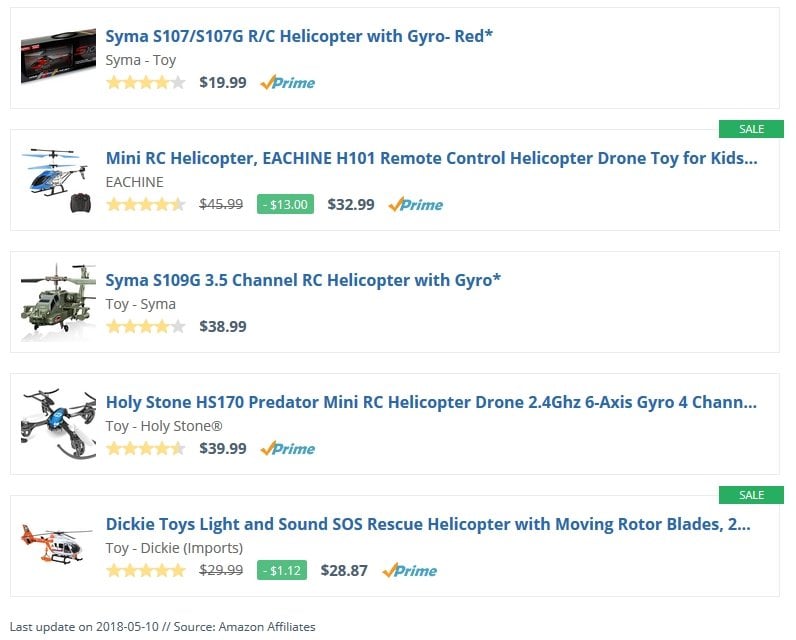
The used shortcode looks as follows:
```
[amazon box="B00ZR4QMFQ,B00KX1LXTI,B01F5LEMZW,B00MAH2E5K,B01H4YST1Q" template="list"]
```
#### Output with Filter
Now we're adding the shortcode attributes "filterby" and "filter", with the corresponding values. The number of stored products won't change. This is how the updated list looks like:

The used shortcode looks as follows:
```
[amazon box="B00ZR4QMFQ,B00KX1LXTI,B01F5LEMZW,B00MAH2E5K,B01H4YST1Q" template="list" filterby="price" filter="offer"]
```
### Conclusion
The shortcode attributes for filteing product criteria such as prices and titles offer you many different and above all useful options as a user of our plugin.
Because with the filters you allow your visitors the view and selection of price categories, or specific product titles.
---
# Version 3.8 – Proxy for Product Images, Amazon Australia and new Geo-Targeting API
Source: https://getaawp.com/blog/version-3-8-proxy-for-product-images-amazon-australia-and-new-geo-targeting-api/
Finally, version 3.8 of our Amazon Affiliate WordPress plugin is now available. The purpose of this update was implementing new features such as a proxy for product images, adding support for Amazon Australia as well as smaller improvements and fixes.
### Privacy proxy for product images
As you know, product images provided by Amazon's API are delivered directly from the Amazon servers. Regarding the upcoming General Data Protection Regulation, this is a problem, because Amazon has access to the IP addresses of your site visitors.
To prevent this, we introduced a so-called *privacy proxy*, which delivers the product images through a small PHP file. By doing so, Amazon only receives the IP of your web server instead of your site visitors.
[](https://getaawp.com/wp-content/uploads/aawp-settings-image-proxy.png)

The new function must be activated via plugin settings ("Output" tab, "Product images" section). In case you are using a caching plugin on your site, its cache should be emptied too.
### Added support for Amazon Australia
Over the past few weeks, Amazon has extended their affiliate program to Australia. From now on you're able to select Amazon Australia as store in our plugin settings.
### New Geo-targeting API
Our built-in geo-targeting functionality allows you to redirect your website visitors – when clicking on Amazon affiliate links – to the nearest Amazon shop. To determine the country of origin, we made use of two different online services.
After updating to version 3.8, the plugin will now make use of [ipdata.co](https://ipdata.co/) instead. The chosen API stands out due to their high reliability and performance.
More information about the geo-targeting can be found [here](https://getaawp.com/docs/article/geo-targeting/).
---
In case you want to get knowledge about all new features, improvements and fixes, feel free to take a look into the [changelog](https://getaawp.com/changelog/).
If you have any questions, suggestions or feature requests please don't hesitate and [get in touch with us](https://getaawp.com/contact/).
---
# 5 Features an Amazon Affiliate Plugin should have
Source: https://getaawp.com/blog/5-features-amazon-affiliate-plugin-should-have/
An Amazon Affiliate Plugin for WordPress should ensure that its users can generate affiliate links from Amazon PartnerNet with as little effort as possible, and just as easily integrate them into their website.
To make this possible, the Affiliate-Plugin should have some important features that affiliate links can be displayed in different versions and elements.
## 5 important features for an Amazon affiliate plugin
In the following, we show you the 5 most important functions from our point of view, which should be included in every Amazon Affiliate-Plugin.
### 1. Text Links
[Text Links](https://getaawp.com/docs/article/text-links/) are one of the simplest ways to install appropriate Affiliate-Links into the body text, using an Amazon Affiliate plugin. You can choose the link text respectively the word with which you want to link to an Amazon product.
This way you can easily integrate product-related links directly into your content.
---
### 2. Product Boxes
With a [Product Box](https://getaawp.com/docs/article/product-boxes/), you can present your Amazon products in a visually appealing way on your website. For this purpose, the product box usually contains the product image, a part of the product description, the advertised price and a button that is intended to encourage the purchase.

The product box can be integrated anywhere within a page or an article and offers your visitors additional value, combined with a clean visual appearance.
---
### 3. Bestseller (Lists)
The so-called *Bestsellers* are a list of products based on a search term or product group that sells best on Amazon. With [Bestseller Lists](https://getaawp.com/docs/article/bestseller-lists/), you're not just presenting the visitors of your site a vivid view of popular Products, but also provide a real buying incentive.

---
### 4. Comparison Tables
[ Comparison Tables](https://getaawp.com/features/comparison-tables/) are the best way to compare multiple products in one glance. This allows you to compare the most important features (eg features, special features, customer reviews, prices etc.) of different products and provide your readers the opportunity to get a simple comparison.
In order to additionally assist your readers' purchase decision, it is recommended to provide individual products/columns with markings such as 'recommendation' or 'price tip'.
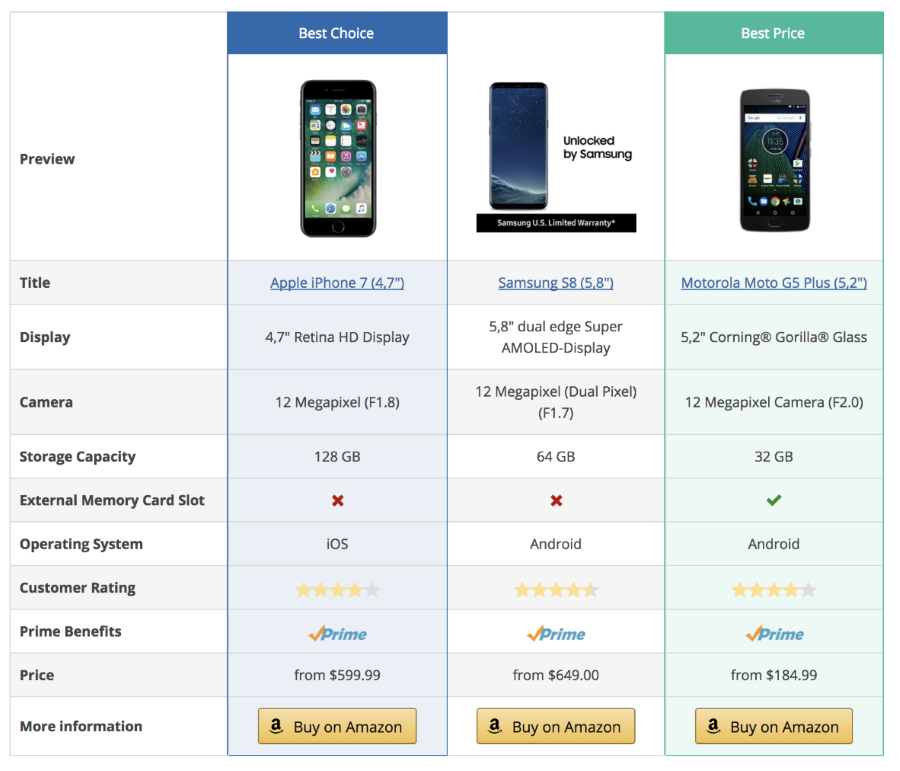
---
### 5. Widgets
Widgets are a great opportunity to place product boxes or lists into the sidebar of your WordPress theme. This way you promote Amazon products on an additional space on your website.

---
## Other useful features Amazon affiliate plugins have
In addition to the previously features, most Amazon-Plugins have other useful features that you can use on your website to promote Amazon products. For example:
- **New Releases (Lists)**
- **Displaying discounted prices**
- **Shortend urls**
- **Price comparisons**
---
### Conclusion
An Amazon Affiliate plugin should include at least the 5 features above, so you can place affiliate links on your sites as easy as possible. An automatic update of the product data within the product boxes, lists, widgets or tables is just as important for the user as it is for the site operator.
If you would like to advertise Amazon products on your site, we recommend our [Guide to get started with the main features of the AAWP plugin](https://getaawp.com/docs/article/guide/). Here we show you what our plugin can do and how you can start with it in no time.
Of course, we are also interested in what features you would like to see in the AAWP plugin in the future? **We would appreciate your feedback in form of a comment below**.
---
# Version 3.5 – Comparison Tables and Template Variables
Source: https://getaawp.com/blog/version-3-5-comparison-tables-template-variables/
After several weeks of developing, we are pleased to announce the release of AAWP v3.5.
With this new version we have introduced our new comparison tables, one of the most wished features. Up to now you had to use the field shortcodes and create such tables on your own.
With our new *table builder* this is no longer necessary and you can build comparison tables right from your admin area. No HTML/CSS skills needed!
### Comparison Tables
[](https://getaawp.com/wp-content/uploads/aawp-demo-comparison-tables.png)
With our new comparison tables, you can compare any Amazon products of your choice and demonstrate advantages and disadvantages. This way you assist your site visitors with their purchase decision.
More information about can be found on the [functions page](https://getaawp.com/features/comparison-tables/) we setup, as well as in our [documentation](https://getaawp.com/docs/article/comparison-tables/).
[Read more about comparison tables](https://getaawp.com/features/comparison-tables/)
Since this is the first version of the comparison tables, we would be happy, if you [get in touch with us](https://getaawp.com/contact/) in case you have suggestions, feature requests or found some bugs. We already have many more ideas for the comparison tables, but your feedback is always very welcome! :)
### Template Variables
Also new and especially interesting in case you're creating custom templates, is the possibility to pass your own variables via shortcode. Afterwards these variable can be accessed directly inside your templates.
```
[amazon box="ASIN" tpl_var1="test" tpl_var2="text1,text2,text3" /]
```
More information can be found in the corresponding [documentation](https://getaawp.com/docs/article/template-variables/).
---
In case you want to get knowledge about all new features, improvements and fixes, feel free to take a look into the [changelog](https://getaawp.com/changelog/).
If you have any questions, suggestions or feature requests please don't hesitate and get in [contact](https://getaawp.com/contact/) with us.
---
# Version 3.2.0 – New widgets and templates
Source: https://getaawp.com/blog/version-3-2-0-new-widgets-templates/
From now all customers have access to the new version 3.2.0 of Amazon Affiliate for WordPress. The latest update includes a rebuild of the caching and product handling system. Additionally I'm very happy to announce the arrival of complete new widgets and templates. Among these you can find the new grid functionality in order to display multiple products side by side.
### New widgets
The old widget was developed as a temporary solution and will be replaced by three complete new widgets for single products, bestseller and new releases lists.

Additionally you will find a new small widget template as well:
**Note**: The old widget is still available but marked as deprecated. Please don't use it anymore.
### New templates and documentation
Besides new widget templates there are a few templates for the main content area as well: Display products as a list or using grids in order to show products side by side.
#### Lists
#### Grids
In the documentation you will find a [new article listing all available templates](https://getaawp.com/docs/article/templates/). An overview of all shortcodes regarding templates and styles will be published very soon.
Worth mentioning is the fact that **templating was optimized**, as well as a [new article about editing and creating templates](https://getaawp.com/docs/article/templating/) which was published too.
In case you want to get knowledge about all new features, improvements and fixes, feel free to take a look into the [changelog](https://getaawp.com/changelog/).
If you have any questions, suggestions or feature wishes please don't hesitate and get in [contact](https://getaawp.com/contact/) with me.
---
# Note: Missing Star-/Ratings *Updated*
Source: https://getaawp.com/blog/note-missing-star-ratings/
Over the past few days we received multiple mails about missing star-/ratings when using product boxes or field shortcodes. The cause of this issues is the fact that Amazon implemented a captcha in order to prevent scraping the reviews from their pages.
### Protective mechanism prevents scraping
Until now Amazon *beared* scraping their pages, which ends now. We are aware of multiple requests from other affiliates towards Amazon as to revert this decision and in best case delivering the ratings via their Amazon Product Advertising API. It's very vague if Amazon would follow this requests. In case you think about bypassing this protective mehanism, you should better think twice...
### Disabling the ratings
Unless there are any other information, we have to resign using the star-/ratings. Therefore you can disable the ratings via the plugin settings (tab "output"). Afterwards it's recommendable to clear the plugin cache.
---
### Update 28th December 2017
The circumstances mentioned above still exist and it doesn't seem like something will change in nearest future. There are websites out there with and even without having problems fetching ratings.
**Our advice**: If you want to get those ratings, give the plugin some time and be happy if they occur, but don't be disappointed in case they don't show up :-)
---
# Version 3.1.2 – Changelog, Click-Tracking and updating of custom templates
Source: https://getaawp.com/blog/version-3-1-2-changelog-click-tracking-updating-custom-templates/
Today we’re excited to announce the release of version 3.1.2 of the Amazon Affiliate WordPress plugin. This update includes a bunch of new features like **click tracking for affiliate links**, plus several improvements and fixes.
## Click tracking
Over the last few weeks a lot of you asked for the opportunity to track click on affiliate links which are generated by the plugin. We added this feature which can be activated via the plugin settings from now on. In order to use this you only have to place a **Google Analytics or Piwik** tracking code on your site. **AAWP will automatically detect both tools** and makes use of their event tracking functionality.
### Updating custom templates
In case you want to use click tracking with your custom templates, you have to update them.
Therefore simply apply the_product_container function to the container of a single product. According to the box template example above, you can see how it's done correctly. Of course you can take a look into the original templates provided by AAWP and compare them with yours. If you have any troubles updating your templates, feel free to [contact us](https://getaawp.com/contact/).
## Changelog
Finally here’s the complete changelog including the new features, enhancements and some bug fixes:
> - New: Added affiliate link click tracking which can be enabled via settings. Currently supporting Google Analytics & Piwik
> - New: Added Amazon logo for link shortcode which can be selected via settings and/or shortcode
> - New: Added "star_rating" shortcode attribute accepting the value "none" for hiding the star rating
> - New: Added "reviews" shortcode attribute accepting the value "none" for hiding the star rating
> - New: Added field values "asin", "ean" and "isbn"
> - Improvement: Optimized cache handling when using third party caching plugins and object cache
> - Improvement: Enhanced filter functionality, added opportunities by filtering prices and checking multiple strings for titles
> - Fix: Error message: Could not resolve host: webservices.amazon.de
> - Fix: PHP implode warning: class.aawp-api.php
> - Fix: eBooks with costs accidentally showed 0.00 EUR as price
> - Fix: Remove double quotes from html titel/alt tags which broke up the markup
> - Fix: Affiliate links table on settings page broke layout on small window sizes using Chrome browser
---
# Version 3.0.0 – Release and Changelog
Source: https://getaawp.com/blog/version-3-0-0-release-changelog/
We're glad to announce version 3 of the Amazon Affiliate WordPress plugin. One of the principal points of the update was the switch over to a new Amazon API library. This step was necessary in order to fix some connection issues and prepare the plugin for some upcoming features.
> - As one of the main impacts of the update, AAWP requires **PHP v5.3 or newer** from now on.
> - The second one is the fact that we renamed the plugin folder and mail file. Therefore you need to **reactivate the plugin and reconnect the Amazon API after finishing the update**
In case your webhosting is out-of-date, please upgrade the installed PHP version manually or contact your hosting provider. The old version will be available on your account page temporarily.
Finally here's the complete changelog including a lot of new features, enhancements and some fixes.
## Changelog
> ### New
>
>
> - Added "connect", "disconnect" and "reconnect" buttons to the API settings page
> - Added support for Accelerated Mobile Pages (AMP) when using official WordPress AMP plugin: [https://wordpress.org/plugins/amp/](https://wordpress.org/plugins/amp/)
> - Added short affiliate urls
> - Added settings option which allows you to force long affiliate urls
> - Added "image_link" attribute for overwriting or removing (use "none") product thumbnail links via shortcode
> - Added settings option which allows you apply the title adding on thumbnail link titles as well
> - Added settings option which allows you display an Amazon Prime logo besides the pricing whenever Prime is available for the related product (not available for all countries)
> - Earn extra commissions with the newly added Amazon Prime logo whenever a user clicks the logo and signs up for the free trial (not available for all countries)
> - Added "tracking_id" attribute for overwriting the used Amazon affiliate tracking id via shortcode (doesn't work for long affiliate urls)
> - Added Spanish translations (thanks Hendrik!)
> - Added PHP 7 support
>
>
> ### Improvements
>
>
> - Better product description building for items of the following categories: Shoes, AudioCDs, Movies and Prime Videos
> - Products which are out of stock now show a note instead of an empty pricing
> - Products which are only available for "used" condition now show a note instead of an empty pricing
> - Enhanced plugin settings "Support" tab in order to give better (and visual) feedback about your current system and possibly missing PHP extensions
> - Enhanced plugin settings "Amazon API" in order to give visual feedback whenever the API is not connected
> - Updated plugin settings "tracking id" translations and added description in order to avoid unclarity
>
>
> ### Fixes
>
>
> - Occasionally occurred missing product images
> - Connection issues result in "Amazon Product Advertising API is currently not available" notice
> - Removed some error notices coming from the API library
> - Removed API routine checks to prevent connection issues
> - Accidentally the product title adding was shown on image alt tags
>
>
> ### General
>
>
> - Replaced Amazon API library
> - Removed support for PHP versions older than 5.3
> - Renamed plugin folder and main file
> - PHP templates files were updated and might require your custom templates to be adjusted!
Hope you enjoy the new update and in case of some questions or issues feel free to [contact us](https://getaawp.com/contact/).
---
Generated by RankReady v1.1.3 (https://github.com/adityaarsharma/rankready) |