
What is the Amazon Creators API? #
The Amazon Creators API is an official Amazon API that provides access to product data from the Amazon catalog.
It is the successor to the former Amazon Product Advertising API (PAAPI) and represents the current and recommended way to retrieve Amazon product information.
AAWP uses the Amazon Creators API to fetch and display Amazon product data such as product titles, images, prices, and availability directly inside WordPress.
To use the Creators API, you must be a fully accepted Amazon Associate. Access is only available to accounts that have successfully completed the Amazon Associates review process and meet the current eligibility requirements.
Eligibility requirements for the Amazon Creators API #
To access the Amazon Creators API, your Amazon Associates account must have generated at least 10 qualified sales within the last 30 days.
If your account does not generate qualified referring sales for a consecutive 30-day period, access to the Creators API will be temporarily revoked by Amazon.
During this time, AAWP can be used with the AAWP API until access to the Creators API becomes available again.
Access to the Creators API will be automatically restored within two days after your referred sales have been shipped again.
How-To create Amazon Creators API credentials #
Follow the steps below to create the Amazon Creators API credentials required for AAWP.
1. Sign in to Amazon Associates #
Sign in to your Amazon Associates account and open Associates Central.
Only the primary account owner of the Amazon Associates account can create Creators API applications and credentials.
2. Open the Creators API section #
In Associates Central, open the Tools menu and select Creators API.
Alternatively, you can open https://affiliate-program.amazon.com/creatorsapi directly.
3. Create a new application #
Click Create Application and enter an application name.
The application name is for internal reference only. For example, you can use “aawp”.
4. Generate API credentials #
After creating the application, click Add New Credential.
Amazon will generate the following credentials:
- Credential ID
- Credential Secret
- Version
Copy the credentials or download them as a CSV file.
Make sure to store the credential secret securely, as it is only shown once.
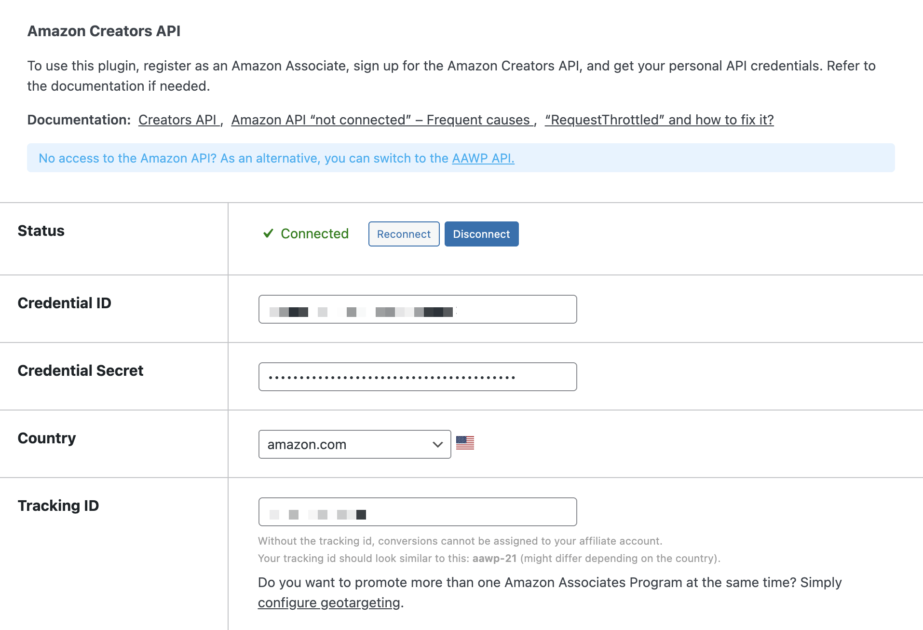
5. Enter the credentials in AAWP #
Log in to your WordPress admin area and go to AAWP → Settings → Amazon API.
Enter the following values:
- Credential ID
- Credential Secret
Select the Amazon store you want to promote and save the settings. AAWP will now be able to retrieve product data from Amazon using the Creators API.


